pi-open-tui 0.3.14 → 0.4.1
This diff represents the content of publicly available package versions that have been released to one of the supported registries. The information contained in this diff is provided for informational purposes only and reflects changes between package versions as they appear in their respective public registries.
- package/README.md +72 -5
- package/README.zh-CN.md +72 -5
- package/assets/preview_dashboard_1.png +0 -0
- package/extensions/open-tui/config.ts +26 -2
- package/extensions/open-tui/copy-buttons.ts +363 -0
- package/extensions/open-tui/editor.ts +322 -122
- package/extensions/open-tui/footer.ts +13 -11
- package/extensions/open-tui/git.ts +10 -32
- package/extensions/open-tui/header.ts +133 -244
- package/extensions/open-tui/icons.ts +9 -0
- package/extensions/open-tui/index.ts +45 -20
- package/extensions/open-tui/runtime.ts +10 -11
- package/extensions/open-tui/session-lifecycle.ts +23 -43
- package/extensions/open-tui/settings-command.ts +66 -45
- package/extensions/open-tui/state.ts +11 -14
- package/extensions/open-tui/tool-preview.ts +167 -0
- package/extensions/open-tui/tool-view.ts +418 -0
- package/extensions/open-tui/utils.ts +3 -3
- package/package.json +11 -15
package/README.md
CHANGED
|
@@ -1,16 +1,20 @@
|
|
|
1
1
|
# pi-open-tui
|
|
2
2
|
|
|
3
|
+
[](https://omppackages.com/packages/pi-open-tui)
|
|
4
|
+
|
|
3
5
|
**English** | [简体中文](./README.zh-CN.md)
|
|
4
6
|
|
|
5
7
|
A polished terminal interface for the [Pi](https://pi.dev) coding agent. It brings the strongest ideas from pi-haiku, pi-claude-code-tui, and pi-zentui into one configurable extension.
|
|
6
8
|
|
|
7
9
|
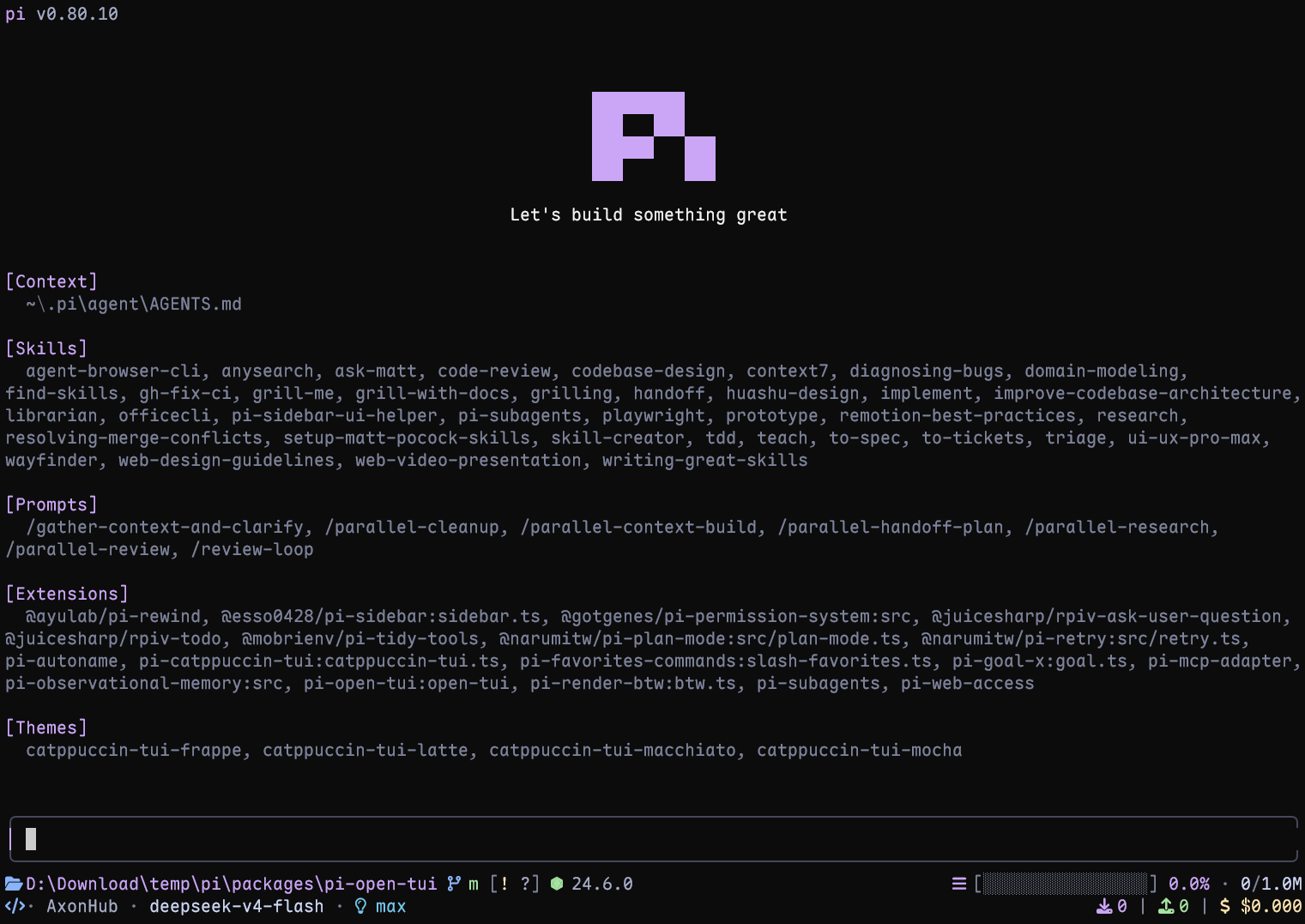
|
|
8
10
|
|
|
11
|
+
Live terminal screenshot with Pi 1.4.0.
|
|
12
|
+
|
|
9
13
|
## Highlights
|
|
10
14
|
|
|
11
15
|
- **Pi header** with model, thinking level, working directory, and useful slash-command hints
|
|
12
16
|
- **Responsive footer** with Git state, detected runtime, context usage, token counts, cost, and extension status
|
|
13
|
-
- **Framed editor** with block, bar, and underline cursor styles
|
|
17
|
+
- **Framed editor** with block, bar, and underline cursor styles; it preserves compatible editors installed by other extensions
|
|
14
18
|
- **Project awareness** for 50+ runtimes and detailed Git states, including ahead/behind, staged, modified, untracked, stashed, and detached HEAD
|
|
15
19
|
- **Turn telemetry** for TPS, time to first token (TTFT), duration, stalls, tokens, and list-price rate
|
|
16
20
|
- **Thinking peek**: an inline ticker replaces Pi's hidden `Thinking...` label with the tail of the model's reasoning while it works
|
|
@@ -18,7 +22,8 @@ A polished terminal interface for the [Pi](https://pi.dev) coding agent. It brin
|
|
|
18
22
|
|
|
19
23
|
## Requirements
|
|
20
24
|
|
|
21
|
-
- Pi 1.0 or later
|
|
25
|
+
- Pi 1.2.0 or later
|
|
26
|
+
- Node.js 22.19.0 or later (Pi's minimum)
|
|
22
27
|
- A terminal with UTF-8 and color support
|
|
23
28
|
- A [Nerd Font](https://www.nerdfonts.com/font-downloads) for the full icon set (optional; portable Unicode icons are built in)
|
|
24
29
|
|
|
@@ -53,12 +58,16 @@ If wide Nerd Font icons visually consume the gap before their labels (for exampl
|
|
|
53
58
|
|
|
54
59
|
## Configuration
|
|
55
60
|
|
|
56
|
-
Run `/open-tui` to open the settings dialog. It provides **General**, **Appearance**, **Footer**, and **Telemetry** tabs. Settings are stored in `~/.pi/agent
|
|
61
|
+
Run `/open-tui` to open the settings dialog. It provides **General**, **Appearance**, **Footer**, and **Telemetry** tabs and adapts to the terminal size. Settings are stored in `open-tui.json` inside Pi's agent directory, which defaults to `~/.pi/agent`; `PI_CODING_AGENT_DIR` overrides that directory. If saving fails, a warning explains that the change applies only to the current session.
|
|
62
|
+
|
|
63
|
+
Example configuration:
|
|
57
64
|
|
|
58
65
|
```json
|
|
59
66
|
{
|
|
60
67
|
"enabled": true,
|
|
68
|
+
"header": true,
|
|
61
69
|
"inlineFooter": false,
|
|
70
|
+
"copyButtons": true,
|
|
62
71
|
"settingsLanguage": "en",
|
|
63
72
|
"cursorStyle": "block",
|
|
64
73
|
"icons": {
|
|
@@ -91,6 +100,9 @@ Run `/open-tui` to open the settings dialog. It provides **General**, **Appearan
|
|
|
91
100
|
},
|
|
92
101
|
"thinkingPeek": {
|
|
93
102
|
"lines": 1
|
|
103
|
+
},
|
|
104
|
+
"toolView": {
|
|
105
|
+
"mode": "native"
|
|
94
106
|
}
|
|
95
107
|
}
|
|
96
108
|
```
|
|
@@ -100,7 +112,9 @@ Key options:
|
|
|
100
112
|
| Option | Values | Notes |
|
|
101
113
|
| --- | --- | --- |
|
|
102
114
|
| `settingsLanguage` | `en`, `zh` | Changes the `/open-tui` interface language |
|
|
115
|
+
| `header` | `true`, `false` | Overrides Pi's header with the open-tui header; set it to `false` to leave the header slot to Pi or another extension |
|
|
103
116
|
| `inlineFooter` | `true`, `false` | Moves the two main Footer rows into the editor's top and bottom borders; defaults to `false`. Extension status rows remain below the editor |
|
|
117
|
+
| `copyButtons` | `true`, `false` | Frames code blocks and shows a clickable `[Copy]` label on code blocks and user messages in fullscreen mode; defaults to `true`. See [Copy buttons](#copy-buttons) |
|
|
104
118
|
| `cursorStyle` | `block`, `bar`, `underline` | `bar` and `underline` require terminal cursor-shape support |
|
|
105
119
|
| `icons.mode` | `auto`, `nerd`, `unicode`, `ascii` | Controls footer and telemetry icons |
|
|
106
120
|
| `footerSegments` | Boolean flags | Shows or hides individual footer data |
|
|
@@ -108,11 +122,20 @@ Key options:
|
|
|
108
122
|
| `footerSegments.nerdIconSpacing` | Boolean | Adds an extra blank cell after Nerd Font icons in the footer; defaults to `false` |
|
|
109
123
|
| `telemetry` | Boolean flags | Enables telemetry and its individual measurements |
|
|
110
124
|
| `thinkingPeek.lines` | `0`, `1`, `2` | Off, one-line, or two-line hidden thinking preview |
|
|
125
|
+
| `toolView.mode` | `native`, `compact` | Pi's native cards (default) or compact call/summary rows with successful edit/write previews. Applies to rows created after the change |
|
|
111
126
|
|
|
112
127
|
`sessionName` appears only when the session has a name. `hostname` shows the short host name (first label of the machine's host name, e.g. `mba` from `mba.example.com`) with a server icon. In detached HEAD state, `gitBranch` shows `HEAD` with the short commit hash; `gitCommit` appends the tag pointing at that commit and only takes effect while `gitBranch` is on. Disabling `extensionStatuses` hides the entire extension status line, including MCP status. Each status keeps the colours its extension applied with `ctx.ui.theme.fg()`. A status without colours renders in the muted theme colour.
|
|
113
128
|
|
|
129
|
+
Footer token and cost totals include assistant responses, tool-reported usage, compaction and branch summaries, and cache warming. The cache-hit percentage describes the most recent assistant response, not the cumulative session.
|
|
130
|
+
|
|
131
|
+
When the first Footer row is too narrow, the runtime and context bar are hidden first, then Git, the session name, and the host name and timer. The CWD stays longest, shortened to its folder name.
|
|
132
|
+
|
|
114
133
|
With `inlineFooter` enabled, the two normal Footer rows are rendered inside the editor frame to save vertical space. The top border places the Git branch on the left and CWD first in the right-hand group; the session title appears on the left too when `sessionName` is enabled. The Header and extension status rows remain separate; narrow terminals truncate lower-priority Footer data first, keeping the right-hand statistics and the border corner.
|
|
115
134
|
|
|
135
|
+
open-tui frames existing editors that retain Pi’s native editor layout and its cursor, mouse, and padding APIs, including `CustomEditor` extensions. It decorates the same instance, preserving ghost text, key handling, completion, and submit callbacks. Editor extensions using the current `ctx.ui.setEditorComponent()` API can register before or after `pi-open-tui`; runtime replacements, including those made from shortcut callbacks with a fresh UI context, are framed too. Replacements are decorated when Pi mounts them, without calling the extension's factory again; temporary dialogs are left alone. Before decorating, open-tui renders the editor once at the terminal width to check for recognizable native top and bottom borders. Each framed render also checks its actual output; layouts without those borders are rendered again at the full requested width without frame mouse offsets, and framing resumes when native borders return. Editors without those capabilities or borders, or whose layout probe throws, remain unchanged, with the footer displayed separately even when `inlineFooter` is enabled. Disabling open-tui removes its decoration, restores the registration methods, and keeps the latest editor factory, including wrappers registered after open-tui.
|
|
136
|
+
|
|
137
|
+
This ordering guarantee applies to editor registration, not header or footer replacements. Extensions that bypass the current registration API by calling a previously saved setter or replacing the API methods themselves are outside this guarantee.
|
|
138
|
+
|
|
116
139
|
## Turn telemetry
|
|
117
140
|
|
|
118
141
|
After each complete agent run, pi-open-tui shows one transient result. Tool-call turns are combined into that result:
|
|
@@ -143,6 +166,48 @@ When Pi's **Hide thinking** setting is enabled, pi-open-tui shows a compact tick
|
|
|
143
166
|
|
|
144
167
|
The ticker appears only once the model actually streams reasoning, so non-reasoning models never show it. Pi's own Hide thinking toggle controls visibility; changing it takes effect immediately. Each row is truncated by *visible* width, so CJK-wide thinking text cannot overflow. Configure it from **General → Thinking peek** in `/open-tui`, or via `thinkingPeek.lines` in `open-tui.json`.
|
|
145
168
|
|
|
169
|
+
## Tool view
|
|
170
|
+
|
|
171
|
+
**Native** remains the default. With **General → Tool view** set to **Compact** (`toolView.mode: "compact"`), Pi's built-in tools (`read`, `bash`, `powershell`, `edit`, `write`, `grep`, `find`, `ls`) render as one call line and one summary line, with previews for successful edits and writes:
|
|
172
|
+
|
|
173
|
+
```text
|
|
174
|
+
● Read(extensions/open-tui/footer.ts:1-120)
|
|
175
|
+
└ 120 lines
|
|
176
|
+
● Edit(extensions/open-tui/footer.ts)
|
|
177
|
+
└ +2 −1
|
|
178
|
+
● Bash(npm test)
|
|
179
|
+
└ Done · 131 lines · 6.4s
|
|
180
|
+
```
|
|
181
|
+
|
|
182
|
+
- Successful calls have dim call/summary text and a green dot. Pending dots are dim; running dots alternate between accent and dim once per second. Errors keep the red dot and summary. Failed shell summaries retain the last output line; while running, shell commands show the newest 3 output lines and elapsed time.
|
|
183
|
+
- Successful `edit` previews parse Pi's actual diff and syntax-highlight old and new code separately. Removed/added rows have red/green background bands ending two columns before the terminal's right edge. Stronger changed-word backgrounds apply only to paired adjacent removed/added lines sharing at least 30% non-whitespace content; exceeding the matching budget falls back to whole-line highlighting. Without a valid diff, the summary stays.
|
|
184
|
+
- Successful `write` previews show syntax-highlighted content with line numbers and no `+` signs on the normal, neutral terminal background. New files and overwrites look the same; no old-file diff is shown. Partial results and errors get no success previews.
|
|
185
|
+
- Preview bodies show at most 16 rows; longer bodies show the first 16 plus a hidden-row count and `Ctrl+O` hint. Edit context and ellipsis rows count toward these limits. In compact mode only, long lines truncate horizontally with `…` instead of wrapping.
|
|
186
|
+
- Clicking a row expands only that row into Pi's native card, and `Ctrl+O` expands all rows. Native expanded rendering, including full output, diffs, and truncation notices, is unchanged. Calls remain separate, with no grouping or extra configuration.
|
|
187
|
+
- Only the display changes. Tools, arguments, results, and what the model sees are untouched. Only tools confirmed by Pi as built-in are wrapped; third-party and MCP tools, including replacements with built-in names, keep their own rendering.
|
|
188
|
+
- Compact summaries flag truncated output, including grep's long-line truncation. Bracketed output and failure messages are preserved rather than mistaken for tool notices.
|
|
189
|
+
- The mode is chosen when Pi creates a row, so switching it affects new rows; `/reload` or a new session applies it to the whole transcript.
|
|
190
|
+
|
|
191
|
+
## Copy buttons
|
|
192
|
+
|
|
193
|
+
In fullscreen mode (Pi's `tuiMode: "fullscreen"`), every fenced code block is drawn in a rounded frame with its language and an always-visible `[Copy]` label in the top border, and every user message gets a `[Copy]` label too. Click it to put the source text on the clipboard; Pi flashes `Copied!`.
|
|
194
|
+
|
|
195
|
+
```text
|
|
196
|
+
╭─ sh ─────────────── [Copy] ╮
|
|
197
|
+
│ pi install npm:pi-open-tui │
|
|
198
|
+
╰────────────────────────────╯
|
|
199
|
+
```
|
|
200
|
+
|
|
201
|
+
- Code blocks: the frame replaces the two fence rows, so a block keeps its height; long lines wrap inside the frame. The label copies the code without the fences, with indentation and tabs preserved. This applies to code in both user and assistant messages.
|
|
202
|
+
- User messages: the label sits on the bubble's last row and copies the message as you typed it.
|
|
203
|
+
- Whole assistant replies have no label; use Pi's `/copy` for that.
|
|
204
|
+
- While a reply streams, its code blocks are framed without a label, so you cannot copy unfinished code. The label is also dropped when the frame is too narrow; thinking blocks keep Pi's plain fences.
|
|
205
|
+
- Regular mode has no mouse capture, so code blocks keep Pi's plain fences there.
|
|
206
|
+
- Drag-selecting across a frame includes its border characters and the `[Copy]` text.
|
|
207
|
+
- If pi-pretty-tui is installed, its own code-block frames and copy buttons are kept and these are not drawn.
|
|
208
|
+
|
|
209
|
+
Toggle it from **General → Copy buttons** in `/open-tui`, or via `copyButtons` in `open-tui.json`.
|
|
210
|
+
|
|
146
211
|
## Local development
|
|
147
212
|
|
|
148
213
|
```bash
|
|
@@ -152,16 +217,18 @@ npm run typecheck
|
|
|
152
217
|
pi -e .
|
|
153
218
|
```
|
|
154
219
|
|
|
220
|
+
CI checks Pi 1.2.0 and the latest release on Node.js 22.19.0 and 24, across Linux, Windows, and macOS. Keep Pi packages on the same version when checking compatibility. Automated tests do not replace checking terminal fonts, mouse interaction, and cursor support with `pi -e .`.
|
|
221
|
+
|
|
155
222
|
## Acknowledgements
|
|
156
223
|
|
|
157
224
|
This project builds on several Pi community packages:
|
|
158
225
|
|
|
159
226
|
- **[pi-haiku](https://github.com/nnocte/pi-haiku)** — two-line footer structure and working timer
|
|
160
|
-
- **[pi-claude-code-tui](https://github.com/Phoobobo/pi-claude-code-tui)** — Pi logo
|
|
227
|
+
- **[pi-claude-code-tui](https://github.com/Phoobobo/pi-claude-code-tui)** — Pi logo artwork and rounded editor border technique
|
|
161
228
|
- **[pi-zentui](https://github.com/lmilojevicc/pi-zentui)** — Starship-style footer segments, runtime detection, session lifecycle, and settings UI pattern
|
|
162
229
|
- **[pi-tps](https://github.com/monotykamary/pi-tps)** — turn timing, stall detection, and conservative TPS measurement
|
|
163
230
|
|
|
164
|
-
The logo
|
|
231
|
+
The logo artwork is derived from Pi's official install script (`pi.dev/install.sh`). Runtime detection and Git porcelain parsing borrow structure from `pi-zentui`.
|
|
165
232
|
|
|
166
233
|
Special thanks to the **[LINUX DO](https://linux.do)** community for its support.
|
|
167
234
|
|
package/README.zh-CN.md
CHANGED
|
@@ -1,16 +1,20 @@
|
|
|
1
1
|
# pi-open-tui
|
|
2
2
|
|
|
3
|
+
[](https://omppackages.com/packages/pi-open-tui)
|
|
4
|
+
|
|
3
5
|
[English](./README.md) | **简体中文**
|
|
4
6
|
|
|
5
7
|
一个为 [Pi](https://pi.dev) 编程代理打造的终端界面扩展,将 pi-haiku、pi-claude-code-tui 与 pi-zentui 的优秀设计整合为统一、可配置的使用体验。
|
|
6
8
|
|
|
7
9
|

|
|
8
10
|
|
|
11
|
+
Pi 1.4.0 的真实终端截图。
|
|
12
|
+
|
|
9
13
|
## 功能亮点
|
|
10
14
|
|
|
11
15
|
- **Pi 顶栏**:显示模型、思考等级、当前目录和常用斜杠命令提示
|
|
12
16
|
- **自适应底栏**:集中展示 Git 状态、运行环境、上下文用量、Token、费用和扩展状态
|
|
13
|
-
-
|
|
17
|
+
- **带边框的编辑器**:支持块状、竖线和下划线三种光标样式;保留其它扩展已安装的兼容编辑器
|
|
14
18
|
- **项目环境感知**:识别 50 多种运行环境,并展示 ahead/behind、已暂存、已修改、未跟踪、stash 和 detached HEAD 等 Git 状态
|
|
15
19
|
- **单轮遥测**:展示 TPS、首 Token 延迟(TTFT)、耗时、停顿、Token 数量和模型标价速率
|
|
16
20
|
- **思考预览**:模型工作时,在 Pi 隐藏思考块的 `Thinking...` 位置显示实时字幕,展示推理内容的末尾片段
|
|
@@ -18,7 +22,8 @@
|
|
|
18
22
|
|
|
19
23
|
## 环境要求
|
|
20
24
|
|
|
21
|
-
- Pi 1.0 或更高版本
|
|
25
|
+
- Pi 1.2.0 或更高版本
|
|
26
|
+
- Node.js 22.19.0 或更高版本(Pi 的最低要求)
|
|
22
27
|
- 支持 UTF-8 和彩色输出的终端
|
|
23
28
|
- 使用完整图标集时需要 [Nerd Font](https://www.nerdfonts.com/font-downloads)(可选;内置可移植 Unicode 图标)
|
|
24
29
|
|
|
@@ -53,12 +58,16 @@ pi -e npm:pi-open-tui
|
|
|
53
58
|
|
|
54
59
|
## 配置
|
|
55
60
|
|
|
56
|
-
运行 `/open-tui`
|
|
61
|
+
运行 `/open-tui` 打开设置窗口,其中包含**常规**、**外观**、**底栏**和**遥测**四个页面,并会适应终端尺寸。设置保存在 Pi 的 agent 目录内的 `open-tui.json` 中;默认目录为 `~/.pi/agent`,可通过 `PI_CODING_AGENT_DIR` 覆盖。保存失败时会提示:修改仅在当前会话生效。
|
|
62
|
+
|
|
63
|
+
配置示例:
|
|
57
64
|
|
|
58
65
|
```json
|
|
59
66
|
{
|
|
60
67
|
"enabled": true,
|
|
68
|
+
"header": true,
|
|
61
69
|
"inlineFooter": false,
|
|
70
|
+
"copyButtons": true,
|
|
62
71
|
"settingsLanguage": "zh",
|
|
63
72
|
"cursorStyle": "block",
|
|
64
73
|
"icons": {
|
|
@@ -91,6 +100,9 @@ pi -e npm:pi-open-tui
|
|
|
91
100
|
},
|
|
92
101
|
"thinkingPeek": {
|
|
93
102
|
"lines": 1
|
|
103
|
+
},
|
|
104
|
+
"toolView": {
|
|
105
|
+
"mode": "native"
|
|
94
106
|
}
|
|
95
107
|
}
|
|
96
108
|
```
|
|
@@ -100,7 +112,9 @@ pi -e npm:pi-open-tui
|
|
|
100
112
|
| 选项 | 可选值 | 说明 |
|
|
101
113
|
| --- | --- | --- |
|
|
102
114
|
| `settingsLanguage` | `en`、`zh` | 切换 `/open-tui` 设置界面的语言 |
|
|
115
|
+
| `header` | `true`、`false` | 决定是否用 open-tui 顶部信息栏覆盖 Pi 的 Header;设为 `false` 时把顶部栏位置留给 Pi 或其他扩展 |
|
|
103
116
|
| `inlineFooter` | `true`、`false` | 将两条主要 Footer 信息行移入编辑器上下边框以节省垂直空间,默认关闭;扩展状态行仍显示在编辑器外 |
|
|
117
|
+
| `copyButtons` | `true`、`false` | 全屏模式下给代码块加圆角边框,并在代码块和用户消息上显示可点击的 `[Copy]` 标签,默认开启;见[复制按钮](#复制按钮) |
|
|
104
118
|
| `cursorStyle` | `block`、`bar`、`underline` | `bar` 和 `underline` 需要终端支持光标形状转义序列 |
|
|
105
119
|
| `icons.mode` | `auto`、`nerd`、`unicode`、`ascii` | 控制底栏和遥测通知使用的图标 |
|
|
106
120
|
| `footerSegments` | 布尔开关 | 分别控制底栏中的各项数据 |
|
|
@@ -108,11 +122,20 @@ pi -e npm:pi-open-tui
|
|
|
108
122
|
| `footerSegments.nerdIconSpacing` | 布尔开关 | 在底栏 Nerd Font 图标后额外留一格空白;默认 `false` |
|
|
109
123
|
| `telemetry` | 布尔开关 | 控制遥测总开关和各项指标 |
|
|
110
124
|
| `thinkingPeek.lines` | `0`、`1`、`2` | 关闭、单行或双行思考预览 |
|
|
125
|
+
| `toolView.mode` | `native`、`compact` | Pi 原生卡片(默认),或带编辑/写入成功预览的紧凑调用与摘要行。只对切换后新建的行生效 |
|
|
111
126
|
|
|
112
127
|
`sessionName` 仅在会话有名称时显示;`hostname` 会显示主机名的短名称(主机名的第一个标签,例如从 `mba.example.com` 显示为 `mba`),并使用服务器图标;处于分离 HEAD(detached HEAD)状态时,`gitBranch` 会显示 `HEAD` 和短提交哈希,`gitCommit` 会在其后追加指向该提交的标签,且仅在开启 `gitBranch` 时生效;关闭 `extensionStatuses` 会隐藏整行扩展状态,其中也包括 MCP 状态。每条状态会保留其扩展通过 `ctx.ui.theme.fg()` 设置的颜色;未设置颜色的状态使用 muted 主题色显示。
|
|
113
128
|
|
|
129
|
+
底栏的 Token 和费用总计包含助手回复、工具报告的用量、压缩与分支摘要以及缓存预热;缓存命中百分比表示最近一条助手回复,而非整个会话的累计比例。
|
|
130
|
+
|
|
131
|
+
底栏第一行宽度不足时,先隐藏运行环境和上下文条,然后依次隐藏 Git、会话名称、主机名和计时器;当前目录保留到最后,并缩短为文件夹名。
|
|
132
|
+
|
|
114
133
|
开启 `inlineFooter` 后,两条常规 Footer 信息行会移入编辑器边框,从而节省垂直空间。顶部边框左侧显示 Git 分支,右侧信息组以当前目录开头;开启 `sessionName` 时,会话标题也会显示在左侧。Header 和扩展状态行保持独立显示;终端较窄时优先截断低优先级 Footer 数据,保留右侧统计信息和边框角。
|
|
115
134
|
|
|
135
|
+
open-tui 会给保留 Pi 原生编辑器布局及光标、鼠标、内边距接口的编辑器加边框,包括基于 `CustomEditor` 的扩展。装饰直接作用于同一实例,因此灰字建议、按键处理、补全和提交回调能够保留。通过当前 `ctx.ui.setEditorComponent()` 接口注册的编辑器扩展可以排在 `pi-open-tui` 前面或后面,运行时替换编辑器也会自动加框,包括在持有新 UI 上下文的快捷键回调中替换。替换后的实例在 Pi 挂载时直接装饰,不会再次调用扩展的创建函数;临时对话框保持原样。装饰前,open-tui 会按终端宽度渲染一次编辑器,检查是否存在可识别的原生上下边界。每次加框也会检查本次实际输出;没有这些边界时按完整请求宽度重新渲染,不应用边框的鼠标坐标偏移,原生边界恢复后再继续加框。缺少这些能力或边界、或在布局检测时抛出异常的编辑器保持原样,即使开启 `inlineFooter`,底栏也会独立显示。关闭 open-tui 会撤销装饰、恢复注册接口,并保留最新的编辑器工厂,包括后注册的扩展包装。
|
|
136
|
+
|
|
137
|
+
顺序无关的保证针对编辑器注册,不包含顶栏或底栏的替换。如果扩展调用预先保存的旧注册函数,或直接替换注册接口本身,则不在此保证范围内。
|
|
138
|
+
|
|
116
139
|
## 单轮遥测
|
|
117
140
|
|
|
118
141
|
每次 Agent 完整运行结束后,pi-open-tui 会显示一条临时结果,并将其中的多个工具调用轮次合并统计:
|
|
@@ -143,6 +166,48 @@ TPS 的计算方式是:将本次运行中服务商报告的全部 Assistant
|
|
|
143
166
|
|
|
144
167
|
该字幕仅在模型真正输出推理内容后出现,非推理模型不会显示。可见性由 Pi 自身的 Hide thinking 开关控制,切换后立即生效。每一行都按*显示宽度*截断(全角字符计 2 列),因此包含中文的思考文本也不会溢出终端。可在 `/open-tui` 的**常规 → 思考预览**中切换,或直接修改 `open-tui.json` 中的 `thinkingPeek.lines`。
|
|
145
168
|
|
|
169
|
+
## 工具视图
|
|
170
|
+
|
|
171
|
+
默认仍为**原生**模式。将**常规 → 工具视图**设为**紧凑**(`toolView.mode: "compact"`)后,Pi 内置工具(`read`、`bash`、`powershell`、`edit`、`write`、`grep`、`find`、`ls`)显示为一行调用加一行摘要,编辑和写入成功时附带预览:
|
|
172
|
+
|
|
173
|
+
```text
|
|
174
|
+
● Read(extensions/open-tui/footer.ts:1-120)
|
|
175
|
+
└ 120 lines
|
|
176
|
+
● Edit(extensions/open-tui/footer.ts)
|
|
177
|
+
└ +2 −1
|
|
178
|
+
● Bash(npm test)
|
|
179
|
+
└ Done · 131 lines · 6.4s
|
|
180
|
+
```
|
|
181
|
+
|
|
182
|
+
- 成功后调用与摘要文字变暗,圆点为绿色;等待时圆点变暗,运行时圆点每秒在主题强调色与暗色之间切换。错误继续显示红色圆点与摘要。Shell 失败摘要保留最后一行输出;运行中显示最新 3 行输出和已用时间。
|
|
183
|
+
- `edit` 成功预览解析 Pi 的真实 diff,分别对旧代码和新代码做语法高亮。删除/新增行使用红/绿整行背景色带,在终端右边缘前留出两列。仅相邻且配对、共享非空白内容至少占 30% 的删除/新增行使用更强的变更词背景;超出匹配预算时回退到整行高亮。没有有效 diff 时保留摘要。
|
|
184
|
+
- `write` 成功预览使用正常、中性的终端背景,显示行号和语法高亮,不带 `+` 号。新建与覆盖写入显示相同,不对比旧文件。部分结果和错误不显示成功预览。
|
|
185
|
+
- 预览正文最多显示 16 行;超过时显示前 16 行,加上隐藏行数与 `Ctrl+O` 提示。编辑的上下文行和省略行也计入行数。仅紧凑模式下,长行以 `…` 横向截断,不自动换行。
|
|
186
|
+
- 点击某行只展开这一行为 Pi 原生卡片,`Ctrl+O` 展开全部行;原生展开视图的完整输出、diff 和截断提示保持不变。各次调用独立显示,不分组,也不增加配置项。
|
|
187
|
+
- 只改变显示:工具、参数、结果以及模型看到的内容都不受影响。仅接管 Pi 确认来源为内置的工具;第三方和 MCP 工具(包括替换内置同名工具的扩展)保持各自的渲染。
|
|
188
|
+
- 紧凑摘要会标记输出截断,包括 grep 的长行截断;方括号正文和失败信息会保留,不会被误当成工具通知删除。
|
|
189
|
+
- 模式在 Pi 创建某行时确定,因此切换只影响新建的行;执行 `/reload` 或新开会话后整个记录都会应用。
|
|
190
|
+
|
|
191
|
+
## 复制按钮
|
|
192
|
+
|
|
193
|
+
全屏模式(Pi 的 `tuiMode: "fullscreen"`)下,每个代码块都会画在圆角边框里,顶边显示语言和始终可见的 `[Copy]` 标签;每条用户消息也有 `[Copy]` 标签。点击即可把原始文本放入剪贴板,Pi 会短暂提示 `Copied!`。
|
|
194
|
+
|
|
195
|
+
```text
|
|
196
|
+
╭─ sh ─────────────── [Copy] ╮
|
|
197
|
+
│ pi install npm:pi-open-tui │
|
|
198
|
+
╰────────────────────────────╯
|
|
199
|
+
```
|
|
200
|
+
|
|
201
|
+
- 代码块:边框替代了上下两行围栏,代码块高度不变;过长的行在边框内换行。标签复制不含围栏的代码,保留缩进和制表符。用户消息和助手回复里的代码块都适用。
|
|
202
|
+
- 用户消息:标签位于气泡最后一行,复制你输入的原文。
|
|
203
|
+
- 整条助手回复没有标签,请使用 Pi 的 `/copy`。
|
|
204
|
+
- 回复输出过程中代码块只有边框、没有标签,避免复制到不完整的代码;边框太窄时也不显示标签;思考块保留 Pi 原生的围栏。
|
|
205
|
+
- 普通模式不捕获鼠标,代码块保留 Pi 原生的围栏。
|
|
206
|
+
- 拖动选择经过边框时会包含边框字符和 `[Copy]` 文字。
|
|
207
|
+
- 如果同时安装了 pi-pretty-tui,则保留它自己的代码块边框和复制按钮,不再绘制这些内容。
|
|
208
|
+
|
|
209
|
+
可在 `/open-tui` 的**常规 → 复制按钮**中切换,或直接修改 `open-tui.json` 中的 `copyButtons`。
|
|
210
|
+
|
|
146
211
|
## 本地开发
|
|
147
212
|
|
|
148
213
|
```bash
|
|
@@ -152,16 +217,18 @@ npm run typecheck
|
|
|
152
217
|
pi -e .
|
|
153
218
|
```
|
|
154
219
|
|
|
220
|
+
CI 在 Linux、Windows、macOS 上,使用 Node.js 22.19.0 和 24,检查 Pi 1.2.0 及最新版本。核对兼容性时应让各个 Pi 包保持同一版本。自动化测试不能替代通过 `pi -e .` 检查终端字体、鼠标交互和光标支持。
|
|
221
|
+
|
|
155
222
|
## 致谢
|
|
156
223
|
|
|
157
224
|
本项目基于多个 Pi 社区包的工作:
|
|
158
225
|
|
|
159
226
|
- **[pi-haiku](https://github.com/nnocte/pi-haiku)** — 双行底栏结构和工作计时器
|
|
160
|
-
- **[pi-claude-code-tui](https://github.com/Phoobobo/pi-claude-code-tui)** — Pi Logo
|
|
227
|
+
- **[pi-claude-code-tui](https://github.com/Phoobobo/pi-claude-code-tui)** — Pi Logo 图案与圆角编辑器边框技术
|
|
161
228
|
- **[pi-zentui](https://github.com/lmilojevicc/pi-zentui)** — Starship 风格底栏、运行环境检测、会话生命周期和设置界面模式
|
|
162
229
|
- **[pi-tps](https://github.com/monotykamary/pi-tps)** — 单轮计时、停顿检测和保守的 TPS 计算方式
|
|
163
230
|
|
|
164
|
-
Logo
|
|
231
|
+
Logo 图案源自 Pi 官方安装脚本(`pi.dev/install.sh`)。运行环境检测和 Git porcelain 解析借鉴了 `pi-zentui` 的结构。
|
|
165
232
|
|
|
166
233
|
特别感谢 **[LINUX DO](https://linux.do)** 社区的支持。
|
|
167
234
|
|
|
Binary file
|
|
@@ -6,6 +6,7 @@ import type { IconMode } from "./icons.ts";
|
|
|
6
6
|
export type SettingsLanguage = "en" | "zh";
|
|
7
7
|
export type CursorStyle = "block" | "bar" | "underline";
|
|
8
8
|
export type ThinkingPeekLines = 0 | 1 | 2;
|
|
9
|
+
export type ToolViewMode = "native" | "compact";
|
|
9
10
|
|
|
10
11
|
export type { IconMode } from "./icons.ts";
|
|
11
12
|
|
|
@@ -42,7 +43,11 @@ export interface ThinkingPeekConfig {
|
|
|
42
43
|
|
|
43
44
|
export interface OpenTuiConfig {
|
|
44
45
|
enabled: boolean;
|
|
46
|
+
/** Override Pi's header with the open-tui header. When false, the header slot is left to Pi or another extension. */
|
|
47
|
+
header: boolean;
|
|
45
48
|
inlineFooter: boolean;
|
|
49
|
+
/** Clickable `Copy` labels on code blocks and user messages (fullscreen mode only). */
|
|
50
|
+
copyButtons: boolean;
|
|
46
51
|
settingsLanguage: SettingsLanguage;
|
|
47
52
|
cursorStyle: CursorStyle;
|
|
48
53
|
icons: {
|
|
@@ -51,11 +56,16 @@ export interface OpenTuiConfig {
|
|
|
51
56
|
footerSegments: FooterSegments;
|
|
52
57
|
telemetry: TelemetryConfig;
|
|
53
58
|
thinkingPeek: ThinkingPeekConfig;
|
|
59
|
+
toolView: {
|
|
60
|
+
mode: ToolViewMode;
|
|
61
|
+
};
|
|
54
62
|
}
|
|
55
63
|
|
|
56
64
|
export const DEFAULT_CONFIG: OpenTuiConfig = {
|
|
57
65
|
enabled: true,
|
|
66
|
+
header: true,
|
|
58
67
|
inlineFooter: false,
|
|
68
|
+
copyButtons: true,
|
|
59
69
|
settingsLanguage: "en",
|
|
60
70
|
cursorStyle: "block",
|
|
61
71
|
icons: {
|
|
@@ -89,6 +99,9 @@ export const DEFAULT_CONFIG: OpenTuiConfig = {
|
|
|
89
99
|
thinkingPeek: {
|
|
90
100
|
lines: 1,
|
|
91
101
|
},
|
|
102
|
+
toolView: {
|
|
103
|
+
mode: "native",
|
|
104
|
+
},
|
|
92
105
|
};
|
|
93
106
|
|
|
94
107
|
export function getConfigPath(): string {
|
|
@@ -160,9 +173,15 @@ export function loadConfig(notify?: (msg: string, level: "warning" | "info") =>
|
|
|
160
173
|
if (typeof config.enabled !== "boolean") {
|
|
161
174
|
config.enabled = DEFAULT_CONFIG.enabled;
|
|
162
175
|
}
|
|
176
|
+
if (typeof config.header !== "boolean") {
|
|
177
|
+
config.header = DEFAULT_CONFIG.header;
|
|
178
|
+
}
|
|
163
179
|
if (typeof config.inlineFooter !== "boolean") {
|
|
164
180
|
config.inlineFooter = DEFAULT_CONFIG.inlineFooter;
|
|
165
181
|
}
|
|
182
|
+
if (typeof config.copyButtons !== "boolean") {
|
|
183
|
+
config.copyButtons = DEFAULT_CONFIG.copyButtons;
|
|
184
|
+
}
|
|
166
185
|
config.footerSegments = normalizeFlags(config.footerSegments, DEFAULT_CONFIG.footerSegments);
|
|
167
186
|
config.telemetry = normalizeFlags(config.telemetry, DEFAULT_CONFIG.telemetry);
|
|
168
187
|
if (typeof config.icons !== "object" || config.icons === null || !ICON_MODES.includes(config.icons.mode)) {
|
|
@@ -179,6 +198,10 @@ export function loadConfig(notify?: (msg: string, level: "warning" | "info") =>
|
|
|
179
198
|
} else {
|
|
180
199
|
config.thinkingPeek.lines = normalizeThinkingPeekLines(config.thinkingPeek.lines);
|
|
181
200
|
}
|
|
201
|
+
if (typeof config.toolView !== "object" || config.toolView === null
|
|
202
|
+
|| (config.toolView.mode !== "native" && config.toolView.mode !== "compact")) {
|
|
203
|
+
config.toolView = structuredClone(DEFAULT_CONFIG.toolView);
|
|
204
|
+
}
|
|
182
205
|
return config;
|
|
183
206
|
} catch (err) {
|
|
184
207
|
notify?.(`open-tui config parse error: ${err instanceof Error ? err.message : String(err)}`, "warning");
|
|
@@ -186,13 +209,14 @@ export function loadConfig(notify?: (msg: string, level: "warning" | "info") =>
|
|
|
186
209
|
}
|
|
187
210
|
}
|
|
188
211
|
|
|
189
|
-
export function saveConfig(config: OpenTuiConfig):
|
|
212
|
+
export function saveConfig(config: OpenTuiConfig): boolean {
|
|
190
213
|
const path = getConfigPath();
|
|
191
214
|
try {
|
|
192
215
|
const agentDir = getAgentDir();
|
|
193
216
|
if (!existsSync(agentDir)) mkdirSync(agentDir, { recursive: true });
|
|
194
217
|
writeFileSync(path, JSON.stringify(config, null, 2) + "\n", "utf8");
|
|
218
|
+
return true;
|
|
195
219
|
} catch {
|
|
196
|
-
|
|
220
|
+
return false;
|
|
197
221
|
}
|
|
198
222
|
}
|