pi-open-tui 0.3.14 → 0.4.0
This diff represents the content of publicly available package versions that have been released to one of the supported registries. The information contained in this diff is provided for informational purposes only and reflects changes between package versions as they appear in their respective public registries.
- package/README.md +197 -170
- package/README.zh-CN.md +197 -170
- package/extensions/open-tui/config.ts +17 -0
- package/extensions/open-tui/editor.ts +11 -3
- package/extensions/open-tui/icons.ts +9 -0
- package/extensions/open-tui/index.ts +25 -1
- package/extensions/open-tui/settings-command.ts +12 -0
- package/extensions/open-tui/tool-view.ts +348 -0
- package/package.json +8 -8
package/README.md
CHANGED
|
@@ -1,170 +1,197 @@
|
|
|
1
|
-
# pi-open-tui
|
|
2
|
-
|
|
3
|
-
|
|
4
|
-
|
|
5
|
-
|
|
6
|
-
|
|
7
|
-
|
|
8
|
-
|
|
9
|
-
|
|
10
|
-
|
|
11
|
-
|
|
12
|
-
|
|
13
|
-
- **
|
|
14
|
-
- **
|
|
15
|
-
- **
|
|
16
|
-
- **
|
|
17
|
-
- **
|
|
18
|
-
|
|
19
|
-
|
|
20
|
-
|
|
21
|
-
|
|
22
|
-
|
|
23
|
-
-
|
|
24
|
-
|
|
25
|
-
|
|
26
|
-
|
|
27
|
-
Install
|
|
28
|
-
|
|
29
|
-
|
|
30
|
-
|
|
31
|
-
```
|
|
32
|
-
|
|
33
|
-
|
|
34
|
-
|
|
35
|
-
|
|
36
|
-
|
|
37
|
-
```
|
|
38
|
-
|
|
39
|
-
|
|
40
|
-
|
|
41
|
-
|
|
42
|
-
|
|
43
|
-
|
|
44
|
-
|
|
45
|
-
|
|
46
|
-
|
|
47
|
-
- `
|
|
48
|
-
- `
|
|
49
|
-
|
|
50
|
-
|
|
51
|
-
|
|
52
|
-
If
|
|
53
|
-
|
|
54
|
-
|
|
55
|
-
|
|
56
|
-
|
|
57
|
-
|
|
58
|
-
|
|
59
|
-
|
|
60
|
-
|
|
61
|
-
|
|
62
|
-
"
|
|
63
|
-
"
|
|
64
|
-
"
|
|
65
|
-
|
|
66
|
-
|
|
67
|
-
"
|
|
68
|
-
"
|
|
69
|
-
|
|
70
|
-
|
|
71
|
-
"
|
|
72
|
-
"
|
|
73
|
-
"
|
|
74
|
-
"
|
|
75
|
-
"
|
|
76
|
-
"
|
|
77
|
-
"
|
|
78
|
-
"
|
|
79
|
-
"
|
|
80
|
-
"
|
|
81
|
-
"
|
|
82
|
-
|
|
83
|
-
|
|
84
|
-
"
|
|
85
|
-
|
|
86
|
-
|
|
87
|
-
"
|
|
88
|
-
"
|
|
89
|
-
"
|
|
90
|
-
"
|
|
91
|
-
|
|
92
|
-
|
|
93
|
-
"
|
|
94
|
-
}
|
|
95
|
-
|
|
96
|
-
|
|
97
|
-
|
|
98
|
-
|
|
99
|
-
|
|
100
|
-
|
|
101
|
-
|
|
102
|
-
|
|
103
|
-
|
|
104
|
-
|
|
105
|
-
|
|
106
|
-
|
|
|
107
|
-
|
|
|
108
|
-
| `
|
|
109
|
-
| `
|
|
110
|
-
| `
|
|
111
|
-
|
|
112
|
-
|
|
113
|
-
|
|
114
|
-
|
|
115
|
-
|
|
116
|
-
|
|
117
|
-
|
|
118
|
-
|
|
119
|
-
|
|
120
|
-
|
|
121
|
-
|
|
122
|
-
|
|
123
|
-
|
|
124
|
-
|
|
125
|
-
|
|
126
|
-
|
|
127
|
-
|
|
128
|
-
|
|
129
|
-
|
|
130
|
-
|
|
131
|
-
|
|
132
|
-
|
|
133
|
-
|
|
134
|
-
|
|
135
|
-
|
|
136
|
-
|
|
137
|
-
|
|
138
|
-
|
|
139
|
-
|
|
140
|
-
|
|
141
|
-
|
|
142
|
-
|
|
143
|
-
|
|
144
|
-
|
|
145
|
-
|
|
146
|
-
|
|
147
|
-
|
|
148
|
-
|
|
149
|
-
|
|
150
|
-
|
|
151
|
-
|
|
152
|
-
|
|
153
|
-
|
|
154
|
-
|
|
155
|
-
|
|
156
|
-
|
|
157
|
-
|
|
158
|
-
|
|
159
|
-
|
|
160
|
-
|
|
161
|
-
|
|
162
|
-
|
|
163
|
-
|
|
164
|
-
|
|
165
|
-
|
|
166
|
-
|
|
167
|
-
|
|
168
|
-
|
|
169
|
-
|
|
170
|
-
|
|
1
|
+
# pi-open-tui
|
|
2
|
+
|
|
3
|
+
[](https://omppackages.com/packages/pi-open-tui)
|
|
4
|
+
|
|
5
|
+
**English** | [简体中文](./README.zh-CN.md)
|
|
6
|
+
|
|
7
|
+
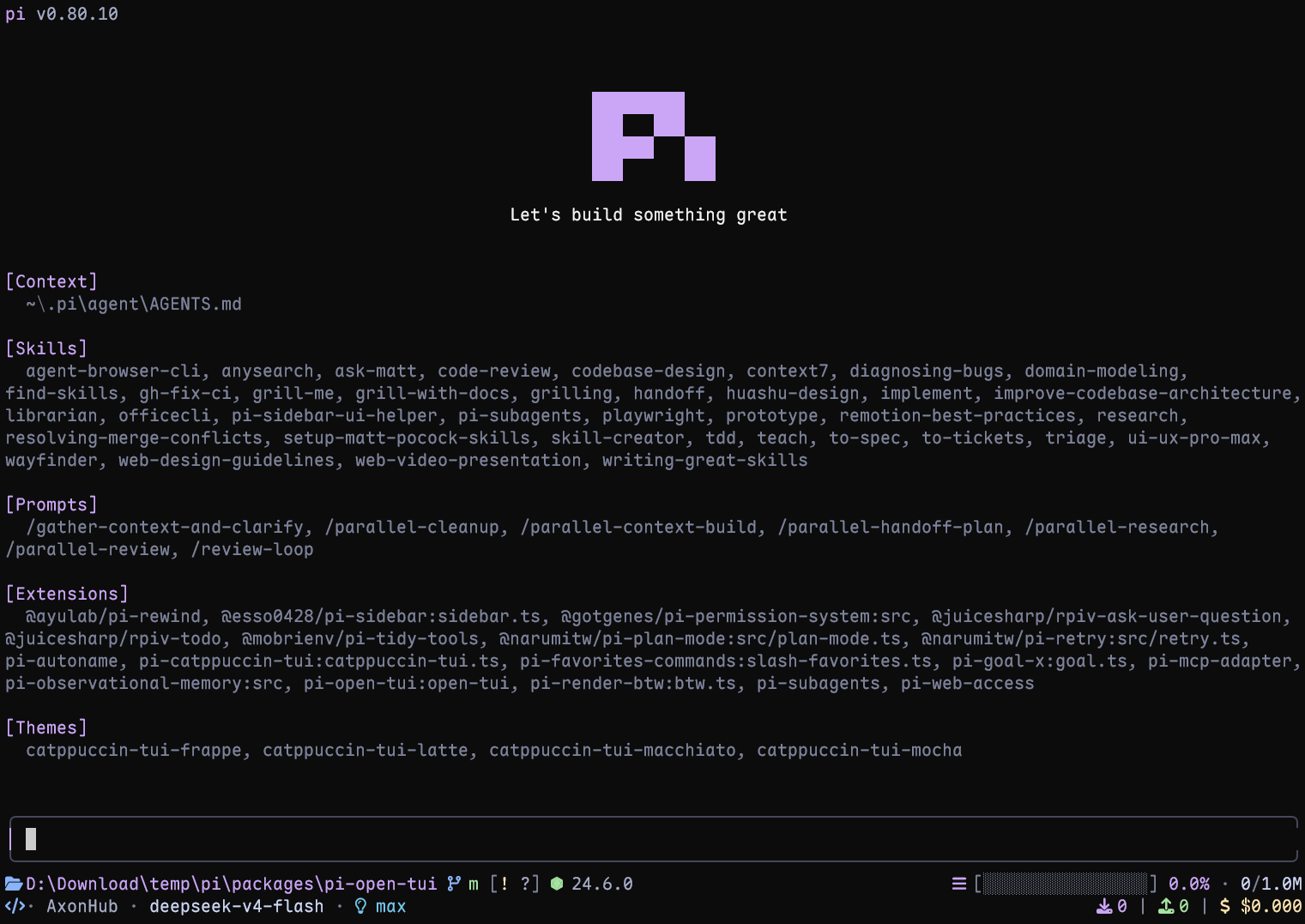
A polished terminal interface for the [Pi](https://pi.dev) coding agent. It brings the strongest ideas from pi-haiku, pi-claude-code-tui, and pi-zentui into one configurable extension.
|
|
8
|
+
|
|
9
|
+
|
|
10
|
+
|
|
11
|
+
## Highlights
|
|
12
|
+
|
|
13
|
+
- **Pi header** with model, thinking level, working directory, and useful slash-command hints
|
|
14
|
+
- **Responsive footer** with Git state, detected runtime, context usage, token counts, cost, and extension status
|
|
15
|
+
- **Framed editor** with block, bar, and underline cursor styles
|
|
16
|
+
- **Project awareness** for 50+ runtimes and detailed Git states, including ahead/behind, staged, modified, untracked, stashed, and detached HEAD
|
|
17
|
+
- **Turn telemetry** for TPS, time to first token (TTFT), duration, stalls, tokens, and list-price rate
|
|
18
|
+
- **Thinking peek**: an inline ticker replaces Pi's hidden `Thinking...` label with the tail of the model's reasoning while it works
|
|
19
|
+
- **Interactive settings** through `/open-tui`, available in English and Simplified Chinese
|
|
20
|
+
|
|
21
|
+
## Requirements
|
|
22
|
+
|
|
23
|
+
- Pi 1.2 or later
|
|
24
|
+
- A terminal with UTF-8 and color support
|
|
25
|
+
- A [Nerd Font](https://www.nerdfonts.com/font-downloads) for the full icon set (optional; portable Unicode icons are built in)
|
|
26
|
+
|
|
27
|
+
## Install
|
|
28
|
+
|
|
29
|
+
Install the extension:
|
|
30
|
+
|
|
31
|
+
```bash
|
|
32
|
+
pi install npm:pi-open-tui
|
|
33
|
+
```
|
|
34
|
+
|
|
35
|
+
Or try it for one session:
|
|
36
|
+
|
|
37
|
+
```bash
|
|
38
|
+
pi -e npm:pi-open-tui
|
|
39
|
+
```
|
|
40
|
+
|
|
41
|
+
## Font and icons
|
|
42
|
+
|
|
43
|
+
Download any patched font from the official [Nerd Fonts downloads page](https://www.nerdfonts.com/font-downloads) or [latest GitHub release](https://github.com/ryanoasis/nerd-fonts/releases/latest). Install it, select that font in your terminal profile, and restart the terminal.
|
|
44
|
+
|
|
45
|
+
The default `auto` mode checks the terminal environment, not the installed font file. It uses Nerd Font icons in interactive UTF-8 TTYs, including terminals running through a runner or subshell. If icons appear as boxes or incorrect symbols, open `/open-tui` and choose one of these modes under **Appearance**:
|
|
46
|
+
|
|
47
|
+
- `nerd`: force Nerd Font icons after configuring a Nerd Font in the terminal
|
|
48
|
+
- `unicode`: portable Unicode icons (folder, branch, laptop, bulb, plug, hourglass, ...) that render without a patched font; emoji glyphs use the terminal's emoji fallback
|
|
49
|
+
- `ascii`: use plain-text icons with no patched font required
|
|
50
|
+
- `auto`: use Nerd Font icons in interactive UTF-8 TTYs; use portable Unicode icons for SSH sessions (the client terminal controls the font and usually has no Nerd Font); use ASCII for non-interactive output, `TERM=dumb`, or an explicitly non-UTF-8 locale
|
|
51
|
+
|
|
52
|
+
If the font is installed but `auto` still selects ASCII, choose `nerd` explicitly. In VS Code, Windows Terminal, and similar apps, configure the font in the terminal profile rather than only installing it in the operating system. If your SSH client terminal does ship a Nerd Font and you want the full icon set over SSH, set the mode to `nerd` explicitly.
|
|
53
|
+
|
|
54
|
+
If wide Nerd Font icons visually consume the gap before their labels (for example in Kitty), enable `footerSegments.nerdIconSpacing` (**Footer → Extra space after Nerd icons** in `/open-tui`). The footer then reserves an extra blank cell after Nerd Font icons, including runtime icons, and includes it in regular and inline footer width calculations. Unicode/ASCII icons and compact Git status flags are unchanged. In Kitty, `narrow_symbols U+E000-U+F8FF 1` in `kitty.conf` is an alternative.
|
|
55
|
+
|
|
56
|
+
## Configuration
|
|
57
|
+
|
|
58
|
+
Run `/open-tui` to open the settings dialog. It provides **General**, **Appearance**, **Footer**, and **Telemetry** tabs. Settings are stored in `~/.pi/agent/open-tui.json`:
|
|
59
|
+
|
|
60
|
+
```json
|
|
61
|
+
{
|
|
62
|
+
"enabled": true,
|
|
63
|
+
"header": true,
|
|
64
|
+
"inlineFooter": false,
|
|
65
|
+
"settingsLanguage": "en",
|
|
66
|
+
"cursorStyle": "block",
|
|
67
|
+
"icons": {
|
|
68
|
+
"mode": "auto"
|
|
69
|
+
},
|
|
70
|
+
"footerSegments": {
|
|
71
|
+
"cwd": true,
|
|
72
|
+
"hostname": false,
|
|
73
|
+
"sessionName": false,
|
|
74
|
+
"gitBranch": true,
|
|
75
|
+
"gitStatus": true,
|
|
76
|
+
"gitCommit": false,
|
|
77
|
+
"runtime": true,
|
|
78
|
+
"context": true,
|
|
79
|
+
"tokens": true,
|
|
80
|
+
"cost": true,
|
|
81
|
+
"liveTps": true,
|
|
82
|
+
"extensionStatuses": true,
|
|
83
|
+
"capitalizeProviderName": true,
|
|
84
|
+
"nerdIconSpacing": false
|
|
85
|
+
},
|
|
86
|
+
"telemetry": {
|
|
87
|
+
"enabled": true,
|
|
88
|
+
"tps": true,
|
|
89
|
+
"ttft": true,
|
|
90
|
+
"duration": true,
|
|
91
|
+
"tokens": true,
|
|
92
|
+
"stalls": true,
|
|
93
|
+
"cost": true
|
|
94
|
+
},
|
|
95
|
+
"thinkingPeek": {
|
|
96
|
+
"lines": 1
|
|
97
|
+
},
|
|
98
|
+
"toolView": {
|
|
99
|
+
"mode": "native"
|
|
100
|
+
}
|
|
101
|
+
}
|
|
102
|
+
```
|
|
103
|
+
|
|
104
|
+
Key options:
|
|
105
|
+
|
|
106
|
+
| Option | Values | Notes |
|
|
107
|
+
| --- | --- | --- |
|
|
108
|
+
| `settingsLanguage` | `en`, `zh` | Changes the `/open-tui` interface language |
|
|
109
|
+
| `header` | `true`, `false` | Overrides Pi's header with the open-tui header; set it to `false` to leave the header slot to Pi or another extension |
|
|
110
|
+
| `inlineFooter` | `true`, `false` | Moves the two main Footer rows into the editor's top and bottom borders; defaults to `false`. Extension status rows remain below the editor |
|
|
111
|
+
| `cursorStyle` | `block`, `bar`, `underline` | `bar` and `underline` require terminal cursor-shape support |
|
|
112
|
+
| `icons.mode` | `auto`, `nerd`, `unicode`, `ascii` | Controls footer and telemetry icons |
|
|
113
|
+
| `footerSegments` | Boolean flags | Shows or hides individual footer data |
|
|
114
|
+
| `footerSegments.capitalizeProviderName` | Boolean | Capitalizes the first character of the provider name in the footer; set it to `false` to keep the provider's original casing |
|
|
115
|
+
| `footerSegments.nerdIconSpacing` | Boolean | Adds an extra blank cell after Nerd Font icons in the footer; defaults to `false` |
|
|
116
|
+
| `telemetry` | Boolean flags | Enables telemetry and its individual measurements |
|
|
117
|
+
| `thinkingPeek.lines` | `0`, `1`, `2` | Off, one-line, or two-line hidden thinking preview |
|
|
118
|
+
| `toolView.mode` | `native`, `compact` | Draws built-in tool calls as Pi's cards or as compact two-line rows; defaults to `native`. Applies to rows created after the change |
|
|
119
|
+
|
|
120
|
+
`sessionName` appears only when the session has a name. `hostname` shows the short host name (first label of the machine's host name, e.g. `mba` from `mba.example.com`) with a server icon. In detached HEAD state, `gitBranch` shows `HEAD` with the short commit hash; `gitCommit` appends the tag pointing at that commit and only takes effect while `gitBranch` is on. Disabling `extensionStatuses` hides the entire extension status line, including MCP status. Each status keeps the colours its extension applied with `ctx.ui.theme.fg()`. A status without colours renders in the muted theme colour.
|
|
121
|
+
|
|
122
|
+
With `inlineFooter` enabled, the two normal Footer rows are rendered inside the editor frame to save vertical space. The top border places the Git branch on the left and CWD first in the right-hand group; the session title appears on the left too when `sessionName` is enabled. The Header and extension status rows remain separate; narrow terminals truncate lower-priority Footer data first, keeping the right-hand statistics and the border corner.
|
|
123
|
+
|
|
124
|
+
## Turn telemetry
|
|
125
|
+
|
|
126
|
+
After each complete agent run, pi-open-tui shows one transient result. Tool-call turns are combined into that result:
|
|
127
|
+
|
|
128
|
+
```text
|
|
129
|
+
> TPS 42.5 tok/s | ~ TTFT 1.2s | + 29.7s | ↑ 567 | ↓ 1.2k | ! stall 1x / 4.3s | $ $3.60/M
|
|
130
|
+
```
|
|
131
|
+
|
|
132
|
+
TPS is calculated from all provider-reported assistant output tokens divided by the total generation time across the run. Timing starts at `turn_start` and ends at the assistant `message_end`, so it includes TTFT, hidden reasoning, buffering, and stalls; tool execution between turns is excluded. Runs without output tokens or measurable generation time show `TPS —`.
|
|
133
|
+
|
|
134
|
+
While a response streams, the working timer also shows the current estimated speed, for example `working 12.3s · ~54 tok/s`. The `~` marks it as an estimate: it is the rate over the last 2 seconds of streamed text, thinking, and tool-call arguments, estimated at about 4 characters per token for Latin text and code and 1 token per CJK character. It drops toward zero during stalls and stays dimmed at its last value during tool execution and between messages. It is controlled by **Footer → Live TPS** (`footerSegments.liveTps`), independently of the telemetry notification. It disappears when the run ends; the exact TPS above is the authoritative value.
|
|
135
|
+
|
|
136
|
+
The `$ / M` value is the model's list-price rate from `usage.cost.total`, not the cumulative session cost shown in the footer. Every telemetry field can be toggled from the **Telemetry** tab.
|
|
137
|
+
|
|
138
|
+
## Thinking peek
|
|
139
|
+
|
|
140
|
+
When Pi's **Hide thinking** setting is enabled, pi-open-tui shows a compact ticker in the native hidden thinking block's `Thinking...` position. The `/open-tui` setting offers three modes: **Off**, **1 line**, and **2 lines**.
|
|
141
|
+
|
|
142
|
+
- while the model is reasoning, the current thinking tail streams by with a spinner (`~ think ⠋ …`);
|
|
143
|
+
- when the answer starts, it settles on a check mark (`~ think ✓`);
|
|
144
|
+
- in 2-line mode, the previous and latest thinking lines share the same text indentation; if the latest line overflows, both rows follow its newest tail as tokens arrive instead of retaining the previous line;
|
|
145
|
+
- after the task settles, the native `Thinking...` label is restored.
|
|
146
|
+
|
|
147
|
+
```text
|
|
148
|
+
~ think ⠋ previous thought
|
|
149
|
+
latest thought
|
|
150
|
+
```
|
|
151
|
+
|
|
152
|
+
The ticker appears only once the model actually streams reasoning, so non-reasoning models never show it. Pi's own Hide thinking toggle controls visibility; changing it takes effect immediately. Each row is truncated by *visible* width, so CJK-wide thinking text cannot overflow. Configure it from **General → Thinking peek** in `/open-tui`, or via `thinkingPeek.lines` in `open-tui.json`.
|
|
153
|
+
|
|
154
|
+
## Tool view
|
|
155
|
+
|
|
156
|
+
With **General → Tool view** set to **Compact** (`toolView.mode: "compact"`), Pi's built-in tools (`read`, `bash`, `powershell`, `edit`, `write`, `grep`, `find`, `ls`) render as one call line and one summary line:
|
|
157
|
+
|
|
158
|
+
```text
|
|
159
|
+
● Read(extensions/open-tui/footer.ts:1-120)
|
|
160
|
+
└ 120 lines
|
|
161
|
+
● Edit(extensions/open-tui/footer.ts)
|
|
162
|
+
└ +2 −1
|
|
163
|
+
● Bash(npm test)
|
|
164
|
+
└ Done · 131 lines · 6.4s
|
|
165
|
+
```
|
|
166
|
+
|
|
167
|
+
- While a shell command runs, the newest 3 output lines and the elapsed time are shown.
|
|
168
|
+
- The dot is yellow while running, green when done, and red when failed. Failed calls keep the compact row with a red summary; for shell commands it ends with the last output line, such as `Exited with code 1 · 12 lines · 1.2s · FAIL tests/a.test.ts`. Press Ctrl+O for the full output.
|
|
169
|
+
- Clicking a row expands only that row into Pi's native card, and `Ctrl+O` expands all rows. The full output, diff, and truncation notices are unchanged.
|
|
170
|
+
- Only the display changes. Tools, arguments, results, and what the model sees are untouched, and third-party or MCP tools keep their own rendering.
|
|
171
|
+
- The mode is chosen when Pi creates a row, so switching it affects new rows; `/reload` or a new session applies it to the whole transcript.
|
|
172
|
+
|
|
173
|
+
## Local development
|
|
174
|
+
|
|
175
|
+
```bash
|
|
176
|
+
npm install
|
|
177
|
+
npm test
|
|
178
|
+
npm run typecheck
|
|
179
|
+
pi -e .
|
|
180
|
+
```
|
|
181
|
+
|
|
182
|
+
## Acknowledgements
|
|
183
|
+
|
|
184
|
+
This project builds on several Pi community packages:
|
|
185
|
+
|
|
186
|
+
- **[pi-haiku](https://github.com/nnocte/pi-haiku)** — two-line footer structure and working timer
|
|
187
|
+
- **[pi-claude-code-tui](https://github.com/Phoobobo/pi-claude-code-tui)** — Pi logo frames and rounded editor border technique
|
|
188
|
+
- **[pi-zentui](https://github.com/lmilojevicc/pi-zentui)** — Starship-style footer segments, runtime detection, session lifecycle, and settings UI pattern
|
|
189
|
+
- **[pi-tps](https://github.com/monotykamary/pi-tps)** — turn timing, stall detection, and conservative TPS measurement
|
|
190
|
+
|
|
191
|
+
The logo frames are derived from Pi's official install script (`pi.dev/install.sh`). Runtime detection and Git porcelain parsing borrow structure from `pi-zentui`.
|
|
192
|
+
|
|
193
|
+
Special thanks to the **[LINUX DO](https://linux.do)** community for its support.
|
|
194
|
+
|
|
195
|
+
## License
|
|
196
|
+
|
|
197
|
+
[MIT](./LICENSE)
|