pi-open-tui 0.3.13 → 0.4.0
This diff represents the content of publicly available package versions that have been released to one of the supported registries. The information contained in this diff is provided for informational purposes only and reflects changes between package versions as they appear in their respective public registries.
- package/README.md +197 -170
- package/README.zh-CN.md +197 -170
- package/extensions/open-tui/config.ts +17 -0
- package/extensions/open-tui/editor.ts +98 -16
- package/extensions/open-tui/icons.ts +9 -0
- package/extensions/open-tui/index.ts +30 -22
- package/extensions/open-tui/settings-command.ts +12 -0
- package/extensions/open-tui/tool-view.ts +348 -0
- package/package.json +8 -8
package/README.zh-CN.md
CHANGED
|
@@ -1,170 +1,197 @@
|
|
|
1
|
-
# pi-open-tui
|
|
2
|
-
|
|
3
|
-
[
|
|
4
|
-
|
|
5
|
-
|
|
6
|
-
|
|
7
|
-
|
|
8
|
-
|
|
9
|
-
|
|
10
|
-
|
|
11
|
-
|
|
12
|
-
|
|
13
|
-
-
|
|
14
|
-
-
|
|
15
|
-
-
|
|
16
|
-
-
|
|
17
|
-
-
|
|
18
|
-
|
|
19
|
-
|
|
20
|
-
|
|
21
|
-
|
|
22
|
-
|
|
23
|
-
-
|
|
24
|
-
|
|
25
|
-
|
|
26
|
-
|
|
27
|
-
|
|
28
|
-
|
|
29
|
-
|
|
30
|
-
|
|
31
|
-
```
|
|
32
|
-
|
|
33
|
-
|
|
34
|
-
|
|
35
|
-
|
|
36
|
-
|
|
37
|
-
```
|
|
38
|
-
|
|
39
|
-
|
|
40
|
-
|
|
41
|
-
|
|
42
|
-
|
|
43
|
-
|
|
44
|
-
|
|
45
|
-
|
|
46
|
-
|
|
47
|
-
- `
|
|
48
|
-
- `
|
|
49
|
-
|
|
50
|
-
|
|
51
|
-
|
|
52
|
-
|
|
53
|
-
|
|
54
|
-
|
|
55
|
-
|
|
56
|
-
|
|
57
|
-
|
|
58
|
-
|
|
59
|
-
|
|
60
|
-
|
|
61
|
-
|
|
62
|
-
"
|
|
63
|
-
"
|
|
64
|
-
"
|
|
65
|
-
|
|
66
|
-
|
|
67
|
-
"
|
|
68
|
-
"
|
|
69
|
-
|
|
70
|
-
|
|
71
|
-
"
|
|
72
|
-
"
|
|
73
|
-
"
|
|
74
|
-
"
|
|
75
|
-
"
|
|
76
|
-
"
|
|
77
|
-
"
|
|
78
|
-
"
|
|
79
|
-
"
|
|
80
|
-
"
|
|
81
|
-
"
|
|
82
|
-
|
|
83
|
-
|
|
84
|
-
"
|
|
85
|
-
|
|
86
|
-
|
|
87
|
-
"
|
|
88
|
-
"
|
|
89
|
-
"
|
|
90
|
-
"
|
|
91
|
-
|
|
92
|
-
|
|
93
|
-
"
|
|
94
|
-
}
|
|
95
|
-
|
|
96
|
-
|
|
97
|
-
|
|
98
|
-
|
|
99
|
-
|
|
100
|
-
|
|
101
|
-
|
|
102
|
-
|
|
103
|
-
|
|
104
|
-
|
|
105
|
-
|
|
106
|
-
|
|
|
107
|
-
|
|
|
108
|
-
| `
|
|
109
|
-
| `
|
|
110
|
-
| `
|
|
111
|
-
|
|
112
|
-
|
|
113
|
-
|
|
114
|
-
|
|
115
|
-
|
|
116
|
-
|
|
117
|
-
|
|
118
|
-
|
|
119
|
-
|
|
120
|
-
|
|
121
|
-
|
|
122
|
-
|
|
123
|
-
|
|
124
|
-
|
|
125
|
-
|
|
126
|
-
|
|
127
|
-
|
|
128
|
-
|
|
129
|
-
|
|
130
|
-
|
|
131
|
-
|
|
132
|
-
|
|
133
|
-
|
|
134
|
-
|
|
135
|
-
|
|
136
|
-
|
|
137
|
-
|
|
138
|
-
|
|
139
|
-
|
|
140
|
-
|
|
141
|
-
|
|
142
|
-
|
|
143
|
-
|
|
144
|
-
|
|
145
|
-
|
|
146
|
-
|
|
147
|
-
|
|
148
|
-
|
|
149
|
-
|
|
150
|
-
|
|
151
|
-
|
|
152
|
-
|
|
153
|
-
|
|
154
|
-
|
|
155
|
-
|
|
156
|
-
|
|
157
|
-
|
|
158
|
-
|
|
159
|
-
|
|
160
|
-
|
|
161
|
-
|
|
162
|
-
|
|
163
|
-
|
|
164
|
-
|
|
165
|
-
|
|
166
|
-
|
|
167
|
-
|
|
168
|
-
|
|
169
|
-
|
|
170
|
-
|
|
1
|
+
# pi-open-tui
|
|
2
|
+
|
|
3
|
+
[](https://omppackages.com/packages/pi-open-tui)
|
|
4
|
+
|
|
5
|
+
[English](./README.md) | **简体中文**
|
|
6
|
+
|
|
7
|
+
一个为 [Pi](https://pi.dev) 编程代理打造的终端界面扩展,将 pi-haiku、pi-claude-code-tui 与 pi-zentui 的优秀设计整合为统一、可配置的使用体验。
|
|
8
|
+
|
|
9
|
+
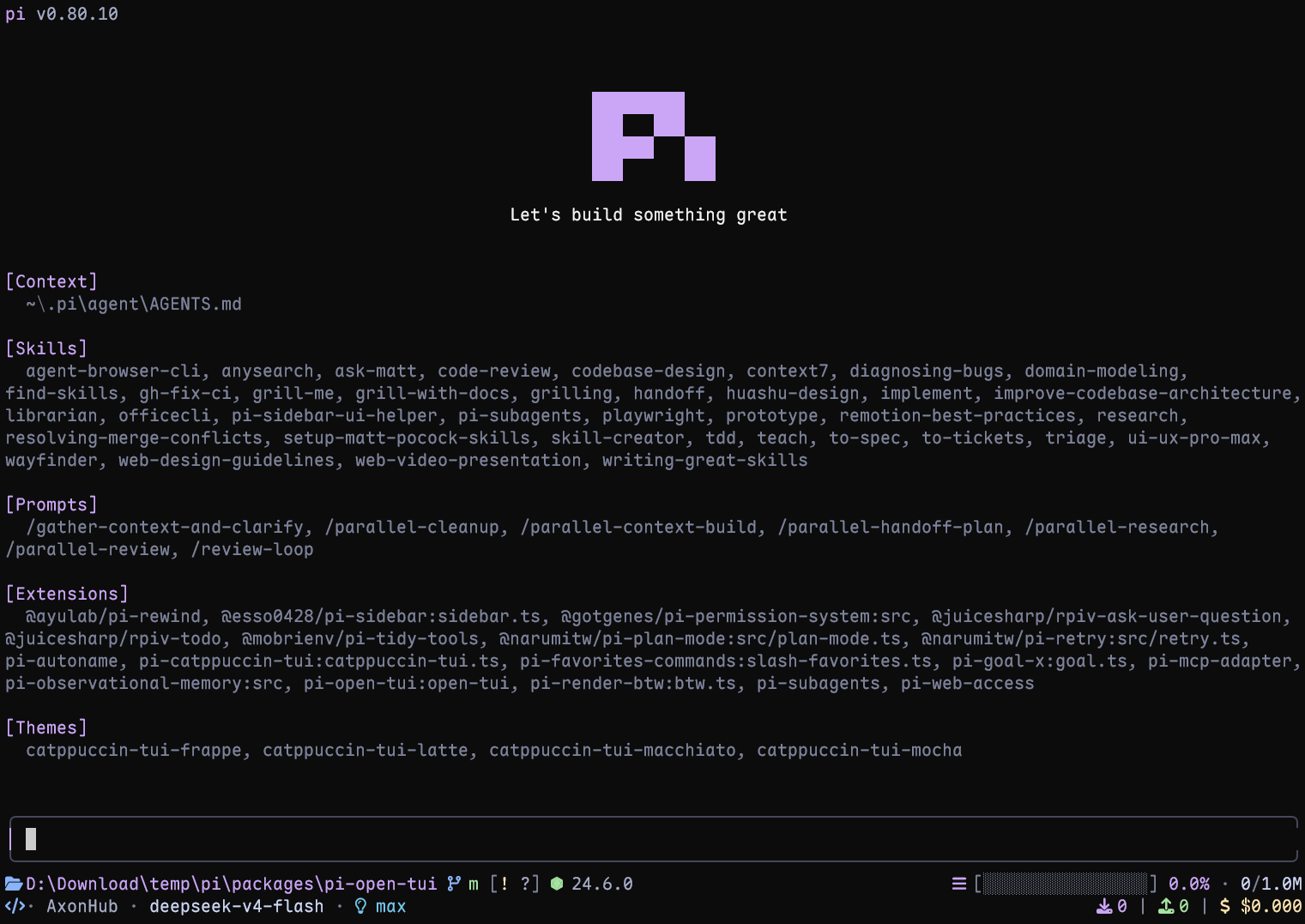
|
|
10
|
+
|
|
11
|
+
## 功能亮点
|
|
12
|
+
|
|
13
|
+
- **Pi 顶栏**:显示模型、思考等级、当前目录和常用斜杠命令提示
|
|
14
|
+
- **自适应底栏**:集中展示 Git 状态、运行环境、上下文用量、Token、费用和扩展状态
|
|
15
|
+
- **带边框的编辑器**:支持块状、竖线和下划线三种光标样式
|
|
16
|
+
- **项目环境感知**:识别 50 多种运行环境,并展示 ahead/behind、已暂存、已修改、未跟踪、stash 和 detached HEAD 等 Git 状态
|
|
17
|
+
- **单轮遥测**:展示 TPS、首 Token 延迟(TTFT)、耗时、停顿、Token 数量和模型标价速率
|
|
18
|
+
- **思考预览**:模型工作时,在 Pi 隐藏思考块的 `Thinking...` 位置显示实时字幕,展示推理内容的末尾片段
|
|
19
|
+
- **交互式设置**:通过 `/open-tui` 配置,并支持英文和简体中文界面
|
|
20
|
+
|
|
21
|
+
## 环境要求
|
|
22
|
+
|
|
23
|
+
- Pi 1.2 或更高版本
|
|
24
|
+
- 支持 UTF-8 和彩色输出的终端
|
|
25
|
+
- 使用完整图标集时需要 [Nerd Font](https://www.nerdfonts.com/font-downloads)(可选;内置可移植 Unicode 图标)
|
|
26
|
+
|
|
27
|
+
## 安装
|
|
28
|
+
|
|
29
|
+
安装扩展:
|
|
30
|
+
|
|
31
|
+
```bash
|
|
32
|
+
pi install npm:pi-open-tui
|
|
33
|
+
```
|
|
34
|
+
|
|
35
|
+
也可以只在当前会话中试用:
|
|
36
|
+
|
|
37
|
+
```bash
|
|
38
|
+
pi -e npm:pi-open-tui
|
|
39
|
+
```
|
|
40
|
+
|
|
41
|
+
## 字体与图标
|
|
42
|
+
|
|
43
|
+
可从 [Nerd Fonts 官方下载页](https://www.nerdfonts.com/font-downloads)或 [GitHub 最新版本](https://github.com/ryanoasis/nerd-fonts/releases/latest)下载任意已修补字体。安装后,请在终端配置中选择该字体,并重启终端。
|
|
44
|
+
|
|
45
|
+
默认的 `auto` 模式检查终端环境,而不是已安装的字体文件。在支持 UTF-8 的交互式 TTY 中,它会使用 Nerd Font 图标,即使 Pi 运行在 runner 或子 shell 中。如果图标显示为方框、乱码或错误符号,请打开 `/open-tui`,在**外观**页选择合适的模式:
|
|
46
|
+
|
|
47
|
+
- `nerd`:终端已配置 Nerd Font 时,强制使用 Nerd Font 图标
|
|
48
|
+
- `unicode`:可移植 Unicode 图标(文件夹、分支、笔记本电脑、灯泡、插头、沙漏等),无需修补字体;emoji 字形通过终端的 emoji 回退渲染
|
|
49
|
+
- `ascii`:使用纯文本图标,无需安装修补字体
|
|
50
|
+
- `auto`:在支持 UTF-8 的交互式 TTY 中使用 Nerd Font 图标;SSH 会话使用可移植 Unicode 图标(字体由客户端终端决定,通常没有 Nerd Font);非交互式输出、`TERM=dumb` 或明确配置为非 UTF-8 的 locale 使用 ASCII
|
|
51
|
+
|
|
52
|
+
如果已经安装字体,但 `auto` 仍选择 ASCII,请手动切换为 `nerd`。使用 VS Code、Windows Terminal 等应用时,只在操作系统中安装字体还不够,还需要在对应的终端配置中选中该字体。如果 SSH 客户端终端确实安装了 Nerd Font 并希望在 SSH 下使用完整图标,请将模式显式设为 `nerd`。
|
|
53
|
+
|
|
54
|
+
如果较宽的 Nerd Font 图标占用了图标与文字之间的间隔(例如在 Kitty 中),可开启 `footerSegments.nerdIconSpacing`(`/open-tui` 中的 **底栏 → Nerd 图标后额外留空**)。开启后底栏会在 Nerd Font 图标后额外预留一格空白,包括运行环境图标,常规底栏和内嵌底栏的宽度计算都包含这格留白;Unicode/ASCII 图标与紧凑的 Git 状态标记不受影响。Kitty 用户也可以在 `kitty.conf` 中设置 `narrow_symbols U+E000-U+F8FF 1`。
|
|
55
|
+
|
|
56
|
+
## 配置
|
|
57
|
+
|
|
58
|
+
运行 `/open-tui` 打开设置窗口,其中包含**常规**、**外观**、**底栏**和**遥测**四个页面。设置保存在 `~/.pi/agent/open-tui.json`:
|
|
59
|
+
|
|
60
|
+
```json
|
|
61
|
+
{
|
|
62
|
+
"enabled": true,
|
|
63
|
+
"header": true,
|
|
64
|
+
"inlineFooter": false,
|
|
65
|
+
"settingsLanguage": "zh",
|
|
66
|
+
"cursorStyle": "block",
|
|
67
|
+
"icons": {
|
|
68
|
+
"mode": "auto"
|
|
69
|
+
},
|
|
70
|
+
"footerSegments": {
|
|
71
|
+
"cwd": true,
|
|
72
|
+
"hostname": false,
|
|
73
|
+
"sessionName": false,
|
|
74
|
+
"gitBranch": true,
|
|
75
|
+
"gitStatus": true,
|
|
76
|
+
"gitCommit": false,
|
|
77
|
+
"runtime": true,
|
|
78
|
+
"context": true,
|
|
79
|
+
"tokens": true,
|
|
80
|
+
"cost": true,
|
|
81
|
+
"liveTps": true,
|
|
82
|
+
"extensionStatuses": true,
|
|
83
|
+
"capitalizeProviderName": true,
|
|
84
|
+
"nerdIconSpacing": false
|
|
85
|
+
},
|
|
86
|
+
"telemetry": {
|
|
87
|
+
"enabled": true,
|
|
88
|
+
"tps": true,
|
|
89
|
+
"ttft": true,
|
|
90
|
+
"duration": true,
|
|
91
|
+
"tokens": true,
|
|
92
|
+
"stalls": true,
|
|
93
|
+
"cost": true
|
|
94
|
+
},
|
|
95
|
+
"thinkingPeek": {
|
|
96
|
+
"lines": 1
|
|
97
|
+
},
|
|
98
|
+
"toolView": {
|
|
99
|
+
"mode": "native"
|
|
100
|
+
}
|
|
101
|
+
}
|
|
102
|
+
```
|
|
103
|
+
|
|
104
|
+
主要选项:
|
|
105
|
+
|
|
106
|
+
| 选项 | 可选值 | 说明 |
|
|
107
|
+
| --- | --- | --- |
|
|
108
|
+
| `settingsLanguage` | `en`、`zh` | 切换 `/open-tui` 设置界面的语言 |
|
|
109
|
+
| `header` | `true`、`false` | 决定是否用 open-tui 顶部信息栏覆盖 Pi 的 Header;设为 `false` 时把顶部栏位置留给 Pi 或其他扩展 |
|
|
110
|
+
| `inlineFooter` | `true`、`false` | 将两条主要 Footer 信息行移入编辑器上下边框以节省垂直空间,默认关闭;扩展状态行仍显示在编辑器外 |
|
|
111
|
+
| `cursorStyle` | `block`、`bar`、`underline` | `bar` 和 `underline` 需要终端支持光标形状转义序列 |
|
|
112
|
+
| `icons.mode` | `auto`、`nerd`、`unicode`、`ascii` | 控制底栏和遥测通知使用的图标 |
|
|
113
|
+
| `footerSegments` | 布尔开关 | 分别控制底栏中的各项数据 |
|
|
114
|
+
| `footerSegments.capitalizeProviderName` | 布尔开关 | 将底栏中提供商名称的首字母大写;设为 `false` 时保留原始大小写 |
|
|
115
|
+
| `footerSegments.nerdIconSpacing` | 布尔开关 | 在底栏 Nerd Font 图标后额外留一格空白;默认 `false` |
|
|
116
|
+
| `telemetry` | 布尔开关 | 控制遥测总开关和各项指标 |
|
|
117
|
+
| `thinkingPeek.lines` | `0`、`1`、`2` | 关闭、单行或双行思考预览 |
|
|
118
|
+
| `toolView.mode` | `native`、`compact` | 内置工具调用显示为 Pi 原生卡片,或紧凑的两行摘要;默认 `native`。只对切换后新建的行生效 |
|
|
119
|
+
|
|
120
|
+
`sessionName` 仅在会话有名称时显示;`hostname` 会显示主机名的短名称(主机名的第一个标签,例如从 `mba.example.com` 显示为 `mba`),并使用服务器图标;处于分离 HEAD(detached HEAD)状态时,`gitBranch` 会显示 `HEAD` 和短提交哈希,`gitCommit` 会在其后追加指向该提交的标签,且仅在开启 `gitBranch` 时生效;关闭 `extensionStatuses` 会隐藏整行扩展状态,其中也包括 MCP 状态。每条状态会保留其扩展通过 `ctx.ui.theme.fg()` 设置的颜色;未设置颜色的状态使用 muted 主题色显示。
|
|
121
|
+
|
|
122
|
+
开启 `inlineFooter` 后,两条常规 Footer 信息行会移入编辑器边框,从而节省垂直空间。顶部边框左侧显示 Git 分支,右侧信息组以当前目录开头;开启 `sessionName` 时,会话标题也会显示在左侧。Header 和扩展状态行保持独立显示;终端较窄时优先截断低优先级 Footer 数据,保留右侧统计信息和边框角。
|
|
123
|
+
|
|
124
|
+
## 单轮遥测
|
|
125
|
+
|
|
126
|
+
每次 Agent 完整运行结束后,pi-open-tui 会显示一条临时结果,并将其中的多个工具调用轮次合并统计:
|
|
127
|
+
|
|
128
|
+
```text
|
|
129
|
+
> TPS 42.5 tok/s | ~ TTFT 1.2s | + 29.7s | ↑ 567 | ↓ 1.2k | ! stall 1x / 4.3s | $ $3.60/M
|
|
130
|
+
```
|
|
131
|
+
|
|
132
|
+
TPS 的计算方式是:将本次运行中服务商报告的全部 Assistant 输出 Token,除以各个生成轮次的总耗时。计时范围从 `turn_start` 到 Assistant 的 `message_end`,包含 TTFT、隐藏推理、缓冲和停顿,但不包含轮次之间的工具执行时间。没有输出 Token 或无法测得生成时间时,会显示 `TPS —`。
|
|
133
|
+
|
|
134
|
+
回复流式输出时,工作计时器还会显示当前的估算速度,例如 `working 12.3s · ~54 tok/s`。`~` 表示估算值:它是最近 2 秒内流式输出的正文、思考内容和工具调用参数的速率,按拉丁文本和代码约 4 个字符 1 个 Token、中日韩字符每字 1 个 Token 估算。停顿时数值会逐渐降向零;工具执行期间和消息之间以暗色保留上一个值。由**底栏 → 实时 TPS**(`footerSegments.liveTps`)控制,与遥测通知的开关互不影响。运行结束后不再显示,以上面的精确 TPS 为准。
|
|
135
|
+
|
|
136
|
+
`$ / M` 表示根据 `usage.cost.total` 得到的模型标价速率,不是底栏中的会话累计费用。所有遥测字段都可以在**遥测**页单独开关。
|
|
137
|
+
|
|
138
|
+
## 思考预览
|
|
139
|
+
|
|
140
|
+
开启 Pi 的 **Hide thinking** 后,任务运行期间 pi-open-tui 会在原生隐藏思考块的 `Thinking...` 位置显示紧凑的实时字幕。`/open-tui` 中提供**关闭、单行、双行**三种模式:
|
|
141
|
+
|
|
142
|
+
- 模型推理时,思考内容的末尾片段会随 spinner 滚动(`~ think ⠋ …`);
|
|
143
|
+
- 开始输出正文时定格为对勾(`~ think ✓`);
|
|
144
|
+
- 双行模式中,上一条和最新一条思考内容使用相同的文字缩进;如果最新一行超出宽度,则两行随新 Token 持续显示它的最新末尾片段,不再保留上一条;
|
|
145
|
+
- 任务结束后恢复原生 `Thinking...` 标签。
|
|
146
|
+
|
|
147
|
+
```text
|
|
148
|
+
~ think ⠋ 上一条思考
|
|
149
|
+
最新一条思考
|
|
150
|
+
```
|
|
151
|
+
|
|
152
|
+
该字幕仅在模型真正输出推理内容后出现,非推理模型不会显示。可见性由 Pi 自身的 Hide thinking 开关控制,切换后立即生效。每一行都按*显示宽度*截断(全角字符计 2 列),因此包含中文的思考文本也不会溢出终端。可在 `/open-tui` 的**常规 → 思考预览**中切换,或直接修改 `open-tui.json` 中的 `thinkingPeek.lines`。
|
|
153
|
+
|
|
154
|
+
## 工具视图
|
|
155
|
+
|
|
156
|
+
将**常规 → 工具视图**设为**紧凑**(`toolView.mode: "compact"`)后,Pi 内置工具(`read`、`bash`、`powershell`、`edit`、`write`、`grep`、`find`、`ls`)显示为一行调用加一行摘要:
|
|
157
|
+
|
|
158
|
+
```text
|
|
159
|
+
● Read(extensions/open-tui/footer.ts:1-120)
|
|
160
|
+
└ 120 lines
|
|
161
|
+
● Edit(extensions/open-tui/footer.ts)
|
|
162
|
+
└ +2 −1
|
|
163
|
+
● Bash(npm test)
|
|
164
|
+
└ Done · 131 lines · 6.4s
|
|
165
|
+
```
|
|
166
|
+
|
|
167
|
+
- Shell 命令运行中会显示最新 3 行输出和已用时间。
|
|
168
|
+
- 圆点运行中为黄色、完成为绿色、失败为红色;失败的调用同样保持紧凑行,并显示红色摘要;Shell 命令的摘要末尾带上最后一行输出(如 `Exited with code 1 · 12 lines · 1.2s · FAIL tests/a.test.ts`),按 Ctrl+O 查看完整输出。
|
|
169
|
+
- 点击某行只展开这一行为 Pi 原生卡片,`Ctrl+O` 展开全部行;完整输出、diff 和截断提示保持不变。
|
|
170
|
+
- 只改变显示:工具、参数、结果以及模型看到的内容都不受影响,第三方和 MCP 工具保持各自的渲染。
|
|
171
|
+
- 模式在 Pi 创建某行时确定,因此切换只影响新建的行;执行 `/reload` 或新开会话后整个记录都会应用。
|
|
172
|
+
|
|
173
|
+
## 本地开发
|
|
174
|
+
|
|
175
|
+
```bash
|
|
176
|
+
npm install
|
|
177
|
+
npm test
|
|
178
|
+
npm run typecheck
|
|
179
|
+
pi -e .
|
|
180
|
+
```
|
|
181
|
+
|
|
182
|
+
## 致谢
|
|
183
|
+
|
|
184
|
+
本项目基于多个 Pi 社区包的工作:
|
|
185
|
+
|
|
186
|
+
- **[pi-haiku](https://github.com/nnocte/pi-haiku)** — 双行底栏结构和工作计时器
|
|
187
|
+
- **[pi-claude-code-tui](https://github.com/Phoobobo/pi-claude-code-tui)** — Pi Logo 帧与圆角编辑器边框技术
|
|
188
|
+
- **[pi-zentui](https://github.com/lmilojevicc/pi-zentui)** — Starship 风格底栏、运行环境检测、会话生命周期和设置界面模式
|
|
189
|
+
- **[pi-tps](https://github.com/monotykamary/pi-tps)** — 单轮计时、停顿检测和保守的 TPS 计算方式
|
|
190
|
+
|
|
191
|
+
Logo 帧源自 Pi 官方安装脚本(`pi.dev/install.sh`)。运行环境检测和 Git porcelain 解析借鉴了 `pi-zentui` 的结构。
|
|
192
|
+
|
|
193
|
+
特别感谢 **[LINUX DO](https://linux.do)** 社区的支持。
|
|
194
|
+
|
|
195
|
+
## 许可证
|
|
196
|
+
|
|
197
|
+
[MIT](./LICENSE)
|
|
@@ -6,6 +6,7 @@ import type { IconMode } from "./icons.ts";
|
|
|
6
6
|
export type SettingsLanguage = "en" | "zh";
|
|
7
7
|
export type CursorStyle = "block" | "bar" | "underline";
|
|
8
8
|
export type ThinkingPeekLines = 0 | 1 | 2;
|
|
9
|
+
export type ToolViewMode = "native" | "compact";
|
|
9
10
|
|
|
10
11
|
export type { IconMode } from "./icons.ts";
|
|
11
12
|
|
|
@@ -42,6 +43,8 @@ export interface ThinkingPeekConfig {
|
|
|
42
43
|
|
|
43
44
|
export interface OpenTuiConfig {
|
|
44
45
|
enabled: boolean;
|
|
46
|
+
/** Override Pi's header with the open-tui header. When false, the header slot is left to Pi or another extension. */
|
|
47
|
+
header: boolean;
|
|
45
48
|
inlineFooter: boolean;
|
|
46
49
|
settingsLanguage: SettingsLanguage;
|
|
47
50
|
cursorStyle: CursorStyle;
|
|
@@ -51,10 +54,14 @@ export interface OpenTuiConfig {
|
|
|
51
54
|
footerSegments: FooterSegments;
|
|
52
55
|
telemetry: TelemetryConfig;
|
|
53
56
|
thinkingPeek: ThinkingPeekConfig;
|
|
57
|
+
toolView: {
|
|
58
|
+
mode: ToolViewMode;
|
|
59
|
+
};
|
|
54
60
|
}
|
|
55
61
|
|
|
56
62
|
export const DEFAULT_CONFIG: OpenTuiConfig = {
|
|
57
63
|
enabled: true,
|
|
64
|
+
header: true,
|
|
58
65
|
inlineFooter: false,
|
|
59
66
|
settingsLanguage: "en",
|
|
60
67
|
cursorStyle: "block",
|
|
@@ -89,6 +96,9 @@ export const DEFAULT_CONFIG: OpenTuiConfig = {
|
|
|
89
96
|
thinkingPeek: {
|
|
90
97
|
lines: 1,
|
|
91
98
|
},
|
|
99
|
+
toolView: {
|
|
100
|
+
mode: "native",
|
|
101
|
+
},
|
|
92
102
|
};
|
|
93
103
|
|
|
94
104
|
export function getConfigPath(): string {
|
|
@@ -160,6 +170,9 @@ export function loadConfig(notify?: (msg: string, level: "warning" | "info") =>
|
|
|
160
170
|
if (typeof config.enabled !== "boolean") {
|
|
161
171
|
config.enabled = DEFAULT_CONFIG.enabled;
|
|
162
172
|
}
|
|
173
|
+
if (typeof config.header !== "boolean") {
|
|
174
|
+
config.header = DEFAULT_CONFIG.header;
|
|
175
|
+
}
|
|
163
176
|
if (typeof config.inlineFooter !== "boolean") {
|
|
164
177
|
config.inlineFooter = DEFAULT_CONFIG.inlineFooter;
|
|
165
178
|
}
|
|
@@ -179,6 +192,10 @@ export function loadConfig(notify?: (msg: string, level: "warning" | "info") =>
|
|
|
179
192
|
} else {
|
|
180
193
|
config.thinkingPeek.lines = normalizeThinkingPeekLines(config.thinkingPeek.lines);
|
|
181
194
|
}
|
|
195
|
+
if (typeof config.toolView !== "object" || config.toolView === null
|
|
196
|
+
|| (config.toolView.mode !== "native" && config.toolView.mode !== "compact")) {
|
|
197
|
+
config.toolView = structuredClone(DEFAULT_CONFIG.toolView);
|
|
198
|
+
}
|
|
182
199
|
return config;
|
|
183
200
|
} catch (err) {
|
|
184
201
|
notify?.(`open-tui config parse error: ${err instanceof Error ? err.message : String(err)}`, "warning");
|
|
@@ -40,6 +40,8 @@ export interface InlineFooterRenderer {
|
|
|
40
40
|
|
|
41
41
|
interface HiddenThinkingLabelComponent {
|
|
42
42
|
children: unknown[];
|
|
43
|
+
outputPad?: unknown;
|
|
44
|
+
render(width: number): string[];
|
|
43
45
|
setHiddenThinkingLabel(label: string): void;
|
|
44
46
|
setHideThinkingBlock(hide: boolean): void;
|
|
45
47
|
updateContent(message: unknown, isStreaming?: boolean): void;
|
|
@@ -48,6 +50,7 @@ interface HiddenThinkingLabelComponent {
|
|
|
48
50
|
function isHiddenThinkingLabelComponent(value: object): value is HiddenThinkingLabelComponent {
|
|
49
51
|
const component = value as unknown as Record<string, unknown>;
|
|
50
52
|
return Array.isArray(component.children)
|
|
53
|
+
&& typeof component.render === "function"
|
|
51
54
|
&& typeof component.setHiddenThinkingLabel === "function"
|
|
52
55
|
&& typeof component.setHideThinkingBlock === "function"
|
|
53
56
|
&& typeof component.updateContent === "function";
|
|
@@ -71,8 +74,18 @@ function findLatestHiddenThinkingLabel(tui: TUI): HiddenThinkingLabelComponent {
|
|
|
71
74
|
return latest;
|
|
72
75
|
}
|
|
73
76
|
|
|
77
|
+
/** Width Pi's hidden-thinking `Text(label, outputPad, 0)` wraps at when its message renders at `width`. */
|
|
78
|
+
function hiddenThinkingTextWidth(width: number, outputPad: unknown): number {
|
|
79
|
+
const pad = typeof outputPad === "number" && Number.isFinite(outputPad) ? Math.max(0, Math.floor(outputPad)) : 1;
|
|
80
|
+
const paddingX = Math.min(pad, Math.max(0, Math.floor((width - 1) / 2)));
|
|
81
|
+
return Math.max(1, width - paddingX * 2);
|
|
82
|
+
}
|
|
83
|
+
|
|
84
|
+
// pi-tui's renderFakeCursor() markers (FAKE_CURSOR_START/END, not exported). Truncation can drop the end marker.
|
|
85
|
+
const FAKE_CURSOR = /\x1b_pi:fc\x07([\s\S]*?)(?:\x1b_pi:\/fc\x07|$)/g;
|
|
86
|
+
|
|
74
87
|
function removeSoftwareCursor(line: string, cursorMarker = ""): string {
|
|
75
|
-
return line.replace(
|
|
88
|
+
return line.replace(FAKE_CURSOR, (_match, cursor: string) => {
|
|
76
89
|
const replacement = `${cursorMarker}${cursor}`;
|
|
77
90
|
cursorMarker = "";
|
|
78
91
|
return replacement;
|
|
@@ -308,6 +321,42 @@ export class OpenTuiEditor extends CustomEditor {
|
|
|
308
321
|
}
|
|
309
322
|
}
|
|
310
323
|
|
|
324
|
+
type StreamWrite = (...args: unknown[]) => boolean;
|
|
325
|
+
|
|
326
|
+
/**
|
|
327
|
+
* Calls `requestRepaint` after each raw write to a TTY stream. Pi's fullscreen renderer only
|
|
328
|
+
* rewrites changed rows, so text other extensions print straight to the terminal would
|
|
329
|
+
* otherwise stay over the editor and footer until a resize.
|
|
330
|
+
*/
|
|
331
|
+
export function repaintAfterStreamWrites(
|
|
332
|
+
requestRepaint: () => void,
|
|
333
|
+
stream: NodeJS.WriteStream = process.stderr,
|
|
334
|
+
): () => void {
|
|
335
|
+
if (!stream.isTTY) return () => {};
|
|
336
|
+
const original = stream.write as unknown as StreamWrite;
|
|
337
|
+
let enabled = true;
|
|
338
|
+
const patched = ((...args: unknown[]) => {
|
|
339
|
+
const callback = typeof args[args.length - 1] === "function"
|
|
340
|
+
? (args.pop() as (error?: Error | null) => void)
|
|
341
|
+
: undefined;
|
|
342
|
+
// Repaint from the write callback so the redraw lands after the stray text.
|
|
343
|
+
return original.call(stream, ...args, (error?: Error | null) => {
|
|
344
|
+
try {
|
|
345
|
+
if (enabled) requestRepaint();
|
|
346
|
+
} catch {
|
|
347
|
+
// A failed repaint must not break the caller's write; logging it here would recurse.
|
|
348
|
+
}
|
|
349
|
+
callback?.(error);
|
|
350
|
+
});
|
|
351
|
+
}) as typeof stream.write;
|
|
352
|
+
stream.write = patched;
|
|
353
|
+
return () => {
|
|
354
|
+
enabled = false;
|
|
355
|
+
// A later wrapper may still delegate to ours; leave it as a passthrough then.
|
|
356
|
+
if (stream.write === patched) stream.write = original as unknown as typeof stream.write;
|
|
357
|
+
};
|
|
358
|
+
}
|
|
359
|
+
|
|
311
360
|
export function installEditor(
|
|
312
361
|
_pi: ExtensionAPI,
|
|
313
362
|
ctx: ExtensionContext,
|
|
@@ -319,41 +368,74 @@ export function installEditor(
|
|
|
319
368
|
let previousHardwareCursor: boolean | undefined;
|
|
320
369
|
let currentCursorStyle = cursorStyle;
|
|
321
370
|
let hiddenThinkingTarget: HiddenThinkingLabelComponent | undefined;
|
|
371
|
+
let restoreHiddenThinkingRender: (() => void) | undefined;
|
|
372
|
+
let buildHiddenThinkingLabel: ((width: number) => string) | undefined;
|
|
322
373
|
const getActiveTui = (): TUI => {
|
|
323
374
|
if (!activeTui) throw new Error("Open TUI editor is not mounted");
|
|
324
375
|
return activeTui;
|
|
325
376
|
};
|
|
377
|
+
const resetHiddenThinkingTarget = (): void => {
|
|
378
|
+
restoreHiddenThinkingRender?.();
|
|
379
|
+
restoreHiddenThinkingRender = undefined;
|
|
380
|
+
hiddenThinkingTarget = undefined;
|
|
381
|
+
buildHiddenThinkingLabel = undefined;
|
|
382
|
+
};
|
|
383
|
+
// Build the label at the width Pi actually renders the message with; layout
|
|
384
|
+
// extensions (e.g. pi-sidebar) can make it much narrower than the terminal.
|
|
385
|
+
const patchHiddenThinkingRender = (target: HiddenThinkingLabelComponent): void => {
|
|
386
|
+
const originalRender = target.render;
|
|
387
|
+
let lastWidth: number | undefined;
|
|
388
|
+
let lastBuild: ((width: number) => string) | undefined;
|
|
389
|
+
let active = true;
|
|
390
|
+
const patched = function (this: HiddenThinkingLabelComponent, width: number): string[] {
|
|
391
|
+
if (!active) return originalRender.call(this, width);
|
|
392
|
+
const build = buildHiddenThinkingLabel;
|
|
393
|
+
const textWidth = hiddenThinkingTextWidth(width, this.outputPad);
|
|
394
|
+
if (build && (build !== lastBuild || textWidth !== lastWidth)) {
|
|
395
|
+
lastBuild = build;
|
|
396
|
+
lastWidth = textWidth;
|
|
397
|
+
this.setHiddenThinkingLabel(build(textWidth));
|
|
398
|
+
}
|
|
399
|
+
return originalRender.call(this, width);
|
|
400
|
+
};
|
|
401
|
+
target.render = patched;
|
|
402
|
+
restoreHiddenThinkingRender = () => {
|
|
403
|
+
active = false;
|
|
404
|
+
// Another copy of this extension may have wrapped us; unwinding then would drop its wrapper.
|
|
405
|
+
if (target.render === patched) target.render = originalRender;
|
|
406
|
+
};
|
|
407
|
+
};
|
|
408
|
+
// Only the fullscreen renderer clears and rewrites the whole screen on a forced render.
|
|
409
|
+
const restoreStderr = repaintAfterStreamWrites(() => {
|
|
410
|
+
if (activeTui?.mode === "fullscreen") activeTui.requestRender(true);
|
|
411
|
+
});
|
|
326
412
|
|
|
327
413
|
ctx.ui.setEditorComponent((tui, editorTheme, keybindings) => {
|
|
328
414
|
activeTui = tui;
|
|
329
|
-
|
|
415
|
+
resetHiddenThinkingTarget();
|
|
330
416
|
previousHardwareCursor = tui.getShowHardwareCursor();
|
|
331
417
|
activeEditor = new OpenTuiEditor(tui, editorTheme, keybindings, currentCursorStyle, inlineFooter);
|
|
332
418
|
return activeEditor;
|
|
333
419
|
});
|
|
334
420
|
return {
|
|
335
|
-
|
|
336
|
-
|
|
337
|
-
if (typeof columns !== "number" || !Number.isFinite(columns)) {
|
|
338
|
-
throw new Error("Open TUI editor terminal has an invalid width");
|
|
339
|
-
}
|
|
340
|
-
return Math.max(1, Math.floor(columns));
|
|
341
|
-
},
|
|
342
|
-
setLatestHiddenThinkingLabel(label: string): void {
|
|
421
|
+
/** `build` receives the hidden-thinking text width and runs again whenever that width changes. */
|
|
422
|
+
setLatestHiddenThinkingLabel(build: (width: number) => string): void {
|
|
343
423
|
const tui = getActiveTui();
|
|
344
|
-
|
|
345
|
-
|
|
424
|
+
if (!hiddenThinkingTarget) {
|
|
425
|
+
hiddenThinkingTarget = findLatestHiddenThinkingLabel(tui);
|
|
426
|
+
patchHiddenThinkingRender(hiddenThinkingTarget);
|
|
427
|
+
}
|
|
428
|
+
buildHiddenThinkingLabel = build;
|
|
346
429
|
tui.requestRender();
|
|
347
430
|
},
|
|
348
|
-
resetHiddenThinkingLabelTarget
|
|
349
|
-
hiddenThinkingTarget = undefined;
|
|
350
|
-
},
|
|
431
|
+
resetHiddenThinkingLabelTarget: resetHiddenThinkingTarget,
|
|
351
432
|
setCursorStyle(nextCursorStyle: CursorStyle): void {
|
|
352
433
|
currentCursorStyle = nextCursorStyle;
|
|
353
434
|
activeEditor?.setCursorStyle(nextCursorStyle, previousHardwareCursor);
|
|
354
435
|
},
|
|
355
436
|
cleanup(): void {
|
|
356
|
-
|
|
437
|
+
restoreStderr();
|
|
438
|
+
resetHiddenThinkingTarget();
|
|
357
439
|
ctx.ui.setEditorComponent(undefined);
|
|
358
440
|
if (activeTui) {
|
|
359
441
|
if (currentCursorStyle !== "block") activeTui.terminal.write(DEFAULT_CURSOR_STYLE_SEQUENCE);
|
|
@@ -28,6 +28,9 @@ export interface IconGlyphs {
|
|
|
28
28
|
untracked: string;
|
|
29
29
|
renamed: string;
|
|
30
30
|
deleted: string;
|
|
31
|
+
/** Compact tool view: call marker and result gutter. */
|
|
32
|
+
toolCall: string;
|
|
33
|
+
toolResult: string;
|
|
31
34
|
}
|
|
32
35
|
|
|
33
36
|
const NERD_GLYPHS: IconGlyphs = {
|
|
@@ -59,6 +62,8 @@ const NERD_GLYPHS: IconGlyphs = {
|
|
|
59
62
|
untracked: "?",
|
|
60
63
|
renamed: "»",
|
|
61
64
|
deleted: "✘",
|
|
65
|
+
toolCall: "●",
|
|
66
|
+
toolResult: "⎿",
|
|
62
67
|
};
|
|
63
68
|
|
|
64
69
|
// ponytail: ASCII fallback uses compact symbols (not English words) to keep
|
|
@@ -92,6 +97,8 @@ const ASCII_GLYPHS: IconGlyphs = {
|
|
|
92
97
|
untracked: "?",
|
|
93
98
|
renamed: "r",
|
|
94
99
|
deleted: "x",
|
|
100
|
+
toolCall: "*",
|
|
101
|
+
toolResult: "`-",
|
|
95
102
|
};
|
|
96
103
|
|
|
97
104
|
// Portable Unicode icon set for terminals without a Nerd Font. Keeps the
|
|
@@ -129,6 +136,8 @@ const UNICODE_GLYPHS: IconGlyphs = {
|
|
|
129
136
|
untracked: "?",
|
|
130
137
|
renamed: "→",
|
|
131
138
|
deleted: "✗",
|
|
139
|
+
toolCall: "●",
|
|
140
|
+
toolResult: "└",
|
|
132
141
|
};
|
|
133
142
|
|
|
134
143
|
function isSshSession(): boolean {
|