pi-open-tui 0.2.13 → 0.2.15
This diff represents the content of publicly available package versions that have been released to one of the supported registries. The information contained in this diff is provided for informational purposes only and reflects changes between package versions as they appear in their respective public registries.
- package/README.md +141 -135
- package/README.zh-CN.md +141 -135
- package/extensions/open-tui/config.ts +16 -0
- package/extensions/open-tui/editor.ts +11 -0
- package/extensions/open-tui/fullscreen-scroll.ts +34 -0
- package/extensions/open-tui/index.ts +5 -1
- package/extensions/open-tui/settings-command.ts +83 -7
- package/extensions/open-tui/state.ts +11 -8
- package/extensions/open-tui/telemetry.ts +295 -298
- package/extensions/open-tui/utils.ts +365 -361
- package/package.json +2 -2
package/README.md
CHANGED
|
@@ -1,135 +1,141 @@
|
|
|
1
|
-
# pi-open-tui
|
|
2
|
-
|
|
3
|
-
**English** | [简体中文](./README.zh-CN.md)
|
|
4
|
-
|
|
5
|
-
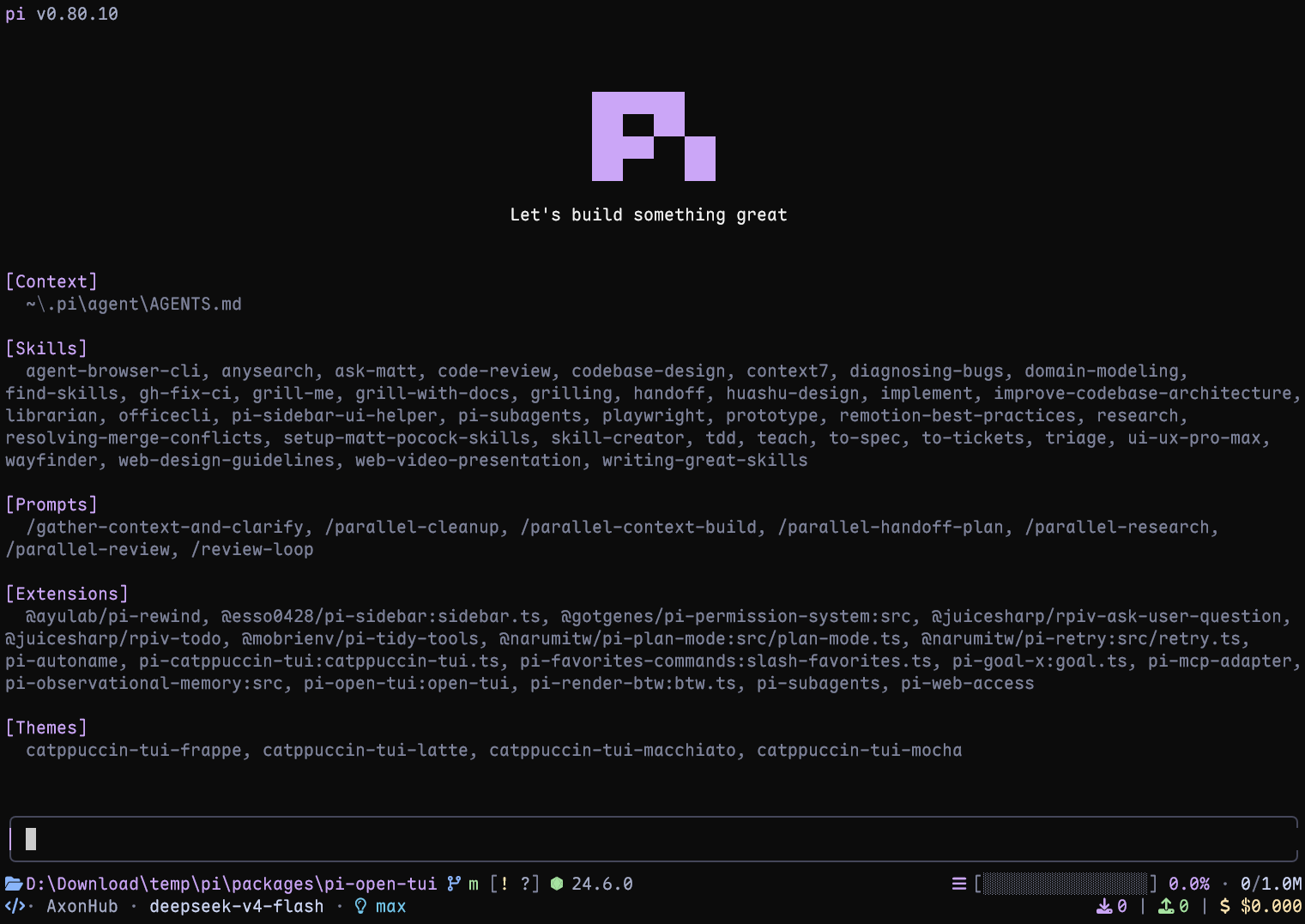
A polished terminal interface for the [Pi](https://pi.dev) coding agent. It brings the strongest ideas from pi-haiku, pi-claude-code-tui, and pi-zentui into one configurable extension.
|
|
6
|
-
|
|
7
|
-
|
|
8
|
-
|
|
9
|
-
## Highlights
|
|
10
|
-
|
|
11
|
-
- **Pi header** with model, thinking level, working directory, and useful slash-command hints
|
|
12
|
-
- **Responsive footer** with Git state, detected runtime, context usage, token counts, cost, and extension status
|
|
13
|
-
- **Framed editor** with block, bar, and underline cursor styles
|
|
14
|
-
- **Project awareness** for 50+ runtimes and detailed Git states, including ahead/behind, staged, modified, untracked, stashed, and detached HEAD
|
|
15
|
-
- **Turn telemetry** for TPS, time to first token (TTFT), duration, stalls, tokens, and list-price rate
|
|
16
|
-
- **Interactive settings** through `/open-tui`, available in English and Simplified Chinese
|
|
17
|
-
- **
|
|
18
|
-
|
|
19
|
-
## Requirements
|
|
20
|
-
|
|
21
|
-
- Pi 0.80 or later
|
|
22
|
-
- A terminal with UTF-8 and color support
|
|
23
|
-
- A [Nerd Font](https://www.nerdfonts.com/font-downloads) for the full icon set (optional; ASCII icons are built in)
|
|
24
|
-
|
|
25
|
-
## Install
|
|
26
|
-
|
|
27
|
-
Install the extension:
|
|
28
|
-
|
|
29
|
-
```bash
|
|
30
|
-
pi install npm:pi-open-tui
|
|
31
|
-
```
|
|
32
|
-
|
|
33
|
-
Or try it for one session:
|
|
34
|
-
|
|
35
|
-
```bash
|
|
36
|
-
pi -e npm:pi-open-tui
|
|
37
|
-
```
|
|
38
|
-
|
|
39
|
-
## Font and icons
|
|
40
|
-
|
|
41
|
-
Download any patched font from the official [Nerd Fonts downloads page](https://www.nerdfonts.com/font-downloads) or [latest GitHub release](https://github.com/ryanoasis/nerd-fonts/releases/latest). Install it, select that font in your terminal profile, and restart the terminal.
|
|
42
|
-
|
|
43
|
-
The default `auto` mode detects the terminal environment, not the installed font file. If icons appear as boxes or incorrect symbols, open `/open-tui` and choose one of these modes under **Appearance**:
|
|
44
|
-
|
|
45
|
-
- `nerd`: force Nerd Font icons after configuring a Nerd Font in the terminal
|
|
46
|
-
- `ascii`: use plain-text icons with no patched font required
|
|
47
|
-
- `auto`: use Nerd Font icons in recognized terminals and ASCII elsewhere
|
|
48
|
-
|
|
49
|
-
If the font is installed but `auto` still selects ASCII, choose `nerd` explicitly. In VS Code, Windows Terminal, and similar apps, configure the font in the terminal profile rather than only installing it in the operating system.
|
|
50
|
-
|
|
51
|
-
## Configuration
|
|
52
|
-
|
|
53
|
-
Run `/open-tui` to open the settings dialog. It provides **General**, **Appearance**, **Footer**, and **Telemetry** tabs. Settings are stored in `~/.pi/agent/open-tui.json`:
|
|
54
|
-
|
|
55
|
-
```json
|
|
56
|
-
{
|
|
57
|
-
"enabled": true,
|
|
58
|
-
"settingsLanguage": "en",
|
|
59
|
-
"cursorStyle": "block",
|
|
60
|
-
"
|
|
61
|
-
"
|
|
62
|
-
},
|
|
63
|
-
"
|
|
64
|
-
"
|
|
65
|
-
|
|
66
|
-
|
|
67
|
-
"
|
|
68
|
-
"
|
|
69
|
-
"
|
|
70
|
-
"
|
|
71
|
-
"
|
|
72
|
-
"
|
|
73
|
-
"
|
|
74
|
-
|
|
75
|
-
|
|
76
|
-
"
|
|
77
|
-
|
|
78
|
-
|
|
79
|
-
"
|
|
80
|
-
"
|
|
81
|
-
"
|
|
82
|
-
"
|
|
83
|
-
|
|
84
|
-
|
|
85
|
-
|
|
86
|
-
|
|
87
|
-
|
|
88
|
-
|
|
89
|
-
|
|
90
|
-
|
|
91
|
-
|
|
92
|
-
|
|
|
93
|
-
|
|
|
94
|
-
| `
|
|
95
|
-
| `
|
|
96
|
-
|
|
97
|
-
`
|
|
98
|
-
|
|
99
|
-
|
|
100
|
-
|
|
101
|
-
|
|
102
|
-
|
|
103
|
-
|
|
104
|
-
|
|
105
|
-
|
|
106
|
-
|
|
107
|
-
|
|
108
|
-
|
|
109
|
-
|
|
110
|
-
|
|
111
|
-
|
|
112
|
-
|
|
113
|
-
|
|
114
|
-
|
|
115
|
-
|
|
116
|
-
|
|
117
|
-
|
|
118
|
-
|
|
119
|
-
|
|
120
|
-
|
|
121
|
-
|
|
122
|
-
|
|
123
|
-
|
|
124
|
-
|
|
125
|
-
|
|
126
|
-
|
|
127
|
-
|
|
128
|
-
|
|
129
|
-
|
|
130
|
-
|
|
131
|
-
|
|
132
|
-
|
|
133
|
-
|
|
134
|
-
|
|
135
|
-
|
|
1
|
+
# pi-open-tui
|
|
2
|
+
|
|
3
|
+
**English** | [简体中文](./README.zh-CN.md)
|
|
4
|
+
|
|
5
|
+
A polished terminal interface for the [Pi](https://pi.dev) coding agent. It brings the strongest ideas from pi-haiku, pi-claude-code-tui, and pi-zentui into one configurable extension.
|
|
6
|
+
|
|
7
|
+

|
|
8
|
+
|
|
9
|
+
## Highlights
|
|
10
|
+
|
|
11
|
+
- **Pi header** with model, thinking level, working directory, and useful slash-command hints
|
|
12
|
+
- **Responsive footer** with Git state, detected runtime, context usage, token counts, cost, and extension status
|
|
13
|
+
- **Framed editor** with block, bar, and underline cursor styles
|
|
14
|
+
- **Project awareness** for 50+ runtimes and detailed Git states, including ahead/behind, staged, modified, untracked, stashed, and detached HEAD
|
|
15
|
+
- **Turn telemetry** for TPS, time to first token (TTFT), duration, stalls, tokens, and list-price rate
|
|
16
|
+
- **Interactive settings** through `/open-tui`, available in English and Simplified Chinese
|
|
17
|
+
- **Version-guarded Pi compatibility shim**: fullscreen wheel speed falls back to Pi's default if its runtime support changes
|
|
18
|
+
|
|
19
|
+
## Requirements
|
|
20
|
+
|
|
21
|
+
- Pi 0.80 or later
|
|
22
|
+
- A terminal with UTF-8 and color support
|
|
23
|
+
- A [Nerd Font](https://www.nerdfonts.com/font-downloads) for the full icon set (optional; ASCII icons are built in)
|
|
24
|
+
|
|
25
|
+
## Install
|
|
26
|
+
|
|
27
|
+
Install the extension:
|
|
28
|
+
|
|
29
|
+
```bash
|
|
30
|
+
pi install npm:pi-open-tui
|
|
31
|
+
```
|
|
32
|
+
|
|
33
|
+
Or try it for one session:
|
|
34
|
+
|
|
35
|
+
```bash
|
|
36
|
+
pi -e npm:pi-open-tui
|
|
37
|
+
```
|
|
38
|
+
|
|
39
|
+
## Font and icons
|
|
40
|
+
|
|
41
|
+
Download any patched font from the official [Nerd Fonts downloads page](https://www.nerdfonts.com/font-downloads) or [latest GitHub release](https://github.com/ryanoasis/nerd-fonts/releases/latest). Install it, select that font in your terminal profile, and restart the terminal.
|
|
42
|
+
|
|
43
|
+
The default `auto` mode detects the terminal environment, not the installed font file. If icons appear as boxes or incorrect symbols, open `/open-tui` and choose one of these modes under **Appearance**:
|
|
44
|
+
|
|
45
|
+
- `nerd`: force Nerd Font icons after configuring a Nerd Font in the terminal
|
|
46
|
+
- `ascii`: use plain-text icons with no patched font required
|
|
47
|
+
- `auto`: use Nerd Font icons in recognized terminals and ASCII elsewhere
|
|
48
|
+
|
|
49
|
+
If the font is installed but `auto` still selects ASCII, choose `nerd` explicitly. In VS Code, Windows Terminal, and similar apps, configure the font in the terminal profile rather than only installing it in the operating system.
|
|
50
|
+
|
|
51
|
+
## Configuration
|
|
52
|
+
|
|
53
|
+
Run `/open-tui` to open the settings dialog. It provides **General**, **Appearance**, **Footer**, and **Telemetry** tabs. Settings are stored in `~/.pi/agent/open-tui.json`:
|
|
54
|
+
|
|
55
|
+
```json
|
|
56
|
+
{
|
|
57
|
+
"enabled": true,
|
|
58
|
+
"settingsLanguage": "en",
|
|
59
|
+
"cursorStyle": "block",
|
|
60
|
+
"fullscreen": {
|
|
61
|
+
"wheelScrollLines": 4
|
|
62
|
+
},
|
|
63
|
+
"icons": {
|
|
64
|
+
"mode": "auto"
|
|
65
|
+
},
|
|
66
|
+
"footerSegments": {
|
|
67
|
+
"cwd": true,
|
|
68
|
+
"sessionName": false,
|
|
69
|
+
"gitBranch": true,
|
|
70
|
+
"gitStatus": true,
|
|
71
|
+
"gitCommit": false,
|
|
72
|
+
"runtime": true,
|
|
73
|
+
"context": true,
|
|
74
|
+
"tokens": true,
|
|
75
|
+
"cost": true,
|
|
76
|
+
"extensionStatuses": true
|
|
77
|
+
},
|
|
78
|
+
"telemetry": {
|
|
79
|
+
"enabled": true,
|
|
80
|
+
"tps": true,
|
|
81
|
+
"ttft": true,
|
|
82
|
+
"duration": true,
|
|
83
|
+
"tokens": true,
|
|
84
|
+
"stalls": true,
|
|
85
|
+
"cost": true
|
|
86
|
+
}
|
|
87
|
+
}
|
|
88
|
+
```
|
|
89
|
+
|
|
90
|
+
Key options:
|
|
91
|
+
|
|
92
|
+
| Option | Values | Notes |
|
|
93
|
+
| --- | --- | --- |
|
|
94
|
+
| `settingsLanguage` | `en`, `zh` | Changes the `/open-tui` interface language |
|
|
95
|
+
| `cursorStyle` | `block`, `bar`, `underline` | `bar` and `underline` require terminal cursor-shape support |
|
|
96
|
+
| `fullscreen.wheelScrollLines` | `1`-`10` | Lines scrolled per mouse-wheel notch in fullscreen mode; defaults to `4`. In `/open-tui`, press Enter on this item and type a number (values are clamped to `1`-`10`) |
|
|
97
|
+
| `icons.mode` | `auto`, `nerd`, `ascii` | Controls footer and telemetry icons |
|
|
98
|
+
| `footerSegments` | Boolean flags | Shows or hides individual footer data |
|
|
99
|
+
| `telemetry` | Boolean flags | Enables telemetry and its individual measurements |
|
|
100
|
+
|
|
101
|
+
`sessionName` appears only when the session has a name. `gitCommit` shows the short hash and tag in detached HEAD state. Disabling `extensionStatuses` hides the entire extension status line, including MCP status.
|
|
102
|
+
|
|
103
|
+
Fullscreen wheel speed uses an isolated compatibility shim for Pi 0.84.2's runtime field because Pi does not yet expose a public setter. On Pi versions without a compatible field, the setting is ignored and Pi's default scrolling remains active.
|
|
104
|
+
|
|
105
|
+
## Turn telemetry
|
|
106
|
+
|
|
107
|
+
After each complete agent run, pi-open-tui shows one transient result. Tool-call turns are combined into that result:
|
|
108
|
+
|
|
109
|
+
```text
|
|
110
|
+
> TPS 42.5 tok/s | ~ TTFT 1.2s | + 29.7s | ↑ 567 | ↓ 1.2k | ! stall 1x / 4.3s | $ $3.60/M
|
|
111
|
+
```
|
|
112
|
+
|
|
113
|
+
TPS is calculated from all provider-reported assistant output tokens divided by the total generation time across the run. Timing starts at `turn_start` and ends at the assistant `message_end`, so it includes TTFT, hidden reasoning, buffering, and stalls; tool execution between turns is excluded. Runs without output tokens or measurable generation time show `TPS —`.
|
|
114
|
+
|
|
115
|
+
The `$ / M` value is the model's list-price rate from `usage.cost.total`, not the cumulative session cost shown in the footer. Every telemetry field can be toggled from the **Telemetry** tab.
|
|
116
|
+
|
|
117
|
+
## Local development
|
|
118
|
+
|
|
119
|
+
```bash
|
|
120
|
+
npm install
|
|
121
|
+
npm test
|
|
122
|
+
npm run typecheck
|
|
123
|
+
pi -e .
|
|
124
|
+
```
|
|
125
|
+
|
|
126
|
+
## Acknowledgements
|
|
127
|
+
|
|
128
|
+
This project builds on several Pi community packages:
|
|
129
|
+
|
|
130
|
+
- **[pi-haiku](https://github.com/nnocte/pi-haiku)** — two-line footer structure and working timer
|
|
131
|
+
- **[pi-claude-code-tui](https://github.com/Phoobobo/pi-claude-code-tui)** — Pi logo frames and rounded editor border technique
|
|
132
|
+
- **[pi-zentui](https://github.com/lmilojevicc/pi-zentui)** — Starship-style footer segments, runtime detection, session lifecycle, and settings UI pattern
|
|
133
|
+
- **[pi-tps](https://github.com/monotykamary/pi-tps)** — turn timing, stall detection, and conservative TPS measurement
|
|
134
|
+
|
|
135
|
+
The logo frames are derived from Pi's official install script (`pi.dev/install.sh`). Runtime detection and Git porcelain parsing borrow structure from `pi-zentui`.
|
|
136
|
+
|
|
137
|
+
Special thanks to the **[LINUX DO](https://linux.do)** community for its support.
|
|
138
|
+
|
|
139
|
+
## License
|
|
140
|
+
|
|
141
|
+
[MIT](./LICENSE)
|
package/README.zh-CN.md
CHANGED
|
@@ -1,135 +1,141 @@
|
|
|
1
|
-
# pi-open-tui
|
|
2
|
-
|
|
3
|
-
[English](./README.md) | **简体中文**
|
|
4
|
-
|
|
5
|
-
一个为 [Pi](https://pi.dev) 编程代理打造的终端界面扩展,将 pi-haiku、pi-claude-code-tui 与 pi-zentui 的优秀设计整合为统一、可配置的使用体验。
|
|
6
|
-
|
|
7
|
-

|
|
8
|
-
|
|
9
|
-
## 功能亮点
|
|
10
|
-
|
|
11
|
-
- **Pi 顶栏**:显示模型、思考等级、当前目录和常用斜杠命令提示
|
|
12
|
-
- **自适应底栏**:集中展示 Git 状态、运行环境、上下文用量、Token、费用和扩展状态
|
|
13
|
-
- **带边框的编辑器**:支持块状、竖线和下划线三种光标样式
|
|
14
|
-
- **项目环境感知**:识别 50 多种运行环境,并展示 ahead/behind、已暂存、已修改、未跟踪、stash 和 detached HEAD 等 Git 状态
|
|
15
|
-
- **单轮遥测**:展示 TPS、首 Token 延迟(TTFT)、耗时、停顿、Token 数量和模型标价速率
|
|
16
|
-
- **交互式设置**:通过 `/open-tui` 配置,并支持英文和简体中文界面
|
|
17
|
-
-
|
|
18
|
-
|
|
19
|
-
## 环境要求
|
|
20
|
-
|
|
21
|
-
- Pi 0.80 或更高版本
|
|
22
|
-
- 支持 UTF-8 和彩色输出的终端
|
|
23
|
-
- 使用完整图标集时需要 [Nerd Font](https://www.nerdfonts.com/font-downloads)(可选;内置 ASCII 图标)
|
|
24
|
-
|
|
25
|
-
## 安装
|
|
26
|
-
|
|
27
|
-
安装扩展:
|
|
28
|
-
|
|
29
|
-
```bash
|
|
30
|
-
pi install npm:pi-open-tui
|
|
31
|
-
```
|
|
32
|
-
|
|
33
|
-
也可以只在当前会话中试用:
|
|
34
|
-
|
|
35
|
-
```bash
|
|
36
|
-
pi -e npm:pi-open-tui
|
|
37
|
-
```
|
|
38
|
-
|
|
39
|
-
## 字体与图标
|
|
40
|
-
|
|
41
|
-
可从 [Nerd Fonts 官方下载页](https://www.nerdfonts.com/font-downloads)或 [GitHub 最新版本](https://github.com/ryanoasis/nerd-fonts/releases/latest)下载任意已修补字体。安装后,请在终端配置中选择该字体,并重启终端。
|
|
42
|
-
|
|
43
|
-
默认的 `auto` 模式检测的是终端环境,无法确认终端当前实际使用的字体。如果图标显示为方框、乱码或错误符号,请打开 `/open-tui`,在**外观**页选择合适的模式:
|
|
44
|
-
|
|
45
|
-
- `nerd`:终端已配置 Nerd Font 时,强制使用 Nerd Font 图标
|
|
46
|
-
- `ascii`:使用纯文本图标,无需安装修补字体
|
|
47
|
-
- `auto`:在已识别的终端中使用 Nerd Font 图标,其他环境回退到 ASCII
|
|
48
|
-
|
|
49
|
-
如果已经安装字体,但 `auto` 仍选择 ASCII,请手动切换为 `nerd`。使用 VS Code、Windows Terminal 等应用时,只在操作系统中安装字体还不够,还需要在对应的终端配置中选中该字体。
|
|
50
|
-
|
|
51
|
-
## 配置
|
|
52
|
-
|
|
53
|
-
运行 `/open-tui` 打开设置窗口,其中包含**常规**、**外观**、**底栏**和**遥测**四个页面。设置保存在 `~/.pi/agent/open-tui.json`:
|
|
54
|
-
|
|
55
|
-
```json
|
|
56
|
-
{
|
|
57
|
-
"enabled": true,
|
|
58
|
-
"settingsLanguage": "zh",
|
|
59
|
-
"cursorStyle": "block",
|
|
60
|
-
"
|
|
61
|
-
"
|
|
62
|
-
},
|
|
63
|
-
"
|
|
64
|
-
"
|
|
65
|
-
|
|
66
|
-
|
|
67
|
-
"
|
|
68
|
-
"
|
|
69
|
-
"
|
|
70
|
-
"
|
|
71
|
-
"
|
|
72
|
-
"
|
|
73
|
-
"
|
|
74
|
-
|
|
75
|
-
|
|
76
|
-
"
|
|
77
|
-
|
|
78
|
-
|
|
79
|
-
"
|
|
80
|
-
"
|
|
81
|
-
"
|
|
82
|
-
"
|
|
83
|
-
|
|
84
|
-
|
|
85
|
-
|
|
86
|
-
|
|
87
|
-
|
|
88
|
-
|
|
89
|
-
|
|
90
|
-
|
|
91
|
-
|
|
92
|
-
|
|
|
93
|
-
|
|
|
94
|
-
| `
|
|
95
|
-
| `
|
|
96
|
-
|
|
97
|
-
`
|
|
98
|
-
|
|
99
|
-
|
|
100
|
-
|
|
101
|
-
|
|
102
|
-
|
|
103
|
-
|
|
104
|
-
|
|
105
|
-
|
|
106
|
-
|
|
107
|
-
|
|
108
|
-
|
|
109
|
-
|
|
110
|
-
|
|
111
|
-
|
|
112
|
-
|
|
113
|
-
|
|
114
|
-
|
|
115
|
-
|
|
116
|
-
|
|
117
|
-
|
|
118
|
-
|
|
119
|
-
|
|
120
|
-
|
|
121
|
-
|
|
122
|
-
|
|
123
|
-
|
|
124
|
-
|
|
125
|
-
|
|
126
|
-
|
|
127
|
-
|
|
128
|
-
|
|
129
|
-
|
|
130
|
-
|
|
131
|
-
|
|
132
|
-
|
|
133
|
-
|
|
134
|
-
|
|
135
|
-
|
|
1
|
+
# pi-open-tui
|
|
2
|
+
|
|
3
|
+
[English](./README.md) | **简体中文**
|
|
4
|
+
|
|
5
|
+
一个为 [Pi](https://pi.dev) 编程代理打造的终端界面扩展,将 pi-haiku、pi-claude-code-tui 与 pi-zentui 的优秀设计整合为统一、可配置的使用体验。
|
|
6
|
+
|
|
7
|
+

|
|
8
|
+
|
|
9
|
+
## 功能亮点
|
|
10
|
+
|
|
11
|
+
- **Pi 顶栏**:显示模型、思考等级、当前目录和常用斜杠命令提示
|
|
12
|
+
- **自适应底栏**:集中展示 Git 状态、运行环境、上下文用量、Token、费用和扩展状态
|
|
13
|
+
- **带边框的编辑器**:支持块状、竖线和下划线三种光标样式
|
|
14
|
+
- **项目环境感知**:识别 50 多种运行环境,并展示 ahead/behind、已暂存、已修改、未跟踪、stash 和 detached HEAD 等 Git 状态
|
|
15
|
+
- **单轮遥测**:展示 TPS、首 Token 延迟(TTFT)、耗时、停顿、Token 数量和模型标价速率
|
|
16
|
+
- **交互式设置**:通过 `/open-tui` 配置,并支持英文和简体中文界面
|
|
17
|
+
- **带版本保护的 Pi 兼容层**:全屏滚轮速度所依赖的运行时支持发生变化时,会回退为 Pi 默认行为
|
|
18
|
+
|
|
19
|
+
## 环境要求
|
|
20
|
+
|
|
21
|
+
- Pi 0.80 或更高版本
|
|
22
|
+
- 支持 UTF-8 和彩色输出的终端
|
|
23
|
+
- 使用完整图标集时需要 [Nerd Font](https://www.nerdfonts.com/font-downloads)(可选;内置 ASCII 图标)
|
|
24
|
+
|
|
25
|
+
## 安装
|
|
26
|
+
|
|
27
|
+
安装扩展:
|
|
28
|
+
|
|
29
|
+
```bash
|
|
30
|
+
pi install npm:pi-open-tui
|
|
31
|
+
```
|
|
32
|
+
|
|
33
|
+
也可以只在当前会话中试用:
|
|
34
|
+
|
|
35
|
+
```bash
|
|
36
|
+
pi -e npm:pi-open-tui
|
|
37
|
+
```
|
|
38
|
+
|
|
39
|
+
## 字体与图标
|
|
40
|
+
|
|
41
|
+
可从 [Nerd Fonts 官方下载页](https://www.nerdfonts.com/font-downloads)或 [GitHub 最新版本](https://github.com/ryanoasis/nerd-fonts/releases/latest)下载任意已修补字体。安装后,请在终端配置中选择该字体,并重启终端。
|
|
42
|
+
|
|
43
|
+
默认的 `auto` 模式检测的是终端环境,无法确认终端当前实际使用的字体。如果图标显示为方框、乱码或错误符号,请打开 `/open-tui`,在**外观**页选择合适的模式:
|
|
44
|
+
|
|
45
|
+
- `nerd`:终端已配置 Nerd Font 时,强制使用 Nerd Font 图标
|
|
46
|
+
- `ascii`:使用纯文本图标,无需安装修补字体
|
|
47
|
+
- `auto`:在已识别的终端中使用 Nerd Font 图标,其他环境回退到 ASCII
|
|
48
|
+
|
|
49
|
+
如果已经安装字体,但 `auto` 仍选择 ASCII,请手动切换为 `nerd`。使用 VS Code、Windows Terminal 等应用时,只在操作系统中安装字体还不够,还需要在对应的终端配置中选中该字体。
|
|
50
|
+
|
|
51
|
+
## 配置
|
|
52
|
+
|
|
53
|
+
运行 `/open-tui` 打开设置窗口,其中包含**常规**、**外观**、**底栏**和**遥测**四个页面。设置保存在 `~/.pi/agent/open-tui.json`:
|
|
54
|
+
|
|
55
|
+
```json
|
|
56
|
+
{
|
|
57
|
+
"enabled": true,
|
|
58
|
+
"settingsLanguage": "zh",
|
|
59
|
+
"cursorStyle": "block",
|
|
60
|
+
"fullscreen": {
|
|
61
|
+
"wheelScrollLines": 4
|
|
62
|
+
},
|
|
63
|
+
"icons": {
|
|
64
|
+
"mode": "auto"
|
|
65
|
+
},
|
|
66
|
+
"footerSegments": {
|
|
67
|
+
"cwd": true,
|
|
68
|
+
"sessionName": false,
|
|
69
|
+
"gitBranch": true,
|
|
70
|
+
"gitStatus": true,
|
|
71
|
+
"gitCommit": false,
|
|
72
|
+
"runtime": true,
|
|
73
|
+
"context": true,
|
|
74
|
+
"tokens": true,
|
|
75
|
+
"cost": true,
|
|
76
|
+
"extensionStatuses": true
|
|
77
|
+
},
|
|
78
|
+
"telemetry": {
|
|
79
|
+
"enabled": true,
|
|
80
|
+
"tps": true,
|
|
81
|
+
"ttft": true,
|
|
82
|
+
"duration": true,
|
|
83
|
+
"tokens": true,
|
|
84
|
+
"stalls": true,
|
|
85
|
+
"cost": true
|
|
86
|
+
}
|
|
87
|
+
}
|
|
88
|
+
```
|
|
89
|
+
|
|
90
|
+
主要选项:
|
|
91
|
+
|
|
92
|
+
| 选项 | 可选值 | 说明 |
|
|
93
|
+
| --- | --- | --- |
|
|
94
|
+
| `settingsLanguage` | `en`、`zh` | 切换 `/open-tui` 设置界面的语言 |
|
|
95
|
+
| `cursorStyle` | `block`、`bar`、`underline` | `bar` 和 `underline` 需要终端支持光标形状转义序列 |
|
|
96
|
+
| `fullscreen.wheelScrollLines` | `1`-`10` | 全屏模式下滚轮每格滚动的行数,默认值为 `4`;`/open-tui` 中在该项上按 Enter 后直接输入数字(超出范围会自动钳制到 `1`-`10`) |
|
|
97
|
+
| `icons.mode` | `auto`、`nerd`、`ascii` | 控制底栏和遥测通知使用的图标 |
|
|
98
|
+
| `footerSegments` | 布尔开关 | 分别控制底栏中的各项数据 |
|
|
99
|
+
| `telemetry` | 布尔开关 | 控制遥测总开关和各项指标 |
|
|
100
|
+
|
|
101
|
+
`sessionName` 仅在会话有名称时显示;`gitCommit` 会在 detached HEAD 状态下显示短哈希和标签;关闭 `extensionStatuses` 会隐藏整行扩展状态,其中也包括 MCP 状态。
|
|
102
|
+
|
|
103
|
+
全屏滚轮速度通过隔离的兼容层写入 Pi 0.84.2 的运行时字段,因为 Pi 尚未提供公开 setter。若后续 Pi 版本不再包含兼容字段,该设置会被忽略并继续使用 Pi 的默认滚动行为。
|
|
104
|
+
|
|
105
|
+
## 单轮遥测
|
|
106
|
+
|
|
107
|
+
每次 Agent 完整运行结束后,pi-open-tui 会显示一条临时结果,并将其中的多个工具调用轮次合并统计:
|
|
108
|
+
|
|
109
|
+
```text
|
|
110
|
+
> TPS 42.5 tok/s | ~ TTFT 1.2s | + 29.7s | ↑ 567 | ↓ 1.2k | ! stall 1x / 4.3s | $ $3.60/M
|
|
111
|
+
```
|
|
112
|
+
|
|
113
|
+
TPS 的计算方式是:将本次运行中服务商报告的全部 Assistant 输出 Token,除以各个生成轮次的总耗时。计时范围从 `turn_start` 到 Assistant 的 `message_end`,包含 TTFT、隐藏推理、缓冲和停顿,但不包含轮次之间的工具执行时间。没有输出 Token 或无法测得生成时间时,会显示 `TPS —`。
|
|
114
|
+
|
|
115
|
+
`$ / M` 表示根据 `usage.cost.total` 得到的模型标价速率,不是底栏中的会话累计费用。所有遥测字段都可以在**遥测**页单独开关。
|
|
116
|
+
|
|
117
|
+
## 本地开发
|
|
118
|
+
|
|
119
|
+
```bash
|
|
120
|
+
npm install
|
|
121
|
+
npm test
|
|
122
|
+
npm run typecheck
|
|
123
|
+
pi -e .
|
|
124
|
+
```
|
|
125
|
+
|
|
126
|
+
## 致谢
|
|
127
|
+
|
|
128
|
+
本项目基于多个 Pi 社区包的工作:
|
|
129
|
+
|
|
130
|
+
- **[pi-haiku](https://github.com/nnocte/pi-haiku)** — 双行底栏结构和工作计时器
|
|
131
|
+
- **[pi-claude-code-tui](https://github.com/Phoobobo/pi-claude-code-tui)** — Pi Logo 帧与圆角编辑器边框技术
|
|
132
|
+
- **[pi-zentui](https://github.com/lmilojevicc/pi-zentui)** — Starship 风格底栏、运行环境检测、会话生命周期和设置界面模式
|
|
133
|
+
- **[pi-tps](https://github.com/monotykamary/pi-tps)** — 单轮计时、停顿检测和保守的 TPS 计算方式
|
|
134
|
+
|
|
135
|
+
Logo 帧源自 Pi 官方安装脚本(`pi.dev/install.sh`)。运行环境检测和 Git porcelain 解析借鉴了 `pi-zentui` 的结构。
|
|
136
|
+
|
|
137
|
+
特别感谢 **[LINUX DO](https://linux.do)** 社区的支持。
|
|
138
|
+
|
|
139
|
+
## 许可证
|
|
140
|
+
|
|
141
|
+
[MIT](./LICENSE)
|
|
@@ -1,6 +1,10 @@
|
|
|
1
1
|
import { existsSync, readFileSync, writeFileSync, mkdirSync } from "node:fs";
|
|
2
2
|
import { join } from "node:path";
|
|
3
3
|
import { getAgentDir } from "@earendil-works/pi-coding-agent";
|
|
4
|
+
import {
|
|
5
|
+
DEFAULT_FULLSCREEN_WHEEL_SCROLL_LINES,
|
|
6
|
+
normalizeFullscreenWheelScrollLines,
|
|
7
|
+
} from "./fullscreen-scroll.ts";
|
|
4
8
|
import type { IconMode } from "./icons.ts";
|
|
5
9
|
|
|
6
10
|
export type SettingsLanguage = "en" | "zh";
|
|
@@ -31,10 +35,15 @@ export interface TelemetryConfig {
|
|
|
31
35
|
cost: boolean;
|
|
32
36
|
}
|
|
33
37
|
|
|
38
|
+
export interface FullscreenConfig {
|
|
39
|
+
wheelScrollLines: number;
|
|
40
|
+
}
|
|
41
|
+
|
|
34
42
|
export interface OpenTuiConfig {
|
|
35
43
|
enabled: boolean;
|
|
36
44
|
settingsLanguage: SettingsLanguage;
|
|
37
45
|
cursorStyle: CursorStyle;
|
|
46
|
+
fullscreen: FullscreenConfig;
|
|
38
47
|
icons: {
|
|
39
48
|
mode: IconMode;
|
|
40
49
|
};
|
|
@@ -46,6 +55,9 @@ export const DEFAULT_CONFIG: OpenTuiConfig = {
|
|
|
46
55
|
enabled: true,
|
|
47
56
|
settingsLanguage: "en",
|
|
48
57
|
cursorStyle: "block",
|
|
58
|
+
fullscreen: {
|
|
59
|
+
wheelScrollLines: DEFAULT_FULLSCREEN_WHEEL_SCROLL_LINES,
|
|
60
|
+
},
|
|
49
61
|
icons: {
|
|
50
62
|
mode: "auto",
|
|
51
63
|
},
|
|
@@ -128,6 +140,10 @@ export function loadConfig(notify?: (msg: string, level: "warning" | "info") =>
|
|
|
128
140
|
if (config.cursorStyle !== "block" && config.cursorStyle !== "bar" && config.cursorStyle !== "underline") {
|
|
129
141
|
config.cursorStyle = DEFAULT_CONFIG.cursorStyle;
|
|
130
142
|
}
|
|
143
|
+
config.fullscreen.wheelScrollLines = normalizeFullscreenWheelScrollLines(
|
|
144
|
+
config.fullscreen.wheelScrollLines,
|
|
145
|
+
DEFAULT_CONFIG.fullscreen.wheelScrollLines,
|
|
146
|
+
);
|
|
131
147
|
return config;
|
|
132
148
|
} catch (err) {
|
|
133
149
|
notify?.(`open-tui config parse error: ${err instanceof Error ? err.message : String(err)}`, "warning");
|
|
@@ -7,6 +7,10 @@ import {
|
|
|
7
7
|
import type { EditorTheme, TUI } from "@earendil-works/pi-tui";
|
|
8
8
|
import { CURSOR_MARKER, truncateToWidth, visibleWidth } from "@earendil-works/pi-tui";
|
|
9
9
|
import type { CursorStyle } from "./config.ts";
|
|
10
|
+
import {
|
|
11
|
+
applyFullscreenWheelScrollLines,
|
|
12
|
+
DEFAULT_FULLSCREEN_WHEEL_SCROLL_LINES,
|
|
13
|
+
} from "./fullscreen-scroll.ts";
|
|
10
14
|
import { findBottomBorderIndex, isEditorBorderLine, stripAnsi } from "./utils.ts";
|
|
11
15
|
|
|
12
16
|
function fillLine(content: string, width: number): string {
|
|
@@ -151,14 +155,17 @@ export function installEditor(
|
|
|
151
155
|
_pi: ExtensionAPI,
|
|
152
156
|
ctx: ExtensionContext,
|
|
153
157
|
cursorStyle: CursorStyle = "block",
|
|
158
|
+
wheelScrollLines = DEFAULT_FULLSCREEN_WHEEL_SCROLL_LINES,
|
|
154
159
|
) {
|
|
155
160
|
let activeTui: TUI | undefined;
|
|
156
161
|
let activeEditor: OpenTuiEditor | undefined;
|
|
157
162
|
let previousHardwareCursor: boolean | undefined;
|
|
158
163
|
let currentCursorStyle = cursorStyle;
|
|
164
|
+
let currentWheelScrollLines = wheelScrollLines;
|
|
159
165
|
|
|
160
166
|
ctx.ui.setEditorComponent((tui, editorTheme, keybindings) => {
|
|
161
167
|
activeTui = tui;
|
|
168
|
+
applyFullscreenWheelScrollLines(tui, currentWheelScrollLines);
|
|
162
169
|
previousHardwareCursor = tui.getShowHardwareCursor();
|
|
163
170
|
activeEditor = new OpenTuiEditor(tui, editorTheme, keybindings, currentCursorStyle);
|
|
164
171
|
return activeEditor;
|
|
@@ -168,6 +175,10 @@ export function installEditor(
|
|
|
168
175
|
currentCursorStyle = nextCursorStyle;
|
|
169
176
|
activeEditor?.setCursorStyle(nextCursorStyle, previousHardwareCursor);
|
|
170
177
|
},
|
|
178
|
+
setWheelScrollLines(nextWheelScrollLines: number): void {
|
|
179
|
+
currentWheelScrollLines = nextWheelScrollLines;
|
|
180
|
+
if (activeTui) applyFullscreenWheelScrollLines(activeTui, currentWheelScrollLines);
|
|
181
|
+
},
|
|
171
182
|
cleanup(): void {
|
|
172
183
|
ctx.ui.setEditorComponent(undefined);
|
|
173
184
|
if (activeTui) {
|