pi-lazy-panel 0.1.0 → 0.1.2
This diff represents the content of publicly available package versions that have been released to one of the supported registries. The information contained in this diff is provided for informational purposes only and reflects changes between package versions as they appear in their respective public registries.
- package/README.md +109 -104
- package/README.zh.md +109 -104
- package/docs/design.md +235 -235
- package/docs/keybindings.md +172 -172
- package/docs/keybindings.zh.md +172 -172
- package/index.ts +10 -0
- package/package.json +80 -67
- package/src/actions/session-actions.ts +585 -585
- package/src/actions/tree-actions.ts +161 -161
- package/src/config/config.ts +155 -155
- package/src/config/keymap.ts +219 -219
- package/src/config/keys.ts +279 -279
- package/src/constants.ts +48 -48
- package/src/data/content.ts +178 -178
- package/src/data/search.ts +183 -183
- package/src/data/sessions.ts +148 -148
- package/src/data/tree.ts +258 -258
- package/src/i18n/index.ts +103 -103
- package/src/i18n/locales/en.json +341 -341
- package/src/i18n/locales/zh.json +341 -341
- package/src/index.ts +155 -155
- package/src/types.ts +346 -346
- package/src/ui/app.ts +2892 -2892
- package/src/ui/frame.ts +116 -116
- package/src/ui/mouse-input.ts +197 -197
- package/src/ui/mouse.ts +99 -99
- package/src/ui/panes/content-pane.ts +132 -132
- package/src/ui/panes/sessions-pane.ts +161 -161
- package/src/ui/panes/tree-pane.ts +152 -152
- package/src/ui/search-highlight.ts +108 -108
- package/src/ui/widgets/changelog-dialog.ts +196 -196
- package/src/ui/widgets/compact-dialog.ts +29 -29
- package/src/ui/widgets/confirm-dialog.ts +98 -98
- package/src/ui/widgets/export-dialog.ts +62 -62
- package/src/ui/widgets/footer.ts +117 -117
- package/src/ui/widgets/fork-dialog.ts +28 -28
- package/src/ui/widgets/help-overlay.ts +220 -220
- package/src/ui/widgets/import-dialog.ts +32 -32
- package/src/ui/widgets/input-dialog.ts +136 -136
- package/src/ui/widgets/label-dialog.ts +28 -28
- package/src/ui/widgets/new-session-dialog.ts +29 -29
- package/src/ui/widgets/prompt-bar.ts +92 -92
- package/src/ui/widgets/rename-dialog.ts +29 -29
- package/src/ui/widgets/restore-dialog.ts +60 -60
- package/src/ui/widgets/search-bar.ts +65 -65
- package/src/ui/widgets/select-dialog.ts +193 -193
- package/src/ui/widgets/session-info-dialog.ts +189 -189
- package/src/ui/widgets/tree-dialog.ts +293 -293
- package/src/utils/format.ts +83 -83
package/README.md
CHANGED
|
@@ -1,104 +1,109 @@
|
|
|
1
|
-
**English** | [中文](./README.zh.md)
|
|
2
|
-
|
|
3
|
-
## Introduction
|
|
4
|
-
|
|
5
|
-
pi-lazy-panel is a panel for managing [pi](https://pi.dev) sessions and session trees, offering a lazygit-style workflow and TUI look. Once installed, run `/lazy-panel` inside pi to open a full-terminal three-pane interface:
|
|
6
|
-
|
|
7
|
-
- Top-left **SESSIONS**: the history of past sessions (mirrors `/resume`)
|
|
8
|
-
- Bottom-left **TREE**: the conversation tree of the selected session (mirrors `/tree`, switches automatically with the selection above)
|
|
9
|
-
- Right **CONTENT**: the conversation detail of the selected node, rendered with pi's native Markdown, distinguishing "me" from "AI"
|
|
10
|
-
|
|
11
|
-
The everyday session operations (new / resume / fork / clone / rename / delete / compact / export / import / share / copy) are all condensed into single-key shortcuts — no mouse required.
|
|
12
|
-
|
|
13
|
-
## Preview
|
|
14
|
-
|
|
15
|
-

|
|
16
|
-
|
|
17
|
-
## Features
|
|
18
|
-
|
|
19
|
-
1. Pure keyboard flow — most operations take a single key (hjkl to move, `d` to delete, `r` to rename, à la lazygit)
|
|
20
|
-
2. Three linked panes: SESSIONS → TREE → CONTENT cascade-refresh as the cursor moves
|
|
21
|
-
3. Full coverage of the session commands: resume / new / fork / clone / rename / delete / compact / export / import / share / copy
|
|
22
|
-
4. Session-tree navigation: restore to any node, choosing "No summary / Summarize / Summarize with custom prompt" for the abandoned branch
|
|
23
|
-
5. lazygit-style search: `/` jumps in place, `n` / `N` cycle, with `name:` `model:` `path:` `tag:` `role:` `after:` `before:` qualifiers
|
|
24
|
-
6. Theme follows pi automatically
|
|
25
|
-
7. Bilingual — English and Chinese (follows the system language, overridable in the config)
|
|
26
|
-
8. Fully customizable keybindings: rebind any action in `~/.pi/agent/lazy-panel.json`
|
|
27
|
-
9. Light mouse support (wheel to scroll, click to focus, double-click to enter / fold)
|
|
28
|
-
|
|
29
|
-
## Quick start
|
|
30
|
-
|
|
31
|
-
Requires [pi](https://pi.dev) to be installed. Run the install command inside pi:
|
|
32
|
-
|
|
33
|
-
```bash
|
|
34
|
-
# npm
|
|
35
|
-
pi install npm:pi-lazy-panel
|
|
36
|
-
|
|
37
|
-
# GitHub
|
|
38
|
-
pi install git:github.com/JessieChan0730/pi-lazy-panel
|
|
39
|
-
```
|
|
40
|
-
|
|
41
|
-
After installing, run `/lazy-panel` inside pi to open the panel; `?` shows all shortcuts for the current pane.
|
|
42
|
-
|
|
43
|
-
## Local development
|
|
44
|
-
|
|
45
|
-
The pi-related packages are `devDependencies`, so you must install dependencies after cloning:
|
|
46
|
-
|
|
47
|
-
```bash
|
|
48
|
-
npm install # install dependencies (pi packages included; not installed automatically by default)
|
|
49
|
-
npm run dev # load the plugin temporarily via pi -e ./src/index.ts, without writing config
|
|
50
|
-
npm run install:pi # pi install . registers this directory into pi (once only); after editing code, run /reload in pi to pick up the latest
|
|
51
|
-
```
|
|
52
|
-
|
|
53
|
-
Run the full check suite before committing (same as the pre-push hook):
|
|
54
|
-
|
|
55
|
-
```bash
|
|
56
|
-
npm run lint # ESLint
|
|
57
|
-
npm run check # tsc --noEmit
|
|
58
|
-
npm test # unit tests
|
|
59
|
-
npm run i18n:check # English/Chinese copy alignment
|
|
60
|
-
```
|
|
61
|
-
|
|
62
|
-
## Compatibility
|
|
63
|
-
|
|
64
|
-
- **Runtime**: Node.js ≥ 20.
|
|
65
|
-
- **pi version**: runs as a pi plugin, depending on pi's session API (`@earendil-works/pi-coding-agent`).
|
|
66
|
-
- **Run mode**: available only in pi's TUI mode (`/lazy-panel` refuses to open outside TUI mode).
|
|
67
|
-
- **OS**: cross-platform — Windows / macOS / Linux all work (paths are handled uniformly per platform).
|
|
68
|
-
- **Terminal**: mouse support in regular mode needs a terminal that supports SGR mouse reporting (virtually all modern terminals do); without it, keyboard operation is unaffected.
|
|
69
|
-
- **Optional external commands**: `/share` needs a logged-in GitHub CLI (`gh`); when deleting a session, `trash` is used if available (moving it to the recycle bin), otherwise the file is deleted directly.
|
|
70
|
-
|
|
71
|
-
## Configuration
|
|
72
|
-
|
|
73
|
-
The config file lives at `~/.pi/agent/lazy-panel.json`. Every field is optional and falls back to a built-in default when omitted:
|
|
74
|
-
|
|
75
|
-
```json
|
|
76
|
-
{
|
|
77
|
-
"locale": "zh",
|
|
78
|
-
"defaultScope": "all",
|
|
79
|
-
"defaultSort": "recent",
|
|
80
|
-
"leftColumnRatio": 0.25,
|
|
81
|
-
"keymap": {
|
|
82
|
-
"global": { "help": "F1", "scope-all": ["A", "ctrl+space"] },
|
|
83
|
-
"sessions": { "session-delete": "ctrl+d", "session-share": null }
|
|
84
|
-
}
|
|
85
|
-
}
|
|
86
|
-
```
|
|
87
|
-
|
|
88
|
-
| Field | Description | Values / range | Default |
|
|
89
|
-
| ----------------- | ------------------------------- | --------------------------------------------------- | ---------------------- |
|
|
90
|
-
| `locale` | UI language | `"en"` / `"zh"` | follows system language |
|
|
91
|
-
| `defaultScope` | session scope on open | `"current-folder"` / `"all"` | `"current-folder"` |
|
|
92
|
-
| `defaultSort` | session list ordering | `"recent"` / `"created"` / `"title"` / `"threaded"` | `"recent"` |
|
|
93
|
-
| `leftColumnRatio` | left column width ratio | `0.15` ~ `0.6` | `0.25` |
|
|
94
|
-
| `keymap` | custom keybindings | see below | built-in keys |
|
|
95
|
-
|
|
96
|
-
`keymap` is grouped by `scope` (`global` / `sessions` / `tree` / `content` / `tree-dialog`); the key is an action id and the value is one or more chords (e.g. `"ctrl+d"`, `["A", "ctrl+space"]`). A user-provided binding **replaces the action's default entirely**, and `null` unbinds it. See [docs/keybindings.md](./docs/keybindings.md) for the full list of action ids and keybindings.
|
|
97
|
-
|
|
98
|
-
##
|
|
99
|
-
|
|
100
|
-
|
|
101
|
-
|
|
102
|
-
|
|
103
|
-
|
|
104
|
-
|
|
1
|
+
**English** | [中文](./README.zh.md)
|
|
2
|
+
|
|
3
|
+
## Introduction
|
|
4
|
+
|
|
5
|
+
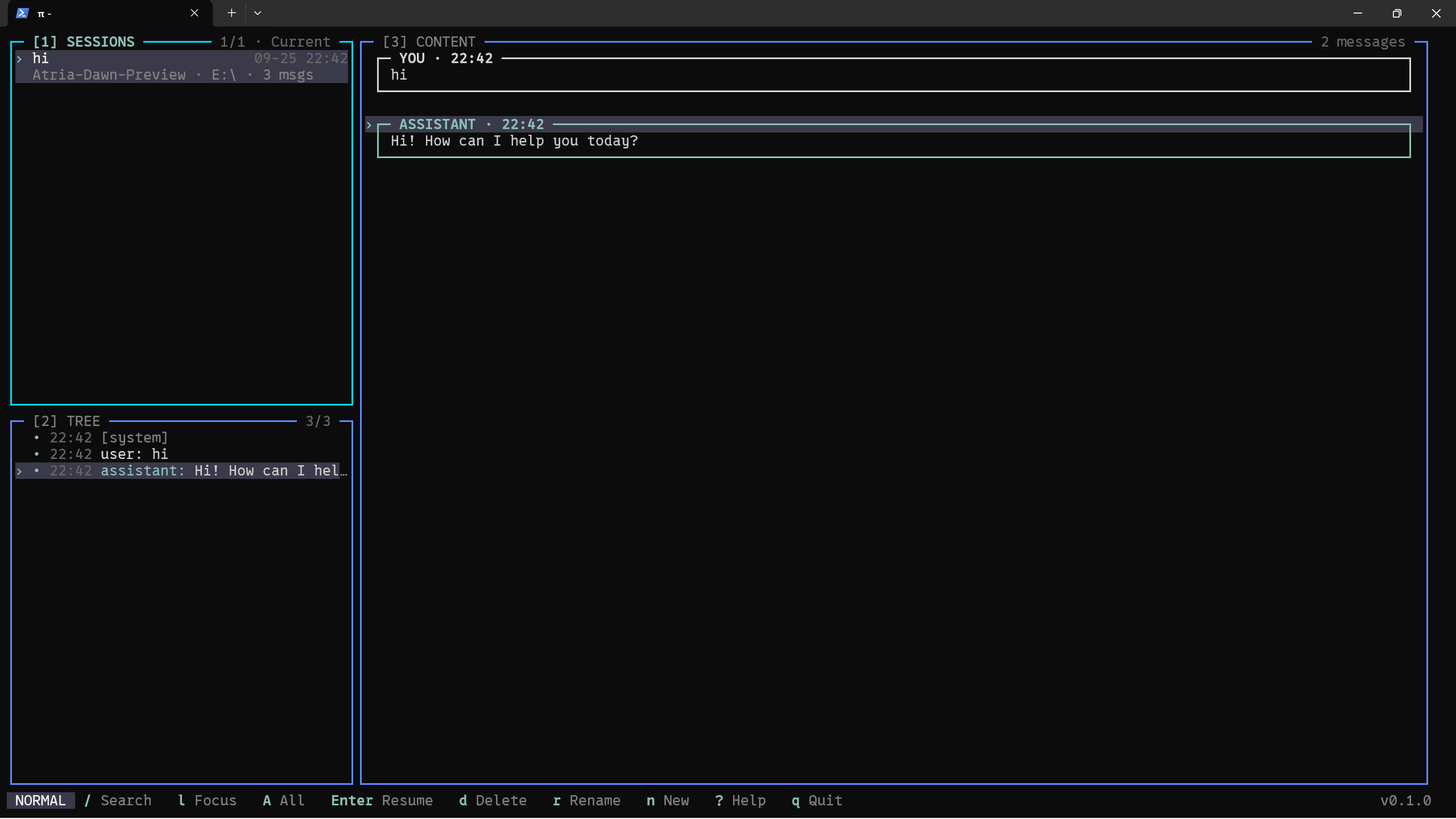
pi-lazy-panel is a panel for managing [pi](https://pi.dev) sessions and session trees, offering a lazygit-style workflow and TUI look. Once installed, run `/lazy-panel` inside pi to open a full-terminal three-pane interface:
|
|
6
|
+
|
|
7
|
+
- Top-left **SESSIONS**: the history of past sessions (mirrors `/resume`)
|
|
8
|
+
- Bottom-left **TREE**: the conversation tree of the selected session (mirrors `/tree`, switches automatically with the selection above)
|
|
9
|
+
- Right **CONTENT**: the conversation detail of the selected node, rendered with pi's native Markdown, distinguishing "me" from "AI"
|
|
10
|
+
|
|
11
|
+
The everyday session operations (new / resume / fork / clone / rename / delete / compact / export / import / share / copy) are all condensed into single-key shortcuts — no mouse required.
|
|
12
|
+
|
|
13
|
+
## Preview
|
|
14
|
+
|
|
15
|
+
|
|
16
|
+
|
|
17
|
+
## Features
|
|
18
|
+
|
|
19
|
+
1. Pure keyboard flow — most operations take a single key (hjkl to move, `d` to delete, `r` to rename, à la lazygit)
|
|
20
|
+
2. Three linked panes: SESSIONS → TREE → CONTENT cascade-refresh as the cursor moves
|
|
21
|
+
3. Full coverage of the session commands: resume / new / fork / clone / rename / delete / compact / export / import / share / copy
|
|
22
|
+
4. Session-tree navigation: restore to any node, choosing "No summary / Summarize / Summarize with custom prompt" for the abandoned branch
|
|
23
|
+
5. lazygit-style search: `/` jumps in place, `n` / `N` cycle, with `name:` `model:` `path:` `tag:` `role:` `after:` `before:` qualifiers
|
|
24
|
+
6. Theme follows pi automatically
|
|
25
|
+
7. Bilingual — English and Chinese (follows the system language, overridable in the config)
|
|
26
|
+
8. Fully customizable keybindings: rebind any action in `~/.pi/agent/lazy-panel.json`
|
|
27
|
+
9. Light mouse support (wheel to scroll, click to focus, double-click to enter / fold)
|
|
28
|
+
|
|
29
|
+
## Quick start
|
|
30
|
+
|
|
31
|
+
Requires [pi](https://pi.dev) to be installed. Run the install command inside pi:
|
|
32
|
+
|
|
33
|
+
```bash
|
|
34
|
+
# npm
|
|
35
|
+
pi install npm:pi-lazy-panel
|
|
36
|
+
|
|
37
|
+
# GitHub
|
|
38
|
+
pi install git:github.com/JessieChan0730/pi-lazy-panel
|
|
39
|
+
```
|
|
40
|
+
|
|
41
|
+
After installing, run `/lazy-panel` inside pi to open the panel; `?` shows all shortcuts for the current pane.
|
|
42
|
+
|
|
43
|
+
## Local development
|
|
44
|
+
|
|
45
|
+
The pi-related packages are `devDependencies`, so you must install dependencies after cloning:
|
|
46
|
+
|
|
47
|
+
```bash
|
|
48
|
+
npm install # install dependencies (pi packages included; not installed automatically by default)
|
|
49
|
+
npm run dev # load the plugin temporarily via pi -e ./src/index.ts, without writing config
|
|
50
|
+
npm run install:pi # pi install . registers this directory into pi (once only); after editing code, run /reload in pi to pick up the latest
|
|
51
|
+
```
|
|
52
|
+
|
|
53
|
+
Run the full check suite before committing (same as the pre-push hook):
|
|
54
|
+
|
|
55
|
+
```bash
|
|
56
|
+
npm run lint # ESLint
|
|
57
|
+
npm run check # tsc --noEmit
|
|
58
|
+
npm test # unit tests
|
|
59
|
+
npm run i18n:check # English/Chinese copy alignment
|
|
60
|
+
```
|
|
61
|
+
|
|
62
|
+
## Compatibility
|
|
63
|
+
|
|
64
|
+
- **Runtime**: Node.js ≥ 20.
|
|
65
|
+
- **pi version**: runs as a pi plugin, depending on pi's session API (`@earendil-works/pi-coding-agent`).
|
|
66
|
+
- **Run mode**: available only in pi's TUI mode (`/lazy-panel` refuses to open outside TUI mode).
|
|
67
|
+
- **OS**: cross-platform — Windows / macOS / Linux all work (paths are handled uniformly per platform).
|
|
68
|
+
- **Terminal**: mouse support in regular mode needs a terminal that supports SGR mouse reporting (virtually all modern terminals do); without it, keyboard operation is unaffected.
|
|
69
|
+
- **Optional external commands**: `/share` needs a logged-in GitHub CLI (`gh`); when deleting a session, `trash` is used if available (moving it to the recycle bin), otherwise the file is deleted directly.
|
|
70
|
+
|
|
71
|
+
## Configuration
|
|
72
|
+
|
|
73
|
+
The config file lives at `~/.pi/agent/lazy-panel.json`. Every field is optional and falls back to a built-in default when omitted:
|
|
74
|
+
|
|
75
|
+
```json
|
|
76
|
+
{
|
|
77
|
+
"locale": "zh",
|
|
78
|
+
"defaultScope": "all",
|
|
79
|
+
"defaultSort": "recent",
|
|
80
|
+
"leftColumnRatio": 0.25,
|
|
81
|
+
"keymap": {
|
|
82
|
+
"global": { "help": "F1", "scope-all": ["A", "ctrl+space"] },
|
|
83
|
+
"sessions": { "session-delete": "ctrl+d", "session-share": null }
|
|
84
|
+
}
|
|
85
|
+
}
|
|
86
|
+
```
|
|
87
|
+
|
|
88
|
+
| Field | Description | Values / range | Default |
|
|
89
|
+
| ----------------- | ------------------------------- | --------------------------------------------------- | ---------------------- |
|
|
90
|
+
| `locale` | UI language | `"en"` / `"zh"` | follows system language |
|
|
91
|
+
| `defaultScope` | session scope on open | `"current-folder"` / `"all"` | `"current-folder"` |
|
|
92
|
+
| `defaultSort` | session list ordering | `"recent"` / `"created"` / `"title"` / `"threaded"` | `"recent"` |
|
|
93
|
+
| `leftColumnRatio` | left column width ratio | `0.15` ~ `0.6` | `0.25` |
|
|
94
|
+
| `keymap` | custom keybindings | see below | built-in keys |
|
|
95
|
+
|
|
96
|
+
`keymap` is grouped by `scope` (`global` / `sessions` / `tree` / `content` / `tree-dialog`); the key is an action id and the value is one or more chords (e.g. `"ctrl+d"`, `["A", "ctrl+space"]`). A user-provided binding **replaces the action's default entirely**, and `null` unbinds it. See [docs/keybindings.md](./docs/keybindings.md) for the full list of action ids and keybindings.
|
|
97
|
+
|
|
98
|
+
## Next steps
|
|
99
|
+
|
|
100
|
+
- Add a settings panel
|
|
101
|
+
- Add multiple themes / custom themes
|
|
102
|
+
|
|
103
|
+
## Contributing
|
|
104
|
+
|
|
105
|
+
Contributions are welcome — see [CONTRIBUTING.md](./CONTRIBUTING.md) for the local setup, coding conventions and commit/PR flow.
|
|
106
|
+
|
|
107
|
+
## License
|
|
108
|
+
|
|
109
|
+
Licensed under the [MIT License](./LICENSE).
|
package/README.zh.md
CHANGED
|
@@ -1,104 +1,109 @@
|
|
|
1
|
-
[English](./README.md) | **中文**
|
|
2
|
-
|
|
3
|
-
## 简介
|
|
4
|
-
|
|
5
|
-
pi-lazy-panel 是 [pi](https://pi.dev) 会话和会话树管理的面板,提供类似于 lazygit 的操作方式和 TUI 风格。安装后在 pi 中执行 `/lazy-panel`,即可打开一个占满终端的三面板界面:
|
|
6
|
-
|
|
7
|
-
- 左上 **SESSIONS**:历史会话列表(对应 `/resume`)
|
|
8
|
-
- 左下 **TREE**:当前所选会话的对话树(对应 `/tree`,随上方选择自动切换)
|
|
9
|
-
- 右侧 **CONTENT**:所选节点的对话详情,用 pi 原生 Markdown 渲染,区分「我」和「AI」
|
|
10
|
-
|
|
11
|
-
围绕会话的常用操作(新建 / 恢复 / 分叉 / 克隆 / 改名 / 删除 / 压缩 / 导出 / 导入 / 分享 / 复制)都收敛成单键快捷键,全程无需鼠标。
|
|
12
|
-
|
|
13
|
-
## 界面预览
|
|
14
|
-
|
|
15
|
-

|
|
16
|
-
|
|
17
|
-
## 特点
|
|
18
|
-
|
|
19
|
-
1. 纯粹的键盘流,大部分的操作使用一个键就能完成(hjkl 移动、d 删除、r 改名,参考 lazygit)
|
|
20
|
-
2. 三面板联动:SESSIONS → TREE → CONTENT 随光标自动级联刷新
|
|
21
|
-
3. 覆盖全套会话命令:resume / new / fork / clone / rename / delete / compact / export / import / share / copy
|
|
22
|
-
4. 会话树导航:可恢复到任意节点,并选择「不摘要 / 摘要 / 自定义摘要」处理被放弃的分支
|
|
23
|
-
5. lazygit 风格搜索:`/` 就地跳转、`n` / `N` 循环,支持 `name:` `model:` `path:` `tag:` `role:` `after:` `before:` 限定词
|
|
24
|
-
6. 主题跟随 pi 自动切换
|
|
25
|
-
7. 支持中英文(跟随系统语言,可在配置里覆盖)
|
|
26
|
-
8. 快捷键完全可自定义:在 `~/.pi/agent/lazy-panel.json` 里重绑任意动作
|
|
27
|
-
9. 鼠标轻量适配(滚轮滚动、单击聚焦、双击进入 / 折叠)
|
|
28
|
-
|
|
29
|
-
## 快速开始
|
|
30
|
-
|
|
31
|
-
需要已安装 [pi](https://pi.dev),在 pi 中执行安装命令:
|
|
32
|
-
|
|
33
|
-
```bash
|
|
34
|
-
# npm
|
|
35
|
-
pi install npm:pi-lazy-panel
|
|
36
|
-
|
|
37
|
-
# GitHub
|
|
38
|
-
pi install git:github.com/JessieChan0730/pi-lazy-panel
|
|
39
|
-
```
|
|
40
|
-
|
|
41
|
-
安装后在 pi 里执行 `/lazy-panel` 打开面板,`?` 可查看当前面板的全部快捷键。
|
|
42
|
-
|
|
43
|
-
## 本地开发
|
|
44
|
-
|
|
45
|
-
pi 相关的包是 `devDependencies`,克隆后必须先安装依赖:
|
|
46
|
-
|
|
47
|
-
```bash
|
|
48
|
-
npm install # 安装依赖(含 pi 相关包,默认不会自动装)
|
|
49
|
-
npm run dev # 用 pi -e ./src/index.ts 临时加载插件,不写配置
|
|
50
|
-
npm run install:pi # pi install . 把本目录注册进 pi,只需一次;改完代码在 pi 里 /reload 即最新
|
|
51
|
-
```
|
|
52
|
-
|
|
53
|
-
提交前请跑全部检查(与 pre-push 钩子一致):
|
|
54
|
-
|
|
55
|
-
```bash
|
|
56
|
-
npm run lint # ESLint
|
|
57
|
-
npm run check # tsc --noEmit
|
|
58
|
-
npm test # 单元测试
|
|
59
|
-
npm run i18n:check # 中英文案对齐
|
|
60
|
-
```
|
|
61
|
-
|
|
62
|
-
## 兼容性
|
|
63
|
-
|
|
64
|
-
- **运行环境**:Node.js ≥ 20。
|
|
65
|
-
- **pi 版本**:作为 pi 插件运行,依赖 pi 的会话 API(`@earendil-works/pi-coding-agent`)。
|
|
66
|
-
- **运行模式**:仅在 pi 的 TUI 模式下可用(非 TUI 模式下 `/lazy-panel` 会拒绝打开)。
|
|
67
|
-
- **操作系统**:跨平台,Windows / macOS / Linux 均可(路径按平台统一处理)。
|
|
68
|
-
- **终端**:regular 模式下的鼠标支持需要终端支持 SGR 鼠标上报(现代终端基本都支持);不支持也不影响键盘操作。
|
|
69
|
-
- **可选外部命令**:`/share` 需要已登录的 GitHub CLI(`gh`);删除会话时若存在 `trash` 则移入回收站,否则直接删除。
|
|
70
|
-
|
|
71
|
-
## 配置文件
|
|
72
|
-
|
|
73
|
-
配置文件位于 `~/.pi/agent/lazy-panel.json`,所有字段均为可选,缺省时使用内置默认值:
|
|
74
|
-
|
|
75
|
-
```json
|
|
76
|
-
{
|
|
77
|
-
"locale": "zh",
|
|
78
|
-
"defaultScope": "all",
|
|
79
|
-
"defaultSort": "recent",
|
|
80
|
-
"leftColumnRatio": 0.25,
|
|
81
|
-
"keymap": {
|
|
82
|
-
"global": { "help": "F1", "scope-all": ["A", "ctrl+space"] },
|
|
83
|
-
"sessions": { "session-delete": "ctrl+d", "session-share": null }
|
|
84
|
-
}
|
|
85
|
-
}
|
|
86
|
-
```
|
|
87
|
-
|
|
88
|
-
| 字段 | 说明 | 可选值 / 范围 | 默认 |
|
|
89
|
-
| ----------------- | ---------------- | --------------------------------------------------- | ------------------ |
|
|
90
|
-
| `locale` | UI 语言 | `"en"` / `"zh"` | 跟随系统语言 |
|
|
91
|
-
| `defaultScope` | 打开时的会话范围 | `"current-folder"` / `"all"` | `"current-folder"` |
|
|
92
|
-
| `defaultSort` | 会话列表排序 | `"recent"` / `"created"` / `"title"` / `"threaded"` | `"recent"` |
|
|
93
|
-
| `leftColumnRatio` | 左侧列宽占比 | `0.15` ~ `0.6` | `0.25` |
|
|
94
|
-
| `keymap` | 自定义快捷键 | 见下 | 内置键位 |
|
|
95
|
-
|
|
96
|
-
`keymap` 按 `scope`(`global` / `sessions` / `tree` / `content` / `tree-dialog`)分组,键为动作 id、值为一个或多个 chord(如 `"ctrl+d"`、`["A", "ctrl+space"]`);用户提供的键位**整体替换**该动作的默认值,`null` 表示解绑。完整的动作 id 与键位说明见 [docs/keybindings.zh.md](./docs/keybindings.zh.md)。
|
|
97
|
-
|
|
98
|
-
##
|
|
99
|
-
|
|
100
|
-
|
|
101
|
-
|
|
102
|
-
|
|
103
|
-
|
|
104
|
-
|
|
1
|
+
[English](./README.md) | **中文**
|
|
2
|
+
|
|
3
|
+
## 简介
|
|
4
|
+
|
|
5
|
+
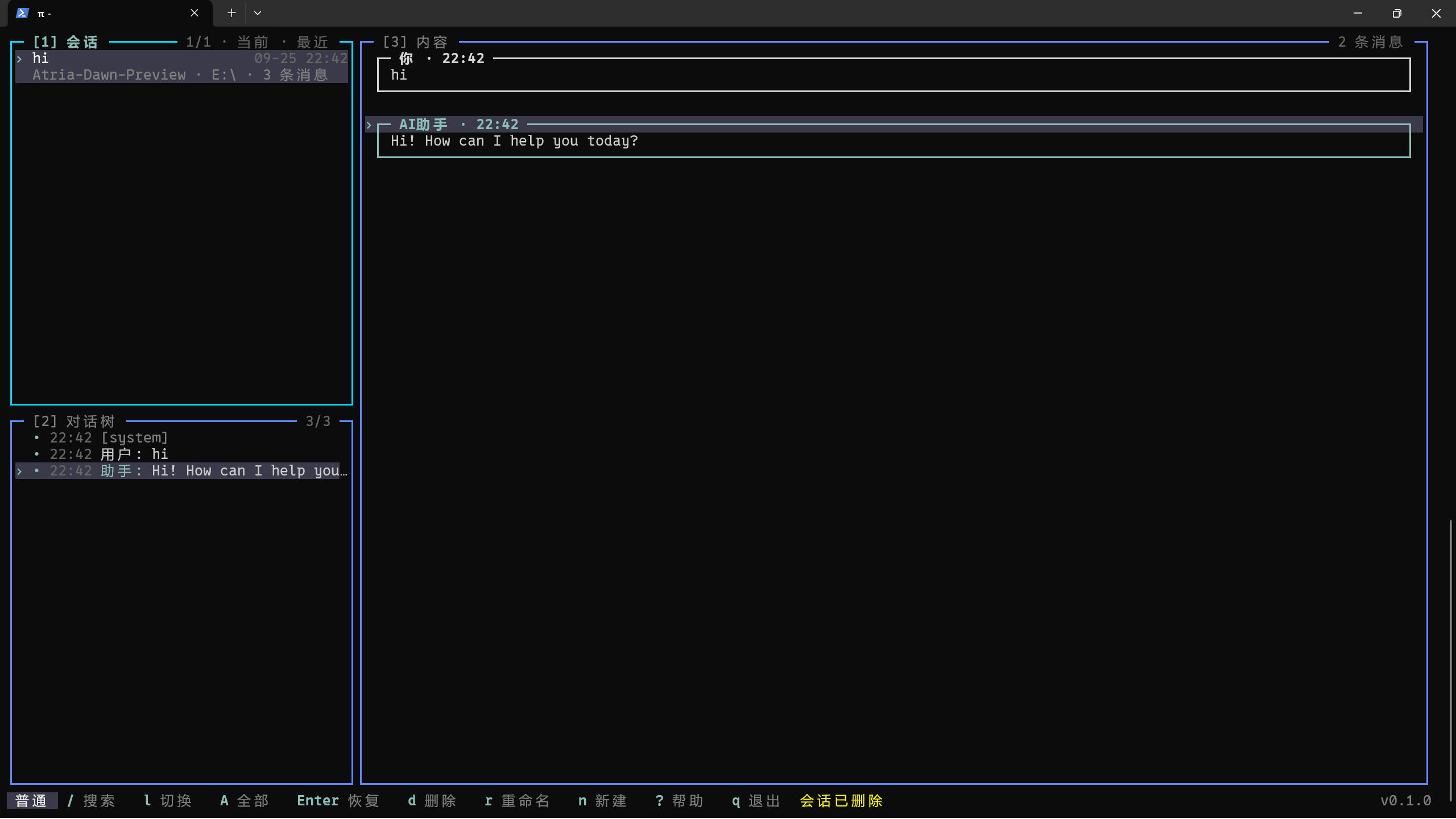
pi-lazy-panel 是 [pi](https://pi.dev) 会话和会话树管理的面板,提供类似于 lazygit 的操作方式和 TUI 风格。安装后在 pi 中执行 `/lazy-panel`,即可打开一个占满终端的三面板界面:
|
|
6
|
+
|
|
7
|
+
- 左上 **SESSIONS**:历史会话列表(对应 `/resume`)
|
|
8
|
+
- 左下 **TREE**:当前所选会话的对话树(对应 `/tree`,随上方选择自动切换)
|
|
9
|
+
- 右侧 **CONTENT**:所选节点的对话详情,用 pi 原生 Markdown 渲染,区分「我」和「AI」
|
|
10
|
+
|
|
11
|
+
围绕会话的常用操作(新建 / 恢复 / 分叉 / 克隆 / 改名 / 删除 / 压缩 / 导出 / 导入 / 分享 / 复制)都收敛成单键快捷键,全程无需鼠标。
|
|
12
|
+
|
|
13
|
+
## 界面预览
|
|
14
|
+
|
|
15
|
+
|
|
16
|
+
|
|
17
|
+
## 特点
|
|
18
|
+
|
|
19
|
+
1. 纯粹的键盘流,大部分的操作使用一个键就能完成(hjkl 移动、d 删除、r 改名,参考 lazygit)
|
|
20
|
+
2. 三面板联动:SESSIONS → TREE → CONTENT 随光标自动级联刷新
|
|
21
|
+
3. 覆盖全套会话命令:resume / new / fork / clone / rename / delete / compact / export / import / share / copy
|
|
22
|
+
4. 会话树导航:可恢复到任意节点,并选择「不摘要 / 摘要 / 自定义摘要」处理被放弃的分支
|
|
23
|
+
5. lazygit 风格搜索:`/` 就地跳转、`n` / `N` 循环,支持 `name:` `model:` `path:` `tag:` `role:` `after:` `before:` 限定词
|
|
24
|
+
6. 主题跟随 pi 自动切换
|
|
25
|
+
7. 支持中英文(跟随系统语言,可在配置里覆盖)
|
|
26
|
+
8. 快捷键完全可自定义:在 `~/.pi/agent/lazy-panel.json` 里重绑任意动作
|
|
27
|
+
9. 鼠标轻量适配(滚轮滚动、单击聚焦、双击进入 / 折叠)
|
|
28
|
+
|
|
29
|
+
## 快速开始
|
|
30
|
+
|
|
31
|
+
需要已安装 [pi](https://pi.dev),在 pi 中执行安装命令:
|
|
32
|
+
|
|
33
|
+
```bash
|
|
34
|
+
# npm
|
|
35
|
+
pi install npm:pi-lazy-panel
|
|
36
|
+
|
|
37
|
+
# GitHub
|
|
38
|
+
pi install git:github.com/JessieChan0730/pi-lazy-panel
|
|
39
|
+
```
|
|
40
|
+
|
|
41
|
+
安装后在 pi 里执行 `/lazy-panel` 打开面板,`?` 可查看当前面板的全部快捷键。
|
|
42
|
+
|
|
43
|
+
## 本地开发
|
|
44
|
+
|
|
45
|
+
pi 相关的包是 `devDependencies`,克隆后必须先安装依赖:
|
|
46
|
+
|
|
47
|
+
```bash
|
|
48
|
+
npm install # 安装依赖(含 pi 相关包,默认不会自动装)
|
|
49
|
+
npm run dev # 用 pi -e ./src/index.ts 临时加载插件,不写配置
|
|
50
|
+
npm run install:pi # pi install . 把本目录注册进 pi,只需一次;改完代码在 pi 里 /reload 即最新
|
|
51
|
+
```
|
|
52
|
+
|
|
53
|
+
提交前请跑全部检查(与 pre-push 钩子一致):
|
|
54
|
+
|
|
55
|
+
```bash
|
|
56
|
+
npm run lint # ESLint
|
|
57
|
+
npm run check # tsc --noEmit
|
|
58
|
+
npm test # 单元测试
|
|
59
|
+
npm run i18n:check # 中英文案对齐
|
|
60
|
+
```
|
|
61
|
+
|
|
62
|
+
## 兼容性
|
|
63
|
+
|
|
64
|
+
- **运行环境**:Node.js ≥ 20。
|
|
65
|
+
- **pi 版本**:作为 pi 插件运行,依赖 pi 的会话 API(`@earendil-works/pi-coding-agent`)。
|
|
66
|
+
- **运行模式**:仅在 pi 的 TUI 模式下可用(非 TUI 模式下 `/lazy-panel` 会拒绝打开)。
|
|
67
|
+
- **操作系统**:跨平台,Windows / macOS / Linux 均可(路径按平台统一处理)。
|
|
68
|
+
- **终端**:regular 模式下的鼠标支持需要终端支持 SGR 鼠标上报(现代终端基本都支持);不支持也不影响键盘操作。
|
|
69
|
+
- **可选外部命令**:`/share` 需要已登录的 GitHub CLI(`gh`);删除会话时若存在 `trash` 则移入回收站,否则直接删除。
|
|
70
|
+
|
|
71
|
+
## 配置文件
|
|
72
|
+
|
|
73
|
+
配置文件位于 `~/.pi/agent/lazy-panel.json`,所有字段均为可选,缺省时使用内置默认值:
|
|
74
|
+
|
|
75
|
+
```json
|
|
76
|
+
{
|
|
77
|
+
"locale": "zh",
|
|
78
|
+
"defaultScope": "all",
|
|
79
|
+
"defaultSort": "recent",
|
|
80
|
+
"leftColumnRatio": 0.25,
|
|
81
|
+
"keymap": {
|
|
82
|
+
"global": { "help": "F1", "scope-all": ["A", "ctrl+space"] },
|
|
83
|
+
"sessions": { "session-delete": "ctrl+d", "session-share": null }
|
|
84
|
+
}
|
|
85
|
+
}
|
|
86
|
+
```
|
|
87
|
+
|
|
88
|
+
| 字段 | 说明 | 可选值 / 范围 | 默认 |
|
|
89
|
+
| ----------------- | ---------------- | --------------------------------------------------- | ------------------ |
|
|
90
|
+
| `locale` | UI 语言 | `"en"` / `"zh"` | 跟随系统语言 |
|
|
91
|
+
| `defaultScope` | 打开时的会话范围 | `"current-folder"` / `"all"` | `"current-folder"` |
|
|
92
|
+
| `defaultSort` | 会话列表排序 | `"recent"` / `"created"` / `"title"` / `"threaded"` | `"recent"` |
|
|
93
|
+
| `leftColumnRatio` | 左侧列宽占比 | `0.15` ~ `0.6` | `0.25` |
|
|
94
|
+
| `keymap` | 自定义快捷键 | 见下 | 内置键位 |
|
|
95
|
+
|
|
96
|
+
`keymap` 按 `scope`(`global` / `sessions` / `tree` / `content` / `tree-dialog`)分组,键为动作 id、值为一个或多个 chord(如 `"ctrl+d"`、`["A", "ctrl+space"]`);用户提供的键位**整体替换**该动作的默认值,`null` 表示解绑。完整的动作 id 与键位说明见 [docs/keybindings.zh.md](./docs/keybindings.zh.md)。
|
|
97
|
+
|
|
98
|
+
## 下一步计划
|
|
99
|
+
|
|
100
|
+
- 添加设置面板
|
|
101
|
+
- 添加多主题 / 自定义主题
|
|
102
|
+
|
|
103
|
+
## 贡献
|
|
104
|
+
|
|
105
|
+
欢迎贡献代码——本地环境、代码规范与提交 / PR 流程见 [CONTRIBUTING.zh.md](./CONTRIBUTING.zh.md)。
|
|
106
|
+
|
|
107
|
+
## License
|
|
108
|
+
|
|
109
|
+
基于 [MIT 许可证](./LICENSE)授权。
|