pi-image-tools 1.0.4 → 1.0.5
This diff represents the content of publicly available package versions that have been released to one of the supported registries. The information contained in this diff is provided for informational purposes only and reflects changes between package versions as they appear in their respective public registries.
- package/CHANGELOG.md +37 -37
- package/LICENSE +21 -21
- package/README.md +244 -244
- package/config/config.example.json +3 -3
- package/index.ts +3 -3
- package/package.json +9 -1
- package/src/clipboard.ts +385 -385
- package/src/commands.ts +79 -79
- package/src/image-preview.ts +469 -469
- package/src/index.ts +252 -252
- package/src/inline-user-preview.ts +354 -354
- package/src/keybindings.ts +21 -21
- package/src/recent-images.ts +508 -508
- package/src/temp-file.ts +82 -82
- package/src/types.ts +20 -20
package/CHANGELOG.md
CHANGED
|
@@ -1,37 +1,37 @@
|
|
|
1
|
-
# Changelog
|
|
2
|
-
|
|
3
|
-
## [1.0.4] - 2026-03-07
|
|
4
|
-
|
|
5
|
-
### Added
|
|
6
|
-
- Added Linux clipboard image support via `wl-paste` and `xclip` fallback readers.
|
|
7
|
-
- Added Linux and macOS default recent-image discovery locations so the recent picker works beyond Windows.
|
|
8
|
-
- Added non-Windows image paste shortcuts including `Ctrl+V` in addition to the existing alternate bindings.
|
|
9
|
-
|
|
10
|
-
### Changed
|
|
11
|
-
- Updated README documentation to reflect current cross-platform support, clipboard backends, recent-image discovery behavior, and inline preview details.
|
|
12
|
-
|
|
13
|
-
### Fixed
|
|
14
|
-
- Removed the Windows-only extension gate so supported non-Windows platforms can register commands and shortcuts.
|
|
15
|
-
- Preserved Kitty and iTerm inline image protocol rows during preview width fitting, alongside the existing Sixel-safe handling.
|
|
16
|
-
- Improved clipboard reader error handling so unsupported environments report missing backends more clearly.
|
|
17
|
-
|
|
18
|
-
## [1.0.3] - 2026-03-04
|
|
19
|
-
|
|
20
|
-
### Fixed
|
|
21
|
-
- Use absolute GitHub raw URL for README image to fix npm display
|
|
22
|
-
|
|
23
|
-
## [1.0.2] - 2026-03-04
|
|
24
|
-
|
|
25
|
-
### Changed
|
|
26
|
-
- Rewrote README.md with professional documentation standards
|
|
27
|
-
- Added comprehensive feature documentation, configuration reference, and usage examples
|
|
28
|
-
|
|
29
|
-
## 1.0.1
|
|
30
|
-
|
|
31
|
-
- Included `asset/` in the npm package whitelist so README image assets ship in the tarball.
|
|
32
|
-
|
|
33
|
-
## 1.0.0
|
|
34
|
-
|
|
35
|
-
- Standardized repository layout to `src/` + root shim entrypoint.
|
|
36
|
-
- Added TypeScript/Bundler project config, package metadata, and publish whitelist.
|
|
37
|
-
- Added standard docs, license, and config template/runtime placeholder files.
|
|
1
|
+
# Changelog
|
|
2
|
+
|
|
3
|
+
## [1.0.4] - 2026-03-07
|
|
4
|
+
|
|
5
|
+
### Added
|
|
6
|
+
- Added Linux clipboard image support via `wl-paste` and `xclip` fallback readers.
|
|
7
|
+
- Added Linux and macOS default recent-image discovery locations so the recent picker works beyond Windows.
|
|
8
|
+
- Added non-Windows image paste shortcuts including `Ctrl+V` in addition to the existing alternate bindings.
|
|
9
|
+
|
|
10
|
+
### Changed
|
|
11
|
+
- Updated README documentation to reflect current cross-platform support, clipboard backends, recent-image discovery behavior, and inline preview details.
|
|
12
|
+
|
|
13
|
+
### Fixed
|
|
14
|
+
- Removed the Windows-only extension gate so supported non-Windows platforms can register commands and shortcuts.
|
|
15
|
+
- Preserved Kitty and iTerm inline image protocol rows during preview width fitting, alongside the existing Sixel-safe handling.
|
|
16
|
+
- Improved clipboard reader error handling so unsupported environments report missing backends more clearly.
|
|
17
|
+
|
|
18
|
+
## [1.0.3] - 2026-03-04
|
|
19
|
+
|
|
20
|
+
### Fixed
|
|
21
|
+
- Use absolute GitHub raw URL for README image to fix npm display
|
|
22
|
+
|
|
23
|
+
## [1.0.2] - 2026-03-04
|
|
24
|
+
|
|
25
|
+
### Changed
|
|
26
|
+
- Rewrote README.md with professional documentation standards
|
|
27
|
+
- Added comprehensive feature documentation, configuration reference, and usage examples
|
|
28
|
+
|
|
29
|
+
## 1.0.1
|
|
30
|
+
|
|
31
|
+
- Included `asset/` in the npm package whitelist so README image assets ship in the tarball.
|
|
32
|
+
|
|
33
|
+
## 1.0.0
|
|
34
|
+
|
|
35
|
+
- Standardized repository layout to `src/` + root shim entrypoint.
|
|
36
|
+
- Added TypeScript/Bundler project config, package metadata, and publish whitelist.
|
|
37
|
+
- Added standard docs, license, and config template/runtime placeholder files.
|
package/LICENSE
CHANGED
|
@@ -1,21 +1,21 @@
|
|
|
1
|
-
MIT License
|
|
2
|
-
|
|
3
|
-
Copyright (c) 2026 MasuRii
|
|
4
|
-
|
|
5
|
-
Permission is hereby granted, free of charge, to any person obtaining a copy
|
|
6
|
-
of this software and associated documentation files (the "Software"), to deal
|
|
7
|
-
in the Software without restriction, including without limitation the rights
|
|
8
|
-
to use, copy, modify, merge, publish, distribute, sublicense, and/or sell
|
|
9
|
-
copies of the Software, and to permit persons to whom the Software is
|
|
10
|
-
furnished to do so, subject to the following conditions:
|
|
11
|
-
|
|
12
|
-
The above copyright notice and this permission notice shall be included in all
|
|
13
|
-
copies or substantial portions of the Software.
|
|
14
|
-
|
|
15
|
-
THE SOFTWARE IS PROVIDED "AS IS", WITHOUT WARRANTY OF ANY KIND, EXPRESS OR
|
|
16
|
-
IMPLIED, INCLUDING BUT NOT LIMITED TO THE WARRANTIES OF MERCHANTABILITY,
|
|
17
|
-
FITNESS FOR A PARTICULAR PURPOSE AND NONINFRINGEMENT. IN NO EVENT SHALL THE
|
|
18
|
-
AUTHORS OR COPYRIGHT HOLDERS BE LIABLE FOR ANY CLAIM, DAMAGES OR OTHER
|
|
19
|
-
LIABILITY, WHETHER IN AN ACTION OF CONTRACT, TORT OR OTHERWISE, ARISING FROM,
|
|
20
|
-
OUT OF OR IN CONNECTION WITH THE SOFTWARE OR THE USE OR OTHER DEALINGS IN THE
|
|
21
|
-
SOFTWARE.
|
|
1
|
+
MIT License
|
|
2
|
+
|
|
3
|
+
Copyright (c) 2026 MasuRii
|
|
4
|
+
|
|
5
|
+
Permission is hereby granted, free of charge, to any person obtaining a copy
|
|
6
|
+
of this software and associated documentation files (the "Software"), to deal
|
|
7
|
+
in the Software without restriction, including without limitation the rights
|
|
8
|
+
to use, copy, modify, merge, publish, distribute, sublicense, and/or sell
|
|
9
|
+
copies of the Software, and to permit persons to whom the Software is
|
|
10
|
+
furnished to do so, subject to the following conditions:
|
|
11
|
+
|
|
12
|
+
The above copyright notice and this permission notice shall be included in all
|
|
13
|
+
copies or substantial portions of the Software.
|
|
14
|
+
|
|
15
|
+
THE SOFTWARE IS PROVIDED "AS IS", WITHOUT WARRANTY OF ANY KIND, EXPRESS OR
|
|
16
|
+
IMPLIED, INCLUDING BUT NOT LIMITED TO THE WARRANTIES OF MERCHANTABILITY,
|
|
17
|
+
FITNESS FOR A PARTICULAR PURPOSE AND NONINFRINGEMENT. IN NO EVENT SHALL THE
|
|
18
|
+
AUTHORS OR COPYRIGHT HOLDERS BE LIABLE FOR ANY CLAIM, DAMAGES OR OTHER
|
|
19
|
+
LIABILITY, WHETHER IN AN ACTION OF CONTRACT, TORT OR OTHERWISE, ARISING FROM,
|
|
20
|
+
OUT OF OR IN CONNECTION WITH THE SOFTWARE OR THE USE OR OTHER DEALINGS IN THE
|
|
21
|
+
SOFTWARE.
|
package/README.md
CHANGED
|
@@ -1,244 +1,244 @@
|
|
|
1
|
-
# 🖼️ pi-image-tools
|
|
2
|
-
|
|
3
|
-
Image attachment and preview extension for the **Pi coding agent**.
|
|
4
|
-
|
|
5
|
-
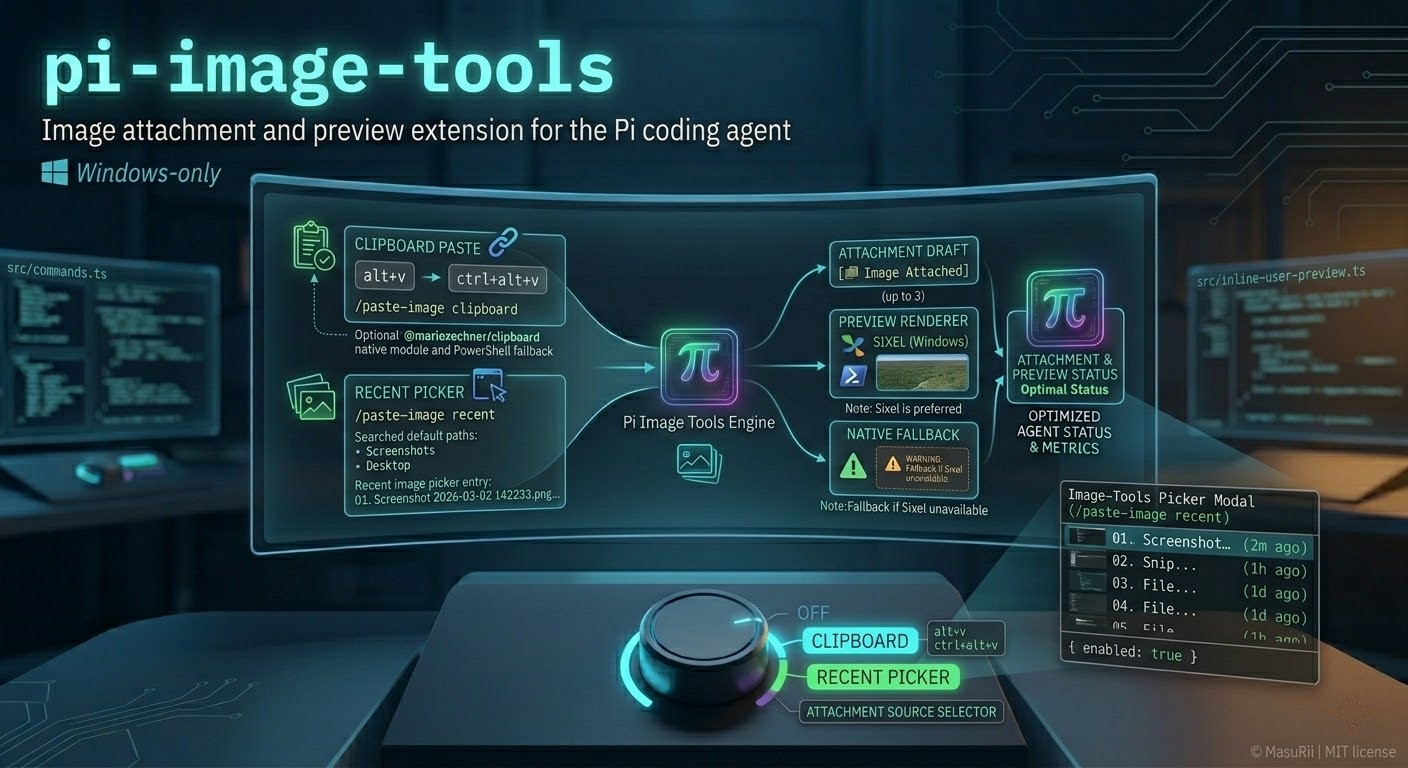
`pi-image-tools` lets you attach clipboard images or recent screenshots to your next user message, then preview them inline in the TUI before the message is sent.
|
|
6
|
-
|
|
7
|
-
|
|
8
|
-
|
|
9
|
-
## Features
|
|
10
|
-
|
|
11
|
-
- **Clipboard image attach** with `/paste-image` and keyboard shortcuts
|
|
12
|
-
- **Recent image picker** for screenshots and cached clipboard images
|
|
13
|
-
- **Inline preview rendering** in the TUI chat before the message is sent
|
|
14
|
-
- **Cross-platform recent image discovery** for Windows, Linux, and macOS
|
|
15
|
-
- **Multiple clipboard backends** with platform-specific fallbacks
|
|
16
|
-
- **Recent-cache persistence** so clipboard images also appear in the recent picker
|
|
17
|
-
- **Terminal image safety** that preserves inline image protocol rows during width fitting
|
|
18
|
-
|
|
19
|
-
## Platform support
|
|
20
|
-
|
|
21
|
-
| Platform | Clipboard paste | Recent image picker | Notes |
|
|
22
|
-
|----------|-----------------|---------------------|-------|
|
|
23
|
-
| Windows | Yes | Yes | Uses native clipboard module first, then PowerShell fallback |
|
|
24
|
-
| Linux | Yes | Yes | Requires a graphical session; uses `wl-paste` or `xclip`, then native module fallback |
|
|
25
|
-
| macOS | Yes* | Yes | Clipboard paste depends on `@mariozechner/clipboard` being available |
|
|
26
|
-
| Termux / headless Linux | No | Limited | Clipboard image paste is disabled without a graphical session |
|
|
27
|
-
|
|
28
|
-
\* macOS clipboard image support relies on the optional native clipboard module.
|
|
29
|
-
|
|
30
|
-
## Installation
|
|
31
|
-
|
|
32
|
-
### Extension folder
|
|
33
|
-
|
|
34
|
-
Place this folder in one of these locations:
|
|
35
|
-
|
|
36
|
-
| Scope | Path |
|
|
37
|
-
|-------|------|
|
|
38
|
-
| Global | `~/.pi/agent/extensions/pi-image-tools` |
|
|
39
|
-
| Project | `.pi/extensions/pi-image-tools` |
|
|
40
|
-
|
|
41
|
-
Pi auto-discovers extensions in those paths.
|
|
42
|
-
|
|
43
|
-
### Via npm
|
|
44
|
-
|
|
45
|
-
```bash
|
|
46
|
-
pi install npm:pi-image-tools
|
|
47
|
-
```
|
|
48
|
-
|
|
49
|
-
### Via Git
|
|
50
|
-
|
|
51
|
-
```bash
|
|
52
|
-
pi install git:github.com/MasuRii/pi-image-tools
|
|
53
|
-
```
|
|
54
|
-
|
|
55
|
-
## Usage
|
|
56
|
-
|
|
57
|
-
### Commands
|
|
58
|
-
|
|
59
|
-
#### Paste from clipboard
|
|
60
|
-
|
|
61
|
-
```text
|
|
62
|
-
/paste-image clipboard
|
|
63
|
-
```
|
|
64
|
-
|
|
65
|
-
or simply:
|
|
66
|
-
|
|
67
|
-
```text
|
|
68
|
-
/paste-image
|
|
69
|
-
```
|
|
70
|
-
|
|
71
|
-
This reads an image from your clipboard and queues it for attachment. A marker (`[ Image Attached]`) is inserted into your draft. When you send the message, the marker is removed and the image payload is attached.
|
|
72
|
-
|
|
73
|
-
> Remove all markers from the draft before sending if you want to discard pending images.
|
|
74
|
-
|
|
75
|
-
#### Paste from recent images
|
|
76
|
-
|
|
77
|
-
```text
|
|
78
|
-
/paste-image recent
|
|
79
|
-
```
|
|
80
|
-
|
|
81
|
-
This opens an interactive picker showing recent screenshots and cached clipboard images.
|
|
82
|
-
|
|
83
|
-
Example entry:
|
|
84
|
-
|
|
85
|
-
```text
|
|
86
|
-
01. Screenshot 2026-03-02 142233.png • 2m ago • 412 KB • C:\Users\...\Pictures\Screenshots\...
|
|
87
|
-
```
|
|
88
|
-
|
|
89
|
-
Selecting an entry queues that image for your next message.
|
|
90
|
-
|
|
91
|
-
### Keyboard shortcuts
|
|
92
|
-
|
|
93
|
-
| Platform | Shortcuts |
|
|
94
|
-
|----------|-----------|
|
|
95
|
-
| Windows | `Alt+V`, `Ctrl+Alt+V` |
|
|
96
|
-
| Linux / macOS | `Ctrl+V`, `Alt+V`, `Ctrl+Alt+V` |
|
|
97
|
-
|
|
98
|
-
## Configuration
|
|
99
|
-
|
|
100
|
-
### Environment variables
|
|
101
|
-
|
|
102
|
-
| Variable | Description | Default |
|
|
103
|
-
|----------|-------------|---------|
|
|
104
|
-
| `PI_IMAGE_TOOLS_RECENT_DIRS` | Semicolon-separated directories to search for recent images | Platform defaults listed below |
|
|
105
|
-
| `PI_IMAGE_TOOLS_RECENT_CACHE_DIR` | Custom cache directory for clipboard-pasted images | OS temp dir + `pi-image-tools/recent-cache` |
|
|
106
|
-
|
|
107
|
-
Example:
|
|
108
|
-
|
|
109
|
-
```powershell
|
|
110
|
-
$env:PI_IMAGE_TOOLS_RECENT_DIRS = "C:\Users\me\Pictures\Screenshots;D:\Shares\Screens"
|
|
111
|
-
```
|
|
112
|
-
|
|
113
|
-
### Runtime config
|
|
114
|
-
|
|
115
|
-
A config file can be placed at:
|
|
116
|
-
|
|
117
|
-
```text
|
|
118
|
-
~/.pi/agent/extensions/pi-image-tools/config.json
|
|
119
|
-
```
|
|
120
|
-
|
|
121
|
-
Starter template:
|
|
122
|
-
|
|
123
|
-
```json
|
|
124
|
-
{
|
|
125
|
-
"enabled": true
|
|
126
|
-
}
|
|
127
|
-
```
|
|
128
|
-
|
|
129
|
-
See `config/config.example.json` for the same template.
|
|
130
|
-
|
|
131
|
-
## Default recent-image search locations
|
|
132
|
-
|
|
133
|
-
### Windows
|
|
134
|
-
|
|
135
|
-
1. Cache directory for clipboard-pasted images
|
|
136
|
-
2. `~/Pictures/Screenshots`
|
|
137
|
-
3. `~/OneDrive/Pictures/Screenshots`
|
|
138
|
-
4. `~/Desktop` filtered to screenshot-like names
|
|
139
|
-
|
|
140
|
-
### Linux
|
|
141
|
-
|
|
142
|
-
1. Cache directory for clipboard-pasted images
|
|
143
|
-
2. `~/Pictures/Screenshots`
|
|
144
|
-
3. `~/Pictures` filtered to screenshot-like names
|
|
145
|
-
4. `~/Downloads` filtered to screenshot-like names
|
|
146
|
-
5. `~/Desktop` filtered to screenshot-like names
|
|
147
|
-
|
|
148
|
-
### macOS
|
|
149
|
-
|
|
150
|
-
1. Cache directory for clipboard-pasted images
|
|
151
|
-
2. `~/Desktop` filtered to screenshot-like names
|
|
152
|
-
3. `~/Downloads` filtered to screenshot-like names
|
|
153
|
-
4. `~/Pictures/Screenshots`
|
|
154
|
-
5. `~/Pictures` filtered to screenshot-like names
|
|
155
|
-
|
|
156
|
-
Supported image formats:
|
|
157
|
-
- `.png`
|
|
158
|
-
- `.jpg`
|
|
159
|
-
- `.jpeg`
|
|
160
|
-
- `.webp`
|
|
161
|
-
- `.gif`
|
|
162
|
-
- `.bmp`
|
|
163
|
-
|
|
164
|
-
## Rendering details
|
|
165
|
-
|
|
166
|
-
### Inline user preview
|
|
167
|
-
|
|
168
|
-
When you queue one or more images, the extension renders an inline preview inside the user message area.
|
|
169
|
-
|
|
170
|
-
Preview behavior:
|
|
171
|
-
- up to **3 images** are previewed per message
|
|
172
|
-
- Sixel rendering is attempted on Windows when available
|
|
173
|
-
- native TUI image rendering is used as the fallback
|
|
174
|
-
- inline width fitting now preserves Sixel, Kitty, and iTerm image protocol rows instead of truncating them like plain text
|
|
175
|
-
|
|
176
|
-
### Clipboard readers
|
|
177
|
-
|
|
178
|
-
`pi-image-tools` uses the first available clipboard backend for the current platform:
|
|
179
|
-
|
|
180
|
-
- **Windows**
|
|
181
|
-
- `@mariozechner/clipboard`
|
|
182
|
-
- PowerShell `System.Windows.Forms.Clipboard`
|
|
183
|
-
- **Linux**
|
|
184
|
-
- `wl-paste` (`wl-clipboard`) in Wayland sessions
|
|
185
|
-
- `xclip` in X11 sessions
|
|
186
|
-
- `@mariozechner/clipboard` fallback
|
|
187
|
-
- **macOS**
|
|
188
|
-
- `@mariozechner/clipboard`
|
|
189
|
-
|
|
190
|
-
If a platform-specific reader exists but no image is currently on the clipboard, the command returns a normal “No image found in clipboard” message. If no usable reader exists at all, the extension surfaces a setup-oriented error.
|
|
191
|
-
|
|
192
|
-
## Project structure
|
|
193
|
-
|
|
194
|
-
```text
|
|
195
|
-
pi-image-tools/
|
|
196
|
-
├── index.ts # Root entrypoint for Pi auto-discovery
|
|
197
|
-
├── src/
|
|
198
|
-
│ ├── index.ts # Extension bootstrap and message flow
|
|
199
|
-
│ ├── commands.ts # /paste-image command registration
|
|
200
|
-
│ ├── clipboard.ts # Cross-platform clipboard image reading
|
|
201
|
-
│ ├── recent-images.ts # Recent image discovery and cache management
|
|
202
|
-
│ ├── image-preview.ts # Preview building and Sixel/native rendering
|
|
203
|
-
│ ├── inline-user-preview.ts # Inline preview patching for user messages
|
|
204
|
-
│ ├── keybindings.ts # Keyboard shortcut registration
|
|
205
|
-
│ ├── temp-file.ts # Temporary file management and cleanup
|
|
206
|
-
│ └── types.ts # Shared TypeScript types
|
|
207
|
-
├── config/
|
|
208
|
-
│ └── config.example.json # Starter runtime config
|
|
209
|
-
└── asset/
|
|
210
|
-
└── pi-image-tools.png # README preview image
|
|
211
|
-
```
|
|
212
|
-
|
|
213
|
-
## Troubleshooting
|
|
214
|
-
|
|
215
|
-
| Issue | Solution |
|
|
216
|
-
|-------|----------|
|
|
217
|
-
| `No image found in clipboard` | Confirm you copied an actual image, not text or a file path |
|
|
218
|
-
| Linux clipboard paste fails | Make sure you are in a graphical session and install `wl-clipboard` or `xclip` |
|
|
219
|
-
| Recent picker is empty | Add directories via `PI_IMAGE_TOOLS_RECENT_DIRS` or paste images from clipboard first so they enter the recent cache |
|
|
220
|
-
| `/paste-image recent` says it requires interactive mode | Run Pi in interactive TUI mode |
|
|
221
|
-
| Sixel preview warning appears | On Windows, install the PowerShell `Sixel` module and restart Pi |
|
|
222
|
-
|
|
223
|
-
Manual Sixel installation:
|
|
224
|
-
|
|
225
|
-
```powershell
|
|
226
|
-
Install-Module -Name Sixel -Scope CurrentUser -Force -AllowClobber
|
|
227
|
-
```
|
|
228
|
-
|
|
229
|
-
## Development
|
|
230
|
-
|
|
231
|
-
```bash
|
|
232
|
-
# Type-check
|
|
233
|
-
npm run build
|
|
234
|
-
|
|
235
|
-
# Run tests
|
|
236
|
-
npm run test
|
|
237
|
-
|
|
238
|
-
# Full verification
|
|
239
|
-
npm run check
|
|
240
|
-
```
|
|
241
|
-
|
|
242
|
-
## License
|
|
243
|
-
|
|
244
|
-
MIT
|
|
1
|
+
# 🖼️ pi-image-tools
|
|
2
|
+
|
|
3
|
+
Image attachment and preview extension for the **Pi coding agent**.
|
|
4
|
+
|
|
5
|
+
`pi-image-tools` lets you attach clipboard images or recent screenshots to your next user message, then preview them inline in the TUI before the message is sent.
|
|
6
|
+
|
|
7
|
+

|
|
8
|
+
|
|
9
|
+
## Features
|
|
10
|
+
|
|
11
|
+
- **Clipboard image attach** with `/paste-image` and keyboard shortcuts
|
|
12
|
+
- **Recent image picker** for screenshots and cached clipboard images
|
|
13
|
+
- **Inline preview rendering** in the TUI chat before the message is sent
|
|
14
|
+
- **Cross-platform recent image discovery** for Windows, Linux, and macOS
|
|
15
|
+
- **Multiple clipboard backends** with platform-specific fallbacks
|
|
16
|
+
- **Recent-cache persistence** so clipboard images also appear in the recent picker
|
|
17
|
+
- **Terminal image safety** that preserves inline image protocol rows during width fitting
|
|
18
|
+
|
|
19
|
+
## Platform support
|
|
20
|
+
|
|
21
|
+
| Platform | Clipboard paste | Recent image picker | Notes |
|
|
22
|
+
|----------|-----------------|---------------------|-------|
|
|
23
|
+
| Windows | Yes | Yes | Uses native clipboard module first, then PowerShell fallback |
|
|
24
|
+
| Linux | Yes | Yes | Requires a graphical session; uses `wl-paste` or `xclip`, then native module fallback |
|
|
25
|
+
| macOS | Yes* | Yes | Clipboard paste depends on `@mariozechner/clipboard` being available |
|
|
26
|
+
| Termux / headless Linux | No | Limited | Clipboard image paste is disabled without a graphical session |
|
|
27
|
+
|
|
28
|
+
\* macOS clipboard image support relies on the optional native clipboard module.
|
|
29
|
+
|
|
30
|
+
## Installation
|
|
31
|
+
|
|
32
|
+
### Extension folder
|
|
33
|
+
|
|
34
|
+
Place this folder in one of these locations:
|
|
35
|
+
|
|
36
|
+
| Scope | Path |
|
|
37
|
+
|-------|------|
|
|
38
|
+
| Global | `~/.pi/agent/extensions/pi-image-tools` |
|
|
39
|
+
| Project | `.pi/extensions/pi-image-tools` |
|
|
40
|
+
|
|
41
|
+
Pi auto-discovers extensions in those paths.
|
|
42
|
+
|
|
43
|
+
### Via npm
|
|
44
|
+
|
|
45
|
+
```bash
|
|
46
|
+
pi install npm:pi-image-tools
|
|
47
|
+
```
|
|
48
|
+
|
|
49
|
+
### Via Git
|
|
50
|
+
|
|
51
|
+
```bash
|
|
52
|
+
pi install git:github.com/MasuRii/pi-image-tools
|
|
53
|
+
```
|
|
54
|
+
|
|
55
|
+
## Usage
|
|
56
|
+
|
|
57
|
+
### Commands
|
|
58
|
+
|
|
59
|
+
#### Paste from clipboard
|
|
60
|
+
|
|
61
|
+
```text
|
|
62
|
+
/paste-image clipboard
|
|
63
|
+
```
|
|
64
|
+
|
|
65
|
+
or simply:
|
|
66
|
+
|
|
67
|
+
```text
|
|
68
|
+
/paste-image
|
|
69
|
+
```
|
|
70
|
+
|
|
71
|
+
This reads an image from your clipboard and queues it for attachment. A marker (`[ Image Attached]`) is inserted into your draft. When you send the message, the marker is removed and the image payload is attached.
|
|
72
|
+
|
|
73
|
+
> Remove all markers from the draft before sending if you want to discard pending images.
|
|
74
|
+
|
|
75
|
+
#### Paste from recent images
|
|
76
|
+
|
|
77
|
+
```text
|
|
78
|
+
/paste-image recent
|
|
79
|
+
```
|
|
80
|
+
|
|
81
|
+
This opens an interactive picker showing recent screenshots and cached clipboard images.
|
|
82
|
+
|
|
83
|
+
Example entry:
|
|
84
|
+
|
|
85
|
+
```text
|
|
86
|
+
01. Screenshot 2026-03-02 142233.png • 2m ago • 412 KB • C:\Users\...\Pictures\Screenshots\...
|
|
87
|
+
```
|
|
88
|
+
|
|
89
|
+
Selecting an entry queues that image for your next message.
|
|
90
|
+
|
|
91
|
+
### Keyboard shortcuts
|
|
92
|
+
|
|
93
|
+
| Platform | Shortcuts |
|
|
94
|
+
|----------|-----------|
|
|
95
|
+
| Windows | `Alt+V`, `Ctrl+Alt+V` |
|
|
96
|
+
| Linux / macOS | `Ctrl+V`, `Alt+V`, `Ctrl+Alt+V` |
|
|
97
|
+
|
|
98
|
+
## Configuration
|
|
99
|
+
|
|
100
|
+
### Environment variables
|
|
101
|
+
|
|
102
|
+
| Variable | Description | Default |
|
|
103
|
+
|----------|-------------|---------|
|
|
104
|
+
| `PI_IMAGE_TOOLS_RECENT_DIRS` | Semicolon-separated directories to search for recent images | Platform defaults listed below |
|
|
105
|
+
| `PI_IMAGE_TOOLS_RECENT_CACHE_DIR` | Custom cache directory for clipboard-pasted images | OS temp dir + `pi-image-tools/recent-cache` |
|
|
106
|
+
|
|
107
|
+
Example:
|
|
108
|
+
|
|
109
|
+
```powershell
|
|
110
|
+
$env:PI_IMAGE_TOOLS_RECENT_DIRS = "C:\Users\me\Pictures\Screenshots;D:\Shares\Screens"
|
|
111
|
+
```
|
|
112
|
+
|
|
113
|
+
### Runtime config
|
|
114
|
+
|
|
115
|
+
A config file can be placed at:
|
|
116
|
+
|
|
117
|
+
```text
|
|
118
|
+
~/.pi/agent/extensions/pi-image-tools/config.json
|
|
119
|
+
```
|
|
120
|
+
|
|
121
|
+
Starter template:
|
|
122
|
+
|
|
123
|
+
```json
|
|
124
|
+
{
|
|
125
|
+
"enabled": true
|
|
126
|
+
}
|
|
127
|
+
```
|
|
128
|
+
|
|
129
|
+
See `config/config.example.json` for the same template.
|
|
130
|
+
|
|
131
|
+
## Default recent-image search locations
|
|
132
|
+
|
|
133
|
+
### Windows
|
|
134
|
+
|
|
135
|
+
1. Cache directory for clipboard-pasted images
|
|
136
|
+
2. `~/Pictures/Screenshots`
|
|
137
|
+
3. `~/OneDrive/Pictures/Screenshots`
|
|
138
|
+
4. `~/Desktop` filtered to screenshot-like names
|
|
139
|
+
|
|
140
|
+
### Linux
|
|
141
|
+
|
|
142
|
+
1. Cache directory for clipboard-pasted images
|
|
143
|
+
2. `~/Pictures/Screenshots`
|
|
144
|
+
3. `~/Pictures` filtered to screenshot-like names
|
|
145
|
+
4. `~/Downloads` filtered to screenshot-like names
|
|
146
|
+
5. `~/Desktop` filtered to screenshot-like names
|
|
147
|
+
|
|
148
|
+
### macOS
|
|
149
|
+
|
|
150
|
+
1. Cache directory for clipboard-pasted images
|
|
151
|
+
2. `~/Desktop` filtered to screenshot-like names
|
|
152
|
+
3. `~/Downloads` filtered to screenshot-like names
|
|
153
|
+
4. `~/Pictures/Screenshots`
|
|
154
|
+
5. `~/Pictures` filtered to screenshot-like names
|
|
155
|
+
|
|
156
|
+
Supported image formats:
|
|
157
|
+
- `.png`
|
|
158
|
+
- `.jpg`
|
|
159
|
+
- `.jpeg`
|
|
160
|
+
- `.webp`
|
|
161
|
+
- `.gif`
|
|
162
|
+
- `.bmp`
|
|
163
|
+
|
|
164
|
+
## Rendering details
|
|
165
|
+
|
|
166
|
+
### Inline user preview
|
|
167
|
+
|
|
168
|
+
When you queue one or more images, the extension renders an inline preview inside the user message area.
|
|
169
|
+
|
|
170
|
+
Preview behavior:
|
|
171
|
+
- up to **3 images** are previewed per message
|
|
172
|
+
- Sixel rendering is attempted on Windows when available
|
|
173
|
+
- native TUI image rendering is used as the fallback
|
|
174
|
+
- inline width fitting now preserves Sixel, Kitty, and iTerm image protocol rows instead of truncating them like plain text
|
|
175
|
+
|
|
176
|
+
### Clipboard readers
|
|
177
|
+
|
|
178
|
+
`pi-image-tools` uses the first available clipboard backend for the current platform:
|
|
179
|
+
|
|
180
|
+
- **Windows**
|
|
181
|
+
- `@mariozechner/clipboard`
|
|
182
|
+
- PowerShell `System.Windows.Forms.Clipboard`
|
|
183
|
+
- **Linux**
|
|
184
|
+
- `wl-paste` (`wl-clipboard`) in Wayland sessions
|
|
185
|
+
- `xclip` in X11 sessions
|
|
186
|
+
- `@mariozechner/clipboard` fallback
|
|
187
|
+
- **macOS**
|
|
188
|
+
- `@mariozechner/clipboard`
|
|
189
|
+
|
|
190
|
+
If a platform-specific reader exists but no image is currently on the clipboard, the command returns a normal “No image found in clipboard” message. If no usable reader exists at all, the extension surfaces a setup-oriented error.
|
|
191
|
+
|
|
192
|
+
## Project structure
|
|
193
|
+
|
|
194
|
+
```text
|
|
195
|
+
pi-image-tools/
|
|
196
|
+
├── index.ts # Root entrypoint for Pi auto-discovery
|
|
197
|
+
├── src/
|
|
198
|
+
│ ├── index.ts # Extension bootstrap and message flow
|
|
199
|
+
│ ├── commands.ts # /paste-image command registration
|
|
200
|
+
│ ├── clipboard.ts # Cross-platform clipboard image reading
|
|
201
|
+
│ ├── recent-images.ts # Recent image discovery and cache management
|
|
202
|
+
│ ├── image-preview.ts # Preview building and Sixel/native rendering
|
|
203
|
+
│ ├── inline-user-preview.ts # Inline preview patching for user messages
|
|
204
|
+
│ ├── keybindings.ts # Keyboard shortcut registration
|
|
205
|
+
│ ├── temp-file.ts # Temporary file management and cleanup
|
|
206
|
+
│ └── types.ts # Shared TypeScript types
|
|
207
|
+
├── config/
|
|
208
|
+
│ └── config.example.json # Starter runtime config
|
|
209
|
+
└── asset/
|
|
210
|
+
└── pi-image-tools.png # README preview image
|
|
211
|
+
```
|
|
212
|
+
|
|
213
|
+
## Troubleshooting
|
|
214
|
+
|
|
215
|
+
| Issue | Solution |
|
|
216
|
+
|-------|----------|
|
|
217
|
+
| `No image found in clipboard` | Confirm you copied an actual image, not text or a file path |
|
|
218
|
+
| Linux clipboard paste fails | Make sure you are in a graphical session and install `wl-clipboard` or `xclip` |
|
|
219
|
+
| Recent picker is empty | Add directories via `PI_IMAGE_TOOLS_RECENT_DIRS` or paste images from clipboard first so they enter the recent cache |
|
|
220
|
+
| `/paste-image recent` says it requires interactive mode | Run Pi in interactive TUI mode |
|
|
221
|
+
| Sixel preview warning appears | On Windows, install the PowerShell `Sixel` module and restart Pi |
|
|
222
|
+
|
|
223
|
+
Manual Sixel installation:
|
|
224
|
+
|
|
225
|
+
```powershell
|
|
226
|
+
Install-Module -Name Sixel -Scope CurrentUser -Force -AllowClobber
|
|
227
|
+
```
|
|
228
|
+
|
|
229
|
+
## Development
|
|
230
|
+
|
|
231
|
+
```bash
|
|
232
|
+
# Type-check
|
|
233
|
+
npm run build
|
|
234
|
+
|
|
235
|
+
# Run tests
|
|
236
|
+
npm run test
|
|
237
|
+
|
|
238
|
+
# Full verification
|
|
239
|
+
npm run check
|
|
240
|
+
```
|
|
241
|
+
|
|
242
|
+
## License
|
|
243
|
+
|
|
244
|
+
MIT
|
|
@@ -1,3 +1,3 @@
|
|
|
1
|
-
{
|
|
2
|
-
"enabled": true
|
|
3
|
-
}
|
|
1
|
+
{
|
|
2
|
+
"enabled": true
|
|
3
|
+
}
|
package/index.ts
CHANGED
|
@@ -1,3 +1,3 @@
|
|
|
1
|
-
import imageToolsExtension from "./src/index.js";
|
|
2
|
-
|
|
3
|
-
export default imageToolsExtension;
|
|
1
|
+
import imageToolsExtension from "./src/index.js";
|
|
2
|
+
|
|
3
|
+
export default imageToolsExtension;
|
package/package.json
CHANGED
|
@@ -1,6 +1,6 @@
|
|
|
1
1
|
{
|
|
2
2
|
"name": "pi-image-tools",
|
|
3
|
-
"version": "1.0.
|
|
3
|
+
"version": "1.0.5",
|
|
4
4
|
"description": "Image attachment and rendering extension for Pi TUI",
|
|
5
5
|
"type": "module",
|
|
6
6
|
"main": "./index.ts",
|
|
@@ -32,6 +32,14 @@
|
|
|
32
32
|
],
|
|
33
33
|
"author": "MasuRii",
|
|
34
34
|
"license": "MIT",
|
|
35
|
+
"repository": {
|
|
36
|
+
"type": "git",
|
|
37
|
+
"url": "git+https://github.com/MasuRii/pi-image-tools.git"
|
|
38
|
+
},
|
|
39
|
+
"homepage": "https://github.com/MasuRii/pi-image-tools#readme",
|
|
40
|
+
"bugs": {
|
|
41
|
+
"url": "https://github.com/MasuRii/pi-image-tools/issues"
|
|
42
|
+
},
|
|
35
43
|
"engines": {
|
|
36
44
|
"node": ">=20"
|
|
37
45
|
},
|