pi-cowboy 0.10.1 → 0.11.0
This diff represents the content of publicly available package versions that have been released to one of the supported registries. The information contained in this diff is provided for informational purposes only and reflects changes between package versions as they appear in their respective public registries.
- package/README.md +151 -152
- package/package.json +2 -2
package/README.md
CHANGED
|
@@ -4,45 +4,53 @@
|
|
|
4
4
|
|
|
5
5
|
**License:** MIT
|
|
6
6
|
|
|
7
|
-
pi-cowboy is
|
|
7
|
+
`pi-cowboy` is a multi-agent orchestrator for [pi](https://pi.dev). Break a large job into focused subtasks, hand them off to background agents running in parallel, and merge their branches back when they finish.
|
|
8
|
+
|
|
9
|
+
Each agent runs in its own terminal pane inside [Herdr](https://github.com/electric-dragon-80000v/herdr) and works in an isolated copy-on-write Git worktree. You can watch agents work in real time, jump into any pane to steer them, or mix and match harnesses like Pi, Claude Code, OpenCode, and Codex in the same session. When the work is merged, `pi-cowboy` cleans up the panes, worktrees, and branches for you.
|
|
8
10
|
|
|
9
11
|
## Why should I use it?
|
|
10
12
|
|
|
11
|
-
|
|
13
|
+
### Focused tasks produce better code
|
|
12
14
|
|
|
13
|
-
|
|
15
|
+
Give each agent a smaller, isolated subtask. A single task with clear instructions leaves little room for error, whereas a long list of expectations invites drift and over-engineering. Because each agent commits to its own branch, you can review and merge each subtask on its own.
|
|
14
16
|
|
|
15
|
-
|
|
16
|
-
The numbers below are from a Git repository containing 153,607 files in total. The tracked files occupy 479 MiB, while the repository is 27 GiB in total, including untracked files.
|
|
17
|
+
### Foreign harness support
|
|
17
18
|
|
|
18
|
-
|
|
19
|
-
| ------------------------------ | ------------------- | ------------ |
|
|
20
|
-
| Pi-cowboy's copy-on-write | yes | 75 MiB |
|
|
21
|
-
| Classic `git worktree add` | no | 479 MiB |
|
|
22
|
-
| Classic wt + copy of untracked | yes | 27 GiB |
|
|
19
|
+
`pi-cowboy` can orchestrate Claude Code, Codex, OpenCode, and more: start work on Pi, continue on Claude Code, finish on OpenCode. Do you need support for something else? Create an issue on [GitHub](https://github.com/electric-dragon-80000v/pi-cowboy/issues/new).
|
|
23
20
|
|
|
24
|
-
|
|
21
|
+
### Parallel work with minimal disk overhead
|
|
25
22
|
|
|
26
|
-
|
|
23
|
+
Multiple agents can edit, build, and run tests at the same time without interfering with each other. Copy-on-write worktrees make high parallelism practical by keeping disk usage small even when your repository has gigabytes of untracked build artifacts or dependencies.
|
|
27
24
|
|
|
28
|
-
|
|
25
|
+
The numbers below come from a Git repository with 153,607 files in total (479 MiB tracked, 27 GiB total including untracked files):
|
|
29
26
|
|
|
30
|
-
|
|
27
|
+
| Method | Including untracked | Size on disk |
|
|
28
|
+
| ------------------------------ | ------------------- | ------------ |
|
|
29
|
+
| Pi-cowboy's copy-on-write | yes | 75 MiB |
|
|
30
|
+
| Classic `git worktree add` | no | 479 MiB |
|
|
31
|
+
| Classic wt + copy of untracked | yes | 27 GiB |
|
|
31
32
|
|
|
32
|
-
|
|
33
|
+
### Live visibility in Herdr
|
|
33
34
|
|
|
34
|
-
|
|
35
|
+
Each task gets its own shell, a visible terminal pane you can open at any time, and notifications when an agent needs your attention.
|
|
35
36
|
|
|
36
|
-
|
|
37
|
-
- `herdr` 0.8 or later
|
|
38
|
-
- `herdr` pi integration
|
|
39
|
-
- macOS also needs `python3` for copy-on-write worktrees
|
|
37
|
+
### Custom workflows
|
|
40
38
|
|
|
41
|
-
|
|
39
|
+
Define reusable [agent templates](#agent-templates) for specialist roles and [orchestrator templates](#orchestrator-templates) to adapt how agents work and report back.
|
|
42
40
|
|
|
43
|
-
|
|
41
|
+
### Grazing cows and a cowboy on your screen
|
|
44
42
|
|
|
45
|
-
|
|
43
|
+
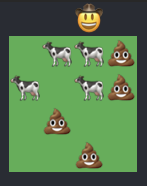
|
|
44
|
+
|
|
45
|
+
Who wouldn’t want their agents visualized as cow emojis? Go on… guess. That's exactly right. No one.
|
|
46
|
+
|
|
47
|
+
## Requirements
|
|
48
|
+
|
|
49
|
+
- Linux or macOS
|
|
50
|
+
- `herdr` 0.8 or later, with the `herdr` pi integration enabled
|
|
51
|
+
- `python3` on macOS (used for copy-on-write worktrees; macOS has not shipped `python3` since 12.3, so install the Xcode Command Line Tools with `xcode-select --install`)
|
|
52
|
+
- Copy-on-write capable filesystem (APFS on macOS; BTRFS or ZFS on Linux)
|
|
53
|
+
- `ext4` does not support copy-on-write. On `ext4`, `agent.worktreeMaterialization` falls back to `checkout`.
|
|
46
54
|
|
|
47
55
|
## Install
|
|
48
56
|
|
|
@@ -52,34 +60,33 @@ Install from npm:
|
|
|
52
60
|
|
|
53
61
|
## Usage
|
|
54
62
|
|
|
55
|
-
|
|
63
|
+
`pi-cowboy` activates automatically whenever you run `pi` inside a Git repository.
|
|
64
|
+
|
|
65
|
+
##### 1. Delegating a task
|
|
56
66
|
|
|
57
67
|
<hr>
|
|
58
68
|
<code>Based on the security audit, group the relevant files into 10 groups, and launch parallel cowboy agents to address their audit results.</code>
|
|
59
|
-
|
|
60
69
|
<hr>
|
|
61
70
|
|
|
62
|
-
pi-cowboy spawns agents for the
|
|
71
|
+
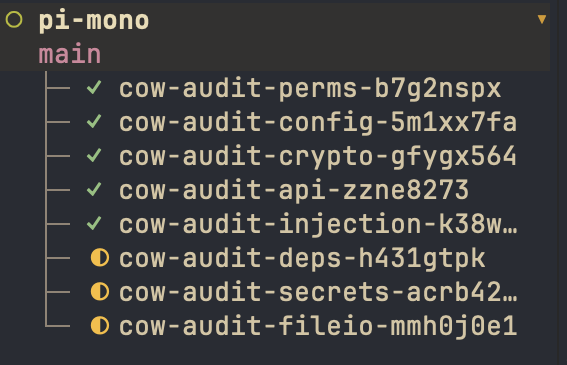
`pi-cowboy` spawns background agents for the subtasks right away:
|
|
63
72
|
|
|
64
73
|
<code>✓ Spawned agent b7g2nspx (general-purpose)</code><br>
|
|
65
74
|
<code>✓ Spawned agent 5m1xx7fa (general-purpose)</code><br>
|
|
66
75
|
<code>...</code>
|
|
67
76
|
|
|
68
|
-
|
|
77
|
+
If you spawn more agents than your concurrency limit allows, the extras wait in a queue. With the default global limit of 4, the first 4 agents start immediately and the remaining 6 start as slots open up.
|
|
69
78
|
|
|
70
|
-
##### Agent isolation
|
|
79
|
+
##### 2. Agent isolation
|
|
71
80
|
|
|
72
81
|
|
|
73
82
|
|
|
74
|
-
Each agent runs as a separate
|
|
75
|
-
|
|
76
|
-
Three Herdr terms recur below: a **workspace** is the outermost Herdr container and holds tabs, a **tab** holds panes, and a **pane** is one terminal session, the one the agent's pi process runs in. pi-cowboy gives each agent its own workspace and tab, and puts the agent in that tab's root pane. pi-cowboy needs a git repository because each agent works in a worktree of it; outside a repository the extension stays inactive for that session. The pane id is the durable handle `cleanup_cowboy_agent` uses to find that pane again.
|
|
83
|
+
Each agent runs as a separate process in its own Herdr workspace, inside its own tab and terminal pane. You can switch to an agent's workspace at any time to watch its progress or steer it directly.
|
|
77
84
|
|
|
78
|
-
|
|
85
|
+
On disk, each agent works in a dedicated Git worktree under `<agent dir>/pi-cowboy/worktrees/` (`~/.pi/agent` by default).
|
|
79
86
|
|
|
80
|
-
##### Agent completion
|
|
87
|
+
##### 3. Agent completion
|
|
81
88
|
|
|
82
|
-
When an agent settles, its
|
|
89
|
+
When an agent finishes its turn (settles), its report arrives as a message in the parent session:
|
|
83
90
|
|
|
84
91
|
<code>✓ [Cowboy agent "general-purpose" b7g2nspx completed]</code><br>
|
|
85
92
|
<br>
|
|
@@ -87,26 +94,23 @@ When an agent settles, its result arrives in the parent session that started it:
|
|
|
87
94
|
<br>
|
|
88
95
|
<code>(Worktree: $HOME/.pi/agent/pi-cowboy/worktrees/cow-audit-perms-b7g2nspx (branch cow-audit-perms-b7g2nspx). The agent process and its herdr pane stay until you call cleanup_cowboy_agent — its pane is closed, which ends that process. The worktree stays until you call cleanup_cowboy_agent to remove it — call it once the branch is merged or rejected.)</code>
|
|
89
96
|
|
|
90
|
-
The
|
|
97
|
+
The parent session can then review the report, steer the agent if something needs another pass, or merge the branch.
|
|
91
98
|
|
|
92
|
-
##### Merging
|
|
99
|
+
##### 4. Merging
|
|
93
100
|
|
|
94
|
-
|
|
101
|
+
To bring the changes in, the orchestrator calls `merge_cowboy_branch`, which merges the agent's branch into your repository's main working tree:
|
|
95
102
|
|
|
96
103
|
<code>✓ Merged "cow-audit-perms-b7g2nspx" into "main" in pi-mono.</code>
|
|
97
104
|
|
|
98
|
-
##### Cleanup
|
|
105
|
+
##### 5. Cleanup
|
|
99
106
|
|
|
100
|
-
|
|
107
|
+
Once the work is merged, the orchestrator cleans up the agent's resources (or you can ask it to):
|
|
101
108
|
|
|
102
109
|
<hr>
|
|
103
110
|
<code>Clean up perms audit agent.</code>
|
|
104
|
-
|
|
105
111
|
<hr>
|
|
106
112
|
|
|
107
|
-
|
|
108
|
-
|
|
109
|
-
pi-cowboy calls the `cleanup_cowboy_agent` tool, which removes the agent's artifacts and reports the results:
|
|
113
|
+
`cleanup_cowboy_agent` closes the Herdr pane and tab, removes the worktree, and deletes the branch:
|
|
110
114
|
|
|
111
115
|
<code>✓ Cleaned up agent b7g2nspx:</code><br>
|
|
112
116
|
<code>agent status: completed</code><br>
|
|
@@ -114,184 +118,179 @@ pi-cowboy calls the `cleanup_cowboy_agent` tool, which removes the agent's artif
|
|
|
114
118
|
<code>worktree: removed ($HOME/.pi/agent/pi-cowboy/worktrees/cow-audit-perms-b7g2nspx)</code><br>
|
|
115
119
|
<code>branch: deleted (cow-audit-perms-b7g2nspx)</code>
|
|
116
120
|
|
|
117
|
-
|
|
118
|
-
If pi-cowboy cannot remove one of them, it reports the failure and completes the removals it can.
|
|
121
|
+
Cleanup is safe by default: it refuses to touch an agent that is still running, keeps any worktree that still has uncommitted changes, and deletes the branch only if it has already been merged. If one step cannot be completed, `pi-cowboy` reports the reason and finishes the rest.
|
|
119
122
|
|
|
120
|
-
##
|
|
123
|
+
## Customizing your workflow
|
|
124
|
+
|
|
125
|
+
### Agent templates
|
|
126
|
+
|
|
127
|
+
If you find yourself repeating the same instructions for recurring jobs, you can package them into an agent template with its own system prompt, model, harness, and tool permissions.
|
|
128
|
+
|
|
129
|
+
For example, a `release-notes` template looks like this:
|
|
130
|
+
|
|
131
|
+
```toml
|
|
132
|
+
name = "release-notes"
|
|
133
|
+
description = "Prepares release notes."
|
|
134
|
+
system_prompt = '''
|
|
135
|
+
You prepare release notes for this repository. Read the history and tags
|
|
136
|
+
(git log, git tag) and report the changes as a message.
|
|
137
|
+
'''
|
|
138
|
+
```
|
|
139
|
+
|
|
140
|
+
You can then ask for it by name in the parent session:
|
|
141
|
+
|
|
142
|
+
<hr>
|
|
143
|
+
<code>> Spawn a cowboy agent using release notes template to prepare the release notes for the most recent changes.</code>
|
|
144
|
+
<hr>
|
|
145
|
+
|
|
146
|
+
See [Agent Templates](docs/Agent%20Templates.md) for all template fields and directory locations.
|
|
147
|
+
|
|
148
|
+
### Orchestrator templates
|
|
149
|
+
|
|
150
|
+
While agent templates specialize individual workers, orchestrator templates apply rules across every agent you spawn. They also let you customize the status messages ("cues") sent to the parent session when agents spawn, queue, or settle.
|
|
151
|
+
|
|
152
|
+
For instance, if you use an adversarial review tool, you can define an orchestrator template that requires every agent to run it before committing:
|
|
153
|
+
|
|
154
|
+
```toml
|
|
155
|
+
name = "adversarial-review"
|
|
156
|
+
guidance = '''
|
|
157
|
+
Run the adversarial-review tool before you commit, and fix any glaring mistakes that the review finds and then commit.
|
|
158
|
+
'''
|
|
159
|
+
```
|
|
160
|
+
|
|
161
|
+
You can switch the active orchestrator at any time from `/cowboy` > `Default orchestrator`. See [Orchestrator Templates](docs/Orchestrator%20Templates.md) for details.
|
|
121
162
|
|
|
122
|
-
|
|
163
|
+
### Foreign harnesses
|
|
123
164
|
|
|
124
|
-
|
|
165
|
+
`pi-cowboy` auto-detects Codex, Claude Code, OpenCode, PiG, and Pi-Bolt when they are installed on your `PATH`. You can request a specific harness directly in your prompt (for example, "Launch an OpenCode agent for this task") or set defaults in your [configuration](docs/Configuration.md#agentharnesstype) and [agent templates](docs/Agent%20Templates.md).
|
|
125
166
|
|
|
126
|
-
|
|
167
|
+
## Concurrency
|
|
127
168
|
|
|
128
|
-
|
|
169
|
+
You can cap how many agents run at the same time across four independent levels:
|
|
129
170
|
|
|
130
|
-
|
|
171
|
+
- Global: `concurrency.default` (default `4`), which applies to every agent
|
|
172
|
+
- Per harness: `concurrency.harnesses.<harness-id>`
|
|
173
|
+
- Per provider: `concurrency.providers.<provider>`
|
|
174
|
+
- Per model: `concurrency.models["<provider>/<model-id>"]`
|
|
131
175
|
|
|
132
|
-
|
|
176
|
+
A running agent occupies a slot in every limit that applies to it. When the agent settles, it releases those slots and `pi-cowboy` starts the next queued agent that has room at all of its levels. An agent waiting on a busy model limit will not block a queued agent behind it that uses a different model.
|
|
133
177
|
|
|
134
|
-
|
|
178
|
+
If you steer a settled agent, it wakes up in its existing pane and runs immediately, even if that temporarily puts a limit over capacity.
|
|
135
179
|
|
|
136
|
-
|
|
180
|
+
Configure these limits in `config.json` or live in your session via `/cowboy` > `Settings` > `Concurrency Settings`. See [Configuration](docs/Configuration.md#concurrency) for details.
|
|
137
181
|
|
|
138
|
-
|
|
182
|
+
## Model resolution
|
|
183
|
+
|
|
184
|
+
When `pi-cowboy` spawns an agent, it picks the model using the first match in this order:
|
|
185
|
+
|
|
186
|
+
1. The `model` parameter passed to the `cowboy_agent` tool call
|
|
187
|
+
2. The session per-type model override (`/cowboy` > `Model overrides`)
|
|
188
|
+
3. The config per-type override (`agent.<agent-type>`)
|
|
189
|
+
4. The model set in the [agent template](docs/Agent%20Templates.md) for the launching harness family
|
|
190
|
+
5. The session default model (`/cowboy model`)
|
|
191
|
+
6. The launching harness's configured default (`agent.default` for the Pi family, or `agent.defaultModelByHarness` for foreign harnesses)
|
|
192
|
+
7. For Pi-family launches, the parent session's active model
|
|
193
|
+
|
|
194
|
+
See [Configuration](docs/Configuration.md#model-keys) for the full rules.
|
|
195
|
+
|
|
196
|
+
## Commands
|
|
139
197
|
|
|
140
|
-
|
|
198
|
+
Run `/cowboy` to open the interactive menu, or pass a subcommand directly. See [Menu](docs/Menu.md) for a guide to every screen.
|
|
199
|
+
|
|
200
|
+
```text
|
|
201
|
+
/cowboy # Open the pi-cowboy menu
|
|
202
|
+
/cowboy status # List spawned, queued, and settled agents
|
|
203
|
+
/cowboy spawn # Spawn an agent manually
|
|
204
|
+
/cowboy worktree # Create a git worktree with no agent attached
|
|
205
|
+
/cowboy model # Pick the default agent model for this session
|
|
206
|
+
/cowboy model provider/model-id # Set the default agent model for this session
|
|
207
|
+
/cowboy model clear # Clear the session model override
|
|
208
|
+
/cowboy enable # Enable pi-cowboy
|
|
209
|
+
/cowboy disable # Disable pi-cowboy
|
|
210
|
+
```
|
|
141
211
|
|
|
142
212
|
## Tools
|
|
143
213
|
|
|
144
214
|
### `cowboy_agent`
|
|
145
215
|
|
|
146
|
-
Delegates one or more tasks to cowboy agents.
|
|
216
|
+
Delegates one or more tasks to cowboy agents. By default, the call returns immediately with an agent ID for each task, and results arrive in the parent session as each agent settles.
|
|
147
217
|
|
|
148
218
|
| Parameter | Required | Description |
|
|
149
219
|
| ------------------- | -------- | ------------------------------------------------------------------------------------------------ |
|
|
150
220
|
| `agents[]` | yes | One object per task. |
|
|
151
221
|
| `run_in_background` | no | Set to `false` to wait for the result in the same turn. Only allowed when `agents` has one task. |
|
|
152
222
|
|
|
153
|
-
`agents[]
|
|
223
|
+
Each item in `agents[]` takes:
|
|
154
224
|
|
|
155
|
-
| Field | Required | Description
|
|
156
|
-
| -------------- | -------- |
|
|
157
|
-
| `prompt` | yes | Task instructions for the cowboy agent.
|
|
158
|
-
| `task_name` | yes | Short 2-3-word name (e.g. "fix login flow")
|
|
159
|
-
| `agent_type` | no | Agent
|
|
160
|
-
| `model` | no | Model for this
|
|
161
|
-
| `harness_type` | no | Harness that launches this agent: `pi`, `pig`, `pi-bolt`, `opencode`, `codex`, or `claude`. Overrides the agent template's `harness_type` and the `agent.harnessType` setting. If this machine cannot launch the harness, the call fails before
|
|
225
|
+
| Field | Required | Description |
|
|
226
|
+
| -------------- | -------- | ------------------------------------------------------------------------------------------------------------------------------------------------------------------------------------------------------------------------------------------------------------------- |
|
|
227
|
+
| `prompt` | yes | Task instructions for the cowboy agent. |
|
|
228
|
+
| `task_name` | yes | Short 2-3-word name (e.g. `"fix login flow"`) used to name the agent's branch, worktree, and tab. |
|
|
229
|
+
| `agent_type` | no | Agent template to use. Defaults to the type selected at `/cowboy` > `Agent`. |
|
|
230
|
+
| `model` | no | Model for this agent as `"provider/model-id"`. Resolved according to [Model resolution](#model-resolution). |
|
|
231
|
+
| `harness_type` | no | Harness that launches this agent: `pi`, `pig`, `pi-bolt`, `opencode`, `codex`, or `claude`. Overrides the agent template's `harness_type` and the `agent.harnessType` setting. If this machine cannot launch the requested harness, the call fails before spawning. |
|
|
162
232
|
|
|
163
233
|
### `steer_cowboy_agent`
|
|
164
234
|
|
|
165
|
-
Sends a message to one or more agents.
|
|
166
|
-
|
|
235
|
+
Sends a follow-up message to one or more agents. If an agent is running, it receives the message before its next model call. If an agent has already settled, steering revives it in the same pane for another turn and delivers a new completion message when it settles again.
|
|
236
|
+
|
|
237
|
+
Queued agents cannot be steered because they do not have a pane yet. Agents that have already been cleaned up (or are currently being cleaned up) cannot be steered either.
|
|
167
238
|
|
|
168
239
|
| Parameter | Required | Description |
|
|
169
240
|
| ------------- | -------- | ------------------------------------- |
|
|
170
|
-
| `agent_ids[]` | yes | Agent
|
|
241
|
+
| `agent_ids[]` | yes | Agent IDs to send the message to. |
|
|
171
242
|
| `message` | yes | The message to deliver to each agent. |
|
|
172
243
|
|
|
173
244
|
### `stop_cowboy_agent`
|
|
174
245
|
|
|
175
|
-
|
|
246
|
+
Interrupts one or more running agents and marks them as stopped. Their worktrees, branches, and panes are preserved so you can inspect or clean them up afterward.
|
|
176
247
|
|
|
177
248
|
| Parameter | Required | Description |
|
|
178
249
|
| ------------- | -------- | ------------------ |
|
|
179
|
-
| `agent_ids[]` | yes | Agent
|
|
250
|
+
| `agent_ids[]` | yes | Agent IDs to stop. |
|
|
180
251
|
|
|
181
252
|
### `merge_cowboy_branch`
|
|
182
253
|
|
|
183
|
-
Merges one or more settled agent branches into a target branch in your repository's main working tree.
|
|
254
|
+
Merges one or more settled agent branches into a target branch in your repository's main working tree. Your main working tree must already be on the target branch with no uncommitted changes. If a merge conflict occurs, `pi-cowboy` leaves the conflict in place so you can resolve it.
|
|
184
255
|
|
|
185
256
|
| Parameter | Required | Description |
|
|
186
257
|
| ------------ | -------- | ------------------------------------------------------------------------------- |
|
|
187
|
-
| `branches[]` | yes | The `cow-<task>-<id>`
|
|
258
|
+
| `branches[]` | yes | The `cow-<task>-<id>` branch names from the agent completion reports. |
|
|
188
259
|
| `target` | no | Branch to merge into. Defaults to `main`. |
|
|
189
260
|
| `repo` | no | Path inside the repository. Defaults to the parent session's working directory. |
|
|
190
261
|
|
|
191
262
|
### `cleanup_cowboy_agent`
|
|
192
263
|
|
|
193
|
-
|
|
194
|
-
The tool reports the result for each agent.
|
|
264
|
+
Closes the Herdr pane and tab, removes the worktree, and deletes the branch for one or more settled agents. The tool reports the result for each agent.
|
|
195
265
|
|
|
196
|
-
|
|
266
|
+
Cleanup never throws on partial failures: it deletes a branch only after it has been merged, and it keeps any worktree that still has uncommitted changes (reporting why it was kept).
|
|
197
267
|
|
|
198
268
|
| Parameter | Required | Description |
|
|
199
269
|
| ------------- | -------- | ------------------------------------------------------------------------------------- |
|
|
200
|
-
| `agent_ids[]` | yes | Agent
|
|
201
|
-
|
|
202
|
-
## Model resolution
|
|
203
|
-
|
|
204
|
-
A model set in the `cowboy_agent` call wins over everything; below it come the session per-type override, the config per-type override, the agent template, the session default, the launching harness's default, and finally, under the pi family, the model of the parent session. The authoritative order is in [Configuration](docs/Configuration.md#model-keys).
|
|
205
|
-
|
|
206
|
-
## Concurrency
|
|
207
|
-
|
|
208
|
-
A running agent holds a place in every concurrency limit that applies to it. pi-cowboy releases those places when the agent settles, then the next queued agent starts. You can define concurrency limits as follows:
|
|
209
|
-
|
|
210
|
-
- Per model: `concurrency.models["<provider>/<model-id>"]`
|
|
211
|
-
- Per provider: `concurrency.providers.<provider>`
|
|
212
|
-
- Per harness: `concurrency.harnesses.<harness-id>`
|
|
213
|
-
- Global: `concurrency.default` (default `4`), which every agent counts against
|
|
214
|
-
|
|
215
|
-
The levels are independent: an agent whose model, provider, and harness all have limits counts against all of them and against the global limit, so you have to free room at every level that applies.
|
|
216
|
-
pi-cowboy starts the first waiting agent whose every level has room: an agent that waits for one limit to clear does not hold back an agent behind it.
|
|
217
|
-
|
|
218
|
-
An agent with no model selection counts against the global limit alone.
|
|
219
|
-
|
|
220
|
-
pi-cowboy floors limits at one, so `0` and a negative number both mean one at a time. See [Configuration](docs/Configuration.md#concurrency).
|
|
221
|
-
|
|
222
|
-
A steered agent that settled and starts again is a second live process. It counts against its limits at once, even when it then exceeds a limit. The message is already in the pane of that agent, so its second turn cannot wait for room.
|
|
223
|
-
|
|
224
|
-
These settings can be configured via the configuration file or via the menu `/cowboy` > `Settings` > `Concurrency Settings`.
|
|
225
|
-
|
|
226
|
-
## Agent templates
|
|
227
|
-
|
|
228
|
-
You can define custom agent templates for tasks that keep coming back and would otherwise make you repeat the same instructions.
|
|
229
|
-
|
|
230
|
-
As an example, a release notes template may look like this:
|
|
231
|
-
|
|
232
|
-
```toml
|
|
233
|
-
name = "release-notes"
|
|
234
|
-
description = "Prepares release notes."
|
|
235
|
-
system_prompt = '''
|
|
236
|
-
You prepare release notes for this repository. Read the history and tags
|
|
237
|
-
(git log, git tag) and report the changes as a message.
|
|
238
|
-
'''
|
|
239
|
-
```
|
|
240
|
-
|
|
241
|
-
You can then refer to this in the parent session to trigger it:
|
|
242
|
-
|
|
243
|
-
<hr>
|
|
244
|
-
<code>> Spawn a cowboy agent using release notes template to prepare the release notes for the most recent changes.</code>
|
|
245
|
-
|
|
246
|
-
<hr>
|
|
247
|
-
|
|
248
|
-
Agent templates have more configuration options. See [Agent Templates](docs/Agent%20Templates.md) for the full list.
|
|
249
|
-
|
|
250
|
-
## Orchestrator templates
|
|
251
|
-
|
|
252
|
-
You can define custom orchestrator templates when the same instructions should apply to every agent you spawn, no matter the task.
|
|
253
|
-
|
|
254
|
-
If you have an adversarial review tool installed, you can define an "adversarial-review" orchestrator:
|
|
255
|
-
|
|
256
|
-
```toml
|
|
257
|
-
name = "adversarial-review"
|
|
258
|
-
guidance = '''
|
|
259
|
-
Run the adversarial-review tool before you commit, and fix any glaring mistakes that the review finds and then commit.
|
|
260
|
-
'''
|
|
261
|
-
```
|
|
262
|
-
|
|
263
|
-
You can switch orchestrators during a session at `/cowboy` > `Default orchestrator`. See [Menu](docs/Menu.md).
|
|
264
|
-
|
|
265
|
-
Orchestrator templates also allow you to customize how the agent communicates with the orchestrator. See [Orchestrator Templates](docs/Orchestrator%20Templates.md) for more details.
|
|
266
|
-
|
|
267
|
-
### Foreign harnesses
|
|
268
|
-
|
|
269
|
-
pi-cowboy can also orchestrate Codex, Claude Code, and OpenCode. It auto-detects them, so you can reference them directly (e.g., "Launch an OpenCode agent for this task") or configure them as defaults in your [settings](docs/Configuration.md#agentharnesstype) and [agent templates](docs/Agent%20Templates.md).
|
|
270
|
+
| `agent_ids[]` | yes | Agent IDs to clean up. `cleanup_cowboy_agent` refuses an agent that is still running. |
|
|
270
271
|
|
|
271
272
|
## FAQ
|
|
272
273
|
|
|
273
274
|
### Why is my agent queued, not running?
|
|
274
275
|
|
|
275
|
-
Every running agent
|
|
276
|
+
Every running agent occupies a slot in each concurrency limit that applies to it: model, provider, harness, and global (model and provider keys can also be scoped to a harness, like `opencode:provider/model`). `pi-cowboy` queues new agents until all of their applicable limits have room. You can raise limits in `/cowboy` > `Settings` > `Concurrency Settings` or in your config file. See [Concurrency](#concurrency).
|
|
276
277
|
|
|
277
278
|
### Why did my worktree survive cleanup?
|
|
278
279
|
|
|
279
|
-
`cleanup_cowboy_agent`
|
|
280
|
+
`cleanup_cowboy_agent` refuses to delete a worktree that still has uncommitted changes or whose git status cannot be verified. Commit or discard the leftover changes, make sure the agent is stopped, and run cleanup again. See [`cleanup_cowboy_agent`](#cleanup_cowboy_agent).
|
|
280
281
|
|
|
281
282
|
### Isn't one pi process per agent too much overhead?
|
|
282
283
|
|
|
283
|
-
|
|
284
|
+
For a single tiny change, spinning up a fresh process can take longer than making the edit directly. `pi-cowboy` is built for running several tasks in parallel, where that startup cost is paid once across all concurrent agents.
|
|
284
285
|
|
|
285
|
-
|
|
286
|
+
If you want faster startup and lower memory usage, `pi-cowboy` also supports [pig](https://github.com/MichaelKinsy/PiG) (a drop-in Pi replacement written in Go) and [pi-bolt](https://github.com/opensec-git/Pi-Bolt) (an ahead-of-time compiled Pi variant). Set `agent.harnessType` in [Configuration](docs/Configuration.md) to use them.
|
|
286
287
|
|
|
287
288
|
### I don't like the emojis, can I turn them off?
|
|
288
289
|
|
|
289
|
-
Yes. You can disable both the cowboy and the grazing in
|
|
290
|
+
Yes. You can disable both the cowboy indicator and the grazing cows in `/cowboy` > `Settings` or in your config file. See [Configuration](docs/Configuration.md).
|
|
290
291
|
|
|
291
292
|
## References
|
|
292
293
|
|
|
293
|
-
The settings, screens and template files mentioned above are documented in these four pages.
|
|
294
|
-
|
|
295
294
|
- [Configuration](docs/Configuration.md)
|
|
296
295
|
- [Menu](docs/Menu.md)
|
|
297
296
|
- [Agent Templates](docs/Agent%20Templates.md)
|
package/package.json
CHANGED
|
@@ -1,6 +1,6 @@
|
|
|
1
1
|
{
|
|
2
2
|
"name": "pi-cowboy",
|
|
3
|
-
"version": "0.
|
|
3
|
+
"version": "0.11.0",
|
|
4
4
|
"type": "module",
|
|
5
5
|
"packageManager": "pnpm@12.9.1",
|
|
6
6
|
"description": "Agent orchestrator for pi: can manage Codex, Claude Code, OpenCode, pi, pig and pi-bolt as subagents. Runs subagents in background Herdr panes, isolated in copy-on-write Git worktrees.",
|
|
@@ -96,7 +96,7 @@
|
|
|
96
96
|
"eslint-plugin-import-x": "^4.17.1",
|
|
97
97
|
"husky": "^9.1.7",
|
|
98
98
|
"oxlint": "1.87.0",
|
|
99
|
-
"oxlint-tsgolint": "7.0.
|
|
99
|
+
"oxlint-tsgolint": "7.0.2004",
|
|
100
100
|
"prettier": "^3.9.9",
|
|
101
101
|
"semantic-release": "^25.0.9",
|
|
102
102
|
"typescript": "npm:@typescript/typescript6@^6.0.2",
|