pi-compact-tools 0.8.0 → 0.8.1
This diff represents the content of publicly available package versions that have been released to one of the supported registries. The information contained in this diff is provided for informational purposes only and reflects changes between package versions as they appear in their respective public registries.
- package/README.md +13 -123
- package/package.json +1 -1
package/README.md
CHANGED
|
@@ -1,61 +1,19 @@
|
|
|
1
1
|
# pi-compact-tools
|
|
2
2
|
|
|
3
|
-
Compact, expandable rendering for Pi's built-in tools, with a
|
|
3
|
+
Compact, expandable rendering for Pi's built-in tools, with a GitHub Dark theme.
|
|
4
4
|
|
|
5
|
-
|
|
6
|
-
|
|
7
|
-
## Demo
|
|
8
|
-
|
|
9
|
-
The UI uses portable Unicode symbols and does not require a Nerd Font.
|
|
10
|
-
|
|
11
|
-
### Compact tool workflow
|
|
12
|
-
|
|
13
|
-
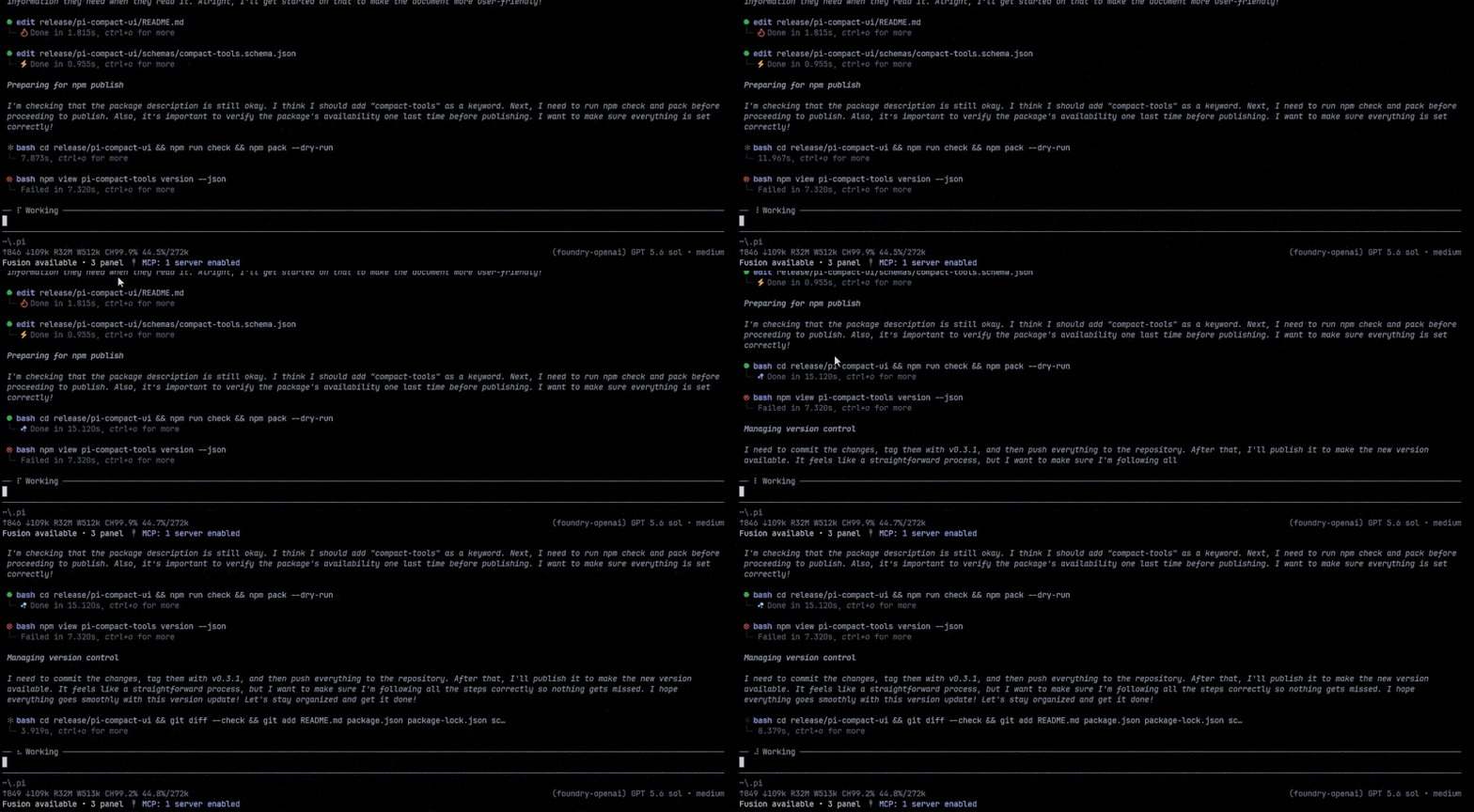
Active, successful, and failed tool calls stay compact while preserving useful status and timing information.
|
|
14
|
-
|
|
15
|
-
|
|
16
|
-
|
|
17
|
-
### Progress and duration display
|
|
18
|
-
|
|
19
|
-
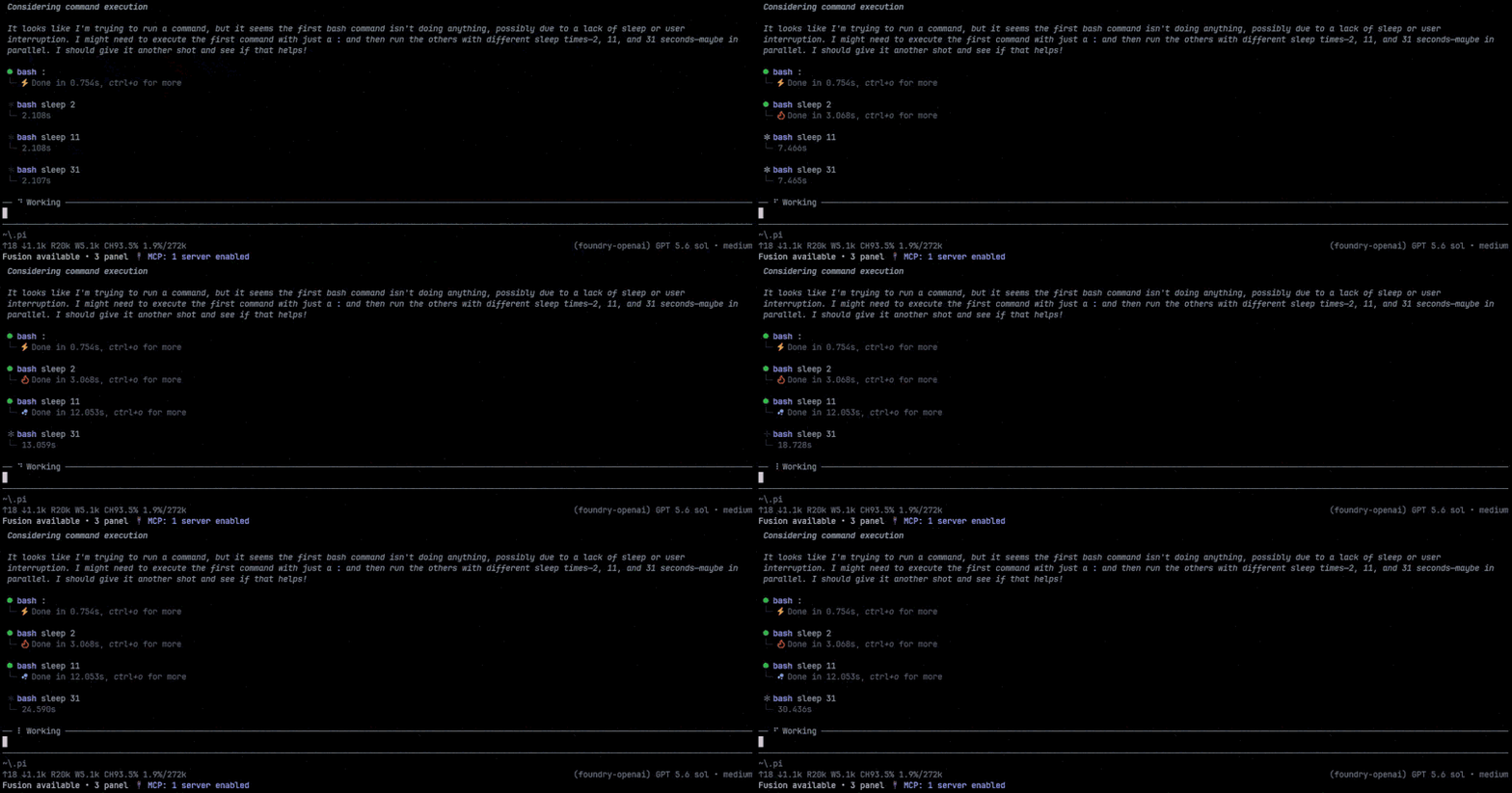
The working label above the prompt uses the Thinking summary color with a soft white light sweep. Every tool state uses the same `⦁` glyph; running tools use a fourteen-frame cosine-eased RGB pulse between dim and bright gray, then settle to green on success or red on failure. Elapsed time remains visible in the neutral control color.
|
|
5
|
+

|
|
20
6
|
|
|
21
7
|
|
|
22
8
|
|
|
23
|
-
### Code-aware results
|
|
24
|
-
|
|
25
|
-
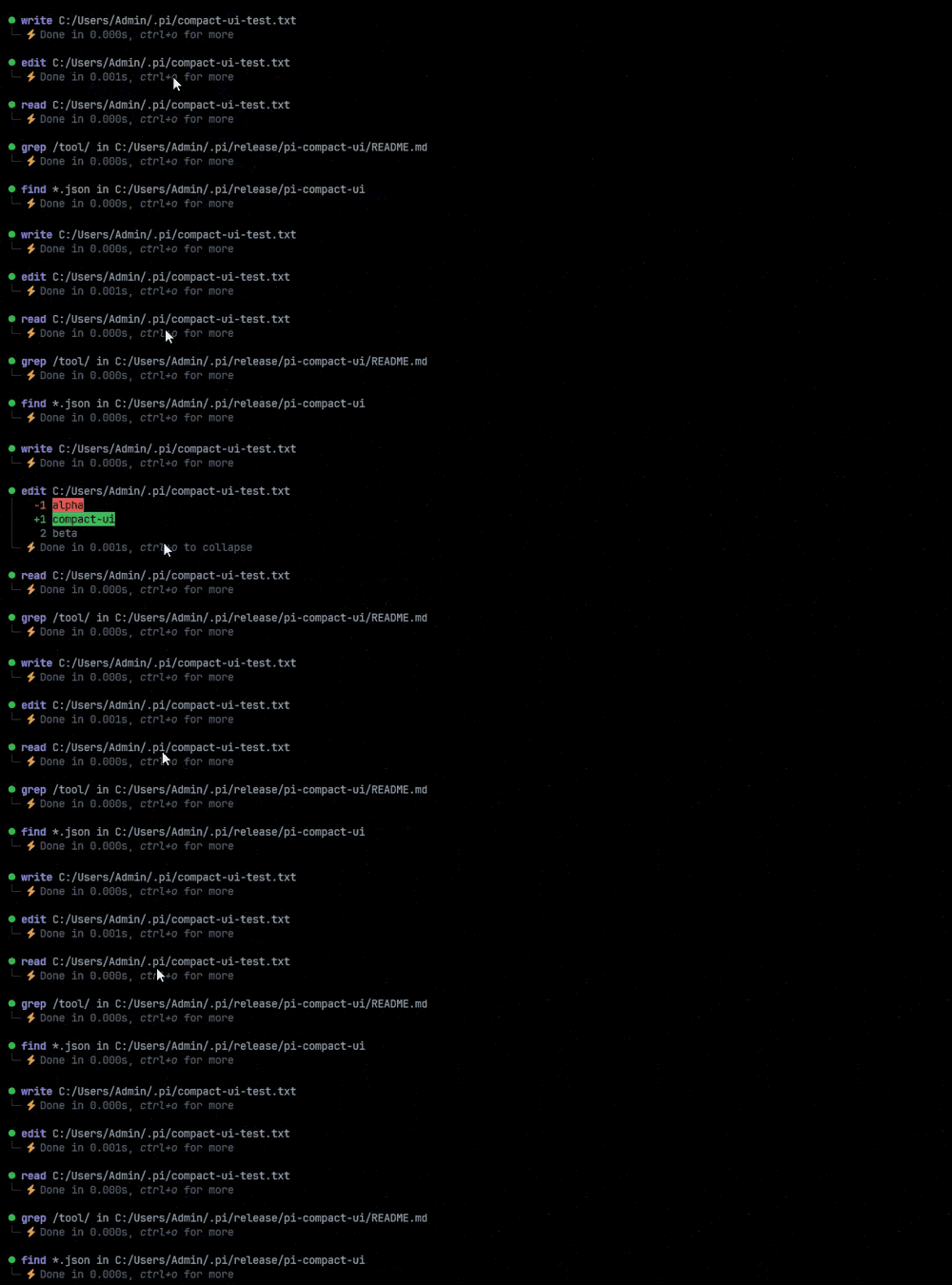
Completed `edit` rows render a syntax-highlighted diff: a line-number and `+`/`-` gutter beside the code, tinted rows for additions and deletions, and `⋮` where context is skipped. Collapsed rows keep one line of context around each change so the edit itself stays visible; expanding with a click or `Ctrl+O` restores the full context the patch carries.
|
|
26
|
-
|
|
27
|
-
```text
|
|
28
|
-
⦁ edit src/load.ts
|
|
29
|
-
│ 3 export async function load(path: string): Promise<string> {
|
|
30
|
-
│ 4 - const raw = await readFile(path, "utf8");
|
|
31
|
-
│ 4 + const raw = await readFile(path, "utf-8");
|
|
32
|
-
│ 5 return raw.trim();
|
|
33
|
-
└─ Done in 0.012s (2 lines)
|
|
34
|
-
```
|
|
35
|
-
|
|
36
|
-
`read` and `write` results use the same numbered, syntax-highlighted layout without the diff signs. `read` line numbers start at the requested `offset`, and Pi's continuation notice (`[Showing lines …]`) is shown as a dim note below the code. Markdown files keep their exact source but style headings, lists, quotes, links, emphasis, and inline code, while fenced blocks are highlighted in their declared language. Files without a recognized language keep the plain output color instead of a guessed highlight.
|
|
37
|
-
|
|
38
9
|
|
|
39
10
|
|
|
40
11
|
## Features
|
|
41
12
|
|
|
42
|
-
- Compact
|
|
43
|
-
-
|
|
44
|
-
-
|
|
45
|
-
-
|
|
46
|
-
- Millisecond-precision duration and completed output line counts with neutral status text
|
|
47
|
-
- Per-tool hidden or persistent bounded-preview collapsed state with `auto_compact: true` or `false`
|
|
48
|
-
- Primary invocation targets such as paths and patterns stay visible, including common collapsed shell file operations
|
|
49
|
-
- Click and `Ctrl+O` follow Pi's built-in expansion state while preview rows collapse back to their preview
|
|
50
|
-
- Edit results render as syntax-highlighted diffs with a line-number gutter, tinted change rows, and `⋮` context breaks
|
|
51
|
-
- `read` and `write` contents use the same numbered, syntax-highlighted layout, with `read` line numbers following `offset`
|
|
52
|
-
- Markdown files keep their exact source but style headings, lists, quotes, links, and inline code, and highlight fenced code blocks in their declared language
|
|
53
|
-
- Configurable `previewLines` prevents large diffs, HTML, and shell output from flooding the transcript
|
|
54
|
-
- Width-cached expanded results, edit-diff processing, and unchanged result reuse during status animation
|
|
55
|
-
- Dark `│` and `└─` visual grouping
|
|
56
|
-
- Distinct cool-blue thinking text
|
|
57
|
-
- Truecolor and 256-color terminal support, plus Windows, Unix, and classic Mac line endings
|
|
58
|
-
- No Nerd Font requirement
|
|
13
|
+
- Compact rows for `read`, `write`, `edit`, `bash`, `powershell`, `grep`, `find`, and `ls`, with status, duration, and line count
|
|
14
|
+
- Syntax-highlighted edit diffs and numbered `read`/`write` code views, including Markdown code fences
|
|
15
|
+
- Animated working label above the prompt and a `Ctrl+T` thinking summary/detail cycle
|
|
16
|
+
- No Nerd Font required
|
|
59
17
|
|
|
60
18
|
## Install
|
|
61
19
|
|
|
@@ -63,93 +21,27 @@ Completed `edit` rows render a syntax-highlighted diff: a line-number and `+`/`-
|
|
|
63
21
|
pi install npm:pi-compact-tools
|
|
64
22
|
```
|
|
65
23
|
|
|
66
|
-
|
|
67
|
-
|
|
68
|
-
```bash
|
|
69
|
-
pi install git:github.com/nedleeds/pi-compact-tools
|
|
70
|
-
```
|
|
71
|
-
|
|
72
|
-
Restart Pi or run `/reload`.
|
|
73
|
-
|
|
74
|
-
Migrating from the previous package name:
|
|
75
|
-
|
|
76
|
-
```bash
|
|
77
|
-
pi remove npm:@nedleeds/pi-compact-ui
|
|
78
|
-
pi install npm:pi-compact-tools
|
|
79
|
-
```
|
|
80
|
-
|
|
81
|
-
## Theme
|
|
82
|
-
|
|
83
|
-
Select `github-dark-pro` in Pi's settings, or add it to `~/.pi/agent/settings.json`:
|
|
84
|
-
|
|
85
|
-
```json
|
|
86
|
-
{
|
|
87
|
-
"theme": "github-dark-pro"
|
|
88
|
-
}
|
|
89
|
-
```
|
|
24
|
+
Then restart Pi or run `/reload`. For the bundled theme, set `"theme": "github-dark-pro"` in `~/.pi/agent/settings.json`.
|
|
90
25
|
|
|
91
26
|
## Configuration
|
|
92
27
|
|
|
93
|
-
|
|
94
|
-
|
|
95
|
-
Default configuration:
|
|
28
|
+
Optional. Put it in `~/.pi/agent/compact-tools.json` or `<project>/.pi/compact-tools.json`:
|
|
96
29
|
|
|
97
30
|
```json
|
|
98
31
|
{
|
|
99
|
-
"$schema": "https://raw.githubusercontent.com/nedleeds/pi-compact-tools/main/schemas/compact-tools.schema.json",
|
|
100
32
|
"tools": ["read", "write", "edit", "bash"],
|
|
101
33
|
"previewLines": 10,
|
|
102
|
-
"auto_compact": {
|
|
103
|
-
"read": true,
|
|
104
|
-
"write": true,
|
|
105
|
-
"edit": false,
|
|
106
|
-
"bash": true
|
|
107
|
-
}
|
|
34
|
+
"auto_compact": { "read": true, "write": true, "edit": false, "bash": true }
|
|
108
35
|
}
|
|
109
36
|
```
|
|
110
37
|
|
|
111
|
-
|
|
112
|
-
|
|
113
|
-
`auto_compact` controls each tool's initial result state:
|
|
114
|
-
|
|
115
|
-
- `true` starts with the result hidden.
|
|
116
|
-
- `false` starts with at most `previewLines` rendered rows visible.
|
|
117
|
-
- Clicking or pressing `Ctrl+O` expands the complete result through Pi's built-in expansion state.
|
|
118
|
-
|
|
119
|
-
`previewLines` accepts `1`–`100` and defaults to `10`. It limits the collapsed preview; the complete result remains available. Unspecified entries inherit the previous configuration layer. By default, `read`, `write`, and `bash` start hidden, while `edit` starts with a short diff preview centered on the changed lines.
|
|
120
|
-
|
|
121
|
-
To enable all Unix-compatible tools:
|
|
122
|
-
|
|
123
|
-
```json
|
|
124
|
-
{
|
|
125
|
-
"tools": ["read", "write", "edit", "bash", "grep", "find", "ls"]
|
|
126
|
-
}
|
|
127
|
-
```
|
|
128
|
-
|
|
129
|
-
Add `"powershell"` on Windows if desired.
|
|
38
|
+
- `tools`: tools to render compactly. Also available: `grep`, `find`, `ls`, `powershell`.
|
|
39
|
+
- `auto_compact`: `true` starts hidden, `false` starts with a preview of up to `previewLines` rows (`1`–`100`).
|
|
130
40
|
|
|
131
41
|
## Controls
|
|
132
42
|
|
|
133
|
-
`Ctrl+
|
|
134
|
-
|
|
135
|
-
```text
|
|
136
|
-
one-line summary → summary + │-indented detail → one-line summary → Thinking...
|
|
137
|
-
```
|
|
138
|
-
|
|
139
|
-
Standalone bold lines and Markdown headings split one provider thinking run into logical sections. Each section gets its own summary and optional `│`-indented detail. Summary-only views stay uncluttered with no control hint; the control row appears only while provider-supplied detail is visible. When no thinking detail exists, `Ctrl+T` falls back to Pi's normal visible/hidden toggle instead of showing a duplicate detail phase. While thinking streams, a slightly faster highlight sweeps from the Thinking summary color to white across Pi's working label at a steady interval rather than depending on token updates. The transcript summary remains visually stable. The transformation is display-only; complete thinking remains unchanged in the session and model context.
|
|
140
|
-
|
|
141
|
-
Primary file and search targets stay visible. Collapsed `bash` and `powershell` rows describe intent—such as `Run tests` or `Check repository status`. Text searches retain their primary pattern (for example, `Search text "TODO|FIXME"`), and common file commands retain their operands (for example, `Run rm "build"` or `Find files "*.test.ts" in "src"`). Expanding the row reveals the exact command. After every supported tool completes, the status reports the expanded result size as `Done in …s (N lines)` instead of repeating options such as context and limit. Counts use the returned text for reads, searches, listings, and shell commands, written content for `write`, and only the changed `-`/`+` lines for `edit`. The count is computed once after completion and cached with the row, so streaming and repeated expansion do not add ongoing work. Large payloads represented as results follow the result toggle.
|
|
142
|
-
|
|
143
|
-
A mouse click toggles one row using Pi's native result state. `Ctrl+O` remains owned by Pi and expands or collapses all tool rows consistently, including tools not rendered by this extension. A row with `auto_compact: false` cycles predictably between its bounded preview and the complete result, so repeated clicks never remove the row and fall through to a neighboring Thinking block. The extension does not intercept the global keybinding.
|
|
144
|
-
|
|
145
|
-
## Notes
|
|
146
|
-
|
|
147
|
-
- Pi `0.85.1+` and Node.js `22.19.0+` are recommended.
|
|
148
|
-
- The working indicator and mouse interaction are provided by Pi's TUI; `Ctrl+O` also works in regular mode.
|
|
149
|
-
- Duration covers the full rendered tool-call lifecycle, including streamed `write` and `edit` arguments.
|
|
150
|
-
- Syntax highlighting is skipped, keeping line numbers, for content over 512 KB, 10,000 lines, or a single 4 KB line. Pi already truncates `read` output to 2,000 lines or 50 KB.
|
|
151
|
-
- Highlighting runs per diff hunk or `read` range, so a hunk or `offset` that starts inside a block comment or Markdown code fence may color its first lines as surrounding text.
|
|
152
|
-
- Selected tools override definitions with the same names so their compact renderers are restored reliably after `/reload`; other extensions overriding those tools may conflict by load order.
|
|
43
|
+
- Click a row or press `Ctrl+O` to expand or collapse results.
|
|
44
|
+
- `Ctrl+T` cycles thinking: summary → detail → summary → hidden.
|
|
153
45
|
|
|
154
46
|
## Development
|
|
155
47
|
|
|
@@ -159,8 +51,6 @@ npm run check
|
|
|
159
51
|
pi -e .
|
|
160
52
|
```
|
|
161
53
|
|
|
162
|
-
Pi extensions execute with full system access. Review third-party extension source before installation.
|
|
163
|
-
|
|
164
54
|
## License
|
|
165
55
|
|
|
166
56
|
MIT
|