pi-compact-tools 0.6.3 → 0.7.8
This diff represents the content of publicly available package versions that have been released to one of the supported registries. The information contained in this diff is provided for informational purposes only and reflects changes between package versions as they appear in their respective public registries.
- package/README.md +151 -183
- package/examples/compact-tools-2.json +1 -4
- package/examples/compact-tools.json +1 -4
- package/extensions/compact-tools-color.ts +65 -0
- package/extensions/compact-tools-config.ts +7 -42
- package/extensions/compact-tools-core.ts +26 -0
- package/extensions/compact-tools-invocation.ts +402 -117
- package/extensions/compact-tools-layout.ts +23 -22
- package/extensions/compact-tools-progress.ts +158 -0
- package/extensions/compact-tools-runtime.ts +44 -70
- package/extensions/compact-tools-thinking.ts +280 -337
- package/extensions/compact-tools-types.ts +9 -8
- package/extensions/compact-tools.ts +350 -322
- package/package.json +64 -64
- package/schemas/compact-tools.schema.json +8 -24
- package/scripts/check-resources.mjs +13 -16
- package/extensions/compact-tools-input.ts +0 -8
package/README.md
CHANGED
|
@@ -1,183 +1,151 @@
|
|
|
1
|
-
# pi-compact-tools
|
|
2
|
-
|
|
3
|
-
Compact, expandable rendering for Pi's built-in tools, with a polished GitHub Dark theme.
|
|
4
|
-
|
|
5
|
-
> Formerly `@nedleeds/pi-compact-ui`. New installations should use `pi-compact-tools`.
|
|
6
|
-
|
|
7
|
-
## Demo
|
|
8
|
-
|
|
9
|
-
The
|
|
10
|
-
|
|
11
|
-
### Compact tool workflow
|
|
12
|
-
|
|
13
|
-
Active, successful, and failed tool calls stay compact while preserving useful status and timing information.
|
|
14
|
-
|
|
15
|
-
|
|
16
|
-
|
|
17
|
-
###
|
|
18
|
-
|
|
19
|
-
The
|
|
20
|
-
|
|
21
|
-
|
|
22
|
-
|
|
23
|
-
###
|
|
24
|
-
|
|
25
|
-
Completed `edit` rows show
|
|
26
|
-
|
|
27
|
-
|
|
28
|
-
|
|
29
|
-
## Features
|
|
30
|
-
|
|
31
|
-
- Compact rendering for `read`, `write`, `edit`, `bash`, `powershell`, `grep`, `find`, and `ls`
|
|
32
|
-
-
|
|
33
|
-
-
|
|
34
|
-
-
|
|
35
|
-
-
|
|
36
|
-
-
|
|
37
|
-
-
|
|
38
|
-
-
|
|
39
|
-
-
|
|
40
|
-
-
|
|
41
|
-
-
|
|
42
|
-
-
|
|
43
|
-
-
|
|
44
|
-
|
|
45
|
-
|
|
46
|
-
|
|
47
|
-
|
|
48
|
-
|
|
49
|
-
```
|
|
50
|
-
|
|
51
|
-
|
|
52
|
-
|
|
53
|
-
|
|
54
|
-
|
|
55
|
-
```
|
|
56
|
-
|
|
57
|
-
|
|
58
|
-
|
|
59
|
-
|
|
60
|
-
|
|
61
|
-
|
|
62
|
-
|
|
63
|
-
|
|
64
|
-
|
|
65
|
-
|
|
66
|
-
|
|
67
|
-
|
|
68
|
-
|
|
69
|
-
|
|
70
|
-
|
|
71
|
-
|
|
72
|
-
|
|
73
|
-
|
|
74
|
-
|
|
75
|
-
|
|
76
|
-
|
|
77
|
-
|
|
78
|
-
Configuration
|
|
79
|
-
|
|
80
|
-
|
|
81
|
-
|
|
82
|
-
|
|
83
|
-
|
|
84
|
-
|
|
85
|
-
|
|
86
|
-
"
|
|
87
|
-
|
|
88
|
-
|
|
89
|
-
|
|
90
|
-
"
|
|
91
|
-
|
|
92
|
-
|
|
93
|
-
"
|
|
94
|
-
|
|
95
|
-
|
|
96
|
-
|
|
97
|
-
|
|
98
|
-
|
|
99
|
-
|
|
100
|
-
|
|
101
|
-
|
|
102
|
-
|
|
103
|
-
`
|
|
104
|
-
|
|
105
|
-
|
|
106
|
-
|
|
107
|
-
|
|
108
|
-
|
|
109
|
-
|
|
110
|
-
|
|
111
|
-
|
|
112
|
-
|
|
113
|
-
|
|
114
|
-
|
|
115
|
-
|
|
116
|
-
|
|
117
|
-
|
|
118
|
-
|
|
119
|
-
|
|
120
|
-
|
|
121
|
-
|
|
122
|
-
|
|
123
|
-
|
|
124
|
-
|
|
125
|
-
|
|
126
|
-
|
|
127
|
-
|
|
128
|
-
|
|
129
|
-
|
|
130
|
-
|
|
131
|
-
|
|
132
|
-
|
|
133
|
-
|
|
134
|
-
|
|
135
|
-
|
|
136
|
-
|
|
137
|
-
|
|
138
|
-
|
|
139
|
-
|
|
140
|
-
|
|
141
|
-
|
|
142
|
-
|
|
143
|
-
|
|
144
|
-
|
|
145
|
-
|
|
146
|
-
|
|
147
|
-
|
|
148
|
-
|
|
149
|
-
|
|
150
|
-
|
|
151
|
-
|
|
152
|
-
```text
|
|
153
|
-
result hidden ↔ full result
|
|
154
|
-
```
|
|
155
|
-
|
|
156
|
-
`Ctrl+O` operates on all rows whose tool has `auto_compact: true`:
|
|
157
|
-
|
|
158
|
-
- If any participating row is not fully expanded, it expands all participating rows.
|
|
159
|
-
- If every participating row is fully expanded, it collapses all participating rows.
|
|
160
|
-
- Rows whose tool has `auto_compact: false` are left unchanged.
|
|
161
|
-
|
|
162
|
-
The extension handles and consumes `Ctrl+O` directly, so no Pi keybinding changes are required. With the default `edit: false`, edit diffs start visible and are excluded from the global toggle, while clicking an edit row still collapses or expands it.
|
|
163
|
-
|
|
164
|
-
## Notes
|
|
165
|
-
|
|
166
|
-
- Pi `0.85.1+` and Node.js 20+ are recommended.
|
|
167
|
-
- Fullscreen TUI mode is required for spinner animation and mouse interaction; `Ctrl+O` also works in regular mode.
|
|
168
|
-
- Duration covers the full rendered tool-call lifecycle, including streamed `write` and `edit` arguments.
|
|
169
|
-
- Selected tools override Pi's built-in definitions; other extensions overriding the same names may conflict by load order.
|
|
170
|
-
|
|
171
|
-
## Development
|
|
172
|
-
|
|
173
|
-
```bash
|
|
174
|
-
npm install
|
|
175
|
-
npm run check
|
|
176
|
-
pi -e .
|
|
177
|
-
```
|
|
178
|
-
|
|
179
|
-
Pi extensions execute with full system access. Review third-party extension source before installation.
|
|
180
|
-
|
|
181
|
-
## License
|
|
182
|
-
|
|
183
|
-
MIT
|
|
1
|
+
# pi-compact-tools
|
|
2
|
+
|
|
3
|
+
Compact, expandable rendering for Pi's built-in tools, with a polished GitHub Dark theme.
|
|
4
|
+
|
|
5
|
+
> Formerly `@nedleeds/pi-compact-ui`. New installations should use `pi-compact-tools`.
|
|
6
|
+
|
|
7
|
+
## Demo
|
|
8
|
+
|
|
9
|
+
The UI uses portable Unicode symbols and does not require a Nerd Font.
|
|
10
|
+
|
|
11
|
+
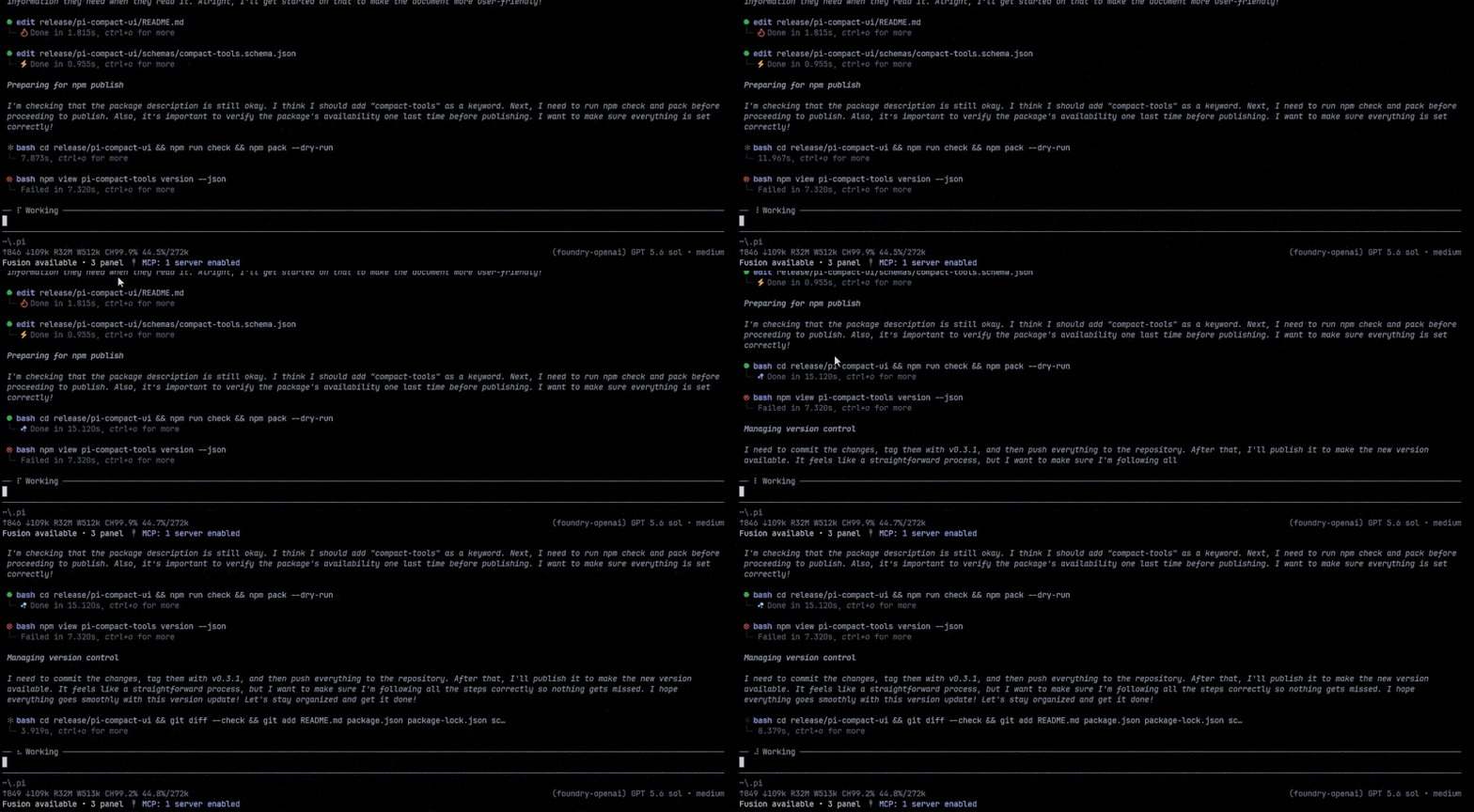
### Compact tool workflow
|
|
12
|
+
|
|
13
|
+
Active, successful, and failed tool calls stay compact while preserving useful status and timing information.
|
|
14
|
+
|
|
15
|
+

|
|
16
|
+
|
|
17
|
+
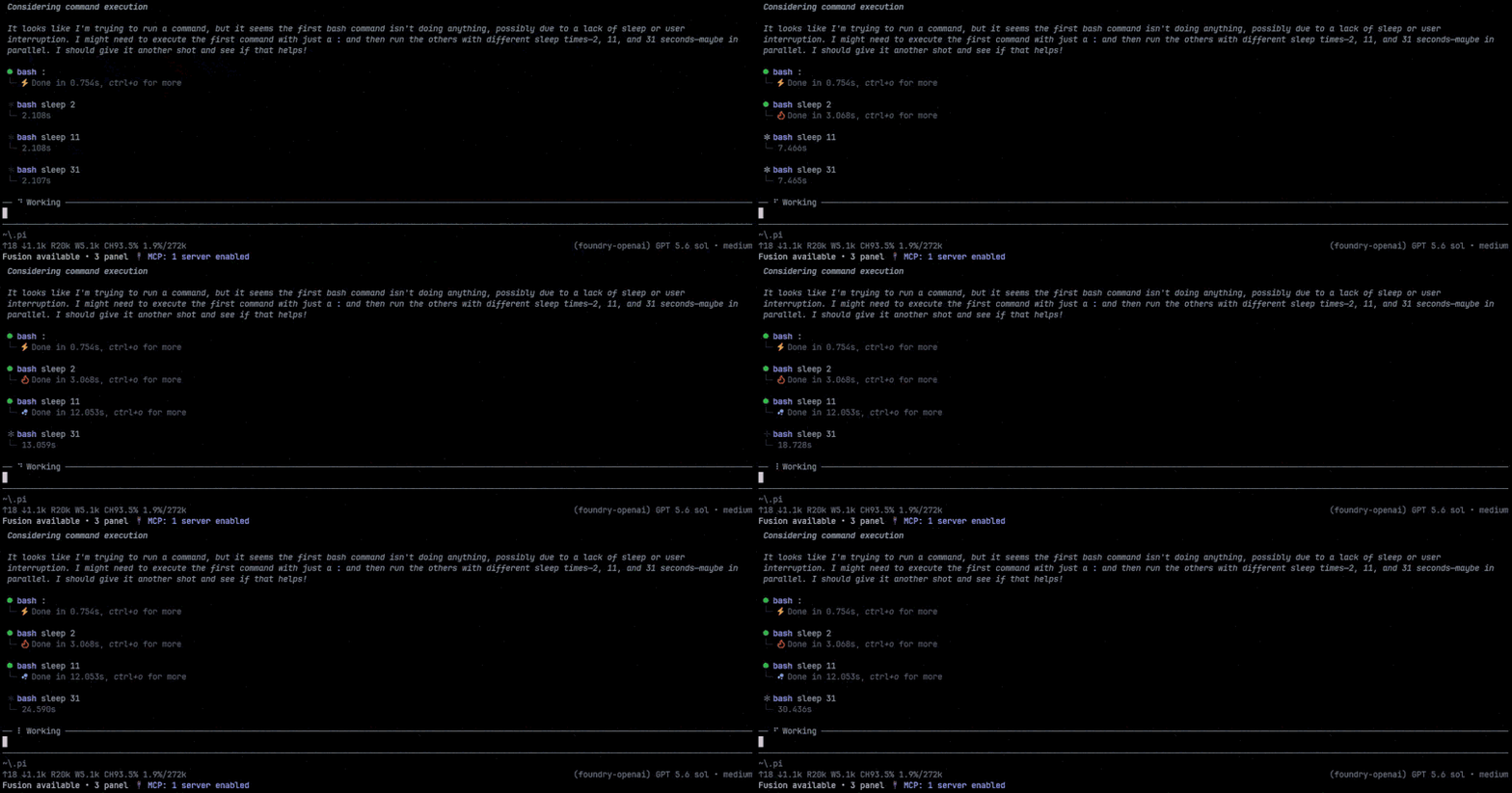
### Progress and duration display
|
|
18
|
+
|
|
19
|
+
The working label above the prompt uses the Thinking summary color with a soft white light sweep. Every tool state uses the same `⦁` glyph; running tools use a fourteen-frame cosine-eased RGB pulse between dim and bright gray, then settle to green on success or red on failure. Elapsed time remains visible in the neutral control color.
|
|
20
|
+
|
|
21
|
+

|
|
22
|
+
|
|
23
|
+
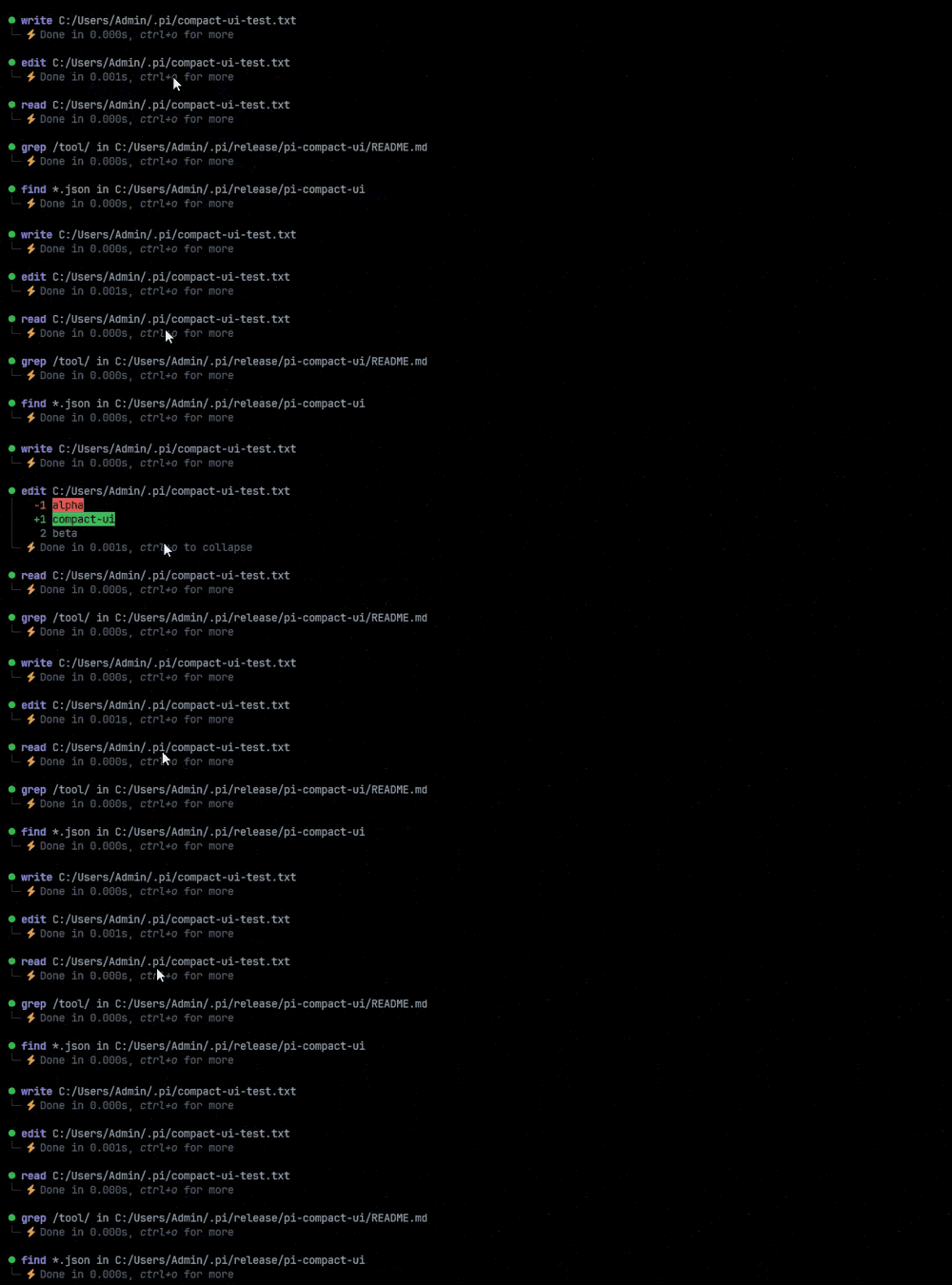
### Bounded result previews
|
|
24
|
+
|
|
25
|
+
Completed `edit` rows show only the lines actually removed (`-`) or added (`+`), without unchanged context, hunk metadata, or success prose. The per-tool `auto_compact` setting chooses between hidden results and a bounded preview; click or `Ctrl+O` uses Pi's normal expansion flow to reveal all changed lines.
|
|
26
|
+
|
|
27
|
+

|
|
28
|
+
|
|
29
|
+
## Features
|
|
30
|
+
|
|
31
|
+
- Compact rendering for `read`, `write`, `edit`, `bash`, `powershell`, `grep`, `find`, and `ls`
|
|
32
|
+
- One continuously glowing working label above the input prompt across thinking and tool execution
|
|
33
|
+
- Semantic built-in progress labels and automatically cleaned custom/MCP tool names; collapsed text-search rows include the searched pattern
|
|
34
|
+
- Four-step `Ctrl+T` thinking cycle when provider detail is available: summary, detail, summary, then hidden
|
|
35
|
+
- Millisecond-precision duration and completed output line counts with neutral status text
|
|
36
|
+
- Per-tool hidden or persistent bounded-preview collapsed state with `auto_compact: true` or `false`
|
|
37
|
+
- Primary invocation targets such as paths and patterns stay visible, including common collapsed shell file operations
|
|
38
|
+
- Click and `Ctrl+O` follow Pi's built-in expansion state while preview rows collapse back to their preview
|
|
39
|
+
- Edit patches display only removed (`-`) and added (`+`) lines, omitting unchanged context
|
|
40
|
+
- Configurable `previewLines` prevents large diffs, HTML, and shell output from flooding the transcript
|
|
41
|
+
- Width-cached expanded results, edit-diff processing, and unchanged result reuse during status animation
|
|
42
|
+
- Dark `│` and `└─` visual grouping
|
|
43
|
+
- Distinct cool-blue thinking text
|
|
44
|
+
- Truecolor and 256-color terminal support, plus Windows, Unix, and classic Mac line endings
|
|
45
|
+
- No Nerd Font requirement
|
|
46
|
+
|
|
47
|
+
## Install
|
|
48
|
+
|
|
49
|
+
```bash
|
|
50
|
+
pi install npm:pi-compact-tools
|
|
51
|
+
```
|
|
52
|
+
|
|
53
|
+
Or install from GitHub:
|
|
54
|
+
|
|
55
|
+
```bash
|
|
56
|
+
pi install git:github.com/nedleeds/pi-compact-tools
|
|
57
|
+
```
|
|
58
|
+
|
|
59
|
+
Restart Pi or run `/reload`.
|
|
60
|
+
|
|
61
|
+
Migrating from the previous package name:
|
|
62
|
+
|
|
63
|
+
```bash
|
|
64
|
+
pi remove npm:@nedleeds/pi-compact-ui
|
|
65
|
+
pi install npm:pi-compact-tools
|
|
66
|
+
```
|
|
67
|
+
|
|
68
|
+
## Theme
|
|
69
|
+
|
|
70
|
+
Select `github-dark-pro` in Pi's settings, or add it to `~/.pi/agent/settings.json`:
|
|
71
|
+
|
|
72
|
+
```json
|
|
73
|
+
{
|
|
74
|
+
"theme": "github-dark-pro"
|
|
75
|
+
}
|
|
76
|
+
```
|
|
77
|
+
|
|
78
|
+
## Configuration
|
|
79
|
+
|
|
80
|
+
Configuration is optional. Create `~/.pi/agent/compact-tools.json` for global settings or `<project>/.pi/compact-tools.json` for a trusted project.
|
|
81
|
+
|
|
82
|
+
Default configuration:
|
|
83
|
+
|
|
84
|
+
```json
|
|
85
|
+
{
|
|
86
|
+
"$schema": "https://raw.githubusercontent.com/nedleeds/pi-compact-tools/main/schemas/compact-tools.schema.json",
|
|
87
|
+
"tools": ["read", "write", "edit", "bash"],
|
|
88
|
+
"previewLines": 10,
|
|
89
|
+
"auto_compact": {
|
|
90
|
+
"read": true,
|
|
91
|
+
"write": true,
|
|
92
|
+
"edit": false,
|
|
93
|
+
"bash": true
|
|
94
|
+
}
|
|
95
|
+
}
|
|
96
|
+
```
|
|
97
|
+
|
|
98
|
+
Every tool call title uses `⦁`. Pending calls use dark gray; active calls smoothly pulse through fourteen cosine-eased RGB frames at a 45 ms interval without disappearing. Animation starts while arguments stream, so `write` and `edit` remain visibly active before their filesystem operation begins. Successful titles use green, and failed titles use red. `Done`, `Failed`, elapsed time, and line counts use the same neutral control color without printing inline click or keyboard hints. A single Pi working label animates independently of token arrival and reports `Thinking…`, `Responding…`, semantic built-in states such as `Reading file…`, or cleaned custom states such as `Using jira search…`. Invocation arguments remain in the tool row instead of being duplicated above the prompt. No separate spinner glyph is shown above the prompt.
|
|
99
|
+
|
|
100
|
+
`auto_compact` controls each tool's initial result state:
|
|
101
|
+
|
|
102
|
+
- `true` starts with the result hidden.
|
|
103
|
+
- `false` starts with at most `previewLines` rendered rows visible.
|
|
104
|
+
- Clicking or pressing `Ctrl+O` expands the complete result through Pi's built-in expansion state.
|
|
105
|
+
|
|
106
|
+
`previewLines` accepts `1`–`100` and defaults to `10`. It limits the collapsed preview; the complete result remains available. Unspecified entries inherit the previous configuration layer. By default, `read`, `write`, and `bash` start hidden, while `edit` starts with a short changed-lines preview.
|
|
107
|
+
|
|
108
|
+
To enable all Unix-compatible tools:
|
|
109
|
+
|
|
110
|
+
```json
|
|
111
|
+
{
|
|
112
|
+
"tools": ["read", "write", "edit", "bash", "grep", "find", "ls"]
|
|
113
|
+
}
|
|
114
|
+
```
|
|
115
|
+
|
|
116
|
+
Add `"powershell"` on Windows if desired.
|
|
117
|
+
|
|
118
|
+
## Controls
|
|
119
|
+
|
|
120
|
+
`Ctrl+T` cycles every thinking block through:
|
|
121
|
+
|
|
122
|
+
```text
|
|
123
|
+
one-line summary → summary + │-indented detail → one-line summary → Thinking...
|
|
124
|
+
```
|
|
125
|
+
|
|
126
|
+
Standalone bold lines and Markdown headings split one provider thinking run into logical sections. Each section gets its own summary and optional `│`-indented detail. Summary-only views stay uncluttered with no control hint; the control row appears only while provider-supplied detail is visible. When no thinking detail exists, `Ctrl+T` falls back to Pi's normal visible/hidden toggle instead of showing a duplicate detail phase. While thinking streams, a slightly faster highlight sweeps from the Thinking summary color to white across Pi's working label at a steady interval rather than depending on token updates. The transcript summary remains visually stable. The transformation is display-only; complete thinking remains unchanged in the session and model context.
|
|
127
|
+
|
|
128
|
+
Primary file and search targets stay visible. Collapsed `bash` and `powershell` rows describe intent—such as `Run tests` or `Check repository status`. Text searches retain their primary pattern (for example, `Search text "TODO|FIXME"`), and common file commands retain their operands (for example, `Run rm "build"` or `Find files "*.test.ts" in "src"`). Expanding the row reveals the exact command. After every supported tool completes, the status reports the expanded result size as `Done in …s (N lines)` instead of repeating options such as context and limit. Counts use the returned text for reads, searches, listings, and shell commands, written content for `write`, and only the displayed `-`/`+` lines for `edit`. The count is computed once after completion and cached with the row, so streaming and repeated expansion do not add ongoing work. Large payloads represented as results follow the result toggle.
|
|
129
|
+
|
|
130
|
+
A mouse click toggles one row using Pi's native result state. `Ctrl+O` remains owned by Pi and expands or collapses all tool rows consistently, including tools not rendered by this extension. A row with `auto_compact: false` cycles predictably between its bounded preview and the complete result, so repeated clicks never remove the row and fall through to a neighboring Thinking block. The extension does not intercept the global keybinding.
|
|
131
|
+
|
|
132
|
+
## Notes
|
|
133
|
+
|
|
134
|
+
- Pi `0.85.1+` and Node.js `22.19.0+` are recommended.
|
|
135
|
+
- The working indicator and mouse interaction are provided by Pi's TUI; `Ctrl+O` also works in regular mode.
|
|
136
|
+
- Duration covers the full rendered tool-call lifecycle, including streamed `write` and `edit` arguments.
|
|
137
|
+
- Selected tools override definitions with the same names so their compact renderers are restored reliably after `/reload`; other extensions overriding those tools may conflict by load order.
|
|
138
|
+
|
|
139
|
+
## Development
|
|
140
|
+
|
|
141
|
+
```bash
|
|
142
|
+
npm install
|
|
143
|
+
npm run check
|
|
144
|
+
pi -e .
|
|
145
|
+
```
|
|
146
|
+
|
|
147
|
+
Pi extensions execute with full system access. Review third-party extension source before installation.
|
|
148
|
+
|
|
149
|
+
## License
|
|
150
|
+
|
|
151
|
+
MIT
|
|
@@ -1,14 +1,11 @@
|
|
|
1
1
|
{
|
|
2
2
|
"$schema": "https://raw.githubusercontent.com/nedleeds/pi-compact-tools/main/schemas/compact-tools.schema.json",
|
|
3
3
|
"tools": ["read", "write", "edit", "bash"],
|
|
4
|
+
"previewLines": 10,
|
|
4
5
|
"auto_compact": {
|
|
5
6
|
"read": true,
|
|
6
7
|
"write": true,
|
|
7
8
|
"edit": false,
|
|
8
9
|
"bash": true
|
|
9
|
-
},
|
|
10
|
-
"spinner": {
|
|
11
|
-
"frames": ["●", "●", " ", "●", "●"],
|
|
12
|
-
"intervalMs": 120
|
|
13
10
|
}
|
|
14
11
|
}
|
|
@@ -1,14 +1,11 @@
|
|
|
1
1
|
{
|
|
2
2
|
"$schema": "https://raw.githubusercontent.com/nedleeds/pi-compact-tools/main/schemas/compact-tools.schema.json",
|
|
3
3
|
"tools": ["read", "write", "edit", "bash", "grep", "find", "ls"],
|
|
4
|
+
"previewLines": 10,
|
|
4
5
|
"auto_compact": {
|
|
5
6
|
"read": true,
|
|
6
7
|
"write": true,
|
|
7
8
|
"edit": false,
|
|
8
9
|
"bash": true
|
|
9
|
-
},
|
|
10
|
-
"spinner": {
|
|
11
|
-
"frames": ["◐", "◓", "◑", "◒"],
|
|
12
|
-
"intervalMs": 120
|
|
13
10
|
}
|
|
14
11
|
}
|
|
@@ -0,0 +1,65 @@
|
|
|
1
|
+
import type { Theme } from "@earendil-works/pi-coding-agent";
|
|
2
|
+
|
|
3
|
+
export type Rgb = { r: number; g: number; b: number };
|
|
4
|
+
type ThemeForeground = Parameters<Theme["getFgAnsi"]>[0];
|
|
5
|
+
|
|
6
|
+
const ANSI_BASIC_RGB: readonly Rgb[] = [
|
|
7
|
+
{ r: 0, g: 0, b: 0 }, { r: 128, g: 0, b: 0 }, { r: 0, g: 128, b: 0 }, { r: 128, g: 128, b: 0 },
|
|
8
|
+
{ r: 0, g: 0, b: 128 }, { r: 128, g: 0, b: 128 }, { r: 0, g: 128, b: 128 }, { r: 192, g: 192, b: 192 },
|
|
9
|
+
{ r: 128, g: 128, b: 128 }, { r: 255, g: 0, b: 0 }, { r: 0, g: 255, b: 0 }, { r: 255, g: 255, b: 0 },
|
|
10
|
+
{ r: 0, g: 0, b: 255 }, { r: 255, g: 0, b: 255 }, { r: 0, g: 255, b: 255 }, { r: 255, g: 255, b: 255 },
|
|
11
|
+
];
|
|
12
|
+
|
|
13
|
+
function ansi256ToRgb(index: number): Rgb {
|
|
14
|
+
if (index < 16) return ANSI_BASIC_RGB[index] ?? { r: 192, g: 192, b: 192 };
|
|
15
|
+
if (index < 232) {
|
|
16
|
+
const value = index - 16;
|
|
17
|
+
const channel = (part: number) => part === 0 ? 0 : 55 + part * 40;
|
|
18
|
+
return {
|
|
19
|
+
r: channel(Math.floor(value / 36)),
|
|
20
|
+
g: channel(Math.floor((value % 36) / 6)),
|
|
21
|
+
b: channel(value % 6),
|
|
22
|
+
};
|
|
23
|
+
}
|
|
24
|
+
const gray = 8 + Math.min(23, index - 232) * 10;
|
|
25
|
+
return { r: gray, g: gray, b: gray };
|
|
26
|
+
}
|
|
27
|
+
|
|
28
|
+
function rgbToAnsi256(rgb: Rgb): number {
|
|
29
|
+
let bestIndex = 0;
|
|
30
|
+
let bestDistance = Number.POSITIVE_INFINITY;
|
|
31
|
+
for (let index = 0; index < 256; index++) {
|
|
32
|
+
const candidate = ansi256ToRgb(index);
|
|
33
|
+
const distance = (rgb.r - candidate.r) ** 2 + (rgb.g - candidate.g) ** 2 + (rgb.b - candidate.b) ** 2;
|
|
34
|
+
if (distance >= bestDistance) continue;
|
|
35
|
+
bestIndex = index;
|
|
36
|
+
bestDistance = distance;
|
|
37
|
+
}
|
|
38
|
+
return bestIndex;
|
|
39
|
+
}
|
|
40
|
+
|
|
41
|
+
export function themeColorRgb(theme: Theme, color: ThemeForeground): Rgb | undefined {
|
|
42
|
+
if (typeof theme.getFgAnsi !== "function") return undefined;
|
|
43
|
+
const ansi = theme.getFgAnsi(color);
|
|
44
|
+
const trueColor = ansi.match(/\[38;2;(\d+);(\d+);(\d+)m/u);
|
|
45
|
+
if (trueColor) return { r: Number(trueColor[1]), g: Number(trueColor[2]), b: Number(trueColor[3]) };
|
|
46
|
+
const indexed = ansi.match(/\[38;5;(\d+)m/u);
|
|
47
|
+
return indexed ? ansi256ToRgb(Number(indexed[1])) : undefined;
|
|
48
|
+
}
|
|
49
|
+
|
|
50
|
+
export function interpolateRgb(from: Rgb, to: Rgb, amount: number): Rgb {
|
|
51
|
+
const bounded = Math.max(0, Math.min(1, amount));
|
|
52
|
+
const channel = (start: number, end: number) => Math.round(start + (end - start) * bounded);
|
|
53
|
+
return {
|
|
54
|
+
r: channel(from.r, to.r),
|
|
55
|
+
g: channel(from.g, to.g),
|
|
56
|
+
b: channel(from.b, to.b),
|
|
57
|
+
};
|
|
58
|
+
}
|
|
59
|
+
|
|
60
|
+
export function colorizeRgb(theme: Theme, color: Rgb, text: string): string {
|
|
61
|
+
if (typeof theme.getColorMode === "function" && theme.getColorMode() === "256color") {
|
|
62
|
+
return `\x1b[38;5;${rgbToAnsi256(color)}m${text}\x1b[39m`;
|
|
63
|
+
}
|
|
64
|
+
return `\x1b[38;2;${color.r};${color.g};${color.b}m${text}\x1b[39m`;
|
|
65
|
+
}
|
|
@@ -12,6 +12,7 @@ type JsonObject = Record<string, unknown>;
|
|
|
12
12
|
|
|
13
13
|
export const DEFAULT_CONFIG: CompactToolsConfig = {
|
|
14
14
|
tools: ["read", "write", "edit", "bash"],
|
|
15
|
+
previewLines: 10,
|
|
15
16
|
auto_compact: {
|
|
16
17
|
read: true,
|
|
17
18
|
write: true,
|
|
@@ -22,10 +23,6 @@ export const DEFAULT_CONFIG: CompactToolsConfig = {
|
|
|
22
23
|
find: true,
|
|
23
24
|
ls: true,
|
|
24
25
|
},
|
|
25
|
-
spinner: {
|
|
26
|
-
frames: ["◐", "◓", "◑", "◒"],
|
|
27
|
-
intervalMs: 120,
|
|
28
|
-
},
|
|
29
26
|
};
|
|
30
27
|
|
|
31
28
|
function isObject(value: unknown): value is JsonObject {
|
|
@@ -40,10 +37,6 @@ function isIntegerInRange(value: unknown, minimum: number, maximum: number): val
|
|
|
40
37
|
return typeof value === "number" && Number.isInteger(value) && value >= minimum && value <= maximum;
|
|
41
38
|
}
|
|
42
39
|
|
|
43
|
-
function isNonEmptyStringArray(value: unknown): value is string[] {
|
|
44
|
-
return Array.isArray(value) && value.length > 0 && value.every((item) => typeof item === "string" && item.length > 0);
|
|
45
|
-
}
|
|
46
|
-
|
|
47
40
|
function parseTools(value: unknown, path: string): CompactToolName[] | undefined {
|
|
48
41
|
if (!Array.isArray(value)) {
|
|
49
42
|
warn(path, "tools must be an array; using previous values");
|
|
@@ -82,28 +75,6 @@ function parseAutoCompact(
|
|
|
82
75
|
return result;
|
|
83
76
|
}
|
|
84
77
|
|
|
85
|
-
function parseSpinner(
|
|
86
|
-
base: CompactToolsConfig["spinner"],
|
|
87
|
-
value: unknown,
|
|
88
|
-
path: string,
|
|
89
|
-
): CompactToolsConfig["spinner"] {
|
|
90
|
-
if (value === undefined) return base;
|
|
91
|
-
if (!isObject(value)) {
|
|
92
|
-
warn(path, "spinner must be an object; using previous values");
|
|
93
|
-
return base;
|
|
94
|
-
}
|
|
95
|
-
const frames = value.frames;
|
|
96
|
-
const intervalMs = value.intervalMs;
|
|
97
|
-
const validFrames = isNonEmptyStringArray(frames);
|
|
98
|
-
const validInterval = isIntegerInRange(intervalMs, 40, 5_000);
|
|
99
|
-
if (frames !== undefined && !validFrames) warn(path, "spinner.frames must be a non-empty string array");
|
|
100
|
-
if (intervalMs !== undefined && !validInterval) warn(path, "spinner.intervalMs must be 40–5000");
|
|
101
|
-
return {
|
|
102
|
-
frames: validFrames ? frames : base.frames,
|
|
103
|
-
intervalMs: validInterval ? intervalMs : base.intervalMs,
|
|
104
|
-
};
|
|
105
|
-
}
|
|
106
|
-
|
|
107
78
|
export function mergeConfig(base: CompactToolsConfig, value: unknown, path: string): CompactToolsConfig {
|
|
108
79
|
if (value === undefined) return base;
|
|
109
80
|
if (!isObject(value)) {
|
|
@@ -112,8 +83,12 @@ export function mergeConfig(base: CompactToolsConfig, value: unknown, path: stri
|
|
|
112
83
|
}
|
|
113
84
|
const tools = value.tools === undefined ? base.tools : (parseTools(value.tools, path) ?? base.tools);
|
|
114
85
|
const auto_compact = parseAutoCompact(base.auto_compact, value.auto_compact, path);
|
|
115
|
-
const
|
|
116
|
-
|
|
86
|
+
const previewLines = value.previewLines === undefined ? base.previewLines
|
|
87
|
+
: isIntegerInRange(value.previewLines, 1, 100) ? value.previewLines : base.previewLines;
|
|
88
|
+
if (value.previewLines !== undefined && !isIntegerInRange(value.previewLines, 1, 100)) {
|
|
89
|
+
warn(path, "previewLines must be 1–100; using previous value");
|
|
90
|
+
}
|
|
91
|
+
return { tools, auto_compact, previewLines };
|
|
117
92
|
}
|
|
118
93
|
|
|
119
94
|
function readJson(path: string): unknown {
|
|
@@ -133,13 +108,3 @@ export function loadConfig(cwd?: string, projectTrusted = false): CompactToolsCo
|
|
|
133
108
|
const projectPath = join(cwd, CONFIG_DIR_NAME, CONFIG_FILE);
|
|
134
109
|
return mergeConfig(globalConfig, readJson(projectPath), projectPath);
|
|
135
110
|
}
|
|
136
|
-
|
|
137
|
-
export function isFullscreenMode(argv = process.argv): boolean {
|
|
138
|
-
for (let index = 0; index < argv.length; index++) {
|
|
139
|
-
const argument = argv[index];
|
|
140
|
-
if (argument === "--tui-mode") return argv[index + 1] === "fullscreen";
|
|
141
|
-
if (argument?.startsWith("--tui-mode=")) return argument.slice("--tui-mode=".length) === "fullscreen";
|
|
142
|
-
}
|
|
143
|
-
const settings = readJson(join(getAgentDir(), "settings.json"));
|
|
144
|
-
return isObject(settings) && settings.tuiMode === "fullscreen";
|
|
145
|
-
}
|
|
@@ -2,6 +2,32 @@
|
|
|
2
2
|
|
|
3
3
|
export type RowStatus = "pending" | "running" | "success" | "error";
|
|
4
4
|
|
|
5
|
+
export type IndicatorTone = "borderAccent" | "border" | "borderMuted" | "success" | "error";
|
|
6
|
+
|
|
7
|
+
export const RUNNING_INDICATOR_FRAME_COUNT = 14;
|
|
8
|
+
const RUNNING_INDICATOR_MIN_STRENGTH = 0.08;
|
|
9
|
+
|
|
10
|
+
export function indicatorStrength(status: RowStatus, frame = 0): number {
|
|
11
|
+
if (status !== "running") return 1;
|
|
12
|
+
const normalizedFrame = ((frame % RUNNING_INDICATOR_FRAME_COUNT) + RUNNING_INDICATOR_FRAME_COUNT)
|
|
13
|
+
% RUNNING_INDICATOR_FRAME_COUNT;
|
|
14
|
+
const wave = (Math.cos((normalizedFrame / RUNNING_INDICATOR_FRAME_COUNT) * Math.PI * 2) + 1) / 2;
|
|
15
|
+
return RUNNING_INDICATOR_MIN_STRENGTH + (1 - RUNNING_INDICATOR_MIN_STRENGTH) * wave;
|
|
16
|
+
}
|
|
17
|
+
|
|
18
|
+
/** Semantic fallback for themes whose foreground RGB values cannot be resolved. */
|
|
19
|
+
export function indicatorTone(status: RowStatus, frame = 0): IndicatorTone {
|
|
20
|
+
if (status === "success") return "success";
|
|
21
|
+
if (status === "error") return "error";
|
|
22
|
+
if (status === "pending") return "borderAccent";
|
|
23
|
+
const strength = indicatorStrength(status, frame);
|
|
24
|
+
return strength >= 0.7 ? "borderAccent" : strength >= 0.35 ? "border" : "borderMuted";
|
|
25
|
+
}
|
|
26
|
+
|
|
27
|
+
export function indicatorGlyph(_status: RowStatus, _frame = 0): string {
|
|
28
|
+
return "⦁";
|
|
29
|
+
}
|
|
30
|
+
|
|
5
31
|
export function normalizeLineEndings(value: string): string {
|
|
6
32
|
return value.replace(/\r\n?|\n/g, "\n");
|
|
7
33
|
}
|