pi-compact-tools 0.6.0 → 0.6.3
This diff represents the content of publicly available package versions that have been released to one of the supported registries. The information contained in this diff is provided for informational purposes only and reflects changes between package versions as they appear in their respective public registries.
- package/README.md +183 -183
- package/extensions/compact-tools-invocation.ts +117 -69
- package/extensions/compact-tools-thinking.ts +337 -292
- package/extensions/compact-tools-types.ts +2 -0
- package/extensions/compact-tools.ts +322 -314
- package/package.json +1 -1
package/README.md
CHANGED
|
@@ -1,183 +1,183 @@
|
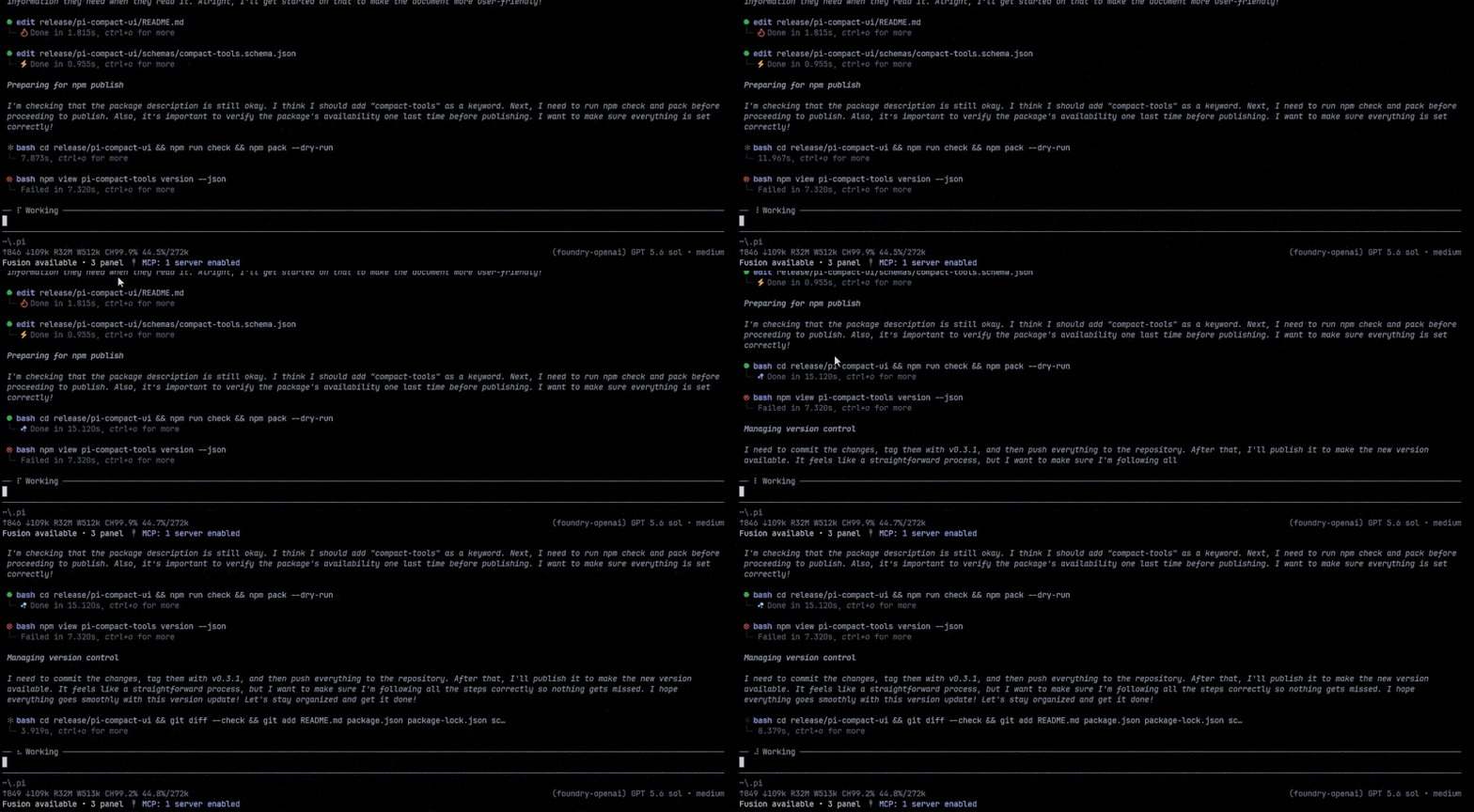
|
|
1
|
-
# pi-compact-tools
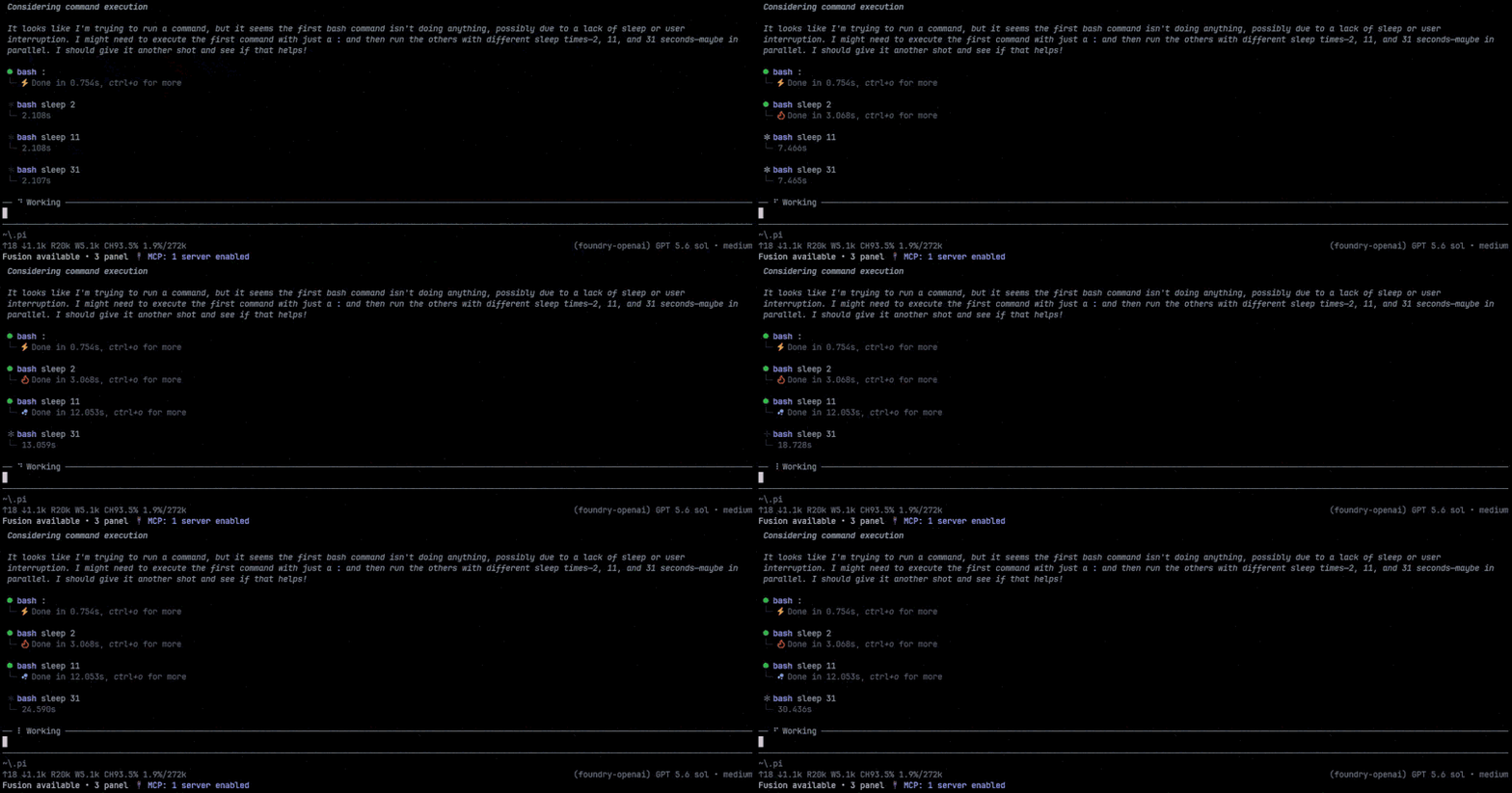
|
|
2
|
-
|
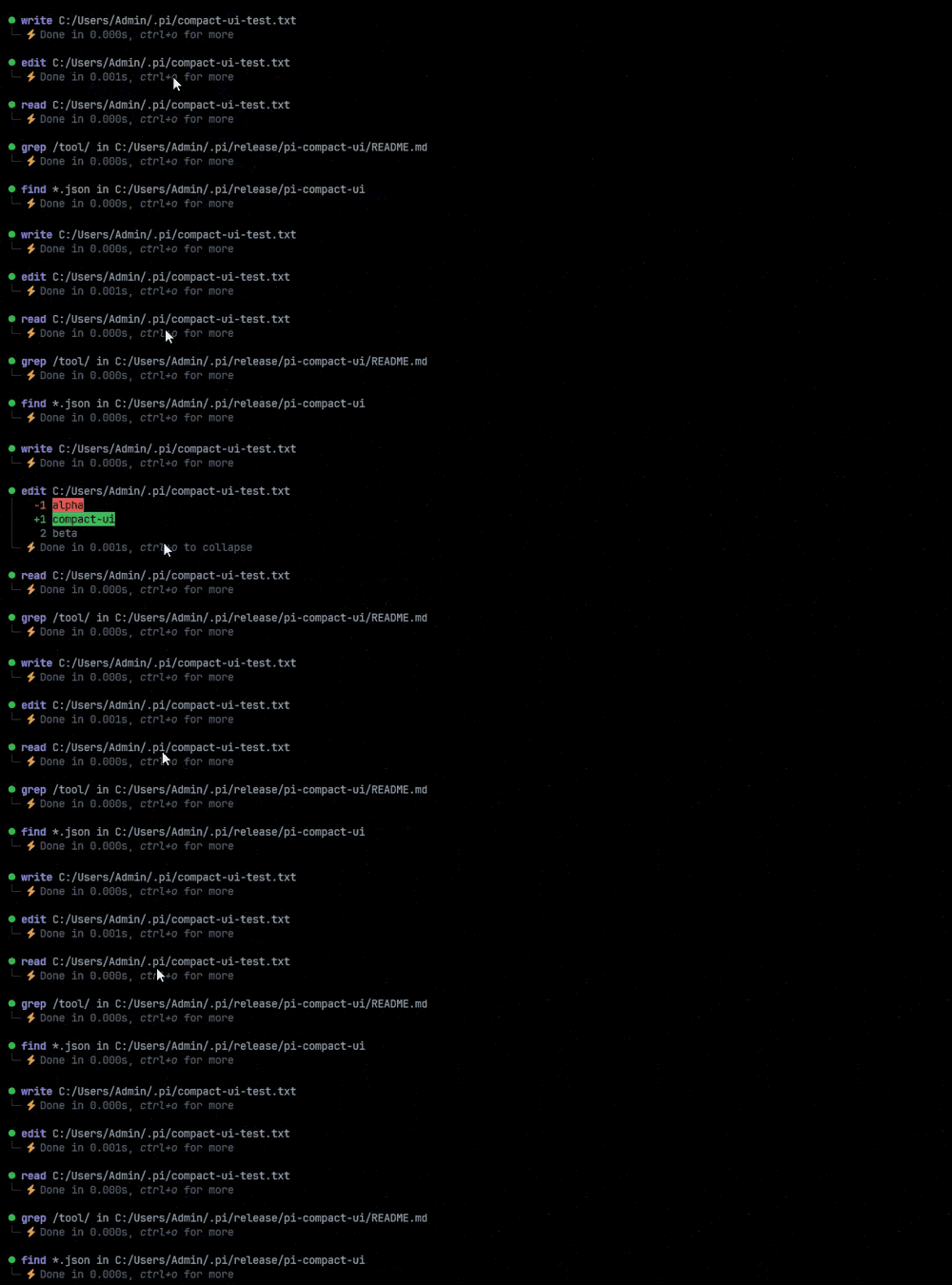
|
3
|
-
Compact, expandable rendering for Pi's built-in tools, with a polished GitHub Dark theme.
|
|
4
|
-
|
|
5
|
-
> Formerly `@nedleeds/pi-compact-ui`. New installations should use `pi-compact-tools`.
|
|
6
|
-
|
|
7
|
-
## Demo
|
|
8
|
-
|
|
9
|
-
The recordings below use the optional [Nerd Font](#nerd-font-spinner-preset) spinner preset. **The default configuration does not require a Nerd Font**.
|
|
10
|
-
|
|
11
|
-
### Compact tool workflow
|
|
12
|
-
|
|
13
|
-
Active, successful, and failed tool calls stay compact while preserving useful status and timing information.
|
|
14
|
-
|
|
15
|
-
|
|
16
|
-
|
|
17
|
-
### Spinner and duration display
|
|
18
|
-
|
|
19
|
-
The spinner animates during execution, then returns to a green success circle or red failure circle. Elapsed time remains visible in the neutral control color.
|
|
20
|
-
|
|
21
|
-
|
|
22
|
-
|
|
23
|
-
### Initially visible edit diffs
|
|
24
|
-
|
|
25
|
-
Completed `edit` rows show their full diff initially by default. The per-tool `auto_compact` setting controls which tools start with their result hidden without disabling click or `Ctrl+O` interaction.
|
|
26
|
-
|
|
27
|
-
|
|
28
|
-
|
|
29
|
-
## Features
|
|
30
|
-
|
|
31
|
-
- Compact rendering for `read`, `write`, `edit`, `bash`, `powershell`, `grep`, `find`, and `ls`
|
|
32
|
-
- Animated configurable spinner in fullscreen TUI mode
|
|
33
|
-
-
|
|
34
|
-
- Millisecond-precision duration with neutral status text
|
|
35
|
-
- Per-tool initial compaction and global-toggle participation with `auto_compact: true` or `false`
|
|
36
|
-
-
|
|
37
|
-
- Click toggles one result between hidden and fully visible; `Ctrl+O` toggles all participating rows
|
|
38
|
-
- Full output on expansion and initially visible edit diffs by default
|
|
39
|
-
- Width-cached expanded results and edit-diff processing for responsive fullscreen scrolling
|
|
40
|
-
- Dark `│` and `└─` visual grouping
|
|
41
|
-
- Distinct cool-blue thinking text
|
|
42
|
-
- Windows, Unix, and classic Mac line-ending support
|
|
43
|
-
- No Nerd Font requirement
|
|
44
|
-
|
|
45
|
-
## Install
|
|
46
|
-
|
|
47
|
-
```bash
|
|
48
|
-
pi install npm:pi-compact-tools
|
|
49
|
-
```
|
|
50
|
-
|
|
51
|
-
Or install from GitHub:
|
|
52
|
-
|
|
53
|
-
```bash
|
|
54
|
-
pi install git:github.com/nedleeds/pi-compact-tools
|
|
55
|
-
```
|
|
56
|
-
|
|
57
|
-
Restart Pi or run `/reload`.
|
|
58
|
-
|
|
59
|
-
Migrating from the previous package name:
|
|
60
|
-
|
|
61
|
-
```bash
|
|
62
|
-
pi remove npm:@nedleeds/pi-compact-ui
|
|
63
|
-
pi install npm:pi-compact-tools
|
|
64
|
-
```
|
|
65
|
-
|
|
66
|
-
## Theme
|
|
67
|
-
|
|
68
|
-
Select `github-dark-pro` in Pi's settings, or add it to `~/.pi/agent/settings.json`:
|
|
69
|
-
|
|
70
|
-
```json
|
|
71
|
-
{
|
|
72
|
-
"theme": "github-dark-pro"
|
|
73
|
-
}
|
|
74
|
-
```
|
|
75
|
-
|
|
76
|
-
## Configuration
|
|
77
|
-
|
|
78
|
-
Configuration is optional. Create `~/.pi/agent/compact-tools.json` for global settings or `<project>/.pi/compact-tools.json` for a trusted project.
|
|
79
|
-
|
|
80
|
-
Default configuration:
|
|
81
|
-
|
|
82
|
-
```json
|
|
83
|
-
{
|
|
84
|
-
"$schema": "https://raw.githubusercontent.com/nedleeds/pi-compact-tools/main/schemas/compact-tools.schema.json",
|
|
85
|
-
"tools": ["read", "write", "edit", "bash"],
|
|
86
|
-
"auto_compact": {
|
|
87
|
-
"read": true,
|
|
88
|
-
"write": true,
|
|
89
|
-
"edit": false,
|
|
90
|
-
"bash": true
|
|
91
|
-
},
|
|
92
|
-
"spinner": {
|
|
93
|
-
"frames": ["◐", "◓", "◑", "◒"],
|
|
94
|
-
"intervalMs": 120
|
|
95
|
-
}
|
|
96
|
-
}
|
|
97
|
-
```
|
|
98
|
-
|
|
99
|
-
Successful call titles use a green `●`, while failed call titles use a red `●`. `Done`, `Failed`, and elapsed time use the same neutral control color. Fast tools finish immediately; no artificial spinner delay is added.
|
|
100
|
-
|
|
101
|
-
For a minimal blinking spinner, copy [`examples/compact-tools-2.json`](examples/compact-tools-2.json). Its frames use `● ● (blank) ● ●` at 120 ms intervals. The renderer's built-in frame dimming turns this into a fade-out/fade-in animation. Rename it to `compact-tools.json` or copy its contents to the active configuration path.
|
|
102
|
-
|
|
103
|
-
`auto_compact` controls each tool's initial state and whether it participates in the global `Ctrl+O` toggle:
|
|
104
|
-
|
|
105
|
-
- `true` starts with the result hidden and participates in `Ctrl+O`.
|
|
106
|
-
- `false` starts with the full result visible and is unaffected by `Ctrl+O`.
|
|
107
|
-
- Clicking any compact-rendered row still toggles that row's result.
|
|
108
|
-
|
|
109
|
-
Unspecified entries inherit the previous configuration layer. By default, `read`, `write`, and `bash` start compact and participate in the global toggle, while `edit` starts expanded and remains unaffected so code diffs stay visible.
|
|
110
|
-
|
|
111
|
-
To enable all Unix-compatible tools:
|
|
112
|
-
|
|
113
|
-
```json
|
|
114
|
-
{
|
|
115
|
-
"tools": ["read", "write", "edit", "bash", "grep", "find", "ls"]
|
|
116
|
-
}
|
|
117
|
-
```
|
|
118
|
-
|
|
119
|
-
Add `"powershell"` on Windows if desired.
|
|
120
|
-
|
|
121
|
-
## Nerd Font spinner preset
|
|
122
|
-
|
|
123
|
-
If your terminal uses a [Nerd Font](https://www.nerdfonts.com/), this preset enables all eight tools and the spinner shown in the demos:
|
|
124
|
-
|
|
125
|
-
```json
|
|
126
|
-
{
|
|
127
|
-
"$schema": "https://raw.githubusercontent.com/nedleeds/pi-compact-tools/main/schemas/compact-tools.schema.json",
|
|
128
|
-
"tools": ["read", "write", "edit", "bash", "powershell", "grep", "find", "ls"],
|
|
129
|
-
"spinner": {
|
|
130
|
-
"frames": ["✽", "✻", "✲", "✢", "✲", "✻"],
|
|
131
|
-
"intervalMs": 80
|
|
132
|
-
}
|
|
133
|
-
}
|
|
134
|
-
```
|
|
135
|
-
|
|
136
|
-
Remove `"powershell"` on systems where it is unavailable.
|
|
137
|
-
|
|
138
|
-
## Controls
|
|
139
|
-
|
|
140
|
-
`Ctrl+T` cycles every thinking block through:
|
|
141
|
-
|
|
142
|
-
```text
|
|
143
|
-
one-line summary
|
|
144
|
-
```
|
|
145
|
-
|
|
146
|
-
Standalone bold lines and Markdown headings split one provider thinking run into logical sections. Each section gets its own summary
|
|
147
|
-
|
|
148
|
-
|
|
149
|
-
|
|
150
|
-
A mouse click toggles one row's result:
|
|
151
|
-
|
|
152
|
-
```text
|
|
153
|
-
result hidden ↔ full result
|
|
154
|
-
```
|
|
155
|
-
|
|
156
|
-
`Ctrl+O` operates on all rows whose tool has `auto_compact: true`:
|
|
157
|
-
|
|
158
|
-
- If any participating row is not fully expanded, it expands all participating rows.
|
|
159
|
-
- If every participating row is fully expanded, it collapses all participating rows.
|
|
160
|
-
- Rows whose tool has `auto_compact: false` are left unchanged.
|
|
161
|
-
|
|
162
|
-
The extension handles and consumes `Ctrl+O` directly, so no Pi keybinding changes are required. With the default `edit: false`, edit diffs start visible and are excluded from the global toggle, while clicking an edit row still collapses or expands it.
|
|
163
|
-
|
|
164
|
-
## Notes
|
|
165
|
-
|
|
166
|
-
- Pi `0.85.1+` and Node.js 20+ are recommended.
|
|
167
|
-
- Fullscreen TUI mode is required for spinner animation and mouse interaction; `Ctrl+O` also works in regular mode.
|
|
168
|
-
- Duration covers the full rendered tool-call lifecycle, including streamed `write` and `edit` arguments.
|
|
169
|
-
- Selected tools override Pi's built-in definitions; other extensions overriding the same names may conflict by load order.
|
|
170
|
-
|
|
171
|
-
## Development
|
|
172
|
-
|
|
173
|
-
```bash
|
|
174
|
-
npm install
|
|
175
|
-
npm run check
|
|
176
|
-
pi -e .
|
|
177
|
-
```
|
|
178
|
-
|
|
179
|
-
Pi extensions execute with full system access. Review third-party extension source before installation.
|
|
180
|
-
|
|
181
|
-
## License
|
|
182
|
-
|
|
183
|
-
MIT
|
|
1
|
+
# pi-compact-tools
|
|
2
|
+
|
|
3
|
+
Compact, expandable rendering for Pi's built-in tools, with a polished GitHub Dark theme.
|
|
4
|
+
|
|
5
|
+
> Formerly `@nedleeds/pi-compact-ui`. New installations should use `pi-compact-tools`.
|
|
6
|
+
|
|
7
|
+
## Demo
|
|
8
|
+
|
|
9
|
+
The recordings below use the optional [Nerd Font](#nerd-font-spinner-preset) spinner preset. **The default configuration does not require a Nerd Font**.
|
|
10
|
+
|
|
11
|
+
### Compact tool workflow
|
|
12
|
+
|
|
13
|
+
Active, successful, and failed tool calls stay compact while preserving useful status and timing information.
|
|
14
|
+
|
|
15
|
+

|
|
16
|
+
|
|
17
|
+
### Spinner and duration display
|
|
18
|
+
|
|
19
|
+
The spinner animates during execution, then returns to a green success circle or red failure circle. Elapsed time remains visible in the neutral control color.
|
|
20
|
+
|
|
21
|
+

|
|
22
|
+
|
|
23
|
+
### Initially visible edit diffs
|
|
24
|
+
|
|
25
|
+
Completed `edit` rows show their full diff initially by default. The per-tool `auto_compact` setting controls which tools start with their result hidden without disabling click or `Ctrl+O` interaction.
|
|
26
|
+
|
|
27
|
+

|
|
28
|
+
|
|
29
|
+
## Features
|
|
30
|
+
|
|
31
|
+
- Compact rendering for `read`, `write`, `edit`, `bash`, `powershell`, `grep`, `find`, and `ls`
|
|
32
|
+
- Animated configurable spinner in fullscreen TUI mode
|
|
33
|
+
- Four-step `Ctrl+T` thinking cycle when provider detail is available: summary, detail, summary, then hidden
|
|
34
|
+
- Millisecond-precision duration and completed output line counts with neutral status text
|
|
35
|
+
- Per-tool initial compaction and global-toggle participation with `auto_compact: true` or `false`
|
|
36
|
+
- Primary invocation targets such as paths, patterns, and shell commands stay visible
|
|
37
|
+
- Click toggles one result between hidden and fully visible; `Ctrl+O` toggles all participating rows
|
|
38
|
+
- Full output on expansion and initially visible edit diffs by default
|
|
39
|
+
- Width-cached expanded results and edit-diff processing for responsive fullscreen scrolling
|
|
40
|
+
- Dark `│` and `└─` visual grouping
|
|
41
|
+
- Distinct cool-blue thinking text
|
|
42
|
+
- Windows, Unix, and classic Mac line-ending support
|
|
43
|
+
- No Nerd Font requirement
|
|
44
|
+
|
|
45
|
+
## Install
|
|
46
|
+
|
|
47
|
+
```bash
|
|
48
|
+
pi install npm:pi-compact-tools
|
|
49
|
+
```
|
|
50
|
+
|
|
51
|
+
Or install from GitHub:
|
|
52
|
+
|
|
53
|
+
```bash
|
|
54
|
+
pi install git:github.com/nedleeds/pi-compact-tools
|
|
55
|
+
```
|
|
56
|
+
|
|
57
|
+
Restart Pi or run `/reload`.
|
|
58
|
+
|
|
59
|
+
Migrating from the previous package name:
|
|
60
|
+
|
|
61
|
+
```bash
|
|
62
|
+
pi remove npm:@nedleeds/pi-compact-ui
|
|
63
|
+
pi install npm:pi-compact-tools
|
|
64
|
+
```
|
|
65
|
+
|
|
66
|
+
## Theme
|
|
67
|
+
|
|
68
|
+
Select `github-dark-pro` in Pi's settings, or add it to `~/.pi/agent/settings.json`:
|
|
69
|
+
|
|
70
|
+
```json
|
|
71
|
+
{
|
|
72
|
+
"theme": "github-dark-pro"
|
|
73
|
+
}
|
|
74
|
+
```
|
|
75
|
+
|
|
76
|
+
## Configuration
|
|
77
|
+
|
|
78
|
+
Configuration is optional. Create `~/.pi/agent/compact-tools.json` for global settings or `<project>/.pi/compact-tools.json` for a trusted project.
|
|
79
|
+
|
|
80
|
+
Default configuration:
|
|
81
|
+
|
|
82
|
+
```json
|
|
83
|
+
{
|
|
84
|
+
"$schema": "https://raw.githubusercontent.com/nedleeds/pi-compact-tools/main/schemas/compact-tools.schema.json",
|
|
85
|
+
"tools": ["read", "write", "edit", "bash"],
|
|
86
|
+
"auto_compact": {
|
|
87
|
+
"read": true,
|
|
88
|
+
"write": true,
|
|
89
|
+
"edit": false,
|
|
90
|
+
"bash": true
|
|
91
|
+
},
|
|
92
|
+
"spinner": {
|
|
93
|
+
"frames": ["◐", "◓", "◑", "◒"],
|
|
94
|
+
"intervalMs": 120
|
|
95
|
+
}
|
|
96
|
+
}
|
|
97
|
+
```
|
|
98
|
+
|
|
99
|
+
Successful call titles use a green `●`, while failed call titles use a red `●`. `Done`, `Failed`, and elapsed time use the same neutral control color. Fast tools finish immediately; no artificial spinner delay is added.
|
|
100
|
+
|
|
101
|
+
For a minimal blinking spinner, copy [`examples/compact-tools-2.json`](examples/compact-tools-2.json). Its frames use `● ● (blank) ● ●` at 120 ms intervals. The renderer's built-in frame dimming turns this into a fade-out/fade-in animation. Rename it to `compact-tools.json` or copy its contents to the active configuration path.
|
|
102
|
+
|
|
103
|
+
`auto_compact` controls each tool's initial state and whether it participates in the global `Ctrl+O` toggle:
|
|
104
|
+
|
|
105
|
+
- `true` starts with the result hidden and participates in `Ctrl+O`.
|
|
106
|
+
- `false` starts with the full result visible and is unaffected by `Ctrl+O`.
|
|
107
|
+
- Clicking any compact-rendered row still toggles that row's result.
|
|
108
|
+
|
|
109
|
+
Unspecified entries inherit the previous configuration layer. By default, `read`, `write`, and `bash` start compact and participate in the global toggle, while `edit` starts expanded and remains unaffected so code diffs stay visible.
|
|
110
|
+
|
|
111
|
+
To enable all Unix-compatible tools:
|
|
112
|
+
|
|
113
|
+
```json
|
|
114
|
+
{
|
|
115
|
+
"tools": ["read", "write", "edit", "bash", "grep", "find", "ls"]
|
|
116
|
+
}
|
|
117
|
+
```
|
|
118
|
+
|
|
119
|
+
Add `"powershell"` on Windows if desired.
|
|
120
|
+
|
|
121
|
+
## Nerd Font spinner preset
|
|
122
|
+
|
|
123
|
+
If your terminal uses a [Nerd Font](https://www.nerdfonts.com/), this preset enables all eight tools and the spinner shown in the demos:
|
|
124
|
+
|
|
125
|
+
```json
|
|
126
|
+
{
|
|
127
|
+
"$schema": "https://raw.githubusercontent.com/nedleeds/pi-compact-tools/main/schemas/compact-tools.schema.json",
|
|
128
|
+
"tools": ["read", "write", "edit", "bash", "powershell", "grep", "find", "ls"],
|
|
129
|
+
"spinner": {
|
|
130
|
+
"frames": ["✽", "✻", "✲", "✢", "✲", "✻"],
|
|
131
|
+
"intervalMs": 80
|
|
132
|
+
}
|
|
133
|
+
}
|
|
134
|
+
```
|
|
135
|
+
|
|
136
|
+
Remove `"powershell"` on systems where it is unavailable.
|
|
137
|
+
|
|
138
|
+
## Controls
|
|
139
|
+
|
|
140
|
+
`Ctrl+T` cycles every thinking block through:
|
|
141
|
+
|
|
142
|
+
```text
|
|
143
|
+
one-line summary → summary + │-indented detail → one-line summary → Thinking...
|
|
144
|
+
```
|
|
145
|
+
|
|
146
|
+
Standalone bold lines and Markdown headings split one provider thinking run into logical sections. Each section gets its own summary and optional `│`-indented detail. The control row appears only on sections for which the provider returned expandable detail; when no thinking detail exists, no toggle hint is shown and `Ctrl+T` falls back to Pi's normal visible/hidden toggle instead of showing a duplicate detail phase. While thinking streams, a text-color highlight sweeps across summaries using streaming updates; no spinner glyph or title circle is shown. The transformation is display-only; complete thinking remains unchanged in the session and model context.
|
|
147
|
+
|
|
148
|
+
Primary invocation targets stay visible, including paths, patterns, and shell commands. After every supported tool completes, the status reports the expanded result size as `Done in …s (N lines)` instead of repeating options such as context and limit. Counts use the returned text for reads, searches, listings, and shell commands, written content for `write`, and the rendered diff for `edit`. The count is computed once after completion and cached with the row, so streaming and repeated expansion do not add ongoing work. Large payloads represented as results, such as write content and edit diffs, follow the result toggle.
|
|
149
|
+
|
|
150
|
+
A mouse click toggles one row's result:
|
|
151
|
+
|
|
152
|
+
```text
|
|
153
|
+
result hidden ↔ full result
|
|
154
|
+
```
|
|
155
|
+
|
|
156
|
+
`Ctrl+O` operates on all rows whose tool has `auto_compact: true`:
|
|
157
|
+
|
|
158
|
+
- If any participating row is not fully expanded, it expands all participating rows.
|
|
159
|
+
- If every participating row is fully expanded, it collapses all participating rows.
|
|
160
|
+
- Rows whose tool has `auto_compact: false` are left unchanged.
|
|
161
|
+
|
|
162
|
+
The extension handles and consumes `Ctrl+O` directly, so no Pi keybinding changes are required. With the default `edit: false`, edit diffs start visible and are excluded from the global toggle, while clicking an edit row still collapses or expands it.
|
|
163
|
+
|
|
164
|
+
## Notes
|
|
165
|
+
|
|
166
|
+
- Pi `0.85.1+` and Node.js 20+ are recommended.
|
|
167
|
+
- Fullscreen TUI mode is required for spinner animation and mouse interaction; `Ctrl+O` also works in regular mode.
|
|
168
|
+
- Duration covers the full rendered tool-call lifecycle, including streamed `write` and `edit` arguments.
|
|
169
|
+
- Selected tools override Pi's built-in definitions; other extensions overriding the same names may conflict by load order.
|
|
170
|
+
|
|
171
|
+
## Development
|
|
172
|
+
|
|
173
|
+
```bash
|
|
174
|
+
npm install
|
|
175
|
+
npm run check
|
|
176
|
+
pi -e .
|
|
177
|
+
```
|
|
178
|
+
|
|
179
|
+
Pi extensions execute with full system access. Review third-party extension source before installation.
|
|
180
|
+
|
|
181
|
+
## License
|
|
182
|
+
|
|
183
|
+
MIT
|
|
@@ -1,69 +1,117 @@
|
|
|
1
|
-
import type { AgentToolResult } from "@earendil-works/pi-coding-agent";
|
|
2
|
-
import { normalizeLineEndings } from "./compact-tools-core.ts";
|
|
3
|
-
import type { ToolArgs } from "./compact-tools-types.ts";
|
|
4
|
-
|
|
5
|
-
function pathFrom(args: ToolArgs): string {
|
|
6
|
-
const value = args.path ?? args.file_path;
|
|
7
|
-
return typeof value === "string" ? normalizeLineEndings(value) : "";
|
|
8
|
-
}
|
|
9
|
-
|
|
10
|
-
|
|
11
|
-
|
|
12
|
-
|
|
13
|
-
if (
|
|
14
|
-
|
|
15
|
-
|
|
16
|
-
|
|
17
|
-
|
|
18
|
-
|
|
19
|
-
|
|
20
|
-
|
|
21
|
-
|
|
22
|
-
|
|
23
|
-
}
|
|
24
|
-
|
|
25
|
-
|
|
26
|
-
|
|
27
|
-
|
|
28
|
-
|
|
29
|
-
|
|
30
|
-
|
|
31
|
-
|
|
32
|
-
}
|
|
33
|
-
|
|
34
|
-
|
|
35
|
-
|
|
36
|
-
|
|
37
|
-
|
|
38
|
-
|
|
39
|
-
|
|
40
|
-
|
|
41
|
-
|
|
42
|
-
|
|
43
|
-
|
|
44
|
-
|
|
45
|
-
|
|
46
|
-
|
|
47
|
-
|
|
48
|
-
|
|
49
|
-
|
|
50
|
-
|
|
51
|
-
|
|
52
|
-
|
|
53
|
-
|
|
54
|
-
|
|
55
|
-
|
|
56
|
-
|
|
57
|
-
|
|
58
|
-
|
|
59
|
-
|
|
60
|
-
|
|
61
|
-
|
|
62
|
-
|
|
63
|
-
|
|
64
|
-
)
|
|
65
|
-
|
|
66
|
-
|
|
67
|
-
|
|
68
|
-
|
|
69
|
-
|
|
1
|
+
import type { AgentToolResult } from "@earendil-works/pi-coding-agent";
|
|
2
|
+
import { normalizeLineEndings } from "./compact-tools-core.ts";
|
|
3
|
+
import type { ToolArgs } from "./compact-tools-types.ts";
|
|
4
|
+
|
|
5
|
+
function pathFrom(args: ToolArgs): string {
|
|
6
|
+
const value = args.path ?? args.file_path;
|
|
7
|
+
return typeof value === "string" ? normalizeLineEndings(value) : "";
|
|
8
|
+
}
|
|
9
|
+
|
|
10
|
+
const INLINE_ARGUMENT_TOOLS = new Set(["grep", "find", "ls"]);
|
|
11
|
+
|
|
12
|
+
function omitArgument(name: string, key: string): boolean {
|
|
13
|
+
if (key === "path" || key === "file_path") return true;
|
|
14
|
+
if (name === "read" && (key === "offset" || key === "limit")) return true;
|
|
15
|
+
if (name === "write" && key === "content") return true;
|
|
16
|
+
return (name === "grep" || name === "find") && key === "pattern";
|
|
17
|
+
}
|
|
18
|
+
|
|
19
|
+
function collectArgumentDetails(name: string, args: ToolArgs): ToolArgs {
|
|
20
|
+
const details: ToolArgs = {};
|
|
21
|
+
for (const [key, value] of Object.entries(args)) {
|
|
22
|
+
if (value !== undefined && !omitArgument(name, key)) details[key] = value;
|
|
23
|
+
}
|
|
24
|
+
return details;
|
|
25
|
+
}
|
|
26
|
+
|
|
27
|
+
export function getCallDetails(name: string, args: ToolArgs): string {
|
|
28
|
+
const path = pathFrom(args) || (INLINE_ARGUMENT_TOOLS.has(name) ? "." : "");
|
|
29
|
+
if (name === "read") return path;
|
|
30
|
+
if (name !== "grep" && name !== "find") return path;
|
|
31
|
+
const pattern = typeof args.pattern === "string" ? normalizeLineEndings(args.pattern) : "…";
|
|
32
|
+
return name === "grep" ? `/${pattern}/ in ${path}` : `${pattern} in ${path}`;
|
|
33
|
+
}
|
|
34
|
+
|
|
35
|
+
export function getArgumentDetails(name: string, args: ToolArgs): ToolArgs {
|
|
36
|
+
if (name === "edit" || INLINE_ARGUMENT_TOOLS.has(name)) return {};
|
|
37
|
+
return collectArgumentDetails(name, args);
|
|
38
|
+
}
|
|
39
|
+
|
|
40
|
+
export function getTextResult(result: AgentToolResult<unknown>): string {
|
|
41
|
+
const parts: string[] = [];
|
|
42
|
+
for (const item of result.content) {
|
|
43
|
+
if (item.type === "text") parts.push(item.text);
|
|
44
|
+
}
|
|
45
|
+
return normalizeLineEndings(parts.join("\n")).trimEnd();
|
|
46
|
+
}
|
|
47
|
+
|
|
48
|
+
type ResultDetails = {
|
|
49
|
+
diff?: unknown;
|
|
50
|
+
truncation?: {
|
|
51
|
+
firstLineExceedsLimit?: boolean;
|
|
52
|
+
outputLines?: number;
|
|
53
|
+
};
|
|
54
|
+
matchLimitReached?: unknown;
|
|
55
|
+
resultLimitReached?: unknown;
|
|
56
|
+
entryLimitReached?: unknown;
|
|
57
|
+
linesTruncated?: unknown;
|
|
58
|
+
};
|
|
59
|
+
|
|
60
|
+
function countTextLines(text: string): number {
|
|
61
|
+
const normalized = normalizeLineEndings(text).trimEnd();
|
|
62
|
+
if (!normalized) return 0;
|
|
63
|
+
let count = 1;
|
|
64
|
+
for (let index = 0; index < normalized.length; index++) {
|
|
65
|
+
if (normalized.charCodeAt(index) === 10) count++;
|
|
66
|
+
}
|
|
67
|
+
return count;
|
|
68
|
+
}
|
|
69
|
+
|
|
70
|
+
function stripGeneratedFooter(name: string, text: string, details: ResultDetails | undefined): string {
|
|
71
|
+
if (name === "read") {
|
|
72
|
+
return text.replace(/\n\n\[(?:Showing lines |\d+ more lines in file\.)[^\n]*\]$/u, "");
|
|
73
|
+
}
|
|
74
|
+
const hasGeneratedFooter = details?.truncation?.outputLines !== undefined
|
|
75
|
+
|| details?.matchLimitReached !== undefined
|
|
76
|
+
|| details?.resultLimitReached !== undefined
|
|
77
|
+
|| details?.entryLimitReached !== undefined
|
|
78
|
+
|| details?.linesTruncated !== undefined;
|
|
79
|
+
return hasGeneratedFooter ? text.replace(/\n\n\[[^\n]*\]$/u, "") : text;
|
|
80
|
+
}
|
|
81
|
+
|
|
82
|
+
export function formatResultLineSummary(
|
|
83
|
+
name: string,
|
|
84
|
+
args: ToolArgs,
|
|
85
|
+
result: AgentToolResult<unknown>,
|
|
86
|
+
output?: string,
|
|
87
|
+
): string | undefined {
|
|
88
|
+
const details = result.details as ResultDetails | undefined;
|
|
89
|
+
const text = name === "edit" && typeof details?.diff === "string"
|
|
90
|
+
? details.diff
|
|
91
|
+
: output ?? (name === "write"
|
|
92
|
+
? String(args.content ?? "")
|
|
93
|
+
: result.content.some((item) => item.type === "text")
|
|
94
|
+
? getTextResult(result)
|
|
95
|
+
: undefined);
|
|
96
|
+
if (text === undefined) return undefined;
|
|
97
|
+
const truncationLines = details?.truncation?.outputLines;
|
|
98
|
+
const lineCount = !details?.truncation?.firstLineExceedsLimit
|
|
99
|
+
&& typeof truncationLines === "number"
|
|
100
|
+
&& Number.isInteger(truncationLines)
|
|
101
|
+
&& truncationLines >= 0
|
|
102
|
+
? truncationLines
|
|
103
|
+
: countTextLines(stripGeneratedFooter(name, text, details));
|
|
104
|
+
return `${lineCount} ${lineCount === 1 ? "line" : "lines"}`;
|
|
105
|
+
}
|
|
106
|
+
|
|
107
|
+
export function getFileOutput(
|
|
108
|
+
name: string,
|
|
109
|
+
args: ToolArgs,
|
|
110
|
+
result: AgentToolResult<unknown>,
|
|
111
|
+
isError: boolean,
|
|
112
|
+
): string {
|
|
113
|
+
if (isError || name === "read" || name === "grep" || name === "find" || name === "ls") {
|
|
114
|
+
return getTextResult(result);
|
|
115
|
+
}
|
|
116
|
+
return name === "write" ? String(args.content ?? "") : "";
|
|
117
|
+
}
|