pi-compact-tools 0.3.2 → 0.3.3
This diff represents the content of publicly available package versions that have been released to one of the supported registries. The information contained in this diff is provided for informational purposes only and reflects changes between package versions as they appear in their respective public registries.
- package/README.md +44 -100
- package/package.json +2 -2
package/README.md
CHANGED
|
@@ -1,89 +1,66 @@
|
|
|
1
1
|
# pi-compact-tools
|
|
2
2
|
|
|
3
|
-
Compact, expandable rendering for
|
|
3
|
+
Compact, expandable rendering for Pi's built-in tools, with a polished GitHub Dark theme.
|
|
4
4
|
|
|
5
|
-
> Formerly
|
|
6
|
-
|
|
7
|
-
Designed for a focused, low-noise terminal workflow.
|
|
8
|
-
|
|
9
|
-

|
|
5
|
+
> Formerly `@nedleeds/pi-compact-ui`. New installations should use `pi-compact-tools`.
|
|
10
6
|
|
|
11
7
|
## Demo
|
|
12
8
|
|
|
13
|
-
|
|
9
|
+
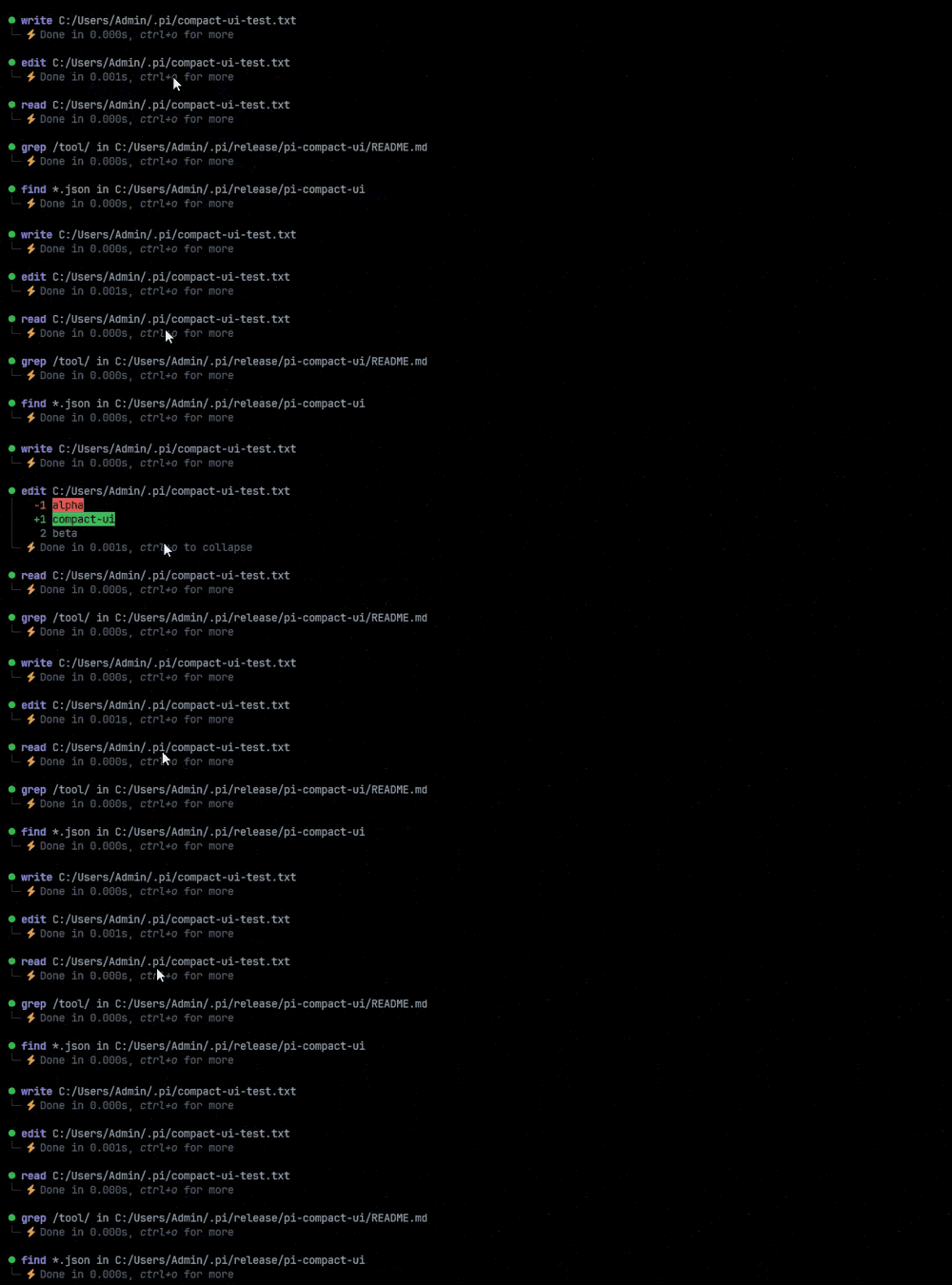
The recordings below use the optional [Nerd Font](#nerd-font-preset) preset. **The default configuration does not require a Nerd Font**: it uses portable emoji and standard Unicode icons instead, with the same spinner, timing, and expansion behavior.
|
|
14
10
|
|
|
15
|
-
|
|
11
|
+
### Compact tool workflow
|
|
16
12
|
|
|
17
|
-
|
|
13
|
+
Active, successful, and failed tool calls stay compact while preserving useful status and timing information.
|
|
18
14
|
|
|
19
|
-

|
|
20
16
|
|
|
21
|
-
|
|
17
|
+
### Spinner and duration indicators
|
|
22
18
|
|
|
23
|
-
|
|
19
|
+
The spinner animates during execution, then changes to a duration-aware completion icon.
|
|
24
20
|
|
|
25
|
-
|
|
21
|
+

|
|
26
22
|
|
|
27
|
-
|
|
28
|
-
- Supports `read`, `write`, `edit`, `bash`, `powershell`, `grep`, `find`, and `ls`
|
|
29
|
-
- Click or `Ctrl+O` to cycle through available detail levels
|
|
30
|
-
- Skips argument and output levels that contain no additional information
|
|
31
|
-
- Animated, configurable tool spinner with a bright → dark → bright frame tone cycle
|
|
32
|
-
- Millisecond-precision execution duration with configurable indicators
|
|
33
|
-
- Short and full output previews with dark `│` / `└─` visual grouping
|
|
34
|
-
- Clean edit diffs without duplicate JSON arguments or leading blank lines
|
|
35
|
-
- GitHub Dark theme with distinct tool, output, success, and error colors
|
|
36
|
-
- No Nerd Font requirement
|
|
23
|
+
### Expandable edit diffs
|
|
37
24
|
|
|
38
|
-
|
|
25
|
+
Click a completed `edit` row, or press `Ctrl+O`, to reveal and collapse its diff.
|
|
39
26
|
|
|
40
|
-
|
|
41
|
-
| --- | --- | :---: |
|
|
42
|
-
| `read` | Read files and images | Yes |
|
|
43
|
-
| `write` | Create or overwrite files | Yes |
|
|
44
|
-
| `edit` | Apply exact text replacements with clean diffs | Yes |
|
|
45
|
-
| `bash` | Run shell commands | Yes |
|
|
46
|
-
| `grep` | Search file contents | Opt-in |
|
|
47
|
-
| `find` | Find files by glob pattern | Opt-in |
|
|
48
|
-
| `ls` | List directory contents | Opt-in |
|
|
49
|
-
| `powershell` | Run PowerShell commands | Opt-in |
|
|
27
|
+
|
|
50
28
|
|
|
51
|
-
|
|
52
|
-
|
|
53
|
-
## Requirements
|
|
29
|
+
## Features
|
|
54
30
|
|
|
55
|
-
-
|
|
56
|
-
-
|
|
57
|
-
-
|
|
31
|
+
- Compact rendering for `read`, `write`, `edit`, `bash`, `powershell`, `grep`, `find`, and `ls`
|
|
32
|
+
- Animated configurable spinner in fullscreen TUI mode
|
|
33
|
+
- Millisecond-precision duration and configurable completion icons
|
|
34
|
+
- Click or `Ctrl+O` to cycle through meaningful detail levels
|
|
35
|
+
- Short previews, full output, and clean edit diffs
|
|
36
|
+
- Dark `│` and `└─` visual grouping
|
|
37
|
+
- Windows, Unix, and classic Mac line-ending support
|
|
38
|
+
- No Nerd Font requirement
|
|
58
39
|
|
|
59
40
|
## Install
|
|
60
41
|
|
|
61
|
-
From npm:
|
|
62
|
-
|
|
63
42
|
```bash
|
|
64
43
|
pi install npm:pi-compact-tools
|
|
65
44
|
```
|
|
66
45
|
|
|
67
|
-
Or
|
|
46
|
+
Or install from GitHub:
|
|
68
47
|
|
|
69
48
|
```bash
|
|
70
49
|
pi install git:github.com/nedleeds/pi-compact-tools
|
|
71
50
|
```
|
|
72
51
|
|
|
73
|
-
Restart
|
|
52
|
+
Restart Pi or run `/reload`.
|
|
74
53
|
|
|
75
|
-
|
|
54
|
+
Migrating from the previous package name:
|
|
76
55
|
|
|
77
56
|
```bash
|
|
78
57
|
pi remove npm:@nedleeds/pi-compact-ui
|
|
79
58
|
pi install npm:pi-compact-tools
|
|
80
59
|
```
|
|
81
60
|
|
|
82
|
-
The former GitHub repository URL redirects to the renamed `nedleeds/pi-compact-tools` repository.
|
|
83
|
-
|
|
84
61
|
## Theme
|
|
85
62
|
|
|
86
|
-
|
|
63
|
+
Select `github-dark-pro` in Pi's settings, or add it to `~/.pi/agent/settings.json`:
|
|
87
64
|
|
|
88
65
|
```json
|
|
89
66
|
{
|
|
@@ -93,23 +70,7 @@ The package includes the `github-dark-pro` theme. Select it from pi's settings U
|
|
|
93
70
|
|
|
94
71
|
## Configuration
|
|
95
72
|
|
|
96
|
-
|
|
97
|
-
|
|
98
|
-
To customize it globally, create `~/.pi/agent/compact-tools.json` using the example below. The included JSON Schema provides completion and validation in compatible editors.
|
|
99
|
-
|
|
100
|
-
For project-specific settings, create:
|
|
101
|
-
|
|
102
|
-
```text
|
|
103
|
-
<project>/.pi/compact-tools.json
|
|
104
|
-
```
|
|
105
|
-
|
|
106
|
-
Project configuration is loaded only for trusted projects. Values are merged in this order:
|
|
107
|
-
|
|
108
|
-
```text
|
|
109
|
-
built-in defaults
|
|
110
|
-
→ ~/.pi/agent/compact-tools.json
|
|
111
|
-
→ <project>/.pi/compact-tools.json
|
|
112
|
-
```
|
|
73
|
+
Configuration is optional. Create `~/.pi/agent/compact-tools.json` for global settings or `<project>/.pi/compact-tools.json` for a trusted project.
|
|
113
74
|
|
|
114
75
|
Default configuration:
|
|
115
76
|
|
|
@@ -131,7 +92,11 @@ Default configuration:
|
|
|
131
92
|
}
|
|
132
93
|
```
|
|
133
94
|
|
|
134
|
-
|
|
95
|
+
These defaults use emoji and standard Unicode, so they work without a Nerd Font. Fast tools finish immediately; no artificial spinner delay is added.
|
|
96
|
+
|
|
97
|
+
`durationIndicators` must have ascending `underMs` values, with a final fallback entry that omits `underMs`. `color` is optional and accepts a supported theme color or six-digit hex value. Existing icon-only configurations remain compatible.
|
|
98
|
+
|
|
99
|
+
To enable all Unix-compatible tools:
|
|
135
100
|
|
|
136
101
|
```json
|
|
137
102
|
{
|
|
@@ -139,21 +104,11 @@ Default configuration:
|
|
|
139
104
|
}
|
|
140
105
|
```
|
|
141
106
|
|
|
142
|
-
`powershell`
|
|
143
|
-
|
|
144
|
-
Spinner frames automatically use a bright → dark → bright tone cycle (`muted` → `dim` → `border` → `dim` → `muted`). Fast tools are never delayed artificially: they transition directly to their success or failure state.
|
|
145
|
-
|
|
146
|
-
`durationIndicators` must use ascending `underMs` values. The final entry must omit `underMs` and acts as the fallback. Durations are displayed with millisecond precision, for example `Done in 0.023s`. The optional `color` field applies color to the icon only; when omitted, it defaults to `dim`. Existing icon-only configurations remain fully compatible, including configurations copied from older releases of this README:
|
|
147
|
-
|
|
148
|
-
```json
|
|
149
|
-
{ "underMs": 1000, "icon": "⚡️" }
|
|
150
|
-
```
|
|
151
|
-
|
|
152
|
-
Icons are arbitrary strings and do not require Nerd Font glyphs. Emoji, ASCII text, or terminal-safe Unicode symbols can be used instead. `color` accepts semantic theme colors such as `warning`, `accent`, `success`, `error`, `muted`, `dim`, `border`, and `text`, as well as six-digit hex colors such as `#800020` or `#FFFFFF`. Hex colors use truecolor when available and fall back to the nearest ANSI-256 color.
|
|
107
|
+
Add `"powershell"` on Windows if desired.
|
|
153
108
|
|
|
154
|
-
|
|
109
|
+
## Nerd Font preset
|
|
155
110
|
|
|
156
|
-
If your terminal uses a [Nerd Font](https://www.nerdfonts.com/),
|
|
111
|
+
If your terminal uses a [Nerd Font](https://www.nerdfonts.com/), this preset enables all eight tools and the icons shown in the demos:
|
|
157
112
|
|
|
158
113
|
```json
|
|
159
114
|
{
|
|
@@ -173,35 +128,28 @@ If your terminal uses a [Nerd Font](https://www.nerdfonts.com/), the following c
|
|
|
173
128
|
}
|
|
174
129
|
```
|
|
175
130
|
|
|
176
|
-
The escaped code points
|
|
131
|
+
The escaped code points remain readable on GitHub and are decoded to Nerd Font icons when JSON is loaded. Remove `"powershell"` on systems where it is unavailable.
|
|
177
132
|
|
|
178
|
-
##
|
|
133
|
+
## Controls
|
|
179
134
|
|
|
180
|
-
|
|
135
|
+
`Ctrl+O` or a mouse click cycles only through available content:
|
|
181
136
|
|
|
182
137
|
```text
|
|
183
138
|
summary → arguments → output preview → full output → summary
|
|
184
|
-
summary → output → summary
|
|
185
|
-
summary only
|
|
186
139
|
```
|
|
187
140
|
|
|
188
|
-
`edit
|
|
141
|
+
For `edit`:
|
|
189
142
|
|
|
190
143
|
```text
|
|
191
144
|
summary → diff → summary
|
|
192
145
|
```
|
|
193
146
|
|
|
194
|
-
##
|
|
147
|
+
## Notes
|
|
195
148
|
|
|
196
|
-
-
|
|
197
|
-
-
|
|
198
|
-
-
|
|
199
|
-
-
|
|
200
|
-
- `timeout` tool arguments are execution limits, not measured durations, and are intentionally omitted from the compact shell summary.
|
|
201
|
-
- Windows (`CRLF`), Unix/macOS (`LF`), and classic Mac (`CR`) output is normalized before line counting and preview rendering.
|
|
202
|
-
- Spinner animation is disabled in regular TUI mode to avoid unsafe redraws of transcript rows above the viewport.
|
|
203
|
-
- Separator glyphs use the theme's `border` color; actual darkness depends on the selected theme.
|
|
204
|
-
- Emoji appearance depends on terminal and system font support. All default duration icons use Unicode 6.0 or earlier.
|
|
149
|
+
- Pi `0.85.1+` and Node.js 20+ are recommended.
|
|
150
|
+
- Fullscreen TUI mode is required for spinner animation and mouse interaction; `Ctrl+O` also works in regular mode.
|
|
151
|
+
- Duration covers the full rendered tool-call lifecycle, including streamed `write` and `edit` arguments.
|
|
152
|
+
- Selected tools override Pi's built-in definitions; other extensions overriding the same names may conflict by load order.
|
|
205
153
|
|
|
206
154
|
## Development
|
|
207
155
|
|
|
@@ -211,11 +159,7 @@ npm run check
|
|
|
211
159
|
pi -e .
|
|
212
160
|
```
|
|
213
161
|
|
|
214
|
-
|
|
215
|
-
|
|
216
|
-
## Security
|
|
217
|
-
|
|
218
|
-
Pi extensions execute with full system access. Review extension source before installing third-party packages.
|
|
162
|
+
Pi extensions execute with full system access. Review third-party extension source before installation.
|
|
219
163
|
|
|
220
164
|
## License
|
|
221
165
|
|
package/package.json
CHANGED
|
@@ -1,6 +1,6 @@
|
|
|
1
1
|
{
|
|
2
2
|
"name": "pi-compact-tools",
|
|
3
|
-
"version": "0.3.
|
|
3
|
+
"version": "0.3.3",
|
|
4
4
|
"description": "Compact, expandable UI for pi's built-in tools, bundled with a polished GitHub Dark theme.",
|
|
5
5
|
"type": "module",
|
|
6
6
|
"license": "MIT",
|
|
@@ -42,7 +42,7 @@
|
|
|
42
42
|
"themes": [
|
|
43
43
|
"./themes/github-dark-pro.json"
|
|
44
44
|
],
|
|
45
|
-
"image": "https://raw.githubusercontent.com/nedleeds/pi-compact-tools/main/assets/
|
|
45
|
+
"image": "https://raw.githubusercontent.com/nedleeds/pi-compact-tools/main/assets/nerd-font-workflow.gif"
|
|
46
46
|
},
|
|
47
47
|
"peerDependencies": {
|
|
48
48
|
"@earendil-works/pi-coding-agent": "*",
|