pi-compact-tools 0.16.1 → 0.16.5
This diff represents the content of publicly available package versions that have been released to one of the supported registries. The information contained in this diff is provided for informational purposes only and reflects changes between package versions as they appear in their respective public registries.
- package/README.md +48 -84
- package/extensions/compact-tools-activity.ts +9 -10
- package/extensions/compact-tools-clock.ts +37 -20
- package/extensions/compact-tools-command.ts +13 -16
- package/extensions/compact-tools-grouping.ts +2 -1
- package/extensions/compact-tools-invocation.ts +6 -0
- package/extensions/compact-tools-progress.ts +17 -18
- package/extensions/compact-tools-rendering.ts +36 -1
- package/extensions/compact-tools-runtime.ts +9 -50
- package/extensions/compact-tools-silent.ts +11 -8
- package/extensions/compact-tools-thinking.ts +12 -4
- package/extensions/compact-tools-transcript.ts +93 -0
- package/extensions/compact-tools-viewport.ts +5 -3
- package/extensions/compact-tools.ts +93 -81
- package/package.json +3 -3
- package/release-notes.json +42 -0
package/README.md
CHANGED
|
@@ -1,8 +1,10 @@
|
|
|
1
1
|
# pi-compact-tools
|
|
2
2
|
|
|
3
|
-
|
|
3
|
+
Three tool-row styles for Pi: **Claude**, **Codex**, and **Compact**. Switch styles live, hide tool noise with silent mode, and see what codemode scripts actually called.
|
|
4
4
|
|
|
5
|
-
|
|
5
|
+
**UI only:** no changes to tool execution, model input, or session records. Includes custom-tool rendering and a GitHub Dark theme.
|
|
6
|
+
|
|
7
|
+
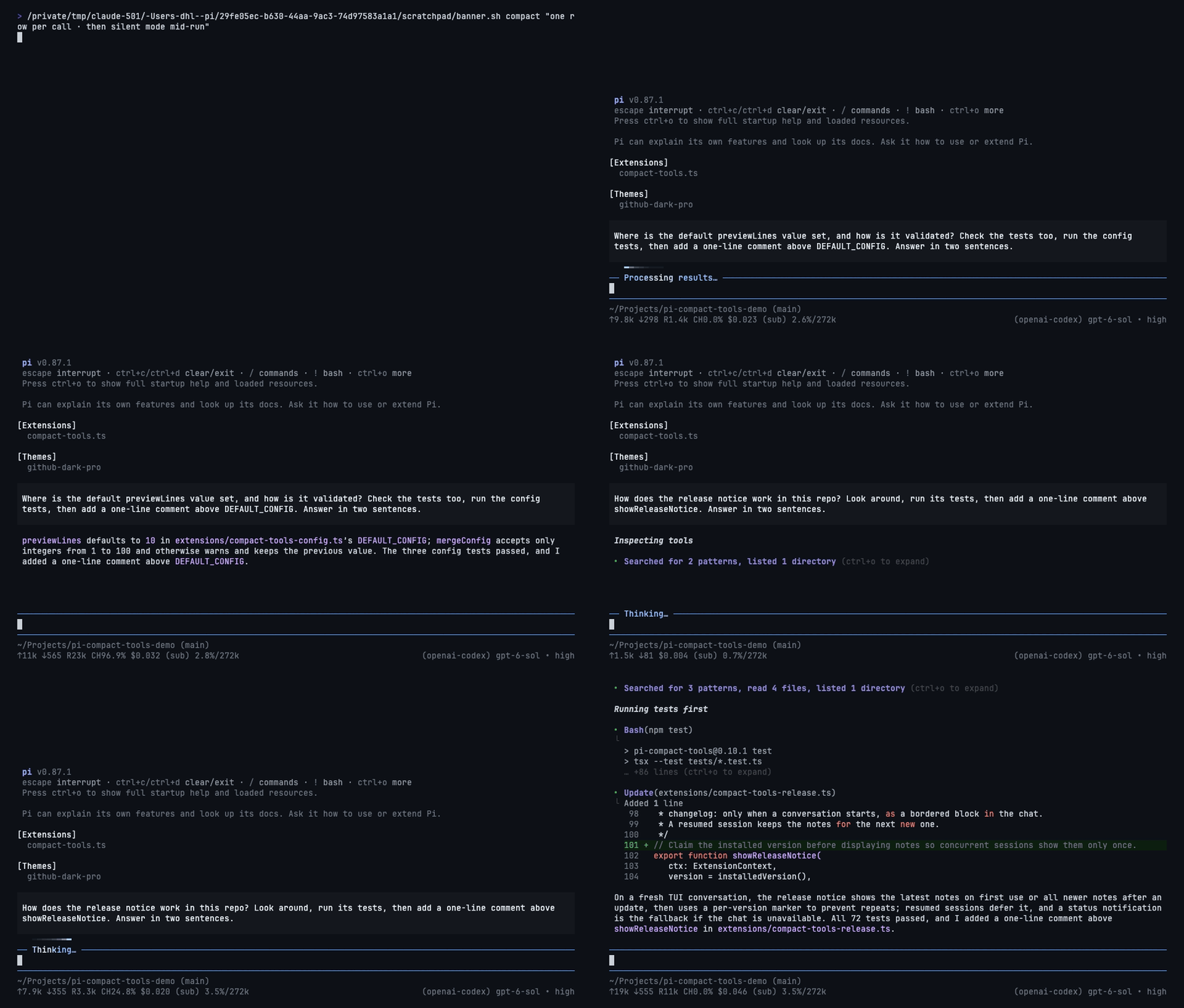
|
|
6
8
|
|
|
7
9
|
## Install
|
|
8
10
|
|
|
@@ -10,131 +12,93 @@ Tool rows for Pi in three styles: **Claude**, **Codex**, and **Compact**. Pick t
|
|
|
10
12
|
pi install npm:pi-compact-tools
|
|
11
13
|
```
|
|
12
14
|
|
|
13
|
-
|
|
15
|
+
Run `/reload` or restart Pi, then `/compact-tools` to choose a style. Try without installing: `pi -e npm:pi-compact-tools`.
|
|
14
16
|
|
|
15
|
-
Requires Node.js 22.19+ and Pi 0.85.1+. **Pi 1.2
|
|
17
|
+
Requires Node.js 22.19+ and Pi 0.85.1+. **Pi 1.0.2+ recommended** for native renderer integration and styled HTML exports.
|
|
16
18
|
|
|
17
19
|
## Styles
|
|
18
20
|
|
|
19
|
-
| Style |
|
|
21
|
+
| Style | What you see | Command |
|
|
20
22
|
|---|---|---|
|
|
21
|
-
| **Claude** |
|
|
22
|
-
| **Codex** |
|
|
23
|
-
| **Compact** |
|
|
23
|
+
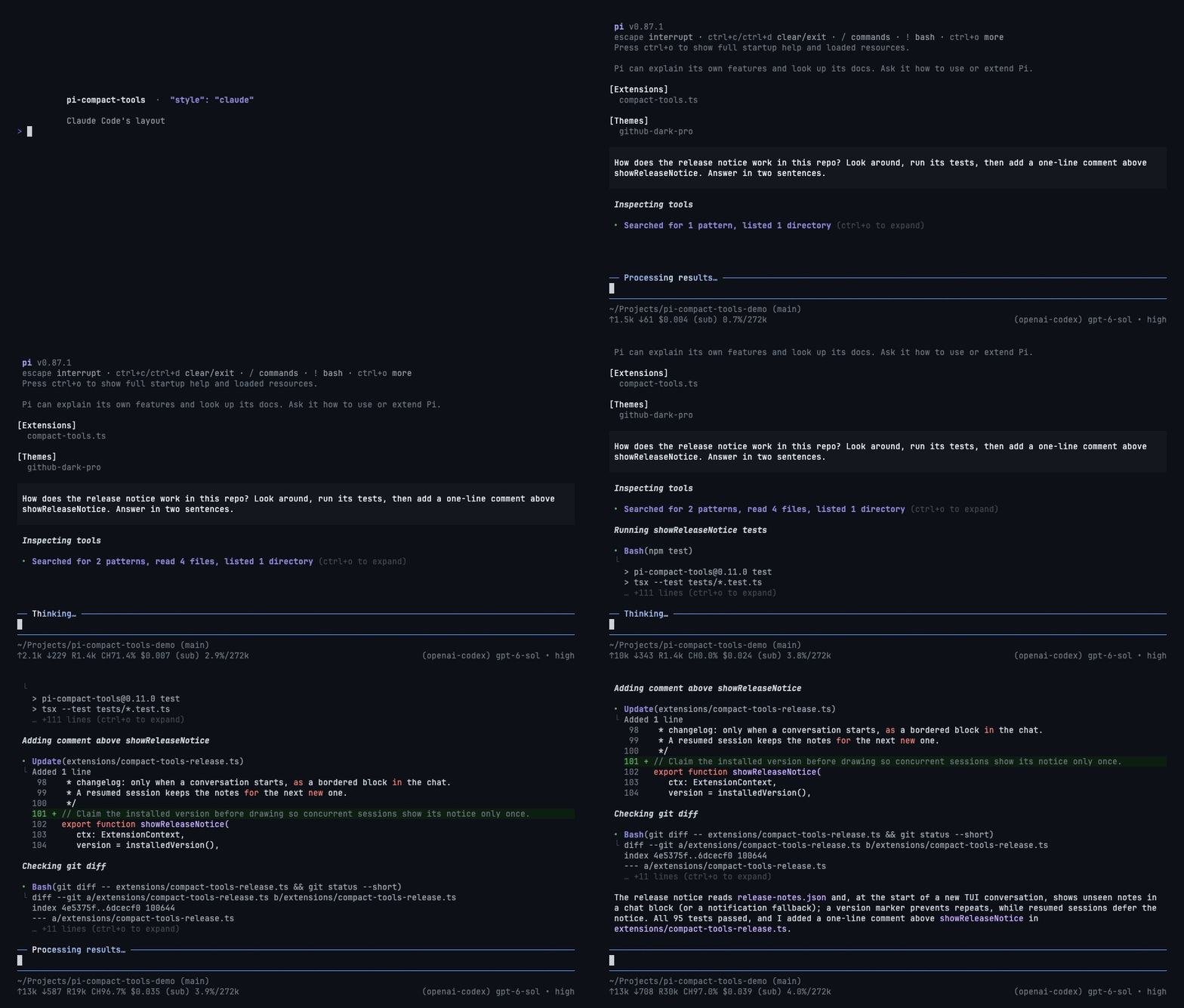
| **Claude** | Grouped reads/searches, `⎿` results, edit previews | `/compact-tools claude` |
|
|
24
|
+
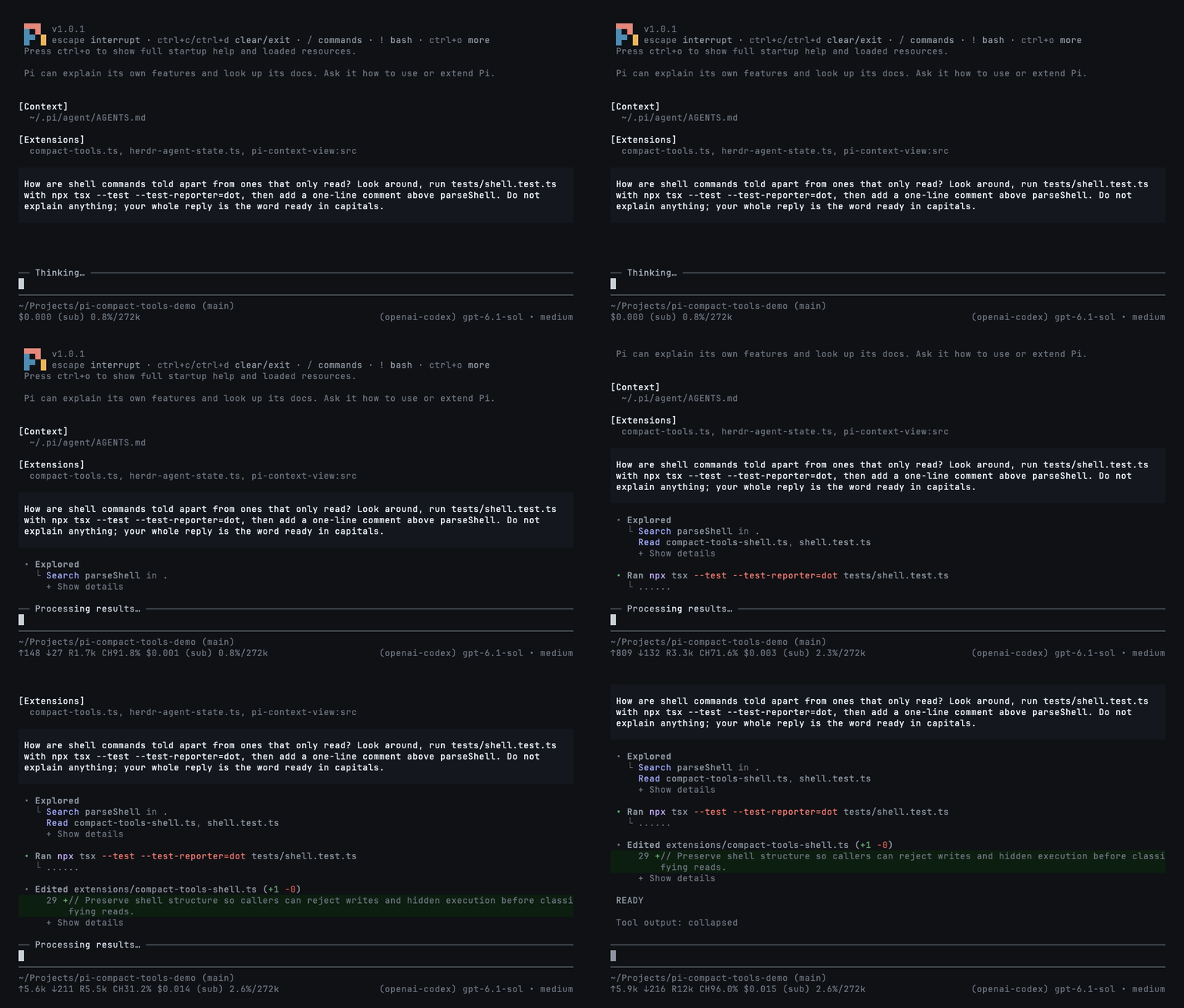
| **Codex** | `• Explored` groups, `• Ran` output, highlighted diffs | `/compact-tools codex` |
|
|
25
|
+
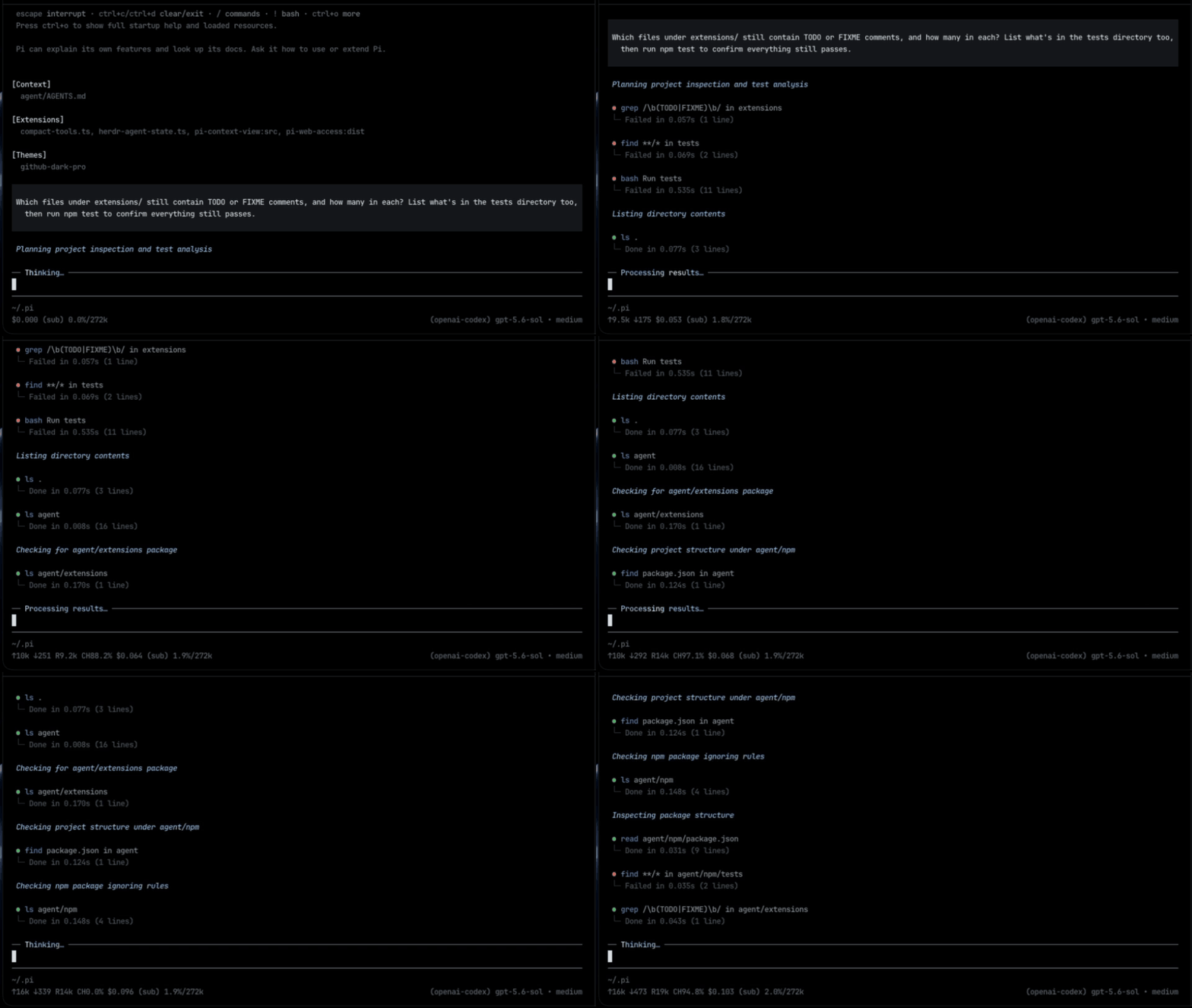
| **Compact** (default) | One row per call: status, duration, line count, and diff | `/compact-tools compact` |
|
|
26
|
+
| **Off / Pi native** | Pi's original rows, thinking display, and working indicator | `/compact-tools off` |
|
|
24
27
|
|
|
25
|
-
|
|
28
|
+
Every style, including **off**, redraws existing rows immediately, even while tools run. No reload or interruption is needed. Only read-only exploration is grouped; commands that write or execute work keep separate rows.
|
|
26
29
|
|
|
27
30
|
### Claude
|
|
28
31
|
|
|
29
|
-
|
|
34
33
|
|
|
35
34
|
### Codex
|
|
36
35
|
|
|
37
|
-
|
|
43
37
|
|
|
44
38
|
### Compact
|
|
45
39
|
|
|
46
|
-
|
|
41
|
+
|
|
42
|
+
## Silent mode
|
|
47
43
|
|
|
48
|
-
|
|
49
|
-
- Edits show a highlighted diff with `(+3 -1)`; reads and writes show numbered code.
|
|
44
|
+
Toggle with **`Ctrl+'`** or `/silent`; use `/silent on` and `/silent off` explicitly. Works with any style. It also hides thinking, intermediate assistant turns, and error/status notices; turn it off to inspect them.
|
|
50
45
|
|
|
51
|
-
|
|
46
|
+
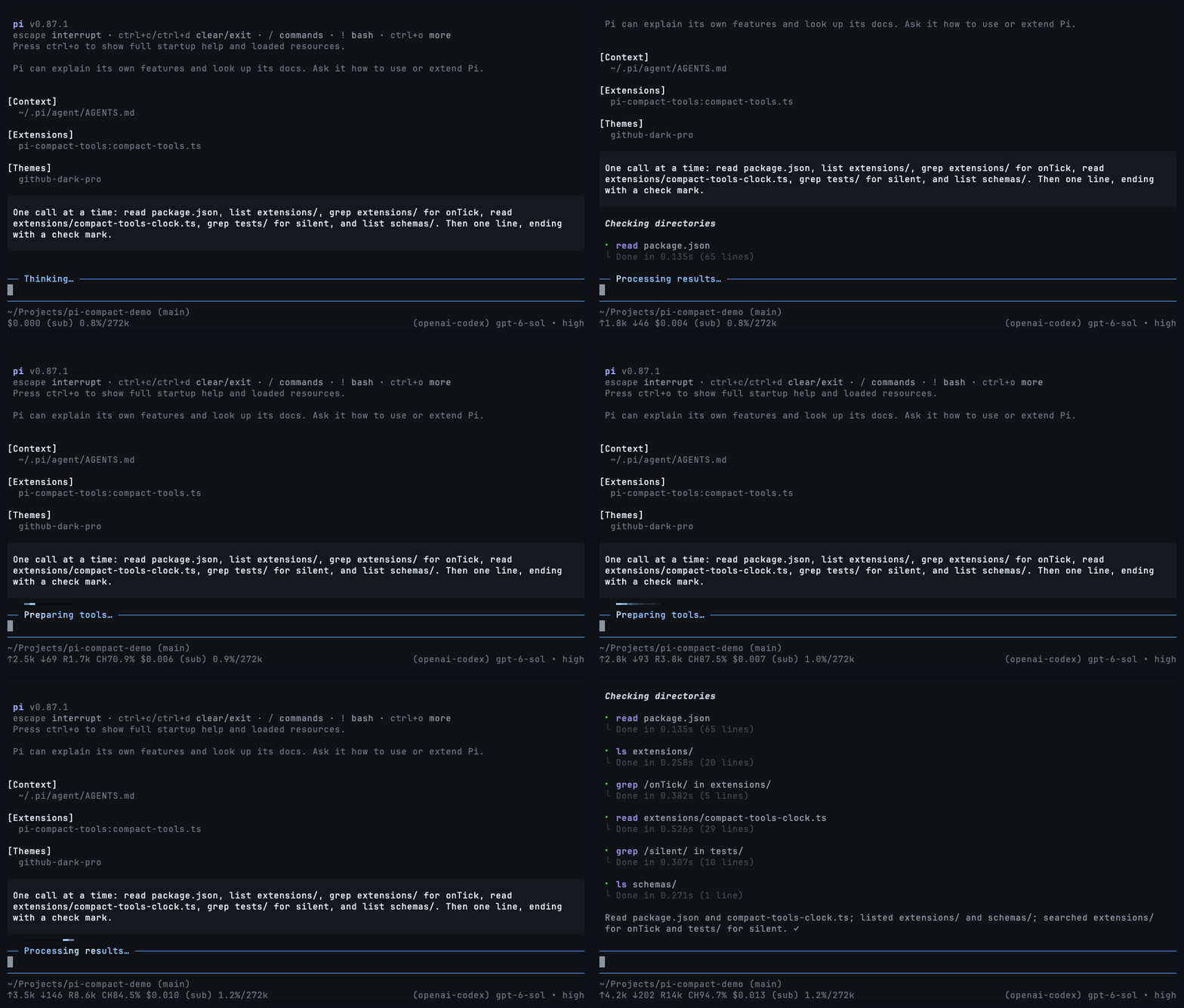
**During work:** hide tool rows while the activity light keeps moving and the answer still arrives. Turn it off to restore every row.
|
|
52
47
|
|
|
53
|
-
|
|
48
|
+
|
|
54
49
|
|
|
55
|
-
|
|
50
|
+
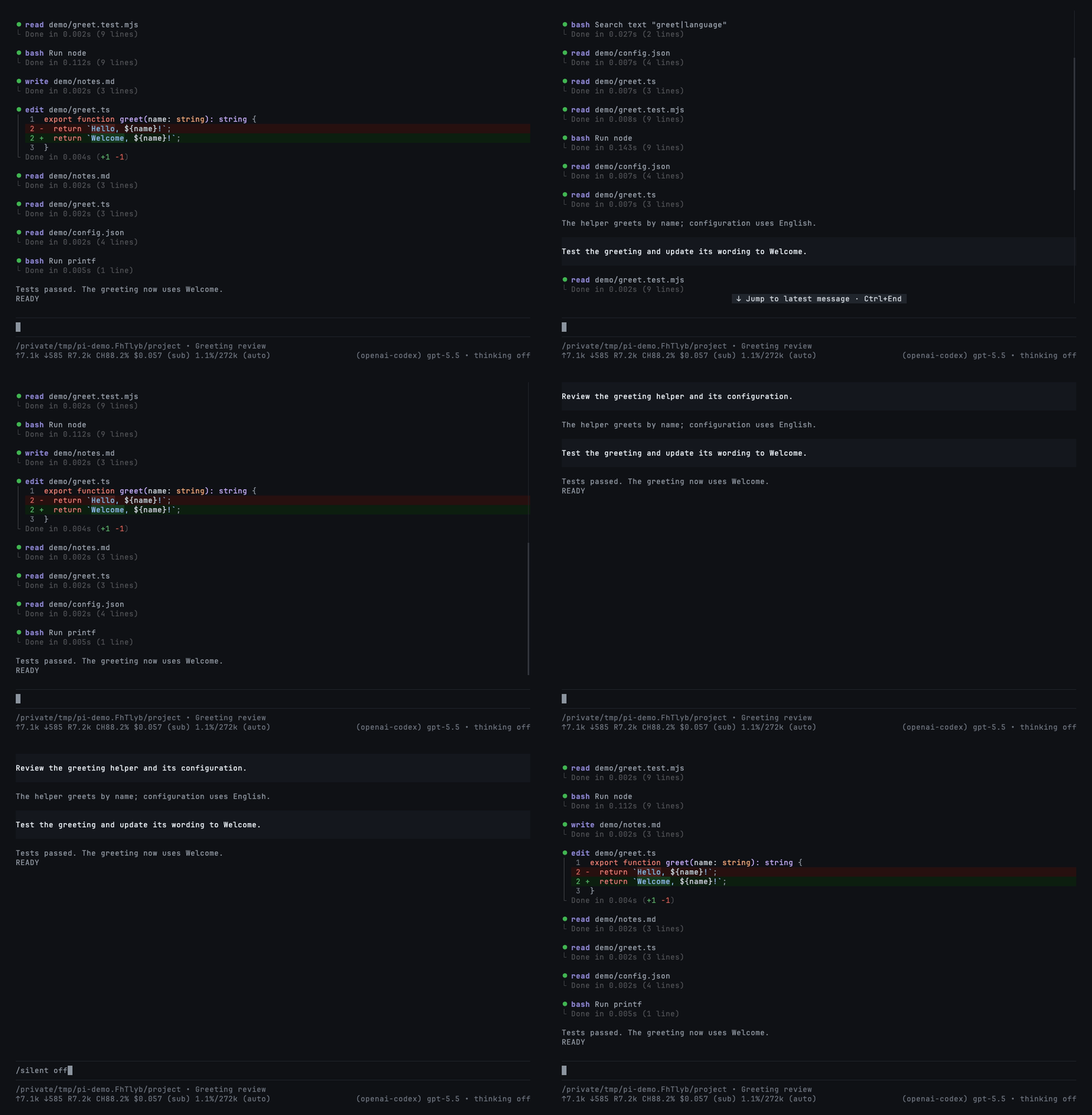
**In a resumed session:** hide pages of completed tool calls to see the conversation at a glance.
|
|
51
|
+
|
|
52
|
+
|
|
53
|
+
|
|
54
|
+
This changes the display only—not the saved history or the model's context. Set `"mode": "silent"` to start sessions with it on.
|
|
55
|
+
|
|
56
|
+
## Codemode summaries
|
|
56
57
|
|
|
57
|
-
|
|
58
|
+
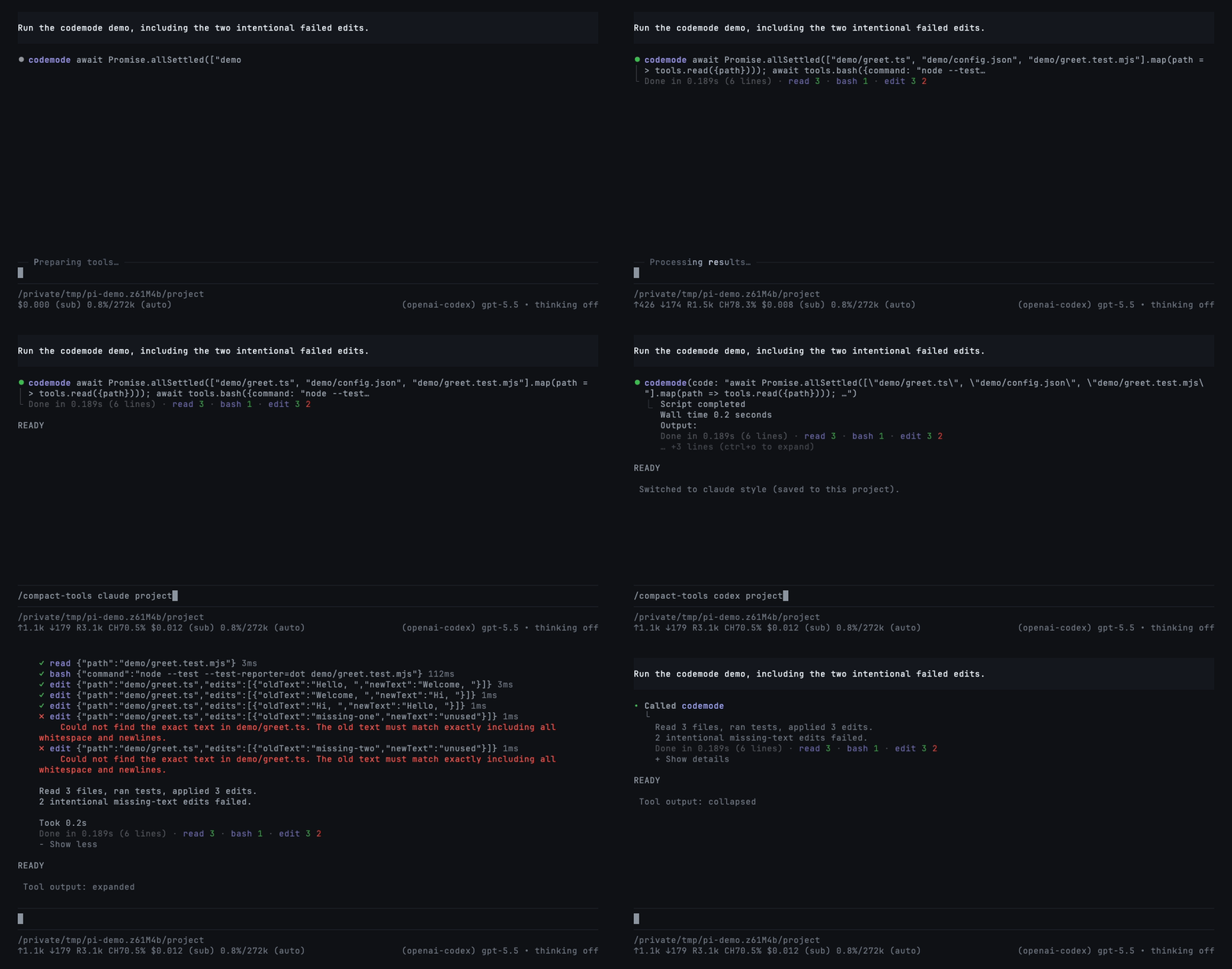
Codemode is Pi's tool for scripts that call other tools. Enable it for a session with `pi --tools +codemode`; use Pi 1.2+ for the native summaries shown here. This extension only renders it.
|
|
58
59
|
|
|
59
|
-
|
|
60
|
+
Completed scripts show outcomes in all three styles: `read 3 · bash 1 · edit 3 2`. Counts use your theme's success, error, and warning colors—green, red, and yellow in the included theme. Each tool appears once; edits come last.
|
|
61
|
+
|
|
62
|
+
|
|
63
|
+
|
|
64
|
+
The two failed edits are intentional. Reload/resume preserves summaries from nested-call records; older hosts without those records keep normal previews. See [compatibility details](https://github.com/nedleeds/pi-compact-tools/blob/main/docs/development.md#ui-only-integration-and-compatibility).
|
|
65
|
+
|
|
66
|
+
## Commands and controls
|
|
60
67
|
|
|
61
68
|
```text
|
|
62
|
-
/compact-tools # choose
|
|
63
|
-
/compact-tools codex # switch style, at once, even while tools run
|
|
69
|
+
/compact-tools # choose style and save scope
|
|
64
70
|
/compact-tools claude project # save for this trusted project
|
|
65
|
-
/compact-tools
|
|
66
|
-
/compact-tools status # effective
|
|
71
|
+
/compact-tools codex global # save globally
|
|
72
|
+
/compact-tools status # effective settings and paths
|
|
73
|
+
/compact-tools off # restore Pi's native UI live, even while streaming
|
|
67
74
|
```
|
|
68
75
|
|
|
69
|
-
Without a scope,
|
|
76
|
+
Without a scope, changes are saved where the style is configured: project or global. A trusted project's own style overrides a global save. `/compact-tools off` immediately restores native tool rows, unmodified thinking, Pi's working indicator and keyboard behavior, with no grouping or silent hiding—even while a response or tool is running. No reload, abort, or restart occurs. Your selected theme, tool execution, and session history are not changed. Use `/compact-tools compact`, `claude`, or `codex` to enable it again, also live. Your silent-mode choice is retained for when you re-enable a style; `/silent` while off only updates that saved choice, without hiding native UI.
|
|
77
|
+
|
|
78
|
+
- Click a row/group or press `Ctrl+O` to expand/collapse.
|
|
79
|
+
- `Ctrl+T` changes the thinking display, not the model's reasoning effort.
|
|
80
|
+
- Choose `github-dark-pro` in Pi's `/settings` for the included theme.
|
|
70
81
|
|
|
71
82
|
## Configuration
|
|
72
83
|
|
|
73
|
-
Optional
|
|
84
|
+
Optional: `~/.pi/agent/compact-tools.json` or `<project>/.pi/compact-tools.json`. Trusted project settings override global settings field by field.
|
|
74
85
|
|
|
75
86
|
```json
|
|
76
87
|
{
|
|
88
|
+
"$schema": "https://raw.githubusercontent.com/nedleeds/pi-compact-tools/main/schemas/compact-tools.schema.json",
|
|
77
89
|
"style": "compact",
|
|
78
90
|
"mode": "normal",
|
|
79
|
-
"tools": ["read", "write", "edit", "bash"],
|
|
80
91
|
"previewLines": 10,
|
|
81
92
|
"auto_compact": { "read": true, "write": true, "edit": false, "bash": true },
|
|
82
93
|
"custom_tools": { "enabled": true, "auto_compact": true, "exclude": [] }
|
|
83
94
|
}
|
|
84
95
|
```
|
|
85
96
|
|
|
86
|
-
|
|
87
|
-
- `tools`: built-ins drawn in the style. Also `grep`, `find`, `ls`, `powershell`.
|
|
88
|
-
- `auto_compact`: `true` starts a Compact row collapsed; `false` shows up to `previewLines` rows. Custom tool names work too.
|
|
89
|
-
- `custom_tools`: rows for tools from other packages. `exclude` keeps a tool's own look.
|
|
90
|
-
|
|
91
|
-
## Codemode summaries
|
|
92
|
-
|
|
93
|
-
Completed `codemode` rows in **Compact, Claude, and Codex** list the outcomes of the tools the script actually called, beside the duration and output-line count:
|
|
94
|
-
|
|
95
|
-
```text
|
|
96
|
-
Done in 1.234s (42 lines) · read 3 · bash 1 · edit 3 2
|
|
97
|
-
```
|
|
98
|
-
|
|
99
|
-
Each tool appears once with plain colored counts and no count parentheses or pipe: `read 3 · bash 1 · edit 3 2`. Single-outcome calls show one green success count, red failure count, or yellow unfinished-only count. Mixed success/failure calls show the green success count followed by the red failure count, separated only by a space; zero-count placeholders are omitted. Unfinished calls alongside settled calls add a separate yellow note such as `edit 3 2 1 unfinished`. Summary names retain their theme title hue at 75% brightness without bold, while outcome numbers keep their hues at 80% brightness. The main tool title and code preview remain unchanged. `Done in … (N lines)` uses a neutral tone one step brighter than the frame; spaces and `·` separators retain the dim frame chrome. There are no circles, leading bars, underlines, patch totals, or per-call diff lists. Non-edit groups retain first-occurrence order, and edit always appears last. Incomplete records show `(partial)`. Long summaries wrap to the pane width. Previews and author-provided expanded views remain available; expansion does not add patch details. Claude and Codex place the indented completion summary after output and keep disclosure last. Completion rows do not consume Claude’s output-preview limit.
|
|
100
|
-
|
|
101
|
-
The summary uses the host’s nested-call events and saved records without changing what the model sees. It retains only tool names and statuses, never arguments, results, or edit diff totals. An in-process `/reload`, resumed sessions, and `/tree` navigation preserve or restore call counts and outcomes. Hosts without nested-call data keep the previous row rendering.
|
|
102
|
-
|
|
103
|
-
## UI-only behavior
|
|
104
|
-
|
|
105
|
-
This package never registers or activates agent tools and does not add model-facing
|
|
106
|
-
messages, tool schemas, or prompt text. Host execution settings (including shell
|
|
107
|
-
prefixes and image resizing) remain untouched. Renderer-bearing overrides of names
|
|
108
|
-
such as `read` or `bash` follow `custom_tools`, including its exclusions.
|
|
109
|
-
|
|
110
|
-
On Pi 1.0.2 and newer, the public renderer API also applies compact rendering to HTML
|
|
111
|
-
exports. Older hosts use a terminal-only compatibility patch; HTML exports keep
|
|
112
|
-
Pi's native renderers. On Pi 1.1 and newer, final durations use the host's recorded
|
|
113
|
-
`durationMs`, including restored sessions, and tool rows follow `outputPad` (0 or 1)
|
|
114
|
-
without changing their internal style indentation. Older hosts keep event-based
|
|
115
|
-
timing and the original margins; the minimum supported Pi version is unchanged.
|
|
116
|
-
When custom compact rendering is enabled, it intentionally takes precedence over
|
|
117
|
-
fallback renderers supplied by earlier `next() ?? mine` resolvers for unknown tools.
|
|
118
|
-
Disable `custom_tools` or exclude the tool to preserve those fallback renderers.
|
|
119
|
-
|
|
120
|
-
## Controls
|
|
121
|
-
|
|
122
|
-
- Click a row or group, or press `Ctrl+O`, to expand and collapse.
|
|
123
|
-
- `Ctrl+T` cycles thinking: summary → detail → summary → hidden.
|
|
97
|
+
`auto_compact` entries set to `true` start Compact rows collapsed. Add tool names to `custom_tools.exclude` to keep their own rendering. All options are described in the linked schema.
|
|
124
98
|
|
|
125
99
|
## Development
|
|
126
100
|
|
|
127
|
-
|
|
128
|
-
npm install
|
|
129
|
-
npm run check
|
|
130
|
-
pi -e .
|
|
131
|
-
```
|
|
132
|
-
|
|
133
|
-
Development dependencies are pinned to Pi 1.2.0; the peer minimum remains Pi 0.85.1. CI checks Pi 0.85.1, 0.99.1, 1.0.0, 1.0.2, 1.1.0, and 1.2.0 on Node 22.19.0 and 24. Schema validation and deterministic test clocks are development-only dependencies, not runtime dependencies. Development scripts and tests are not included in the published package. `npm test` runs the rendering tests first and the resource/packaging checks separately so their subprocesses do not disturb animation tests.
|
|
134
|
-
|
|
135
|
-
For a local before/after performance comparison, run `npx tsx tests/benchmark.ts <clean-baseline-directory>` with the same host dependencies in both directories. Measurements are informational, not timing-sensitive test assertions.
|
|
136
|
-
|
|
137
|
-
Renders are pinned in `tests/golden/`. After an intended change to the output, record it with `UPDATE_GOLDEN=1 npm test` and review the diff. The Claude and Codex styles are checked against references captured from the real tools in `tests/fixtures/`. The README's GIFs are recorded with `scripts/record-demos.sh` (needs `vhs` and `ffmpeg`). Before publishing, add the version's notes to `release-notes.json` (`[]` for none).
|
|
101
|
+
See [development, compatibility, and demo recording](https://github.com/nedleeds/pi-compact-tools/blob/main/docs/development.md). Run `npm ci` and `npm run check` before contributing.
|
|
138
102
|
|
|
139
103
|
## License
|
|
140
104
|
|
|
@@ -251,7 +251,6 @@ export class SilentActivityAnimator {
|
|
|
251
251
|
|
|
252
252
|
constructor(private readonly pi: ExtensionAPI) {
|
|
253
253
|
pi.on("agent_start", () => {
|
|
254
|
-
if (!this.context) return;
|
|
255
254
|
this.running = true;
|
|
256
255
|
this.answering = false;
|
|
257
256
|
this.refresh();
|
|
@@ -265,7 +264,6 @@ export class SilentActivityAnimator {
|
|
|
265
264
|
});
|
|
266
265
|
pi.on("tool_execution_start", () => this.setAnswering(false));
|
|
267
266
|
pi.on("turn_start", () => {
|
|
268
|
-
if (!this.context) return;
|
|
269
267
|
this.running = true;
|
|
270
268
|
this.answering = false;
|
|
271
269
|
this.refresh();
|
|
@@ -274,17 +272,16 @@ export class SilentActivityAnimator {
|
|
|
274
272
|
// Keep the shared clock alive until Pi declares final settlement, as the
|
|
275
273
|
// working-label controller already does.
|
|
276
274
|
pi.on("agent_settled", () => {
|
|
277
|
-
if (!this.context) return;
|
|
278
275
|
this.running = false;
|
|
279
276
|
this.refresh();
|
|
280
277
|
});
|
|
281
278
|
}
|
|
282
279
|
|
|
283
|
-
bind(ctx: ExtensionContext): void {
|
|
280
|
+
bind(ctx: ExtensionContext, resume = false): void {
|
|
284
281
|
this.hide();
|
|
285
282
|
this.context = ctx;
|
|
286
283
|
this.running = ctx.isIdle?.() === false;
|
|
287
|
-
this.answering = false;
|
|
284
|
+
if (!resume) this.answering = false;
|
|
288
285
|
}
|
|
289
286
|
|
|
290
287
|
setEnabled(enabled: boolean): void {
|
|
@@ -293,10 +290,12 @@ export class SilentActivityAnimator {
|
|
|
293
290
|
}
|
|
294
291
|
|
|
295
292
|
dispose(): void {
|
|
296
|
-
this.hide();
|
|
297
|
-
|
|
298
|
-
|
|
299
|
-
|
|
293
|
+
try { this.hide(); }
|
|
294
|
+
finally {
|
|
295
|
+
this.context = undefined;
|
|
296
|
+
this.running = false;
|
|
297
|
+
this.enabled = false;
|
|
298
|
+
}
|
|
300
299
|
}
|
|
301
300
|
|
|
302
301
|
/** Guarded like the progress label: a host with a partial API keeps the default color. */
|
|
@@ -305,7 +304,7 @@ export class SilentActivityAnimator {
|
|
|
305
304
|
}
|
|
306
305
|
|
|
307
306
|
private setAnswering(answering: boolean): void {
|
|
308
|
-
if (
|
|
307
|
+
if (this.answering === answering) return;
|
|
309
308
|
this.answering = answering;
|
|
310
309
|
this.refresh();
|
|
311
310
|
}
|
|
@@ -1,29 +1,46 @@
|
|
|
1
1
|
/**
|
|
2
|
-
* One
|
|
3
|
-
*
|
|
4
|
-
*
|
|
5
|
-
*
|
|
2
|
+
* One clock for tool indicators, the working label, and silent activity. The
|
|
3
|
+
* fastest subscriber sets its cadence; slower animations share those frames,
|
|
4
|
+
* keeping their average period with a remainder instead of repainting between
|
|
5
|
+
* indicator frames. With no indicators it returns to the original 80ms cadence.
|
|
6
6
|
*/
|
|
7
7
|
export const TICK_MS = 80;
|
|
8
8
|
|
|
9
|
-
type
|
|
10
|
-
|
|
11
|
-
const listeners = new Set<Listener>();
|
|
9
|
+
type Subscription = { listener: () => void; period: number; elapsed: number };
|
|
10
|
+
const listeners = new Set<Subscription>();
|
|
12
11
|
let timer: ReturnType<typeof setInterval> | undefined;
|
|
12
|
+
let cadence = 0;
|
|
13
|
+
|
|
14
|
+
function reschedule(): void {
|
|
15
|
+
const next = listeners.size ? Math.min(...[...listeners].map(({ period }) => period)) : 0;
|
|
16
|
+
if (next === cadence) return;
|
|
17
|
+
if (timer) clearInterval(timer);
|
|
18
|
+
timer = undefined;
|
|
19
|
+
cadence = next;
|
|
20
|
+
if (!next) return;
|
|
21
|
+
timer = setInterval(() => {
|
|
22
|
+
// Capture the elapsed step: a subscriber may change the cadence or unsubscribe
|
|
23
|
+
// another callback while this dispatch is in progress.
|
|
24
|
+
const step = cadence;
|
|
25
|
+
for (const entry of [...listeners]) {
|
|
26
|
+
if (!listeners.has(entry)) continue;
|
|
27
|
+
entry.elapsed += step;
|
|
28
|
+
if (entry.elapsed < entry.period) continue;
|
|
29
|
+
entry.elapsed %= entry.period;
|
|
30
|
+
entry.listener();
|
|
31
|
+
}
|
|
32
|
+
}, next);
|
|
33
|
+
timer.unref?.();
|
|
34
|
+
}
|
|
13
35
|
|
|
14
|
-
/**
|
|
15
|
-
export function onTick(listener:
|
|
16
|
-
|
|
17
|
-
|
|
18
|
-
|
|
19
|
-
|
|
20
|
-
}, TICK_MS);
|
|
21
|
-
timer.unref?.();
|
|
22
|
-
}
|
|
36
|
+
/** Subscribe until disposed. No timer survives the last subscriber. */
|
|
37
|
+
export function onTick(listener: () => void, period = TICK_MS): () => void {
|
|
38
|
+
if (!Number.isFinite(period) || period <= 0) throw new RangeError("Animation period must be positive and finite");
|
|
39
|
+
const entry: Subscription = { listener, period, elapsed: 0 };
|
|
40
|
+
listeners.add(entry);
|
|
41
|
+
reschedule();
|
|
23
42
|
return () => {
|
|
24
|
-
listeners.delete(
|
|
25
|
-
|
|
26
|
-
clearInterval(timer);
|
|
27
|
-
timer = undefined;
|
|
43
|
+
listeners.delete(entry);
|
|
44
|
+
reschedule();
|
|
28
45
|
};
|
|
29
46
|
}
|
|
@@ -1,19 +1,19 @@
|
|
|
1
1
|
import { chmodSync, existsSync, lstatSync, mkdirSync, readFileSync, realpathSync, renameSync, rmSync, statSync, writeFileSync } from "node:fs";
|
|
2
2
|
import { randomUUID } from "node:crypto";
|
|
3
3
|
import { dirname, join } from "node:path";
|
|
4
|
-
import { CONFIG_DIR_NAME, getAgentDir, type ExtensionAPI } from "@earendil-works/pi-coding-agent";
|
|
4
|
+
import { CONFIG_DIR_NAME, getAgentDir, type ExtensionAPI, type ExtensionContext } from "@earendil-works/pi-coding-agent";
|
|
5
5
|
import { DISPLAY_STYLES, type CompactToolsConfig, type DisplayStyle } from "./compact-tools-types.ts";
|
|
6
6
|
import { loadConfig } from "./compact-tools-config.ts";
|
|
7
7
|
|
|
8
8
|
type Scope = "global" | "project";
|
|
9
9
|
const SCOPES: readonly Scope[] = ["global", "project"];
|
|
10
|
-
const HELP = "Usage: /compact-tools [compact|claude|codex|off] [global|project]\nWithout a scope the style is saved globally, or to this project when its settings choose the style.\n/compact-tools status · /compact-tools help\nCtrl+O expands rows; /silent toggles quiet mode.
|
|
10
|
+
const HELP = "Usage: /compact-tools [compact|claude|codex|off] [global|project]\nWithout a scope the style is saved globally, or to this project when its settings choose the style.\n/compact-tools status · /compact-tools help\nCtrl+O expands rows; /silent toggles quiet mode. All styles, including off, switch at once, even while tools run.";
|
|
11
11
|
const BUSY = "Wait for the current response to finish before changing tool styles.";
|
|
12
12
|
const CHOICES: Record<DisplayStyle, string> = {
|
|
13
13
|
compact: "Compact — one expandable row per tool call",
|
|
14
14
|
claude: "Claude — group reads and searches",
|
|
15
15
|
codex: "Codex — explored groups and output tails, like Codex CLI",
|
|
16
|
-
off: "Off — restore Pi's
|
|
16
|
+
off: "Off — restore Pi's native UI",
|
|
17
17
|
};
|
|
18
18
|
|
|
19
19
|
export function configPath(cwd: string, scope: Scope): string {
|
|
@@ -78,15 +78,10 @@ function errorMessage(error: unknown): string {
|
|
|
78
78
|
|
|
79
79
|
/**
|
|
80
80
|
* Draw the saved style in place, without a reload, and say whether it could: a switch
|
|
81
|
-
* between
|
|
82
|
-
*
|
|
81
|
+
* between any style, including native/off, changes only UI routing. It applies
|
|
82
|
+
* at once while a response runs, with no tool registry or transcript changes.
|
|
83
83
|
*/
|
|
84
|
-
export type ApplyStyle = (cwd: string, trusted: boolean) => boolean;
|
|
85
|
-
|
|
86
|
-
/** Whether a switch needs Pi to reload: only off hands tools to or takes them from Pi's own renderers. */
|
|
87
|
-
function needsReload(from: DisplayStyle, to: DisplayStyle): boolean {
|
|
88
|
-
return from === "off" || to === "off";
|
|
89
|
-
}
|
|
84
|
+
export type ApplyStyle = (cwd: string, trusted: boolean, ctx: ExtensionContext) => boolean;
|
|
90
85
|
|
|
91
86
|
export function registerCompactToolsCommand(pi: ExtensionAPI, getConfig: () => CompactToolsConfig, applyStyle?: ApplyStyle): void {
|
|
92
87
|
pi.registerCommand("compact-tools", {
|
|
@@ -122,9 +117,9 @@ export function registerCompactToolsCommand(pi: ExtensionAPI, getConfig: () => C
|
|
|
122
117
|
ctx.ui.notify(HELP, "warning");
|
|
123
118
|
return;
|
|
124
119
|
}
|
|
125
|
-
//
|
|
120
|
+
// Only a host/integration without live UI routing requires an idle reload.
|
|
126
121
|
const named = parts[0] as DisplayStyle | undefined;
|
|
127
|
-
if (named && !ctx.isIdle() &&
|
|
122
|
+
if (named && !ctx.isIdle() && !applyStyle) {
|
|
128
123
|
ctx.ui.notify(BUSY, "warning");
|
|
129
124
|
return;
|
|
130
125
|
}
|
|
@@ -155,7 +150,7 @@ export function registerCompactToolsCommand(pi: ExtensionAPI, getConfig: () => C
|
|
|
155
150
|
return;
|
|
156
151
|
}
|
|
157
152
|
// The agent may have started while the user was choosing in a dialog.
|
|
158
|
-
const reloads =
|
|
153
|
+
const reloads = !applyStyle;
|
|
159
154
|
if (reloads && !ctx.isIdle()) {
|
|
160
155
|
ctx.ui.notify(BUSY, "warning");
|
|
161
156
|
return;
|
|
@@ -175,7 +170,7 @@ export function registerCompactToolsCommand(pi: ExtensionAPI, getConfig: () => C
|
|
|
175
170
|
ctx.ui.notify(`Saved ${style} to global settings, but this project keeps its own ${effective} style. Run /compact-tools ${style} to switch it here.`, "warning");
|
|
176
171
|
return;
|
|
177
172
|
}
|
|
178
|
-
if (!reloads && applyStyle!(ctx.cwd, ctx.isProjectTrusted())) {
|
|
173
|
+
if (!reloads && applyStyle!(ctx.cwd, ctx.isProjectTrusted(), ctx)) {
|
|
179
174
|
ctx.ui.notify(`Switched to ${style} style (saved to ${where}).`, "info");
|
|
180
175
|
return;
|
|
181
176
|
}
|
|
@@ -183,7 +178,9 @@ export function registerCompactToolsCommand(pi: ExtensionAPI, getConfig: () => C
|
|
|
183
178
|
ctx.ui.notify(`Saved ${style} style to ${where}. It applies once the response finishes; run /reload then.`, "warning");
|
|
184
179
|
return;
|
|
185
180
|
}
|
|
186
|
-
ctx.ui.notify(
|
|
181
|
+
ctx.ui.notify(style === "off"
|
|
182
|
+
? `Restoring Pi's native UI (saved to ${where}). Reloading…`
|
|
183
|
+
: `Switching to ${style} style (saved to ${where}). Reloading…`, "info");
|
|
187
184
|
// Reloading makes this ctx stale, so a failure is reported through the UI held from before.
|
|
188
185
|
const ui = ctx.ui;
|
|
189
186
|
try {
|
|
@@ -324,8 +324,9 @@ export class ToolGroupController {
|
|
|
324
324
|
}
|
|
325
325
|
|
|
326
326
|
dispose(): void {
|
|
327
|
-
this.context
|
|
327
|
+
const context = this.context;
|
|
328
328
|
this.context = undefined;
|
|
329
|
+
context?.ui.setWidget(WIDGET_KEY, undefined, { placement: "belowEditor" });
|
|
329
330
|
}
|
|
330
331
|
|
|
331
332
|
private makeGroup(rows: ToolRowLike[], members: unknown[], tui: { requestRender(): void }): Component {
|
|
@@ -3,6 +3,12 @@ import { stripTerminalSequences } from "@earendil-works/pi-tui";
|
|
|
3
3
|
import { normalizeLineEndings } from "./compact-tools-core.ts";
|
|
4
4
|
import type { ToolArgs } from "./compact-tools-types.ts";
|
|
5
5
|
|
|
6
|
+
/** Historical/transcribed read arguments may contain numeric strings or null. Display only. */
|
|
7
|
+
export function readStartLine(value: unknown): number {
|
|
8
|
+
if (typeof value === "string" && value.trim() !== "") value = Number(value);
|
|
9
|
+
return typeof value === "number" && Number.isFinite(value) ? value : 1;
|
|
10
|
+
}
|
|
11
|
+
|
|
6
12
|
function pathFrom(args: ToolArgs): string {
|
|
7
13
|
const value = args.path ?? args.file_path;
|
|
8
14
|
return typeof value === "string" ? normalizeLineEndings(value) : "";
|
|
@@ -96,28 +96,24 @@ export class ProgressController {
|
|
|
96
96
|
private level: ThinkingLevel = "medium";
|
|
97
97
|
|
|
98
98
|
constructor(private readonly pi: ExtensionAPI) {
|
|
99
|
-
//
|
|
100
|
-
//
|
|
101
|
-
// any future handler added here — out of the detached path.
|
|
99
|
+
// Keep only the current phase/active calls while detached. No UI work or
|
|
100
|
+
// clock runs, but re-enabling mid-stream can resume the correct label.
|
|
102
101
|
pi.on("agent_start", () => {
|
|
103
|
-
if (!this.context) return;
|
|
104
102
|
this.setMessage("Thinking…");
|
|
105
103
|
});
|
|
106
104
|
pi.on("message_update", (event) => {
|
|
107
|
-
|
|
108
|
-
const type = event.assistantMessageEvent.type;
|
|
105
|
+
const type = event.assistantMessageEvent?.type;
|
|
109
106
|
if (type === "thinking_start" || type === "thinking_delta") this.setMessage("Thinking…");
|
|
110
107
|
else if (type === "text_start" || type === "text_delta") this.setMessage("Responding…");
|
|
111
108
|
else if (type === "toolcall_start" || type === "toolcall_delta") this.setMessage("Preparing tools…");
|
|
112
109
|
});
|
|
113
110
|
pi.on("tool_execution_start", (event) => {
|
|
114
|
-
if (
|
|
111
|
+
if (typeof event.toolName !== "string") return;
|
|
115
112
|
const message = formatToolProgress(event.toolName, event.args ?? {});
|
|
116
113
|
this.activeTools.set(event.toolCallId, message);
|
|
117
114
|
this.setMessage(message);
|
|
118
115
|
});
|
|
119
116
|
pi.on("tool_execution_end", (event) => {
|
|
120
|
-
if (!this.context) return;
|
|
121
117
|
this.activeTools.delete(event.toolCallId);
|
|
122
118
|
const remaining = [...this.activeTools.values()].at(-1);
|
|
123
119
|
this.setMessage(remaining ?? "Processing results…");
|
|
@@ -128,7 +124,6 @@ export class ProgressController {
|
|
|
128
124
|
// so releasing the label at agent_end makes a retried turn reappear under Pi's
|
|
129
125
|
// default label. Release it at the final settlement instead.
|
|
130
126
|
pi.on("agent_settled", () => {
|
|
131
|
-
if (!this.context) return;
|
|
132
127
|
this.activeTools.clear();
|
|
133
128
|
this.clearMessage();
|
|
134
129
|
});
|
|
@@ -146,30 +141,34 @@ export class ProgressController {
|
|
|
146
141
|
if (typeof this.pi.getThinkingLevel === "function") this.level = this.pi.getThinkingLevel();
|
|
147
142
|
}
|
|
148
143
|
|
|
149
|
-
bind(ctx: ExtensionContext): void {
|
|
144
|
+
bind(ctx: ExtensionContext, resume = false): void {
|
|
150
145
|
this.stopAnimation();
|
|
151
146
|
this.context = ctx;
|
|
152
147
|
this.readLevel();
|
|
153
|
-
|
|
148
|
+
const message = resume && ctx.isIdle?.() === false ? this.message ?? "Thinking…" : undefined;
|
|
149
|
+
if (!message) this.activeTools.clear();
|
|
154
150
|
this.message = undefined;
|
|
155
151
|
this.frames = [];
|
|
156
152
|
this.frame = 0;
|
|
157
153
|
ctx.ui.setWorkingVisible(true);
|
|
158
154
|
ctx.ui.setWorkingIndicator({ frames: [] });
|
|
155
|
+
if (message) this.setMessage(message);
|
|
159
156
|
}
|
|
160
157
|
|
|
161
|
-
dispose(): void {
|
|
158
|
+
dispose(preservePhase = false): void {
|
|
159
|
+
const context = this.context;
|
|
160
|
+
this.context = undefined;
|
|
162
161
|
this.stopAnimation();
|
|
163
|
-
this.activeTools.clear();
|
|
164
|
-
this.
|
|
165
|
-
this.context?.ui.setWorkingIndicator();
|
|
166
|
-
this.message = undefined;
|
|
162
|
+
if (!preservePhase) this.activeTools.clear();
|
|
163
|
+
if (!preservePhase) this.message = undefined;
|
|
167
164
|
this.frames = [];
|
|
168
|
-
|
|
165
|
+
try { context?.ui.setWorkingMessage(); }
|
|
166
|
+
finally { context?.ui.setWorkingIndicator(); }
|
|
169
167
|
}
|
|
170
168
|
|
|
171
169
|
private setMessage(message: string): void {
|
|
172
|
-
if (!this.context
|
|
170
|
+
if (!this.context) { this.message = message; return; }
|
|
171
|
+
if (this.message === message && this.stopTicking) return;
|
|
173
172
|
this.message = message;
|
|
174
173
|
this.frames = [];
|
|
175
174
|
this.frame = 0;
|
|
@@ -1,5 +1,7 @@
|
|
|
1
|
+
import { join } from "node:path";
|
|
2
|
+
import { pathToFileURL } from "node:url";
|
|
1
3
|
import {
|
|
2
|
-
createBashToolDefinition, createEditToolDefinition, createFindToolDefinition,
|
|
4
|
+
getPackageDir, createBashToolDefinition, createEditToolDefinition, createFindToolDefinition,
|
|
3
5
|
createGrepToolDefinition, createLsToolDefinition, createPowerShellToolDefinition,
|
|
4
6
|
createReadToolDefinition, createWriteToolDefinition,
|
|
5
7
|
type ToolDefinition,
|
|
@@ -22,6 +24,20 @@ for (const [name, factory] of Object.entries(factories)) {
|
|
|
22
24
|
}
|
|
23
25
|
}
|
|
24
26
|
|
|
27
|
+
let nativeTimerLoad: Promise<void> | undefined;
|
|
28
|
+
/** Optional bundled renderer: absent on old hosts, and never executes a tool. */
|
|
29
|
+
export function loadNativeTimerRenderers(): Promise<void> {
|
|
30
|
+
return nativeTimerLoad ??= (async () => {
|
|
31
|
+
try {
|
|
32
|
+
const url = pathToFileURL(join(getPackageDir(), "dist/extensions/codemode/renderer.js"));
|
|
33
|
+
const { codemodeRenderers } = await import(url.href);
|
|
34
|
+
if (typeof codemodeRenderers?.renderCall === "function" && typeof codemodeRenderers?.renderResult === "function") {
|
|
35
|
+
builtinRenderers.set("codemode", { call: String(codemodeRenderers.renderCall), result: String(codemodeRenderers.renderResult) });
|
|
36
|
+
}
|
|
37
|
+
} catch { /* Optional host internals must not prevent UI loading. */ }
|
|
38
|
+
})();
|
|
39
|
+
}
|
|
40
|
+
|
|
25
41
|
/** Conservative fallback on legacy hosts without source metadata. */
|
|
26
42
|
export function hasAuthorRenderers(name: string, definition: ToolDefinition<any, any, any> | undefined): boolean {
|
|
27
43
|
if (!definition) return false;
|
|
@@ -30,6 +46,25 @@ export function hasAuthorRenderers(name: string, definition: ToolDefinition<any,
|
|
|
30
46
|
|| (definition.renderResult && String(definition.renderResult) !== builtin?.result));
|
|
31
47
|
}
|
|
32
48
|
|
|
49
|
+
/**
|
|
50
|
+
* Native shell rows own a one-second elapsed timer in their renderer state. Pause
|
|
51
|
+
* it when leaving native rendering (without fabricating a final result), and seed
|
|
52
|
+
* its start from the observed execution time when entering native rendering late.
|
|
53
|
+
* Guard by the exact host renderer fingerprint: third-party state is not ours.
|
|
54
|
+
*/
|
|
55
|
+
export function syncNativeToolTimer(row: object, name: string, base: ToolDefinition<any, any, any> | undefined, native: boolean, timing?: { startedAt: number; endedAt?: number }): void {
|
|
56
|
+
if (!base || !builtinRenderers.has(name) || !["bash", "powershell", "codemode"].includes(name) || hasAuthorRenderers(name, base)) return;
|
|
57
|
+
const state = (row as { rendererState?: { startedAt?: number; endedAt?: number; interval?: ReturnType<typeof setInterval> } }).rendererState;
|
|
58
|
+
if (!state) return;
|
|
59
|
+
if (native) {
|
|
60
|
+
if (state.startedAt === undefined && timing) state.startedAt = timing.startedAt;
|
|
61
|
+
if (state.endedAt === undefined && timing?.endedAt !== undefined) state.endedAt = timing.endedAt;
|
|
62
|
+
} else if (state.interval !== undefined) {
|
|
63
|
+
clearInterval(state.interval);
|
|
64
|
+
state.interval = undefined;
|
|
65
|
+
}
|
|
66
|
+
}
|
|
67
|
+
|
|
33
68
|
/** Change only a transcript row's renderer shell, never a tool registry entry. */
|
|
34
69
|
export function refreshRowShell(row: object): void {
|
|
35
70
|
const target = row as {
|