pi-compact-tools 0.16.1 → 0.16.2
This diff represents the content of publicly available package versions that have been released to one of the supported registries. The information contained in this diff is provided for informational purposes only and reflects changes between package versions as they appear in their respective public registries.
- package/README.md +47 -84
- package/package.json +1 -1
- package/release-notes.json +8 -0
package/README.md
CHANGED
|
@@ -1,8 +1,10 @@
|
|
|
1
1
|
# pi-compact-tools
|
|
2
2
|
|
|
3
|
-
|
|
3
|
+
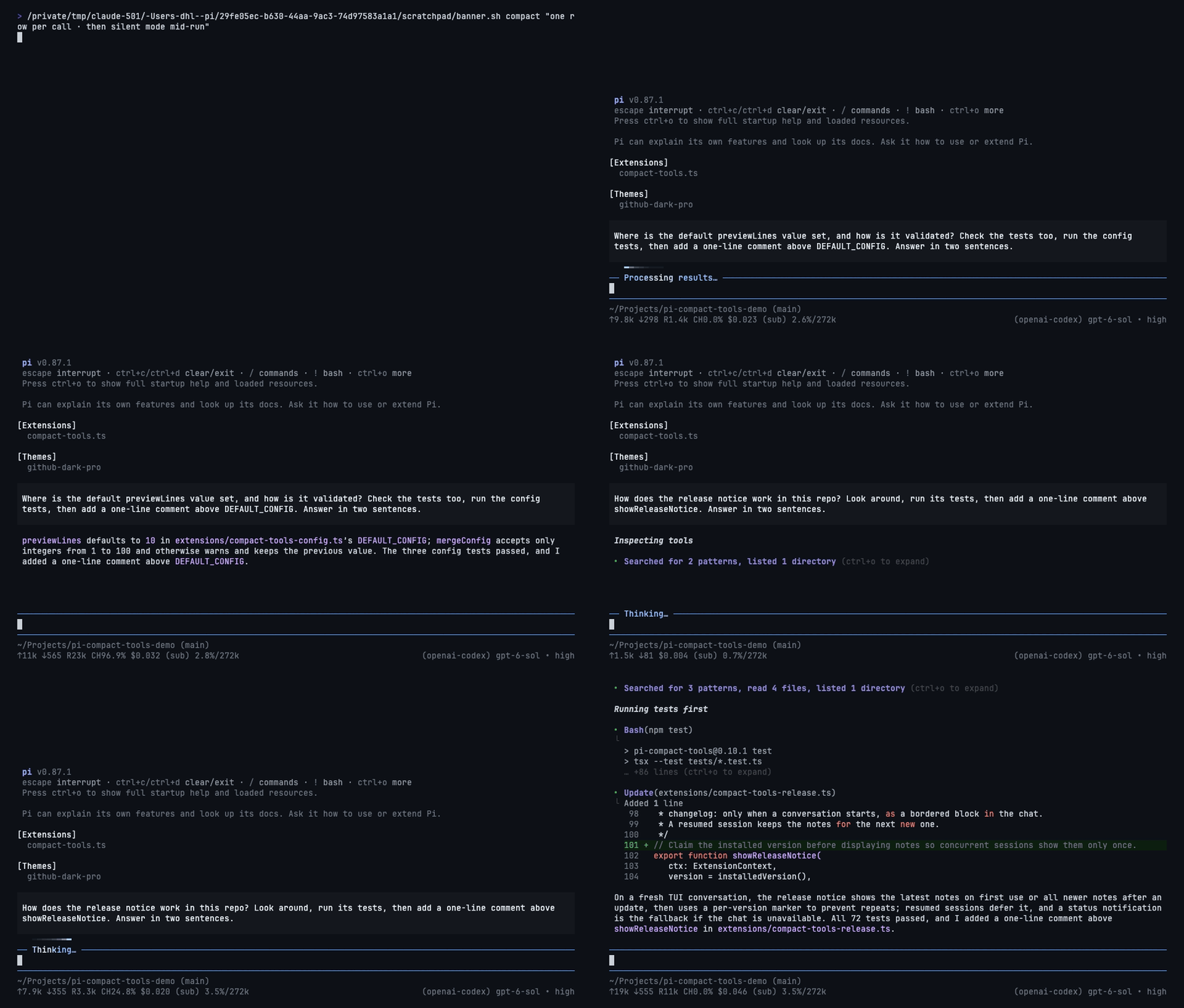
Three tool-row styles for Pi: **Claude**, **Codex**, and **Compact**. Switch styles live, hide tool noise with silent mode, and see what codemode scripts actually called.
|
|
4
4
|
|
|
5
|
-
|
|
5
|
+
**UI only:** no changes to tool execution, model input, or session records. Includes custom-tool rendering and a GitHub Dark theme.
|
|
6
|
+
|
|
7
|
+
|
|
6
8
|
|
|
7
9
|
## Install
|
|
8
10
|
|
|
@@ -10,131 +12,92 @@ Tool rows for Pi in three styles: **Claude**, **Codex**, and **Compact**. Pick t
|
|
|
10
12
|
pi install npm:pi-compact-tools
|
|
11
13
|
```
|
|
12
14
|
|
|
13
|
-
|
|
15
|
+
Run `/reload` or restart Pi, then `/compact-tools` to choose a style. Try without installing: `pi -e npm:pi-compact-tools`.
|
|
14
16
|
|
|
15
|
-
Requires Node.js 22.19+ and Pi 0.85.1+. **Pi 1.2
|
|
17
|
+
Requires Node.js 22.19+ and Pi 0.85.1+. **Pi 1.0.2+ recommended** for native renderer integration and styled HTML exports.
|
|
16
18
|
|
|
17
19
|
## Styles
|
|
18
20
|
|
|
19
|
-
| Style |
|
|
21
|
+
| Style | What you see | Command |
|
|
20
22
|
|---|---|---|
|
|
21
|
-
| **Claude** |
|
|
22
|
-
| **Codex** |
|
|
23
|
-
| **Compact** |
|
|
23
|
+
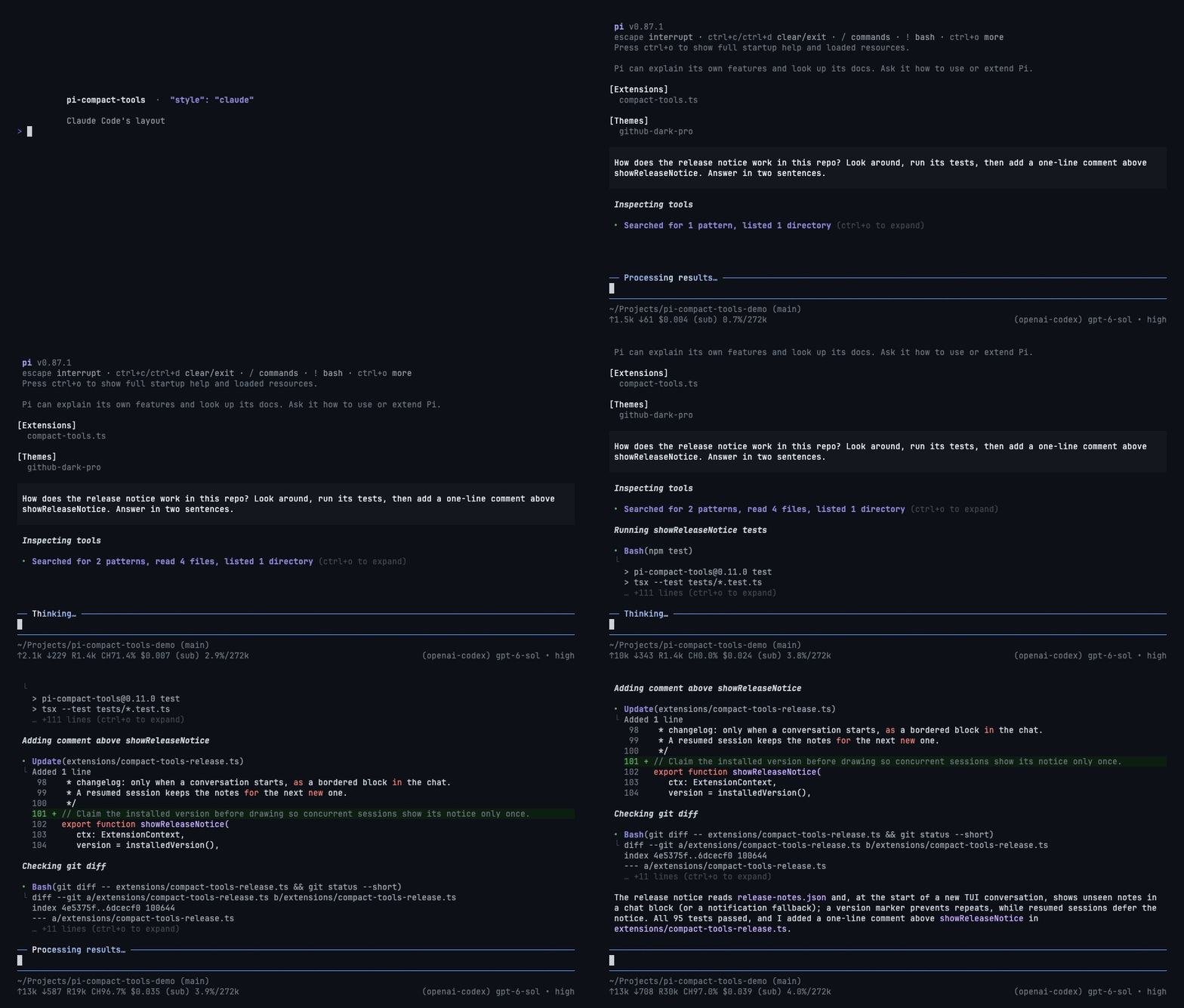
| **Claude** | Grouped reads/searches, `⎿` results, edit previews | `/compact-tools claude` |
|
|
24
|
+
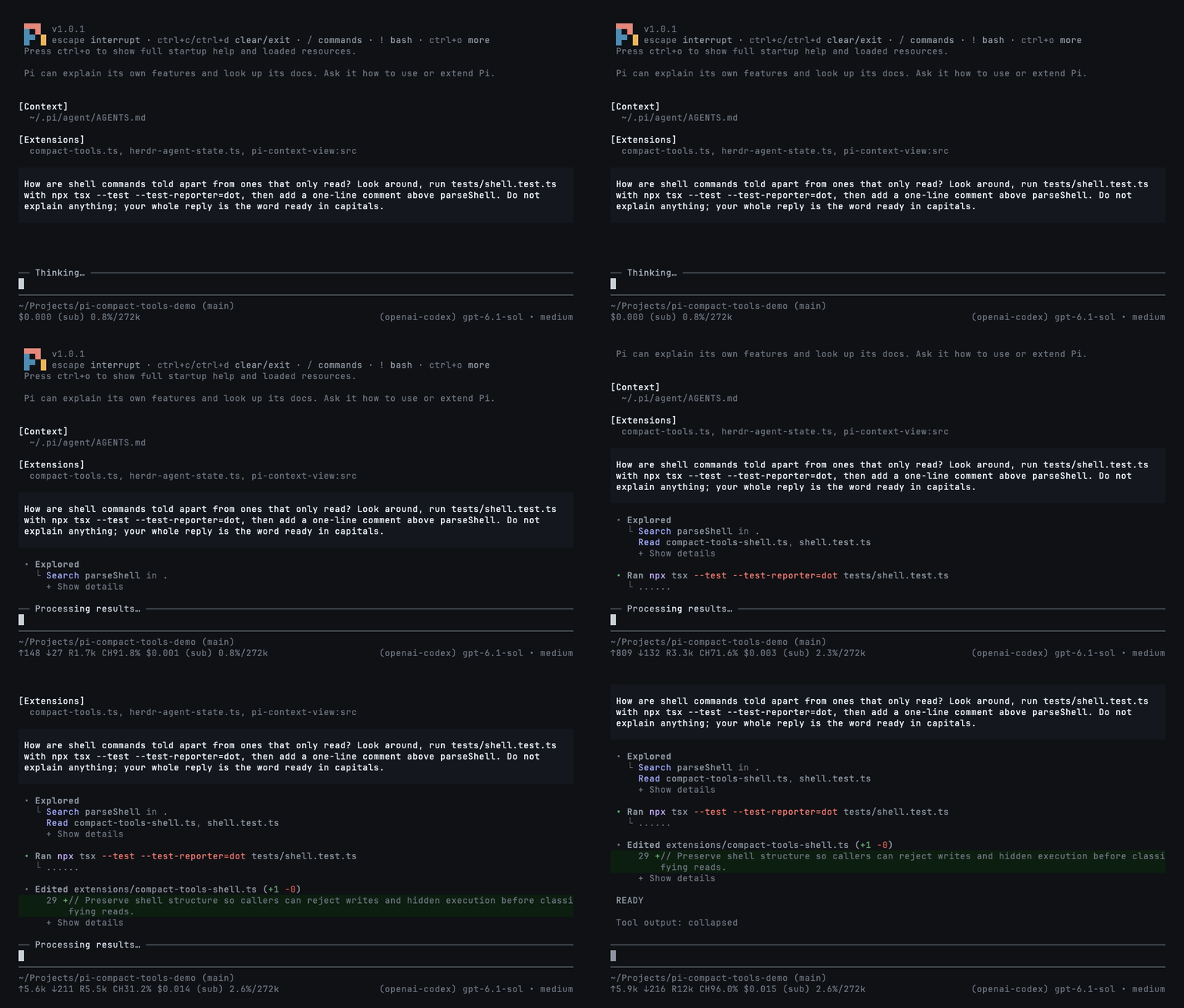
| **Codex** | `• Explored` groups, `• Ran` output, highlighted diffs | `/compact-tools codex` |
|
|
25
|
+
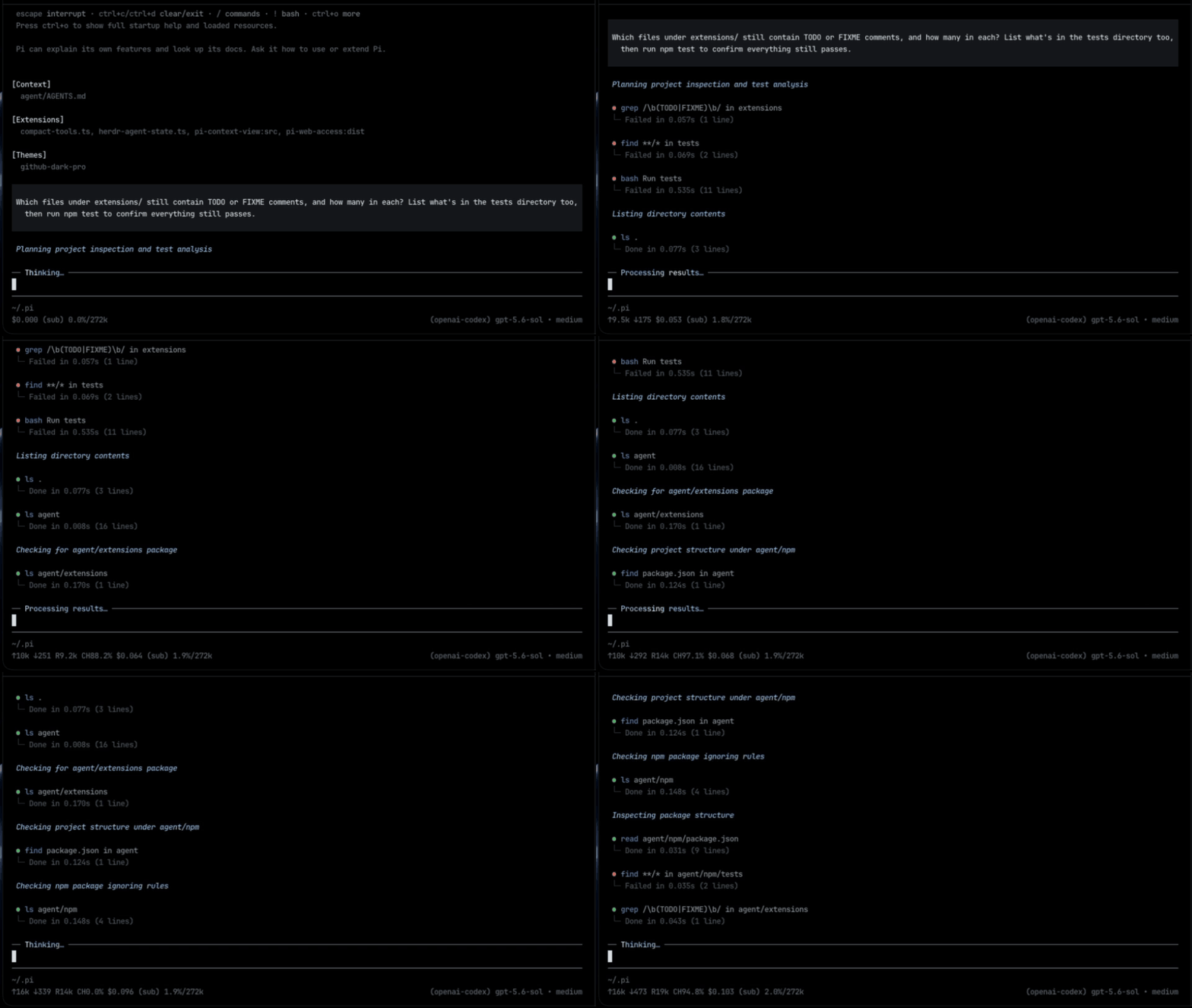
| **Compact** (default) | One row per call: status, duration, line count, and diff | `/compact-tools compact` |
|
|
24
26
|
|
|
25
|
-
|
|
27
|
+
Switching redraws existing rows, even while tools run. Only read-only exploration is grouped; commands that write or execute work keep separate rows.
|
|
26
28
|
|
|
27
29
|
### Claude
|
|
28
30
|
|
|
29
|
-
|
|
34
32
|
|
|
35
33
|
### Codex
|
|
36
34
|
|
|
37
|
-
|
|
43
36
|
|
|
44
37
|
### Compact
|
|
45
38
|
|
|
46
|
-
|
|
40
|
+
|
|
41
|
+
## Silent mode
|
|
47
42
|
|
|
48
|
-
|
|
49
|
-
- Edits show a highlighted diff with `(+3 -1)`; reads and writes show numbered code.
|
|
43
|
+
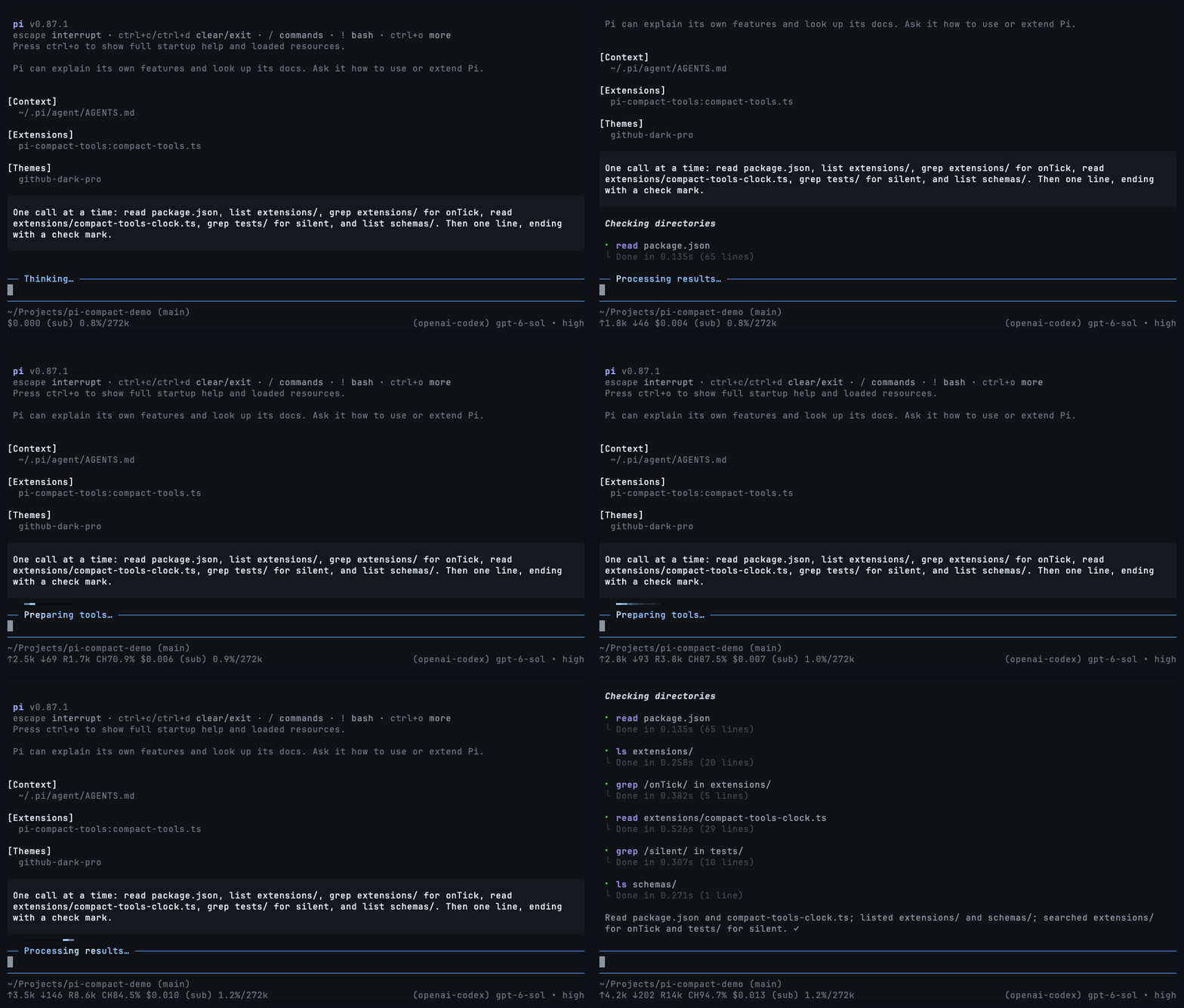
Toggle with **`Ctrl+'`** or `/silent`; use `/silent on` and `/silent off` explicitly. Works with any style. It also hides thinking, intermediate assistant turns, and error/status notices; turn it off to inspect them.
|
|
50
44
|
|
|
51
|
-
|
|
45
|
+
**During work:** hide tool rows while the activity light keeps moving and the answer still arrives. Turn it off to restore every row.
|
|
52
46
|
|
|
53
|
-
|
|
47
|
+
|
|
54
48
|
|
|
55
|
-
|
|
49
|
+
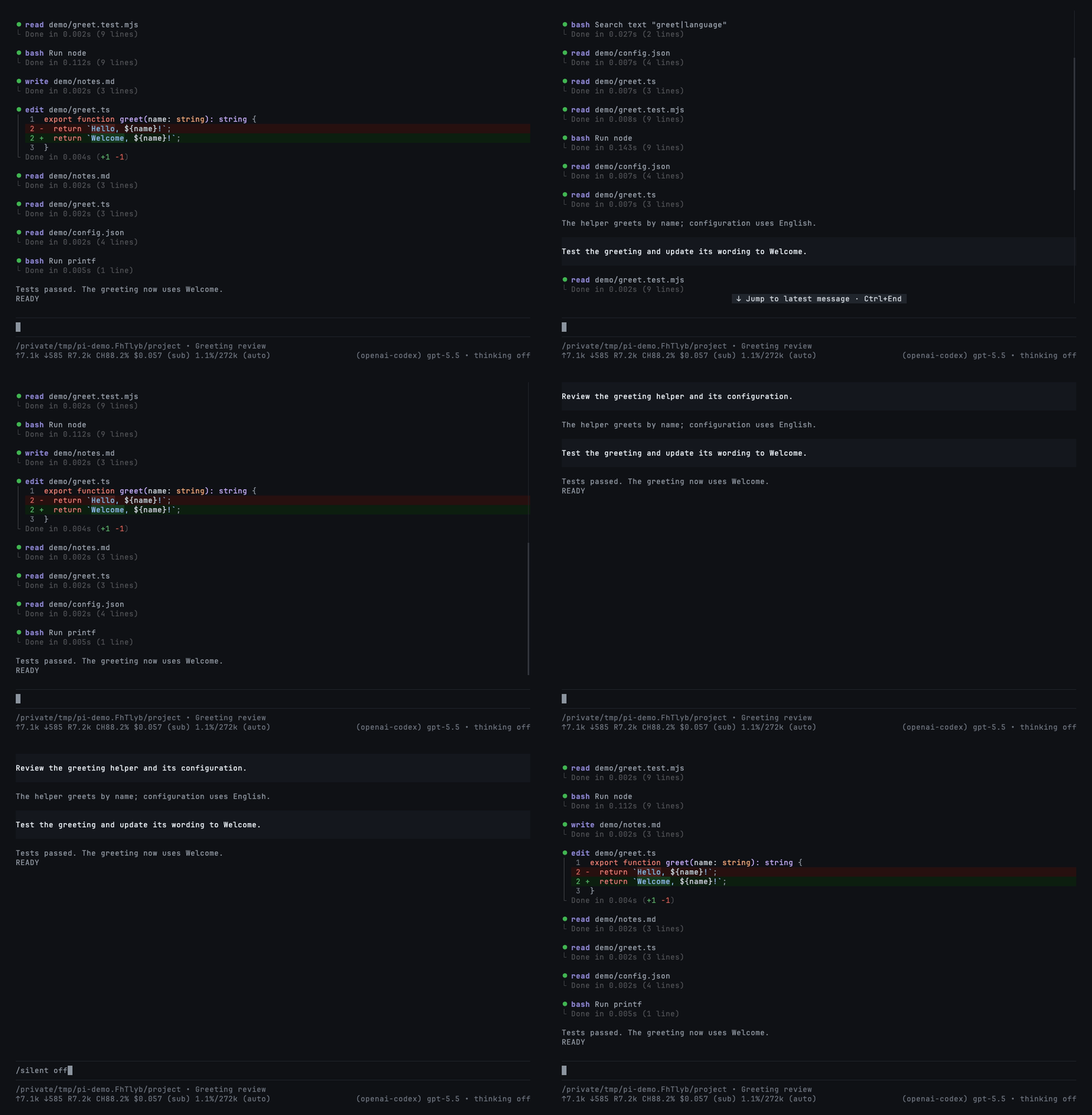
**In a resumed session:** hide pages of completed tool calls to see the conversation at a glance.
|
|
50
|
+
|
|
51
|
+
|
|
52
|
+
|
|
53
|
+
This changes the display only—not the saved history or the model's context. Set `"mode": "silent"` to start sessions with it on.
|
|
54
|
+
|
|
55
|
+
## Codemode summaries
|
|
56
56
|
|
|
57
|
-
|
|
57
|
+
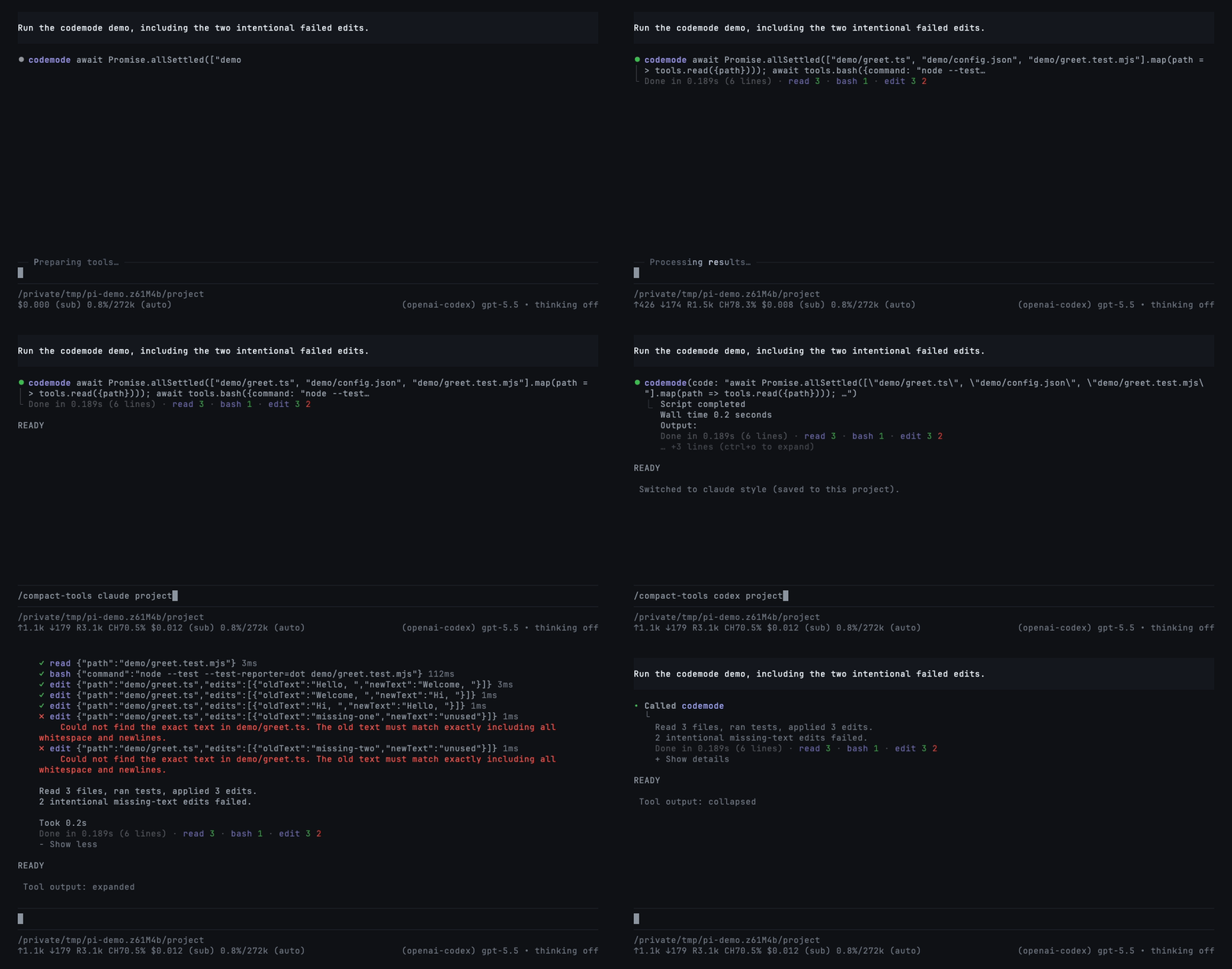
Codemode is Pi's tool for scripts that call other tools. Enable it for a session with `pi --tools +codemode`; use Pi 1.2+ for the native summaries shown here. This extension only renders it.
|
|
58
58
|
|
|
59
|
-
|
|
59
|
+
Completed scripts show outcomes in all three styles: `read 3 · bash 1 · edit 3 2`. Counts use your theme's success, error, and warning colors—green, red, and yellow in the included theme. Each tool appears once; edits come last.
|
|
60
|
+
|
|
61
|
+
|
|
62
|
+
|
|
63
|
+
The two failed edits are intentional. Reload/resume preserves summaries from nested-call records; older hosts without those records keep normal previews. See [compatibility details](https://github.com/nedleeds/pi-compact-tools/blob/main/docs/development.md#ui-only-integration-and-compatibility).
|
|
64
|
+
|
|
65
|
+
## Commands and controls
|
|
60
66
|
|
|
61
67
|
```text
|
|
62
|
-
/compact-tools # choose
|
|
63
|
-
/compact-tools codex # switch style, at once, even while tools run
|
|
68
|
+
/compact-tools # choose style and save scope
|
|
64
69
|
/compact-tools claude project # save for this trusted project
|
|
65
|
-
/compact-tools
|
|
66
|
-
/compact-tools status # effective
|
|
70
|
+
/compact-tools codex global # save globally
|
|
71
|
+
/compact-tools status # effective settings and paths
|
|
72
|
+
/compact-tools off # restore Pi's native rows (reloads Pi)
|
|
67
73
|
```
|
|
68
74
|
|
|
69
|
-
Without a scope,
|
|
75
|
+
Without a scope, changes are saved where the style is configured: project or global. A trusted project's own style overrides a global save. Turning rows off or back on waits for the current response to finish and reloads Pi.
|
|
76
|
+
|
|
77
|
+
- Click a row/group or press `Ctrl+O` to expand/collapse.
|
|
78
|
+
- `Ctrl+T` changes the thinking display, not the model's reasoning effort.
|
|
79
|
+
- Choose `github-dark-pro` in Pi's `/settings` for the included theme.
|
|
70
80
|
|
|
71
81
|
## Configuration
|
|
72
82
|
|
|
73
|
-
Optional
|
|
83
|
+
Optional: `~/.pi/agent/compact-tools.json` or `<project>/.pi/compact-tools.json`. Trusted project settings override global settings field by field.
|
|
74
84
|
|
|
75
85
|
```json
|
|
76
86
|
{
|
|
87
|
+
"$schema": "https://raw.githubusercontent.com/nedleeds/pi-compact-tools/main/schemas/compact-tools.schema.json",
|
|
77
88
|
"style": "compact",
|
|
78
89
|
"mode": "normal",
|
|
79
|
-
"tools": ["read", "write", "edit", "bash"],
|
|
80
90
|
"previewLines": 10,
|
|
81
91
|
"auto_compact": { "read": true, "write": true, "edit": false, "bash": true },
|
|
82
92
|
"custom_tools": { "enabled": true, "auto_compact": true, "exclude": [] }
|
|
83
93
|
}
|
|
84
94
|
```
|
|
85
95
|
|
|
86
|
-
|
|
87
|
-
- `tools`: built-ins drawn in the style. Also `grep`, `find`, `ls`, `powershell`.
|
|
88
|
-
- `auto_compact`: `true` starts a Compact row collapsed; `false` shows up to `previewLines` rows. Custom tool names work too.
|
|
89
|
-
- `custom_tools`: rows for tools from other packages. `exclude` keeps a tool's own look.
|
|
90
|
-
|
|
91
|
-
## Codemode summaries
|
|
92
|
-
|
|
93
|
-
Completed `codemode` rows in **Compact, Claude, and Codex** list the outcomes of the tools the script actually called, beside the duration and output-line count:
|
|
94
|
-
|
|
95
|
-
```text
|
|
96
|
-
Done in 1.234s (42 lines) · read 3 · bash 1 · edit 3 2
|
|
97
|
-
```
|
|
98
|
-
|
|
99
|
-
Each tool appears once with plain colored counts and no count parentheses or pipe: `read 3 · bash 1 · edit 3 2`. Single-outcome calls show one green success count, red failure count, or yellow unfinished-only count. Mixed success/failure calls show the green success count followed by the red failure count, separated only by a space; zero-count placeholders are omitted. Unfinished calls alongside settled calls add a separate yellow note such as `edit 3 2 1 unfinished`. Summary names retain their theme title hue at 75% brightness without bold, while outcome numbers keep their hues at 80% brightness. The main tool title and code preview remain unchanged. `Done in … (N lines)` uses a neutral tone one step brighter than the frame; spaces and `·` separators retain the dim frame chrome. There are no circles, leading bars, underlines, patch totals, or per-call diff lists. Non-edit groups retain first-occurrence order, and edit always appears last. Incomplete records show `(partial)`. Long summaries wrap to the pane width. Previews and author-provided expanded views remain available; expansion does not add patch details. Claude and Codex place the indented completion summary after output and keep disclosure last. Completion rows do not consume Claude’s output-preview limit.
|
|
100
|
-
|
|
101
|
-
The summary uses the host’s nested-call events and saved records without changing what the model sees. It retains only tool names and statuses, never arguments, results, or edit diff totals. An in-process `/reload`, resumed sessions, and `/tree` navigation preserve or restore call counts and outcomes. Hosts without nested-call data keep the previous row rendering.
|
|
102
|
-
|
|
103
|
-
## UI-only behavior
|
|
104
|
-
|
|
105
|
-
This package never registers or activates agent tools and does not add model-facing
|
|
106
|
-
messages, tool schemas, or prompt text. Host execution settings (including shell
|
|
107
|
-
prefixes and image resizing) remain untouched. Renderer-bearing overrides of names
|
|
108
|
-
such as `read` or `bash` follow `custom_tools`, including its exclusions.
|
|
109
|
-
|
|
110
|
-
On Pi 1.0.2 and newer, the public renderer API also applies compact rendering to HTML
|
|
111
|
-
exports. Older hosts use a terminal-only compatibility patch; HTML exports keep
|
|
112
|
-
Pi's native renderers. On Pi 1.1 and newer, final durations use the host's recorded
|
|
113
|
-
`durationMs`, including restored sessions, and tool rows follow `outputPad` (0 or 1)
|
|
114
|
-
without changing their internal style indentation. Older hosts keep event-based
|
|
115
|
-
timing and the original margins; the minimum supported Pi version is unchanged.
|
|
116
|
-
When custom compact rendering is enabled, it intentionally takes precedence over
|
|
117
|
-
fallback renderers supplied by earlier `next() ?? mine` resolvers for unknown tools.
|
|
118
|
-
Disable `custom_tools` or exclude the tool to preserve those fallback renderers.
|
|
119
|
-
|
|
120
|
-
## Controls
|
|
121
|
-
|
|
122
|
-
- Click a row or group, or press `Ctrl+O`, to expand and collapse.
|
|
123
|
-
- `Ctrl+T` cycles thinking: summary → detail → summary → hidden.
|
|
96
|
+
`auto_compact` entries set to `true` start Compact rows collapsed. Add tool names to `custom_tools.exclude` to keep their own rendering. All options are described in the linked schema.
|
|
124
97
|
|
|
125
98
|
## Development
|
|
126
99
|
|
|
127
|
-
|
|
128
|
-
npm install
|
|
129
|
-
npm run check
|
|
130
|
-
pi -e .
|
|
131
|
-
```
|
|
132
|
-
|
|
133
|
-
Development dependencies are pinned to Pi 1.2.0; the peer minimum remains Pi 0.85.1. CI checks Pi 0.85.1, 0.99.1, 1.0.0, 1.0.2, 1.1.0, and 1.2.0 on Node 22.19.0 and 24. Schema validation and deterministic test clocks are development-only dependencies, not runtime dependencies. Development scripts and tests are not included in the published package. `npm test` runs the rendering tests first and the resource/packaging checks separately so their subprocesses do not disturb animation tests.
|
|
134
|
-
|
|
135
|
-
For a local before/after performance comparison, run `npx tsx tests/benchmark.ts <clean-baseline-directory>` with the same host dependencies in both directories. Measurements are informational, not timing-sensitive test assertions.
|
|
136
|
-
|
|
137
|
-
Renders are pinned in `tests/golden/`. After an intended change to the output, record it with `UPDATE_GOLDEN=1 npm test` and review the diff. The Claude and Codex styles are checked against references captured from the real tools in `tests/fixtures/`. The README's GIFs are recorded with `scripts/record-demos.sh` (needs `vhs` and `ffmpeg`). Before publishing, add the version's notes to `release-notes.json` (`[]` for none).
|
|
100
|
+
See [development, compatibility, and demo recording](https://github.com/nedleeds/pi-compact-tools/blob/main/docs/development.md). Run `npm ci` and `npm run check` before contributing.
|
|
138
101
|
|
|
139
102
|
## License
|
|
140
103
|
|
package/package.json
CHANGED
|
@@ -1,6 +1,6 @@
|
|
|
1
1
|
{
|
|
2
2
|
"name": "pi-compact-tools",
|
|
3
|
-
"version": "0.16.
|
|
3
|
+
"version": "0.16.2",
|
|
4
4
|
"description": "Tool rows for Pi in three styles: Claude, Codex, and Compact. Switch with /compact-tools; includes silent mode and a GitHub Dark theme.",
|
|
5
5
|
"type": "module",
|
|
6
6
|
"license": "MIT",
|
package/release-notes.json
CHANGED
|
@@ -1,4 +1,12 @@
|
|
|
1
1
|
{
|
|
2
|
+
"0.16.2": {
|
|
3
|
+
"New": [
|
|
4
|
+
"A concise README and a separate development guide",
|
|
5
|
+
"Seven refreshed real-time demos, including silent mode during work and in resumed sessions"
|
|
6
|
+
],
|
|
7
|
+
"Fix": [],
|
|
8
|
+
"Deprecated": []
|
|
9
|
+
},
|
|
2
10
|
"0.16.1": {
|
|
3
11
|
"New": [
|
|
4
12
|
"Minimal codemode summaries show each tool once: read 3 · bash 1 · edit 3 2; non-edit tools keep first-call order and edit always comes last",
|