pi-compact-tools 0.13.1 → 0.14.0
This diff represents the content of publicly available package versions that have been released to one of the supported registries. The information contained in this diff is provided for informational purposes only and reflects changes between package versions as they appear in their respective public registries.
- package/README.md +52 -26
- package/extensions/compact-tools-activity.ts +10 -2
- package/extensions/compact-tools-claude.ts +20 -26
- package/extensions/compact-tools-codex-rows.ts +465 -0
- package/extensions/compact-tools-codex.ts +453 -0
- package/extensions/compact-tools-command.ts +196 -0
- package/extensions/compact-tools-custom.ts +9 -0
- package/extensions/compact-tools-grouping.ts +130 -31
- package/extensions/compact-tools-invocation.ts +30 -1
- package/extensions/compact-tools-layout.ts +124 -27
- package/extensions/compact-tools-palette.ts +6 -7
- package/extensions/compact-tools-release.ts +30 -7
- package/extensions/compact-tools-runtime.ts +16 -0
- package/extensions/compact-tools-shell.ts +277 -0
- package/extensions/compact-tools-silent.ts +4 -1
- package/extensions/compact-tools-types.ts +10 -2
- package/extensions/compact-tools-viewport.ts +5 -7
- package/extensions/compact-tools.ts +115 -38
- package/package.json +10 -6
- package/release-notes.json +23 -0
- package/schemas/compact-tools.schema.json +3 -3
- package/scripts/check-resources.mjs +0 -82
package/README.md
CHANGED
|
@@ -1,8 +1,8 @@
|
|
|
1
1
|
# pi-compact-tools
|
|
2
2
|
|
|
3
|
-
|
|
3
|
+
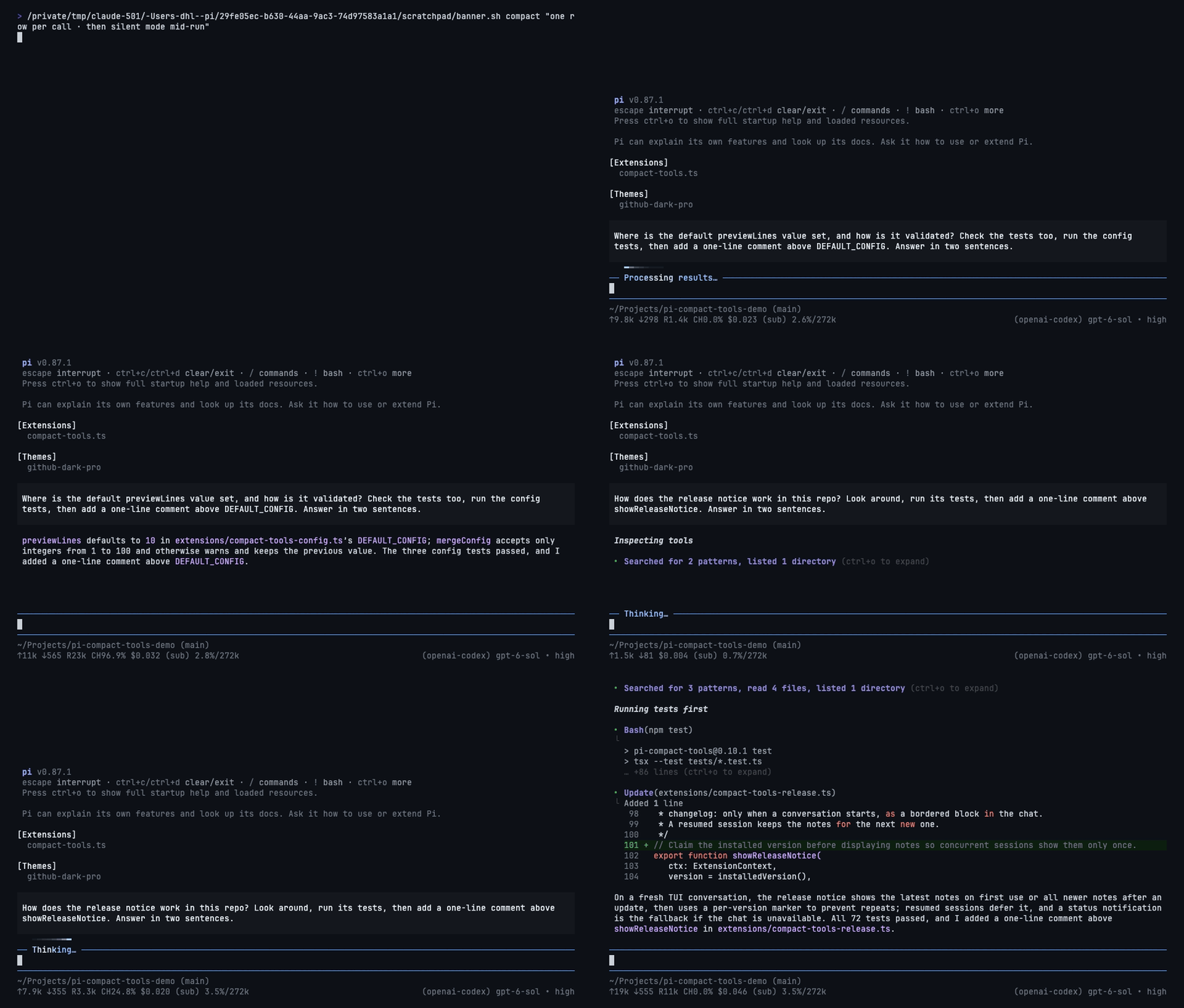
Tool rows for Pi in three styles: **Claude**, **Codex**, and **Compact**. Pick the look you know from Claude Code or Codex CLI, or Pi's own compact rows, and switch any time with `/compact-tools`. Includes a silent mode and a GitHub Dark theme, and works with custom tools from other packages.
|
|
4
4
|
|
|
5
|
-
|
|
6
6
|
|
|
7
7
|
## Install
|
|
8
8
|
|
|
@@ -10,46 +10,67 @@ Compact, expandable tool rows for Pi in its own compact style or Claude Code's,
|
|
|
10
10
|
pi install npm:pi-compact-tools
|
|
11
11
|
```
|
|
12
12
|
|
|
13
|
-
Restart Pi or run `/reload
|
|
13
|
+
Restart Pi or run `/reload`, then run `/compact-tools` to choose a style. To try it for one session without installing: `pi -e npm:pi-compact-tools`.
|
|
14
14
|
|
|
15
|
-
|
|
15
|
+
Requires Node.js 22.19+ and Pi 0.85.1+. It changes only how tool calls are drawn, not what they run or what the model sees.
|
|
16
16
|
|
|
17
|
-
|
|
17
|
+
## Styles
|
|
18
18
|
|
|
19
|
-
| |
|
|
20
|
-
|
|
21
|
-
| **
|
|
22
|
-
| **
|
|
23
|
-
| **
|
|
19
|
+
| Style | Looks like | Set with |
|
|
20
|
+
|---|---|---|
|
|
21
|
+
| **Claude** | Claude Code: reads and searches fold into one line, `⎿` results | `/compact-tools claude` |
|
|
22
|
+
| **Codex** | Codex CLI: `• Explored` groups, `• Ran` with the last output lines | `/compact-tools codex` |
|
|
23
|
+
| **Compact** | one expandable row per call, with its status and time (default) | `/compact-tools compact` |
|
|
24
24
|
|
|
25
|
-
|
|
25
|
+
Silent mode (`Ctrl+'` or `/silent`) works on top of any style. `/compact-tools off` restores Pi's own rows.
|
|
26
26
|
|
|
27
|
-
###
|
|
27
|
+
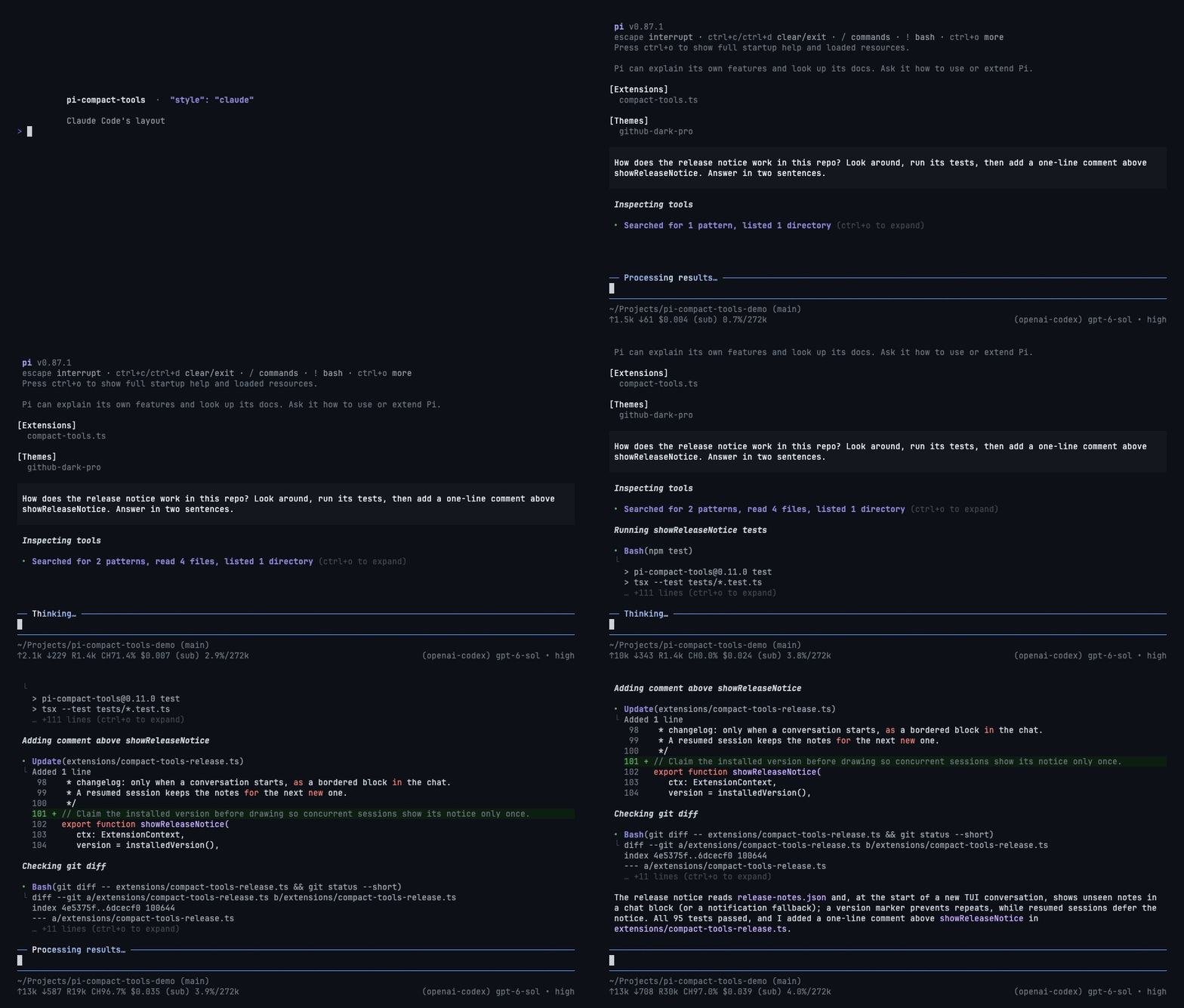
### Claude
|
|
28
|
+
|
|
29
|
+
|
|
30
|
+
|
|
31
|
+
- Reads, searches, and listings fold into one line: `Searched for 2 patterns, read 3 files`.
|
|
32
|
+
- `Bash`, `Update`, `Write`, and custom tools keep their own rows with `⎿` results and short previews.
|
|
33
|
+
- Matched against Claude Code 2.1.288 in a live terminal.
|
|
34
|
+
|
|
35
|
+
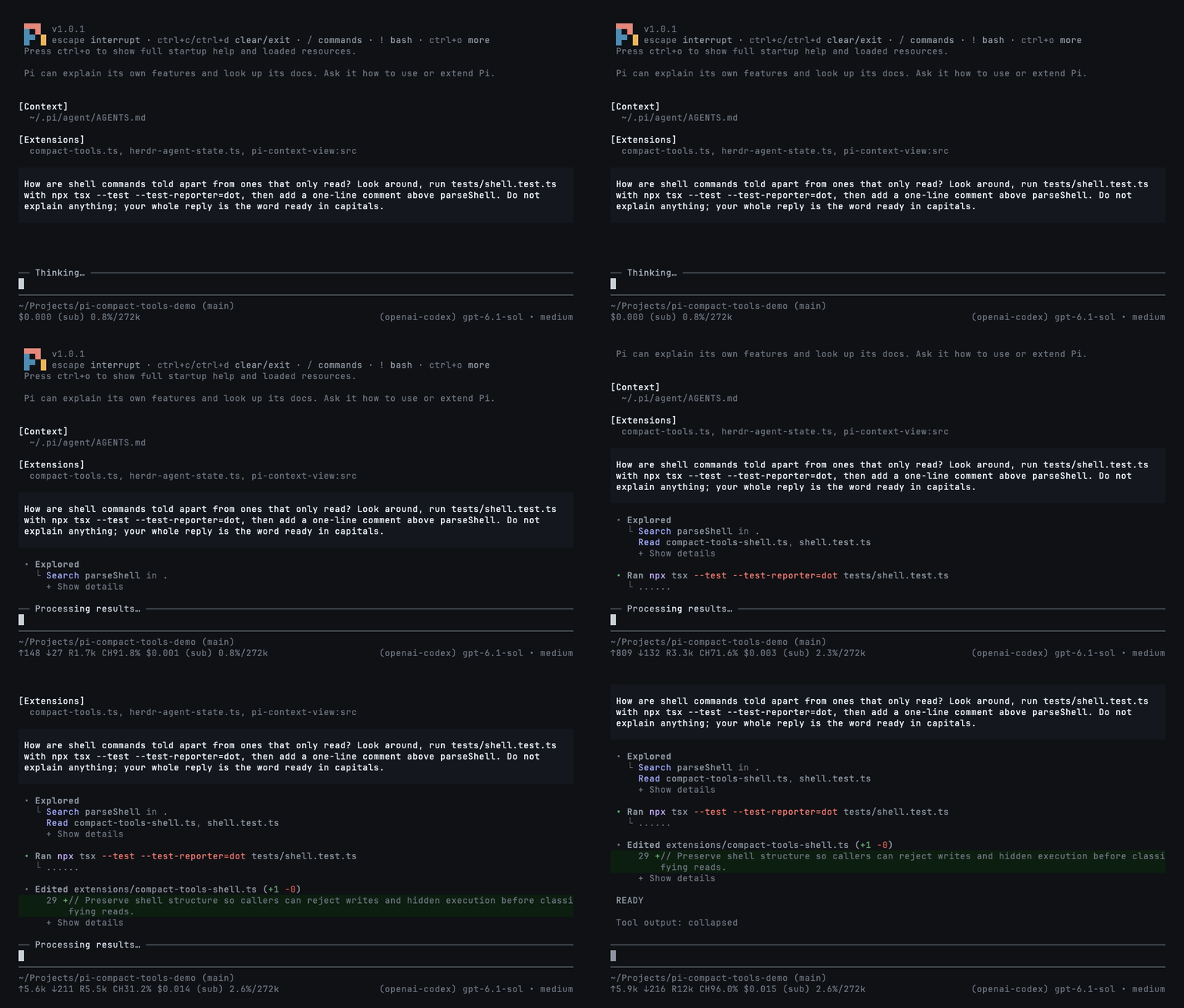
### Codex
|
|
36
|
+
|
|
37
|
+
|
|
38
|
+
|
|
39
|
+
- Reads, searches, and listings fold into `• Explored`: `Read a.ts, b.ts`, `Search TODO in src`.
|
|
40
|
+
- Commands read `Ran` or `Failed (exit 2)` with their last three output lines; opened, `$ cmd`, all its output, and `✓ • 1.23s`.
|
|
41
|
+
- Edits preview their changed lines; custom tools read `• Called name`.
|
|
42
|
+
- Matched against Codex CLI 0.160.0 in a live terminal.
|
|
43
|
+
|
|
44
|
+
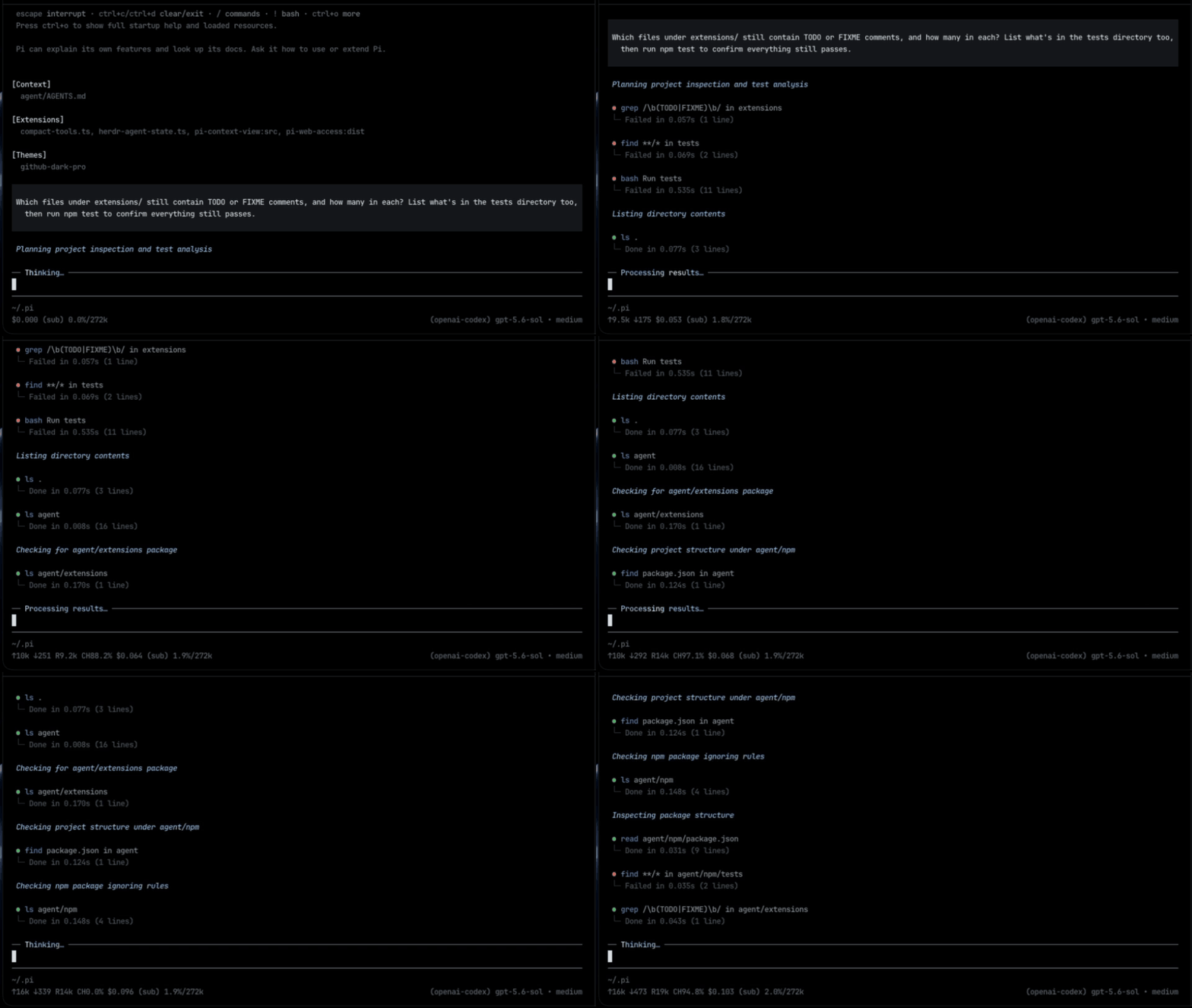
### Compact
|
|
28
45
|
|
|
29
46
|
|
|
30
47
|
|
|
31
|
-
-
|
|
48
|
+
- One row per call: what it ran, its status, duration, and line count.
|
|
32
49
|
- Edits show a highlighted diff with `(+3 -1)`; reads and writes show numbered code.
|
|
33
50
|
|
|
34
|
-
|
|
51
|
+
A command that writes or runs something, such as `tee`, `xargs`, or `find -delete`, always keeps its own row; only calls that just look around are folded into a group.
|
|
35
52
|
|
|
36
|
-
|
|
53
|
+
### Silent mode
|
|
37
54
|
|
|
38
|
-
|
|
39
|
-
- `Bash`, `Update`, `Write`, and custom tools keep their own rows with short previews.
|
|
55
|
+
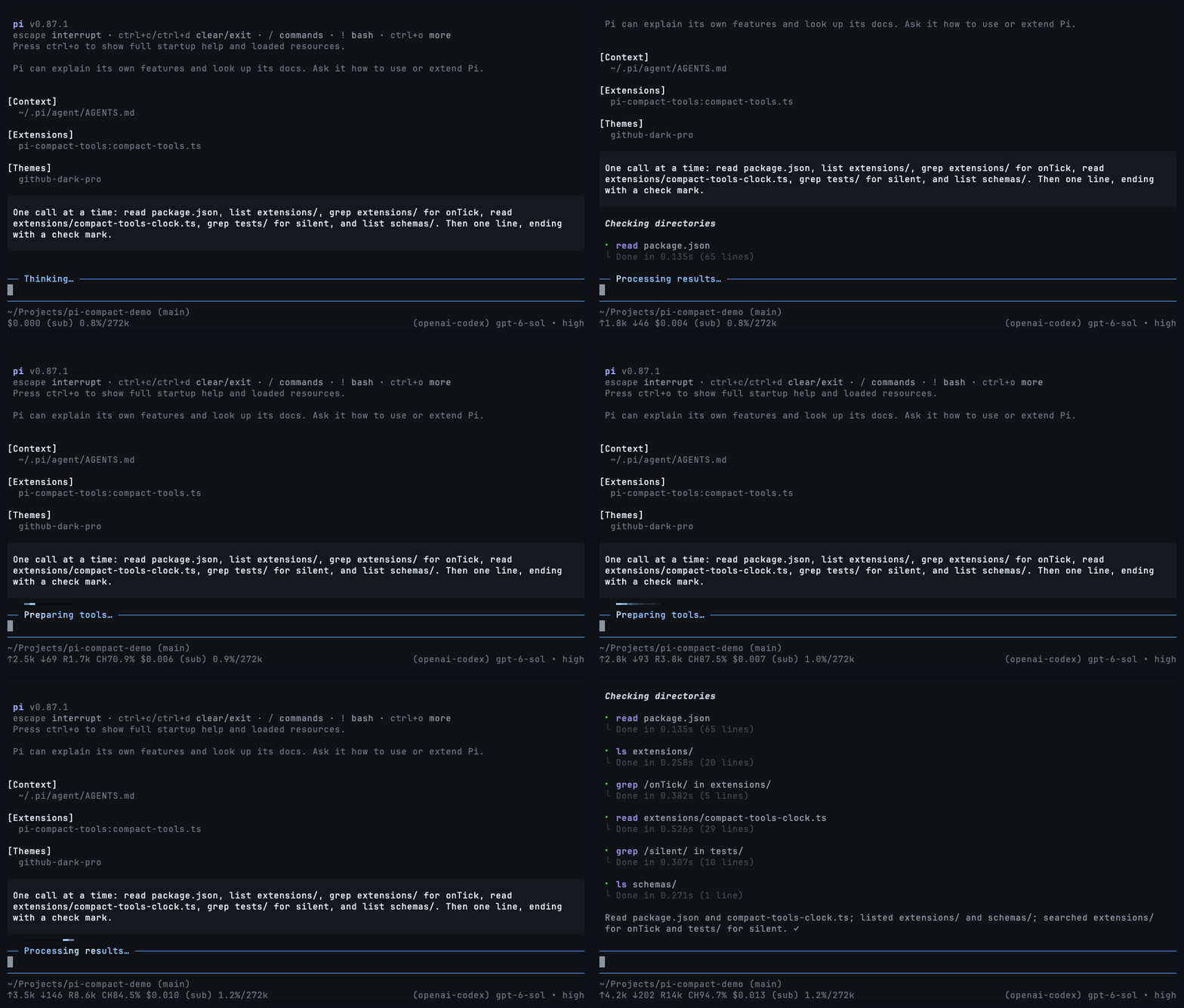
|
|
40
56
|
|
|
41
|
-
|
|
57
|
+
Only your prompts and the answers. Toggle with `Ctrl+'` or `/silent`; `"mode": "silent"` starts sessions with it on.
|
|
42
58
|
|
|
43
|
-
|
|
59
|
+
## Commands
|
|
44
60
|
|
|
45
|
-
|
|
61
|
+
```text
|
|
62
|
+
/compact-tools # choose a style and where to save it
|
|
63
|
+
/compact-tools codex # switch style, at once, even while tools run
|
|
64
|
+
/compact-tools claude project # save for this trusted project
|
|
65
|
+
/compact-tools off # restore Pi's own rows (reloads Pi)
|
|
66
|
+
/compact-tools status # effective style, mode, and config paths
|
|
67
|
+
```
|
|
46
68
|
|
|
47
|
-
|
|
48
|
-
- Turn it off and every row comes back. `"mode": "silent"` starts sessions with it on.
|
|
69
|
+
Without a scope, the style is saved where it is decided: in the trusted project if its settings choose a style, otherwise globally. Switching between Claude, Codex, and Compact redraws every row at once, even while tools run. Turning rows `off` or back on reloads Pi, so it waits until the response finishes. Your other settings are kept.
|
|
49
70
|
|
|
50
71
|
## Configuration
|
|
51
72
|
|
|
52
|
-
Optional, in `~/.pi/agent/compact-tools.json` or `<project>/.pi/compact-tools.json
|
|
73
|
+
Optional, in `~/.pi/agent/compact-tools.json` or `<project>/.pi/compact-tools.json` (trusted projects only; they override global settings field by field). Add `"$schema": "https://raw.githubusercontent.com/nedleeds/pi-compact-tools/main/schemas/compact-tools.schema.json"` for editor validation.
|
|
53
74
|
|
|
54
75
|
```json
|
|
55
76
|
{
|
|
@@ -62,8 +83,9 @@ Optional, in `~/.pi/agent/compact-tools.json` or `<project>/.pi/compact-tools.js
|
|
|
62
83
|
}
|
|
63
84
|
```
|
|
64
85
|
|
|
65
|
-
- `
|
|
66
|
-
- `
|
|
86
|
+
- `style`: `claude`, `codex`, `compact`, or `off`.
|
|
87
|
+
- `tools`: built-ins drawn in the style. Also `grep`, `find`, `ls`, `powershell`.
|
|
88
|
+
- `auto_compact`: `true` starts a Compact row collapsed; `false` shows up to `previewLines` rows. Custom tool names work too.
|
|
67
89
|
- `custom_tools`: rows for tools from other packages. `exclude` keeps a tool's own look.
|
|
68
90
|
|
|
69
91
|
## Controls
|
|
@@ -79,7 +101,11 @@ npm run check
|
|
|
79
101
|
pi -e .
|
|
80
102
|
```
|
|
81
103
|
|
|
82
|
-
|
|
104
|
+
Development dependencies are pinned to Pi 1.0.0; the peer minimum remains Pi 0.85.1. CI checks Pi 0.85.1, 0.99.1, and 1.0.0 on Node 22.19.0 and 24. Schema validation and deterministic test clocks are development-only dependencies, not runtime dependencies. Development scripts and tests are not included in the published package. `npm test` runs the rendering tests first and the resource/packaging checks separately so their subprocesses do not disturb animation tests.
|
|
105
|
+
|
|
106
|
+
For a local before/after performance comparison, run `npx tsx tests/benchmark.ts <clean-baseline-directory>` with the same host dependencies in both directories. Measurements are informational, not timing-sensitive test assertions.
|
|
107
|
+
|
|
108
|
+
Renders are pinned in `tests/golden/`. After an intended change to the output, record it with `UPDATE_GOLDEN=1 npm test` and review the diff. The Claude and Codex styles are checked against references captured from the real tools in `tests/fixtures/`. The README's GIFs are recorded with `scripts/record-demos.sh` (needs `vhs` and `ffmpeg`). Before publishing, add the version's notes to `release-notes.json` (`[]` for none).
|
|
83
109
|
|
|
84
110
|
## License
|
|
85
111
|
|
|
@@ -264,8 +264,16 @@ export class SilentActivityAnimator {
|
|
|
264
264
|
else if (type === "thinking_start" || type === "toolcall_start") this.setAnswering(false);
|
|
265
265
|
});
|
|
266
266
|
pi.on("tool_execution_start", () => this.setAnswering(false));
|
|
267
|
-
pi.on("turn_start", () =>
|
|
268
|
-
|
|
267
|
+
pi.on("turn_start", () => {
|
|
268
|
+
if (!this.context) return;
|
|
269
|
+
this.running = true;
|
|
270
|
+
this.answering = false;
|
|
271
|
+
this.refresh();
|
|
272
|
+
});
|
|
273
|
+
// agent_end closes a low-level run, not retries/compaction/continuations.
|
|
274
|
+
// Keep the shared clock alive until Pi declares final settlement, as the
|
|
275
|
+
// working-label controller already does.
|
|
276
|
+
pi.on("agent_settled", () => {
|
|
269
277
|
if (!this.context) return;
|
|
270
278
|
this.running = false;
|
|
271
279
|
this.refresh();
|
|
@@ -4,10 +4,10 @@ import { normalizeLineEndings } from "./compact-tools-core.ts";
|
|
|
4
4
|
import {
|
|
5
5
|
countEditChanges,
|
|
6
6
|
formatResultLineSummary,
|
|
7
|
-
shellSegments,
|
|
8
7
|
summarizeCustomArguments,
|
|
9
8
|
summarizeFailure,
|
|
10
9
|
} from "./compact-tools-invocation.ts";
|
|
10
|
+
import { isHarmlessRedirect, parseShell, writesOrRuns } from "./compact-tools-shell.ts";
|
|
11
11
|
import type { ToolArgs } from "./compact-tools-types.ts";
|
|
12
12
|
|
|
13
13
|
/**
|
|
@@ -20,6 +20,18 @@ export const CLAUDE_WRITE_ROWS = 10;
|
|
|
20
20
|
/** Lines of context Claude Code keeps around each change in an edit's diff. */
|
|
21
21
|
export const CLAUDE_DIFF_CONTEXT_LINES = 3;
|
|
22
22
|
|
|
23
|
+
/**
|
|
24
|
+
* Claude Code 2.1.288's chrome: `⏺ Bash(…)`, then ` ⎿ ` with the "⎿" under the
|
|
25
|
+
* tool's name and the result two columns after it. Pi draws every row one column
|
|
26
|
+
* in, with its own smaller "⦁" dot, so each prefix keeps that geometry one column
|
|
27
|
+
* further right.
|
|
28
|
+
*/
|
|
29
|
+
export const CLAUDE_RESULT_PREFIX = " ⎿ ";
|
|
30
|
+
/** Lines after the first under "⎿", and everything drawn beneath the result. */
|
|
31
|
+
export const CLAUDE_INDENT = " ";
|
|
32
|
+
/** Where a wrapped call line continues: under the tool's name. */
|
|
33
|
+
export const CLAUDE_TITLE_INDENT = " ";
|
|
34
|
+
|
|
23
35
|
/** Claude Code's names for the tools Pi shares with it. */
|
|
24
36
|
const LABELS: Readonly<Record<string, string>> = {
|
|
25
37
|
read: "Read",
|
|
@@ -118,38 +130,20 @@ const NEUTRAL_COMMANDS = new Set(["echo", "printf", "true", "false", ":"]);
|
|
|
118
130
|
|
|
119
131
|
export type LookKind = "search" | "read" | "list";
|
|
120
132
|
|
|
121
|
-
/** Split one shell step at its unquoted pipes. */
|
|
122
|
-
function pipeStages(segment: string): string[] {
|
|
123
|
-
const stages: string[] = [];
|
|
124
|
-
let current = "";
|
|
125
|
-
let quote: string | undefined;
|
|
126
|
-
for (let index = 0; index < segment.length; index++) {
|
|
127
|
-
const character = segment[index]!;
|
|
128
|
-
if (quote) {
|
|
129
|
-
if (character === quote) quote = undefined;
|
|
130
|
-
} else if (character === "'" || character === '"' || character === "`") {
|
|
131
|
-
quote = character;
|
|
132
|
-
} else if (character === "|" && segment[index + 1] !== "|") {
|
|
133
|
-
stages.push(current);
|
|
134
|
-
current = "";
|
|
135
|
-
continue;
|
|
136
|
-
}
|
|
137
|
-
current += character;
|
|
138
|
-
}
|
|
139
|
-
stages.push(current);
|
|
140
|
-
return stages.map((stage) => stage.trim()).filter(Boolean);
|
|
141
|
-
}
|
|
142
|
-
|
|
143
133
|
/**
|
|
144
134
|
* How a shell command looks around, if that is all it does: `rg x | head` searches,
|
|
145
|
-
* `cat a.ts` reads, `ls src` lists. Anything that runs something else
|
|
135
|
+
* `cat a.ts` reads, `ls src` lists. Anything that runs something else, writes a
|
|
136
|
+
* file, or redirects anywhere but /dev/null is undefined, so a group never hides it.
|
|
146
137
|
*/
|
|
147
138
|
export function classifyShellCommand(command: string): LookKind | undefined {
|
|
139
|
+
const parsed = parseShell(normalizeLineEndings(command));
|
|
140
|
+
if (!parsed || parsed.opaque) return undefined;
|
|
148
141
|
let search = false;
|
|
149
142
|
let read = false;
|
|
150
143
|
let list = false;
|
|
151
|
-
for (const
|
|
152
|
-
|
|
144
|
+
for (const { words, redirects } of parsed.commands) {
|
|
145
|
+
if (!redirects.every(isHarmlessRedirect) || writesOrRuns(words)) return undefined;
|
|
146
|
+
const program = words[0];
|
|
153
147
|
if (!program || NEUTRAL_COMMANDS.has(program)) continue;
|
|
154
148
|
if (SEARCH_COMMANDS.has(program)) search = true;
|
|
155
149
|
else if (READ_COMMANDS.has(program)) read = true;
|