pi-compact-tools 0.10.1 → 0.11.1
This diff represents the content of publicly available package versions that have been released to one of the supported registries. The information contained in this diff is provided for informational purposes only and reflects changes between package versions as they appear in their respective public registries.
- package/README.md +44 -53
- package/extensions/compact-tools-claude.ts +227 -0
- package/extensions/compact-tools-config.ts +9 -5
- package/extensions/compact-tools-grouping.ts +282 -0
- package/extensions/compact-tools-invocation.ts +1 -1
- package/extensions/compact-tools-layout.ts +64 -17
- package/extensions/compact-tools-palette.ts +10 -0
- package/extensions/compact-tools-runtime.ts +10 -0
- package/extensions/compact-tools-silent.ts +9 -3
- package/extensions/compact-tools-types.ts +4 -0
- package/extensions/compact-tools.ts +218 -223
- package/package.json +3 -3
- package/release-notes.json +7 -0
- package/schemas/compact-tools.schema.json +7 -1
package/README.md
CHANGED
|
@@ -1,19 +1,8 @@
|
|
|
1
1
|
# pi-compact-tools
|
|
2
2
|
|
|
3
|
-
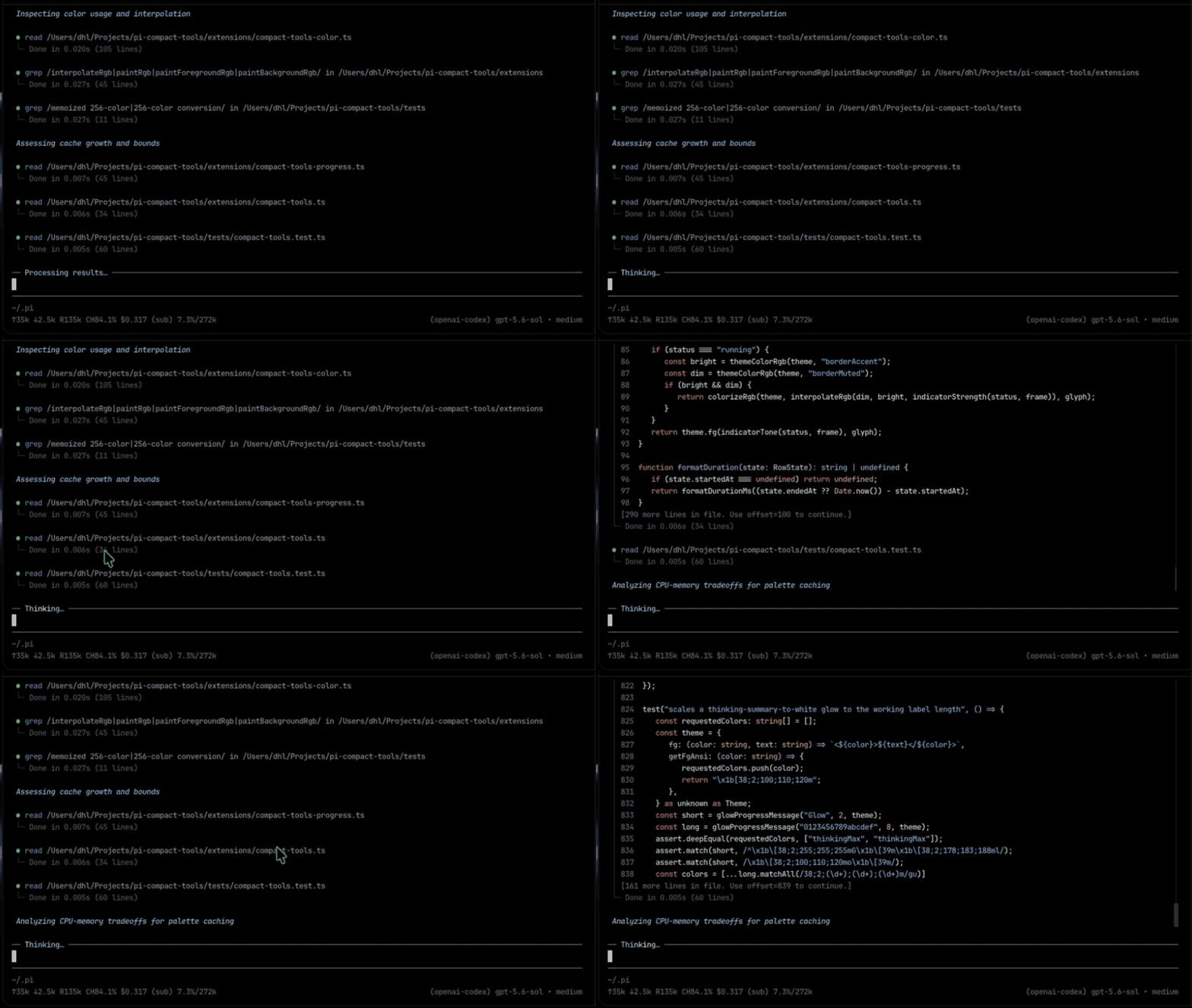
Compact, expandable tool rows for Pi
|
|
3
|
+
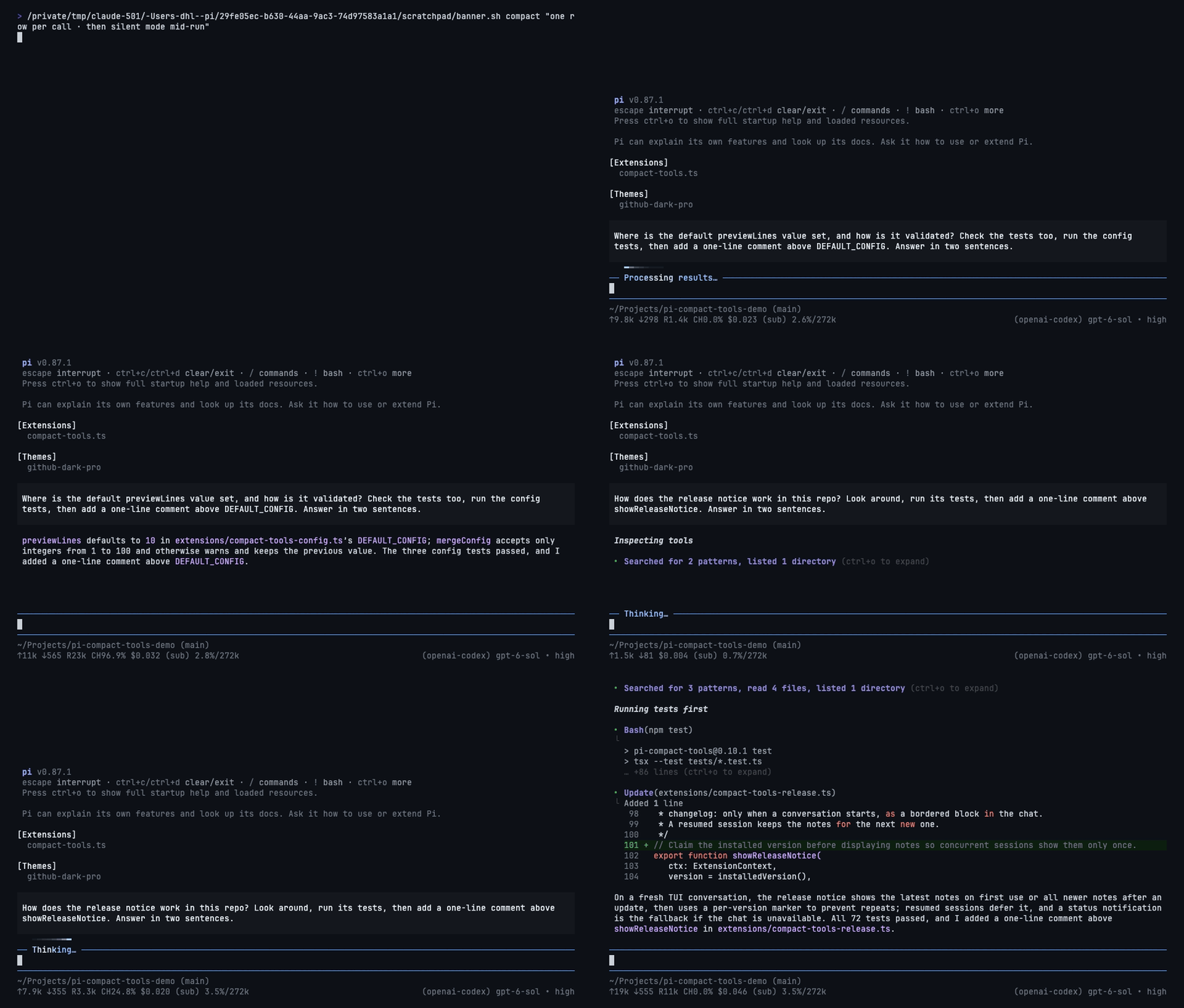
Compact, expandable tool rows for Pi in its own compact style or Claude Code's, with a silent mode and a GitHub Dark theme. Works with custom tools from other packages.
|
|
4
4
|
|
|
5
|
-
|
|
8
|
-
|
|
9
|
-
## Features
|
|
10
|
-
|
|
11
|
-
- Compact rows for `read`, `write`, `edit`, `bash`, `powershell`, `grep`, `find`, and `ls`, with status, duration, and line count
|
|
12
|
-
- The same rows for custom tools from other packages, with no setup
|
|
13
|
-
- Syntax-highlighted edit diffs, with lines added and removed: `(+3 -1)`
|
|
14
|
-
- Numbered code views for `read` and `write`
|
|
15
|
-
- Silent mode: only prompts and final answers
|
|
16
|
-
- Works with any theme; no Nerd Font required
|
|
5
|
+
|
|
17
6
|
|
|
18
7
|
## Install
|
|
19
8
|
|
|
@@ -23,62 +12,64 @@ pi install npm:pi-compact-tools
|
|
|
23
12
|
|
|
24
13
|
Restart Pi or run `/reload`. For the bundled theme, set `"theme": "github-dark-pro"` in `~/.pi/agent/settings.json`.
|
|
25
14
|
|
|
26
|
-
##
|
|
15
|
+
## Usage
|
|
27
16
|
|
|
28
|
-
|
|
17
|
+
Pick a style. Silent mode works on top of either.
|
|
29
18
|
|
|
30
|
-
|
|
31
|
-
|
|
32
|
-
|
|
33
|
-
|
|
34
|
-
|
|
35
|
-
"mode": "normal",
|
|
36
|
-
"custom_tools": { "enabled": true, "auto_compact": true, "exclude": [] }
|
|
37
|
-
}
|
|
38
|
-
```
|
|
19
|
+
| | Setting | Shows | How |
|
|
20
|
+
|---|---|---|---|
|
|
21
|
+
| **Compact** | Style | every tool call, one short row each | `"style": "compact"` (default) |
|
|
22
|
+
| **Claude** | Style | reads and searches folded into one line, like Claude Code | `"style": "claude"` |
|
|
23
|
+
| **Silent** | Mode | only your prompts and the answers | `Ctrl+'` or `/silent` |
|
|
39
24
|
|
|
40
|
-
|
|
41
|
-
- `auto_compact`: `true` starts a row hidden, `false` shows a preview of up to `previewLines` rows. Custom tool names work too.
|
|
42
|
-
- `mode`: `"normal"` or `"silent"`. See [Silent mode](#silent-mode).
|
|
43
|
-
- `custom_tools`: see [Custom tools](#custom-tools).
|
|
25
|
+
Set `"style"` in the config below, then `/reload`. `"style": "off"` restores Pi's own rows.
|
|
44
26
|
|
|
45
|
-
|
|
27
|
+
### Style: Compact
|
|
46
28
|
|
|
47
|
-
|
|
48
30
|
|
|
49
|
-
|
|
31
|
+
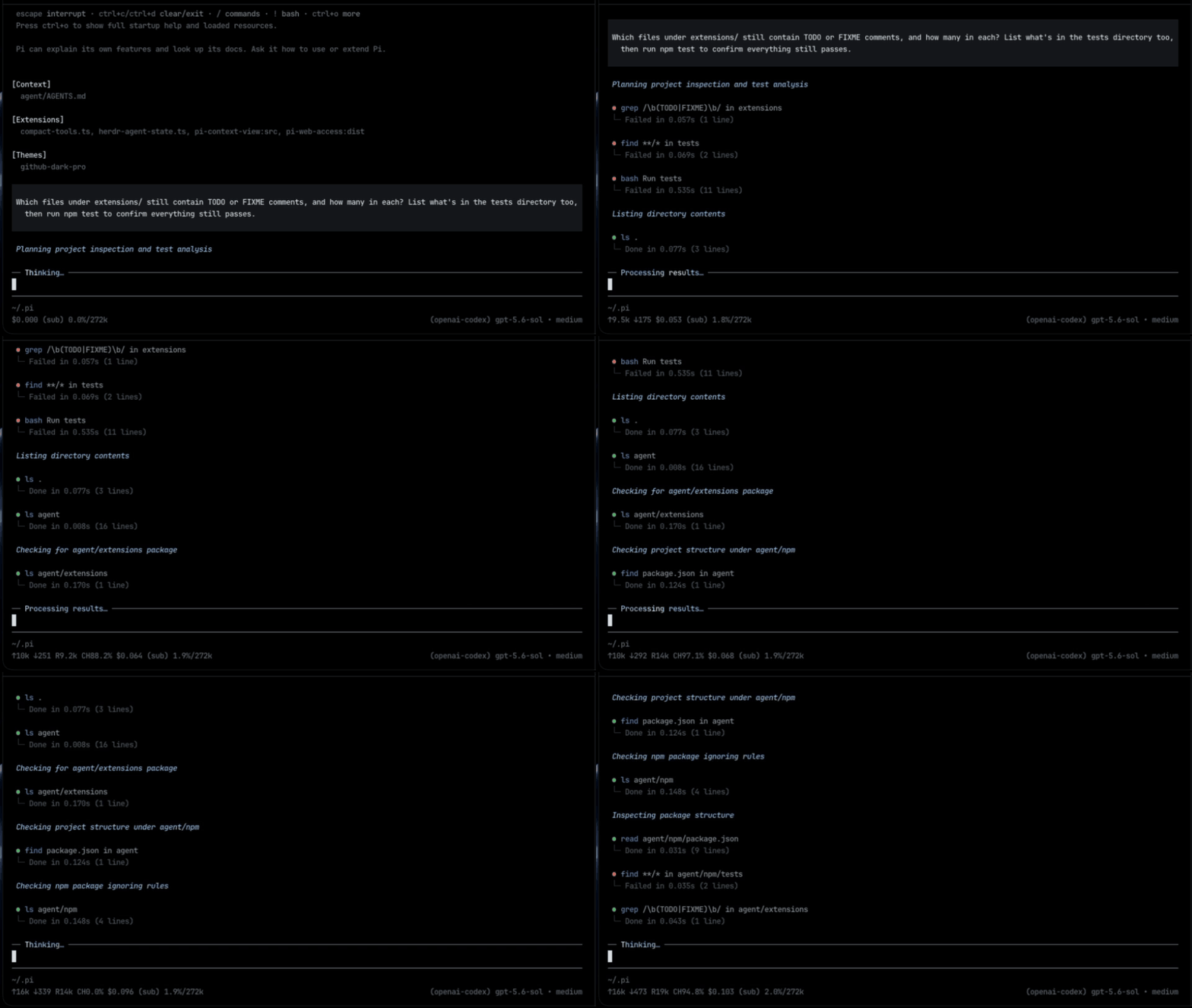
- One row per call: status, duration, and line count.
|
|
32
|
+
- Edits show a highlighted diff with `(+3 -1)`; reads and writes show numbered code.
|
|
50
33
|
|
|
51
|
-
|
|
34
|
+
### Style: Claude
|
|
52
35
|
|
|
53
|
-
|
|
54
|
-
{
|
|
55
|
-
"auto_compact": { "web_search": false },
|
|
56
|
-
"custom_tools": { "enabled": true, "auto_compact": true, "exclude": ["my_tool"] }
|
|
57
|
-
}
|
|
58
|
-
```
|
|
36
|
+
|
|
59
37
|
|
|
60
|
-
-
|
|
61
|
-
- `
|
|
62
|
-
- `exclude`: tools that keep their original look.
|
|
38
|
+
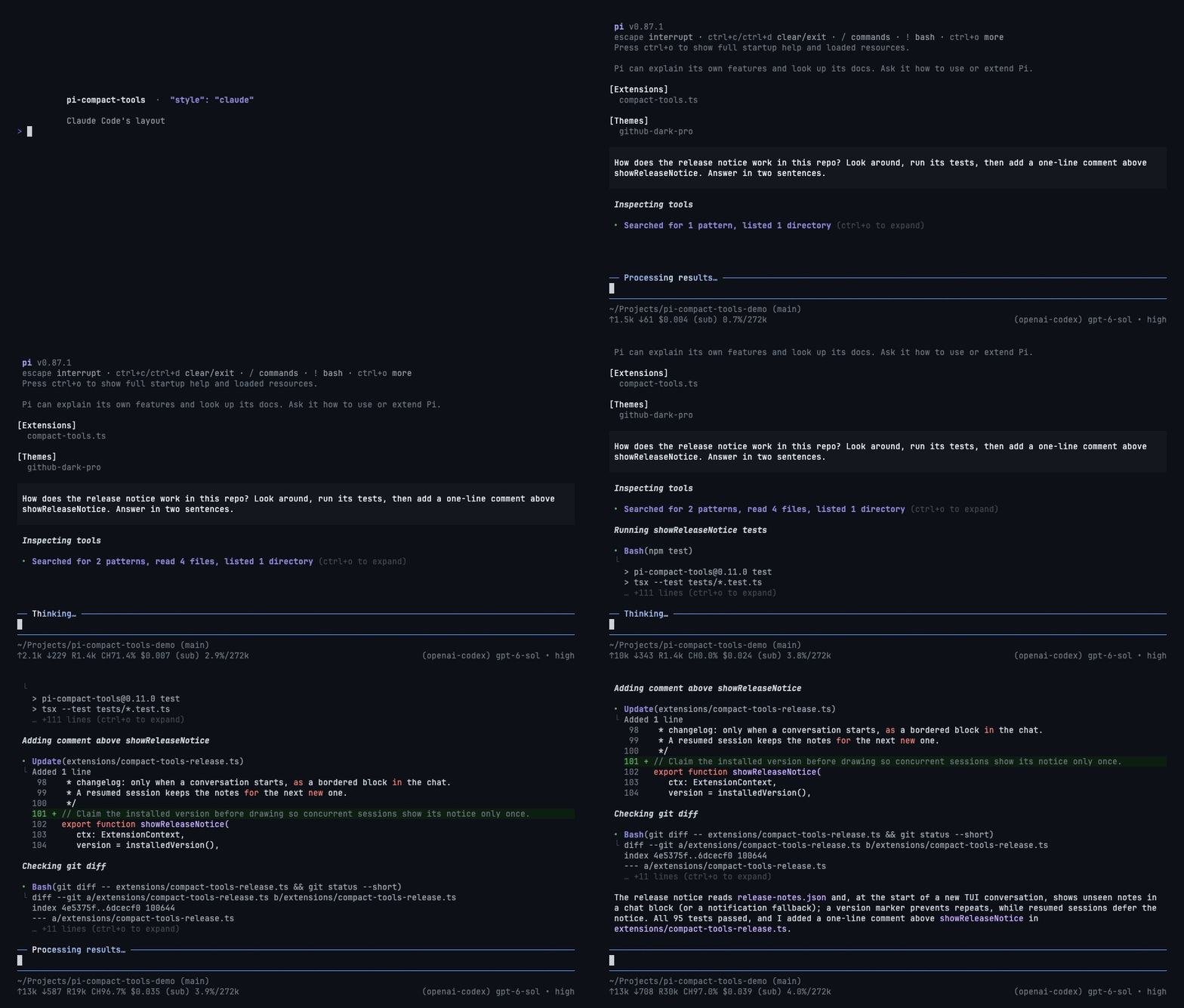
- Reads, searches, and listings fold into one line: `Searched for 2 patterns, read 3 files`.
|
|
39
|
+
- `Bash`, `Update`, `Write`, and custom tools keep their own rows with short previews.
|
|
63
40
|
|
|
64
|
-
|
|
41
|
+
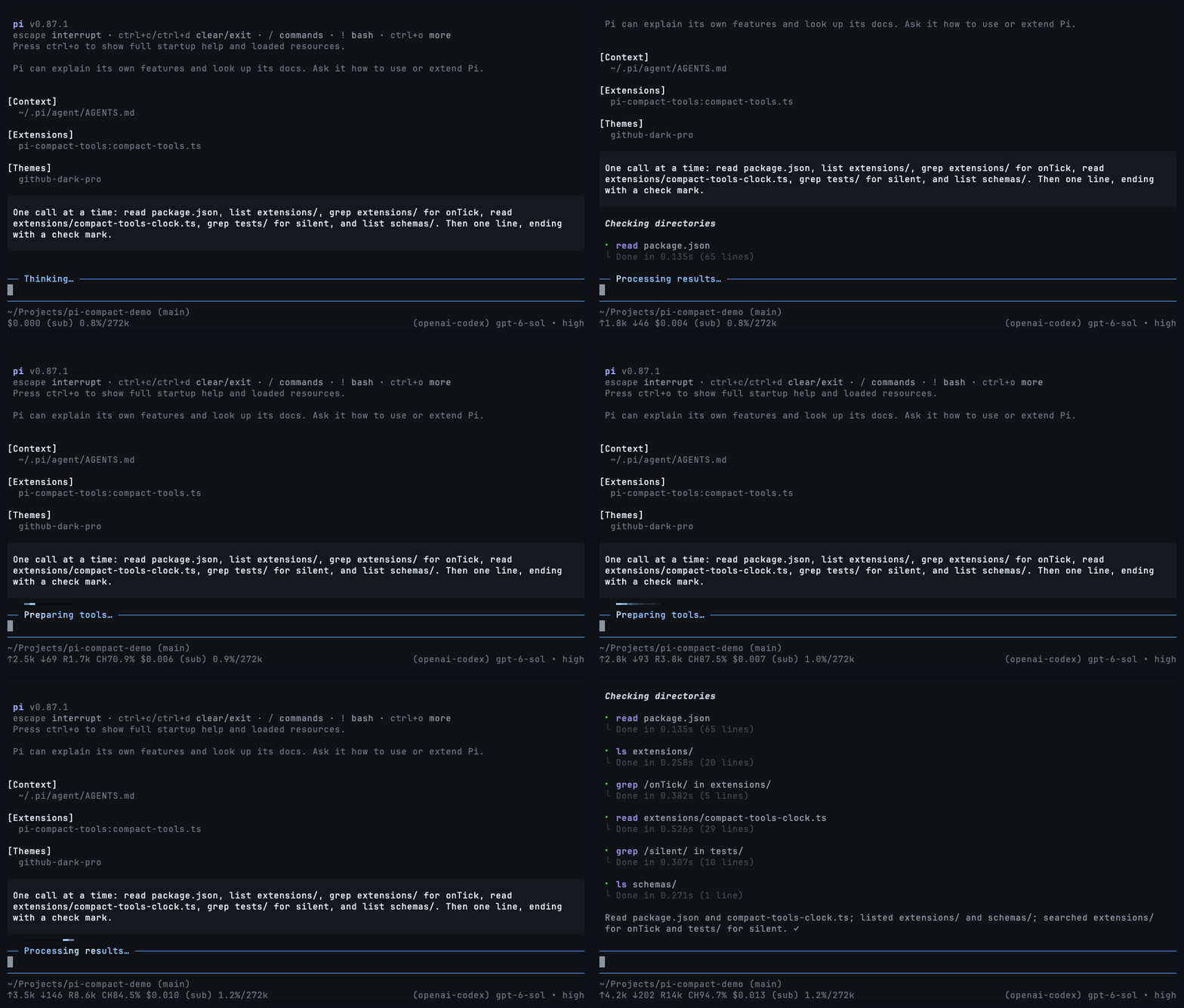
### Mode: Silent
|
|
65
42
|
|
|
66
|
-
|
|
67
44
|
|
|
68
|
-
Shows only your prompts and the
|
|
45
|
+
Shows only your prompts and the answers, in either style.
|
|
69
46
|
|
|
70
|
-
- Toggle with `Ctrl+'` or `/silent
|
|
71
|
-
-
|
|
72
|
-
- Turning it off brings every hidden row back.
|
|
73
|
-
- Errors are hidden too. If a run ends without an answer, turn silent mode off to see why.
|
|
47
|
+
- Toggle with `Ctrl+'` or `/silent`. Tool rows and thinking fold into a moving light while the agent works.
|
|
48
|
+
- Turn it off and every row comes back. `"mode": "silent"` starts sessions with it on.
|
|
74
49
|
|
|
75
|
-
##
|
|
50
|
+
## Configuration
|
|
51
|
+
|
|
52
|
+
Optional, in `~/.pi/agent/compact-tools.json` or `<project>/.pi/compact-tools.json`:
|
|
53
|
+
|
|
54
|
+
```json
|
|
55
|
+
{
|
|
56
|
+
"style": "compact",
|
|
57
|
+
"mode": "normal",
|
|
58
|
+
"tools": ["read", "write", "edit", "bash"],
|
|
59
|
+
"previewLines": 10,
|
|
60
|
+
"auto_compact": { "read": true, "write": true, "edit": false, "bash": true },
|
|
61
|
+
"custom_tools": { "enabled": true, "auto_compact": true, "exclude": [] }
|
|
62
|
+
}
|
|
63
|
+
```
|
|
76
64
|
|
|
77
|
-
|
|
65
|
+
- `tools`: built-ins to compact. Also `grep`, `find`, `ls`, `powershell`.
|
|
66
|
+
- `auto_compact`: `true` starts a row collapsed; `false` shows up to `previewLines` rows. Custom tool names work too.
|
|
67
|
+
- `custom_tools`: rows for tools from other packages. `exclude` keeps a tool's own look.
|
|
68
|
+
|
|
69
|
+
## Controls
|
|
78
70
|
|
|
79
|
-
- Click a row or press `Ctrl+O
|
|
71
|
+
- Click a row or group, or press `Ctrl+O`, to expand and collapse.
|
|
80
72
|
- `Ctrl+T` cycles thinking: summary → detail → summary → hidden.
|
|
81
|
-
- `Ctrl+'` or `/silent` toggles silent mode.
|
|
82
73
|
|
|
83
74
|
## Development
|
|
84
75
|
|
|
@@ -88,7 +79,7 @@ npm run check
|
|
|
88
79
|
pi -e .
|
|
89
80
|
```
|
|
90
81
|
|
|
91
|
-
Before publishing, add the
|
|
82
|
+
Renders are pinned in `tests/golden/render.json`. After an intended change to the output, record it with `UPDATE_GOLDEN=1 npm test` and review the diff. Before publishing, add the version's notes to `release-notes.json` (`[]` for none).
|
|
92
83
|
|
|
93
84
|
## License
|
|
94
85
|
|
|
@@ -0,0 +1,227 @@
|
|
|
1
|
+
import type { AgentToolResult } from "@earendil-works/pi-coding-agent";
|
|
2
|
+
import { stripTerminalSequences } from "@earendil-works/pi-tui";
|
|
3
|
+
import { normalizeLineEndings } from "./compact-tools-core.ts";
|
|
4
|
+
import {
|
|
5
|
+
countEditChanges,
|
|
6
|
+
formatResultLineSummary,
|
|
7
|
+
shellSegments,
|
|
8
|
+
summarizeCustomArguments,
|
|
9
|
+
summarizeFailure,
|
|
10
|
+
} from "./compact-tools-invocation.ts";
|
|
11
|
+
import type { ToolArgs } from "./compact-tools-types.ts";
|
|
12
|
+
|
|
13
|
+
/**
|
|
14
|
+
* Rows Claude Code shows of a command's output before "… +N lines". Output is
|
|
15
|
+
* wrapped to the width first, so a long line counts as the rows it takes.
|
|
16
|
+
*/
|
|
17
|
+
export const CLAUDE_OUTPUT_ROWS = 3;
|
|
18
|
+
/** Rows Claude Code shows of what a write put in the file. */
|
|
19
|
+
export const CLAUDE_WRITE_ROWS = 10;
|
|
20
|
+
/** Lines of context Claude Code keeps around each change in an edit's diff. */
|
|
21
|
+
export const CLAUDE_DIFF_CONTEXT_LINES = 3;
|
|
22
|
+
|
|
23
|
+
/** Claude Code's names for the tools Pi shares with it. */
|
|
24
|
+
const LABELS: Readonly<Record<string, string>> = {
|
|
25
|
+
read: "Read",
|
|
26
|
+
grep: "Search",
|
|
27
|
+
find: "Search",
|
|
28
|
+
ls: "List",
|
|
29
|
+
bash: "Bash",
|
|
30
|
+
powershell: "PowerShell",
|
|
31
|
+
edit: "Update",
|
|
32
|
+
write: "Write",
|
|
33
|
+
};
|
|
34
|
+
|
|
35
|
+
export function claudeLabel(name: string): string {
|
|
36
|
+
return LABELS[name] ?? name;
|
|
37
|
+
}
|
|
38
|
+
|
|
39
|
+
export function pathOf(args: ToolArgs): string {
|
|
40
|
+
const value = args.path ?? args.file_path;
|
|
41
|
+
return typeof value === "string" ? normalizeLineEndings(value) : "";
|
|
42
|
+
}
|
|
43
|
+
|
|
44
|
+
function oneLine(text: string): string {
|
|
45
|
+
const lines = normalizeLineEndings(stripTerminalSequences(text)).split("\n").map((line) => line.trim()).filter(Boolean);
|
|
46
|
+
if (lines.length === 0) return "";
|
|
47
|
+
return lines.length > 1 ? `${lines[0]} …` : lines[0]!;
|
|
48
|
+
}
|
|
49
|
+
|
|
50
|
+
function commandOf(args: ToolArgs): string {
|
|
51
|
+
return typeof args.command === "string" ? args.command : "";
|
|
52
|
+
}
|
|
53
|
+
|
|
54
|
+
/** What goes between the parentheses: `Bash(npm test)`, `Search(pattern: "x", path: "src")`. */
|
|
55
|
+
export function claudeArgument(name: string, args: ToolArgs): string {
|
|
56
|
+
const path = pathOf(args);
|
|
57
|
+
if (name === "bash" || name === "powershell") return oneLine(commandOf(args));
|
|
58
|
+
if (name === "grep" || name === "find") {
|
|
59
|
+
const pattern = typeof args.pattern === "string" ? oneLine(args.pattern) : "";
|
|
60
|
+
// Arguments stream in; until the pattern arrives there is nothing to name.
|
|
61
|
+
if (!pattern) return "";
|
|
62
|
+
return path ? `pattern: "${pattern}", path: "${path}"` : `pattern: "${pattern}"`;
|
|
63
|
+
}
|
|
64
|
+
if (name === "ls") return path || ".";
|
|
65
|
+
if (name === "read" || name === "edit" || name === "write") return path;
|
|
66
|
+
return formatArguments(args);
|
|
67
|
+
}
|
|
68
|
+
|
|
69
|
+
function formatValue(value: unknown): string | undefined {
|
|
70
|
+
if (typeof value === "string") return JSON.stringify(oneLine(value));
|
|
71
|
+
if (typeof value === "number" || typeof value === "boolean") return String(value);
|
|
72
|
+
if (Array.isArray(value) && value.every((item) => typeof item !== "object" || item === null)) {
|
|
73
|
+
return `[${value.map((item) => formatValue(item) ?? "null").join(", ")}]`;
|
|
74
|
+
}
|
|
75
|
+
return undefined;
|
|
76
|
+
}
|
|
77
|
+
|
|
78
|
+
/** A custom tool's arguments as Claude Code lists them: `query: "pi tui", limit: 5`. */
|
|
79
|
+
export function formatArguments(args: ToolArgs): string {
|
|
80
|
+
const parts: string[] = [];
|
|
81
|
+
for (const [key, value] of Object.entries(args)) {
|
|
82
|
+
const formatted = formatValue(value);
|
|
83
|
+
if (formatted !== undefined) parts.push(`${key}: ${formatted}`);
|
|
84
|
+
}
|
|
85
|
+
return parts.length > 0 ? parts.join(", ") : summarizeCustomArguments(args);
|
|
86
|
+
}
|
|
87
|
+
|
|
88
|
+
export function claudeTitle(name: string, args: ToolArgs): { label: string; argument: string } {
|
|
89
|
+
return { label: claudeLabel(name), argument: claudeArgument(name, args) };
|
|
90
|
+
}
|
|
91
|
+
|
|
92
|
+
// Claude Code's own lists: a command made only of these only looks around, so it
|
|
93
|
+
// folds into a group with reads and searches.
|
|
94
|
+
const SEARCH_COMMANDS = new Set(["find", "grep", "rg", "ag", "ack", "locate", "which", "whereis"]);
|
|
95
|
+
const READ_COMMANDS = new Set([
|
|
96
|
+
"cat", "head", "tail", "less", "more", "wc", "stat", "file", "strings", "jq", "awk", "cut", "sort", "uniq", "tr",
|
|
97
|
+
]);
|
|
98
|
+
const LIST_COMMANDS = new Set(["ls", "tree", "du"]);
|
|
99
|
+
const NEUTRAL_COMMANDS = new Set(["echo", "printf", "true", "false", ":"]);
|
|
100
|
+
|
|
101
|
+
export type LookKind = "search" | "read" | "list";
|
|
102
|
+
|
|
103
|
+
/** Split one shell step at its unquoted pipes. */
|
|
104
|
+
function pipeStages(segment: string): string[] {
|
|
105
|
+
const stages: string[] = [];
|
|
106
|
+
let current = "";
|
|
107
|
+
let quote: string | undefined;
|
|
108
|
+
for (let index = 0; index < segment.length; index++) {
|
|
109
|
+
const character = segment[index]!;
|
|
110
|
+
if (quote) {
|
|
111
|
+
if (character === quote) quote = undefined;
|
|
112
|
+
} else if (character === "'" || character === '"' || character === "`") {
|
|
113
|
+
quote = character;
|
|
114
|
+
} else if (character === "|" && segment[index + 1] !== "|") {
|
|
115
|
+
stages.push(current);
|
|
116
|
+
current = "";
|
|
117
|
+
continue;
|
|
118
|
+
}
|
|
119
|
+
current += character;
|
|
120
|
+
}
|
|
121
|
+
stages.push(current);
|
|
122
|
+
return stages.map((stage) => stage.trim()).filter(Boolean);
|
|
123
|
+
}
|
|
124
|
+
|
|
125
|
+
/**
|
|
126
|
+
* How a shell command looks around, if that is all it does: `rg x | head` searches,
|
|
127
|
+
* `cat a.ts` reads, `ls src` lists. Anything that runs something else is undefined.
|
|
128
|
+
*/
|
|
129
|
+
export function classifyShellCommand(command: string): LookKind | undefined {
|
|
130
|
+
let search = false;
|
|
131
|
+
let read = false;
|
|
132
|
+
let list = false;
|
|
133
|
+
for (const stage of shellSegments(normalizeLineEndings(command)).flatMap(pipeStages)) {
|
|
134
|
+
const program = stage.split(/\s+/u)[0];
|
|
135
|
+
if (!program || NEUTRAL_COMMANDS.has(program)) continue;
|
|
136
|
+
if (SEARCH_COMMANDS.has(program)) search = true;
|
|
137
|
+
else if (READ_COMMANDS.has(program)) read = true;
|
|
138
|
+
else if (LIST_COMMANDS.has(program)) list = true;
|
|
139
|
+
else return undefined;
|
|
140
|
+
}
|
|
141
|
+
// Claude Code counts a call once: as a listing first, then a search, then a read.
|
|
142
|
+
return list ? "list" : search ? "search" : read ? "read" : undefined;
|
|
143
|
+
}
|
|
144
|
+
|
|
145
|
+
/** Whether a call only looks around, and how; such calls fold into one group. */
|
|
146
|
+
export function lookKind(name: string, args: ToolArgs): LookKind | undefined {
|
|
147
|
+
if (name === "read") return "read";
|
|
148
|
+
if (name === "grep" || name === "find") return "search";
|
|
149
|
+
if (name === "ls") return "list";
|
|
150
|
+
if (name === "bash" || name === "powershell") return classifyShellCommand(commandOf(args));
|
|
151
|
+
return undefined;
|
|
152
|
+
}
|
|
153
|
+
|
|
154
|
+
/** What a group's second line names while a call runs: a path, a pattern, a command. */
|
|
155
|
+
export function lookHint(name: string, args: ToolArgs): string {
|
|
156
|
+
if (name === "grep" || name === "find") {
|
|
157
|
+
const pattern = typeof args.pattern === "string" ? oneLine(args.pattern) : "";
|
|
158
|
+
return pattern ? `"${pattern}"` : "";
|
|
159
|
+
}
|
|
160
|
+
if (name === "bash" || name === "powershell") {
|
|
161
|
+
const command = oneLine(commandOf(args));
|
|
162
|
+
return command ? `$ ${command}` : "";
|
|
163
|
+
}
|
|
164
|
+
return name === "ls" ? pathOf(args) || "." : pathOf(args);
|
|
165
|
+
}
|
|
166
|
+
|
|
167
|
+
function plural(count: number, singular: string): string {
|
|
168
|
+
return count === 1 ? singular : `${singular}s`;
|
|
169
|
+
}
|
|
170
|
+
|
|
171
|
+
function countOf(summary: string | undefined): number {
|
|
172
|
+
return Number.parseInt(summary ?? "0", 10) || 0;
|
|
173
|
+
}
|
|
174
|
+
|
|
175
|
+
/**
|
|
176
|
+
* The result line for tools whose outcome is a sentence rather than output, worded
|
|
177
|
+
* as Claude Code words it: "Read 42 lines", "Added 3 lines, removed 1 line". `bold`
|
|
178
|
+
* marks the counts and paths Claude Code sets in bold. Tools whose output is the
|
|
179
|
+
* result, commands and custom tools, return undefined and show it instead.
|
|
180
|
+
*/
|
|
181
|
+
export function claudeOutcome(
|
|
182
|
+
name: string,
|
|
183
|
+
args: ToolArgs,
|
|
184
|
+
result: AgentToolResult<unknown>,
|
|
185
|
+
output: string,
|
|
186
|
+
bold: (text: string) => string = (text) => text,
|
|
187
|
+
): string | undefined {
|
|
188
|
+
const lines = countOf(formatResultLineSummary(name, args, result, output));
|
|
189
|
+
const count = (value: number, singular: string) => `${bold(String(value))} ${plural(value, singular)}`;
|
|
190
|
+
switch (name) {
|
|
191
|
+
case "read": return `Read ${count(lines, "line")}`;
|
|
192
|
+
case "grep": return `Found ${count(lines, "line")}`;
|
|
193
|
+
case "find": return `Found ${count(lines, "file")}`;
|
|
194
|
+
case "ls": return `Listed ${count(lines, "path")}`;
|
|
195
|
+
case "write": return `Wrote ${count(lines, "line")} to ${bold(pathOf(args))}`;
|
|
196
|
+
case "edit": {
|
|
197
|
+
const { added, removed } = countEditChanges(result) ?? { added: 0, removed: 0 };
|
|
198
|
+
if (added > 0 && removed > 0) return `Added ${count(added, "line")}, removed ${count(removed, "line")}`;
|
|
199
|
+
if (added > 0) return `Added ${count(added, "line")}`;
|
|
200
|
+
if (removed > 0) return `Removed ${count(removed, "line")}`;
|
|
201
|
+
return undefined;
|
|
202
|
+
}
|
|
203
|
+
default: return undefined;
|
|
204
|
+
}
|
|
205
|
+
}
|
|
206
|
+
|
|
207
|
+
const SHELL_STATUS = /^Command (?:exited with code (\d+)|(timed out.*|aborted|terminated.*))$/iu;
|
|
208
|
+
|
|
209
|
+
/**
|
|
210
|
+
* A failure as Claude Code reports it. A command leads with its exit code and
|
|
211
|
+
* then shows what it printed; another tool leads with its reason alone.
|
|
212
|
+
*/
|
|
213
|
+
export function claudeFailure(name: string, output: string): { headline: string; detail: string } {
|
|
214
|
+
if (name === "bash" || name === "powershell" || !TOOL_NAMES.has(name)) {
|
|
215
|
+
const lines = normalizeLineEndings(output).trimEnd().split("\n");
|
|
216
|
+
const status = lines.at(-1)?.trim().match(SHELL_STATUS);
|
|
217
|
+
if (status) {
|
|
218
|
+
const headline = status[1] !== undefined ? `Error: Exit code ${status[1]}` : `Error: ${status[2]}`;
|
|
219
|
+
return { headline, detail: lines.slice(0, -1).join("\n").trimEnd() };
|
|
220
|
+
}
|
|
221
|
+
if (name === "bash" || name === "powershell") return { headline: "Error", detail: output.trimEnd() };
|
|
222
|
+
}
|
|
223
|
+
const reason = summarizeFailure(name, output);
|
|
224
|
+
return { headline: reason ? `Error: ${reason}` : "Error", detail: "" };
|
|
225
|
+
}
|
|
226
|
+
|
|
227
|
+
const TOOL_NAMES = new Set(Object.keys(LABELS));
|
|
@@ -3,10 +3,12 @@ import { join } from "node:path";
|
|
|
3
3
|
import { CONFIG_DIR_NAME, getAgentDir } from "@earendil-works/pi-coding-agent";
|
|
4
4
|
import {
|
|
5
5
|
DISPLAY_MODES,
|
|
6
|
+
DISPLAY_STYLES,
|
|
6
7
|
SUPPORTED_TOOL_SET,
|
|
7
8
|
type CompactToolName,
|
|
8
9
|
type CompactToolsConfig,
|
|
9
10
|
type DisplayMode,
|
|
11
|
+
type DisplayStyle,
|
|
10
12
|
} from "./compact-tools-types.ts";
|
|
11
13
|
|
|
12
14
|
const CONFIG_FILE = "compact-tools.json";
|
|
@@ -14,6 +16,7 @@ type JsonObject = Record<string, unknown>;
|
|
|
14
16
|
|
|
15
17
|
export const DEFAULT_CONFIG: CompactToolsConfig = {
|
|
16
18
|
mode: "normal",
|
|
19
|
+
style: "compact",
|
|
17
20
|
tools: ["read", "write", "edit", "bash"],
|
|
18
21
|
previewLines: 10,
|
|
19
22
|
auto_compact: {
|
|
@@ -45,9 +48,9 @@ function isIntegerInRange(value: unknown, minimum: number, maximum: number): val
|
|
|
45
48
|
return typeof value === "number" && Number.isInteger(value) && value >= minimum && value <= maximum;
|
|
46
49
|
}
|
|
47
50
|
|
|
48
|
-
function
|
|
49
|
-
if ((
|
|
50
|
-
warn(path,
|
|
51
|
+
function parseChoice<T extends string>(value: unknown, choices: readonly T[], key: string, path: string): T | undefined {
|
|
52
|
+
if ((choices as readonly unknown[]).includes(value)) return value as T;
|
|
53
|
+
warn(path, `${key} must be one of ${choices.join(", ")}; using previous value`);
|
|
51
54
|
return undefined;
|
|
52
55
|
}
|
|
53
56
|
|
|
@@ -121,7 +124,8 @@ export function mergeConfig(base: CompactToolsConfig, value: unknown, path: stri
|
|
|
121
124
|
warn(path, "expected a JSON object; using previous values");
|
|
122
125
|
return base;
|
|
123
126
|
}
|
|
124
|
-
const mode = value.mode === undefined ? base.mode : (
|
|
127
|
+
const mode = value.mode === undefined ? base.mode : (parseChoice<DisplayMode>(value.mode, DISPLAY_MODES, "mode", path) ?? base.mode);
|
|
128
|
+
const style = value.style === undefined ? base.style : (parseChoice<DisplayStyle>(value.style, DISPLAY_STYLES, "style", path) ?? base.style);
|
|
125
129
|
const tools = value.tools === undefined ? base.tools : (parseTools(value.tools, path) ?? base.tools);
|
|
126
130
|
const auto_compact = parseAutoCompact(base.auto_compact, value.auto_compact, path);
|
|
127
131
|
const custom_tools = parseCustomTools(base.custom_tools, value.custom_tools, path);
|
|
@@ -130,7 +134,7 @@ export function mergeConfig(base: CompactToolsConfig, value: unknown, path: stri
|
|
|
130
134
|
if (value.previewLines !== undefined && !isIntegerInRange(value.previewLines, 1, 100)) {
|
|
131
135
|
warn(path, "previewLines must be 1–100; using previous value");
|
|
132
136
|
}
|
|
133
|
-
return { mode, tools, auto_compact, custom_tools, previewLines };
|
|
137
|
+
return { mode, style, tools, auto_compact, custom_tools, previewLines };
|
|
134
138
|
}
|
|
135
139
|
|
|
136
140
|
function readJson(path: string): unknown {
|