pi-compact-tools 0.10.0 → 0.10.1
This diff represents the content of publicly available package versions that have been released to one of the supported registries. The information contained in this diff is provided for informational purposes only and reflects changes between package versions as they appear in their respective public registries.
- package/README.md +32 -39
- package/extensions/compact-tools-release.ts +13 -11
- package/package.json +1 -1
- package/release-notes.json +1 -0
- package/scripts/check-resources.mjs +3 -2
package/README.md
CHANGED
|
@@ -1,8 +1,6 @@
|
|
|
1
1
|
# pi-compact-tools
|
|
2
2
|
|
|
3
|
-
Compact, expandable
|
|
4
|
-
|
|
5
|
-
|
|
3
|
+
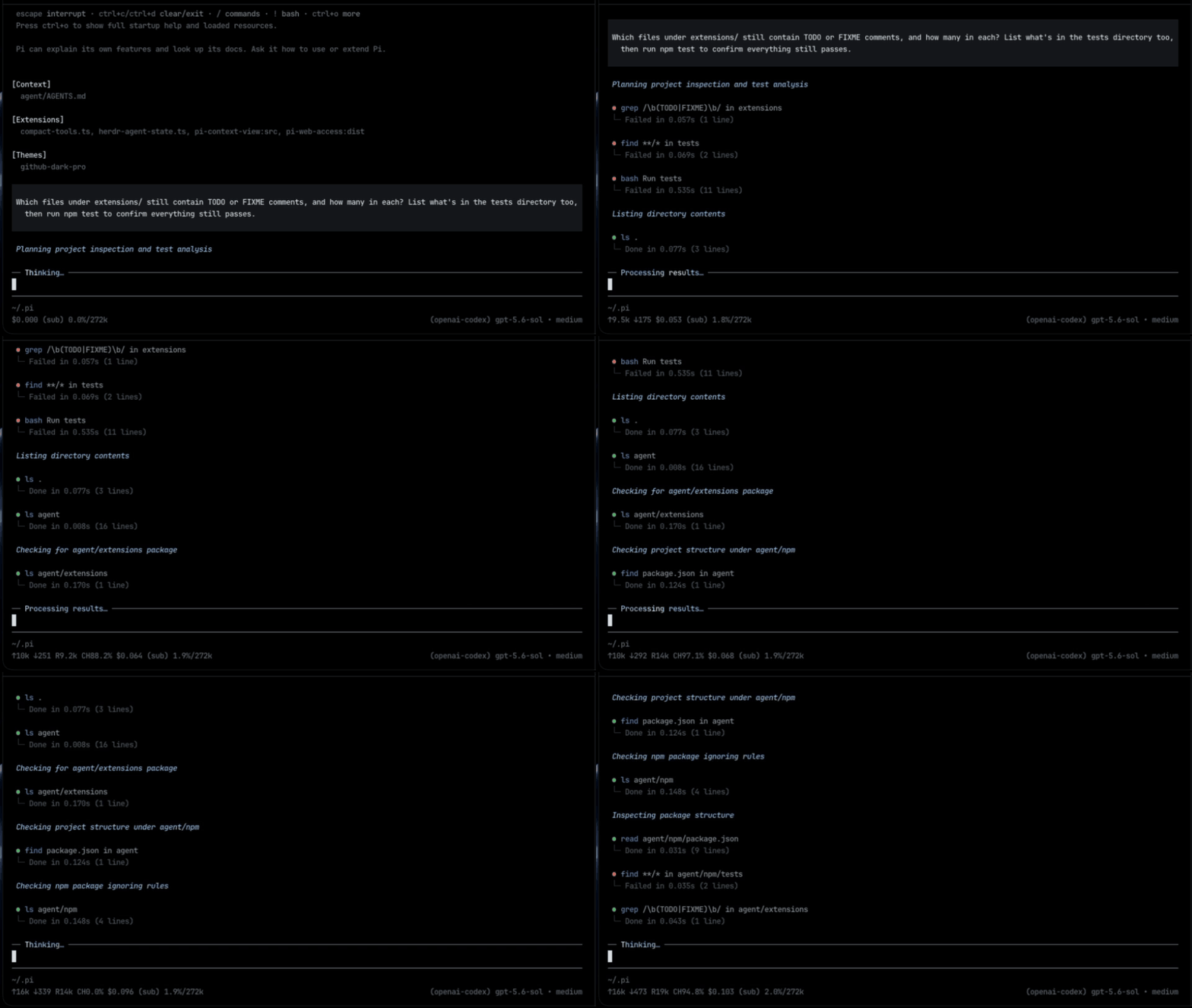
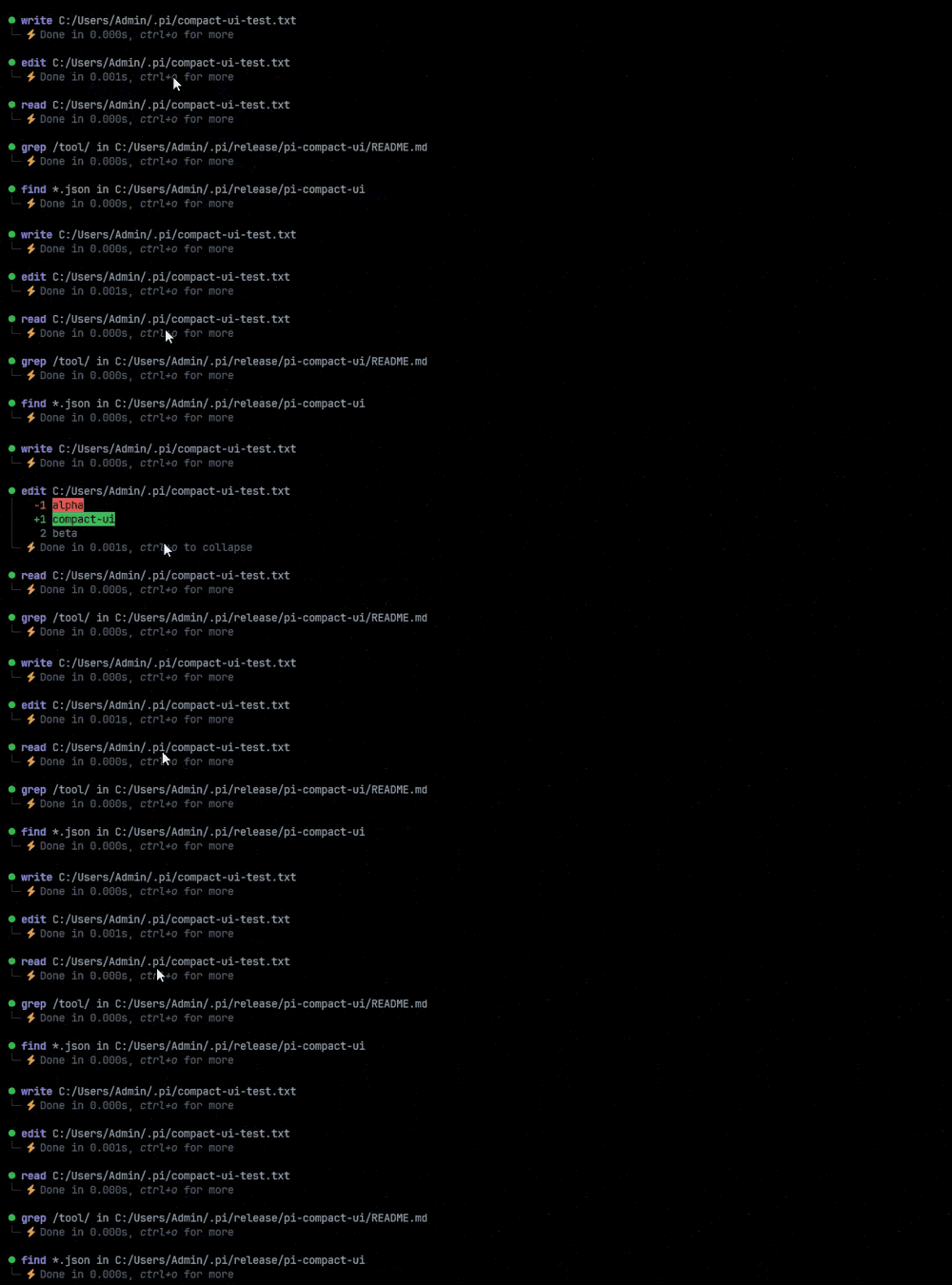
Compact, expandable tool rows for Pi, including custom tools from other packages, with a GitHub Dark theme.
|
|
6
4
|
|
|
7
5
|
|
|
8
6
|
|
|
@@ -11,12 +9,11 @@ Compact, expandable rendering for Pi's built-in tools and for custom tools from
|
|
|
11
9
|
## Features
|
|
12
10
|
|
|
13
11
|
- Compact rows for `read`, `write`, `edit`, `bash`, `powershell`, `grep`, `find`, and `ls`, with status, duration, and line count
|
|
14
|
-
- The same
|
|
15
|
-
- Syntax-highlighted edit diffs
|
|
16
|
-
-
|
|
17
|
-
-
|
|
18
|
-
-
|
|
19
|
-
- No Nerd Font required
|
|
12
|
+
- The same rows for custom tools from other packages, with no setup
|
|
13
|
+
- Syntax-highlighted edit diffs, with lines added and removed: `(+3 -1)`
|
|
14
|
+
- Numbered code views for `read` and `write`
|
|
15
|
+
- Silent mode: only prompts and final answers
|
|
16
|
+
- Works with any theme; no Nerd Font required
|
|
20
17
|
|
|
21
18
|
## Install
|
|
22
19
|
|
|
@@ -24,71 +21,65 @@ Compact, expandable rendering for Pi's built-in tools and for custom tools from
|
|
|
24
21
|
pi install npm:pi-compact-tools
|
|
25
22
|
```
|
|
26
23
|
|
|
27
|
-
|
|
24
|
+
Restart Pi or run `/reload`. For the bundled theme, set `"theme": "github-dark-pro"` in `~/.pi/agent/settings.json`.
|
|
28
25
|
|
|
29
26
|
## Configuration
|
|
30
27
|
|
|
31
|
-
|
|
28
|
+
All settings go in one optional file: `~/.pi/agent/compact-tools.json`, or `<project>/.pi/compact-tools.json` for one project. Every key is optional.
|
|
32
29
|
|
|
33
30
|
```json
|
|
34
31
|
{
|
|
35
32
|
"tools": ["read", "write", "edit", "bash"],
|
|
36
33
|
"previewLines": 10,
|
|
37
|
-
"auto_compact": { "read": true, "write": true, "edit": false, "bash": true }
|
|
34
|
+
"auto_compact": { "read": true, "write": true, "edit": false, "bash": true },
|
|
35
|
+
"mode": "normal",
|
|
36
|
+
"custom_tools": { "enabled": true, "auto_compact": true, "exclude": [] }
|
|
38
37
|
}
|
|
39
38
|
```
|
|
40
39
|
|
|
41
|
-
- `tools`: tools to
|
|
42
|
-
- `auto_compact`: `true` starts hidden, `false`
|
|
43
|
-
- `mode`: `"normal"`
|
|
44
|
-
- `custom_tools`:
|
|
40
|
+
- `tools`: built-in tools to compact. Also available: `grep`, `find`, `ls`, `powershell`.
|
|
41
|
+
- `auto_compact`: `true` starts a row hidden, `false` shows a preview of up to `previewLines` rows. Custom tool names work too.
|
|
42
|
+
- `mode`: `"normal"` or `"silent"`. See [Silent mode](#silent-mode).
|
|
43
|
+
- `custom_tools`: see [Custom tools](#custom-tools).
|
|
45
44
|
|
|
46
45
|
## Custom tools
|
|
47
46
|
|
|
48
|
-
|
|
47
|
+

|
|
48
|
+
|
|
49
|
+
Tools from other packages get compact rows automatically. Expanding a row shows the tool's own result view.
|
|
49
50
|
|
|
50
|
-
|
|
51
|
+
Set them with the `custom_tools` key in the same `compact-tools.json`:
|
|
51
52
|
|
|
52
53
|
```json
|
|
53
54
|
{
|
|
55
|
+
"auto_compact": { "web_search": false },
|
|
54
56
|
"custom_tools": { "enabled": true, "auto_compact": true, "exclude": ["my_tool"] }
|
|
55
57
|
}
|
|
56
58
|
```
|
|
57
59
|
|
|
58
|
-
- `enabled`: `false`
|
|
59
|
-
- `auto_compact`:
|
|
60
|
-
- `exclude`:
|
|
61
|
-
|
|
62
|
-
Built-in tools follow `tools` above: a built-in left out of that list keeps Pi's default renderer.
|
|
63
|
-
|
|
64
|
-
Pi has no public API for changing how another package's tool is drawn, so this wraps the renderer lookup of Pi's tool row component. Nothing in Pi's installation is modified, and it only applies while this extension is loaded. If a Pi release changes that component, custom tools fall back to their own renderers and Pi shows a warning once.
|
|
60
|
+
- `enabled`: `false` turns this off for every custom tool.
|
|
61
|
+
- `auto_compact`: the default for every custom tool. Override one tool in the top-level `auto_compact`, like `web_search` above.
|
|
62
|
+
- `exclude`: tools that keep their original look.
|
|
65
63
|
|
|
66
64
|
## Silent mode
|
|
67
65
|
|
|
68
66
|
|
|
69
67
|
|
|
70
|
-
|
|
68
|
+
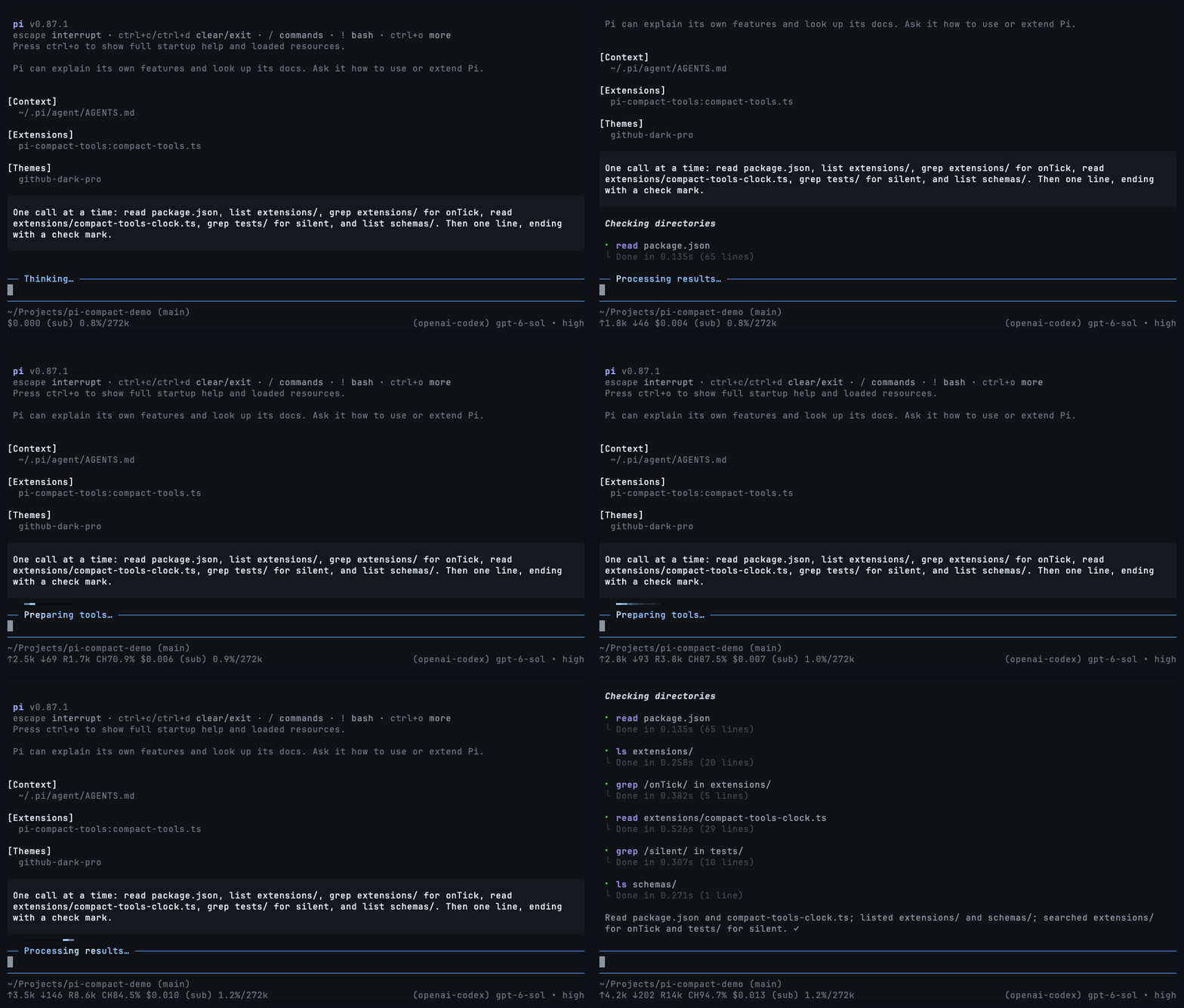
Shows only your prompts and the final answers. Tool calls, thinking, and notices are hidden while a light under the prompt shows the agent is working.
|
|
71
69
|
|
|
72
|
-
-
|
|
73
|
-
-
|
|
74
|
-
-
|
|
75
|
-
-
|
|
76
|
-
- Turning it off brings back every hidden row. Nothing is removed from the session or the model's context.
|
|
77
|
-
- Errors are hidden too, so a run that fails ends without an answer. Turn silent mode off to see what went wrong.
|
|
78
|
-
|
|
79
|
-
Pi has no public API for hiding other extensions' tool rows, so silent mode wraps Pi's transcript components. If a future Pi release changes them, `/silent` reports that it is unavailable and the transcript renders normally.
|
|
70
|
+
- Toggle with `Ctrl+'` or `/silent` (`/silent on`, `/silent off`). `Ctrl+'` needs a terminal with the Kitty keyboard protocol, such as Ghostty, Kitty, or WezTerm.
|
|
71
|
+
- Start every session silent with `"mode": "silent"`.
|
|
72
|
+
- Turning it off brings every hidden row back.
|
|
73
|
+
- Errors are hidden too. If a run ends without an answer, turn silent mode off to see why.
|
|
80
74
|
|
|
81
75
|
## Controls
|
|
82
76
|
|
|
77
|
+

|
|
78
|
+
|
|
83
79
|
- Click a row or press `Ctrl+O` to expand or collapse results.
|
|
84
|
-
- In fullscreen mode, expanding or collapsing every row, cycling thinking, and toggling silent mode keep the text you were reading in place instead of jumping.
|
|
85
80
|
- `Ctrl+T` cycles thinking: summary → detail → summary → hidden.
|
|
86
81
|
- `Ctrl+'` or `/silent` toggles silent mode.
|
|
87
82
|
|
|
88
|
-
## Release notes
|
|
89
|
-
|
|
90
|
-
After an update, the next new conversation opens with a bordered "What's new" block, the way Pi shows its own changelog: once, listing every release since the last one shown. A resumed session keeps it for the next new one, and so does silent mode. The block lives only in the TUI; it is never saved to the session or sent to the model. When publishing a new version, add its changes to `release-notes.json`; `npm run check` requires an entry matching `package.json`.
|
|
91
|
-
|
|
92
83
|
## Development
|
|
93
84
|
|
|
94
85
|
```bash
|
|
@@ -97,6 +88,8 @@ npm run check
|
|
|
97
88
|
pi -e .
|
|
98
89
|
```
|
|
99
90
|
|
|
91
|
+
Before publishing, add the new version's notes to `release-notes.json`. Pi shows them once after users update. Use `[]` for a release with nothing to announce.
|
|
92
|
+
|
|
100
93
|
## License
|
|
101
94
|
|
|
102
95
|
MIT
|
|
@@ -39,25 +39,27 @@ export function compareVersions(left: string, right: string): number {
|
|
|
39
39
|
|
|
40
40
|
/**
|
|
41
41
|
* The notes to show, newest first: every version with notes after the last one
|
|
42
|
-
* shown, up to the installed one.
|
|
43
|
-
*
|
|
44
|
-
*
|
|
42
|
+
* shown, up to the installed one. An empty list marks a quiet release, such as a
|
|
43
|
+
* documentation update, that shows nothing. With nothing shown before, only the
|
|
44
|
+
* newest notes up to the installed version appear: that is either a new install
|
|
45
|
+
* or an update from a version that predates these notices, and there is no
|
|
46
|
+
* telling which.
|
|
45
47
|
*/
|
|
46
48
|
export function releasesToShow(
|
|
47
49
|
installed: string,
|
|
48
50
|
notes: ReleaseNotes,
|
|
49
51
|
lastShown: string | undefined,
|
|
50
52
|
): Array<{ version: string; notes: readonly string[] }> {
|
|
51
|
-
const
|
|
52
|
-
|
|
53
|
-
: Object.keys(notes).filter((version) =>
|
|
53
|
+
const withNotes = Object.keys(notes)
|
|
54
|
+
.filter((version) =>
|
|
54
55
|
VERSION.test(version)
|
|
55
|
-
&& compareVersions(version, lastShown) > 0
|
|
56
56
|
&& compareVersions(version, installed) <= 0
|
|
57
|
-
&& notes[version]!.length > 0)
|
|
58
|
-
|
|
59
|
-
|
|
60
|
-
.
|
|
57
|
+
&& notes[version]!.length > 0)
|
|
58
|
+
.sort((left, right) => compareVersions(right, left));
|
|
59
|
+
const versions = lastShown === undefined
|
|
60
|
+
? withNotes.slice(0, 1)
|
|
61
|
+
: withNotes.filter((version) => compareVersions(version, lastShown) > 0);
|
|
62
|
+
return versions.map((version) => ({ version, notes: notes[version]! }));
|
|
61
63
|
}
|
|
62
64
|
|
|
63
65
|
function lastShownVersion(directory: string): string | undefined {
|
package/package.json
CHANGED
package/release-notes.json
CHANGED
|
@@ -73,9 +73,10 @@ if (schema.properties?.previewLines?.default !== 10) {
|
|
|
73
73
|
|
|
74
74
|
const manifest = JSON.parse(await readFile(new URL("../package.json", import.meta.url), "utf8"));
|
|
75
75
|
const releaseNotes = JSON.parse(await readFile(new URL("../release-notes.json", import.meta.url), "utf8"));
|
|
76
|
-
|
|
76
|
+
// Every published version needs an entry. An empty list is a quiet release that shows no notice.
|
|
77
|
+
if (!Array.isArray(releaseNotes[manifest.version]) ||
|
|
77
78
|
releaseNotes[manifest.version].some((note) => typeof note !== "string" || !note.trim())) {
|
|
78
|
-
throw new Error(`release-notes.json must
|
|
79
|
+
throw new Error(`release-notes.json must have an entry for v${manifest.version} before publishing; use [] for no notice`);
|
|
79
80
|
}
|
|
80
81
|
|
|
81
82
|
console.log("Resource checks passed");
|