pi-auto-save-session-to-markdown 0.10.0
This diff represents the content of publicly available package versions that have been released to one of the supported registries. The information contained in this diff is provided for informational purposes only and reflects changes between package versions as they appear in their respective public registries.
- package/LICENSE +21 -0
- package/README.md +186 -0
- package/README.zh.md +186 -0
- package/debug.ts +27 -0
- package/index.ts +2192 -0
- package/markdown.ts +282 -0
- package/package.json +61 -0
package/LICENSE
ADDED
|
@@ -0,0 +1,21 @@
|
|
|
1
|
+
MIT License
|
|
2
|
+
|
|
3
|
+
Copyright (c) 2026 licongy
|
|
4
|
+
|
|
5
|
+
Permission is hereby granted, free of charge, to any person obtaining a copy
|
|
6
|
+
of this software and associated documentation files (the "Software"), to deal
|
|
7
|
+
in the Software without restriction, including without limitation the rights
|
|
8
|
+
to use, copy, modify, merge, publish, distribute, sublicense, and/or sell
|
|
9
|
+
copies of the Software, and to permit persons to whom the Software is
|
|
10
|
+
furnished to do so, subject to the following conditions:
|
|
11
|
+
|
|
12
|
+
The above copyright notice and this permission notice shall be included in all
|
|
13
|
+
copies or substantial portions of the Software.
|
|
14
|
+
|
|
15
|
+
THE SOFTWARE IS PROVIDED "AS IS", WITHOUT WARRANTY OF ANY KIND, EXPRESS OR
|
|
16
|
+
IMPLIED, INCLUDING BUT NOT LIMITED TO THE WARRANTIES OF MERCHANTABILITY,
|
|
17
|
+
FITNESS FOR A PARTICULAR PURPOSE AND NONINFRINGEMENT. IN NO EVENT SHALL THE
|
|
18
|
+
AUTHORS OR COPYRIGHT HOLDERS BE LIABLE FOR ANY CLAIM, DAMAGES OR OTHER
|
|
19
|
+
LIABILITY, WHETHER IN AN ACTION OF CONTRACT, TORT OR OTHERWISE, ARISING FROM,
|
|
20
|
+
OUT OF OR IN CONNECTION WITH THE SOFTWARE OR THE USE OR OTHER DEALINGS IN THE
|
|
21
|
+
SOFTWARE.
|
package/README.md
ADDED
|
@@ -0,0 +1,186 @@
|
|
|
1
|
+
# pi-auto-save-session-to-markdown
|
|
2
|
+
|
|
3
|
+
[](https://www.npmjs.com/package/pi-auto-save-session-to-markdown)
|
|
4
|
+
[](LICENSE)
|
|
5
|
+
|
|
6
|
+
[English](README.md) | [中文](README.zh.md)
|
|
7
|
+
|
|
8
|
+
A [Pi](https://www.npmjs.com/package/@earendil-works/pi-coding-agent) extension that automatically saves every completed conversation turn as a markdown file with YAML frontmatter — one file per session-tree branch.
|
|
9
|
+
|
|
10
|
+
## Why
|
|
11
|
+
|
|
12
|
+
Pi records sessions internally as JSONL trees, which are great for resuming but terrible for reading, searching, or archiving. This extension mirrors the conversation into plain markdown files as you work, so every exchange is preserved in a format any editor, note app, or grep can consume — with the model, cost, tokens, and session metadata right in the frontmatter.
|
|
13
|
+
|
|
14
|
+
## Installation
|
|
15
|
+
|
|
16
|
+
```
|
|
17
|
+
pi install npm:pi-auto-save-session-to-markdown
|
|
18
|
+
```
|
|
19
|
+
|
|
20
|
+
## Usage
|
|
21
|
+
|
|
22
|
+
Automatic: after every settled agent turn (`agent_settled`), the current conversation branch is written to `<cwd>/<folder>/<title>-<key>-<time>.md`.
|
|
23
|
+
|
|
24
|
+
Sessions Pi does not persist (in-memory, `--no-session` — including the ephemeral auxiliary agents host clients spawn next to the real conversation, such as Claudian's title generation) are skipped by every automatic save; only the explicit `/save-conversation` command archives such a session on demand.
|
|
25
|
+
|
|
26
|
+
Manual: run `/save-conversation` to save the current branch immediately and report the file path.
|
|
27
|
+
|
|
28
|
+
Batch: run `/save-conversation-all` to save **every session of the current project** — every session jsonl in the project's `~/.pi/agent/sessions/<encoded-cwd>/` folder. Each session goes through the exact same pipeline as the live one (candidate chain, never-overwrite guard, rename-on-title, recovery warnings), and its archive is written under that session's own working directory, exactly as if `/save-conversation` had been run inside it. The current session saves first through the normal live path. Details:
|
|
29
|
+
|
|
30
|
+
- **Idempotent.** Re-running continues or reports "up to date" per session; it never re-creates files.
|
|
31
|
+
- **Skips** sessions without an assistant reply (nothing conversational to archive) and pre-`id/parentId`-era legacy files.
|
|
32
|
+
- **Defers** a session whose jsonl changed while it was being processed (its runtime is still writing it): the save only proceeds when the file is verified unchanged since it was read. Deferred sessions are continued by their own runtime or by the next batch run.
|
|
33
|
+
- **Reports** a summary — `N saved, M up to date, K skipped, …` — with per-session warnings for anything anomalous (each tagged with the first 8 chars of its session id).
|
|
34
|
+
|
|
35
|
+
## Configuration
|
|
36
|
+
|
|
37
|
+
The target folder is controlled by the `PI_SAVE_CONVERSATION_DIR` environment variable (Pi has no per-extension settings API):
|
|
38
|
+
|
|
39
|
+
| Value | Location |
|
|
40
|
+
| ----------- | ----------------------------------- |
|
|
41
|
+
| unset | `<cwd>/ai-conversations/` (default) |
|
|
42
|
+
| `.` or `""` | `<cwd>/` directly |
|
|
43
|
+
| `notes/ai` | `<cwd>/notes/ai/` |
|
|
44
|
+
| `/abs/path` | that absolute path |
|
|
45
|
+
|
|
46
|
+
```bash
|
|
47
|
+
PI_SAVE_CONVERSATION_DIR=notes/ai pi
|
|
48
|
+
```
|
|
49
|
+
|
|
50
|
+
## File naming and frontmatter
|
|
51
|
+
|
|
52
|
+
Filename: `<title>-<key>-<time>.md`
|
|
53
|
+
|
|
54
|
+
- `<title>` — the session name (`/name`), or a slug of the first user message when the session is unnamed
|
|
55
|
+
- `<key>` — the first 8 hex of the SHA-256 of the session id: every file of one session shares it, so a session's files cluster in the directory across recoveries and resumes (when no session id exists yet — the degenerate fallback — the deepest message entry's id is hashed the same way, so the key is always an opaque 8-hex cluster key)
|
|
56
|
+
- `<time>` — local file-creation time, `YYYYMMDD-HHmmss`
|
|
57
|
+
|
|
58
|
+
When the session's real name arrives after the file was created (e.g. Claudian generates its title only after the first reply), the next save renames the file once to `<name>-<key>-<original-time>.md` — keeping the original creation timestamp — and rewrites the frontmatter title and the document heading to match. The rename happens at most once: later `/name` changes never touch the filename, and manually renamed files are left alone.
|
|
59
|
+
|
|
60
|
+
````markdown
|
|
61
|
+
---
|
|
62
|
+
title: "Fix login redirect loop"
|
|
63
|
+
agent: "pi"
|
|
64
|
+
format_version: "1.6"
|
|
65
|
+
session_id: "d0a4f541-976d-4d1b-8e1c-30a1f2b3c4d5"
|
|
66
|
+
session_key: "c2088d77"
|
|
67
|
+
branch_last_entry_id: "019be3a2-1f4d-7c8a-9b01-d23e45f6a7b8"
|
|
68
|
+
model: "z-ai/glm-5.3"
|
|
69
|
+
provider: "openrouter"
|
|
70
|
+
cost: 0.023401
|
|
71
|
+
tokens: 18745
|
|
72
|
+
tokens_input: 15230
|
|
73
|
+
tokens_output: 3515
|
|
74
|
+
tokens_cache_read: 0
|
|
75
|
+
tokens_cache_write: 0
|
|
76
|
+
messages: 8
|
|
77
|
+
created: "2026-08-29T13:05:12+08:00"
|
|
78
|
+
updated: "2026-08-29T13:42:10+08:00"
|
|
79
|
+
project_root: "/Users/me/project"
|
|
80
|
+
session_file: "~/.pi/agent/sessions/--Users-me-project-20260829-050500_ab12.jsonl"
|
|
81
|
+
---
|
|
82
|
+
|
|
83
|
+
# Fix login redirect loop
|
|
84
|
+
|
|
85
|
+
User <span style="font-size: 0.5em; color: var(--text-faint);">2026-08-29 13:05:12</span>
|
|
86
|
+
===
|
|
87
|
+
|
|
88
|
+
The login page redirects in a loop after the auth refactor...
|
|
89
|
+
|
|
90
|
+
> [!quote]- Editor Selection
|
|
91
|
+
> [[src/auth/middleware.ts|middleware.ts]] · **lines**: `14-22`
|
|
92
|
+
>
|
|
93
|
+
> export function middleware(request) { … }
|
|
94
|
+
|
|
95
|
+
---
|
|
96
|
+
|
|
97
|
+
Assistant <span style="font-size: 0.5em; color: var(--text-faint);">2026-08-29 13:05:40 · claude-sonnet-4-5</span>
|
|
98
|
+
===
|
|
99
|
+
|
|
100
|
+
> [!tldr]- Thinking
|
|
101
|
+
>
|
|
102
|
+
> Let me check the redirect chain...
|
|
103
|
+
|
|
104
|
+
I'll trace the middleware order first.
|
|
105
|
+
|
|
106
|
+
> [!quote]- Tool Calls · 1 (read)
|
|
107
|
+
> **`read`** `{"filePath":"/Users/me/project/src/auth/middleware.ts"}`
|
|
108
|
+
>
|
|
109
|
+
> ```
|
|
110
|
+
> import { NextResponse } from "next/server";
|
|
111
|
+
> export function middleware(…) …
|
|
112
|
+
> ```
|
|
113
|
+
|
|
114
|
+
---
|
|
115
|
+
````
|
|
116
|
+
|
|
117
|
+
The body renders user and assistant messages in full (assistant thinking and per-turn tool calls are each folded into a collapsed callout — `> [!tldr]- Thinking` and `> [!quote]- Tool Calls · …`), recording every tool call with its full raw result: the file is a documentary record that may be @-referenced back into a conversation, and a truncated half-result would be wasted when the tool is called again and misleading when it is not, while local reading (grep, ranged reads) makes size a non-issue. Callouts are used instead of HTML `<details>` because a callout is plain markdown — meaningful in every renderer, a panel where supported and a blockquote everywhere else — whereas raw HTML blocks have no such portability: Obsidian does not parse markdown inside HTML blocks, and neither does Quartz's remark/CommonMark pipeline (invalid HTML there can even break a page outright), so `<details>` cannot be relied on to carry content across the tools these files are read in. Arguments render as full JSON in inline code spans and results verbatim — whitespace intact, nothing capped — in fenced code blocks (with a delimiter sized to survive backticks inside the content), so raw tool output renders literally instead of being parsed as markdown.
|
|
118
|
+
|
|
119
|
+
### Callouts beyond Obsidian
|
|
120
|
+
|
|
121
|
+
A callout is a blockquote whose first line carries a type marker (`> [!note] Title`): renderers that understand the marker draw a titled, colored, optionally collapsible panel, and every other renderer still sees a perfectly valid blockquote. Obsidian popularized the syntax and extends it with fold markers (`-` collapsed, `+` expanded) and arbitrary types; GitHub standardized a five-type subset of the same marker (`[!note]` …`[!caution]`, no folding) as its "alerts". These files render best in Obsidian — custom types and preset-collapsed folds included — but Obsidian is far from the only viewer that draws the panels:
|
|
122
|
+
|
|
123
|
+
- **[Quartz](https://quartz.jzhao.xyz)** — the static-site generator for publishing Obsidian vaults, renders the same callout syntax, folding included.
|
|
124
|
+
- **VS Code** — extensions add the panels to the built-in markdown preview, e.g. Markdown Obsidian Callout, vscode-markdown-obsidian-alert, or Markdown GitHub Alerts & Obsidian Callouts.
|
|
125
|
+
- **Static-site pipelines** — remark plugins render callouts on the web: remark-obsidian-callout (Astro and friends) parses the full Obsidian syntax, remark-github-blockquote-alert the GitHub subset.
|
|
126
|
+
- **The standardized subset** — GitHub itself, Typora (opt-in), and Markdown Preview Enhanced render GitHub's alert types; this plugin's `tldr`/`quote` types and fold markers live outside that subset, so on those surfaces the callouts fall back to plain — still perfectly readable — blockquotes, exactly the graceful degradation the syntax was designed for.
|
|
127
|
+
|
|
128
|
+
Prompt blocks the client or the agent injects into a user message — the editor's active selection, attached or referenced notes, loaded skills — are re-rendered from their raw XML (which markdown viewers cannot present usefully — Obsidian shows it as literal angle-bracket text) into generic callouts. No block is parsed individually: the title is the tag name in words (`editor_selection` → Editor Selection), and the body opens with vault-shaped `path`/`location` values as bare wikilinks (`[[…|alias]]` is a clickable link in Obsidian, Quartz, and Markdown Preview Enhanced alike; the aliased filename speaks for itself — no `path:` label), followed by the remaining attributes as `**name**: value` items, then the content. Every callout is preset-collapsed — user-provided blocks (selections, note attachments) as `> [!quote]-`, even when they carry only attributes (the client emits note references as self-closing tags carrying just a path), agent-side skill traces as a `> [!note]- Skill · <name>` marker (the loaded skill's name rides the title, so the collapsed marker still says which skill; the location follows in the body, the content is dropped) — and consecutive blocks of the same tag (nothing but whitespace between them) merge into one callout, so a run of note references collapses into a single list. Unknown markup is left verbatim, so XML pasted as content is never mangled — and the fallback filename slug derives from the typed message with every known block stripped.
|
|
129
|
+
|
|
130
|
+
The recognized injected-block vocabulary:
|
|
131
|
+
|
|
132
|
+
| XML tag | Renders as | What it carries |
|
|
133
|
+
| ------------------- | ----------------------------- | ----------------------------------------------- |
|
|
134
|
+
| `editor_selection` | `[!quote]-` Editor Selection | Selection in the code editor |
|
|
135
|
+
| `editor_cursor` | `[!quote]-` Editor Cursor | Cursor position in the editor |
|
|
136
|
+
| `current_note` | `[!quote]-` Current Note | The currently open note |
|
|
137
|
+
| `context_files` | `[!quote]-` Context Files | Files attached as context |
|
|
138
|
+
| `canvas_selection` | `[!quote]-` Canvas Selection | Selection on the canvas |
|
|
139
|
+
| `browser_selection` | `[!quote]-` Browser Selection | Selection in the browser view |
|
|
140
|
+
| `linked_note` | `[!quote]-` Linked Note | A note reference (the @-mention's machine copy) |
|
|
141
|
+
| `linked_content` | `[!quote]-` Linked Content | An attached note's content |
|
|
142
|
+
| `skill` | `[!note]-` Skill · `<name>` | Loaded-skill marker; content dropped |
|
|
143
|
+
| any other tag | verbatim | Pasted XML is never mangled |
|
|
144
|
+
|
|
145
|
+
Each message block opens with a setext level-1 info header (`User`, `Assistant`) underlined with `===` — one level above the `##` headings AI content typically starts with, and distinguishable from content `#` headings when parsing. The header's metadata (local date-time, and the model for assistant messages) sits in a small faint `<span>` (`0.5em`, Obsidian's `--text-faint` color — renderers without the variable fall back to the inherited text color), so the role stays visually dominant while the details remain a glance away. Each block ends with a `---` separator wrapped in single blank lines (extra blank lines are trimmed), so blocks are easy to tell apart both when reading and when splitting the file programmatically. The document heading sits directly after the frontmatter with no blank line between them; appends heal the blank line that older versions wrote there.
|
|
146
|
+
|
|
147
|
+
Two views of the same saved file rendered in Obsidian — the `<title>-<key>-<time>.md` filename on top, message blocks with role headers and timestamps, and the Thinking and Tool Calls callouts collapsed. First with the Properties panel expanded, showing all frontmatter fields:
|
|
148
|
+
|
|
149
|
+
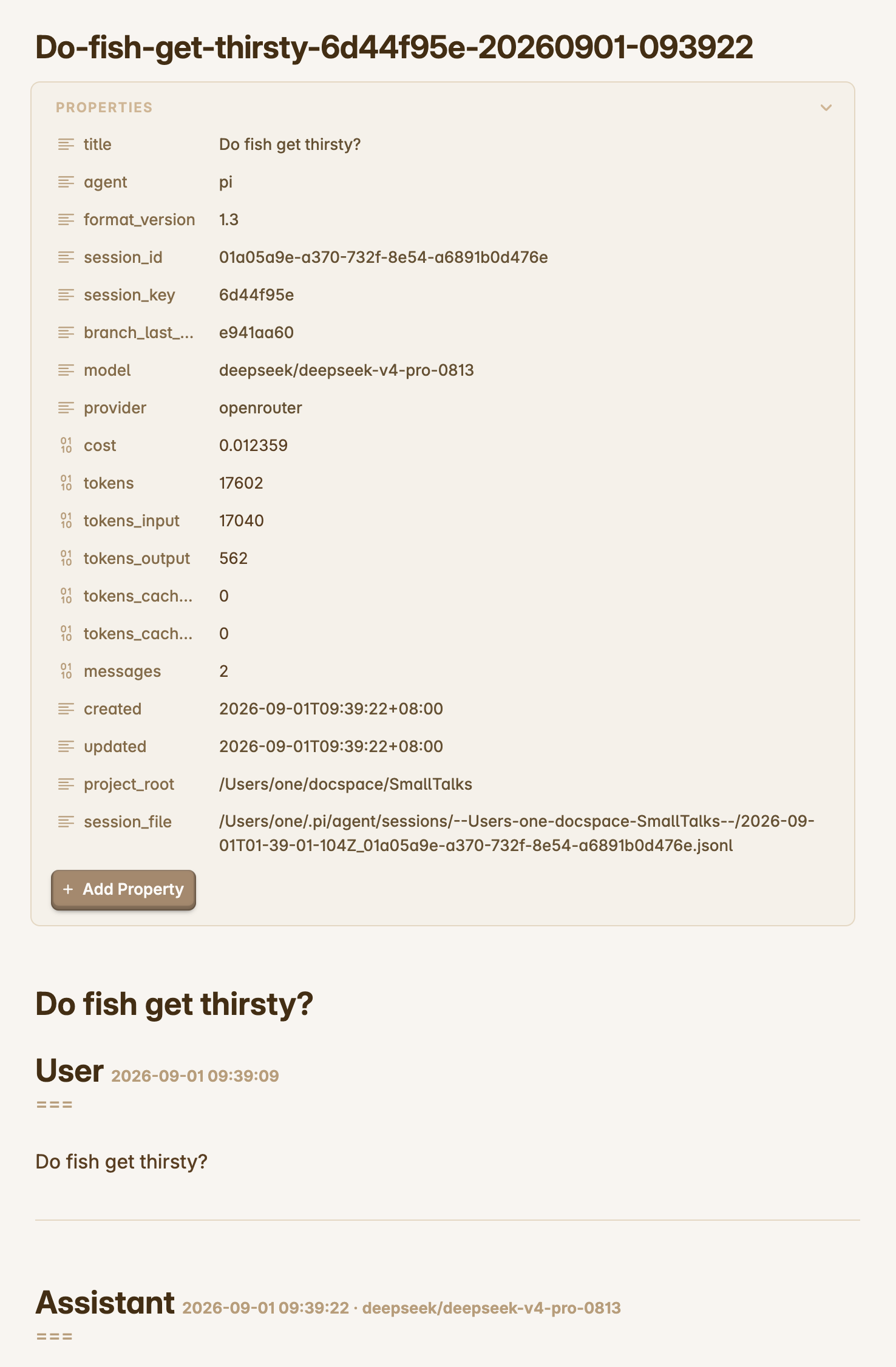
|
|
150
|
+
|
|
151
|
+
Then with the Properties panel folded away and the full conversation body in view:
|
|
152
|
+
|
|
153
|
+
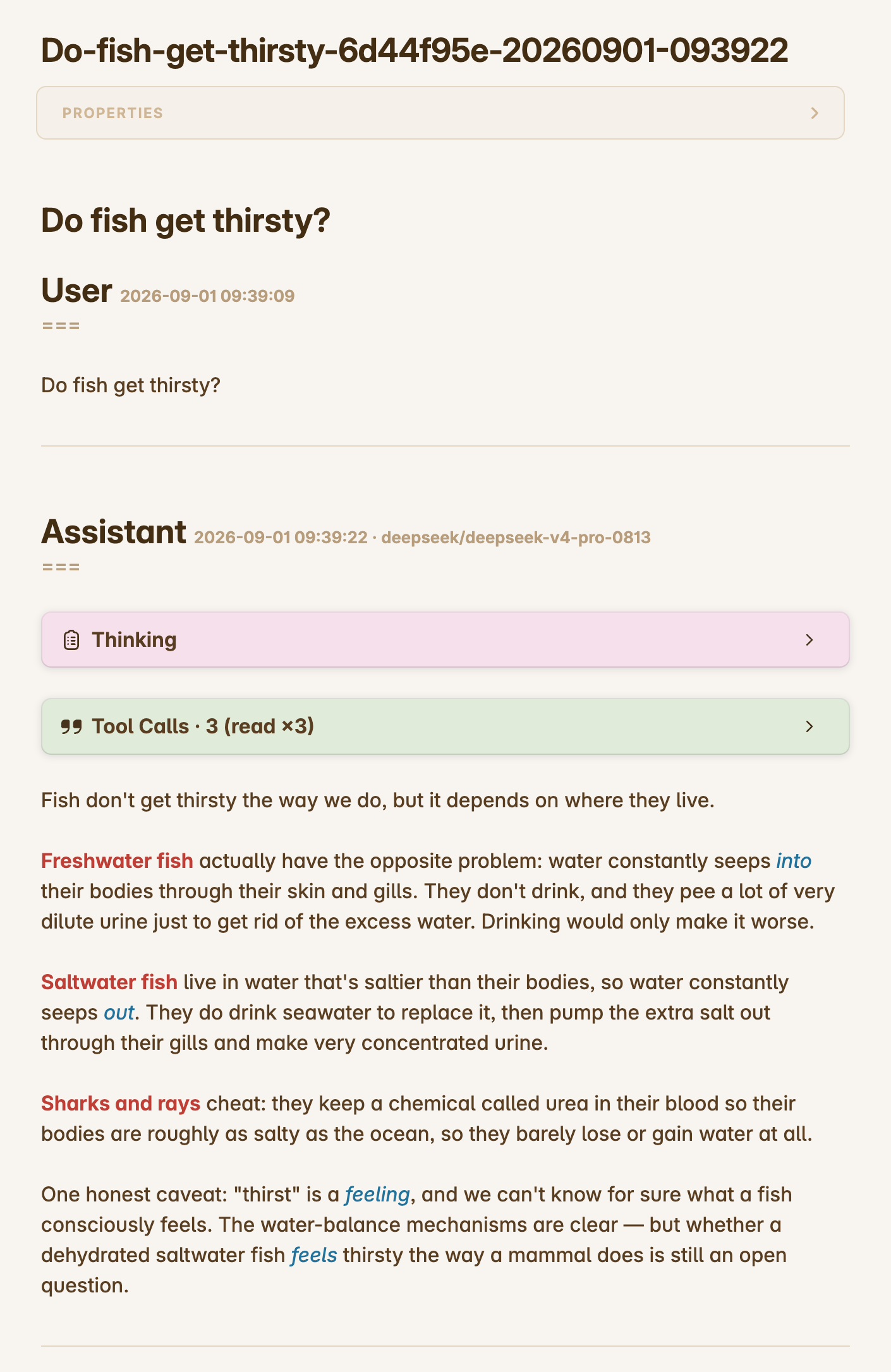
|
|
154
|
+
|
|
155
|
+
### Fragmented thinking repair
|
|
156
|
+
|
|
157
|
+
Some upstream reasoning streams (observed with z-ai/GLM via OpenRouter) store thinking with every word — or every CJK character — on its own line: the original spaces collapse into leading spaces of one-word fragments joined by runs of newlines. The extension detects this corruption (lines starting with a single leading space, or a majority of 1–2-character fragment lines) and re-joins the fragments into flowing text, so saved thinking reads normally instead of one word per line. Paragraph breaks survive the repair: a separator run of 3+ newlines that follows a sentence-final character is a real paragraph break about three times out of four in corrupted blocks, so exactly those separators are restored to blank-line paragraphs while every other separator joins — a break is never inserted mid-sentence; worst case, one lands between two complete sentences, which still reads fine. Clean thinking blocks are written untouched.
|
|
158
|
+
|
|
159
|
+
`cost` and the token fields cover the whole saved branch and include cached tokens (priced at the provider's cache rates), so the totals are comparable with provider-side accounting (e.g. OpenRouter activity). Requests that never landed in the session tree (failed retries, other sessions sharing the same API key) are necessarily excluded.
|
|
160
|
+
|
|
161
|
+
## Branch behavior
|
|
162
|
+
|
|
163
|
+
Pi sessions are trees: `/tree` navigates to an earlier point and a new prompt forks a new branch. Each markdown file records exactly **one branch** — the root-to-leaf path that branch sees.
|
|
164
|
+
|
|
165
|
+
- **Same branch, next turn** → new messages are _appended_ to the existing file, and the frontmatter (`cost`, `tokens`, `messages`, `updated`, title, model) is refreshed.
|
|
166
|
+
- **`/tree` + new prompt (a different branch)** → a _new file_ is created containing the full new branch (the shared prefix plus the new exchange). The save also notifies (info) that the branch changed, naming the new file and the earlier branch's kept file, so multiple files of one session stay navigable.
|
|
167
|
+
- **Forking at the current tip** → the existing file continues (its content is already an exact prefix of the new branch), so no duplicate file is created.
|
|
168
|
+
- **Resuming later** (restart, `/resume`, `/fork`, `/clone`) → the branch is recognized and its file continues where it left off.
|
|
169
|
+
|
|
170
|
+
Branch identity is persisted inside the session tree itself via extension custom entries (never sent to the LLM, not rendered in the TUI), so state survives restarts and navigation without any sidecar files. State discovery reads those entries straight from the session's jsonl on disk — the append log shared by every runtime — so even a long-lived warm process whose in-memory tree lags behind still finds saves recorded by other runtimes.
|
|
171
|
+
|
|
172
|
+
Continuation targets are validated newest-first: the target file must exist and its frontmatter `messages` count must cover the branch position (a higher count is fine — a descendant branch extended the same file). The first target that validates is continued; when the newest one fails but an older candidate validates, the save downgrades to the older file and warns about it. If every target fails — the file was deleted, or was rewritten from a different tree position (e.g. a save on an older branch after `/tree` navigation), where continuing could silently strand the newer branch's messages — a **fresh file with the full current branch** is written instead, with a warning naming the failed target. A fresh file never overwrites an existing filename either (an existing name falls back to `-1`, `-2` … suffixes), so two runtimes recovering the same lost file in the same second cannot silently overwrite each other. Every branch therefore always ends up with a complete, consistent file.
|
|
173
|
+
|
|
174
|
+
Compacted sessions still export their **full original history** — the archive always contains the complete conversation, not the compacted context.
|
|
175
|
+
|
|
176
|
+
## Debug
|
|
177
|
+
|
|
178
|
+
```bash
|
|
179
|
+
PI_CLAUDIAN_DEBUG=1 pi
|
|
180
|
+
```
|
|
181
|
+
|
|
182
|
+
Any value other than an explicit false token (empty, `0`, `false`, `no`, `off` — case-insensitive) enables it; unset the variable (or set one of those tokens) to turn it off.
|
|
183
|
+
|
|
184
|
+
## License
|
|
185
|
+
|
|
186
|
+
MIT
|
package/README.zh.md
ADDED
|
@@ -0,0 +1,186 @@
|
|
|
1
|
+
# pi-auto-save-session-to-markdown
|
|
2
|
+
|
|
3
|
+
[](https://www.npmjs.com/package/pi-auto-save-session-to-markdown)
|
|
4
|
+
[](LICENSE)
|
|
5
|
+
|
|
6
|
+
[English](README.md) | [中文](README.zh.md)
|
|
7
|
+
|
|
8
|
+
一个 [Pi](https://www.npmjs.com/package/@earendil-works/pi-coding-agent) 扩展:每轮对话完成后,自动把当前对话分支保存为带 YAML frontmatter 的 markdown 文件——每个会话树分支一个文件。
|
|
9
|
+
|
|
10
|
+
## 为什么需要它
|
|
11
|
+
|
|
12
|
+
Pi 内部以 JSONL 树的形式记录会话,便于恢复却不便于阅读、检索和归档。本扩展在你工作的同时把对话镜像成普通 markdown 文件,每轮交流都以任何编辑器、笔记软件或 grep 都能处理的格式留存,且模型、费用、token 数等元数据都写在 frontmatter 里。
|
|
13
|
+
|
|
14
|
+
## 安装
|
|
15
|
+
|
|
16
|
+
```
|
|
17
|
+
pi install npm:pi-auto-save-session-to-markdown
|
|
18
|
+
```
|
|
19
|
+
|
|
20
|
+
## 用法
|
|
21
|
+
|
|
22
|
+
自动:每个 agent 轮次完全结束(`agent_settled`,含自动重试与压缩全部完成)后,当前对话分支写入 `<cwd>/<文件夹>/<标题>-<key>-<时间>.md`。
|
|
23
|
+
|
|
24
|
+
Pi 未持久化的会话(内存态、`--no-session`——包括宿主客户端在真实对话旁派生的临时辅助 agent,例如 Claudian 的标题生成)会被所有自动保存路径跳过;只有显式的 `/save-conversation` 命令才会按需归档此类会话。
|
|
25
|
+
|
|
26
|
+
手动:运行 `/save-conversation` 立即保存当前分支并显示文件路径。
|
|
27
|
+
|
|
28
|
+
批量:运行 `/save-conversation-all` 保存**当前项目的全部 session**——即项目的 `~/.pi/agent/sessions/<编码后的 cwd>/` 目录下的全部 session jsonl。每个 session 都走与实时保存完全相同的管线(候选链、绝不覆盖守卫、标题追认重命名、恢复告警),归档写入**该 session 自己的工作目录**下,与在其中运行 `/save-conversation` 落点完全一致。当前 session 最先经正常实时路径保存。细节:
|
|
29
|
+
|
|
30
|
+
- **幂等**。重复运行只续写或逐 session 报告"up to date",绝不重复建文件。
|
|
31
|
+
- **跳过**没有任何 assistant 回复的 session(无可归档的对话内容)与 `id/parentId` 结构之前的远古遗留文件。
|
|
32
|
+
- **推迟**(defer)保存期间 jsonl 发生变化的 session(其运行时仍在写入):保存只在文件自读取后未被改动时才继续。被推迟的 session 由其运行时或下一轮批量自然补齐。
|
|
33
|
+
- **汇报**汇总——`N saved, M up to date, K skipped, …`——异常情况逐 session 告警(附 session id 前 8 位标识)。
|
|
34
|
+
|
|
35
|
+
## 配置
|
|
36
|
+
|
|
37
|
+
目标文件夹由环境变量 `PI_SAVE_CONVERSATION_DIR` 控制(Pi 没有扩展设置 API):
|
|
38
|
+
|
|
39
|
+
| 取值 | 保存位置 |
|
|
40
|
+
| ----------- | --------------------------------- |
|
|
41
|
+
| 未设置 | `<cwd>/ai-conversations/`(默认) |
|
|
42
|
+
| `.` 或 `""` | 直接保存在 `<cwd>/` |
|
|
43
|
+
| `notes/ai` | `<cwd>/notes/ai/` |
|
|
44
|
+
| `/绝对路径` | 该绝对路径 |
|
|
45
|
+
|
|
46
|
+
```bash
|
|
47
|
+
PI_SAVE_CONVERSATION_DIR=notes/ai pi
|
|
48
|
+
```
|
|
49
|
+
|
|
50
|
+
## 文件名与 frontmatter
|
|
51
|
+
|
|
52
|
+
文件名:`<标题>-<key>-<时间>.md`
|
|
53
|
+
|
|
54
|
+
- `<标题>` — 会话名称(`/name`);未命名时取第一条用户消息的摘要
|
|
55
|
+
- `<key>` — session id 的 SHA-256 前 8 位十六进制:同一会话的所有文件相同,恢复、重启后仍天然聚簇(session id 尚不存在时,改以同样方式哈希分支上最深一条消息的 entry id——key 始终是 8 位十六进制的不透明聚簇键)
|
|
56
|
+
- `<时间>` — 建文件的本地时间,格式 `YYYYMMDD-HHmmss`
|
|
57
|
+
|
|
58
|
+
会话的真实名称在建文件之后才到达时(如 Claudian 在首轮回复后才生成标题),下一次保存会把文件一次性改名为 `<名称>-<key>-<原时间戳>.md`(保留原创建时间戳),并同步改写 frontmatter 标题与正文标题。改名至多发生一次:之后的 `/name` 改名不再影响文件名,手动整理过的文件名也不会被动。
|
|
59
|
+
|
|
60
|
+
````markdown
|
|
61
|
+
---
|
|
62
|
+
title: "修复登录重定向死循环"
|
|
63
|
+
agent: "pi"
|
|
64
|
+
format_version: "1.6"
|
|
65
|
+
session_id: "d0a4f541-976d-4d1b-8e1c-30a1f2b3c4d5"
|
|
66
|
+
session_key: "c2088d77"
|
|
67
|
+
branch_last_entry_id: "019be3a2-1f4d-7c8a-9b01-d23e45f6a7b8"
|
|
68
|
+
model: "z-ai/glm-5.3"
|
|
69
|
+
provider: "openrouter"
|
|
70
|
+
cost: 0.023401
|
|
71
|
+
tokens: 18745
|
|
72
|
+
tokens_input: 15230
|
|
73
|
+
tokens_output: 3515
|
|
74
|
+
tokens_cache_read: 0
|
|
75
|
+
tokens_cache_write: 0
|
|
76
|
+
messages: 8
|
|
77
|
+
created: "2026-08-29T13:05:12+08:00"
|
|
78
|
+
updated: "2026-08-29T13:42:10+08:00"
|
|
79
|
+
project_root: "/Users/me/project"
|
|
80
|
+
session_file: "~/.pi/agent/sessions/--Users-me-project-20260829-050500_ab12.jsonl"
|
|
81
|
+
---
|
|
82
|
+
|
|
83
|
+
# 修复登录重定向死循环
|
|
84
|
+
|
|
85
|
+
User <span style="font-size: 0.5em; color: var(--text-faint);">2026-08-29 13:05:12</span>
|
|
86
|
+
===
|
|
87
|
+
|
|
88
|
+
auth 重构之后登录页一直重定向死循环……
|
|
89
|
+
|
|
90
|
+
> [!quote]- Editor Selection
|
|
91
|
+
> [[src/auth/middleware.ts|middleware.ts]] · **lines**: `14-22`
|
|
92
|
+
>
|
|
93
|
+
> export function middleware(request) { … }
|
|
94
|
+
|
|
95
|
+
---
|
|
96
|
+
|
|
97
|
+
Assistant <span style="font-size: 0.5em; color: var(--text-faint);">2026-08-29 13:05:40 · claude-sonnet-4-5</span>
|
|
98
|
+
===
|
|
99
|
+
|
|
100
|
+
> [!tldr]- Thinking
|
|
101
|
+
>
|
|
102
|
+
> 先看中间件的执行顺序……
|
|
103
|
+
|
|
104
|
+
我先追踪一下中间件链。
|
|
105
|
+
|
|
106
|
+
> [!quote]- Tool Calls · 1 (read)
|
|
107
|
+
> **`read`** `{"filePath":"/Users/me/project/src/auth/middleware.ts"}`
|
|
108
|
+
>
|
|
109
|
+
> ```
|
|
110
|
+
> import { NextResponse } from "next/server";
|
|
111
|
+
> export function middleware(…) …
|
|
112
|
+
> ```
|
|
113
|
+
|
|
114
|
+
---
|
|
115
|
+
````
|
|
116
|
+
|
|
117
|
+
正文完整渲染 user / assistant 消息(assistant 的 thinking 与每轮工具调用分别折叠在可折叠的 callout 中——`> [!tldr]- Thinking` 和 `> [!quote]- Tool Calls · …`),每次工具调用连同其完整原始结果一起记录:归档文件是可能被 @ 引回对话的史料,截断的半个结果在工具重调时是浪费、在不再调用时是误导,而局部阅读(grep、按行段读取)让体积不成问题。之所以用 callout 而不是 HTML `<details>`,是因为 callout 是纯 Markdown,在任何渲染器里都是有效文本:支持的环境画出可折叠面板,不支持的环境退化为普通引用块;原始 HTML 块则没有这等待遇——Obsidian 不解析 HTML 块内嵌的 Markdown,Quartz(remark/CommonMark 管线)同样如此,无效的 HTML 属性甚至能让整页渲染失败,`<details>` 无法跨工具承载内容。参数以完整 JSON 包在 inline code 里,结果逐字保真——空白原样、不截断——放在 fenced code block 中(分隔符长度会自动压过内容中的反引号序列),工具的原始输出因此按字面渲染,不会被当作 Markdown 解析。
|
|
118
|
+
|
|
119
|
+
### Callout 在 Obsidian 之外的渲染
|
|
120
|
+
|
|
121
|
+
Callout 本质是首行带类型标记的引用块(`> [!note] 标题`):认得这个标记的渲染器把它画成带标题、配色、可折叠的面板,其余渲染器看到的仍是完全合法的引用块。这套语法由 Obsidian 发扬光大,并以折叠标记(`-` 收起、`+` 展开)和任意类型加以扩展;GitHub 则把同一标记的五种类型(`[!note]` …`[!caution]`,无折叠)标准化为自家的 "alerts"。归档文件在 Obsidian 中渲染最佳——自定义类型与预设折叠都在——但会画 callout 面板的远不止 Obsidian 一家:
|
|
122
|
+
|
|
123
|
+
- **[Quartz](https://quartz.jzhao.xyz)** —— 发布 Obsidian vault 的静态站点生成器,渲染同一套 callout 语法,含折叠。
|
|
124
|
+
- **VS Code** —— 内置 markdown 预览装上扩展即可渲染面板,如 Markdown Obsidian Callout、vscode-markdown-obsidian-alert、Markdown GitHub Alerts & Obsidian Callouts。
|
|
125
|
+
- **静态站点管线** —— remark 插件把 callout 渲染到网页上:remark-obsidian-callout(Astro 等)解析完整 Obsidian 语法,remark-github-blockquote-alert 对应 GitHub 子集。
|
|
126
|
+
- **标准化子集** —— GitHub 本身、Typora(偏好设置中开启)与 Markdown Preview Enhanced 渲染的是 GitHub 的 alert 类型;本插件用到的 `tldr`/`quote` 类型与折叠标记不在其列,在这些环境里 callout 于是退化为普通(依旧可读的)引用块——正是该语法与生俱来的优雅降级。
|
|
127
|
+
|
|
128
|
+
客户端或 agent 注入到用户消息中的提示块——编辑器当前选区、附加或引用的笔记、加载的 skill——会从原始 XML(Markdown 渲染器无法有效呈现,在 Obsidian 中显示为裸露的尖括号文本)重新渲染为通用 callout。不做任何逐块解析:标题取标记名的分词(`editor_selection` → Editor Selection),正文以形似 vault 相对笔记路径的 `path`/`location` 值开头——直接渲染为不带标签的 wikilink(`[[…|别名]]` 在 Obsidian、Quartz、Markdown Preview Enhanced 等环境里都是可点击链接,别名文件名自解释,`path:` 标签反而冗余),其余属性以 `**属性**: 值` 跟随,最后是引用内容。所有 callout 一律预设折叠——用户提供的块(选区、笔记附件)为 `> [!quote]-`(仅有属性的自闭合笔记引用同样折叠),agent 侧痕迹(skill)为 `> [!note]- Skill · <名称>` 标记(加载的 skill 名称直接进标题,折叠状态也能看到是哪个 skill;location 跟在正文,内容丢弃);连续的同标签块(中间只有空白)合并进同一个 callout,一串笔记引用因此收拢为一份列表(skill 标记不合并:各自标注各自的 skill)。未知标记原样保留,用户粘贴的 XML 内容绝不会被误改;回退文件名 slug 也从剥离全部已知块后的纯键入文本推导。
|
|
129
|
+
|
|
130
|
+
当前识别的注入块标签清单:
|
|
131
|
+
|
|
132
|
+
| XML 标签 | 渲染为 | 内容 |
|
|
133
|
+
| ------------------- | ----------------------------- | ----------------------------- |
|
|
134
|
+
| `editor_selection` | `[!quote]-` Editor Selection | 代码编辑器中的选区 |
|
|
135
|
+
| `editor_cursor` | `[!quote]-` Editor Cursor | 编辑器中的光标位置 |
|
|
136
|
+
| `current_note` | `[!quote]-` Current Note | 当前打开的笔记 |
|
|
137
|
+
| `context_files` | `[!quote]-` Context Files | 附加为上下文的文件 |
|
|
138
|
+
| `canvas_selection` | `[!quote]-` Canvas Selection | 画布中的选区 |
|
|
139
|
+
| `browser_selection` | `[!quote]-` Browser Selection | 浏览器视图中的选区 |
|
|
140
|
+
| `linked_note` | `[!quote]-` Linked Note | 笔记引用(@ 提及的机器副本) |
|
|
141
|
+
| `linked_content` | `[!quote]-` Linked Content | 附加笔记的内容 |
|
|
142
|
+
| `skill` | `[!note]-` Skill · `<名称>` | 已加载 skill 的标记;内容丢弃 |
|
|
143
|
+
| 其他任何标签 | 原样保留 | 粘贴的 XML 绝不会被误改 |
|
|
144
|
+
|
|
145
|
+
每个消息块以 setext 一级信息头(`User`、`Assistant`,下一行以 `===` 下划)开头——高于 AI 内容常见的 `##` 二级标题,解析时也能与内容中的 `#` 一级标题区分开。信息头的元数据(本地日期时间,assistant 消息还带模型名)放在一个小号浅色 `<span>` 中(`0.5em`,Obsidian 的 `--text-faint` 颜色;无此变量的渲染器回退为继承的正文字色),角色名因此保持醒目,细节又触手可及。每个消息块以"上下各一个空行"包裹的 `---` 分隔线结尾(多余空行会被裁剪),无论是阅读还是程序化切分,都能清楚地区分每个消息块。文档标题紧跟在 frontmatter 之后,中间没有空行;追加保存时会顺带修复旧版本在两者之间写下的空行。
|
|
146
|
+
|
|
147
|
+
同一个保存文件在 Obsidian 中的两种渲染视图——顶部为 `<标题>-<key>-<时间>.md` 文件名,消息块带角色信息头和时间戳,Thinking 与 Tool Calls 两个 callout 处于折叠状态。首先是 Properties 面板展开、展示全部 frontmatter 字段的效果:
|
|
148
|
+
|
|
149
|
+

|
|
150
|
+
|
|
151
|
+
然后是 Properties 面板折叠、完整对话正文的效果:
|
|
152
|
+
|
|
153
|
+

|
|
154
|
+
|
|
155
|
+
### 碎片化 thinking 修复
|
|
156
|
+
|
|
157
|
+
部分上游推理流(在 z-ai/GLM 经 OpenRouter 的场景中观察到)会把 thinking 存成一词一行、甚至一字一行:原始空格塌缩成碎片行开头的单个空格,碎片之间被成串的换行拼接。扩展会检测这种损坏(依据带单个前导空格的行、或大量 1–2 字符碎片行),把碎片重新接回通顺的文本,保存的 thinking 不再一行一词。段落分隔在修复后得以保留:句末标点之后紧跟 3 个以上换行的分隔串,在损坏块中约四分之三是真实的段落边界,因此恰好这类分隔被还原成空行段落,其余全部拼接——断行永远不会插进句子中间,最坏也只是落在两个完整句子之间,阅读不受影响。正常的 thinking 块原样保存,不做任何改动。
|
|
158
|
+
|
|
159
|
+
`cost` 和 token 字段统计整条已保存分支,且包含缓存 token(按供应商缓存价格计费),因此总计可与供应商侧账单(如 OpenRouter Activity)对照。未进入会话树的请求(失败重试、共用同一 API key 的其他会话)不在其中。
|
|
160
|
+
|
|
161
|
+
## 分支行为
|
|
162
|
+
|
|
163
|
+
Pi 会话是树:`/tree` 导航到更早的位置后再提问就分出新的分支。每个 markdown 文件只记录**一个分支**——即该分支看到的 root→leaf 完整路径。
|
|
164
|
+
|
|
165
|
+
- **同一分支继续对话** → 新消息*追加*到已有文件,frontmatter(`cost`、`tokens`、`messages`、`updated`、标题、模型)同步刷新。
|
|
166
|
+
- **`/tree` 后重新提问(不同分支)** → _另存新文件_,内容为新分支的完整路径(共享前缀 + 新对话)。保存时会以 info 提示分支已切换,指明新文件与保留的原分支文件,同一会话的多个文件因此始终可分辨。
|
|
167
|
+
- **在当前末端分叉** → 已有文件继续追加(其内容恰好是新分支的精确前缀),不会产生重复文件。
|
|
168
|
+
- **之后恢复会话**(重启、`/resume`、`/fork`、`/clone`)→ 分支被识别,对应文件从上次的位置继续。
|
|
169
|
+
|
|
170
|
+
分支状态以扩展 custom entry 的形式持久化在会话树内部(不进 LLM 上下文、不在 TUI 渲染),因此无需任何辅助文件即可在重启和导航后恢复状态。状态发现直接从磁盘上的 session jsonl(所有运行时共享的追加日志)读取这些条目,因此即使长驻的暖进程内存视图滞后,也能看到其他运行时记录的保存。
|
|
171
|
+
|
|
172
|
+
续写目标按最新优先逐个校验:目标文件必须存在、且 frontmatter 的 `messages` 数覆盖当前分支位置(数值更大也没问题——那是子分支沿同一文件继续追加过)。第一个通过校验的目标即被续写;当最新目标失败而较旧的候选通过时,保存会回退续写旧文件并发出告警。只有当全部目标失败——文件被删除,或曾被另一个树位置改写(例如 `/tree` 导航后在旧分支上保存过),继续沿用可能把新分支的消息悄悄丢掉——才会**以当前分支的完整内容另存新文件**,并在告警中指名失败的目标。新文件的创建也绝不覆盖已有同名文件(同名回退 `-1`、`-2` … 后缀),两个运行时同秒并发恢复也不会互相静默覆盖。每个分支因此最终都有一个完整、一致的文件。
|
|
173
|
+
|
|
174
|
+
被压缩(compaction)过的会话导出的仍是**完整原始历史**——归档永远是全量对话,而不是压缩后的上下文。
|
|
175
|
+
|
|
176
|
+
## 调试
|
|
177
|
+
|
|
178
|
+
```bash
|
|
179
|
+
PI_CLAUDIAN_DEBUG=1 pi
|
|
180
|
+
```
|
|
181
|
+
|
|
182
|
+
除显式假值(空串、`0`、`false`、`no`、`off`,忽略大小写)以外的任何值都会开启调试;取消该变量或将其设为其中某个假值即可关闭。
|
|
183
|
+
|
|
184
|
+
## 许可
|
|
185
|
+
|
|
186
|
+
MIT
|
package/debug.ts
ADDED
|
@@ -0,0 +1,27 @@
|
|
|
1
|
+
/**
|
|
2
|
+
* Shared debug logging for all @pi-claudian extensions.
|
|
3
|
+
*
|
|
4
|
+
* Enable by setting the PI_CLAUDIAN_DEBUG environment variable to any value
|
|
5
|
+
* other than an explicit false token (empty, "0", "false", "no", "off" —
|
|
6
|
+
* case-insensitive). Output goes to stderr via console.error, so it never
|
|
7
|
+
* mixes with pi's stdout and can be captured separately:
|
|
8
|
+
*
|
|
9
|
+
* PI_CLAUDIAN_DEBUG=1 pi # show inline
|
|
10
|
+
* PI_CLAUDIAN_DEBUG=1 pi 2>debug.log # capture to a file
|
|
11
|
+
*
|
|
12
|
+
* This is a source-only module (Pi loads it via jiti). Each @pi-claudian
|
|
13
|
+
* package vendors its own copy and imports it, keeping packages independent —
|
|
14
|
+
* the shared contract is the PI_CLAUDIAN_DEBUG env var name, not a shared
|
|
15
|
+
* npm dependency.
|
|
16
|
+
*/
|
|
17
|
+
|
|
18
|
+
const TAG = "[pi-claudian]";
|
|
19
|
+
const FALSE_TOKENS = new Set(["", "0", "false", "no", "off"]);
|
|
20
|
+
const raw = process.env.PI_CLAUDIAN_DEBUG?.trim().toLowerCase();
|
|
21
|
+
const enabled = raw !== undefined && !FALSE_TOKENS.has(raw);
|
|
22
|
+
|
|
23
|
+
/** Log a debug message when PI_CLAUDIAN_DEBUG is set to an enabling value. */
|
|
24
|
+
export function debug(...args: unknown[]): void {
|
|
25
|
+
if (!enabled) return;
|
|
26
|
+
console.error(TAG, ...args);
|
|
27
|
+
}
|