physical-quantity 1.1.30 → 1.1.40
This diff represents the content of publicly available package versions that have been released to one of the supported registries. The information contained in this diff is provided for informational purposes only and reflects changes between package versions as they appear in their respective public registries.
- package/README.md +35 -5
- package/dist/pq.es.js +537 -346
- package/dist/pq.umd.js +583 -369
- package/package.json +1 -1
package/README.md
CHANGED
|
@@ -13,7 +13,7 @@ It is a new HTML element for expressing physical quantities, featuring self-cont
|
|
|
13
13
|
- Easy to integrate into any web project.
|
|
14
14
|
|
|
15
15
|
## Demo: Physical Quantity element - No Unit Converter or Dual Units Needed
|
|
16
|
-
[Live Demo
|
|
16
|
+
[Live Demo](https://v2-docs.donwen.com/demo/products/quik2.html)
|
|
17
17
|
|
|
18
18
|
[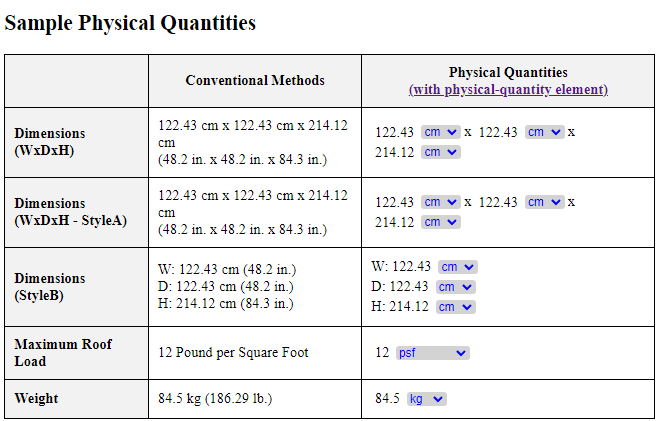](https://jsfiddle.net/hithere/tz8ym4fh/100/embedded/result)
|
|
19
19
|
|
|
@@ -31,7 +31,7 @@ npm install physical-quantity
|
|
|
31
31
|
### For Web Visitors
|
|
32
32
|
The unit list displays available units for the physical quantity category. Users can easily switch between units to view the same quantity in different measurements.
|
|
33
33
|
|
|
34
|
-
When hovering over the unit list, an icon appears, providing access to a comprehensive
|
|
34
|
+
When hovering over the unit list, an icon appears, providing access to a comprehensive [Generic Unit Converter](https://v2-docs.donwen.com/daily-calculations/unit-converter.html) powered by [AutoCalcs](https://v2.donwen.com). This tool allows users to convert quantities across 60+ categories.
|
|
35
35
|
|
|
36
36
|
### For Developers
|
|
37
37
|
After installation, you can import and use the physical-quantity component in your project.
|
|
@@ -47,6 +47,27 @@ Add the `physical-quantity` or `uc-qty` tag to your HTML file:
|
|
|
47
47
|
```html
|
|
48
48
|
<physical-quantity value="25.4" unit="mm" decimal-places="4"></physical-quantity>
|
|
49
49
|
<uc-qty value="25.4" unit="mm" decimal-places="4"></uc-qty>
|
|
50
|
+
<uc-qty value="25.4" unit="mm" show-unit-arrow="false"></uc-qty> Compact mode, no arrow.<br>
|
|
51
|
+
<physical-quantity value="25.4" unit="mxm" decimal-places="2"></physical-quantity> Non-exist unit, shown as is.<br>
|
|
52
|
+
<physical-quantity value="1500" unit="g"></physical-quantity> <br>
|
|
53
|
+
<physical-quantity value="1500" unit="psf"></physical-quantity> <br>
|
|
54
|
+
<h3>Box Size (No need of Unit Converter)</h3>
|
|
55
|
+
137.16 cm x 137.16 cm x 91.44 cm (54 in. x 54 in. x 36 in.) <br>
|
|
56
|
+
<physical-quantity value="137.16" unit="cm"></physical-quantity>x
|
|
57
|
+
<physical-quantity value="137.16" unit="cm"></physical-quantity>x
|
|
58
|
+
<physical-quantity value="91.44" unit="cm"></physical-quantity><br>
|
|
59
|
+
<physical-quantity value="800" unit="kg/m³"></physical-quantity><br>
|
|
60
|
+
<physical-quantity value="800" unit="kg/m³" show-unit-arrow="false"></physical-quantity>Compact mode, no arrow.<br>
|
|
61
|
+
<uc-qty value="91" unit="cm"></uc-qty><br>
|
|
62
|
+
<uc-qty value="2" unit="minute"></uc-qty><br>
|
|
63
|
+
<uc-qty value="2" unit="A"></uc-qty> Default with arrow.<br>
|
|
64
|
+
<uc-qty value="2" unit="A" show-unit-arrow="false"></uc-qty>Compact mode, no arrow.<br>
|
|
65
|
+
<uc-qty value="37.778" unit="°C" show-unit-arrow="false"></uc-qty>Compact mode, no arrow.<br>
|
|
66
|
+
<uc-qty value="100" unit="°F"></uc-qty><br>
|
|
67
|
+
<uc-qty value="2'-3" unit="ft-in"></uc-qty>For Feet-Inches unit<br>
|
|
68
|
+
<physical-quantity value="2'-3 3/16" unit="ft-in" ></physical-quantity>
|
|
69
|
+
<physical-quantity value="2" unit="ft-in"></physical-quantity>
|
|
70
|
+
<physical-quantity value="2'-3" unit="ft-in" ></physical-quantity>
|
|
50
71
|
```
|
|
51
72
|
|
|
52
73
|
### Example - Linking the Code
|
|
@@ -92,7 +113,9 @@ Here's an example of how to use the component in an HTML file:
|
|
|
92
113
|
The physical-quantity component supports the following attributes:
|
|
93
114
|
|
|
94
115
|
- <ins>_value_</ins>: The initial value of the physical quantity. It can be any number.
|
|
95
|
-
- <ins>_unit_</ins>: The initial unit of the physical quantity.
|
|
116
|
+
- <ins>_unit_</ins>: The initial unit of the physical quantity.
|
|
117
|
+
When a valid unit within the supported unit categories (e.g., mm, cm, m, in, ft for length), unit conversion is automated;
|
|
118
|
+
When a unit provided is not in the library, it will show per the author's input, like a regular text input.
|
|
96
119
|
- <ins>_decimal-places_</ins>: web author can specify the decimal-places depending on the magnitude of the quantity. Default to be 3.
|
|
97
120
|
- <ins>_show-unit-arrow_</ins>: specify to show the downward arrow following the units list. Default to be true. When set to false, it is suitable when the author wants to show in a compact format.
|
|
98
121
|
|
|
@@ -101,10 +124,11 @@ Currently, the component supports the following categories and units:
|
|
|
101
124
|
| Category | Unit | Description |
|
|
102
125
|
|---|---|---|
|
|
103
126
|
| Length | m |meter|
|
|
104
|
-
| |km |
|
|
127
|
+
| |km |kilometer|
|
|
105
128
|
| |mm |millimeter|
|
|
106
129
|
| |cm |centimeter|
|
|
107
130
|
| |in |inch|
|
|
131
|
+
| |ft-in |foot-inch|
|
|
108
132
|
| |ft |foot|
|
|
109
133
|
| Mass | kg |kilogram|
|
|
110
134
|
| | g |gram|
|
|
@@ -145,7 +169,11 @@ Currently, the component supports the following categories and units:
|
|
|
145
169
|
| | µA||
|
|
146
170
|
| | kA||
|
|
147
171
|
| | MA||
|
|
148
|
-
| | esu/s
|
|
172
|
+
| | esu/s ||
|
|
173
|
+
| Temperature | °K ||
|
|
174
|
+
| | °C ||
|
|
175
|
+
| | °F ||
|
|
176
|
+
| | °Ra ||
|
|
149
177
|
| more to update. | (feel free to send your request for other units & categories) ||
|
|
150
178
|
|
|
151
179
|
## License
|
|
@@ -157,6 +185,8 @@ Contributions are welcome! Please contact the developer for any bugs, features,
|
|
|
157
185
|
## Change Log
|
|
158
186
|
| Version | Date | Description |
|
|
159
187
|
|---|---|---|
|
|
188
|
+
| v1.1.40 |20240619| Added *ft-in* (ie: Foot-Inch) in Length category.|
|
|
189
|
+
| v1.1.35 |20240616| Added temperature category.|
|
|
160
190
|
| v1.1.30 |20240615| Added "show-unit-arrow" prop to allow web author to create a compact UI; Unit width is now responsive to the chosen unit; Author can force init unit.|
|
|
161
191
|
| v1.1.28 |20240610| Tooltip for unit list provides a link to the unit converter page for all unit categories. Added more categories.|
|
|
162
192
|
| v1.1.21 |20240603| Added alias uc-qty. |
|