physical-quantity 1.1.19 → 1.1.20
This diff represents the content of publicly available package versions that have been released to one of the supported registries. The information contained in this diff is provided for informational purposes only and reflects changes between package versions as they appear in their respective public registries.
- package/README.md +4 -4
- package/package.json +1 -1
package/README.md
CHANGED
|
@@ -3,7 +3,7 @@
|
|
|
3
3
|
`physical-quantity(PQE)` is a web component that allows you to create and manipulate physical quantities with different units. It provides an input for the value and a dropdown for the unit, automatically converting between units in the same category.
|
|
4
4
|
|
|
5
5
|
It is a new HTML element for expressing physical quantities, featuring self-contained unit conversion, a compact and clean UI, no redundant dual units, and seamless integration across all websites and platforms.
|
|
6
|
-
](https://firebasestorage.googleapis.com/v0/b/auto-calc-80237.appspot.com/o/PQE%2Fexamples%2FPhysicalQuantityElementDemo3-ezgif.com.gif?alt=media&token=b910c493-e990-490b-bf4d-015a4d4c10d2)
|
|
7
7
|
|
|
8
8
|
## Features
|
|
9
9
|
|
|
@@ -13,9 +13,9 @@ It is a new HTML element for expressing physical quantities, featuring self-cont
|
|
|
13
13
|
- Easy to integrate into any web project.
|
|
14
14
|
|
|
15
15
|
## Demo: Physical Quantity element - No Unit Converter or Dual Units Needed
|
|
16
|
-
[Live Demo on JS Fiddle](https://jsfiddle.net/hithere/tz8ym4fh/
|
|
16
|
+
[Live Demo on JS Fiddle](https://jsfiddle.net/hithere/tz8ym4fh/129/embedded/result)
|
|
17
17
|
|
|
18
|
-
<iframe width="100%" height="300" src="https://jsfiddle.net/hithere/tz8ym4fh/
|
|
18
|
+
<iframe width="100%" height="300" src="https://jsfiddle.net/hithere/tz8ym4fh/129/embedded/result" allowfullscreen="true" frameborder="0"></iframe>
|
|
19
19
|
|
|
20
20
|
[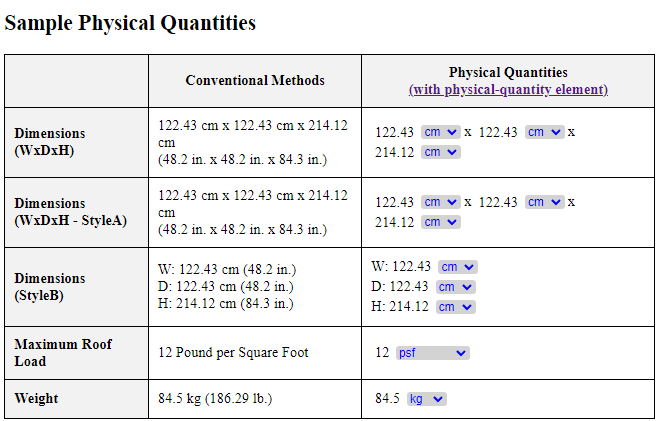](https://jsfiddle.net/hithere/tz8ym4fh/100/embedded/result)
|
|
21
21
|
|
|
@@ -71,7 +71,7 @@ Here's an example of how to use the component in an HTML file:
|
|
|
71
71
|
<meta charset="UTF-8">
|
|
72
72
|
<meta name="viewport" content="width=device-width, initial-scale=1.0">
|
|
73
73
|
<title>Physical Quantity Component Example</title>
|
|
74
|
-
<script src="https://unpkg.com/physical-quantity@
|
|
74
|
+
<script src="https://unpkg.com/physical-quantity@latest/dist/pq.umd.js"></script>
|
|
75
75
|
</head>
|
|
76
76
|
<body>
|
|
77
77
|
<physical-quantity value="25.4" unit="mm"></physical-quantity>
|