physical-quantity 1.1.13 → 1.1.19
This diff represents the content of publicly available package versions that have been released to one of the supported registries. The information contained in this diff is provided for informational purposes only and reflects changes between package versions as they appear in their respective public registries.
- package/README.md +14 -9
- package/dist/pq.es.js +173 -0
- package/dist/pq.umd.js +63 -0
- package/package.json +17 -6
- package/dist/pq.min.js +0 -73
- package/images/examples/PhysicalQuantityElementExample0.jpg +0 -0
- package/images/examples/PhysicalQuantityElementExample1.png +0 -0
- package/images/examples/PhysicalQuantityElementExample2.png +0 -0
package/README.md
CHANGED
|
@@ -1,23 +1,25 @@
|
|
|
1
1
|
# Physical Quantity Web Component
|
|
2
2
|
|
|
3
|
-
`physical-quantity` is a web component that allows you to create and manipulate physical quantities with different units. It provides an input for the value and a dropdown for the unit, automatically converting between units in the same category.
|
|
3
|
+
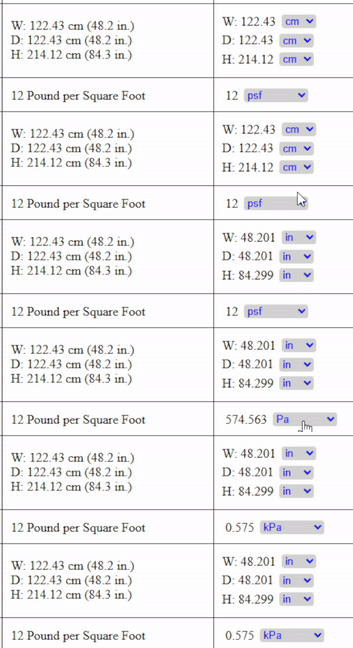
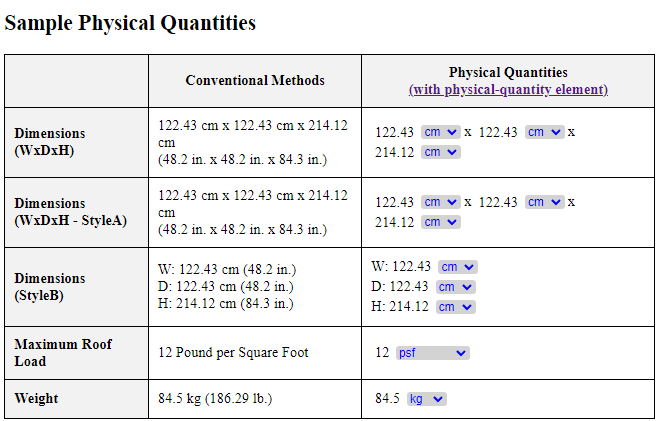
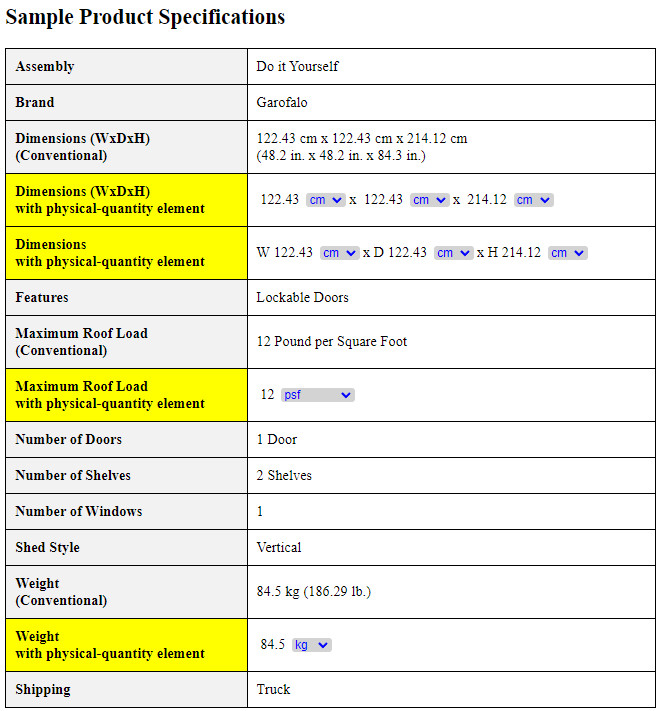
`physical-quantity(PQE)` is a web component that allows you to create and manipulate physical quantities with different units. It provides an input for the value and a dropdown for the unit, automatically converting between units in the same category.
|
|
4
4
|
|
|
5
|
-
|
|
5
|
+
It is a new HTML element for expressing physical quantities, featuring self-contained unit conversion, a compact and clean UI, no redundant dual units, and seamless integration across all websites and platforms.
|
|
6
|
+
|
|
6
7
|
|
|
7
8
|
## Features
|
|
8
9
|
|
|
9
10
|
- Create a physical quantity with a value and unit.
|
|
10
11
|
- Automatically convert between units within the same category.
|
|
11
|
-
- Display values with
|
|
12
|
+
- Display values with customizable decimal places if not an integer; show integers without decimal parts.
|
|
12
13
|
- Easy to integrate into any web project.
|
|
13
14
|
|
|
14
15
|
## Demo: Physical Quantity element - No Unit Converter or Dual Units Needed
|
|
15
|
-
Live Demo on JS Fiddle
|
|
16
|
+
[Live Demo on JS Fiddle](https://jsfiddle.net/hithere/tz8ym4fh/119/embedded/result)
|
|
17
|
+
|
|
16
18
|
<iframe width="100%" height="300" src="https://jsfiddle.net/hithere/tz8ym4fh/100/embedded/result" allowfullscreen="true" frameborder="0"></iframe>
|
|
17
19
|
|
|
18
|
-
[](https://jsfiddle.net/hithere/tz8ym4fh/100/embedded/result)
|
|
19
21
|
|
|
20
|
-
[](https://jsfiddle.net/hithere/tz8ym4fh/100/embedded/result)
|
|
21
23
|
|
|
22
24
|
## Installation
|
|
23
25
|
|
|
@@ -33,7 +35,7 @@ After installation, you can import and use the physical-quantity component in yo
|
|
|
33
35
|
### Importing the Component
|
|
34
36
|
Include the following script tag in your HTML file:
|
|
35
37
|
```html
|
|
36
|
-
<script src="node_modules/physical-quantity/dist/pq.
|
|
38
|
+
<script src="node_modules/physical-quantity/dist/pq.es.js"></script>
|
|
37
39
|
```
|
|
38
40
|
|
|
39
41
|
### Using the Component
|
|
@@ -56,7 +58,7 @@ Here's an example of how to use the component in an HTML file:
|
|
|
56
58
|
<body>
|
|
57
59
|
<physical-quantity value="25.4" unit="mm"></physical-quantity>
|
|
58
60
|
|
|
59
|
-
<script src="node_modules/physical-quantity/src/pq.
|
|
61
|
+
<script src="node_modules/physical-quantity/src/pq.es.js"></script>
|
|
60
62
|
</body>
|
|
61
63
|
</html>
|
|
62
64
|
```
|
|
@@ -69,7 +71,7 @@ Here's an example of how to use the component in an HTML file:
|
|
|
69
71
|
<meta charset="UTF-8">
|
|
70
72
|
<meta name="viewport" content="width=device-width, initial-scale=1.0">
|
|
71
73
|
<title>Physical Quantity Component Example</title>
|
|
72
|
-
<script src="https://unpkg.com/physical-quantity@1.1.
|
|
74
|
+
<script src="https://unpkg.com/physical-quantity@1.1.19/dist/pq.umd.js"></script>
|
|
73
75
|
</head>
|
|
74
76
|
<body>
|
|
75
77
|
<physical-quantity value="25.4" unit="mm"></physical-quantity>
|
|
@@ -123,6 +125,9 @@ This project is licensed under the MIT License. See the LICENSE file for more de
|
|
|
123
125
|
## Contributing
|
|
124
126
|
Contributions are welcome! Please contact the developer for any bugs, features, or improvements.
|
|
125
127
|
|
|
128
|
+
## Change Log
|
|
129
|
+
- 20250602 v1.1.19: changed to umd for unpkg, and es for module.
|
|
130
|
+
|
|
126
131
|
## Contact
|
|
127
132
|
If you have any questions or feedback, feel free to contact me at don.wen@yahoo.com.
|
|
128
133
|
For more info, please visit:
|
package/dist/pq.es.js
ADDED
|
@@ -0,0 +1,173 @@
|
|
|
1
|
+
const o = 0.45359237, s = 25.4 / 1e3, a = 12 * s, l = 101325, n = 133.322387415;
|
|
2
|
+
class r extends HTMLElement {
|
|
3
|
+
constructor() {
|
|
4
|
+
super(), this.attachShadow({ mode: "open" }), this.value = 0, this.unit = "mm", this.unitCategory = "Length", this.decimalPlaces = 3, this.units = {
|
|
5
|
+
Length: ["m", "km", "cm", "mm", "in", "ft"],
|
|
6
|
+
Mass: ["g", "kg", "lbm"],
|
|
7
|
+
Pressure: [
|
|
8
|
+
"Pa",
|
|
9
|
+
"kPa",
|
|
10
|
+
"MPa",
|
|
11
|
+
"GPa",
|
|
12
|
+
"bar",
|
|
13
|
+
"mbar",
|
|
14
|
+
"atm",
|
|
15
|
+
"mm HG",
|
|
16
|
+
"cm HG",
|
|
17
|
+
"in HG",
|
|
18
|
+
"mm W.C.",
|
|
19
|
+
"m W.C.",
|
|
20
|
+
"in W.C.",
|
|
21
|
+
"psf",
|
|
22
|
+
"psi",
|
|
23
|
+
"ksi",
|
|
24
|
+
"ksi[kip/in²]"
|
|
25
|
+
]
|
|
26
|
+
// Add other categories and units as needed
|
|
27
|
+
}, this.unitConversion = {
|
|
28
|
+
Length: {
|
|
29
|
+
m: 1,
|
|
30
|
+
km: 1e3,
|
|
31
|
+
cm: 0.01,
|
|
32
|
+
mm: 1e-3,
|
|
33
|
+
in: s,
|
|
34
|
+
ft: a
|
|
35
|
+
// Add more conversion factors as needed
|
|
36
|
+
},
|
|
37
|
+
// Add other category conversion factors as needed
|
|
38
|
+
Mass: {
|
|
39
|
+
kg: 1,
|
|
40
|
+
g: 1e-3,
|
|
41
|
+
lbm: o
|
|
42
|
+
// Add more conversion factors as needed
|
|
43
|
+
},
|
|
44
|
+
Pressure: {
|
|
45
|
+
Pa: 1,
|
|
46
|
+
kPa: 1e3,
|
|
47
|
+
MPa: 1e6,
|
|
48
|
+
GPa: 1e9,
|
|
49
|
+
bar: 1e5,
|
|
50
|
+
mbar: 100,
|
|
51
|
+
atm: l,
|
|
52
|
+
"mm HG": n,
|
|
53
|
+
"cm HG": n * 10,
|
|
54
|
+
"in HG": n * 25.4,
|
|
55
|
+
"mm W.C.": 1 / 1e3 * 1e3 * 9.80665,
|
|
56
|
+
"m W.C.": 1 * 1e3 * 9.80665,
|
|
57
|
+
"in W.C.": s * 1e3 * 9.80665,
|
|
58
|
+
psf: o * 9.80665 / Math.pow(a, 2),
|
|
59
|
+
psi: o * 9.80665 / Math.pow(s, 2),
|
|
60
|
+
ksi: o * 9.80665 / Math.pow(s, 2) * 1e3,
|
|
61
|
+
"ksi[kip/in²]": o * 9.80665 / Math.pow(s, 2) * 1e3
|
|
62
|
+
}
|
|
63
|
+
}, this.render();
|
|
64
|
+
}
|
|
65
|
+
static get observedAttributes() {
|
|
66
|
+
return ["value", "unit", "decimal-places"];
|
|
67
|
+
}
|
|
68
|
+
attributeChangedCallback(t, e, i) {
|
|
69
|
+
t === "value" ? this.value = parseFloat(i) : t === "unit" ? (this.unit = i, this.unitCategory = this.getUnitCategory(i)) : t === "decimal-places" && (this.decimalPlaces = parseInt(i) || 3), this.render();
|
|
70
|
+
}
|
|
71
|
+
getUnitCategory(t) {
|
|
72
|
+
for (const e in this.units)
|
|
73
|
+
if (this.units[e].includes(t))
|
|
74
|
+
return e;
|
|
75
|
+
return null;
|
|
76
|
+
}
|
|
77
|
+
connectedCallback() {
|
|
78
|
+
this.shadowRoot.addEventListener("change", this.handleUnitChange.bind(this)), this.shadowRoot.addEventListener("mouseover", this.handleMouseOver.bind(this)), this.shadowRoot.addEventListener("mouseout", this.handleMouseOut.bind(this)), this.render();
|
|
79
|
+
}
|
|
80
|
+
disconnectedCallback() {
|
|
81
|
+
this.shadowRoot.removeEventListener("change", this.handleUnitChange.bind(this)), this.shadowRoot.removeEventListener("mouseover", this.handleMouseOver.bind(this)), this.shadowRoot.removeEventListener("mouseout", this.handleMouseOut.bind(this));
|
|
82
|
+
}
|
|
83
|
+
handleArrowClick(t) {
|
|
84
|
+
if (t.target.closest(".unit-container")) {
|
|
85
|
+
const e = this.shadowRoot.querySelector("select");
|
|
86
|
+
e && (e.focus(), e.click());
|
|
87
|
+
}
|
|
88
|
+
}
|
|
89
|
+
handleUnitChange(t) {
|
|
90
|
+
if (t.target.tagName === "SELECT") {
|
|
91
|
+
const e = t.target.value, i = this.unitConversion[this.unitCategory][this.unit] / this.unitConversion[this.unitCategory][e];
|
|
92
|
+
this.value = this.value * i, this.unit = e, this.render();
|
|
93
|
+
}
|
|
94
|
+
}
|
|
95
|
+
handleMouseOver() {
|
|
96
|
+
const t = this.shadowRoot.querySelector(".tooltip");
|
|
97
|
+
t.style.display = "block", clearTimeout(this.tooltipTimeout);
|
|
98
|
+
}
|
|
99
|
+
handleMouseOut() {
|
|
100
|
+
const t = this.shadowRoot.querySelector(".tooltip");
|
|
101
|
+
t.style.display = "none";
|
|
102
|
+
}
|
|
103
|
+
formatValue(t) {
|
|
104
|
+
return Number.isInteger(t) ? t.toString() : Math.floor(t) !== 0 ? t.toFixed(this.decimalPlaces).replace(/0+$/, "").replace(/\.$/, "") : t.toPrecision(3);
|
|
105
|
+
}
|
|
106
|
+
render() {
|
|
107
|
+
this.shadowRoot.innerHTML = `
|
|
108
|
+
<style>
|
|
109
|
+
:host {
|
|
110
|
+
display: inline-block;
|
|
111
|
+
}
|
|
112
|
+
.quantity {
|
|
113
|
+
display: flex;
|
|
114
|
+
align-items: center;
|
|
115
|
+
}
|
|
116
|
+
.value {
|
|
117
|
+
margin-left: 0.25em;
|
|
118
|
+
margin-right: 0.25em;
|
|
119
|
+
}
|
|
120
|
+
.unit-container select {
|
|
121
|
+
position: relative;
|
|
122
|
+
display: inline-flex;
|
|
123
|
+
align-items: center;
|
|
124
|
+
color: blue;
|
|
125
|
+
background-color: lightgray;
|
|
126
|
+
border-radius: 0.25em;
|
|
127
|
+
border: none;
|
|
128
|
+
margin: 0.25em;
|
|
129
|
+
cursor: pointer;
|
|
130
|
+
}
|
|
131
|
+
|
|
132
|
+
.tooltip {
|
|
133
|
+
display: block; /* Set display to block for initial positioning */
|
|
134
|
+
visibility: hidden; /* Initially hide the tooltip */
|
|
135
|
+
opacity: 0; /* Start with zero opacity */
|
|
136
|
+
transition: opacity 0.3s ease-in-out; /* Smooth transition */
|
|
137
|
+
position: absolute;
|
|
138
|
+
bottom: 100%;
|
|
139
|
+
left: 50%;
|
|
140
|
+
transform: translateX(-50%);
|
|
141
|
+
background-color: black;
|
|
142
|
+
color: red;
|
|
143
|
+
padding: 5px;
|
|
144
|
+
border-radius: 5px;
|
|
145
|
+
font-size: 0.8em;
|
|
146
|
+
white-space: nowrap;
|
|
147
|
+
z-index: 10;
|
|
148
|
+
}
|
|
149
|
+
|
|
150
|
+
.tooltip a {
|
|
151
|
+
color: cyan;
|
|
152
|
+
}
|
|
153
|
+
|
|
154
|
+
</style>
|
|
155
|
+
|
|
156
|
+
<div class="quantity">
|
|
157
|
+
<span class="value">${this.formatValue(this.value)}</span>
|
|
158
|
+
<div class="unit-container">
|
|
159
|
+
<select>
|
|
160
|
+
${this.units[this.unitCategory].map((t) => `<option value="${t}" ${t === this.unit ? "selected" : ""}>
|
|
161
|
+
${t}</option>`).join("")}
|
|
162
|
+
</select>
|
|
163
|
+
</div>
|
|
164
|
+
</div>
|
|
165
|
+
<div class="tooltip">
|
|
166
|
+
Powered by <a href="https://v2.donwen.com" target="_blank" style="color: cyan;">
|
|
167
|
+
AutoCalcs</a>
|
|
168
|
+
</div>
|
|
169
|
+
`;
|
|
170
|
+
}
|
|
171
|
+
}
|
|
172
|
+
customElements.define("physical-quantity", r);
|
|
173
|
+
customElements.define("pqe", r);
|
package/dist/pq.umd.js
ADDED
|
@@ -0,0 +1,63 @@
|
|
|
1
|
+
(function(n){typeof define=="function"&&define.amd?define(n):n()})(function(){"use strict";const o=.45359237,i=25.4/1e3,r=12*i,h=101325,a=133.322387415;class l extends HTMLElement{constructor(){super(),this.attachShadow({mode:"open"}),this.value=0,this.unit="mm",this.unitCategory="Length",this.decimalPlaces=3,this.units={Length:["m","km","cm","mm","in","ft"],Mass:["g","kg","lbm"],Pressure:["Pa","kPa","MPa","GPa","bar","mbar","atm","mm HG","cm HG","in HG","mm W.C.","m W.C.","in W.C.","psf","psi","ksi","ksi[kip/in²]"]},this.unitConversion={Length:{m:1,km:1e3,cm:.01,mm:.001,in:i,ft:r},Mass:{kg:1,g:.001,lbm:o},Pressure:{Pa:1,kPa:1e3,MPa:1e6,GPa:1e9,bar:1e5,mbar:100,atm:h,"mm HG":a,"cm HG":a*10,"in HG":a*25.4,"mm W.C.":1/1e3*1e3*9.80665,"m W.C.":1*1e3*9.80665,"in W.C.":i*1e3*9.80665,psf:o*9.80665/Math.pow(r,2),psi:o*9.80665/Math.pow(i,2),ksi:o*9.80665/Math.pow(i,2)*1e3,"ksi[kip/in²]":o*9.80665/Math.pow(i,2)*1e3}},this.render()}static get observedAttributes(){return["value","unit","decimal-places"]}attributeChangedCallback(t,e,s){t==="value"?this.value=parseFloat(s):t==="unit"?(this.unit=s,this.unitCategory=this.getUnitCategory(s)):t==="decimal-places"&&(this.decimalPlaces=parseInt(s)||3),this.render()}getUnitCategory(t){for(const e in this.units)if(this.units[e].includes(t))return e;return null}connectedCallback(){this.shadowRoot.addEventListener("change",this.handleUnitChange.bind(this)),this.shadowRoot.addEventListener("mouseover",this.handleMouseOver.bind(this)),this.shadowRoot.addEventListener("mouseout",this.handleMouseOut.bind(this)),this.render()}disconnectedCallback(){this.shadowRoot.removeEventListener("change",this.handleUnitChange.bind(this)),this.shadowRoot.removeEventListener("mouseover",this.handleMouseOver.bind(this)),this.shadowRoot.removeEventListener("mouseout",this.handleMouseOut.bind(this))}handleArrowClick(t){if(t.target.closest(".unit-container")){const e=this.shadowRoot.querySelector("select");e&&(e.focus(),e.click())}}handleUnitChange(t){if(t.target.tagName==="SELECT"){const e=t.target.value,s=this.unitConversion[this.unitCategory][this.unit]/this.unitConversion[this.unitCategory][e];this.value=this.value*s,this.unit=e,this.render()}}handleMouseOver(){const t=this.shadowRoot.querySelector(".tooltip");t.style.display="block",clearTimeout(this.tooltipTimeout)}handleMouseOut(){const t=this.shadowRoot.querySelector(".tooltip");t.style.display="none"}formatValue(t){return Number.isInteger(t)?t.toString():Math.floor(t)!==0?t.toFixed(this.decimalPlaces).replace(/0+$/,"").replace(/\.$/,""):t.toPrecision(3)}render(){this.shadowRoot.innerHTML=`
|
|
2
|
+
<style>
|
|
3
|
+
:host {
|
|
4
|
+
display: inline-block;
|
|
5
|
+
}
|
|
6
|
+
.quantity {
|
|
7
|
+
display: flex;
|
|
8
|
+
align-items: center;
|
|
9
|
+
}
|
|
10
|
+
.value {
|
|
11
|
+
margin-left: 0.25em;
|
|
12
|
+
margin-right: 0.25em;
|
|
13
|
+
}
|
|
14
|
+
.unit-container select {
|
|
15
|
+
position: relative;
|
|
16
|
+
display: inline-flex;
|
|
17
|
+
align-items: center;
|
|
18
|
+
color: blue;
|
|
19
|
+
background-color: lightgray;
|
|
20
|
+
border-radius: 0.25em;
|
|
21
|
+
border: none;
|
|
22
|
+
margin: 0.25em;
|
|
23
|
+
cursor: pointer;
|
|
24
|
+
}
|
|
25
|
+
|
|
26
|
+
.tooltip {
|
|
27
|
+
display: block; /* Set display to block for initial positioning */
|
|
28
|
+
visibility: hidden; /* Initially hide the tooltip */
|
|
29
|
+
opacity: 0; /* Start with zero opacity */
|
|
30
|
+
transition: opacity 0.3s ease-in-out; /* Smooth transition */
|
|
31
|
+
position: absolute;
|
|
32
|
+
bottom: 100%;
|
|
33
|
+
left: 50%;
|
|
34
|
+
transform: translateX(-50%);
|
|
35
|
+
background-color: black;
|
|
36
|
+
color: red;
|
|
37
|
+
padding: 5px;
|
|
38
|
+
border-radius: 5px;
|
|
39
|
+
font-size: 0.8em;
|
|
40
|
+
white-space: nowrap;
|
|
41
|
+
z-index: 10;
|
|
42
|
+
}
|
|
43
|
+
|
|
44
|
+
.tooltip a {
|
|
45
|
+
color: cyan;
|
|
46
|
+
}
|
|
47
|
+
|
|
48
|
+
</style>
|
|
49
|
+
|
|
50
|
+
<div class="quantity">
|
|
51
|
+
<span class="value">${this.formatValue(this.value)}</span>
|
|
52
|
+
<div class="unit-container">
|
|
53
|
+
<select>
|
|
54
|
+
${this.units[this.unitCategory].map(t=>`<option value="${t}" ${t===this.unit?"selected":""}>
|
|
55
|
+
${t}</option>`).join("")}
|
|
56
|
+
</select>
|
|
57
|
+
</div>
|
|
58
|
+
</div>
|
|
59
|
+
<div class="tooltip">
|
|
60
|
+
Powered by <a href="https://v2.donwen.com" target="_blank" style="color: cyan;">
|
|
61
|
+
AutoCalcs</a>
|
|
62
|
+
</div>
|
|
63
|
+
`}}customElements.define("physical-quantity",l),customElements.define("pqe",l)});
|
package/package.json
CHANGED
|
@@ -1,15 +1,26 @@
|
|
|
1
1
|
{
|
|
2
2
|
"name": "physical-quantity",
|
|
3
|
-
"version": "1.1.
|
|
3
|
+
"version": "1.1.19",
|
|
4
4
|
"description": "A web component to represent a physical quantity with unit conversion.",
|
|
5
|
-
"main": "./
|
|
5
|
+
"main": "./pq.js",
|
|
6
|
+
"module": "./pq.js",
|
|
6
7
|
"files": [
|
|
7
|
-
"dist/"
|
|
8
|
-
"images/"
|
|
8
|
+
"dist/"
|
|
9
9
|
],
|
|
10
10
|
"scripts": {
|
|
11
|
+
"d": "vite",
|
|
12
|
+
"b": "vite build",
|
|
13
|
+
"s": "vite preview",
|
|
11
14
|
"test": "echo \"Error: no test specified\" && exit 1"
|
|
12
15
|
},
|
|
13
|
-
"
|
|
14
|
-
|
|
16
|
+
"keywords": [
|
|
17
|
+
"web-component",
|
|
18
|
+
"physical-quantity"
|
|
19
|
+
],
|
|
20
|
+
"author": "E3d - Don Wen <don.wen@yahoo.com>",
|
|
21
|
+
"license": "MIT",
|
|
22
|
+
"devDependencies": {
|
|
23
|
+
"@vitejs/plugin-legacy": "^5.4.1",
|
|
24
|
+
"vite": "^5.2.12"
|
|
25
|
+
}
|
|
15
26
|
}
|
package/dist/pq.min.js
DELETED
|
@@ -1,73 +0,0 @@
|
|
|
1
|
-
const GRAVITY_SI=9.80665,POUNDMASS_KG=.45359237,INCH_METER=.0254,FOOT_METER=12*INCH_METER,ATM_PA=101325,TORR_ATM=1/760,MMHG_PA=133.322387415;// 1 mmHG = 133.322387415 Pa
|
|
2
|
-
class PhysicalQuantity extends HTMLElement{constructor(){super(),this.attachShadow({mode:"open"}),this.value=0,this.unit="mm",this.unitCategory="Length",this.decimalPlaces=3,// Default decimal places
|
|
3
|
-
this.units={Length:["m","cm","mm","in","ft"],Mass:["g","kg","lbm"],Pressure:["Pa","kPa","MPa","GPa","bar","mbar","atm","mm HG","cm HG","in HG","mm W.C.","m W.C.","in W.C.","psf","psi","ksi","ksi[kip/in²]"]},this.unitConversion={Length:{m:1,cm:.01,mm:.001,in:INCH_METER,ft:FOOT_METER},
|
|
4
|
-
// Add other category conversion factors as needed
|
|
5
|
-
Mass:{kg:1,g:.001,lbm:POUNDMASS_KG},Pressure:{Pa:1,kPa:1e3,MPa:1e6,GPa:1e9,bar:1e5,mbar:100,atm:ATM_PA,"mm HG":MMHG_PA,"cm HG":10*MMHG_PA,"in HG":25.4*MMHG_PA,"mm W.C.":+GRAVITY_SI,"m W.C.":1e3*GRAVITY_SI,"in W.C.":1e3*INCH_METER*GRAVITY_SI,psf:POUNDMASS_KG*GRAVITY_SI/Math.pow(FOOT_METER,2),psi:POUNDMASS_KG*GRAVITY_SI/Math.pow(INCH_METER,2),ksi:POUNDMASS_KG*GRAVITY_SI/Math.pow(INCH_METER,2)*1e3,"ksi[kip/in²]":POUNDMASS_KG*GRAVITY_SI/Math.pow(INCH_METER,2)*1e3}},
|
|
6
|
-
// this.handleUnitChange = this.handleUnitChange; // Bind the method to the instance
|
|
7
|
-
// this.handleMouseOver = this.handleMouseOver; // Bind the method to the instance
|
|
8
|
-
// this.handleMouseOut = this.handleMouseOut;
|
|
9
|
-
this.render()}static get observedAttributes(){return["value","unit","decimal-places"]}attributeChangedCallback(t,e,i){"value"===t?this.value=parseFloat(i):"unit"===t?(this.unit=i,this.unitCategory=this.getUnitCategory(i)):"decimal-places"===t&&(this.decimalPlaces=parseInt(i)||3),this.render()}getUnitCategory(t){for(const e in this.units)if(this.units[e].includes(t))return e;return null}connectedCallback(){this.shadowRoot.addEventListener("change",this.handleUnitChange.bind(this)),this.shadowRoot.addEventListener("mouseover",this.handleMouseOver.bind(this)),this.shadowRoot.addEventListener("mouseout",this.handleMouseOut.bind(this)),this.render()}disconnectedCallback(){this.shadowRoot.removeEventListener("change",this.handleUnitChange.bind(this)),this.shadowRoot.removeEventListener("mouseover",this.handleMouseOver.bind(this)),this.shadowRoot.removeEventListener("mouseout",this.handleMouseOut.bind(this))}handleArrowClick(t){t.target.closest(".unit-container")&&(t=this.shadowRoot.querySelector("select"))&&(t.focus(),t.click())}handleUnitChange(t){var e;"SELECT"===t.target.tagName&&(t=t.target.value,e=this.unitConversion[this.unitCategory][this.unit]/this.unitConversion[this.unitCategory][t],this.value=this.value*e,this.unit=t,this.render())}handleMouseOver(){this.shadowRoot.querySelector(".tooltip").style.display="block",clearTimeout(this.tooltipTimeout)}handleMouseOut(){
|
|
10
|
-
// clearTimeout(this.tooltipTimeout);
|
|
11
|
-
this.shadowRoot.querySelector(".tooltip").style.display="none"}formatValue(t){// https://aistudio.google.com/app/prompts?state=%7B%22ids%22:%5B%221oNb_BksOrN-5hQ_5KjCxxYhMotx5gA-P%22%5D,%22action%22:%22open%22,%22userId%22:%22114169196047837137010%22,%22resourceKeys%22:%7B%7D%7D&usp=sharing
|
|
12
|
-
return Number.isInteger(t)?t.toString():0!==Math.floor(t)?t.toFixed(this.decimalPlaces).replace(/0+$/,"").replace(/\.$/,""):t.toPrecision(3)}render(){this.shadowRoot.innerHTML=`
|
|
13
|
-
<style>
|
|
14
|
-
:host {
|
|
15
|
-
display: inline-block;
|
|
16
|
-
}
|
|
17
|
-
.quantity {
|
|
18
|
-
display: flex;
|
|
19
|
-
align-items: center;
|
|
20
|
-
}
|
|
21
|
-
.value {
|
|
22
|
-
margin-left: 0.25em;
|
|
23
|
-
margin-right: 0.25em;
|
|
24
|
-
}
|
|
25
|
-
.unit-container select {
|
|
26
|
-
position: relative;
|
|
27
|
-
display: inline-flex;
|
|
28
|
-
align-items: center;
|
|
29
|
-
color: blue;
|
|
30
|
-
background-color: lightgray;
|
|
31
|
-
border-radius: 0.25em;
|
|
32
|
-
border: none;
|
|
33
|
-
margin: 0.25em;
|
|
34
|
-
cursor: pointer;
|
|
35
|
-
}
|
|
36
|
-
|
|
37
|
-
.tooltip {
|
|
38
|
-
display: block; /* Set display to block for initial positioning */
|
|
39
|
-
visibility: hidden; /* Initially hide the tooltip */
|
|
40
|
-
opacity: 0; /* Start with zero opacity */
|
|
41
|
-
transition: opacity 0.3s ease-in-out; /* Smooth transition */
|
|
42
|
-
position: absolute;
|
|
43
|
-
bottom: 100%;
|
|
44
|
-
left: 50%;
|
|
45
|
-
transform: translateX(-50%);
|
|
46
|
-
background-color: black;
|
|
47
|
-
color: red;
|
|
48
|
-
padding: 5px;
|
|
49
|
-
border-radius: 5px;
|
|
50
|
-
font-size: 0.8em;
|
|
51
|
-
white-space: nowrap;
|
|
52
|
-
z-index: 10;
|
|
53
|
-
}
|
|
54
|
-
|
|
55
|
-
.tooltip a {
|
|
56
|
-
color: cyan;
|
|
57
|
-
}
|
|
58
|
-
|
|
59
|
-
</style>
|
|
60
|
-
|
|
61
|
-
<div class="quantity">
|
|
62
|
-
<span class="value">${this.formatValue(this.value)}</span>
|
|
63
|
-
<div class="unit-container">
|
|
64
|
-
<select>
|
|
65
|
-
${this.units[this.unitCategory].map(t=>`<option value="${t}" ${t===this.unit?"selected":""}>
|
|
66
|
-
${t}</option>`).join("")}
|
|
67
|
-
</select>
|
|
68
|
-
</div>
|
|
69
|
-
</div>
|
|
70
|
-
<div class="tooltip">
|
|
71
|
-
Powered by <a href="https://yourwebsite.com" target="_blank" style="color: cyan;">Your Package</a>
|
|
72
|
-
</div>
|
|
73
|
-
`}}customElements.define("physical-quantity",PhysicalQuantity);
|
|
Binary file
|
|
Binary file
|
|
Binary file
|