phonon-studio 0.0.0-stage → 1.0.0
This diff represents the content of publicly available package versions that have been released to one of the supported registries. The information contained in this diff is provided for informational purposes only and reflects changes between package versions as they appear in their respective public registries.
- package/README.md +141 -2
- package/package.json +40 -4
- package/public/app.js +1 -0
- package/public/index.html +457 -0
- package/public/styles.css +1234 -0
- package/server.js +2 -0
package/README.md
CHANGED
|
@@ -1,3 +1,142 @@
|
|
|
1
|
-
#
|
|
1
|
+
# Phonon Studio
|
|
2
2
|
|
|
3
|
-
|
|
3
|
+
> Local AI text-to-speech — powered by Ollama Phonon, running entirely on your Mac.
|
|
4
|
+
|
|
5
|
+

|
|
6
|
+

|
|
7
|
+

|
|
8
|
+
|
|
9
|
+
|
|
10
|
+
## Screenshot
|
|
11
|
+
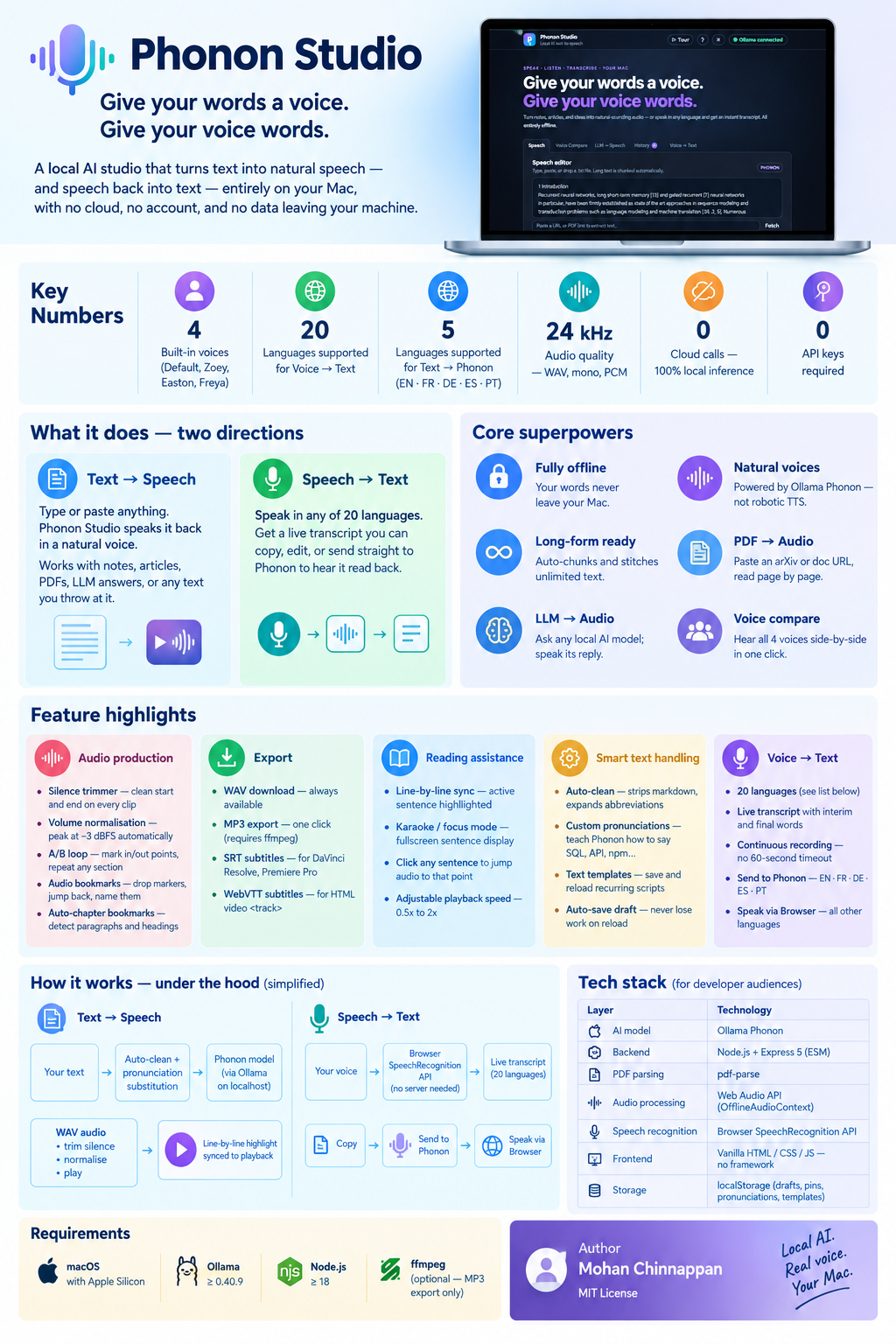
|
|
12
|
+
|
|
13
|
+
|
|
14
|
+
## What is this?
|
|
15
|
+
|
|
16
|
+
Phonon Studio is a polished browser-based TTS app that turns any text into
|
|
17
|
+
natural-sounding WAV audio using the
|
|
18
|
+
[Phonon](https://ollama.com/library/phonon) model — no cloud account, no API
|
|
19
|
+
key, no data leaving your machine.
|
|
20
|
+
|
|
21
|
+
## Features
|
|
22
|
+
|
|
23
|
+
| Feature | Details |
|
|
24
|
+
|---|---|
|
|
25
|
+
| Local inference | Calls `http://localhost:11434/v1/audio/speech` |
|
|
26
|
+
| Voice selection | Default, Zoey, Easton, Freya |
|
|
27
|
+
| Auto chunking | Splits long text at sentence boundaries, stitches WAV |
|
|
28
|
+
| Voice compare | Generate all voices in parallel, side-by-side players |
|
|
29
|
+
| LLM → Speech | Ask any local Ollama model, send reply to Phonon |
|
|
30
|
+
| Waveform | Live animated frequency bars while audio plays |
|
|
31
|
+
| Speed control | 0.5× – 2× playback rate, no re-generation |
|
|
32
|
+
| WAV + MP3 download | MP3 via ffmpeg (optional) |
|
|
33
|
+
| Silence trimmer | Leading/trailing silence stripped from every generated WAV |
|
|
34
|
+
| History + pinning | Last 20 generations; ★ to pin entries across sessions |
|
|
35
|
+
| History filter | Filter history by voice |
|
|
36
|
+
| Auto-save draft | Textarea content persists across page reloads via localStorage |
|
|
37
|
+
| Estimated duration | Live `~Xm Ys` estimate next to character count |
|
|
38
|
+
| Auto-clean text | Strips markdown, expands abbreviations before sending to TTS |
|
|
39
|
+
| URL → Speech | Paste a URL (HTML page or PDF) to extract and speak the text |
|
|
40
|
+
| PDF pagination | Multi-page PDFs load page-by-page with ← → navigation |
|
|
41
|
+
| Clipboard & drag/drop | Paste text or drop a `.txt` file |
|
|
42
|
+
| Line-by-line highlight | Active sentence highlighted in sync with audio; **Line sync** slider to tune lead/lag |
|
|
43
|
+
| SRT / VTT export | Download subtitle files from computed line timings — for video editors or web `<track>` |
|
|
44
|
+
| Custom pronunciations | Word → spoken form table (localStorage) applied before every generation |
|
|
45
|
+
| Karaoke / focus mode | Fullscreen sentence display with progress bar; `⛶ Focus` button or auto on generate |
|
|
46
|
+
| Browser Speech fallback | When Ollama is offline, speak via `window.speechSynthesis` — amber indicator + button |
|
|
47
|
+
| Batch queue | Queue all PDF pages for sequential generation; per-page WAV downloads as they complete |
|
|
48
|
+
| Audio bookmarks | Press `B` to drop timestamps; seek chips + yellow waveform markers; click waveform to seek |
|
|
49
|
+
| Click-to-seek on lines | Click any sentence in the highlight panel to jump audio to that line's start |
|
|
50
|
+
| A/B loop | `[` set loop-in · `]` set loop-out; purple waveform region; auto-repeats section |
|
|
51
|
+
| Text templates | Save named text snippets to localStorage; quick-load into editor |
|
|
52
|
+
| Volume normalisation | Peak normalised to −3 dBFS after generation (toggle in controls) |
|
|
53
|
+
| Copy sent text | See exactly what was dispatched to TTS after all transforms |
|
|
54
|
+
| Auto-chapter bookmarks | Detect paragraph breaks and headings; create bookmarks at each chapter |
|
|
55
|
+
| Voice → Text | Speak in 20 languages; live transcript with copy, send to Phonon (EN/FR/DE/ES/PT), or speak back via browser TTS for all other languages |
|
|
56
|
+
| Keyboard shortcuts | `Cmd+Enter` generate · `P` play/pause · `B` bookmark · `[`/`]` loop · `?` help |
|
|
57
|
+
| Guided tour | Step-by-step spotlight walkthrough of every feature |
|
|
58
|
+
| Splash screen | Welcome screen with feature highlights on first visit |
|
|
59
|
+
| Tooltips | Hover any control for an inline description |
|
|
60
|
+
| Dark / Light theme | Toggle in the topbar, saved to localStorage |
|
|
61
|
+
| Sticky header | Topbar stays visible while scrolling |
|
|
62
|
+
|
|
63
|
+
## Requirements
|
|
64
|
+
|
|
65
|
+
- **macOS with Apple Silicon** (Phonon model requirement)
|
|
66
|
+
- **Ollama ≥ 0.40.9** — [install](https://ollama.com)
|
|
67
|
+
- **Node.js ≥ 18**
|
|
68
|
+
- **ffmpeg** _(optional, for MP3 export)_ — `brew install ffmpeg`
|
|
69
|
+
|
|
70
|
+
## Quick start
|
|
71
|
+
|
|
72
|
+
```bash
|
|
73
|
+
# 1. Pull the model
|
|
74
|
+
ollama pull phonon
|
|
75
|
+
|
|
76
|
+
# Install Phonon studio
|
|
77
|
+
|
|
78
|
+
npm install -g phonon-studio
|
|
79
|
+
|
|
80
|
+
```
|
|
81
|
+
## Run
|
|
82
|
+
|
|
83
|
+
```bash
|
|
84
|
+
phonon-studio --port 4567
|
|
85
|
+
```
|
|
86
|
+
|
|
87
|
+
> The app requires an explicit port. It will print a clear error and exit if
|
|
88
|
+
> neither `--port` nor `PORT` is provided.
|
|
89
|
+
|
|
90
|
+
## Usage
|
|
91
|
+
|
|
92
|
+
1. **Speech tab** — type or paste text, pick a voice, press **Generate speech**
|
|
93
|
+
(or `Cmd+Enter`). Long text is chunked automatically. Enable **Auto-clean**
|
|
94
|
+
to strip markdown and expand abbreviations before synthesis. After generation,
|
|
95
|
+
the active sentence is highlighted as the audio plays; use the **Line sync**
|
|
96
|
+
slider to adjust if the highlight leads or lags the voice.
|
|
97
|
+
2. **URL fetch** — paste any URL (web page or PDF) and click **Fetch**. PDFs
|
|
98
|
+
load page-by-page with ← → navigation. The Attention Is All You Need paper
|
|
99
|
+
(`arxiv.org/pdf/1706.03762`) is pre-filled as a demo.
|
|
100
|
+
3. **Voice Compare tab** — enter text in Speech, switch here, click
|
|
101
|
+
**Compare all voices** to hear all four in parallel.
|
|
102
|
+
4. **LLM → Speech tab** — pick an Ollama chat model, ask a question, click
|
|
103
|
+
**Send to Phonon** to speak the response.
|
|
104
|
+
5. **History tab** — replay or download any of your last 20 generations.
|
|
105
|
+
Click ☆ to pin an entry so it survives page reloads.
|
|
106
|
+
6. **Voice → Text tab** — pick a language, click **Start recording**, speak.
|
|
107
|
+
The live transcript appears as you talk (interim words in italic, final text
|
|
108
|
+
in normal weight). Click **Copy text** or, for EN/FR/DE/ES/PT, click
|
|
109
|
+
**Send to Phonon** to load the transcript straight into the Speech editor.
|
|
110
|
+
7. **Keyboard shortcuts** — `Cmd+Enter` generate, `P` play/pause, `B` bookmark,
|
|
111
|
+
`[`/`]` A/B loop in/out, `?` help, `Esc` close overlays/karaoke,
|
|
112
|
+
`←`/`→` tour navigation.
|
|
113
|
+
7. **Guided tour** — click **▷ Tour** in the header (or "Take a guided tour"
|
|
114
|
+
on the splash screen) for a step-by-step walkthrough.
|
|
115
|
+
|
|
116
|
+
|
|
117
|
+
## API
|
|
118
|
+
|
|
119
|
+
| Endpoint | Description |
|
|
120
|
+
|---|---|
|
|
121
|
+
| `GET /api/health` | Ollama status + model check + ffmpeg flag |
|
|
122
|
+
| `GET /api/models` | Available chat models |
|
|
123
|
+
| `POST /api/speech` | `{ text, voice }` → WAV stream |
|
|
124
|
+
| `POST /api/chat` | `{ message, model }` → `{ text }` |
|
|
125
|
+
| `POST /api/convert/mp3` | WAV body → MP3 (requires ffmpeg) |
|
|
126
|
+
| `GET /api/fetch-url?url=` | Fetch URL → extract text (HTML or PDF) |
|
|
127
|
+
|
|
128
|
+
## Environment variables
|
|
129
|
+
|
|
130
|
+
| Variable | Purpose |
|
|
131
|
+
|---|---|
|
|
132
|
+
| `PORT` | Listening port (required) |
|
|
133
|
+
| `OLLAMA_URL` | Ollama base URL (default: `http://127.0.0.1:11434`) |
|
|
134
|
+
| `PHONON_MODEL` | TTS model name (default: `phonon`) |
|
|
135
|
+
|
|
136
|
+
## License
|
|
137
|
+
|
|
138
|
+
MIT — see [LICENSE](LICENSE)
|
|
139
|
+
|
|
140
|
+
## Author
|
|
141
|
+
|
|
142
|
+
**Mohan Chinnappan**
|
package/package.json
CHANGED
|
@@ -1,6 +1,42 @@
|
|
|
1
1
|
{
|
|
2
2
|
"name": "phonon-studio",
|
|
3
|
-
"version": "
|
|
4
|
-
"
|
|
5
|
-
"
|
|
6
|
-
|
|
3
|
+
"version": "1.0.0",
|
|
4
|
+
"description": "Local AI text-to-speech web app powered by Ollama Phonon",
|
|
5
|
+
"type": "module",
|
|
6
|
+
"author": "Mohan Chinnappan",
|
|
7
|
+
"license": "MIT",
|
|
8
|
+
"keywords": [
|
|
9
|
+
"tts",
|
|
10
|
+
"text-to-speech",
|
|
11
|
+
"ollama",
|
|
12
|
+
"phonon",
|
|
13
|
+
"local-ai",
|
|
14
|
+
"speech",
|
|
15
|
+
"audio",
|
|
16
|
+
"wav",
|
|
17
|
+
"mp3",
|
|
18
|
+
"browser",
|
|
19
|
+
"express"
|
|
20
|
+
],
|
|
21
|
+
"files": [
|
|
22
|
+
"server.js",
|
|
23
|
+
"public/",
|
|
24
|
+
"dist/",
|
|
25
|
+
"README.md",
|
|
26
|
+
"SKILLS.md",
|
|
27
|
+
"CLAUDE.md"
|
|
28
|
+
],
|
|
29
|
+
"bin": {
|
|
30
|
+
"phonon-studio": "./server.js"
|
|
31
|
+
},
|
|
32
|
+
"scripts": {
|
|
33
|
+
"start": "node server.js",
|
|
34
|
+
"dev": "node --watch server.js",
|
|
35
|
+
"build": "obfuscli build --project . --output dist --preset medium --exclude 'node_modules/**,dist/**,*.md'"
|
|
36
|
+
},
|
|
37
|
+
"dependencies": {
|
|
38
|
+
"express": "^5.0.0",
|
|
39
|
+
"open-resource": "^1.0.2",
|
|
40
|
+
"pdf-parse": "^2.4.5"
|
|
41
|
+
}
|
|
42
|
+
}
|