penguins-eggs 9.4.2 → 9.4.4
This diff represents the content of publicly available package versions that have been released to one of the supported registries. The information contained in this diff is provided for informational purposes only and reflects changes between package versions as they appear in their respective public registries.
- package/.oclif.manifest.json +1 -1
- package/README.md +72 -49
- package/dist/classes/distro.js +8 -5
- package/dist/classes/family/archlinux.js +1 -1
- package/dist/classes/family/debian.js +1 -1
- package/dist/classes/family/fedora.js +1 -1
- package/dist/classes/family/suse.js +1 -1
- package/dist/classes/ovary.js +4 -4
- package/dist/classes/pacman.js +1 -1
- package/dist/classes/yolk.js +1 -1
- package/dist/commands/adapt.js +1 -1
- package/dist/commands/analyze.js +1 -1
- package/dist/commands/calamares.js +4 -4
- package/dist/commands/config.js +2 -2
- package/dist/commands/cuckoo.js +1 -1
- package/dist/commands/dad.js +1 -1
- package/dist/commands/export/deb.js +1 -1
- package/dist/commands/export/iso.js +1 -1
- package/dist/commands/install.js +1 -1
- package/dist/commands/kill.js +1 -1
- package/dist/commands/mom.js +1 -1
- package/dist/commands/produce.js +1 -1
- package/dist/commands/status.js +1 -1
- package/dist/commands/syncfrom.js +1 -1
- package/dist/commands/syncto.js +1 -1
- package/dist/commands/tools/clean.js +1 -1
- package/dist/commands/tools/ppa.js +1 -1
- package/dist/commands/tools/skel.js +1 -1
- package/dist/commands/tools/stat.js +1 -1
- package/dist/commands/tools/yolk.js +1 -1
- package/dist/commands/update.js +1 -1
- package/dist/commands/wardrobe/get.js +1 -1
- package/dist/commands/wardrobe/list.js +1 -1
- package/dist/commands/wardrobe/show.js +1 -1
- package/dist/commands/wardrobe/wear.js +1 -1
- package/manpages/doc/man/eggs.1.gz +0 -0
- package/manpages/doc/man/eggs.html +196 -121
- package/package.json +21 -27
- package/scripts/README.md +1 -1
- package/scripts/_eggs +3 -3
- package/scripts/mom.sh +30 -20
package/.oclif.manifest.json
CHANGED
|
@@ -1 +1 @@
|
|
|
1
|
-
{"version":"9.4.2","commands":{"adapt":{"id":"adapt","description":"adapt monitor resolution for VM only","strict":true,"pluginName":"penguins-eggs","pluginAlias":"penguins-eggs","pluginType":"core","aliases":[],"examples":["eggs adapt"],"flags":{"help":{"name":"help","type":"boolean","char":"h","description":"Show CLI help.","allowNo":false},"verbose":{"name":"verbose","type":"boolean","char":"v","allowNo":false}},"args":[]},"analyze":{"id":"analyze","description":"analyze for syncto","strict":true,"pluginName":"penguins-eggs","pluginAlias":"penguins-eggs","pluginType":"core","aliases":[],"examples":["sudo eggs analyze"],"flags":{"help":{"name":"help","type":"boolean","char":"h","description":"Show CLI help.","allowNo":false},"verbose":{"name":"verbose","type":"boolean","char":"v","description":"verbose","allowNo":false}},"args":[]},"calamares":{"id":"calamares","description":"configure calamares or install or configure it","strict":true,"pluginName":"penguins-eggs","pluginAlias":"penguins-eggs","pluginType":"core","aliases":[],"examples":["sudo eggs calamares","sudo eggs calamares --install","sudo eggs calamares --install --theme=/path/to/theme","sudo eggs calamares --remove"],"flags":{"help":{"name":"help","type":"boolean","char":"h","description":"Show CLI help.","allowNo":false},"install":{"name":"install","type":"boolean","char":"i","description":"install calamares and it's dependencies","allowNo":false},"nointeractive":{"name":"nointeractive","type":"boolean","char":"n","description":"no user interaction","allowNo":false},"release":{"name":"release","type":"boolean","char":"r","description":"release: remove calamares and all it's dependencies after the installation","allowNo":false},"remove":{"name":"remove","type":"boolean","description":"remove calamares and it's dependencies","allowNo":false},"theme":{"name":"theme","type":"option","description":"theme/branding for eggs and calamares","multiple":false},"verbose":{"name":"verbose","type":"boolean","char":"v","allowNo":false}},"args":[]},"config":{"id":"config","description":"Configure and install prerequisites deb packages to run it","strict":true,"pluginName":"penguins-eggs","pluginAlias":"penguins-eggs","pluginType":"core","aliases":[],"examples":["sudo eggs config","sudo eggs config --clean","sudo eggs config --clean --nointeractive"],"flags":{"clean":{"name":"clean","type":"boolean","char":"c","description":"remove old configuration before to create new one","allowNo":false},"help":{"name":"help","type":"boolean","char":"h","description":"Show CLI help.","allowNo":false},"nointeractive":{"name":"nointeractive","type":"boolean","char":"n","description":"no user interaction","allowNo":false},"verbose":{"name":"verbose","type":"boolean","char":"v","description":"verbose","allowNo":false}},"args":[]},"cuckoo":{"id":"cuckoo","description":"PXE start with proxy-dhcp","strict":true,"pluginName":"penguins-eggs","pluginAlias":"penguins-eggs","pluginType":"core","aliases":[],"examples":["sudo eggs cuckoo"],"flags":{"help":{"name":"help","type":"boolean","char":"h","description":"Show CLI help.","allowNo":false}},"args":[]},"dad":{"id":"dad","description":"ask help from daddy - TUI configuration helper","strict":true,"pluginName":"penguins-eggs","pluginAlias":"penguins-eggs","pluginType":"core","aliases":[],"examples":["sudo dad","sudo dad --clean","sudo dad --default"],"flags":{"clean":{"name":"clean","type":"boolean","char":"c","description":"remove old configuration before to create","allowNo":false},"default":{"name":"default","type":"boolean","char":"d","description":"remove old configuration and force default","allowNo":false},"help":{"name":"help","type":"boolean","char":"h","description":"Show CLI help.","allowNo":false},"verbose":{"name":"verbose","type":"boolean","char":"v","allowNo":false}},"args":[]},"install":{"id":"install","description":"krill: the CLI system installer - the egg became a penguin!","strict":true,"pluginName":"penguins-eggs","pluginAlias":"penguins-eggs","pluginType":"core","aliases":[],"examples":["sudo eggs install","sudo eggs install --unattended --halt","sudo eggs install --custom it"],"flags":{"crypted":{"name":"crypted","type":"boolean","char":"k","description":"Crypted CLI installation","allowNo":false},"custom":{"name":"custom","type":"option","char":"c","description":"custom unattended configuration","multiple":false},"domain":{"name":"domain","type":"option","char":"d","description":"Domain name, defult: .local","multiple":false},"halt":{"name":"halt","type":"boolean","char":"H","description":"Halt the system after installation","allowNo":false},"help":{"name":"help","type":"boolean","char":"h","description":"Show CLI help.","allowNo":false},"ip":{"name":"ip","type":"boolean","char":"i","description":"hostname as ip, eg: ip-192-168-1-33","allowNo":false},"nointeractive":{"name":"nointeractive","type":"boolean","char":"n","description":"no user interaction","allowNo":false},"none":{"name":"none","type":"boolean","char":"N","description":"Swap none: 256M","allowNo":false},"pve":{"name":"pve","type":"boolean","char":"p","description":"Proxmox VE install","allowNo":false},"random":{"name":"random","type":"boolean","char":"r","description":"Add random to hostname, eg: colibri-ay412dt","allowNo":false},"small":{"name":"small","type":"boolean","char":"s","description":"Swap small: RAM","allowNo":false},"suspend":{"name":"suspend","type":"boolean","char":"S","description":"Swap suspend: RAM x 2","allowNo":false},"unattended":{"name":"unattended","type":"boolean","char":"u","description":"Unattended installation","allowNo":false},"verbose":{"name":"verbose","type":"boolean","char":"v","description":"Verbose","allowNo":false}},"args":[]},"kill":{"id":"kill","description":"kill the eggs/free the nest","strict":true,"pluginName":"penguins-eggs","pluginAlias":"penguins-eggs","pluginType":"core","aliases":[],"examples":["sudo eggs kill"],"flags":{"help":{"name":"help","type":"boolean","char":"h","description":"Show CLI help.","allowNo":false},"nointeractive":{"name":"nointeractive","type":"boolean","char":"n","description":"no user interaction","allowNo":false},"verbose":{"name":"verbose","type":"boolean","char":"v","description":"verbose","allowNo":false}},"args":[]},"mom":{"id":"mom","description":"ask help from mommy - TUI helper","strict":true,"pluginName":"penguins-eggs","pluginAlias":"penguins-eggs","pluginType":"core","aliases":[],"examples":["eggs mom"],"flags":{"help":{"name":"help","type":"boolean","char":"h","description":"Show CLI help.","allowNo":false}},"args":[]},"produce":{"id":"produce","description":"produce a live image from your system whithout your data","strict":true,"pluginName":"penguins-eggs","pluginAlias":"penguins-eggs","pluginType":"core","aliases":[],"examples":["sudo eggs produce","sudo eggs produce --standard","sudo eggs produce --max","sudo eggs produce --max --basename=colibri","sudo eggs produce --cryptedclone","sudo eggs produce --clone","sudo eggs produce --basename=colibri","sudo eggs produce --basename=colibri --theme /path/to/theme --addons adapt"],"flags":{"addons":{"name":"addons","type":"option","description":"addons to be used: adapt, ichoice, pve, rsupport","multiple":true},"basename":{"name":"basename","type":"option","description":"basename","multiple":false},"clone":{"name":"clone","type":"boolean","char":"c","description":"clone","allowNo":false},"cryptedclone":{"name":"cryptedclone","type":"boolean","char":"C","description":"crypted clone","allowNo":false},"help":{"name":"help","type":"boolean","char":"h","description":"Show CLI help.","allowNo":false},"max":{"name":"max","type":"boolean","char":"m","description":"max compression","allowNo":false},"nointeractive":{"name":"nointeractive","type":"boolean","char":"n","description":"no user interaction","allowNo":false},"prefix":{"name":"prefix","type":"option","char":"p","description":"prefix","multiple":false},"release":{"name":"release","type":"boolean","description":"release: max compression, remove penguins-eggs and calamares after installation","allowNo":false},"script":{"name":"script","type":"boolean","char":"s","description":"script mode. Generate scripts to manage iso build","allowNo":false},"standard":{"name":"standard","type":"boolean","char":"f","description":"standard compression","allowNo":false},"theme":{"name":"theme","type":"option","description":"theme for livecd, calamares branding and partitions","multiple":false},"verbose":{"name":"verbose","type":"boolean","char":"v","description":"verbose","allowNo":false},"yolk":{"name":"yolk","type":"boolean","char":"y","description":"-y force yolk renew","allowNo":false}},"args":[]},"status":{"id":"status","description":"informations about eggs status","strict":true,"pluginName":"penguins-eggs","pluginAlias":"penguins-eggs","pluginType":"core","aliases":[],"examples":["eggs status"],"flags":{"help":{"name":"help","type":"boolean","char":"h","description":"Show CLI help.","allowNo":false},"verbose":{"name":"verbose","type":"boolean","char":"v","allowNo":false}},"args":[]},"syncfrom":{"id":"syncfrom","description":"restore users and user data from a LUKS volumes","strict":true,"pluginName":"penguins-eggs","pluginAlias":"penguins-eggs","pluginType":"core","aliases":[],"examples":["sudo eggs syncfrom","sudo eggs syncfrom --file /path/to/fileLUKS"],"flags":{"delete":{"name":"delete","type":"option","description":"rsync --delete delete extraneous files from dest dirs","multiple":false},"file":{"name":"file","type":"option","char":"f","description":"file LUKS volume encrypted","multiple":false},"help":{"name":"help","type":"boolean","char":"h","description":"Show CLI help.","allowNo":false},"rootdir":{"name":"rootdir","type":"option","char":"r","description":"rootdir of the installed system, when used from live","multiple":false},"verbose":{"name":"verbose","type":"boolean","char":"v","description":"verbose","allowNo":false}},"args":[]},"syncto":{"id":"syncto","description":"saves users and user data in a LUKS volume inside the iso","strict":true,"pluginName":"penguins-eggs","pluginAlias":"penguins-eggs","pluginType":"core","aliases":[],"examples":["sudo eggs syncto","sudo eggs syncto --file /path/to/fileLUKS"],"flags":{"delete":{"name":"delete","type":"option","description":"rsync --delete delete extraneous files from dest dirs","multiple":false},"file":{"name":"file","type":"option","char":"f","description":"file LUKS volume encrypted","multiple":false},"help":{"name":"help","type":"boolean","char":"h","description":"Show CLI help.","allowNo":false},"verbose":{"name":"verbose","type":"boolean","char":"v","description":"verbose","allowNo":false}},"args":[]},"update":{"id":"update","description":"update the Penguins' eggs tool","strict":true,"pluginName":"penguins-eggs","pluginAlias":"penguins-eggs","pluginType":"core","aliases":[],"examples":["eggs update"],"flags":{"help":{"name":"help","type":"boolean","char":"h","description":"Show CLI help.","allowNo":false},"verbose":{"name":"verbose","type":"boolean","char":"v","description":"verbose","allowNo":false}},"args":[]},"export:deb":{"id":"export:deb","description":"export deb/docs/iso to the destination host","strict":true,"pluginName":"penguins-eggs","pluginAlias":"penguins-eggs","pluginType":"core","aliases":[],"examples":["eggs export deb","eggs export deb --clean","eggs export deb --all"],"flags":{"all":{"name":"all","type":"boolean","char":"a","description":"export all archs","allowNo":false},"clean":{"name":"clean","type":"boolean","char":"c","description":"remove old .deb before to copy","allowNo":false},"help":{"name":"help","type":"boolean","char":"h","description":"Show CLI help.","allowNo":false},"verbose":{"name":"verbose","type":"boolean","char":"v","description":"verbose","allowNo":false}},"args":[]},"export:iso":{"id":"export:iso","description":"export iso in the destination host","strict":true,"pluginName":"penguins-eggs","pluginAlias":"penguins-eggs","pluginType":"core","aliases":[],"examples":["eggs export iso","eggs export iso --clean"],"flags":{"clean":{"name":"clean","type":"boolean","char":"c","description":"delete old ISOs before to copy","allowNo":false},"help":{"name":"help","type":"boolean","char":"h","description":"Show CLI help.","allowNo":false},"verbose":{"name":"verbose","type":"boolean","char":"v","description":"verbose","allowNo":false}},"args":[]},"tools:clean":{"id":"tools:clean","description":"clean system log, apt, etc","strict":true,"pluginName":"penguins-eggs","pluginAlias":"penguins-eggs","pluginType":"core","aliases":[],"examples":["sudo eggs tools clean"],"flags":{"help":{"name":"help","type":"boolean","char":"h","description":"Show CLI help.","allowNo":false},"nointeractive":{"name":"nointeractive","type":"boolean","char":"n","description":"no user interaction","allowNo":false},"verbose":{"name":"verbose","type":"boolean","char":"v","description":"verbose","allowNo":false}},"args":[]},"tools:ppa":{"id":"tools:ppa","description":"add/remove PPA repositories (Debian family)","strict":true,"pluginName":"penguins-eggs","pluginAlias":"penguins-eggs","pluginType":"core","aliases":[],"examples":["sudo eggs tools ppa --add","sudo eggs tools ppa --remove"],"flags":{"add":{"name":"add","type":"boolean","char":"a","description":"add penguins-eggs PPA repository","allowNo":false},"help":{"name":"help","type":"boolean","char":"h","description":"Show CLI help.","allowNo":false},"nointeractive":{"name":"nointeractive","type":"boolean","char":"n","description":"no user interaction","allowNo":false},"remove":{"name":"remove","type":"boolean","char":"r","description":"remove penguins-eggs PPA repository","allowNo":false},"verbose":{"name":"verbose","type":"boolean","char":"v","description":"verbose","allowNo":false}},"args":[]},"tools:skel":{"id":"tools:skel","description":"update skel from home configuration","strict":true,"pluginName":"penguins-eggs","pluginAlias":"penguins-eggs","pluginType":"core","aliases":[],"examples":["sudo eggs skel","sudo eggs skel --user user-to-be-copied"],"flags":{"help":{"name":"help","type":"boolean","char":"h","description":"Show CLI help.","allowNo":false},"user":{"name":"user","type":"option","char":"u","description":"user to be used","multiple":false},"verbose":{"name":"verbose","type":"boolean","char":"v","allowNo":false}},"args":[]},"tools:stat":{"id":"tools:stat","description":"get statistics from sourceforge","strict":true,"pluginName":"penguins-eggs","pluginAlias":"penguins-eggs","pluginType":"core","aliases":[],"examples":["eggs tools stat","eggs tools stat --month","eggs tools stat --year"],"flags":{"help":{"name":"help","type":"boolean","char":"h","description":"Show CLI help.","allowNo":false},"month":{"name":"month","type":"boolean","char":"m","description":"current month","allowNo":false},"year":{"name":"year","type":"boolean","char":"y","description":"current year","allowNo":false}},"args":[]},"tools:yolk":{"id":"tools:yolk","description":"configure eggs to install without internet","strict":true,"pluginName":"penguins-eggs","pluginAlias":"penguins-eggs","pluginType":"core","aliases":[],"examples":["sudo eggs yolk"],"flags":{"help":{"name":"help","type":"boolean","char":"h","description":"Show CLI help.","allowNo":false},"verbose":{"name":"verbose","type":"boolean","char":"v","allowNo":false}},"args":[],"dir":"/var/local/yolk"},"wardrobe:get":{"id":"wardrobe:get","description":"get warorobe","strict":true,"pluginName":"penguins-eggs","pluginAlias":"penguins-eggs","pluginType":"core","aliases":[],"examples":["eggs wardrobe get","eggs wardrobe get your-wardrobe"],"flags":{"help":{"name":"help","type":"boolean","char":"h","description":"Show CLI help.","allowNo":false},"verbose":{"name":"verbose","type":"boolean","char":"v","allowNo":false}},"args":[{"name":"repo","description":"repository to get","required":false}]},"wardrobe:list":{"id":"wardrobe:list","description":"list costumes and accessoires in wardrobe","strict":true,"pluginName":"penguins-eggs","pluginAlias":"penguins-eggs","pluginType":"core","aliases":[],"examples":["eggs wardrobe list","eggs wardrobe list your-wardrove"],"flags":{"help":{"name":"help","type":"boolean","char":"h","description":"Show CLI help.","allowNo":false},"verbose":{"name":"verbose","type":"boolean","char":"v","allowNo":false}},"args":[{"name":"wardrobe","description":"wardrobe","required":false}]},"wardrobe:show":{"id":"wardrobe:show","description":"show costumes/accessories in wardrobe","strict":true,"pluginName":"penguins-eggs","pluginAlias":"penguins-eggs","pluginType":"core","aliases":[],"examples":["eggs wardrobe show colibri","eggs wardrobe show accessories/firmwares","eggs wardrobe show accessories/"],"flags":{"help":{"name":"help","type":"boolean","char":"h","description":"Show CLI help.","allowNo":false},"json":{"name":"json","type":"boolean","char":"j","description":"output JSON","allowNo":false},"verbose":{"name":"verbose","type":"boolean","char":"v","allowNo":false},"wardrobe":{"name":"wardrobe","type":"option","char":"w","description":"wardrobe","multiple":false}},"args":[{"name":"costume","description":"costume","required":false}],"example":["eggs wardrobe show colibri","eggs wardrobe show accessories/firmwares","eggs wardrobe show accessories/"]},"wardrobe:wear":{"id":"wardrobe:wear","description":"wear costume/accessories from wardrobe","strict":true,"pluginName":"penguins-eggs","pluginAlias":"penguins-eggs","pluginType":"core","aliases":[],"examples":["sudo eggs wardrobe wear duck","sudo eggs wardrobe wear accessories/firmwares","sudo eggs wardrobe wear wagtail/waydroid"],"flags":{"help":{"name":"help","type":"boolean","char":"h","description":"Show CLI help.","allowNo":false},"no_accessories":{"name":"no_accessories","type":"boolean","char":"a","description":"not install accessories","allowNo":false},"no_firmwares":{"name":"no_firmwares","type":"boolean","char":"f","description":"not install firmwares","allowNo":false},"silent":{"name":"silent","type":"boolean","char":"s","allowNo":false},"verbose":{"name":"verbose","type":"boolean","char":"v","allowNo":false},"wardrobe":{"name":"wardrobe","type":"option","char":"w","description":"wardrobe","multiple":false}},"args":[{"name":"costume","description":"costume","required":false}]}}}
|
|
1
|
+
{"version":"9.4.4","commands":{"adapt":{"id":"adapt","description":"adapt monitor resolution for VM only","strict":true,"pluginName":"penguins-eggs","pluginAlias":"penguins-eggs","pluginType":"core","aliases":[],"examples":["eggs adapt"],"flags":{"help":{"name":"help","type":"boolean","char":"h","description":"Show CLI help.","allowNo":false},"verbose":{"name":"verbose","type":"boolean","char":"v","allowNo":false}},"args":[]},"analyze":{"id":"analyze","description":"analyze for syncto","strict":true,"pluginName":"penguins-eggs","pluginAlias":"penguins-eggs","pluginType":"core","aliases":[],"examples":["sudo eggs analyze"],"flags":{"help":{"name":"help","type":"boolean","char":"h","description":"Show CLI help.","allowNo":false},"verbose":{"name":"verbose","type":"boolean","char":"v","description":"verbose","allowNo":false}},"args":[]},"calamares":{"id":"calamares","description":"configure calamares or install or configure it","strict":true,"pluginName":"penguins-eggs","pluginAlias":"penguins-eggs","pluginType":"core","aliases":[],"examples":["sudo eggs calamares","sudo eggs calamares --install","sudo eggs calamares --install --theme=/path/to/theme","sudo eggs calamares --remove"],"flags":{"help":{"name":"help","type":"boolean","char":"h","description":"Show CLI help.","allowNo":false},"install":{"name":"install","type":"boolean","char":"i","description":"install calamares and its dependencies","allowNo":false},"nointeractive":{"name":"nointeractive","type":"boolean","char":"n","description":"no user interaction","allowNo":false},"release":{"name":"release","type":"boolean","char":"r","description":"release: remove calamares and all its dependencies after the installation","allowNo":false},"remove":{"name":"remove","type":"boolean","description":"remove calamares and its dependencies","allowNo":false},"theme":{"name":"theme","type":"option","description":"theme/branding for eggs and calamares","multiple":false},"verbose":{"name":"verbose","type":"boolean","char":"v","allowNo":false}},"args":[]},"config":{"id":"config","description":"Configure and install prerequisites deb packages to run it","strict":true,"pluginName":"penguins-eggs","pluginAlias":"penguins-eggs","pluginType":"core","aliases":[],"examples":["sudo eggs config","sudo eggs config --clean","sudo eggs config --clean --nointeractive"],"flags":{"clean":{"name":"clean","type":"boolean","char":"c","description":"remove old configuration before to create new one","allowNo":false},"help":{"name":"help","type":"boolean","char":"h","description":"Show CLI help.","allowNo":false},"nointeractive":{"name":"nointeractive","type":"boolean","char":"n","description":"no user interaction","allowNo":false},"verbose":{"name":"verbose","type":"boolean","char":"v","description":"verbose","allowNo":false}},"args":[]},"cuckoo":{"id":"cuckoo","description":"PXE start with proxy-dhcp","strict":true,"pluginName":"penguins-eggs","pluginAlias":"penguins-eggs","pluginType":"core","aliases":[],"examples":["sudo eggs cuckoo"],"flags":{"help":{"name":"help","type":"boolean","char":"h","description":"Show CLI help.","allowNo":false}},"args":[]},"dad":{"id":"dad","description":"ask help from daddy - TUI configuration helper","strict":true,"pluginName":"penguins-eggs","pluginAlias":"penguins-eggs","pluginType":"core","aliases":[],"examples":["sudo dad","sudo dad --clean","sudo dad --default"],"flags":{"clean":{"name":"clean","type":"boolean","char":"c","description":"remove old configuration before to create","allowNo":false},"default":{"name":"default","type":"boolean","char":"d","description":"remove old configuration and force default","allowNo":false},"help":{"name":"help","type":"boolean","char":"h","description":"Show CLI help.","allowNo":false},"verbose":{"name":"verbose","type":"boolean","char":"v","allowNo":false}},"args":[]},"install":{"id":"install","description":"krill: the CLI system installer - the egg became a penguin!","strict":true,"pluginName":"penguins-eggs","pluginAlias":"penguins-eggs","pluginType":"core","aliases":[],"examples":["sudo eggs install","sudo eggs install --unattended --halt","sudo eggs install --custom it"],"flags":{"crypted":{"name":"crypted","type":"boolean","char":"k","description":"Crypted CLI installation","allowNo":false},"custom":{"name":"custom","type":"option","char":"c","description":"custom unattended configuration","multiple":false},"domain":{"name":"domain","type":"option","char":"d","description":"Domain name, defult: .local","multiple":false},"halt":{"name":"halt","type":"boolean","char":"H","description":"Halt the system after installation","allowNo":false},"help":{"name":"help","type":"boolean","char":"h","description":"Show CLI help.","allowNo":false},"ip":{"name":"ip","type":"boolean","char":"i","description":"hostname as ip, eg: ip-192-168-1-33","allowNo":false},"nointeractive":{"name":"nointeractive","type":"boolean","char":"n","description":"no user interaction","allowNo":false},"none":{"name":"none","type":"boolean","char":"N","description":"Swap none: 256M","allowNo":false},"pve":{"name":"pve","type":"boolean","char":"p","description":"Proxmox VE install","allowNo":false},"random":{"name":"random","type":"boolean","char":"r","description":"Add random to hostname, eg: colibri-ay412dt","allowNo":false},"small":{"name":"small","type":"boolean","char":"s","description":"Swap small: RAM","allowNo":false},"suspend":{"name":"suspend","type":"boolean","char":"S","description":"Swap suspend: RAM x 2","allowNo":false},"unattended":{"name":"unattended","type":"boolean","char":"u","description":"Unattended installation","allowNo":false},"verbose":{"name":"verbose","type":"boolean","char":"v","description":"Verbose","allowNo":false}},"args":[]},"kill":{"id":"kill","description":"kill the eggs/free the nest","strict":true,"pluginName":"penguins-eggs","pluginAlias":"penguins-eggs","pluginType":"core","aliases":[],"examples":["sudo eggs kill"],"flags":{"help":{"name":"help","type":"boolean","char":"h","description":"Show CLI help.","allowNo":false},"nointeractive":{"name":"nointeractive","type":"boolean","char":"n","description":"no user interaction","allowNo":false},"verbose":{"name":"verbose","type":"boolean","char":"v","description":"verbose","allowNo":false}},"args":[]},"mom":{"id":"mom","description":"ask help from mommy - TUI helper","strict":true,"pluginName":"penguins-eggs","pluginAlias":"penguins-eggs","pluginType":"core","aliases":[],"examples":["eggs mom"],"flags":{"help":{"name":"help","type":"boolean","char":"h","description":"Show CLI help.","allowNo":false}},"args":[]},"produce":{"id":"produce","description":"produce a live image from your system whithout your data","strict":true,"pluginName":"penguins-eggs","pluginAlias":"penguins-eggs","pluginType":"core","aliases":[],"examples":["sudo eggs produce","sudo eggs produce --standard","sudo eggs produce --max","sudo eggs produce --max --basename=colibri","sudo eggs produce --cryptedclone","sudo eggs produce --clone","sudo eggs produce --basename=colibri","sudo eggs produce --basename=colibri --theme /path/to/theme --addons adapt"],"flags":{"addons":{"name":"addons","type":"option","description":"addons to be used: adapt, ichoice, pve, rsupport","multiple":true},"basename":{"name":"basename","type":"option","description":"basename","multiple":false},"clone":{"name":"clone","type":"boolean","char":"c","description":"clone","allowNo":false},"cryptedclone":{"name":"cryptedclone","type":"boolean","char":"C","description":"crypted clone","allowNo":false},"help":{"name":"help","type":"boolean","char":"h","description":"Show CLI help.","allowNo":false},"max":{"name":"max","type":"boolean","char":"m","description":"max compression","allowNo":false},"nointeractive":{"name":"nointeractive","type":"boolean","char":"n","description":"no user interaction","allowNo":false},"prefix":{"name":"prefix","type":"option","char":"p","description":"prefix","multiple":false},"release":{"name":"release","type":"boolean","description":"release: max compression, remove penguins-eggs and calamares after installation","allowNo":false},"script":{"name":"script","type":"boolean","char":"s","description":"script mode. Generate scripts to manage iso build","allowNo":false},"standard":{"name":"standard","type":"boolean","char":"f","description":"standard compression","allowNo":false},"theme":{"name":"theme","type":"option","description":"theme for livecd, calamares branding and partitions","multiple":false},"verbose":{"name":"verbose","type":"boolean","char":"v","description":"verbose","allowNo":false},"yolk":{"name":"yolk","type":"boolean","char":"y","description":"-y force yolk renew","allowNo":false}},"args":[]},"status":{"id":"status","description":"informations about eggs status","strict":true,"pluginName":"penguins-eggs","pluginAlias":"penguins-eggs","pluginType":"core","aliases":[],"examples":["eggs status"],"flags":{"help":{"name":"help","type":"boolean","char":"h","description":"Show CLI help.","allowNo":false},"verbose":{"name":"verbose","type":"boolean","char":"v","allowNo":false}},"args":[]},"syncfrom":{"id":"syncfrom","description":"restore users and user data from a LUKS volumes","strict":true,"pluginName":"penguins-eggs","pluginAlias":"penguins-eggs","pluginType":"core","aliases":[],"examples":["sudo eggs syncfrom","sudo eggs syncfrom --file /path/to/fileLUKS"],"flags":{"delete":{"name":"delete","type":"option","description":"rsync --delete delete extraneous files from dest dirs","multiple":false},"file":{"name":"file","type":"option","char":"f","description":"file LUKS volume encrypted","multiple":false},"help":{"name":"help","type":"boolean","char":"h","description":"Show CLI help.","allowNo":false},"rootdir":{"name":"rootdir","type":"option","char":"r","description":"rootdir of the installed system, when used from live","multiple":false},"verbose":{"name":"verbose","type":"boolean","char":"v","description":"verbose","allowNo":false}},"args":[]},"syncto":{"id":"syncto","description":"saves users and user data in a LUKS volume inside the iso","strict":true,"pluginName":"penguins-eggs","pluginAlias":"penguins-eggs","pluginType":"core","aliases":[],"examples":["sudo eggs syncto","sudo eggs syncto --file /path/to/fileLUKS"],"flags":{"delete":{"name":"delete","type":"option","description":"rsync --delete delete extraneous files from dest dirs","multiple":false},"file":{"name":"file","type":"option","char":"f","description":"file LUKS volume encrypted","multiple":false},"help":{"name":"help","type":"boolean","char":"h","description":"Show CLI help.","allowNo":false},"verbose":{"name":"verbose","type":"boolean","char":"v","description":"verbose","allowNo":false}},"args":[]},"update":{"id":"update","description":"update the Penguins' eggs tool","strict":true,"pluginName":"penguins-eggs","pluginAlias":"penguins-eggs","pluginType":"core","aliases":[],"examples":["eggs update"],"flags":{"help":{"name":"help","type":"boolean","char":"h","description":"Show CLI help.","allowNo":false},"verbose":{"name":"verbose","type":"boolean","char":"v","description":"verbose","allowNo":false}},"args":[]},"export:deb":{"id":"export:deb","description":"export deb/docs/iso to the destination host","strict":true,"pluginName":"penguins-eggs","pluginAlias":"penguins-eggs","pluginType":"core","aliases":[],"examples":["eggs export deb","eggs export deb --clean","eggs export deb --all"],"flags":{"all":{"name":"all","type":"boolean","char":"a","description":"export all archs","allowNo":false},"clean":{"name":"clean","type":"boolean","char":"c","description":"remove old .deb before to copy","allowNo":false},"help":{"name":"help","type":"boolean","char":"h","description":"Show CLI help.","allowNo":false},"verbose":{"name":"verbose","type":"boolean","char":"v","description":"verbose","allowNo":false}},"args":[]},"export:iso":{"id":"export:iso","description":"export iso in the destination host","strict":true,"pluginName":"penguins-eggs","pluginAlias":"penguins-eggs","pluginType":"core","aliases":[],"examples":["eggs export iso","eggs export iso --clean"],"flags":{"clean":{"name":"clean","type":"boolean","char":"c","description":"delete old ISOs before to copy","allowNo":false},"help":{"name":"help","type":"boolean","char":"h","description":"Show CLI help.","allowNo":false},"verbose":{"name":"verbose","type":"boolean","char":"v","description":"verbose","allowNo":false}},"args":[]},"tools:clean":{"id":"tools:clean","description":"clean system log, apt, etc","strict":true,"pluginName":"penguins-eggs","pluginAlias":"penguins-eggs","pluginType":"core","aliases":[],"examples":["sudo eggs tools clean"],"flags":{"help":{"name":"help","type":"boolean","char":"h","description":"Show CLI help.","allowNo":false},"nointeractive":{"name":"nointeractive","type":"boolean","char":"n","description":"no user interaction","allowNo":false},"verbose":{"name":"verbose","type":"boolean","char":"v","description":"verbose","allowNo":false}},"args":[]},"tools:ppa":{"id":"tools:ppa","description":"add/remove PPA repositories (Debian family)","strict":true,"pluginName":"penguins-eggs","pluginAlias":"penguins-eggs","pluginType":"core","aliases":[],"examples":["sudo eggs tools ppa --add","sudo eggs tools ppa --remove"],"flags":{"add":{"name":"add","type":"boolean","char":"a","description":"add penguins-eggs PPA repository","allowNo":false},"help":{"name":"help","type":"boolean","char":"h","description":"Show CLI help.","allowNo":false},"nointeractive":{"name":"nointeractive","type":"boolean","char":"n","description":"no user interaction","allowNo":false},"remove":{"name":"remove","type":"boolean","char":"r","description":"remove penguins-eggs PPA repository","allowNo":false},"verbose":{"name":"verbose","type":"boolean","char":"v","description":"verbose","allowNo":false}},"args":[]},"tools:skel":{"id":"tools:skel","description":"update skel from home configuration","strict":true,"pluginName":"penguins-eggs","pluginAlias":"penguins-eggs","pluginType":"core","aliases":[],"examples":["sudo eggs skel","sudo eggs skel --user user-to-be-copied"],"flags":{"help":{"name":"help","type":"boolean","char":"h","description":"Show CLI help.","allowNo":false},"user":{"name":"user","type":"option","char":"u","description":"user to be used","multiple":false},"verbose":{"name":"verbose","type":"boolean","char":"v","allowNo":false}},"args":[]},"tools:stat":{"id":"tools:stat","description":"get statistics from sourceforge","strict":true,"pluginName":"penguins-eggs","pluginAlias":"penguins-eggs","pluginType":"core","aliases":[],"examples":["eggs tools stat","eggs tools stat --month","eggs tools stat --year"],"flags":{"help":{"name":"help","type":"boolean","char":"h","description":"Show CLI help.","allowNo":false},"month":{"name":"month","type":"boolean","char":"m","description":"current month","allowNo":false},"year":{"name":"year","type":"boolean","char":"y","description":"current year","allowNo":false}},"args":[]},"tools:yolk":{"id":"tools:yolk","description":"configure eggs to install without internet","strict":true,"pluginName":"penguins-eggs","pluginAlias":"penguins-eggs","pluginType":"core","aliases":[],"examples":["sudo eggs yolk"],"flags":{"help":{"name":"help","type":"boolean","char":"h","description":"Show CLI help.","allowNo":false},"verbose":{"name":"verbose","type":"boolean","char":"v","allowNo":false}},"args":[],"dir":"/var/local/yolk"},"wardrobe:get":{"id":"wardrobe:get","description":"get warorobe","strict":true,"pluginName":"penguins-eggs","pluginAlias":"penguins-eggs","pluginType":"core","aliases":[],"examples":["eggs wardrobe get","eggs wardrobe get your-wardrobe"],"flags":{"help":{"name":"help","type":"boolean","char":"h","description":"Show CLI help.","allowNo":false},"verbose":{"name":"verbose","type":"boolean","char":"v","allowNo":false}},"args":[{"name":"repo","description":"repository to get","required":false}]},"wardrobe:list":{"id":"wardrobe:list","description":"list costumes and accessoires in wardrobe","strict":true,"pluginName":"penguins-eggs","pluginAlias":"penguins-eggs","pluginType":"core","aliases":[],"examples":["eggs wardrobe list","eggs wardrobe list your-wardrove"],"flags":{"help":{"name":"help","type":"boolean","char":"h","description":"Show CLI help.","allowNo":false},"verbose":{"name":"verbose","type":"boolean","char":"v","allowNo":false}},"args":[{"name":"wardrobe","description":"wardrobe","required":false}]},"wardrobe:show":{"id":"wardrobe:show","description":"show costumes/accessories in wardrobe","strict":true,"pluginName":"penguins-eggs","pluginAlias":"penguins-eggs","pluginType":"core","aliases":[],"examples":["eggs wardrobe show colibri","eggs wardrobe show accessories/firmwares","eggs wardrobe show accessories/"],"flags":{"help":{"name":"help","type":"boolean","char":"h","description":"Show CLI help.","allowNo":false},"json":{"name":"json","type":"boolean","char":"j","description":"output JSON","allowNo":false},"verbose":{"name":"verbose","type":"boolean","char":"v","allowNo":false},"wardrobe":{"name":"wardrobe","type":"option","char":"w","description":"wardrobe","multiple":false}},"args":[{"name":"costume","description":"costume","required":false}],"example":["eggs wardrobe show colibri","eggs wardrobe show accessories/firmwares","eggs wardrobe show accessories/"]},"wardrobe:wear":{"id":"wardrobe:wear","description":"wear costume/accessories from wardrobe","strict":true,"pluginName":"penguins-eggs","pluginAlias":"penguins-eggs","pluginType":"core","aliases":[],"examples":["sudo eggs wardrobe wear duck","sudo eggs wardrobe wear accessories/firmwares","sudo eggs wardrobe wear wagtail/waydroid"],"flags":{"help":{"name":"help","type":"boolean","char":"h","description":"Show CLI help.","allowNo":false},"no_accessories":{"name":"no_accessories","type":"boolean","char":"a","description":"not install accessories","allowNo":false},"no_firmwares":{"name":"no_firmwares","type":"boolean","char":"f","description":"not install firmwares","allowNo":false},"silent":{"name":"silent","type":"boolean","char":"s","allowNo":false},"verbose":{"name":"verbose","type":"boolean","char":"v","allowNo":false},"wardrobe":{"name":"wardrobe","type":"option","char":"w","description":"wardrobe","multiple":false}},"args":[{"name":"costume","description":"costume","required":false}]}}}
|
package/README.md
CHANGED
|
@@ -6,7 +6,6 @@ penguins-eggs
|
|
|
6
6
|
### Penguins' eggs are generated and new birds are ready to fly...
|
|
7
7
|
[](https://github.com/pieroproietti/penguins-eggs)
|
|
8
8
|
[](https://penguins-eggs.net)
|
|
9
|
-
[](https://penguins-eggs.sourceforge.io/)
|
|
10
9
|
[](https://penguins-eggs.net/book/)
|
|
11
10
|
[](https://npmjs.org/package/penguins-eggs)
|
|
12
11
|
[](https://sourceforge.net/projects/penguins-eggs/files/DEBS)
|
|
@@ -27,18 +26,23 @@ penguins-eggs
|
|
|
27
26
|
<!-- tocstop -->
|
|
28
27
|
|
|
29
28
|
# Presentation
|
|
30
|
-
**penguins-eggs** is a console
|
|
29
|
+
**penguins-eggs** is a console tool, under continuous development, that allows you to remaster your system and redistribute it as live images on usb sticks or via PXE.
|
|
31
30
|
|
|
32
|
-
The
|
|
31
|
+
The default behavior is total removal of the system's data and users, but it is also possible to remaster the system including the data and accounts of present users, use flag **--clone**. It is also possible to keep the users and files present under an encrypted LUKS file within the same resulting iso file, flag **--cryptedclone**.
|
|
33
32
|
|
|
34
|
-
You can easily install the resulting live system with the calamares installer or the internal TUI krill installer.
|
|
33
|
+
You can easily install the resulting live system with the calamares installer or the internal TUI krill installer.
|
|
35
34
|
|
|
36
|
-
|
|
35
|
+
It is possible to have also unattended installation using **--unattended** flag.
|
|
37
36
|
|
|
37
|
+
Thanks to the wardrobe, you can create or use scripts to switch from a "naked" version - with only a CLI interface - and "wear" it with a full GUI or server configurations.
|
|
38
|
+
|
|
39
|
+
See [penguins-wardrobe](https://github.com/pieroproietti/penguins-wardrobe), fork it and adapt it to yours needs.
|
|
38
40
|
|
|
39
41
|
# Technology
|
|
40
42
|
|
|
41
|
-
eggs is written in
|
|
43
|
+
eggs is written mostly in typescript and ideally can be used with different Linux distributions. Yes, there are big differences in terms of package manager used, path, etc, but basically the various programs used to build the live are the same.
|
|
44
|
+
|
|
45
|
+
Currently eggs supports: [Debian](https://www.debian.org/), [Devuan](https://www.devuan.org/), [Ubuntu](https://ubuntu.com/), [Arch](https://archlinux.org/), [Manjaro](https://manjaro.org/) and [derivaties](./conf/derivatives.yaml).
|
|
42
46
|
|
|
43
47
|
You can read more on the [blog](https://penguins-eggs.net/2021/11/02/distros-that-can-be-remastered-with-eggs/), some examples of iso images remastered with eggs are in the [sourceforge page of the project](https://sourceforge.net/projects/penguins-eggs/files/ISOS/).
|
|
44
48
|
|
|
@@ -46,7 +50,7 @@ You can read more on the [blog](https://penguins-eggs.net/2021/11/02/distros-tha
|
|
|
46
50
|
|
|
47
51
|
## wardrobe, themes and addons
|
|
48
52
|
|
|
49
|
-
wardrobe was added to eggs on april 2022
|
|
53
|
+
wardrobe was added to eggs on april 2022. It is a way to guide and consolidate the process of creating a custom version of Linux, starting from a CLI system. All my personal editions are passed to use wardrobe for their convenience, in that way I can organize, consolidate and manage better my work. I used birds names for my customizations, we have: colibri, duck, eagle, owl, wagtail, warbier and chicks mostly under [plastilinux](https://sourceforge.net/projects/penguins-eggs/files/ISOS/plastilinux/), [waydroid](https://sourceforge.net/projects/penguins-eggs/files/ISOS/waydroid/) or [bullseye](https://sourceforge.net/projects/penguins-eggs/files/ISOS/debian/bullseye/) on eggs' sourceforge page.
|
|
50
54
|
|
|
51
55
|
I hope peoples will be interested in wardrobe and you will end to fork the main repository and add your customizations: together will be possibile to make great steps impossible for a single developer. You can read more in wardrobe on [Penguins' eggs blog](https://penguins-eggs.net/2022/04/12/wardrobe-colibri-duck-eagle-and-owl/).
|
|
52
56
|
|
|
@@ -71,7 +75,7 @@ Saves our data within the generated iso using a LUKS volume. Our data will NOT b
|
|
|
71
75
|
* ```eggs produce --clone``` include all users data UNCRYPTED directly on the live.
|
|
72
76
|
* ```eggs produce --cryptedclone``` include all users data CRYPTED on a LUKS volume inside the iso.
|
|
73
77
|
|
|
74
|
-
Using krill: ```sudo eggs install --cli``` will automaticaly restore your CRYPTED
|
|
78
|
+
Using krill: ```sudo eggs install --cli``` will automaticaly restore your CRYPTED data during the installation.
|
|
75
79
|
|
|
76
80
|
## calamares and krill
|
|
77
81
|
eggs was developed to use [calamares](https://calamares.io) as the system installer and allows its customization with themes. It also includes its own installer, called krill, which allows you to produce and install CLI systems such as servers. krill uses a CLI interface that mimics calamares and uses the same configuration files created by eggs for calamares. This provides a "roughly similar" installation experience for both desktop and server installations. With krill it is also possible to have unattended installations, simply by adding the ``--unattended`` flag, the configuration values can be changed in ``/etc/penguins-eggs.d/krill.yaml`` and will then be used for automatic installation.
|
|
@@ -80,63 +84,82 @@ eggs was developed to use [calamares](https://calamares.io) as the system instal
|
|
|
80
84
|
The cuckoo lays its eggs in the nests of other birds, and the eggs are hatched by the latter. Similarly eggs can start a self-configuring PXE service to allow you to boot and install your iso on third party networked computers. Command cuckoo can be used either to deploy a newly created iso on an installed system or by live booting the iso itself.
|
|
81
85
|
|
|
82
86
|
## mom and dad
|
|
83
|
-
I added two built-in assistants with eggs: mom and dad. While mom is a script based on [easybashgui](https://github.com/BashGui/easybashgui) that explains the various commands and documentation, dad started as a shortcut to properly configure eggs: just type
|
|
87
|
+
I added two built-in assistants with eggs: mom and dad. While mom is a script based on [easybashgui](https://github.com/BashGui/easybashgui) that explains the various commands and documentation, dad started as a shortcut to properly configure eggs: just type ```sudo eggs dad``` and follow simple instructions. Even faster, using ```sudo eggs dad -d``` you will resets the configuration, loads defaults, deletes created isos. At this point, with eggs configured, just type ```sudo produce``` to generate your live.
|
|
84
88
|
|
|
85
89
|
## yolk
|
|
86
90
|
yolk - so called staying on the subject of eggs - is a local repository included in the livecd that contains a minimum of indispensable packages during installation. Thanks to yolk, you can safely install your system without the need of an active internet connection.
|
|
87
91
|
|
|
88
92
|
# Packages
|
|
89
|
-
Supporting various distributions, we need to have different packages. Debian, Devuan and Ubuntu share the .deb packages of eggs, while for Arch Linux and ManjaroLinux they use their
|
|
93
|
+
Supporting various distributions, we need to have different packages. Debian, Devuan and Ubuntu share the .deb packages of eggs, while for Arch Linux and ManjaroLinux they use their PKGBUILDs.
|
|
90
94
|
|
|
91
95
|
## Debian families
|
|
92
|
-
eggs is released deb
|
|
96
|
+
eggs is released as a deb package for amd64, armel and arm64 architectures. Because of eggs' features, they can be installed in Debian, Devuan, or Ubuntu-based distros without worrying about version (buster, bullseye, bookworm, etc.) except for architecture. It includes standard scripts for preinst, postinst, prerm and postrm and man pages.
|
|
93
97
|
|
|
94
98
|
### Install eggs
|
|
95
|
-
There are more than a way to install eggs as .deb package, the most
|
|
99
|
+
There are more than a way to install eggs as .deb package, the most practical is to add and use penguins-eggs-ppa.
|
|
96
100
|
|
|
97
|
-
####
|
|
101
|
+
#### Download the package and install with dpkg
|
|
98
102
|
|
|
99
|
-
|
|
103
|
+
The simplest way to install eggs is download the [package eggs](https://sourceforge.net/projects/penguins-eggs/files/DEBS/) from [sourceforge page of the project](https://sourceforge.net/projects/penguins-eggs/) and install it
|
|
100
104
|
|
|
101
105
|
```
|
|
102
|
-
|
|
103
|
-
echo "deb [arch=$(dpkg --print-architecture)] https://pieroproietti.github.io/penguins-eggs-ppa ./" | sudo tee /etc/apt/sources.list.d/penguins-eggs.list > /dev/null
|
|
106
|
+
sudo dpkg -i eggs_9.4.4_amd64.deb
|
|
104
107
|
```
|
|
105
108
|
|
|
106
|
-
|
|
107
|
-
|
|
109
|
+
or, on a i386 system:
|
|
108
110
|
```
|
|
109
|
-
sudo
|
|
111
|
+
sudo dpkg -i eggs_8.17.17-1_i386.deb
|
|
110
112
|
```
|
|
111
113
|
|
|
114
|
+
Once eggs is installed you can add the [penguins-eggs-ppa](https://pieroproietti.github.io/penguins-eggs-ppa) repository with the command: ```sudo eggs tools ppa --install```
|
|
112
115
|
|
|
113
|
-
####
|
|
116
|
+
#### Using penguins-eggs-ppa (stable version)
|
|
114
117
|
|
|
115
|
-
|
|
118
|
+
eggs have its repository ppa, You can use it, copy and paste in a terminal window the following two lines:
|
|
116
119
|
|
|
117
120
|
```
|
|
118
|
-
sudo
|
|
121
|
+
curl -fsSL https://pieroproietti.github.io/penguins-eggs-ppa/KEY.gpg | sudo gpg --dearmor -o /etc/apt/trusted.gpg.d/penguins-eggs.gpg
|
|
122
|
+
echo "deb [arch=$(dpkg --print-architecture)] https://pieroproietti.github.io/penguins-eggs-ppa ./" | sudo tee /etc/apt/sources.list.d/penguins-eggs.list > /dev/null
|
|
119
123
|
```
|
|
120
124
|
|
|
121
|
-
|
|
125
|
+
Update your repositories and install eggs:
|
|
126
|
+
|
|
122
127
|
```
|
|
123
|
-
sudo
|
|
128
|
+
sudo apt update && sudo apt install eggs
|
|
124
129
|
```
|
|
125
130
|
|
|
126
131
|
### Upgrade eggs
|
|
127
|
-
If you are using penguins-eggs-ppa You can ugrade eggs as others packages just: **sudo apt upgrade**, else simply download new versions of eggs from [sourgeforge page](https://sourceforge.net/projects/penguins-eggs/files/DEBS/) and install it with the standard command **sudo dpkg -i
|
|
132
|
+
If you are using penguins-eggs-ppa You can ugrade eggs as others packages just: **sudo apt upgrade**, else simply download new versions of eggs from [sourgeforge page](https://sourceforge.net/projects/penguins-eggs/files/DEBS/) and install it with the standard command **sudo dpkg -i eggs_9.4.4_amd64.deb**.
|
|
128
133
|
|
|
129
|
-
## Arch families: Arch and ManjaroLinux
|
|
130
|
-
eggs has been present in AUR for a long time, even without my knowledge thanks the support of Arch peoples. I am currently directly maintaining the AUR version of [penguins-eggs](https://aur.archlinux.org/packages/penguins-eggs) for Arch, however you can refer to the versions for Arch and manjaro in their respective repositories on github.
|
|
131
134
|
|
|
132
|
-
|
|
135
|
+
## Arch families
|
|
136
|
+
eggs has been present in AUR for a long time, even without my knowledge thanks the support of Arch peoples. I am currently directly maintaining the AUR version of [penguins-eggs](https://aur.archlinux.org/packages/penguins-eggs) and I'm participating in the [Manjaro Community Repository](https://gitlab.manjaro.org/packages/community/penguins-eggs).
|
|
133
137
|
|
|
138
|
+
The development versions of penguins eggs and other PKGBUILDs are instead in my [penguins-eggs-pkgbuilds](https://github.com/pieroproietti/penguins-eggs-pkgbuilds) repository.
|
|
134
139
|
|
|
135
|
-
|
|
140
|
+
### Arch
|
|
141
|
+
To install penguins-eggs on Arch, simply:
|
|
142
|
+
```
|
|
143
|
+
yay penguins-eggs
|
|
144
|
+
```
|
|
145
|
+
Or, in more traditional way:
|
|
146
|
+
|
|
147
|
+
```
|
|
148
|
+
git clone https://aur.archlinux.org/packages/penguins-eggs
|
|
149
|
+
cd penguins-eggs
|
|
150
|
+
makepkg -srcCi
|
|
151
|
+
```
|
|
152
|
+
### Manjaro
|
|
153
|
+
From penguins-eggs v9.4.3 the package is part of the [Manjaro community](https://gitlab.manjaro.org/packages/community/penguins-eggs) repo and can be installed with [pamac](https://wiki.manjaro.org/index.php/Pamac), alternatively you can install it with:
|
|
154
|
+
```
|
|
155
|
+
git clone https://gitlab.manjaro.org/packages/community/penguins-eggs/
|
|
156
|
+
cd penguins-eggs
|
|
157
|
+
makepkg -srcCi
|
|
158
|
+
```
|
|
136
159
|
|
|
137
160
|
# Usage
|
|
138
161
|
|
|
139
|
-
Once the package has been installed, you can have the new ```eggs``` command. Typing ```eggs``` will get the list of commands, typing ```eggs produce --help``` will get the eggs produce command help screen. You can also use the command autocomplete with the TABS key, you will get the possible choices for each command. In addition, there is a man page, so by typing ```man eggs``` you will get that help as well.
|
|
162
|
+
Once the package has been installed, you can have the new ```eggs``` command. Typing ```eggs``` will get the list of commands, typing ```eggs produce --help``` will get the eggs produce command help screen. You can also use the command autocomplete with the TABS key, you will get the possible choices for each command. In addition, there is a man page, so by typing ```man eggs``` you will get that help as well. You can also use the ```eggs mom``` command that interactively allows you to consult the help for all commands and online documentation.
|
|
140
163
|
|
|
141
164
|
## Examples
|
|
142
165
|
|
|
@@ -152,11 +175,10 @@ Once the package has been installed, you can have the new ```eggs``` command. Ty
|
|
|
152
175
|
|
|
153
176
|
```sudo eggs produce --cryptedclone```
|
|
154
177
|
|
|
155
|
-
At the moment eggs uses the default fast compression, which provides a faster compression speed, for the final compression it is worth using the
|
|
178
|
+
At the moment eggs uses the default fast compression, which provides a faster compression speed, for the final compression it is worth using the ```--max``` flag to get more compressed ISOs.
|
|
156
179
|
|
|
157
180
|
In addition to the description of the commands in this README, you can consult the [Penguins' eggs official book](#penguins-eggs-official-book).
|
|
158
181
|
|
|
159
|
-
|
|
160
182
|
# Commands
|
|
161
183
|
<!-- commands -->
|
|
162
184
|
* [`eggs adapt`](#eggs-adapt)
|
|
@@ -269,11 +291,11 @@ USAGE
|
|
|
269
291
|
|
|
270
292
|
FLAGS
|
|
271
293
|
-h, --help Show CLI help.
|
|
272
|
-
-i, --install install calamares and
|
|
294
|
+
-i, --install install calamares and its dependencies
|
|
273
295
|
-n, --nointeractive no user interaction
|
|
274
|
-
-r, --release release: remove calamares and all
|
|
296
|
+
-r, --release release: remove calamares and all its dependencies after the installation
|
|
275
297
|
-v, --verbose
|
|
276
|
-
--remove remove calamares and
|
|
298
|
+
--remove remove calamares and its dependencies
|
|
277
299
|
--theme=<value> theme/branding for eggs and calamares
|
|
278
300
|
|
|
279
301
|
DESCRIPTION
|
|
@@ -889,27 +911,28 @@ EXAMPLES
|
|
|
889
911
|
<!-- commandsstop -->
|
|
890
912
|
|
|
891
913
|
# Penguins' eggs official book
|
|
892
|
-
The original edition of the eggs manual is released in Italian, of course other languages can be accessed using machine translation
|
|
914
|
+
The original edition of the eggs manual is released in Italian, of course other languages can be accessed using machine translation:
|
|
893
915
|
|
|
894
|
-
|
|
895
|
-
* [English manual 9.3.x](https://penguins--eggs-net.translate.goog/book/italiano9.3?_x_tr_sl=auto&_x_tr_tl=en&_x_tr_hl=en)
|
|
916
|
+
[Penguins' eggs official book](https://penguins-eggs.net/book/)
|
|
896
917
|
|
|
918
|
+
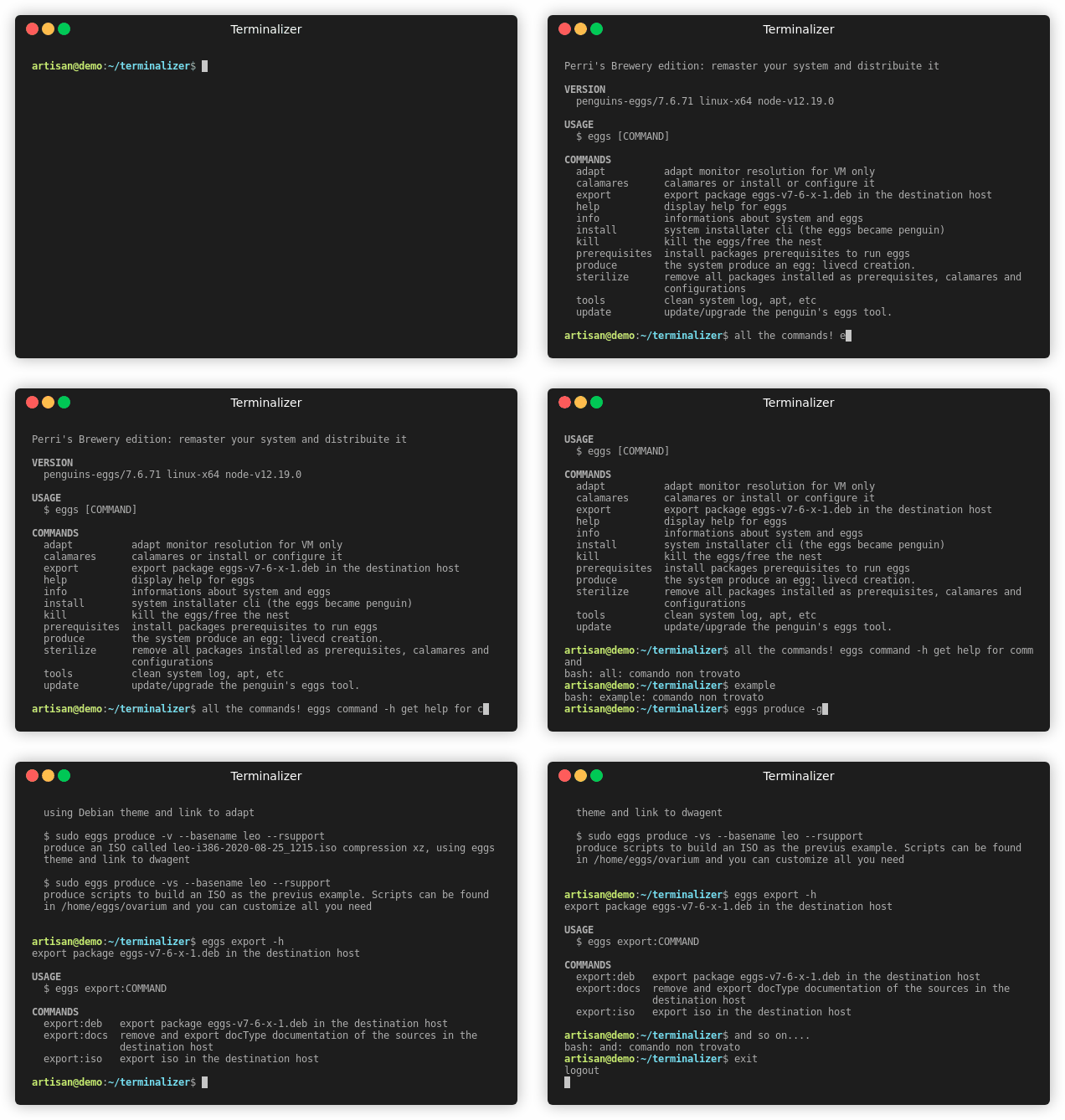
A nice thing to do to help users could be to make terminal samples, I did this some time ago, but they should be updated.
|
|
897
919
|
|
|
898
920
|
|
|
899
921
|
|
|
900
922
|
# That's all Folks!
|
|
901
923
|
No need other configurations, penguins-eggs are battery included or better, as in the real, live is inside! :-D
|
|
902
924
|
|
|
903
|
-
|
|
904
|
-
There is a [Penguins' eggs official book](https://penguins-eggs.net/book/) and same other documentation - mostly for developers - on [penguins-eggs
|
|
905
|
-
|
|
906
|
-
* [blog](https://penguins-eggs.net)
|
|
907
|
-
* [facebook Penguins' eggs group](https://www.facebook.com/groups/128861437762355/)
|
|
908
|
-
* [telegram Penguins' eggs channel](https://t.me/penguins_eggs)
|
|
909
|
-
* [twitter](https://twitter.com/pieroproietti)
|
|
910
|
-
* [sources](https://github.com/pieroproietti/penguins-krill)
|
|
925
|
+
# More informations
|
|
926
|
+
There is a [Penguins' eggs official book](https://penguins-eggs.net/book/) and same other documentation - mostly for developers - on the repository [penguins-eggs](https://github.com/pieroproietti/penguins-eggs) under [documents](https://github.com/pieroproietti/penguins-eggs/tree/master/documents). I want to point out [hens, differents species](https://github.com/pieroproietti/penguins-eggs/blob/master/documents/hens-different-species.md) a brief how to use eggs in Debian. Arch and Manjaro, and the post [Arch-naked](https://penguins-eggs.net/book/arch-naked.html) on the blog which describes how to create an Arch naked live, install it, then dress the resulting system with a graphics development station.
|
|
911
927
|
|
|
912
|
-
You can contact me
|
|
928
|
+
You can contact me by [mail](mailto://pieroproietti@gmail.com) or follow me on
|
|
929
|
+
[blog](https://penguins-eggs.net),
|
|
930
|
+
[facebook](https://www.facebook.com/groups/128861437762355/),
|
|
931
|
+
[github](https://github.com/pieroproietti/penguins-krill),
|
|
932
|
+
[jtsi](https://meet.jit.si/PenguinsEggsMeeting),
|
|
933
|
+
[reddit](https://www.reddit.com/user/Artisan61),
|
|
934
|
+
[telegram](https://t.me/penguins_eggs),
|
|
935
|
+
[twitter](https://twitter.com/pieroproietti).
|
|
913
936
|
|
|
914
|
-
|
|
915
|
-
Copyright (c) 2017, 2023 [Piero Proietti](https://penguins-eggs.net/about-me.html), dual licensed under the MIT or GPL Version 2 licenses.
|
|
937
|
+
# Copyright and licenses
|
|
938
|
+
Copyright (c) 2017, 2023 [Piero Proietti](https://penguins-eggs.net/about-me.html), dual licensed under the MIT or GPL Version 2 licenses.
|
package/dist/classes/distro.js
CHANGED
|
@@ -184,14 +184,14 @@ class Distro {
|
|
|
184
184
|
this.distroLike = 'Arch';
|
|
185
185
|
this.codenameId = 'rolling';
|
|
186
186
|
this.codenameLikeId = 'rolling';
|
|
187
|
-
this.liveMediumPath = '/run/archiso/
|
|
188
|
-
this.squashfs =
|
|
189
|
-
// this.squashfs = `arch/x86_64/airootfs.sfs`
|
|
187
|
+
this.liveMediumPath = '/run/archiso/bootmnt/';
|
|
188
|
+
this.squashfs = `arch/x86_64/airootfs.sfs`;
|
|
190
189
|
break;
|
|
191
190
|
}
|
|
192
191
|
case 'Qonos':
|
|
193
192
|
case 'Ruah':
|
|
194
|
-
case 'Sikaris':
|
|
193
|
+
case 'Sikaris':
|
|
194
|
+
case 'Talos': {
|
|
195
195
|
// Manjaro Linux
|
|
196
196
|
this.familyId = 'archlinux';
|
|
197
197
|
this.distroLike = 'Arch';
|
|
@@ -224,10 +224,13 @@ class Distro {
|
|
|
224
224
|
if (!found) {
|
|
225
225
|
console.log(`This distro ${this.distroId}/${this.codenameId} is not yet recognized!`);
|
|
226
226
|
console.log('');
|
|
227
|
-
console.log('You can edit /usr/lib/penguins-eggs/conf/
|
|
227
|
+
console.log('You can edit /usr/lib/penguins-eggs/conf/derivatives.yaml to add it -');
|
|
228
228
|
console.log('after that - run: sudo eggs dad -d to re-configure eggs.');
|
|
229
229
|
console.log('If you can create your new iso, you can contribute to the project');
|
|
230
230
|
console.log('by suggesting your modification.');
|
|
231
|
+
console.log('');
|
|
232
|
+
console.log('Note: adding derivatives is supported on Debian, Devuan and Ubuntu,');
|
|
233
|
+
console.log(' but not for the Arch family.');
|
|
231
234
|
process.exit(0);
|
|
232
235
|
}
|
|
233
236
|
}
|
package/dist/classes/ovary.js
CHANGED
|
@@ -133,7 +133,7 @@ class Ovary {
|
|
|
133
133
|
}
|
|
134
134
|
// CRYPTEDCLONE
|
|
135
135
|
if (cryptedclone) {
|
|
136
|
-
console.log('
|
|
136
|
+
console.log('eggs will SAVE users and users\' data ENCRYPTED on LUKS volume within the live');
|
|
137
137
|
const users = await this.usersFill();
|
|
138
138
|
for (const user of users) {
|
|
139
139
|
if (user.saveIt) {
|
|
@@ -154,7 +154,7 @@ class Ovary {
|
|
|
154
154
|
// NORMAL
|
|
155
155
|
}
|
|
156
156
|
else {
|
|
157
|
-
utils_2.default.warning('eggs will REMOVE users and users\' from live');
|
|
157
|
+
utils_2.default.warning('eggs will REMOVE users and users\' data from live');
|
|
158
158
|
}
|
|
159
159
|
/**
|
|
160
160
|
* NOTE: reCreate = false
|
|
@@ -989,7 +989,6 @@ class Ovary {
|
|
|
989
989
|
}
|
|
990
990
|
else if (this.familyId === 'archlinux') {
|
|
991
991
|
cmds.push(await rexec(`chroot ${this.settings.work_dir.merged} gpasswd -a ${this.settings.config.user_opt} wheel`, this.verbose));
|
|
992
|
-
cmds.push(await rexec(`chroot ${this.settings.work_dir.merged} gpasswd -a ${this.settings.config.user_opt} sudo`, this.verbose));
|
|
993
992
|
cmds.push(await rexec(`chroot ${this.settings.work_dir.merged} gpasswd -a ${this.settings.config.user_opt} autologin`, this.verbose));
|
|
994
993
|
}
|
|
995
994
|
/**
|
|
@@ -1622,7 +1621,8 @@ async function rexec(cmd, verbose = false) {
|
|
|
1622
1621
|
const check = await (0, utils_1.exec)(cmd, echo);
|
|
1623
1622
|
if (!cmd.startsWith('umount')) { // skip umount errors
|
|
1624
1623
|
if (check.code !== 0) {
|
|
1625
|
-
|
|
1624
|
+
utils_2.default.titles();
|
|
1625
|
+
console.log(`command:'\n${chalk_1.default.cyan(cmd)}\n\nended with code ${chalk_1.default.cyan(check.code)}`);
|
|
1626
1626
|
console.log();
|
|
1627
1627
|
await utils_2.default.pressKeyToExit("eggs caused an error in the previous operation, press enter to continue", true);
|
|
1628
1628
|
}
|
package/dist/classes/pacman.js
CHANGED
package/dist/classes/yolk.js
CHANGED
|
@@ -67,7 +67,7 @@ class Yolk {
|
|
|
67
67
|
process.chdir(this.yolkDir);
|
|
68
68
|
// for all packages, find dependencies and check if are not installed
|
|
69
69
|
for (const package_ of packages) {
|
|
70
|
-
utils_1.default.warning(`downloading package ${package_} and
|
|
70
|
+
utils_1.default.warning(`downloading package ${package_} and its dependencies...`);
|
|
71
71
|
cmd = `apt-cache depends --recurse --no-recommends --no-suggests --no-conflicts --no-breaks --no-replaces --no-enhances ${package_} | grep "^\\w" | sort -u`;
|
|
72
72
|
const depends = (await (0, utils_2.exec)(cmd, { echo: false, capture: true })).data;
|
|
73
73
|
await this.installDeps(depends.split('\n'));
|
package/dist/commands/adapt.js
CHANGED
|
@@ -29,7 +29,6 @@ class Adapt extends core_1.Command {
|
|
|
29
29
|
await (0, utils_2.exec)('xrandr --output Virtual-3 --auto', echo);
|
|
30
30
|
}
|
|
31
31
|
}
|
|
32
|
-
exports.default = Adapt;
|
|
33
32
|
Adapt.flags = {
|
|
34
33
|
help: core_1.Flags.help({ char: 'h' }),
|
|
35
34
|
verbose: core_1.Flags.boolean({ char: 'v' }),
|
|
@@ -38,3 +37,4 @@ Adapt.description = 'adapt monitor resolution for VM only';
|
|
|
38
37
|
Adapt.examples = [
|
|
39
38
|
'eggs adapt',
|
|
40
39
|
];
|
|
40
|
+
exports.default = Adapt;
|
package/dist/commands/analyze.js
CHANGED
|
@@ -101,10 +101,10 @@ class Analyze extends core_1.Command {
|
|
|
101
101
|
}
|
|
102
102
|
}
|
|
103
103
|
}
|
|
104
|
-
exports.default = Analyze;
|
|
105
104
|
Analyze.flags = {
|
|
106
105
|
help: core_1.Flags.help({ char: 'h' }),
|
|
107
106
|
verbose: core_1.Flags.boolean({ char: 'v', description: 'verbose' }),
|
|
108
107
|
};
|
|
109
108
|
Analyze.description = 'analyze for syncto';
|
|
110
109
|
Analyze.examples = ['sudo eggs analyze'];
|
|
110
|
+
exports.default = Analyze;
|
|
@@ -101,13 +101,12 @@ class Calamares extends core_1.Command {
|
|
|
101
101
|
}
|
|
102
102
|
}
|
|
103
103
|
}
|
|
104
|
-
exports.default = Calamares;
|
|
105
104
|
Calamares.flags = {
|
|
106
105
|
help: core_1.Flags.help({ char: 'h' }),
|
|
107
|
-
install: core_1.Flags.boolean({ char: 'i', description: "install calamares and
|
|
106
|
+
install: core_1.Flags.boolean({ char: 'i', description: "install calamares and its dependencies" }),
|
|
108
107
|
nointeractive: core_1.Flags.boolean({ char: 'n', description: 'no user interaction' }),
|
|
109
|
-
release: core_1.Flags.boolean({ char: 'r', description: "release: remove calamares and all
|
|
110
|
-
remove: core_1.Flags.boolean({ description: "remove calamares and
|
|
108
|
+
release: core_1.Flags.boolean({ char: 'r', description: "release: remove calamares and all its dependencies after the installation" }),
|
|
109
|
+
remove: core_1.Flags.boolean({ description: "remove calamares and its dependencies" }),
|
|
111
110
|
theme: core_1.Flags.string({ description: 'theme/branding for eggs and calamares' }),
|
|
112
111
|
verbose: core_1.Flags.boolean({ char: 'v' }),
|
|
113
112
|
};
|
|
@@ -118,3 +117,4 @@ Calamares.examples = [
|
|
|
118
117
|
'sudo eggs calamares --install --theme=/path/to/theme',
|
|
119
118
|
'sudo eggs calamares --remove',
|
|
120
119
|
];
|
|
120
|
+
exports.default = Calamares;
|
package/dist/commands/config.js
CHANGED
|
@@ -160,7 +160,7 @@ class Config extends core_1.Command {
|
|
|
160
160
|
await pacman_1.default.configurationMachineNew(verbose);
|
|
161
161
|
}
|
|
162
162
|
if (i.distroTemplate) {
|
|
163
|
-
utils_1.default.warning('
|
|
163
|
+
utils_1.default.warning('copying distro templates...');
|
|
164
164
|
await pacman_1.default.distroTemplateInstall(verbose);
|
|
165
165
|
}
|
|
166
166
|
if (i.needApt && !nointeractive && !nointeractive && pacman_1.default.distro().familyId === 'debian') {
|
|
@@ -204,7 +204,6 @@ class Config extends core_1.Command {
|
|
|
204
204
|
}
|
|
205
205
|
}
|
|
206
206
|
}
|
|
207
|
-
exports.default = Config;
|
|
208
207
|
Config.flags = {
|
|
209
208
|
clean: core_1.Flags.boolean({ char: 'c', description: 'remove old configuration before to create new one' }),
|
|
210
209
|
help: core_1.Flags.help({ char: 'h' }),
|
|
@@ -217,3 +216,4 @@ Config.examples = [
|
|
|
217
216
|
'sudo eggs config --clean',
|
|
218
217
|
'sudo eggs config --clean --nointeractive',
|
|
219
218
|
];
|
|
219
|
+
exports.default = Config;
|
package/dist/commands/cuckoo.js
CHANGED
|
@@ -53,7 +53,6 @@ class Cuckoo extends core_1.Command {
|
|
|
53
53
|
}
|
|
54
54
|
}
|
|
55
55
|
}
|
|
56
|
-
exports.default = Cuckoo;
|
|
57
56
|
Cuckoo.flags = {
|
|
58
57
|
help: core_1.Flags.help({ char: 'h' }),
|
|
59
58
|
};
|
|
@@ -61,3 +60,4 @@ Cuckoo.description = 'PXE start with proxy-dhcp';
|
|
|
61
60
|
Cuckoo.examples = [
|
|
62
61
|
'sudo eggs cuckoo',
|
|
63
62
|
];
|
|
63
|
+
exports.default = Cuckoo;
|