penguins-eggs 10.0.60 → 10.1.1
This diff represents the content of publicly available package versions that have been released to one of the supported registries. The information contained in this diff is provided for informational purposes only and reflects changes between package versions as they appear in their respective public registries.
- package/.oclif.manifest.json +62 -1
- package/README.md +145 -75
- package/addons/eggs/theme/calamares/modules/{_users.yml → users.yml} +3 -3
- package/addons/eggs/theme/livecd/grub.main.full.cfg +1 -1
- package/addons/eggs/theme/livecd/grub.main.simple.cfg +1 -1
- package/conf/derivatives.yaml +4 -3
- package/conf/derivatives_fedora.yaml +6 -0
- package/conf/distros/alpine/calamares/modules/users.yml +3 -3
- package/conf/distros/bionic/calamares/calamares-modules/grubcfg/grubcfg.yml +1 -1
- package/conf/distros/bionic/calamares/modules/users.yml +3 -3
- package/conf/distros/buster/calamares/modules/users.yml +4 -3
- package/conf/distros/fedora/calamares/modules/users.yml +3 -3
- package/conf/distros/noble/calamares/modules/focal-jammy/users.yml +3 -3
- package/conf/distros/noble/calamares/modules/users.yml +1 -0
- package/conf/distros/opensuse/calamares/modules/users.yml +3 -3
- package/conf/distros/rolling/calamares/modules/users.yml +3 -3
- package/conf/eggs.yaml +1 -1
- package/conf/love.yaml +4 -4
- package/dist/classes/compressors.js +1 -1
- package/dist/classes/distro.d.ts +27 -3
- package/dist/classes/distro.js +361 -289
- package/dist/classes/ovary.d/bind-live-fs.js +22 -30
- package/dist/classes/ovary.d/edit-live-fs.d.ts +1 -0
- package/dist/classes/ovary.d/edit-live-fs.js +9 -13
- package/dist/classes/ovary.d/fertilization.js +6 -1
- package/dist/classes/ovary.d/initrd.js +11 -15
- package/dist/classes/ovary.d/kernel-copy.js +2 -16
- package/dist/classes/ovary.d/make-efi.js +8 -5
- package/dist/classes/ovary.d/make-squashfs.d.ts +1 -1
- package/dist/classes/ovary.d/make-squashfs.js +17 -24
- package/dist/classes/ovary.d/merged.d.ts +9 -13
- package/dist/classes/ovary.d/merged.js +38 -48
- package/dist/classes/ovary.d/produce.d.ts +1 -1
- package/dist/classes/ovary.d/produce.js +38 -32
- package/dist/classes/ovary.d/syslinux.js +4 -4
- package/dist/classes/ovary.d/user-create-live.js +12 -5
- package/dist/classes/ovary.d.ts +8 -3
- package/dist/classes/ovary.js +8 -3
- package/dist/classes/pacman.d/archlinux.js +1 -5
- package/dist/classes/pacman.js +2 -1
- package/dist/classes/systemctl.d.ts +1 -1
- package/dist/classes/systemctl.js +1 -1
- package/dist/classes/tailor.js +2 -1
- package/dist/classes/utils.d/architecture.d.ts +41 -0
- package/dist/classes/utils.d/architecture.js +87 -0
- package/dist/classes/utils.d/console-output.d.ts +26 -0
- package/dist/classes/utils.d/console-output.js +46 -0
- package/dist/classes/utils.d/filesystem.d.ts +53 -0
- package/dist/classes/utils.d/filesystem.js +152 -0
- package/dist/classes/utils.d/formatters.d.ts +32 -0
- package/dist/classes/utils.d/formatters.js +64 -0
- package/dist/classes/utils.d/kernel.d.ts +83 -0
- package/dist/classes/utils.d/kernel.js +288 -0
- package/dist/classes/utils.d/network.d.ts +43 -0
- package/dist/classes/utils.d/network.js +133 -0
- package/dist/classes/utils.d/package-info.d.ts +55 -0
- package/dist/classes/utils.d/package-info.js +137 -0
- package/dist/classes/utils.d/snapshot.d.ts +44 -0
- package/dist/classes/utils.d/snapshot.js +102 -0
- package/dist/classes/utils.d/system.d.ts +63 -0
- package/dist/classes/utils.d/system.js +200 -0
- package/dist/classes/utils.d/user-interaction.d.ts +39 -0
- package/dist/classes/utils.d/user-interaction.js +104 -0
- package/dist/classes/utils.d.ts +90 -322
- package/dist/classes/utils.js +105 -1013
- package/dist/commands/dad.d.ts +1 -0
- package/dist/commands/dad.js +1 -0
- package/dist/commands/export/pkg.js +6 -6
- package/dist/commands/export/tarballs.js +11 -16
- package/dist/commands/kill.js +1 -1
- package/dist/commands/love.d.ts +1 -0
- package/dist/commands/love.js +21 -7
- package/dist/commands/pods.d.ts +22 -0
- package/dist/commands/pods.js +92 -0
- package/dist/commands/produce.d.ts +1 -0
- package/dist/commands/produce.js +21 -1
- package/dist/commands/update.js +2 -2
- package/dist/index.d.ts +6 -52
- package/dist/index.js +6 -145
- package/dist/krill/classes/krill_enums.d.ts +14 -1
- package/dist/krill/classes/krill_enums.js +16 -1
- package/dist/krill/classes/prepare.d/partitions.js +3 -3
- package/dist/krill/classes/prepare.d.ts +46 -21
- package/dist/krill/classes/prepare.js +187 -187
- package/dist/krill/classes/sequence.d/add_user.js +21 -3
- package/dist/krill/classes/sequence.d/partition.js +2 -2
- package/dist/krill/classes/sequence.d.ts +18 -21
- package/dist/krill/classes/sequence.js +156 -423
- package/dist/krill/components/information.js +13 -7
- package/dist/{krill/lib → lib}/kill_me_softly.js +2 -2
- package/dist/penguins-eggs_10.1.1-0_amd64.deb +0 -0
- package/dist/penguins-eggs_10.1.1-0_amd64.deb.sha256 +1 -0
- package/package.json +32 -27
- package/perrisbrewery/scripts/postinst +98 -0
- package/perrisbrewery/scripts/postrm +82 -0
- package/perrisbrewery/scripts/preinst +40 -0
- package/perrisbrewery/scripts/prerm +47 -0
- package/perrisbrewery/template/control.template +17 -0
- package/perrisbrewery/template/dependencies-bionic.yaml +33 -0
- package/perrisbrewery/template/dependencies.yaml +37 -0
- package/perrisbrewery/template/man.template.md +110 -0
- package/pods/README.md +14 -0
- package/pods/almalinux.sh +10 -0
- package/pods/archlinux.sh +10 -0
- package/pods/ci/README.md +5 -0
- package/pods/ci/kernel-overlay-install.sh +114 -0
- package/pods/ci/minimal/almalinux-container2host.sh +165 -0
- package/pods/ci/minimal/archlinux-container2host.sh +125 -0
- package/pods/ci/minimal/debian-container2host.sh +173 -0
- package/pods/ci/minimal/fedora-container2host.sh +170 -0
- package/pods/ci/minimal/manjaro-container2host.sh +123 -0
- package/pods/ci/minimal/opensuse-container2host.sh +143 -0
- package/pods/ci/penguins-eggs-execute.sh +22 -0
- package/pods/ci/penguins-eggs-install.sh +115 -0
- package/pods/ci/run +34 -0
- package/pods/ci/run-on-almalinux.sh +50 -0
- package/pods/ci/run-on-archlinux.sh +64 -0
- package/pods/ci/run-on-debian.sh +51 -0
- package/pods/ci/run-on-devuan.sh +48 -0
- package/pods/ci/run-on-fedora.sh +51 -0
- package/pods/ci/run-on-manjaro.sh +61 -0
- package/pods/ci/run-on-opensuse.sh +58 -0
- package/pods/ci/run-on-rockylinux.sh +51 -0
- package/pods/ci/run-on-ubuntu.sh +52 -0
- package/pods/debian.sh +23 -0
- package/pods/devuan.sh +26 -0
- package/pods/fedora.sh +12 -0
- package/pods/lmde.sh +22 -0
- package/pods/manjaro.sh +10 -0
- package/pods/opensuse.sh +12 -0
- package/pods/podman.command.sh +85 -0
- package/pods/rocky.sh +12 -0
- package/pods/run-build-packages-debs.sh +45 -0
- package/pods/run-create-debs.sh +23 -0
- package/pods/ubuntu.sh +24 -0
- package/scripts/_eggs +14 -5
- package/scripts/eggs.bash +5 -4
- /package/dist/{krill/lib → lib}/kill_me_softly.d.ts +0 -0
package/README.md
CHANGED
|
@@ -1,6 +1,4 @@
|
|
|
1
|
-
penguins-eggs
|
|
2
|
-
=============
|
|
3
|
-
|
|
1
|
+
# penguins-eggs
|
|
4
2
|
## Penguin's eggs are generated and new birds are ready to fly...
|
|
5
3
|
[](https://github.com/pieroproietti/penguins-eggs)
|
|
6
4
|
[](https://penguins-eggs.net)
|
|
@@ -10,9 +8,15 @@ penguins-eggs
|
|
|
10
8
|
[](https://sourceforge.net/projects/penguins-eggs/files/)
|
|
11
9
|
[](https://npmjs.org/package/penguins-eggs)
|
|
12
10
|
|
|
11
|
+
# Plan
|
|
12
|
+
* [Conversione a Deno](./DOCS/DENO.md)
|
|
13
|
+
|
|
13
14
|
# Index
|
|
14
15
|
<!-- toc -->
|
|
16
|
+
* [penguins-eggs](#penguins-eggs)
|
|
17
|
+
* [Plan](#plan)
|
|
15
18
|
* [Index](#index)
|
|
19
|
+
* [penguins-eggs](#penguins-eggs)
|
|
16
20
|
* [Installation](#installation)
|
|
17
21
|
* [Introduction](#introduction)
|
|
18
22
|
* [Technology](#technology)
|
|
@@ -20,7 +24,7 @@ penguins-eggs
|
|
|
20
24
|
* [Packages](#packages)
|
|
21
25
|
* [Usage](#usage)
|
|
22
26
|
* [Commands](#commands)
|
|
23
|
-
* [
|
|
27
|
+
* [GUI](#gui)
|
|
24
28
|
* [Copyright and licenses](#copyright-and-licenses)
|
|
25
29
|
<!-- tocstop -->
|
|
26
30
|
|
|
@@ -29,14 +33,30 @@ penguins-eggs
|
|
|
29
33
|
* [Cook eggs in 5 minutes!](https://penguins-eggs.net/docs/Tutorial/eggs5)
|
|
30
34
|
* [Users guide](https://penguins-eggs.net/docs/Tutorial/eggs-users-guide)
|
|
31
35
|
* [Wardrobe users' guide](https://penguins-eggs.net/docs/Tutorial/wardrobe-users-guide)
|
|
32
|
-
* [Penguins'
|
|
36
|
+
* [Penguins Eggs' book](https://penguins-eggs.gitbook.io/book)
|
|
33
37
|
* [FAQ](https://penguins-eggs.net/docs/faq)
|
|
34
38
|
* [Changelog](https://github.com/pieroproietti/penguins-eggs/blob/master/CHANGELOG.md#changelog)
|
|
35
39
|
|
|
40
|
+
# penguins-eggs
|
|
41
|
+
**penguins-eggs** is a system cloning and distribution remastering tool primarily designed for Linux distributions.
|
|
42
|
+
|
|
43
|
+
It’s often used to create customized live ISO images or backups of a Linux system, allowing users to replicate or share their setup easily. Think of it as a way to "hatch" a new system from an existing one—hence the funny name.
|
|
44
|
+
|
|
45
|
+
Here’s a breakdown of what it’s used for:
|
|
46
|
+
|
|
47
|
+
|
|
48
|
+
* Distribution Remastering: If you’re into crafting your own Linux distro (or a spin of an existing one), `penguins-eggs` simplifies the process. You can tweak an existing system, strip out or add components, and then package it as a new ISO for distribution.
|
|
49
|
+
|
|
50
|
+
* Creating Custom Live ISOs: It lets you generate a bootable live ISO from your system. You can share this ISO with others or use it to boot your setup on different hardware. It’s like creating your own personalized Linux distro without starting from scratch.
|
|
51
|
+
|
|
52
|
+
* System Backup and Cloning: You can use penguins-eggs to create a snapshot of your current Linux system, including installed packages, configurations, and user data (if you choose). This can be handy for disaster recovery or migrating to a new machine.
|
|
53
|
+
|
|
54
|
+
Lightweight and Distro-Agnostic: It works across various Debian, Devuan, Ubuntu, Arch, OpenMamba, Fedora, Almalinux, Rocky, OpenSuSE and other derivatives, so you’re not locked into one ecosystem.
|
|
55
|
+
|
|
36
56
|
# Installation
|
|
37
57
|
|
|
38
58
|
## penguins-eggs-10.0.x installation
|
|
39
|
-
`penguins-eggs-10.0.x`
|
|
59
|
+
`penguins-eggs-10.0.x` depends on `nodejs >18`, which is not directly available on all distros. We can rely on [nodesource](https://github.com/nodesource/distributions?tab=readme-ov-file#debian-and-ubuntu-based-distributions) for adding them.
|
|
40
60
|
|
|
41
61
|
### using get-eggs
|
|
42
62
|
It's the most pratical way and is valid for Alpine, Arch, Debian, Devuan and Ubuntu. get-eggs configure automatically `nodesource` when need and install the right package. Copy and paste:
|
|
@@ -47,14 +67,14 @@ sudo ./get-eggs.sh
|
|
|
47
67
|
```
|
|
48
68
|
### Manual installation
|
|
49
69
|
|
|
50
|
-
#### Arch, Manjaro, Debian 12
|
|
70
|
+
#### Arch, Manjaro, Debian 12 Bookworm, Ubuntu 24.04 Noble
|
|
51
71
|
Just download and install penguins-eggs-10.0.x.
|
|
52
72
|
|
|
53
|
-
#### Debian 10
|
|
54
|
-
Before to install `penguins-eggs-10.x
|
|
73
|
+
#### Debian 10 Buster, Debian 11 Bullseye, Ubuntu 20.04 Focal, Ubuntu 22.04 Jammy
|
|
74
|
+
Before to install `penguins-eggs-10.x`, add the repos from `nodesource`. Follow these [instructions](https://github.com/pieroproietti/penguins-eggs/issues/368) to get `nodejs>18` available.
|
|
55
75
|
|
|
56
|
-
#### Debian 9
|
|
57
|
-
Use the package `penguins-eggs-10.x.x-bionic-x
|
|
76
|
+
#### Debian 9 Stretch, Ubuntu 18.04 Bionic
|
|
77
|
+
Use the package `penguins-eggs-10.x.x-bionic-x`, which is compiled against node16. Follow these [instructions](https://github.com/pieroproietti/penguins-eggs/issues/368#issuecomment-2169961955) to get `nodejs>16` available.
|
|
58
78
|
|
|
59
79
|
### Openmanba
|
|
60
80
|
Openmamba is an italian distribution based on rpm and using dnf as package manager, it is really up-to-date, penguins-eggs is available as rpm package.
|
|
@@ -77,17 +97,17 @@ Initially built with javascript and then switched to Typescript as the main deve
|
|
|
77
97
|
|
|
78
98
|
Other commands follow: like `kill` for removing produced ISOs, `calamares` for configuring the graphical installer, `mom` as interactive help, `dad` to configure eggs, `status`, `tools`, etc.
|
|
79
99
|
|
|
80
|
-
Considered a work-in-progress, the ultimate goal of Penguins
|
|
100
|
+
Considered a work-in-progress, the ultimate goal of Penguins Eggs is to allow the creation of live ISOs from an installed system and their use for system installations. It can be used both to create images on USB devices - even [Ventoy](https://www.ventoy.net/en/index.html) - and as a PXE server to distribute the image itself over a local network. Inspired by the behavior of the cuckoo bird, which depends on others to hatch its eggs.
|
|
81
101
|
|
|
82
102
|
Written primarily in TypeScript, Penguins’ Eggs is designed to be compatible with various Linux distributions, despite differences in package managers, file paths, and more.
|
|
83
103
|
|
|
84
104
|
The tool currently supports Debian, Devuan, Ubuntu, Arch, Manjaro, and their derivatives, across multiple architectures including amd64, i386, and arm64.
|
|
85
105
|
|
|
86
|
-
From the release of version 9.6.x, Penguins’ Eggs is available as a [Debian package](https://penguins-eggs.net/basket/index.php?p=packages%2Fdebs), then was extended to Arch Linux creating the relative [PKGBUILD](https://aur.archlinux.org/packages/penguins-eggs),
|
|
106
|
+
From the release of version 9.6.x, Penguins’ Eggs is available as a [Debian package](https://penguins-eggs.net/basket/index.php?p=packages%2Fdebs), then was extended to Arch Linux creating the relative [PKGBUILD](https://aur.archlinux.org/packages/penguins-eggs). Nowadays, eggs can remaster AlmaLinux, Fedora, openmamba, openSuSE, and RockyLinux too.
|
|
87
107
|
|
|
88
|
-
|
|
108
|
+
Penguins Eggs caters to a wide range of systems including PCs, older machines, and single-board ARM systems like the Raspberry Pi, across amd64, i386, and arm64 architectures.
|
|
89
109
|
|
|
90
|
-
For more information and updates, visit the [Penguins
|
|
110
|
+
For more information and updates, visit the [Penguins Eggs' official website](https://penguins-eggs.net).
|
|
91
111
|
|
|
92
112
|
|
|
93
113
|
> [!TIP]
|
|
@@ -126,7 +146,7 @@ Additionally, you can find examples of remastered ISO images created with `eggs`
|
|
|
126
146
|
|
|
127
147
|
Penguins-eggs has got you covered. To get started with Penguins-eggs, you'll need to install it on your Linux distribution. The tool supports a wide range of Linux distributions and their major derivatives, including Arch, Debian, Devuan, Manjaro, Ubuntu, and more. Additionally, you can easily add support for additional derivatives, expanding the tool's capabilities even further.
|
|
128
148
|
|
|
129
|
-
1.
|
|
149
|
+
1. Fast and Efficient
|
|
130
150
|
Penguins-eggs is designed to be fast and efficient. Unlike traditional methods that involve copying the entire file system, Penguins-eggs utilizes livefs, which allows for instant acquisition of the live system. By default, the tool.
|
|
131
151
|
|
|
132
152
|
2. Supports Compression Algorithm
|
|
@@ -142,18 +162,18 @@ Employs the zstd compression algorithm, significantly reducing the time required
|
|
|
142
162
|
To simplify the installation process, Penguins-eggs provides its own system installer called krill. This installer is particularly useful when a GUI (Graphical User Interface) is not available, allowing for installation in various situations. However, if you are using a desktop system, Penguins-eggs recommends and configures the calamares GUI installer, ensuring a seamless and user-friendly experience.
|
|
143
163
|
Penguins Eggs Linux spearheads a transformative revolution in the realm of system installation with the incorporation of its TUI (Text-based User Interface) / GUI (Graphical User Interface) installer, setting a new standard of versatility and accessibility within the landscape of Linux distributions.
|
|
144
164
|
|
|
145
|
-
6.
|
|
165
|
+
6. Repository Lists
|
|
146
166
|
One of the key advantages of Penguins-eggs is its commitment to utilizing only the original distro's packages. This means that no modifications are made to your repository lists, ensuring a safe and reliable environment. Penguins-eggs prioritizes maintaining the integrity and authenticity of your Linux distribution.
|
|
147
167
|
|
|
148
168
|
7. Wardrobe
|
|
149
169
|
To enhance customization options, Penguins-eggs introduces the concept of Wardrobe. With Wardrobe and its various components, such as costumes, you can easily organize and manage your customizations, samples, and more. This feature enables a streamlined and efficient workflow, allowing you to tailor your Linux system to your preferences.
|
|
150
170
|
|
|
151
|
-
8.
|
|
171
|
+
8. Supporting Multiple Distributions
|
|
152
172
|
Eggs supporting multiple distributions and their derivatives
|
|
153
173
|
Supports: Alpine, Arch, Debian, Fedora, Devuan, Manjaro, Ubuntu,
|
|
154
174
|
and major derivatives like: Linuxmint, KDE neon, EndeavourOS, Garuda, etc. You can easily add more derivatives.
|
|
155
175
|
|
|
156
|
-
10.
|
|
176
|
+
10. Supports Hardware Architectures
|
|
157
177
|
supports a wide range of hardware architectures.
|
|
158
178
|
Supports: i386, amd64 and arm64 architecture, from old PCs, and common PCs to single board computers like Raspberry Pi 4/5
|
|
159
179
|
|
|
@@ -163,8 +183,8 @@ Supports: i386, amd64 and arm64 architecture, from old PCs, and common PCs to si
|
|
|
163
183
|
|
|
164
184
|
## Wardrobe, Themes, and Addons
|
|
165
185
|
In April 2022, the `wardrobe` command was introduced to `eggs`. This addition serves as a comprehensive tool to assist and streamline the process of creating a customized version of Linux, starting from a command-line interface (CLI) system. I have embraced wardrobe for all my editions to enhance convenience, enabling me to better organize, consolidate, and manage my work effectively.
|
|
166
|
-
To add a unique touch to my customizations, I have assigned bird names to each edition. Except for the "naked" edition, there are various options available, including "Colibri," "eagle," "duck," "owl," and "chicks" under the bookworm and plastilinux distributions. [bookworm](https://sourceforge.net/projects/penguins-eggs/files/ISOS/debian/bookworm/) and [plastilinux](https://sourceforge.net/projects/penguins-eggs/files/ISOS/plastilinux/)
|
|
167
|
-
I have high hopes that people will take an interest in wardrobe and consider forking the main repository to incorporate their own customizations. By collaborating, we can achieve significant progress that would be challenging for a single developer to accomplish. If you would like to delve deeper into the wardrobe, I recommend reading the [Penguins'
|
|
186
|
+
To add a unique touch to my customizations, I have assigned bird names to each edition. Except for the "naked" edition, there are various options available, including "Colibri," "eagle," "duck," "owl," and "chicks" under the bookworm and plastilinux distributions. [bookworm](https://sourceforge.net/projects/penguins-eggs/files/ISOS/debian/bookworm/) and [plastilinux](https://sourceforge.net/projects/penguins-eggs/files/ISOS/plastilinux/).Furthermore, under Waydroid on the eggs' SourceForge page, you can find "wagtail" and "warbier."
|
|
187
|
+
I have high hopes that people will take an interest in wardrobe and consider forking the main repository to incorporate their own customizations. By collaborating, we can achieve significant progress that would be challenging for a single developer to accomplish. If you would like to delve deeper into the wardrobe, I recommend reading the [Penguins Eggs' blog](https://penguins-eggs.net/blog/wardrobe-colibri-duck-eagle-and-owl/). post titled Wardrobe: Colibri, Duck, Eagle, and Owl, which provides further insights into its features and benefits.
|
|
168
188
|
Furthermore, addons, predominantly themes, have been organized under the vendor's folder in the penguin's wardrobe. I encourage utilizing your wardrobe for all your customization needs to maintain consistency and organization throughout your work.
|
|
169
189
|
|
|
170
190
|
> [!NOTE]
|
|
@@ -176,9 +196,9 @@ When creating a live distribution of your system, you have different options to
|
|
|
176
196
|
• The default mode, achieved by using the command `eggs produce`, completely removes user data from the live distribution. This ensures that no private data remains in the live system.
|
|
177
197
|
|
|
178
198
|
• The `eggs produce --clone` command allows you to save both user data and system data directly in the generated ISO. This means that if someone obtains a copy of the ISO, they will be able to see and access the
|
|
179
|
-
user data directly from the live system. It's important to note that this data is not encrypted, so it may not be suitable
|
|
199
|
+
user data directly from the live system. It's important to note that this data is not encrypted, so it may not be suitable if you have sensitive information on your system.
|
|
180
200
|
|
|
181
|
-
• On the other hand, the
|
|
201
|
+
• On the other hand, the `eggs produce --cryptedclone` command saves the data within the generated ISO using a LUKS (Linux Unified Key Setup) volume. With this option, the user data will not be visible in the live system. However, it can be automatically reinstalled during the system installation process using the "krill" installer. Even if someone has the generated ISO, they won't be able to access the user data without the LUKS passphrase. This ensures that your data remains protected.
|
|
182
202
|
|
|
183
203
|
To summarize the available options:
|
|
184
204
|
|
|
@@ -191,7 +211,7 @@ To summarize the available options:
|
|
|
191
211
|
> During the installation process, you can use the "krill" installer to restore your crypted data automatically. By running the command "sudo eggs install" with the "krill" installer, your encrypted data will be securely transferred and made available in the installed system.
|
|
192
212
|
|
|
193
213
|
|
|
194
|
-
##
|
|
214
|
+
## Calamares and krill
|
|
195
215
|
Calamares and Krill are powerful tools in the Eggs project, [calamares](https://calamares.io), offering versatile installation options for Linux systems. The Eggs project was specifically designed to utilize Calamares as the default system installer, providing users with the flexibility to customize their installations using themes. However, Eggs goes beyond Calamares by introducing its own installer called Krill, which focuses on command-line interface (CLI) installations, particularly for server environments.
|
|
196
216
|
|
|
197
217
|
Krill adopts a TUI interface that closely resembles Calamares, ensuring a consistent user experience. Leveraging the same configuration files created by Eggs for Calamares, Krill maintains compatibility and allows for seamless transitions between desktop and server installations. By simply adding the flag during installation, Krill enables unattended installations, streamlining the process for system administrators. Fine-tuning installation parameters becomes effortless as the configuration values can be modified in the ```/etc/penguins-eggs.d/krill.yaml``` file, facilitating automated deployments.
|
|
@@ -199,19 +219,19 @@ To summarize the available options:
|
|
|
199
219
|
> [!TIP]
|
|
200
220
|
> Thanks to the Eggs project's integration of Calamares and the introduction of Krill, users can enjoy a comprehensive installation toolkit. Whether one prefers the graphical interface of Calamares or the command-line efficiency of Krill, Eggs caters to diverse installation needs, making Linux setup a breeze.
|
|
201
221
|
|
|
202
|
-
##
|
|
222
|
+
## Cuckoo
|
|
203
223
|
Just like the cuckoo bird lays its eggs in the nests of other birds, the Eggs project introduces a similar concept in the form of a self-configuring PXE service. This service allows you to boot and install your ISO on networked computers that are not originally configured for your specific ISO.
|
|
204
224
|
With the command `cuckoo` you can deploy a newly created ISO on an already installed system, or you can live to boot the ISO itself. This means that you can either install your ISO on existing systems or directly run the ISO without the need for a permanent installation.
|
|
205
225
|
|
|
206
226
|
> [!TIP]
|
|
207
227
|
> By leveraging the cuckoo command, the Eggs project provides a convenient method for deploying and testing your ISO on a variety of networked computers, expanding the possibilities for system installations and evaluations.
|
|
208
228
|
|
|
209
|
-
##
|
|
229
|
+
## Mom and Dad
|
|
210
230
|
I have introduced two helpful built-in assistants: Mom and Dad. Mom, based on the easybashgui [easybashgui](https://github.com/BashGui/easybashgui) script, serves as a comprehensive guide, providing explanations of various commands and documentation. This ensures that users have access to clear instructions and information as they navigate through Eggs' functionalities.
|
|
211
231
|
On the other hand, Dad serves as a convenient shortcut for properly configuring Eggs. By simply typing ```sudo eggs dad``` and following the straightforward instructions, users can quickly configure Eggs to meet their specific requirements. For even faster configuration, utilizing the command ```sudo eggs dad -d``` allows for a complete reset of the configuration, loading default settings, and deleting any created ISOs.
|
|
212
232
|
Once Eggs is properly configured, generating your live environment becomes a breeze. Just type ```sudo eggs produce``` to effortlessly generate your live ISO. With this streamlined workflow, Eggs empowers users to efficiently create customized live environments tailored to their needs. Whether you rely on Mom's guidance or Dad's configuration shortcuts, Eggs offers a user-friendly experience for ISO creation and customization.
|
|
213
233
|
|
|
214
|
-
##
|
|
234
|
+
## Yolk
|
|
215
235
|
Yolk is a local repository that is bundled within the LiveCD of Eggs. This repository contains a carefully curated selection of essential packages required for installation. Yolk serves as a valuable resource, as it allows you to install your system confidently, even without an active internet connection.
|
|
216
236
|
By including Yolk in the LiveCD, Eggs ensures that all the necessary packages are readily available during the installation process. This eliminates the dependency on an internet connection, making it possible to install your system in offline environments or situations where internet access is limited or unavailable.
|
|
217
237
|
Yolk acts as a safety net, providing the minimum set of indispensable packages required for a successful installation. This guarantees a smooth and reliable installation experience, regardless of the availability of an internet connection. With Yolk by your side, you can confidently proceed with system installations, knowing that the essential packages are at your disposal.
|
|
@@ -323,7 +343,7 @@ This will automatically install any required dependencies for Eggs.
|
|
|
323
343
|
> By following these instructions, you can upgrade Eggs either through the penguins-eggs-ppa repository or by manually downloading and installing the latest version from the SourceForge page. Ensure that you choose the appropriate method based on your current setup to keep Eggs up to date with the latest enhancements and bug fixes.
|
|
324
344
|
|
|
325
345
|
## Arch families
|
|
326
|
-
Eggs
|
|
346
|
+
Eggs has been available in the Arch User Repository (AUR) for quite some time, thanks to the support of the Arch Linux community. Although I was initially unaware of its presence, I am now directly maintaining the AUR version of [penguins-eggs](https://aur.archlinux.org/packages/penguins-eggs). Additionally, I am actively participating in the Manjaro Community Repository, specifically for the [penguins-eggs](https://gitlab.manjaro.org/packages/community/penguins-eggs) package.
|
|
327
347
|
|
|
328
348
|
Being present in the AUR signifies that Eggs is available for Arch Linux users to easily install and manage through their package managers. The AUR is a community-driven repository that allows users to contribute and maintain packages that are not officially supported by Arch Linux. By maintaining the AUR version of penguins-eggs, I can ensure that Arch Linux users have access to the latest updates and improvements for Eggs.
|
|
329
349
|
|
|
@@ -440,7 +460,7 @@ sudo eggs produce --standard
|
|
|
440
460
|
sudo eggs produce --max
|
|
441
461
|
```
|
|
442
462
|
> [!TIP]
|
|
443
|
-
> This command will apply differents compression to the ISO file, resulting in a smaller file size or in a longer process. Consult [Penguins'
|
|
463
|
+
> This command will apply differents compression to the ISO file, resulting in a smaller file size or in a longer process. Consult [Penguins Eggs' official guide](https://penguins-eggs.net/docs/Tutorial/eggs-users-guide) for more detailed informations.
|
|
444
464
|
# Commands
|
|
445
465
|
<!-- commands -->
|
|
446
466
|
* [`eggs adapt`](#eggs-adapt)
|
|
@@ -459,6 +479,7 @@ sudo eggs produce --max
|
|
|
459
479
|
* [`eggs krill`](#eggs-krill)
|
|
460
480
|
* [`eggs love`](#eggs-love)
|
|
461
481
|
* [`eggs mom`](#eggs-mom)
|
|
482
|
+
* [`eggs pods [DISTRO]`](#eggs-pods-distro)
|
|
462
483
|
* [`eggs produce`](#eggs-produce)
|
|
463
484
|
* [`eggs status`](#eggs-status)
|
|
464
485
|
* [`eggs syncfrom`](#eggs-syncfrom)
|
|
@@ -494,7 +515,7 @@ EXAMPLES
|
|
|
494
515
|
$ eggs adapt
|
|
495
516
|
```
|
|
496
517
|
|
|
497
|
-
_See code: [src/commands/adapt.ts](https://github.com/pieroproietti/penguins-eggs/blob/v10.
|
|
518
|
+
_See code: [src/commands/adapt.ts](https://github.com/pieroproietti/penguins-eggs/blob/v10.1.1/src/commands/adapt.ts)_
|
|
498
519
|
|
|
499
520
|
## `eggs analyze`
|
|
500
521
|
|
|
@@ -515,7 +536,7 @@ EXAMPLES
|
|
|
515
536
|
sudo eggs analyze
|
|
516
537
|
```
|
|
517
538
|
|
|
518
|
-
_See code: [src/commands/analyze.ts](https://github.com/pieroproietti/penguins-eggs/blob/v10.
|
|
539
|
+
_See code: [src/commands/analyze.ts](https://github.com/pieroproietti/penguins-eggs/blob/v10.1.1/src/commands/analyze.ts)_
|
|
519
540
|
|
|
520
541
|
## `eggs autocomplete [SHELL]`
|
|
521
542
|
|
|
@@ -546,7 +567,7 @@ EXAMPLES
|
|
|
546
567
|
$ eggs autocomplete --refresh-cache
|
|
547
568
|
```
|
|
548
569
|
|
|
549
|
-
_See code: [@oclif/plugin-autocomplete](https://github.com/oclif/plugin-autocomplete/blob/v3.2.
|
|
570
|
+
_See code: [@oclif/plugin-autocomplete](https://github.com/oclif/plugin-autocomplete/blob/v3.2.29/src/commands/autocomplete/index.ts)_
|
|
550
571
|
|
|
551
572
|
## `eggs calamares`
|
|
552
573
|
|
|
@@ -579,7 +600,7 @@ EXAMPLES
|
|
|
579
600
|
sudo eggs calamares --remove
|
|
580
601
|
```
|
|
581
602
|
|
|
582
|
-
_See code: [src/commands/calamares.ts](https://github.com/pieroproietti/penguins-eggs/blob/v10.
|
|
603
|
+
_See code: [src/commands/calamares.ts](https://github.com/pieroproietti/penguins-eggs/blob/v10.1.1/src/commands/calamares.ts)_
|
|
583
604
|
|
|
584
605
|
## `eggs config`
|
|
585
606
|
|
|
@@ -606,7 +627,7 @@ EXAMPLES
|
|
|
606
627
|
sudo eggs config --clean --nointeractive
|
|
607
628
|
```
|
|
608
629
|
|
|
609
|
-
_See code: [src/commands/config.ts](https://github.com/pieroproietti/penguins-eggs/blob/v10.
|
|
630
|
+
_See code: [src/commands/config.ts](https://github.com/pieroproietti/penguins-eggs/blob/v10.1.1/src/commands/config.ts)_
|
|
610
631
|
|
|
611
632
|
## `eggs cuckoo`
|
|
612
633
|
|
|
@@ -626,7 +647,7 @@ EXAMPLES
|
|
|
626
647
|
sudo eggs cuckoo
|
|
627
648
|
```
|
|
628
649
|
|
|
629
|
-
_See code: [src/commands/cuckoo.ts](https://github.com/pieroproietti/penguins-eggs/blob/v10.
|
|
650
|
+
_See code: [src/commands/cuckoo.ts](https://github.com/pieroproietti/penguins-eggs/blob/v10.1.1/src/commands/cuckoo.ts)_
|
|
630
651
|
|
|
631
652
|
## `eggs dad`
|
|
632
653
|
|
|
@@ -634,13 +655,14 @@ ask help from daddy - TUI configuration helper
|
|
|
634
655
|
|
|
635
656
|
```
|
|
636
657
|
USAGE
|
|
637
|
-
$ eggs dad [-c] [-d] [-f <value>] [-h] [-v]
|
|
658
|
+
$ eggs dad [-c] [-d] [-f <value>] [-n] [-h] [-v]
|
|
638
659
|
|
|
639
660
|
FLAGS
|
|
640
|
-
-c, --clean
|
|
641
|
-
-d, --default
|
|
642
|
-
-f, --file=<value>
|
|
643
|
-
-h, --help
|
|
661
|
+
-c, --clean remove old configuration before to create
|
|
662
|
+
-d, --default reset to default values
|
|
663
|
+
-f, --file=<value> use a file configuration custom
|
|
664
|
+
-h, --help Show CLI help.
|
|
665
|
+
-n, --nointeractive no user interaction
|
|
644
666
|
-v, --verbose
|
|
645
667
|
|
|
646
668
|
DESCRIPTION
|
|
@@ -654,7 +676,7 @@ EXAMPLES
|
|
|
654
676
|
sudo dad --default
|
|
655
677
|
```
|
|
656
678
|
|
|
657
|
-
_See code: [src/commands/dad.ts](https://github.com/pieroproietti/penguins-eggs/blob/v10.
|
|
679
|
+
_See code: [src/commands/dad.ts](https://github.com/pieroproietti/penguins-eggs/blob/v10.1.1/src/commands/dad.ts)_
|
|
658
680
|
|
|
659
681
|
## `eggs export iso`
|
|
660
682
|
|
|
@@ -679,7 +701,7 @@ EXAMPLES
|
|
|
679
701
|
$ eggs export iso --clean
|
|
680
702
|
```
|
|
681
703
|
|
|
682
|
-
_See code: [src/commands/export/iso.ts](https://github.com/pieroproietti/penguins-eggs/blob/v10.
|
|
704
|
+
_See code: [src/commands/export/iso.ts](https://github.com/pieroproietti/penguins-eggs/blob/v10.1.1/src/commands/export/iso.ts)_
|
|
683
705
|
|
|
684
706
|
## `eggs export pkg`
|
|
685
707
|
|
|
@@ -706,7 +728,7 @@ EXAMPLES
|
|
|
706
728
|
$ eggs export pkg --all
|
|
707
729
|
```
|
|
708
730
|
|
|
709
|
-
_See code: [src/commands/export/pkg.ts](https://github.com/pieroproietti/penguins-eggs/blob/v10.
|
|
731
|
+
_See code: [src/commands/export/pkg.ts](https://github.com/pieroproietti/penguins-eggs/blob/v10.1.1/src/commands/export/pkg.ts)_
|
|
710
732
|
|
|
711
733
|
## `eggs export tarballs`
|
|
712
734
|
|
|
@@ -730,7 +752,7 @@ EXAMPLES
|
|
|
730
752
|
$ eggs export tarballs --clean
|
|
731
753
|
```
|
|
732
754
|
|
|
733
|
-
_See code: [src/commands/export/tarballs.ts](https://github.com/pieroproietti/penguins-eggs/blob/v10.
|
|
755
|
+
_See code: [src/commands/export/tarballs.ts](https://github.com/pieroproietti/penguins-eggs/blob/v10.1.1/src/commands/export/tarballs.ts)_
|
|
734
756
|
|
|
735
757
|
## `eggs help [COMMAND]`
|
|
736
758
|
|
|
@@ -750,7 +772,7 @@ DESCRIPTION
|
|
|
750
772
|
Display help for eggs.
|
|
751
773
|
```
|
|
752
774
|
|
|
753
|
-
_See code: [@oclif/plugin-help](https://github.com/oclif/plugin-help/blob/v6.2.
|
|
775
|
+
_See code: [@oclif/plugin-help](https://github.com/oclif/plugin-help/blob/v6.2.28/src/commands/help.ts)_
|
|
754
776
|
|
|
755
777
|
## `eggs install`
|
|
756
778
|
|
|
@@ -792,7 +814,7 @@ EXAMPLES
|
|
|
792
814
|
sudo eggs install --chroot
|
|
793
815
|
```
|
|
794
816
|
|
|
795
|
-
_See code: [src/commands/install.ts](https://github.com/pieroproietti/penguins-eggs/blob/v10.
|
|
817
|
+
_See code: [src/commands/install.ts](https://github.com/pieroproietti/penguins-eggs/blob/v10.1.1/src/commands/install.ts)_
|
|
796
818
|
|
|
797
819
|
## `eggs kill`
|
|
798
820
|
|
|
@@ -815,7 +837,7 @@ EXAMPLES
|
|
|
815
837
|
sudo eggs kill
|
|
816
838
|
```
|
|
817
839
|
|
|
818
|
-
_See code: [src/commands/kill.ts](https://github.com/pieroproietti/penguins-eggs/blob/v10.
|
|
840
|
+
_See code: [src/commands/kill.ts](https://github.com/pieroproietti/penguins-eggs/blob/v10.1.1/src/commands/kill.ts)_
|
|
819
841
|
|
|
820
842
|
## `eggs krill`
|
|
821
843
|
|
|
@@ -863,10 +885,11 @@ the simplest way to get an egg!
|
|
|
863
885
|
|
|
864
886
|
```
|
|
865
887
|
USAGE
|
|
866
|
-
$ eggs love [-h] [-v]
|
|
888
|
+
$ eggs love [-h] [-v] [-n]
|
|
867
889
|
|
|
868
890
|
FLAGS
|
|
869
|
-
-h, --help
|
|
891
|
+
-h, --help Show CLI help.
|
|
892
|
+
-n, --nointeractive no user interaction
|
|
870
893
|
-v, --verbose
|
|
871
894
|
|
|
872
895
|
DESCRIPTION
|
|
@@ -876,7 +899,7 @@ EXAMPLES
|
|
|
876
899
|
$ eggs auto
|
|
877
900
|
```
|
|
878
901
|
|
|
879
|
-
_See code: [src/commands/love.ts](https://github.com/pieroproietti/penguins-eggs/blob/v10.
|
|
902
|
+
_See code: [src/commands/love.ts](https://github.com/pieroproietti/penguins-eggs/blob/v10.1.1/src/commands/love.ts)_
|
|
880
903
|
|
|
881
904
|
## `eggs mom`
|
|
882
905
|
|
|
@@ -896,7 +919,34 @@ EXAMPLES
|
|
|
896
919
|
$ eggs mom
|
|
897
920
|
```
|
|
898
921
|
|
|
899
|
-
_See code: [src/commands/mom.ts](https://github.com/pieroproietti/penguins-eggs/blob/v10.
|
|
922
|
+
_See code: [src/commands/mom.ts](https://github.com/pieroproietti/penguins-eggs/blob/v10.1.1/src/commands/mom.ts)_
|
|
923
|
+
|
|
924
|
+
## `eggs pods [DISTRO]`
|
|
925
|
+
|
|
926
|
+
eggs pods: build ISOs from containers
|
|
927
|
+
|
|
928
|
+
```
|
|
929
|
+
USAGE
|
|
930
|
+
$ eggs pods [DISTRO] [-h]
|
|
931
|
+
|
|
932
|
+
ARGUMENTS
|
|
933
|
+
DISTRO distro to build
|
|
934
|
+
|
|
935
|
+
FLAGS
|
|
936
|
+
-h, --help Show CLI help.
|
|
937
|
+
|
|
938
|
+
DESCRIPTION
|
|
939
|
+
eggs pods: build ISOs from containers
|
|
940
|
+
|
|
941
|
+
EXAMPLES
|
|
942
|
+
$ eggs pods archlinux
|
|
943
|
+
|
|
944
|
+
$ eggs pods debian
|
|
945
|
+
|
|
946
|
+
$ eggs pods ubuntu
|
|
947
|
+
```
|
|
948
|
+
|
|
949
|
+
_See code: [src/commands/pods.ts](https://github.com/pieroproietti/penguins-eggs/blob/v10.1.1/src/commands/pods.ts)_
|
|
900
950
|
|
|
901
951
|
## `eggs produce`
|
|
902
952
|
|
|
@@ -904,8 +954,9 @@ produce a live image from your system whithout your data
|
|
|
904
954
|
|
|
905
955
|
```
|
|
906
956
|
USAGE
|
|
907
|
-
$ eggs produce [--addons <value>...] [--basename <value>] [-c] [-C] [--excludes <value>...] [-h] [
|
|
908
|
-
<value>...] [-m] [-N] [-n] [-p] [-P <value>] [--release] [-s] [-S] [--theme <value>] [-u] [-v]
|
|
957
|
+
$ eggs produce [--addons <value>...] [--basename <value>] [-c] [-C] [--excludes <value>...] [-h] [-k
|
|
958
|
+
<value>] [--links <value>...] [-m] [-N] [-n] [-p] [-P <value>] [--release] [-s] [-S] [--theme <value>] [-u] [-v]
|
|
959
|
+
[-y]
|
|
909
960
|
|
|
910
961
|
FLAGS
|
|
911
962
|
-C, --cryptedclone crypted clone
|
|
@@ -914,6 +965,7 @@ FLAGS
|
|
|
914
965
|
-S, --standard standard compression: xz -b 1M
|
|
915
966
|
-c, --clone clone
|
|
916
967
|
-h, --help Show CLI help.
|
|
968
|
+
-k, --kernel=<value> kernel version
|
|
917
969
|
-m, --max max compression: xz -Xbcj ...
|
|
918
970
|
-n, --nointeractive no user interaction
|
|
919
971
|
-p, --pendrive optimized for pendrive: zstd -b 1M -Xcompression-level 15
|
|
@@ -955,7 +1007,7 @@ EXAMPLES
|
|
|
955
1007
|
sudo eggs produce --excludes home # exclude ~/*
|
|
956
1008
|
```
|
|
957
1009
|
|
|
958
|
-
_See code: [src/commands/produce.ts](https://github.com/pieroproietti/penguins-eggs/blob/v10.
|
|
1010
|
+
_See code: [src/commands/produce.ts](https://github.com/pieroproietti/penguins-eggs/blob/v10.1.1/src/commands/produce.ts)_
|
|
959
1011
|
|
|
960
1012
|
## `eggs status`
|
|
961
1013
|
|
|
@@ -976,7 +1028,7 @@ EXAMPLES
|
|
|
976
1028
|
$ eggs status
|
|
977
1029
|
```
|
|
978
1030
|
|
|
979
|
-
_See code: [src/commands/status.ts](https://github.com/pieroproietti/penguins-eggs/blob/v10.
|
|
1031
|
+
_See code: [src/commands/status.ts](https://github.com/pieroproietti/penguins-eggs/blob/v10.1.1/src/commands/status.ts)_
|
|
980
1032
|
|
|
981
1033
|
## `eggs syncfrom`
|
|
982
1034
|
|
|
@@ -1002,7 +1054,7 @@ EXAMPLES
|
|
|
1002
1054
|
sudo eggs syncfrom --file /path/to/luks-volume
|
|
1003
1055
|
```
|
|
1004
1056
|
|
|
1005
|
-
_See code: [src/commands/syncfrom.ts](https://github.com/pieroproietti/penguins-eggs/blob/v10.
|
|
1057
|
+
_See code: [src/commands/syncfrom.ts](https://github.com/pieroproietti/penguins-eggs/blob/v10.1.1/src/commands/syncfrom.ts)_
|
|
1006
1058
|
|
|
1007
1059
|
## `eggs syncto`
|
|
1008
1060
|
|
|
@@ -1029,7 +1081,7 @@ EXAMPLES
|
|
|
1029
1081
|
sudo eggs syncto --excludes
|
|
1030
1082
|
```
|
|
1031
1083
|
|
|
1032
|
-
_See code: [src/commands/syncto.ts](https://github.com/pieroproietti/penguins-eggs/blob/v10.
|
|
1084
|
+
_See code: [src/commands/syncto.ts](https://github.com/pieroproietti/penguins-eggs/blob/v10.1.1/src/commands/syncto.ts)_
|
|
1033
1085
|
|
|
1034
1086
|
## `eggs tools clean`
|
|
1035
1087
|
|
|
@@ -1051,7 +1103,7 @@ EXAMPLES
|
|
|
1051
1103
|
sudo eggs tools clean
|
|
1052
1104
|
```
|
|
1053
1105
|
|
|
1054
|
-
_See code: [src/commands/tools/clean.ts](https://github.com/pieroproietti/penguins-eggs/blob/v10.
|
|
1106
|
+
_See code: [src/commands/tools/clean.ts](https://github.com/pieroproietti/penguins-eggs/blob/v10.1.1/src/commands/tools/clean.ts)_
|
|
1055
1107
|
|
|
1056
1108
|
## `eggs tools ppa`
|
|
1057
1109
|
|
|
@@ -1077,7 +1129,7 @@ EXAMPLES
|
|
|
1077
1129
|
sudo eggs tools ppa --remove
|
|
1078
1130
|
```
|
|
1079
1131
|
|
|
1080
|
-
_See code: [src/commands/tools/ppa.ts](https://github.com/pieroproietti/penguins-eggs/blob/v10.
|
|
1132
|
+
_See code: [src/commands/tools/ppa.ts](https://github.com/pieroproietti/penguins-eggs/blob/v10.1.1/src/commands/tools/ppa.ts)_
|
|
1081
1133
|
|
|
1082
1134
|
## `eggs tools skel`
|
|
1083
1135
|
|
|
@@ -1101,7 +1153,7 @@ EXAMPLES
|
|
|
1101
1153
|
sudo eggs tools skel --user user-to-be-copied
|
|
1102
1154
|
```
|
|
1103
1155
|
|
|
1104
|
-
_See code: [src/commands/tools/skel.ts](https://github.com/pieroproietti/penguins-eggs/blob/v10.
|
|
1156
|
+
_See code: [src/commands/tools/skel.ts](https://github.com/pieroproietti/penguins-eggs/blob/v10.1.1/src/commands/tools/skel.ts)_
|
|
1105
1157
|
|
|
1106
1158
|
## `eggs tools stat`
|
|
1107
1159
|
|
|
@@ -1127,7 +1179,7 @@ EXAMPLES
|
|
|
1127
1179
|
$ eggs tools stat --year
|
|
1128
1180
|
```
|
|
1129
1181
|
|
|
1130
|
-
_See code: [src/commands/tools/stat.ts](https://github.com/pieroproietti/penguins-eggs/blob/v10.
|
|
1182
|
+
_See code: [src/commands/tools/stat.ts](https://github.com/pieroproietti/penguins-eggs/blob/v10.1.1/src/commands/tools/stat.ts)_
|
|
1131
1183
|
|
|
1132
1184
|
## `eggs tools yolk`
|
|
1133
1185
|
|
|
@@ -1148,7 +1200,7 @@ EXAMPLES
|
|
|
1148
1200
|
sudo eggs tools yolk
|
|
1149
1201
|
```
|
|
1150
1202
|
|
|
1151
|
-
_See code: [src/commands/tools/yolk.ts](https://github.com/pieroproietti/penguins-eggs/blob/v10.
|
|
1203
|
+
_See code: [src/commands/tools/yolk.ts](https://github.com/pieroproietti/penguins-eggs/blob/v10.1.1/src/commands/tools/yolk.ts)_
|
|
1152
1204
|
|
|
1153
1205
|
## `eggs update`
|
|
1154
1206
|
|
|
@@ -1169,7 +1221,7 @@ EXAMPLES
|
|
|
1169
1221
|
$ eggs update
|
|
1170
1222
|
```
|
|
1171
1223
|
|
|
1172
|
-
_See code: [src/commands/update.ts](https://github.com/pieroproietti/penguins-eggs/blob/v10.
|
|
1224
|
+
_See code: [src/commands/update.ts](https://github.com/pieroproietti/penguins-eggs/blob/v10.1.1/src/commands/update.ts)_
|
|
1173
1225
|
|
|
1174
1226
|
## `eggs version`
|
|
1175
1227
|
|
|
@@ -1189,7 +1241,7 @@ FLAG DESCRIPTIONS
|
|
|
1189
1241
|
Additionally shows the architecture, node version, operating system, and versions of plugins that the CLI is using.
|
|
1190
1242
|
```
|
|
1191
1243
|
|
|
1192
|
-
_See code: [@oclif/plugin-version](https://github.com/oclif/plugin-version/blob/v2.2.
|
|
1244
|
+
_See code: [@oclif/plugin-version](https://github.com/oclif/plugin-version/blob/v2.2.28/src/commands/version.ts)_
|
|
1193
1245
|
|
|
1194
1246
|
## `eggs wardrobe get [REPO]`
|
|
1195
1247
|
|
|
@@ -1215,7 +1267,7 @@ EXAMPLES
|
|
|
1215
1267
|
$ eggs wardrobe get your-wardrobe
|
|
1216
1268
|
```
|
|
1217
1269
|
|
|
1218
|
-
_See code: [src/commands/wardrobe/get.ts](https://github.com/pieroproietti/penguins-eggs/blob/v10.
|
|
1270
|
+
_See code: [src/commands/wardrobe/get.ts](https://github.com/pieroproietti/penguins-eggs/blob/v10.1.1/src/commands/wardrobe/get.ts)_
|
|
1219
1271
|
|
|
1220
1272
|
## `eggs wardrobe list [REPO]`
|
|
1221
1273
|
|
|
@@ -1244,7 +1296,7 @@ EXAMPLES
|
|
|
1244
1296
|
$ eggs wardrobe list --distro arch
|
|
1245
1297
|
```
|
|
1246
1298
|
|
|
1247
|
-
_See code: [src/commands/wardrobe/list.ts](https://github.com/pieroproietti/penguins-eggs/blob/v10.
|
|
1299
|
+
_See code: [src/commands/wardrobe/list.ts](https://github.com/pieroproietti/penguins-eggs/blob/v10.1.1/src/commands/wardrobe/list.ts)_
|
|
1248
1300
|
|
|
1249
1301
|
## `eggs wardrobe show [REPO]`
|
|
1250
1302
|
|
|
@@ -1274,7 +1326,7 @@ EXAMPLES
|
|
|
1274
1326
|
$ eggs wardrobe show accessories/
|
|
1275
1327
|
```
|
|
1276
1328
|
|
|
1277
|
-
_See code: [src/commands/wardrobe/show.ts](https://github.com/pieroproietti/penguins-eggs/blob/v10.
|
|
1329
|
+
_See code: [src/commands/wardrobe/show.ts](https://github.com/pieroproietti/penguins-eggs/blob/v10.1.1/src/commands/wardrobe/show.ts)_
|
|
1278
1330
|
|
|
1279
1331
|
## `eggs wardrobe wear [REPO]`
|
|
1280
1332
|
|
|
@@ -1305,26 +1357,39 @@ EXAMPLES
|
|
|
1305
1357
|
sudo eggs wardrobe wear wagtail/waydroid
|
|
1306
1358
|
```
|
|
1307
1359
|
|
|
1308
|
-
_See code: [src/commands/wardrobe/wear.ts](https://github.com/pieroproietti/penguins-eggs/blob/v10.
|
|
1360
|
+
_See code: [src/commands/wardrobe/wear.ts](https://github.com/pieroproietti/penguins-eggs/blob/v10.1.1/src/commands/wardrobe/wear.ts)_
|
|
1309
1361
|
<!-- commandsstop -->
|
|
1310
1362
|
|
|
1311
|
-
#
|
|
1363
|
+
# GUI
|
|
1364
|
+
There are two GUIs for penguins-eggs at the moment: eggsmaker and penGUI.
|
|
1365
|
+
|
|
1366
|
+
## eggsmaker
|
|
1367
|
+
### A project by [Jorge Luis Endres](https://github.com/jlendres/eggsmaker).
|
|
1368
|
+
|
|
1369
|
+

|
|
1370
|
+
|
|
1371
|
+
eggsmaker is a graphical interface for penguins-eggs.
|
|
1372
|
+
|
|
1373
|
+
Written by my friend Jorge Luis Endres, it is essential and functional. It doesn’t cover all the possibilities of penguins-eggs, but in the end, a GUI should be simple and intuitive.
|
|
1374
|
+
|
|
1375
|
+
I like it, I hope you like it too, and I thank Jorge for his daring.
|
|
1376
|
+
|
|
1377
|
+
## penGUI
|
|
1312
1378
|

|
|
1313
|
-
|
|
1379
|
+
### penGUI take cure of eggs!
|
|
1314
1380
|
|
|
1315
1381
|
The development of a GUI for `eggs` with the penGUI project sounds promising. It's exciting to see that work on the GUI has started and is progressing rapidly. GUIs can greatly enhance the user experience and make it more accessible to a wider range of users. I hope the penGUI [penGUI](https://github.com/pieroproietti/pengui) project continues to thrive and brings a user-friendly interface to `penguins-eggs`. If you have any specific questions or need further information about the penGUI project, feel free to ask!
|
|
1316
1382
|
|
|
1317
|
-
|
|
1318
1383
|
## That's all, Folks!
|
|
1319
1384
|
|
|
1320
|
-
One of the standout features of Penguins
|
|
1385
|
+
One of the standout features of Penguins Eggs' is its hassle-free setup. It comes with all the necessary configurations, making it a convenient choice for users. Just like in real life, the magic of Penguins Eggs' lies within - no additional setup required!
|
|
1321
1386
|
|
|
1322
1387
|
## More Information
|
|
1323
1388
|
|
|
1324
|
-
In addition to the official guide, there are other resources available for Penguins
|
|
1389
|
+
In addition to the official guide, there are other resources available for Penguins Eggs' users, particularly developers. These resources can be found in the [penguins-eggs repository](https://github.com/pieroproietti/penguins-eggs) under the [documents](https://github.com/pieroproietti/penguins-eggs/tree/master/documents) section.
|
|
1325
1390
|
|
|
1326
1391
|
Some noteworthy documents include:
|
|
1327
|
-
- [Hens: Different Species](https://github.com/pieroproietti/penguins-eggs/blob/master//hens-different-species.md): A brief guide on using Penguins
|
|
1392
|
+
- [Hens: Different Species](https://github.com/pieroproietti/penguins-eggs/blob/master//hens-different-species.md): A brief guide on using Penguins Eggs' in Debian, Arch, and Manjaro.
|
|
1328
1393
|
- [Arch-naked](https://penguins-eggs.net/docs/Tutorial/archlinux-naked.html): A blog post detailing how to create an Arch naked live, install it, and customize the resulting system into a graphics development station.
|
|
1329
1394
|
|
|
1330
1395
|
If you have any questions or need further assistance, feel free to contact me via email at pieroproietti@gmail.com. You can also stay updated by following my [blog](https://penguins-eggs.net) or connecting with me on , [Telegram](https://t.me/penguins_eggs), [Mastodom](https://social.treehouse.systems/@artisan), [Facebook](https://www.facebook.com/groups/128861437762355/), [GitHub](https://github.com/pieroproietti/penguins-krill), [Jitsi](https://meet.jit.si/PenguinsEggsMeeting), [Reddit](https://www.reddit.com/user/Artisan61) or [Twitter](https://twitter.com/pieroproietti),
|
|
@@ -1337,10 +1402,15 @@ If you have any questions or need further assistance, feel free to contact me vi
|
|
|
1337
1402
|
|
|
1338
1403
|
Thank you!
|
|
1339
1404
|
|
|
1405
|
+
## Book
|
|
1406
|
+
My friend [Hosein Seilany](https://predator-store.com/about-us/) founder of [predator-os](https://predator-os.ir/), has written a book on Penguins's eggs, with my partecipation. It's a remarkable work - even in size and weight - so it's a great honor to [announce](https://predator-store.com/product/penguins-eggs-tool) it here!
|
|
1407
|
+
|
|
1408
|
+
[](https://predator-store.com/product/penguins-eggs-tool/)
|
|
1409
|
+
|
|
1340
1410
|
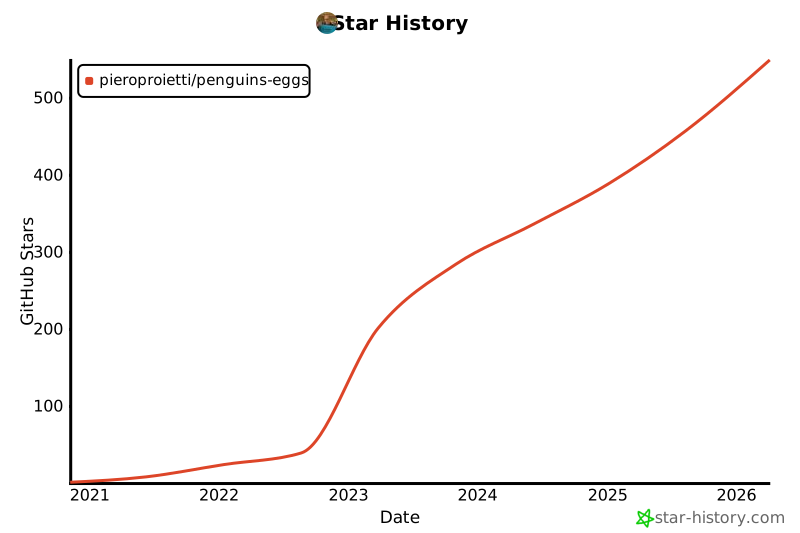
## Star History
|
|
1341
1411
|
This project collects stars, look to the sky... contribute!
|
|
1342
1412
|
|
|
1343
1413
|
[](https://star-history.com/#pieroproietti/penguins-eggs&Date)
|
|
1344
1414
|
|
|
1345
1415
|
# Copyright and licenses
|
|
1346
|
-
Copyright (c) 2017,
|
|
1416
|
+
Copyright (c) 2017, 2025 [Piero Proietti](https://penguins-eggs.net/about-me.html), dual licensed under the MIT or GPL Version 2 licenses.
|