peekme 0.4.3 → 0.4.5
This diff represents the content of publicly available package versions that have been released to one of the supported registries. The information contained in this diff is provided for informational purposes only and reflects changes between package versions as they appear in their respective public registries.
- package/CHANGELOG.md +40 -0
- package/README.md +110 -112
- package/npm-shrinkwrap.json +2 -2
- package/package.json +3 -3
package/CHANGELOG.md
CHANGED
|
@@ -1,5 +1,45 @@
|
|
|
1
1
|
# Changelog
|
|
2
2
|
|
|
3
|
+
## 0.4.5 (2026-10-11)
|
|
4
|
+
|
|
5
|
+
- Mac Terminal: with Kiro CLI inline or Claude Code's classic screen, Option+P typed `π`,
|
|
6
|
+
because Terminal keeps its selection to itself. Now peekme can read that selection through
|
|
7
|
+
macOS Accessibility. The first Option+P with nothing selected that peekme can see asks once:
|
|
8
|
+
press Enter, then turn on Terminal in System Settings > Privacy & Security > Accessibility.
|
|
9
|
+
Esc keeps things as before. Kiro stays inline. `peekme doctor` says if it is on.
|
|
10
|
+
- tmux with `mouse on`: Option+Shift+P (Alt+Shift+P) did nothing after a drag when tmux stayed
|
|
11
|
+
in copy mode. Option+P worked. Now both work.
|
|
12
|
+
- tmux with `mouse on`: a click on underlined text now opens the saved answer also over agents
|
|
13
|
+
that leave the mouse alone (Claude Code classic, Kiro CLI inline), also over SSH. tmux keeps
|
|
14
|
+
plain clicks for itself there, so peekme asks it to hand them over in its own pane. Drags and
|
|
15
|
+
the wheel stay with tmux. Needs tmux 3.2 or newer.
|
|
16
|
+
- Docs: a new table in the README and on peekme.dev says what peekme can read inside tmux and
|
|
17
|
+
over SSH, for each agent, with tmux's mouse on and off.
|
|
18
|
+
|
|
19
|
+
## 0.4.4-beta.2 (2026-10-11)
|
|
20
|
+
|
|
21
|
+
A test build, only on crates.io: `cargo install peekme --version 0.4.4-beta.2`.
|
|
22
|
+
|
|
23
|
+
- tmux with `mouse on`: after a drag that tmux handles (the agent leaves the mouse alone, like
|
|
24
|
+
Kiro inline or Claude classic), Option+Shift+P did nothing when tmux stayed in copy mode.
|
|
25
|
+
Option+P worked. Now both work, also as Alt+Shift+P.
|
|
26
|
+
- tmux with `mouse on`: a click on underlined text did nothing when the agent leaves the mouse
|
|
27
|
+
alone, because tmux keeps plain clicks. peekme now asks tmux to hand them over in its own
|
|
28
|
+
pane, so the click opens the saved answer. Drags and the wheel stay with tmux. Needs tmux 3.2
|
|
29
|
+
or newer.
|
|
30
|
+
|
|
31
|
+
## 0.4.4-beta.1 (2026-10-11)
|
|
32
|
+
|
|
33
|
+
A test build, only on crates.io: `cargo install peekme --version 0.4.4-beta.1`.
|
|
34
|
+
|
|
35
|
+
- Mac Terminal: Kiro inline (and Claude classic) leave the mouse to Terminal, and Terminal keeps
|
|
36
|
+
the selection to itself, so Option+P typed π. Now peekme can read that selection through
|
|
37
|
+
macOS Accessibility. The first Option+P with nothing peekme can see asks once: press Enter,
|
|
38
|
+
then turn on Terminal in System Settings > Privacy & Security > Accessibility. Esc keeps
|
|
39
|
+
things as before. Kiro stays inline.
|
|
40
|
+
- `peekme doctor` on a Mac says if Accessibility is on for the terminal and, with text selected,
|
|
41
|
+
if peekme can read it.
|
|
42
|
+
|
|
3
43
|
## 0.4.3 (2026-10-09)
|
|
4
44
|
|
|
5
45
|
- Questions inside boxes. Select words in a box and press Alt+Shift+P (Option+Shift+P on a Mac):
|
package/README.md
CHANGED
|
@@ -4,33 +4,46 @@ Pick me. Select text in [Claude Code](https://github.com/anthropics/claude-code)
|
|
|
4
4
|
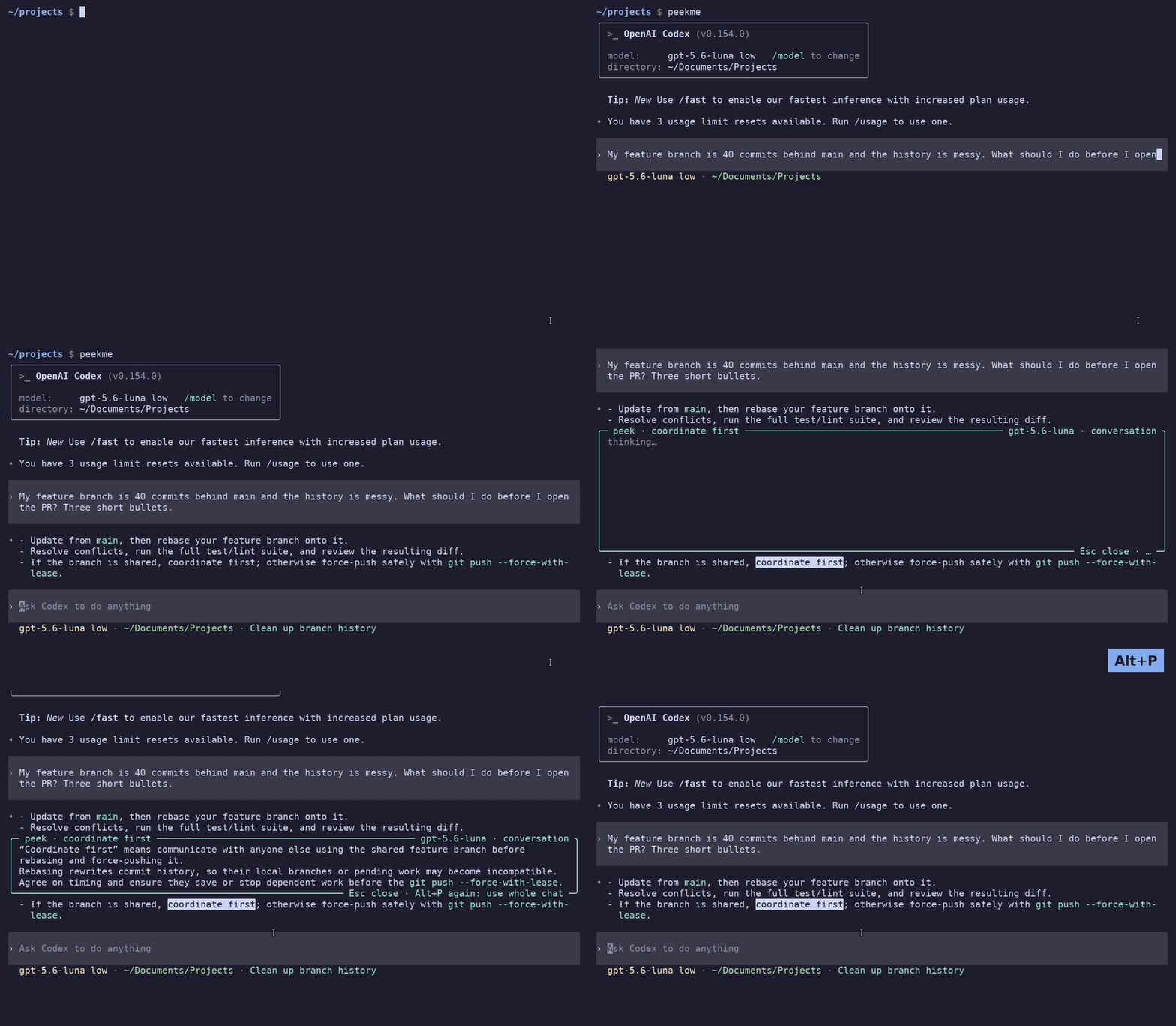
[Codex CLI](https://github.com/openai/codex),
|
|
5
5
|
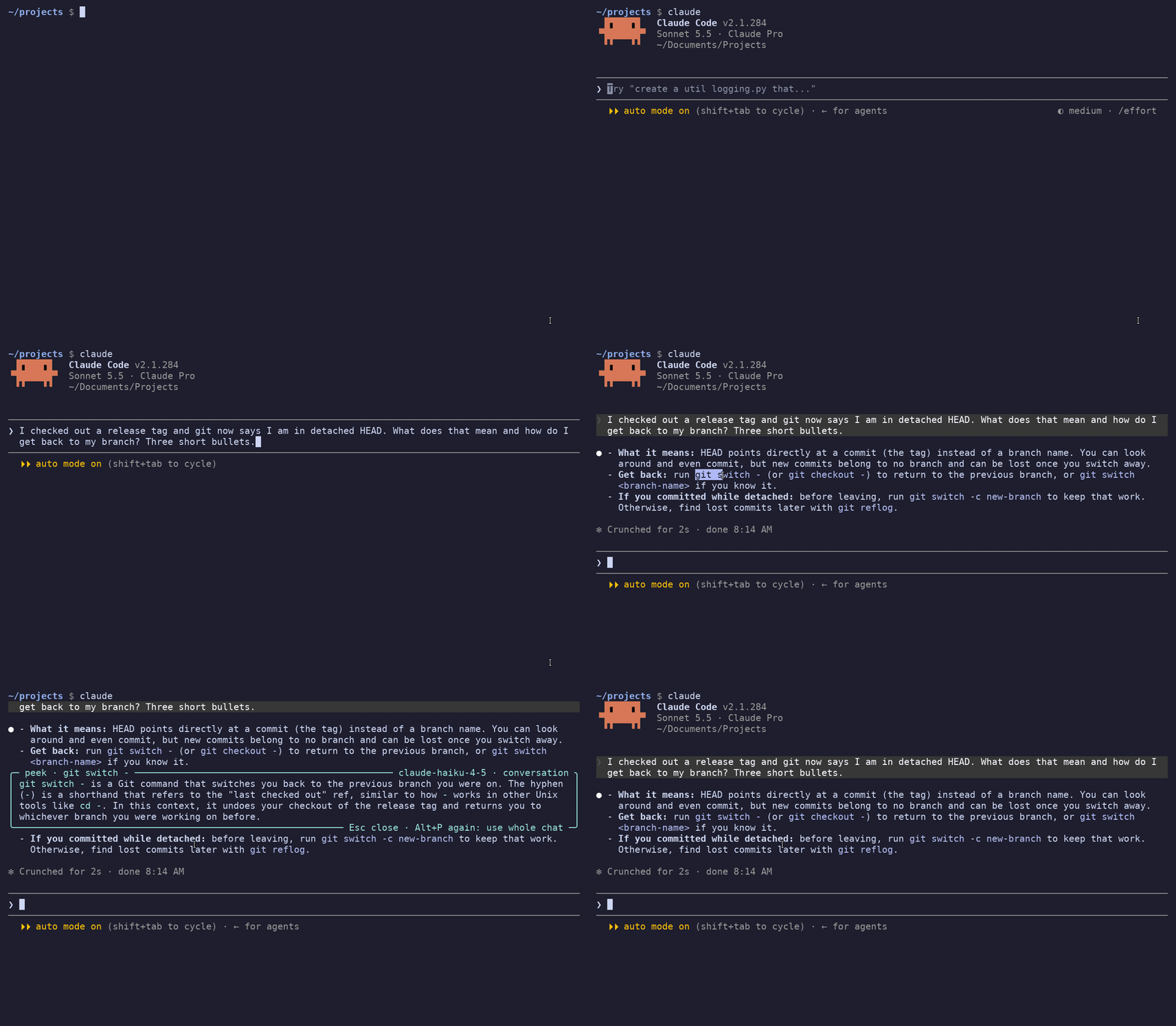
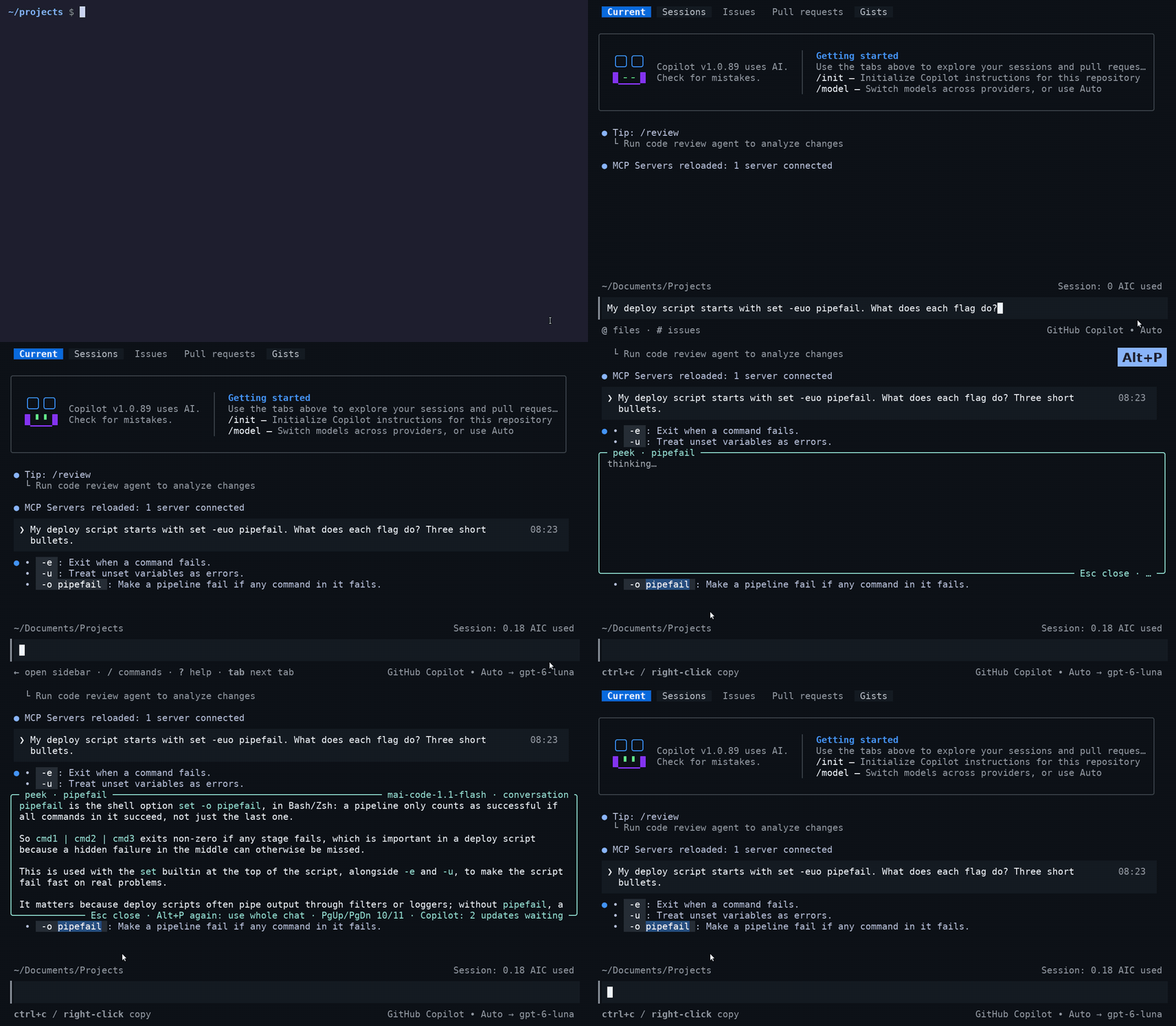
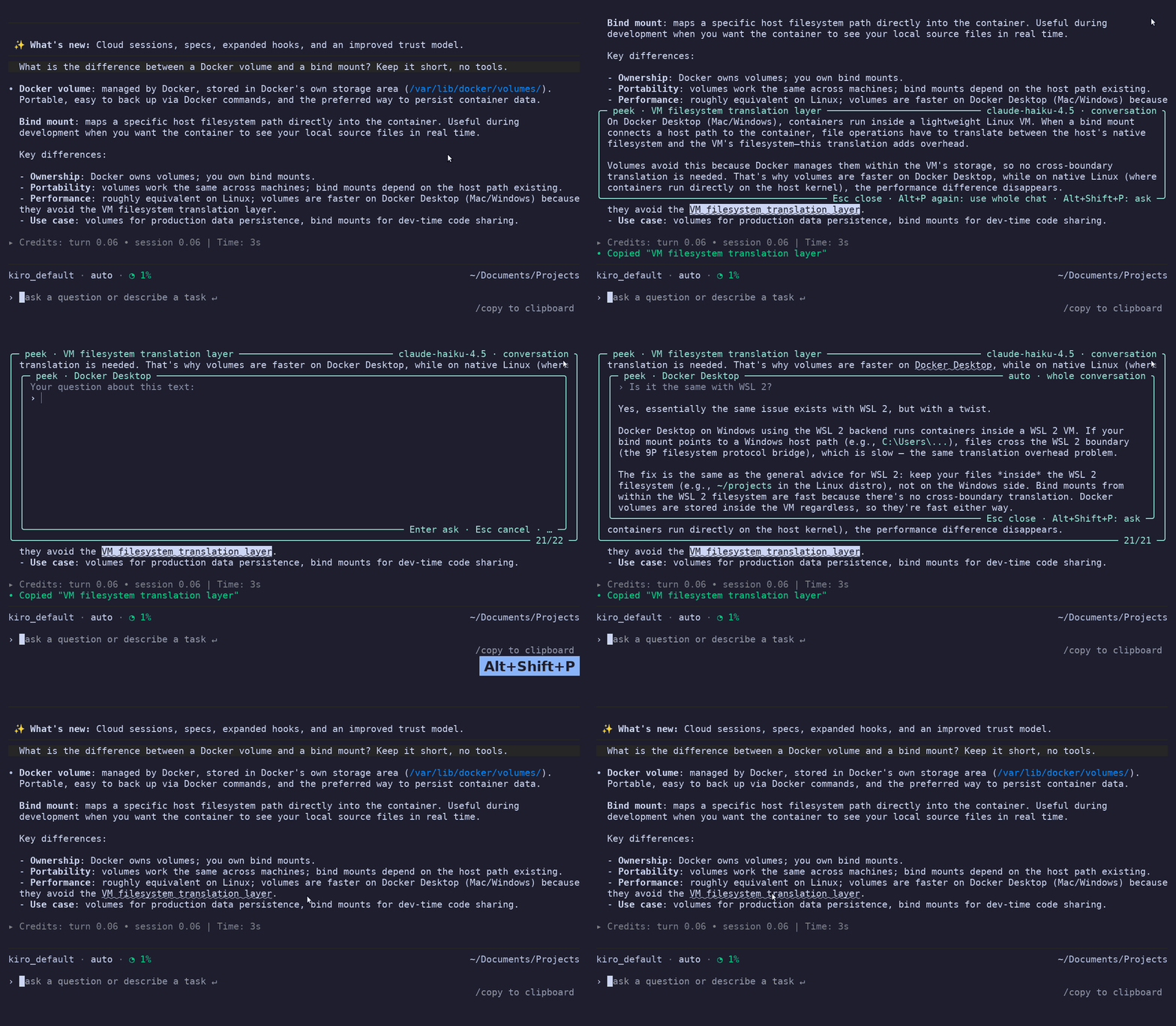
[GitHub Copilot CLI](https://github.com/github/copilot-cli) or [Kiro CLI](https://kiro.dev/cli/) output, press **Alt+P** (**Option+P** on a Mac), and a short
|
|
6
6
|
explanation opens right next to that text, inside the terminal. The other lines move to make
|
|
7
|
-
room, like Peek in VS Code.
|
|
7
|
+
room, like Peek in VS Code. Or press **Alt+Shift+P** and type your own question first. Esc
|
|
8
|
+
closes the box and the screen is exactly as before.
|
|
8
9
|
|
|
9
|
-
|
|
10
11
|
|
|
11
|
-
|
|
12
|
-
"its split panes" in an answer that recommends Kitty, it tells you it is about Kitty.
|
|
13
|
-
|
|
14
|
-
Status: 0.4.3. Tested with Claude Code 2.1.292, Codex 0.161, Copilot CLI 1.0.93 and Kiro CLI 2.28 on Linux, also
|
|
12
|
+
Status: 0.4.5. Tested with Claude Code 2.1.292, Codex 0.161, Copilot CLI 1.0.93 and Kiro CLI 2.28 on Linux, also
|
|
15
13
|
inside tmux and over SSH. On macOS it is tested in Terminal and iTerm2 with a stand-in agent, and
|
|
16
14
|
in Terminal with the real Codex, also inside tmux and over SSH.
|
|
17
15
|
|
|
16
|
+
Website and docs: **[peekme.dev](https://peekme.dev)**
|
|
17
|
+
|
|
18
|
+
## What it does
|
|
19
|
+
|
|
20
|
+
- **Peek: Alt+P** (Option+P). Select text and press Alt+P. A short explanation opens under the
|
|
21
|
+
text. It comes from a small, fast model, and the model knows the conversation: if you select
|
|
22
|
+
"its split panes" in an answer that recommends Kitty, it tells you it is about Kitty.
|
|
23
|
+
- **Ask: Alt+Shift+P** (Option+Shift+P). Select text, press Alt+Shift+P and type your own
|
|
24
|
+
question, for example "why not use a mutex here?". Enter sends it. The answer comes from the
|
|
25
|
+
model your chat runs on, with the whole conversation, so it is slower and better than a peek.
|
|
26
|
+
- **Boxes inside boxes.** In an open box, select words and press Alt+P or Alt+Shift+P again. A
|
|
27
|
+
new box opens inside, under that line. You can go several levels deep.
|
|
28
|
+
- **Saved answers.** Text you asked about gets a dotted underline. Click it and the answer opens
|
|
29
|
+
again, with no new request.
|
|
30
|
+
|
|
18
31
|
## One peekme for all your agents
|
|
19
32
|
|
|
20
|
-
|
|
21
|
-
|
|
22
|
-
everywhere. Claude Code, Codex CLI,
|
|
23
|
-
GitHub Copilot CLI and Kiro CLI work today, and more agents are planned. If one agent gets its own way to
|
|
24
|
-
explain a selection some day, it will work in that agent only. peekme keeps working in all of
|
|
25
|
-
them.
|
|
33
|
+
You install peekme once, and the keys and the boxes are the same in Claude Code, Codex CLI,
|
|
34
|
+
GitHub Copilot CLI and Kiro CLI. More agents are planned.
|
|
26
35
|
|
|
27
36
|
Codex CLI:
|
|
28
37
|
|
|
29
|
-
|
|
30
39
|
|
|
31
40
|
GitHub Copilot CLI:
|
|
32
41
|
|
|
33
|
-
|
|
43
|
+
|
|
44
|
+
Kiro CLI:
|
|
45
|
+
|
|
46
|
+
|
|
34
47
|
|
|
35
48
|
## Install
|
|
36
49
|
|
|
@@ -59,61 +72,37 @@ the selection itself, and peekme uses that selection.
|
|
|
59
72
|
|
|
60
73
|
| Key | When | What it does |
|
|
61
74
|
|---|---|---|
|
|
62
|
-
| Alt+P (Mac: Option+P) |
|
|
75
|
+
| Alt+P (Mac: Option+P) | text is selected | explain it |
|
|
76
|
+
| Alt+Shift+P (Mac: Option+Shift+P) | text is selected | type a question about it first, Enter sends it |
|
|
63
77
|
| Alt+P again | box is open, same selection | explain again using the whole conversation |
|
|
64
|
-
|
|
|
65
|
-
|
|
|
78
|
+
| Alt+P or Alt+Shift+P on text in the box | box is open | open a new box inside it, under that line |
|
|
79
|
+
| click on underlined text | any time | show the saved answer, with no new request |
|
|
80
|
+
| PgUp / PgDn, mouse wheel | box is open | scroll a long answer |
|
|
81
|
+
| Esc | box is open | close the innermost box |
|
|
66
82
|
| typing | box is open | goes to the agent's input line, the box stays open |
|
|
67
83
|
| Enter | box is open | sends your message and closes the box |
|
|
68
|
-
| Alt+P on text in the box | box is open | opens a new box inside it, under that line |
|
|
69
|
-
| Alt+Shift+P (Mac: Option+Shift+P) | any time | type a question about the selected text first, Enter sends it |
|
|
70
|
-
| click on underlined text | any time | shows the answer from before, with no new request |
|
|
71
84
|
|
|
72
|
-
|
|
73
|
-
|
|
74
|
-
|
|
75
|
-
|
|
85
|
+
A second click on underlined text closes the saved answer. Boxes inside boxes go several levels
|
|
86
|
+
deep while the window is wide enough. The wheel scrolls the box under the pointer.
|
|
87
|
+
|
|
88
|
+
In Claude Code, Alt+P opens the model picker. With peekme it explains the selection instead.
|
|
89
|
+
`/model` still opens the model picker.
|
|
76
90
|
|
|
77
91
|
### Ask a question
|
|
78
92
|
|
|
79
|
-
|
|
80
|
-
|
|
81
|
-
"why not use a mutex here?". Enter sends it, Esc cancels. While you type, the keys stay in the
|
|
82
|
-
box and don't go to the agent.
|
|
93
|
+
After Alt+Shift+P the box opens empty and you type. Enter sends the question, Esc cancels. While
|
|
94
|
+
you type, the keys stay in the box and don't go to the agent.
|
|
83
95
|
|
|
84
96
|
The question goes to the model your chat runs on, not the small one, together with the whole
|
|
85
|
-
conversation (Codex gets a copy of the thread). So it takes longer and costs more than a
|
|
86
|
-
|
|
87
|
-
words and press Alt+Shift+P to ask about them: the question opens in a box inside, and the model
|
|
88
|
-
also gets the answers around it. The answer is saved with the question, and a click on the
|
|
89
|
-
underline shows both.
|
|
97
|
+
conversation (Codex gets a copy of the thread). So it takes longer and costs more than a peek.
|
|
98
|
+
To use another model, see [Settings](#settings).
|
|
90
99
|
|
|
91
|
-
|
|
100
|
+
- With a box open and nothing new selected, Alt+Shift+P asks about the text that box explains.
|
|
101
|
+
- Inside a box, select words and press Alt+Shift+P. The question opens in a box inside, and the
|
|
102
|
+
model also gets the answers around it.
|
|
103
|
+
- The answer is saved with the question, and a click on the underline shows both.
|
|
92
104
|
|
|
93
|
-
|
|
94
|
-
terminal sends Option+P as the character `π`. When something is selected, peekme takes `π` as
|
|
95
|
-
the shortcut. When nothing is selected, `π` is typed as usual, so you never lose the letter.
|
|
96
|
-
Option+Shift+P types `∏` and works the same way for questions. If
|
|
97
|
-
you type Greek, `π` stays a letter. If your terminal sends Option as Meta, Option+P works too.
|
|
98
|
-
|
|
99
|
-
When the agent draws full screen, peekme gets the selection from the agent. Otherwise (Claude
|
|
100
|
-
Code's classic screen, Kiro CLI before `/fullscreen`) it reads the clipboard: iTerm2 copies a
|
|
101
|
-
selection there by itself, in Terminal press Cmd+C after you select. Over SSH only the agent's
|
|
102
|
-
own selection can be read, so use the full screen mode there (Claude Code with
|
|
103
|
-
`"tui": "fullscreen"`, `/fullscreen` in Kiro CLI, Codex and Copilot CLI by default).
|
|
104
|
-
|
|
105
|
-
Inside tmux, Codex leaves the mouse to the terminal when tmux has the mouse off, which is tmux's
|
|
106
|
-
default. A selection is then your terminal's own, and over SSH peekme cannot read it. Add
|
|
107
|
-
`set -g mouse on` to `~/.tmux.conf` and restart Codex. peekme tells you this the first time you
|
|
108
|
-
press Option+P there.
|
|
109
|
-
|
|
110
|
-
With tmux's mouse on, a drag over text the agent doesn't take is a tmux selection, and Option+P
|
|
111
|
-
explains it, also when your tmux stays in copy mode after the drag. A selection made with Option
|
|
112
|
-
held is your terminal's own. Over SSH no program on the other side can read it, so drag without
|
|
113
|
-
Option there.
|
|
114
|
-
|
|
115
|
-
In Claude Code, Alt+P opens the model picker. With peekme it explains the selection instead.
|
|
116
|
-
`/model` still opens the model picker.
|
|
105
|
+
### Which model explains
|
|
117
106
|
|
|
118
107
|
No API key is needed. peekme asks the agent's own CLI, with your existing login:
|
|
119
108
|
|
|
@@ -135,36 +124,62 @@ No API key is needed. peekme asks the agent's own CLI, with your existing login:
|
|
|
135
124
|
|
|
136
125
|
It does use your plan, a little for each explanation. Nothing starts before the first Alt+P.
|
|
137
126
|
|
|
138
|
-
|
|
139
|
-
`claude -c`, `codex`, `codex "prompt"`, `codex resume`, `codex fork`, `copilot`,
|
|
140
|
-
`copilot -i "prompt"`, `copilot --resume`, and `kiro-cli`, `kiro-cli chat`, `kiro-cli --resume`.
|
|
141
|
-
Commands like `claude -p`, `codex exec`, `copilot -p`, `copilot login`,
|
|
142
|
-
`kiro-cli chat --no-interactive` or `kiro-cli acp`, and anything with output going to a pipe or
|
|
143
|
-
a file, run the agent directly.
|
|
127
|
+
### On a Mac
|
|
144
128
|
|
|
145
|
-
|
|
129
|
+
Option+P works as it is, with no terminal setting, also over SSH and inside tmux. A Mac
|
|
130
|
+
terminal sends Option+P as the character `π`. When something is selected, peekme takes `π` as
|
|
131
|
+
the shortcut. When nothing is selected, `π` is typed as usual, so you never lose the letter.
|
|
132
|
+
Option+Shift+P types `∏` and works the same way for questions. If
|
|
133
|
+
you type Greek, `π` stays a letter. If your terminal sends Option as Meta, Option+P works too.
|
|
146
134
|
|
|
147
|
-
|
|
148
|
-
|
|
149
|
-
what is on your screen.
|
|
135
|
+
When the agent draws full screen, peekme gets the selection from the agent. Otherwise (Claude
|
|
136
|
+
Code's classic screen, Kiro CLI before `/fullscreen`) the selection is your terminal's own:
|
|
150
137
|
|
|
151
|
-
|
|
138
|
+
- iTerm2 copies a selection to the clipboard by itself, and peekme reads it there.
|
|
139
|
+
- Terminal keeps it to itself. The first Option+P there offers to read it through macOS
|
|
140
|
+
Accessibility: press Enter, then turn on Terminal in System Settings > Privacy & Security >
|
|
141
|
+
Accessibility. It is needed once. If Option+P still types `π`, quit Terminal and open it again.
|
|
142
|
+
`peekme doctor` says if it is on. Esc instead keeps things as before, and Cmd+C after you
|
|
143
|
+
select works too.
|
|
152
144
|
|
|
153
|
-
|
|
154
|
-
|
|
155
|
-
|
|
156
|
-
- Codex full screen: the text Codex highlighted.
|
|
157
|
-
- Copilot CLI, and Kiro CLI after `/fullscreen`: the same OSC 52 sequence as Claude Code.
|
|
158
|
-
- Otherwise: your terminal's mouse selection (the X11 PRIMARY selection).
|
|
145
|
+
Over SSH the terminal's selection stays on your Mac. Use the agent's full screen mode there, or
|
|
146
|
+
run the agent inside tmux with its mouse on, see [Inside tmux and over SSH](#inside-tmux-and-over-ssh).
|
|
147
|
+
In iTerm2 a drag with Option held is always iTerm2's own selection, so drag without Option there.
|
|
159
148
|
|
|
160
|
-
|
|
161
|
-
cleared and there is no switch to another screen, so there is no flicker. The agent's input
|
|
162
|
-
line and status line under the box keep updating, so you can type while you read. Other output
|
|
163
|
-
that arrives while the box is open is kept aside.
|
|
149
|
+
### Inside tmux and over SSH
|
|
164
150
|
|
|
165
|
-
|
|
166
|
-
|
|
167
|
-
|
|
151
|
+
peekme runs where the agent runs: install it on the machine you SSH into, and it works inside
|
|
152
|
+
tmux there. What peekme can read depends on who takes the mouse:
|
|
153
|
+
|
|
154
|
+
| Agent | tmux mouse on (`set -g mouse on`) | tmux mouse off (tmux's default) |
|
|
155
|
+
|---|---|---|
|
|
156
|
+
| Full screen: Claude Code with `"tui": "fullscreen"`, Copilot CLI, Kiro CLI after `/fullscreen` | the agent's selection, also over SSH | the same |
|
|
157
|
+
| Codex | the agent's selection, also over SSH | your terminal's selection (Codex leaves it the mouse), not readable over SSH |
|
|
158
|
+
| Claude Code classic screen, Kiro CLI inline | tmux's selection, also over SSH | your terminal's selection, not readable over SSH |
|
|
159
|
+
|
|
160
|
+
With tmux's mouse on and an agent that leaves the mouse alone, a drag is tmux's selection.
|
|
161
|
+
Alt+P and Alt+Shift+P explain it, also when your tmux stays in copy mode after the drag, and a
|
|
162
|
+
click on underlined text opens the saved answer (tmux 3.2 or newer). Drags and the wheel stay
|
|
163
|
+
with tmux. For this peekme adds key bindings to tmux that act only in its own pane (Option+P and
|
|
164
|
+
Option+Shift+P in copy mode, and a plain click), and leaves keys you bound yourself alone.
|
|
165
|
+
|
|
166
|
+
Codex asks tmux at startup whether it has the mouse. After `set -g mouse on`, restart Codex.
|
|
167
|
+
peekme tells you this the first time you press Alt+P there.
|
|
168
|
+
|
|
169
|
+
## How it works
|
|
170
|
+
|
|
171
|
+
The agent runs in a pseudo-terminal. Its output goes to your terminal unchanged, and the same
|
|
172
|
+
bytes also go to a terminal emulator in memory (`alacritty_terminal`), so peekme always knows
|
|
173
|
+
what is on your screen. The selection comes from the agent when it draws full screen (Claude
|
|
174
|
+
Code, Copilot CLI and Kiro CLI copy it with an OSC 52 sequence, Codex highlights it), otherwise
|
|
175
|
+
from your terminal (X11 PRIMARY, or the clipboard on a Mac).
|
|
176
|
+
|
|
177
|
+
peekme redraws only the rows next to the selection, with the box between them. Nothing is
|
|
178
|
+
cleared and there is no switch to another screen, so there is no flicker. The agent's input line
|
|
179
|
+
and status line keep updating while the box is open. On Esc peekme draws those rows again from a
|
|
180
|
+
copy and sends the output it kept aside, so the terminal ends in the same state as if the box
|
|
181
|
+
never existed. Tests check this cell by cell on real Claude Code, Codex, Copilot CLI and Kiro CLI
|
|
182
|
+
output.
|
|
168
183
|
|
|
169
184
|
### What the model gets
|
|
170
185
|
|
|
@@ -238,6 +253,13 @@ npm 12 may say that it skipped an install script of peekme. That is fine: peekme
|
|
|
238
253
|
its binary the first time it runs. Ready binaries for Linux and macOS (x86_64 and ARM) are on the
|
|
239
254
|
[latest release](https://github.com/GregoryBolshakov/peekme/releases/latest) page.
|
|
240
255
|
|
|
256
|
+
Only the interactive screen gets peekme: `claude`, `claude "prompt"`, `claude --resume`,
|
|
257
|
+
`claude -c`, `codex`, `codex "prompt"`, `codex resume`, `codex fork`, `copilot`,
|
|
258
|
+
`copilot -i "prompt"`, `copilot --resume`, and `kiro-cli`, `kiro-cli chat`, `kiro-cli --resume`.
|
|
259
|
+
Commands like `claude -p`, `codex exec`, `copilot -p`, `copilot login`,
|
|
260
|
+
`kiro-cli chat --no-interactive` or `kiro-cli acp`, and anything with output going to a pipe or
|
|
261
|
+
a file, run the agent directly.
|
|
262
|
+
|
|
241
263
|
To use peekme with another program, run `peekme -- COMMAND`.
|
|
242
264
|
|
|
243
265
|
## Limits
|
|
@@ -245,40 +267,16 @@ To use peekme with another program, run `peekme -- COMMAND`.
|
|
|
245
267
|
- Only text that is on screen now. Text that scrolled up into the terminal history can't be
|
|
246
268
|
selected yet.
|
|
247
269
|
- In full screen mode selection works anywhere, also over SSH, because peekme reads the
|
|
248
|
-
selection from the agent. Otherwise peekme needs the terminal's selection
|
|
249
|
-
|
|
250
|
-
|
|
251
|
-
- A click on underlined text works
|
|
252
|
-
Claude Code's classic screen and Kiro CLI before
|
|
253
|
-
terminal.
|
|
270
|
+
selection from the agent. Otherwise peekme needs the terminal's selection (or tmux's, see
|
|
271
|
+
[Inside tmux and over SSH](#inside-tmux-and-over-ssh)), which it reads on Linux with X11 only.
|
|
272
|
+
On Wayland it works through XWayland, and on macOS see [On a Mac](#on-a-mac).
|
|
273
|
+
- A click on underlined text works when the agent takes the mouse (full screen mode), or inside
|
|
274
|
+
tmux with its mouse on. Otherwise, on Claude Code's classic screen and Kiro CLI before
|
|
275
|
+
`/fullscreen`, the click goes to your terminal.
|
|
254
276
|
- Claude Code full screen: if `copyOnSelect` is off, Claude does not report the selection. Then
|
|
255
277
|
only a Shift+drag selection works (read from X11 PRIMARY).
|
|
256
278
|
- An explanation takes about 1 to 2 seconds to start arriving.
|
|
257
279
|
|
|
258
|
-
## Development
|
|
259
|
-
|
|
260
|
-
```
|
|
261
|
-
cargo test
|
|
262
|
-
cargo clippy --all-targets
|
|
263
|
-
cargo run --example vtdump -- capture.bin 120 40 [offset]
|
|
264
|
-
cargo run --example peek_text -- "<screen text>" "<selection>" [--deep] [--ask QUESTION] [--inside ANSWER WORDS] [--claude|--copilot|--kiro] [--pid PID]
|
|
265
|
-
python3 spikes/capture.py out.bin 120 40 "<script>" -- peekme claude
|
|
266
|
-
python3 spikes/flicker_test.py
|
|
267
|
-
python3 spikes/explain_probe.py
|
|
268
|
-
python3 spikes/copilot_probe.py info
|
|
269
|
-
python3 spikes/kiro_probe.py [MODEL] [PROMPT]
|
|
270
|
-
```
|
|
271
|
-
|
|
272
|
-
`vtdump` replays a captured byte stream and prints the screen. `peek_text` runs one explanation
|
|
273
|
-
without a terminal and prints the exact prompt. `capture.py` runs a command in a pseudo-terminal,
|
|
274
|
-
sends keys and mouse events from a script and saves everything it prints. `flicker_test.py`
|
|
275
|
-
shows if your terminal flickers when a program switches screens. `explain_probe.py` makes one
|
|
276
|
-
explanation request to `codex app-server` and prints timings. `copilot_probe.py` does the same
|
|
277
|
-
with Copilot CLI's headless server, `kiro_probe.py` with Kiro CLI's ACP server.
|
|
278
|
-
|
|
279
|
-
Each agent has its own folder in `src/` (`claude/`, `codex/`, `copilot/`, `kiro/`): how its selection is read, where
|
|
280
|
-
its conversation comes from, and which model explains. The rest is shared.
|
|
281
|
-
|
|
282
280
|
## License
|
|
283
281
|
|
|
284
282
|
MIT or Apache-2.0, at your choice.
|
package/npm-shrinkwrap.json
CHANGED
|
@@ -19,7 +19,7 @@
|
|
|
19
19
|
"hasInstallScript": true,
|
|
20
20
|
"license": "MIT OR Apache-2.0",
|
|
21
21
|
"name": "peekme",
|
|
22
|
-
"version": "0.4.
|
|
22
|
+
"version": "0.4.5"
|
|
23
23
|
},
|
|
24
24
|
"node_modules/detect-libc": {
|
|
25
25
|
"engines": {
|
|
@@ -48,5 +48,5 @@
|
|
|
48
48
|
}
|
|
49
49
|
},
|
|
50
50
|
"requires": true,
|
|
51
|
-
"version": "0.4.
|
|
51
|
+
"version": "0.4.5"
|
|
52
52
|
}
|
package/package.json
CHANGED
|
@@ -1,6 +1,6 @@
|
|
|
1
1
|
{
|
|
2
2
|
"artifactDownloadUrls": [
|
|
3
|
-
"https://github.com/GregoryBolshakov/peekme/releases/download/v0.4.
|
|
3
|
+
"https://github.com/GregoryBolshakov/peekme/releases/download/v0.4.5"
|
|
4
4
|
],
|
|
5
5
|
"author": "Gregory Bolshakov",
|
|
6
6
|
"bin": {
|
|
@@ -21,7 +21,7 @@
|
|
|
21
21
|
"major": 2,
|
|
22
22
|
"series": 35
|
|
23
23
|
},
|
|
24
|
-
"homepage": "https://
|
|
24
|
+
"homepage": "https://peekme.dev",
|
|
25
25
|
"keywords": [
|
|
26
26
|
"command-line-utilities",
|
|
27
27
|
"development-tools",
|
|
@@ -70,7 +70,7 @@
|
|
|
70
70
|
"zipExt": ".tar.xz"
|
|
71
71
|
}
|
|
72
72
|
},
|
|
73
|
-
"version": "0.4.
|
|
73
|
+
"version": "0.4.5",
|
|
74
74
|
"volta": {
|
|
75
75
|
"node": "18.14.1",
|
|
76
76
|
"npm": "9.5.0"
|