peekme 0.3.5 → 0.4.1
This diff represents the content of publicly available package versions that have been released to one of the supported registries. The information contained in this diff is provided for informational purposes only and reflects changes between package versions as they appear in their respective public registries.
- package/CHANGELOG.md +124 -0
- package/README.md +9 -4
- package/npm-shrinkwrap.json +2 -2
- package/package.json +5 -4
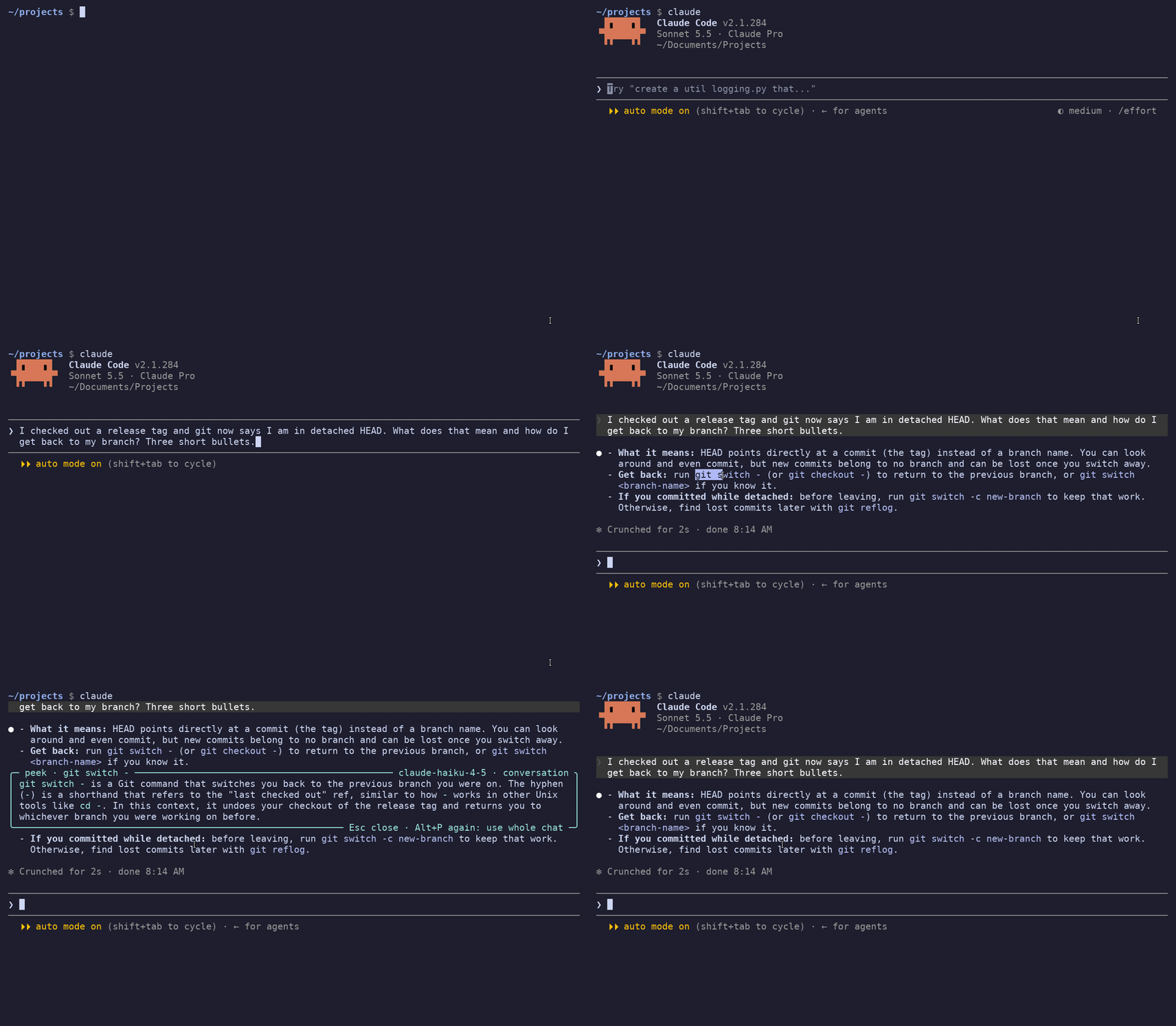
package/CHANGELOG.md
CHANGED
|
@@ -1,5 +1,129 @@
|
|
|
1
1
|
# Changelog
|
|
2
2
|
|
|
3
|
+
## 0.4.1 (2026-10-07)
|
|
4
|
+
|
|
5
|
+
- Mac: after `peekme install`, `claude` could stop with `error: unknown option
|
|
6
|
+
'--internal-jobctl-helper'` and Claude Code never opened. `codex` and `copilot` had the same
|
|
7
|
+
problem. On macOS peekme's helper process started under the name of the agent link, and
|
|
8
|
+
peekme passed its own flag on to the agent. Now the helper is found first. The same happened
|
|
9
|
+
on any system where `claude` was a copy of peekme instead of a link.
|
|
10
|
+
- Tests no longer depend on running inside tmux or over SSH.
|
|
11
|
+
|
|
12
|
+
## 0.4.0 (2026-10-06)
|
|
13
|
+
|
|
14
|
+
Everything from the 0.4.0 betas below, now in the normal install (`npm i -g peekme`, Homebrew,
|
|
15
|
+
`cargo install peekme`).
|
|
16
|
+
|
|
17
|
+
- Text you already asked about gets a dotted underline. Click it and the saved answer opens
|
|
18
|
+
again, with no new request. Click again to close it.
|
|
19
|
+
- Peek inside a peek. Select words in the box and press Alt+P (Option+P on a Mac). A new box
|
|
20
|
+
opens under that line, and you can go several levels deep.
|
|
21
|
+
- Each box scrolls on its own: the wheel scrolls the box under the pointer, PgUp/PgDn the
|
|
22
|
+
innermost one, Esc closes the innermost one.
|
|
23
|
+
- Underlines stay on their text after scrolling, resizing and unfolding tool calls in Codex and
|
|
24
|
+
Claude Code.
|
|
25
|
+
- Mac fixes: Option+P after a drag in Codex, Terminal with mouse reporting off, and Option sent
|
|
26
|
+
as Alt.
|
|
27
|
+
|
|
28
|
+
## 0.4.0-beta.10 (2026-10-04)
|
|
29
|
+
|
|
30
|
+
A test build, only on crates.io: `cargo install peekme --version 0.4.0-beta.10`.
|
|
31
|
+
|
|
32
|
+
- Clicks on underlined text answer at once. Before, a click soon after the last one was taken as
|
|
33
|
+
part of a double click and did nothing, so you could not close a peek and open it again quickly.
|
|
34
|
+
Now only a second click on the same spot right after opening counts as a double click, and it
|
|
35
|
+
keeps the box open.
|
|
36
|
+
- With a box open, a click on other underlined text opens its answer in one click.
|
|
37
|
+
- Inside a box, a double click on a word selects it, so Option+P can explain it without a drag.
|
|
38
|
+
- Underlines no longer blink after a box closes.
|
|
39
|
+
|
|
40
|
+
## 0.4.0-beta.9 (2026-10-04)
|
|
41
|
+
|
|
42
|
+
A test build, only on crates.io: `cargo install peekme --version 0.4.0-beta.9`.
|
|
43
|
+
|
|
44
|
+
- Peek inside a peek. Select words in the box with the mouse and press Option+P (Alt+P): a new
|
|
45
|
+
box opens inside it, under that line. The outer boxes stay around it, so you see where you are.
|
|
46
|
+
You can go several levels deep while the window is wide enough.
|
|
47
|
+
- Each box scrolls on its own. The wheel scrolls the box under the pointer, PgUp/PgDn the
|
|
48
|
+
innermost one. Esc closes the innermost box.
|
|
49
|
+
- Answers inside a box are saved like the ones on screen. Their words get the dotted underline,
|
|
50
|
+
and a click on them shows the saved answer again with no new call.
|
|
51
|
+
- A press inside the box now selects text there. Before, it closed the box.
|
|
52
|
+
- With an agent that does not use the mouse (Claude Code classic, for example), peekme turns
|
|
53
|
+
mouse reports on while a box is open, so text in it can be selected. The agent gets none of them.
|
|
54
|
+
|
|
55
|
+
## 0.4.0-beta.8 (2026-10-03)
|
|
56
|
+
|
|
57
|
+
A test build, only on crates.io: `cargo install peekme --version 0.4.0-beta.8`.
|
|
58
|
+
|
|
59
|
+
- Codex: the underline under explained text lagged when you unfolded a command or a reasoning
|
|
60
|
+
block. The text moved down at once, but the underline came after Codex went quiet, and for that
|
|
61
|
+
time it stayed on the old place. Now peekme draws it in the same frame as Codex's text.
|
|
62
|
+
|
|
63
|
+
## 0.4.0-beta.7 (2026-10-02)
|
|
64
|
+
|
|
65
|
+
A test build, only on crates.io: `cargo install peekme --version 0.4.0-beta.7`.
|
|
66
|
+
|
|
67
|
+
- Codex: Option+P pressed right after a drag sometimes typed the letter instead of opening the
|
|
68
|
+
box. Codex draws its selection a moment after you release the mouse, and peekme looked too
|
|
69
|
+
early. Now it waits up to a second for the selection.
|
|
70
|
+
|
|
71
|
+
## 0.4.0-beta.6 (2026-09-30)
|
|
72
|
+
|
|
73
|
+
A test build, only on crates.io: `cargo install peekme --version 0.4.0-beta.6`.
|
|
74
|
+
|
|
75
|
+
- Mac Terminal with View > Allow Mouse Reporting off: a drag is Terminal's own selection, which
|
|
76
|
+
Codex and peekme never get, so Option+P typed the letter. Now Option+P tells you once to turn
|
|
77
|
+
mouse reporting on (Cmd+R). Alt+P says it every time.
|
|
78
|
+
- Option+P is also understood when the terminal reports Option as Alt.
|
|
79
|
+
|
|
80
|
+
## 0.4.0-beta.5 (2026-09-30)
|
|
81
|
+
|
|
82
|
+
A test build, only on crates.io: `cargo install peekme --version 0.4.0-beta.5`.
|
|
83
|
+
|
|
84
|
+
- Mac, without tmux or SSH: Option+P with nothing selected explained the last thing Codex copied
|
|
85
|
+
to the clipboard. Now a copy counts once. After that Option+P types the letter again, until you
|
|
86
|
+
select or copy something new.
|
|
87
|
+
|
|
88
|
+
## 0.4.0-beta.4 (2026-09-30)
|
|
89
|
+
|
|
90
|
+
A test build, only on crates.io: `cargo install peekme --version 0.4.0-beta.4`.
|
|
91
|
+
|
|
92
|
+
- Underlined text that is only partly on screen keeps the line on the part you can see.
|
|
93
|
+
- After you resize the window, underlines find their text again where the lines wrap now.
|
|
94
|
+
- Leftover underlines no longer stay behind on other text after scrolling in Codex.
|
|
95
|
+
- Codex: a selection over several formatted lines now gets its underline too.
|
|
96
|
+
|
|
97
|
+
## 0.4.0-beta.3 (2026-09-30)
|
|
98
|
+
|
|
99
|
+
A test build, only on crates.io: `cargo install peekme --version 0.4.0-beta.3`.
|
|
100
|
+
|
|
101
|
+
- In Codex and Claude Code full screen, an underline could disappear after a small scroll or after
|
|
102
|
+
opening a tool call, when the same words were on screen twice (for example in your question and
|
|
103
|
+
in the answer). peekme moved the mark to the other copy and never drew it there. Now a mark
|
|
104
|
+
follows its own copy, found by the lines around it.
|
|
105
|
+
|
|
106
|
+
## 0.4.0-beta.2 (2026-09-30)
|
|
107
|
+
|
|
108
|
+
A test build, only on crates.io. `cargo install peekme` still gives 0.3.5. To try it:
|
|
109
|
+
`cargo install peekme --version 0.4.0-beta.2`. It has all the fixes from 0.3.5.
|
|
110
|
+
|
|
111
|
+
- Text you already asked about gets a dotted underline once the answer is complete, so you can
|
|
112
|
+
see what you peeked before. The line comes back when the agent redraws those rows. Terminals
|
|
113
|
+
without dotted lines show another kind of underline.
|
|
114
|
+
- Click underlined text to see its answer again, with no new request. Click it again to close
|
|
115
|
+
the box. A double click opens it once. Dragging over the text still selects it, and a click with
|
|
116
|
+
Ctrl, Cmd, Shift or Option still does what your terminal or agent does with it. Links in the
|
|
117
|
+
agent's answer stay links. With the mouse over underlined text the line turns solid, and in
|
|
118
|
+
terminals that support it (kitty, Ghostty, WezTerm) the pointer becomes a hand.
|
|
119
|
+
- Clicks work where the agent handles the mouse itself: Codex and Claude Code full screen, also
|
|
120
|
+
in tmux and over SSH. In Claude Code's classic screen, select the text and press Alt+P.
|
|
121
|
+
- Select marked text and press Alt+P: the answer from before opens right away. Alt+P again still
|
|
122
|
+
asks with the whole chat.
|
|
123
|
+
- Codex: Option+P typed `π` when the selected text was in one of Codex's answers. Codex copies
|
|
124
|
+
such a selection as markdown (`- **Desktop app**` for the words Desktop app), and peekme looked
|
|
125
|
+
for that text on the screen and did not find it. Now peekme uses the text Codex highlights.
|
|
126
|
+
|
|
3
127
|
## 0.3.5 (2026-09-30)
|
|
4
128
|
|
|
5
129
|
- Option+P did nothing after a tmux selection when tmux stays in copy mode after the drag (a
|
package/README.md
CHANGED
|
@@ -6,12 +6,12 @@ Pick me. Select text in [Claude Code](https://github.com/anthropics/claude-code)
|
|
|
6
6
|
explanation opens right next to that text, inside the terminal. The other lines move to make
|
|
7
7
|
room, like Peek in VS Code. Esc closes it and the screen is exactly as before.
|
|
8
8
|
|
|
9
|
-
|
|
10
10
|
|
|
11
11
|
The explanation comes from a small, fast model and it knows the conversation. If you select
|
|
12
12
|
"its split panes" in an answer that recommends Kitty, it tells you it is about Kitty.
|
|
13
13
|
|
|
14
|
-
Status: 0.
|
|
14
|
+
Status: 0.4.1. Tested with Claude Code 2.1.292, Codex 0.161 and Copilot CLI 1.0.93 on Linux, also
|
|
15
15
|
inside tmux and over SSH. On macOS it is tested in Terminal and iTerm2 with a stand-in agent, and
|
|
16
16
|
in Terminal with the real Codex, also inside tmux and over SSH.
|
|
17
17
|
|
|
@@ -64,6 +64,13 @@ Codex since 0.157, Copilot CLI), it makes the selection itself, and peekme uses
|
|
|
64
64
|
| Esc | box is open | close the box |
|
|
65
65
|
| typing | box is open | goes to the agent's input line, the box stays open |
|
|
66
66
|
| Enter | box is open | sends your message and closes the box |
|
|
67
|
+
| Alt+P on text in the box | box is open | opens a new box inside it, under that line |
|
|
68
|
+
| click on underlined text | any time | shows the answer from before, with no new request |
|
|
69
|
+
|
|
70
|
+
Text you already asked about gets a dotted underline, so you can see what you peeked before.
|
|
71
|
+
A click on it opens the saved answer again, a second click closes it. Inside a box you can select
|
|
72
|
+
words and press Alt+P again, and go several levels deep while the window is wide enough. The
|
|
73
|
+
wheel scrolls the box under the pointer, Esc closes the innermost box.
|
|
67
74
|
|
|
68
75
|
### On a Mac
|
|
69
76
|
|
|
@@ -213,8 +220,6 @@ To use peekme with another program, run `peekme -- COMMAND`.
|
|
|
213
220
|
- Claude Code full screen: if `copyOnSelect` is off, Claude does not report the selection. Then
|
|
214
221
|
only a Shift+drag selection works (read from X11 PRIMARY).
|
|
215
222
|
- An explanation takes about 1 to 2 seconds to start arriving.
|
|
216
|
-
- `peekme install` is tested with bash. zsh uses the same block and should work the same way,
|
|
217
|
-
but it is not tested yet. The fish setup is not tested either.
|
|
218
223
|
|
|
219
224
|
## Development
|
|
220
225
|
|
package/npm-shrinkwrap.json
CHANGED
|
@@ -19,7 +19,7 @@
|
|
|
19
19
|
"hasInstallScript": true,
|
|
20
20
|
"license": "MIT OR Apache-2.0",
|
|
21
21
|
"name": "peekme",
|
|
22
|
-
"version": "0.
|
|
22
|
+
"version": "0.4.1"
|
|
23
23
|
},
|
|
24
24
|
"node_modules/detect-libc": {
|
|
25
25
|
"engines": {
|
|
@@ -48,5 +48,5 @@
|
|
|
48
48
|
}
|
|
49
49
|
},
|
|
50
50
|
"requires": true,
|
|
51
|
-
"version": "0.
|
|
51
|
+
"version": "0.4.1"
|
|
52
52
|
}
|
package/package.json
CHANGED
|
@@ -1,6 +1,6 @@
|
|
|
1
1
|
{
|
|
2
2
|
"artifactDownloadUrls": [
|
|
3
|
-
"https://github.com/GregoryBolshakov/peekme/releases/download/v0.
|
|
3
|
+
"https://github.com/GregoryBolshakov/peekme/releases/download/v0.4.1"
|
|
4
4
|
],
|
|
5
5
|
"author": "Gregory Bolshakov",
|
|
6
6
|
"bin": {
|
|
@@ -24,11 +24,12 @@
|
|
|
24
24
|
"homepage": "https://github.com/GregoryBolshakov/peekme",
|
|
25
25
|
"keywords": [
|
|
26
26
|
"command-line-utilities",
|
|
27
|
-
"
|
|
27
|
+
"development-tools",
|
|
28
|
+
"claude-code",
|
|
28
29
|
"codex",
|
|
29
30
|
"copilot",
|
|
30
31
|
"terminal",
|
|
31
|
-
"
|
|
32
|
+
"tui"
|
|
32
33
|
],
|
|
33
34
|
"license": "MIT OR Apache-2.0",
|
|
34
35
|
"name": "peekme",
|
|
@@ -69,7 +70,7 @@
|
|
|
69
70
|
"zipExt": ".tar.xz"
|
|
70
71
|
}
|
|
71
72
|
},
|
|
72
|
-
"version": "0.
|
|
73
|
+
"version": "0.4.1",
|
|
73
74
|
"volta": {
|
|
74
75
|
"node": "18.14.1",
|
|
75
76
|
"npm": "9.5.0"
|