peekme 0.3.2 → 0.3.4
This diff represents the content of publicly available package versions that have been released to one of the supported registries. The information contained in this diff is provided for informational purposes only and reflects changes between package versions as they appear in their respective public registries.
- package/CHANGELOG.md +35 -0
- package/README.md +73 -60
- package/npm-shrinkwrap.json +2 -2
- package/package.json +4 -4
package/CHANGELOG.md
CHANGED
|
@@ -1,5 +1,40 @@
|
|
|
1
1
|
# Changelog
|
|
2
2
|
|
|
3
|
+
## 0.3.4 (2026-09-29)
|
|
4
|
+
|
|
5
|
+
- Codex inside tmux over SSH: Option+P typed `π` although text was selected. Codex (0.159)
|
|
6
|
+
asks tmux whether it handles the mouse, and when tmux has the mouse off, which is its default,
|
|
7
|
+
Codex leaves the mouse to the terminal. The selection is then made by your terminal on your
|
|
8
|
+
own machine, and peekme on the other side of SSH cannot see it. peekme can't change that, so
|
|
9
|
+
now the first Option+P there opens a box that says so and how to fix it: `set -g mouse on` in
|
|
10
|
+
`~/.tmux.conf`. Alt+P shows the same box. Found by driving the real Codex in Terminal and
|
|
11
|
+
iTerm2 on macOS, through SSH and tmux.
|
|
12
|
+
- On a Mac reached over SSH, peekme no longer reads that Mac's clipboard as a selection. It is
|
|
13
|
+
not the clipboard of the terminal you type in.
|
|
14
|
+
- Short messages in a box now show whole, not one line with PgUp/PgDn.
|
|
15
|
+
- With two copies of peekme on one machine (an old one from `cargo install`, a newer one from npm
|
|
16
|
+
or Homebrew), `codex` could keep starting the old copy. The old copy's `peekme install` had
|
|
17
|
+
linked `codex` to itself, and the new copy only fixed links that were missing. So Codex got
|
|
18
|
+
none of the later fixes, for example Option+P inside tmux over SSH, while `claude` worked. Now
|
|
19
|
+
the newer peekme moves such links to itself when it starts, and says so once.
|
|
20
|
+
|
|
21
|
+
## 0.3.3 (2026-09-29)
|
|
22
|
+
|
|
23
|
+
- Claude Code with Amazon Bedrock, Google Vertex or an API gateway: explanations failed with
|
|
24
|
+
"Could not load AWS credentials" or "Not logged in", although Claude Code itself worked. The
|
|
25
|
+
explainer did not read your Claude Code settings, so it missed the `env` block, `awsAuthRefresh`,
|
|
26
|
+
`awsCredentialExport`, `gcpAuthRefresh` and `apiKeyHelper` there. It also dropped every
|
|
27
|
+
`CLAUDE_CODE_*` variable, `CLAUDE_CODE_USE_BEDROCK` included. Now it uses the same login and
|
|
28
|
+
provider as `claude` in that directory. Hooks, plugins and MCP servers from your settings still
|
|
29
|
+
do not run for explanations.
|
|
30
|
+
- Claude Code's classic screen: when `claude` started lower on the screen, under earlier shell
|
|
31
|
+
output, the box could land a few rows off and repeat lines from above it. peekme now asks the
|
|
32
|
+
terminal where the cursor is when it starts, and the box never covers the shell lines above
|
|
33
|
+
the agent.
|
|
34
|
+
- Agents are listed as Claude Code, Codex, Copilot CLI everywhere. Plain `peekme` now runs the
|
|
35
|
+
first one of them that is installed, in that order. Before, it preferred Codex.
|
|
36
|
+
- A shell setup from an older version that differs only in this order is left as it is.
|
|
37
|
+
|
|
3
38
|
## 0.3.2 (2026-09-28)
|
|
4
39
|
|
|
5
40
|
- Updating peekme now also updates your shell setup. Before, a setup made with an older version
|
package/README.md
CHANGED
|
@@ -1,68 +1,60 @@
|
|
|
1
1
|
# peekme
|
|
2
2
|
|
|
3
|
-
|
|
4
|
-
[
|
|
3
|
+
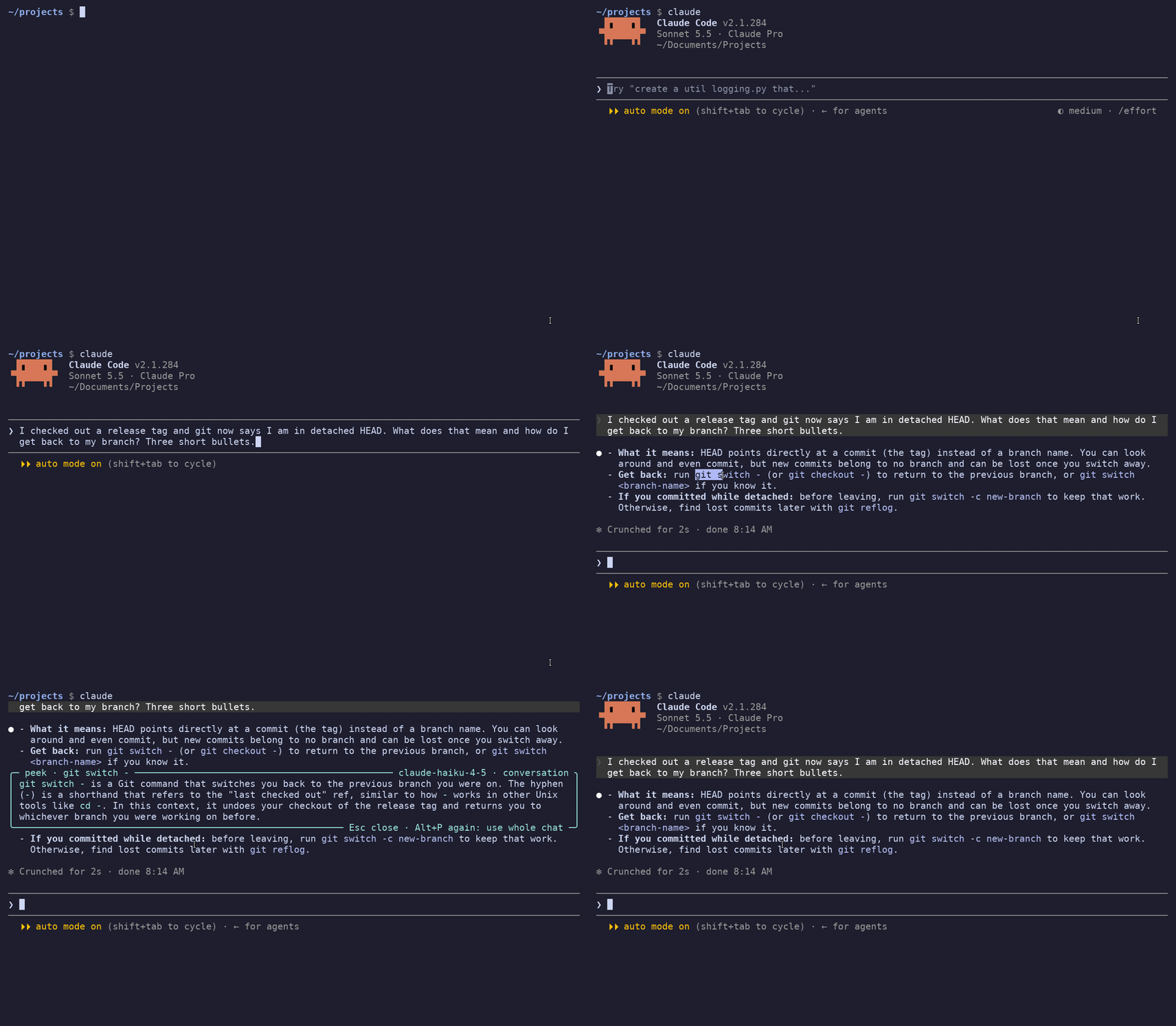
Pick me. Select text in [Claude Code](https://github.com/anthropics/claude-code),
|
|
4
|
+
[Codex CLI](https://github.com/openai/codex) or
|
|
5
5
|
[GitHub Copilot CLI](https://github.com/github/copilot-cli) output, press **Alt+P** (**Option+P** on a Mac), and a short
|
|
6
6
|
explanation opens right next to that text, inside the terminal. The other lines move to make
|
|
7
7
|
room, like Peek in VS Code. Esc closes it and the screen is exactly as before.
|
|
8
8
|
|
|
9
|
-
|
|
10
10
|
|
|
11
11
|
The explanation comes from a small, fast model and it knows the conversation. If you select
|
|
12
12
|
"its split panes" in an answer that recommends Kitty, it tells you it is about Kitty.
|
|
13
13
|
|
|
14
|
-
Status: 0.3.
|
|
15
|
-
inside tmux and over SSH. On macOS it is tested in Terminal and iTerm2 with a stand-in agent,
|
|
16
|
-
inside tmux and over SSH.
|
|
14
|
+
Status: 0.3.4. Tested with Claude Code 2.1.285, Codex 0.159 and Copilot CLI 1.0.89 on Linux, also
|
|
15
|
+
inside tmux and over SSH. On macOS it is tested in Terminal and iTerm2 with a stand-in agent, and
|
|
16
|
+
in Terminal with the real Codex, also inside tmux and over SSH.
|
|
17
17
|
|
|
18
|
-
##
|
|
18
|
+
## One peekme for all your agents
|
|
19
19
|
|
|
20
|
-
|
|
21
|
-
|
|
20
|
+
Many developers have more than one agent CLI and switch between them during the day. peekme
|
|
21
|
+
works the same way in each of them. You install it once, and the key and the box are the same
|
|
22
|
+
everywhere. Claude Code, Codex CLI
|
|
23
|
+
and GitHub Copilot CLI work today, and more agents are planned. If one agent gets its own way to
|
|
24
|
+
explain a selection some day, it will work in that agent only. peekme keeps working in all of
|
|
25
|
+
them.
|
|
22
26
|
|
|
23
|
-
|
|
24
|
-
npm i -g peekme # you have npm already if you installed an agent with it
|
|
25
|
-
brew install gregorybolshakov/tap/peekme # Homebrew, on macOS or Linux
|
|
26
|
-
cargo install peekme # builds it with Rust
|
|
27
|
-
peekme install
|
|
28
|
-
```
|
|
27
|
+
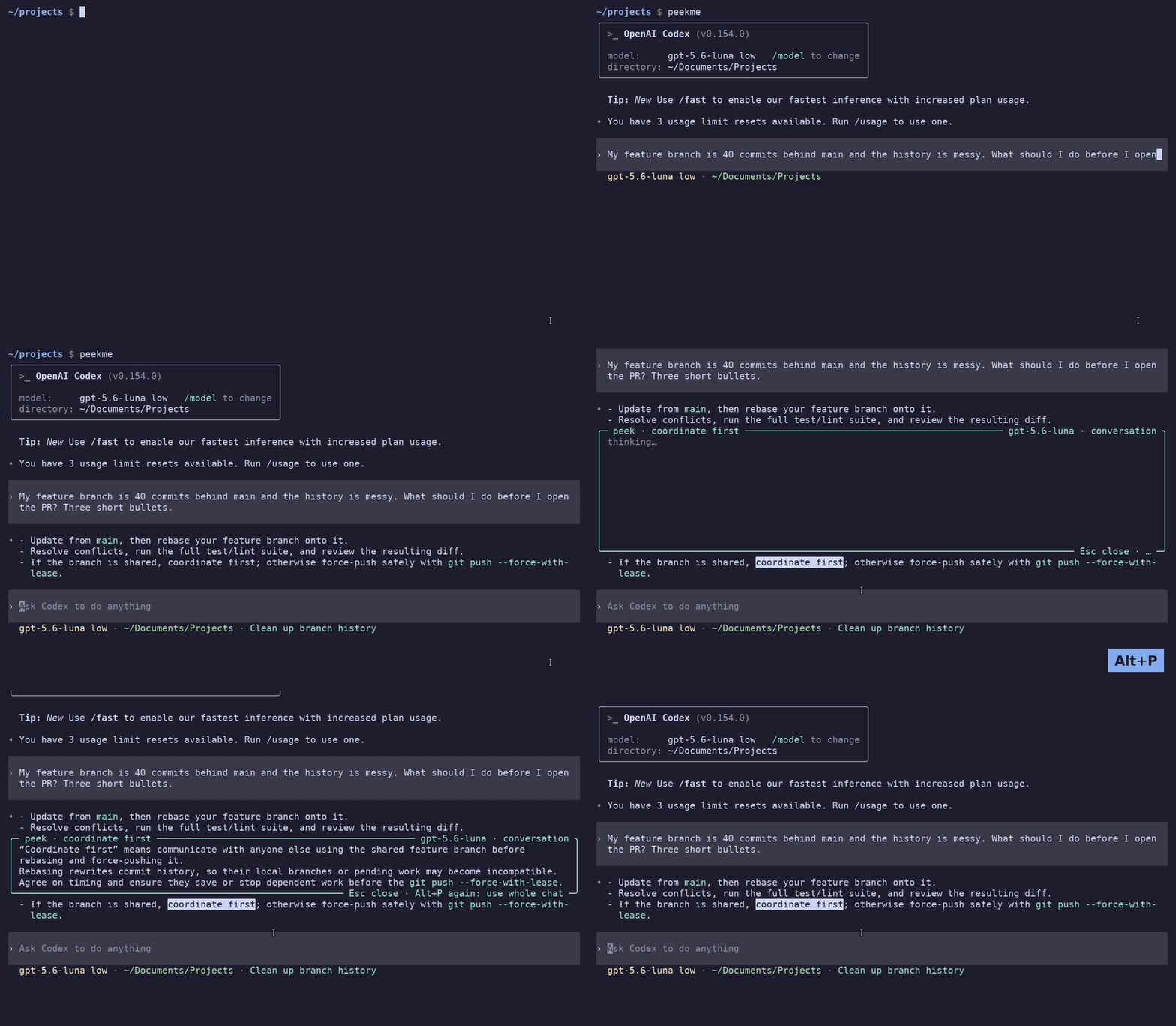
Codex CLI:
|
|
29
28
|
|
|
30
|
-
|
|
31
|
-
its binary the first time it runs.
|
|
29
|
+
|
|
32
30
|
|
|
33
|
-
|
|
34
|
-
[latest release](https://github.com/GregoryBolshakov/peekme/releases/latest) puts peekme in
|
|
35
|
-
`~/.local/bin`:
|
|
31
|
+
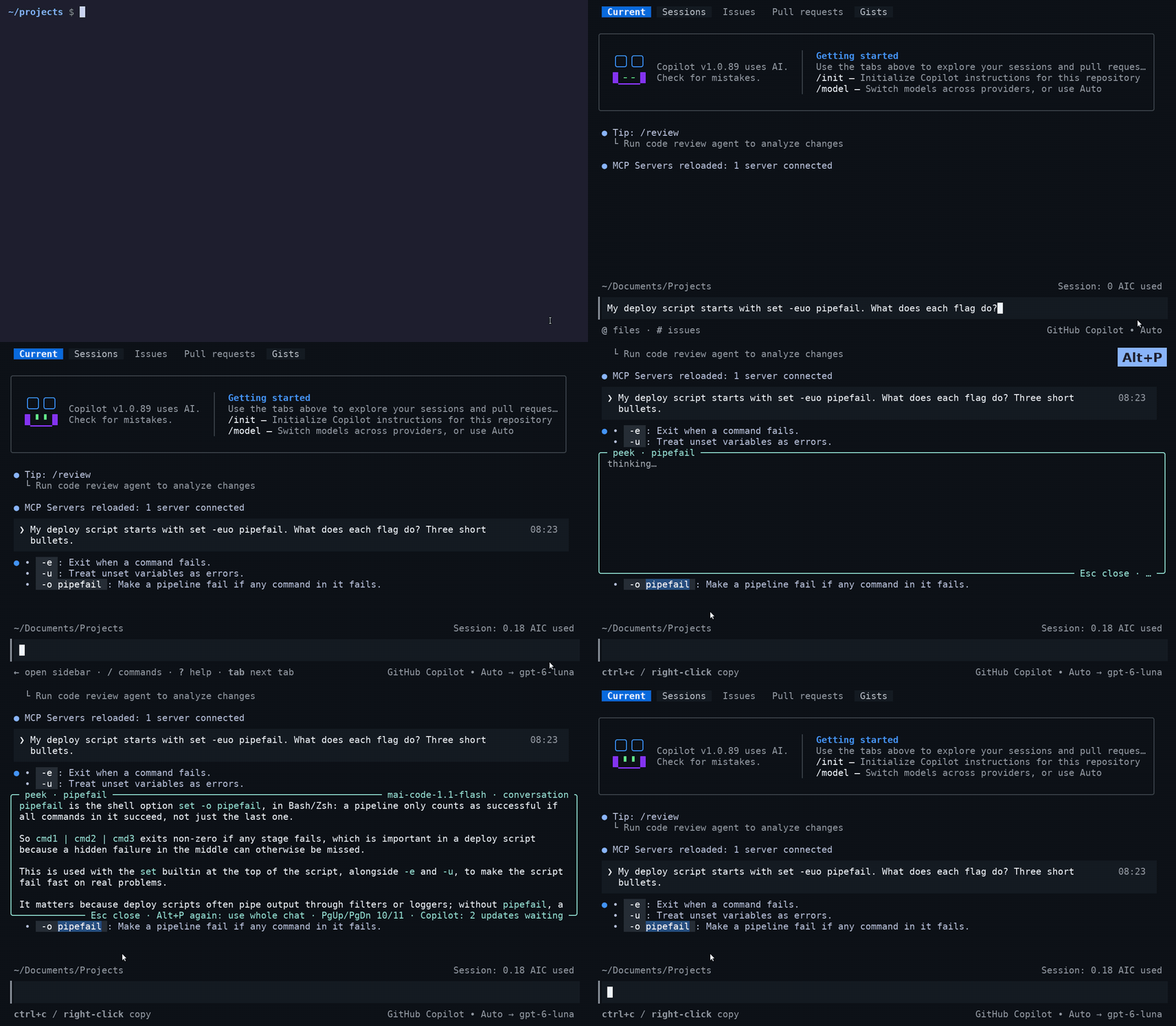
GitHub Copilot CLI:
|
|
36
32
|
|
|
37
|
-
|
|
38
|
-
curl --proto '=https' --tlsv1.2 -LsSf https://github.com/GregoryBolshakov/peekme/releases/latest/download/peekme-installer.sh | sh
|
|
39
|
-
```
|
|
33
|
+
|
|
40
34
|
|
|
41
|
-
|
|
42
|
-
|
|
43
|
-
After this, `codex`, `claude` and `copilot` open with peekme in every new terminal. You keep
|
|
44
|
-
typing them as always, and your aliases and scripts that call them keep working. `peekme install`
|
|
45
|
-
adds a short, marked block to your `~/.bashrc` or `~/.zshrc` (for fish, a file in
|
|
46
|
-
`~/.config/fish/conf.d`). If you install one of the agents later, it gets peekme too.
|
|
35
|
+
## Install
|
|
47
36
|
|
|
48
37
|
```
|
|
49
|
-
|
|
50
|
-
peekme
|
|
51
|
-
command codex # run plain Codex once
|
|
52
|
-
command claude # run plain Claude Code once
|
|
53
|
-
command copilot # run plain Copilot CLI once
|
|
38
|
+
npm i -g peekme
|
|
39
|
+
peekme install
|
|
54
40
|
```
|
|
55
41
|
|
|
56
|
-
|
|
42
|
+
Open a new terminal. Now `claude`, `codex` and `copilot` open with peekme, and you type them as
|
|
43
|
+
always. That's all.
|
|
44
|
+
|
|
45
|
+
peekme has no account of its own. The explanation uses the login of the agent you are in.
|
|
46
|
+
|
|
47
|
+
Don't have npm? Use one of these instead of the first line:
|
|
57
48
|
|
|
58
|
-
|
|
59
|
-
|
|
49
|
+
- Homebrew: `brew install gregorybolshakov/tap/peekme`
|
|
50
|
+
- Rust: `cargo install peekme`
|
|
51
|
+
- Neither: `curl -LsSf https://github.com/GregoryBolshakov/peekme/releases/latest/download/peekme-installer.sh | sh`
|
|
60
52
|
|
|
61
53
|
## Use
|
|
62
54
|
|
|
63
|
-
Start
|
|
64
|
-
do, then press Alt+P. When the agent draws full screen (
|
|
65
|
-
|
|
55
|
+
Start Claude Code, Codex or Copilot CLI as always. Select text with the mouse as you normally
|
|
56
|
+
do, then press Alt+P. When the agent draws full screen (Claude Code with `"tui": "fullscreen"`,
|
|
57
|
+
Codex since 0.157, Copilot CLI), it makes the selection itself, and peekme uses that selection.
|
|
66
58
|
|
|
67
59
|
| Key | When | What it does |
|
|
68
60
|
|---|---|---|
|
|
@@ -83,20 +75,25 @@ you type Greek, `π` stays a letter. If your terminal sends Option as Meta, Opti
|
|
|
83
75
|
When the agent draws full screen, peekme gets the selection from the agent. Otherwise (Claude
|
|
84
76
|
Code's classic screen) it reads the clipboard: iTerm2 copies a selection there by itself, in
|
|
85
77
|
Terminal press Cmd+C after you select. Over SSH only the agent's own selection can be read, so
|
|
86
|
-
use the full screen mode there (
|
|
87
|
-
|
|
78
|
+
use the full screen mode there (Claude Code with `"tui": "fullscreen"`, Codex and Copilot CLI
|
|
79
|
+
by default).
|
|
80
|
+
|
|
81
|
+
Inside tmux, Codex leaves the mouse to the terminal when tmux has the mouse off, which is tmux's
|
|
82
|
+
default. A selection is then your terminal's own, and over SSH peekme cannot read it. Add
|
|
83
|
+
`set -g mouse on` to `~/.tmux.conf` and restart Codex. peekme tells you this the first time you
|
|
84
|
+
press Option+P there.
|
|
88
85
|
|
|
89
86
|
In Claude Code, Alt+P opens the model picker. With peekme it explains the selection instead.
|
|
90
87
|
`/model` still opens the model picker.
|
|
91
88
|
|
|
92
89
|
No API key is needed. peekme asks the agent's own CLI, with your existing login:
|
|
93
90
|
|
|
94
|
-
- Codex: its `app-server`, on a temporary thread that is not saved. Since Codex 0.157 a shared
|
|
95
|
-
Codex server runs in the background, and peekme uses it, so it adds only a few MB of memory.
|
|
96
|
-
Without that server it starts its own `codex app-server`, which takes about 250 MB.
|
|
97
91
|
- Claude Code: `claude -p` on Haiku, without tools and without saving the session, so nothing
|
|
98
92
|
appears in `/resume`. After the first explanation one `claude -p` waits in the background for
|
|
99
93
|
the next one, so it starts in about half a second. It takes about 210 MB.
|
|
94
|
+
- Codex: its `app-server`, on a temporary thread that is not saved. Since Codex 0.157 a shared
|
|
95
|
+
Codex server runs in the background, and peekme uses it, so it adds only a few MB of memory.
|
|
96
|
+
Without that server it starts its own `codex app-server`, which takes about 250 MB.
|
|
100
97
|
- Copilot CLI: its headless server (`copilot --headless`, the one the Copilot SDK uses), started
|
|
101
98
|
on the first explanation. Each explanation is a short session without tools, and peekme
|
|
102
99
|
deletes it afterwards, so nothing appears in your session list. The model is Copilot's Auto
|
|
@@ -104,9 +101,9 @@ No API key is needed. peekme asks the agent's own CLI, with your existing login:
|
|
|
104
101
|
|
|
105
102
|
It does use your plan, a little for each explanation. Nothing starts before the first Alt+P.
|
|
106
103
|
|
|
107
|
-
Only the interactive screen gets peekme: `
|
|
108
|
-
`
|
|
109
|
-
`copilot -i "prompt"`, `copilot --resume`. Commands like `
|
|
104
|
+
Only the interactive screen gets peekme: `claude`, `claude "prompt"`, `claude --resume`,
|
|
105
|
+
`claude -c`, `codex`, `codex "prompt"`, `codex resume`, `codex fork`, and `copilot`,
|
|
106
|
+
`copilot -i "prompt"`, `copilot --resume`. Commands like `claude -p`, `codex exec`, `copilot -p`
|
|
110
107
|
or `copilot login`, and anything with output going to a pipe or a file, run the agent directly.
|
|
111
108
|
|
|
112
109
|
## How it works
|
|
@@ -117,10 +114,11 @@ what is on your screen.
|
|
|
117
114
|
|
|
118
115
|
On Alt+P it takes the selection and finds it on the screen:
|
|
119
116
|
|
|
120
|
-
-
|
|
121
|
-
|
|
122
|
-
sequence when you release the mouse. peekme reads the text from that sequence as it passes through, and knows
|
|
117
|
+
- Claude Code full screen: Claude copies the selection with an OSC 52 escape sequence when you
|
|
118
|
+
release the mouse. peekme reads the text from that sequence as it passes through, and knows
|
|
123
119
|
where the drag ended. This also works over SSH.
|
|
120
|
+
- Codex full screen: the text Codex highlighted.
|
|
121
|
+
- Copilot CLI: the same OSC 52 sequence as Claude Code.
|
|
124
122
|
- Otherwise: your terminal's mouse selection (the X11 PRIMARY selection).
|
|
125
123
|
|
|
126
124
|
Then it redraws only the rows next to the selection, with the box between them. Nothing is
|
|
@@ -130,7 +128,7 @@ that arrives while the box is open is kept aside.
|
|
|
130
128
|
|
|
131
129
|
On Esc it draws those rows again from a copy taken when the box opened. After that it sends the
|
|
132
130
|
kept output, so the terminal ends in the same state as if the box never existed. Tests check
|
|
133
|
-
this cell by cell on real
|
|
131
|
+
this cell by cell on real Claude Code, Codex and Copilot CLI output.
|
|
134
132
|
|
|
135
133
|
### What the model gets
|
|
136
134
|
|
|
@@ -146,8 +144,8 @@ slow. So the model gets small parts, each with a size limit:
|
|
|
146
144
|
3. Your request that this text answers, and one line for each of your earlier requests.
|
|
147
145
|
4. The first places in the conversation where the same words were used before.
|
|
148
146
|
|
|
149
|
-
The conversation comes from
|
|
150
|
-
|
|
147
|
+
The conversation comes from Claude Code's session transcript in `~/.claude/projects`, from
|
|
148
|
+
Codex's app-server, or from Copilot CLI's session log in `~/.copilot/session-state`. peekme
|
|
151
149
|
knows which session, because the agent registers its process id there.
|
|
152
150
|
|
|
153
151
|
Usually this is 1 to 7 KB of text. When it is not enough, press Alt+P again and the model gets
|
|
@@ -159,29 +157,44 @@ more.
|
|
|
159
157
|
|
|
160
158
|
| Variable | Meaning |
|
|
161
159
|
|---|---|
|
|
160
|
+
| `PEEKME_CLAUDE_MODEL` | model for Claude Code explanations. Default is `haiku` |
|
|
161
|
+
| `PEEKME_CLAUDE_BIN` | claude binary to use for explanations. Default is `claude` |
|
|
162
162
|
| `PEEKME_MODEL` | model for Codex explanations. Default is the model your account lists as fast |
|
|
163
163
|
| `PEEKME_CODEX_BIN` | codex binary to use for explanations. Default is `codex` |
|
|
164
164
|
| `PEEKME_OWN_SERVER` | set to 1 to start peekme's own `codex app-server` instead of using the shared one |
|
|
165
|
-
| `PEEKME_CLAUDE_MODEL` | model for Claude Code explanations. Default is `haiku` |
|
|
166
|
-
| `PEEKME_CLAUDE_BIN` | claude binary to use for explanations. Default is `claude` |
|
|
167
165
|
| `PEEKME_COPILOT_MODEL` | model for Copilot CLI explanations. Default is Copilot's Auto |
|
|
168
166
|
| `PEEKME_COPILOT_BIN` | copilot binary to use for explanations. Default is `copilot` |
|
|
169
167
|
| `PEEKME_SELECTION` | use this text instead of the mouse selection, for testing |
|
|
170
168
|
|
|
171
|
-
### How `
|
|
169
|
+
### How `claude`, `codex` and `copilot` get peekme
|
|
170
|
+
|
|
171
|
+
```
|
|
172
|
+
peekme doctor # check the setup, and see what is in the way if something is
|
|
173
|
+
peekme uninstall # remove it, your files are as before
|
|
174
|
+
command claude # run plain Claude Code once (same for codex, copilot)
|
|
175
|
+
```
|
|
172
176
|
|
|
173
177
|
`peekme install` does two things:
|
|
174
178
|
|
|
175
|
-
1. It defines shell functions `
|
|
179
|
+
1. It defines shell functions `claude`, `codex` and `copilot` in your shell setup. A function wins over
|
|
176
180
|
anything on PATH, so it keeps working when nvm, mise, Homebrew or an agent's installer
|
|
177
181
|
change PATH later. Aliases that call them go through it too.
|
|
178
|
-
2. It puts `
|
|
182
|
+
2. It puts `claude`, `codex` and `copilot` links to peekme in `~/.local/share/peekme/bin` at the front of
|
|
179
183
|
PATH, so scripts that run them also get peekme. If some tool puts its own directory in front
|
|
180
184
|
of it later, only scripts lose peekme, and `peekme doctor` tells you which directory it is.
|
|
181
185
|
|
|
182
186
|
Both find the real agent on PATH themselves, so updating the agent changes nothing. If you
|
|
183
187
|
remove peekme, the functions fall back to the plain agents.
|
|
184
188
|
|
|
189
|
+
The block in `~/.bashrc` or `~/.zshrc` (for fish, a file in `~/.config/fish/conf.d`) is short
|
|
190
|
+
and marked. It covers all three agents, so an agent you install later gets peekme too. When a new
|
|
191
|
+
peekme version knows more agents, it adds them to your setup the next time it starts and says
|
|
192
|
+
so once.
|
|
193
|
+
|
|
194
|
+
npm 12 may say that it skipped an install script of peekme. That is fine: peekme then downloads
|
|
195
|
+
its binary the first time it runs. Ready binaries for Linux and macOS (x86_64 and ARM) are on the
|
|
196
|
+
[latest release](https://github.com/GregoryBolshakov/peekme/releases/latest) page.
|
|
197
|
+
|
|
185
198
|
To use peekme with another program, run `peekme -- COMMAND`.
|
|
186
199
|
|
|
187
200
|
## Limits
|
|
@@ -218,7 +231,7 @@ shows if your terminal flickers when a program switches screens. `explain_probe.
|
|
|
218
231
|
explanation request to `codex app-server` and prints timings. `copilot_probe.py` does the same
|
|
219
232
|
with Copilot CLI's headless server.
|
|
220
233
|
|
|
221
|
-
Each agent has its own folder in `src/` (`
|
|
234
|
+
Each agent has its own folder in `src/` (`claude/`, `codex/`, `copilot/`): how its selection is read, where
|
|
222
235
|
its conversation comes from, and which model explains. The rest is shared.
|
|
223
236
|
|
|
224
237
|
## License
|
package/npm-shrinkwrap.json
CHANGED
|
@@ -19,7 +19,7 @@
|
|
|
19
19
|
"hasInstallScript": true,
|
|
20
20
|
"license": "MIT OR Apache-2.0",
|
|
21
21
|
"name": "peekme",
|
|
22
|
-
"version": "0.3.
|
|
22
|
+
"version": "0.3.4"
|
|
23
23
|
},
|
|
24
24
|
"node_modules/detect-libc": {
|
|
25
25
|
"engines": {
|
|
@@ -48,5 +48,5 @@
|
|
|
48
48
|
}
|
|
49
49
|
},
|
|
50
50
|
"requires": true,
|
|
51
|
-
"version": "0.3.
|
|
51
|
+
"version": "0.3.4"
|
|
52
52
|
}
|
package/package.json
CHANGED
|
@@ -1,6 +1,6 @@
|
|
|
1
1
|
{
|
|
2
2
|
"artifactDownloadUrls": [
|
|
3
|
-
"https://github.com/GregoryBolshakov/peekme/releases/download/v0.3.
|
|
3
|
+
"https://github.com/GregoryBolshakov/peekme/releases/download/v0.3.4"
|
|
4
4
|
],
|
|
5
5
|
"author": "Gregory Bolshakov",
|
|
6
6
|
"bin": {
|
|
@@ -9,7 +9,7 @@
|
|
|
9
9
|
"dependencies": {
|
|
10
10
|
"detect-libc": "^2.1.2"
|
|
11
11
|
},
|
|
12
|
-
"description": "Select text in
|
|
12
|
+
"description": "Select text in Claude Code, Codex CLI or GitHub Copilot CLI output and get a short explanation right under it, inside the terminal",
|
|
13
13
|
"devDependencies": {
|
|
14
14
|
"prettier": "^3.8.3"
|
|
15
15
|
},
|
|
@@ -24,8 +24,8 @@
|
|
|
24
24
|
"homepage": "https://github.com/GregoryBolshakov/peekme",
|
|
25
25
|
"keywords": [
|
|
26
26
|
"command-line-utilities",
|
|
27
|
-
"codex",
|
|
28
27
|
"claude",
|
|
28
|
+
"codex",
|
|
29
29
|
"copilot",
|
|
30
30
|
"terminal",
|
|
31
31
|
"cli"
|
|
@@ -69,7 +69,7 @@
|
|
|
69
69
|
"zipExt": ".tar.xz"
|
|
70
70
|
}
|
|
71
71
|
},
|
|
72
|
-
"version": "0.3.
|
|
72
|
+
"version": "0.3.4",
|
|
73
73
|
"volta": {
|
|
74
74
|
"node": "18.14.1",
|
|
75
75
|
"npm": "9.5.0"
|