payload 1.8.6 → 1.9.0
This diff represents the content of publicly available package versions that have been released to one of the supported registries. The information contained in this diff is provided for informational purposes only and reflects changes between package versions as they appear in their respective public registries.
- package/dist/bin/generateTypes.js +8 -12
- package/dist/bin/generateTypes.js.map +1 -1
- package/dist/fields/config/schema.js +4 -0
- package/dist/fields/config/schema.js.map +1 -1
- package/dist/fields/config/types.d.ts +33 -1
- package/dist/fields/config/types.js.map +1 -1
- package/dist/graphql/registerSchema.js +3 -0
- package/dist/graphql/registerSchema.js.map +1 -1
- package/dist/graphql/schema/buildObjectType.js +54 -33
- package/dist/graphql/schema/buildObjectType.js.map +1 -1
- package/dist/payload.d.ts +3 -0
- package/dist/payload.js.map +1 -1
- package/dist/utilities/entityToJSONSchema.d.ts +2 -2
- package/dist/utilities/entityToJSONSchema.js +67 -57
- package/dist/utilities/entityToJSONSchema.js.map +1 -1
- package/docs/fields/array.mdx +49 -44
- package/docs/fields/blocks.mdx +68 -57
- package/docs/fields/group.mdx +34 -29
- package/docs/fields/tabs.mdx +42 -35
- package/docs/graphql/graphql-schema.mdx +45 -6
- package/docs/graphql/overview.mdx +47 -39
- package/docs/troubleshooting/troubleshooting.mdx +25 -0
- package/docs/typescript/generating-types.mdx +86 -23
- package/package.json +1 -1
- package/dist/graphql/schema/buildBlockType.d.ts +0 -9
- package/dist/graphql/schema/buildBlockType.js +0 -28
- package/dist/graphql/schema/buildBlockType.js.map +0 -1
package/docs/fields/group.mdx
CHANGED
|
@@ -6,28 +6,30 @@ desc: The Group field allows other fields to be nested under a common property.
|
|
|
6
6
|
keywords: group, fields, config, configuration, documentation, Content Management System, cms, headless, javascript, node, react, express
|
|
7
7
|
---
|
|
8
8
|
|
|
9
|
-
<Banner
|
|
10
|
-
The Group field allows fields to be nested under a common property name. It
|
|
9
|
+
<Banner>
|
|
10
|
+
The Group field allows fields to be nested under a common property name. It
|
|
11
|
+
also groups fields together visually in the Admin panel.
|
|
11
12
|
</Banner>
|
|
12
13
|
|
|
13
14
|
### Config
|
|
14
15
|
|
|
15
|
-
| Option
|
|
16
|
-
|
|
|
17
|
-
| **`name`**
|
|
18
|
-
| **`fields`**
|
|
19
|
-
| **`label`**
|
|
20
|
-
| **`validate`**
|
|
21
|
-
| **`saveToJWT`**
|
|
22
|
-
| **`hooks`**
|
|
23
|
-
| **`access`**
|
|
24
|
-
| **`hidden`**
|
|
25
|
-
| **`defaultValue`**
|
|
26
|
-
| **`localized`**
|
|
27
|
-
| **`admin`**
|
|
28
|
-
| **`custom`**
|
|
16
|
+
| Option | Description |
|
|
17
|
+
| ------------------- | ---------------------------------------------------------------------------------------------------------------------------------------------------------------------------------------------------------------------------------------------------------------------------------- |
|
|
18
|
+
| **`name`** \* | To be used as the property name when stored and retrieved from the database. [More](/docs/fields/overview#field-names) |
|
|
19
|
+
| **`fields`** \* | Array of field types to nest within this Group. |
|
|
20
|
+
| **`label`** | Used as a heading in the Admin panel and to name the generated GraphQL type. |
|
|
21
|
+
| **`validate`** | Provide a custom validation function that will be executed on both the Admin panel and the backend. [More](/docs/fields/overview#validation) |
|
|
22
|
+
| **`saveToJWT`** | If this field is top-level and nested in a config supporting [Authentication](/docs/authentication/config), include its data in the user JWT. |
|
|
23
|
+
| **`hooks`** | Provide field-based hooks to control logic for this field. [More](/docs/fields/overview#field-level-hooks) |
|
|
24
|
+
| **`access`** | Provide field-based access control to denote what users can see and do with this field's data. [More](/docs/fields/overview#field-level-access-control) |
|
|
25
|
+
| **`hidden`** | Restrict this field's visibility from all APIs entirely. Will still be saved to the database, but will not appear in any API or the Admin panel. |
|
|
26
|
+
| **`defaultValue`** | Provide an object of data to be used for this field's default value. [More](/docs/fields/overview#default-values) |
|
|
27
|
+
| **`localized`** | Enable localization for this field. Requires [localization to be enabled](/docs/configuration/localization) in the Base config. If enabled, a separate, localized set of all data within this Group will be kept, so there is no need to specify each nested field as `localized`. |
|
|
28
|
+
| **`admin`** | Admin-specific configuration. See below for [more detail](#admin-config). |
|
|
29
|
+
| **`custom`** | Extension point for adding custom data (e.g. for plugins) |
|
|
30
|
+
| **`interfaceName`** | Create a top level, reusable [Typescript interface](/docs/typescript/generating-types#custom-field-interfaces) & [GraphQL type](/docs/graphql/graphql-schema#custom-field-schemas). |
|
|
29
31
|
|
|
30
|
-
|
|
32
|
+
_\* An asterisk denotes that a property is required._
|
|
31
33
|
|
|
32
34
|
### Admin config
|
|
33
35
|
|
|
@@ -40,32 +42,35 @@ Set this property to `true` to hide this field's gutter within the admin panel.
|
|
|
40
42
|
### Example
|
|
41
43
|
|
|
42
44
|
`collections/ExampleCollection.ts`
|
|
45
|
+
|
|
43
46
|
```ts
|
|
44
|
-
import { CollectionConfig } from
|
|
47
|
+
import { CollectionConfig } from "payload/types";
|
|
45
48
|
|
|
46
49
|
export const ExampleCollection: CollectionConfig = {
|
|
47
|
-
slug:
|
|
50
|
+
slug: "example-collection",
|
|
48
51
|
fields: [
|
|
49
52
|
{
|
|
50
|
-
name:
|
|
51
|
-
type:
|
|
52
|
-
|
|
53
|
+
name: "pageMeta", // required
|
|
54
|
+
type: "group", // required
|
|
55
|
+
interfaceName: "Meta", // optional
|
|
56
|
+
fields: [
|
|
57
|
+
// required
|
|
53
58
|
{
|
|
54
|
-
name:
|
|
55
|
-
type:
|
|
59
|
+
name: "title",
|
|
60
|
+
type: "text",
|
|
56
61
|
required: true,
|
|
57
62
|
minLength: 20,
|
|
58
63
|
maxLength: 100,
|
|
59
64
|
},
|
|
60
65
|
{
|
|
61
|
-
name:
|
|
62
|
-
type:
|
|
66
|
+
name: "description",
|
|
67
|
+
type: "textarea",
|
|
63
68
|
required: true,
|
|
64
69
|
minLength: 40,
|
|
65
70
|
maxLength: 160,
|
|
66
|
-
}
|
|
71
|
+
},
|
|
67
72
|
],
|
|
68
|
-
}
|
|
69
|
-
]
|
|
73
|
+
},
|
|
74
|
+
],
|
|
70
75
|
};
|
|
71
76
|
```
|
package/docs/fields/tabs.mdx
CHANGED
|
@@ -6,71 +6,78 @@ desc: The Tabs field is a great way to organize complex editing experiences into
|
|
|
6
6
|
keywords: tabs, fields, config, configuration, documentation, Content Management System, cms, headless, javascript, node, react, express
|
|
7
7
|
---
|
|
8
8
|
|
|
9
|
-
<Banner
|
|
10
|
-
The Tabs field is presentational-only and only affects the Admin panel (unless
|
|
9
|
+
<Banner>
|
|
10
|
+
The Tabs field is presentational-only and only affects the Admin panel (unless
|
|
11
|
+
a tab is named). By using it, you can place fields within a nice layout
|
|
12
|
+
component that separates certain sub-fields by a tabbed interface.
|
|
11
13
|
</Banner>
|
|
12
14
|
|
|
13
15
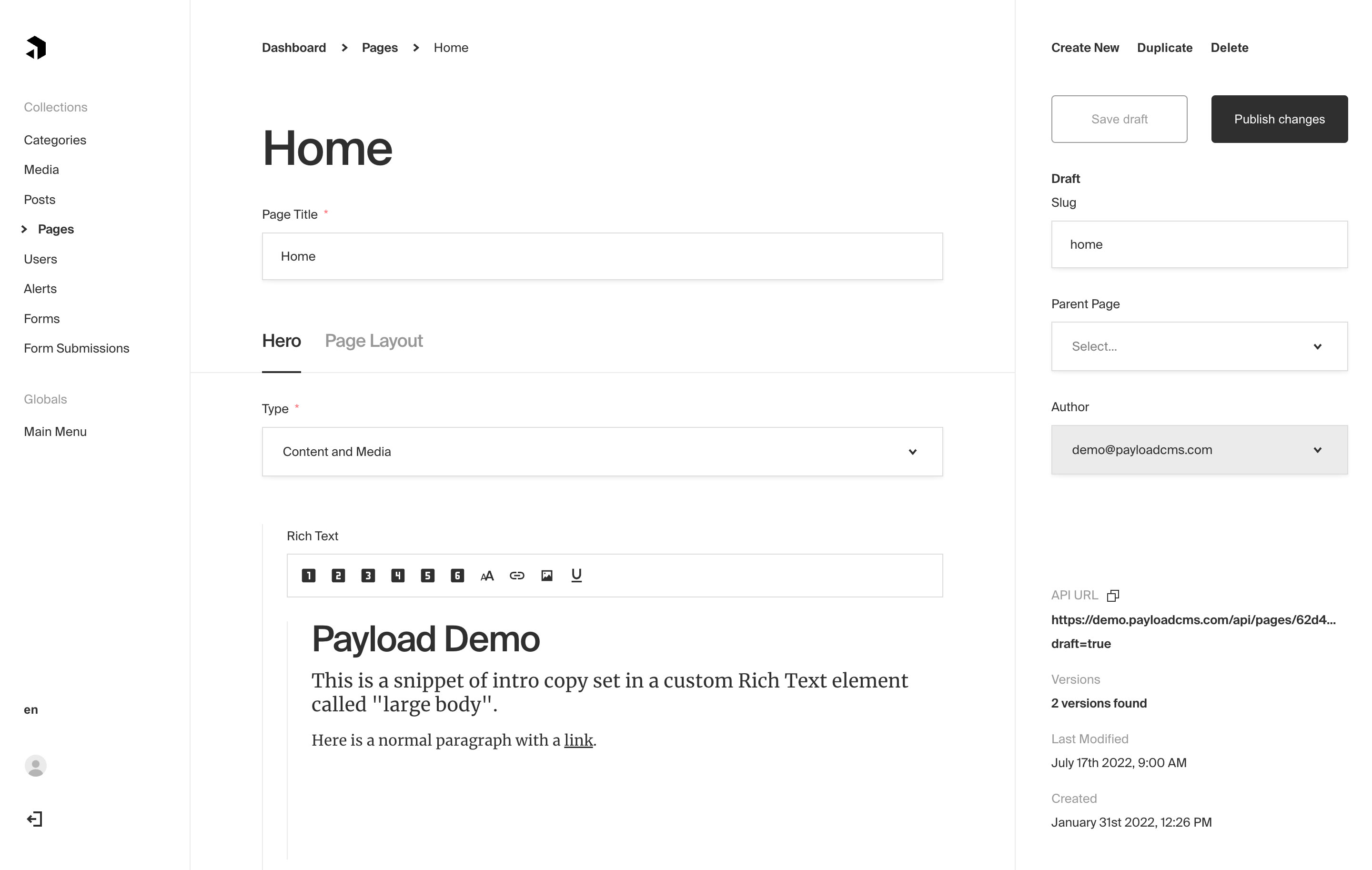
|
|
|
14
|
-
|
|
16
|
+
_Tabs field type used to separate Hero fields from Page Layout_
|
|
15
17
|
|
|
16
18
|
### Config
|
|
17
19
|
|
|
18
|
-
| Option
|
|
19
|
-
|
|
|
20
|
-
| **`tabs`**
|
|
21
|
-
| **`admin`**
|
|
22
|
-
| **`custom`**
|
|
20
|
+
| Option | Description |
|
|
21
|
+
| ------------- | ------------------------------------------------------------------------------------------------------------------------ |
|
|
22
|
+
| **`tabs`** \* | Array of tabs to render within this Tabs field. |
|
|
23
|
+
| **`admin`** | Admin-specific configuration. See the [default field admin config](/docs/fields/overview#admin-config) for more details. |
|
|
24
|
+
| **`custom`** | Extension point for adding custom data (e.g. for plugins) |
|
|
23
25
|
|
|
24
26
|
#### Tab-specific Config
|
|
25
27
|
|
|
26
28
|
Each tab has its own required `label` and `fields` array. You can also optionally pass a `description` to render within each individual tab.
|
|
27
29
|
|
|
28
|
-
| Option
|
|
29
|
-
|
|
|
30
|
-
| **`name`**
|
|
31
|
-
| **`label`**
|
|
32
|
-
| **`fields`**
|
|
33
|
-
| **`description`**
|
|
30
|
+
| Option | Description |
|
|
31
|
+
| ------------------- | ------------------------------------------------------------------------------------------------------------------------------------------------------------------------------------------------------------ |
|
|
32
|
+
| **`name`** | An optional property name to be used when stored and retrieved from the database. [More](/docs/fields/overview#field-names) |
|
|
33
|
+
| **`label`** \* | The label to render on the tab itself. |
|
|
34
|
+
| **`fields`** \* | The fields to render within this tab. |
|
|
35
|
+
| **`description`** | Optionally render a description within this tab to describe the contents of the tab itself. |
|
|
36
|
+
| **`interfaceName`** | Create a top level, reusable [Typescript interface](/docs/typescript/generating-types#custom-field-interfaces) & [GraphQL type](/docs/graphql/graphql-schema#custom-field-schemas). (`name` must be present) |
|
|
34
37
|
|
|
35
|
-
|
|
38
|
+
_\* An asterisk denotes that a property is required._
|
|
36
39
|
|
|
37
40
|
### Example
|
|
38
41
|
|
|
39
42
|
`collections/ExampleCollection.ts`
|
|
43
|
+
|
|
40
44
|
```ts
|
|
41
|
-
import { CollectionConfig } from
|
|
45
|
+
import { CollectionConfig } from "payload/types";
|
|
42
46
|
|
|
43
47
|
export const ExampleCollection: CollectionConfig = {
|
|
44
|
-
slug:
|
|
48
|
+
slug: "example-collection",
|
|
45
49
|
fields: [
|
|
46
50
|
{
|
|
47
|
-
type:
|
|
48
|
-
tabs: [
|
|
51
|
+
type: "tabs", // required
|
|
52
|
+
tabs: [
|
|
53
|
+
// required
|
|
49
54
|
{
|
|
50
|
-
label:
|
|
51
|
-
description:
|
|
52
|
-
fields: [
|
|
55
|
+
label: "Tab One Label", // required
|
|
56
|
+
description: "This will appear within the tab above the fields.",
|
|
57
|
+
fields: [
|
|
58
|
+
// required
|
|
53
59
|
{
|
|
54
|
-
name:
|
|
55
|
-
type:
|
|
60
|
+
name: "someTextField",
|
|
61
|
+
type: "text",
|
|
56
62
|
required: true,
|
|
57
63
|
},
|
|
58
64
|
],
|
|
59
65
|
},
|
|
60
66
|
{
|
|
61
|
-
name:
|
|
62
|
-
label:
|
|
63
|
-
|
|
67
|
+
name: "tabTwo",
|
|
68
|
+
label: "Tab Two Label", // required
|
|
69
|
+
interfaceName: "TabTwo", // optional (`name` must be present)
|
|
70
|
+
fields: [
|
|
71
|
+
// required
|
|
64
72
|
{
|
|
65
|
-
name:
|
|
66
|
-
type:
|
|
73
|
+
name: "numberField", // accessible via tabTwo.numberField
|
|
74
|
+
type: "number",
|
|
67
75
|
required: true,
|
|
68
76
|
},
|
|
69
77
|
],
|
|
70
|
-
}
|
|
71
|
-
]
|
|
72
|
-
|
|
73
|
-
|
|
74
|
-
|
|
75
|
-
}
|
|
78
|
+
},
|
|
79
|
+
],
|
|
80
|
+
},
|
|
81
|
+
],
|
|
82
|
+
};
|
|
76
83
|
```
|
|
@@ -8,7 +8,7 @@ keywords: headless cms, typescript, documentation, Content Management System, cm
|
|
|
8
8
|
|
|
9
9
|
When working with GraphQL it is useful to have the schema for development of other projects that need to call on your GraphQL endpoint. In Payload the schema is controlled by your collections and globals and is made available to the developer or third parties, it is not necessary for developers using Payload to write schema types manually.
|
|
10
10
|
|
|
11
|
-
###
|
|
11
|
+
### Schema generatation script
|
|
12
12
|
|
|
13
13
|
Run the following command in a Payload project to generate your project's GraphQL schema from Payload:
|
|
14
14
|
|
|
@@ -16,9 +16,9 @@ Run the following command in a Payload project to generate your project's GraphQ
|
|
|
16
16
|
payload generate:graphQLSchema
|
|
17
17
|
```
|
|
18
18
|
|
|
19
|
-
You can run this command whenever you need to regenerate your
|
|
19
|
+
You can run this command whenever you need to regenerate your GraphQL schema and output it to a file, and then you can use the schema for writing your own GraphQL elsewhere in other projects.
|
|
20
20
|
|
|
21
|
-
###
|
|
21
|
+
### Custom output file path
|
|
22
22
|
|
|
23
23
|
```js
|
|
24
24
|
{
|
|
@@ -29,12 +29,51 @@ You can run this command whenever you need to regenerate your graphQL schema and
|
|
|
29
29
|
}
|
|
30
30
|
```
|
|
31
31
|
|
|
32
|
+
### Custom Field Schemas
|
|
33
|
+
|
|
34
|
+
For `array`, `block`, `group` and named `tab` fields, you can generate top level reusable interfaces. The following group field config:
|
|
35
|
+
|
|
36
|
+
```ts
|
|
37
|
+
{
|
|
38
|
+
type: 'group',
|
|
39
|
+
name: 'meta',
|
|
40
|
+
interfaceName: 'SharedMeta', <-- here!!
|
|
41
|
+
fields: [
|
|
42
|
+
{
|
|
43
|
+
name: 'title',
|
|
44
|
+
type: 'text',
|
|
45
|
+
},
|
|
46
|
+
{
|
|
47
|
+
name: 'description',
|
|
48
|
+
type: 'text',
|
|
49
|
+
},
|
|
50
|
+
],
|
|
51
|
+
}
|
|
52
|
+
```
|
|
53
|
+
|
|
54
|
+
will generate:
|
|
55
|
+
|
|
56
|
+
```ts
|
|
57
|
+
// a top level reusable type!!
|
|
58
|
+
type SharedMeta {
|
|
59
|
+
title: String
|
|
60
|
+
description: String
|
|
61
|
+
}
|
|
62
|
+
|
|
63
|
+
// example usage inside collection schema
|
|
64
|
+
type Collection1 {
|
|
65
|
+
// ...other fields
|
|
66
|
+
meta: SharedMeta
|
|
67
|
+
}
|
|
68
|
+
```
|
|
69
|
+
|
|
32
70
|
The above example outputs all your definitions to a file relative from your payload config as `./graphql/schema.graphql`. By default, the file will be output to your current working directory as `schema.graphql`.
|
|
33
71
|
|
|
34
72
|
#### Adding an NPM script
|
|
35
73
|
|
|
36
74
|
<Banner type="warning">
|
|
37
|
-
<strong>Important
|
|
75
|
+
<strong>Important</strong>
|
|
76
|
+
<br />
|
|
38
77
|
Payload needs to be able to find your config to generate your GraphQL schema.
|
|
39
78
|
</Banner>
|
|
40
79
|
|
|
@@ -45,8 +84,8 @@ To add an NPM script to generate your types and show Payload where to find your
|
|
|
45
84
|
```json
|
|
46
85
|
{
|
|
47
86
|
"scripts": {
|
|
48
|
-
"generate:graphQLSchema": "cross-env PAYLOAD_CONFIG_PATH=src/payload.config.ts payload generate:graphQLSchema"
|
|
49
|
-
}
|
|
87
|
+
"generate:graphQLSchema": "cross-env PAYLOAD_CONFIG_PATH=src/payload.config.ts payload generate:graphQLSchema"
|
|
88
|
+
}
|
|
50
89
|
}
|
|
51
90
|
```
|
|
52
91
|
|
|
@@ -16,13 +16,13 @@ The labels you provide for your Collections and Globals are used to name the Gra
|
|
|
16
16
|
|
|
17
17
|
At the top of your Payload config you can define all the options to manage GraphQL.
|
|
18
18
|
|
|
19
|
-
| Option
|
|
20
|
-
|
|
|
21
|
-
| `mutations` | Any custom Mutations to be added in addition to what Payload provides. [More](/docs/graphql/extending)
|
|
22
|
-
| `queries` | Any custom Queries to be added in addition to what Payload provides. [More](/docs/graphql/extending)
|
|
23
|
-
| `maxComplexity` | A number used to set the maximum allowed complexity allowed by requests [More](/docs/graphql/overview#query-complexity-limits)
|
|
24
|
-
| `disablePlaygroundInProduction` | A boolean that if false will enable the
|
|
25
|
-
| `disable` | A boolean that if true will disable the
|
|
19
|
+
| Option | Description |
|
|
20
|
+
| ------------------------------- | ------------------------------------------------------------------------------------------------------------------------------------------------------------- |
|
|
21
|
+
| `mutations` | Any custom Mutations to be added in addition to what Payload provides. [More](/docs/graphql/extending) |
|
|
22
|
+
| `queries` | Any custom Queries to be added in addition to what Payload provides. [More](/docs/graphql/extending) |
|
|
23
|
+
| `maxComplexity` | A number used to set the maximum allowed complexity allowed by requests [More](/docs/graphql/overview#query-complexity-limits) |
|
|
24
|
+
| `disablePlaygroundInProduction` | A boolean that if false will enable the GraphQL playground, defaults to true. [More](/docs/graphql/overview#graphql-playground) |
|
|
25
|
+
| `disable` | A boolean that if true will disable the GraphQL entirely, defaults to false. |
|
|
26
26
|
| `schemaOutputFile` | A string for the file path used by the generate schema command. Defaults to `graphql.schema` next to `payload.config.ts` [More](/docs/graphql/graphql-schema) |
|
|
27
27
|
|
|
28
28
|
## Collections
|
|
@@ -43,26 +43,26 @@ export const PublicUser: CollectionConfig = {
|
|
|
43
43
|
|
|
44
44
|
**Payload will automatically open up the following queries:**
|
|
45
45
|
|
|
46
|
-
| Query Name
|
|
47
|
-
|
|
|
48
|
-
| **`PublicUser`**
|
|
49
|
-
| **`PublicUsers`**
|
|
50
|
-
| **`mePublicUser`**
|
|
46
|
+
| Query Name | Operation |
|
|
47
|
+
| ------------------ | ------------------- |
|
|
48
|
+
| **`PublicUser`** | `findByID` |
|
|
49
|
+
| **`PublicUsers`** | `find` |
|
|
50
|
+
| **`mePublicUser`** | `me` auth operation |
|
|
51
51
|
|
|
52
52
|
**And the following mutations:**
|
|
53
53
|
|
|
54
|
-
| Query Name | Operation
|
|
55
|
-
| ------------------------------ |
|
|
56
|
-
| **`createPublicUser`** | `create`
|
|
57
|
-
| **`updatePublicUser`** | `update`
|
|
58
|
-
| **`deletePublicUser`** | `delete`
|
|
54
|
+
| Query Name | Operation |
|
|
55
|
+
| ------------------------------ | ------------------------------- |
|
|
56
|
+
| **`createPublicUser`** | `create` |
|
|
57
|
+
| **`updatePublicUser`** | `update` |
|
|
58
|
+
| **`deletePublicUser`** | `delete` |
|
|
59
59
|
| **`forgotPasswordPublicUser`** | `forgotPassword` auth operation |
|
|
60
|
-
| **`resetPasswordPublicUser`** | `resetPassword` auth operation
|
|
61
|
-
| **`unlockPublicUser`** | `unlock` auth operation
|
|
62
|
-
| **`verifyPublicUser`** | `verify` auth operation
|
|
63
|
-
| **`loginPublicUser`** | `login` auth operation
|
|
64
|
-
| **`logoutPublicUser`** | `logout` auth operation
|
|
65
|
-
| **`refreshTokenPublicUser`** | `refresh` auth operation
|
|
60
|
+
| **`resetPasswordPublicUser`** | `resetPassword` auth operation |
|
|
61
|
+
| **`unlockPublicUser`** | `unlock` auth operation |
|
|
62
|
+
| **`verifyPublicUser`** | `verify` auth operation |
|
|
63
|
+
| **`loginPublicUser`** | `login` auth operation |
|
|
64
|
+
| **`logoutPublicUser`** | `logout` auth operation |
|
|
65
|
+
| **`refreshTokenPublicUser`** | `refresh` auth operation |
|
|
66
66
|
|
|
67
67
|
## Globals
|
|
68
68
|
|
|
@@ -81,32 +81,32 @@ const Header: GlobalConfig = {
|
|
|
81
81
|
|
|
82
82
|
**Payload will open the following query:**
|
|
83
83
|
|
|
84
|
-
| Query Name
|
|
85
|
-
|
|
|
86
|
-
| **`Header`**
|
|
84
|
+
| Query Name | Operation |
|
|
85
|
+
| ------------ | --------- |
|
|
86
|
+
| **`Header`** | `findOne` |
|
|
87
87
|
|
|
88
88
|
**And the following mutation:**
|
|
89
89
|
|
|
90
|
-
| Query Name
|
|
91
|
-
|
|
|
92
|
-
| **`updateHeader`**
|
|
90
|
+
| Query Name | Operation |
|
|
91
|
+
| ------------------ | --------- |
|
|
92
|
+
| **`updateHeader`** | `update` |
|
|
93
93
|
|
|
94
94
|
## Preferences
|
|
95
95
|
|
|
96
|
-
User [preferences](/docs/admin/overview#preferences)
|
|
96
|
+
User [preferences](/docs/admin/overview#preferences) for the admin panel are also available to GraphQL. To query preferences you must supply an authorization token in the header and only the preferences of that user will be accessible and of the `key` argument.
|
|
97
97
|
|
|
98
98
|
**Payload will open the following query:**
|
|
99
99
|
|
|
100
|
-
| Query Name
|
|
101
|
-
|
|
|
102
|
-
| **`Preference`**
|
|
100
|
+
| Query Name | Operation |
|
|
101
|
+
| ---------------- | --------- |
|
|
102
|
+
| **`Preference`** | `findOne` |
|
|
103
103
|
|
|
104
104
|
**And the following mutations:**
|
|
105
105
|
|
|
106
|
-
| Query Name | Operation
|
|
107
|
-
| ---------------------- |
|
|
108
|
-
| **`updatePreference`** | `update`
|
|
109
|
-
| **`deletePreference`** | `delete`
|
|
106
|
+
| Query Name | Operation |
|
|
107
|
+
| ---------------------- | --------- |
|
|
108
|
+
| **`updatePreference`** | `update` |
|
|
109
|
+
| **`deletePreference`** | `delete` |
|
|
110
110
|
|
|
111
111
|
## GraphQL Playground
|
|
112
112
|
|
|
@@ -115,8 +115,16 @@ GraphQL Playground is enabled by default for development purposes, but disabled
|
|
|
115
115
|
You can even log in using the `login[collection-singular-label-here]` mutation to use the Playground as an authenticated user.
|
|
116
116
|
|
|
117
117
|
<Banner type="success">
|
|
118
|
-
<strong>Tip:</strong
|
|
119
|
-
|
|
118
|
+
<strong>Tip:</strong>
|
|
119
|
+
<br />
|
|
120
|
+
To see more regarding how the above queries and mutations are used, visit your
|
|
121
|
+
GraphQL playground (by default at{" "}
|
|
122
|
+
<a href="http://localhost:3000/api/graphql-playground">
|
|
123
|
+
(http://localhost:3000/api/graphql-playground
|
|
124
|
+
</a>
|
|
125
|
+
) while your server is running. There, you can use the "Schema" and "Docs"
|
|
126
|
+
buttons on the right to see a ton of detail about how GraphQL operates within
|
|
127
|
+
Payload.
|
|
120
128
|
</Banner>
|
|
121
129
|
|
|
122
130
|
## Query complexity limits
|
|
@@ -0,0 +1,25 @@
|
|
|
1
|
+
---
|
|
2
|
+
title: Troubleshooting
|
|
3
|
+
label: Troubleshooting
|
|
4
|
+
order: 10
|
|
5
|
+
desc: Troubleshooting Common Issues in Payload
|
|
6
|
+
keywords: admin, components, custom, customize, documentation, Content Management System, cms, headless, javascript, node, react, express, troubleshooting
|
|
7
|
+
---
|
|
8
|
+
|
|
9
|
+
## Common Issues
|
|
10
|
+
|
|
11
|
+
### "Unauthorized, you must be logged in to make this request" when attempting to log in
|
|
12
|
+
|
|
13
|
+
This means that your auth cookie is not being set or accepted correctly upon logging in. To resolve heck the following settings in your Payload config:
|
|
14
|
+
|
|
15
|
+
- CORS - If you are using the '*', try to explicitly only allow certain domains instead including the one you have specified.
|
|
16
|
+
- CSRF - Do you have this set? if so, make sure your domain is whitelisted within the csrf domains. If not, probably not the issue, but probably can't hurt to whitelist it anyway.
|
|
17
|
+
- Cookie settings. If these are completely undefined, then that's fine. but if you have cookie domain set, or anything similar, make sure you don't have the domain misconfigured
|
|
18
|
+
|
|
19
|
+
This error likely means that the auth cookie that Payload sets after logging in successfully is being rejected because of misconfiguration.
|
|
20
|
+
|
|
21
|
+
To further investigate the issue:
|
|
22
|
+
|
|
23
|
+
- Go to the login screen. Open your inspector. Go to the Network tab.
|
|
24
|
+
- Log in and then find the login request that should appear in your network panel. Click the login request.
|
|
25
|
+
- The login request should have a Set-Cookie header on the response, and the cookie should be getting set successfully. If it is not, most browsers generally have a little yellow ⚠️ symbol that you can hover over to see why the cookie was rejected.
|
|
@@ -8,7 +8,9 @@ keywords: headless cms, typescript, documentation, Content Management System, cm
|
|
|
8
8
|
|
|
9
9
|
While building your own custom functionality into Payload, like plugins, hooks, access control functions, custom routes, GraphQL queries / mutations, or anything else, you may benefit from generating your own TypeScript types dynamically from your Payload config itself.
|
|
10
10
|
|
|
11
|
-
|
|
11
|
+
### Types generatation script
|
|
12
|
+
|
|
13
|
+
Run the following command in a Payload project to generate types based on your Payload config:
|
|
12
14
|
|
|
13
15
|
```
|
|
14
16
|
payload generate:types
|
|
@@ -16,6 +18,46 @@ payload generate:types
|
|
|
16
18
|
|
|
17
19
|
You can run this command whenever you need to regenerate your types, and then you can use these types in your Payload code directly.
|
|
18
20
|
|
|
21
|
+
### Configuration
|
|
22
|
+
|
|
23
|
+
In order for Payload to properly infer these types when using local operations, you'll need to alias the following in your tsconfig.json file:
|
|
24
|
+
|
|
25
|
+
```json
|
|
26
|
+
// tsconfig.json
|
|
27
|
+
|
|
28
|
+
{
|
|
29
|
+
"compilerOptions": {
|
|
30
|
+
// ...
|
|
31
|
+
"paths": {
|
|
32
|
+
"payload/generated-types": [
|
|
33
|
+
"./src/payload-types.ts" // Ensure this matches the path to your typescript outputFile
|
|
34
|
+
]
|
|
35
|
+
}
|
|
36
|
+
}
|
|
37
|
+
// ...
|
|
38
|
+
}
|
|
39
|
+
```
|
|
40
|
+
|
|
41
|
+
#### Custom output file path
|
|
42
|
+
|
|
43
|
+
You can specify where you want your types to be generated by adding a property to your Payload config:
|
|
44
|
+
|
|
45
|
+
```ts
|
|
46
|
+
// payload.config.ts
|
|
47
|
+
|
|
48
|
+
{
|
|
49
|
+
// ...
|
|
50
|
+
typescript: {
|
|
51
|
+
// defaults to: path.resolve(__dirname, './payload-types.ts')
|
|
52
|
+
outputFile: path.resolve(__dirname, './generated-types.ts'),
|
|
53
|
+
},
|
|
54
|
+
}
|
|
55
|
+
```
|
|
56
|
+
|
|
57
|
+
The above example places your types next to your Payload config itself as the file `generated-types.ts`.
|
|
58
|
+
|
|
59
|
+
### Example Usage
|
|
60
|
+
|
|
19
61
|
For example, let's look at the following simple Payload config:
|
|
20
62
|
|
|
21
63
|
```ts
|
|
@@ -74,44 +116,65 @@ export interface Post {
|
|
|
74
116
|
title?: string;
|
|
75
117
|
author?: string | User;
|
|
76
118
|
}
|
|
77
|
-
|
|
78
119
|
```
|
|
79
120
|
|
|
80
|
-
|
|
121
|
+
### Custom Field Interfaces
|
|
81
122
|
|
|
82
|
-
|
|
123
|
+
For `array`, `block`, `group` and named `tab` fields, you can generate top level reusable interfaces. The following group field config:
|
|
124
|
+
|
|
125
|
+
```ts
|
|
83
126
|
{
|
|
84
|
-
|
|
85
|
-
|
|
86
|
-
|
|
87
|
-
|
|
88
|
-
|
|
89
|
-
|
|
90
|
-
|
|
91
|
-
|
|
92
|
-
|
|
127
|
+
type: 'group',
|
|
128
|
+
name: 'meta',
|
|
129
|
+
interfaceName: 'SharedMeta', <-- here!!
|
|
130
|
+
fields: [
|
|
131
|
+
{
|
|
132
|
+
name: 'title',
|
|
133
|
+
type: 'text',
|
|
134
|
+
},
|
|
135
|
+
{
|
|
136
|
+
name: 'description',
|
|
137
|
+
type: 'text',
|
|
138
|
+
},
|
|
139
|
+
],
|
|
93
140
|
}
|
|
94
141
|
```
|
|
95
142
|
|
|
96
|
-
|
|
97
|
-
|
|
98
|
-
You can specify where you want your types to be generated by adding a property to your Payload config:
|
|
143
|
+
will generate:
|
|
99
144
|
|
|
100
145
|
```ts
|
|
101
|
-
|
|
102
|
-
|
|
103
|
-
|
|
104
|
-
|
|
105
|
-
|
|
146
|
+
// a top level reusable interface!!
|
|
147
|
+
export interface SharedMeta {
|
|
148
|
+
title?: string;
|
|
149
|
+
description?: string;
|
|
150
|
+
}
|
|
151
|
+
|
|
152
|
+
// example usage inside collection interface
|
|
153
|
+
export interface Collection1 {
|
|
154
|
+
// ...other fields
|
|
155
|
+
meta?: SharedMeta;
|
|
106
156
|
}
|
|
107
157
|
```
|
|
108
158
|
|
|
109
|
-
|
|
159
|
+
<Banner type="warning">
|
|
160
|
+
<strong>Naming Collisions</strong>
|
|
161
|
+
<br />
|
|
162
|
+
Since these types are hoisted to the top level, you need to be aware that
|
|
163
|
+
naming collisions can occur. For example, if you have a collection with the
|
|
164
|
+
name of `Meta` and you also create a interface with the name `Meta` they will
|
|
165
|
+
collide. It is recommended to scope your interfaces by appending the field
|
|
166
|
+
type to the end, i.e. `MetaGroup` or similar.
|
|
167
|
+
</Banner>
|
|
168
|
+
|
|
169
|
+
### Using your types
|
|
170
|
+
|
|
171
|
+
Now that your types have been generated, payloads local API will now be typed. It is common for users to want to use this in their frontend code, we recommend generating them with payload and then copying the file over to your frontend codebase. This is the simplest way to get your types into your frontend codebase.
|
|
110
172
|
|
|
111
173
|
#### Adding an NPM script
|
|
112
174
|
|
|
113
175
|
<Banner type="warning">
|
|
114
|
-
<strong>Important
|
|
176
|
+
<strong>Important</strong>
|
|
177
|
+
<br />
|
|
115
178
|
Payload needs to be able to find your config to generate your types.
|
|
116
179
|
</Banner>
|
|
117
180
|
|
package/package.json
CHANGED
|
@@ -1,9 +0,0 @@
|
|
|
1
|
-
import { Payload } from '../../payload';
|
|
2
|
-
import { Block } from '../../fields/config/types';
|
|
3
|
-
type Args = {
|
|
4
|
-
payload: Payload;
|
|
5
|
-
block: Block;
|
|
6
|
-
forceNullable?: boolean;
|
|
7
|
-
};
|
|
8
|
-
declare function buildBlockType({ payload, block, forceNullable, }: Args): void;
|
|
9
|
-
export default buildBlockType;
|