payload 1.7.2 → 1.7.4
This diff represents the content of publicly available package versions that have been released to one of the supported registries. The information contained in this diff is provided for informational purposes only and reflects changes between package versions as they appear in their respective public registries.
- package/dist/admin/components/elements/ListDrawer/DrawerContent.js +3 -3
- package/dist/admin/components/elements/ListDrawer/DrawerContent.js.map +1 -1
- package/dist/admin/components/elements/TableColumns/index.js +9 -9
- package/dist/admin/components/elements/TableColumns/index.js.map +1 -1
- package/dist/admin/components/forms/field-types/RichText/elements/getCommonBlock.js +3 -2
- package/dist/admin/components/forms/field-types/RichText/elements/getCommonBlock.js.map +1 -1
- package/dist/admin/components/forms/field-types/RichText/elements/indent/index.js +2 -1
- package/dist/admin/components/forms/field-types/RichText/elements/indent/index.js.map +1 -1
- package/dist/admin/components/forms/field-types/RichText/elements/injectVoid.js +1 -1
- package/dist/admin/components/forms/field-types/RichText/elements/injectVoid.js.map +1 -1
- package/dist/admin/components/forms/field-types/RichText/elements/isBlockElement.d.ts +8 -0
- package/dist/admin/components/forms/field-types/RichText/elements/isBlockElement.js +28 -0
- package/dist/admin/components/forms/field-types/RichText/elements/isBlockElement.js.map +1 -0
- package/dist/admin/components/forms/field-types/RichText/elements/link/Button/index.js +4 -5
- package/dist/admin/components/forms/field-types/RichText/elements/link/Button/index.js.map +1 -1
- package/dist/admin/components/forms/field-types/RichText/elements/link/Element/index.js +3 -4
- package/dist/admin/components/forms/field-types/RichText/elements/link/Element/index.js.map +1 -1
- package/dist/admin/components/views/collections/List/formatFields.d.ts +1 -2
- package/dist/admin/components/views/collections/List/formatFields.js +1 -18
- package/dist/admin/components/views/collections/List/formatFields.js.map +1 -1
- package/dist/admin/components/views/collections/List/index.js +1 -1
- package/dist/admin/components/views/collections/List/index.js.map +1 -1
- package/dist/collections/buildSchema.js +5 -0
- package/dist/collections/buildSchema.js.map +1 -1
- package/dist/collections/config/sanitize.d.ts +1 -1
- package/dist/collections/config/sanitize.js +42 -0
- package/dist/collections/config/sanitize.js.map +1 -1
- package/dist/collections/config/schema.js +4 -0
- package/dist/collections/config/schema.js.map +1 -1
- package/dist/collections/config/types.d.ts +12 -4
- package/dist/collections/graphql/init.js +12 -30
- package/dist/collections/graphql/init.js.map +1 -1
- package/dist/collections/initLocal.js +10 -0
- package/dist/collections/initLocal.js.map +1 -1
- package/dist/collections/operations/delete.js +3 -21
- package/dist/collections/operations/delete.js.map +1 -1
- package/dist/collections/operations/deleteByID.js +6 -13
- package/dist/collections/operations/deleteByID.js.map +1 -1
- package/dist/collections/operations/find.js +3 -19
- package/dist/collections/operations/find.js.map +1 -1
- package/dist/collections/operations/findByID.js +6 -14
- package/dist/collections/operations/findByID.js.map +1 -1
- package/dist/collections/operations/findVersionByID.js +6 -14
- package/dist/collections/operations/findVersionByID.js.map +1 -1
- package/dist/collections/operations/findVersions.js +5 -28
- package/dist/collections/operations/findVersions.js.map +1 -1
- package/dist/collections/operations/restoreVersion.js +7 -14
- package/dist/collections/operations/restoreVersion.js.map +1 -1
- package/dist/collections/operations/update.js +2 -20
- package/dist/collections/operations/update.js.map +1 -1
- package/dist/collections/operations/updateByID.js +6 -13
- package/dist/collections/operations/updateByID.js.map +1 -1
- package/dist/errors/APIError.d.ts +0 -3
- package/dist/errors/APIError.js +1 -6
- package/dist/errors/APIError.js.map +1 -1
- package/dist/fields/config/schema.js +1 -1
- package/dist/fields/config/schema.js.map +1 -1
- package/dist/fields/config/types.d.ts +7 -2
- package/dist/fields/config/types.js.map +1 -1
- package/dist/fields/validations.d.ts +1 -1
- package/dist/globals/operations/findOne.js +7 -15
- package/dist/globals/operations/findOne.js.map +1 -1
- package/dist/globals/operations/findVersionByID.js +6 -14
- package/dist/globals/operations/findVersionByID.js.map +1 -1
- package/dist/globals/operations/findVersions.js +4 -30
- package/dist/globals/operations/findVersions.js.map +1 -1
- package/dist/globals/operations/update.js +6 -14
- package/dist/globals/operations/update.js.map +1 -1
- package/dist/graphql/schema/withNullableType.js +2 -1
- package/dist/graphql/schema/withNullableType.js.map +1 -1
- package/dist/mongoose/buildQuery.d.ts +10 -5
- package/dist/mongoose/buildQuery.js +64 -52
- package/dist/mongoose/buildQuery.js.map +1 -1
- package/dist/mongoose/sanitizeQueryValue.d.ts +1 -3
- package/dist/mongoose/sanitizeQueryValue.js +7 -4
- package/dist/mongoose/sanitizeQueryValue.js.map +1 -1
- package/dist/translations/fa.json +346 -0
- package/dist/translations/index.d.ts +731 -39
- package/dist/translations/index.js +4 -0
- package/dist/translations/index.js.map +1 -1
- package/dist/translations/ro.json +346 -0
- package/dist/utilities/entityToJSONSchema.js +9 -8
- package/dist/utilities/entityToJSONSchema.js.map +1 -1
- package/dist/versions/drafts/queryDrafts.js +4 -9
- package/dist/versions/drafts/queryDrafts.js.map +1 -1
- package/dist/versions/drafts/replaceWithDraftIfAvailable.js +3 -2
- package/dist/versions/drafts/replaceWithDraftIfAvailable.js.map +1 -1
- package/dist/webpack/getProdConfig.js +2 -3
- package/dist/webpack/getProdConfig.js.map +1 -1
- package/docs/access-control/collections.mdx +1 -3
- package/docs/access-control/fields.mdx +3 -1
- package/docs/admin/webpack.mdx +1 -3
- package/docs/authentication/config.mdx +2 -2
- package/docs/authentication/overview.mdx +2 -2
- package/docs/configuration/collections.mdx +4 -3
- package/docs/configuration/globals.mdx +1 -1
- package/docs/configuration/i18n.mdx +3 -1
- package/docs/fields/array.mdx +1 -1
- package/docs/fields/blocks.mdx +1 -1
- package/docs/fields/checkbox.mdx +1 -1
- package/docs/fields/code.mdx +1 -1
- package/docs/fields/collapsible.mdx +1 -1
- package/docs/fields/date.mdx +1 -1
- package/docs/fields/email.mdx +1 -1
- package/docs/fields/group.mdx +1 -1
- package/docs/fields/json.mdx +1 -1
- package/docs/fields/number.mdx +1 -1
- package/docs/fields/overview.mdx +2 -2
- package/docs/fields/point.mdx +1 -1
- package/docs/fields/radio.mdx +1 -2
- package/docs/fields/relationship.mdx +26 -19
- package/docs/fields/rich-text.mdx +3 -2
- package/docs/fields/row.mdx +1 -1
- package/docs/fields/select.mdx +1 -1
- package/docs/fields/tabs.mdx +1 -1
- package/docs/fields/text.mdx +1 -1
- package/docs/fields/textarea.mdx +1 -1
- package/docs/fields/ui.mdx +1 -1
- package/docs/fields/upload.mdx +1 -1
- package/docs/graphql/overview.mdx +1 -1
- package/docs/hooks/collections.mdx +1 -1
- package/docs/queries/overview.mdx +1 -1
- package/docs/rest-api/overview.mdx +1 -1
- package/docs/upload/overview.mdx +3 -3
- package/docs/versions/autosave.mdx +1 -1
- package/docs/versions/drafts.mdx +2 -2
- package/package.json +2 -2
|
@@ -35,8 +35,8 @@ Simple example collection:
|
|
|
35
35
|
```ts
|
|
36
36
|
import { CollectionConfig } from 'payload/types';
|
|
37
37
|
|
|
38
|
-
const Admins: CollectionConfig = {
|
|
39
|
-
slug:
|
|
38
|
+
export const Admins: CollectionConfig = {
|
|
39
|
+
slug: 'admins',
|
|
40
40
|
// highlight-start
|
|
41
41
|
auth: {
|
|
42
42
|
tokenExpiration: 7200, // How many seconds to keep the user logged in
|
|
@@ -16,6 +16,7 @@ It's often best practice to write your Collections in separate files and then im
|
|
|
16
16
|
|--------------------|------------------------------------------------------------------------------------------------------------------------------------------------------------------------------------------------------------------------|
|
|
17
17
|
| **`slug`** * | Unique, URL-friendly string that will act as an identifier for this Collection. |
|
|
18
18
|
| **`fields`** * | Array of field types that will determine the structure and functionality of the data stored within this Collection. [Click here](/docs/fields/overview) for a full list of field types as well as how to configure them. |
|
|
19
|
+
| **`indexes`** * | Array of database indexes to create, including compound indexes that have multiple fields. |
|
|
19
20
|
| **`labels`** | Singular and plural labels for use in identifying this Collection throughout Payload. Auto-generated from slug if not defined. |
|
|
20
21
|
| **`admin`** | Admin-specific configuration. See below for [more detail](#admin-options). |
|
|
21
22
|
| **`hooks`** | Entry points to "tie in" to Collection actions at specific points. [More](/docs/hooks/overview#collection-hooks) |
|
|
@@ -38,7 +39,7 @@ It's often best practice to write your Collections in separate files and then im
|
|
|
38
39
|
```ts
|
|
39
40
|
import { CollectionConfig } from 'payload/types';
|
|
40
41
|
|
|
41
|
-
const Orders: CollectionConfig = {
|
|
42
|
+
export const Orders: CollectionConfig = {
|
|
42
43
|
slug: 'orders',
|
|
43
44
|
fields: [
|
|
44
45
|
{
|
|
@@ -52,7 +53,7 @@ const Orders: CollectionConfig = {
|
|
|
52
53
|
relationTo: 'customers',
|
|
53
54
|
required: true,
|
|
54
55
|
}
|
|
55
|
-
]
|
|
56
|
+
],
|
|
56
57
|
};
|
|
57
58
|
```
|
|
58
59
|
|
|
@@ -94,7 +95,7 @@ If the function is specified, a Preview button will automatically appear in the
|
|
|
94
95
|
```ts
|
|
95
96
|
import { CollectionConfig } from 'payload/types';
|
|
96
97
|
|
|
97
|
-
const Posts: CollectionConfig = {
|
|
98
|
+
export const Posts: CollectionConfig = {
|
|
98
99
|
slug: 'posts',
|
|
99
100
|
fields: [
|
|
100
101
|
{
|
|
@@ -12,7 +12,9 @@ While Payload's built-in features come translated, you may want to also translat
|
|
|
12
12
|
|
|
13
13
|
Here is an example of a simple collection supporting both English and Spanish editors:
|
|
14
14
|
```ts
|
|
15
|
-
|
|
15
|
+
import { CollectionConfig } from 'payload/types';
|
|
16
|
+
|
|
17
|
+
export const Articles: CollectionConfig = {
|
|
16
18
|
slug: 'articles',
|
|
17
19
|
labels: {
|
|
18
20
|
singular: {
|
package/docs/fields/array.mdx
CHANGED
|
@@ -56,7 +56,7 @@ In addition to the default [field admin config](/docs/fields/overview#admin-conf
|
|
|
56
56
|
```ts
|
|
57
57
|
import { CollectionConfig } from 'payload/types';
|
|
58
58
|
|
|
59
|
-
const ExampleCollection: CollectionConfig = {
|
|
59
|
+
export const ExampleCollection: CollectionConfig = {
|
|
60
60
|
slug: 'example-collection',
|
|
61
61
|
fields: [
|
|
62
62
|
{
|
package/docs/fields/blocks.mdx
CHANGED
package/docs/fields/checkbox.mdx
CHANGED
|
@@ -36,7 +36,7 @@ keywords: checkbox, fields, config, configuration, documentation, Content Manage
|
|
|
36
36
|
```ts
|
|
37
37
|
import { CollectionConfig } from 'payload/types';
|
|
38
38
|
|
|
39
|
-
const ExampleCollection: CollectionConfig = {
|
|
39
|
+
export const ExampleCollection: CollectionConfig = {
|
|
40
40
|
slug: 'example-collection',
|
|
41
41
|
fields: [
|
|
42
42
|
{
|
package/docs/fields/code.mdx
CHANGED
|
@@ -51,7 +51,7 @@ In addition to the default [field admin config](/docs/fields/overview#admin-conf
|
|
|
51
51
|
```ts
|
|
52
52
|
import { CollectionConfig } from 'payload/types';
|
|
53
53
|
|
|
54
|
-
const ExampleCollection: CollectionConfig = {
|
|
54
|
+
export const ExampleCollection: CollectionConfig = {
|
|
55
55
|
slug: 'example-collection',
|
|
56
56
|
fields: [
|
|
57
57
|
{
|
|
@@ -35,7 +35,7 @@ In addition to the default [field admin config](/docs/fields/overview#admin-conf
|
|
|
35
35
|
```ts
|
|
36
36
|
import { CollectionConfig } from 'payload/types';
|
|
37
37
|
|
|
38
|
-
const ExampleCollection: CollectionConfig = {
|
|
38
|
+
export const ExampleCollection: CollectionConfig = {
|
|
39
39
|
slug: 'example-collection',
|
|
40
40
|
fields: [
|
|
41
41
|
{
|
package/docs/fields/date.mdx
CHANGED
|
@@ -70,7 +70,7 @@ When only `pickerAppearance` is set, an equivalent format will be rendered in th
|
|
|
70
70
|
```ts
|
|
71
71
|
import { CollectionConfig } from "payload/types";
|
|
72
72
|
|
|
73
|
-
const ExampleCollection: CollectionConfig = {
|
|
73
|
+
export const ExampleCollection: CollectionConfig = {
|
|
74
74
|
slug: "example-collection",
|
|
75
75
|
fields: [
|
|
76
76
|
{
|
package/docs/fields/email.mdx
CHANGED
|
@@ -49,7 +49,7 @@ Set this property to a string that will be used for browser autocomplete.
|
|
|
49
49
|
```ts
|
|
50
50
|
import { CollectionConfig } from 'payload/types';
|
|
51
51
|
|
|
52
|
-
const ExampleCollection: CollectionConfig = {
|
|
52
|
+
export const ExampleCollection: CollectionConfig = {
|
|
53
53
|
slug: 'example-collection',
|
|
54
54
|
fields: [
|
|
55
55
|
{
|
package/docs/fields/group.mdx
CHANGED
|
@@ -43,7 +43,7 @@ Set this property to `true` to hide this field's gutter within the admin panel.
|
|
|
43
43
|
```ts
|
|
44
44
|
import { CollectionConfig } from 'payload/types';
|
|
45
45
|
|
|
46
|
-
const ExampleCollection: CollectionConfig = {
|
|
46
|
+
export const ExampleCollection: CollectionConfig = {
|
|
47
47
|
slug: 'example-collection',
|
|
48
48
|
fields: [
|
|
49
49
|
{
|
package/docs/fields/json.mdx
CHANGED
|
@@ -48,7 +48,7 @@ In addition to the default [field admin config](/docs/fields/overview#admin-conf
|
|
|
48
48
|
```ts
|
|
49
49
|
import { CollectionConfig } from 'payload/types';
|
|
50
50
|
|
|
51
|
-
const ExampleCollection: CollectionConfig = {
|
|
51
|
+
export const ExampleCollection: CollectionConfig = {
|
|
52
52
|
slug: 'example-collection',
|
|
53
53
|
fields: [
|
|
54
54
|
{
|
package/docs/fields/number.mdx
CHANGED
|
@@ -55,7 +55,7 @@ Set this property to a string that will be used for browser autocomplete.
|
|
|
55
55
|
```ts
|
|
56
56
|
import { CollectionConfig } from 'payload/types';
|
|
57
57
|
|
|
58
|
-
const ExampleCollection: CollectionConfig = {
|
|
58
|
+
export const ExampleCollection: CollectionConfig = {
|
|
59
59
|
slug: 'example-collection',
|
|
60
60
|
fields: [
|
|
61
61
|
{
|
package/docs/fields/overview.mdx
CHANGED
|
@@ -19,7 +19,7 @@ The required `type` property on a field determines what values it can accept, ho
|
|
|
19
19
|
```ts
|
|
20
20
|
import { CollectionConfig } from 'payload/types';
|
|
21
21
|
|
|
22
|
-
const Page: CollectionConfig = {
|
|
22
|
+
export const Page: CollectionConfig = {
|
|
23
23
|
slug: 'pages',
|
|
24
24
|
fields: [
|
|
25
25
|
{
|
|
@@ -90,7 +90,7 @@ Example:
|
|
|
90
90
|
```ts
|
|
91
91
|
import { CollectionConfig } from 'payload/types';
|
|
92
92
|
|
|
93
|
-
const Orders: CollectionConfig = {
|
|
93
|
+
export const Orders: CollectionConfig = {
|
|
94
94
|
slug: 'orders',
|
|
95
95
|
fields: [
|
|
96
96
|
{
|
package/docs/fields/point.mdx
CHANGED
|
@@ -40,7 +40,7 @@ The data structure in the database matches the GeoJSON structure to represent po
|
|
|
40
40
|
```ts
|
|
41
41
|
import { CollectionConfig } from 'payload/types';
|
|
42
42
|
|
|
43
|
-
const ExampleCollection: CollectionConfig = {
|
|
43
|
+
export const ExampleCollection: CollectionConfig = {
|
|
44
44
|
slug: 'example-collection',
|
|
45
45
|
fields: [
|
|
46
46
|
{
|
package/docs/fields/radio.mdx
CHANGED
|
@@ -50,7 +50,7 @@ The `layout` property allows for the radio group to be styled as a horizonally o
|
|
|
50
50
|
```ts
|
|
51
51
|
import { CollectionConfig } from 'payload/types';
|
|
52
52
|
|
|
53
|
-
const ExampleCollection: CollectionConfig = {
|
|
53
|
+
export const ExampleCollection: CollectionConfig = {
|
|
54
54
|
slug: 'example-collection',
|
|
55
55
|
fields: [
|
|
56
56
|
{
|
|
@@ -73,5 +73,4 @@ const ExampleCollection: CollectionConfig = {
|
|
|
73
73
|
}
|
|
74
74
|
]
|
|
75
75
|
}
|
|
76
|
-
|
|
77
76
|
```
|
|
@@ -20,7 +20,7 @@ keywords: relationship, fields, config, configuration, documentation, Content Ma
|
|
|
20
20
|
### Config
|
|
21
21
|
|
|
22
22
|
| Option | Description |
|
|
23
|
-
|
|
23
|
+
| ------------------- | --------------------------------------------------------------------------------------------------------------------------------------------------------------------------------------------------- |
|
|
24
24
|
| **`name`** \* | To be used as the property name when stored and retrieved from the database. [More](/docs/fields/overview#field-names) |
|
|
25
25
|
| **`relationTo`** \* | Provide one or many collection `slug`s to be able to assign relationships to. |
|
|
26
26
|
| **`filterOptions`** | A query to filter which options appear in the UI and validate against. [More](#filtering-relationship-options). |
|
|
@@ -77,27 +77,34 @@ The `filterOptions` property can either be a `Where` query directly, or a functi
|
|
|
77
77
|
| `id` | The value of the collection `id`, will be `undefined` on create request |
|
|
78
78
|
| `user` | The currently authenticated user object |
|
|
79
79
|
|
|
80
|
-
|
|
80
|
+
### Example
|
|
81
81
|
|
|
82
82
|
```ts
|
|
83
|
-
|
|
84
|
-
name: "purchase",
|
|
85
|
-
type: "relationship",
|
|
86
|
-
relationTo: ["products", "services"],
|
|
87
|
-
filterOptions: ({ relationTo, siblingData }) => {
|
|
88
|
-
// returns a Where query dynamically by the type of relationship
|
|
89
|
-
if (relationTo === "products") {
|
|
90
|
-
return {
|
|
91
|
-
stock: { greater_than: siblingData.quantity },
|
|
92
|
-
};
|
|
93
|
-
}
|
|
83
|
+
import { CollectionConfig } from "payload/types";
|
|
94
84
|
|
|
95
|
-
|
|
96
|
-
|
|
97
|
-
|
|
98
|
-
|
|
99
|
-
|
|
100
|
-
|
|
85
|
+
export const ExampleCollection: CollectionConfig = {
|
|
86
|
+
slug: "example-collection",
|
|
87
|
+
fields: [
|
|
88
|
+
{
|
|
89
|
+
name: "purchase",
|
|
90
|
+
type: "relationship",
|
|
91
|
+
relationTo: ["products", "services"],
|
|
92
|
+
filterOptions: ({ relationTo, siblingData }) => {
|
|
93
|
+
// returns a Where query dynamically by the type of relationship
|
|
94
|
+
if (relationTo === "products") {
|
|
95
|
+
return {
|
|
96
|
+
stock: { greater_than: siblingData.quantity },
|
|
97
|
+
};
|
|
98
|
+
}
|
|
99
|
+
|
|
100
|
+
if (relationTo === "services") {
|
|
101
|
+
return {
|
|
102
|
+
isAvailable: { equals: true },
|
|
103
|
+
};
|
|
104
|
+
}
|
|
105
|
+
},
|
|
106
|
+
},
|
|
107
|
+
],
|
|
101
108
|
};
|
|
102
109
|
```
|
|
103
110
|
|
|
@@ -83,6 +83,8 @@ Set this property to `true` to hide this field's gutter within the admin panel.
|
|
|
83
83
|
|
|
84
84
|
This allows [fields](/docs/fields/overview) to be saved as extra fields on a link inside the Rich Text Editor. When this is present, the fields will render inside a modal that can be opened by clicking the "edit" button on the link element.
|
|
85
85
|
|
|
86
|
+
`link.fields` may either be an array of fields (in which case all fields defined in it will be appended below the default fields) or a function that accepts the default fields as only argument and returns an array defining the entirety of fields to be used (thus providing a mechanism of overriding the default fields).
|
|
87
|
+
|
|
86
88
|
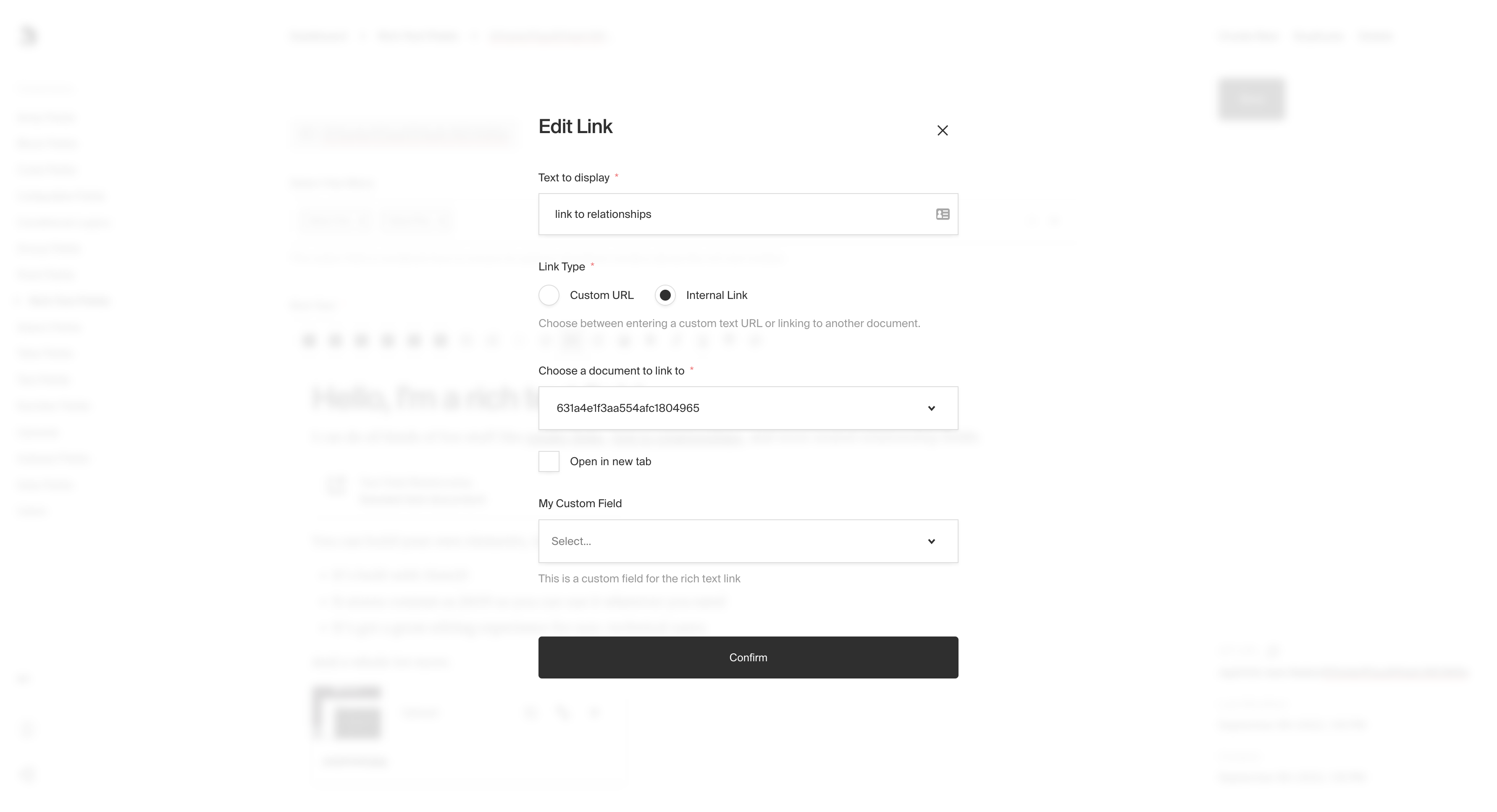
|
|
87
89
|
*RichText link with custom fields*
|
|
88
90
|
|
|
@@ -139,7 +141,7 @@ Custom `Leaf` objects follow a similar pattern but require you to define the `Le
|
|
|
139
141
|
```ts
|
|
140
142
|
import { CollectionConfig } from 'payload/types';
|
|
141
143
|
|
|
142
|
-
const ExampleCollection: CollectionConfig = {
|
|
144
|
+
export const ExampleCollection: CollectionConfig = {
|
|
143
145
|
slug: 'example-collection',
|
|
144
146
|
fields: [
|
|
145
147
|
{
|
|
@@ -369,5 +371,4 @@ import type {
|
|
|
369
371
|
RichTextCustomElement,
|
|
370
372
|
RichTextCustomLeaf,
|
|
371
373
|
} from 'payload/types';
|
|
372
|
-
|
|
373
374
|
```
|
package/docs/fields/row.mdx
CHANGED
|
@@ -26,7 +26,7 @@ keywords: row, fields, config, configuration, documentation, Content Management
|
|
|
26
26
|
```ts
|
|
27
27
|
import { CollectionConfig } from 'payload/types';
|
|
28
28
|
|
|
29
|
-
const ExampleCollection: CollectionConfig = {
|
|
29
|
+
export const ExampleCollection: CollectionConfig = {
|
|
30
30
|
slug: 'example-collection',
|
|
31
31
|
fields: [
|
|
32
32
|
{
|
package/docs/fields/select.mdx
CHANGED
|
@@ -62,7 +62,7 @@ Set to `true` if you'd like this field to be sortable within the Admin UI using
|
|
|
62
62
|
```ts
|
|
63
63
|
import { CollectionConfig } from 'payload/types';
|
|
64
64
|
|
|
65
|
-
const ExampleCollection: CollectionConfig = {
|
|
65
|
+
export const ExampleCollection: CollectionConfig = {
|
|
66
66
|
slug: 'example-collection',
|
|
67
67
|
fields: [
|
|
68
68
|
{
|
package/docs/fields/tabs.mdx
CHANGED
|
@@ -40,7 +40,7 @@ Each tab has its own required `label` and `fields` array. You can also optionall
|
|
|
40
40
|
```ts
|
|
41
41
|
import { CollectionConfig } from 'payload/types';
|
|
42
42
|
|
|
43
|
-
const ExampleCollection: CollectionConfig = {
|
|
43
|
+
export const ExampleCollection: CollectionConfig = {
|
|
44
44
|
slug: 'example-collection',
|
|
45
45
|
fields: [
|
|
46
46
|
{
|
package/docs/fields/text.mdx
CHANGED
|
@@ -51,7 +51,7 @@ Set this property to a string that will be used for browser autocomplete.
|
|
|
51
51
|
```ts
|
|
52
52
|
import { CollectionConfig } from 'payload/types';
|
|
53
53
|
|
|
54
|
-
const ExampleCollection: CollectionConfig = {
|
|
54
|
+
export const ExampleCollection: CollectionConfig = {
|
|
55
55
|
slug: 'example-collection',
|
|
56
56
|
fields: [
|
|
57
57
|
{
|
package/docs/fields/textarea.mdx
CHANGED
|
@@ -51,7 +51,7 @@ Set this property to a string that will be used for browser autocomplete.
|
|
|
51
51
|
```ts
|
|
52
52
|
import { CollectionConfig } from 'payload/types';
|
|
53
53
|
|
|
54
|
-
const ExampleCollection: CollectionConfig = {
|
|
54
|
+
export const ExampleCollection: CollectionConfig = {
|
|
55
55
|
slug: 'example-collection',
|
|
56
56
|
fields: [
|
|
57
57
|
{
|
package/docs/fields/ui.mdx
CHANGED
|
@@ -39,7 +39,7 @@ With this field, you can also inject custom `Cell` components that appear as add
|
|
|
39
39
|
```ts
|
|
40
40
|
import { CollectionConfig } from 'payload/types';
|
|
41
41
|
|
|
42
|
-
const ExampleCollection: CollectionConfig = {
|
|
42
|
+
export const ExampleCollection: CollectionConfig = {
|
|
43
43
|
slug: 'example-collection',
|
|
44
44
|
fields: [
|
|
45
45
|
{
|
package/docs/fields/upload.mdx
CHANGED
|
@@ -51,7 +51,7 @@ keywords: upload, images media, fields, config, configuration, documentation, Co
|
|
|
51
51
|
```ts
|
|
52
52
|
import { CollectionConfig } from 'payload/types';
|
|
53
53
|
|
|
54
|
-
const ExampleCollection: CollectionConfig = {
|
|
54
|
+
export const ExampleCollection: CollectionConfig = {
|
|
55
55
|
slug: 'example-collection',
|
|
56
56
|
fields: [
|
|
57
57
|
{
|
|
@@ -32,7 +32,7 @@ Everything that can be done to a Collection via the REST or Local API can be don
|
|
|
32
32
|
```ts
|
|
33
33
|
import { CollectionConfig } from 'payload/types';
|
|
34
34
|
|
|
35
|
-
const PublicUser: CollectionConfig = {
|
|
35
|
+
export const PublicUser: CollectionConfig = {
|
|
36
36
|
slug: 'public-users',
|
|
37
37
|
auth: true, // Auth is enabled
|
|
38
38
|
fields: [
|
|
@@ -34,7 +34,7 @@ All collection Hook properties accept arrays of synchronous or asynchronous func
|
|
|
34
34
|
```ts
|
|
35
35
|
import { CollectionConfig } from 'payload/types';
|
|
36
36
|
|
|
37
|
-
const ExampleHooks: CollectionConfig = {
|
|
37
|
+
export const ExampleHooks: CollectionConfig = {
|
|
38
38
|
slug: 'example-hooks',
|
|
39
39
|
fields: [
|
|
40
40
|
{ name: 'name', type: 'text'},
|
|
@@ -99,7 +99,7 @@ Example:
|
|
|
99
99
|
import { CollectionConfig } from 'payload/types';
|
|
100
100
|
|
|
101
101
|
// a collection of 'orders' with an additional route for tracking details, reachable at /api/orders/:id/tracking
|
|
102
|
-
const Orders: CollectionConfig = {
|
|
102
|
+
export const Orders: CollectionConfig = {
|
|
103
103
|
slug: 'orders',
|
|
104
104
|
fields: [ /* ... */ ],
|
|
105
105
|
// highlight-start
|
package/docs/upload/overview.mdx
CHANGED
|
@@ -60,7 +60,7 @@ _An asterisk denotes that a property above is required._
|
|
|
60
60
|
```ts
|
|
61
61
|
import { CollectionConfig } from 'payload/types';
|
|
62
62
|
|
|
63
|
-
const Media: CollectionConfig = {
|
|
63
|
+
export const Media: CollectionConfig = {
|
|
64
64
|
slug: 'media',
|
|
65
65
|
upload: {
|
|
66
66
|
staticURL: '/media',
|
|
@@ -165,7 +165,7 @@ You can specify how Payload retrieves admin thumbnails for your upload-enabled C
|
|
|
165
165
|
```ts
|
|
166
166
|
import { CollectionConfig } from 'payload/types';
|
|
167
167
|
|
|
168
|
-
const Media: CollectionConfig = {
|
|
168
|
+
export const Media: CollectionConfig = {
|
|
169
169
|
slug: 'media',
|
|
170
170
|
upload: {
|
|
171
171
|
staticURL: '/media',
|
|
@@ -200,7 +200,7 @@ Some example values are: `image/*`, `audio/*`, `video/*`, `image/png`, `applicat
|
|
|
200
200
|
```ts
|
|
201
201
|
import { CollectionConfig } from 'payload/types';
|
|
202
202
|
|
|
203
|
-
const Media: CollectionConfig = {
|
|
203
|
+
export const Media: CollectionConfig = {
|
|
204
204
|
slug: 'media',
|
|
205
205
|
upload: {
|
|
206
206
|
staticURL: '/media',
|
|
@@ -28,7 +28,7 @@ Collections and Globals both support the same options for configuring autosave.
|
|
|
28
28
|
```ts
|
|
29
29
|
import { CollectionConfig } from 'payload/types';
|
|
30
30
|
|
|
31
|
-
const Pages: CollectionConfig = {
|
|
31
|
+
export const Pages: CollectionConfig = {
|
|
32
32
|
slug: 'pages',
|
|
33
33
|
access: {
|
|
34
34
|
read: ({ req }) => {
|
package/docs/versions/drafts.mdx
CHANGED
|
@@ -84,7 +84,7 @@ Here is an example that utilizes the `_status` field to require a user to be log
|
|
|
84
84
|
```ts
|
|
85
85
|
import { CollectionConfig } from 'payload/types';
|
|
86
86
|
|
|
87
|
-
const Pages: CollectionConfig = {
|
|
87
|
+
export const Pages: CollectionConfig = {
|
|
88
88
|
slug: 'pages',
|
|
89
89
|
access: {
|
|
90
90
|
read: ({ req }) => {
|
|
@@ -119,7 +119,7 @@ Here is an example for how to write an access control function that grants acces
|
|
|
119
119
|
```ts
|
|
120
120
|
import { CollectionConfig } from 'payload/types';
|
|
121
121
|
|
|
122
|
-
const Pages: CollectionConfig = {
|
|
122
|
+
export const Pages: CollectionConfig = {
|
|
123
123
|
slug: 'pages',
|
|
124
124
|
access: {
|
|
125
125
|
read: ({ req }) => {
|
package/package.json
CHANGED
|
@@ -1,6 +1,6 @@
|
|
|
1
1
|
{
|
|
2
2
|
"name": "payload",
|
|
3
|
-
"version": "1.7.
|
|
3
|
+
"version": "1.7.4",
|
|
4
4
|
"description": "Node, React and MongoDB Headless CMS and Application Framework",
|
|
5
5
|
"license": "MIT",
|
|
6
6
|
"engines": {
|
|
@@ -179,7 +179,7 @@
|
|
|
179
179
|
"slate-react": "^0.92.0",
|
|
180
180
|
"style-loader": "^2.0.0",
|
|
181
181
|
"swc-loader": "^0.2.3",
|
|
182
|
-
"swc-minify-webpack-plugin": "^1.0
|
|
182
|
+
"swc-minify-webpack-plugin": "^2.1.0",
|
|
183
183
|
"terser-webpack-plugin": "^5.3.6",
|
|
184
184
|
"ts-essentials": "^7.0.3",
|
|
185
185
|
"url-loader": "^4.1.1",
|