paseo-office 0.2.0 → 0.2.2
This diff represents the content of publicly available package versions that have been released to one of the supported registries. The information contained in this diff is provided for informational purposes only and reflects changes between package versions as they appear in their respective public registries.
- package/OVERVIEW.md +27 -0
- package/README.md +65 -134
- package/client/action-button.tsx +4 -1
- package/client/activity-panel.tsx +6 -4
- package/client/agent-appearance.tsx +257 -0
- package/client/agent-card.tsx +2 -1
- package/client/agent-picker-text.ts +23 -4
- package/client/agent-picker.tsx +5 -8
- package/client/board-sheet.tsx +48 -16
- package/client/board-text.ts +12 -2
- package/client/brand.ts +1 -0
- package/client/chat-chrome.tsx +318 -0
- package/client/chat-compose-tools.tsx +314 -0
- package/client/chat-dictation.tsx +133 -0
- package/client/chat-more.tsx +119 -0
- package/client/chat-panel.tsx +401 -146
- package/client/chat-quick.tsx +198 -0
- package/client/chat-text.ts +25 -6
- package/client/column-sheet.tsx +93 -23
- package/client/conversation-model.ts +19 -5
- package/client/duty-sheet.tsx +321 -0
- package/client/duty-text.ts +20 -0
- package/client/fullscreen-header.tsx +28 -13
- package/client/fullscreen-theme.ts +38 -0
- package/client/host-details.tsx +269 -0
- package/client/host-styles.ts +129 -0
- package/client/host-switches.tsx +212 -83
- package/client/incidents-card.tsx +2 -1
- package/client/janitor-card.tsx +1 -1
- package/client/library-card.tsx +2 -1
- package/client/list-text.ts +8 -6
- package/client/lobby-board.tsx +73 -53
- package/client/machine-card.tsx +225 -85
- package/client/messenger-styles.ts +216 -0
- package/client/new-agent-form.tsx +153 -61
- package/client/new-agent-model.ts +2 -0
- package/client/notes-card.tsx +111 -83
- package/client/notes-days.tsx +1 -1
- package/client/office-brand-context.ts +44 -0
- package/client/office-column.tsx +2 -1
- package/client/office-keyboard.ts +79 -0
- package/client/office-link.ts +7 -1
- package/client/office-mark.tsx +29 -0
- package/client/office-modal.tsx +440 -0
- package/client/office-settings.tsx +75 -30
- package/client/office-state.ts +12 -2
- package/client/office-surface.tsx +591 -81
- package/client/pixel/actors.ts +2 -1
- package/client/pixel/art.ts +33 -19
- package/client/pixel/pixel-office.tsx +2 -2
- package/client/prompt-coach.tsx +152 -0
- package/client/qa-card.tsx +2 -1
- package/client/review-card.tsx +2 -1
- package/client/room-board.tsx +26 -2
- package/client/scene-picker.tsx +158 -0
- package/client/scene-previews.ts +10 -0
- package/client/session-pane.tsx +25 -5
- package/client/session-panel-detail.tsx +238 -0
- package/client/session-panel.tsx +222 -137
- package/client/session-styles.ts +224 -1
- package/client/session-transcript.tsx +243 -0
- package/client/sessions-panel.tsx +181 -22
- package/client/sessions-text.ts +18 -0
- package/client/settings-sections.tsx +126 -0
- package/client/sidebar-launcher.ts +29 -0
- package/client/ssh-hosts.tsx +331 -0
- package/client/ssh-metrics.ts +76 -0
- package/client/standup-card.tsx +2 -1
- package/client/structure-view.tsx +20 -3
- package/client/styles.ts +170 -62
- package/client/team-chat-preview.tsx +96 -0
- package/client/tracker-connections.tsx +252 -0
- package/client/transcript-styles.ts +90 -0
- package/client/use-device-switch.ts +21 -12
- package/client/use-duty-actions.ts +43 -0
- package/client/use-group-photo.ts +48 -0
- package/client/use-new-agent.ts +4 -0
- package/client/use-street.ts +8 -0
- package/client/workspace-office-tools.tsx +102 -0
- package/client/workspace-overlay-route.web.ts +47 -0
- package/client/workspace-overlay.tsx +195 -0
- package/client/world/adapter.ts +37 -2
- package/client/world/escape.ts +58 -0
- package/client/world/use-world-feed.ts +6 -2
- package/client/world/workspace-dock.ts +6 -0
- package/client/world/world-api.ts +45 -4
- package/client/world/world-bridge-page.ts +14 -3
- package/client/world/world-bridge.ts +50 -5
- package/client/world/world-frame.web.ts +8 -0
- package/client/world/world-view-native.tsx +31 -10
- package/client/world/world-view-shared.ts +36 -7
- package/client/world/world-view.tsx +93 -21
- package/docs/office.md +165 -64
- package/index.client.tsx +13 -6
- package/index.server.ts +232 -16
- package/package.json +2 -1
- package/server/activity.ts +42 -19
- package/server/agent-tools.ts +11 -5
- package/server/board-service.ts +381 -10
- package/server/brand-logo.ts +34 -0
- package/server/chat-group.ts +83 -0
- package/server/chat-service.ts +406 -62
- package/server/chat-store.ts +1 -4
- package/server/directory.ts +22 -7
- package/server/duty-service.ts +230 -0
- package/server/group-photo.ts +39 -0
- package/server/home-departure.ts +47 -0
- package/server/hub.ts +43 -1
- package/server/incidents-jira.ts +19 -7
- package/server/incidents-schedule.ts +10 -10
- package/server/incidents-sentry.ts +34 -8
- package/server/live-ports.ts +114 -18
- package/server/lobby-pickup.ts +170 -0
- package/server/machine/details.ts +91 -0
- package/server/mention-queue.ts +14 -0
- package/server/office.ts +110 -6
- package/server/paths.ts +14 -0
- package/server/ssh/LICENSE.paseo +211 -0
- package/server/ssh/client.ts +401 -0
- package/server/ssh/discovery.ts +230 -0
- package/server/ssh/installed.ts +104 -0
- package/server/ssh/monitor.ts +104 -0
- package/server/ssh/pid-files.ts +194 -0
- package/server/ssh/read.ts +136 -0
- package/server/subagent-names.ts +4 -0
- package/server/tracker-credentials.ts +141 -0
- package/server/words.generated.ts +1 -1
- package/server/world.generated.ts +1 -1
- package/shared/appearance.ts +43 -0
- package/shared/branding.ts +53 -0
- package/shared/chat-words.ts +2 -2
- package/shared/contracts.ts +199 -5
- package/shared/duties.ts +100 -0
- package/shared/host-details.ts +25 -0
- package/shared/lobby-assignment.ts +34 -0
- package/shared/model.ts +9 -1
- package/shared/names.ts +2 -0
- package/shared/settings.ts +14 -3
- package/shared/ssh.ts +34 -0
- package/shared/upstream/README.md +1 -3
- package/shared/upstream/chat-engine.d.ts +4 -0
- package/shared/upstream/prompt-coach.d.ts +6 -0
- package/shared/upstream/prompt-coach.js +178 -0
package/OVERVIEW.md
ADDED
|
@@ -0,0 +1,27 @@
|
|
|
1
|
+
# Office 3D
|
|
2
|
+
|
|
3
|
+
See your Paseo sessions as people at work in a shared office. Each workspace has a room, so you can spot an agent waiting for approval, walk over to its desk and open the conversation without leaving the floor.
|
|
4
|
+
|
|
5
|
+
## Working in the office
|
|
6
|
+
|
|
7
|
+
Open **Office 3D** from the sidebar and choose **Full screen**. **Sessions** groups agents by status and shows their current activity. When a provider reports checklist progress, the row shows completed items. A bar labeled **Context** measures context-window usage.
|
|
8
|
+
|
|
9
|
+
Select a row to read the conversation, reply or answer a permission request. On desktop and web, the **↗** beside the row opens the agent’s Paseo workspace over the floor, including files, diffs and terminals. In **Walk in**, press **E** next to the agent for the same workspace. Minimize it to keep your place, or hide the Sessions and Details sidebars for a wider view.
|
|
10
|
+
|
|
11
|
+
Use **Team chat** to talk to the group or address one session. Use the **Lobby board** for work that an available agent can claim. With **Agent tools** and **Wake agents** enabled, idle agents pick up unassigned tasks. Completing a linked workspace task also checks it off in the lobby. The pantry **Duty board** schedules recurring assignments on the days you choose.
|
|
12
|
+
|
|
13
|
+
## Setup and compatibility
|
|
14
|
+
|
|
15
|
+
Office 3D requires Paseo 0.16.0 or newer and plugins enabled on the host. Desktop and web support the 3D floor with WebGL 2. The store mobile app offers the 2D floor and List. Mobile builds with a script-capable frame can also show 3D.
|
|
16
|
+
|
|
17
|
+
The settings gear controls the floor plan, backdrop, lighting and sound. Under **Appearance → Branding**, the host can set a shared office name, logo and mark color. The 3D scene supports English, Vietnamese, Thai and Indonesian. The surrounding Office controls use English.
|
|
18
|
+
|
|
19
|
+
**Archive idle sessions** is off by default. Enable it under **Office settings → Automation** if you want an open 3D floor to archive a session when its worker goes home. Workers can go home after resting for at least 30 minutes at night or after evening drinks. The session must still be idle, with no pending approval or working subagent. Archiving removes it from the active list and keeps its conversation history.
|
|
20
|
+
|
|
21
|
+
Stand-up notes need a host folder. Jira and Sentry alerts need project settings and a connection: a Jira address, email and API token, and a Sentry auth token, entered in the settings or set in the host environment. Entered tokens are stored unencrypted on the host in a file only its user can read. Weather from a service needs a configured URL. Linux hosts can also show CPU, memory and processes.
|
|
22
|
+
|
|
23
|
+
## Data access
|
|
24
|
+
|
|
25
|
+
Office reads session status, activity and provider-reported usage. It stores team chat, tasks and duty records on the Paseo host. An agent’s configured provider processes messages, assignments and tool results. A whole-group message can include up to six recent group or scene messages when Office asks an available agent to reply.
|
|
26
|
+
|
|
27
|
+
Configured issue trackers and weather services receive requests from the host. Clients fetch a custom logo from its configured URL. A session’s available actions depend on its provider and the host SDK.
|
package/README.md
CHANGED
|
@@ -1,145 +1,76 @@
|
|
|
1
|
-
# Office 3D
|
|
2
|
-
|
|
3
|
-
A community port of [my-office](https://github.com/khanh020905/my-office) for
|
|
4
|
-
[Paseo](https://github.com/getpaseo/paseo): your agents at their desks, in 3D.
|
|
5
|
-
|
|
6
|
-
It is based on my-office by [khanh020905](https://github.com/khanh020905), with the author's
|
|
7
|
-
permission, and is not an official version of it. Report issues with this Paseo plugin in
|
|
8
|
-
[this repository's issue tracker](https://github.com/allrested/paseo-office/issues), not in
|
|
9
|
-
my-office's.
|
|
10
|
-
|
|
11
|
-
## What it does
|
|
12
|
-
|
|
13
|
-
- Shows every agent on the host as a floor: in 3D, in 2D pixel art, or as a list. Each workspace
|
|
14
|
-
is a room, and each agent sits at a desk and walks to the kind of work it is doing. The 3D floor
|
|
15
|
-
offers Company floor, Cozy room and Headquarters in Settings. Headquarters seats 44 agents. Its four department rooms fill as teams outgrow the six desk areas on the main floor.
|
|
16
|
-
- The indoor staff deliver parcels, make rounds and tally reported spending. The teams have duty rosters, promotions and farewells.
|
|
17
|
-
- The optional street outside has walk-in shops, traffic and six staff scenes. Shops and vehicles carry made-up names and locally drawn signs. The cafés, pharmacy and phone shop share the generic store fittings.
|
|
18
|
-
- Dresses the 3D floor for Halloween, Christmas and Lunar New Year by the date. Weather can follow a hand-picked sky, the season or a service you choose.
|
|
19
|
-
- Shows 3D signs, labels and speech in English, Vietnamese, Thai or Indonesian. Choose a language
|
|
20
|
-
on the settings page. Automatic follows the app’s language when supported. Paseo 0.16.2 offers
|
|
21
|
-
none of the three non-English scene languages, so select one explicitly to use it.
|
|
22
|
-
- Puts a column beside the floor: Attention (who needs you, and the office's cards), Sessions,
|
|
23
|
-
Activity, and a team Chat where an `@` prompts an agent. An agent's session opens as a tab of
|
|
24
|
-
the column, with its conversation, a reply box, permission answers and Stop. The Sessions tab
|
|
25
|
-
starts an agent: a workspace, a provider and model, and a first prompt.
|
|
26
|
-
- Select **Full screen** beside the view switch to work inside the office. On a wide screen,
|
|
27
|
-
Sessions sits on the left, the floor in the center, and activity or the open conversation
|
|
28
|
-
on the right. Select **Sessions** or **Details** in the toolbar to hide or show that side.
|
|
29
|
-
Hide both for an edge-to-edge floor, or open a conversation to reply and answer permission requests.
|
|
30
|
-
- Gives each room a board of tasks and notes. Agents read and post with three tools, and a post
|
|
31
|
-
that names an idle agent wakes it.
|
|
32
|
-
- Writes the day's stand-up entry at 8:00 on the days you choose, Monday to Friday by default: an
|
|
33
|
-
agent on the host gets the office's stand-up report and writes a `## DD Month YYYY` entry into
|
|
34
|
-
`daily-standup-YYYYMM.md` in a folder of notes you choose, following the stand-up notes
|
|
35
|
-
instructions for that folder, which may sit in its own or a parent folder's `AGENTS.md` or
|
|
36
|
-
`CLAUDE.md`.
|
|
37
|
-
- Rings an incident alarm for a new Jira bug or Sentry issue in the projects you name.
|
|
38
|
-
- Plays my-office's sounds in the 3D floor: off until you turn on Sound in the settings or with the
|
|
39
|
-
speaker button on the floor's toolbar.
|
|
40
|
-
- Takes a photo of the 3D floor, in the app's light or held to day or night for the photo, and on
|
|
41
|
-
a desktop or in a browser records a 15-second clip of it; a tour of the floor's things shows
|
|
42
|
-
once on a desktop.
|
|
43
|
-
- Reads the host (on Linux): memory, CPU, and what each agent left running, with a way to clean it
|
|
44
|
-
up.
|
|
45
|
-
|
|
46
|
-
[docs/office.md](docs/office.md) says how each part works.
|
|
47
|
-
|
|
48
|
-
## Install
|
|
49
|
-
|
|
50
|
-
You need Paseo 0.16.0 or newer; the plugin is tested on 0.16.2. Installed plugins must be turned on
|
|
51
|
-
in `config.json` under the host's Paseo home (`$PASEO_HOME/config.json`, by default
|
|
52
|
-
`~/.paseo/config.json`):
|
|
53
|
-
|
|
54
|
-
```json
|
|
55
|
-
{ "pluginsEnabled": true }
|
|
56
|
-
```
|
|
1
|
+
# Office 3D for Paseo
|
|
57
2
|
|
|
58
|
-
|
|
59
|
-
`paseo daemon reload` or restart the daemon.
|
|
3
|
+
Office 3D puts your Paseo agents on a shared floor. Each workspace has a room. Pick a desk to see what its agent is doing, open the agent’s workbench over the floor, or leave the office in view while you watch for permission requests.
|
|
60
4
|
|
|
61
|
-
|
|
5
|
+
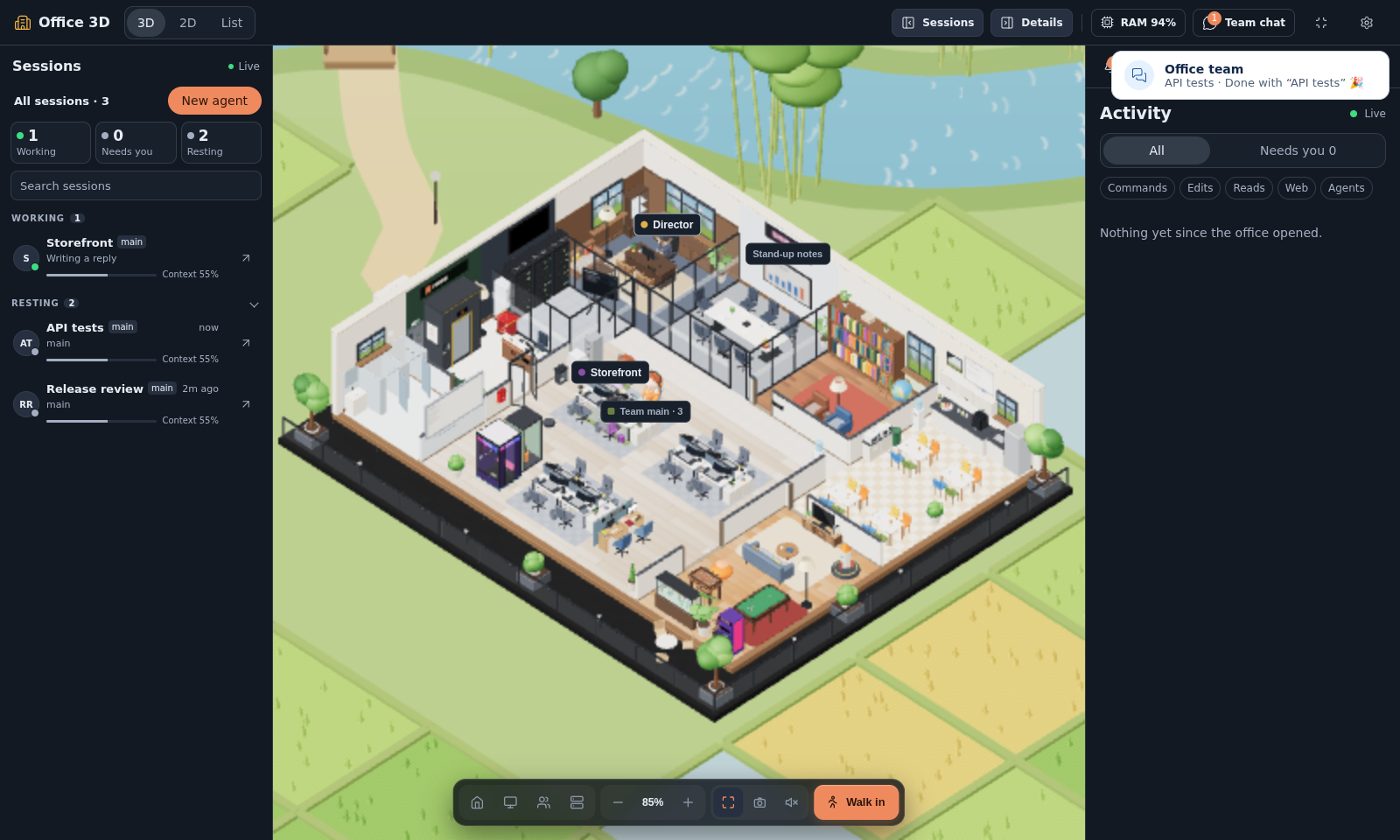
|
|
62
6
|
|
|
63
|
-
|
|
64
|
-
paseo plugin install git:allrested/paseo-office
|
|
65
|
-
```
|
|
7
|
+
## Install on a host
|
|
66
8
|
|
|
67
|
-
|
|
68
|
-
`node_modules`.
|
|
69
|
-
|
|
70
|
-
The settings are in Settings > Plugins > Office 3D. The gear over the floor opens them too.
|
|
71
|
-
|
|
72
|
-
## What works where
|
|
73
|
-
|
|
74
|
-
| Where | What you get |
|
|
75
|
-
| --------------------------------- | -------------------------------------------------------------------------------------------------------------------------------------------------------------------------------------- |
|
|
76
|
-
| Desktop app and browsers | The 3D floor, the 2D floor and the list; Photo mode, clips and the tour |
|
|
77
|
-
| The phone app with a script frame | The 3D floor without Photo mode, clips and the tour |
|
|
78
|
-
| The store phone app | The 2D floor and the list: its plugin frame runs no script |
|
|
79
|
-
| Sound | A browser and the desktop app, where the frame lets audio start; the phone's script frame: see [docs/verified.md](docs/verified.md) |
|
|
80
|
-
| The street outside | Available in 3D. Enabled by default on wide web layouts and disabled by default on phones. |
|
|
81
|
-
| Stock Paseo 0.16 | A session opens in the office in every app. Its SDK has no `cancel()` or `closeRuntime()` for an agent: no Stop on a session, and the Host card does not close an idle agent's runtime |
|
|
82
|
-
|
|
83
|
-
[docs/verified.md](docs/verified.md) says what was seen on a stock Paseo 0.16.2, and what was not.
|
|
84
|
-
|
|
85
|
-
The stand-up notes and the incidents check run on the plugin's own timers. After a daemon
|
|
86
|
-
restart, a run waits until the office is opened or an agent opens or ends a turn. A run missed
|
|
87
|
-
while the daemon was down is not made up.
|
|
88
|
-
|
|
89
|
-
The column, agent cards, settings, team chat (including @Director), whiteboard rows and host
|
|
90
|
-
notifications stay in English. Thai and Indonesian use the English karaoke songs. Vietnamese
|
|
91
|
-
and Thai also use English for the port’s custom lines. The sound-unavailable message and
|
|
92
|
-
photo lighting group title are English in every language.
|
|
93
|
-
|
|
94
|
-
## What it reads and where it sends it
|
|
95
|
-
|
|
96
|
-
- It reads agents, workspaces, status, spending when the provider reports it, and each agent’s kind
|
|
97
|
-
of activity. On the host it runs Git once per workspace folder to read the first commit date.
|
|
98
|
-
- The 3D scene receives people, kinds of activity, spending, repository birthdays, team tenure,
|
|
99
|
-
and the lift’s servicing time and build sticker. It receives no file names, commands or prompts and makes no
|
|
100
|
-
network calls. It sends chat moments with a name or count, and reports farewells and promotions.
|
|
101
|
-
- With the street enabled, the device receives the bundled Kenney Car Kit (CC0). While a street
|
|
102
|
-
is open, the host checks local Git tags and the installed Claude CLI version. New tags can
|
|
103
|
-
trigger the photo booth. The pickleball scene uses check results already available to Paseo.
|
|
104
|
-
- English travels with the scene. For each other language the host sends one dictionary on request
|
|
105
|
-
to the device that chose it (about 82–130 KB). The device keeps those words for the life of the page.
|
|
106
|
-
- A clip is recorded inside the page and saved as a download on the device; nothing is sent. The
|
|
107
|
-
scene keeps on the device, under keys that start with `office-`, which team sits where, the
|
|
108
|
-
plants, the graphics level, the Sound switch, that the tour was seen, and the clip's shape and
|
|
109
|
-
music choice, the duty roster with team members’ names, the fire drill day, and team farewells and returns. The column keeps when this device last had the chat open (`office-chat-seen`).
|
|
110
|
-
- With Settings > Weather > From a service and an address set, the host reads that address while an
|
|
111
|
-
office is open, at most once in 15 minutes. The request sets only the `Accept` header. The
|
|
112
|
-
scene receives a weather code, temperature and cloud share. The host stores the address,
|
|
113
|
-
including any key in its query, in `<PASEO_HOME>/plugin-settings/office/office.json`.
|
|
114
|
-
Anyone who can open the settings page can see it there.
|
|
115
|
-
- It calls Jira and Sentry only when their settings are filled in, with tokens from the host's
|
|
116
|
-
environment (`ATLASSIAN_*`, `SENTRY_AUTH_TOKEN`). The tracker settings never hold a token.
|
|
117
|
-
- The stand-up notes writer, a wake and a chat `@` send the board's text, the chat message and the
|
|
118
|
-
notes' prompt to the host's own agents, and so to whichever provider runs them.
|
|
119
|
-
- It stores boards, the chat, the stand-up notes' state and incidents under the host's Paseo home,
|
|
120
|
-
in `office/`, alongside the team ledger (`tenure.json`) and lift build (`lift.json`).
|
|
121
|
-
|
|
122
|
-
## Based on
|
|
123
|
-
|
|
124
|
-
The 3D scene is my-office at commit
|
|
125
|
-
[`b68228871fe30cd2c759a2c919337a9a9d1f5644`](https://github.com/khanh020905/my-office/tree/b68228871fe30cd2c759a2c919337a9a9d1f5644)
|
|
126
|
-
(v0.6.0), with three.js 0.160.0. [vendor/SOURCES.md](vendor/SOURCES.md) says what is taken, what
|
|
127
|
-
stands in for the rest, and how to take a newer my-office.
|
|
128
|
-
|
|
129
|
-
Upstream supplies the Vietnamese and Thai text, with real brand names replaced. The Indonesian
|
|
130
|
-
text was written for this port in my-office’s locale format.
|
|
131
|
-
|
|
132
|
-
## Develop
|
|
9
|
+
Office 3D requires Paseo **0.16.0 or newer**. The plugin has been tested on stock Paseo 0.16.2.
|
|
133
10
|
|
|
134
|
-
|
|
135
|
-
|
|
11
|
+
1. In the host’s existing `$PASEO_HOME/config.json` (default `~/.paseo/config.json`), set `"pluginsEnabled": true`. If you changed it on a running daemon, run `paseo daemon reload`.
|
|
12
|
+
2. Install from the repository’s default branch.
|
|
13
|
+
|
|
14
|
+
```sh
|
|
15
|
+
paseo plugin install git:allrested/paseo-office
|
|
16
|
+
```
|
|
17
|
+
|
|
18
|
+
To install a particular branch or tag, add `--ref <ref>`. The host supplies the SDK and runs the bundled scene directly.
|
|
19
|
+
|
|
20
|
+
3. Open **Office 3D** in the Paseo sidebar. The gear on the floor opens **Office settings**.
|
|
21
|
+
|
|
22
|
+
## Work from the floor
|
|
23
|
+
|
|
24
|
+
| What you want to do | Where to go |
|
|
25
|
+
| -------------------------- | --------------------------------------------------------------------------------------------------------------------------------------------------------------------------------------------------------------------------------------------------------- |
|
|
26
|
+
| See who needs you | Open **Sessions** for working, waiting and resting agents. A row shows the current activity. A checklist bar shows reported task completion. A bar labeled **Context** shows how much of the agent’s context window is in use. |
|
|
27
|
+
| Open an agent’s work | In fullscreen, click the **↗** beside the session. In **Walk in**, face the agent and press **E** or tap the prompt. On desktop or web, the agent’s workbench opens over the office. Minimize it to revisit the floor or close it to return to your walk. |
|
|
28
|
+
| Reply or approve a request | Select the session row to open its conversation and permission requests. **New agent** lets you choose a workspace, provider and model, set the agent’s appearance and send the first prompt. |
|
|
29
|
+
| Talk to the team | Open **Team chat** for group conversation, polls and office photos. Choose **To** or mention a session when you want that agent to act. |
|
|
30
|
+
| Give an idle agent a task | Add a to-do on the **Lobby board**. Turn on **Agent tools** and **Wake agents** for automatic pickup. When an agent claims a task for its workspace, checking it off on either board completes the linked item on both. |
|
|
31
|
+
| Schedule recurring work | On the pantry **Duty board**, choose the days and add instructions for an agent. Duties with instructions enter the pickup queue at 08:00 on their scheduled days. Duties without instructions are acted out on the floor. |
|
|
32
|
+
| Read a stand-up | Open **Stand-up notes** at the meeting screen to browse entries by date. Set the notes folder, days and time zone to have an agent write scheduled entries. |
|
|
33
|
+
|
|
34
|
+
On wide screens, **Sessions** and **Details** toggle the sidebars independently. Hide both for a full-width floor. [Workspace screenshot](https://raw.githubusercontent.com/allrested/paseo-office/main/docs/fullscreen-workspace.webp) · [Team chat screenshot](https://raw.githubusercontent.com/allrested/paseo-office/main/docs/fullscreen-team-chat.webp)
|
|
35
|
+
|
|
36
|
+
## Make the office yours
|
|
37
|
+
|
|
38
|
+
In **Office settings → Appearance**, choose Company floor, Cozy room or Headquarters. Choose City for streets and shops, Countryside, Beach or Plain for the backdrop, and App theme, Day or Night for lighting. The scene offers English, Vietnamese, Thai and Indonesian. The Office panels and team chat use English.
|
|
39
|
+
|
|
40
|
+
Under **Branding**, set the office name, logo URL and mark color. Blank fields inherit their host defaults. To change one agent’s name, character or avatar, open their session and choose **Customize agent**. [Branding environment variables](https://github.com/allrested/paseo-office/blob/main/docs/office.md#custom-branding)
|
|
41
|
+
|
|
42
|
+
## Platform support
|
|
43
|
+
|
|
44
|
+
| Client | Available views and controls |
|
|
45
|
+
| ------------------------------ | ------------------------------------------------------------------------------------------------------------------------------ |
|
|
46
|
+
| Paseo Desktop and web browsers | 3D with WebGL 2, 2D and List. Fullscreen workbench, walk-in controls, photos and 15-second clips. |
|
|
47
|
+
| Mobile app | 2D and List. Mobile builds with a script-capable frame also support 3D. Use Office session controls for replies and approvals. |
|
|
48
|
+
| Stock Paseo 0.16 | Stop and idle-runtime cleanup depend on host SDK support. The stock 0.16 SDK lacks these operations. |
|
|
49
|
+
|
|
50
|
+
The Linux Host panel shows memory, CPU and processes. Choose **Host → SSH** for memory, load averages and disk use on hosts configured through SSH-MCP. The floor also reflects reported agent spending, repository birthdays and team tenure. Git tags, pull-request checks and the installed Claude CLI version can trigger city activities. Weather and Jira or Sentry alerts are optional. [Feature guide](https://github.com/allrested/paseo-office/blob/main/docs/office.md) · [Compatibility checks](https://github.com/allrested/paseo-office/blob/main/docs/verified.md)
|
|
51
|
+
|
|
52
|
+
## Data and integrations
|
|
53
|
+
|
|
54
|
+
Boards, duties, team chat and stand-up state are stored under `$PASEO_HOME/office/`. View preferences are stored on the device. Clips download to the device. A custom logo is fetched from the image URL you configure.
|
|
55
|
+
|
|
56
|
+
Agent prompts, tool results and scheduled assignments go through the agent’s configured provider. A **Whole group** chat message can go to one available session with up to six recent group or scene messages for context. **To**, mentions and replies address a particular session.
|
|
57
|
+
|
|
58
|
+
Jira and Sentry use project settings and a connection saved from the settings or read from the host environment. Saved tokens stay on the host, unencrypted, in a file only its user can read. A configured weather service receives requests while Office is open, at most once every 15 minutes. Its URL is visible in host settings. On stock hosts using fallback timers, scheduled work resumes after daemon restart when Office or an agent activates the plugin. Missed runs are skipped. [Plugin overview](https://github.com/allrested/paseo-office/blob/main/OVERVIEW.md) · [Implementation and storage](https://github.com/allrested/paseo-office/blob/main/docs/office.md)
|
|
59
|
+
|
|
60
|
+
## Development
|
|
61
|
+
|
|
62
|
+
```sh
|
|
63
|
+
npm ci
|
|
136
64
|
npm run typecheck
|
|
137
65
|
npm test
|
|
138
|
-
npm run test:scripts
|
|
66
|
+
npm run test:scripts
|
|
139
67
|
npm run lint
|
|
140
|
-
npm run
|
|
68
|
+
npm run format:check
|
|
69
|
+
npm run check:world
|
|
141
70
|
```
|
|
142
71
|
|
|
143
|
-
|
|
72
|
+
After editing the vendored scene, run `npm run build:world` and commit the regenerated files.
|
|
73
|
+
|
|
74
|
+
## Credits and license
|
|
144
75
|
|
|
145
|
-
|
|
76
|
+
This is an independent community port of **my-office** by **khanh020905**, used with the author’s permission. The scene is based on upstream v0.6.0 at `b682288` and uses three.js 0.160.0. Report Paseo-specific issues in this repository. [Upstream project](https://github.com/khanh020905/my-office) · [Vendored sources and credits](https://github.com/allrested/paseo-office/blob/main/vendor/SOURCES.md) · [Issue tracker](https://github.com/allrested/paseo-office/issues) · [MIT license](https://github.com/allrested/paseo-office/blob/main/LICENSE)
|
package/client/action-button.tsx
CHANGED
|
@@ -16,6 +16,8 @@ export interface ActionButtonProps {
|
|
|
16
16
|
styles: OfficeStyles;
|
|
17
17
|
primary?: boolean;
|
|
18
18
|
disabled?: boolean;
|
|
19
|
+
/** Its name for a screen reader, where the label alone does not say what it acts on. */
|
|
20
|
+
name?: string;
|
|
19
21
|
}
|
|
20
22
|
|
|
21
23
|
// Same as server/errors.ts errorMessage; client code may not import server/.
|
|
@@ -57,6 +59,7 @@ export function ActionButton({
|
|
|
57
59
|
styles,
|
|
58
60
|
primary = false,
|
|
59
61
|
disabled = false,
|
|
62
|
+
name,
|
|
60
63
|
}: ActionButtonProps) {
|
|
61
64
|
const [pending, setPending] = useState(false);
|
|
62
65
|
const [error, setError] = useState<string | null>(null);
|
|
@@ -100,7 +103,7 @@ export function ActionButton({
|
|
|
100
103
|
<View style={styles.actionButton}>
|
|
101
104
|
<Pressable
|
|
102
105
|
accessibilityRole="button"
|
|
103
|
-
accessibilityLabel={shown}
|
|
106
|
+
accessibilityLabel={pending || name === undefined ? shown : name}
|
|
104
107
|
disabled={dim}
|
|
105
108
|
onPress={press}
|
|
106
109
|
style={style}
|
|
@@ -204,7 +204,7 @@ export function loadProblem(subscription: OfficeState["subscription"]): string |
|
|
|
204
204
|
* The Activity tab of the office's column, fed by the surface's subscription: the feed of what
|
|
205
205
|
* the agents did, filtered by its tabs and chips.
|
|
206
206
|
*/
|
|
207
|
-
export function ActivityPanel({ office, styles, link }: ColumnPanelProps) {
|
|
207
|
+
export function ActivityPanel({ office, styles, link, layout }: ColumnPanelProps) {
|
|
208
208
|
const { state, subscription } = office;
|
|
209
209
|
const events = useSyncExternalStore(feedStore.subscribe, feedStore.getSnapshot);
|
|
210
210
|
const [tab, setTab] = useState<FeedTab>("all");
|
|
@@ -228,9 +228,11 @@ export function ActivityPanel({ office, styles, link }: ColumnPanelProps) {
|
|
|
228
228
|
<ScrollView contentContainerStyle={styles.panelFeed}>
|
|
229
229
|
<View style={styles.activityTop}>
|
|
230
230
|
<View style={styles.activityHeading}>
|
|
231
|
-
|
|
232
|
-
|
|
233
|
-
|
|
231
|
+
{(!layout.compact || layout.platform === "web") && (
|
|
232
|
+
<Text accessibilityRole="header" style={styles.activityTitle}>
|
|
233
|
+
Activity
|
|
234
|
+
</Text>
|
|
235
|
+
)}
|
|
234
236
|
{subscription.status === "live" ? (
|
|
235
237
|
<View style={styles.panelLive}>
|
|
236
238
|
<View style={styles.dot.running} />
|
|
@@ -0,0 +1,257 @@
|
|
|
1
|
+
import { useCallback, useMemo, useState } from "react";
|
|
2
|
+
import { Pressable, Text, View } from "react-native";
|
|
3
|
+
import { usePaseo } from "@getpaseo/plugin/client";
|
|
4
|
+
import { TextInput } from "@getpaseo/plugin/client/ui";
|
|
5
|
+
import {
|
|
6
|
+
APPEARANCE_KEY,
|
|
7
|
+
savedAppearance,
|
|
8
|
+
AVATARS,
|
|
9
|
+
GENDERS,
|
|
10
|
+
COLORS,
|
|
11
|
+
SHIRTS,
|
|
12
|
+
shirtColor,
|
|
13
|
+
type Appearance,
|
|
14
|
+
} from "../shared/appearance.js";
|
|
15
|
+
import type { OfficeAgent } from "../shared/contracts.js";
|
|
16
|
+
import { agentTitle } from "../shared/model.js";
|
|
17
|
+
import { OfficeModal } from "./office-modal.js";
|
|
18
|
+
import { ActionButton } from "./action-button.js";
|
|
19
|
+
import { avatarInitials } from "./sessions-text.js";
|
|
20
|
+
import type { OfficeStyles } from "./styles.js";
|
|
21
|
+
|
|
22
|
+
export function AppearanceEditor({
|
|
23
|
+
agent,
|
|
24
|
+
styles,
|
|
25
|
+
close,
|
|
26
|
+
}: {
|
|
27
|
+
agent: OfficeAgent;
|
|
28
|
+
styles: OfficeStyles;
|
|
29
|
+
close(): void;
|
|
30
|
+
}) {
|
|
31
|
+
const paseo = usePaseo();
|
|
32
|
+
const [draft, setDraft] = useState<Appearance>(agent.appearance ?? {});
|
|
33
|
+
const modalChange = useCallback(
|
|
34
|
+
(open: boolean) => {
|
|
35
|
+
if (!open) close();
|
|
36
|
+
},
|
|
37
|
+
[close],
|
|
38
|
+
);
|
|
39
|
+
const save = useCallback(async () => {
|
|
40
|
+
await paseo.agents.ref(agent.id).setMetadata({ [APPEARANCE_KEY]: savedAppearance(draft) });
|
|
41
|
+
close();
|
|
42
|
+
}, [draft, paseo, agent.id, close]);
|
|
43
|
+
return (
|
|
44
|
+
<OfficeModal open title="Customize agent" onOpenChange={modalChange}>
|
|
45
|
+
<OfficeModal.Content>
|
|
46
|
+
<View style={styles.sheet}>
|
|
47
|
+
<AppearanceFields
|
|
48
|
+
draft={draft}
|
|
49
|
+
change={setDraft}
|
|
50
|
+
fallback={agentTitle(agent)}
|
|
51
|
+
styles={styles}
|
|
52
|
+
/>
|
|
53
|
+
<ActionButton
|
|
54
|
+
label="Save appearance"
|
|
55
|
+
pendingLabel="Saving…"
|
|
56
|
+
primary
|
|
57
|
+
onPress={save}
|
|
58
|
+
styles={styles}
|
|
59
|
+
/>
|
|
60
|
+
</View>
|
|
61
|
+
</OfficeModal.Content>
|
|
62
|
+
</OfficeModal>
|
|
63
|
+
);
|
|
64
|
+
}
|
|
65
|
+
|
|
66
|
+
const emptyProfile: Appearance = {};
|
|
67
|
+
|
|
68
|
+
export function AppearanceFields({
|
|
69
|
+
draft,
|
|
70
|
+
change,
|
|
71
|
+
fallback = "",
|
|
72
|
+
styles,
|
|
73
|
+
collapsible = false,
|
|
74
|
+
}: {
|
|
75
|
+
draft?: Appearance;
|
|
76
|
+
change(next: Appearance): void;
|
|
77
|
+
fallback?: string;
|
|
78
|
+
styles: OfficeStyles;
|
|
79
|
+
collapsible?: boolean;
|
|
80
|
+
}) {
|
|
81
|
+
const { name = "", gender, avatar, color } = draft ?? emptyProfile;
|
|
82
|
+
const badgeColor = shirtColor(draft) ?? styles.placeholderColor;
|
|
83
|
+
const badgeStyle = useMemo(
|
|
84
|
+
() => [styles.sessions.identityAvatar, { borderWidth: 2, borderColor: badgeColor }],
|
|
85
|
+
[styles.sessions.identityAvatar, badgeColor],
|
|
86
|
+
);
|
|
87
|
+
const character = [gender, avatar, color].filter(Boolean).join(" · ");
|
|
88
|
+
const nameLabel = collapsible ? "Agent name" : "Office display name";
|
|
89
|
+
const [expanded, setExpanded] = useState(false);
|
|
90
|
+
const toggle = useCallback(() => setExpanded((value) => !value), []);
|
|
91
|
+
const setName = useCallback(
|
|
92
|
+
(value: string) => change({ ...draft, name: value }),
|
|
93
|
+
[change, draft],
|
|
94
|
+
);
|
|
95
|
+
const setGender = useCallback(
|
|
96
|
+
(value: Appearance["gender"]) => change({ ...draft, gender: value }),
|
|
97
|
+
[change, draft],
|
|
98
|
+
);
|
|
99
|
+
const setAvatar = useCallback(
|
|
100
|
+
(value: Appearance["avatar"]) => change({ ...draft, avatar: value }),
|
|
101
|
+
[change, draft],
|
|
102
|
+
);
|
|
103
|
+
const setColor = useCallback(
|
|
104
|
+
(value: Appearance["color"]) => change({ ...draft, color: value }),
|
|
105
|
+
[change, draft],
|
|
106
|
+
);
|
|
107
|
+
return (
|
|
108
|
+
<>
|
|
109
|
+
<View style={styles.sheetField}>
|
|
110
|
+
<Text style={styles.sheetLabel}>{nameLabel}</Text>
|
|
111
|
+
<TextInput
|
|
112
|
+
accessibilityLabel={nameLabel}
|
|
113
|
+
maxLength={60}
|
|
114
|
+
value={name}
|
|
115
|
+
onChangeText={setName}
|
|
116
|
+
placeholder="Use default name"
|
|
117
|
+
style={styles.fieldInput}
|
|
118
|
+
/>
|
|
119
|
+
</View>
|
|
120
|
+
{collapsible && (
|
|
121
|
+
<Pressable
|
|
122
|
+
accessibilityRole="button"
|
|
123
|
+
accessibilityLabel="Customize character"
|
|
124
|
+
aria-expanded={expanded}
|
|
125
|
+
onPress={toggle}
|
|
126
|
+
style={styles.newAgentSelector}
|
|
127
|
+
>
|
|
128
|
+
<View aria-hidden style={badgeStyle}>
|
|
129
|
+
<Text style={styles.sessions.initials}>
|
|
130
|
+
{avatar ? AVATARS[avatar] : avatarInitials(name || "Agent")}
|
|
131
|
+
</Text>
|
|
132
|
+
</View>
|
|
133
|
+
<Text style={styles.sidebarButtonText}>
|
|
134
|
+
{expanded ? "Hide character options" : character || "Customize character"}
|
|
135
|
+
</Text>
|
|
136
|
+
</Pressable>
|
|
137
|
+
)}
|
|
138
|
+
{(!collapsible || expanded) && (
|
|
139
|
+
<>
|
|
140
|
+
<Text style={styles.sheetLabel}>Character gender</Text>
|
|
141
|
+
<View style={choiceRow}>
|
|
142
|
+
{[undefined, ...GENDERS].map((option) => (
|
|
143
|
+
<Choice<(typeof GENDERS)[number]>
|
|
144
|
+
key={option ?? "auto"}
|
|
145
|
+
label={option ?? "Automatic gender"}
|
|
146
|
+
value={option}
|
|
147
|
+
selected={gender === option}
|
|
148
|
+
choose={setGender}
|
|
149
|
+
styles={styles}
|
|
150
|
+
>
|
|
151
|
+
{option ?? "Auto"}
|
|
152
|
+
</Choice>
|
|
153
|
+
))}
|
|
154
|
+
</View>
|
|
155
|
+
<Text style={styles.sheetLabel}>Avatar</Text>
|
|
156
|
+
<View style={choiceRow}>
|
|
157
|
+
<Choice<keyof typeof AVATARS>
|
|
158
|
+
label="Initials"
|
|
159
|
+
selected={!avatar}
|
|
160
|
+
value={undefined}
|
|
161
|
+
choose={setAvatar}
|
|
162
|
+
styles={styles}
|
|
163
|
+
>
|
|
164
|
+
{avatarInitials(name.trim() || fallback)}
|
|
165
|
+
</Choice>
|
|
166
|
+
{Object.entries(AVATARS).map(([key, icon]) => (
|
|
167
|
+
<Choice<keyof typeof AVATARS>
|
|
168
|
+
key={key}
|
|
169
|
+
label={key}
|
|
170
|
+
selected={avatar === key}
|
|
171
|
+
value={key as keyof typeof AVATARS}
|
|
172
|
+
choose={setAvatar}
|
|
173
|
+
styles={styles}
|
|
174
|
+
>
|
|
175
|
+
{icon}
|
|
176
|
+
</Choice>
|
|
177
|
+
))}
|
|
178
|
+
</View>
|
|
179
|
+
<Text style={styles.sheetLabel}>Agent color</Text>
|
|
180
|
+
<View style={choiceRow}>
|
|
181
|
+
<Choice<(typeof COLORS)[number]>
|
|
182
|
+
label="Automatic color"
|
|
183
|
+
selected={!color}
|
|
184
|
+
value={undefined}
|
|
185
|
+
choose={setColor}
|
|
186
|
+
styles={styles}
|
|
187
|
+
>
|
|
188
|
+
Auto
|
|
189
|
+
</Choice>
|
|
190
|
+
{COLORS.map((item, index) => (
|
|
191
|
+
<Choice<(typeof COLORS)[number]>
|
|
192
|
+
key={item}
|
|
193
|
+
label={item}
|
|
194
|
+
selected={item === color}
|
|
195
|
+
value={item}
|
|
196
|
+
choose={setColor}
|
|
197
|
+
styles={styles}
|
|
198
|
+
>
|
|
199
|
+
<View style={swatches[index]} />
|
|
200
|
+
</Choice>
|
|
201
|
+
))}
|
|
202
|
+
</View>
|
|
203
|
+
</>
|
|
204
|
+
)}
|
|
205
|
+
</>
|
|
206
|
+
);
|
|
207
|
+
}
|
|
208
|
+
|
|
209
|
+
const choiceRow = { flexDirection: "row", flexWrap: "wrap", gap: 6 } as const;
|
|
210
|
+
const swatches = SHIRTS.map(({ shirt }) => ({
|
|
211
|
+
width: 20,
|
|
212
|
+
height: 20,
|
|
213
|
+
borderRadius: 10,
|
|
214
|
+
backgroundColor: shirt,
|
|
215
|
+
}));
|
|
216
|
+
function Choice<T extends string>({
|
|
217
|
+
label,
|
|
218
|
+
selected,
|
|
219
|
+
value,
|
|
220
|
+
choose,
|
|
221
|
+
styles,
|
|
222
|
+
children,
|
|
223
|
+
}: {
|
|
224
|
+
label: string;
|
|
225
|
+
selected: boolean;
|
|
226
|
+
value: T | undefined;
|
|
227
|
+
choose(value: T | undefined): void;
|
|
228
|
+
styles: OfficeStyles;
|
|
229
|
+
children: React.ReactNode;
|
|
230
|
+
}) {
|
|
231
|
+
const press = useCallback(() => choose(value), [value, choose]);
|
|
232
|
+
const state = useMemo(() => ({ selected }), [selected]);
|
|
233
|
+
const style = useMemo(
|
|
234
|
+
() => ({
|
|
235
|
+
alignItems: "center" as const,
|
|
236
|
+
justifyContent: "center" as const,
|
|
237
|
+
minWidth: 44,
|
|
238
|
+
minHeight: 44,
|
|
239
|
+
borderRadius: 10,
|
|
240
|
+
borderWidth: 2,
|
|
241
|
+
borderColor: selected ? styles.iconColor : "transparent",
|
|
242
|
+
backgroundColor: styles.input.backgroundColor,
|
|
243
|
+
}),
|
|
244
|
+
[selected, styles],
|
|
245
|
+
);
|
|
246
|
+
return (
|
|
247
|
+
<Pressable
|
|
248
|
+
accessibilityRole="button"
|
|
249
|
+
accessibilityLabel={label}
|
|
250
|
+
accessibilityState={state}
|
|
251
|
+
onPress={press}
|
|
252
|
+
style={style}
|
|
253
|
+
>
|
|
254
|
+
{typeof children === "string" ? <Text style={styles.sheetText}>{children}</Text> : children}
|
|
255
|
+
</Pressable>
|
|
256
|
+
);
|
|
257
|
+
}
|
package/client/agent-card.tsx
CHANGED
|
@@ -1,6 +1,7 @@
|
|
|
1
1
|
import { useCallback, useEffect, useRef, useState } from "react";
|
|
2
2
|
import { Text, View } from "react-native";
|
|
3
|
-
import {
|
|
3
|
+
import { TextInput } from "@getpaseo/plugin/client/ui";
|
|
4
|
+
import { OfficeModal as Modal } from "./office-modal.js";
|
|
4
5
|
import type { AgentStatus, OfficeAgent } from "../shared/contracts.js";
|
|
5
6
|
import { ActionButton, failureText } from "./action-button.js";
|
|
6
7
|
import { reasonLabel } from "./attention-strip.js";
|
|
@@ -1,11 +1,26 @@
|
|
|
1
1
|
import { stateLabel } from "./agent-card.js";
|
|
2
2
|
import { agentTask, agentTitle, dotTone, type DotTone, type OfficeRoom } from "../shared/model.js";
|
|
3
|
+
import { LOBBY } from "../shared/names.js";
|
|
3
4
|
|
|
4
|
-
/** The
|
|
5
|
+
/** The post has no named recipient. */
|
|
5
6
|
export const NOBODY = "";
|
|
6
7
|
/** The search field shows from this many agents: more than eight. */
|
|
7
8
|
export const SEARCH_FROM = 9;
|
|
8
9
|
|
|
10
|
+
export function recipientLabels(roomId: string) {
|
|
11
|
+
return roomId === LOBBY
|
|
12
|
+
? {
|
|
13
|
+
field: "Send task to",
|
|
14
|
+
defaultChoice: "Any idle agent",
|
|
15
|
+
detail: "An available agent picks up the task automatically.",
|
|
16
|
+
}
|
|
17
|
+
: {
|
|
18
|
+
field: "Wake an agent with it",
|
|
19
|
+
defaultChoice: "Nobody",
|
|
20
|
+
detail: "The post wakes no agent",
|
|
21
|
+
};
|
|
22
|
+
}
|
|
23
|
+
|
|
9
24
|
export interface PickerRow {
|
|
10
25
|
agentId: string;
|
|
11
26
|
title: string;
|
|
@@ -75,9 +90,13 @@ export function keptChoice(to: string, rooms: readonly OfficeRoom[]): string {
|
|
|
75
90
|
return to !== NOBODY && titleOf(to, rooms) !== null ? to : NOBODY;
|
|
76
91
|
}
|
|
77
92
|
|
|
78
|
-
/**
|
|
79
|
-
export function choiceLabel(
|
|
80
|
-
|
|
93
|
+
/** The selected agent's title, or the board's default recipient. */
|
|
94
|
+
export function choiceLabel(
|
|
95
|
+
to: string,
|
|
96
|
+
rooms: readonly OfficeRoom[],
|
|
97
|
+
defaultChoice: string,
|
|
98
|
+
): string {
|
|
99
|
+
return (to === NOBODY ? null : titleOf(to, rooms)) ?? defaultChoice;
|
|
81
100
|
}
|
|
82
101
|
|
|
83
102
|
/**
|
package/client/agent-picker.tsx
CHANGED
|
@@ -2,7 +2,7 @@ import { useCallback, useEffect, useId, useMemo, useState } from "react";
|
|
|
2
2
|
import { Platform, Pressable, Text, View } from "react-native";
|
|
3
3
|
import { TextInput } from "@getpaseo/plugin/client/ui";
|
|
4
4
|
import { ActionButton } from "./action-button.js";
|
|
5
|
-
import { NOBODY, pickerGroups, showsSearch } from "./agent-picker-text.js";
|
|
5
|
+
import { NOBODY, pickerGroups, recipientLabels, showsSearch } from "./agent-picker-text.js";
|
|
6
6
|
import type { DotTone, OfficeRoom } from "../shared/model.js";
|
|
7
7
|
import type { OfficeStyles } from "./styles.js";
|
|
8
8
|
import { focusById, listenForSpace } from "./web-env.web.js";
|
|
@@ -92,6 +92,7 @@ export interface AgentPickerProps {
|
|
|
92
92
|
/** The page of a board's sheet that chooses who a post wakes. */
|
|
93
93
|
export function AgentPicker({ rooms, roomId, value, onChoose, onBack, styles }: AgentPickerProps) {
|
|
94
94
|
const [query, setQuery] = useState("");
|
|
95
|
+
const labels = recipientLabels(roomId);
|
|
95
96
|
const searchable = showsSearch(rooms);
|
|
96
97
|
const groups = useMemo(
|
|
97
98
|
() => pickerGroups(rooms, roomId, searchable ? query : ""),
|
|
@@ -114,16 +115,12 @@ export function AgentPicker({ rooms, roomId, value, onChoose, onBack, styles }:
|
|
|
114
115
|
style={styles.pickerSearch}
|
|
115
116
|
/>
|
|
116
117
|
) : null}
|
|
117
|
-
<View
|
|
118
|
-
accessibilityRole="radiogroup"
|
|
119
|
-
accessibilityLabel="Wake an agent with it"
|
|
120
|
-
style={styles.sheet}
|
|
121
|
-
>
|
|
118
|
+
<View accessibilityRole="radiogroup" accessibilityLabel={labels.field} style={styles.sheet}>
|
|
122
119
|
<View style={styles.pickerRows}>
|
|
123
120
|
<Row
|
|
124
121
|
value={NOBODY}
|
|
125
|
-
title=
|
|
126
|
-
detail=
|
|
122
|
+
title={labels.defaultChoice}
|
|
123
|
+
detail={labels.detail}
|
|
127
124
|
tone={null}
|
|
128
125
|
selected={value === NOBODY}
|
|
129
126
|
takesFocus={!searchable && value === NOBODY}
|