paseo-dsh 0.2.19 → 0.2.21
This diff represents the content of publicly available package versions that have been released to one of the supported registries. The information contained in this diff is provided for informational purposes only and reflects changes between package versions as they appear in their respective public registries.
- package/OVERVIEW.md +4 -2
- package/OVERVIEW.zh-CN.md +15 -0
- package/README.md +6 -2
- package/client/locales/en.json +123 -0
- package/client/locales/zh-CN.json +122 -0
- package/client/messages.ts +43 -0
- package/client/settings-screen.tsx +26 -19
- package/client/stream-stats.tsx +49 -34
- package/client/timeline.tsx +344 -67
- package/index.server.ts +18 -6
- package/package.json +9 -6
- package/paseo-plugin.json +8 -2
- package/server/bridge-assets.ts +2 -1
- package/server/dsh-process.ts +9 -1
- package/server/provider.ts +29 -9
- package/server/session.ts +59 -50
- package/server/timeline.ts +8 -3
- package/shared/image-preview.ts +8 -1
- package/shared/settings.ts +14 -43
package/OVERVIEW.md
CHANGED
|
@@ -1,11 +1,13 @@
|
|
|
1
1
|
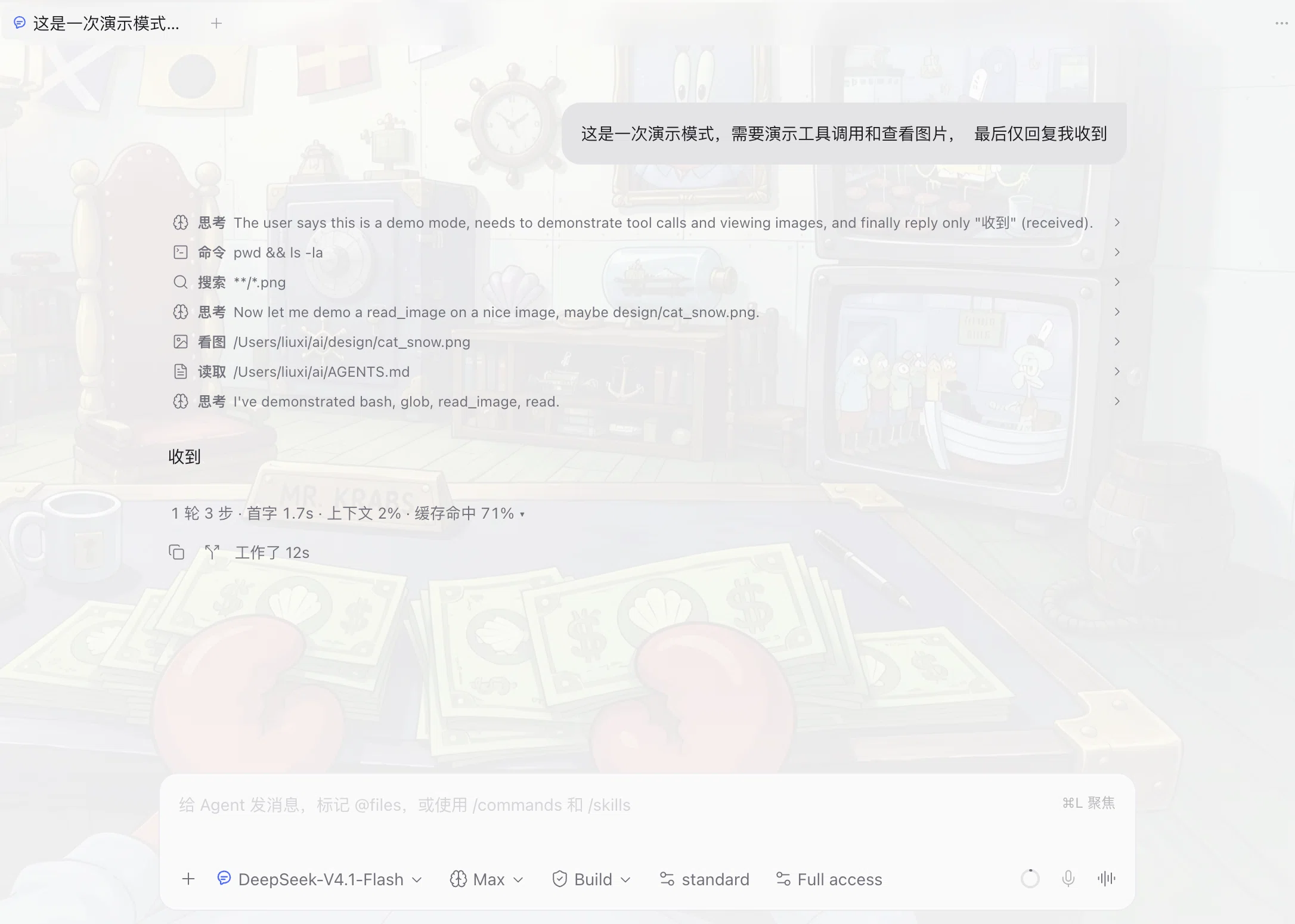
dsh-paseo adds a native provider to Paseo for DeepSeek Harness (`dsh`), so a Paseo agent runs as a DSH session instead of an ACP client. The conversation stays in Paseo's normal agent view, and the plugin adds no screens of its own. It is a community plugin, not an official DeepSeek or Paseo product.
|
|
2
2
|
|
|
3
|
+
|
|
4
|
+
|
|
3
5
|
Each Paseo agent session starts one `dsh --profile paseo` child process on the daemon machine and talks to it over a local stdio bridge. The process runs as your operating system user with the daemon's environment, so the credentials and permission policy are the ones DSH already uses; the plugin adds no sandbox of its own. Model and reasoning-effort choices come from the catalog DSH reports for the profile, so they follow your DSH configuration.
|
|
4
6
|
|
|
5
|
-
DeepSeek Harness must be installed and logged in on the daemon machine, with `dsh` on the daemon's `PATH` or set through the provider command override. The plugin needs Paseo 0.
|
|
7
|
+
DeepSeek Harness must be installed and logged in on the daemon machine, with `dsh` on the daemon's `PATH` or set through the provider command override. The plugin needs Paseo 0.13.0 or newer and Node.js 22 or newer on the daemon, and DSH 0.2.1-rc.2 is the tested line. On first use it provisions `~/.dsh/profiles/paseo`, and it never overwrites an existing profile file, so local edits to `cordis.patch.yml` survive reloads.
|
|
6
8
|
|
|
7
9
|
Composer features are passed to DSH rather than emulated. Attached images are admitted into DSH's attachment store, `/` commands and user-invocable skills come from DSH's registry, and steering, plan mode, question cards and permission prompts render as normal Paseo items. The session menu can switch the agent preset and permission mode when the profile declares them, the composer shows the context window and current occupancy that DSH reports, and each answer carries a small line with its first-token latency and output speed. Sessions persist by DSH session id, so a reopened agent resumes its context, and Paseo can list and import existing DSH sessions; an imported session replays its messages into the timeline.
|
|
8
10
|
|
|
9
11
|
Images flow one way. The model receives attached images, but Paseo's transcript renders an image only from an `https://` Markdown URL, so a picture produced on the daemon has to be published to a URL first. Local paths, `file://` URIs and base64 data URLs do not display.
|
|
10
12
|
|
|
11
|
-
Known limits: there is one `dsh` process per session, so each agent costs a process. Reloading the plugin or restarting the daemon ends a running turn, and the session has to be resumed. The provider id is `deepseek-harness-native`, which keeps it separate from an ACP `deepseek-harness` provider when both are installed. Windows and native iOS and Android clients are untested.
|
|
13
|
+
Every label the plugin draws follows the Paseo app language: timeline rows, the thinking row, the detail sheet, the per-turn stats line and the timeline style screen ship with English and Simplified Chinese catalogs, and are worded from the app language rather than from the provider. Changing Settings → General → Language re-words them without restarting the plugin. Known limits: there is one `dsh` process per session, so each agent costs a process. Reloading the plugin or restarting the daemon ends a running turn, and the session has to be resumed. The provider id is `deepseek-harness-native`, which keeps it separate from an ACP `deepseek-harness` provider when both are installed. Windows and native iOS and Android clients are untested.
|
|
@@ -0,0 +1,15 @@
|
|
|
1
|
+
dsh-paseo 给 Paseo 加一个 DeepSeek Harness(`dsh`)原生 provider,让 Paseo 的 agent 以 DSH 会话的方式运行,而不是当一个 ACP 客户端。对话仍在 Paseo 平时的 agent 视图里,插件自己不额外加页面。它是社区插件,不是 DeepSeek 或 Paseo 的官方产品。
|
|
2
|
+
|
|
3
|
+

|
|
4
|
+
|
|
5
|
+
每个 Paseo agent 会话都会在 daemon 所在机器上起一个 `dsh --profile paseo` 子进程,并通过本地 stdio 桥与它通信。进程以你的操作系统用户身份、用 daemon 的环境运行,所以凭据和权限策略就是 DSH 本来用的那一套;插件自己不加沙箱。模型和思考档位的选项来自 DSH 为该 profile 报告的能力目录,因此跟随你的 DSH 配置。
|
|
6
|
+
|
|
7
|
+
daemon 机器上必须已安装并登录 DeepSeek Harness,`dsh` 要在 daemon 的 `PATH` 上,或通过 provider 的命令覆盖指定。插件需要 Paseo 0.13.0 或更新版本、daemon 上 Node.js 22 或更新版本,实测基准是 DSH 0.2.1-rc.2。首次使用时它会准备 `~/.dsh/profiles/paseo`;已存在的 profile 文件从不覆盖,所以你手改的 `cordis.patch.yml` 能活过重载。
|
|
8
|
+
|
|
9
|
+
输入框里的功能是交给 DSH 执行的,不是仿造的。附加图片会进 DSH 的附件库;`/` 命令与用户可调用的 skill 来自 DSH 的注册表;插话、计划模式、提问卡与权限确认都按 Paseo 正常的条目渲染。会话菜单能在 profile 声明了的时候切换 agent preset 与权限模式,输入框会显示 DSH 报告的上下文窗口与当前占用,每个回答下面还有一行首字延迟与输出速度。会话按 DSH 会话 id 持久化,重开会话会接着用原来的上下文,Paseo 也能列出并导入已有的 DSH 会话;导入的会话会把消息回放进时间线。
|
|
10
|
+
|
|
11
|
+
图片是单向的。模型能收到你附上的图片,但 Paseo 的对话记录只渲染来自 `https://` Markdown 地址的图片,所以在 daemon 上生成的图片必须先发布成 URL。本地路径、`file://` URI 和 base64 data URL 都显示不出来。
|
|
12
|
+
|
|
13
|
+
插件画出的每一个标签都跟随 Paseo 的应用语言:时间线行、思考行、详情抽屉、每回合统计行和时间线样式页都自带英文与简体中文两套文案,用词看应用语言而不是看 provider。在 设置 → 通用 → 语言 里切换,不用重启插件就会换词。
|
|
14
|
+
|
|
15
|
+
已知限制:每个会话一个 `dsh` 进程,所以每个 agent 都要花一个进程。重载插件或重启 daemon 会结束正在跑的回合,会话需要重新恢复。provider id 是 `deepseek-harness-native`,这样同时装了 ACP 的 `deepseek-harness` provider 时两者不会冲突。Windows 以及原生 iOS、Android 客户端未测试。
|
package/README.md
CHANGED
|
@@ -44,7 +44,11 @@ What you get that the ACP boundary can't carry:
|
|
|
44
44
|
Full documentation, the adoption guide, and 20 real defects with their fixes
|
|
45
45
|
live in the main repository: **https://github.com/liuxing7954/paseo-dsh**
|
|
46
46
|
|
|
47
|
-
Requires Paseo ≥ 0.
|
|
47
|
+
Requires Paseo ≥ 0.13.0 (plugin translations) and the official `dsh` on the daemon's `PATH`.
|
|
48
|
+
|
|
49
|
+
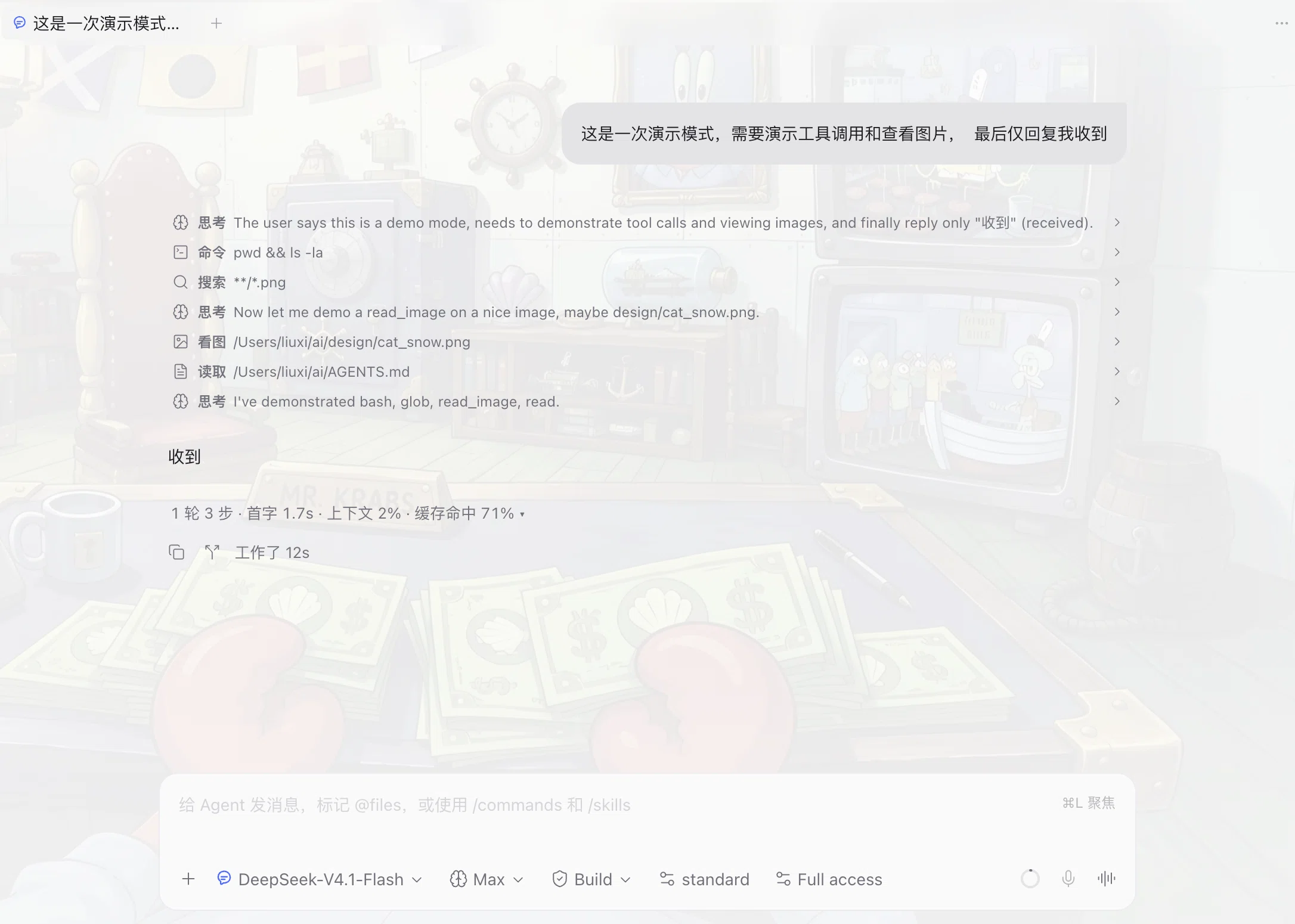
## What it looks like
|
|
50
|
+
|
|
51
|
+
|
|
48
52
|
|
|
49
53
|
## Versioning
|
|
50
54
|
|
|
@@ -98,7 +102,7 @@ ACP 承载不了、而这里都有:
|
|
|
98
102
|
完整文档、改造指南、以及 20 个真实缺陷的修复记录都在主仓库:
|
|
99
103
|
**https://github.com/liuxing7954/paseo-dsh**
|
|
100
104
|
|
|
101
|
-
需要 Paseo ≥ 0.
|
|
105
|
+
需要 Paseo ≥ 0.13.0(插件翻译 API),且 daemon 的 `PATH` 上有官方 `dsh`。
|
|
102
106
|
|
|
103
107
|
### 版本策略
|
|
104
108
|
|
|
@@ -0,0 +1,123 @@
|
|
|
1
|
+
{
|
|
2
|
+
"timeline": {
|
|
3
|
+
"thinking": {
|
|
4
|
+
"verb": "Thought",
|
|
5
|
+
"live": "Thinking…",
|
|
6
|
+
"done": "Thought"
|
|
7
|
+
},
|
|
8
|
+
"status": {
|
|
9
|
+
"running": "Running",
|
|
10
|
+
"failed": "Failed",
|
|
11
|
+
"canceled": "Canceled",
|
|
12
|
+
"done": "Done"
|
|
13
|
+
},
|
|
14
|
+
"row": {
|
|
15
|
+
"running": "Running",
|
|
16
|
+
"imagePreview": "Image preview",
|
|
17
|
+
"loadingImage": "Loading image…",
|
|
18
|
+
"loadAnyway": "Load anyway",
|
|
19
|
+
"copy": "Copy",
|
|
20
|
+
"copied": "Copied",
|
|
21
|
+
"copyFailed": "Copy failed",
|
|
22
|
+
"fullscreen": "Fullscreen",
|
|
23
|
+
"exitFullscreen": "Exit fullscreen",
|
|
24
|
+
"close": "Close",
|
|
25
|
+
"wrap": "Wrap",
|
|
26
|
+
"noWrap": "No wrap"
|
|
27
|
+
},
|
|
28
|
+
"tool": {
|
|
29
|
+
"command": "Command",
|
|
30
|
+
"image": "Image",
|
|
31
|
+
"read": "Read",
|
|
32
|
+
"write": "Write",
|
|
33
|
+
"edit": "Edit",
|
|
34
|
+
"search": "Search",
|
|
35
|
+
"webSearch": "Web search",
|
|
36
|
+
"fetch": "Fetch",
|
|
37
|
+
"browser": "Browser",
|
|
38
|
+
"code": "Code",
|
|
39
|
+
"tasks": "Tasks",
|
|
40
|
+
"question": "Asked"
|
|
41
|
+
},
|
|
42
|
+
"browser": {
|
|
43
|
+
"open": "Open",
|
|
44
|
+
"click": "Click",
|
|
45
|
+
"type": "Type",
|
|
46
|
+
"snapshot": "Snapshot",
|
|
47
|
+
"scroll": "Scroll",
|
|
48
|
+
"navigate": "Navigate",
|
|
49
|
+
"wait": "Wait",
|
|
50
|
+
"close": "Close",
|
|
51
|
+
"run": "Run",
|
|
52
|
+
"find": "Find"
|
|
53
|
+
},
|
|
54
|
+
"image": {
|
|
55
|
+
"unsupportedFormat": "Unsupported image format",
|
|
56
|
+
"notFile": "Not a file",
|
|
57
|
+
"tooLarge": "Large image ({{size}} MB, above the {{limit}} MB preview limit)",
|
|
58
|
+
"tooLargeHard": "Image is above the 64 MB hard limit and cannot be previewed",
|
|
59
|
+
"unreadable": "Could not read the image",
|
|
60
|
+
"detail": "{{message}}"
|
|
61
|
+
}
|
|
62
|
+
},
|
|
63
|
+
"streamStats": {
|
|
64
|
+
"turnsSteps": "{{turns}} turns · {{steps}} steps",
|
|
65
|
+
"firstToken": "First token {{latency}}",
|
|
66
|
+
"contextPercent": "Context {{percent}}%",
|
|
67
|
+
"cacheHit": "Cache hit {{percent}}%",
|
|
68
|
+
"expand": "Expand answer stats",
|
|
69
|
+
"collapse": "Collapse answer stats",
|
|
70
|
+
"contextLine": "Context {{used}} / {{max}} {{bar}} {{percent}}%",
|
|
71
|
+
"tokensLine": "Tokens {{parts}}",
|
|
72
|
+
"tokenInput": "in {{tokens}}",
|
|
73
|
+
"tokenCached": "cached {{tokens}}",
|
|
74
|
+
"tokenOutput": "out {{tokens}}",
|
|
75
|
+
"routeLine": "Route {{route}}",
|
|
76
|
+
"routeWithThinking": "Route {{route}} · thinking {{option}}",
|
|
77
|
+
"toolsLine": "Tools {{calls}}{{duration}}",
|
|
78
|
+
"tools_one": "{{count}} call",
|
|
79
|
+
"tools_other": "{{count}} calls"
|
|
80
|
+
},
|
|
81
|
+
"settings": {
|
|
82
|
+
"title": "Timeline style",
|
|
83
|
+
"intro": "Tool row spacing, row height and command drawer height. Changes apply as soon as you save, without restarting Paseo.",
|
|
84
|
+
"save": "Save",
|
|
85
|
+
"saving": "Saving…",
|
|
86
|
+
"reset": "Restore defaults",
|
|
87
|
+
"saved": "Saved",
|
|
88
|
+
"saveFailed": "Could not save",
|
|
89
|
+
"resetDone": "Defaults restored",
|
|
90
|
+
"resetFailed": "Could not restore defaults",
|
|
91
|
+
"invalidNumber": "“{{label}}” is not a valid number",
|
|
92
|
+
"field": {
|
|
93
|
+
"toolRowMarginY": {
|
|
94
|
+
"label": "Extra spacing between tools",
|
|
95
|
+
"hint": "Added on top of the host's fixed 16px. Negative values are allowed: 8 → about 24px, -8 → about 8px, -16 → about 0px. Range -16 to 24."
|
|
96
|
+
},
|
|
97
|
+
"liveReasoningRowMarginY": {
|
|
98
|
+
"label": "Extra spacing for the streaming thinking row",
|
|
99
|
+
"hint": "Applies only to the thinking row that is still streaming. Default 8; negative values can overlap."
|
|
100
|
+
},
|
|
101
|
+
"toolRowPaddingY": {
|
|
102
|
+
"label": "Tool row vertical padding (inside the row)",
|
|
103
|
+
"hint": "Changes only the padding inside a row, not the gap between tools. To tighten the gap, edit “Extra spacing between tools” above. Range 0 to 12."
|
|
104
|
+
},
|
|
105
|
+
"toolRowMinHeight": {
|
|
106
|
+
"label": "Tool row minimum height",
|
|
107
|
+
"hint": "How tall a row is at minimum; with padding 0 it can shrink to about the icon height (about 17px). Range 12 to 64."
|
|
108
|
+
},
|
|
109
|
+
"toolRowGap": {
|
|
110
|
+
"label": "Horizontal gap between icon and text",
|
|
111
|
+
"hint": "Between the icon, the verb and the target. Range 0 to 24."
|
|
112
|
+
},
|
|
113
|
+
"commandMaxHeightRatio": {
|
|
114
|
+
"label": "Command block maximum height (share of the window)",
|
|
115
|
+
"hint": "0.25 means at most a quarter of the window height; beyond that the command block scrolls internally and the output area stays visible. Range 0.1 to 0.6."
|
|
116
|
+
},
|
|
117
|
+
"commandMinHeight": {
|
|
118
|
+
"label": "Command block minimum height cap",
|
|
119
|
+
"hint": "The height the command block keeps even in a very small window, in pixels. Range 60 to 360."
|
|
120
|
+
}
|
|
121
|
+
}
|
|
122
|
+
}
|
|
123
|
+
}
|
|
@@ -0,0 +1,122 @@
|
|
|
1
|
+
{
|
|
2
|
+
"timeline": {
|
|
3
|
+
"thinking": {
|
|
4
|
+
"verb": "思考",
|
|
5
|
+
"live": "思考中…",
|
|
6
|
+
"done": "已思考"
|
|
7
|
+
},
|
|
8
|
+
"status": {
|
|
9
|
+
"running": "运行中",
|
|
10
|
+
"failed": "失败",
|
|
11
|
+
"canceled": "已取消",
|
|
12
|
+
"done": "完成"
|
|
13
|
+
},
|
|
14
|
+
"row": {
|
|
15
|
+
"running": "运行中",
|
|
16
|
+
"imagePreview": "图片预览",
|
|
17
|
+
"loadingImage": "载入图片…",
|
|
18
|
+
"loadAnyway": "仍要加载",
|
|
19
|
+
"copy": "复制",
|
|
20
|
+
"copied": "已复制",
|
|
21
|
+
"copyFailed": "复制失败",
|
|
22
|
+
"fullscreen": "全屏",
|
|
23
|
+
"exitFullscreen": "退出全屏",
|
|
24
|
+
"close": "关闭",
|
|
25
|
+
"wrap": "换行",
|
|
26
|
+
"noWrap": "不换行"
|
|
27
|
+
},
|
|
28
|
+
"tool": {
|
|
29
|
+
"command": "命令",
|
|
30
|
+
"image": "看图",
|
|
31
|
+
"read": "读取",
|
|
32
|
+
"write": "写入",
|
|
33
|
+
"edit": "编辑",
|
|
34
|
+
"search": "搜索",
|
|
35
|
+
"webSearch": "网页搜索",
|
|
36
|
+
"fetch": "抓取",
|
|
37
|
+
"browser": "浏览器",
|
|
38
|
+
"code": "运行代码",
|
|
39
|
+
"tasks": "任务",
|
|
40
|
+
"question": "提问"
|
|
41
|
+
},
|
|
42
|
+
"browser": {
|
|
43
|
+
"open": "打开网页",
|
|
44
|
+
"click": "点击",
|
|
45
|
+
"type": "输入",
|
|
46
|
+
"snapshot": "截图",
|
|
47
|
+
"scroll": "滚动",
|
|
48
|
+
"navigate": "导航",
|
|
49
|
+
"wait": "等待",
|
|
50
|
+
"close": "关闭",
|
|
51
|
+
"run": "执行",
|
|
52
|
+
"find": "查找"
|
|
53
|
+
},
|
|
54
|
+
"image": {
|
|
55
|
+
"unsupportedFormat": "不支持的图片格式",
|
|
56
|
+
"notFile": "不是文件",
|
|
57
|
+
"tooLarge": "图片较大({{size}}MB,超过 {{limit}}MB 预览上限)",
|
|
58
|
+
"tooLargeHard": "图片超过 64MB 硬上限,无法预览",
|
|
59
|
+
"unreadable": "无法读取图片",
|
|
60
|
+
"detail": "{{message}}"
|
|
61
|
+
}
|
|
62
|
+
},
|
|
63
|
+
"streamStats": {
|
|
64
|
+
"turnsSteps": "{{turns}} 轮 · {{steps}} 步",
|
|
65
|
+
"firstToken": "首字 {{latency}}",
|
|
66
|
+
"contextPercent": "上下文 {{percent}}%",
|
|
67
|
+
"cacheHit": "缓存命中 {{percent}}%",
|
|
68
|
+
"expand": "展开回答统计",
|
|
69
|
+
"collapse": "收起回答统计",
|
|
70
|
+
"contextLine": "上下文 {{used}} / {{max}} {{bar}} {{percent}}%",
|
|
71
|
+
"tokensLine": "Tokens {{parts}}",
|
|
72
|
+
"tokenInput": "输入 {{tokens}}",
|
|
73
|
+
"tokenCached": "缓存 {{tokens}}",
|
|
74
|
+
"tokenOutput": "输出 {{tokens}}",
|
|
75
|
+
"routeLine": "路由 {{route}}",
|
|
76
|
+
"routeWithThinking": "路由 {{route}} · 思考 {{option}}",
|
|
77
|
+
"toolsLine": "工具 {{calls}}{{duration}}",
|
|
78
|
+
"tools_other": "{{count}} 次"
|
|
79
|
+
},
|
|
80
|
+
"settings": {
|
|
81
|
+
"title": "时间线样式",
|
|
82
|
+
"intro": "工具行间距、行高和命令抽屉高度。保存后立即生效,不需要重启 Paseo。",
|
|
83
|
+
"save": "保存",
|
|
84
|
+
"saving": "保存中…",
|
|
85
|
+
"reset": "恢复默认",
|
|
86
|
+
"saved": "已保存",
|
|
87
|
+
"saveFailed": "保存失败",
|
|
88
|
+
"resetDone": "已恢复默认值",
|
|
89
|
+
"resetFailed": "重置失败",
|
|
90
|
+
"invalidNumber": "「{{label}}」不是有效数字",
|
|
91
|
+
"field": {
|
|
92
|
+
"toolRowMarginY": {
|
|
93
|
+
"label": "工具之间的额外间距",
|
|
94
|
+
"hint": "叠加在宿主固定 16px 之上,可填负数:8 → 约 24px,-8 → 约 8px,-16 → 约 0px。范围 -16 ~ 24。"
|
|
95
|
+
},
|
|
96
|
+
"liveReasoningRowMarginY": {
|
|
97
|
+
"label": "正在输出的思考行额外间距",
|
|
98
|
+
"hint": "只作用于正在流式输出的思考行。默认 8,负值可能重叠。"
|
|
99
|
+
},
|
|
100
|
+
"toolRowPaddingY": {
|
|
101
|
+
"label": "工具行上下内边距(行内留白)",
|
|
102
|
+
"hint": "只改行内留白,不改工具之间的距离;要缩小行间距请改上面的“工具之间的额外间距”。范围 0 ~ 12。"
|
|
103
|
+
},
|
|
104
|
+
"toolRowMinHeight": {
|
|
105
|
+
"label": "工具行最小高度",
|
|
106
|
+
"hint": "整行至少多高;配合内边距 0 可压到接近图标高度(约 17px)。范围 12 ~ 64。"
|
|
107
|
+
},
|
|
108
|
+
"toolRowGap": {
|
|
109
|
+
"label": "图标与文字的水平间距",
|
|
110
|
+
"hint": "图标、动词、目标之间。范围 0 ~ 24。"
|
|
111
|
+
},
|
|
112
|
+
"commandMaxHeightRatio": {
|
|
113
|
+
"label": "命令块最大高度(窗口占比)",
|
|
114
|
+
"hint": "0.25 表示最多占窗口高度的四分之一;超过后命令块内部滚动,输出区始终保留。范围 0.1 ~ 0.6。"
|
|
115
|
+
},
|
|
116
|
+
"commandMinHeight": {
|
|
117
|
+
"label": "命令块最小高度上限",
|
|
118
|
+
"hint": "窗口很小时仍给命令块保留的高度(像素)。范围 60 ~ 360。"
|
|
119
|
+
}
|
|
120
|
+
}
|
|
121
|
+
}
|
|
122
|
+
}
|
|
@@ -0,0 +1,43 @@
|
|
|
1
|
+
import { defineTranslations } from "@getpaseo/plugin/client";
|
|
2
|
+
import en from "./locales/en.json";
|
|
3
|
+
import zhCN from "./locales/zh-CN.json";
|
|
4
|
+
|
|
5
|
+
/**
|
|
6
|
+
* Every user-visible string the plugin draws in the app.
|
|
7
|
+
*
|
|
8
|
+
* English is the source of truth for the key set; `zh-CN` may omit a key and
|
|
9
|
+
* falls back to English. Paseo resolves the app language per installation, so
|
|
10
|
+
* the same bundle serves both catalogs and a language switch re-renders the
|
|
11
|
+
* rows without reloading the plugin.
|
|
12
|
+
*/
|
|
13
|
+
export const messages = defineTranslations({ resources: { en, "zh-CN": zhCN } });
|
|
14
|
+
|
|
15
|
+
/** Bare verb keys a tool row can resolve to; they carry no interpolation. */
|
|
16
|
+
export type ToolVerbKey =
|
|
17
|
+
| "timeline.tool.command"
|
|
18
|
+
| "timeline.tool.image"
|
|
19
|
+
| "timeline.tool.read"
|
|
20
|
+
| "timeline.tool.write"
|
|
21
|
+
| "timeline.tool.edit"
|
|
22
|
+
| "timeline.tool.search"
|
|
23
|
+
| "timeline.tool.webSearch"
|
|
24
|
+
| "timeline.tool.fetch"
|
|
25
|
+
| "timeline.tool.browser"
|
|
26
|
+
| "timeline.tool.code"
|
|
27
|
+
| "timeline.tool.tasks"
|
|
28
|
+
| "timeline.tool.question";
|
|
29
|
+
|
|
30
|
+
export type BrowserVerbKey =
|
|
31
|
+
| "timeline.browser.open"
|
|
32
|
+
| "timeline.browser.click"
|
|
33
|
+
| "timeline.browser.type"
|
|
34
|
+
| "timeline.browser.snapshot"
|
|
35
|
+
| "timeline.browser.scroll"
|
|
36
|
+
| "timeline.browser.navigate"
|
|
37
|
+
| "timeline.browser.wait"
|
|
38
|
+
| "timeline.browser.close"
|
|
39
|
+
| "timeline.browser.run"
|
|
40
|
+
| "timeline.browser.find";
|
|
41
|
+
|
|
42
|
+
/** A resolve-on-render verb: a catalog key, or the provider's raw tool name. */
|
|
43
|
+
export type ToolVerb = ToolVerbKey | BrowserVerbKey | { readonly text: string };
|
|
@@ -1,18 +1,27 @@
|
|
|
1
1
|
import type { PluginClientContext, PluginSurfaceProps } from "@getpaseo/plugin/client";
|
|
2
|
-
import { useSettings } from "@getpaseo/plugin/client";
|
|
2
|
+
import { useSettings, useTranslation } from "@getpaseo/plugin/client";
|
|
3
3
|
import { useMemo, useState } from "react";
|
|
4
4
|
import { Platform, Pressable, ScrollView, Text, View } from "react-native";
|
|
5
5
|
import { TextInput } from "@getpaseo/plugin/client/react-native";
|
|
6
6
|
import {
|
|
7
7
|
TIMELINE_STYLE_DEFAULTS,
|
|
8
|
-
|
|
8
|
+
TIMELINE_STYLE_KEYS,
|
|
9
9
|
timelineStyleSettings,
|
|
10
10
|
type TimelineStyleKey,
|
|
11
11
|
type TimelineStyleValues,
|
|
12
12
|
} from "../shared/settings";
|
|
13
|
+
import { messages } from "./messages";
|
|
14
|
+
|
|
15
|
+
/** Editor rows: the key order is shared, the wording comes from the catalogs. */
|
|
16
|
+
const FIELDS = TIMELINE_STYLE_KEYS.map((key) => ({
|
|
17
|
+
key,
|
|
18
|
+
label: `settings.field.${key}.label` as const,
|
|
19
|
+
hint: `settings.field.${key}.hint` as const,
|
|
20
|
+
}));
|
|
13
21
|
|
|
14
22
|
/** Numeric editor for the timeline row spacing and command drawer height. */
|
|
15
23
|
export function TimelineSettingsScreen({ theme, layout }: PluginSurfaceProps) {
|
|
24
|
+
const { t } = useTranslation(messages);
|
|
16
25
|
const settings = useSettings(timelineStyleSettings);
|
|
17
26
|
const [draft, setDraft] = useState<Partial<Record<TimelineStyleKey, string>>>({});
|
|
18
27
|
const [notice, setNotice] = useState<string | null>(null);
|
|
@@ -67,64 +76,62 @@ export function TimelineSettingsScreen({ theme, layout }: PluginSurfaceProps) {
|
|
|
67
76
|
const save = async () => {
|
|
68
77
|
if (settings.status !== "ready") return;
|
|
69
78
|
const next: TimelineStyleValues = { ...current };
|
|
70
|
-
for (const field of
|
|
79
|
+
for (const field of FIELDS) {
|
|
71
80
|
const value = Number.parseFloat(textOf(field.key));
|
|
72
81
|
if (!Number.isFinite(value)) {
|
|
73
|
-
setNotice(
|
|
82
|
+
setNotice(t("settings.invalidNumber", { label: t(field.label) }));
|
|
74
83
|
return;
|
|
75
84
|
}
|
|
76
85
|
next[field.key] = value;
|
|
77
86
|
}
|
|
78
87
|
const saved = await settings.save(next, settings.revision);
|
|
79
|
-
setNotice(saved ? "
|
|
88
|
+
setNotice(saved ? t("settings.saved") : (settings.saveError ?? t("settings.saveFailed")));
|
|
80
89
|
if (saved) setDraft({});
|
|
81
90
|
};
|
|
82
91
|
|
|
83
92
|
const reset = async () => {
|
|
84
93
|
const saved = await settings.reset();
|
|
85
|
-
setNotice(saved ? "
|
|
94
|
+
setNotice(saved ? t("settings.resetDone") : (settings.saveError ?? t("settings.resetFailed")));
|
|
86
95
|
if (saved) setDraft({});
|
|
87
96
|
};
|
|
88
97
|
|
|
89
98
|
return (
|
|
90
99
|
<ScrollView style={styles.screen} contentContainerStyle={styles.content}>
|
|
91
|
-
<Text style={styles.title}
|
|
92
|
-
<Text style={styles.intro}>
|
|
93
|
-
|
|
94
|
-
</Text>
|
|
95
|
-
{TIMELINE_STYLE_FIELDS.map((field) => (
|
|
100
|
+
<Text style={styles.title}>{t("settings.title")}</Text>
|
|
101
|
+
<Text style={styles.intro}>{t("settings.intro")}</Text>
|
|
102
|
+
{FIELDS.map((field) => (
|
|
96
103
|
<View key={field.key} style={styles.field}>
|
|
97
|
-
<Text style={styles.label}>{field.label}</Text>
|
|
104
|
+
<Text style={styles.label}>{t(field.label)}</Text>
|
|
98
105
|
<TextInput
|
|
99
106
|
value={textOf(field.key)}
|
|
100
107
|
onChangeText={(value: string) => edit(field.key, value)}
|
|
101
108
|
keyboardType={field.key === "toolRowMarginY" ? (Platform.OS === "web" ? "default" : "numbers-and-punctuation") : "numeric"}
|
|
102
109
|
autoCapitalize="none"
|
|
103
110
|
autoCorrect={false}
|
|
104
|
-
accessibilityLabel={field.label}
|
|
111
|
+
accessibilityLabel={t(field.label)}
|
|
105
112
|
style={styles.input}
|
|
106
113
|
/>
|
|
107
|
-
<Text style={styles.hint}>{field.hint}</Text>
|
|
114
|
+
<Text style={styles.hint}>{t(field.hint)}</Text>
|
|
108
115
|
</View>
|
|
109
116
|
))}
|
|
110
117
|
<View style={styles.actions}>
|
|
111
118
|
<Pressable
|
|
112
119
|
accessibilityRole="button"
|
|
113
|
-
accessibilityLabel="
|
|
120
|
+
accessibilityLabel={t("settings.save")}
|
|
114
121
|
disabled={settings.status !== "ready" || settings.saving}
|
|
115
122
|
onPress={() => void save()}
|
|
116
123
|
style={styles.button}
|
|
117
124
|
>
|
|
118
|
-
<Text style={styles.buttonText}>{settings.saving ? "
|
|
125
|
+
<Text style={styles.buttonText}>{settings.saving ? t("settings.saving") : t("settings.save")}</Text>
|
|
119
126
|
</Pressable>
|
|
120
127
|
<Pressable
|
|
121
128
|
accessibilityRole="button"
|
|
122
|
-
accessibilityLabel="
|
|
129
|
+
accessibilityLabel={t("settings.reset")}
|
|
123
130
|
disabled={settings.status !== "ready" || settings.saving}
|
|
124
131
|
onPress={() => void reset()}
|
|
125
132
|
style={[styles.button, styles.secondary]}
|
|
126
133
|
>
|
|
127
|
-
<Text style={styles.secondaryText}
|
|
134
|
+
<Text style={styles.secondaryText}>{t("settings.reset")}</Text>
|
|
128
135
|
</Pressable>
|
|
129
136
|
</View>
|
|
130
137
|
{settings.status === "error" ? <Text style={styles.notice}>{settings.error}</Text> : null}
|
|
@@ -137,7 +144,7 @@ export function TimelineSettingsScreen({ theme, layout }: PluginSurfaceProps) {
|
|
|
137
144
|
export function contributeTimelineSettings(client: PluginClientContext): () => void {
|
|
138
145
|
return client.addSettingsScreen({
|
|
139
146
|
id: "timeline-style",
|
|
140
|
-
title: "
|
|
147
|
+
title: messages.message("settings.title"),
|
|
141
148
|
icon: "SlidersHorizontal",
|
|
142
149
|
Component: TimelineSettingsScreen,
|
|
143
150
|
});
|
package/client/stream-stats.tsx
CHANGED
|
@@ -1,4 +1,6 @@
|
|
|
1
1
|
import type { PluginClientContext, PluginTimelineItemProps } from "@getpaseo/plugin/client";
|
|
2
|
+
import { useTranslation } from "@getpaseo/plugin/client";
|
|
3
|
+
import { messages } from "./messages";
|
|
2
4
|
import { Fragment, useLayoutEffect, useRef, useState } from "react";
|
|
3
5
|
import { Pressable, Text, View } from "react-native";
|
|
4
6
|
import { z } from "zod";
|
|
@@ -54,34 +56,6 @@ function contextRatio(data: StreamStats): number | undefined {
|
|
|
54
56
|
return Math.max(0, Math.min(1, data.contextUsed / data.contextMax));
|
|
55
57
|
}
|
|
56
58
|
|
|
57
|
-
function contextLine(data: StreamStats): string | undefined {
|
|
58
|
-
const ratio = contextRatio(data);
|
|
59
|
-
if (ratio === undefined) return undefined;
|
|
60
|
-
const filled = Math.round(ratio * 10);
|
|
61
|
-
const bar = `${"█".repeat(filled)}${"░".repeat(10 - filled)}`;
|
|
62
|
-
return `上下文 ${formatNumber(data.contextUsed ?? 0)} / ${formatNumber(data.contextMax ?? 0)} ${bar} ${Math.round(ratio * 100)}%`;
|
|
63
|
-
}
|
|
64
|
-
|
|
65
|
-
function tokensLine(data: StreamStats): string | undefined {
|
|
66
|
-
const parts: string[] = [];
|
|
67
|
-
if (data.inputTokens !== undefined) parts.push(`输入 ${formatNumber(data.inputTokens)}`);
|
|
68
|
-
if (data.cachedInputTokens !== undefined) parts.push(`缓存 ${formatNumber(data.cachedInputTokens)}`);
|
|
69
|
-
if (data.outputTokens !== undefined) parts.push(`输出 ${formatNumber(data.outputTokens)}`);
|
|
70
|
-
return parts.length === 0 ? undefined : `Tokens ${parts.join(" · ")}`;
|
|
71
|
-
}
|
|
72
|
-
|
|
73
|
-
function routeLine(data: StreamStats): string | undefined {
|
|
74
|
-
if (data.provider === undefined && data.model === undefined) return undefined;
|
|
75
|
-
const route = [data.provider, data.model].filter((part) => part !== undefined).join(" / ");
|
|
76
|
-
return `路由 ${route}${data.thinkingOption === undefined ? "" : ` · 思考 ${data.thinkingOption}`}`;
|
|
77
|
-
}
|
|
78
|
-
|
|
79
|
-
function toolsLine(data: StreamStats): string | undefined {
|
|
80
|
-
if (data.toolCalls === undefined || data.toolCalls <= 0) return undefined;
|
|
81
|
-
const duration = data.toolMs === undefined ? "" : ` · ${formatLatency(data.toolMs)}`;
|
|
82
|
-
return `工具 ${data.toolCalls} 次${duration}`;
|
|
83
|
-
}
|
|
84
|
-
|
|
85
59
|
/** One compact line under an answer; tap to expand the full picture. */
|
|
86
60
|
function StreamStatsRow({ item, theme, layout }: PluginTimelineItemProps<StreamStats>) {
|
|
87
61
|
const [open, setOpen] = useState(false);
|
|
@@ -91,6 +65,47 @@ function StreamStatsRow({ item, theme, layout }: PluginTimelineItemProps<StreamS
|
|
|
91
65
|
/** The lift the DOM currently carries; the next measurement discounts it. */
|
|
92
66
|
const appliedLift = useRef(0);
|
|
93
67
|
const data = item.data;
|
|
68
|
+
const { t } = useTranslation(messages);
|
|
69
|
+
const line = {
|
|
70
|
+
context(): string | undefined {
|
|
71
|
+
const ratio = contextRatio(data);
|
|
72
|
+
if (ratio === undefined) return undefined;
|
|
73
|
+
const filled = Math.round(ratio * 10);
|
|
74
|
+
const bar = `${"█".repeat(filled)}${"░".repeat(10 - filled)}`;
|
|
75
|
+
return t("streamStats.contextLine", {
|
|
76
|
+
used: formatNumber(data.contextUsed ?? 0),
|
|
77
|
+
max: formatNumber(data.contextMax ?? 0),
|
|
78
|
+
bar,
|
|
79
|
+
percent: Math.round(ratio * 100),
|
|
80
|
+
});
|
|
81
|
+
},
|
|
82
|
+
tokens(): string | undefined {
|
|
83
|
+
const parts: string[] = [];
|
|
84
|
+
if (data.inputTokens !== undefined) {
|
|
85
|
+
parts.push(t("streamStats.tokenInput", { tokens: formatNumber(data.inputTokens) }));
|
|
86
|
+
}
|
|
87
|
+
if (data.cachedInputTokens !== undefined) {
|
|
88
|
+
parts.push(t("streamStats.tokenCached", { tokens: formatNumber(data.cachedInputTokens) }));
|
|
89
|
+
}
|
|
90
|
+
if (data.outputTokens !== undefined) {
|
|
91
|
+
parts.push(t("streamStats.tokenOutput", { tokens: formatNumber(data.outputTokens) }));
|
|
92
|
+
}
|
|
93
|
+
return parts.length === 0 ? undefined : t("streamStats.tokensLine", { parts: parts.join(" · ") });
|
|
94
|
+
},
|
|
95
|
+
route(): string | undefined {
|
|
96
|
+
if (data.provider === undefined && data.model === undefined) return undefined;
|
|
97
|
+
const route = [data.provider, data.model].filter((part) => part !== undefined).join(" / ");
|
|
98
|
+
return data.thinkingOption === undefined
|
|
99
|
+
? t("streamStats.routeLine", { route })
|
|
100
|
+
: t("streamStats.routeWithThinking", { route, option: data.thinkingOption });
|
|
101
|
+
},
|
|
102
|
+
tools(): string | undefined {
|
|
103
|
+
if (data.toolCalls === undefined || data.toolCalls <= 0) return undefined;
|
|
104
|
+
const calls = t("streamStats.tools", { count: data.toolCalls });
|
|
105
|
+
const duration = data.toolMs === undefined ? "" : ` · ${formatLatency(data.toolMs)}`;
|
|
106
|
+
return t("streamStats.toolsLine", { calls, duration });
|
|
107
|
+
},
|
|
108
|
+
};
|
|
94
109
|
|
|
95
110
|
// The ref must describe the margin the DOM actually carries, not the one a
|
|
96
111
|
// pending render is about to apply.
|
|
@@ -149,23 +164,23 @@ function StreamStatsRow({ item, theme, layout }: PluginTimelineItemProps<StreamS
|
|
|
149
164
|
const ratio = contextRatio(data);
|
|
150
165
|
const segments: Array<{ text: string; color: string }> = [];
|
|
151
166
|
if (data.turns !== undefined && data.steps !== undefined) {
|
|
152
|
-
segments.push({ text:
|
|
167
|
+
segments.push({ text: t("streamStats.turnsSteps", { turns: data.turns, steps: data.steps }), color: muted });
|
|
153
168
|
}
|
|
154
169
|
if (data.firstTokenMs !== undefined) {
|
|
155
|
-
segments.push({ text:
|
|
170
|
+
segments.push({ text: t("streamStats.firstToken", { latency: formatLatency(data.firstTokenMs) }), color: muted });
|
|
156
171
|
}
|
|
157
172
|
if (data.tokensPerSecond !== undefined) {
|
|
158
173
|
segments.push({ text: `${Math.round(data.tokensPerSecond)} tok/s`, color: muted });
|
|
159
174
|
}
|
|
160
175
|
if (ratio !== undefined) {
|
|
161
|
-
segments.push({ text:
|
|
176
|
+
segments.push({ text: t("streamStats.contextPercent", { percent: Math.round(ratio * 100) }), color: muted });
|
|
162
177
|
}
|
|
163
178
|
if (data.cacheHit !== undefined) {
|
|
164
|
-
segments.push({ text:
|
|
179
|
+
segments.push({ text: t("streamStats.cacheHit", { percent: Math.round(data.cacheHit * 100) }), color: muted });
|
|
165
180
|
}
|
|
166
181
|
if (segments.length === 0) return null;
|
|
167
182
|
|
|
168
|
-
const details = [
|
|
183
|
+
const details = [line.context(), line.tokens(), line.route(), line.tools()].filter(
|
|
169
184
|
(line): line is string => line !== undefined,
|
|
170
185
|
);
|
|
171
186
|
|
|
@@ -173,7 +188,7 @@ function StreamStatsRow({ item, theme, layout }: PluginTimelineItemProps<StreamS
|
|
|
173
188
|
<Pressable
|
|
174
189
|
ref={rowRef}
|
|
175
190
|
accessibilityRole="button"
|
|
176
|
-
accessibilityLabel={open ? "
|
|
191
|
+
accessibilityLabel={open ? t("streamStats.collapse") : t("streamStats.expand")}
|
|
177
192
|
onPress={() => setOpen((value) => !value)}
|
|
178
193
|
style={{ alignSelf: "flex-start", marginTop: lift, marginBottom: 0, paddingLeft: inset }}
|
|
179
194
|
>
|