partner-center-broker 1.0.1 → 1.1.0
This diff represents the content of publicly available package versions that have been released to one of the supported registries. The information contained in this diff is provided for informational purposes only and reflects changes between package versions as they appear in their respective public registries.
- package/.editorconfig +12 -12
- package/.eslintignore +4 -3
- package/.eslintrc.json +54 -54
- package/.github/workflows/main.yml +30 -0
- package/.github/workflows/npm-publish.yml +58 -44
- package/.prettierignore +4 -3
- package/LICENSE +675 -674
- package/README.md +252 -135
- package/{dist → lib}/converters.d.ts +21 -17
- package/{dist → lib}/converters.js +62 -48
- package/lib/helpers.d.ts +5 -0
- package/lib/helpers.js +149 -0
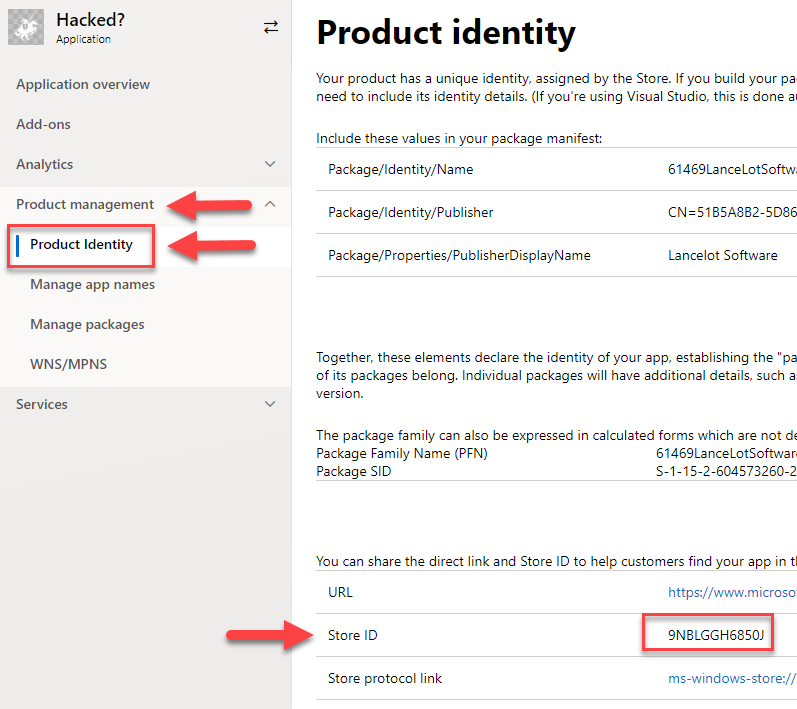
- package/{dist → lib}/index.d.ts +18 -17
- package/{dist → lib}/index.js +361 -290
- package/{dist → lib}/interfaces.d.ts +221 -172
- package/{dist → lib}/interfaces.js +2 -2
- package/package.json +63 -57
package/README.md
CHANGED
|
@@ -1,135 +1,252 @@
|
|
|
1
|
-
# Microsoft Partner Center Broker
|
|
2
|
-
|
|
3
|
-
A library that lets you use the Microsoft Partner Center (aka DevCenter) APIs to manage your
|
|
4
|
-
|
|
5
|
-
|
|
6
|
-
|
|
7
|
-
## Usage
|
|
8
|
-
|
|
9
|
-
|
|
10
|
-
|
|
11
|
-
|
|
12
|
-
|
|
13
|
-
|
|
14
|
-
If you do not
|
|
15
|
-
|
|
16
|
-
|
|
17
|
-
|
|
18
|
-
|
|
19
|
-
|
|
20
|
-
|
|
21
|
-
|
|
22
|
-
|
|
23
|
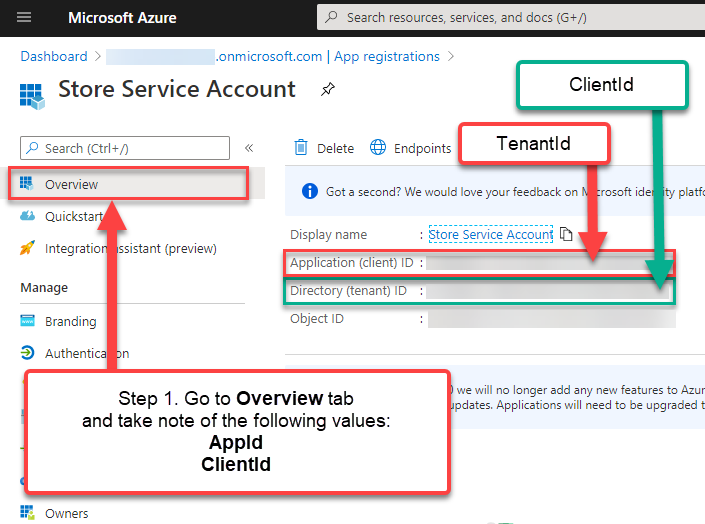
-
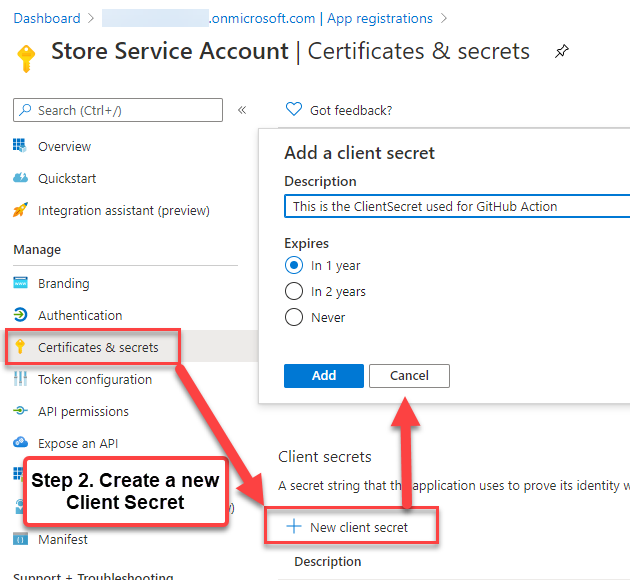
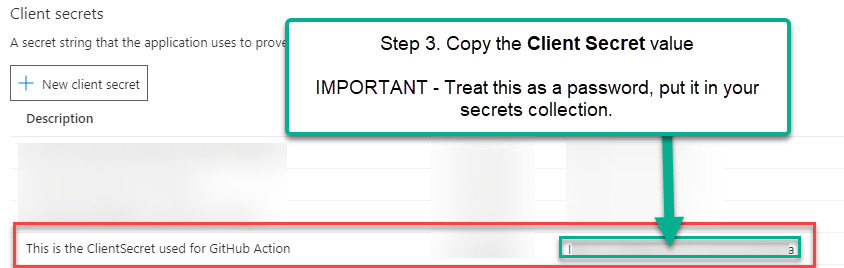
|
|
24
|
-
|
|
25
|
-
|
|
26
|
-
|
|
27
|
-
|
|
28
|
-
|
|
29
|
-
const
|
|
30
|
-
|
|
31
|
-
|
|
32
|
-
|
|
33
|
-
|
|
34
|
-
|
|
35
|
-
|
|
36
|
-
|
|
37
|
-
|
|
38
|
-
|
|
39
|
-
|
|
40
|
-
|
|
41
|
-
|
|
42
|
-
const
|
|
43
|
-
|
|
44
|
-
//
|
|
45
|
-
const
|
|
46
|
-
|
|
47
|
-
|
|
48
|
-
|
|
49
|
-
|
|
50
|
-
|
|
51
|
-
|
|
52
|
-
|
|
53
|
-
|
|
54
|
-
|
|
55
|
-
|
|
56
|
-
|
|
57
|
-
|
|
58
|
-
|
|
59
|
-
|
|
60
|
-
|
|
61
|
-
|
|
62
|
-
|
|
63
|
-
|
|
64
|
-
|
|
65
|
-
|
|
66
|
-
|
|
67
|
-
|
|
68
|
-
|
|
69
|
-
|
|
70
|
-
|
|
71
|
-
|
|
72
|
-
|
|
73
|
-
|
|
74
|
-
|
|
75
|
-
|
|
76
|
-
|
|
77
|
-
|
|
78
|
-
|
|
79
|
-
|
|
80
|
-
|
|
81
|
-
|
|
82
|
-
|
|
83
|
-
|
|
84
|
-
|
|
85
|
-
|
|
86
|
-
|
|
87
|
-
|
|
88
|
-
|
|
89
|
-
|
|
90
|
-
|
|
91
|
-
|
|
92
|
-
|
|
93
|
-
|
|
94
|
-
|
|
95
|
-
|
|
96
|
-
|
|
97
|
-
|
|
98
|
-
|
|
99
|
-
|
|
100
|
-
|
|
101
|
-
|
|
102
|
-
|
|
103
|
-
|
|
104
|
-
|
|
105
|
-
|
|
106
|
-
|
|
107
|
-
|
|
108
|
-
|
|
109
|
-
|
|
110
|
-
|
|
111
|
-
|
|
112
|
-
|
|
113
|
-
|
|
114
|
-
|
|
115
|
-
|
|
116
|
-
|
|
117
|
-
|
|
118
|
-
|
|
119
|
-
|
|
120
|
-
|
|
121
|
-
|
|
122
|
-
|
|
123
|
-
|
|
124
|
-
|
|
125
|
-
|
|
126
|
-
|
|
127
|
-
|
|
128
|
-
|
|
129
|
-
|
|
130
|
-
|
|
131
|
-
|
|
132
|
-
|
|
133
|
-
|
|
134
|
-
|
|
135
|
-
|
|
1
|
+
# Microsoft Partner Center Broker
|
|
2
|
+
|
|
3
|
+
A library that lets you use the Microsoft Partner Center (aka DevCenter) APIs to manage your packaged application submissions. Take a look at the [Documentation and API Reference](https://lancemccarthy.github.io/PartnerCenterBroker/) for the latest info.
|
|
4
|
+
|
|
5
|
+
> This project is still experimental and not production-ready for all scenarios. If you would like a production-ready library, take a look at all the available options here https://docs.microsoft.com/en-us/partner-center/develop/
|
|
6
|
+
|
|
7
|
+
## Usage
|
|
8
|
+
|
|
9
|
+
### Preparation
|
|
10
|
+
|
|
11
|
+
You will need the following 4 pieces of information to use this:
|
|
12
|
+
|
|
13
|
+
* A Service Principal's **Tenant ID**, **Client ID** and **Client Secret** (if you do not have this already, see the Authentication or section below)
|
|
14
|
+
* Your app's **App ID** (aka 'Store ID' in DevCenter). If you do not know this, see the Screenshots section below.
|
|
15
|
+
|
|
16
|
+
If you do not have any of the above, see the **Quick-Start by Screenshots** section below.
|
|
17
|
+
|
|
18
|
+
### Implementation
|
|
19
|
+
|
|
20
|
+
Once you have your **Tenant ID**, **Client ID** and **Client Secret**, you can initialize the `DevCenter` object.
|
|
21
|
+
|
|
22
|
+
##### Import
|
|
23
|
+
|
|
24
|
+
```typescript
|
|
25
|
+
import { DevCenter } from 'partner-center-broker'
|
|
26
|
+
```
|
|
27
|
+
|
|
28
|
+
```typescript
|
|
29
|
+
const tenantId = "";
|
|
30
|
+
const clientId = "";
|
|
31
|
+
const clientSecret = "";
|
|
32
|
+
|
|
33
|
+
// Instantiate the DevCenter class
|
|
34
|
+
const devCenter = new DevCenter(tenantId, clientId, clientSecret);
|
|
35
|
+
```
|
|
36
|
+
|
|
37
|
+
##### Get app info
|
|
38
|
+
|
|
39
|
+
Once you have a valid `DevCenter` instance, you can start making API calls. The first thing you should do is call `GetAppInfo()` using your application's app ID (the Store ID from the preparation section above.
|
|
40
|
+
|
|
41
|
+
```typescript
|
|
42
|
+
const appId = "";
|
|
43
|
+
|
|
44
|
+
// Get an application's information
|
|
45
|
+
const appInfoResult = await devCenter.GetAppInfo(appId);
|
|
46
|
+
|
|
47
|
+
console.log(`"Got information for ${appInfoResult.primaryName}!"`);
|
|
48
|
+
```
|
|
49
|
+
|
|
50
|
+
##### Deleting a Submission
|
|
51
|
+
|
|
52
|
+
If you would like to delete a pending submission and start a new one, you only need the appId and submissionId
|
|
53
|
+
|
|
54
|
+
```typescript
|
|
55
|
+
// Using appInfoResult from GetAppInfo()
|
|
56
|
+
const submissionPending = appInfoResult.pendingApplicationSubmission != null;
|
|
57
|
+
|
|
58
|
+
if(submissionPending){
|
|
59
|
+
const getSubmissionStatusResult = await devCenter.DeleteSubmission(appId, submissionId);
|
|
60
|
+
}
|
|
61
|
+
```
|
|
62
|
+
|
|
63
|
+
##### Starting a new submission
|
|
64
|
+
|
|
65
|
+
You can think of a submission as a starting point, a notice that you want to update the app.
|
|
66
|
+
|
|
67
|
+
```typescript
|
|
68
|
+
// To create a submission
|
|
69
|
+
const createSubmissionResult = await devCenter.CreateAppSubmission(appId);
|
|
70
|
+
|
|
71
|
+
// Grab the submission ID for use in the rest of the workflow.
|
|
72
|
+
const submissionId = createSubmissionResult.Id;
|
|
73
|
+
```
|
|
74
|
+
|
|
75
|
+
##### Updating the submission with the Submission Data
|
|
76
|
+
|
|
77
|
+
This is where things get complicated. The submission body needs a lot of info (see the `Update Submission Request Body` section at the bottom of this page). To keep things as simple as possible, you can clone the last app submission using the `CloneLastSubmissionData` helper method.
|
|
78
|
+
|
|
79
|
+
```typescript
|
|
80
|
+
// Uses createSubmissionResult and submissionId previous step
|
|
81
|
+
|
|
82
|
+
// This copies all the data from the prvious submission into the new submission
|
|
83
|
+
const clonedSubmission = Helpers.CloneLastSubmissionData(createSubmissionResult);
|
|
84
|
+
|
|
85
|
+
// In this example we are only changing the name of the file that is going to be inside the uploaded assets.
|
|
86
|
+
clonedSubmission.applicationPackages[0].fileName = "PathInZip/MyApp_x86_bundle.appxupload"
|
|
87
|
+
|
|
88
|
+
// Update the submissino with the new app data
|
|
89
|
+
const updateResult = await dev.UpdateSubmission(appId, submissionId, clonedSubmission);
|
|
90
|
+
```
|
|
91
|
+
|
|
92
|
+
> If you would like to alter more than just the package file, see the
|
|
93
|
+
|
|
94
|
+
##### Preparing and uploading assets
|
|
95
|
+
|
|
96
|
+
As part of the SubmissionResult object you will get an SAS storage URL in the `CommitSubmissionResult.fileUploadUrl` value. That is the location you need to upload the application submission data. The best way to approach this is to use the Azure Store SDK (**'@azure/storage-blob'**) and use `BlockBlobClient`.
|
|
97
|
+
|
|
98
|
+
```typescript
|
|
99
|
+
// from previous steps
|
|
100
|
+
const sasUploadUrl = createSubmissionResult.fileUploadUrl;
|
|
101
|
+
|
|
102
|
+
// the pre-authenticated SAS url can be used to create a BlockBlobClient
|
|
103
|
+
// requires import { BlockBlobClient } from '@azure/storage-blob'
|
|
104
|
+
const blobClient = await new BlockBlobClient(startSubmissionResult.fileUploadUrl);
|
|
105
|
+
|
|
106
|
+
// PREPARE ZIP file that contains all the required info (see Submission Data section below)
|
|
107
|
+
const assetFile = "submission.zip";
|
|
108
|
+
|
|
109
|
+
// Upload the zip file
|
|
110
|
+
await blobClient.uploadFile(assetFile);
|
|
111
|
+
|
|
112
|
+
```
|
|
113
|
+
##### Submit
|
|
114
|
+
|
|
115
|
+
Finally you can commit the submission once all the submission data has been updated and uploaded.
|
|
116
|
+
|
|
117
|
+
```typescript
|
|
118
|
+
// SubmissionId and AppId are from previous steps
|
|
119
|
+
|
|
120
|
+
// Commit a submission for review
|
|
121
|
+
const commitSubmissionResult = await devCenter.CommitSubmission(appId, submissionId);
|
|
122
|
+
|
|
123
|
+
```
|
|
124
|
+
|
|
125
|
+
##### Polling/Checking Status
|
|
126
|
+
|
|
127
|
+
You can check the status of a submission with the following method
|
|
128
|
+
|
|
129
|
+
```typescript
|
|
130
|
+
// SubmissionId and AppId are from previous steps
|
|
131
|
+
const statusResult = await dc.GetSubmissionStatus(appId, submissionId)
|
|
132
|
+
```
|
|
133
|
+
|
|
134
|
+
This could be used to poll a submission as it returns value for every stage of the submission, including failures. See
|
|
135
|
+
|
|
136
|
+
## Service Principal and Authentication
|
|
137
|
+
|
|
138
|
+
For a more robust explanation of how to create this information, visit the Microsoft Store Broker documentation's [Authentication section](https://github.com/microsoft/StoreBroker/blob/master/Documentation/SETUP.md#authentication). For your convenience, I have copied and modified that info to streamline it.
|
|
139
|
+
|
|
140
|
+
You need three key pieces of information from Azure portal:
|
|
141
|
+
|
|
142
|
+
* `TenantId`: This is the ID of the Azure Active Directory (AAD) connected to your developer account.
|
|
143
|
+
* `ClientId` and `ClientSecret`: Essentially a username/password for a "user" that you create for StoreBroker to be able to use the API against your developer account on your behalf.
|
|
144
|
+
|
|
145
|
+
> You only need to perform this task once, the credentials can be reused for every run. **Protect the `Client ID` and `Client Secret` as if they were your username and password**.
|
|
146
|
+
|
|
147
|
+
To get those values:
|
|
148
|
+
|
|
149
|
+
1. In Dev Center, go to your **Account settings**, click **Manage users**, and associate your
|
|
150
|
+
organization's Dev Center account with your organization's AAD. For detailed instructions,
|
|
151
|
+
see [Manage account users](https://msdn.microsoft.com/windows/uwp/publish/manage-account-users).
|
|
152
|
+
|
|
153
|
+
2. In the **Manage users** page, click **Add Azure AD applications**, add the Azure AD application
|
|
154
|
+
that represents the app or service that you will use to access submissions for your Dev Center
|
|
155
|
+
account, and assign it the **Manager** role. If this application already exists in your AAD,
|
|
156
|
+
you can select it on the **Add Azure AD applications** page to add it to your Dev Center account.
|
|
157
|
+
Otherwise, you can create a new AAD application on the **Add Azure AD applications** page.
|
|
158
|
+
For more information, see [Add and manage Azure AD applications](https://msdn.microsoft.com/windows/uwp/publish/manage-account-users#add-and-manage-azure-ad-applications).
|
|
159
|
+
|
|
160
|
+
3. Return to the **Manage users** page, click the name of your Azure AD application to go to the
|
|
161
|
+
application settings, and copy the **Tenant ID** and **Client ID** values.
|
|
162
|
+
|
|
163
|
+
4. Click **Add new key**. On the following screen, copy the **Key** value, which corresponds to the
|
|
164
|
+
**Client secret**. You *will not* be able to access this info again after you leave this page,
|
|
165
|
+
so make sure to not lose it. For more information, see the information about managing keys in
|
|
166
|
+
[Add and manage Azure AD applications](https://msdn.microsoft.com/windows/uwp/publish/manage-account-users#add-and-manage-azure-ad-applications).
|
|
167
|
+
|
|
168
|
+
> These steps are directly from the Partner Center [API Documentation](https://msdn.microsoft.com/windows/uwp/monetize/create-and-manage-submissions-using-windows-store-services).
|
|
169
|
+
|
|
170
|
+
## Quick-Start by Screenshots
|
|
171
|
+
|
|
172
|
+
### Getting Service Principal Credentials from Azure Portal
|
|
173
|
+
|
|
174
|
+
#### Step 1
|
|
175
|
+
|
|
176
|
+
|
|
177
|
+
|
|
178
|
+
#### Step 2
|
|
179
|
+
|
|
180
|
+
|
|
181
|
+
|
|
182
|
+
#### Step 3
|
|
183
|
+
|
|
184
|
+
|
|
185
|
+
|
|
186
|
+
## Getting the App ID
|
|
187
|
+
|
|
188
|
+
Go to Microsoft [Partner Center Developer Dashboard](https://partner.microsoft.com/en-us/dashboard/windows/overview) and navigate to your app's page. Once there, open the *Product Management > Product Identity* pane.
|
|
189
|
+
|
|
190
|
+
|
|
191
|
+
|
|
192
|
+
## Submission Preparation
|
|
193
|
+
|
|
194
|
+
The `UpdateSubmmissionRequest` call must have the following details in JSON format. I have made this easier by allowing you to use a single typeScript object and the library will do the conversion for you.
|
|
195
|
+
|
|
196
|
+
# Interfaces and Parameters
|
|
197
|
+
|
|
198
|
+
## Status Values
|
|
199
|
+
|
|
200
|
+
Here are the possible status messages:
|
|
201
|
+
|
|
202
|
+
```text
|
|
203
|
+
None
|
|
204
|
+
Canceled
|
|
205
|
+
PendingCommit
|
|
206
|
+
CommitStarted
|
|
207
|
+
CommitFailed
|
|
208
|
+
PendingPublication
|
|
209
|
+
Publishing
|
|
210
|
+
Published
|
|
211
|
+
PublishFailed
|
|
212
|
+
PreProcessing
|
|
213
|
+
PreProcessingFailed
|
|
214
|
+
Certification
|
|
215
|
+
CertificationFailed
|
|
216
|
+
Release
|
|
217
|
+
ReleaseFailed
|
|
218
|
+
```
|
|
219
|
+
|
|
220
|
+
## `ApplicationData` Interface
|
|
221
|
+
|
|
222
|
+
The `UpdateSubmission()` method requires a parameter of type `ApplicationData`. This gets converted to JSON and is used as the body of the PUT request to the DevCenter API.
|
|
223
|
+
|
|
224
|
+
You can create this from scratch, but it is **strongly** recommended that you clone this from the last submission using the `Helpers.CloneLastSubmissionData()` helper method, and then modify any values afterwards.
|
|
225
|
+
|
|
226
|
+
|
|
227
|
+
| Value | Type | Description |
|
|
228
|
+
|------------------------------------------|---------|------------------------------------------|
|
|
229
|
+
| applicationCategory | string | A string that specifies the [category and/or subcategory](https://docs.microsoft.com/en-us/windows/uwp/publish/category-and-subcategory-table) for your app. Categories and subcategories are combined into a single string with the underscore '_' character, such as **BooksAndReference_EReader**. |
|
|
230
|
+
| pricing | object | An object that contains pricing info for the app. For more information, see the [Pricing resource](https://docs.microsoft.com/en-us/windows/uwp/monetize/manage-app-submissions#pricing-object) section. |
|
|
231
|
+
| visibility | string | The visibility of the app. This can be one of the following values: * Hidden * Public * Private * NotSet |
|
|
232
|
+
| targetPublishMode | string | The publish mode for the submission. This can be one of the following values: * Immediate * Manual * SpecificDate |
|
|
233
|
+
| targetPublishDate | string | The publish date for the submission in ISO 8601 format, if the _targetPublishMode_ is set to SpecificDate. |
|
|
234
|
+
| listings | object | A dictionary of key and value pairs, where each key is a country code and each value is a [Listing resource](https://docs.microsoft.com/en-us/windows/uwp/monetize/manage-app-submissions#listing-object) object that contains listing info for the app. |
|
|
235
|
+
| hardwarePreferences | array | An array of strings that define the [hardware preferences](https://docs.microsoft.com/en-us/en-us/windows/uwp/publish/enter-app-properties) for your app. This can be one of the following values: * Touch * Keyboard * Mouse * Camera * NfcHce * Nfc * BluetoothLE * Telephony |
|
|
236
|
+
| automaticBackupEnabled | boolean | Indicates whether Windows can include your app's data in automatic backups to OneDrive. For more information, see [App declarations](https://docs.microsoft.com/en-us/en-us/windows/uwp/publish/app-declarations). |
|
|
237
|
+
| canInstallOnRemovableMedia | boolean | Indicates whether customers can install your app to removable storage. For more information, see [App declarations](https://docs.microsoft.com/en-us/en-us/windows/uwp/publish/app-declarations). |
|
|
238
|
+
| isGameDvrEnabled | boolean | Indicates whether game DVR is enabled for the app. |
|
|
239
|
+
| gamingOptions | object | An array that contains one [gaming options resource](https://docs.microsoft.com/en-us/windows/uwp/monetize/manage-app-submissions#gaming-options-object) that defines game-related settings for the app. |
|
|
240
|
+
| hasExternalInAppProducts | boolean | Indicates whether your app allows users to make purchase outside the Microsoft Store commerce system. For more information, see [App declarations](https://docs.microsoft.com/en-us/en-us/windows/uwp/publish/app-declarations). |
|
|
241
|
+
| meetAccessibilityGuidelines | boolean | Indicates whether your app has been tested to meet accessibility guidelines. For more information, see [App declarations](https://docs.microsoft.com/en-us/en-us/windows/uwp/publish/app-declarations). |
|
|
242
|
+
| notesForCertification | string | Contains [notes for certification](https://docs.microsoft.com/en-us/en-us/windows/uwp/publish/notes-for-certification) for your app. |
|
|
243
|
+
| applicationPackages | array | Contains objects that provide details about each package in the submission. For more information, see the [Application package](https://docs.microsoft.com/en-us/windows/uwp/monetize/manage-app-submissions#application-package-object) section. When calling this method to update an app submission, only the _fileName_, _fileStatus_, _minimumDirectXVersion_, and _minimumSystemRam_ values of these objects are required in the request body. The other values are populated by Partner Center. |
|
|
244
|
+
| packageDeliveryOptions | object | Contains gradual package rollout and mandatory update settings for the submission. For more information, see [Package delivery options object](https://docs.microsoft.com/en-us/windows/uwp/monetize/manage-app-submissions#package-delivery-options-object). |
|
|
245
|
+
| enterpriseLicensing | string | One of the [enterprise licensing values](https://docs.microsoft.com/en-us/windows/uwp/monetize/manage-app-submissions#enterprise-licensing) values that indicate the enterprise licensing behavior for the app. |
|
|
246
|
+
| allowMicrosftDecideAppAvailabilityToFutureDeviceFamilies | boolean | Indicates whether Microsoft is allowed to [make the app available to future Windows 10 device families](https://docs.microsoft.com/en-us/windows/uwp/publish/set-app-pricing-and-availability). |
|
|
247
|
+
| allowTargetFutureDeviceFamilies | boolean | Indicates whether your app is allowed to [target future Windows 10 device families](https://docs.microsoft.com/en-us/windows/uwp/publish/set-app-pricing-and-availability). |
|
|
248
|
+
| trailers | array | An array that contains up to [trailer resources](https://docs.microsoft.com/en-us/windows/uwp/monetize/manage-app-submissions#trailer-object) that represent video trailers for the app listing. |
|
|
249
|
+
|
|
250
|
+
|
|
251
|
+
|
|
252
|
+
|
|
@@ -1,17 +1,21 @@
|
|
|
1
|
-
import { GetSubmissionResult, ServiceAuthenticationResult, SubmissionStatusResult, CommitSubmissionResult, CreateAppSubmissionResult, AppResourceResult, FlightResourceResult } from
|
|
2
|
-
export declare class Convert {
|
|
3
|
-
static
|
|
4
|
-
static
|
|
5
|
-
static
|
|
6
|
-
static
|
|
7
|
-
static
|
|
8
|
-
static
|
|
9
|
-
static
|
|
10
|
-
static
|
|
11
|
-
static
|
|
12
|
-
static
|
|
13
|
-
static
|
|
14
|
-
static
|
|
15
|
-
static
|
|
16
|
-
static
|
|
17
|
-
|
|
1
|
+
import { GetSubmissionResult, ServiceAuthenticationResult, SubmissionStatusResult, CommitSubmissionResult, CreateAppSubmissionResult, AppResourceResult, FlightResourceResult, UpdateSubmissionResult, SubmissionData } from './interfaces';
|
|
2
|
+
export declare class Convert {
|
|
3
|
+
static toServiceAuthenticationResult(json: string): ServiceAuthenticationResult;
|
|
4
|
+
static toAppInfoResult(json: string): AppResourceResult;
|
|
5
|
+
static toCreateAppSubmissionResult(json: string): CreateAppSubmissionResult;
|
|
6
|
+
static toUpdateSubmissionResult(json: string): UpdateSubmissionResult;
|
|
7
|
+
static toCommitSubmissionResult(json: string): CommitSubmissionResult;
|
|
8
|
+
static toGetSubmissionResult(json: string): GetSubmissionResult;
|
|
9
|
+
static toSubmissionStatusResult(json: string): SubmissionStatusResult;
|
|
10
|
+
static toSubmissionData(json: string): SubmissionData;
|
|
11
|
+
static toFlightResourceResult(json: string): FlightResourceResult;
|
|
12
|
+
static serviceAuthenticationResultToJson(value: ServiceAuthenticationResult): string;
|
|
13
|
+
static appInfoResultToJson(value: AppResourceResult): string;
|
|
14
|
+
static createAppSubmissionResultToJson(value: CreateAppSubmissionResult): string;
|
|
15
|
+
static submissionDataToJson(value: SubmissionData): string;
|
|
16
|
+
static updateSubmissionResultToJson(value: UpdateSubmissionResult): string;
|
|
17
|
+
static commitSubmissionResultToJson(value: CommitSubmissionResult): string;
|
|
18
|
+
static getSubmissionResultToJson(value: GetSubmissionResult): string;
|
|
19
|
+
static submissionStatusResultToJson(value: SubmissionStatusResult): string;
|
|
20
|
+
static flightResourceResultToJson(value: FlightResourceResult): string;
|
|
21
|
+
}
|
|
@@ -1,48 +1,62 @@
|
|
|
1
|
-
"use strict";
|
|
2
|
-
Object.defineProperty(exports, "__esModule", { value: true });
|
|
3
|
-
exports.Convert = void 0;
|
|
4
|
-
class Convert {
|
|
5
|
-
|
|
6
|
-
|
|
7
|
-
|
|
8
|
-
|
|
9
|
-
|
|
10
|
-
|
|
11
|
-
|
|
12
|
-
|
|
13
|
-
|
|
14
|
-
|
|
15
|
-
|
|
16
|
-
|
|
17
|
-
|
|
18
|
-
|
|
19
|
-
|
|
20
|
-
|
|
21
|
-
|
|
22
|
-
|
|
23
|
-
|
|
24
|
-
|
|
25
|
-
|
|
26
|
-
|
|
27
|
-
|
|
28
|
-
|
|
29
|
-
|
|
30
|
-
|
|
31
|
-
|
|
32
|
-
|
|
33
|
-
|
|
34
|
-
|
|
35
|
-
|
|
36
|
-
|
|
37
|
-
|
|
38
|
-
|
|
39
|
-
|
|
40
|
-
|
|
41
|
-
|
|
42
|
-
|
|
43
|
-
|
|
44
|
-
|
|
45
|
-
|
|
46
|
-
|
|
47
|
-
|
|
48
|
-
|
|
1
|
+
"use strict";
|
|
2
|
+
Object.defineProperty(exports, "__esModule", { value: true });
|
|
3
|
+
exports.Convert = void 0;
|
|
4
|
+
class Convert {
|
|
5
|
+
// JSON to type
|
|
6
|
+
static toServiceAuthenticationResult(json) {
|
|
7
|
+
return JSON.parse(json);
|
|
8
|
+
}
|
|
9
|
+
static toAppInfoResult(json) {
|
|
10
|
+
return JSON.parse(json);
|
|
11
|
+
}
|
|
12
|
+
static toCreateAppSubmissionResult(json) {
|
|
13
|
+
return JSON.parse(json);
|
|
14
|
+
}
|
|
15
|
+
static toUpdateSubmissionResult(json) {
|
|
16
|
+
return JSON.parse(json);
|
|
17
|
+
}
|
|
18
|
+
static toCommitSubmissionResult(json) {
|
|
19
|
+
return JSON.parse(json);
|
|
20
|
+
}
|
|
21
|
+
static toGetSubmissionResult(json) {
|
|
22
|
+
return JSON.parse(json);
|
|
23
|
+
}
|
|
24
|
+
static toSubmissionStatusResult(json) {
|
|
25
|
+
return JSON.parse(json);
|
|
26
|
+
}
|
|
27
|
+
static toSubmissionData(json) {
|
|
28
|
+
return JSON.parse(json);
|
|
29
|
+
}
|
|
30
|
+
static toFlightResourceResult(json) {
|
|
31
|
+
return JSON.parse(json);
|
|
32
|
+
}
|
|
33
|
+
// Type to JSON
|
|
34
|
+
static serviceAuthenticationResultToJson(value) {
|
|
35
|
+
return JSON.stringify(value);
|
|
36
|
+
}
|
|
37
|
+
static appInfoResultToJson(value) {
|
|
38
|
+
return JSON.stringify(value);
|
|
39
|
+
}
|
|
40
|
+
static createAppSubmissionResultToJson(value) {
|
|
41
|
+
return JSON.stringify(value);
|
|
42
|
+
}
|
|
43
|
+
static submissionDataToJson(value) {
|
|
44
|
+
return JSON.stringify(value);
|
|
45
|
+
}
|
|
46
|
+
static updateSubmissionResultToJson(value) {
|
|
47
|
+
return JSON.stringify(value);
|
|
48
|
+
}
|
|
49
|
+
static commitSubmissionResultToJson(value) {
|
|
50
|
+
return JSON.stringify(value);
|
|
51
|
+
}
|
|
52
|
+
static getSubmissionResultToJson(value) {
|
|
53
|
+
return JSON.stringify(value);
|
|
54
|
+
}
|
|
55
|
+
static submissionStatusResultToJson(value) {
|
|
56
|
+
return JSON.stringify(value);
|
|
57
|
+
}
|
|
58
|
+
static flightResourceResultToJson(value) {
|
|
59
|
+
return JSON.stringify(value);
|
|
60
|
+
}
|
|
61
|
+
}
|
|
62
|
+
exports.Convert = Convert;
|
package/lib/helpers.d.ts
ADDED