pake-cli 3.2.16 → 3.2.17
This diff represents the content of publicly available package versions that have been released to one of the supported registries. The information contained in this diff is provided for informational purposes only and reflects changes between package versions as they appear in their respective public registries.
- package/README.md +20 -17
- package/dist/cli.js +202 -173
- package/package.json +11 -9
- package/src-tauri/.cargo/config.toml +0 -11
- package/src-tauri/.pake/pake.json +5 -4
- package/src-tauri/.pake/tauri.conf.json +9 -7
- package/src-tauri/.pake/tauri.macos.conf.json +3 -4
- package/src-tauri/gen/schemas/capabilities.json +1 -1
- package/src-tauri/src/app/config.rs +1 -0
- package/src-tauri/src/app/window.rs +7 -0
- package/src-tauri/tauri.conf.json +3 -0
- package/src-tauri/gen/schemas/windows-schema.json +0 -2326
package/README.md
CHANGED
|
@@ -1,4 +1,4 @@
|
|
|
1
|
-
<h4 align="right"><strong>English</strong> | <a href="
|
|
1
|
+
<h4 align="right"><strong>English</strong> | <a href="README_CN.md">简体中文</a> | <a href="README_JP.md">日本語</a></h4>
|
|
2
2
|
<p align="center">
|
|
3
3
|
<img src=https://gw.alipayobjects.com/zos/k/fa/logo-modified.png width=138/>
|
|
4
4
|
</p>
|
|
@@ -154,7 +154,7 @@ In addition, double-click the title bar to switch to full-screen mode. For Mac u
|
|
|
154
154
|
|
|
155
155
|
## Before starting
|
|
156
156
|
|
|
157
|
-
1. **For beginners**: Play with Popular Packages to find out Pake's capabilities, or try to pack your application with [GitHub Actions](
|
|
157
|
+
1. **For beginners**: Play with Popular Packages to find out Pake's capabilities, or try to pack your application with [GitHub Actions](docs/github-actions-usage.md). Don't hesitate to reach for assistance at [Discussion](https://github.com/tw93/Pake/discussions)!
|
|
158
158
|
2. **For developers**: “Command-Line Packaging” supports macOS fully. For Windows/Linux users, it requires some tinkering. [Configure your environment](https://tauri.app/start/prerequisites/) before getting started.
|
|
159
159
|
3. **For hackers**: For people who are good at both front-end development and Rust, how about customizing your apps' function more with the following [Customized Development](#development)?
|
|
160
160
|
|
|
@@ -162,10 +162,13 @@ In addition, double-click the title bar to switch to full-screen mode. For Mac u
|
|
|
162
162
|
|
|
163
163
|
|
|
164
164
|
|
|
165
|
-
**Pake provides a command line tool, making the flow of package customization quicker and easier. See the [
|
|
165
|
+
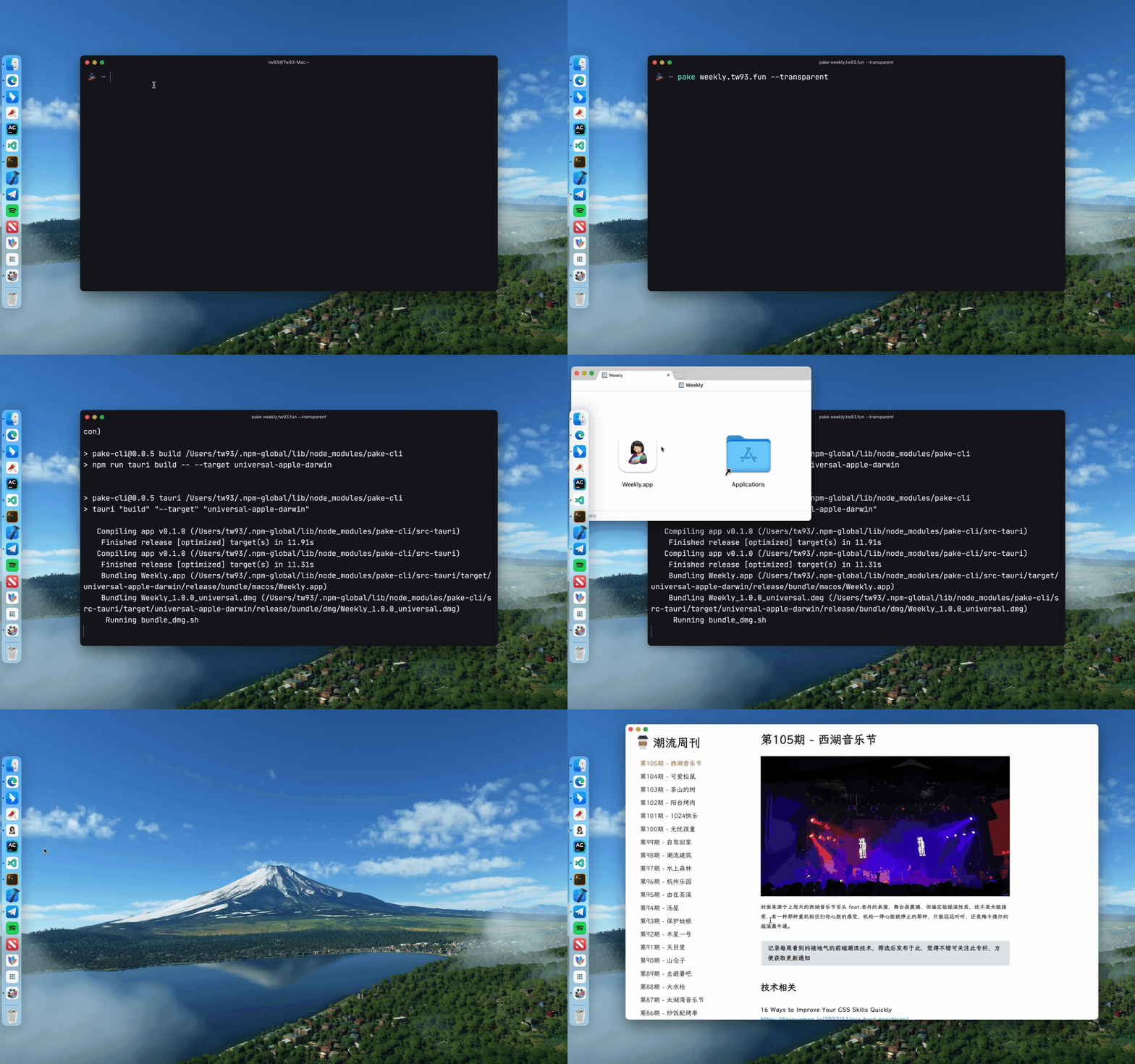
**Pake provides a command line tool, making the flow of package customization quicker and easier. See the [CLI usage guide](docs/cli-usage.md) for more information.**
|
|
166
166
|
|
|
167
167
|
```bash
|
|
168
|
-
#
|
|
168
|
+
# Recommended (pnpm)
|
|
169
|
+
pnpm install -g pake-cli
|
|
170
|
+
|
|
171
|
+
# Alternative (npm)
|
|
169
172
|
npm install -g pake-cli
|
|
170
173
|
|
|
171
174
|
# Command usage
|
|
@@ -175,31 +178,31 @@ pake url [OPTIONS]...
|
|
|
175
178
|
pake https://weekly.tw93.fun --name Weekly --hide-title-bar
|
|
176
179
|
```
|
|
177
180
|
|
|
178
|
-
If you are new to the command line, you can compile packages online with _GitHub Actions_. See
|
|
181
|
+
If you are new to the command line, you can compile packages online with _GitHub Actions_. See our [documentation](#documentation) for detailed guides.
|
|
179
182
|
|
|
180
183
|
## Development
|
|
181
184
|
|
|
182
|
-
Prepare your environment before starting. Make sure you have Rust `>=1.89` and Node `>=
|
|
185
|
+
Prepare your environment before starting. Make sure you have Rust `>=1.89` and Node `>=18` (e.g., `22.11.0`) installed on your computer. _Note: Latest stable versions are recommended._ For installation guidance, see [Tauri documentation](https://tauri.app/start/prerequisites/).
|
|
183
186
|
|
|
184
187
|
If you are unfamiliar with these, it is better to try out the above tool to pack with one click.
|
|
185
188
|
|
|
186
189
|
```sh
|
|
187
|
-
# Install
|
|
188
|
-
|
|
190
|
+
# Install dependencies
|
|
191
|
+
pnpm i
|
|
189
192
|
|
|
190
|
-
# Local development
|
|
191
|
-
|
|
193
|
+
# Local development (right-click to open debug mode)
|
|
194
|
+
pnpm run dev
|
|
192
195
|
|
|
193
|
-
#
|
|
194
|
-
|
|
196
|
+
# Build application
|
|
197
|
+
pnpm run build
|
|
195
198
|
```
|
|
196
199
|
|
|
197
|
-
##
|
|
200
|
+
## Documentation
|
|
198
201
|
|
|
199
|
-
|
|
200
|
-
|
|
201
|
-
|
|
202
|
-
|
|
202
|
+
- **[CLI Usage](docs/cli-usage.md)** ([中文](docs/cli-usage_CN.md)) - Command-line interface reference
|
|
203
|
+
- **[Advanced Usage](docs/advanced-usage.md)** ([中文](docs/advanced-usage_CN.md)) - Customization and advanced features
|
|
204
|
+
- **[GitHub Actions](docs/github-actions-usage.md)** ([中文](docs/github-actions-usage_CN.md)) - Build apps online
|
|
205
|
+
- **[Contributing](CONTRIBUTING.md)** - How to contribute to development
|
|
203
206
|
|
|
204
207
|
## Developers
|
|
205
208
|
|