oxlint-plugin-slimdeer 0.0.0-stage → 0.6.1
This diff represents the content of publicly available package versions that have been released to one of the supported registries. The information contained in this diff is provided for informational purposes only and reflects changes between package versions as they appear in their respective public registries.
- package/LICENSE +26 -0
- package/README.md +301 -2
- package/bin/slimdeer.js +355 -0
- package/engine/README.md +59 -0
- package/engine/THIRD_PARTY_LICENSES.txt +4055 -0
- package/engine/provenance.json +23 -0
- package/engine/slimdeer_wasm.js +448 -0
- package/engine/slimdeer_wasm_bg.wasm +0 -0
- package/package.json +76 -4
- package/src/batch.js +506 -0
- package/src/cache.js +138 -0
- package/src/check.js +465 -0
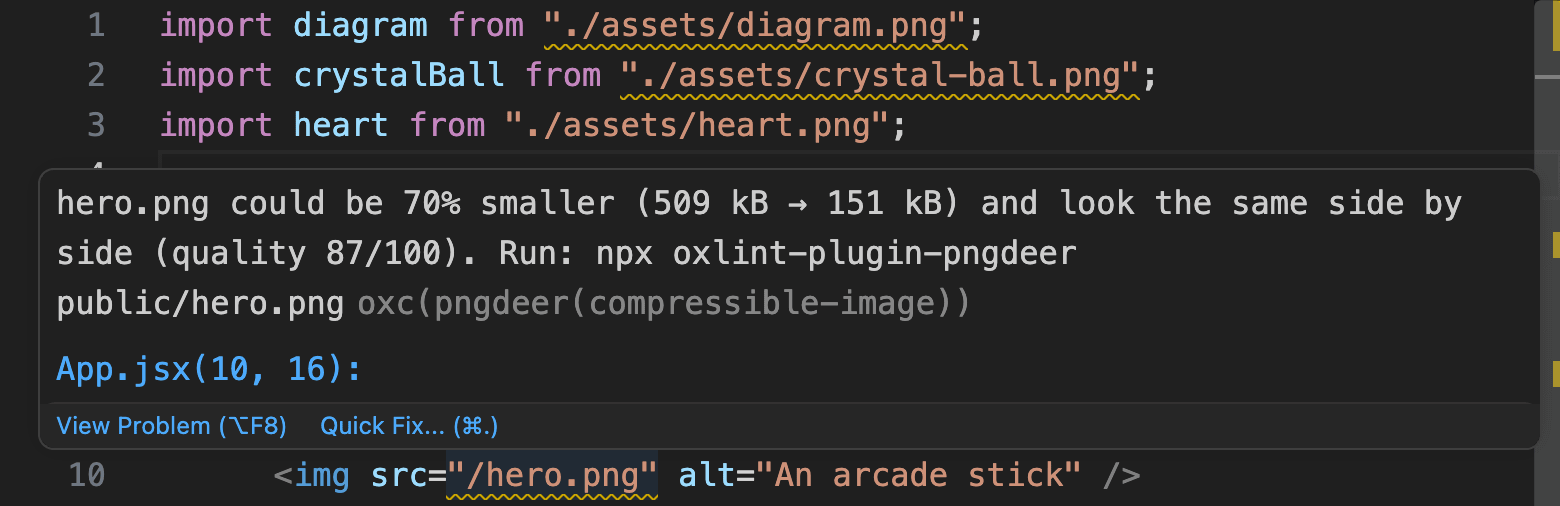
- package/src/compat.js +100 -0
- package/src/convert.js +286 -0
- package/src/copies.js +219 -0
- package/src/engine.js +98 -0
- package/src/fill-worker.js +26 -0
- package/src/images.js +78 -0
- package/src/index.d.ts +64 -0
- package/src/index.js +22 -0
- package/src/markdown.js +57 -0
- package/src/marker.js +103 -0
- package/src/measure.js +410 -0
- package/src/mentions.js +95 -0
- package/src/progress.js +73 -0
- package/src/review-page.js +907 -0
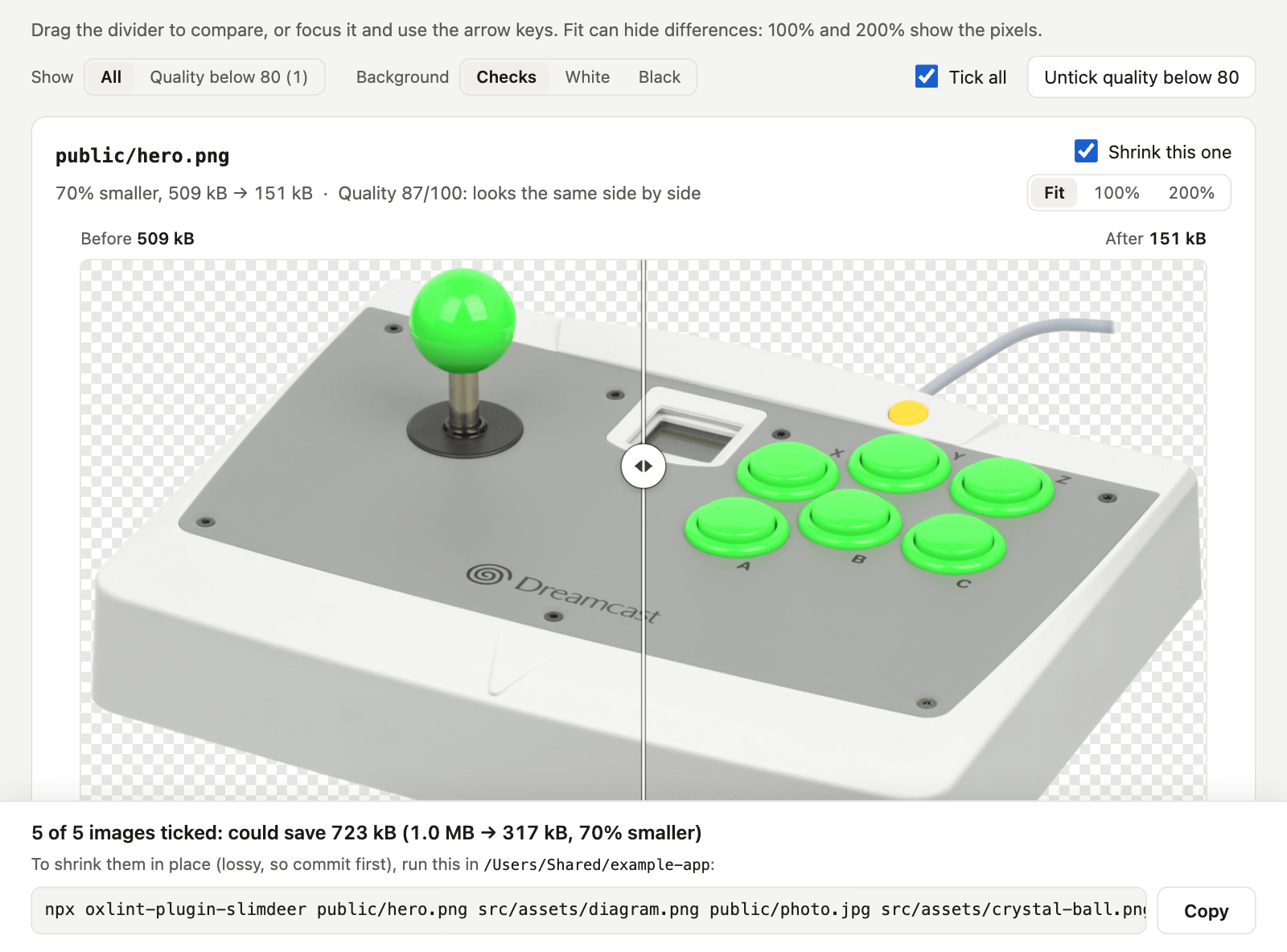
- package/src/review.js +430 -0
- package/src/rule.js +697 -0
- package/src/scan.js +152 -0
- package/src/shrink.js +103 -0
- package/src/summary.js +577 -0
- package/src/sync.js +91 -0
- package/src/text.js +138 -0
- package/src/threads.js +12 -0
- package/src/tsconfig.js +136 -0
- package/src/worker.js +85 -0
package/LICENSE
ADDED
|
@@ -0,0 +1,26 @@
|
|
|
1
|
+
Copyright (c) 2026 The oxlint-plugin-slimdeer contributors
|
|
2
|
+
Copyright (c) 2026 The slimdeer contributors (the engine in engine/, https://github.com/heydeer/slimdeer)
|
|
3
|
+
|
|
4
|
+
Permission is hereby granted, free of charge, to any
|
|
5
|
+
person obtaining a copy of this software and associated
|
|
6
|
+
documentation files (the "Software"), to deal in the
|
|
7
|
+
Software without restriction, including without
|
|
8
|
+
limitation the rights to use, copy, modify, merge,
|
|
9
|
+
publish, distribute, sublicense, and/or sell copies of
|
|
10
|
+
the Software, and to permit persons to whom the Software
|
|
11
|
+
is furnished to do so, subject to the following
|
|
12
|
+
conditions:
|
|
13
|
+
|
|
14
|
+
The above copyright notice and this permission notice
|
|
15
|
+
shall be included in all copies or substantial portions
|
|
16
|
+
of the Software.
|
|
17
|
+
|
|
18
|
+
THE SOFTWARE IS PROVIDED "AS IS", WITHOUT WARRANTY OF
|
|
19
|
+
ANY KIND, EXPRESS OR IMPLIED, INCLUDING BUT NOT LIMITED
|
|
20
|
+
TO THE WARRANTIES OF MERCHANTABILITY, FITNESS FOR A
|
|
21
|
+
PARTICULAR PURPOSE AND NONINFRINGEMENT. IN NO EVENT
|
|
22
|
+
SHALL THE AUTHORS OR COPYRIGHT HOLDERS BE LIABLE FOR ANY
|
|
23
|
+
CLAIM, DAMAGES OR OTHER LIABILITY, WHETHER IN AN ACTION
|
|
24
|
+
OF CONTRACT, TORT OR OTHERWISE, ARISING FROM, OUT OF OR
|
|
25
|
+
IN CONNECTION WITH THE SOFTWARE OR THE USE OR OTHER
|
|
26
|
+
DEALINGS IN THE SOFTWARE.
|
package/README.md
CHANGED
|
@@ -1,3 +1,302 @@
|
|
|
1
|
-
|
|
1
|
+
<p align="center">
|
|
2
|
+
<img src="https://raw.githubusercontent.com/lndgalante/oxlint-plugin-slimdeer/main/.github/logo.svg" alt="" width="128" height="128">
|
|
3
|
+
</p>
|
|
2
4
|
|
|
3
|
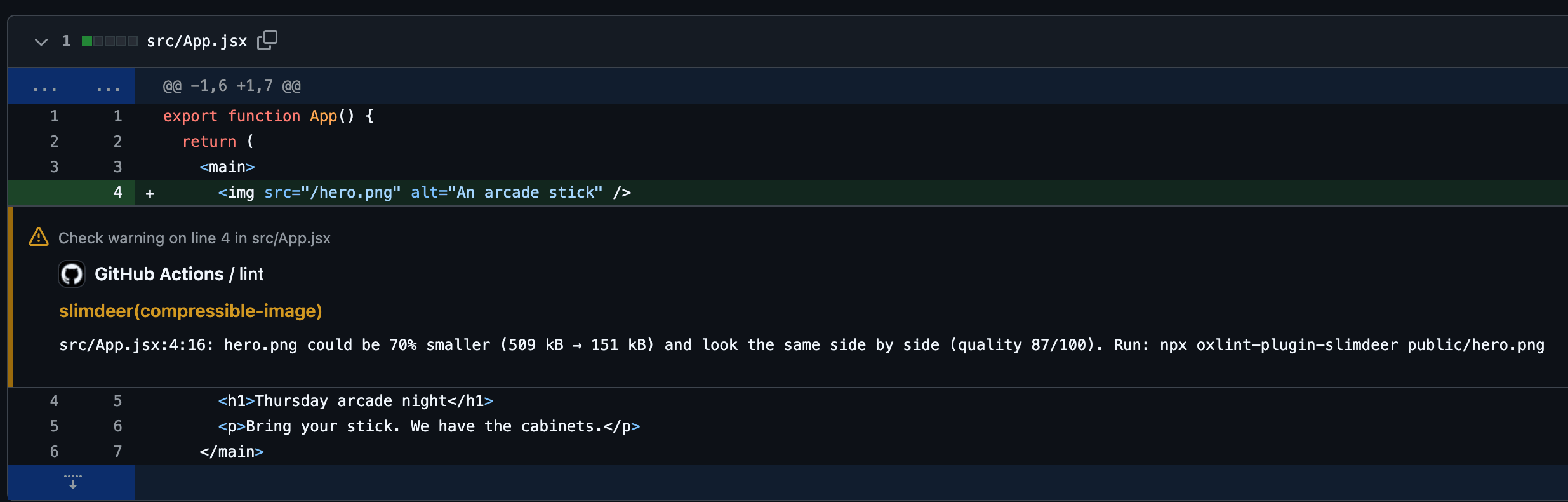
-
|
|
5
|
+
<h1 align="center">oxlint-plugin-slimdeer</h1>
|
|
6
|
+
|
|
7
|
+
<p align="center"><strong>Catch heavy PNGs and JPEGs on the line of code that uses them.</strong></p>
|
|
8
|
+
|
|
9
|
+
<p align="center">
|
|
10
|
+
<a href="https://www.npmjs.com/package/oxlint-plugin-slimdeer"><img src="https://img.shields.io/npm/v/oxlint-plugin-slimdeer" alt="npm version"></a>
|
|
11
|
+
<a href="https://github.com/lndgalante/oxlint-plugin-slimdeer/actions/workflows/ci.yml"><img src="https://github.com/lndgalante/oxlint-plugin-slimdeer/actions/workflows/ci.yml/badge.svg" alt="CI status"></a>
|
|
12
|
+
</p>
|
|
13
|
+
|
|
14
|
+
A lint rule for [oxlint](https://oxc.rs/docs/guide/usage/linter) and ESLint. It runs [slimdeer](https://github.com/heydeer/slimdeer), HeyDeer's open-source lossy image compressor, on your project's PNGs and JPEGs, in memory and on your machine. Then it warns, on the line of code that names an image, when that image could be at least 4 KiB and 10% smaller at about the same visual quality:
|
|
15
|
+
|
|
16
|
+
|
|
17
|
+
|
|
18
|
+
This plugin isn't made by HeyDeer; it runs their MIT-licensed engine.
|
|
19
|
+
|
|
20
|
+
## Try it on your images
|
|
21
|
+
|
|
22
|
+
From your project's folder, with no setup:
|
|
23
|
+
|
|
24
|
+
```bash
|
|
25
|
+
npx oxlint-plugin-slimdeer --review
|
|
26
|
+
```
|
|
27
|
+
|
|
28
|
+
It writes a page that shows each image before and after, with the command that shrinks the ones you keep ticked. It changes no image and uploads nothing. Shrinking is lossy, so commit before you run that command. On this repository's example app, it shows 5 images that could be 70% smaller in all (1.0 MB → 317 kB). Their quality scores run from 76 to 90 out of 100, where 80 and up looks the same side by side.
|
|
29
|
+
|
|
30
|
+
The first run takes a few seconds per image, several at a time, and later runs read the cache. The cache and the page go in `node_modules/.cache/slimdeer`. It needs Node 20.19+ or 22.12+.
|
|
31
|
+
|
|
32
|
+
|
|
33
|
+
|
|
34
|
+
- Drag the divider across an image, or switch from Fit to 100% or 200% to see the pixels. Each "after" is the file the command writes, byte for byte.
|
|
35
|
+
- Untick an image to keep it as it is, or press "Untick quality below 80". The bar gives the command for the rest; run it in the same folder. The lint still warns on an image you keep until you add it to the rule's [`exclude` option](#options).
|
|
36
|
+
- The command prints the page's address. Add `--open` to open it in your browser.
|
|
37
|
+
|
|
38
|
+
Prefer the terminal? `npx oxlint-plugin-slimdeer --check` lists the same images, then the commands that review and shrink them ([below](#check-without-a-linter)).
|
|
39
|
+
|
|
40
|
+
As WebP or AVIF? `npx oxlint-plugin-slimdeer --review --format webp` (or `--format avif`) compares the same images as copies in that format, at the same quality scores, and shows the ones worth writing. Its command writes each copy next to its original, which stays, and lists the lines of code that still name the original: the saving starts once they name the copy ([WebP and AVIF](#webp-and-avif)).
|
|
41
|
+
|
|
42
|
+
Savings vary by image. On pinned copies of three public projects' images, `--check` flagged all 19 of the Vue docs' guide images (74% smaller in all, 1.2 MB → 316 kB) and 4 of the Docusaurus starter's 5 (53% smaller in all), but only 2 of Starlight's 12 small portraits (7% smaller in all). On [SSIMULACRA2](https://github.com/cloudinary/ssimulacra2), the 0–100 perceptual score each warning shows, 21 of those 25 scored 89 or more, and 4 scored 73 to 78, which the rule calls "close, with differences you might spot side by side". These are repository bytes: an image pipeline or CDN may already re-encode what users download. [The trials](https://github.com/lndgalante/oxlint-plugin-slimdeer/blob/main/bench/TRIALS.md)
|
|
43
|
+
|
|
44
|
+
## Why a lint rule
|
|
45
|
+
|
|
46
|
+
Compressing your images once fixes today's. The rule also catches next month's 2 MB screenshot, whether you, a teammate or a coding agent adds it, in your editor and in the pull request. Vite copies `public/` to the build as it is, and Astro never optimizes images there. The usual fixes run at other moments:
|
|
47
|
+
|
|
48
|
+
| | When it runs | The committed file |
|
|
49
|
+
|---|---|---|
|
|
50
|
+
| **Build plugins** like vite-plugin-image-optimizer | during each build, lossless by default | stays heavy |
|
|
51
|
+
| **calibreapp/image-actions** | on pull requests, with write access; forks need extra setup | recompressed on the branch |
|
|
52
|
+
| **Imgbot** | in pull requests it opens, lossless by default | recompressed |
|
|
53
|
+
| **TinyPNG** | when someone uploads the images; its API needs a key | recompressed |
|
|
54
|
+
| **Lighthouse** | on a running page, estimating savings from bytes per pixel | unchanged |
|
|
55
|
+
| **This rule** | in your editor, lint and CI, on the line that names the image | unchanged until you run the command it gives |
|
|
56
|
+
|
|
57
|
+
## Quick start with oxlint
|
|
58
|
+
|
|
59
|
+
Needs Node 20.19+ or 22.12+ and oxlint 1.60+. oxlint's JS plugins are alpha, so pin oxlint's version:
|
|
60
|
+
|
|
61
|
+
```bash
|
|
62
|
+
npm install --save-dev --save-exact oxlint
|
|
63
|
+
npm install --save-dev oxlint-plugin-slimdeer
|
|
64
|
+
```
|
|
65
|
+
|
|
66
|
+
Create `.oxlintrc.json` next to `package.json`, or edit the one you have (Vite's React templates and `npx oxlint --init` create one). The package goes in `jsPlugins`, not `plugins`. If the file has `rules`, add the rule there: a second `rules` key silently replaces the first.
|
|
67
|
+
|
|
68
|
+
```json
|
|
69
|
+
{
|
|
70
|
+
"jsPlugins": ["oxlint-plugin-slimdeer"],
|
|
71
|
+
"rules": { "slimdeer/compressible-image": "warn" }
|
|
72
|
+
}
|
|
73
|
+
```
|
|
74
|
+
|
|
75
|
+
Then run `npx oxlint`. It warns on each heavy image, then sums them up.
|
|
76
|
+
|
|
77
|
+
## Quick start with ESLint
|
|
78
|
+
|
|
79
|
+
If your project already lints with ESLint 9 or 10, ESLint runs the same rule and shares oxlint's cache. Needs Node 20.19+ or 22.12+ (22.13+ for ESLint 10).
|
|
80
|
+
|
|
81
|
+
```bash
|
|
82
|
+
npm install --save-dev oxlint-plugin-slimdeer
|
|
83
|
+
```
|
|
84
|
+
|
|
85
|
+
Add the recommended config. It turns the rule on for the files the rest of your config lints:
|
|
86
|
+
|
|
87
|
+
```js
|
|
88
|
+
// eslint.config.js
|
|
89
|
+
import slimdeer from "oxlint-plugin-slimdeer";
|
|
90
|
+
|
|
91
|
+
export default [
|
|
92
|
+
// ...your config, which parses your JSX or TypeScript
|
|
93
|
+
slimdeer.configs.recommended,
|
|
94
|
+
];
|
|
95
|
+
```
|
|
96
|
+
|
|
97
|
+
No config for your JSX yet? ESLint then lints no `.jsx` file, and the rule warns on nothing. Put this object before `slimdeer.configs.recommended`:
|
|
98
|
+
|
|
99
|
+
```js
|
|
100
|
+
{ files: ["**/*.{js,jsx}"], languageOptions: { parserOptions: { ecmaFeatures: { jsx: true } } } },
|
|
101
|
+
```
|
|
102
|
+
|
|
103
|
+
For TypeScript, [add a config object with its parser](https://github.com/lndgalante/oxlint-plugin-slimdeer/blob/main/docs/rules/compressible-image.md#eslint-setup).
|
|
104
|
+
|
|
105
|
+
Then run `npx eslint .`, without `--cache`: ESLint would replay old warnings for images you already shrank, and the rule would print no summary.
|
|
106
|
+
|
|
107
|
+
## Quick start with Vite+
|
|
108
|
+
|
|
109
|
+
Vite+ brings its own oxlint, so install only the plugin: `npm install --save-dev oxlint-plugin-slimdeer`. `vp lint`, and editors that start `vp lint --lsp`, read the `lint` block of `vite.config.ts`, not `.oxlintrc.json`:
|
|
110
|
+
|
|
111
|
+
```ts
|
|
112
|
+
// vite.config.ts
|
|
113
|
+
import { defineConfig } from "vite-plus";
|
|
114
|
+
|
|
115
|
+
export default defineConfig({
|
|
116
|
+
// ...your config
|
|
117
|
+
lint: {
|
|
118
|
+
jsPlugins: ["oxlint-plugin-slimdeer"],
|
|
119
|
+
rules: { "slimdeer/compressible-image": "warn" },
|
|
120
|
+
},
|
|
121
|
+
});
|
|
122
|
+
```
|
|
123
|
+
|
|
124
|
+
Then run `npx vp lint`.
|
|
125
|
+
|
|
126
|
+
## What a lint shows
|
|
127
|
+
|
|
128
|
+
Each warning ends with the command that shrinks its image. After the warnings, the rule sums them up, each image once, biggest saving first (here in `example/`, shortened):
|
|
129
|
+
|
|
130
|
+
```
|
|
131
|
+
slimdeer: 4 flagged images could be 718 kB smaller in all (1.0 MB → 310 kB, 70% smaller):
|
|
132
|
+
image now after saves quality
|
|
133
|
+
public/hero.png 509 kB → 151 kB 359 kB 87
|
|
134
|
+
src/assets/diagram.png 248 kB → 63 kB 185 kB 90
|
|
135
|
+
public/photo.jpg 235 kB → 85 kB 150 kB 76
|
|
136
|
+
src/assets/crystal-ball.png 35 kB → 11 kB 24 kB 87
|
|
137
|
+
…
|
|
138
|
+
slimdeer: to see the 4 flagged images before and after on one page first, run: npx oxlint-plugin-slimdeer --review --flagged
|
|
139
|
+
slimdeer: to shrink the 4 flagged images in place (lossy, so commit first), run: npx oxlint-plugin-slimdeer --flagged
|
|
140
|
+
```
|
|
141
|
+
|
|
142
|
+
`--review --flagged` writes the review page for exactly the images the lint flagged, each at the target the lint measured it at, so images the rule's `exclude` option or a disable comment leaves out stay out. `--flagged` shrinks them in place. Both leave out, and name, an image whose bytes changed since the lint; lint again to check it. With one flagged image, the summary offers a preview as a new file instead, like `npx oxlint-plugin-slimdeer public/photo.jpg -o photo.preview.jpg`. The summary also lists images no linted code names, like a background in a CSS file, with where each one is named.
|
|
143
|
+
|
|
144
|
+
The shrink command marks what it writes, so the rule doesn't flag it again, and keeps each file's name and format, so no code changes. Each lossy pass costs quality, so shrink an image once. An image another tool already compressed can still be flagged: look at it on the review page first.
|
|
145
|
+
|
|
146
|
+
No warnings at all? [Go through this list](https://github.com/lndgalante/oxlint-plugin-slimdeer/blob/main/docs/rules/compressible-image.md#no-warnings).
|
|
147
|
+
|
|
148
|
+
## Check without a linter
|
|
149
|
+
|
|
150
|
+
`--check` measures without changing any image and needs no linter setup. It checks every package below the folder, warms the lint's cache, and ends with the commands that review and shrink what it lists. It reads no linter configuration, and neither does plain `--review`: pass the rule's options, like its `exclude` as `--exclude`. It exits 0 when no image clears both thresholds, 1 when one does, and 2 on a mistake in the arguments or when an image or folder couldn't be checked, so a CI step can gate on it. `--json` prints one JSON document on stdout instead, for scripts. With `--format webp` or `--format avif`, it compares each image's WebP or AVIF copy with its shrink at the same quality score instead, and leaves out each image whose copy is already next to it ([WebP and AVIF](#webp-and-avif)). [Options, exit codes and the JSON](https://github.com/lndgalante/oxlint-plugin-slimdeer/blob/main/docs/rules/compressible-image.md#check-images-without-changing-them)
|
|
151
|
+
|
|
152
|
+
## WebP and AVIF
|
|
153
|
+
|
|
154
|
+
The command can also write a WebP or AVIF copy of an image, at the quality score its PNG or JPEG shrink would have, so the two sizes compare like for like:
|
|
155
|
+
|
|
156
|
+
```bash
|
|
157
|
+
npx oxlint-plugin-slimdeer --check --format webp # which images are worth it
|
|
158
|
+
npx oxlint-plugin-slimdeer --review --format webp # see them before and after
|
|
159
|
+
npx oxlint-plugin-slimdeer --format webp public/hero.png # write public/hero.webp
|
|
160
|
+
npx oxlint-plugin-slimdeer public/photo.jpg -o photo.avif # write the copy you name
|
|
161
|
+
```
|
|
162
|
+
|
|
163
|
+
Run in `example/`, the third command prints:
|
|
164
|
+
|
|
165
|
+
```
|
|
166
|
+
public/hero.png → public/hero.webp: 509 kB → 92 kB (82% smaller, quality 87/100: looks the same side by side); shrunk as PNG at the same quality: 151 kB
|
|
167
|
+
slimdeer: public/hero.png is still there, and this line still names it; point it at hero.webp:
|
|
168
|
+
src/App.jsx:10 <img src="/hero.png" alt="An arcade stick" />
|
|
169
|
+
and 1 mention in Markdown: SOURCES.md:10
|
|
170
|
+
slimdeer: delete public/hero.png only once nothing uses it; other sites, emails and share previews may link to files in public/.
|
|
171
|
+
```
|
|
172
|
+
|
|
173
|
+
On this repository's example app, at the same quality scores: as WebP, three of the five images come out 32% smaller than shrinking them as PNG (793 kB now, 225 kB shrunk, 152 kB as WebP), while the photo comes out only 3% smaller than its JPEG shrink, so `--check --format webp` leaves it out. As AVIF, three come out 64% smaller than shrinking them (780 kB now, 247 kB shrunk, 89 kB as AVIF), but the diagram comes out 59% bigger than its PNG shrink, so it is left out. It depends on the image, so check before you convert.
|
|
174
|
+
|
|
175
|
+
- The original stays as it is, and `--format` writes only new files. The saving starts once your code names the copy: the command lists the lines that still name the original.
|
|
176
|
+
- `--format` writes a copy only where it is smaller than both the original and the original's PNG or JPEG shrink; `-o` writes one whenever it is smaller than the original, and says when the shrink would be smaller. By default, `--check --format` and `--review --format` list a copy only when it is at least 4 KiB and 10% smaller than the shrink.
|
|
177
|
+
- Skip it where something already converts: next/image, Astro's `<Image>` and `<Picture>`, Gatsby's image plugin and many image CDNs serve WebP to browsers that take it, and converting the source first adds a second lossy pass. The command says so when your package.json depends on next, astro, gatsby, @nuxt/image or vite-imagetools.
|
|
178
|
+
- Keep share images, app icons and images in email as PNG or JPEG; as AVIF, they can fail to show. In a [December 2024 test](https://joost.blog/use-avif-webp-share-images/), link previews on X, LinkedIn, Slack and iMessage didn't show AVIF (WebP showed on all 11 platforms tried), and [Outlook for Windows](https://www.caniemail.com/features/image-avif/) doesn't show AVIF either. With `--format avif`, the command points out each image named like a share image or an icon.
|
|
179
|
+
- AVIF is slow: on the example app, `--check --format avif` took 66 seconds for five images, against 13 as WebP and 5 for the PNG and JPEG check, and one image alone often takes about a minute. `--check --format` and `--review --format` cache what they measure.
|
|
180
|
+
- A copy keeps transparency and the color profile, and drops other metadata; a JPEG's EXIF orientation is applied to its pixels. [WebP](https://caniuse.com/webp) and [AVIF](https://caniuse.com/avif) each show in about 97% of browsers in use (caniuse, November 2026); AVIF needs Safari 16.4 or later to show on every Mac.
|
|
181
|
+
|
|
182
|
+
[Every option, the JSON, and each reason an image is left out](https://github.com/lndgalante/oxlint-plugin-slimdeer/blob/main/docs/rules/compressible-image.md#write-images-as-webp-or-avif)
|
|
183
|
+
|
|
184
|
+
## For coding agents
|
|
185
|
+
|
|
186
|
+
An agent adds images too, and the rule warns on them in the agent's own lint run. [The agent skill](https://github.com/lndgalante/oxlint-plugin-slimdeer/blob/main/skills/oxlint-plugin-slimdeer/SKILL.md) in this repository has a coding agent measure your images with `--check --json`, give you the review page's address, shrink only the images you approve, and, when you ask, write WebP or AVIF copies and list the code that still names the originals:
|
|
187
|
+
|
|
188
|
+
```bash
|
|
189
|
+
npx skills add lndgalante/oxlint-plugin-slimdeer
|
|
190
|
+
```
|
|
191
|
+
|
|
192
|
+
Without it, ask the agent to run `npx oxlint-plugin-slimdeer --review` (after a lint, `--review --flagged`) and give you the page's address: without `--open`, it opens nothing and prints the address. The page's command shrinks only the images you keep ticked; run it, or paste it back to the agent.
|
|
193
|
+
|
|
194
|
+
## What gets flagged
|
|
195
|
+
|
|
196
|
+
The rule reads imports, `require`, `new URL(…, import.meta.url)`, JSX `src` and `srcSet`, CSS `url()` in inline styles and CSS-in-JS templates, and strings that start with `./`, `../`, `/` or an alias like `@/`, in JS and TS and in the script parts of Vue, Svelte and Astro files. In React Native and Expo projects, `@2x` and platform variants count with the image they belong to. Images named only from CSS files, HTML or Markdown get no warning, but the summary lists them, and `--check` and `--review` include them. An image is flagged when it could be at least 4 KiB and 10% smaller.
|
|
197
|
+
|
|
198
|
+
By default, the rule picks a quality for each image, about what TinyPNG would give it, and never below 70: below that, it calls a result "visibly different". An image it can't make smaller at 70 or above isn't flagged, and the shrink command leaves it as it is. The lint says how many it turned down as it measures, and `--check` names them:
|
|
199
|
+
|
|
200
|
+
```
|
|
201
|
+
slimdeer: 1 image can't be made smaller without a visible difference (its best quality is below 70), so it isn't listed; to try it at a lower target, run: npx oxlint-plugin-slimdeer --check public/fade.png --target 60
|
|
202
|
+
```
|
|
203
|
+
|
|
204
|
+
Above the floor, a score in the 70s still means "close, with differences you might spot side by side", like `photo.jpg` above: look at those on the review page before you shrink them. [What it flags, and what it skips](https://github.com/lndgalante/oxlint-plugin-slimdeer/blob/main/docs/rules/compressible-image.md#what-it-flags)
|
|
205
|
+
|
|
206
|
+
## Editors
|
|
207
|
+
|
|
208
|
+
Warnings show in editors that run your project's oxlint as a language server: the [Oxc extension](https://github.com/oxc-project/oxc-vscode) for VS Code and its forks, Zed's Oxc extension (when `package.json` lists `oxlint` or `vite-plus`), and Neovim's `oxlint` config. With ESLint, ESLint's own editor extensions run the rule.
|
|
209
|
+
|
|
210
|
+
By default, the editor never waits for the rule, which measures images in the background. A file shows its warnings the next time the editor lints it, usually when you type in it. Lint once from the command line first, or commit the cache (see CI below), and the warnings are there when you open a file.
|
|
211
|
+
|
|
212
|
+
## CI
|
|
213
|
+
|
|
214
|
+
Lint each pull request, with annotations on the lines that name heavy images:
|
|
215
|
+
|
|
216
|
+
```yaml
|
|
217
|
+
# .github/workflows/images.yml
|
|
218
|
+
name: Images
|
|
219
|
+
on: pull_request
|
|
220
|
+
permissions:
|
|
221
|
+
contents: read
|
|
222
|
+
jobs:
|
|
223
|
+
lint:
|
|
224
|
+
runs-on: ubuntu-latest
|
|
225
|
+
steps:
|
|
226
|
+
- uses: actions/checkout@v7
|
|
227
|
+
- uses: actions/setup-node@v7
|
|
228
|
+
with:
|
|
229
|
+
node-version: 24
|
|
230
|
+
- run: npm ci
|
|
231
|
+
- run: npx oxlint --format github
|
|
232
|
+
```
|
|
233
|
+
|
|
234
|
+
A pull request that adds a heavy image then gets a warning on the line that uses it ([see it live](https://github.com/lndgalante/slimdeer-demo/pull/1/files)):
|
|
235
|
+
|
|
236
|
+
|
|
237
|
+
|
|
238
|
+
With ESLint, run `npx eslint .`: `actions/setup-node` turns its output into annotations. With Vite+, run `npx vp lint --format github`. GitHub annotates at most 10 warnings and 10 errors per step, your other lint warnings included. The rule also writes the job summary, with no option or permission: a table of the flagged images (up to 200) and the commands that review and shrink them.
|
|
239
|
+
|
|
240
|
+
### Commit the cache
|
|
241
|
+
|
|
242
|
+
Without it, CI measures every image on every run, two at a time on a 2-core runner (GitHub's default for private repositories).
|
|
243
|
+
|
|
244
|
+
1. Name a folder in `settings`: next to `rules` in `.oxlintrc.json`, in a config object in ESLint, or in the `lint` block of `vite.config.ts`.
|
|
245
|
+
```json
|
|
246
|
+
"settings": { "slimdeer": { "cacheDir": ".slimdeer" } }
|
|
247
|
+
```
|
|
248
|
+
2. Fill it. This copies what your machine has measured and measures the rest; from a monorepo's root, it fills each package's folder. If the rule sets a `target`, pass the same `--target`. It exits 1 when it lists images that could be smaller: a finding, not a failure.
|
|
249
|
+
```bash
|
|
250
|
+
npx oxlint-plugin-slimdeer --check --cache-dir .slimdeer
|
|
251
|
+
```
|
|
252
|
+
3. Commit the folder, and again after adding or changing images. To clear old entries, or to cache in GitHub Actions instead, see [the cache](https://github.com/lndgalante/oxlint-plugin-slimdeer/blob/main/docs/rules/compressible-image.md#the-cache).
|
|
253
|
+
|
|
254
|
+
### Block only new heavy images
|
|
255
|
+
|
|
256
|
+
Set the rule to `"error"` to fail the check. To let through the heavy images you already have, list them in the rule's `exclude` option: from the next lint on, they are no longer measured or reported, and `--flagged` leaves them alone (it shrinks what the last lint flagged). ESLint 9.24+ can also [suppress them](https://github.com/lndgalante/oxlint-plugin-slimdeer/blob/main/docs/rules/compressible-image.md#turning-it-off).
|
|
257
|
+
|
|
258
|
+
## Options
|
|
259
|
+
|
|
260
|
+
Pass options after the severity, like `["warn", { "exclude": ["public/originals", "**/fixtures/**"] }]`:
|
|
261
|
+
|
|
262
|
+
- `exclude` (default `[]`) leaves out paths or patterns, relative to the project's folder.
|
|
263
|
+
- `target` (`"auto"`) is the quality to keep: `"auto"`, or a SSIMULACRA2 score, where 90 looks identical and 80 the same side by side.
|
|
264
|
+
- `minSavedBytes` (`4096`) and `minSavedPercent` (`10`) set the smallest saving worth a warning. An image must clear both.
|
|
265
|
+
- `scan` (`"project"`): `"referenced"` measures only the images the linted files name, for linting a few files. [Compare them](https://github.com/lndgalante/oxlint-plugin-slimdeer/blob/main/bench/README.md#comparing-scan-scopes).
|
|
266
|
+
|
|
267
|
+
With ESLint's recommended config, set the rule again in a config object after it. [All options](https://github.com/lndgalante/oxlint-plugin-slimdeer/blob/main/docs/rules/compressible-image.md#options)
|
|
268
|
+
|
|
269
|
+
## Questions
|
|
270
|
+
|
|
271
|
+
- **Does it upload my images?** No. The engine ships in the package as 5.3 MB of WebAssembly (the package is a 2.0 MB download): no upload, no API key, no dependencies, no native binaries, no install scripts.
|
|
272
|
+
- **Is it lossless?** No. SSIMULACRA2 scores how close an image looks to its original, from 0 to 100, and each warning shows it. By default, slimdeer keeps the smallest file that scores about as high as TinyPNG's file would. In slimdeer's own benchmark of 180 PNGs (published under its former name, pngdeer), the median file is 8–12% smaller than TinyPNG's at the same quality ([leaderboard](https://github.com/heydeer/slimdeer/blob/a8e88267ba02cbaf66e746db93ed04242dca8450/README.md#leaderboard)). For photos and screenshots with small text, try `"target": 90` and compare.
|
|
273
|
+
- **Does it resize images?** No. Each image keeps its width and height; only the file gets smaller.
|
|
274
|
+
- **How is it different from TinyPNG or Squoosh?** Both compress the images you hand them. TinyPNG uploads each one, and its API needs a key, with 500 free compressions a month. Squoosh runs in your browser, one image at a time, at the settings you pick. This plugin runs slimdeer on your machine, picks the quality per image, and finds the images that need it in your code.
|
|
275
|
+
- **Does it help behind `next/image`, Astro's `<Image>` or an image CDN?** Less: they re-encode images for visitors anyway, so shrinking those mostly saves repository and build size, and adds a second lossy pass. Behind `next/image`, the warning says so. Leave those folders out with `exclude`. Images served as they are still count: plain `<img>`, CSS backgrounds, and `public/` in Vite and Astro. [When not to use it](https://github.com/lndgalante/oxlint-plugin-slimdeer/blob/main/docs/rules/compressible-image.md#when-not-to-use-it)
|
|
276
|
+
- **Does the rule suggest WebP or AVIF?** No: its fix keeps each image's name and format, so no code changes. The command writes WebP and AVIF copies when you ask ([WebP and AVIF](#webp-and-avif)). Images that are already WebP, AVIF, GIF or SVG aren't measured.
|
|
277
|
+
- **How slow is the first run?** The first lint measures every PNG and JPEG in the project, one engine per core (8 at most); later lints read the cache. On a 16-core M3 Max, the first lint of an app with 39 images (12 MB) took 14.6 s and peaked at 3.0 GB of memory. Later lints took 178 ms, against 68 ms without the plugin. That was version 0.3.0; today's engine writes the same PNG and JPEG files in about the same time ([the benchmark](https://github.com/lndgalante/oxlint-plugin-slimdeer/blob/main/bench/README.md)). Since 0.6.0, an image whose automatic result scores below 70 is compressed a second time, at 70: on tanstack.com's 148 images, a cold run took 718 s of CPU time, against 661 s with 0.5.0, in the same wall time ([the quality floor](https://github.com/lndgalante/oxlint-plugin-slimdeer/blob/main/docs/releases/0.6.0.md#the-quality-floor)).
|
|
278
|
+
- **Does it need oxlint?** No. `--check`, `--review` and the shrink command run alone, and ESLint 9 and 10 run the same rule.
|
|
279
|
+
- **Where doesn't it work?** oxlint runs JS plugins only on 64-bit little-endian machines, and on some memory-constrained Linux machines any JS plugin can make oxlint run out of memory ([oxc#20331](https://github.com/oxc-project/oxc/issues/20331)). slimdeer fails on some images, like flat-color JPEGs, and the rule skips others, like grayscale PNGs with a color profile; a command-line lint names them on stderr. [What it skips](https://github.com/lndgalante/oxlint-plugin-slimdeer/blob/main/docs/rules/compressible-image.md#what-it-skips)
|
|
280
|
+
|
|
281
|
+
## Learn more
|
|
282
|
+
|
|
283
|
+
[The rule's docs](https://github.com/lndgalante/oxlint-plugin-slimdeer/blob/main/docs/rules/compressible-image.md) cover every option and setting, `--check`, `--review`, WebP and AVIF copies, paths and aliases, the cache, and upgrading. Also: [CHANGELOG.md](https://github.com/lndgalante/oxlint-plugin-slimdeer/blob/main/CHANGELOG.md), [FINDINGS.md](https://github.com/lndgalante/oxlint-plugin-slimdeer/blob/main/FINDINGS.md) (design notes) and [CONTRIBUTING.md](https://github.com/lndgalante/oxlint-plugin-slimdeer/blob/main/CONTRIBUTING.md).
|
|
284
|
+
|
|
285
|
+
This plugin is a separate project from slimdeer. Report problems with the rule or the command in [this repository's issues](https://github.com/lndgalante/oxlint-plugin-slimdeer/issues). An error that says "a bug in HeyDeer's slimdeer engine" goes to [slimdeer's issues](https://github.com/heydeer/slimdeer/issues).
|
|
286
|
+
|
|
287
|
+
This package was formerly named oxlint-plugin-pngdeer, until 0.5.0. [Moving to the new name](https://github.com/lndgalante/oxlint-plugin-slimdeer/blob/main/docs/rules/compressible-image.md#moving-from-oxlint-plugin-pngdeer) takes a few edits.
|
|
288
|
+
|
|
289
|
+
## Showcase
|
|
290
|
+
|
|
291
|
+
[Multabot](https://multabot.com.ar) tracks traffic fines in Argentina. It ran this package's command (version 0.5.0, formerly named oxlint-plugin-pngdeer) on three images that its Astro site, on Cloudflare Pages, serves from `public/` as they are. At `--target 90`, the quality suggested above for photos and screenshots with small text, they became 67% smaller in all (965 kB → 317 kB). Multabot shipped the compressed files: on November 2, 2026, the site served each one byte for byte. Two are below. The third, an annotated screenshot of a partner's site, went from 485,329 to 190,091 bytes (61% smaller). [The full report](https://github.com/lndgalante/oxlint-plugin-slimdeer/blob/main/docs/showcase.md#multabot)
|
|
292
|
+
|
|
293
|
+
| Original | Compressed at quality 90 |
|
|
294
|
+
|---|---|
|
|
295
|
+
| <br>Social preview · 370,801 bytes | <br>66,520 bytes · 82% smaller |
|
|
296
|
+
| <br>Blog photo · 108,899 bytes | <br>60,161 bytes · 45% smaller |
|
|
297
|
+
|
|
298
|
+
Using the rule or the command in a real project? We'd like to feature more. [Share yours in an issue](https://github.com/lndgalante/oxlint-plugin-slimdeer/issues/new?template=showcase.yml): what it caught, how much smaller the images became, and whether the result looked good enough to ship. [A prompt](https://github.com/lndgalante/oxlint-plugin-slimdeer/blob/main/docs/showcase.md#a-prompt-to-share) helps a coding assistant draft one.
|
|
299
|
+
|
|
300
|
+
## License
|
|
301
|
+
|
|
302
|
+
[MIT](https://github.com/lndgalante/oxlint-plugin-slimdeer/blob/main/LICENSE). The engine's dependencies keep their own licenses ([engine/THIRD_PARTY_LICENSES.txt](https://github.com/lndgalante/oxlint-plugin-slimdeer/blob/main/engine/THIRD_PARTY_LICENSES.txt)), and [engine/README.md](https://github.com/lndgalante/oxlint-plugin-slimdeer/blob/main/engine/README.md) says where the engine comes from. The example images keep theirs ([example/SOURCES.md](https://github.com/lndgalante/oxlint-plugin-slimdeer/blob/main/example/SOURCES.md)), and the MIT license doesn't cover the showcase images. JPEG output is encoded with mozjpeg: this software is based in part on the work of the Independent JPEG Group. AVIF output is encoded with libaom, under the BSD-2-Clause license and the Alliance for Open Media Patent License 1.0, with parts of it under BSD-3-Clause and MIT.
|