oxcode-ai 0.0.0-stage → 0.11.1
This diff represents the content of publicly available package versions that have been released to one of the supported registries. The information contained in this diff is provided for informational purposes only and reflects changes between package versions as they appear in their respective public registries.
- package/LICENSE.txt +65 -0
- package/README.md +122 -2
- package/dist/THIRD-PARTY-NOTICES.txt +1822 -0
- package/dist/cli-main.js +3547 -0
- package/dist/cli.js +23 -0
- package/dist/sql-wasm.wasm +0 -0
- package/package.json +28 -4
package/LICENSE.txt
ADDED
|
@@ -0,0 +1,65 @@
|
|
|
1
|
+
Copyright (c) 2026 Oxcode.ai. All rights reserved.
|
|
2
|
+
|
|
3
|
+
This license covers the OxCode extension for Visual Studio Code, as published
|
|
4
|
+
on the Visual Studio Marketplace and Open VSX, and the OxCode command-line
|
|
5
|
+
tool published on npm as oxcode-ai, including every update to them
|
|
6
|
+
(together, "the Software").
|
|
7
|
+
|
|
8
|
+
1. Licensed, not sold.
|
|
9
|
+
The Software is licensed to you, not sold. Oxcode.ai keeps all right, title
|
|
10
|
+
and interest in the Software and in every copy of it.
|
|
11
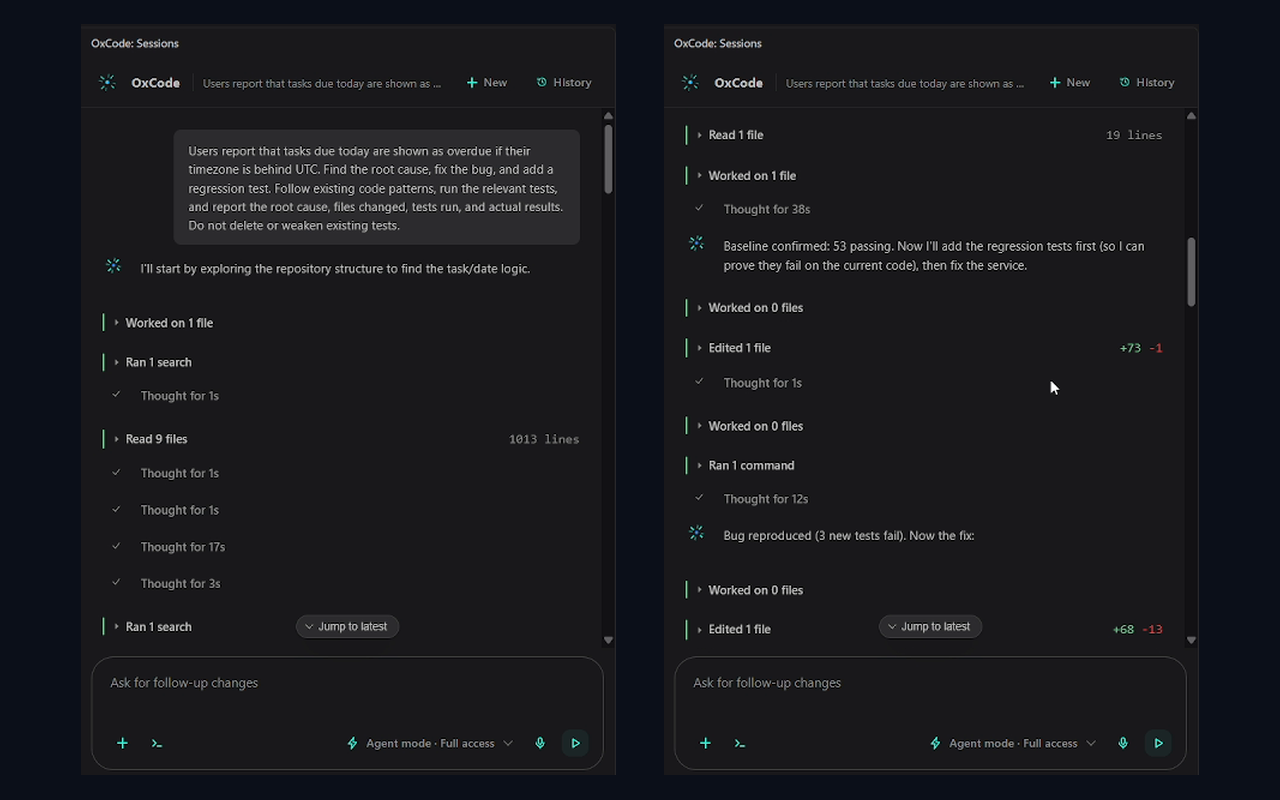
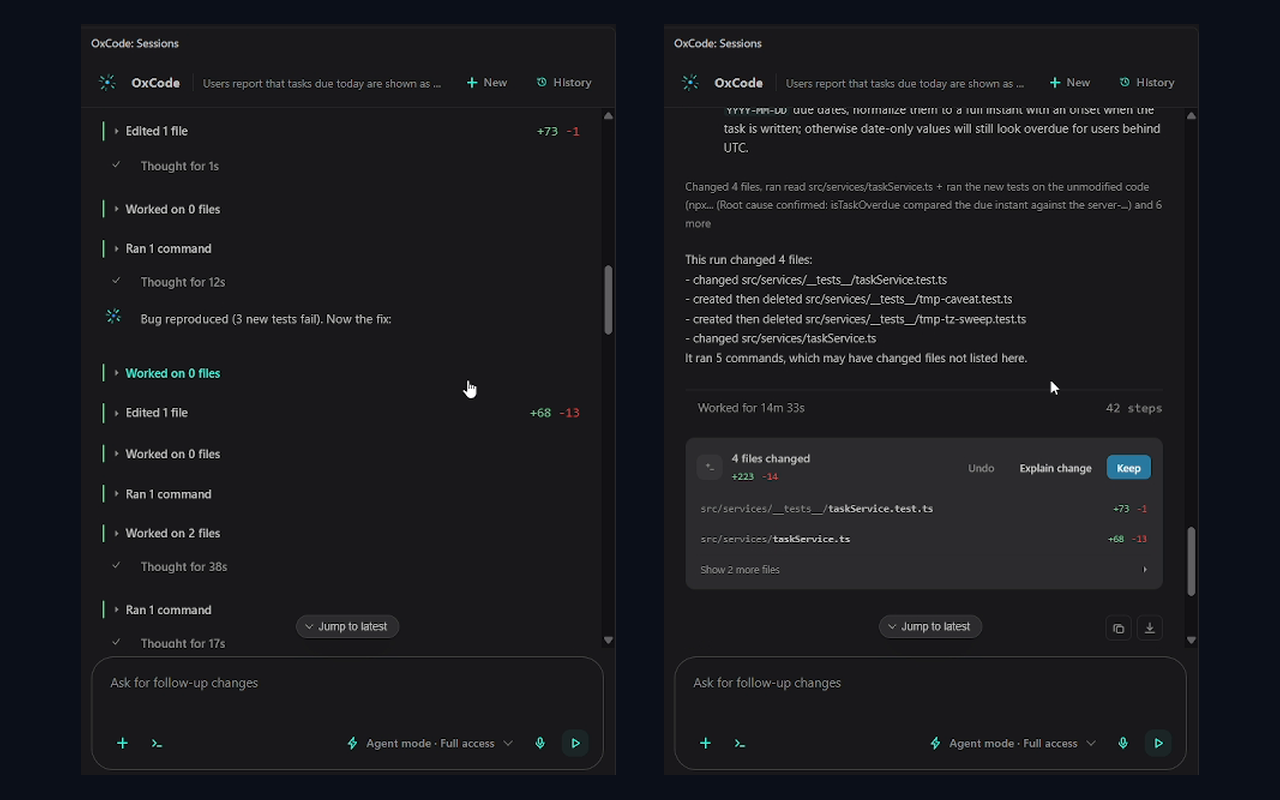
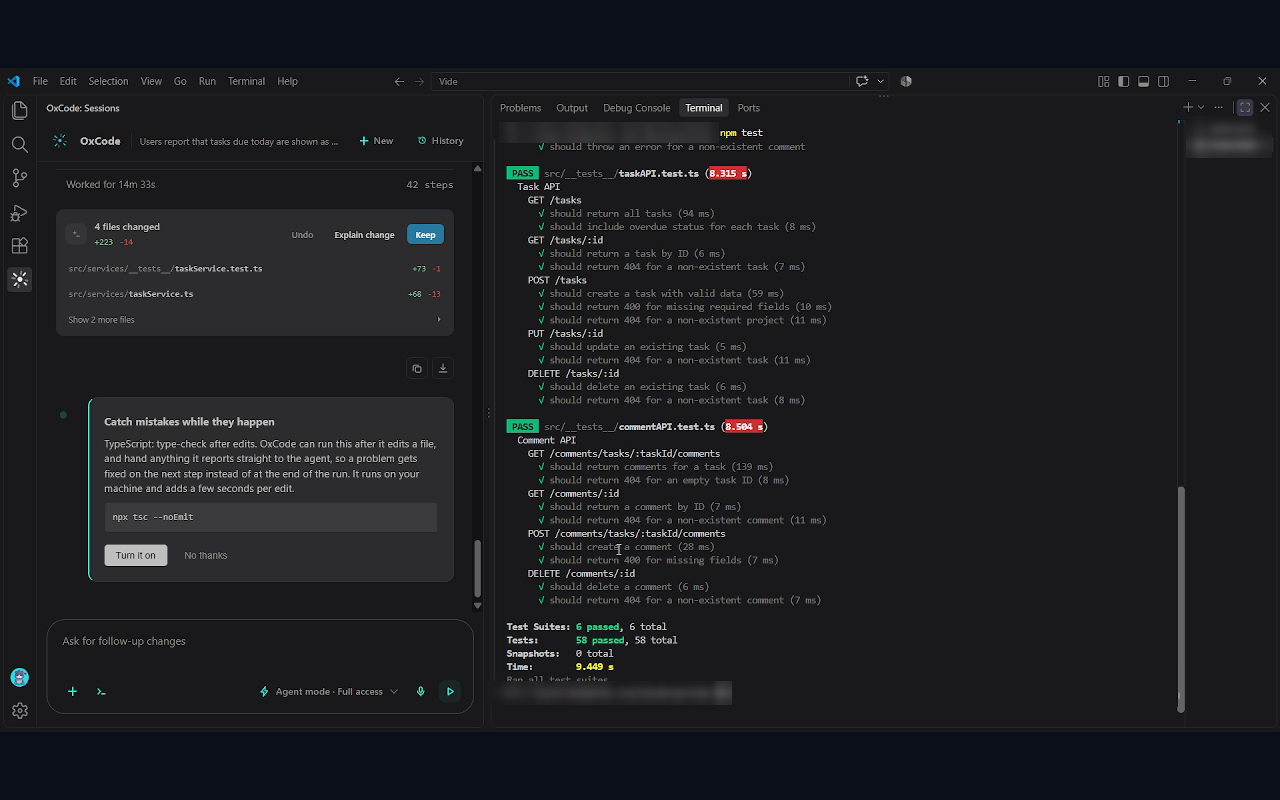
|
+
|
|
12
|
+
2. What you may do.
|
|
13
|
+
Oxcode.ai grants you a personal, non-exclusive, non-transferable and
|
|
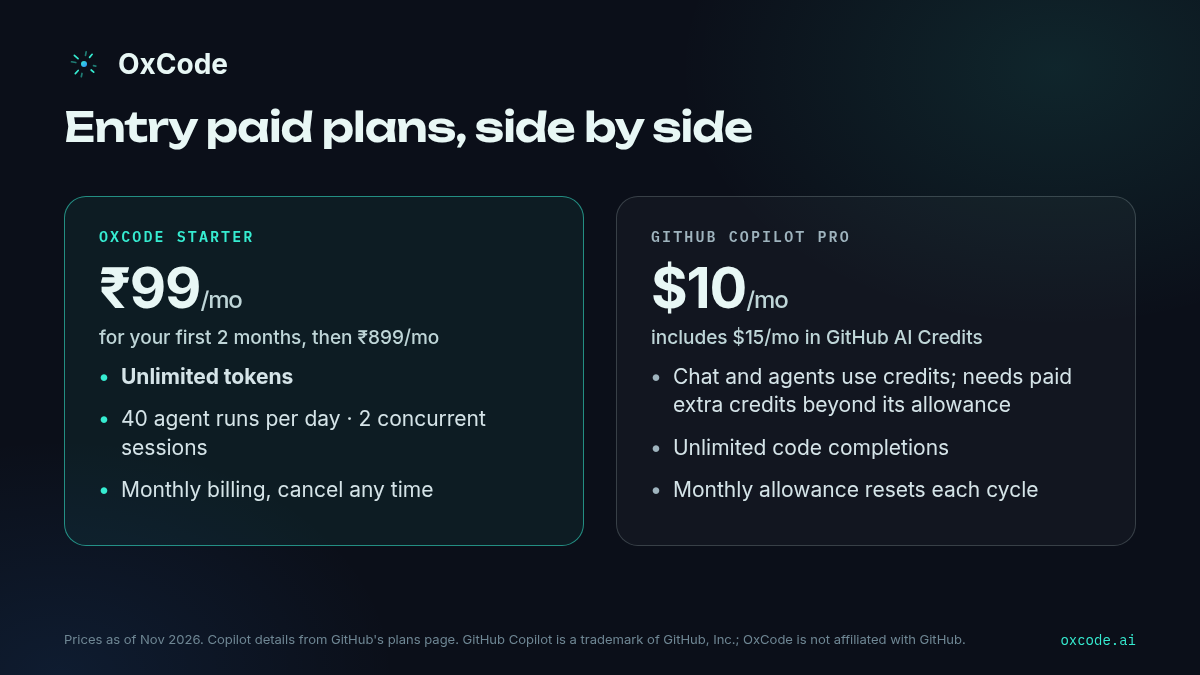
14
|
+
revocable license to install and run the Software, only to use the OxCode
|
|
15
|
+
service and only under the OxCode Terms of Service at
|
|
16
|
+
https://www.oxcode.ai/terms ("the Terms"). The Terms are part of this
|
|
17
|
+
license. Where this license and the Terms differ, the Terms govern.
|
|
18
|
+
|
|
19
|
+
3. What you may not do.
|
|
20
|
+
Except where applicable law expressly permits it despite this limitation,
|
|
21
|
+
you may not:
|
|
22
|
+
(a) copy the Software, other than the copies needed to install and run it
|
|
23
|
+
under section 2;
|
|
24
|
+
(b) modify, adapt, translate or create derivative works of the Software;
|
|
25
|
+
(c) distribute, publish, sell, rent, lease, lend, sublicense or otherwise
|
|
26
|
+
transfer the Software or any part of it;
|
|
27
|
+
(d) reverse engineer, decompile or disassemble the Software, or otherwise
|
|
28
|
+
try to derive its source code or internal logic;
|
|
29
|
+
(e) use the Software with any service other than the OxCode service;
|
|
30
|
+
(f) remove or change any copyright, license or ownership notice in the
|
|
31
|
+
Software;
|
|
32
|
+
(g) use the Software, or any information obtained from it, to build,
|
|
33
|
+
train or improve a competing product or service;
|
|
34
|
+
(h) extract, copy or reuse the prompts, model settings, routing logic or
|
|
35
|
+
configuration contained in the Software;
|
|
36
|
+
(i) bypass, disable or interfere with any usage limit, authentication or
|
|
37
|
+
other technical protection in the Software or the OxCode service.
|
|
38
|
+
|
|
39
|
+
4. Third-party components.
|
|
40
|
+
The Software includes open-source components that their authors license
|
|
41
|
+
under their own terms. Those terms, and the notices they require, are in
|
|
42
|
+
THIRD-PARTY-NOTICES.txt, which ships with the Software in its dist folder.
|
|
43
|
+
Nothing in this license limits your rights under those terms for those
|
|
44
|
+
components.
|
|
45
|
+
|
|
46
|
+
5. Termination.
|
|
47
|
+
This license ends automatically if you breach it, or when your right to use
|
|
48
|
+
the OxCode service ends. When it ends you must stop using the Software and
|
|
49
|
+
delete every copy you have.
|
|
50
|
+
|
|
51
|
+
6. No warranty.
|
|
52
|
+
To the extent the law allows, the Software is provided "as is", without
|
|
53
|
+
warranty of any kind, express or implied, including the warranties of
|
|
54
|
+
merchantability, fitness for a particular purpose and non-infringement.
|
|
55
|
+
|
|
56
|
+
7. Limitation of liability.
|
|
57
|
+
To the extent the law allows, Oxcode.ai is not liable for any indirect,
|
|
58
|
+
incidental, special, consequential or punitive damages, or for any loss of
|
|
59
|
+
data, profits or revenue, arising from or related to the Software. Any
|
|
60
|
+
liability Oxcode.ai has is subject to the limits in the Terms.
|
|
61
|
+
|
|
62
|
+
8. Governing law.
|
|
63
|
+
This license is governed by the laws of the Dubai International Financial
|
|
64
|
+
Centre (DIFC). The courts of the DIFC have exclusive jurisdiction over any
|
|
65
|
+
dispute arising from or related to this license or the Software.
|
package/README.md
CHANGED
|
@@ -1,3 +1,123 @@
|
|
|
1
|
-
|
|
1
|
+
<!-- Every image and link here is absolute, because a relative path is a 404 on the npm page. -->
|
|
2
|
+
<p align="center">
|
|
3
|
+
<img src="https://www.oxcode.ai/readme/demo.gif" alt="OxCode demo" width="800" />
|
|
4
|
+
</p>
|
|
2
5
|
|
|
3
|
-
|
|
6
|
+
<p align="center"><img src="https://www.oxcode.ai/readme/hero.png" alt="OxCode: AI software engineer for VS Code" width="800" /></p>
|
|
7
|
+
|
|
8
|
+
# OxCode: the AI software engineer that plans, writes, tests and debugs your code
|
|
9
|
+
|
|
10
|
+
**Made in India for Indian developers. Free to start.**
|
|
11
|
+
|
|
12
|
+
`oxcode` is the OxCode agent as a command: give it a task, and it reads your project, makes the change and checks its own work. It is the same agent as the OxCode extension for VS Code, built from the same commit and released with the same version.
|
|
13
|
+
|
|
14
|
+
[Website](https://www.oxcode.ai/?utm_source=npm&utm_medium=package_listing&utm_campaign=readme) · [Pricing](https://www.oxcode.ai/pricing?utm_source=npm&utm_medium=package_listing&utm_campaign=readme) · [Docs](https://www.oxcode.ai/docs?utm_source=npm&utm_medium=package_listing&utm_campaign=readme)
|
|
15
|
+
|
|
16
|
+
---
|
|
17
|
+
|
|
18
|
+
## Before you install
|
|
19
|
+
|
|
20
|
+
OxCode needs Node 18 or later. If you already have it, skip to Install. If you have never used Node, install it first:
|
|
21
|
+
|
|
22
|
+
**Windows.** In a terminal, run `winget install OpenJS.NodeJS.LTS`, or download the installer from [nodejs.org](https://nodejs.org). Then open a NEW terminal, so it can find Node.
|
|
23
|
+
|
|
24
|
+
**macOS.** In a terminal, run `brew install node`, or download the installer from [nodejs.org](https://nodejs.org).
|
|
25
|
+
|
|
26
|
+
**Linux.** Install Node from your distribution's packages, or from [nodejs.org](https://nodejs.org). Some distributions ship an older Node than 18, so check it as below.
|
|
27
|
+
|
|
28
|
+
To check, run:
|
|
29
|
+
|
|
30
|
+
```sh
|
|
31
|
+
node -v
|
|
32
|
+
```
|
|
33
|
+
|
|
34
|
+
It should print a version that starts with 18 or higher, such as `v22.11.0`.
|
|
35
|
+
|
|
36
|
+
## Install
|
|
37
|
+
|
|
38
|
+
```sh
|
|
39
|
+
npm install -g oxcode-ai
|
|
40
|
+
```
|
|
41
|
+
|
|
42
|
+
**If `oxcode` is not found** after it installs, open a new terminal and try again. On Windows, also check that the folder `npm prefix -g` prints is on your PATH.
|
|
43
|
+
|
|
44
|
+
## Sign in
|
|
45
|
+
|
|
46
|
+
Run `oxcode`. The first time, with nobody signed in, it shows the sign-in screen itself: choose **Sign in with Google in the browser**, or **Sign in with a code** if the browser cannot come back to this machine, over ssh for example. When you are signed in, your session starts. There is nothing to type first.
|
|
47
|
+
|
|
48
|
+
To sign in as someone else later, run `oxcode login`, or type `/login` in a session.
|
|
49
|
+
|
|
50
|
+
## Use it
|
|
51
|
+
|
|
52
|
+
**In a session.** `oxcode` opens a full-screen session in your terminal. Describe the task in plain words, and OxCode reads your project, makes the change and checks it. It asks before anything risky, and you approve or refuse right there. When you leave, your terminal comes back as it was. Slash commands: `/help` lists them all, `/account` shows who is signed in, `/usage` shows the runs you have left today, `/upgrade` shows the plans, and `/plugins` manages plugins.
|
|
53
|
+
|
|
54
|
+
**One task at a time.**
|
|
55
|
+
|
|
56
|
+
```sh
|
|
57
|
+
oxcode "add input validation to the signup form"
|
|
58
|
+
oxcode "what does this repo do" > answer.txt
|
|
59
|
+
```
|
|
60
|
+
|
|
61
|
+
When stdout is piped or redirected, it holds only the answer; progress goes to stderr. A one-shot run does not open the sign-in screen: if you are not signed in it stops with exit code 4, so run `oxcode` once first. `oxcode --help` lists every option, and the exit code says how the run ended (`oxcode --help-all` has the table).
|
|
62
|
+
|
|
63
|
+
## What OxCode does
|
|
64
|
+
|
|
65
|
+
OxCode works with you across the whole development cycle. It does not just generate code.
|
|
66
|
+
|
|
67
|
+
- **Plans**: breaks a feature or bug into steps before touching your code.
|
|
68
|
+
- **Writes**: edits across files, and you can follow every step.
|
|
69
|
+
- **Tests**: runs your commands and checks the results before calling a task done.
|
|
70
|
+
- **Debugs**: tracks a bug to its root cause and fixes it.
|
|
71
|
+
- **Reviews and explains**: walks you through code and engineering decisions.
|
|
72
|
+
|
|
73
|
+
## See it in action
|
|
74
|
+
|
|
75
|
+
These are from the OxCode extension in VS Code. The terminal runs the same agent.
|
|
76
|
+
|
|
77
|
+
|
|
78
|
+
|
|
79
|
+
|
|
80
|
+
|
|
81
|
+
|
|
82
|
+
|
|
83
|
+
## Benchmarks
|
|
84
|
+
|
|
85
|
+
OxCode resolves **82%** of SWE-bench Verified (410 of 500 instances, one attempt per instance, closed book) and solves **73 of 89** Terminal-Bench 2.1 tasks (one attempt per task). These runs were made by the OxCode team. They are not official leaderboard entries. Full method and raw results: **[oxcode.ai/benchmarks](https://www.oxcode.ai/benchmarks?utm_source=npm&utm_medium=package_listing&utm_campaign=readme)** and the public record at [github.com/Oxcode-ai/oxcode-evals](https://github.com/Oxcode-ai/oxcode-evals).
|
|
86
|
+
|
|
87
|
+
## Pricing
|
|
88
|
+
|
|
89
|
+
|
|
90
|
+
|
|
91
|
+
Simple pricing with no hidden charges. Start free, forever, and upgrade for more daily agent runs and concurrent sessions.
|
|
92
|
+
|
|
93
|
+
| Plan | Price | Agent runs per day | Concurrent sessions |
|
|
94
|
+
|---|---|---|---|
|
|
95
|
+
| **Free** | ₹0 forever, no credit card required | 10 | 1 |
|
|
96
|
+
| **Starter** | **₹99 a month for your first 2 months**, then ₹899/month, unlimited tokens | 40 | 2 |
|
|
97
|
+
| **Pro** | ₹999 a month for your first 2 months, then ₹3,999/month | 200 | 5 |
|
|
98
|
+
|
|
99
|
+
Paid plans are billed monthly and you can cancel any time. One agent run is one request you give OxCode, and your allowance resets daily. See **[oxcode.ai/pricing](https://www.oxcode.ai/pricing?utm_source=npm&utm_medium=package_listing&utm_campaign=readme)**.
|
|
100
|
+
|
|
101
|
+
## When your runs for the day are used up
|
|
102
|
+
|
|
103
|
+
A task that is already going when your runs run out is not cut off mid-edit. It finishes the change it is on, leaves the project working, and stops at a checkpoint: what is done, what is not, and the next step. The run exits 5, and the checkpoint is printed on stdout as well, so a script can read it.
|
|
104
|
+
|
|
105
|
+
Once your runs are back, pick it up in the same folder:
|
|
106
|
+
|
|
107
|
+
```sh
|
|
108
|
+
oxcode continue
|
|
109
|
+
```
|
|
110
|
+
|
|
111
|
+
In a session, type `/continue`. The continued task is one new run.
|
|
112
|
+
|
|
113
|
+
One checkpoint is kept per folder, in `~/.oxcode/checkpoints/`. It is replaced when a new task starts in that folder and expires after 7 days. On Linux and macOS the file is readable only by you (mode 0600, in a 0700 folder). On Windows it relies on your user profile's permissions: anyone who can read your profile folder can read it.
|
|
114
|
+
|
|
115
|
+
## Links
|
|
116
|
+
|
|
117
|
+
- Website: https://www.oxcode.ai
|
|
118
|
+
- OxCode for VS Code: https://www.oxcode.ai/install
|
|
119
|
+
- Docs: https://www.oxcode.ai/docs
|
|
120
|
+
- Pricing: https://www.oxcode.ai/pricing
|
|
121
|
+
- Issues: https://www.oxcode.ai/dashboard/issues
|
|
122
|
+
|
|
123
|
+
Copyright (c) 2026 Oxcode.ai. Licensed, not sold, under the license in LICENSE.txt and the terms at https://www.oxcode.ai/terms. Open-source components it includes are listed, with their licenses, in dist/THIRD-PARTY-NOTICES.txt.
|