orgchart 4.0.0 → 5.0.0
This diff represents the content of publicly available package versions that have been released to one of the supported registries. The information contained in this diff is provided for informational purposes only and reflects changes between package versions as they appear in their respective public registries.
- package/README.md +50 -11
- package/README.zh-cn.md +68 -4
- package/README.zh-tw.md +68 -4
- package/demo/export-chart-with-pictures.html +2 -1
- package/demo/family-tree.html +97 -0
- package/demo/index.html +2 -2
- package/demo/nodes-of-different-widths.html +4 -3
- package/demo/option-createNode.html +3 -3
- package/dist/css/jquery.orgchart.css +113 -44
- package/dist/css/jquery.orgchart.min.css +1 -1
- package/dist/js/jquery.orgchart.js +106 -45
- package/dist/js/jquery.orgchart.min.js +2 -2
- package/dist/js/jquery.orgchart.min.js.map +1 -1
- package/package.json +3 -3
- package/src/css/jquery.orgchart.css +113 -44
- package/src/js/jquery.orgchart.js +106 -45
- package/demo/multiple-layers.html +0 -128
package/README.md
CHANGED
|
@@ -1,16 +1,18 @@
|
|
|
1
|
-

|
|
2
2
|
|
|
3
|
-
#
|
|
3
|
+
# [简体文档](https://github.com/dabeng/OrgChart/blob/master/README.zh-cn.md), [繁體文档](https://github.com/dabeng/OrgChart/blob/master/README.zh-tw.md)
|
|
4
4
|
|
|
5
5
|
# [ES6 Version](http://github.com/dabeng/OrgChart.js)
|
|
6
6
|
# [Web Components Version](http://github.com/dabeng/OrgChart-Webcomponents)
|
|
7
7
|
# [Vue.js Version](https://github.com/dabeng/vue-orgchart)
|
|
8
|
-
# [Angular Version
|
|
8
|
+
# [Angular Version](https://github.com/dabeng/ng-orgchart)
|
|
9
9
|
# [React Version](https://github.com/dabeng/react-orgchart)
|
|
10
10
|
|
|
11
11
|
## Foreword
|
|
12
|
-
First of all, thanks a lot for [wesnolte](https://github.com/wesnolte)'s great work:blush: -- [jOrgChart](https://github.com/wesnolte/jOrgChart). The thought that using nested tables to build out the tree-like
|
|
13
|
-
Unfortunately, it's long time not to see the update of jOrgChart. on the other hand, I got some interesting ideas to add, so I choose to create a new repo.
|
|
12
|
+
First of all, thanks a lot for [wesnolte](https://github.com/wesnolte)'s great work:blush: -- [jOrgChart](https://github.com/wesnolte/jOrgChart). The thought that using nested tables to build out the tree-like organization chart is amazing. This idea is more simple and direct than its counterparts based on svg
|
|
13
|
+
Unfortunately, it's long time not to see the update of jOrgChart. on the other hand, I got some interesting ideas to add, so I choose to create a new repo.
|
|
14
|
+
- Since version 3.0, we use nested ul to construct tree-like chart instead of nested table.
|
|
15
|
+
- Since version 4.0, users build up the ajax datasoure by themselves.
|
|
14
16
|
|
|
15
17
|
## Features
|
|
16
18
|
- Supports both local data and remote data (JSON).
|
|
@@ -21,7 +23,7 @@ Unfortunately, it's long time not to see the update of jOrgChart. on the other h
|
|
|
21
23
|
- Supports exporting chart as a picture or pdf document.
|
|
22
24
|
- Supports pan and zoom.
|
|
23
25
|
- Allows user to customize the internal structure for every node.
|
|
24
|
-
- Users can adopt multiple solutions to build up a huge organization chart(please refer
|
|
26
|
+
- Users can adopt multiple solutions to build up a huge organization chart(please refer hybrid layout sections).
|
|
25
27
|
- touch-enabled plugin for mobile device.
|
|
26
28
|
|
|
27
29
|
## CDN
|
|
@@ -45,7 +47,7 @@ $ npm install orgchart
|
|
|
45
47
|
require('orgchart') will load orgchart plugin onto the jQuery object. The orgchart module itself does not export anything.
|
|
46
48
|
|
|
47
49
|
## [Demos on github pages](https://dabeng.github.io/OrgChart/)
|
|
48
|
-
## [Demos based on nested ul](https://codepen.io/collection/
|
|
50
|
+
## [Demos based on nested ul](https://codepen.io/collection/xKmPeK)
|
|
49
51
|
## [Demos based on nested table](https://codepen.io/collection/AWxGVb/) (obsolete)
|
|
50
52
|
|
|
51
53
|
### online demos
|
|
@@ -117,10 +119,6 @@ That's where getHierarchy() comes in.
|
|
|
117
119
|
|
|
118
120
|
It's a so easy task, we just need to append id or className property to node data.
|
|
119
121
|
|
|
120
|
-
- [I want a multiple-layers chart](https://dabeng.github.io/OrgChart/multiple-layers.html)
|
|
121
|
-
|
|
122
|
-
In fact, this is a wonderful solution to display a orgchart which includes a huge number of node data.
|
|
123
|
-
|
|
124
122
|
- [I want a hybrid(horizontal + vertical) chart](https://dabeng.github.io/OrgChart/vertical-level.html)
|
|
125
123
|
|
|
126
124
|
This feature is inspired by the issues([Aligning Children Vertical](https://github.com/dabeng/OrgChart/issues/46), [Hybrid(horizontal + vertical) OrgChart](https://github.com/dabeng/OrgChart/issues/61)). Thank [mfahadi](https://github.com/mfahadi) and [Destructrix](https://github.com/Destructrix) for their constructive suggestions:blush: Special thanks to [tedliang](https://github.com/tedliang) for his wonderful hybrid mode solution.
|
|
@@ -167,6 +165,47 @@ You need the solution based on new datasource structure with **levelOffset data
|
|
|
167
165
|
|
|
168
166
|
**compact data property** is designed for your use case. Once node data includes a "compact" prop with truthy value, itself and its descendant nodes will be arranged with compact mode.
|
|
169
167
|
|
|
168
|
+
- [ I want to visualize genealogy/pedigree/family tree information](https://dabeng.github.io/OrgChart/family-tree.html)
|
|
169
|
+
|
|
170
|
+

|
|
171
|
+
|
|
172
|
+
We use the following two-dimensional array datasource to build up the Family Tree.
|
|
173
|
+
```
|
|
174
|
+
var datascource = [
|
|
175
|
+
[
|
|
176
|
+
{ 'id': '8', 'name': 'Lao Ye', 'title': 'Grandfather', 'gender': 'male' },
|
|
177
|
+
{
|
|
178
|
+
'id': '1', 'name': 'Lao Lao', 'title': 'Grandmother', 'gender': 'female', 'outsider': true,
|
|
179
|
+
'children': [
|
|
180
|
+
[
|
|
181
|
+
{ 'id': '2', 'name': 'Bo miao', 'title': 'Aunt', 'gender': 'female'}
|
|
182
|
+
],
|
|
183
|
+
[
|
|
184
|
+
{ 'id': '3', 'name': 'Su Miao', 'title': 'Mother', 'gender': 'female',
|
|
185
|
+
'children': [
|
|
186
|
+
[
|
|
187
|
+
|
|
188
|
+
{ 'id': '12', 'name': 'Pang Pang', 'title': 'Wife', 'gender': 'female', 'outsider': true,
|
|
189
|
+
'children': [
|
|
190
|
+
[{ 'id': '7', 'name': 'Dan Dan', 'title': 'Daughter', 'gender': 'female' }],
|
|
191
|
+
[{ 'id': '6', 'name': 'Er Dan', 'title': 'Daughter', 'gender': 'female' }],
|
|
192
|
+
]
|
|
193
|
+
},
|
|
194
|
+
{ 'id': '5', 'name': 'Hei Hei', 'title': 'Me', 'gender': 'male' },
|
|
195
|
+
]
|
|
196
|
+
]
|
|
197
|
+
},
|
|
198
|
+
{ 'id': '9', 'name': 'Tie Hua', 'title': 'Father', 'gender': 'male', 'outsider': true }
|
|
199
|
+
],
|
|
200
|
+
[
|
|
201
|
+
{ 'id': '10', 'name': 'Hong miao', 'title': 'Aunt', 'gender': 'female'}
|
|
202
|
+
]
|
|
203
|
+
]
|
|
204
|
+
}
|
|
205
|
+
]
|
|
206
|
+
];
|
|
207
|
+
```
|
|
208
|
+
|
|
170
209
|
### how to start up demos locally
|
|
171
210
|
|
|
172
211
|
- you have to install node.js v6+ because our unit tests are based on jsdom v11
|
package/README.zh-cn.md
CHANGED
|
@@ -105,10 +105,6 @@ $ npm install orgchart
|
|
|
105
105
|
|
|
106
106
|
我们只需要把css的样式与数据源中的id字段或css类字段关联起来就好。
|
|
107
107
|
|
|
108
|
-
- [我想实现一个多层级(而非深度)的组织结构图](https://dabeng.github.io/OrgChart/multiple-layers.html)
|
|
109
|
-
|
|
110
|
-
如果你的组织层级很多,二每个层级下的节点也很多,那么上面的方案可以采纳尝试。
|
|
111
|
-
|
|
112
108
|
- [我想构造一个混合布局的(水平方向 + 垂直方向)组织结构图](https://dabeng.github.io/OrgChart/vertical-level.html)
|
|
113
109
|
|
|
114
110
|
这个特性的灵感来源于这两个话题的讨论--[Aligning Children Vertical](https://github.com/dabeng/OrgChart/issues/46), [Hybrid(horizontal + vertical) OrgChart](https://github.com/dabeng/OrgChart/issues/61)。感谢[mfahadi](https://github.com/mfahadi)和[Destructrix](https://github.com/Destructrix)建设性的讨论:blush:尤其感谢[tedliang](https://github.com/tedliang)提供了非常棒的混合布局的解决方案。
|
|
@@ -125,6 +121,74 @@ $ npm install orgchart
|
|
|
125
121
|
|
|
126
122
|
没问题,我们推荐使用ES6的模版字符串。
|
|
127
123
|
|
|
124
|
+
- [我想将节点安置在特定的层级. 咋做 ?](https://dabeng.github.io/OrgChart/level-offset.html)
|
|
125
|
+
|
|
126
|
+
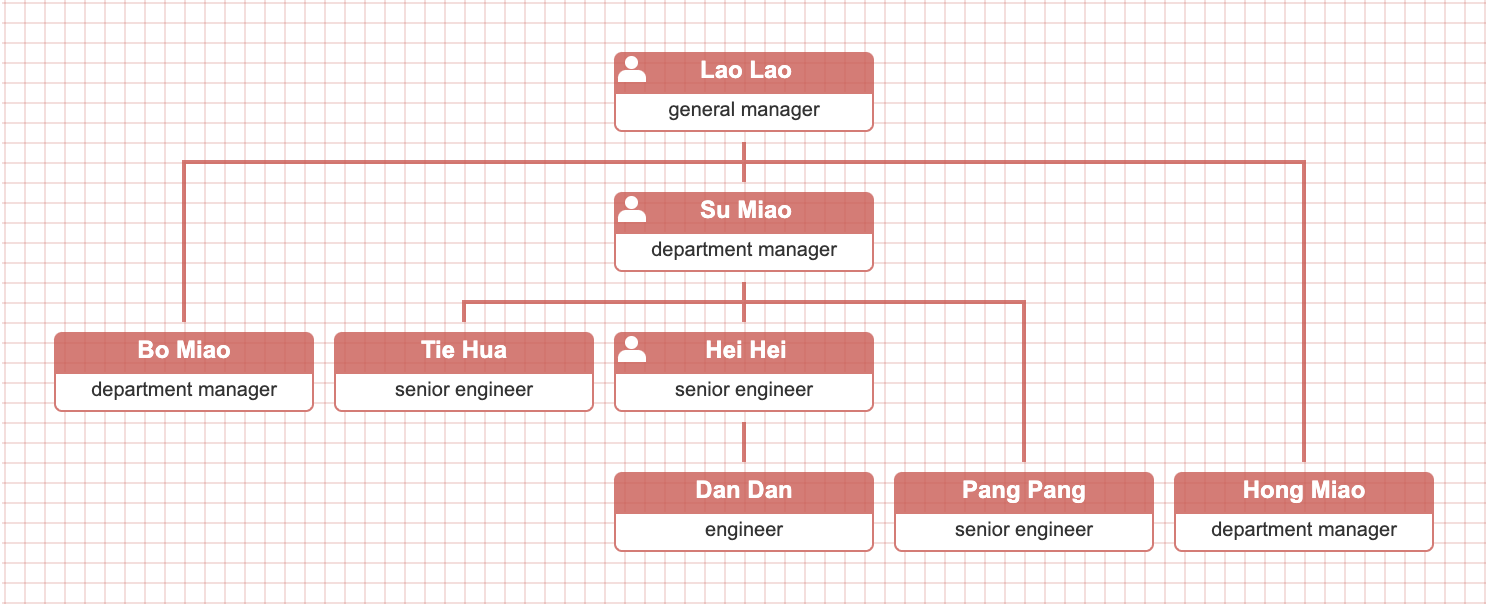
|
|
127
|
+
|
|
128
|
+
你需要的是一个复合的解决方案: **levelOffset data prop** + callback createNode() + CSS custom properties(variables)
|
|
129
|
+
|
|
130
|
+
- [我想构造一个组织结构图,每个节点宽度都可以不同的](https://dabeng.github.io/OrgChart/nodes-of-different-widths.html)
|
|
131
|
+
|
|
132
|
+
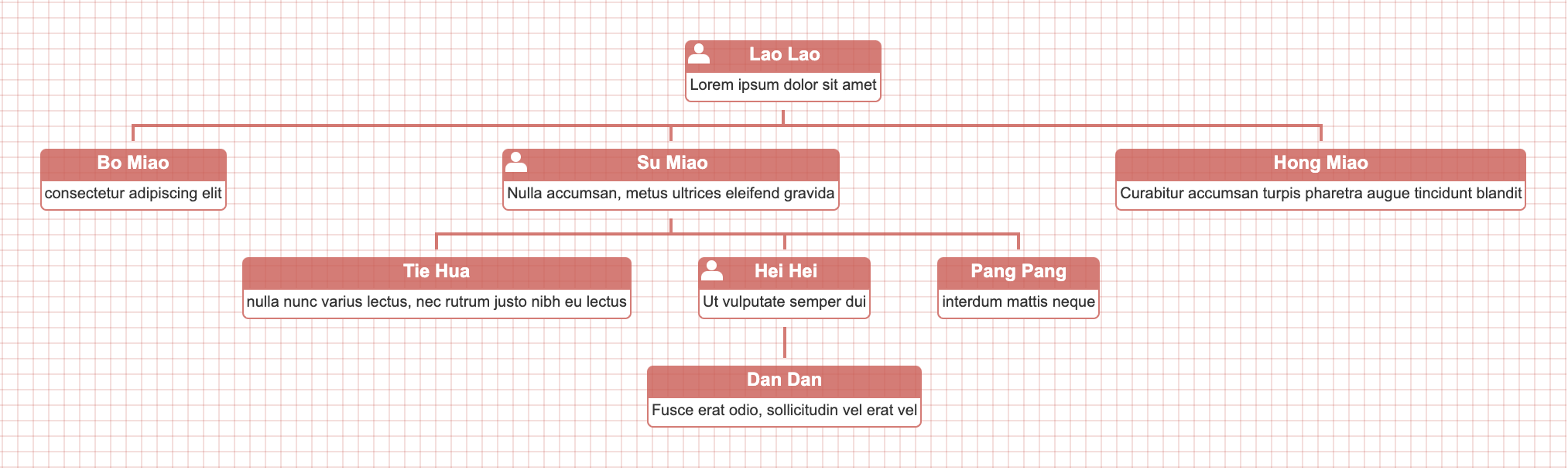
|
|
133
|
+
|
|
134
|
+
- [我想在混合布局中实现拖/放功能](https://dabeng.github.io/OrgChart/drag-drop-hybrid-chart.html)
|
|
135
|
+
|
|
136
|
+
- [我想指定从某一分支开始,其下所有子节点都以垂直样式显示](https://dabeng.github.io/OrgChart/data-prop-hybrid.html)
|
|
137
|
+
|
|
138
|
+
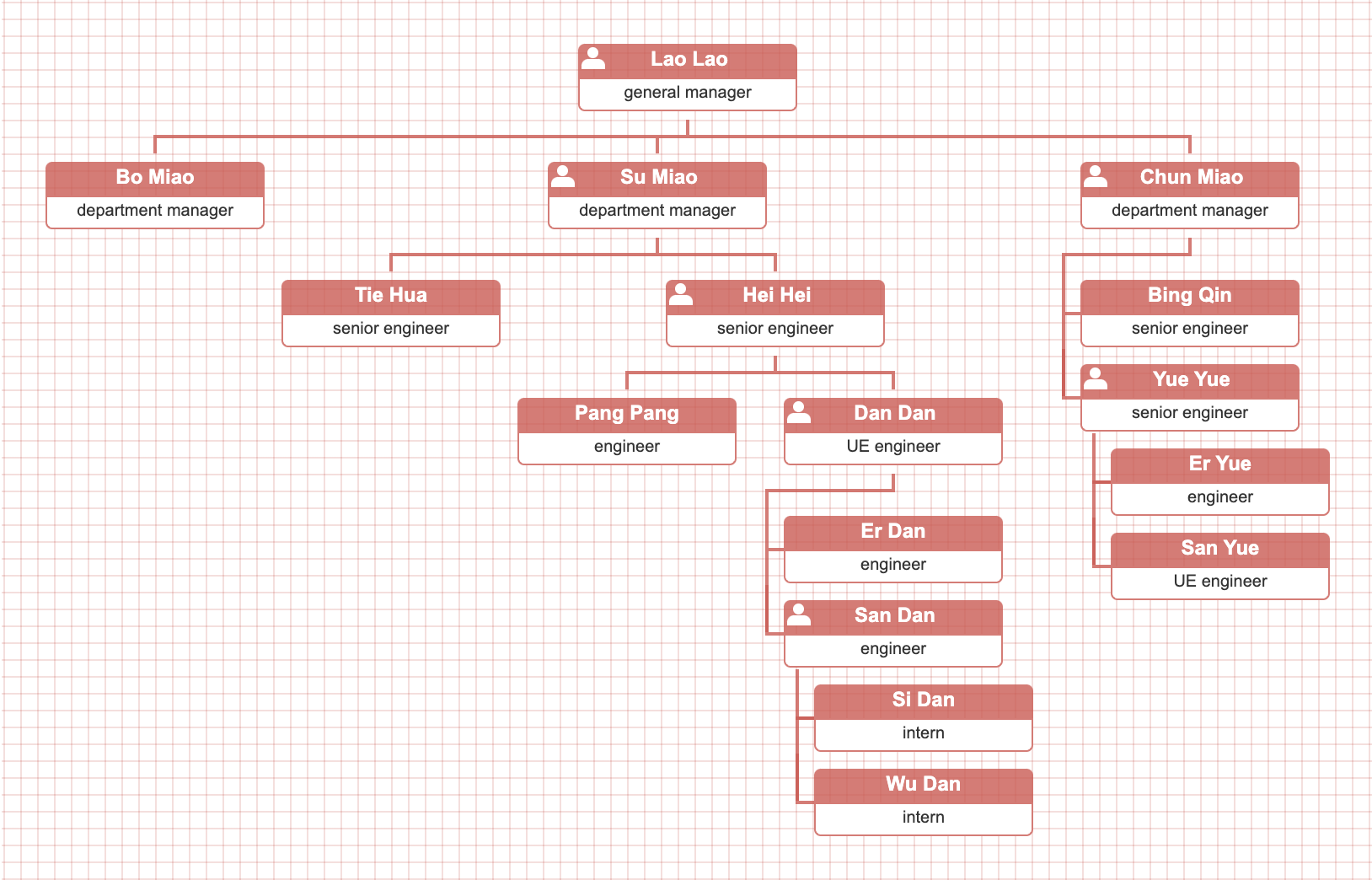
|
|
139
|
+
|
|
140
|
+
**hybrid data property** 就派上用场了. 在数据源的某个节点中提供"hybrid"属性,那么它的所有后代节点都会垂直布局.
|
|
141
|
+
|
|
142
|
+
- [我想用Font Awesome图标代替内置的图标](https://dabeng.github.io/OrgChart/custom-icons.html)
|
|
143
|
+
|
|
144
|
+
- [子节点众多的时候,我想以一种压缩起来的展示方式尽可能节省空间](https://dabeng.github.io/OrgChart/data-prop-compact.html)
|
|
145
|
+
|
|
146
|
+
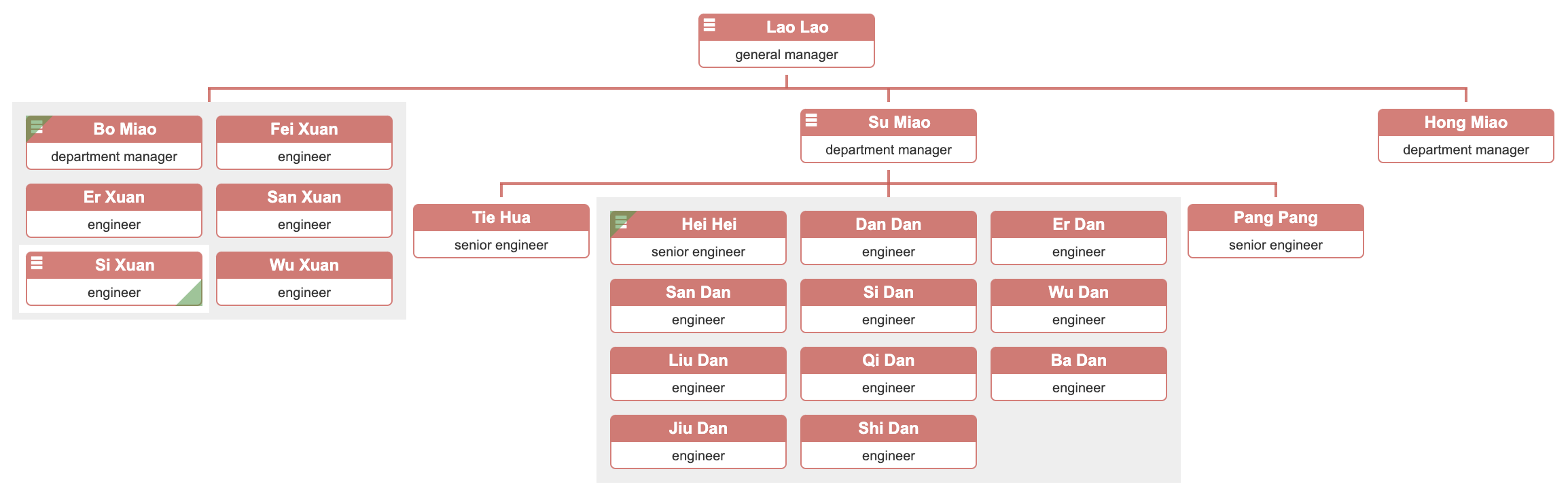
|
|
147
|
+
|
|
148
|
+
**compact data property** 就派上用场了. 在数据源的某个节点里提供了"compact"属性,并赋为真值,那么它和它的子节点就会展示为压缩模式。
|
|
149
|
+
|
|
150
|
+
- [我想构造族谱,家谱,宗谱的关系图](https://dabeng.github.io/OrgChart/family-tree.html)
|
|
151
|
+
|
|
152
|
+

|
|
153
|
+
|
|
154
|
+
我们使用如下的二维数组数据源来构建家谱。“outsider”代表外姓人。
|
|
155
|
+
|
|
156
|
+
```
|
|
157
|
+
var datascource = [
|
|
158
|
+
[
|
|
159
|
+
{ 'id': '8', 'name': 'Lao Ye', 'title': 'Grandfather', 'gender': 'male' },
|
|
160
|
+
{
|
|
161
|
+
'id': '1', 'name': 'Lao Lao', 'title': 'Grandmother', 'gender': 'female', 'outsider': true,
|
|
162
|
+
'children': [
|
|
163
|
+
[
|
|
164
|
+
{ 'id': '2', 'name': 'Bo miao', 'title': 'Aunt', 'gender': 'female'}
|
|
165
|
+
],
|
|
166
|
+
[
|
|
167
|
+
{ 'id': '3', 'name': 'Su Miao', 'title': 'Mother', 'gender': 'female',
|
|
168
|
+
'children': [
|
|
169
|
+
[
|
|
170
|
+
|
|
171
|
+
{ 'id': '12', 'name': 'Pang Pang', 'title': 'Wife', 'gender': 'female', 'outsider': true,
|
|
172
|
+
'children': [
|
|
173
|
+
[{ 'id': '7', 'name': 'Dan Dan', 'title': 'Daughter', 'gender': 'female' }],
|
|
174
|
+
[{ 'id': '6', 'name': 'Er Dan', 'title': 'Daughter', 'gender': 'female' }],
|
|
175
|
+
]
|
|
176
|
+
},
|
|
177
|
+
{ 'id': '5', 'name': 'Hei Hei', 'title': 'Me', 'gender': 'male' },
|
|
178
|
+
]
|
|
179
|
+
]
|
|
180
|
+
},
|
|
181
|
+
{ 'id': '9', 'name': 'Tie Hua', 'title': 'Father', 'gender': 'male', 'outsider': true }
|
|
182
|
+
],
|
|
183
|
+
[
|
|
184
|
+
{ 'id': '10', 'name': 'Hong miao', 'title': 'Aunt', 'gender': 'female'}
|
|
185
|
+
]
|
|
186
|
+
]
|
|
187
|
+
}
|
|
188
|
+
]
|
|
189
|
+
];
|
|
190
|
+
```
|
|
191
|
+
|
|
128
192
|
### 本地运行orgchart
|
|
129
193
|
|
|
130
194
|
- 必须安装node.js v6+,因为我们的单元测试是基于jsdom v11。
|
package/README.zh-tw.md
CHANGED
|
@@ -105,10 +105,6 @@ $ npm install orgchart
|
|
|
105
105
|
|
|
106
106
|
我們只需要把css的樣式與數據源中的id字段或css類字段關聯起來就好。
|
|
107
107
|
|
|
108
|
-
- [我想實現一個多層級(而非深度)的組織結構圖](https://dabeng.github.io/OrgChart/multiple-layers.html)
|
|
109
|
-
|
|
110
|
-
如果你的組織層級很多,二每個層級下的節點也很多,那麽上面的方案可以采納嘗試。
|
|
111
|
-
|
|
112
108
|
- [我想構造一個混合布局的(水平方向 + 垂直方向)組織結構圖](https://dabeng.github.io/OrgChart/vertical-level.html)
|
|
113
109
|
|
|
114
110
|
這個特性的靈感來源于這兩個話題的討論--[Aligning Children Vertical](https://github.com/dabeng/OrgChart/issues/46), [Hybrid(horizontal + vertical) OrgChart](https://github.com/dabeng/OrgChart/issues/61)。感謝[mfahadi](https://github.com/mfahadi)和[Destructrix](https://github.com/Destructrix)建設性的討論:blush:尤其感謝[tedliang](https://github.com/tedliang)提供了非常棒的混合布局的解決方案。
|
|
@@ -125,6 +121,74 @@ $ npm install orgchart
|
|
|
125
121
|
|
|
126
122
|
沒問題,我們推薦使用ES6的模版字符串。
|
|
127
123
|
|
|
124
|
+
- [我想將節點安置在特定的層級。 咋做 ?](https://dabeng.github.io/OrgChart/level-offset.html)
|
|
125
|
+
|
|
126
|
+

|
|
127
|
+
|
|
128
|
+
你需要的是一個復合的解決方案: **levelOffset data prop** + callback createNode() + CSS custom properties(variables)
|
|
129
|
+
|
|
130
|
+
- [我想構造一個組織結構圖,每個節點寬度都可以不同的](https://dabeng.github.io/OrgChart/nodes-of-different-widths.html)
|
|
131
|
+
|
|
132
|
+

|
|
133
|
+
|
|
134
|
+
- [我想在混合布局中實現拖/放功能](https://dabeng.github.io/OrgChart/drag-drop-hybrid-chart.html)
|
|
135
|
+
|
|
136
|
+
- [我想指定從某一分支開始,其下所有子節點都以垂直樣式顯示](https://dabeng.github.io/OrgChart/data-prop-hybrid.html)
|
|
137
|
+
|
|
138
|
+

|
|
139
|
+
|
|
140
|
+
**hybrid data property** 就派上用場了。 在數據源的某個節點中提供"hybrid"屬性,那麽它的所有後代節點都會垂直布局。
|
|
141
|
+
|
|
142
|
+
- [我想用Font Awesome圖標代替內置的圖標](https://dabeng.github.io/OrgChart/custom-icons.html)
|
|
143
|
+
|
|
144
|
+
- [子節點眾多的時候,我想以一種壓縮起來的展示方式盡可能節省空間](https://dabeng.github.io/OrgChart/data-prop-compact.html)
|
|
145
|
+
|
|
146
|
+

|
|
147
|
+
|
|
148
|
+
**compact data property** 就派上用場了。在數據源的某個節點裏提供了"compact"屬性,並賦為真值,那麽它和它的子節點就會展示為壓縮模式。
|
|
149
|
+
|
|
150
|
+
- [我想構造族譜,家譜,宗譜的關系圖](https://dabeng.github.io/OrgChart/family-tree.html)
|
|
151
|
+
|
|
152
|
+

|
|
153
|
+
|
|
154
|
+
我們使用如下的二維數組數據源來構建家譜。“outsider”代表外姓人。
|
|
155
|
+
|
|
156
|
+
```
|
|
157
|
+
var datascource = [
|
|
158
|
+
[
|
|
159
|
+
{ 'id': '8', 'name': 'Lao Ye', 'title': 'Grandfather', 'gender': 'male' },
|
|
160
|
+
{
|
|
161
|
+
'id': '1', 'name': 'Lao Lao', 'title': 'Grandmother', 'gender': 'female', 'outsider': true,
|
|
162
|
+
'children': [
|
|
163
|
+
[
|
|
164
|
+
{ 'id': '2', 'name': 'Bo miao', 'title': 'Aunt', 'gender': 'female'}
|
|
165
|
+
],
|
|
166
|
+
[
|
|
167
|
+
{ 'id': '3', 'name': 'Su Miao', 'title': 'Mother', 'gender': 'female',
|
|
168
|
+
'children': [
|
|
169
|
+
[
|
|
170
|
+
|
|
171
|
+
{ 'id': '12', 'name': 'Pang Pang', 'title': 'Wife', 'gender': 'female', 'outsider': true,
|
|
172
|
+
'children': [
|
|
173
|
+
[{ 'id': '7', 'name': 'Dan Dan', 'title': 'Daughter', 'gender': 'female' }],
|
|
174
|
+
[{ 'id': '6', 'name': 'Er Dan', 'title': 'Daughter', 'gender': 'female' }],
|
|
175
|
+
]
|
|
176
|
+
},
|
|
177
|
+
{ 'id': '5', 'name': 'Hei Hei', 'title': 'Me', 'gender': 'male' },
|
|
178
|
+
]
|
|
179
|
+
]
|
|
180
|
+
},
|
|
181
|
+
{ 'id': '9', 'name': 'Tie Hua', 'title': 'Father', 'gender': 'male', 'outsider': true }
|
|
182
|
+
],
|
|
183
|
+
[
|
|
184
|
+
{ 'id': '10', 'name': 'Hong miao', 'title': 'Aunt', 'gender': 'female'}
|
|
185
|
+
]
|
|
186
|
+
]
|
|
187
|
+
}
|
|
188
|
+
]
|
|
189
|
+
];
|
|
190
|
+
```
|
|
191
|
+
|
|
128
192
|
### 本地運行orgchart
|
|
129
193
|
|
|
130
194
|
- 必須安裝node.js v6+,因爲我們的單元測試是基于jsdom v11。
|
|
@@ -0,0 +1,97 @@
|
|
|
1
|
+
<!DOCTYPE html>
|
|
2
|
+
<html lang="en">
|
|
3
|
+
<head>
|
|
4
|
+
<meta charset="utf-8">
|
|
5
|
+
<title>Organization Chart Plugin</title>
|
|
6
|
+
<link rel="icon" href="img/logo.png">
|
|
7
|
+
<link rel="stylesheet" href="css/jquery.orgchart.css">
|
|
8
|
+
<link rel="stylesheet" href="css/style.css">
|
|
9
|
+
<style type="text/css">
|
|
10
|
+
.orgchart { background: #fff; }
|
|
11
|
+
#chart-container {
|
|
12
|
+
height: 850px;
|
|
13
|
+
}
|
|
14
|
+
.orgchart .node {
|
|
15
|
+
padding: 3px 8px;
|
|
16
|
+
}
|
|
17
|
+
.orgchart .node .avatar {
|
|
18
|
+
border-radius: 60px;
|
|
19
|
+
box-shadow: rgba(99, 99, 99, 0.8) 0px 2px 8px 0px;
|
|
20
|
+
}
|
|
21
|
+
.orgchart .couple:has(> .nodes) > .node:first-child::after {
|
|
22
|
+
top: 148px;
|
|
23
|
+
}
|
|
24
|
+
.orgchart .couple::after {
|
|
25
|
+
top: 148px;
|
|
26
|
+
width: 30px;
|
|
27
|
+
left: calc(50% - 15px);
|
|
28
|
+
}
|
|
29
|
+
.orgchart .couple:first-child:not(:only-child)::before {
|
|
30
|
+
width: calc(100% - 74px);
|
|
31
|
+
left: 74px;
|
|
32
|
+
}
|
|
33
|
+
.orgchart .hierarchy.couple:only-child::before {
|
|
34
|
+
width: 152px;
|
|
35
|
+
left: calc(50% - 76px);
|
|
36
|
+
}
|
|
37
|
+
.orgchart .couple:last-child:not(:only-child)::before {
|
|
38
|
+
width: calc(50% + 76px);
|
|
39
|
+
}
|
|
40
|
+
</style>
|
|
41
|
+
</head>
|
|
42
|
+
<body>
|
|
43
|
+
<div id="chart-container"></div>
|
|
44
|
+
|
|
45
|
+
<script type="text/javascript" src="js/jquery.min.js"></script>
|
|
46
|
+
<script type="text/javascript" src="js/jquery.orgchart.js"></script>
|
|
47
|
+
<script type="text/javascript">
|
|
48
|
+
$(function() {
|
|
49
|
+
|
|
50
|
+
var datascource = [
|
|
51
|
+
[
|
|
52
|
+
{ 'id': '8', 'name': 'Lao Ye', 'title': 'Grandfather', 'gender': 'male' },
|
|
53
|
+
{
|
|
54
|
+
'id': '1', 'name': 'Lao Lao', 'title': 'Grandmother', 'gender': 'female', 'outsider': true,
|
|
55
|
+
'children': [
|
|
56
|
+
[
|
|
57
|
+
{ 'id': '2', 'name': 'Bo miao', 'title': 'Aunt', 'gender': 'female'}
|
|
58
|
+
],
|
|
59
|
+
[
|
|
60
|
+
{ 'id': '3', 'name': 'Su Miao', 'title': 'Mother', 'gender': 'female',
|
|
61
|
+
'children': [
|
|
62
|
+
[
|
|
63
|
+
|
|
64
|
+
{ 'id': '12', 'name': 'Pang Pang', 'title': 'Wife', 'gender': 'female', 'outsider': true,
|
|
65
|
+
'children': [
|
|
66
|
+
[{ 'id': '7', 'name': 'Dan Dan', 'title': 'Daughter', 'gender': 'female' }],
|
|
67
|
+
[{ 'id': '6', 'name': 'Er Dan', 'title': 'Daughter', 'gender': 'female' }],
|
|
68
|
+
]
|
|
69
|
+
},
|
|
70
|
+
{ 'id': '5', 'name': 'Hei Hei', 'title': 'Me', 'gender': 'male' },
|
|
71
|
+
]
|
|
72
|
+
]
|
|
73
|
+
},
|
|
74
|
+
{ 'id': '9', 'name': 'Tie Hua', 'title': 'Father', 'gender': 'male', 'outsider': true }
|
|
75
|
+
],
|
|
76
|
+
[
|
|
77
|
+
{ 'id': '10', 'name': 'Hong miao', 'title': 'Aunt', 'gender': 'female'}
|
|
78
|
+
]
|
|
79
|
+
]
|
|
80
|
+
}
|
|
81
|
+
]
|
|
82
|
+
];
|
|
83
|
+
|
|
84
|
+
var oc = $('#chart-container').orgchart({
|
|
85
|
+
'data' : datascource,
|
|
86
|
+
'nodeContent': 'title',
|
|
87
|
+
'nodeID': 'id',
|
|
88
|
+
'createNode': function($node, data) {
|
|
89
|
+
$node.prepend(`<img class="avatar" src="https://dabeng.github.io/OrgChart/img/avatar/${data.id}.jpg" crossorigin="anonymous" />`);
|
|
90
|
+
}
|
|
91
|
+
});
|
|
92
|
+
|
|
93
|
+
|
|
94
|
+
});
|
|
95
|
+
</script>
|
|
96
|
+
</body>
|
|
97
|
+
</html>
|
package/demo/index.html
CHANGED
|
@@ -13,7 +13,7 @@
|
|
|
13
13
|
background-color: #000;
|
|
14
14
|
}
|
|
15
15
|
section {
|
|
16
|
-
width:
|
|
16
|
+
width: 36rem;
|
|
17
17
|
margin-top: 200px;
|
|
18
18
|
margin-left: auto;
|
|
19
19
|
margin-right: auto;
|
|
@@ -130,7 +130,6 @@
|
|
|
130
130
|
<li><a href="get-hierarchy.html" target="_blank">getHierarchy() method</a></li>
|
|
131
131
|
<li><a href="integrate-map.html" target="_blank">itegrate orgchart with map info</a></li>
|
|
132
132
|
<li><a href="local-datasource.html" target="_blank">local datasource</a></li>
|
|
133
|
-
<li><a href="multiple-layers.html" target="_blank">multiple-layers chart</a></li>
|
|
134
133
|
<li><a href="ondemand-loading-data.html" target="_blank">load data on-demand</a></li>
|
|
135
134
|
<li><a href="option-createNode.html" target="_blank">createNode callback</a></li>
|
|
136
135
|
<li><a href="pan-zoom.html" target="_blank">pan and zoom the chart</a></li>
|
|
@@ -148,6 +147,7 @@
|
|
|
148
147
|
<li><a href="data-prop-hybrid.html" target="_blank">create hybrid chart with data prop "hybrid"</a></li>
|
|
149
148
|
<li><a href="custom-icons.html" target="_blank">use fontawesome icons instead of built-in icons</a></li>
|
|
150
149
|
<li><a href="data-prop-compact.html" target="_blank">layout for children which is too many</a></li>
|
|
150
|
+
<li><a href="family-tree.html" target="_blank">visualize genealogy/pedigree/family tree information</a></li>
|
|
151
151
|
</ol>
|
|
152
152
|
</section>
|
|
153
153
|
</body>
|
|
@@ -7,12 +7,13 @@
|
|
|
7
7
|
<link rel="stylesheet" href="css/jquery.orgchart.css">
|
|
8
8
|
<link rel="stylesheet" href="css/style.css">
|
|
9
9
|
<style type="text/css">
|
|
10
|
-
.orgchart .nodes {
|
|
11
|
-
justify-content: center;
|
|
12
|
-
}
|
|
13
10
|
.orgchart .node .title {
|
|
14
11
|
width: auto;
|
|
15
12
|
}
|
|
13
|
+
.orgchart .node .content {
|
|
14
|
+
width: auto;
|
|
15
|
+
padding: 0 3px;
|
|
16
|
+
}
|
|
16
17
|
</style>
|
|
17
18
|
</head>
|
|
18
19
|
<body>
|
|
@@ -21,12 +21,12 @@
|
|
|
21
21
|
.orgchart .node .second-menu {
|
|
22
22
|
display: none;
|
|
23
23
|
position: absolute;
|
|
24
|
-
|
|
25
|
-
right:
|
|
24
|
+
bottom: -35px;
|
|
25
|
+
right: 0;
|
|
26
26
|
border-radius: 35px;
|
|
27
27
|
box-shadow: 0 0 10px 1px #999;
|
|
28
28
|
background-color: #fff;
|
|
29
|
-
z-index:
|
|
29
|
+
z-index: 3;
|
|
30
30
|
}
|
|
31
31
|
.orgchart .node .second-menu .avatar {
|
|
32
32
|
width: 60px;
|