openyida 1.0.0-beta.0 → 1.0.0-beta.2
This diff represents the content of publicly available package versions that have been released to one of the supported registries. The information contained in this diff is provided for informational purposes only and reflects changes between package versions as they appear in their respective public registries.
- package/README.md +68 -36
- package/bin/yida.js +199 -50
- package/lib/auth.js +238 -0
- package/lib/cdn-config-cmd.js +252 -0
- package/lib/cdn-config.js +172 -0
- package/lib/cdn-refresh.js +293 -0
- package/lib/cdn-upload.js +321 -0
- package/lib/copy.js +24 -30
- package/lib/create-app.js +34 -36
- package/lib/create-form.js +154 -149
- package/lib/create-page.js +23 -20
- package/lib/env.js +28 -27
- package/lib/export-app.js +197 -0
- package/lib/get-page-config.js +18 -17
- package/lib/get-schema.js +20 -18
- package/lib/i18n.js +131 -0
- package/lib/import-app.js +364 -0
- package/lib/locales/en.js +819 -0
- package/lib/locales/ja.js +710 -0
- package/lib/locales/zh.js +718 -0
- package/lib/login.js +33 -29
- package/lib/org.js +367 -0
- package/lib/publish.js +62 -62
- package/lib/qr-login.js +616 -0
- package/lib/save-share-config.js +39 -38
- package/lib/update-form-config.js +31 -30
- package/lib/utils.js +16 -15
- package/lib/verify-short-url.js +37 -36
- package/package.json +5 -3
- package/scripts/postinstall.js +81 -0
- package/scripts/validate-ci.sh +24 -0
- package/scripts/validate-structure.js +33 -0
- package/yida-skills/SKILL.md +2 -0
- package/yida-skills/reference/yida-api.md +4 -0
- package/yida-skills/skills/yida-custom-page/SKILL.md +11 -0
- package/yida-skills/skills/yida-custom-page/examples/tabs-visibility-control.js +152 -0
package/README.md
CHANGED
|
@@ -1,3 +1,21 @@
|
|
|
1
|
+
<div align="center">
|
|
2
|
+
|
|
3
|
+
# 🚀 OpenYida
|
|
4
|
+
|
|
5
|
+
**Build Yida low-code apps with AI — zero config, instant deploy.**
|
|
6
|
+
|
|
7
|
+
[快速开始](#快速开始) · [CLI 命令](#cli-命令一览) · [Demo](#demo-展示) · [贡献指南](./CONTRIBUTING.md) · [更新日志](./CHANGELOG.md)
|
|
8
|
+
|
|
9
|
+
[](https://www.npmjs.com/package/openyida)
|
|
10
|
+
[](https://www.npmjs.com/package/openyida)
|
|
11
|
+
[](https://github.com/openyida/openyida/actions/workflows/ci.yml)
|
|
12
|
+
[](./LICENSE)
|
|
13
|
+
[](https://nodejs.org)
|
|
14
|
+
|
|
15
|
+
</div>
|
|
16
|
+
|
|
17
|
+
---
|
|
18
|
+
|
|
1
19
|
## 快速开始
|
|
2
20
|
|
|
3
21
|
```bash
|
|
@@ -6,19 +24,25 @@ npm install -g openyida
|
|
|
6
24
|
|
|
7
25
|
**安装即用,零配置。** 安装后在 Claude Code / OpenCode / Aone Copilot 中直接对话:
|
|
8
26
|
|
|
9
|
-
|
|
10
|
-
|
|
11
|
-
|
|
27
|
+
```
|
|
28
|
+
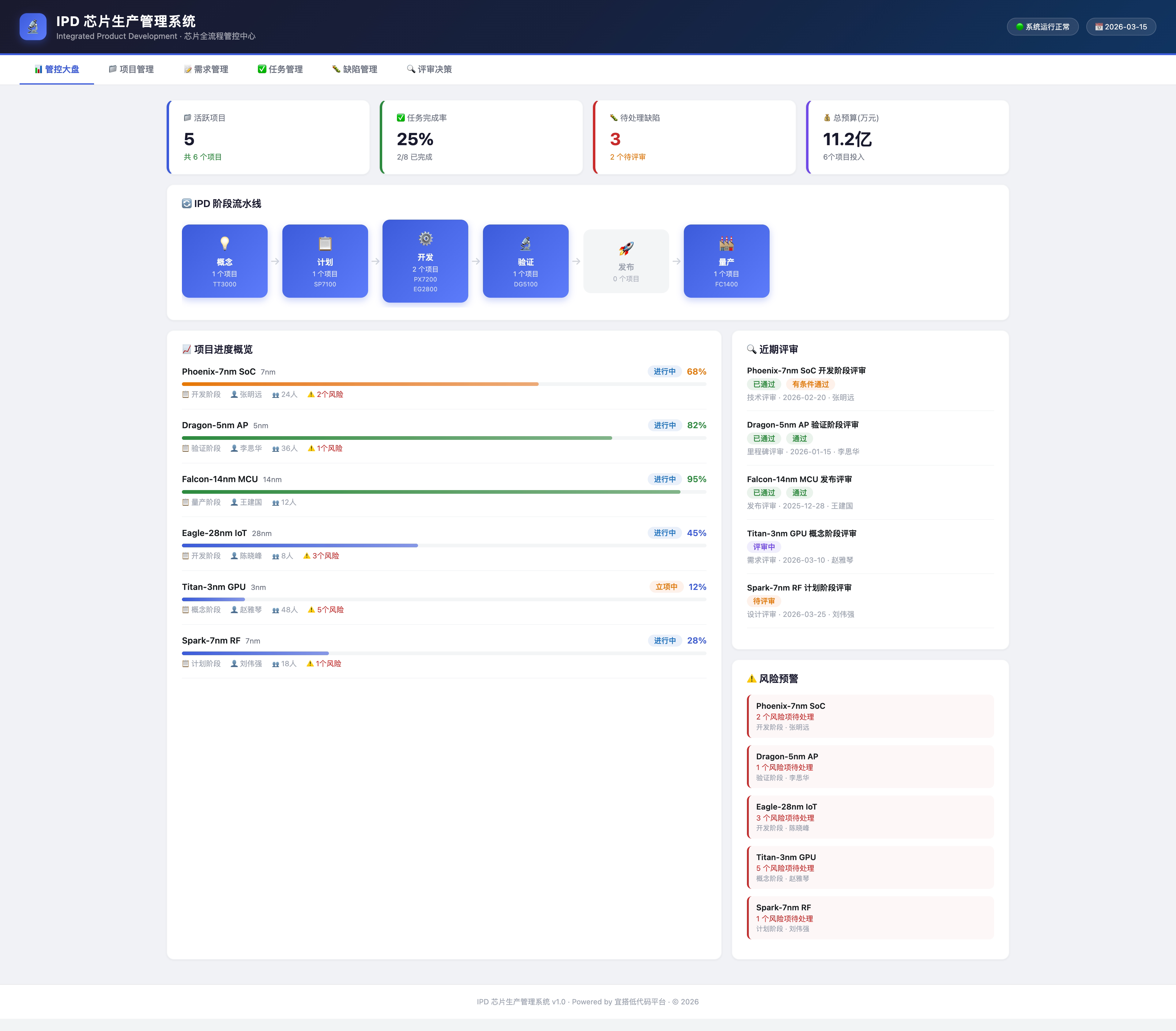
帮我用宜搭创建一个 IPD 系统,需要管理芯片生产全流程
|
|
29
|
+
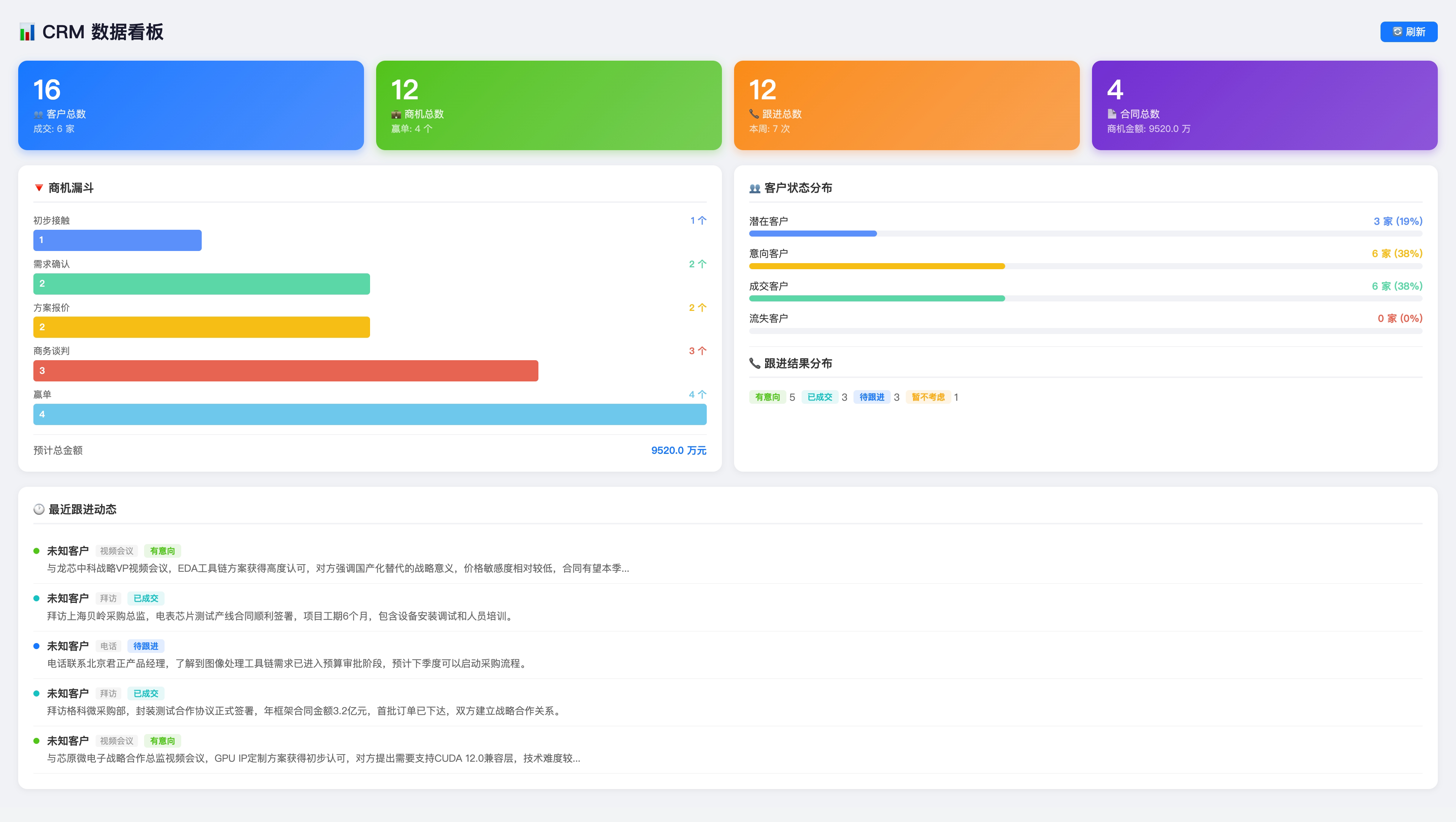
帮我搭建一个 CRM
|
|
30
|
+
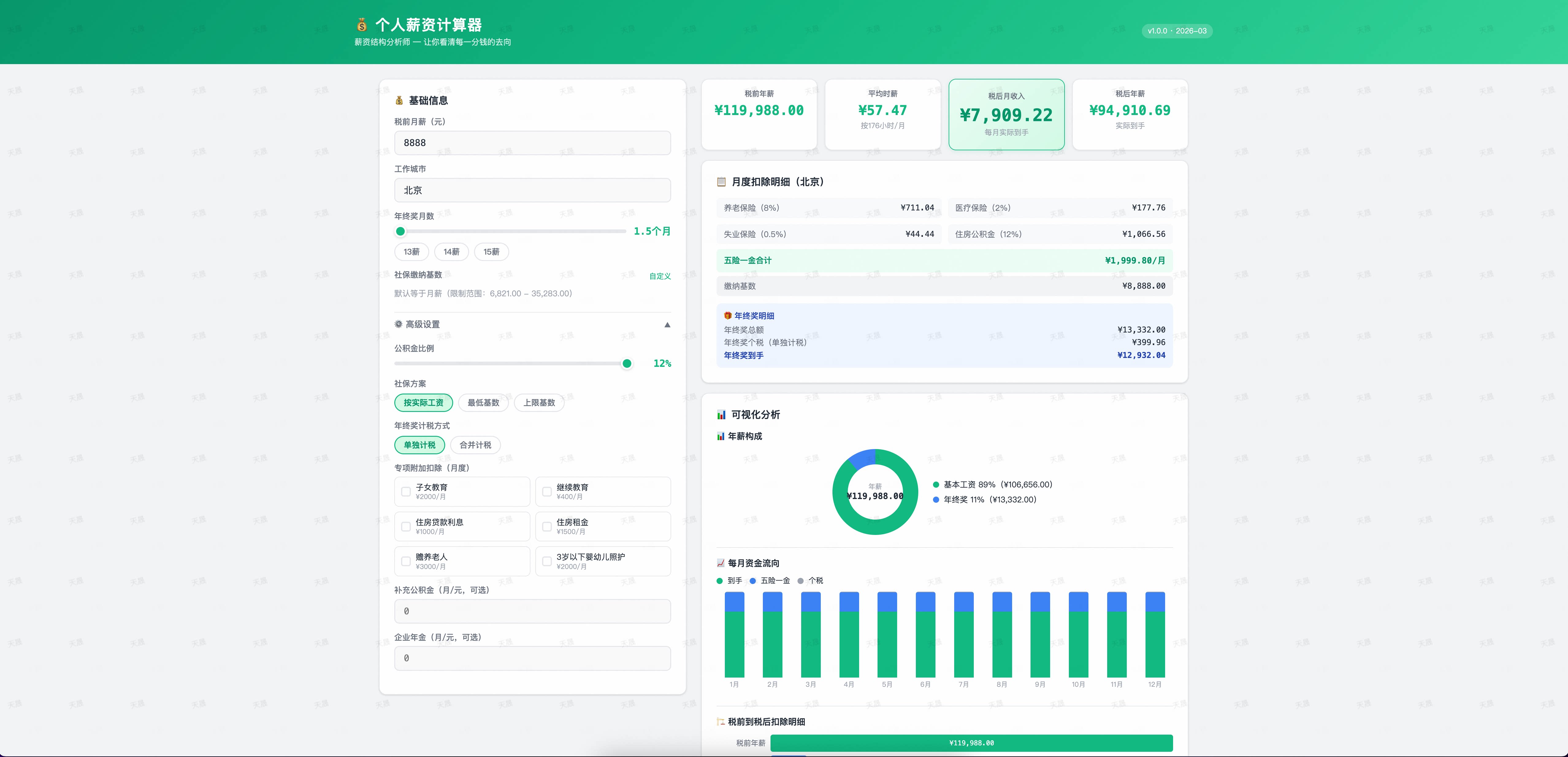
帮我搭建个人薪资计算器应用
|
|
31
|
+
```
|
|
12
32
|
|
|
13
33
|
---
|
|
14
34
|
|
|
15
35
|
## 支持的 AI 编程工具
|
|
16
36
|
|
|
17
|
-
|
|
18
|
-
|
|
19
|
-
|
|
20
|
-
|
|
21
|
-
|
|
37
|
+
| 工具 | 支持状态 |
|
|
38
|
+
|------|----------|
|
|
39
|
+
| [Claude Code](https://claude.ai/code) | ✅ 完整支持 |
|
|
40
|
+
| [Aone Copilot](https://copilot.code.alibaba-inc.com) | ✅ 完整支持 |
|
|
41
|
+
| [OpenCode](https://opencode.ai) | ✅ 完整支持 |
|
|
42
|
+
| [Cursor](https://cursor.com/) | ✅ 完整支持 |
|
|
43
|
+
| [Visual Studio Code](https://code.visualstudio.com/) | ✅ 完整支持 |
|
|
44
|
+
| [Qoder](https://qoder.com) | ✅ 完整支持 |
|
|
45
|
+
| [悟空](https://dingtalk.com/wukong) | ✅ 完整支持 |
|
|
22
46
|
|
|
23
47
|
---
|
|
24
48
|
|
|
@@ -41,7 +65,9 @@ npm install -g openyida
|
|
|
41
65
|
|------|----------|------|
|
|
42
66
|
| Node.js | ≥ 16 | CLI 运行、页面发布 |
|
|
43
67
|
|
|
44
|
-
|
|
68
|
+
---
|
|
69
|
+
|
|
70
|
+
## CLI 命令一览
|
|
45
71
|
|
|
46
72
|
```bash
|
|
47
73
|
openyida env # 检测当前 AI 工具环境和登录态
|
|
@@ -57,80 +83,86 @@ openyida verify-short-url # 验证短链接 URL 是否可用
|
|
|
57
83
|
openyida save-share-config # 保存公开访问 / 分享配置
|
|
58
84
|
openyida get-page-config # 查询页面公开访问 / 分享配置
|
|
59
85
|
openyida update-form-config # 更新表单配置
|
|
86
|
+
openyida cdn-config # 配置 CDN 图片上传(阿里云 OSS + CDN)
|
|
87
|
+
openyida cdn-upload # 上传图片到 CDN
|
|
88
|
+
openyida cdn-refresh # 刷新 CDN 缓存
|
|
60
89
|
```
|
|
61
90
|
|
|
62
91
|
---
|
|
63
92
|
|
|
64
|
-
##
|
|
93
|
+
## Demo 展示
|
|
65
94
|
|
|
66
|
-
### 业务系统
|
|
95
|
+
### 🏢 业务系统 — IPD / CRM
|
|
96
|
+
|
|
97
|
+
一句话描述需求,AI 自动生成完整的多表单业务系统。
|
|
67
98
|
|
|
68
99
|
|
|
69
100
|
|
|
70
101
|
|
|
71
102
|
|
|
72
|
-
### 💰 小工具
|
|
103
|
+
### 💰 小工具 — 个人薪资计算器
|
|
73
104
|
|
|
74
105
|
|
|
75
106
|
|
|
76
|
-
|
|
77
|
-
|
|
78
|
-
### 🌐 Landing Page - 智联协同
|
|
107
|
+
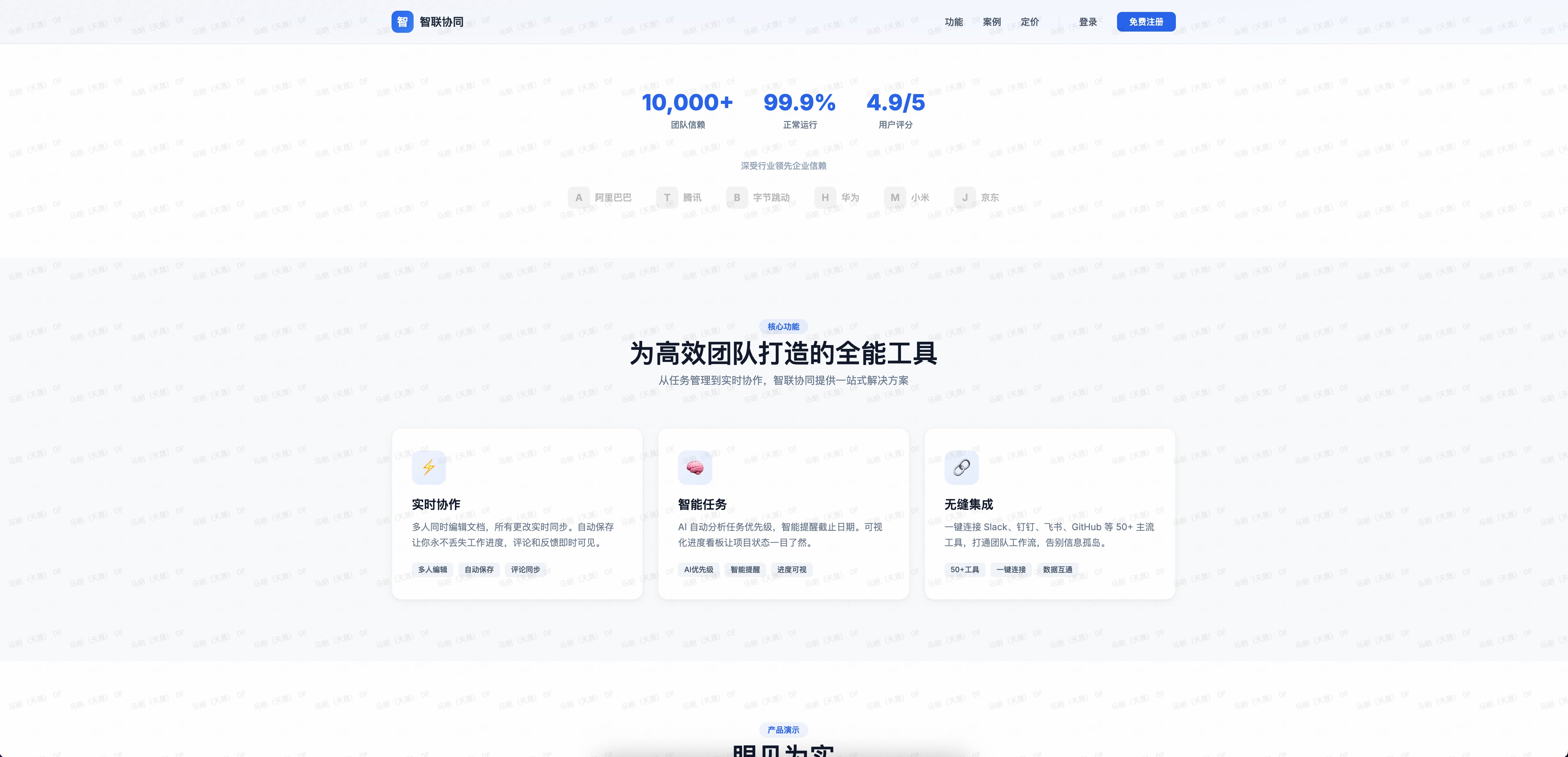
### 🌐 Landing Page — 智联协同
|
|
79
108
|
|
|
80
109
|
企业级产品介绍页,一句话生成完整 Landing Page。
|
|
81
110
|
|
|
82
111
|
|
|
83
112
|
|
|
84
|
-
|
|
85
|
-
|
|
86
|
-
### 🏮 运营场景 - 看图猜灯谜
|
|
113
|
+
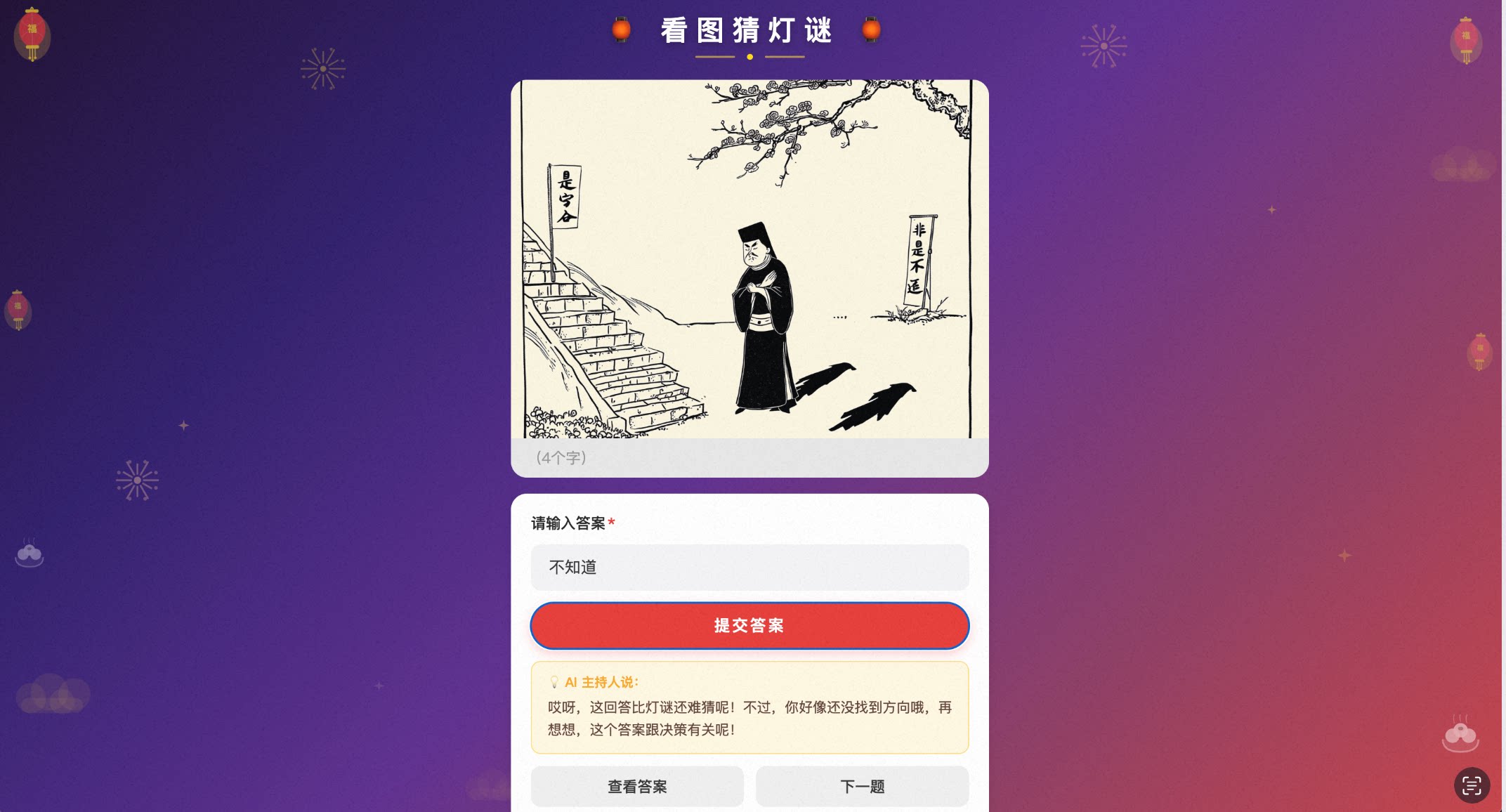
### 🏮 运营场景 — 看图猜灯谜
|
|
87
114
|
|
|
88
115
|
AI 生成灯谜图片,用户猜答案,猜错了有 AI 幽默提示。
|
|
89
116
|
|
|
90
|
-
|
|
91
118
|
|
|
92
119
|
---
|
|
93
120
|
|
|
94
121
|
## 常用问法
|
|
95
122
|
|
|
96
|
-
|
|
97
|
-
|
|
98
|
-
|
|
99
|
-
|
|
100
|
-
|
|
101
|
-
|
|
102
|
-
|
|
103
|
-
|
|
104
|
-
|
|
123
|
+
```
|
|
124
|
+
帮我搭建一个 xxx 应用
|
|
125
|
+
根据需求文档生成应用
|
|
126
|
+
帮我创建一个 xxx 表单页面
|
|
127
|
+
帮我给 xxx 页面添加一个 xxx 字段,字段名称:字段类型 xxx
|
|
128
|
+
帮我给 xxx 页面 xxx 字段改为必填
|
|
129
|
+
帮我发布 xxx 页面
|
|
130
|
+
帮我把页面发布为公开访问
|
|
131
|
+
重新登录 / 退出登录
|
|
132
|
+
```
|
|
105
133
|
|
|
106
134
|
---
|
|
107
135
|
|
|
108
|
-
## OpenClaw
|
|
136
|
+
## OpenClaw 集成
|
|
109
137
|
|
|
110
|
-
通过 [yida-app](https://clawhub.ai/nicky1108/yida-app) 在 OpenClaw
|
|
138
|
+
通过 [yida-app](https://clawhub.ai/nicky1108/yida-app) 在 OpenClaw 中使用:
|
|
111
139
|
|
|
112
|
-
安装:
|
|
113
140
|
```bash
|
|
114
141
|
npx clawhub@latest install nicky1108/yida-app
|
|
115
142
|
```
|
|
116
143
|
|
|
117
144
|
---
|
|
118
145
|
|
|
119
|
-
##
|
|
146
|
+
## 社区
|
|
120
147
|
|
|
121
|
-
|
|
148
|
+
钉钉扫码加入 OpenYida 用户群,获取最新动态和技术支持。
|
|
122
149
|
|
|
123
150
|

|
|
124
151
|
|
|
152
|
+
---
|
|
153
|
+
|
|
125
154
|
## 贡献者
|
|
126
155
|
|
|
127
|
-
感谢所有为 OpenYida
|
|
156
|
+
感谢所有为 OpenYida 做出贡献的开发者!欢迎阅读 [贡献指南](./CONTRIBUTING.md) 参与共建。
|
|
128
157
|
|
|
129
|
-
### 贡献者
|
|
130
158
|
<p align="left">
|
|
131
|
-
<a href="https://github.com/yize"><img src="https://avatars.githubusercontent.com/u/1578814?v=4&s=48" width="48" height="48" alt="yize" title="yize"/></a>
|
|
159
|
+
<a href="https://github.com/yize"><img src="https://avatars.githubusercontent.com/u/1578814?v=4&s=48" width="48" height="48" alt="yize" title="yize"/></a>
|
|
160
|
+
<a href="https://github.com/alex-mm"><img src="https://avatars.githubusercontent.com/u/3302053?v=4&s=48" width="48" height="48" alt="alex-mm" title="alex-mm"/></a>
|
|
161
|
+
<a href="https://github.com/nicky1108"><img src="https://avatars.githubusercontent.com/u/4279283?v=4&s=48" width="48" height="48" alt="nicky1108" title="nicky1108"/></a>
|
|
132
162
|
</p>
|
|
133
163
|
|
|
164
|
+
---
|
|
165
|
+
|
|
134
166
|
## License
|
|
135
167
|
|
|
136
168
|
[MIT](./LICENSE) © 2026 Alibaba Group
|
package/bin/yida.js
CHANGED
|
@@ -8,8 +8,14 @@
|
|
|
8
8
|
* 命令列表:
|
|
9
9
|
* openyida env 检测当前 AI 工具环境和登录态
|
|
10
10
|
* openyida copy [--force] 复制 project 工作目录到当前 AI 工具环境
|
|
11
|
-
* openyida login
|
|
11
|
+
* openyida login [--qr] 登录态管理(--qr 使用终端二维码扫码)
|
|
12
12
|
* openyida logout 退出登录
|
|
13
|
+
* openyida auth status 查看当前登录状态
|
|
14
|
+
* openyida auth login 执行登录
|
|
15
|
+
* openyida auth refresh 刷新登录态
|
|
16
|
+
* openyida auth logout 退出登录
|
|
17
|
+
* openyida org list 列出可访问的组织
|
|
18
|
+
* openyida org switch --corp-id <corpId> 切换组织(无需重新登录)
|
|
13
19
|
* openyida create-app "<名称>" [desc] [icon] [color] 创建应用
|
|
14
20
|
* openyida create-page <appType> "<页面名>" 创建自定义页面
|
|
15
21
|
* openyida create-form create <appType> "<表单名>" <字段JSON> 创建表单页面
|
|
@@ -20,12 +26,15 @@
|
|
|
20
26
|
* openyida save-share-config <appType> <formUuid> <url> <isOpen> [openAuth] 保存公开访问/分享配置
|
|
21
27
|
* openyida get-page-config <appType> <formUuid> 查询页面公开访问/分享配置
|
|
22
28
|
* openyida update-form-config <appType> <formUuid> <isRenderNav> <title> 更新表单配置
|
|
29
|
+
* openyida export <appType> [output] 导出应用所有表单 Schema(生成迁移包)
|
|
30
|
+
* openyida import <file> [name] 导入迁移包,在目标环境重建应用
|
|
23
31
|
*/
|
|
24
32
|
|
|
25
33
|
"use strict";
|
|
26
34
|
|
|
27
35
|
const { checkUpdate } = require('../lib/check-update');
|
|
28
36
|
const { version: currentVersion } = require('../package.json');
|
|
37
|
+
const { t } = require('../lib/i18n');
|
|
29
38
|
|
|
30
39
|
// 异步检查更新,fire-and-forget,不阻塞主流程
|
|
31
40
|
const updateCheckPromise = checkUpdate(currentVersion);
|
|
@@ -34,46 +43,84 @@ const command = process.argv[2];
|
|
|
34
43
|
const args = process.argv.slice(3);
|
|
35
44
|
|
|
36
45
|
function printHelp() {
|
|
37
|
-
console.log(
|
|
38
|
-
|
|
39
|
-
|
|
40
|
-
|
|
41
|
-
|
|
42
|
-
|
|
43
|
-
|
|
44
|
-
|
|
45
|
-
|
|
46
|
-
|
|
47
|
-
|
|
48
|
-
|
|
49
|
-
|
|
50
|
-
|
|
51
|
-
|
|
52
|
-
|
|
53
|
-
|
|
54
|
-
|
|
55
|
-
|
|
56
|
-
|
|
57
|
-
|
|
58
|
-
|
|
59
|
-
|
|
60
|
-
|
|
61
|
-
|
|
62
|
-
|
|
63
|
-
|
|
64
|
-
|
|
65
|
-
|
|
66
|
-
|
|
67
|
-
|
|
68
|
-
|
|
69
|
-
|
|
70
|
-
|
|
71
|
-
|
|
72
|
-
|
|
46
|
+
console.log(t('cli.help'));
|
|
47
|
+
}
|
|
48
|
+
|
|
49
|
+
/**
|
|
50
|
+
* 检测是否首次运行(安装后第一次执行 openyida 命令)。
|
|
51
|
+
* 通过 ~/.openyida/first-run-done 标记文件判断。
|
|
52
|
+
* 若是首次运行,打印新手引导并写入标记文件。
|
|
53
|
+
*/
|
|
54
|
+
function handleFirstRunGuide() {
|
|
55
|
+
const os = require('os');
|
|
56
|
+
const path = require('path');
|
|
57
|
+
const fs = require('fs');
|
|
58
|
+
|
|
59
|
+
const OPENYIDA_DIR = path.join(os.homedir(), '.openyida');
|
|
60
|
+
const FIRST_RUN_FLAG = path.join(OPENYIDA_DIR, 'first-run-done');
|
|
61
|
+
|
|
62
|
+
// 已运行过,跳过引导
|
|
63
|
+
if (fs.existsSync(FIRST_RUN_FLAG)) return;
|
|
64
|
+
|
|
65
|
+
// 写入标记,避免重复展示
|
|
66
|
+
try {
|
|
67
|
+
fs.mkdirSync(OPENYIDA_DIR, { recursive: true });
|
|
68
|
+
fs.writeFileSync(FIRST_RUN_FLAG, new Date().toISOString(), 'utf8');
|
|
69
|
+
} catch {
|
|
70
|
+
// 写入失败不影响主流程
|
|
71
|
+
}
|
|
72
|
+
|
|
73
|
+
const RESET = '\x1b[0m';
|
|
74
|
+
const BOLD = '\x1b[1m';
|
|
75
|
+
const DIM = '\x1b[2m';
|
|
76
|
+
const CYAN = '\x1b[36m';
|
|
77
|
+
const GREEN = '\x1b[32m';
|
|
78
|
+
const YELLOW = '\x1b[33m';
|
|
79
|
+
const BLUE = '\x1b[34m';
|
|
80
|
+
const MAGENTA = '\x1b[35m';
|
|
81
|
+
const BG_CYAN = '\x1b[46m';
|
|
82
|
+
const WHITE = '\x1b[37m';
|
|
83
|
+
|
|
84
|
+
const SEP = `${DIM}${'─'.repeat(60)}${RESET}`;
|
|
85
|
+
|
|
86
|
+
console.log('');
|
|
87
|
+
console.log(`${BG_CYAN}${WHITE}${BOLD}${t('cli.first_run_title')}${RESET}`);
|
|
88
|
+
console.log(SEP);
|
|
89
|
+
console.log(t('cli.first_run_welcome', `${GREEN}${BOLD}`, RESET));
|
|
90
|
+
console.log('');
|
|
91
|
+
console.log(`${BOLD}${CYAN}${t('cli.first_run_way1_title')}${RESET}`);
|
|
92
|
+
console.log(t('cli.first_run_way1_desc'));
|
|
93
|
+
console.log('');
|
|
94
|
+
console.log(` ${YELLOW}${t('cli.first_run_prompt1')}${RESET}`);
|
|
95
|
+
console.log(` ${YELLOW}${t('cli.first_run_prompt2')}${RESET}`);
|
|
96
|
+
console.log(` ${YELLOW}${t('cli.first_run_prompt3')}${RESET}`);
|
|
97
|
+
console.log('');
|
|
98
|
+
console.log(`${BOLD}${CYAN}${t('cli.first_run_way2_title')}${RESET}`);
|
|
99
|
+
console.log('');
|
|
100
|
+
console.log(` ${YELLOW}${t('cli.first_run_prompt4')}${RESET}`);
|
|
101
|
+
console.log('');
|
|
102
|
+
console.log(`${BOLD}${CYAN}${t('cli.first_run_examples_title')}${RESET}`);
|
|
103
|
+
console.log('');
|
|
104
|
+
console.log(` ${MAGENTA}•${RESET} ${t('cli.first_run_examples')}`);
|
|
105
|
+
console.log('');
|
|
106
|
+
console.log(SEP);
|
|
107
|
+
console.log(`${BOLD}${BLUE}${t('cli.first_run_tips_title')}${RESET}`);
|
|
108
|
+
console.log('');
|
|
109
|
+
console.log(t('cli.first_run_tip1', CYAN, RESET));
|
|
110
|
+
console.log(t('cli.first_run_tip2', CYAN, RESET));
|
|
111
|
+
console.log(t('cli.first_run_tip3'));
|
|
112
|
+
console.log('');
|
|
113
|
+
console.log(SEP);
|
|
114
|
+
console.log(` ${DIM}${t('cli.first_run_footer1')}${RESET}`);
|
|
115
|
+
console.log(` ${DIM}${t('cli.first_run_footer2')}${RESET}`);
|
|
116
|
+
console.log('');
|
|
117
|
+
console.log(` ${DIM}${t('cli.first_run_footer3')}${RESET}`);
|
|
118
|
+
console.log('');
|
|
73
119
|
}
|
|
74
120
|
|
|
75
121
|
async function main() {
|
|
76
122
|
if (!command || command === '--help' || command === '-h') {
|
|
123
|
+
handleFirstRunGuide();
|
|
77
124
|
printHelp();
|
|
78
125
|
process.exit(0);
|
|
79
126
|
}
|
|
@@ -101,6 +148,10 @@ async function main() {
|
|
|
101
148
|
if (args[0] === '--check-only') {
|
|
102
149
|
const result = checkLoginOnly();
|
|
103
150
|
console.log(JSON.stringify(result, null, 2));
|
|
151
|
+
} else if (args[0] === '--qr') {
|
|
152
|
+
const { qrLogin } = require('../lib/qr-login');
|
|
153
|
+
const result = await qrLogin();
|
|
154
|
+
console.log(JSON.stringify(result));
|
|
104
155
|
} else {
|
|
105
156
|
const result = ensureLogin();
|
|
106
157
|
console.log(JSON.stringify(result));
|
|
@@ -114,6 +165,62 @@ async function main() {
|
|
|
114
165
|
break;
|
|
115
166
|
}
|
|
116
167
|
|
|
168
|
+
case 'auth': {
|
|
169
|
+
const subCommand = args[0];
|
|
170
|
+
const { authStatus, authLogin, authRefresh, authLogout } = require('../lib/auth');
|
|
171
|
+
|
|
172
|
+
if (subCommand === 'status') {
|
|
173
|
+
authStatus();
|
|
174
|
+
} else if (subCommand === 'login') {
|
|
175
|
+
authLogin({ type: 'qrcode' });
|
|
176
|
+
} else if (subCommand === 'refresh') {
|
|
177
|
+
authRefresh();
|
|
178
|
+
} else if (subCommand === 'logout') {
|
|
179
|
+
authLogout();
|
|
180
|
+
} else {
|
|
181
|
+
console.error(t('cli.auth_usage'));
|
|
182
|
+
console.error(t('cli.auth_example'));
|
|
183
|
+
process.exit(1);
|
|
184
|
+
}
|
|
185
|
+
break;
|
|
186
|
+
}
|
|
187
|
+
|
|
188
|
+
case 'org': {
|
|
189
|
+
const subCommand = args[0];
|
|
190
|
+
const { listOrganizations, switchOrganization, interactiveSwitch } = require('../lib/org');
|
|
191
|
+
const { loadCookieData } = require('../lib/utils');
|
|
192
|
+
|
|
193
|
+
if (subCommand === 'list') {
|
|
194
|
+
const cookieData = loadCookieData();
|
|
195
|
+
if (!cookieData || !cookieData.cookies) {
|
|
196
|
+
console.error(t('org.no_login'));
|
|
197
|
+
process.exit(1);
|
|
198
|
+
}
|
|
199
|
+
await listOrganizations(cookieData);
|
|
200
|
+
} else if (subCommand === 'switch') {
|
|
201
|
+
const cookieData = loadCookieData();
|
|
202
|
+
if (!cookieData || !cookieData.cookies) {
|
|
203
|
+
console.error(t('org.no_login'));
|
|
204
|
+
process.exit(1);
|
|
205
|
+
}
|
|
206
|
+
|
|
207
|
+
// 解析 --corp-id 参数
|
|
208
|
+
const corpIdIndex = args.indexOf('--corp-id');
|
|
209
|
+
if (corpIdIndex !== -1 && args[corpIdIndex + 1]) {
|
|
210
|
+
const targetCorpId = args[corpIdIndex + 1];
|
|
211
|
+
await switchOrganization(targetCorpId, cookieData);
|
|
212
|
+
} else {
|
|
213
|
+
// 交互式选择
|
|
214
|
+
await interactiveSwitch(cookieData);
|
|
215
|
+
}
|
|
216
|
+
} else {
|
|
217
|
+
console.error(t('cli.org_usage'));
|
|
218
|
+
console.error(t('cli.org_example'));
|
|
219
|
+
process.exit(1);
|
|
220
|
+
}
|
|
221
|
+
break;
|
|
222
|
+
}
|
|
223
|
+
|
|
117
224
|
case 'create-app': {
|
|
118
225
|
const { run } = require('../lib/create-app');
|
|
119
226
|
await run(args);
|
|
@@ -143,8 +250,8 @@ async function main() {
|
|
|
143
250
|
// 参数顺序:<源文件路径> <appType> <formUuid>
|
|
144
251
|
// publish.js 内部读取顺序:argv[2]=appType, argv[3]=formUuid, argv[4]=sourceFile
|
|
145
252
|
if (args.length < 3) {
|
|
146
|
-
console.error('
|
|
147
|
-
console.error('
|
|
253
|
+
console.error(t('cli.publish_usage'));
|
|
254
|
+
console.error(t('cli.publish_example'));
|
|
148
255
|
process.exit(1);
|
|
149
256
|
}
|
|
150
257
|
const [sourceFile, appType, formUuid] = args;
|
|
@@ -155,8 +262,8 @@ async function main() {
|
|
|
155
262
|
|
|
156
263
|
case 'verify-short-url': {
|
|
157
264
|
if (args.length < 3) {
|
|
158
|
-
console.error('
|
|
159
|
-
console.error('
|
|
265
|
+
console.error(t('cli.verify_usage'));
|
|
266
|
+
console.error(t('cli.verify_example'));
|
|
160
267
|
process.exit(1);
|
|
161
268
|
}
|
|
162
269
|
process.argv = [process.argv[0], process.argv[1], ...args];
|
|
@@ -166,8 +273,8 @@ async function main() {
|
|
|
166
273
|
|
|
167
274
|
case 'save-share-config': {
|
|
168
275
|
if (args.length < 4) {
|
|
169
|
-
console.error('
|
|
170
|
-
console.error('
|
|
276
|
+
console.error(t('cli.share_usage'));
|
|
277
|
+
console.error(t('cli.share_example'));
|
|
171
278
|
process.exit(1);
|
|
172
279
|
}
|
|
173
280
|
process.argv = [process.argv[0], process.argv[1], ...args];
|
|
@@ -177,8 +284,8 @@ async function main() {
|
|
|
177
284
|
|
|
178
285
|
case 'get-page-config': {
|
|
179
286
|
if (args.length < 2) {
|
|
180
|
-
console.error('
|
|
181
|
-
console.error('
|
|
287
|
+
console.error(t('cli.page_config_usage'));
|
|
288
|
+
console.error(t('cli.page_config_example'));
|
|
182
289
|
process.exit(1);
|
|
183
290
|
}
|
|
184
291
|
process.argv = [process.argv[0], process.argv[1], ...args];
|
|
@@ -188,8 +295,8 @@ async function main() {
|
|
|
188
295
|
|
|
189
296
|
case 'update-form-config': {
|
|
190
297
|
if (args.length < 4) {
|
|
191
|
-
console.error('
|
|
192
|
-
console.error('
|
|
298
|
+
console.error(t('cli.form_config_usage'));
|
|
299
|
+
console.error(t('cli.form_config_example'));
|
|
193
300
|
process.exit(1);
|
|
194
301
|
}
|
|
195
302
|
process.argv = [process.argv[0], process.argv[1], ...args];
|
|
@@ -197,9 +304,51 @@ async function main() {
|
|
|
197
304
|
break;
|
|
198
305
|
}
|
|
199
306
|
|
|
307
|
+
case 'export': {
|
|
308
|
+
if (args.length < 1) {
|
|
309
|
+
console.error(t('cli.export_usage'));
|
|
310
|
+
console.error(t('cli.export_example1'));
|
|
311
|
+
console.error(t('cli.export_example2'));
|
|
312
|
+
process.exit(1);
|
|
313
|
+
}
|
|
314
|
+
const { run: runExport } = require('../lib/export-app');
|
|
315
|
+
await runExport(args);
|
|
316
|
+
break;
|
|
317
|
+
}
|
|
318
|
+
|
|
319
|
+
case 'import': {
|
|
320
|
+
if (args.length < 1) {
|
|
321
|
+
console.error(t('cli.import_usage'));
|
|
322
|
+
console.error(t('cli.import_example1'));
|
|
323
|
+
console.error(t('cli.import_example2'));
|
|
324
|
+
process.exit(1);
|
|
325
|
+
}
|
|
326
|
+
const { run: runImport } = require('../lib/import-app');
|
|
327
|
+
await runImport(args);
|
|
328
|
+
break;
|
|
329
|
+
}
|
|
330
|
+
|
|
331
|
+
case 'cdn-config': {
|
|
332
|
+
const { run: runCdnConfig } = require('../lib/cdn-config-cmd');
|
|
333
|
+
await runCdnConfig(args);
|
|
334
|
+
break;
|
|
335
|
+
}
|
|
336
|
+
|
|
337
|
+
case 'cdn-upload': {
|
|
338
|
+
const { run: runCdnUpload } = require('../lib/cdn-upload');
|
|
339
|
+
await runCdnUpload(args);
|
|
340
|
+
break;
|
|
341
|
+
}
|
|
342
|
+
|
|
343
|
+
case 'cdn-refresh': {
|
|
344
|
+
const { run: runCdnRefresh } = require('../lib/cdn-refresh');
|
|
345
|
+
await runCdnRefresh(args);
|
|
346
|
+
break;
|
|
347
|
+
}
|
|
348
|
+
|
|
200
349
|
default: {
|
|
201
|
-
console.error(
|
|
202
|
-
console.error('
|
|
350
|
+
console.error(t('cli.unknown_command', command));
|
|
351
|
+
console.error(t('cli.run_help'));
|
|
203
352
|
process.exit(1);
|
|
204
353
|
}
|
|
205
354
|
}
|
|
@@ -208,7 +357,7 @@ async function main() {
|
|
|
208
357
|
main()
|
|
209
358
|
.then(() => updateCheckPromise)
|
|
210
359
|
.catch((err) => {
|
|
211
|
-
console.error(
|
|
360
|
+
console.error(t('cli.exec_failed', err.message));
|
|
212
361
|
process.exit(1);
|
|
213
362
|
});
|
|
214
363
|
|