openwriter 0.1.1 → 0.2.0
This diff represents the content of publicly available package versions that have been released to one of the supported registries. The information contained in this diff is provided for informational purposes only and reflects changes between package versions as they appear in their respective public registries.
- package/README.md +45 -5
- package/dist/bin/pad.js +49 -43
- package/dist/server/install-skill.js +19 -0
- package/package.json +2 -1
- package/skill/SKILL.md +177 -0
package/README.md
CHANGED
|
@@ -2,20 +2,23 @@
|
|
|
2
2
|
|
|
3
3
|
**The open-source writing surface for the agentic era.**
|
|
4
4
|
|
|
5
|
-
A
|
|
5
|
+
A markdown-native rich text editor built for human-agent collaboration. Your AI agent writes, you review. Plain `.md` files on disk — no database, no lock-in. Works with any MCP-compatible agent.
|
|
6
6
|
|
|
7
|
-
|
|
7
|
+
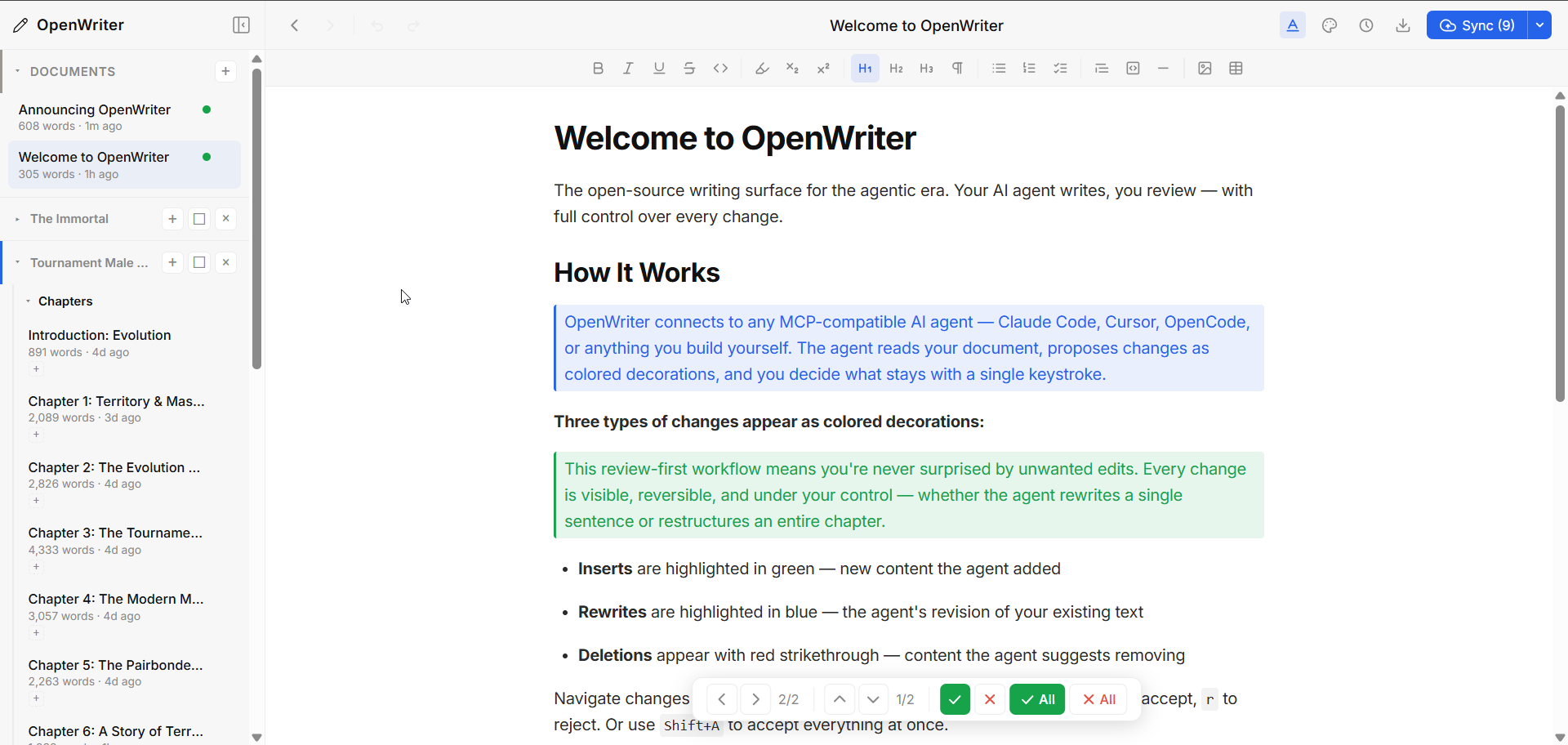
|
|
8
8
|
|
|
9
9
|
---
|
|
10
10
|
|
|
11
11
|
## Why OpenWriter?
|
|
12
12
|
|
|
13
|
-
|
|
13
|
+
Claude Code, OpenCode, Codex — these agents are transforming how people build software. But that power hasn't crossed over to writing. Ask an agent to edit your essay and you're staring at raw markdown in a terminal. There's no collaborative surface, no way to review changes, no real workflow.
|
|
14
14
|
|
|
15
|
-
|
|
15
|
+
Every writing tool is racing to bolt on its own weak agent. They have it backwards. The most powerful agents already exist — and they're designed to work with tools, not be trapped inside one. OpenWriter doesn't ship an agent. It's the first writing surface built for the agents you already use, with a review system that keeps you in control.
|
|
16
|
+
|
|
17
|
+
Markdown is the native language of AI. Every LLM reads it, writes it, and thinks in it. OpenWriter treats `.md` files as first-class citizens — your documents are plain markdown on disk, and the editor adds rich formatting, workspaces, version history, and agent collaboration on top. No proprietary format. No database. Just files.
|
|
16
18
|
|
|
17
19
|
**The agent writes. You accept or reject. That's it.**
|
|
18
20
|
|
|
21
|
+
- Documents are plain `.md` files — open existing ones or create new ones
|
|
19
22
|
- Agent makes changes → they appear as colored decorations (green for inserts, blue for rewrites, red for deletions)
|
|
20
23
|
- You review with vim-style hotkeys (`j`/`k` navigate, `a` accept, `r` reject)
|
|
21
24
|
- Cross-document navigation when an agent edits multiple files at once
|
|
@@ -31,9 +34,21 @@ npx openwriter
|
|
|
31
34
|
|
|
32
35
|
That's it. Opens your browser to `localhost:5050` with a ready-to-use editor. Documents save as markdown files in `~/.openwriter/`.
|
|
33
36
|
|
|
37
|
+
Already have markdown files? Open them directly — the agent can use `open_file` to load any `.md` from disk, or you can drag files into the sidebar.
|
|
38
|
+
|
|
34
39
|
### Connect Your Agent
|
|
35
40
|
|
|
36
|
-
|
|
41
|
+
**Claude Code:**
|
|
42
|
+
```bash
|
|
43
|
+
claude mcp add -s user open-writer -- npx openwriter --no-open
|
|
44
|
+
|
|
45
|
+
# Optional: install the companion skill for better agent behavior
|
|
46
|
+
npx openwriter install-skill
|
|
47
|
+
```
|
|
48
|
+
|
|
49
|
+
The skill installs a `SKILL.md` to `~/.claude/skills/openwriter/` that teaches Claude Code how to use OpenWriter's 24 tools effectively — writing strategy, review etiquette, and troubleshooting.
|
|
50
|
+
|
|
51
|
+
**Other MCP agents** (Cursor, OpenCode, etc.) — add to your MCP config:
|
|
37
52
|
|
|
38
53
|
```json
|
|
39
54
|
{
|
|
@@ -145,6 +160,28 @@ Automatic snapshots with full rollback. Browse previous versions and restore any
|
|
|
145
160
|
|
|
146
161
|
---
|
|
147
162
|
|
|
163
|
+
## Markdown Native
|
|
164
|
+
|
|
165
|
+
Every document is a `.md` file on disk. What you see in the editor is markdown with rich rendering — headings, lists, tables, code blocks, images, links — all stored as plain text.
|
|
166
|
+
|
|
167
|
+
```
|
|
168
|
+
~/.openwriter/
|
|
169
|
+
├── Getting Started.md
|
|
170
|
+
├── Chapter 1 - Origins.md
|
|
171
|
+
├── Research Notes.md
|
|
172
|
+
└── _workspaces/
|
|
173
|
+
└── My Novel.json
|
|
174
|
+
```
|
|
175
|
+
|
|
176
|
+
- **No database.** The filesystem is the index. Move, copy, or `grep` your files however you want.
|
|
177
|
+
- **Open any `.md` file.** Point OpenWriter at existing markdown from any project — it loads instantly.
|
|
178
|
+
- **Git Sync built in.** Push your documents to GitHub directly from the editor. Your markdown files are version-controlled and portable — access them from any machine or future web client.
|
|
179
|
+
- **Frontmatter metadata.** YAML frontmatter for tags, status, or any key-value pairs your workflow needs.
|
|
180
|
+
- **Full markdown fidelity.** Bold, italic, strikethrough, code blocks with syntax highlighting, tables, task lists, images, links, subscript, superscript — all round-trip cleanly to `.md`.
|
|
181
|
+
- **AI-native format.** Every LLM reads and writes markdown natively. No conversion layer, no token waste. The agent edits the same format the file is stored in.
|
|
182
|
+
|
|
183
|
+
---
|
|
184
|
+
|
|
148
185
|
## Token-Efficient Wire Format
|
|
149
186
|
|
|
150
187
|
Agents don't parse JSON. OpenWriter uses a compact tagged-line format that's ~10x more token-efficient:
|
|
@@ -220,6 +257,9 @@ Options:
|
|
|
220
257
|
--api-key <key> Author's Voice API key
|
|
221
258
|
--av-url <url> Author's Voice backend URL
|
|
222
259
|
--plugins <names> Comma-separated plugin names
|
|
260
|
+
|
|
261
|
+
Subcommands:
|
|
262
|
+
install-skill Install Claude Code companion skill to ~/.claude/skills/openwriter/
|
|
223
263
|
```
|
|
224
264
|
|
|
225
265
|
Environment variables: `AV_API_KEY`, `AV_BACKEND_URL`
|
package/dist/bin/pad.js
CHANGED
|
@@ -16,49 +16,55 @@ console.log = (...args) => console.error(...args);
|
|
|
16
16
|
import { startServer } from '../server/index.js';
|
|
17
17
|
import { readConfig, saveConfig } from '../server/helpers.js';
|
|
18
18
|
const args = process.argv.slice(2);
|
|
19
|
-
|
|
20
|
-
|
|
21
|
-
|
|
22
|
-
|
|
23
|
-
|
|
24
|
-
|
|
25
|
-
|
|
26
|
-
|
|
27
|
-
|
|
28
|
-
|
|
29
|
-
|
|
30
|
-
|
|
31
|
-
|
|
32
|
-
|
|
33
|
-
|
|
34
|
-
i
|
|
35
|
-
|
|
36
|
-
|
|
37
|
-
|
|
38
|
-
|
|
19
|
+
// Subcommands (run and exit, don't start server)
|
|
20
|
+
if (args[0] === 'install-skill') {
|
|
21
|
+
import('../server/install-skill.js').then(m => m.installSkill());
|
|
22
|
+
}
|
|
23
|
+
else {
|
|
24
|
+
let port = 5050;
|
|
25
|
+
let noOpen = false;
|
|
26
|
+
let cliApiKey;
|
|
27
|
+
let cliAvUrl;
|
|
28
|
+
let plugins = [];
|
|
29
|
+
for (let i = 0; i < args.length; i++) {
|
|
30
|
+
if (args[i] === '--port' && args[i + 1]) {
|
|
31
|
+
port = parseInt(args[i + 1], 10);
|
|
32
|
+
i++;
|
|
33
|
+
}
|
|
34
|
+
if (args[i] === '--no-open') {
|
|
35
|
+
noOpen = true;
|
|
36
|
+
}
|
|
37
|
+
if (args[i] === '--api-key' && args[i + 1]) {
|
|
38
|
+
cliApiKey = args[i + 1];
|
|
39
|
+
i++;
|
|
40
|
+
}
|
|
41
|
+
if (args[i] === '--av-url' && args[i + 1]) {
|
|
42
|
+
cliAvUrl = args[i + 1];
|
|
43
|
+
i++;
|
|
44
|
+
}
|
|
45
|
+
if (args[i] === '--plugins' && args[i + 1]) {
|
|
46
|
+
plugins = args[i + 1].split(',').map((s) => s.trim()).filter(Boolean);
|
|
47
|
+
i++;
|
|
48
|
+
}
|
|
39
49
|
}
|
|
40
|
-
|
|
41
|
-
|
|
42
|
-
|
|
50
|
+
// Resolve API key: CLI flag → env var → saved config
|
|
51
|
+
const config = readConfig();
|
|
52
|
+
const avApiKey = cliApiKey || process.env.AV_API_KEY || config.avApiKey || '';
|
|
53
|
+
const avBackendUrl = cliAvUrl || process.env.AV_BACKEND_URL || config.avBackendUrl;
|
|
54
|
+
// Persist new values to config so future starts don't need them
|
|
55
|
+
const updates = {};
|
|
56
|
+
if (cliApiKey && cliApiKey !== config.avApiKey)
|
|
57
|
+
updates.avApiKey = cliApiKey;
|
|
58
|
+
if (cliAvUrl && cliAvUrl !== config.avBackendUrl)
|
|
59
|
+
updates.avBackendUrl = cliAvUrl;
|
|
60
|
+
if (Object.keys(updates).length > 0) {
|
|
61
|
+
saveConfig(updates);
|
|
62
|
+
console.log('Config saved to ~/.openwriter/config.json');
|
|
43
63
|
}
|
|
64
|
+
// Set env vars for downstream code (plugins read process.env)
|
|
65
|
+
if (avApiKey)
|
|
66
|
+
process.env.AV_API_KEY = avApiKey;
|
|
67
|
+
if (avBackendUrl)
|
|
68
|
+
process.env.AV_BACKEND_URL = avBackendUrl;
|
|
69
|
+
startServer({ port, noOpen, plugins });
|
|
44
70
|
}
|
|
45
|
-
// Resolve API key: CLI flag → env var → saved config
|
|
46
|
-
const config = readConfig();
|
|
47
|
-
const avApiKey = cliApiKey || process.env.AV_API_KEY || config.avApiKey || '';
|
|
48
|
-
const avBackendUrl = cliAvUrl || process.env.AV_BACKEND_URL || config.avBackendUrl;
|
|
49
|
-
// Persist new values to config so future starts don't need them
|
|
50
|
-
const updates = {};
|
|
51
|
-
if (cliApiKey && cliApiKey !== config.avApiKey)
|
|
52
|
-
updates.avApiKey = cliApiKey;
|
|
53
|
-
if (cliAvUrl && cliAvUrl !== config.avBackendUrl)
|
|
54
|
-
updates.avBackendUrl = cliAvUrl;
|
|
55
|
-
if (Object.keys(updates).length > 0) {
|
|
56
|
-
saveConfig(updates);
|
|
57
|
-
console.log('Config saved to ~/.openwriter/config.json');
|
|
58
|
-
}
|
|
59
|
-
// Set env vars for downstream code (plugins read process.env)
|
|
60
|
-
if (avApiKey)
|
|
61
|
-
process.env.AV_API_KEY = avApiKey;
|
|
62
|
-
if (avBackendUrl)
|
|
63
|
-
process.env.AV_BACKEND_URL = avBackendUrl;
|
|
64
|
-
startServer({ port, noOpen, plugins });
|
|
@@ -0,0 +1,19 @@
|
|
|
1
|
+
import fs from 'fs';
|
|
2
|
+
import path from 'path';
|
|
3
|
+
import os from 'os';
|
|
4
|
+
import { fileURLToPath } from 'url';
|
|
5
|
+
const __filename = fileURLToPath(import.meta.url);
|
|
6
|
+
const __dirname = path.dirname(__filename);
|
|
7
|
+
export function installSkill() {
|
|
8
|
+
const source = path.join(__dirname, '../../skill/SKILL.md');
|
|
9
|
+
const targetDir = path.join(os.homedir(), '.claude', 'skills', 'openwriter');
|
|
10
|
+
const target = path.join(targetDir, 'SKILL.md');
|
|
11
|
+
if (!fs.existsSync(source)) {
|
|
12
|
+
console.error(`Error: SKILL.md not found at ${source}`);
|
|
13
|
+
process.exit(1);
|
|
14
|
+
}
|
|
15
|
+
fs.mkdirSync(targetDir, { recursive: true });
|
|
16
|
+
fs.copyFileSync(source, target);
|
|
17
|
+
console.error(`Installed OpenWriter skill to ${target}`);
|
|
18
|
+
process.exit(0);
|
|
19
|
+
}
|
package/package.json
CHANGED
|
@@ -1,6 +1,6 @@
|
|
|
1
1
|
{
|
|
2
2
|
"name": "openwriter",
|
|
3
|
-
"version": "0.
|
|
3
|
+
"version": "0.2.0",
|
|
4
4
|
"description": "Local TipTap editor for human-agent collaboration via MCP",
|
|
5
5
|
"type": "module",
|
|
6
6
|
"license": "MIT",
|
|
@@ -83,6 +83,7 @@
|
|
|
83
83
|
},
|
|
84
84
|
"files": [
|
|
85
85
|
"dist/",
|
|
86
|
+
"skill/",
|
|
86
87
|
"package.json"
|
|
87
88
|
]
|
|
88
89
|
}
|
package/skill/SKILL.md
ADDED
|
@@ -0,0 +1,177 @@
|
|
|
1
|
+
---
|
|
2
|
+
name: openwriter
|
|
3
|
+
description: |
|
|
4
|
+
OpenWriter — local TipTap editor for human-agent collaboration.
|
|
5
|
+
Agent reads/edits documents via MCP tools (read_pad, write_to_pad, etc.).
|
|
6
|
+
Changes appear as pending decorations the user accepts or rejects.
|
|
7
|
+
Multi-document workspace with sidebar navigation.
|
|
8
|
+
|
|
9
|
+
Use when user says: "open writer", "openwriter", "write in openwriter",
|
|
10
|
+
"edit my document", "review my writing", "check the pad".
|
|
11
|
+
|
|
12
|
+
Requires: OpenWriter MCP server configured. Browser UI at localhost:5050.
|
|
13
|
+
---
|
|
14
|
+
|
|
15
|
+
# OpenWriter — Public Companion Skill
|
|
16
|
+
|
|
17
|
+
You are a writing collaborator. The user has a document open in OpenWriter (http://localhost:5050). You read their document and make edits **exclusively via MCP tools**. Edits appear as pending decorations (colored highlights) that the user can accept or reject.
|
|
18
|
+
|
|
19
|
+
**First action when activated:** Always share the browser URL:
|
|
20
|
+
> OpenWriter is at **http://localhost:5050**
|
|
21
|
+
|
|
22
|
+
## Quick Setup
|
|
23
|
+
|
|
24
|
+
OpenWriter must be configured as an MCP server before use. Two paths:
|
|
25
|
+
|
|
26
|
+
### Option A: User runs it from their terminal (outside Claude Code)
|
|
27
|
+
|
|
28
|
+
```bash
|
|
29
|
+
claude mcp add -s user open-writer -- npx openwriter --no-open
|
|
30
|
+
```
|
|
31
|
+
|
|
32
|
+
Then restart the Claude Code session. The MCP tools become available automatically.
|
|
33
|
+
|
|
34
|
+
### Option B: Agent configures it (when user asks you to set it up)
|
|
35
|
+
|
|
36
|
+
Edit `~/.claude.json` and add to the `mcpServers` object:
|
|
37
|
+
|
|
38
|
+
```json
|
|
39
|
+
"open-writer": {
|
|
40
|
+
"command": "npx",
|
|
41
|
+
"args": ["openwriter", "--no-open"]
|
|
42
|
+
}
|
|
43
|
+
```
|
|
44
|
+
|
|
45
|
+
The `mcpServers` key is at the top level of `~/.claude.json`. If it doesn't exist, create it. Example:
|
|
46
|
+
|
|
47
|
+
```json
|
|
48
|
+
{
|
|
49
|
+
"mcpServers": {
|
|
50
|
+
"open-writer": {
|
|
51
|
+
"command": "npx",
|
|
52
|
+
"args": ["openwriter", "--no-open"]
|
|
53
|
+
}
|
|
54
|
+
}
|
|
55
|
+
}
|
|
56
|
+
```
|
|
57
|
+
|
|
58
|
+
After editing, tell the user:
|
|
59
|
+
1. Restart your Claude Code session (the MCP server loads on startup)
|
|
60
|
+
2. Open http://localhost:5050 in your browser
|
|
61
|
+
|
|
62
|
+
**Note:** You cannot run `claude mcp add` from inside a session (nested session error). That's why we edit the JSON directly.
|
|
63
|
+
|
|
64
|
+
## MCP Tools Reference (24 tools)
|
|
65
|
+
|
|
66
|
+
### Document Operations
|
|
67
|
+
|
|
68
|
+
| Tool | Description |
|
|
69
|
+
|------|-------------|
|
|
70
|
+
| `read_pad` | Read the current document (compact tagged-line format) |
|
|
71
|
+
| `write_to_pad` | Apply edits as pending decorations (rewrite, insert, delete) |
|
|
72
|
+
| `get_pad_status` | Lightweight poll: word count, pending changes, userSignaledReview |
|
|
73
|
+
| `get_nodes` | Fetch specific nodes by ID |
|
|
74
|
+
| `get_metadata` | Get frontmatter metadata for the active document |
|
|
75
|
+
| `set_metadata` | Update frontmatter metadata (merge, set key to null to remove) |
|
|
76
|
+
|
|
77
|
+
### Document Lifecycle
|
|
78
|
+
|
|
79
|
+
| Tool | Description |
|
|
80
|
+
|------|-------------|
|
|
81
|
+
| `list_documents` | List all documents with filename, word count, active status |
|
|
82
|
+
| `switch_document` | Switch to a different document by filename |
|
|
83
|
+
| `create_document` | Create a new document (optional title, content, path) |
|
|
84
|
+
| `open_file` | Open an existing .md file from any location on disk |
|
|
85
|
+
|
|
86
|
+
### Import
|
|
87
|
+
|
|
88
|
+
| Tool | Description |
|
|
89
|
+
|------|-------------|
|
|
90
|
+
| `replace_document` | Import external content into a new/blank document |
|
|
91
|
+
| `import_gdoc` | Import a Google Doc (auto-splits multi-chapter docs) |
|
|
92
|
+
|
|
93
|
+
### Workspace Management
|
|
94
|
+
|
|
95
|
+
| Tool | Description |
|
|
96
|
+
|------|-------------|
|
|
97
|
+
| `list_workspaces` | List all workspaces with title and doc count |
|
|
98
|
+
| `create_workspace` | Create a new workspace |
|
|
99
|
+
| `get_workspace_structure` | Get full workspace tree: containers, docs, tags, context |
|
|
100
|
+
| `get_item_context` | Get progressive disclosure context for a doc in a workspace |
|
|
101
|
+
| `update_workspace_context` | Update workspace context (characters, settings, rules) |
|
|
102
|
+
|
|
103
|
+
### Workspace Organization
|
|
104
|
+
|
|
105
|
+
| Tool | Description |
|
|
106
|
+
|------|-------------|
|
|
107
|
+
| `add_doc` | Add a document to a workspace (optional container placement) |
|
|
108
|
+
| `create_container` | Create a folder inside a workspace (max depth: 3) |
|
|
109
|
+
| `tag_doc` | Add a tag to a document in a workspace |
|
|
110
|
+
| `untag_doc` | Remove a tag from a document |
|
|
111
|
+
| `move_doc` | Move a document to a different container or root level |
|
|
112
|
+
|
|
113
|
+
### Text Operations
|
|
114
|
+
|
|
115
|
+
| Tool | Description |
|
|
116
|
+
|------|-------------|
|
|
117
|
+
| `edit_text` | Fine-grained text edits within a node (find/replace, add/remove marks) |
|
|
118
|
+
|
|
119
|
+
## Writing Strategy
|
|
120
|
+
|
|
121
|
+
**Incremental edits, not monolithic replacement.**
|
|
122
|
+
|
|
123
|
+
- Use `write_to_pad` for all edits — never `replace_document` (unless importing into a blank doc)
|
|
124
|
+
- Send **3-8 changes per call** for a responsive, streaming feel
|
|
125
|
+
- Always `read_pad` before writing — you need fresh node IDs
|
|
126
|
+
- Respect `pendingChanges > 0` — wait for the user to accept/reject before sending more
|
|
127
|
+
- Content accepts markdown strings (preferred) or TipTap JSON
|
|
128
|
+
- Decoration colors: **blue** = rewrite, **green** = insert, **red** = delete
|
|
129
|
+
|
|
130
|
+
## Workflow
|
|
131
|
+
|
|
132
|
+
### Single document
|
|
133
|
+
|
|
134
|
+
```
|
|
135
|
+
1. get_pad_status → check pendingChanges and userSignaledReview
|
|
136
|
+
2. read_pad → get full document with node IDs
|
|
137
|
+
3. write_to_pad → send changes (3-8 per call)
|
|
138
|
+
4. Wait → user accepts/rejects in browser
|
|
139
|
+
```
|
|
140
|
+
|
|
141
|
+
### Multi-document
|
|
142
|
+
|
|
143
|
+
```
|
|
144
|
+
1. list_documents → see all docs, find target
|
|
145
|
+
2. switch_document → save current, load target (returns content)
|
|
146
|
+
3. read_pad → read full content with node IDs
|
|
147
|
+
4. write_to_pad → apply edits
|
|
148
|
+
```
|
|
149
|
+
|
|
150
|
+
### Creating new content
|
|
151
|
+
|
|
152
|
+
```
|
|
153
|
+
1. create_document({ title: "My Doc", content: "# Heading\n\nContent..." })
|
|
154
|
+
2. read_pad → get node IDs from created content
|
|
155
|
+
3. write_to_pad → refine with edits
|
|
156
|
+
```
|
|
157
|
+
|
|
158
|
+
## Review Etiquette
|
|
159
|
+
|
|
160
|
+
1. **Share the URL.** Always tell the user: http://localhost:5050
|
|
161
|
+
2. **Read before writing.** Always fetch the document before suggesting changes
|
|
162
|
+
3. **Don't overwhelm.** 1-3 changes at a time for reviews, 3-8 for drafting
|
|
163
|
+
4. **Explain your edits.** Tell the user what you changed and why
|
|
164
|
+
5. **Respect pending changes.** If `pendingChanges > 0`, wait for the user
|
|
165
|
+
6. **Watch for the review signal.** When `userSignaledReview` is true, the user is asking for your input — reading status clears it (one-shot)
|
|
166
|
+
|
|
167
|
+
## Troubleshooting
|
|
168
|
+
|
|
169
|
+
**MCP tools not available** — Run `/mcp` in Claude Code to check connection status. Click reconnect if needed.
|
|
170
|
+
|
|
171
|
+
**Port 5050 busy** — Another OpenWriter instance owns the port. New sessions auto-enter client mode (proxying via HTTP) — tools still work. No action needed.
|
|
172
|
+
|
|
173
|
+
**Edits don't appear** — Stale node IDs. Always `read_pad` before `write_to_pad` to get fresh IDs.
|
|
174
|
+
|
|
175
|
+
**"pendingChanges" never clears** — User needs to accept/reject changes in the browser at http://localhost:5050.
|
|
176
|
+
|
|
177
|
+
**Server not starting** — Ensure `npx openwriter` works from your terminal. If on Windows and using `npx`, the MCP config may need `"command": "cmd"` with `"args": ["/c", "npx", "openwriter", "--no-open"]`.
|