openwriter 0.1.0 → 0.2.0
This diff represents the content of publicly available package versions that have been released to one of the supported registries. The information contained in this diff is provided for informational purposes only and reflects changes between package versions as they appear in their respective public registries.
- package/LICENSE +21 -0
- package/README.md +337 -0
- package/dist/bin/pad.js +49 -43
- package/dist/server/install-skill.js +19 -0
- package/package.json +2 -1
- package/skill/SKILL.md +177 -0
package/LICENSE
ADDED
|
@@ -0,0 +1,21 @@
|
|
|
1
|
+
MIT License
|
|
2
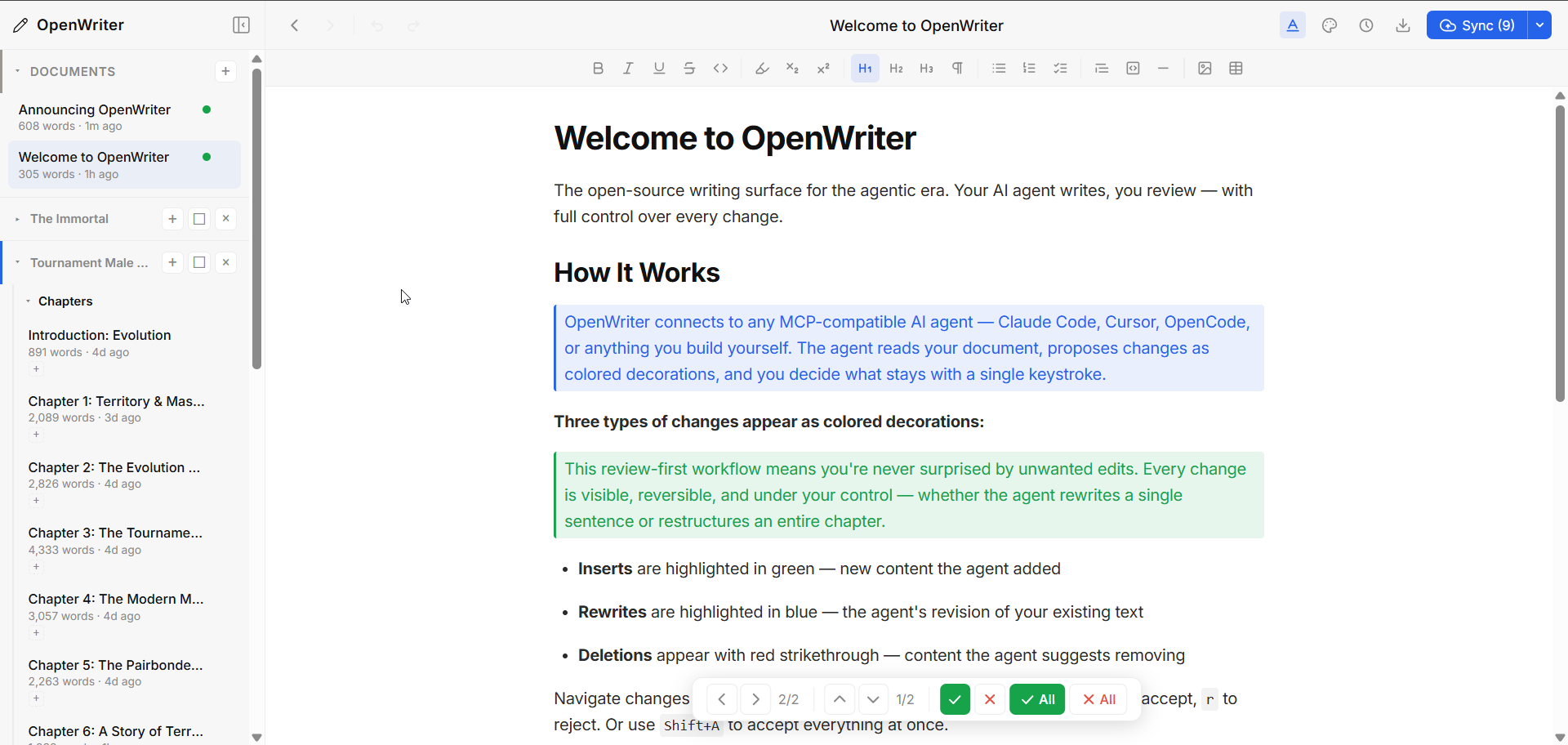
|
+
|
|
3
|
+
Copyright (c) 2025 Travis Steward
|
|
4
|
+
|
|
5
|
+
Permission is hereby granted, free of charge, to any person obtaining a copy
|
|
6
|
+
of this software and associated documentation files (the "Software"), to deal
|
|
7
|
+
in the Software without restriction, including without limitation the rights
|
|
8
|
+
to use, copy, modify, merge, publish, distribute, sublicense, and/or sell
|
|
9
|
+
copies of the Software, and to permit persons to whom the Software is
|
|
10
|
+
furnished to do so, subject to the following conditions:
|
|
11
|
+
|
|
12
|
+
The above copyright notice and this permission notice shall be included in all
|
|
13
|
+
copies or substantial portions of the Software.
|
|
14
|
+
|
|
15
|
+
THE SOFTWARE IS PROVIDED "AS IS", WITHOUT WARRANTY OF ANY KIND, EXPRESS OR
|
|
16
|
+
IMPLIED, INCLUDING BUT NOT LIMITED TO THE WARRANTIES OF MERCHANTABILITY,
|
|
17
|
+
FITNESS FOR A PARTICULAR PURPOSE AND NONINFRINGEMENT. IN NO EVENT SHALL THE
|
|
18
|
+
AUTHORS OR COPYRIGHT HOLDERS BE LIABLE FOR ANY CLAIM, DAMAGES OR OTHER
|
|
19
|
+
LIABILITY, WHETHER IN AN ACTION OF CONTRACT, TORT OR OTHERWISE, ARISING FROM,
|
|
20
|
+
OUT OF OR IN CONNECTION WITH THE SOFTWARE OR THE USE OR OTHER DEALINGS IN THE
|
|
21
|
+
SOFTWARE.
|
package/README.md
ADDED
|
@@ -0,0 +1,337 @@
|
|
|
1
|
+
# OpenWriter
|
|
2
|
+
|
|
3
|
+
**The open-source writing surface for the agentic era.**
|
|
4
|
+
|
|
5
|
+
A markdown-native rich text editor built for human-agent collaboration. Your AI agent writes, you review. Plain `.md` files on disk — no database, no lock-in. Works with any MCP-compatible agent.
|
|
6
|
+
|
|
7
|
+
|
|
8
|
+
|
|
9
|
+
---
|
|
10
|
+
|
|
11
|
+
## Why OpenWriter?
|
|
12
|
+
|
|
13
|
+
Claude Code, OpenCode, Codex — these agents are transforming how people build software. But that power hasn't crossed over to writing. Ask an agent to edit your essay and you're staring at raw markdown in a terminal. There's no collaborative surface, no way to review changes, no real workflow.
|
|
14
|
+
|
|
15
|
+
Every writing tool is racing to bolt on its own weak agent. They have it backwards. The most powerful agents already exist — and they're designed to work with tools, not be trapped inside one. OpenWriter doesn't ship an agent. It's the first writing surface built for the agents you already use, with a review system that keeps you in control.
|
|
16
|
+
|
|
17
|
+
Markdown is the native language of AI. Every LLM reads it, writes it, and thinks in it. OpenWriter treats `.md` files as first-class citizens — your documents are plain markdown on disk, and the editor adds rich formatting, workspaces, version history, and agent collaboration on top. No proprietary format. No database. Just files.
|
|
18
|
+
|
|
19
|
+
**The agent writes. You accept or reject. That's it.**
|
|
20
|
+
|
|
21
|
+
- Documents are plain `.md` files — open existing ones or create new ones
|
|
22
|
+
- Agent makes changes → they appear as colored decorations (green for inserts, blue for rewrites, red for deletions)
|
|
23
|
+
- You review with vim-style hotkeys (`j`/`k` navigate, `a` accept, `r` reject)
|
|
24
|
+
- Cross-document navigation when an agent edits multiple files at once
|
|
25
|
+
- Works with any MCP agent — no vendor lock-in
|
|
26
|
+
|
|
27
|
+
---
|
|
28
|
+
|
|
29
|
+
## Quick Start
|
|
30
|
+
|
|
31
|
+
```bash
|
|
32
|
+
npx openwriter
|
|
33
|
+
```
|
|
34
|
+
|
|
35
|
+
That's it. Opens your browser to `localhost:5050` with a ready-to-use editor. Documents save as markdown files in `~/.openwriter/`.
|
|
36
|
+
|
|
37
|
+
Already have markdown files? Open them directly — the agent can use `open_file` to load any `.md` from disk, or you can drag files into the sidebar.
|
|
38
|
+
|
|
39
|
+
### Connect Your Agent
|
|
40
|
+
|
|
41
|
+
**Claude Code:**
|
|
42
|
+
```bash
|
|
43
|
+
claude mcp add -s user open-writer -- npx openwriter --no-open
|
|
44
|
+
|
|
45
|
+
# Optional: install the companion skill for better agent behavior
|
|
46
|
+
npx openwriter install-skill
|
|
47
|
+
```
|
|
48
|
+
|
|
49
|
+
The skill installs a `SKILL.md` to `~/.claude/skills/openwriter/` that teaches Claude Code how to use OpenWriter's 24 tools effectively — writing strategy, review etiquette, and troubleshooting.
|
|
50
|
+
|
|
51
|
+
**Other MCP agents** (Cursor, OpenCode, etc.) — add to your MCP config:
|
|
52
|
+
|
|
53
|
+
```json
|
|
54
|
+
{
|
|
55
|
+
"mcpServers": {
|
|
56
|
+
"open-writer": {
|
|
57
|
+
"command": "npx",
|
|
58
|
+
"args": ["openwriter", "--no-open"]
|
|
59
|
+
}
|
|
60
|
+
}
|
|
61
|
+
}
|
|
62
|
+
```
|
|
63
|
+
|
|
64
|
+
Now your agent has 24 tools to read, write, and organize documents — and every change goes through your review.
|
|
65
|
+
|
|
66
|
+
---
|
|
67
|
+
|
|
68
|
+
## Features
|
|
69
|
+
|
|
70
|
+
### Agent Collaboration via MCP
|
|
71
|
+
|
|
72
|
+
24 tools across four categories:
|
|
73
|
+
|
|
74
|
+
| Category | Tools | What They Do |
|
|
75
|
+
|----------|-------|-------------|
|
|
76
|
+
| **Document** | `read_pad`, `write_to_pad`, `edit_text`, `get_pad_status`, + 5 more | Read/write document content, fine-grained text edits, metadata |
|
|
77
|
+
| **Multi-doc** | `list_documents`, `switch_document`, `create_document` | Navigate and manage multiple documents |
|
|
78
|
+
| **Workspace** | `create_workspace`, `get_workspace_structure`, `add_doc`, + 6 more | Organize docs into projects with containers and tags |
|
|
79
|
+
| **Import** | `import_gdoc` | Import Google Docs, auto-split into chapters |
|
|
80
|
+
|
|
81
|
+
Agents write in markdown or TipTap JSON. The server converts, assigns node IDs, and broadcasts changes to your browser in real-time via WebSocket.
|
|
82
|
+
|
|
83
|
+
### Pending Change Review
|
|
84
|
+
|
|
85
|
+
The core interaction model. When an agent (or the context menu) makes changes:
|
|
86
|
+
|
|
87
|
+
- **Inserts** appear highlighted in green
|
|
88
|
+
- **Rewrites** appear highlighted in blue (original content preserved for reject)
|
|
89
|
+
- **Deletions** appear with red strikethrough
|
|
90
|
+
|
|
91
|
+
Review Panel (floating bottom bar):
|
|
92
|
+
|
|
93
|
+
| Key | Action |
|
|
94
|
+
|-----|--------|
|
|
95
|
+
| `j` / `k` | Next / previous change |
|
|
96
|
+
| `h` / `l` | Previous / next document with changes |
|
|
97
|
+
| `a` | Accept current change |
|
|
98
|
+
| `r` | Reject current change |
|
|
99
|
+
| `Shift+A` | Accept all in document |
|
|
100
|
+
| `Shift+R` | Reject all in document |
|
|
101
|
+
|
|
102
|
+
### Multi-Document Workspaces
|
|
103
|
+
|
|
104
|
+
Documents are markdown files on disk. Organize them into workspaces with nested containers, cross-cutting tags, and shared context (characters, settings, rules) that agents can read for consistency.
|
|
105
|
+
|
|
106
|
+
Four sidebar views:
|
|
107
|
+
- **Tree** — Hierarchical folders with drag-and-drop
|
|
108
|
+
- **Timeline** — Sorted by last modified
|
|
109
|
+
- **Board** — Card-based drill-down navigation
|
|
110
|
+
- **Shelf** — Visual bookshelf metaphor with spine browsing
|
|
111
|
+
|
|
112
|
+
### Context Menu (Right-Click)
|
|
113
|
+
|
|
114
|
+
Select text and right-click for AI-powered transformations:
|
|
115
|
+
|
|
116
|
+
| Action | Key | Description |
|
|
117
|
+
|--------|-----|-------------|
|
|
118
|
+
| Rewrite | `R` | Rewrite selection at similar length |
|
|
119
|
+
| Shrink | `S` | Condense by 40-60% |
|
|
120
|
+
| Expand | `E` | Expand by 50-100% |
|
|
121
|
+
| Custom | — | Free-text instruction |
|
|
122
|
+
| Fill | `F` | Generate content between paragraphs |
|
|
123
|
+
| Insert after | `I` | Generate new content after selection |
|
|
124
|
+
| Delete | `D` | Mark for deletion |
|
|
125
|
+
| Link to doc | `L` | Create internal document links |
|
|
126
|
+
|
|
127
|
+
Context menu actions are provided by plugins. The built-in [Author's Voice](https://authors-voice.com) plugin rewrites text in your personal writing voice.
|
|
128
|
+
|
|
129
|
+
### Themes
|
|
130
|
+
|
|
131
|
+
5 themes, each with light and dark modes:
|
|
132
|
+
|
|
133
|
+
- **Ink** — Clean, minimal, professional
|
|
134
|
+
- **Novel** — Warm, serif-based, literary
|
|
135
|
+
- **Mono** — Monospace, code-focused
|
|
136
|
+
- **Editorial** — Bold magazine-style headings
|
|
137
|
+
- **Studio** — Contemporary sans-serif
|
|
138
|
+
|
|
139
|
+
Three typography presets (default, compact, expanded) work with any theme.
|
|
140
|
+
|
|
141
|
+
### Git Sync
|
|
142
|
+
|
|
143
|
+
Push your documents to GitHub directly from the editor. Three setup methods:
|
|
144
|
+
- **GitHub CLI** — Auto-detected if `gh` is authenticated
|
|
145
|
+
- **Personal Access Token** — Manual GitHub auth
|
|
146
|
+
- **Existing repo** — Connect to a repo you already have
|
|
147
|
+
|
|
148
|
+
### Export
|
|
149
|
+
|
|
150
|
+
Export any document to:
|
|
151
|
+
- Markdown (`.md`)
|
|
152
|
+
- HTML (styled web page)
|
|
153
|
+
- Word (`.docx`)
|
|
154
|
+
- Plain text (`.txt`)
|
|
155
|
+
- PDF (via print preview)
|
|
156
|
+
|
|
157
|
+
### Version History
|
|
158
|
+
|
|
159
|
+
Automatic snapshots with full rollback. Browse previous versions and restore any point.
|
|
160
|
+
|
|
161
|
+
---
|
|
162
|
+
|
|
163
|
+
## Markdown Native
|
|
164
|
+
|
|
165
|
+
Every document is a `.md` file on disk. What you see in the editor is markdown with rich rendering — headings, lists, tables, code blocks, images, links — all stored as plain text.
|
|
166
|
+
|
|
167
|
+
```
|
|
168
|
+
~/.openwriter/
|
|
169
|
+
├── Getting Started.md
|
|
170
|
+
├── Chapter 1 - Origins.md
|
|
171
|
+
├── Research Notes.md
|
|
172
|
+
└── _workspaces/
|
|
173
|
+
└── My Novel.json
|
|
174
|
+
```
|
|
175
|
+
|
|
176
|
+
- **No database.** The filesystem is the index. Move, copy, or `grep` your files however you want.
|
|
177
|
+
- **Open any `.md` file.** Point OpenWriter at existing markdown from any project — it loads instantly.
|
|
178
|
+
- **Git Sync built in.** Push your documents to GitHub directly from the editor. Your markdown files are version-controlled and portable — access them from any machine or future web client.
|
|
179
|
+
- **Frontmatter metadata.** YAML frontmatter for tags, status, or any key-value pairs your workflow needs.
|
|
180
|
+
- **Full markdown fidelity.** Bold, italic, strikethrough, code blocks with syntax highlighting, tables, task lists, images, links, subscript, superscript — all round-trip cleanly to `.md`.
|
|
181
|
+
- **AI-native format.** Every LLM reads and writes markdown natively. No conversion layer, no token waste. The agent edits the same format the file is stored in.
|
|
182
|
+
|
|
183
|
+
---
|
|
184
|
+
|
|
185
|
+
## Token-Efficient Wire Format
|
|
186
|
+
|
|
187
|
+
Agents don't parse JSON. OpenWriter uses a compact tagged-line format that's ~10x more token-efficient:
|
|
188
|
+
|
|
189
|
+
```
|
|
190
|
+
title: My Document
|
|
191
|
+
words: 1,205
|
|
192
|
+
pending: 2
|
|
193
|
+
---
|
|
194
|
+
[h1:a1b2c3d4] Chapter One
|
|
195
|
+
[p:e5f6g7h8] The quick brown fox jumped over the **lazy** dog.
|
|
196
|
+
[ul:i9j0k1l2]
|
|
197
|
+
[li:m3n4o5p6] First bullet
|
|
198
|
+
[li:q7r8s9t0] Second bullet
|
|
199
|
+
```
|
|
200
|
+
|
|
201
|
+
Each line: `[type:8-char-id] content` with inline markdown preserved. Agents read and write naturally.
|
|
202
|
+
|
|
203
|
+
---
|
|
204
|
+
|
|
205
|
+
## Plugin System
|
|
206
|
+
|
|
207
|
+
OpenWriter is extensible via plugins. A plugin can:
|
|
208
|
+
|
|
209
|
+
- **Register MCP tools** — Extend the agent's capabilities
|
|
210
|
+
- **Add HTTP routes** — Custom API endpoints on the server
|
|
211
|
+
- **Contribute context menu items** — UI actions for text transformation
|
|
212
|
+
|
|
213
|
+
```typescript
|
|
214
|
+
import type { OpenWriterPlugin } from 'openwriter';
|
|
215
|
+
|
|
216
|
+
const plugin: OpenWriterPlugin = {
|
|
217
|
+
name: 'my-plugin',
|
|
218
|
+
version: '1.0.0',
|
|
219
|
+
|
|
220
|
+
mcpTools(config) {
|
|
221
|
+
return [{
|
|
222
|
+
name: 'my-tool',
|
|
223
|
+
description: 'Does something useful',
|
|
224
|
+
inputSchema: { type: 'object', properties: {} },
|
|
225
|
+
handler: async (params) => ({ result: 'done' })
|
|
226
|
+
}];
|
|
227
|
+
},
|
|
228
|
+
|
|
229
|
+
contextMenuItems() {
|
|
230
|
+
return [{
|
|
231
|
+
label: 'My Action',
|
|
232
|
+
action: 'myplugin:do-thing',
|
|
233
|
+
condition: 'has-selection'
|
|
234
|
+
}];
|
|
235
|
+
}
|
|
236
|
+
};
|
|
237
|
+
|
|
238
|
+
export default plugin;
|
|
239
|
+
```
|
|
240
|
+
|
|
241
|
+
Load plugins at startup:
|
|
242
|
+
|
|
243
|
+
```bash
|
|
244
|
+
npx openwriter --plugins my-plugin,another-plugin
|
|
245
|
+
```
|
|
246
|
+
|
|
247
|
+
---
|
|
248
|
+
|
|
249
|
+
## CLI Options
|
|
250
|
+
|
|
251
|
+
```bash
|
|
252
|
+
npx openwriter [options]
|
|
253
|
+
|
|
254
|
+
Options:
|
|
255
|
+
--port <number> Port number (default: 5050)
|
|
256
|
+
--no-open Don't auto-open browser
|
|
257
|
+
--api-key <key> Author's Voice API key
|
|
258
|
+
--av-url <url> Author's Voice backend URL
|
|
259
|
+
--plugins <names> Comma-separated plugin names
|
|
260
|
+
|
|
261
|
+
Subcommands:
|
|
262
|
+
install-skill Install Claude Code companion skill to ~/.claude/skills/openwriter/
|
|
263
|
+
```
|
|
264
|
+
|
|
265
|
+
Environment variables: `AV_API_KEY`, `AV_BACKEND_URL`
|
|
266
|
+
|
|
267
|
+
---
|
|
268
|
+
|
|
269
|
+
## Architecture
|
|
270
|
+
|
|
271
|
+
```
|
|
272
|
+
Browser (localhost:5050)
|
|
273
|
+
├── TipTap 3.0 Editor (React)
|
|
274
|
+
├── Decoration Plugin (pending insert/rewrite/delete)
|
|
275
|
+
├── Review Panel (accept/reject with keyboard nav)
|
|
276
|
+
├── Sidebar (4 views: tree, timeline, board, shelf)
|
|
277
|
+
└── Context Menu (plugin-provided AI actions)
|
|
278
|
+
│
|
|
279
|
+
│ WebSocket + HTTP
|
|
280
|
+
▼
|
|
281
|
+
Pad Server (Express + WebSocket + MCP stdio)
|
|
282
|
+
├── Document state (in-memory + markdown on disk)
|
|
283
|
+
├── 24 MCP tools + plugin tools
|
|
284
|
+
├── Workspace management
|
|
285
|
+
├── Git sync, versions, export
|
|
286
|
+
└── Plugin loader
|
|
287
|
+
│
|
|
288
|
+
│ MCP stdio
|
|
289
|
+
▼
|
|
290
|
+
AI Agent (Claude Code, Cursor, etc.)
|
|
291
|
+
```
|
|
292
|
+
|
|
293
|
+
Three interfaces:
|
|
294
|
+
- **HTTP** — Browser UI operations, document CRUD, plugin proxying
|
|
295
|
+
- **WebSocket** — Real-time push of agent changes to browser
|
|
296
|
+
- **MCP stdio** — Agent reads/writes documents
|
|
297
|
+
|
|
298
|
+
The server supports **multi-session mode**: if port 5050 is already taken, additional instances proxy MCP calls via HTTP to the running server. Multiple agents can safely share the same document state.
|
|
299
|
+
|
|
300
|
+
---
|
|
301
|
+
|
|
302
|
+
## Development
|
|
303
|
+
|
|
304
|
+
```bash
|
|
305
|
+
# Clone and install
|
|
306
|
+
git clone https://github.com/travsteward/openwriter.git
|
|
307
|
+
cd openwriter
|
|
308
|
+
npm install
|
|
309
|
+
|
|
310
|
+
# Dev mode (hot reload)
|
|
311
|
+
cd packages/openwriter
|
|
312
|
+
npm run dev
|
|
313
|
+
|
|
314
|
+
# Build
|
|
315
|
+
npx turbo run build --force
|
|
316
|
+
|
|
317
|
+
# Type check
|
|
318
|
+
npx tsc --noEmit -p packages/openwriter/tsconfig.json # frontend
|
|
319
|
+
npx tsc --noEmit -p packages/openwriter/tsconfig.server.json # server
|
|
320
|
+
|
|
321
|
+
# Run production build
|
|
322
|
+
node packages/openwriter/dist/bin/pad.js
|
|
323
|
+
```
|
|
324
|
+
|
|
325
|
+
Monorepo structure: `packages/openwriter` (editor + server), `plugins/` (optional extensions).
|
|
326
|
+
|
|
327
|
+
---
|
|
328
|
+
|
|
329
|
+
## Contributing
|
|
330
|
+
|
|
331
|
+
Contributions welcome. Please open an issue first to discuss what you'd like to change.
|
|
332
|
+
|
|
333
|
+
---
|
|
334
|
+
|
|
335
|
+
## License
|
|
336
|
+
|
|
337
|
+
[MIT](LICENSE) — Travis Steward
|
package/dist/bin/pad.js
CHANGED
|
@@ -16,49 +16,55 @@ console.log = (...args) => console.error(...args);
|
|
|
16
16
|
import { startServer } from '../server/index.js';
|
|
17
17
|
import { readConfig, saveConfig } from '../server/helpers.js';
|
|
18
18
|
const args = process.argv.slice(2);
|
|
19
|
-
|
|
20
|
-
|
|
21
|
-
|
|
22
|
-
|
|
23
|
-
|
|
24
|
-
|
|
25
|
-
|
|
26
|
-
|
|
27
|
-
|
|
28
|
-
|
|
29
|
-
|
|
30
|
-
|
|
31
|
-
|
|
32
|
-
|
|
33
|
-
|
|
34
|
-
i
|
|
35
|
-
|
|
36
|
-
|
|
37
|
-
|
|
38
|
-
|
|
19
|
+
// Subcommands (run and exit, don't start server)
|
|
20
|
+
if (args[0] === 'install-skill') {
|
|
21
|
+
import('../server/install-skill.js').then(m => m.installSkill());
|
|
22
|
+
}
|
|
23
|
+
else {
|
|
24
|
+
let port = 5050;
|
|
25
|
+
let noOpen = false;
|
|
26
|
+
let cliApiKey;
|
|
27
|
+
let cliAvUrl;
|
|
28
|
+
let plugins = [];
|
|
29
|
+
for (let i = 0; i < args.length; i++) {
|
|
30
|
+
if (args[i] === '--port' && args[i + 1]) {
|
|
31
|
+
port = parseInt(args[i + 1], 10);
|
|
32
|
+
i++;
|
|
33
|
+
}
|
|
34
|
+
if (args[i] === '--no-open') {
|
|
35
|
+
noOpen = true;
|
|
36
|
+
}
|
|
37
|
+
if (args[i] === '--api-key' && args[i + 1]) {
|
|
38
|
+
cliApiKey = args[i + 1];
|
|
39
|
+
i++;
|
|
40
|
+
}
|
|
41
|
+
if (args[i] === '--av-url' && args[i + 1]) {
|
|
42
|
+
cliAvUrl = args[i + 1];
|
|
43
|
+
i++;
|
|
44
|
+
}
|
|
45
|
+
if (args[i] === '--plugins' && args[i + 1]) {
|
|
46
|
+
plugins = args[i + 1].split(',').map((s) => s.trim()).filter(Boolean);
|
|
47
|
+
i++;
|
|
48
|
+
}
|
|
39
49
|
}
|
|
40
|
-
|
|
41
|
-
|
|
42
|
-
|
|
50
|
+
// Resolve API key: CLI flag → env var → saved config
|
|
51
|
+
const config = readConfig();
|
|
52
|
+
const avApiKey = cliApiKey || process.env.AV_API_KEY || config.avApiKey || '';
|
|
53
|
+
const avBackendUrl = cliAvUrl || process.env.AV_BACKEND_URL || config.avBackendUrl;
|
|
54
|
+
// Persist new values to config so future starts don't need them
|
|
55
|
+
const updates = {};
|
|
56
|
+
if (cliApiKey && cliApiKey !== config.avApiKey)
|
|
57
|
+
updates.avApiKey = cliApiKey;
|
|
58
|
+
if (cliAvUrl && cliAvUrl !== config.avBackendUrl)
|
|
59
|
+
updates.avBackendUrl = cliAvUrl;
|
|
60
|
+
if (Object.keys(updates).length > 0) {
|
|
61
|
+
saveConfig(updates);
|
|
62
|
+
console.log('Config saved to ~/.openwriter/config.json');
|
|
43
63
|
}
|
|
64
|
+
// Set env vars for downstream code (plugins read process.env)
|
|
65
|
+
if (avApiKey)
|
|
66
|
+
process.env.AV_API_KEY = avApiKey;
|
|
67
|
+
if (avBackendUrl)
|
|
68
|
+
process.env.AV_BACKEND_URL = avBackendUrl;
|
|
69
|
+
startServer({ port, noOpen, plugins });
|
|
44
70
|
}
|
|
45
|
-
// Resolve API key: CLI flag → env var → saved config
|
|
46
|
-
const config = readConfig();
|
|
47
|
-
const avApiKey = cliApiKey || process.env.AV_API_KEY || config.avApiKey || '';
|
|
48
|
-
const avBackendUrl = cliAvUrl || process.env.AV_BACKEND_URL || config.avBackendUrl;
|
|
49
|
-
// Persist new values to config so future starts don't need them
|
|
50
|
-
const updates = {};
|
|
51
|
-
if (cliApiKey && cliApiKey !== config.avApiKey)
|
|
52
|
-
updates.avApiKey = cliApiKey;
|
|
53
|
-
if (cliAvUrl && cliAvUrl !== config.avBackendUrl)
|
|
54
|
-
updates.avBackendUrl = cliAvUrl;
|
|
55
|
-
if (Object.keys(updates).length > 0) {
|
|
56
|
-
saveConfig(updates);
|
|
57
|
-
console.log('Config saved to ~/.openwriter/config.json');
|
|
58
|
-
}
|
|
59
|
-
// Set env vars for downstream code (plugins read process.env)
|
|
60
|
-
if (avApiKey)
|
|
61
|
-
process.env.AV_API_KEY = avApiKey;
|
|
62
|
-
if (avBackendUrl)
|
|
63
|
-
process.env.AV_BACKEND_URL = avBackendUrl;
|
|
64
|
-
startServer({ port, noOpen, plugins });
|
|
@@ -0,0 +1,19 @@
|
|
|
1
|
+
import fs from 'fs';
|
|
2
|
+
import path from 'path';
|
|
3
|
+
import os from 'os';
|
|
4
|
+
import { fileURLToPath } from 'url';
|
|
5
|
+
const __filename = fileURLToPath(import.meta.url);
|
|
6
|
+
const __dirname = path.dirname(__filename);
|
|
7
|
+
export function installSkill() {
|
|
8
|
+
const source = path.join(__dirname, '../../skill/SKILL.md');
|
|
9
|
+
const targetDir = path.join(os.homedir(), '.claude', 'skills', 'openwriter');
|
|
10
|
+
const target = path.join(targetDir, 'SKILL.md');
|
|
11
|
+
if (!fs.existsSync(source)) {
|
|
12
|
+
console.error(`Error: SKILL.md not found at ${source}`);
|
|
13
|
+
process.exit(1);
|
|
14
|
+
}
|
|
15
|
+
fs.mkdirSync(targetDir, { recursive: true });
|
|
16
|
+
fs.copyFileSync(source, target);
|
|
17
|
+
console.error(`Installed OpenWriter skill to ${target}`);
|
|
18
|
+
process.exit(0);
|
|
19
|
+
}
|
package/package.json
CHANGED
|
@@ -1,6 +1,6 @@
|
|
|
1
1
|
{
|
|
2
2
|
"name": "openwriter",
|
|
3
|
-
"version": "0.
|
|
3
|
+
"version": "0.2.0",
|
|
4
4
|
"description": "Local TipTap editor for human-agent collaboration via MCP",
|
|
5
5
|
"type": "module",
|
|
6
6
|
"license": "MIT",
|
|
@@ -83,6 +83,7 @@
|
|
|
83
83
|
},
|
|
84
84
|
"files": [
|
|
85
85
|
"dist/",
|
|
86
|
+
"skill/",
|
|
86
87
|
"package.json"
|
|
87
88
|
]
|
|
88
89
|
}
|
package/skill/SKILL.md
ADDED
|
@@ -0,0 +1,177 @@
|
|
|
1
|
+
---
|
|
2
|
+
name: openwriter
|
|
3
|
+
description: |
|
|
4
|
+
OpenWriter — local TipTap editor for human-agent collaboration.
|
|
5
|
+
Agent reads/edits documents via MCP tools (read_pad, write_to_pad, etc.).
|
|
6
|
+
Changes appear as pending decorations the user accepts or rejects.
|
|
7
|
+
Multi-document workspace with sidebar navigation.
|
|
8
|
+
|
|
9
|
+
Use when user says: "open writer", "openwriter", "write in openwriter",
|
|
10
|
+
"edit my document", "review my writing", "check the pad".
|
|
11
|
+
|
|
12
|
+
Requires: OpenWriter MCP server configured. Browser UI at localhost:5050.
|
|
13
|
+
---
|
|
14
|
+
|
|
15
|
+
# OpenWriter — Public Companion Skill
|
|
16
|
+
|
|
17
|
+
You are a writing collaborator. The user has a document open in OpenWriter (http://localhost:5050). You read their document and make edits **exclusively via MCP tools**. Edits appear as pending decorations (colored highlights) that the user can accept or reject.
|
|
18
|
+
|
|
19
|
+
**First action when activated:** Always share the browser URL:
|
|
20
|
+
> OpenWriter is at **http://localhost:5050**
|
|
21
|
+
|
|
22
|
+
## Quick Setup
|
|
23
|
+
|
|
24
|
+
OpenWriter must be configured as an MCP server before use. Two paths:
|
|
25
|
+
|
|
26
|
+
### Option A: User runs it from their terminal (outside Claude Code)
|
|
27
|
+
|
|
28
|
+
```bash
|
|
29
|
+
claude mcp add -s user open-writer -- npx openwriter --no-open
|
|
30
|
+
```
|
|
31
|
+
|
|
32
|
+
Then restart the Claude Code session. The MCP tools become available automatically.
|
|
33
|
+
|
|
34
|
+
### Option B: Agent configures it (when user asks you to set it up)
|
|
35
|
+
|
|
36
|
+
Edit `~/.claude.json` and add to the `mcpServers` object:
|
|
37
|
+
|
|
38
|
+
```json
|
|
39
|
+
"open-writer": {
|
|
40
|
+
"command": "npx",
|
|
41
|
+
"args": ["openwriter", "--no-open"]
|
|
42
|
+
}
|
|
43
|
+
```
|
|
44
|
+
|
|
45
|
+
The `mcpServers` key is at the top level of `~/.claude.json`. If it doesn't exist, create it. Example:
|
|
46
|
+
|
|
47
|
+
```json
|
|
48
|
+
{
|
|
49
|
+
"mcpServers": {
|
|
50
|
+
"open-writer": {
|
|
51
|
+
"command": "npx",
|
|
52
|
+
"args": ["openwriter", "--no-open"]
|
|
53
|
+
}
|
|
54
|
+
}
|
|
55
|
+
}
|
|
56
|
+
```
|
|
57
|
+
|
|
58
|
+
After editing, tell the user:
|
|
59
|
+
1. Restart your Claude Code session (the MCP server loads on startup)
|
|
60
|
+
2. Open http://localhost:5050 in your browser
|
|
61
|
+
|
|
62
|
+
**Note:** You cannot run `claude mcp add` from inside a session (nested session error). That's why we edit the JSON directly.
|
|
63
|
+
|
|
64
|
+
## MCP Tools Reference (24 tools)
|
|
65
|
+
|
|
66
|
+
### Document Operations
|
|
67
|
+
|
|
68
|
+
| Tool | Description |
|
|
69
|
+
|------|-------------|
|
|
70
|
+
| `read_pad` | Read the current document (compact tagged-line format) |
|
|
71
|
+
| `write_to_pad` | Apply edits as pending decorations (rewrite, insert, delete) |
|
|
72
|
+
| `get_pad_status` | Lightweight poll: word count, pending changes, userSignaledReview |
|
|
73
|
+
| `get_nodes` | Fetch specific nodes by ID |
|
|
74
|
+
| `get_metadata` | Get frontmatter metadata for the active document |
|
|
75
|
+
| `set_metadata` | Update frontmatter metadata (merge, set key to null to remove) |
|
|
76
|
+
|
|
77
|
+
### Document Lifecycle
|
|
78
|
+
|
|
79
|
+
| Tool | Description |
|
|
80
|
+
|------|-------------|
|
|
81
|
+
| `list_documents` | List all documents with filename, word count, active status |
|
|
82
|
+
| `switch_document` | Switch to a different document by filename |
|
|
83
|
+
| `create_document` | Create a new document (optional title, content, path) |
|
|
84
|
+
| `open_file` | Open an existing .md file from any location on disk |
|
|
85
|
+
|
|
86
|
+
### Import
|
|
87
|
+
|
|
88
|
+
| Tool | Description |
|
|
89
|
+
|------|-------------|
|
|
90
|
+
| `replace_document` | Import external content into a new/blank document |
|
|
91
|
+
| `import_gdoc` | Import a Google Doc (auto-splits multi-chapter docs) |
|
|
92
|
+
|
|
93
|
+
### Workspace Management
|
|
94
|
+
|
|
95
|
+
| Tool | Description |
|
|
96
|
+
|------|-------------|
|
|
97
|
+
| `list_workspaces` | List all workspaces with title and doc count |
|
|
98
|
+
| `create_workspace` | Create a new workspace |
|
|
99
|
+
| `get_workspace_structure` | Get full workspace tree: containers, docs, tags, context |
|
|
100
|
+
| `get_item_context` | Get progressive disclosure context for a doc in a workspace |
|
|
101
|
+
| `update_workspace_context` | Update workspace context (characters, settings, rules) |
|
|
102
|
+
|
|
103
|
+
### Workspace Organization
|
|
104
|
+
|
|
105
|
+
| Tool | Description |
|
|
106
|
+
|------|-------------|
|
|
107
|
+
| `add_doc` | Add a document to a workspace (optional container placement) |
|
|
108
|
+
| `create_container` | Create a folder inside a workspace (max depth: 3) |
|
|
109
|
+
| `tag_doc` | Add a tag to a document in a workspace |
|
|
110
|
+
| `untag_doc` | Remove a tag from a document |
|
|
111
|
+
| `move_doc` | Move a document to a different container or root level |
|
|
112
|
+
|
|
113
|
+
### Text Operations
|
|
114
|
+
|
|
115
|
+
| Tool | Description |
|
|
116
|
+
|------|-------------|
|
|
117
|
+
| `edit_text` | Fine-grained text edits within a node (find/replace, add/remove marks) |
|
|
118
|
+
|
|
119
|
+
## Writing Strategy
|
|
120
|
+
|
|
121
|
+
**Incremental edits, not monolithic replacement.**
|
|
122
|
+
|
|
123
|
+
- Use `write_to_pad` for all edits — never `replace_document` (unless importing into a blank doc)
|
|
124
|
+
- Send **3-8 changes per call** for a responsive, streaming feel
|
|
125
|
+
- Always `read_pad` before writing — you need fresh node IDs
|
|
126
|
+
- Respect `pendingChanges > 0` — wait for the user to accept/reject before sending more
|
|
127
|
+
- Content accepts markdown strings (preferred) or TipTap JSON
|
|
128
|
+
- Decoration colors: **blue** = rewrite, **green** = insert, **red** = delete
|
|
129
|
+
|
|
130
|
+
## Workflow
|
|
131
|
+
|
|
132
|
+
### Single document
|
|
133
|
+
|
|
134
|
+
```
|
|
135
|
+
1. get_pad_status → check pendingChanges and userSignaledReview
|
|
136
|
+
2. read_pad → get full document with node IDs
|
|
137
|
+
3. write_to_pad → send changes (3-8 per call)
|
|
138
|
+
4. Wait → user accepts/rejects in browser
|
|
139
|
+
```
|
|
140
|
+
|
|
141
|
+
### Multi-document
|
|
142
|
+
|
|
143
|
+
```
|
|
144
|
+
1. list_documents → see all docs, find target
|
|
145
|
+
2. switch_document → save current, load target (returns content)
|
|
146
|
+
3. read_pad → read full content with node IDs
|
|
147
|
+
4. write_to_pad → apply edits
|
|
148
|
+
```
|
|
149
|
+
|
|
150
|
+
### Creating new content
|
|
151
|
+
|
|
152
|
+
```
|
|
153
|
+
1. create_document({ title: "My Doc", content: "# Heading\n\nContent..." })
|
|
154
|
+
2. read_pad → get node IDs from created content
|
|
155
|
+
3. write_to_pad → refine with edits
|
|
156
|
+
```
|
|
157
|
+
|
|
158
|
+
## Review Etiquette
|
|
159
|
+
|
|
160
|
+
1. **Share the URL.** Always tell the user: http://localhost:5050
|
|
161
|
+
2. **Read before writing.** Always fetch the document before suggesting changes
|
|
162
|
+
3. **Don't overwhelm.** 1-3 changes at a time for reviews, 3-8 for drafting
|
|
163
|
+
4. **Explain your edits.** Tell the user what you changed and why
|
|
164
|
+
5. **Respect pending changes.** If `pendingChanges > 0`, wait for the user
|
|
165
|
+
6. **Watch for the review signal.** When `userSignaledReview` is true, the user is asking for your input — reading status clears it (one-shot)
|
|
166
|
+
|
|
167
|
+
## Troubleshooting
|
|
168
|
+
|
|
169
|
+
**MCP tools not available** — Run `/mcp` in Claude Code to check connection status. Click reconnect if needed.
|
|
170
|
+
|
|
171
|
+
**Port 5050 busy** — Another OpenWriter instance owns the port. New sessions auto-enter client mode (proxying via HTTP) — tools still work. No action needed.
|
|
172
|
+
|
|
173
|
+
**Edits don't appear** — Stale node IDs. Always `read_pad` before `write_to_pad` to get fresh IDs.
|
|
174
|
+
|
|
175
|
+
**"pendingChanges" never clears** — User needs to accept/reject changes in the browser at http://localhost:5050.
|
|
176
|
+
|
|
177
|
+
**Server not starting** — Ensure `npx openwriter` works from your terminal. If on Windows and using `npx`, the MCP config may need `"command": "cmd"` with `"args": ["/c", "npx", "openwriter", "--no-open"]`.
|