opencode-navigator 0.12.0 → 0.14.0
This diff represents the content of publicly available package versions that have been released to one of the supported registries. The information contained in this diff is provided for informational purposes only and reflects changes between package versions as they appear in their respective public registries.
- package/README.md +252 -100
- package/dist/tui.js +7530 -9168
- package/package.json +24 -4
package/README.md
CHANGED
|
@@ -8,32 +8,39 @@ with a configurable sidebar.
|
|
|
8
8
|
|
|
9
9
|
## Features
|
|
10
10
|
|
|
11
|
-
- Theme-aware session title
|
|
11
|
+
- Theme-aware session title with the session creation date
|
|
12
12
|
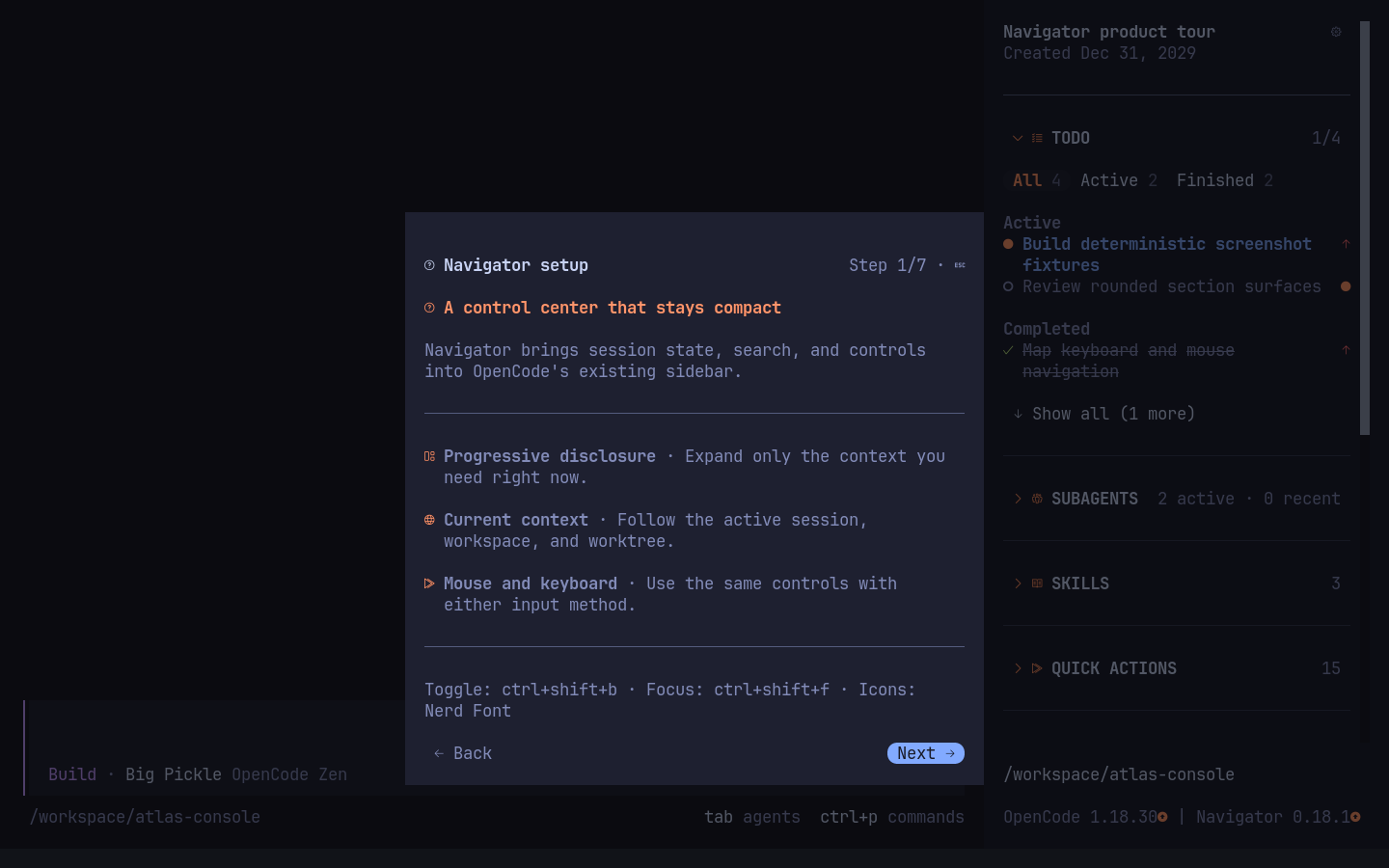
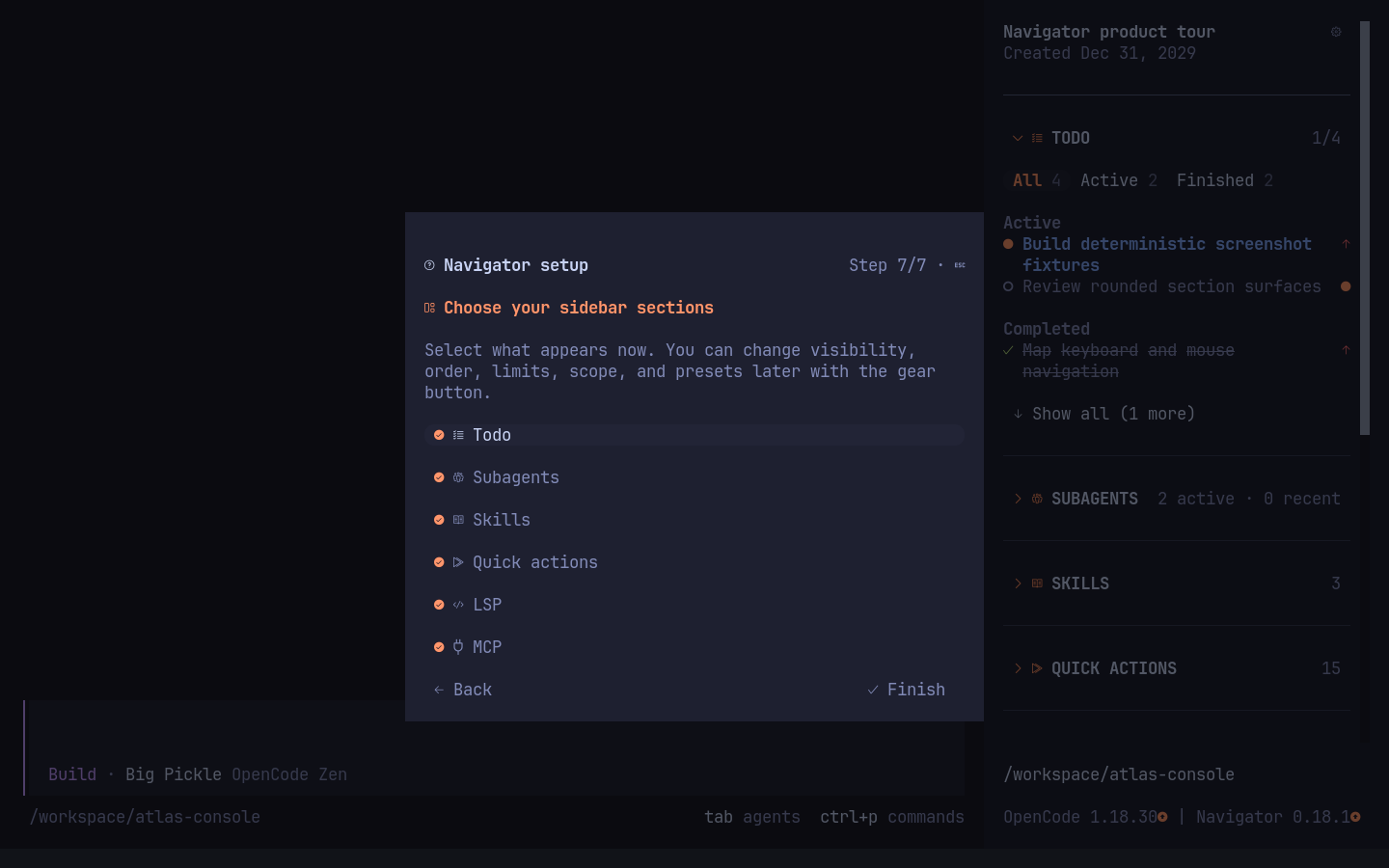
- First-run setup guide with interactive section settings
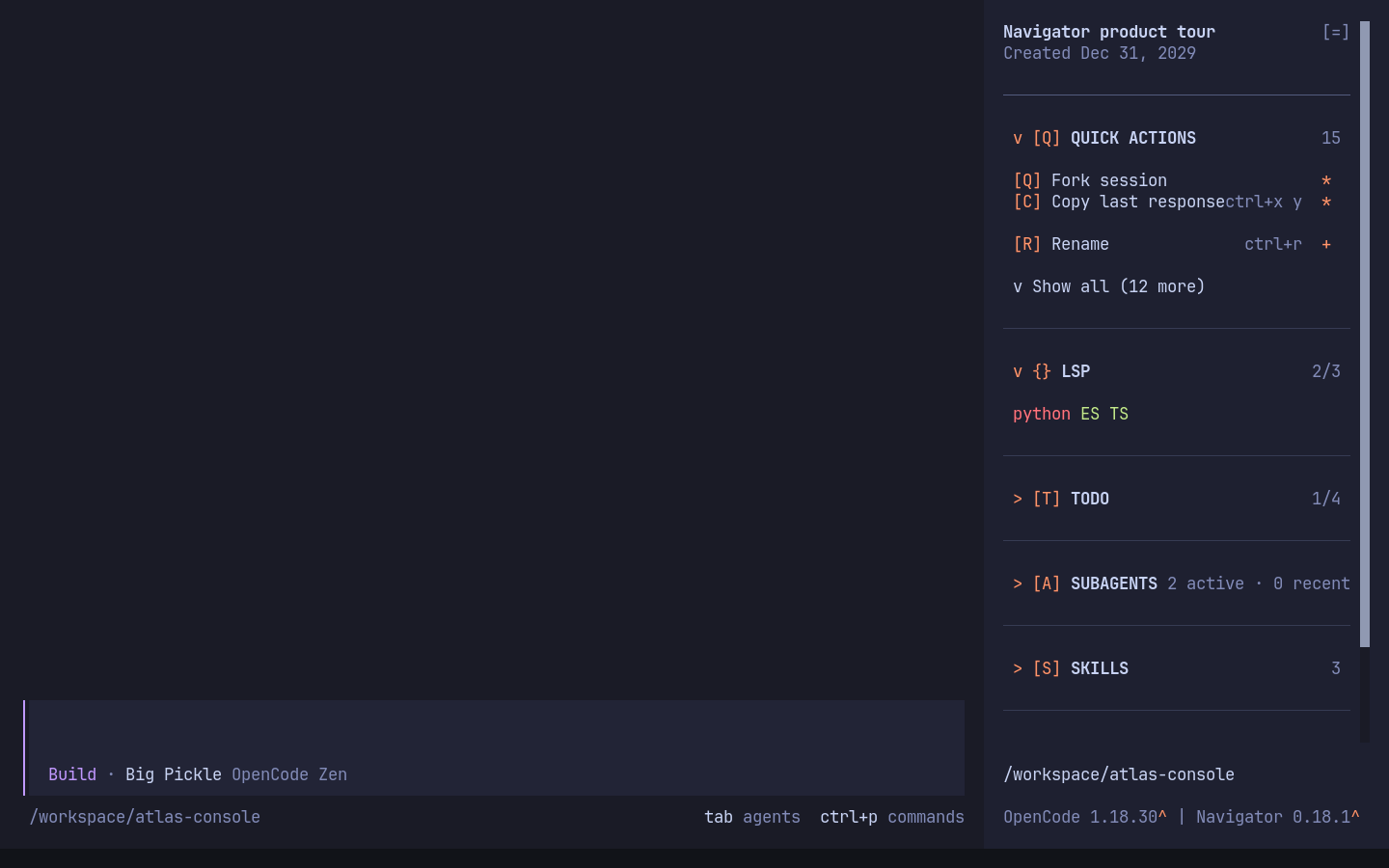
|
|
13
13
|
- Collapsible Todo section with status filters, grouped tasks, progress and priority indicators
|
|
14
14
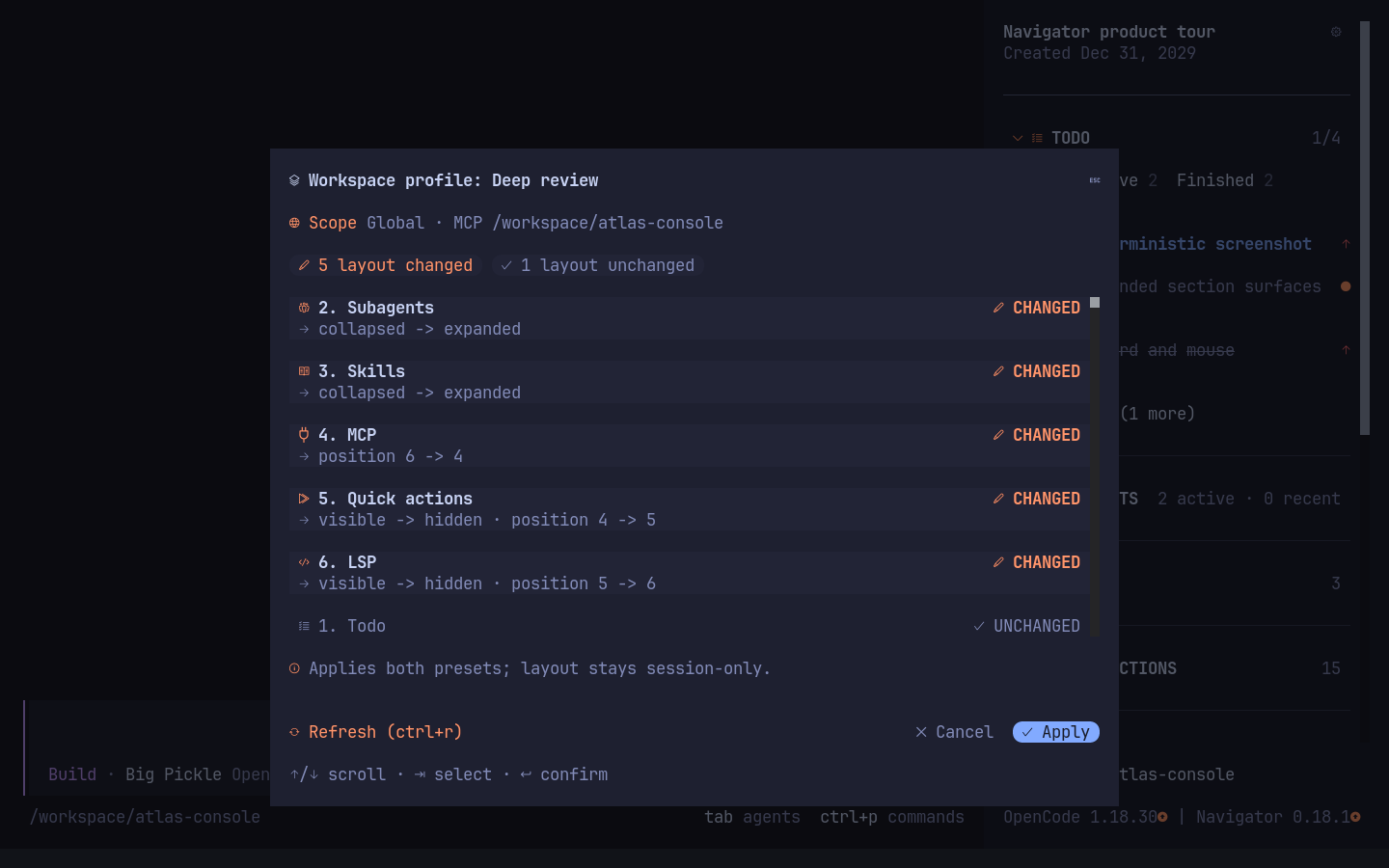
|
- Active subagent list with live statuses and click-to-open navigation, including dev-team workers running in separate local processes
|
|
15
15
|
- Compact, searchable workspace skill list with user-wide favorites, recent skills, source details, and click-to-confirm slash commands
|
|
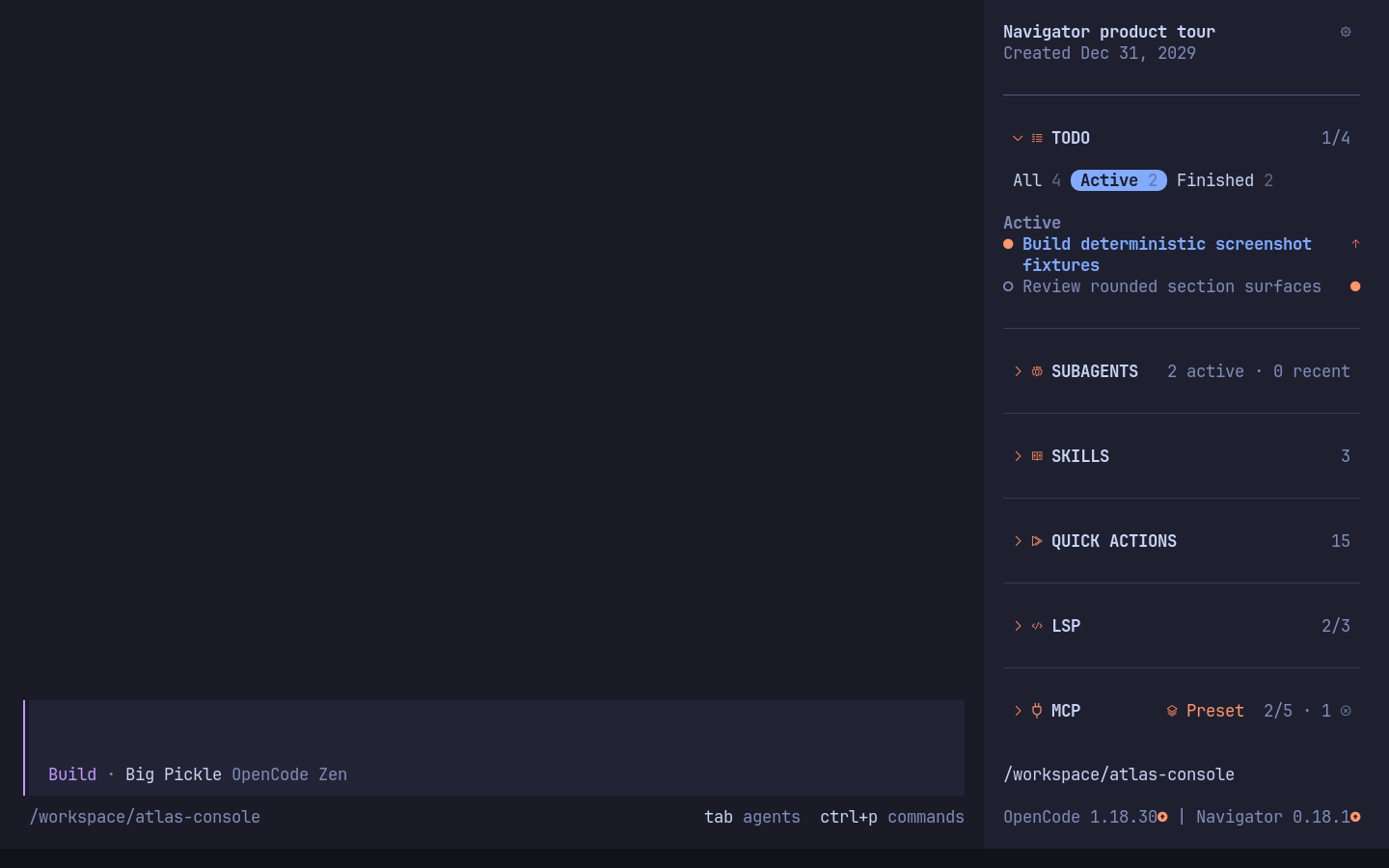
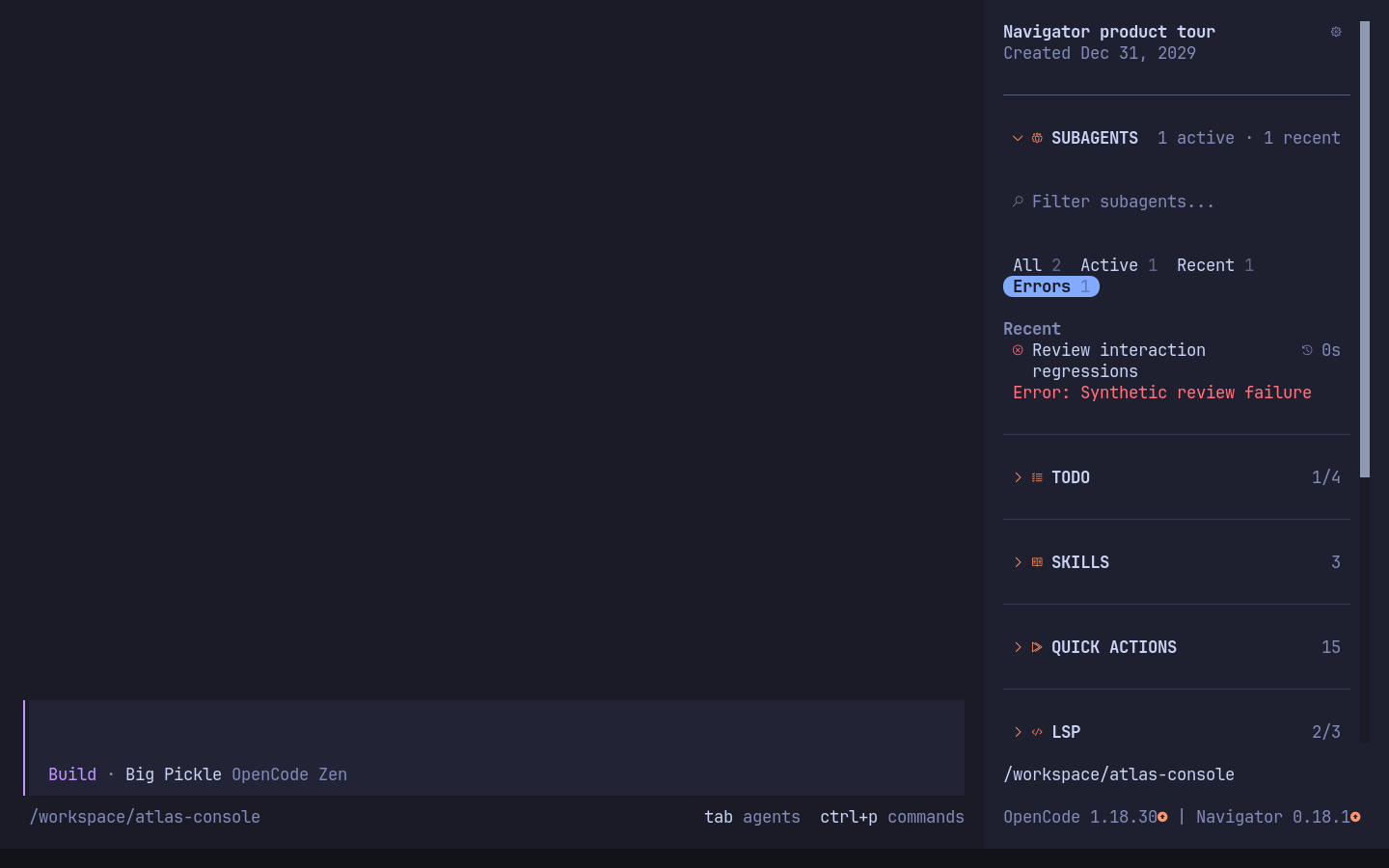
16
|
-
- Configurable quick actions
|
|
17
|
-
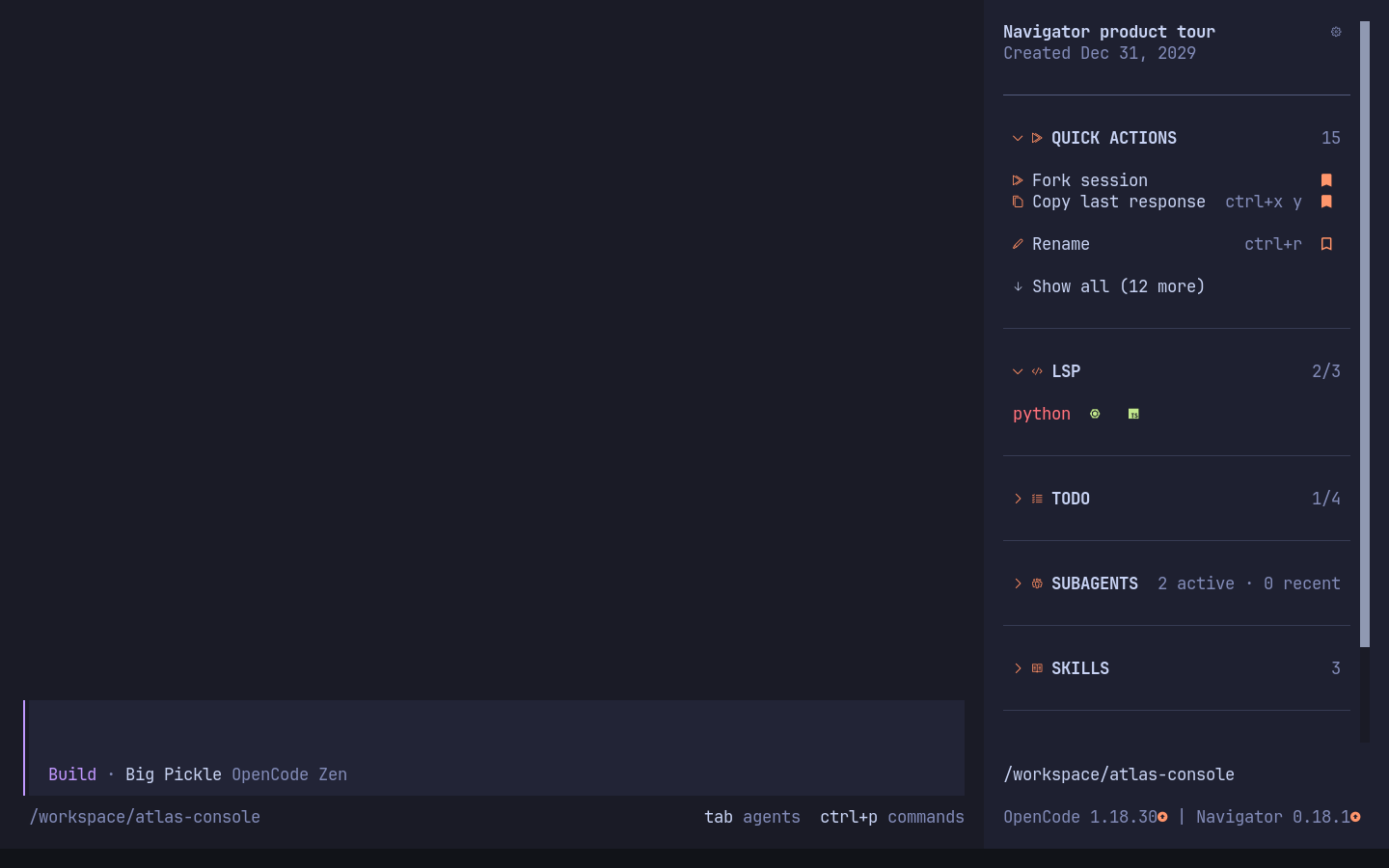
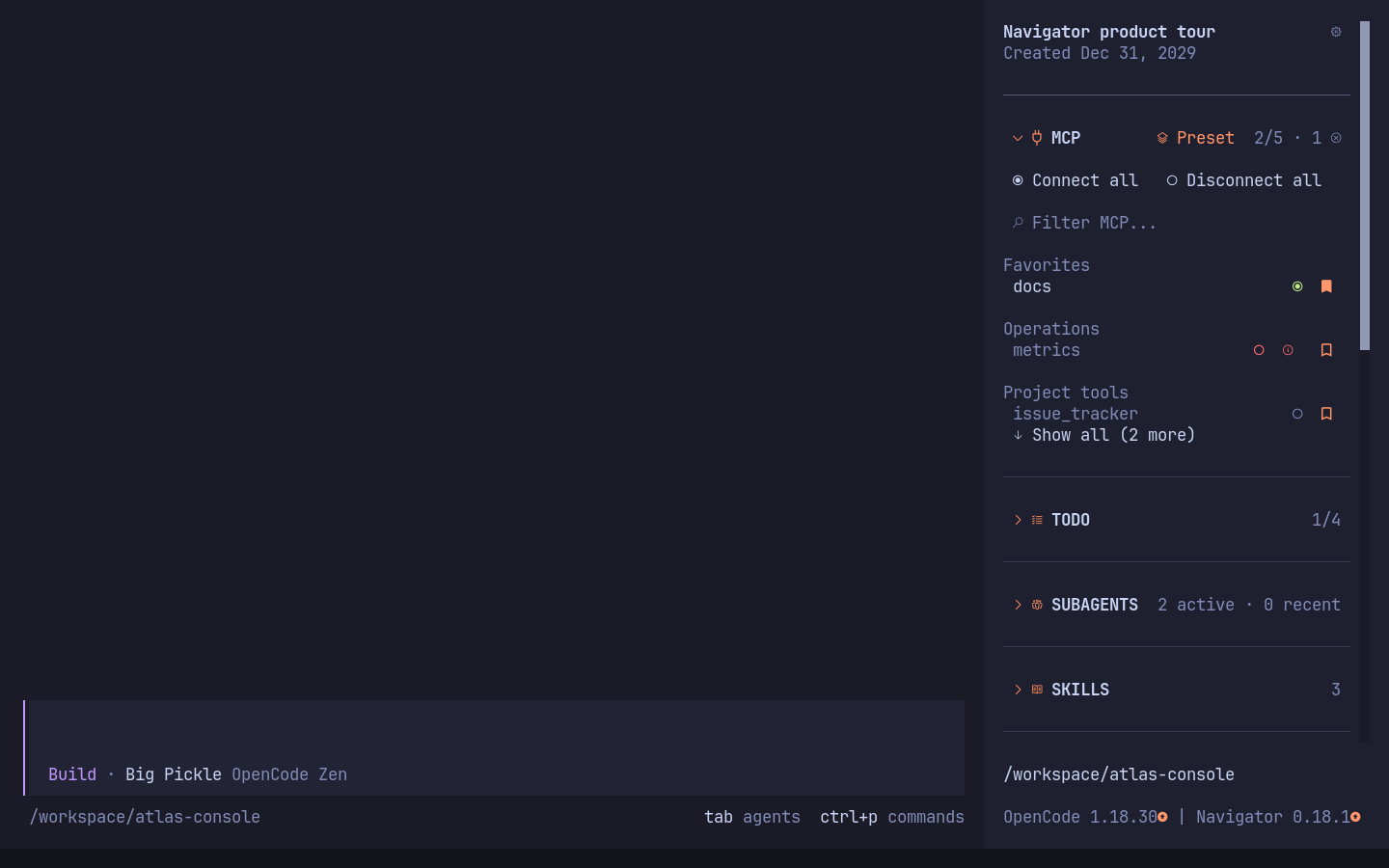
- Live LSP connection status with error-first sorting and
|
|
16
|
+
- Configurable host quick actions, including the auto-approve toggle, with user-wide bookmarks and availability reasons
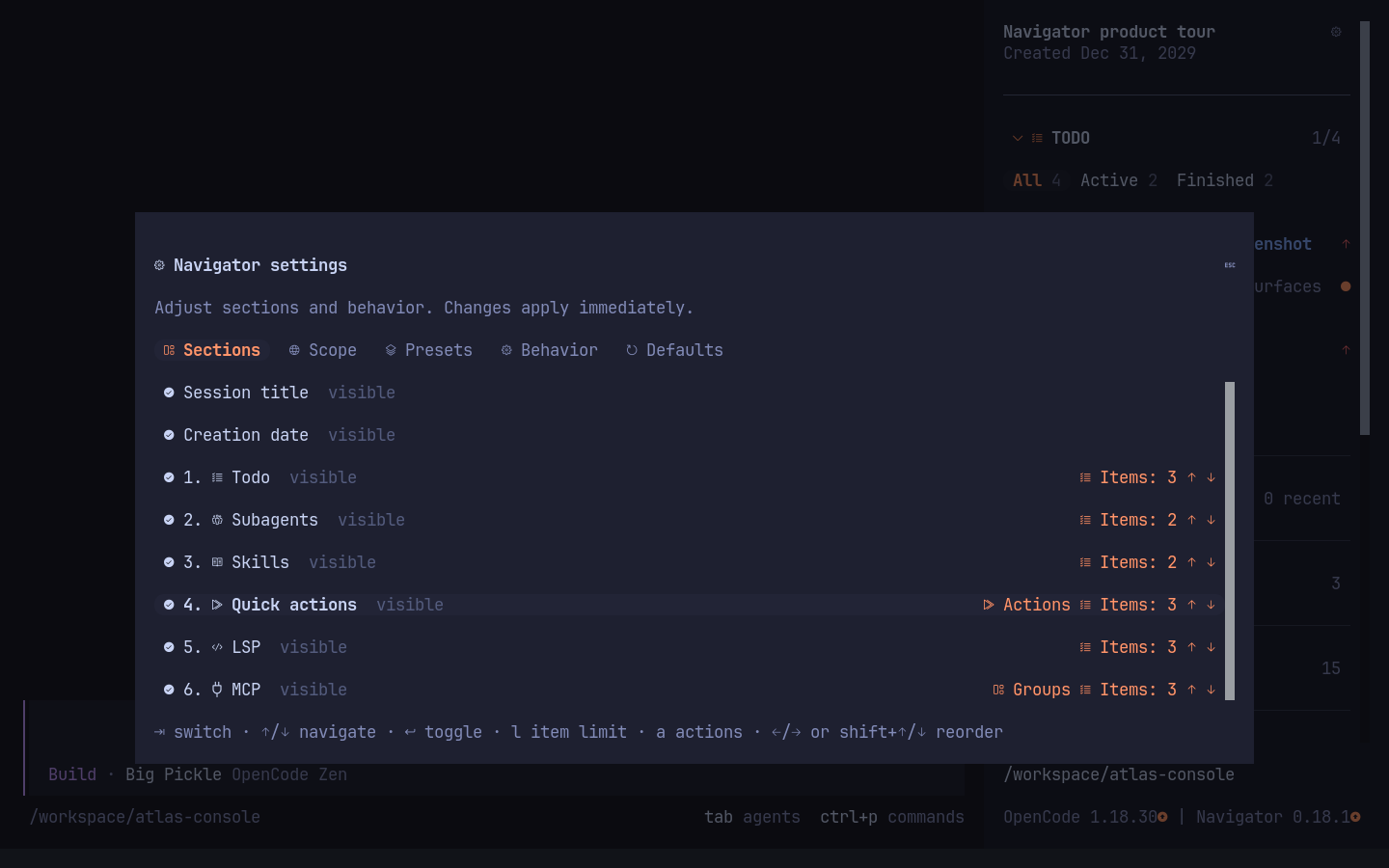
|
|
17
|
+
- Live LSP connection status with error-first sorting and badges that reveal server names in place
|
|
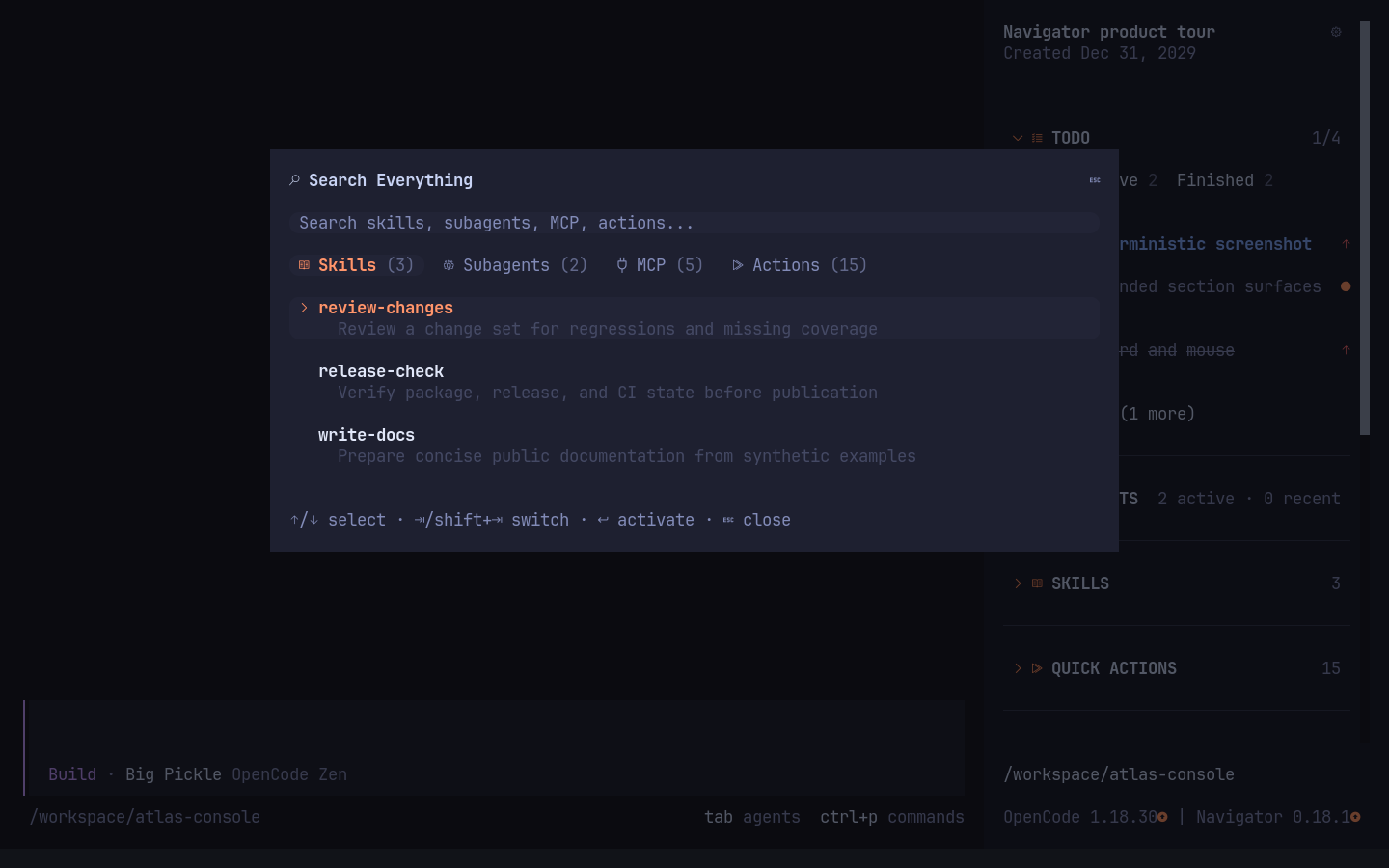
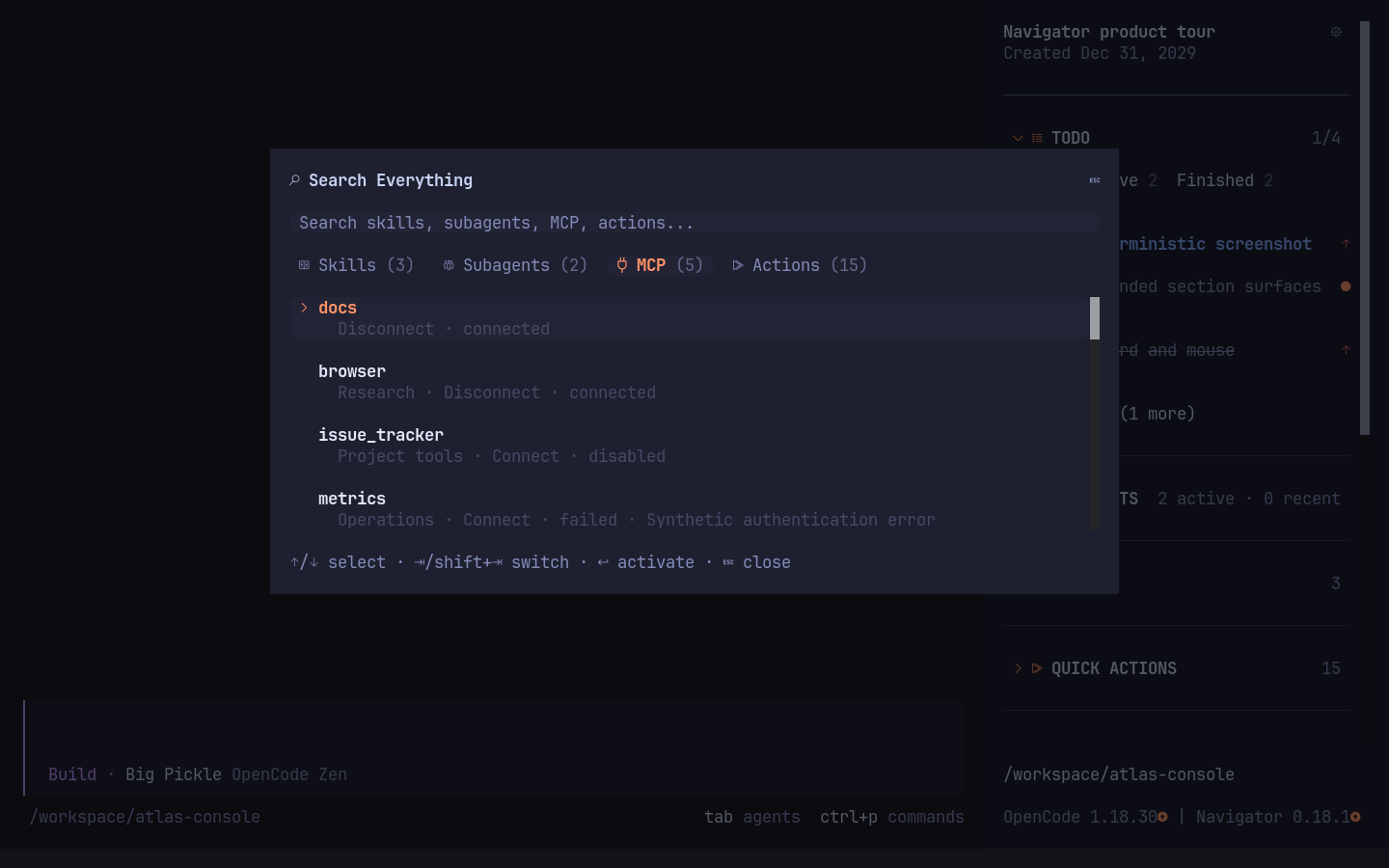
18
18
|
- Searchable MCP section with live radio-style connection controls
|
|
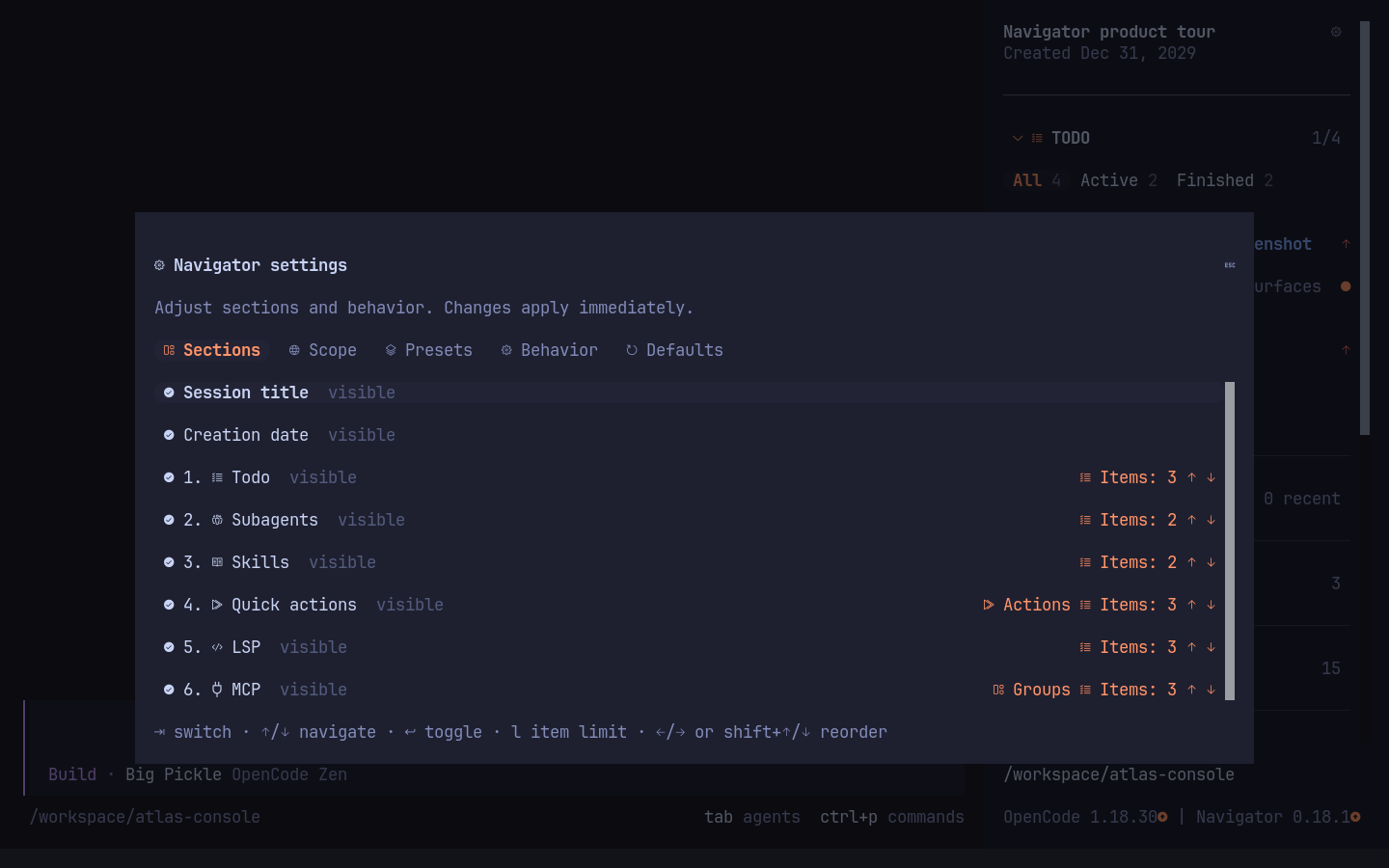
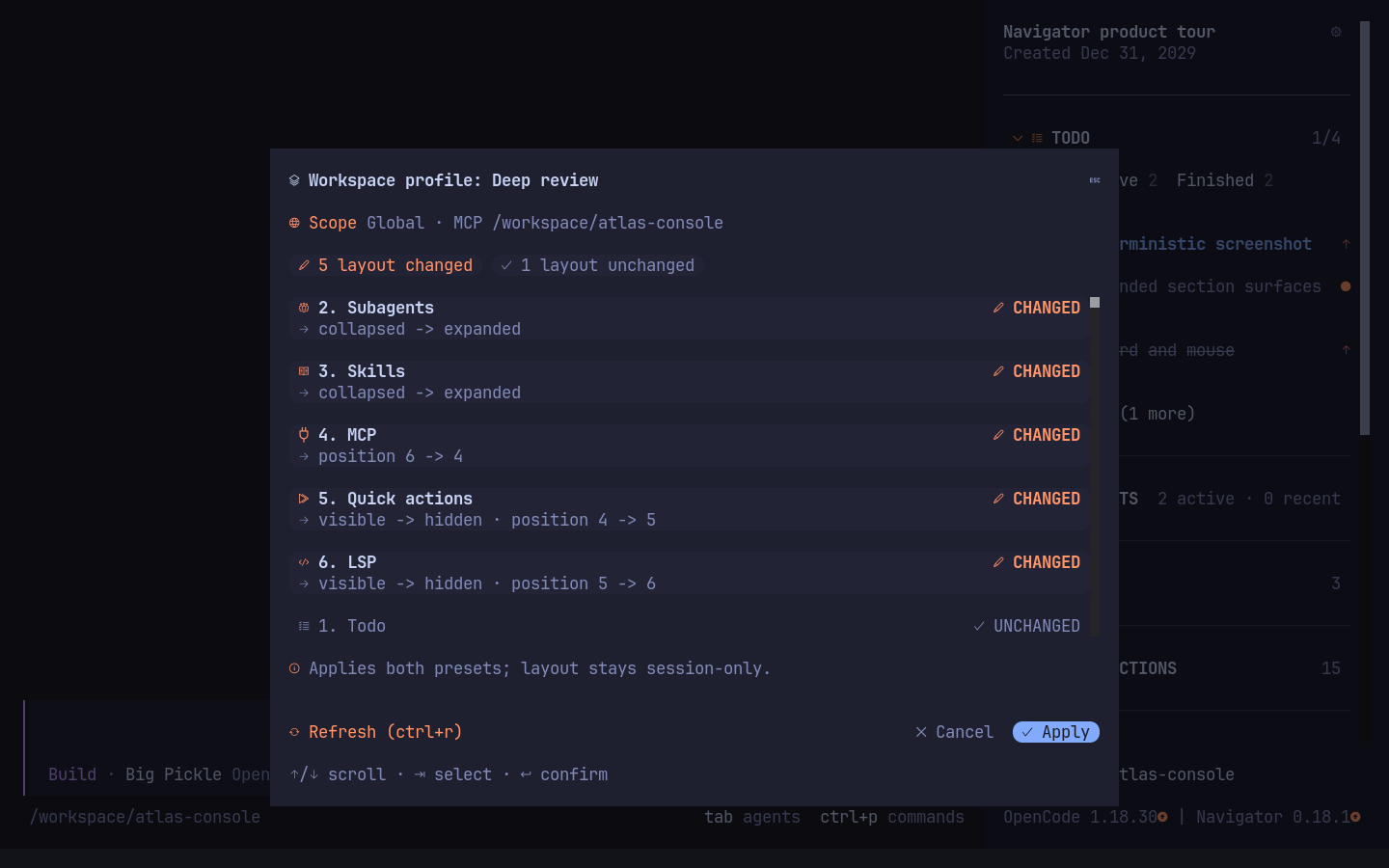
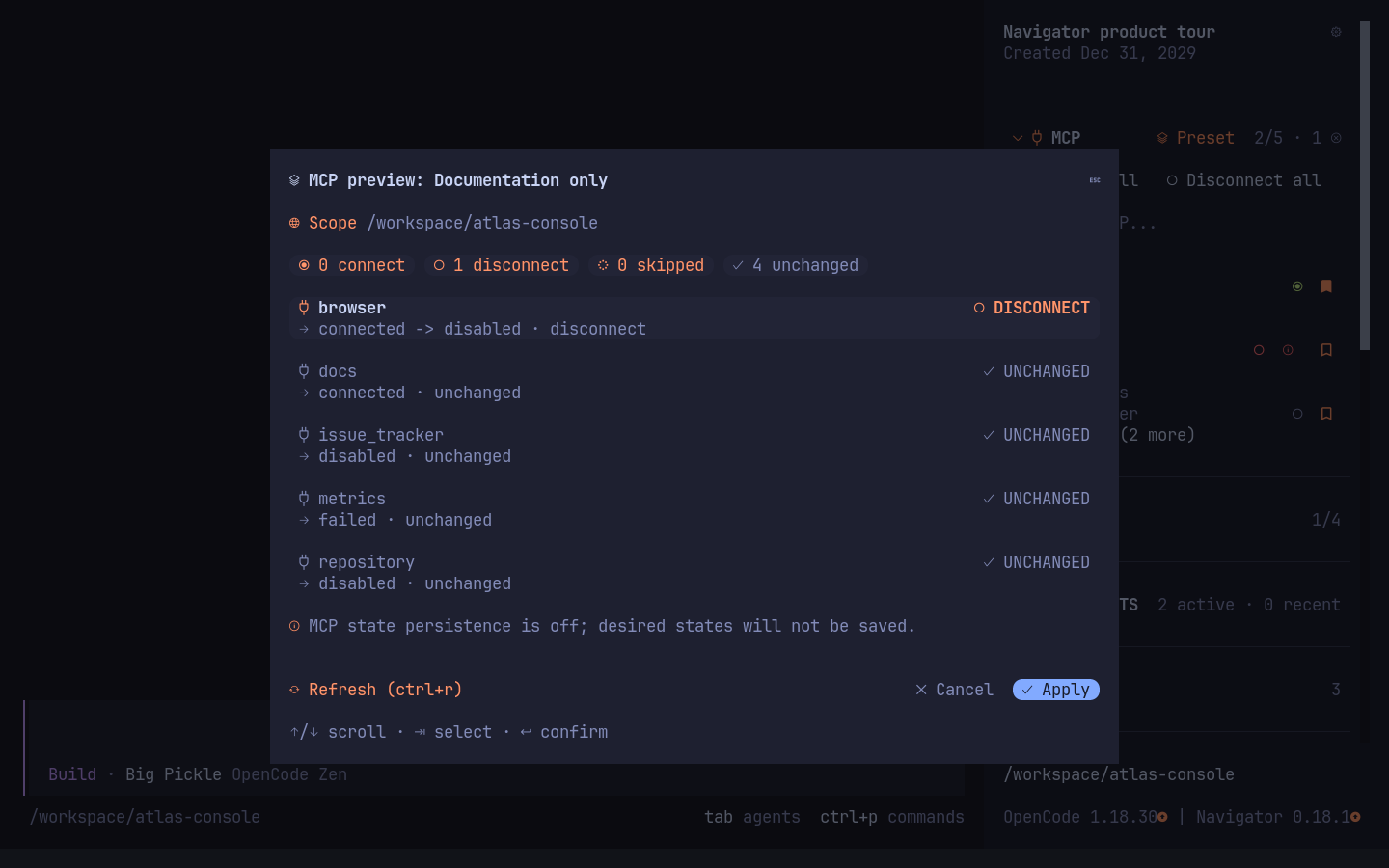
19
19
|
- Click any MCP row to connect or disconnect it
|
|
20
20
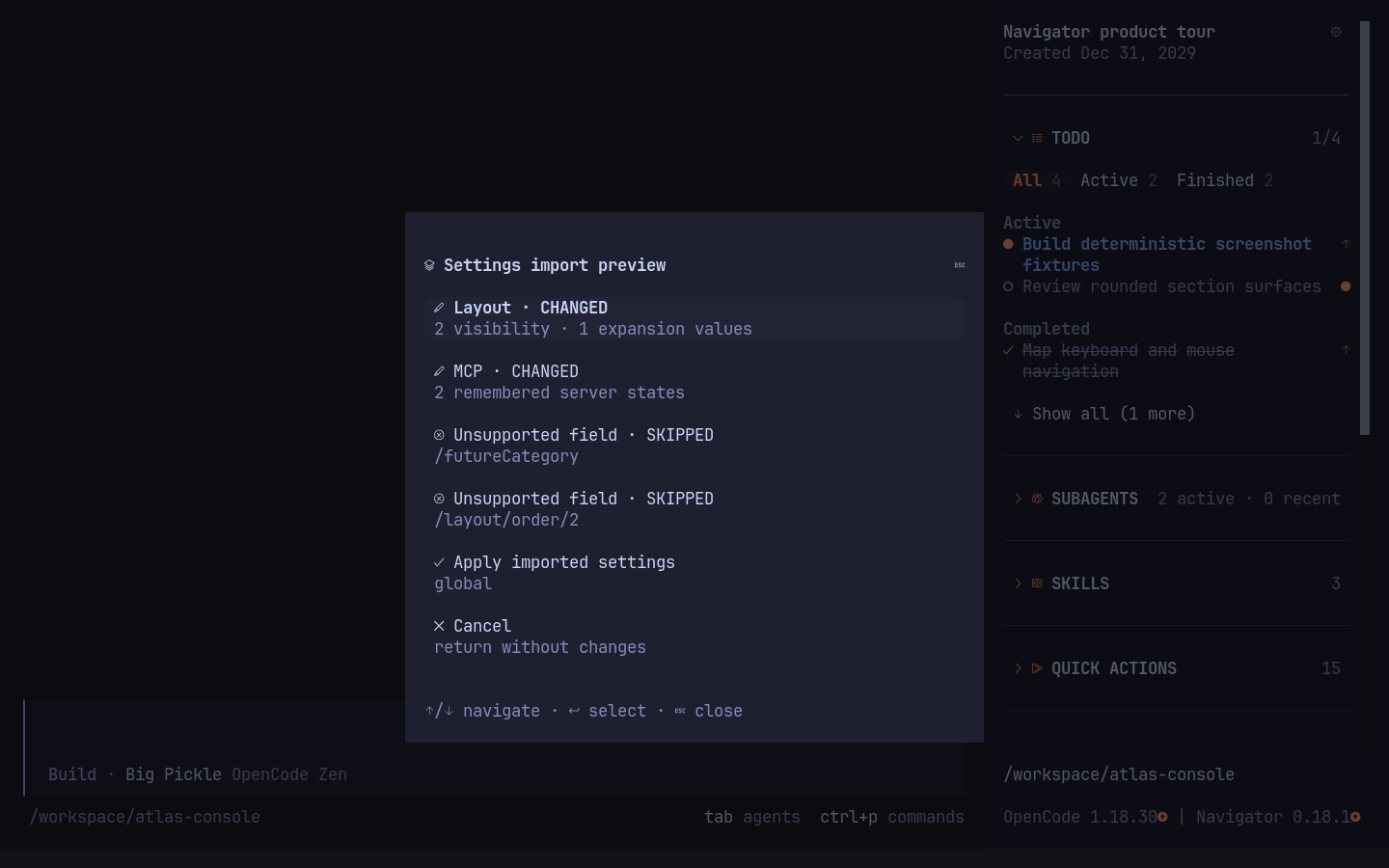
|
- Connect or disconnect every eligible MCP server with per-server progress and failed-only retry
|
|
21
21
|
- Save named MCP state presets and apply them from the MCP section heading
|
|
22
|
+
- Optionally link a layout preset with an MCP preset and apply both through one workspace-profile preview
|
|
22
23
|
- Persist enabled and disabled MCP server states globally or per worktree and reapply them between sessions
|
|
23
24
|
- Keep favorite MCP servers first across workspaces
|
|
25
|
+
- Organize MCP servers into user-wide custom groups while retaining assignments for servers absent from the current workspace
|
|
24
26
|
- Search Everything in a keyboard-first modal with category tabs and fuzzy results
|
|
25
27
|
- Show or hide each sidebar section independently
|
|
26
28
|
- Configure section visibility and order from the sidebar settings button
|
|
29
|
+
- Separate adjacent sections with quiet theme-aware dividers instead of background cards
|
|
27
30
|
- Save visibility, expansion, and order globally or for the current worktree
|
|
31
|
+
- Copy the selected scope's layout and MCP states as versioned JSON, then validate and preview imports
|
|
28
32
|
- Focus the sidebar with `Ctrl+Shift+F`, then navigate with arrows or `j`/`k`
|
|
29
|
-
-
|
|
30
|
-
- Keep OpenCode's compact project path and branch footer
|
|
33
|
+
- Open sidebar shortcut mode with `Ctrl+Shift+B`; press `h` to toggle the panel
|
|
34
|
+
- Keep OpenCode's compact project path and branch footer, followed in OpenCode 1.x by both host and Navigator versions with independent update indicators
|
|
31
35
|
|
|
32
36
|
Todo starts expanded. Subagents, skills, quick actions, LSP, and MCP start
|
|
33
37
|
collapsed. Use `Save current layout as default` in sidebar settings to reuse the
|
|
34
38
|
current visible/hidden, expanded/collapsed, and ordering states in new sessions.
|
|
35
39
|
|
|
36
|
-
|
|
40
|
+
Supports OpenCode 1.18.30 and newer, including OpenCode 2.x. OpenCode 2.0.12 does
|
|
41
|
+
not expose Todo or LSP data to TUI plugins. Navigator keeps Todo visible with an
|
|
42
|
+
explicit unsupported-host message and hides LSP on 2.x while retaining Subagents,
|
|
43
|
+
Skills, Quick Actions, MCP, Search, settings, and presets. All interface icons use Nerd Font glyphs by
|
|
37
44
|
default (Codicons for controls, keyboard symbols for hints, language logos for LSP). Use a Nerd Fonts v3
|
|
38
45
|
terminal font, or select **Settings → Behavior → Icon style → Text fallback**.
|
|
39
46
|
The switch applies to the entire interface, including Quick Actions, search
|
|
@@ -44,14 +51,82 @@ Highlighted rows, tabs, and buttons use rounded ends in Nerd Font mode;
|
|
|
44
51
|
multiline selections use inverse corner masks over a solid background from the additional
|
|
45
52
|
**OpenCode Navigator Corners** fallback font. Installing that font is required
|
|
46
53
|
for rounded multiline selections; Nerd Fonts alone do not contain these four
|
|
47
|
-
custom glyphs.
|
|
48
|
-
|
|
54
|
+
custom glyphs. Without it, disable **Multiline corner font** in Behavior: Nerd Font
|
|
55
|
+
icons and single-line rounded controls remain enabled, while multiline highlights
|
|
56
|
+
become clean rectangles. Text fallback changes all icons as well. Rounded edges
|
|
57
|
+
stay inside the control's padding and remain clickable.
|
|
49
58
|
Navigator uses the full available sidebar slot width; the current OpenCode TUI
|
|
50
59
|
fixes the outer panel at 42 columns. Long preset labels are truncated to keep the
|
|
51
60
|
MCP heading and server count on one line.
|
|
52
61
|
|
|
62
|
+
## Interface tour
|
|
63
|
+
|
|
64
|
+
The sidebar title keeps the session creation date visible without a redundant
|
|
65
|
+
status icon. Todo and live Subagents remain readable while the rest of the
|
|
66
|
+
session stays uncluttered. Filters expose active and finished tasks, live
|
|
67
|
+
workers, and recent failures without mixing their states:
|
|
68
|
+
|
|
69
|
+
|
|
70
|
+
|
|
71
|
+
|
|
72
|
+
|
|
73
|
+
Skills, Quick Actions, compact LSP badges, MCP controls, favorites, filters, and
|
|
74
|
+
muted section dividers share the same narrow sidebar:
|
|
75
|
+
|
|
76
|
+
|
|
77
|
+
|
|
78
|
+
|
|
79
|
+
|
|
80
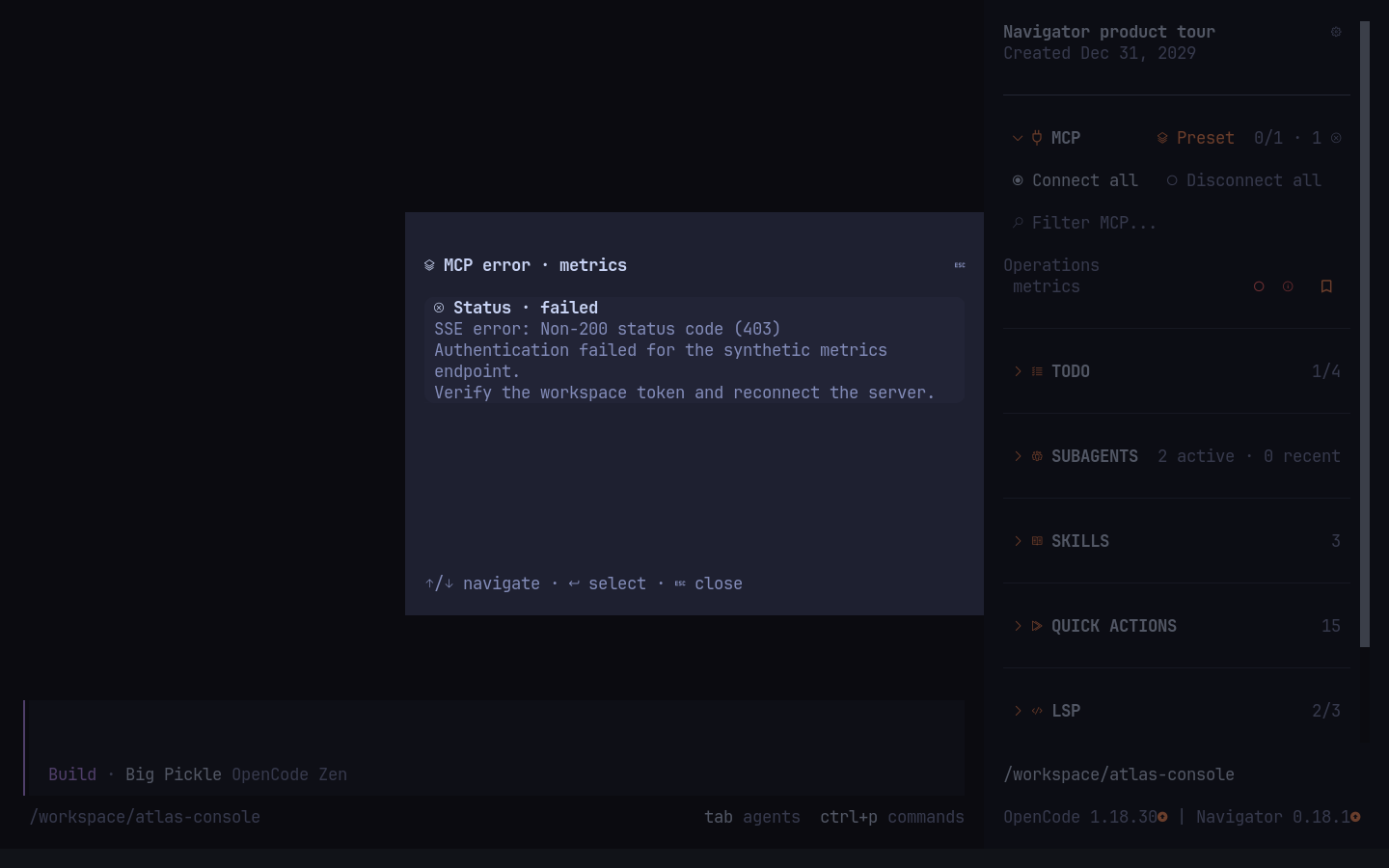
|
+
MCP groups are managed from **Settings → Sections → MCP → Groups**. Favorites
|
|
81
|
+
remain in a leading bucket; custom groups and their servers sort alphabetically.
|
|
82
|
+
Assignments can select an existing group or open an input to create a new one.
|
|
83
|
+
|
|
84
|
+
|
|
85
|
+
|
|
86
|
+
|
|
87
|
+
|
|
88
|
+
Search Everything preserves one query across Skills, Subagents, MCP, and Actions:
|
|
89
|
+
|
|
90
|
+
|
|
91
|
+
|
|
92
|
+
|
|
93
|
+
|
|
94
|
+
Settings and preset previews keep layout and MCP changes explicit before Apply:
|
|
95
|
+
|
|
96
|
+
|
|
97
|
+
|
|
98
|
+
|
|
99
|
+
|
|
100
|
+
|
|
101
|
+
|
|
102
|
+
Portable settings use the terminal clipboard for export and pasted JSON for import.
|
|
103
|
+
The preview separates supported layout/MCP changes from future fields that will
|
|
104
|
+
be skipped:
|
|
105
|
+
|
|
106
|
+
|
|
107
|
+
|
|
108
|
+
The first-run guide configures visible sections, while Text fallback keeps every
|
|
109
|
+
control readable without Nerd Font icons or the corner font:
|
|
110
|
+
|
|
111
|
+
|
|
112
|
+
|
|
113
|
+
|
|
114
|
+
|
|
115
|
+
|
|
116
|
+
|
|
117
|
+
The harness also captures Nerd Font mode without the additional corner font, so
|
|
118
|
+
the uninstalled-font result remains visible rather than being documented only in text:
|
|
119
|
+
|
|
120
|
+
|
|
121
|
+
|
|
122
|
+
The [complete 37-state screenshot gallery](screenshots/README.md) shows every
|
|
123
|
+
Todo and Subagent filter, sidebar section, Search and Settings tab, preset menu
|
|
124
|
+
and preview, confirmation, keyboard-help, setup, and icon-fallback state.
|
|
125
|
+
|
|
53
126
|
## Installation
|
|
54
127
|
|
|
128
|
+
### OpenCode 1.x
|
|
129
|
+
|
|
55
130
|
Install the plugin for the current project:
|
|
56
131
|
|
|
57
132
|
```sh
|
|
@@ -66,6 +141,21 @@ opencode plugin --global opencode-navigator
|
|
|
66
141
|
|
|
67
142
|
`opencode plug` is an alias for `opencode plugin`.
|
|
68
143
|
|
|
144
|
+
### OpenCode 2.x
|
|
145
|
+
|
|
146
|
+
Add Navigator to the `plugins` array in the global `~/.config/opencode/cli.json`:
|
|
147
|
+
|
|
148
|
+
```json
|
|
149
|
+
{
|
|
150
|
+
"$schema": "https://opencode.ai/cli.json",
|
|
151
|
+
"plugins": ["opencode-navigator"]
|
|
152
|
+
}
|
|
153
|
+
```
|
|
154
|
+
|
|
155
|
+
OpenCode 2.x CLI plugins are global terminal settings; there is no project-local
|
|
156
|
+
`cli.json`. Navigator replaces the `sidebar.content` slot, so no built-in sidebar
|
|
157
|
+
plugin overrides are required.
|
|
158
|
+
|
|
69
159
|
### Install the corner font
|
|
70
160
|
|
|
71
161
|
**Required for rounded multiline selections in Nerd Font mode.** Run the font
|
|
@@ -91,9 +181,11 @@ directory and registry. Linux requires `fc-cache` from Fontconfig.
|
|
|
91
181
|
The bundled metrics are tested with IoskeleyMono Nerd Font Propo; see
|
|
92
182
|
[`assets/README.md`](assets/README.md) for generating a matching font for other metrics.
|
|
93
183
|
|
|
94
|
-
If you skip font installation,
|
|
95
|
-
|
|
96
|
-
|
|
184
|
+
If you skip font installation, turn off **Settings → Behavior → Multiline corner
|
|
185
|
+
font** (or set `behavior.cornerFont` / the legacy `corner_font` option to `false`).
|
|
186
|
+
This preserves Nerd Font icons and single-line rounded controls while using clean
|
|
187
|
+
rectangles for multiline highlights. Text fallback remains available when Nerd
|
|
188
|
+
Font icons are also unavailable.
|
|
97
189
|
|
|
98
190
|
To remove only the additional font:
|
|
99
191
|
|
|
@@ -101,9 +193,9 @@ To remove only the additional font:
|
|
|
101
193
|
npx --yes --package=opencode-navigator opencode-navigator-font --uninstall
|
|
102
194
|
```
|
|
103
195
|
|
|
104
|
-
|
|
196
|
+
Turn off **Multiline corner font** before uninstalling it, then restart the terminal.
|
|
105
197
|
|
|
106
|
-
### Configure sidebar sections
|
|
198
|
+
### Configure OpenCode 1.x sidebar sections
|
|
107
199
|
|
|
108
200
|
The `opencode plugin` command adds the package to the `plugin` array in `tui.json`. To avoid
|
|
109
201
|
duplicating sidebar sections, also disable the overlapping built-in plugins:
|
|
@@ -132,7 +224,7 @@ package entry in `tui.json` with `opencode-navigator` rather than loading both.
|
|
|
132
224
|
If you disabled the plugin through `plugin_enabled`, rename that key to
|
|
133
225
|
`opencode-navigator` as well.
|
|
134
226
|
|
|
135
|
-
Existing settings, presets, favorites, recent skills, and shortcuts are retained:
|
|
227
|
+
Existing settings, presets, favorites, recent skills, Quick Action bookmarks, and shortcuts are retained:
|
|
136
228
|
Navigator uses the established `opencode-pretty-sidebar/preferences.json` and its
|
|
137
229
|
lock under OpenCode's state directory. No file copying is required. Public
|
|
138
230
|
`opencode-pretty-sidebar.toggle`, `.focus`, `.focus.<section>`, and `.search`
|
|
@@ -158,8 +250,9 @@ opencode
|
|
|
158
250
|
OpenCode reads TUI configuration at startup. Restart it after changing the
|
|
159
251
|
plugin or `tui.json`.
|
|
160
252
|
|
|
161
|
-
On first launch, a
|
|
162
|
-
|
|
253
|
+
On first launch, a seven-step setup wizard introduces monitoring, Search Everything,
|
|
254
|
+
Skills, Quick Actions, LSP, MCP controls, presets, and workspace customization
|
|
255
|
+
before letting you choose which sections to show. The guide is shown once and can be opened again
|
|
163
256
|
later from the sidebar settings button. The settings dialog also selects global
|
|
164
257
|
or current-worktree scope, manages named layout presets, and controls section
|
|
165
258
|
order, MCP state persistence, icon style, and the sidebar shortcuts without
|
|
@@ -181,81 +274,94 @@ scope; Restore configured behavior removes that scope's limit overrides.
|
|
|
181
274
|
On the Quick Actions row, click `Actions` or press `A` to choose individual
|
|
182
275
|
actions and their order. Enter toggles visibility; Left/Right or Shift+Up/Down
|
|
183
276
|
reorders the selected action. Changes save in the selected Global or Current
|
|
184
|
-
worktree scope. Escape returns to the Quick Actions row in Sections.
|
|
277
|
+
worktree scope. Escape returns to the Quick Actions row in Sections. Navigator
|
|
278
|
+
keeps an explicit allowlist of argument-free host commands, including OpenCode's
|
|
279
|
+
global `permission.mode` auto-approve toggle. Bookmarks are user-wide and move
|
|
280
|
+
selected actions to the front in their configured order in both the sidebar and
|
|
281
|
+
Search Everything. Usage never changes the order. Visibility remains independent,
|
|
282
|
+
so any action, including a bookmarked one, can be hidden from the sidebar while it
|
|
283
|
+
remains searchable. Unavailable actions stay visible with a route- or host-specific reason.
|
|
284
|
+
|
|
285
|
+
## Configuration sources
|
|
286
|
+
|
|
287
|
+
Navigator validates and deep-merges three simultaneous sources in this order:
|
|
288
|
+
|
|
289
|
+
1. The `options` dictionary in Navigator's `opencode.json` plugin tuple. OpenCode
|
|
290
|
+
1.x also passes the same dictionary from its `tui.json` tuple.
|
|
291
|
+
2. `~/.config/.opencode-navigator/settings.json` for user-wide configured defaults.
|
|
292
|
+
3. `.opencode/navigator.json` in the current worktree for commit-safe project defaults.
|
|
185
293
|
|
|
186
|
-
|
|
294
|
+
Later sources override earlier sources. Object fields merge independently, while
|
|
295
|
+
ordered arrays are replaced and normalized. A malformed file is ignored with a
|
|
296
|
+
warning without discarding the other sources. Saved Global and Current worktree
|
|
297
|
+
preferences remain above all three configured sources; current-session layout is
|
|
298
|
+
the final temporary layer.
|
|
187
299
|
|
|
188
|
-
|
|
300
|
+
Use this object directly as either settings file, or as the second item in the
|
|
301
|
+
Navigator plugin tuple:
|
|
189
302
|
|
|
190
303
|
```json
|
|
191
304
|
{
|
|
192
|
-
"
|
|
193
|
-
|
|
194
|
-
|
|
195
|
-
|
|
196
|
-
|
|
197
|
-
|
|
198
|
-
|
|
199
|
-
|
|
200
|
-
|
|
201
|
-
|
|
202
|
-
|
|
203
|
-
|
|
204
|
-
|
|
205
|
-
|
|
206
|
-
|
|
207
|
-
|
|
208
|
-
|
|
209
|
-
|
|
210
|
-
|
|
211
|
-
|
|
212
|
-
|
|
213
|
-
|
|
214
|
-
|
|
215
|
-
|
|
216
|
-
|
|
305
|
+
"behavior": {
|
|
306
|
+
"toggleKey": "ctrl+shift+b",
|
|
307
|
+
"focusKey": "ctrl+shift+f",
|
|
308
|
+
"searchKey": "ctrl+shift+k",
|
|
309
|
+
"persistMcp": true,
|
|
310
|
+
"cornerFont": true,
|
|
311
|
+
"lspIconStyle": "nerd",
|
|
312
|
+
"rowDensity": "compact",
|
|
313
|
+
"sectionItemLimits": { "todo": 0, "skills": 5, "mcp": 5 },
|
|
314
|
+
"quickActionOrder": ["session.rename", "session.copy", "session.fork"],
|
|
315
|
+
"quickActionVisibility": { "session.export": false }
|
|
316
|
+
},
|
|
317
|
+
"layout": {
|
|
318
|
+
"sections": { "todo": true, "skills": true, "lsp": false },
|
|
319
|
+
"expanded": { "todo": true, "mcp": true },
|
|
320
|
+
"order": ["todo", "subagents", "skills", "quick_actions", "mcp", "lsp"]
|
|
321
|
+
},
|
|
322
|
+
"mcp": { "docs": "enabled", "metrics": "disabled" },
|
|
323
|
+
"layoutPresets": {
|
|
324
|
+
"Review": {
|
|
325
|
+
"sections": { "quick_actions": false },
|
|
326
|
+
"expanded": { "todo": true },
|
|
327
|
+
"order": ["todo", "subagents", "skills", "mcp", "quick_actions", "lsp"]
|
|
328
|
+
}
|
|
329
|
+
},
|
|
330
|
+
"mcpPresets": { "Docs": { "docs": "enabled", "metrics": "disabled" } },
|
|
331
|
+
"workspaceProfiles": { "Review": "Docs" },
|
|
332
|
+
"mcpServerGroups": { "docs": "Documentation", "metrics": "Operations" }
|
|
333
|
+
}
|
|
334
|
+
```
|
|
335
|
+
|
|
336
|
+
For example, the schema-valid `opencode.json` entry is:
|
|
337
|
+
|
|
338
|
+
```json
|
|
339
|
+
{
|
|
340
|
+
"$schema": "https://opencode.ai/config.json",
|
|
341
|
+
"plugin": [["opencode-navigator", { "behavior": { "rowDensity": "comfortable" } }]]
|
|
217
342
|
}
|
|
218
343
|
```
|
|
219
344
|
|
|
220
|
-
|
|
221
|
-
|
|
222
|
-
|
|
223
|
-
|
|
224
|
-
|
|
225
|
-
|
|
226
|
-
|
|
227
|
-
|
|
228
|
-
|
|
229
|
-
|
|
230
|
-
|
|
231
|
-
|
|
232
|
-
|
|
233
|
-
|
|
234
|
-
|
|
235
|
-
|
|
236
|
-
|
|
237
|
-
|
|
238
|
-
|
|
239
|
-
|
|
240
|
-
Worktree overrides inherit each unspecified section from Global independently.
|
|
241
|
-
- `quick_action_order`: command IDs of the five built-in quick actions in display
|
|
242
|
-
order. Missing actions are appended; unknown and duplicate IDs are ignored.
|
|
243
|
-
- `quick_action_visibility`: visibility by command ID. Actions default to visible;
|
|
244
|
-
unspecified worktree values inherit the global setting. Restore configured
|
|
245
|
-
behavior resets action overrides as well as the other behavior settings.
|
|
246
|
-
|
|
247
|
-
Every option is also available from the sidebar gear button. Choose `Global` or
|
|
248
|
-
`Current worktree` before editing. Values resolve in configured-default, global,
|
|
249
|
-
worktree, then current-session order. Behavior changes apply immediately in the
|
|
250
|
-
selected scope. Section visibility, expansion, and order remain in memory until
|
|
251
|
-
`Save current layout as default` is selected. The layout, behavior, and
|
|
252
|
-
remembered MCP-state resets remove only the selected scope's overrides, exposing
|
|
253
|
-
inherited values again. Skill-confirmation choices, favorite skills, and MCP
|
|
254
|
-
presets remain user-wide. Preferences
|
|
255
|
-
are stored in one unversioned, validated file under OpenCode's state directory.
|
|
256
|
-
The initial layout-preset list is empty. `Save as…` captures current visibility,
|
|
257
|
-
expansion, and section order; saved presets can be applied to the selected scope,
|
|
258
|
-
updated from the current layout, renamed, or deleted.
|
|
345
|
+
Behavior keys control shortcuts, MCP persistence, `nerd`/`text` icon style, row
|
|
346
|
+
density, item limits, and Navigator's safe Quick Action allowlist. Unknown values,
|
|
347
|
+
sections, actions, and MCP states are discarded. The previous snake_case tuple
|
|
348
|
+
options (`toggle_key`, `focus_key`, `search_key`, `persist_mcp`, `corner_font`, `icon_style`,
|
|
349
|
+
`lsp_icon_style`, `row_density`, `section_item_limits`, `quick_action_order`,
|
|
350
|
+
`quick_action_visibility`, `sections`, and `section_order`) remain compatible;
|
|
351
|
+
canonical nested fields win when both forms are present.
|
|
352
|
+
|
|
353
|
+
Configured files may define behavior, layout, desired MCP states, layout and MCP
|
|
354
|
+
presets, workspace-profile links, and MCP groups. Navigator deliberately ignores
|
|
355
|
+
favorites, recent-item history, trusted skills, onboarding state, paths, and other
|
|
356
|
+
private mutable data. The files are read-only defaults: UI changes continue to use
|
|
357
|
+
the concurrency-safe preferences file under OpenCode's state directory. Resetting
|
|
358
|
+
a scope removes only its saved override and reveals configured values again.
|
|
359
|
+
|
|
360
|
+
Choose `Global` or `Current worktree` before editing from the sidebar gear button.
|
|
361
|
+
Behavior changes apply immediately in the selected scope. Section visibility,
|
|
362
|
+
expansion, and order remain in memory until `Save current layout as default` is
|
|
363
|
+
selected. `Save as…` captures current visibility, expansion, and section order;
|
|
364
|
+
saved presets can be applied, updated, renamed, or deleted.
|
|
259
365
|
|
|
260
366
|
Choose **Preview & apply** in a saved layout preset's menu to review visibility,
|
|
261
367
|
expansion, and position changes before applying it. Changed sections appear first,
|
|
@@ -264,11 +370,21 @@ select **Apply** to confirm or **Cancel** / `Escape` to return to the preset men
|
|
|
264
370
|
Applying a preset updates the in-memory layout for the selected scope. Use
|
|
265
371
|
`Save current layout as default` to persist it.
|
|
266
372
|
|
|
373
|
+
In **Defaults & Help**, **Copy portable settings** exports the selected scope's
|
|
374
|
+
effective layout and desired MCP states as deterministic versioned JSON through
|
|
375
|
+
the terminal clipboard. **Import portable settings…** accepts pasted JSON and
|
|
376
|
+
opens a preview before writing. Unknown future fields and section IDs are listed
|
|
377
|
+
as skipped; malformed versions or invalid known values are rejected. Apply
|
|
378
|
+
replaces only the supplied layout and MCP blocks in the still-selected scope in
|
|
379
|
+
one atomic preferences update. Paths, shortcuts, favorites, history, trust choices,
|
|
380
|
+
and other private preferences are never imported or exported.
|
|
381
|
+
|
|
267
382
|
## Keyboard controls
|
|
268
383
|
|
|
269
384
|
Press `Ctrl+Shift+F` to focus the sidebar. Use `Up`/`Down` or `k`/`j` to move,
|
|
270
385
|
`Enter` to activate the selected row, `Escape` to return to the previous focus,
|
|
271
|
-
|
|
386
|
+
`?` to open the keyboard help, and `Ctrl+,` to open Navigator Settings directly.
|
|
387
|
+
When a Skills or MCP filter owns focus,
|
|
272
388
|
typing edits the query and the first `Escape` returns to sidebar navigation.
|
|
273
389
|
The filter icon, placeholder, entered text, clear control, and cursor use the same
|
|
274
390
|
contrasting focus palette; the field follows actual input focus and blur.
|
|
@@ -286,6 +402,10 @@ Tab icons match the sidebar sections and section entries in settings.
|
|
|
286
402
|
Search covers names, descriptions, skill source paths, and subagent IDs in the
|
|
287
403
|
current workspace/session. It uses full source lists, regardless of sidebar
|
|
288
404
|
visibility and item limits; actions hidden from the sidebar are still searchable.
|
|
405
|
+
Bookmarked actions are remembered user-wide and lead the configured base order in
|
|
406
|
+
both views. Usage never changes their order. Actions unsupported by the current
|
|
407
|
+
OpenCode version or unavailable on the current route remain searchable and show
|
|
408
|
+
why they cannot run.
|
|
289
409
|
|
|
290
410
|
- `Up` / `Down`: select a result in the current tab; `Tab` / `Shift+Tab` or a click:
|
|
291
411
|
switch tabs. Each tab remembers its selection and scroll position until the
|
|
@@ -327,14 +447,22 @@ progress and failed-only retry behavior. Servers in a preset that are not presen
|
|
|
327
447
|
in the current scope are skipped at application time; their desired states are
|
|
328
448
|
retained when MCP state persistence is enabled.
|
|
329
449
|
|
|
450
|
+
A layout preset can optionally link to one MCP preset as a user-wide workspace
|
|
451
|
+
profile. Opening it shows one combined change preview; only the separate `Apply`
|
|
452
|
+
action changes either side. Applying does not save the layout as the default and
|
|
453
|
+
profiles are never applied automatically when entering a workspace.
|
|
454
|
+
|
|
455
|
+
Failed MCP rows expose an information control instead of placing the error inline.
|
|
456
|
+
It opens a scrollable dialog containing the server, status, and complete error text.
|
|
457
|
+
|
|
330
458
|
The MCP bookmark control saves favorites user-wide by server name. Favorites appear
|
|
331
459
|
first, alphabetically within each group, with a blank separator before other
|
|
332
460
|
servers. The bookmark does not connect or disconnect the server.
|
|
333
461
|
|
|
334
462
|
LSP servers with connection errors appear first, followed by alphabetical ID and
|
|
335
|
-
root order. Activate any badge, including a custom server, to
|
|
336
|
-
|
|
337
|
-
|
|
463
|
+
root order. Activate any badge, including a custom server, to toggle its full ID
|
|
464
|
+
in place. Navigator does not open a root/status dialog because OpenCode may report
|
|
465
|
+
an empty root and does not expose the underlying diagnostic error text.
|
|
338
466
|
|
|
339
467
|
Todo priorities are read-only because OpenCode does not expose a Todo mutation
|
|
340
468
|
API to TUI plugins.
|
|
@@ -344,13 +472,14 @@ tasks before pending tasks. Finished contains separate Completed and Cancelled
|
|
|
344
472
|
groups. The selected view is temporary and resets to All when changing sessions.
|
|
345
473
|
The header always reports completed tasks against the full task count.
|
|
346
474
|
|
|
347
|
-
Subagents show observed run duration, retry countdowns, and execution errors.
|
|
348
|
-
|
|
349
|
-
start time is unknown. Recent keeps the last 10 observed
|
|
350
|
-
session in memory across navigation, until OpenCode exits.
|
|
351
|
-
labelled Finished, not a guarantee of successful task
|
|
352
|
-
cancellations retain their own labels. A worker timeout
|
|
353
|
-
unavailability and does not mark its last confirmed active run as
|
|
475
|
+
Subagents show observed run duration, retry countdowns, and execution errors. An
|
|
476
|
+
already-running child discovered by the sidebar uses a clock icon (`~` in Text
|
|
477
|
+
fallback) because its exact start time is unknown. Recent keeps the last 10 observed
|
|
478
|
+
finished runs per parent session in memory across navigation, until OpenCode exits.
|
|
479
|
+
An idle transition is labelled Finished, not a guarantee of successful task
|
|
480
|
+
completion; errors and cancellations retain their own labels. A worker timeout
|
|
481
|
+
displays status unavailability and does not mark its last confirmed active run as
|
|
482
|
+
finished.
|
|
354
483
|
Active runs precede Recent under the shared Subagents item limit.
|
|
355
484
|
Local session events update subagents immediately; snapshot and worker-status
|
|
356
485
|
polling runs every five seconds. Background refresh is silent after the initial
|
|
@@ -362,12 +491,14 @@ session, `Parent session` opens the parent even when no subagents are listed.
|
|
|
362
491
|
Selecting a skill opens its description with Accept and Cancel controls before
|
|
363
492
|
appending its `/<name>` command to the current prompt. Select "Don't show again
|
|
364
493
|
for this skill" to skip that confirmation later. The sidebar settings dialog
|
|
365
|
-
|
|
366
|
-
|
|
494
|
+
lists trusted skills under Defaults, where trust can be revoked individually or
|
|
495
|
+
for every skill. Select the bookmark beside a skill, or the
|
|
496
|
+
same control in its confirmation dialog, to keep it ahead of non-favorite skills
|
|
497
|
+
in every workspace. The last 10 successfully inserted
|
|
367
498
|
skills are remembered user-wide by source location and appear after favorites,
|
|
368
499
|
most recent first, marked with a history icon (`~` in text mode). Other skills
|
|
369
|
-
remain alphabetical.
|
|
370
|
-
|
|
500
|
+
remain alphabetical. Skill rows do not show a separate information control;
|
|
501
|
+
the confirmation dialog contains the description and full source location.
|
|
371
502
|
Quick actions invoke OpenCode's built-in
|
|
372
503
|
commands and display the active keybindings from your configuration.
|
|
373
504
|
|
|
@@ -379,7 +510,7 @@ session or workspace dismisses the entire search dialog chain.
|
|
|
379
510
|
|
|
380
511
|
## Scripts
|
|
381
512
|
|
|
382
|
-
Development requires Bun 1.4.
|
|
513
|
+
Development requires Bun 1.4.2 and Node.js 24.16 or newer. Install dependencies with
|
|
383
514
|
`bun install --frozen-lockfile`.
|
|
384
515
|
|
|
385
516
|
ESLint uses the Solid preset from
|
|
@@ -399,22 +530,43 @@ bun run format:check
|
|
|
399
530
|
bun run font:install
|
|
400
531
|
bun run build
|
|
401
532
|
bun run bundle:size
|
|
533
|
+
bun run screenshots
|
|
534
|
+
bun run screenshots:verify
|
|
402
535
|
bun run check
|
|
403
536
|
```
|
|
404
537
|
|
|
405
538
|
`bun run check` runs the tests, TypeScript, ESLint, bundle-size guard, and formatting
|
|
406
|
-
check. The unminified TUI bundle is limited to
|
|
539
|
+
check. The unminified TUI bundle is limited to 360,000 bytes.
|
|
407
540
|
Font generation is a separate development task: `bun run font:build` and
|
|
408
541
|
`bun run font:check` use `uv` and the pinned FontTools dependency. Users install
|
|
409
542
|
the already generated font; Python and FontTools are not needed at runtime.
|
|
410
543
|
CI checks that the bundled font matches its generator.
|
|
411
544
|
|
|
545
|
+
`bun run screenshots` builds a pinned Linux ARM64 image and captures the real TUI
|
|
546
|
+
through Ghostty on Xvfb. The image includes the bundled corner font and a pinned
|
|
547
|
+
JetBrainsMono Nerd Font; every displayed task, session, workspace, path, skill,
|
|
548
|
+
server, error, and preset is synthetic. `bun run screenshots:verify` renders the
|
|
549
|
+
same 37 scenes to a temporary directory and fails if any PNG differs. Three scenes
|
|
550
|
+
keep the pinned Nerd Font but remove the Navigator corner font so the uninstalled-font
|
|
551
|
+
experience remains reproducible beside the required-font captures. The harness
|
|
552
|
+
requires Docker with Linux ARM64 support. These commands are available for harness
|
|
553
|
+
development; the committed release captures are generated by the manual
|
|
554
|
+
`Prepare Release` GitHub Actions workflow.
|
|
555
|
+
|
|
412
556
|
## Publishing
|
|
413
557
|
|
|
414
558
|
Publishing is handled by `.github/workflows/publish.yml` when a GitHub Release
|
|
415
559
|
is published. The release tag must match the package version, for example
|
|
416
560
|
`v1.2.3` for version `1.2.3`.
|
|
417
561
|
|
|
562
|
+
Before creating the release, run the manual `Prepare Release` workflow on the
|
|
563
|
+
default branch. It renders all screenshots twice to verify reproducibility, creates
|
|
564
|
+
a pull request when PNG files changed, dispatches CI for the exact generated commit,
|
|
565
|
+
and squash-merges it automatically after the checks pass. The workflow uses its
|
|
566
|
+
short-lived, repository-scoped `GITHUB_TOKEN`; no persistent bot token is required.
|
|
567
|
+
Wait for the generated screenshot pull request to merge before creating the release
|
|
568
|
+
tag.
|
|
569
|
+
|
|
418
570
|
The workflow uses npm Trusted Publishing with provenance. Configure
|
|
419
571
|
`St1ggy/opencode-navigator` and `publish.yml` as the trusted GitHub Actions
|
|
420
572
|
publisher in the package settings on npmjs.com before publishing a release.
|