opencode-navigator 0.11.0
This diff represents the content of publicly available package versions that have been released to one of the supported registries. The information contained in this diff is provided for informational purposes only and reflects changes between package versions as they appear in their respective public registries.
- package/LICENSE +21 -0
- package/README.md +401 -0
- package/assets/OpenCodeNavigatorCorners.ttf +0 -0
- package/assets/README.md +39 -0
- package/dist/tui.js +8322 -0
- package/package.json +89 -0
- package/scripts/install-font.mjs +75 -0
package/LICENSE
ADDED
|
@@ -0,0 +1,21 @@
|
|
|
1
|
+
MIT License
|
|
2
|
+
|
|
3
|
+
Copyright (c) 2026 St1ggy
|
|
4
|
+
|
|
5
|
+
Permission is hereby granted, free of charge, to any person obtaining a copy
|
|
6
|
+
of this software and associated documentation files (the "Software"), to deal
|
|
7
|
+
in the Software without restriction, including without limitation the rights
|
|
8
|
+
to use, copy, modify, merge, publish, distribute, sublicense, and/or sell
|
|
9
|
+
copies of the Software, and to permit persons to whom the Software is
|
|
10
|
+
furnished to do so, subject to the following conditions:
|
|
11
|
+
|
|
12
|
+
The above copyright notice and this permission notice shall be included in all
|
|
13
|
+
copies or substantial portions of the Software.
|
|
14
|
+
|
|
15
|
+
THE SOFTWARE IS PROVIDED "AS IS", WITHOUT WARRANTY OF ANY KIND, EXPRESS OR
|
|
16
|
+
IMPLIED, INCLUDING BUT NOT LIMITED TO THE WARRANTIES OF MERCHANTABILITY,
|
|
17
|
+
FITNESS FOR A PARTICULAR PURPOSE AND NONINFRINGEMENT. IN NO EVENT SHALL THE
|
|
18
|
+
AUTHORS OR COPYRIGHT HOLDERS BE LIABLE FOR ANY CLAIM, DAMAGES OR OTHER
|
|
19
|
+
LIABILITY, WHETHER IN AN ACTION OF CONTRACT, TORT OR OTHERWISE, ARISING FROM,
|
|
20
|
+
OUT OF OR IN CONNECTION WITH THE SOFTWARE OR THE USE OR OTHER DEALINGS IN THE
|
|
21
|
+
SOFTWARE.
|
package/README.md
ADDED
|
@@ -0,0 +1,401 @@
|
|
|
1
|
+
# OpenCode Navigator
|
|
2
|
+
|
|
3
|
+
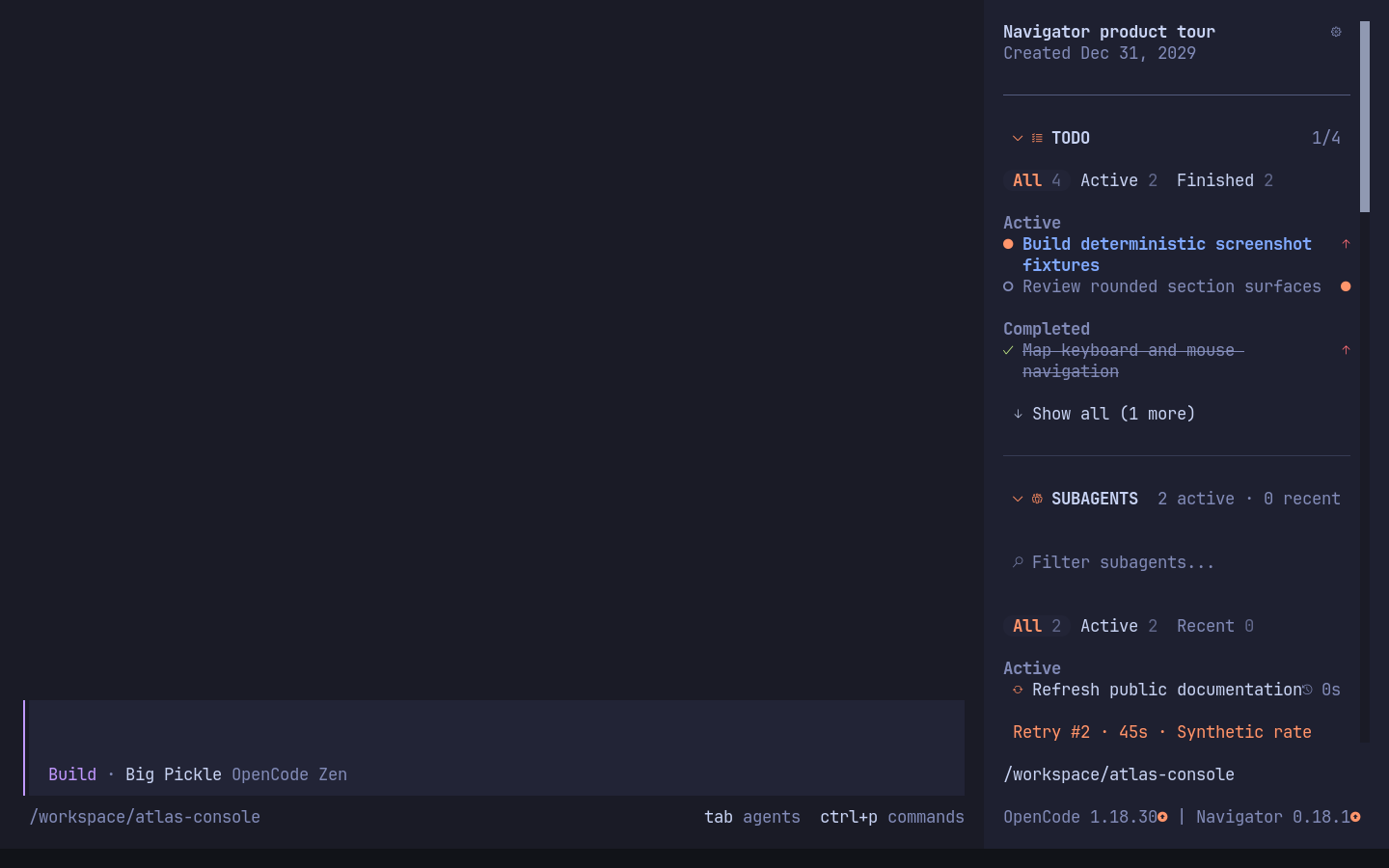
Search, navigate, and manage OpenCode sessions from the TUI. Navigator combines
|
|
4
|
+
Search Everything, task and subagent views, skills, MCP presets, and quick actions
|
|
5
|
+
with a configurable sidebar.
|
|
6
|
+
|
|
7
|
+
|
|
8
|
+
|
|
9
|
+
## Features
|
|
10
|
+
|
|
11
|
+
- Theme-aware session title and activity indicator
|
|
12
|
+
- First-run setup guide with interactive section settings
|
|
13
|
+
- Collapsible Todo section with status filters, grouped tasks, progress and priority indicators
|
|
14
|
+
- Active subagent list with live statuses and click-to-open navigation, including dev-team workers running in separate local processes
|
|
15
|
+
- Compact, searchable workspace skill list with user-wide favorites, recent skills, source details, and click-to-confirm slash commands
|
|
16
|
+
- Configurable quick actions for rename, timeline, transcript copy, export, and compaction
|
|
17
|
+
- Live LSP connection status with error-first sorting and clickable server/root details
|
|
18
|
+
- Searchable MCP section with live radio-style connection controls
|
|
19
|
+
- Click any MCP row to connect or disconnect it
|
|
20
|
+
- Connect or disconnect every eligible MCP server with per-server progress and failed-only retry
|
|
21
|
+
- Save named MCP state presets and apply them from the MCP section heading
|
|
22
|
+
- Persist enabled and disabled MCP server states globally or per worktree and reapply them between sessions
|
|
23
|
+
- Keep favorite MCP servers first across workspaces
|
|
24
|
+
- Search Everything in a keyboard-first modal with category tabs and fuzzy results
|
|
25
|
+
- Show or hide each sidebar section independently
|
|
26
|
+
- Configure section visibility and order from the sidebar settings button
|
|
27
|
+
- Save visibility, expansion, and order globally or for the current worktree
|
|
28
|
+
- Focus the sidebar with `Ctrl+Shift+F`, then navigate with arrows or `j`/`k`
|
|
29
|
+
- Toggle the sidebar with `Ctrl+Shift+B`
|
|
30
|
+
- Keep OpenCode's compact project path and branch footer
|
|
31
|
+
|
|
32
|
+
Todo starts expanded. Subagents, skills, quick actions, LSP, and MCP start
|
|
33
|
+
collapsed. Use `Save current layout as default` in sidebar settings to reuse the
|
|
34
|
+
current visible/hidden, expanded/collapsed, and ordering states in new sessions.
|
|
35
|
+
|
|
36
|
+
Requires OpenCode 1.18.30 or newer. All interface icons use Nerd Font glyphs by
|
|
37
|
+
default (Codicons for controls, keyboard symbols for hints, language logos for LSP). Use a Nerd Fonts v3
|
|
38
|
+
terminal font, or select **Settings → Behavior → Icon style → Text fallback**.
|
|
39
|
+
The switch applies to the entire interface, including Quick Actions, search
|
|
40
|
+
tabs, section headings, statuses, favorites, and dialogs.
|
|
41
|
+
Components read the live style through the shared icon context; host-mounted
|
|
42
|
+
and nested dialogs inherit the same context through the dialog adapter.
|
|
43
|
+
Highlighted rows, tabs, and buttons use rounded ends in Nerd Font mode;
|
|
44
|
+
multiline selections use inverse corner masks over a solid background from the additional
|
|
45
|
+
**OpenCode Navigator Corners** fallback font. Installing that font is required
|
|
46
|
+
for rounded multiline selections; Nerd Fonts alone do not contain these four
|
|
47
|
+
custom glyphs. Text fallback retains rectangular
|
|
48
|
+
highlights. Rounded edges stay inside the control's padding and remain clickable.
|
|
49
|
+
Navigator uses the full available sidebar slot width; the current OpenCode TUI
|
|
50
|
+
fixes the outer panel at 42 columns. Long preset labels are truncated to keep the
|
|
51
|
+
MCP heading and server count on one line.
|
|
52
|
+
|
|
53
|
+
## Installation
|
|
54
|
+
|
|
55
|
+
Install the plugin for the current project:
|
|
56
|
+
|
|
57
|
+
```sh
|
|
58
|
+
opencode plugin opencode-navigator
|
|
59
|
+
```
|
|
60
|
+
|
|
61
|
+
Use `--global` to install it for every project:
|
|
62
|
+
|
|
63
|
+
```sh
|
|
64
|
+
opencode plugin --global opencode-navigator
|
|
65
|
+
```
|
|
66
|
+
|
|
67
|
+
`opencode plug` is an alias for `opencode plugin`.
|
|
68
|
+
|
|
69
|
+
### Install the corner font
|
|
70
|
+
|
|
71
|
+
**Required for rounded multiline selections in Nerd Font mode.** Run the font
|
|
72
|
+
installer on the computer displaying your terminal, even if OpenCode runs over
|
|
73
|
+
SSH on another machine:
|
|
74
|
+
|
|
75
|
+
```sh
|
|
76
|
+
npx --yes --package=opencode-navigator opencode-navigator-font
|
|
77
|
+
```
|
|
78
|
+
|
|
79
|
+
This command requires Node.js 20+ and npm. It installs the small bundled
|
|
80
|
+
[`OpenCodeNavigatorCorners.ttf`](assets/OpenCodeNavigatorCorners.ttf)
|
|
81
|
+
for your user account. Version 1.001 contains four corner masks and preserves the
|
|
82
|
+
four legacy filled corners. It is licensed under MIT. Keep your existing Nerd Font selected as the terminal font; the new
|
|
83
|
+
font supplies only the missing corner characters through font fallback.
|
|
84
|
+
|
|
85
|
+
**Fully quit and reopen the terminal application**, then start OpenCode again.
|
|
86
|
+
Restarting only OpenCode may leave the terminal's old font cache in use.
|
|
87
|
+
|
|
88
|
+
The installer uses `~/Library/Fonts` on macOS, the user font directory under
|
|
89
|
+
`XDG_DATA_HOME` (or `~/.local/share/fonts`) on Linux, and the per-user Windows font
|
|
90
|
+
directory and registry. Linux requires `fc-cache` from Fontconfig.
|
|
91
|
+
The bundled metrics are tested with IoskeleyMono Nerd Font Propo; see
|
|
92
|
+
[`assets/README.md`](assets/README.md) for generating a matching font for other metrics.
|
|
93
|
+
|
|
94
|
+
If you skip font installation, select **Settings → Behavior → Icon style →
|
|
95
|
+
Text fallback** (or set `icon_style` to `text`) to use rectangular selections
|
|
96
|
+
without missing-glyph boxes.
|
|
97
|
+
|
|
98
|
+
To remove only the additional font:
|
|
99
|
+
|
|
100
|
+
```sh
|
|
101
|
+
npx --yes --package=opencode-navigator opencode-navigator-font --uninstall
|
|
102
|
+
```
|
|
103
|
+
|
|
104
|
+
Switch to Text fallback and restart the terminal after uninstalling it.
|
|
105
|
+
|
|
106
|
+
### Configure sidebar sections
|
|
107
|
+
|
|
108
|
+
The `opencode plugin` command adds the package to the `plugin` array in `tui.json`. To avoid
|
|
109
|
+
duplicating sidebar sections, also disable the overlapping built-in plugins:
|
|
110
|
+
|
|
111
|
+
```json
|
|
112
|
+
{
|
|
113
|
+
"$schema": "https://opencode.ai/tui.json",
|
|
114
|
+
"plugin": ["opencode-navigator"],
|
|
115
|
+
"plugin_enabled": {
|
|
116
|
+
"internal:sidebar-context": false,
|
|
117
|
+
"internal:sidebar-mcp": false,
|
|
118
|
+
"internal:sidebar-lsp": false,
|
|
119
|
+
"internal:sidebar-todo": false
|
|
120
|
+
}
|
|
121
|
+
}
|
|
122
|
+
```
|
|
123
|
+
|
|
124
|
+
Use `.opencode/tui.json` for a project installation or
|
|
125
|
+
`~/.config/opencode/tui.json` for a global installation. Restart OpenCode after
|
|
126
|
+
changing the configuration.
|
|
127
|
+
|
|
128
|
+
### Upgrading from Pretty Sidebar
|
|
129
|
+
|
|
130
|
+
OpenCode Navigator is the new name of `opencode-pretty-sidebar`. Replace the old
|
|
131
|
+
package entry in `tui.json` with `opencode-navigator` rather than loading both.
|
|
132
|
+
If you disabled the plugin through `plugin_enabled`, rename that key to
|
|
133
|
+
`opencode-navigator` as well.
|
|
134
|
+
|
|
135
|
+
Existing settings, presets, favorites, recent skills, and shortcuts are retained:
|
|
136
|
+
Navigator uses the established `opencode-pretty-sidebar/preferences.json` and its
|
|
137
|
+
lock under OpenCode's state directory. No file copying is required. Public
|
|
138
|
+
`opencode-pretty-sidebar.toggle`, `.focus`, `.focus.<section>`, and `.search`
|
|
139
|
+
commands remain available as aliases for custom keybindings.
|
|
140
|
+
|
|
141
|
+
## Develop locally
|
|
142
|
+
|
|
143
|
+
This repository already contains `.opencode/tui.json`, so starting OpenCode in
|
|
144
|
+
the repository loads `src/tui.tsx` and disables the overlapping built-in
|
|
145
|
+
sidebar blocks.
|
|
146
|
+
|
|
147
|
+
```sh
|
|
148
|
+
bun install
|
|
149
|
+
bun run font:install
|
|
150
|
+
```
|
|
151
|
+
|
|
152
|
+
Fully restart the terminal once after installing the corner font, then run:
|
|
153
|
+
|
|
154
|
+
```sh
|
|
155
|
+
opencode
|
|
156
|
+
```
|
|
157
|
+
|
|
158
|
+
OpenCode reads TUI configuration at startup. Restart it after changing the
|
|
159
|
+
plugin or `tui.json`.
|
|
160
|
+
|
|
161
|
+
On first launch, a short setup guide explains the sidebar controls and lets you
|
|
162
|
+
choose which sections to show. The guide is shown once and can be opened again
|
|
163
|
+
later from the sidebar settings button. The settings dialog also selects global
|
|
164
|
+
or current-worktree scope, manages named layout presets, and controls section
|
|
165
|
+
order, MCP state persistence, icon style, and the sidebar shortcuts without
|
|
166
|
+
a restart. Settings are grouped into tabs; use `Tab` and `Shift+Tab` to switch
|
|
167
|
+
tabs. In the Sections tab, use `Left`/`Right` or `Shift+Up`/`Shift+Down` to
|
|
168
|
+
reorder the selected section.
|
|
169
|
+
|
|
170
|
+
The Sections tab combines visibility, ordering, and the number of visible items
|
|
171
|
+
for each section. Click `Items: All` / `Items: N`, or press `L` on the selected
|
|
172
|
+
section, to edit its item limit. Enter toggles visibility; the arrow controls
|
|
173
|
+
change section order.
|
|
174
|
+
Every section defaults to `All` (`0`). A positive limit reveals `Show all (N more)`;
|
|
175
|
+
`Show less` restores the configured limit. Limits count items, not wrapped terminal
|
|
176
|
+
lines, and apply after filtering and sorting. Temporary expansion resets when the
|
|
177
|
+
target, filter, or limit changes. MCP bulk actions still operate on the full server
|
|
178
|
+
list. Limit changes persist immediately in the selected Global or Current worktree
|
|
179
|
+
scope; Restore configured behavior removes that scope's limit overrides.
|
|
180
|
+
|
|
181
|
+
On the Quick Actions row, click `Actions` or press `A` to choose individual
|
|
182
|
+
actions and their order. Enter toggles visibility; Left/Right or Shift+Up/Down
|
|
183
|
+
reorders the selected action. Changes save in the selected Global or Current
|
|
184
|
+
worktree scope. Escape returns to the Quick Actions row in Sections.
|
|
185
|
+
|
|
186
|
+
## Options
|
|
187
|
+
|
|
188
|
+
Pass configured defaults with a tuple entry:
|
|
189
|
+
|
|
190
|
+
```json
|
|
191
|
+
{
|
|
192
|
+
"$schema": "https://opencode.ai/tui.json",
|
|
193
|
+
"plugin": [
|
|
194
|
+
[
|
|
195
|
+
"opencode-navigator",
|
|
196
|
+
{
|
|
197
|
+
"persist_mcp": true,
|
|
198
|
+
"icon_style": "nerd",
|
|
199
|
+
"focus_key": "ctrl+shift+f",
|
|
200
|
+
"search_key": "ctrl+shift+k",
|
|
201
|
+
"toggle_key": "ctrl+shift+b",
|
|
202
|
+
"section_order": ["todo", "subagents", "skills", "quick_actions", "lsp", "mcp"],
|
|
203
|
+
"section_item_limits": { "todo": 0, "subagents": 0, "skills": 5, "mcp": 5 },
|
|
204
|
+
"quick_action_order": ["session.rename", "session.timeline", "session.copy", "session.export", "session.compact"],
|
|
205
|
+
"quick_action_visibility": { "session.export": false },
|
|
206
|
+
"sections": {
|
|
207
|
+
"todo": true,
|
|
208
|
+
"subagents": true,
|
|
209
|
+
"skills": true,
|
|
210
|
+
"quick_actions": true,
|
|
211
|
+
"lsp": true,
|
|
212
|
+
"mcp": true
|
|
213
|
+
}
|
|
214
|
+
}
|
|
215
|
+
]
|
|
216
|
+
]
|
|
217
|
+
}
|
|
218
|
+
```
|
|
219
|
+
|
|
220
|
+
- `persist_mcp`: remembers enabled and disabled MCP server states per worktree. Defaults to
|
|
221
|
+
`true`.
|
|
222
|
+
- `toggle_key`: sidebar shortcut. Defaults to `ctrl+shift+b`. Try `alt+s` if
|
|
223
|
+
your terminal does not distinguish `Ctrl+Shift+B` from `Ctrl+B`.
|
|
224
|
+
- `focus_key`: moves keyboard focus into the sidebar. Defaults to
|
|
225
|
+
`ctrl+shift+f`.
|
|
226
|
+
- `search_key`: opens Search Everything. Defaults to `ctrl+shift+k`; choose a
|
|
227
|
+
terminal-friendly alternative such as `alt+y` in Settings → Behavior.
|
|
228
|
+
- `icon_style`: `nerd` (default) for Nerd Font icons throughout Navigator, or
|
|
229
|
+
`text` for ASCII controls and compact text badges. The legacy `lsp_icon_style`
|
|
230
|
+
option and saved preference remain supported and now control all icons too;
|
|
231
|
+
an explicit `icon_style` option takes precedence. Unknown LSP servers keep
|
|
232
|
+
their full ID.
|
|
233
|
+
- `sections`: controls whether each section is rendered. Every section defaults
|
|
234
|
+
to `true`; set any of `todo`, `subagents`, `skills`, `quick_actions`, `lsp`, or
|
|
235
|
+
`mcp` to `false` to hide it.
|
|
236
|
+
- `section_order`: sets the configured section order. Missing and duplicate
|
|
237
|
+
entries are normalized so every section appears exactly once.
|
|
238
|
+
- `section_item_limits`: non-negative integer limits for `todo`, `subagents`,
|
|
239
|
+
`skills`, `quick_actions`, `lsp`, and `mcp`. Missing values default to `0` (All).
|
|
240
|
+
Worktree overrides inherit each unspecified section from Global independently.
|
|
241
|
+
- `quick_action_order`: command IDs of the five built-in quick actions in display
|
|
242
|
+
order. Missing actions are appended; unknown and duplicate IDs are ignored.
|
|
243
|
+
- `quick_action_visibility`: visibility by command ID. Actions default to visible;
|
|
244
|
+
unspecified worktree values inherit the global setting. Restore configured
|
|
245
|
+
behavior resets action overrides as well as the other behavior settings.
|
|
246
|
+
|
|
247
|
+
Every option is also available from the sidebar gear button. Choose `Global` or
|
|
248
|
+
`Current worktree` before editing. Values resolve in configured-default, global,
|
|
249
|
+
worktree, then current-session order. Behavior changes apply immediately in the
|
|
250
|
+
selected scope. Section visibility, expansion, and order remain in memory until
|
|
251
|
+
`Save current layout as default` is selected. The layout, behavior, and
|
|
252
|
+
remembered MCP-state resets remove only the selected scope's overrides, exposing
|
|
253
|
+
inherited values again. Skill-confirmation choices, favorite skills, and MCP
|
|
254
|
+
presets remain user-wide. Preferences
|
|
255
|
+
are stored in one unversioned, validated file under OpenCode's state directory.
|
|
256
|
+
The initial layout-preset list is empty. `Save as…` captures current visibility,
|
|
257
|
+
expansion, and section order; saved presets can be applied to the selected scope,
|
|
258
|
+
updated from the current layout, renamed, or deleted.
|
|
259
|
+
|
|
260
|
+
## Keyboard controls
|
|
261
|
+
|
|
262
|
+
Press `Ctrl+Shift+F` to focus the sidebar. Use `Up`/`Down` or `k`/`j` to move,
|
|
263
|
+
`Enter` to activate the selected row, `Escape` to return to the previous focus,
|
|
264
|
+
and `?` to open the keyboard help. When a Skills or MCP filter owns focus,
|
|
265
|
+
typing edits the query and the first `Escape` returns to sidebar navigation.
|
|
266
|
+
|
|
267
|
+
The command palette also exposes `Focus sidebar` and direct commands for Todo,
|
|
268
|
+
Subagents, Skills, Quick Actions, LSP, and MCP. Both sidebar shortcuts can be
|
|
269
|
+
changed at runtime in settings.
|
|
270
|
+
|
|
271
|
+
### Search Everything
|
|
272
|
+
|
|
273
|
+
Press `Ctrl+Shift+K` or run **Search Everything** from the command palette. Use
|
|
274
|
+
the Skills, Subagents, MCP, and Actions tabs to choose a category. The query is
|
|
275
|
+
shared across tabs; each tab shows its matching result count, including zero.
|
|
276
|
+
Tab icons match the sidebar sections and section entries in settings.
|
|
277
|
+
Search covers names, descriptions, skill source paths, and subagent IDs in the
|
|
278
|
+
current workspace/session. It uses full source lists, regardless of sidebar
|
|
279
|
+
visibility and item limits; actions hidden from the sidebar are still searchable.
|
|
280
|
+
|
|
281
|
+
- `Up` / `Down`: select a result in the current tab; `Tab` / `Shift+Tab` or a click:
|
|
282
|
+
switch tabs. Each tab remembers its selection and scroll position until the
|
|
283
|
+
query changes.
|
|
284
|
+
- `Enter`: insert a skill (honouring its confirmation preference), open a child
|
|
285
|
+
session, connect/disconnect an MCP server, or run a built-in action.
|
|
286
|
+
- MCP toggles keep the search open and update the server status in place,
|
|
287
|
+
preserving the query, selection, and scroll position.
|
|
288
|
+
- `Escape`: close and return focus; `Ctrl+R`: retry loading sources.
|
|
289
|
+
|
|
290
|
+
Results use compact title/preview rows. Background refresh preserves the current
|
|
291
|
+
scroll position and does not flash a refresh indicator. Cached results remain
|
|
292
|
+
available when a source refresh fails. Busy MCP actions
|
|
293
|
+
are disabled; session actions on the home screen explain that a session is required.
|
|
294
|
+
Changing session or workspace closes the search dialog to prevent stale actions.
|
|
295
|
+
|
|
296
|
+
OpenCode initializes enabled MCP servers before TUI plugins. A server remembered
|
|
297
|
+
as disabled can therefore connect briefly during startup before this plugin
|
|
298
|
+
disconnects it. Servers remembered as enabled are connected after the plugin
|
|
299
|
+
initializes. `Connect all` and `Disconnect all` run eligible server changes in
|
|
300
|
+
parallel, retain successful results when some servers fail, and offer a retry for
|
|
301
|
+
only the failed servers.
|
|
302
|
+
|
|
303
|
+
Use the `Preset` selector in the MCP heading to save the current enabled/disabled
|
|
304
|
+
state, apply a preset, update it from the current scope, rename it, or delete it.
|
|
305
|
+
Preset application runs only the necessary server changes and keeps per-server
|
|
306
|
+
progress and failed-only retry behavior. Servers in a preset that are not present
|
|
307
|
+
in the current scope are retained as desired state but skipped at application time.
|
|
308
|
+
|
|
309
|
+
The MCP bookmark control saves favorites user-wide by server name. Favorites appear
|
|
310
|
+
first, alphabetically within each group, with a blank separator before other
|
|
311
|
+
servers. The bookmark does not connect or disconnect the server.
|
|
312
|
+
|
|
313
|
+
LSP servers with connection errors appear first, followed by alphabetical ID and
|
|
314
|
+
root order. Activate any badge, including a custom server, to see its ID, root,
|
|
315
|
+
and current connection status. OpenCode's public LSP state does not provide the
|
|
316
|
+
underlying diagnostic error text; the details view points to configuration/logs.
|
|
317
|
+
|
|
318
|
+
Todo priorities are read-only because OpenCode does not expose a Todo mutation
|
|
319
|
+
API to TUI plugins.
|
|
320
|
+
|
|
321
|
+
Todo offers `All`, `Active`, and `Finished` views with counts. Active shows running
|
|
322
|
+
tasks before pending tasks. Finished contains separate Completed and Cancelled
|
|
323
|
+
groups. The selected view is temporary and resets to All when changing sessions.
|
|
324
|
+
The header always reports completed tasks against the full task count.
|
|
325
|
+
|
|
326
|
+
Subagents show observed run duration, retry countdowns, and execution errors.
|
|
327
|
+
An already-running child discovered by the sidebar uses `≥` because its exact
|
|
328
|
+
start time is unknown. Recent keeps the last 10 observed finished runs per parent
|
|
329
|
+
session in memory across navigation, until OpenCode exits. An idle transition is
|
|
330
|
+
labelled Finished, not a guarantee of successful task completion; errors and
|
|
331
|
+
cancellations retain their own labels. A worker timeout displays status
|
|
332
|
+
unavailability and does not mark its last confirmed active run as finished.
|
|
333
|
+
Active runs precede Recent under the shared Subagents item limit.
|
|
334
|
+
Local session events update subagents immediately; snapshot and worker-status
|
|
335
|
+
polling runs every five seconds. Background refresh is silent after the initial
|
|
336
|
+
load, including when a section is empty, so it does not shift the list.
|
|
337
|
+
Use `All / Active / Recent / Errors` and the text filter to narrow the subagent
|
|
338
|
+
list before applying its item limit. Filters reset on a target change. In a child
|
|
339
|
+
session, `Parent session` opens the parent even when no subagents are listed.
|
|
340
|
+
|
|
341
|
+
Selecting a skill opens its description with Accept and Cancel controls before
|
|
342
|
+
appending its `/<name>` command to the current prompt. Select "Don't show again
|
|
343
|
+
for this skill" to skip that confirmation later. The sidebar settings dialog
|
|
344
|
+
can restore skipped confirmations. Select the star beside a skill to keep it
|
|
345
|
+
ahead of non-favorite skills in every workspace. The last 10 successfully inserted
|
|
346
|
+
skills are remembered user-wide by source location and appear after favorites,
|
|
347
|
+
most recent first, marked with a history icon (`~` in text mode). Other skills
|
|
348
|
+
remain alphabetical. The info control (`i` in text mode)
|
|
349
|
+
opens the description and full source location even when confirmation is skipped.
|
|
350
|
+
Quick actions invoke OpenCode's built-in
|
|
351
|
+
commands and display the active keybindings from your configuration.
|
|
352
|
+
|
|
353
|
+
Nested dialogs support back navigation: Escape, Cancel, and close controls return
|
|
354
|
+
to the previous menu. Settings retain the selected tab and row; Search Everything
|
|
355
|
+
also restores its query, selection, and scroll position. Escape at the root closes
|
|
356
|
+
the dialog. Completing an action closes its confirmation, and changing the search
|
|
357
|
+
session or workspace dismisses the entire search dialog chain.
|
|
358
|
+
|
|
359
|
+
## Scripts
|
|
360
|
+
|
|
361
|
+
Development requires Bun 1.4.0 and Node.js 24.16 or newer. Install dependencies with
|
|
362
|
+
`bun install --frozen-lockfile`.
|
|
363
|
+
|
|
364
|
+
ESLint uses the Solid preset from
|
|
365
|
+
[`@st1ggy/linter-config`](https://github.com/St1ggy/linter-config); Prettier uses its
|
|
366
|
+
common preset. `eslint.config.js` documents project-specific adaptations for
|
|
367
|
+
OpenTUI callbacks, SDK compatibility, and test fixtures. Type-aware linting covers
|
|
368
|
+
application code, tests, build scripts, and JavaScript configuration files.
|
|
369
|
+
|
|
370
|
+
```sh
|
|
371
|
+
bun run test
|
|
372
|
+
bun run test:e2e
|
|
373
|
+
bun run typecheck
|
|
374
|
+
bun run lint
|
|
375
|
+
bun run lint:fix
|
|
376
|
+
bun run format
|
|
377
|
+
bun run format:check
|
|
378
|
+
bun run font:install
|
|
379
|
+
bun run build
|
|
380
|
+
bun run bundle:size
|
|
381
|
+
bun run check
|
|
382
|
+
```
|
|
383
|
+
|
|
384
|
+
`bun run check` runs the tests, TypeScript, ESLint, bundle-size guard, and formatting
|
|
385
|
+
check. The unminified TUI bundle is limited to 320,000 bytes.
|
|
386
|
+
Font generation is a separate development task: `bun run font:build` and
|
|
387
|
+
`bun run font:check` use `uv` and the pinned FontTools dependency. Users install
|
|
388
|
+
the already generated font; Python and FontTools are not needed at runtime.
|
|
389
|
+
CI checks that the bundled font matches its generator.
|
|
390
|
+
|
|
391
|
+
## Publishing
|
|
392
|
+
|
|
393
|
+
Publishing is handled by `.github/workflows/publish.yml` when a GitHub Release
|
|
394
|
+
is published. The release tag must match the package version, for example
|
|
395
|
+
`v1.2.3` for version `1.2.3`.
|
|
396
|
+
|
|
397
|
+
The workflow uses npm Trusted Publishing with provenance. Configure
|
|
398
|
+
`St1ggy/opencode-navigator` and `publish.yml` as the trusted GitHub Actions
|
|
399
|
+
publisher in the package settings on npmjs.com before publishing a release.
|
|
400
|
+
The new npm package needs its own trusted-publisher configuration; the old
|
|
401
|
+
package's settings are not transferred by renaming the GitHub repository.
|
|
Binary file
|
package/assets/README.md
ADDED
|
@@ -0,0 +1,39 @@
|
|
|
1
|
+
# Navigator corner font
|
|
2
|
+
|
|
3
|
+
`OpenCodeNavigatorCorners.ttf` is an original, MIT-licensed fallback font containing
|
|
4
|
+
rounded corner masks. It supplements the terminal's existing font.
|
|
5
|
+
|
|
6
|
+
| Code point | Corner |
|
|
7
|
+
| --- | --- |
|
|
8
|
+
| U+10F004 | Top-left cutout |
|
|
9
|
+
| U+10F005 | Top-right cutout |
|
|
10
|
+
| U+10F006 | Bottom-left cutout |
|
|
11
|
+
| U+10F007 | Bottom-right cutout |
|
|
12
|
+
|
|
13
|
+
The cell background fills the selection; glyphs paint only the outside corner in
|
|
14
|
+
the surrounding background color. This keeps multiline selections continuous even
|
|
15
|
+
when the terminal adds line spacing or rounds glyph bounds to fractional pixels.
|
|
16
|
+
The corner radius is one cell wide and no more than half a cell high.
|
|
17
|
+
|
|
18
|
+
Font version 1.001 adds these cutouts and retains U+10F000–U+10F003 as the original
|
|
19
|
+
filled corners for older plugin versions. Reinstall the font and fully restart the
|
|
20
|
+
terminal when upgrading from 1.000.
|
|
21
|
+
|
|
22
|
+
Generate the font with:
|
|
23
|
+
|
|
24
|
+
```sh
|
|
25
|
+
uv run scripts/generate-corner-font.py
|
|
26
|
+
uv run scripts/generate-corner-font.py --check
|
|
27
|
+
```
|
|
28
|
+
|
|
29
|
+
The generator pins FontTools and uses fixed timestamps for reproducible output.
|
|
30
|
+
Default metrics match IoskeleyMono Nerd Font Propo: 1000 units/em, 600-unit cell
|
|
31
|
+
width, ascender 965, descender -285. To match another terminal font's metrics:
|
|
32
|
+
|
|
33
|
+
```sh
|
|
34
|
+
uv run scripts/generate-corner-font.py --reference-font /path/to/terminal-font.ttf --output /tmp/OpenCodeNavigatorCorners.ttf
|
|
35
|
+
bun run font:install --source /tmp/OpenCodeNavigatorCorners.ttf
|
|
36
|
+
```
|
|
37
|
+
|
|
38
|
+
All corner outlines are generated from geometry; no outlines from the reference
|
|
39
|
+
font are copied. See the root `LICENSE` for the MIT license.
|