opencode-agent-tmux 1.0.1 → 1.0.5
This diff represents the content of publicly available package versions that have been released to one of the supported registries. The information contained in this diff is provided for informational purposes only and reflects changes between package versions as they appear in their respective public registries.
- package/README.md +44 -87
- package/package.json +1 -1
package/README.md
CHANGED
|
@@ -1,48 +1,41 @@
|
|
|
1
1
|
# opencode-agent-tmux
|
|
2
2
|
|
|
3
|
-
|
|
3
|
+
[](https://www.npmjs.com/package/opencode-agent-tmux)
|
|
4
|
+
[](https://www.npmjs.com/package/opencode-agent-tmux)
|
|
5
|
+
[](https://opensource.org/licenses/MIT)
|
|
4
6
|
|
|
5
|
-
|
|
7
|
+
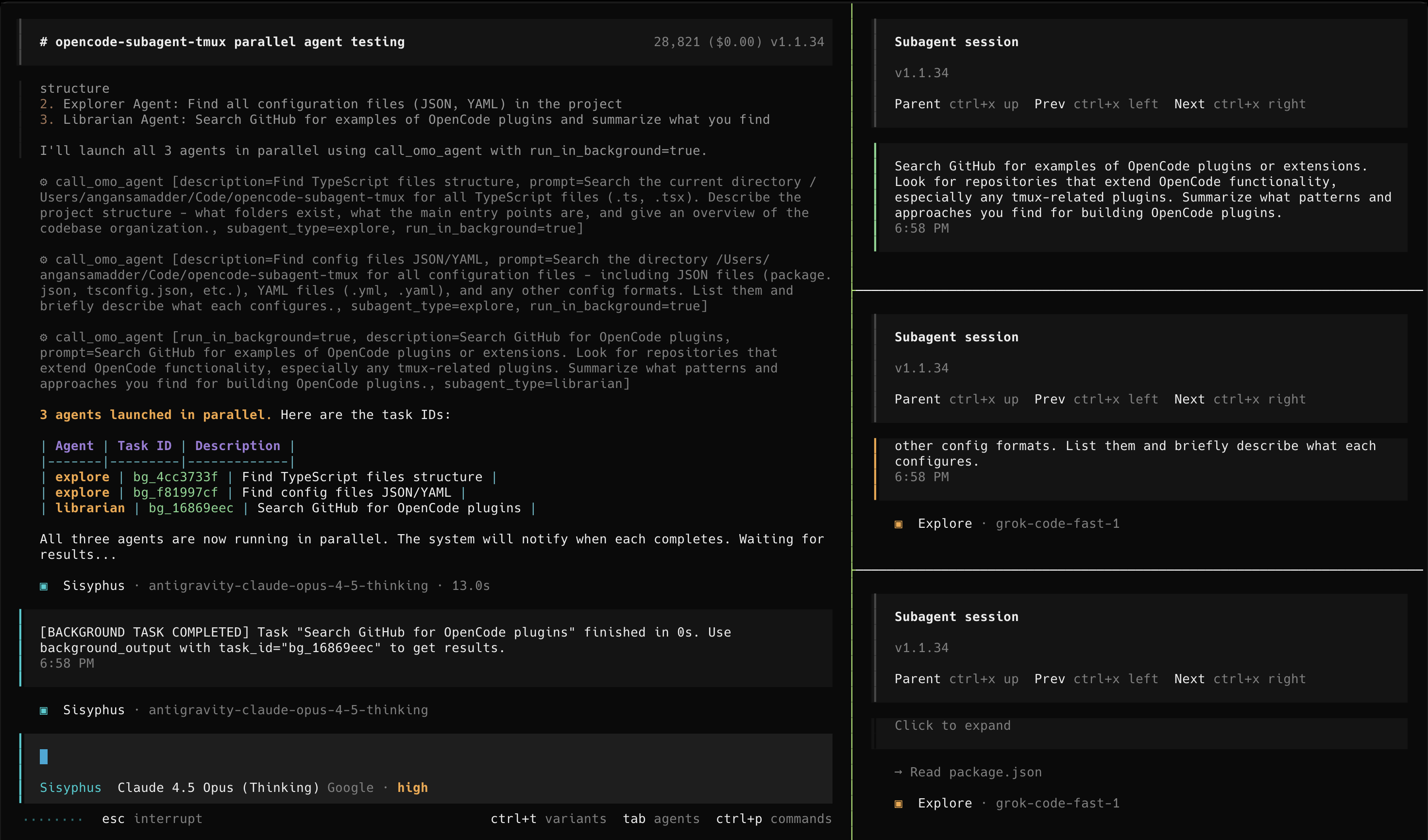
An [OpenCode](https://opencode.ai) plugin that provides **smart tmux integration** for viewing agent execution in real-time. Automatically spawns panes, streams output, and manages your terminal workspace.
|
|
6
8
|
|
|
7
|
-
|
|
9
|
+
- **Agent-Agnostic**: Works with oh-my-opencode, omoc-slim, or vanilla OpenCode.
|
|
10
|
+
- **Cross-Platform**: Full support for **macOS**, **Linux**, and **Windows** (via PowerShell or WSL).
|
|
8
11
|
|
|
9
|
-
|
|
10
|
-
|
|
12
|
+
|
|
13
|
+
*Note: The demo shows the "sisyphus" agent from [oh-my-opencode](https://github.com/code-yeongyu/oh-my-opencode), but this plugin supports ALL OpenCode subagents.*
|
|
11
14
|
|
|
12
|
-
|
|
13
|
-
2. Run 'bun install' and 'bun run build' inside the directory
|
|
14
|
-
3. Add the plugin path to my ~/.config/opencode/opencode.json file
|
|
15
|
-
4. Verify the installation by running 'opencode --version'
|
|
15
|
+
## Installation
|
|
16
16
|
|
|
17
|
-
|
|
18
|
-
```
|
|
17
|
+
### 🤖 Let an LLM do it (Recommended)
|
|
19
18
|
|
|
20
|
-
|
|
19
|
+
Paste this into any LLM agent (OpenCode, Claude Code, Cursor, etc.):
|
|
21
20
|
|
|
22
|
-
|
|
23
|
-
|
|
24
|
-
|
|
25
|
-
- **Configurable Layout**: Support multiple tmux layouts (main-vertical, tiled, etc.)
|
|
26
|
-
- **Multi-Port Support**: Automatically finds available ports when running multiple instances
|
|
27
|
-
- **Agent-Agnostic**: Works with oh-my-opencode, omoc-slim, or vanilla OpenCode
|
|
28
|
-
- **Cross-Platform**: Full support for **macOS**, **Linux**, and **Windows** (via PowerShell or WSL)
|
|
29
|
-
|
|
30
|
-
## 📋 Requirements
|
|
21
|
+
```text
|
|
22
|
+
Install the opencode-agent-tmux plugin by following: https://raw.githubusercontent.com/AnganSamadder/opencode-agent-tmux/main/README.md
|
|
23
|
+
```
|
|
31
24
|
|
|
32
|
-
|
|
33
|
-
|
|
34
|
-
- **Bun** (for building)
|
|
25
|
+
<details>
|
|
26
|
+
<summary><b>Instructions for LLM Agents</b></summary>
|
|
35
27
|
|
|
36
|
-
|
|
28
|
+
To install this plugin, please perform the following steps for the user:
|
|
37
29
|
|
|
38
|
-
1. **Install
|
|
30
|
+
1. **Install the NPM package globally:**
|
|
39
31
|
```bash
|
|
40
32
|
npm install -g opencode-agent-tmux
|
|
41
33
|
```
|
|
42
|
-
*Note:
|
|
34
|
+
*Note: This installer automatically configures the user's shell (Bash/Zsh/Fish/PowerShell) to use the smart wrapper.*
|
|
43
35
|
|
|
44
36
|
2. **Configure OpenCode:**
|
|
45
|
-
Add the
|
|
37
|
+
Add `"opencode-agent-tmux"` to the `plugins` array in the user's config file (usually `~/.config/opencode/opencode.json`).
|
|
38
|
+
|
|
46
39
|
```json
|
|
47
40
|
{
|
|
48
41
|
"plugins": [
|
|
@@ -51,72 +44,41 @@ The plugin repo is: https://github.com/AnganSamadder/opencode-agent-tmux.git
|
|
|
51
44
|
}
|
|
52
45
|
```
|
|
53
46
|
|
|
54
|
-
|
|
47
|
+
3. **Verify & Finalize:**
|
|
48
|
+
* Check if `tmux` is installed on the system. If not, advise the user to install it (e.g., `brew install tmux`, `sudo apt install tmux`, or `winget install tmux`).
|
|
49
|
+
* Tell the user: **"Installation complete! Please restart your terminal and run `opencode` to see the tmux integration in action."**
|
|
55
50
|
|
|
56
|
-
|
|
51
|
+
</details>
|
|
57
52
|
|
|
58
|
-
|
|
59
|
-
```bash
|
|
60
|
-
git clone https://github.com/AnganSamadder/opencode-agent-tmux.git ~/Code/opencode-agent-tmux
|
|
61
|
-
```
|
|
53
|
+
### 👤 For Humans (Manual)
|
|
62
54
|
|
|
63
|
-
|
|
55
|
+
1. **Install via NPM:**
|
|
64
56
|
```bash
|
|
65
|
-
|
|
66
|
-
bun install
|
|
67
|
-
bun run build
|
|
57
|
+
npm install -g opencode-agent-tmux
|
|
68
58
|
```
|
|
59
|
+
*The installer automatically configures your shell to use the smart wrapper.*
|
|
69
60
|
|
|
70
|
-
|
|
71
|
-
Add
|
|
61
|
+
2. **Enable the Plugin:**
|
|
62
|
+
Add `"opencode-agent-tmux"` to your `~/.config/opencode/opencode.json`:
|
|
72
63
|
```json
|
|
73
64
|
{
|
|
74
65
|
"plugins": [
|
|
75
|
-
"
|
|
66
|
+
"opencode-agent-tmux"
|
|
76
67
|
]
|
|
77
68
|
}
|
|
78
69
|
```
|
|
79
70
|
|
|
80
|
-
|
|
81
|
-
|
|
82
|
-
### Easy Mode (Recommended)
|
|
83
|
-
|
|
84
|
-
After installation, just type:
|
|
71
|
+
3. **Run OpenCode:**
|
|
72
|
+
Restart your terminal and type `opencode`. The plugin handles the rest!
|
|
85
73
|
|
|
86
|
-
|
|
87
|
-
opencode
|
|
88
|
-
```
|
|
89
|
-
|
|
90
|
-
The wrapper automatically:
|
|
91
|
-
- Launches tmux if you're not already in it
|
|
92
|
-
- Finds an available port (4096-4106) if default is in use
|
|
93
|
-
- Starts OpenCode with the available port
|
|
94
|
-
- Enables the plugin to spawn panes for agents
|
|
95
|
-
|
|
96
|
-
### Running Multiple Instances
|
|
97
|
-
|
|
98
|
-
Want to run multiple OpenCode sessions? No problem:
|
|
99
|
-
|
|
100
|
-
```bash
|
|
101
|
-
# Terminal 1
|
|
102
|
-
opencode
|
|
103
|
-
# → Starts on port 4096
|
|
104
|
-
|
|
105
|
-
# Terminal 2
|
|
106
|
-
opencode
|
|
107
|
-
# → Detects 4096 in use, automatically uses port 4097
|
|
108
|
-
```
|
|
109
|
-
|
|
110
|
-
Each instance works independently with its own tmux panes!
|
|
111
|
-
|
|
112
|
-
### Manual Mode
|
|
113
|
-
|
|
114
|
-
Or start OpenCode inside tmux manually:
|
|
74
|
+
## ✨ Features
|
|
115
75
|
|
|
116
|
-
|
|
117
|
-
|
|
118
|
-
|
|
119
|
-
|
|
76
|
+
- **Automatic Tmux Pane Spawning**: When any agent starts, automatically spawns a tmux pane
|
|
77
|
+
- **Live Streaming**: Each pane runs `opencode attach` to show real-time agent output
|
|
78
|
+
- **Auto-Cleanup**: Panes automatically close when agents complete
|
|
79
|
+
- **Configurable Layout**: Support multiple tmux layouts (`main-vertical`, `tiled`, etc.)
|
|
80
|
+
- **Multi-Port Support**: Automatically finds available ports (4096-4106) when running multiple instances
|
|
81
|
+
- **Smart Wrapper**: Automatically detects if you are in tmux; if not, launches a session for you.
|
|
120
82
|
|
|
121
83
|
## ⚙️ Configuration
|
|
122
84
|
|
|
@@ -144,20 +106,15 @@ You can customize behavior by creating `~/.config/opencode/opencode-agent-tmux.j
|
|
|
144
106
|
|
|
145
107
|
### Panes Not Spawning
|
|
146
108
|
1. Verify you're inside tmux: `echo $TMUX`
|
|
147
|
-
2. Check tmux is installed: `which tmux`
|
|
148
|
-
3. Check
|
|
149
|
-
4. Check logs: `cat /tmp/opencode-agent-tmux.log`
|
|
109
|
+
2. Check tmux is installed: `which tmux` (or `where tmux` on Windows)
|
|
110
|
+
3. Check logs: `cat /tmp/opencode-agent-tmux.log`
|
|
150
111
|
|
|
151
112
|
### Server Not Found
|
|
152
|
-
Make sure OpenCode is started with the `--port` flag matching your config
|
|
153
|
-
```bash
|
|
154
|
-
opencode --port 4096
|
|
155
|
-
```
|
|
113
|
+
Make sure OpenCode is started with the `--port` flag matching your config (the wrapper does this automatically).
|
|
156
114
|
|
|
157
115
|
## 📄 License
|
|
158
116
|
|
|
159
117
|
MIT
|
|
160
118
|
|
|
161
119
|
## 🙏 Acknowledgements
|
|
162
|
-
|
|
163
120
|
This project extracts and improves upon the tmux session management from [oh-my-opencode-slim](https://github.com/alvinunreal/oh-my-opencode-slim) by alvinunreal.
|