oh-my-claude-sisyphus 3.5.5 → 3.5.7
This diff represents the content of publicly available package versions that have been released to one of the supported registries. The information contained in this diff is provided for informational purposes only and reflects changes between package versions as they appear in their respective public registries.
- package/README.md +58 -343
- package/commands/mcp-setup.md +75 -64
- package/commands/omc-setup.md +51 -0
- package/dist/__tests__/analytics/tokscale-adapter.test.d.ts +2 -0
- package/dist/__tests__/analytics/tokscale-adapter.test.d.ts.map +1 -0
- package/dist/__tests__/analytics/tokscale-adapter.test.js +79 -0
- package/dist/__tests__/analytics/tokscale-adapter.test.js.map +1 -0
- package/dist/analytics/cost-estimator.d.ts +14 -0
- package/dist/analytics/cost-estimator.d.ts.map +1 -1
- package/dist/analytics/cost-estimator.js +65 -0
- package/dist/analytics/cost-estimator.js.map +1 -1
- package/dist/analytics/index.d.ts +1 -0
- package/dist/analytics/index.d.ts.map +1 -1
- package/dist/analytics/index.js +4 -0
- package/dist/analytics/index.js.map +1 -1
- package/dist/analytics/query-engine.d.ts +3 -0
- package/dist/analytics/query-engine.d.ts.map +1 -1
- package/dist/analytics/query-engine.js +87 -0
- package/dist/analytics/query-engine.js.map +1 -1
- package/dist/analytics/token-tracker.d.ts +3 -0
- package/dist/analytics/token-tracker.d.ts.map +1 -1
- package/dist/analytics/token-tracker.js +89 -0
- package/dist/analytics/token-tracker.js.map +1 -1
- package/dist/analytics/tokscale-adapter.d.ts +71 -0
- package/dist/analytics/tokscale-adapter.d.ts.map +1 -0
- package/dist/analytics/tokscale-adapter.js +223 -0
- package/dist/analytics/tokscale-adapter.js.map +1 -0
- package/dist/analytics/types.d.ts +17 -0
- package/dist/analytics/types.d.ts.map +1 -1
- package/dist/analytics/types.js +5 -0
- package/dist/analytics/types.js.map +1 -1
- package/dist/cli/analytics.js +35 -0
- package/dist/cli/analytics.js.map +1 -1
- package/dist/cli/commands/agents.d.ts.map +1 -1
- package/dist/cli/commands/agents.js +4 -2
- package/dist/cli/commands/agents.js.map +1 -1
- package/dist/cli/commands/stats.d.ts.map +1 -1
- package/dist/cli/commands/stats.js +6 -1
- package/dist/cli/commands/stats.js.map +1 -1
- package/dist/cli/index.js +95 -35
- package/dist/cli/index.js.map +1 -1
- package/dist/cli/utils/tokscale-launcher.d.ts +18 -0
- package/dist/cli/utils/tokscale-launcher.d.ts.map +1 -0
- package/dist/cli/utils/tokscale-launcher.js +64 -0
- package/dist/cli/utils/tokscale-launcher.js.map +1 -0
- package/dist/features/auto-update.js +5 -5
- package/dist/features/auto-update.js.map +1 -1
- package/dist/hud/types.d.ts +6 -2
- package/dist/hud/types.d.ts.map +1 -1
- package/dist/hud/types.js.map +1 -1
- package/dist/hud/usage-api.d.ts.map +1 -1
- package/dist/hud/usage-api.js +13 -1
- package/dist/hud/usage-api.js.map +1 -1
- package/docs/ARCHITECTURE.md +80 -397
- package/docs/FEATURES.md +396 -1981
- package/docs/MIGRATION.md +4 -4
- package/docs/REFERENCE.md +545 -0
- package/docs/SYNC-SYSTEM.md +6 -6
- package/package.json +2 -1
- package/scripts/sync-metadata.ts +2 -2
- package/skills/mcp-setup/SKILL.md +63 -75
- package/skills/omc-setup/SKILL.md +51 -0
- package/docs/FULL-README.md +0 -1001
package/README.md
CHANGED
|
@@ -11,407 +11,122 @@
|
|
|
11
11
|
|
|
12
12
|
**Multi-agent orchestration for Claude Code. Zero learning curve.**
|
|
13
13
|
|
|
14
|
-
*Some advanced users customize zsh for years — most of us just use oh-my-zsh.*
|
|
15
14
|
*Don't learn Claude Code. Just use OMC.*
|
|
16
15
|
|
|
17
|
-
[Get Started](#
|
|
16
|
+
[Get Started](#quick-start) • [Documentation](https://yeachan-heo.github.io/oh-my-claudecode-website) • [Migration Guide](docs/MIGRATION.md)
|
|
18
17
|
|
|
19
18
|
</div>
|
|
20
19
|
|
|
21
20
|
---
|
|
22
21
|
|
|
23
|
-
##
|
|
22
|
+
## Quick Start
|
|
24
23
|
|
|
25
|
-
**Step 1
|
|
26
|
-
```
|
|
24
|
+
**Step 1: Install**
|
|
25
|
+
```bash
|
|
27
26
|
/plugin marketplace add https://github.com/Yeachan-Heo/oh-my-claudecode
|
|
28
27
|
/plugin install oh-my-claudecode
|
|
29
28
|
```
|
|
30
29
|
|
|
31
|
-
**Step 2
|
|
32
|
-
```
|
|
30
|
+
**Step 2: Setup**
|
|
31
|
+
```bash
|
|
33
32
|
/oh-my-claudecode:omc-setup
|
|
34
33
|
```
|
|
35
34
|
|
|
36
|
-
|
|
37
|
-
|
|
38
|
-
---
|
|
39
|
-
|
|
40
|
-
## What Happens Now
|
|
41
|
-
|
|
42
|
-
| When You... | I Automatically... |
|
|
43
|
-
|-------------|-------------------|
|
|
44
|
-
| Give me a complex task | Parallelize with specialist agents |
|
|
45
|
-
| Say "plan this" | Start a planning interview |
|
|
46
|
-
| Say "don't stop until done" | Persist until verified complete |
|
|
47
|
-
| Work on UI/frontend | Activate design sensibility |
|
|
48
|
-
| Need research or exploration | Delegate to specialized agents |
|
|
49
|
-
| Say "build me..." or use autopilot | Execute full autonomous workflow |
|
|
50
|
-
|
|
51
|
-
**You don't need to memorize commands.** I detect intent from natural language and activate the right behaviors automatically.
|
|
52
|
-
|
|
53
|
-
---
|
|
54
|
-
|
|
55
|
-
## Magic Keywords (Optional Shortcuts)
|
|
56
|
-
|
|
57
|
-
These are **optional shortcuts** for power users who want explicit control. Natural language works just fine - these keywords simply provide precision when you want it.
|
|
58
|
-
|
|
59
|
-
Include these words anywhere in your message:
|
|
60
|
-
|
|
61
|
-
| Keyword | Effect |
|
|
62
|
-
|---------|--------|
|
|
63
|
-
| `ralph` | Persistence mode - won't stop until done |
|
|
64
|
-
| `ralplan` | Iterative planning with consensus |
|
|
65
|
-
| `ulw` / `ultrawork` | Maximum parallel execution |
|
|
66
|
-
| `ultrapilot` | Parallel autopilot (3-5x faster) |
|
|
67
|
-
| `swarm` | N coordinated agents |
|
|
68
|
-
| `pipeline` | Sequential agent chaining |
|
|
69
|
-
| `eco` / `ecomode` | Token-efficient parallel execution |
|
|
70
|
-
| `plan` | Start a planning interview |
|
|
71
|
-
| `autopilot` / `ap` | Full autonomous execution |
|
|
72
|
-
|
|
73
|
-
**Combine them:** `ralph ulw: migrate the database` or `eco: refactor auth system`
|
|
74
|
-
|
|
75
|
-
---
|
|
76
|
-
|
|
77
|
-
## Execution Modes (v3.4.0)
|
|
78
|
-
|
|
79
|
-
### Ultrapilot: Parallel Autopilot
|
|
80
|
-
|
|
81
|
-
3-5x faster execution with up to 5 parallel workers. Perfect for multi-component systems and large refactoring:
|
|
82
|
-
|
|
83
|
-
```
|
|
84
|
-
/oh-my-claudecode:ultrapilot "build a fullstack todo app"
|
|
85
|
-
```
|
|
86
|
-
|
|
87
|
-
**How it works:**
|
|
88
|
-
- Automatic task decomposition into parallelizable subtasks
|
|
89
|
-
- Non-overlapping file ownership prevents conflicts
|
|
90
|
-
- Parallel execution with intelligent coordination
|
|
91
|
-
- Automatic conflict detection and resolution
|
|
92
|
-
|
|
93
|
-
---
|
|
94
|
-
|
|
95
|
-
### Swarm: Coordinated Agents
|
|
96
|
-
|
|
97
|
-
N independent agents claiming tasks from a shared pool:
|
|
98
|
-
|
|
99
|
-
```
|
|
100
|
-
/oh-my-claudecode:swarm 5:executor "fix all TypeScript errors"
|
|
101
|
-
```
|
|
102
|
-
|
|
103
|
-
**Features:**
|
|
104
|
-
- Atomic task claiming prevents duplicate work
|
|
105
|
-
- 5-minute timeout per task with auto-release
|
|
106
|
-
- Scales from 2 to 10 workers
|
|
107
|
-
|
|
108
|
-
---
|
|
109
|
-
|
|
110
|
-
### Pipeline: Sequential Chaining
|
|
111
|
-
|
|
112
|
-
Chain agents together with data passing between stages:
|
|
113
|
-
|
|
114
|
-
```
|
|
115
|
-
/oh-my-claudecode:pipeline explore:haiku -> architect:opus -> executor:sonnet
|
|
116
|
-
```
|
|
117
|
-
|
|
118
|
-
**Built-in Presets:**
|
|
119
|
-
- `review` - explore → architect → critic → executor
|
|
120
|
-
- `implement` - planner → executor → tdd-guide
|
|
121
|
-
- `debug` - explore → architect → build-fixer
|
|
122
|
-
- `security` - explore → security-reviewer → executor
|
|
123
|
-
|
|
124
|
-
---
|
|
125
|
-
|
|
126
|
-
### Ecomode: Token-Efficient
|
|
127
|
-
|
|
128
|
-
Maximum parallelism with Haiku where possible, falling back to Sonnet/Opus for complex reasoning:
|
|
129
|
-
|
|
130
|
-
```
|
|
131
|
-
/oh-my-claudecode:ecomode "refactor the authentication system"
|
|
132
|
-
```
|
|
133
|
-
|
|
134
|
-
**30-50% token savings** compared to standard ultrawork while maintaining quality.
|
|
135
|
-
|
|
136
|
-
---
|
|
137
|
-
|
|
138
|
-
## Auto Skill Learning (v3.5.0)
|
|
139
|
-
|
|
140
|
-
OMC can automatically detect patterns in your problem-solving and suggest extracting them as reusable skills.
|
|
141
|
-
|
|
142
|
-
### How It Works
|
|
143
|
-
|
|
144
|
-
1. **Pattern Detection** - Recognizes problem-solution pairs in conversations
|
|
145
|
-
2. **Skill Extraction** - `/oh-my-claudecode:learner` extracts reusable knowledge
|
|
146
|
-
3. **Auto-Matching** - Fuzzy matching detects when skills apply to new problems
|
|
147
|
-
4. **Auto-Invocation** - High-confidence matches (80+) auto-apply without prompting
|
|
148
|
-
|
|
149
|
-
### Managing Local Skills
|
|
150
|
-
|
|
151
|
-
```
|
|
152
|
-
/oh-my-claudecode:skill list # List all learned skills
|
|
153
|
-
/oh-my-claudecode:skill search "auth" # Find skills by keyword
|
|
154
|
-
/oh-my-claudecode:skill edit <name> # Edit a skill
|
|
155
|
-
/oh-my-claudecode:skill sync # Sync user + project skills
|
|
156
|
-
```
|
|
157
|
-
|
|
158
|
-
### Skill Storage
|
|
159
|
-
|
|
160
|
-
- **User-level**: `~/.claude/skills/sisyphus-learned/` (shared across projects)
|
|
161
|
-
- **Project-level**: `.omc/skills/` (project-specific)
|
|
162
|
-
|
|
163
|
-
Skills use YAML frontmatter with triggers, tags, and quality scores.
|
|
164
|
-
|
|
165
|
-
---
|
|
166
|
-
|
|
167
|
-
## Analytics & Cost Tracking (v3.5.0)
|
|
168
|
-
|
|
169
|
-
Track your Claude Code usage across all sessions with automatic transcript analysis.
|
|
170
|
-
|
|
171
|
-
### Backfill Historical Data
|
|
172
|
-
|
|
173
|
-
```
|
|
174
|
-
omc backfill # Analyze all transcripts
|
|
175
|
-
omc backfill --from 2026-01-01 # From specific date
|
|
176
|
-
omc backfill --project "*/myproject/*" # Filter by project
|
|
177
|
-
```
|
|
178
|
-
|
|
179
|
-
### View Statistics
|
|
180
|
-
|
|
181
|
-
```
|
|
182
|
-
omc stats # All sessions aggregate
|
|
183
|
-
omc stats --session # Current session only
|
|
184
|
-
omc stats --json # JSON output
|
|
185
|
-
```
|
|
186
|
-
|
|
187
|
-
**Sample Output:**
|
|
188
|
-
```
|
|
189
|
-
📊 All Sessions Stats
|
|
190
|
-
Sessions: 18
|
|
191
|
-
Entries: 3356
|
|
192
|
-
|
|
193
|
-
💰 Token Usage & Cost
|
|
194
|
-
Total Tokens: 4.36M
|
|
195
|
-
Total Cost: $2620.49
|
|
196
|
-
|
|
197
|
-
🤖 Top Agents by Cost (All Sessions)
|
|
198
|
-
(main session) 700.7k tokens $1546.46
|
|
199
|
-
oh-my-claudecode:architect 1.18M tokens $432.68
|
|
200
|
-
oh-my-claudecode:planner 540.9k tokens $274.85
|
|
201
|
-
oh-my-claudecode:executor 306.9k tokens $77.43
|
|
202
|
-
```
|
|
203
|
-
|
|
204
|
-
**Features:**
|
|
205
|
-
- Automatic backfill on first `omc stats` run
|
|
206
|
-
- Global storage in `~/.omc/state/` (cross-project)
|
|
207
|
-
- Proper agent attribution (main session vs spawned agents)
|
|
208
|
-
- Deduplication prevents double-counting
|
|
209
|
-
|
|
210
|
-
---
|
|
211
|
-
|
|
212
|
-
## Data Analysis & Research (v3.4.0)
|
|
213
|
-
|
|
214
|
-
### Scientist Agent Tiers
|
|
215
|
-
|
|
216
|
-
Three tiers of scientist agents for quantitative analysis and data science:
|
|
217
|
-
|
|
218
|
-
| Agent | Model | Use For |
|
|
219
|
-
|-------|-------|---------|
|
|
220
|
-
| `scientist-low` | Haiku | Quick data inspection, simple statistics, file enumeration |
|
|
221
|
-
| `scientist` | Sonnet | Standard analysis, pattern detection, visualization |
|
|
222
|
-
| `scientist-high` | Opus | Complex reasoning, hypothesis validation, ML workflows |
|
|
223
|
-
|
|
224
|
-
**Features:**
|
|
225
|
-
- **Persistent Python REPL** - Variables persist across calls (no pickle/reload overhead)
|
|
226
|
-
- **Structured markers** - `[FINDING]`, `[STAT:*]`, `[DATA]`, `[LIMITATION]` for parsed output
|
|
227
|
-
- **Quality gates** - Every finding requires statistical evidence (CI, effect size, p-value)
|
|
228
|
-
- **Auto-visualization** - Charts saved to `.omc/scientist/figures/`
|
|
229
|
-
- **Report generation** - Markdown reports with embedded figures
|
|
230
|
-
|
|
231
|
-
```python
|
|
232
|
-
# Variables persist across calls!
|
|
233
|
-
python_repl(action="execute", researchSessionID="analysis",
|
|
234
|
-
code="import pandas as pd; df = pd.read_csv('data.csv')")
|
|
235
|
-
|
|
236
|
-
# df still exists - no need to reload
|
|
237
|
-
python_repl(action="execute", researchSessionID="analysis",
|
|
238
|
-
code="print(df.describe())")
|
|
239
|
-
```
|
|
240
|
-
|
|
241
|
-
### /oh-my-claudecode:research Command (NEW)
|
|
242
|
-
|
|
243
|
-
Orchestrate parallel scientist agents for comprehensive research workflows:
|
|
244
|
-
|
|
245
|
-
```
|
|
246
|
-
/oh-my-claudecode:research <goal> # Standard research with checkpoints
|
|
247
|
-
/oh-my-claudecode:research AUTO: <goal> # Fully autonomous until complete
|
|
248
|
-
/oh-my-claudecode:research status # Check current session
|
|
249
|
-
/oh-my-claudecode:research resume # Resume interrupted session
|
|
250
|
-
/oh-my-claudecode:research list # List all sessions
|
|
251
|
-
/oh-my-claudecode:research report <session-id> # Generate report for session
|
|
252
|
-
```
|
|
253
|
-
|
|
254
|
-
**Research Protocol:**
|
|
255
|
-
1. **Decomposition** - Breaks goal into 3-7 independent stages
|
|
256
|
-
2. **Parallel Execution** - Fires scientist agents concurrently (max 5)
|
|
257
|
-
3. **Cross-Validation** - Verifies consistency across findings
|
|
258
|
-
4. **Synthesis** - Generates comprehensive markdown report
|
|
259
|
-
|
|
260
|
-
**Smart Model Routing:**
|
|
261
|
-
- Data gathering tasks → `scientist-low` (Haiku)
|
|
262
|
-
- Standard analysis → `scientist` (Sonnet)
|
|
263
|
-
- Complex reasoning → `scientist-high` (Opus)
|
|
264
|
-
|
|
265
|
-
**Session Management:** Research state persists at `.omc/research/{session-id}/` enabling resume after interruption.
|
|
266
|
-
|
|
267
|
-
---
|
|
268
|
-
|
|
269
|
-
## Stopping Things
|
|
270
|
-
|
|
271
|
-
Just say:
|
|
272
|
-
- "stop"
|
|
273
|
-
- "cancel"
|
|
274
|
-
- "abort"
|
|
275
|
-
|
|
276
|
-
I'll intelligently determine what to stop based on context.
|
|
277
|
-
|
|
278
|
-
---
|
|
279
|
-
|
|
280
|
-
## MCP Server Configuration
|
|
281
|
-
|
|
282
|
-
Extend Claude Code with additional tools via Model Context Protocol (MCP) servers.
|
|
283
|
-
|
|
284
|
-
```
|
|
285
|
-
/oh-my-claudecode:mcp-setup
|
|
286
|
-
```
|
|
287
|
-
|
|
288
|
-
### Supported MCP Servers
|
|
289
|
-
|
|
290
|
-
| Server | Description | API Key Required |
|
|
291
|
-
|--------|-------------|------------------|
|
|
292
|
-
| **Context7** | Documentation and code context from popular libraries | No |
|
|
293
|
-
| **Exa** | Enhanced web search (replaces built-in websearch) | Yes |
|
|
294
|
-
| **Filesystem** | Extended file system access | No |
|
|
295
|
-
| **GitHub** | GitHub API for issues, PRs, repos | Yes (PAT) |
|
|
296
|
-
|
|
297
|
-
### Quick Setup
|
|
298
|
-
|
|
299
|
-
Run the setup command and follow the prompts:
|
|
300
|
-
```
|
|
301
|
-
/oh-my-claudecode:mcp-setup
|
|
35
|
+
**Step 3: Build something**
|
|
302
36
|
```
|
|
303
|
-
|
|
304
|
-
Or configure manually in `~/.claude/settings.json`:
|
|
305
|
-
```json
|
|
306
|
-
{
|
|
307
|
-
"mcpServers": {
|
|
308
|
-
"context7": {
|
|
309
|
-
"command": "npx",
|
|
310
|
-
"args": ["-y", "@upstash/context7-mcp"]
|
|
311
|
-
},
|
|
312
|
-
"exa": {
|
|
313
|
-
"command": "npx",
|
|
314
|
-
"args": ["-y", "exa-mcp-server"],
|
|
315
|
-
"env": {
|
|
316
|
-
"EXA_API_KEY": "your-key-here"
|
|
317
|
-
}
|
|
318
|
-
}
|
|
319
|
-
}
|
|
320
|
-
}
|
|
37
|
+
autopilot: build a REST API for managing tasks
|
|
321
38
|
```
|
|
322
39
|
|
|
323
|
-
|
|
40
|
+
That's it. Everything else is automatic.
|
|
324
41
|
|
|
325
42
|
---
|
|
326
43
|
|
|
327
|
-
##
|
|
44
|
+
## Why oh-my-claudecode?
|
|
328
45
|
|
|
329
|
-
- **
|
|
330
|
-
- **
|
|
331
|
-
- **
|
|
332
|
-
- **
|
|
333
|
-
- **
|
|
334
|
-
- **
|
|
335
|
-
- **
|
|
336
|
-
- **Learned Skills** - Extract reusable insights from sessions with `/oh-my-claudecode:learner`
|
|
337
|
-
- **Memory System** - Persistent context that survives compaction
|
|
46
|
+
- **Zero configuration required** - Works out of the box with intelligent defaults
|
|
47
|
+
- **Natural language interface** - No commands to memorize, just describe what you want
|
|
48
|
+
- **Automatic parallelization** - Complex tasks distributed across specialized agents
|
|
49
|
+
- **Persistent execution** - Won't give up until the job is verified complete
|
|
50
|
+
- **Cost optimization** - Smart model routing saves 30-50% on tokens
|
|
51
|
+
- **Learn from experience** - Automatically extracts and reuses problem-solving patterns
|
|
52
|
+
- **Real-time visibility** - HUD statusline shows what's happening under the hood
|
|
338
53
|
|
|
339
54
|
---
|
|
340
55
|
|
|
341
|
-
##
|
|
56
|
+
## Features
|
|
342
57
|
|
|
343
|
-
|
|
58
|
+
### Execution Modes
|
|
59
|
+
Multiple strategies for different use cases - from fully autonomous builds to token-efficient refactoring. [Learn more →](https://yeachan-heo.github.io/oh-my-claudecode-website/execution-modes)
|
|
344
60
|
|
|
345
|
-
|
|
346
|
-
|
|
347
|
-
|
|
348
|
-
|
|
61
|
+
| Mode | Speed | Use For |
|
|
62
|
+
|------|-------|---------|
|
|
63
|
+
| **Autopilot** | Fast | Full autonomous workflows |
|
|
64
|
+
| **Ultrapilot** | 3-5x faster | Multi-component systems |
|
|
65
|
+
| **Ecomode** | Fast + 30-50% cheaper | Budget-conscious projects |
|
|
66
|
+
| **Swarm** | Coordinated | Parallel independent tasks |
|
|
67
|
+
| **Pipeline** | Sequential | Multi-stage processing |
|
|
349
68
|
|
|
350
|
-
|
|
351
|
-
-
|
|
352
|
-
-
|
|
353
|
-
-
|
|
69
|
+
### Intelligent Orchestration
|
|
70
|
+
- **32 specialized agents** for architecture, research, design, testing, data science
|
|
71
|
+
- **Smart model routing** - Haiku for simple tasks, Opus for complex reasoning
|
|
72
|
+
- **Automatic delegation** - Right agent for the job, every time
|
|
354
73
|
|
|
355
|
-
|
|
356
|
-
-
|
|
357
|
-
-
|
|
74
|
+
### Developer Experience
|
|
75
|
+
- **Magic keywords** - `ralph`, `ulw`, `eco`, `plan` for explicit control
|
|
76
|
+
- **HUD statusline** - Real-time orchestration metrics in your status bar
|
|
77
|
+
- **Skill learning** - Extract reusable patterns from your sessions
|
|
78
|
+
- **Analytics & cost tracking** - Understand token usage across all sessions
|
|
358
79
|
|
|
359
|
-
|
|
80
|
+
[Full feature list →](docs/REFERENCE.md)
|
|
360
81
|
|
|
361
82
|
---
|
|
362
83
|
|
|
363
|
-
##
|
|
84
|
+
## Magic Keywords
|
|
364
85
|
|
|
365
|
-
|
|
86
|
+
Optional shortcuts for power users. Natural language works fine without them.
|
|
366
87
|
|
|
367
|
-
|
|
368
|
-
|
|
369
|
-
|
|
370
|
-
|
|
371
|
-
|
|
88
|
+
| Keyword | Effect | Example |
|
|
89
|
+
|---------|--------|---------|
|
|
90
|
+
| `autopilot` | Full autonomous execution | `autopilot: build a todo app` |
|
|
91
|
+
| `ralph` | Persistence mode | `ralph: refactor auth` |
|
|
92
|
+
| `ulw` | Maximum parallelism | `ulw fix all errors` |
|
|
93
|
+
| `eco` | Token-efficient execution | `eco: migrate database` |
|
|
94
|
+
| `plan` | Planning interview | `plan the API` |
|
|
372
95
|
|
|
373
|
-
|
|
374
|
-
|
|
375
|
-
See the [Migration Guide](docs/MIGRATION.md) for details.
|
|
96
|
+
**Combine them:** `ralph ulw: migrate database` = persistence + parallelism
|
|
376
97
|
|
|
377
98
|
---
|
|
378
99
|
|
|
379
100
|
## Documentation
|
|
380
101
|
|
|
381
|
-
- [Full Reference](docs/
|
|
382
|
-
- [
|
|
383
|
-
- [
|
|
384
|
-
- [
|
|
102
|
+
- **[Full Reference](docs/REFERENCE.md)** - Complete feature documentation
|
|
103
|
+
- **[Website](https://yeachan-heo.github.io/oh-my-claudecode-website)** - Interactive guides and examples
|
|
104
|
+
- **[Migration Guide](docs/MIGRATION.md)** - Upgrade from v2.x
|
|
105
|
+
- **[Architecture](docs/ARCHITECTURE.md)** - How it works under the hood
|
|
385
106
|
|
|
386
107
|
---
|
|
387
108
|
|
|
388
109
|
## Requirements
|
|
389
110
|
|
|
390
111
|
- [Claude Code](https://docs.anthropic.com/claude-code) CLI
|
|
391
|
-
-
|
|
392
|
-
- **Claude Max/Pro subscription** (recommended for individuals)
|
|
393
|
-
- **Anthropic API key** (for API-based usage)
|
|
394
|
-
|
|
395
|
-
---
|
|
396
|
-
|
|
397
|
-
## Star History
|
|
398
|
-
|
|
399
|
-
[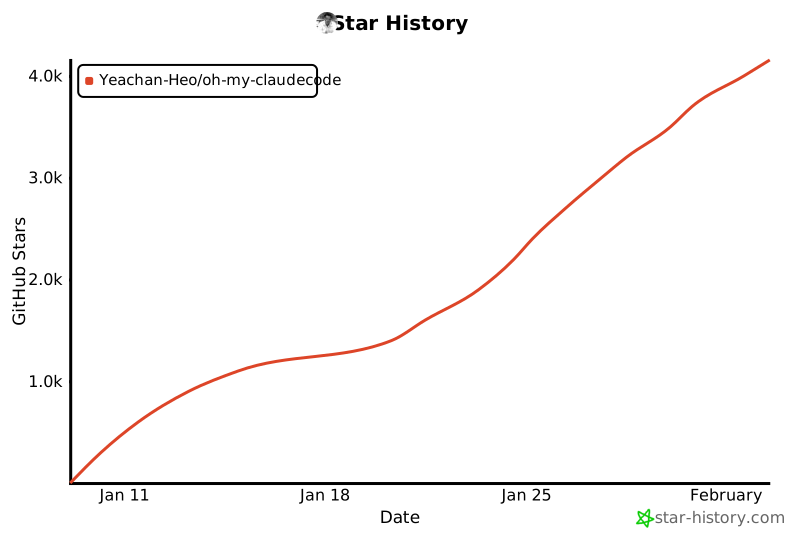](https://star-history.com/#Yeachan-Heo/oh-my-claudecode&Date)
|
|
112
|
+
- Claude Max/Pro subscription OR Anthropic API key
|
|
400
113
|
|
|
401
114
|
---
|
|
402
115
|
|
|
403
116
|
## License
|
|
404
117
|
|
|
405
|
-
MIT
|
|
118
|
+
MIT
|
|
406
119
|
|
|
407
120
|
---
|
|
408
121
|
|
|
409
122
|
<div align="center">
|
|
410
123
|
|
|
411
|
-
**Inspired by:**
|
|
412
|
-
|
|
413
|
-
[oh-my-opencode](https://github.com/code-yeongyu/oh-my-opencode) • [claude-hud](https://github.com/ryanjoachim/claude-hud) • [Superpowers](https://github.com/NexTechFusion/Superpowers) • [everything-claude-code](https://github.com/affaan-m/everything-claude-code)
|
|
124
|
+
**Inspired by:** [oh-my-opencode](https://github.com/code-yeongyu/oh-my-opencode) • [claude-hud](https://github.com/ryanjoachim/claude-hud) • [Superpowers](https://github.com/NexTechFusion/Superpowers) • [everything-claude-code](https://github.com/affaan-m/everything-claude-code)
|
|
414
125
|
|
|
415
126
|
**Zero learning curve. Maximum power.**
|
|
416
127
|
|
|
417
128
|
</div>
|
|
129
|
+
|
|
130
|
+
## Star History
|
|
131
|
+
|
|
132
|
+
[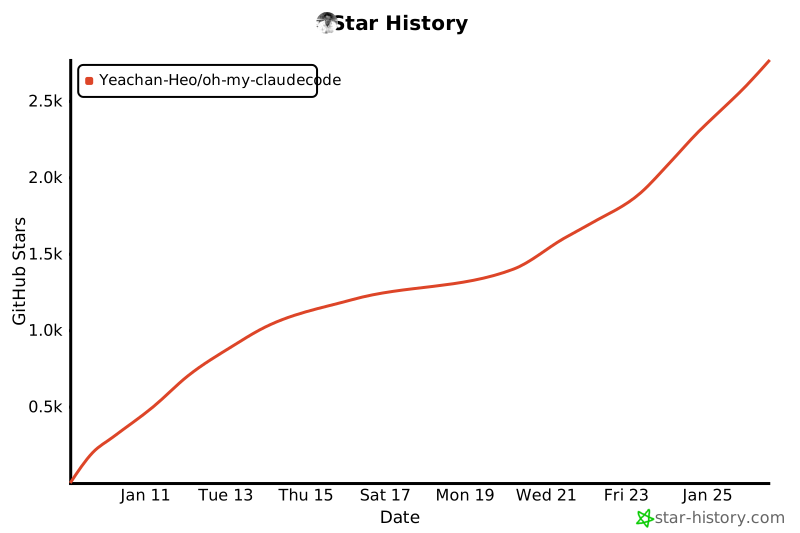](https://www.star-history.com/#Yeachan-Heo/oh-my-claudecode&type=date&legend=top-left)
|
package/commands/mcp-setup.md
CHANGED
|
@@ -8,7 +8,7 @@ Configure Model Context Protocol (MCP) servers to extend Claude Code's capabilit
|
|
|
8
8
|
|
|
9
9
|
## Overview
|
|
10
10
|
|
|
11
|
-
MCP servers provide additional tools that Claude Code agents can use. This skill helps you configure popular MCP servers
|
|
11
|
+
MCP servers provide additional tools that Claude Code agents can use. This skill helps you configure popular MCP servers in your `~/.claude/settings.json`.
|
|
12
12
|
|
|
13
13
|
## Step 1: Show Available MCP Servers
|
|
14
14
|
|
|
@@ -54,51 +54,94 @@ Do you have a GitHub Personal Access Token?
|
|
|
54
54
|
- Enter your token, or type 'skip' to configure later
|
|
55
55
|
```
|
|
56
56
|
|
|
57
|
-
## Step 3:
|
|
57
|
+
## Step 3: Update settings.json
|
|
58
58
|
|
|
59
|
-
|
|
59
|
+
Read the current `~/.claude/settings.json` and add/update the `mcpServers` section.
|
|
60
60
|
|
|
61
61
|
### Context7 Configuration:
|
|
62
|
-
```
|
|
63
|
-
|
|
62
|
+
```json
|
|
63
|
+
{
|
|
64
|
+
"mcpServers": {
|
|
65
|
+
"context7": {
|
|
66
|
+
"command": "npx",
|
|
67
|
+
"args": ["-y", "@upstash/context7-mcp"]
|
|
68
|
+
}
|
|
69
|
+
}
|
|
70
|
+
}
|
|
64
71
|
```
|
|
65
72
|
|
|
66
73
|
### Exa Web Search Configuration:
|
|
67
|
-
```
|
|
68
|
-
|
|
74
|
+
```json
|
|
75
|
+
{
|
|
76
|
+
"mcpServers": {
|
|
77
|
+
"exa": {
|
|
78
|
+
"command": "npx",
|
|
79
|
+
"args": ["-y", "exa-mcp-server"],
|
|
80
|
+
"env": {
|
|
81
|
+
"EXA_API_KEY": "<user-provided-key>"
|
|
82
|
+
}
|
|
83
|
+
}
|
|
84
|
+
}
|
|
85
|
+
}
|
|
69
86
|
```
|
|
70
87
|
|
|
71
88
|
### Filesystem Configuration:
|
|
72
|
-
```
|
|
73
|
-
|
|
89
|
+
```json
|
|
90
|
+
{
|
|
91
|
+
"mcpServers": {
|
|
92
|
+
"filesystem": {
|
|
93
|
+
"command": "npx",
|
|
94
|
+
"args": ["-y", "@modelcontextprotocol/server-filesystem", "<allowed-directories>"]
|
|
95
|
+
}
|
|
96
|
+
}
|
|
97
|
+
}
|
|
74
98
|
```
|
|
75
99
|
|
|
76
100
|
### GitHub Configuration:
|
|
101
|
+
```json
|
|
102
|
+
{
|
|
103
|
+
"mcpServers": {
|
|
104
|
+
"github": {
|
|
105
|
+
"command": "docker",
|
|
106
|
+
"args": ["run", "-i", "--rm", "-e", "GITHUB_PERSONAL_ACCESS_TOKEN", "ghcr.io/github/github-mcp-server"],
|
|
107
|
+
"env": {
|
|
108
|
+
"GITHUB_PERSONAL_ACCESS_TOKEN": "<user-provided-token>"
|
|
109
|
+
}
|
|
110
|
+
}
|
|
111
|
+
}
|
|
112
|
+
}
|
|
113
|
+
```
|
|
114
|
+
> Note: GitHub MCP requires Docker. Alternatively, configure as a remote URL: https://api.githubcopilot.com/mcp/
|
|
115
|
+
|
|
116
|
+
## Step 4: Merge Configuration
|
|
117
|
+
|
|
118
|
+
When updating settings.json:
|
|
119
|
+
|
|
120
|
+
1. Read existing file: `~/.claude/settings.json`
|
|
121
|
+
2. Parse as JSON (handle comments with jsonc-parser if needed)
|
|
122
|
+
3. Merge new `mcpServers` entries with existing ones (don't overwrite user's other MCP servers)
|
|
123
|
+
4. Write back to file with proper formatting
|
|
77
124
|
|
|
78
|
-
**Option 1: Docker (local)**
|
|
79
125
|
```bash
|
|
80
|
-
|
|
126
|
+
# Backup existing settings first
|
|
127
|
+
cp ~/.claude/settings.json ~/.claude/settings.json.bak 2>/dev/null || true
|
|
81
128
|
```
|
|
82
129
|
|
|
83
|
-
|
|
84
|
-
```bash
|
|
85
|
-
claude mcp add --transport http github https://api.githubcopilot.com/mcp/
|
|
86
|
-
```
|
|
130
|
+
Use the Edit tool or Write tool to update the settings file, preserving existing configuration.
|
|
87
131
|
|
|
88
|
-
|
|
89
|
-
|
|
90
|
-
## Step 4: Verify Installation
|
|
132
|
+
## Step 5: Verify Installation
|
|
91
133
|
|
|
92
134
|
After configuration, verify the MCP servers are properly set up:
|
|
93
135
|
|
|
94
136
|
```bash
|
|
95
|
-
#
|
|
96
|
-
claude
|
|
97
|
-
```
|
|
137
|
+
# Check if settings.json has mcpServers
|
|
138
|
+
grep -q "mcpServers" ~/.claude/settings.json && echo "MCP servers configured" || echo "Configuration may have failed"
|
|
98
139
|
|
|
99
|
-
|
|
140
|
+
# List configured servers
|
|
141
|
+
node -e "const s = require('$HOME/.claude/settings.json'); console.log('Configured MCP servers:', Object.keys(s.mcpServers || {}).join(', ') || 'none')"
|
|
142
|
+
```
|
|
100
143
|
|
|
101
|
-
## Step
|
|
144
|
+
## Step 6: Show Completion Message
|
|
102
145
|
|
|
103
146
|
```
|
|
104
147
|
MCP Server Configuration Complete!
|
|
@@ -109,7 +152,6 @@ CONFIGURED SERVERS:
|
|
|
109
152
|
NEXT STEPS:
|
|
110
153
|
1. Restart Claude Code for changes to take effect
|
|
111
154
|
2. The configured MCP tools will be available to all agents
|
|
112
|
-
3. Run `claude mcp list` to verify configuration
|
|
113
155
|
|
|
114
156
|
USAGE TIPS:
|
|
115
157
|
- Context7: Ask about library documentation (e.g., "How do I use React hooks?")
|
|
@@ -118,15 +160,11 @@ USAGE TIPS:
|
|
|
118
160
|
- GitHub: Interact with GitHub repos, issues, and PRs
|
|
119
161
|
|
|
120
162
|
TROUBLESHOOTING:
|
|
121
|
-
- If MCP servers don't appear,
|
|
122
|
-
- Ensure you have Node.js 18+ installed for npx
|
|
123
|
-
- For GitHub Docker option, ensure Docker is installed and running
|
|
163
|
+
- If MCP servers don't appear, check ~/.claude/settings.json for syntax errors
|
|
164
|
+
- Ensure you have Node.js 18+ installed for npx commands
|
|
124
165
|
- Run /oh-my-claudecode:doctor to diagnose issues
|
|
125
166
|
|
|
126
|
-
|
|
127
|
-
- Add more servers: /oh-my-claudecode:mcp-setup or `claude mcp add ...`
|
|
128
|
-
- List servers: `claude mcp list`
|
|
129
|
-
- Remove a server: `claude mcp remove <server-name>`
|
|
167
|
+
To add more MCP servers later, run: /oh-my-claudecode:mcp-setup
|
|
130
168
|
```
|
|
131
169
|
|
|
132
170
|
## Custom MCP Server
|
|
@@ -135,50 +173,23 @@ If user selects "Custom":
|
|
|
135
173
|
|
|
136
174
|
Ask for:
|
|
137
175
|
1. Server name (identifier)
|
|
138
|
-
2.
|
|
139
|
-
3.
|
|
140
|
-
4.
|
|
141
|
-
5. Environment variables (optional, key=value pairs)
|
|
142
|
-
6. HTTP headers (optional, for http transport only)
|
|
176
|
+
2. Command to run (e.g., `npx`, `node`, path to executable)
|
|
177
|
+
3. Arguments (comma-separated)
|
|
178
|
+
4. Environment variables (optional, key=value pairs)
|
|
143
179
|
|
|
144
|
-
Then
|
|
145
|
-
|
|
146
|
-
**For stdio servers:**
|
|
147
|
-
```bash
|
|
148
|
-
# Without environment variables
|
|
149
|
-
claude mcp add <server-name> -- <command> [args...]
|
|
150
|
-
|
|
151
|
-
# With environment variables
|
|
152
|
-
claude mcp add -e KEY1=value1 -e KEY2=value2 <server-name> -- <command> [args...]
|
|
153
|
-
```
|
|
154
|
-
|
|
155
|
-
**For HTTP servers:**
|
|
156
|
-
```bash
|
|
157
|
-
# Basic HTTP server
|
|
158
|
-
claude mcp add --transport http <server-name> <url>
|
|
159
|
-
|
|
160
|
-
# HTTP server with headers
|
|
161
|
-
claude mcp add --transport http --header "Authorization: Bearer <token>" <server-name> <url>
|
|
162
|
-
```
|
|
180
|
+
Then add to mcpServers section accordingly.
|
|
163
181
|
|
|
164
182
|
## Common Issues
|
|
165
183
|
|
|
166
184
|
### MCP Server Not Loading
|
|
167
185
|
- Ensure Node.js 18+ is installed
|
|
168
186
|
- Check that npx is available in PATH
|
|
169
|
-
-
|
|
170
|
-
- Check server logs for errors
|
|
187
|
+
- Verify no JSON syntax errors in settings.json
|
|
171
188
|
|
|
172
189
|
### API Key Issues
|
|
173
190
|
- Exa: Verify key at https://dashboard.exa.ai
|
|
174
|
-
- GitHub: Ensure token has required scopes
|
|
175
|
-
- Re-run `claude mcp add` with correct credentials if needed
|
|
191
|
+
- GitHub: Ensure token has required scopes
|
|
176
192
|
|
|
177
193
|
### Agents Still Using Built-in Tools
|
|
178
194
|
- Restart Claude Code after configuration
|
|
179
195
|
- The built-in websearch will be deprioritized when exa is configured
|
|
180
|
-
- Run `claude mcp list` to confirm servers are active
|
|
181
|
-
|
|
182
|
-
### Removing or Updating a Server
|
|
183
|
-
- Remove: `claude mcp remove <server-name>`
|
|
184
|
-
- Update: Remove the old server, then add it again with new configuration
|