offwatch 0.3.1 → 0.4.1
This diff represents the content of publicly available package versions that have been released to one of the supported registries. The information contained in this diff is provided for informational purposes only and reflects changes between package versions as they appear in their respective public registries.
- package/README.md +178 -300
- package/package.json +1 -1
package/README.md
CHANGED
|
@@ -1,300 +1,178 @@
|
|
|
1
|
-
<p align="center">
|
|
2
|
-
<img src="https://raw.githubusercontent.com/
|
|
3
|
-
</p>
|
|
4
|
-
|
|
5
|
-
<p align="center">
|
|
6
|
-
<a href="#quickstart"><strong>Quickstart</strong></a> ·
|
|
7
|
-
<a href="https://
|
|
8
|
-
|
|
9
|
-
|
|
10
|
-
|
|
11
|
-
|
|
12
|
-
<
|
|
13
|
-
|
|
14
|
-
|
|
15
|
-
|
|
16
|
-
|
|
17
|
-
|
|
18
|
-
<
|
|
19
|
-
|
|
20
|
-
|
|
21
|
-
|
|
22
|
-
|
|
23
|
-
|
|
24
|
-
|
|
25
|
-
|
|
26
|
-
|
|
27
|
-
|
|
28
|
-
|
|
29
|
-
|
|
30
|
-
|
|
31
|
-
|
|
32
|
-
|
|
33
|
-
|
|
34
|
-
|
|
35
|
-
|
|
36
|
-
**
|
|
37
|
-
|
|
38
|
-
|
|
39
|
-
|
|
40
|
-
|
|
41
|
-
|
|
42
|
-
|
|
43
|
-
|
|
44
|
-
<
|
|
45
|
-
|
|
46
|
-
|
|
47
|
-
|
|
48
|
-
<br
|
|
49
|
-
|
|
50
|
-
<
|
|
51
|
-
|
|
52
|
-
|
|
53
|
-
|
|
54
|
-
|
|
55
|
-
|
|
56
|
-
|
|
57
|
-
|
|
58
|
-
|
|
59
|
-
|
|
60
|
-
|
|
61
|
-
|
|
62
|
-
|
|
63
|
-
|
|
64
|
-
|
|
65
|
-
|
|
66
|
-
|
|
67
|
-
|
|
68
|
-
|
|
69
|
-
|
|
70
|
-
|
|
71
|
-
|
|
72
|
-
|
|
73
|
-
|
|
74
|
-
|
|
75
|
-
|
|
76
|
-
|
|
77
|
-
|
|
78
|
-
|
|
79
|
-
<
|
|
80
|
-
|
|
81
|
-
|
|
82
|
-
|
|
83
|
-
<
|
|
84
|
-
<
|
|
85
|
-
|
|
86
|
-
|
|
87
|
-
|
|
88
|
-
|
|
89
|
-
<td align="center"
|
|
90
|
-
<h3
|
|
91
|
-
|
|
92
|
-
</td>
|
|
93
|
-
<td align="center"
|
|
94
|
-
<h3
|
|
95
|
-
|
|
96
|
-
</td>
|
|
97
|
-
|
|
98
|
-
<
|
|
99
|
-
|
|
100
|
-
|
|
101
|
-
|
|
102
|
-
|
|
103
|
-
<td align="center">
|
|
104
|
-
<h3
|
|
105
|
-
|
|
106
|
-
</td>
|
|
107
|
-
<td align="center">
|
|
108
|
-
<h3
|
|
109
|
-
|
|
110
|
-
</td>
|
|
111
|
-
|
|
112
|
-
<
|
|
113
|
-
|
|
114
|
-
|
|
115
|
-
|
|
116
|
-
</
|
|
117
|
-
|
|
118
|
-
<
|
|
119
|
-
|
|
120
|
-
|
|
121
|
-
|
|
122
|
-
|
|
123
|
-
|
|
124
|
-
|
|
125
|
-
|
|
126
|
-
|
|
127
|
-
|
|
128
|
-
|
|
129
|
-
|
|
130
|
-
|
|
131
|
-
|
|
132
|
-
|
|
133
|
-
|
|
134
|
-
|
|
135
|
-
|
|
136
|
-
|
|
137
|
-
|
|
138
|
-
|
|
139
|
-
|
|
140
|
-
|
|
141
|
-
|
|
142
|
-
|
|
143
|
-
|
|
144
|
-
|
|
145
|
-
|
|
146
|
-
|
|
147
|
-
|
|
148
|
-
|
|
149
|
-
|
|
150
|
-
|
|
151
|
-
|
|
152
|
-
|
|
153
|
-
|
|
154
|
-
|
|
155
|
-
|
|
156
|
-
|
|
157
|
-
|
|
158
|
-
|
|
159
|
-
|
|
160
|
-
|
|
161
|
-
|
|
162
|
-
|
|
163
|
-
|
|
164
|
-
|
|
165
|
-
|
|
166
|
-
|
|
167
|
-
|
|
168
|
-
|
|
169
|
-
|
|
170
|
-
|
|
171
|
-
|
|
172
|
-
|
|
173
|
-
|
|
174
|
-
|
|
175
|
-
|
|
176
|
-
|
|
177
|
-
|
|
178
|
-
|
|
179
|
-
|
|
180
|
-
That quickstart path now defaults to trusted local loopback mode for the fastest first run. To start in authenticated/private mode instead, choose a bind preset explicitly:
|
|
181
|
-
|
|
182
|
-
```bash
|
|
183
|
-
npx paperclipai onboard --yes --bind lan
|
|
184
|
-
# or:
|
|
185
|
-
npx paperclipai onboard --yes --bind tailnet
|
|
186
|
-
```
|
|
187
|
-
|
|
188
|
-
If you already have Paperclip configured, rerunning `onboard` keeps the existing config in place. Use `paperclipai configure` to edit settings.
|
|
189
|
-
|
|
190
|
-
Or manually:
|
|
191
|
-
|
|
192
|
-
```bash
|
|
193
|
-
git clone https://github.com/paperclipai/paperclip.git
|
|
194
|
-
cd paperclip
|
|
195
|
-
pnpm install
|
|
196
|
-
pnpm dev
|
|
197
|
-
```
|
|
198
|
-
|
|
199
|
-
This starts the API server at `http://localhost:3100`. An embedded PostgreSQL database is created automatically — no setup required.
|
|
200
|
-
|
|
201
|
-
> **Requirements:** Node.js 20+, pnpm 9.15+
|
|
202
|
-
|
|
203
|
-
<br/>
|
|
204
|
-
|
|
205
|
-
## FAQ
|
|
206
|
-
|
|
207
|
-
**What does a typical setup look like?**
|
|
208
|
-
Locally, a single Node.js process manages an embedded Postgres and local file storage. For production, point it at your own Postgres and deploy however you like. Configure projects, agents, and goals — the agents take care of the rest.
|
|
209
|
-
|
|
210
|
-
If you're a solo-entreprenuer you can use Tailscale to access Paperclip on the go. Then later you can deploy to e.g. Vercel when you need it.
|
|
211
|
-
|
|
212
|
-
**Can I run multiple companies?**
|
|
213
|
-
Yes. A single deployment can run an unlimited number of companies with complete data isolation.
|
|
214
|
-
|
|
215
|
-
**How is Paperclip different from agents like OpenClaw or Claude Code?**
|
|
216
|
-
Paperclip _uses_ those agents. It orchestrates them into a company — with org charts, budgets, goals, governance, and accountability.
|
|
217
|
-
|
|
218
|
-
**Why should I use Paperclip instead of just pointing my OpenClaw to Asana or Trello?**
|
|
219
|
-
Agent orchestration has subtleties in how you coordinate who has work checked out, how to maintain sessions, monitoring costs, establishing governance - Paperclip does this for you.
|
|
220
|
-
|
|
221
|
-
(Bring-your-own-ticket-system is on the Roadmap)
|
|
222
|
-
|
|
223
|
-
**Do agents run continuously?**
|
|
224
|
-
By default, agents run on scheduled heartbeats and event-based triggers (task assignment, @-mentions). You can also hook in continuous agents like OpenClaw. You bring your agent and Paperclip coordinates.
|
|
225
|
-
|
|
226
|
-
<br/>
|
|
227
|
-
|
|
228
|
-
## Development
|
|
229
|
-
|
|
230
|
-
```bash
|
|
231
|
-
pnpm dev # Full dev (API + UI, watch mode)
|
|
232
|
-
pnpm dev:once # Full dev without file watching
|
|
233
|
-
pnpm dev:server # Server only
|
|
234
|
-
pnpm build # Build all
|
|
235
|
-
pnpm typecheck # Type checking
|
|
236
|
-
pnpm test:run # Run tests
|
|
237
|
-
pnpm db:generate # Generate DB migration
|
|
238
|
-
pnpm db:migrate # Apply migrations
|
|
239
|
-
```
|
|
240
|
-
|
|
241
|
-
See [doc/DEVELOPING.md](https://github.com/paperclipai/paperclip/blob/master/doc/DEVELOPING.md) for the full development guide.
|
|
242
|
-
|
|
243
|
-
<br/>
|
|
244
|
-
|
|
245
|
-
## Roadmap
|
|
246
|
-
|
|
247
|
-
- ✅ Plugin system (e.g. add a knowledge base, custom tracing, queues, etc)
|
|
248
|
-
- ✅ Get OpenClaw / claw-style agent employees
|
|
249
|
-
- ✅ companies.sh - import and export entire organizations
|
|
250
|
-
- ✅ Easy AGENTS.md configurations
|
|
251
|
-
- ✅ Skills Manager
|
|
252
|
-
- ✅ Scheduled Routines
|
|
253
|
-
- ✅ Better Budgeting
|
|
254
|
-
- ⚪ Artifacts & Deployments
|
|
255
|
-
- ⚪ CEO Chat
|
|
256
|
-
- ⚪ MAXIMIZER MODE
|
|
257
|
-
- ⚪ Multiple Human Users
|
|
258
|
-
- ⚪ Cloud / Sandbox agents (e.g. Cursor / e2b agents)
|
|
259
|
-
- ⚪ Cloud deployments
|
|
260
|
-
- ⚪ Desktop App
|
|
261
|
-
|
|
262
|
-
<br/>
|
|
263
|
-
|
|
264
|
-
## Community & Plugins
|
|
265
|
-
|
|
266
|
-
Find Plugins and more at [awesome-paperclip](https://github.com/gsxdsm/awesome-paperclip)
|
|
267
|
-
|
|
268
|
-
## Contributing
|
|
269
|
-
|
|
270
|
-
We welcome contributions. See the [contributing guide](https://github.com/paperclipai/paperclip/blob/master/CONTRIBUTING.md) for details.
|
|
271
|
-
|
|
272
|
-
<br/>
|
|
273
|
-
|
|
274
|
-
## Community
|
|
275
|
-
|
|
276
|
-
- [Discord](https://discord.gg/m4HZY7xNG3) — Join the community
|
|
277
|
-
- [GitHub Issues](https://github.com/paperclipai/paperclip/issues) — bugs and feature requests
|
|
278
|
-
- [GitHub Discussions](https://github.com/paperclipai/paperclip/discussions) — ideas and RFC
|
|
279
|
-
|
|
280
|
-
<br/>
|
|
281
|
-
|
|
282
|
-
## License
|
|
283
|
-
|
|
284
|
-
MIT © 2026 Paperclip
|
|
285
|
-
|
|
286
|
-
## Star History
|
|
287
|
-
|
|
288
|
-
[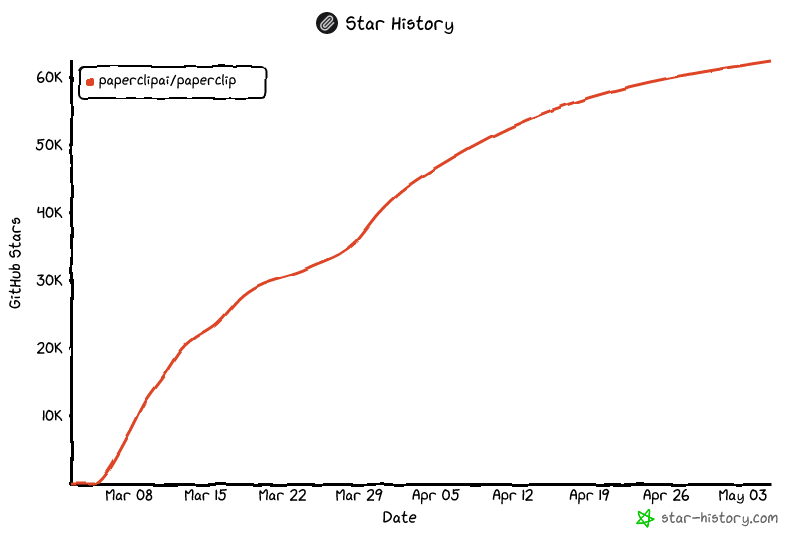](https://www.star-history.com/?repos=paperclipai%2Fpaperclip&type=date&legend=top-left)
|
|
289
|
-
|
|
290
|
-
<br/>
|
|
291
|
-
|
|
292
|
-
---
|
|
293
|
-
|
|
294
|
-
<p align="center">
|
|
295
|
-
<img src="https://raw.githubusercontent.com/paperclipai/paperclip/master/doc/assets/footer.jpg" alt="" width="720" />
|
|
296
|
-
</p>
|
|
297
|
-
|
|
298
|
-
<p align="center">
|
|
299
|
-
<sub>Open source under MIT. Built for people who want to run companies, not babysit agents.</sub>
|
|
300
|
-
</p>
|
|
1
|
+
<p align="center">
|
|
2
|
+
<img src="https://raw.githubusercontent.com/triss-smith/offwatch/main/doc/assets/header.png" alt="Offwatch — automate dev work" width="720" />
|
|
3
|
+
</p>
|
|
4
|
+
|
|
5
|
+
<p align="center">
|
|
6
|
+
<a href="#quickstart"><strong>Quickstart</strong></a> ·
|
|
7
|
+
<a href="https://github.com/triss-smith/offwatch"><strong>GitHub</strong></a>
|
|
8
|
+
</p>
|
|
9
|
+
|
|
10
|
+
<p align="center">
|
|
11
|
+
<a href="https://github.com/triss-smith/offwatch/blob/main/LICENSE"><img src="https://img.shields.io/badge/license-MIT-blue" alt="MIT License" /></a>
|
|
12
|
+
<a href="https://github.com/triss-smith/offwatch/stargazers"><img src="https://img.shields.io/github/stars/triss-smith/offwatch?style=flat" alt="Stars" /></a>
|
|
13
|
+
</p>
|
|
14
|
+
|
|
15
|
+
<br/>
|
|
16
|
+
|
|
17
|
+
<div align="center">
|
|
18
|
+
<video src="https://github.com/user-attachments/assets/773bdfb2-6d1e-4e30-8c5f-3487d5b70c8f" width="600" controls></video>
|
|
19
|
+
</div>
|
|
20
|
+
|
|
21
|
+
<br/>
|
|
22
|
+
|
|
23
|
+
## What is Offwatch?
|
|
24
|
+
|
|
25
|
+
# Open-source orchestration for AI agent teams
|
|
26
|
+
|
|
27
|
+
**If OpenClaw is an _employee_, Offwatch is the _team lead_**
|
|
28
|
+
|
|
29
|
+
Offwatch is a Node.js CLI that orchestrates a team of AI agents to automate dev work. Bring your own agents, assign tasks, and track their work from the command line.
|
|
30
|
+
|
|
31
|
+
**Manage development work, not pull requests.**
|
|
32
|
+
|
|
33
|
+
| | Step | Example |
|
|
34
|
+
| ------ | --------------- | ------------------------------------------------------------------ |
|
|
35
|
+
| **01** | Define the task | _"Build a REST API for user management."_ |
|
|
36
|
+
| **02** | Hire the team | Engineers, code reviewers, deployers — any bot, any provider. |
|
|
37
|
+
| **03** | Approve and run | Review strategy. Set budgets. Hit go. Monitor from the CLI. |
|
|
38
|
+
|
|
39
|
+
<br/>
|
|
40
|
+
|
|
41
|
+
<div align="center">
|
|
42
|
+
<table>
|
|
43
|
+
<tr>
|
|
44
|
+
<td align="center"><strong>Supports</strong></td>
|
|
45
|
+
<td align="center"><img src="https://raw.githubusercontent.com/triss-smith/offwatch/main/doc/assets/logos/openclaw.svg" width="32" alt="OpenClaw" /><br/><sub>OpenClaw</sub></td>
|
|
46
|
+
<td align="center"><img src="https://raw.githubusercontent.com/triss-smith/offwatch/main/doc/assets/logos/claude.svg" width="32" alt="Claude" /><br/><sub>Claude Code</sub></td>
|
|
47
|
+
<td align="center"><img src="https://raw.githubusercontent.com/triss-smith/offwatch/main/doc/assets/logos/codex.svg" width="32" alt="Codex" /><br/><sub>Codex</sub></td>
|
|
48
|
+
<td align="center"><img src="https://raw.githubusercontent.com/triss-smith/offwatch/main/doc/assets/logos/cursor.svg" width="32" alt="Cursor" /><br/><sub>Cursor</sub></td>
|
|
49
|
+
<td align="center"><img src="https://raw.githubusercontent.com/triss-smith/offwatch/main/doc/assets/logos/bash.svg" width="32" alt="Bash" /><br/><sub>Bash</sub></td>
|
|
50
|
+
<td align="center"><img src="https://raw.githubusercontent.com/triss-smith/offwatch/main/doc/assets/logos/http.svg" width="32" alt="HTTP" /><br/><sub>HTTP</sub></td>
|
|
51
|
+
</tr>
|
|
52
|
+
</table>
|
|
53
|
+
|
|
54
|
+
<em>If it can receive a heartbeat, it's hired.</em>
|
|
55
|
+
|
|
56
|
+
</div>
|
|
57
|
+
|
|
58
|
+
<br/>
|
|
59
|
+
|
|
60
|
+
## Offwatch is right for you if
|
|
61
|
+
|
|
62
|
+
- ✅ You want to **automate development work** with AI agents
|
|
63
|
+
- ✅ You **coordinate many different agents** (OpenClaw, Codex, Claude, Cursor) toward a common goal
|
|
64
|
+
- ✅ You have **multiple AI agent terminals** open and lose track of what everyone is doing
|
|
65
|
+
- ✅ You want agents running **autonomously**, but still want to audit work and chime in when needed
|
|
66
|
+
- ✅ You want **persistent task tracking** across reboots
|
|
67
|
+
- ✅ You want a process for managing agents that **feels like using a task manager**
|
|
68
|
+
|
|
69
|
+
<br/>
|
|
70
|
+
|
|
71
|
+
## Features
|
|
72
|
+
|
|
73
|
+
<table>
|
|
74
|
+
<tr>
|
|
75
|
+
<td align="center" width="33%">
|
|
76
|
+
<h3>🔌 Bring Your Own Agent</h3>
|
|
77
|
+
Any agent, any runtime, one team. If it can receive a heartbeat, it's hired.
|
|
78
|
+
</td>
|
|
79
|
+
<td align="center" width="33%">
|
|
80
|
+
<h3>🎯 Task Management</h3>
|
|
81
|
+
Every task traces back to the project goal. Agents know <em>what</em> to do and <em>why</em>.
|
|
82
|
+
</td>
|
|
83
|
+
<td align="center" width="33%">
|
|
84
|
+
<h3>💓 Heartbeats</h3>
|
|
85
|
+
Agents wake on a schedule, check work, and act. Delegation flows up and down.
|
|
86
|
+
</td>
|
|
87
|
+
</tr>
|
|
88
|
+
<tr>
|
|
89
|
+
<td align="center">
|
|
90
|
+
<h3>💰 Cost Control</h3>
|
|
91
|
+
Monthly budgets per agent. When they hit the limit, they stop. No runaway costs.
|
|
92
|
+
</td>
|
|
93
|
+
<td align="center">
|
|
94
|
+
<h3>🏢 Multi-Workspace</h3>
|
|
95
|
+
One deployment, many workspaces. Complete data isolation.
|
|
96
|
+
</td>
|
|
97
|
+
<td align="center">
|
|
98
|
+
<h3>🎫 Ticket System</h3>
|
|
99
|
+
Every conversation traced. Every decision explained. Full tool-call tracing and audit log.
|
|
100
|
+
</td>
|
|
101
|
+
</tr>
|
|
102
|
+
<tr>
|
|
103
|
+
<td align="center">
|
|
104
|
+
<h3>🛡️ Governance</h3>
|
|
105
|
+
You're the lead. Approve work, override strategy, pause or terminate any agent — at any time.
|
|
106
|
+
</td>
|
|
107
|
+
<td align="center">
|
|
108
|
+
<h3>📊 Project Tracking</h3>
|
|
109
|
+
Tasks, progress, status. Your agents have work to do, with clear reporting.
|
|
110
|
+
</td>
|
|
111
|
+
<td align="center">
|
|
112
|
+
<h3>🔄 Persistent Sessions</h3>
|
|
113
|
+
Agents resume the same task context across heartbeats instead of restarting from scratch.
|
|
114
|
+
</td>
|
|
115
|
+
</tr>
|
|
116
|
+
</table>
|
|
117
|
+
|
|
118
|
+
<br/>
|
|
119
|
+
|
|
120
|
+
## Problems Offwatch solves
|
|
121
|
+
|
|
122
|
+
| Without Offwatch | With Offwatch |
|
|
123
|
+
| ------------------------------------------------------------------------------------------------------------------------------------- | -------------------------------------------------------------------------------------------------------------------------------------- |
|
|
124
|
+
| ❌ You have 20 AI agent tabs open and can't track which one does what. On reboot you lose everything. | ✅ Tasks are ticket-based, conversations are threaded, sessions persist across reboots. |
|
|
125
|
+
| ❌ You manually gather context from several places to remind your bot what you're actually doing. | ✅ Context flows from the task up through the project — your agent always knows what to do and why. |
|
|
126
|
+
| ❌ Folders of agent configs are disorganized and you're re-inventing task management and coordination. | ✅ Offwatch gives you task management, ticketing, delegation, and governance out of the box. |
|
|
127
|
+
| ❌ Runaway loops waste hundreds of dollars of tokens and max your quota before you even know what happened. | ✅ Cost tracking surfaces token budgets and throttles agents when they're out. |
|
|
128
|
+
| ❌ You have recurring jobs (maintenance, reports, deployments) and have to remember to manually kick them off. | ✅ Heartbeats handle regular work on a schedule. |
|
|
129
|
+
| ❌ You have an idea, you have to find your repo, fire up Claude Code, keep a tab open, and babysit it. | ✅ Add a task in Offwatch. Your coding agent works on it until it's done. |
|
|
130
|
+
|
|
131
|
+
<br/>
|
|
132
|
+
|
|
133
|
+
## Quickstart
|
|
134
|
+
|
|
135
|
+
```bash
|
|
136
|
+
npm install -g offwatch
|
|
137
|
+
offwatch --help
|
|
138
|
+
```
|
|
139
|
+
|
|
140
|
+
Or run directly:
|
|
141
|
+
|
|
142
|
+
```bash
|
|
143
|
+
npx offwatch --help
|
|
144
|
+
```
|
|
145
|
+
|
|
146
|
+
<br/>
|
|
147
|
+
|
|
148
|
+
## CLI Commands
|
|
149
|
+
|
|
150
|
+
```bash
|
|
151
|
+
offwatch worktree create # Create a new isolated worktree for agent tasks
|
|
152
|
+
offwatch worktree list # List all worktrees
|
|
153
|
+
offwatch worktree sync # Sync issues to worktree
|
|
154
|
+
```
|
|
155
|
+
|
|
156
|
+
<br/>
|
|
157
|
+
|
|
158
|
+
## Development
|
|
159
|
+
|
|
160
|
+
```bash
|
|
161
|
+
pnpm install
|
|
162
|
+
pnpm build
|
|
163
|
+
pnpm dev
|
|
164
|
+
```
|
|
165
|
+
|
|
166
|
+
<br/>
|
|
167
|
+
|
|
168
|
+
## License
|
|
169
|
+
|
|
170
|
+
MIT © 2026 Offwatch
|
|
171
|
+
|
|
172
|
+
<br/>
|
|
173
|
+
|
|
174
|
+
---
|
|
175
|
+
|
|
176
|
+
<p align="center">
|
|
177
|
+
<sub>Open source under MIT. Built for developers who want to automate work, not babysit agents.</sub>
|
|
178
|
+
</p>
|