nsf-clawguard 1.0.0
This diff represents the content of publicly available package versions that have been released to one of the supported registries. The information contained in this diff is provided for informational purposes only and reflects changes between package versions as they appear in their respective public registries.
- package/LICENSE +21 -0
- package/README-CN.md +329 -0
- package/README.md +329 -0
- package/clawdbot.plugin.json +18 -0
- package/dist/index.d.ts +68 -0
- package/dist/index.mjs +48698 -0
- package/openclaw.plugin.json +18 -0
- package/package.json +61 -0
package/LICENSE
ADDED
|
@@ -0,0 +1,21 @@
|
|
|
1
|
+
MIT License
|
|
2
|
+
|
|
3
|
+
Copyright (c) 2026 NSFOCUS Technologies Group Co., Ltd
|
|
4
|
+
|
|
5
|
+
Permission is hereby granted, free of charge, to any person obtaining a copy
|
|
6
|
+
of this software and associated documentation files (the "Software"), to deal
|
|
7
|
+
in the Software without restriction, including without limitation the rights
|
|
8
|
+
to use, copy, modify, merge, publish, distribute, sublicense, and/or sell
|
|
9
|
+
copies of the Software, and to permit persons to whom the Software is
|
|
10
|
+
furnished to do so, subject to the following conditions:
|
|
11
|
+
|
|
12
|
+
The above copyright notice and this permission notice shall be included in all
|
|
13
|
+
copies or substantial portions of the Software.
|
|
14
|
+
|
|
15
|
+
THE SOFTWARE IS PROVIDED "AS IS", WITHOUT WARRANTY OF ANY KIND, EXPRESS OR
|
|
16
|
+
IMPLIED, INCLUDING BUT NOT LIMITED TO THE WARRANTIES OF MERCHANTABILITY,
|
|
17
|
+
FITNESS FOR A PARTICULAR PURPOSE AND NONINFRINGEMENT. IN NO EVENT SHALL THE
|
|
18
|
+
AUTHORS OR COPYRIGHT HOLDERS BE LIABLE FOR ANY CLAIM, DAMAGES OR OTHER
|
|
19
|
+
LIABILITY, WHETHER IN AN ACTION OF CONTRACT, TORT OR OTHERWISE, ARISING FROM,
|
|
20
|
+
OUT OF OR IN CONNECTION WITH THE SOFTWARE OR THE USE OR OTHER DEALINGS IN THE
|
|
21
|
+
SOFTWARE.
|
package/README-CN.md
ADDED
|
@@ -0,0 +1,329 @@
|
|
|
1
|
+
# NSF-ClawGuard
|
|
2
|
+
|
|
3
|
+
[English](https://github.com/NSF-AIGuard/NSF-ClawGuard/blob/main/README.md) | [中文](https://github.com/NSF-AIGuard/NSF-ClawGuard/blob/main/README-CN.md)
|
|
4
|
+
|
|
5
|
+
一款适用于 [OpenClaw 的](https://github.com/openclaw)实时安全监控插件,能够智能识别风险并提供应对方案。
|
|
6
|
+
|
|
7
|
+
<p align="center">
|
|
8
|
+
<a href="https://github.com/NSF-AIGuard/NSF-ClawGuard/blob/main/LICENSE"><img src="https://img.shields.io/badge/license-MIT-blue.svg" alt="License: MIT" /></a>
|
|
9
|
+
<img src="https://img.shields.io/badge/Node.js-%3E%3D18-green.svg" alt="Node.js >= 18" />
|
|
10
|
+
<img src="https://img.shields.io/badge/TypeScript-5.9-blue.svg" alt="TypeScript" />
|
|
11
|
+
</p>
|
|
12
|
+
|
|
13
|
+
NSF-ClawGuard 是一款适用于 [OpenClaw](https://github.com/openclaw) 和 [ClawdBot](https://github.com/openclaw) 的全方位实时安全监控插件。提供多层安全防护能力,包括配置文件扫描、运行时命令监控、Skill 代码分析、内容安全审查以及基于 Web 的安全仪表盘。
|
|
14
|
+
|
|
15
|
+
> **English documentation** please see [README.md](./README.md)
|
|
16
|
+
|
|
17
|
+
---
|
|
18
|
+
|
|
19
|
+
## ✨ 核心特性
|
|
20
|
+
|
|
21
|
+
### 🔍 多层安全扫描
|
|
22
|
+
- **配置文件安全扫描** — 对 `~/.openclaw/openclaw.json` 进行静态分析,内置 30+ 条安全规则,覆盖令牌安全、网络安全、会话安全、数据保护、插件安全、执行安全和速率限制等领域
|
|
23
|
+
- **SOUL.md 提示注入检测** — 识别 SOUL.md 配置文件中的提示注入攻击
|
|
24
|
+
- **Skill 代码静态扫描** — 对已安装的 Skill 进行深度分析,覆盖 SSRF、提示注入、远程代码执行、凭证窃取、敏感路径访问和危险函数组合
|
|
25
|
+
- **npm 依赖漏洞审计** — 检测项目依赖中的已知漏洞
|
|
26
|
+
- **Node.js 生命周期检测** — 在运行不受支持的 Node.js 版本时发出警告
|
|
27
|
+
|
|
28
|
+
### 🛡️ 运行时防护
|
|
29
|
+
- **命令安全监控** — 在执行前拦截和检查危险 Shell 命令(反弹 Shell、文件破坏、权限提升、凭证窃取、进程注入等)
|
|
30
|
+
- **内容安全审查** — 通过本地规则或远程 API 监控用户输入和 AI 输出中的恶意内容
|
|
31
|
+
- **工具调用审计** — 记录所有工具调用(`exec`、`write`、`edit`)的耗时、参数和执行状态
|
|
32
|
+
- **Gateway 认证监控** — 实时监控 Gateway WebSocket 认证事件,支持暴力破解检测
|
|
33
|
+
|
|
34
|
+
### 📊 可观测性
|
|
35
|
+
- **Web 安全仪表盘** — 基于 React 的安全仪表盘,包含事件总览、威胁分布图、Token 用量统计和 Gateway 认证日志
|
|
36
|
+
- **Token 用量追踪** — 按会话/模型记录 AI 模型 Token 消耗,包括缓存命中指标
|
|
37
|
+
- **SQLite 事件存储** — 所有安全事件持久化到本地 SQLite 数据库(`data/lm-security.db`),支持索引查询
|
|
38
|
+
- **违规事件上报** — 自动将安全违规事件上报至远程服务器(可配置)
|
|
39
|
+
|
|
40
|
+
### 🔧 其他能力
|
|
41
|
+
- **CLI 命令** — `nsf-clawguard check`、`nsf-clawguard config-scan`、`nsf-clawguard config-scan-full`
|
|
42
|
+
- **端口扫描** — 发现并探测监听在 `0.0.0.0` 上的暴露服务
|
|
43
|
+
- **心跳机制** — 定期健康检查,支持插件吊销检测
|
|
44
|
+
|
|
45
|
+
---
|
|
46
|
+
|
|
47
|
+
## 🏗️ 项目架构
|
|
48
|
+
|
|
49
|
+
```
|
|
50
|
+
NSF-ClawGuard/
|
|
51
|
+
├── index.ts # 插件入口 & 事件钩子注册
|
|
52
|
+
├── src/
|
|
53
|
+
│ ├── api.ts # 远程 API:违规上报、心跳、内容检测
|
|
54
|
+
│ ├── command-security.ts # 80+ 条危险命令模式检测规则
|
|
55
|
+
│ ├── config-scanner.ts # 30+ 条配置安全扫描规则
|
|
56
|
+
│ ├── skill-scanner.ts # 8 大类 Skill 代码静态分析
|
|
57
|
+
│ ├── database.ts # SQLite 数据库 (sql.js) 含 4 张数据表
|
|
58
|
+
│ ├── event-store.ts # 统一事件存储 & 分类映射
|
|
59
|
+
│ ├── logger.ts # 带前缀的日志封装
|
|
60
|
+
│ ├── request.ts # HTTP 客户端 (HMAC 认证)
|
|
61
|
+
│ ├── constants.ts # 共享常量
|
|
62
|
+
│ ├── types.ts # TypeScript 类型定义
|
|
63
|
+
│ ├── utils.ts # 工具函数
|
|
64
|
+
│ ├── cli/
|
|
65
|
+
│ │ └── index.ts # CLI 命令注册
|
|
66
|
+
│ ├── scan-port/
|
|
67
|
+
│ │ └── index.ts # 网络端口扫描器(跨平台)
|
|
68
|
+
│ └── server/
|
|
69
|
+
│ ├── index.ts # HTTP 路由注册
|
|
70
|
+
│ ├── inspect.ts # 安全事件 & 统计 API 处理器
|
|
71
|
+
│ ├── audit.ts # Token 用量 & 工具调用 API 处理器
|
|
72
|
+
│ ├── router.ts # 轻量级 HTTP 路由器
|
|
73
|
+
│ ├── static.ts # Web UI 静态文件服务
|
|
74
|
+
│ ├── utils.ts # 服务器工具函数
|
|
75
|
+
│ └── ui/ # React 仪表盘 (Vite + Ant Design)
|
|
76
|
+
├── tests/ # 单元测试 (Vitest)
|
|
77
|
+
├── scripts/
|
|
78
|
+
│ └── build.js # 完整构建脚本(UI + 主包)
|
|
79
|
+
├── openclaw.plugin.json # OpenClaw 插件清单
|
|
80
|
+
├── clawdbot.plugin.json # ClawdBot 插件清单
|
|
81
|
+
├── tsup.config.ts # 构建配置
|
|
82
|
+
├── tsconfig.json # TypeScript 配置
|
|
83
|
+
└── vitest.config.ts # 测试配置
|
|
84
|
+
```
|
|
85
|
+
|
|
86
|
+
---
|
|
87
|
+
|
|
88
|
+
## 📦 安装
|
|
89
|
+
|
|
90
|
+
```bash
|
|
91
|
+
# 安装依赖
|
|
92
|
+
npm install
|
|
93
|
+
|
|
94
|
+
# 构建插件
|
|
95
|
+
npm run build
|
|
96
|
+
|
|
97
|
+
# 完整构建(包含 Web 仪表盘)
|
|
98
|
+
npm run build:full
|
|
99
|
+
```
|
|
100
|
+
|
|
101
|
+
---
|
|
102
|
+
|
|
103
|
+
## 🚀 开发
|
|
104
|
+
|
|
105
|
+
```bash
|
|
106
|
+
# 构建
|
|
107
|
+
npm run build
|
|
108
|
+
|
|
109
|
+
# 运行测试
|
|
110
|
+
npm test
|
|
111
|
+
|
|
112
|
+
# 测试监听模式
|
|
113
|
+
npm run test:watch
|
|
114
|
+
|
|
115
|
+
# 生成覆盖率报告
|
|
116
|
+
npm run test:coverage
|
|
117
|
+
|
|
118
|
+
# 完整构建(UI + 主包)
|
|
119
|
+
npm run build:full
|
|
120
|
+
```
|
|
121
|
+
|
|
122
|
+
---
|
|
123
|
+
|
|
124
|
+
## 🔐 安全扫描详情
|
|
125
|
+
|
|
126
|
+
### 配置扫描器(30+ 规则)
|
|
127
|
+
|
|
128
|
+
对 `~/.openclaw/openclaw.json` 进行 7 大安全域扫描:
|
|
129
|
+
|
|
130
|
+
| 安全域 | 规则数 | 示例 |
|
|
131
|
+
|--------|--------|------|
|
|
132
|
+
| **令牌安全** | 3 条 | 熵值检测(< 48 字符)、弱模式检测(200+ 模式)、硬编码 API Key |
|
|
133
|
+
| **网络安全** | 7 条 | Gateway 绑定暴露、TLS 加密要求、CORS 通配符、API 端点安全、代理信任配置 |
|
|
134
|
+
| **会话安全** | 3 条 | 会话 TTL 检测、认证模式验证、会话隔离 |
|
|
135
|
+
| **数据保护** | 3 条 | 工作区限制、详细日志级别、日志包含敏感信息 |
|
|
136
|
+
| **插件安全** | 3 条 | 插件白名单、来源验证、内部钩子 |
|
|
137
|
+
| **执行安全** | 6 条 | 执行安全配置、写入路径限制、拒绝命令列表、MCP 信任配置 |
|
|
138
|
+
| **速率限制** | 1 条 | 速率限制配置与阈值验证 |
|
|
139
|
+
|
|
140
|
+
### Skill 扫描器(8 大类)
|
|
141
|
+
|
|
142
|
+
对所有已安装的 Skill 进行静态安全分析:
|
|
143
|
+
|
|
144
|
+
1. **SSRF 检测** — 检测 `fetch()`、`axios`、`http.get()` 中的用户可控 URL、URL 拼接和模板字符串
|
|
145
|
+
2. **提示注入检测** — 检测通过字符串拼接、模板字面量或消息数组操作将用户输入拼接到 LLM 提示词中
|
|
146
|
+
3. **RCE / 危险调用** — 检测 `child_process`、`eval()`、`vm.runInNewContext`、`__import__`、PHP/Ruby/Java 危险函数
|
|
147
|
+
4. **凭证窃取** — 检测访问 `process.env` 密钥、AWS/SSH/GitHub 路径、密钥字段名和凭证文件写入
|
|
148
|
+
5. **敏感路径访问** — 检测对 `.ssh/`、`.gnupg/`、`/etc/passwd`、`.aws/`、`.kube/`、`.git/`、Docker 配置等的访问
|
|
149
|
+
6. **危险函数组合** — 检测高风险组合:`child_process + fetch`、`eval + fetch`、`writeFile + exec` 等
|
|
150
|
+
7. **元数据质量** — 检查缺失或不完整的 `package.json` 字段(description、author 等)
|
|
151
|
+
8. **安装钩子风险** — 检测危险 npm scripts,如 `curl | bash`
|
|
152
|
+
|
|
153
|
+
### 命令安全监控(80+ 模式)
|
|
154
|
+
|
|
155
|
+
实时拦截工具调用,覆盖:
|
|
156
|
+
|
|
157
|
+
- **反弹 Shell** — `bash -i`、`nc -e`、`socat`、`awk`、`python -c`、`perl -e`、`php -r`、`ruby -e`
|
|
158
|
+
- **系统破坏** — `rm -rf /`、`mkfs`、`dd`、块设备重定向
|
|
159
|
+
- **凭证窃取** — `procdump`、`comsvcs.dll`、`reg save`、`Sqldumper`
|
|
160
|
+
- **权限提升** — `BadPotato`、`JuicyPotato`、`SweetPotato`、`EfsPotato`
|
|
161
|
+
- **下载执行链** — `curl | bash`、`wget | sh`、`base64 | bash`
|
|
162
|
+
- **进程注入** — `gdb -p`、`ptrace`、`strace -p`
|
|
163
|
+
- **内核模块** — `insmod`、`modprobe`、`rmmod`
|
|
164
|
+
- **编码混淆** — Base64 解码管道、通过 `rev` 反转命令
|
|
165
|
+
- **注册表操作** — `REG ADD/DELETE/SAVE`、`wevtutil` 日志操作
|
|
166
|
+
- **Cron 注入** — `echo | crontab`、管道到 `crontab -`
|
|
167
|
+
|
|
168
|
+
---
|
|
169
|
+
|
|
170
|
+
## 🪝 插件钩子
|
|
171
|
+
|
|
172
|
+
| 钩子 | 触发时机 | 执行动作 |
|
|
173
|
+
|------|----------|----------|
|
|
174
|
+
| `message_received` | 用户发送消息 | 对输入内容进行安全审查 |
|
|
175
|
+
| `agent_end` | AI Agent 完成响应 | 对输出内容进行安全审查 |
|
|
176
|
+
| `before_tool_call` | 工具执行前 | 对 `exec`、`write`、`edit` 进行命令安全检查 |
|
|
177
|
+
| `after_tool_call` | 工具执行后 | 记录工具调用的耗时和结果 |
|
|
178
|
+
| `llm_output` | LLM 响应接收时 | 记录 Token 使用量指标 |
|
|
179
|
+
|
|
180
|
+
---
|
|
181
|
+
|
|
182
|
+
## 💾 数据存储
|
|
183
|
+
|
|
184
|
+
所有事件存储在本地 SQLite 数据库(`<插件根目录>/data/lm-security.db`):
|
|
185
|
+
|
|
186
|
+
| 数据表 | 用途 | 关键字段 |
|
|
187
|
+
|--------|------|----------|
|
|
188
|
+
| `security_events` | 所有安全发现 | category, sub_category, threat_level, event_time |
|
|
189
|
+
| `token_usage` | AI Token 消耗记录 | session_key, model, input/output/total tokens |
|
|
190
|
+
| `tool_call` | 工具调用记录 | tool_name, params, result, duration_ms |
|
|
191
|
+
| `gateway_auth_logs` | Gateway 认证事件 | event_type, conn_id, remote_ip, client |
|
|
192
|
+
|
|
193
|
+
---
|
|
194
|
+
|
|
195
|
+
## 🖥️ Web 安全仪表盘
|
|
196
|
+
|
|
197
|
+
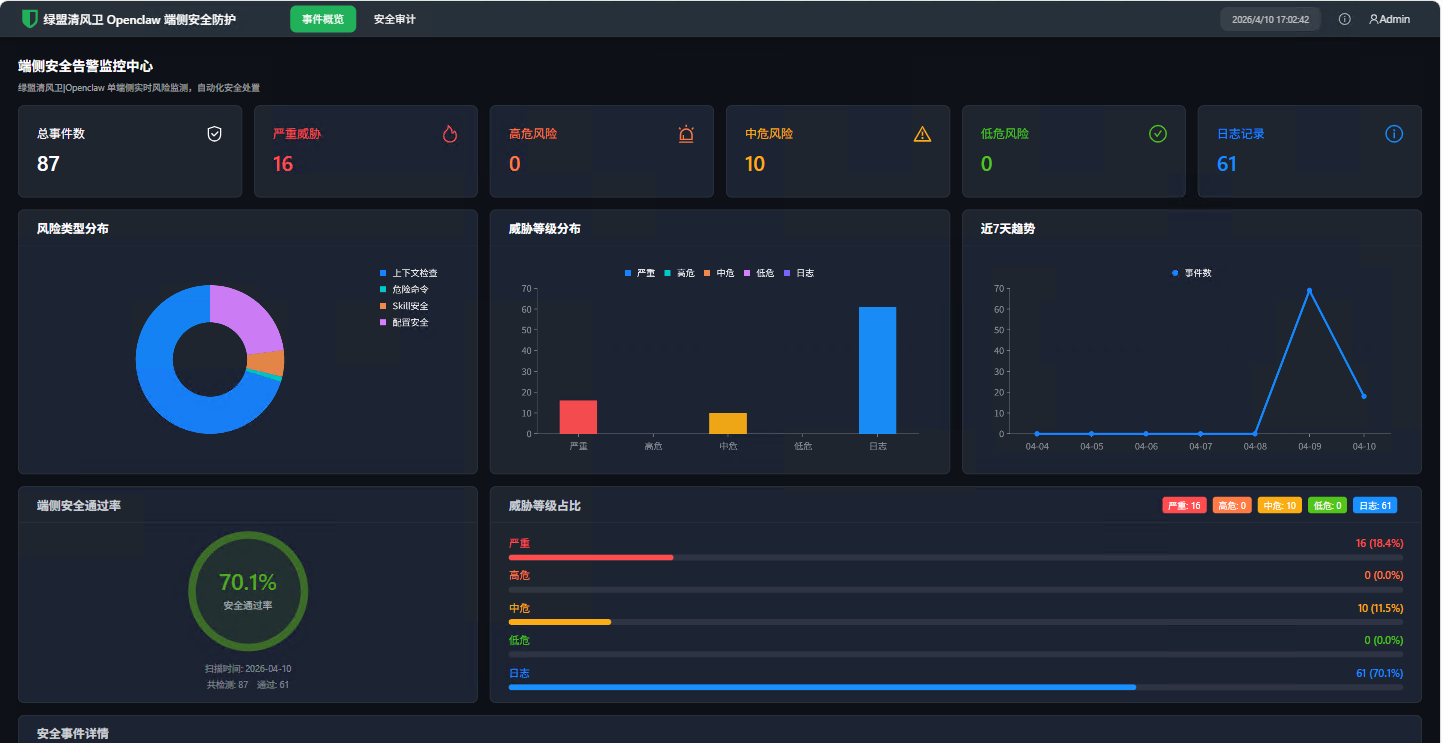
访问安全仪表盘:**http://localhost:18789/web**(其中 `18789` 为 Control UI 界面访问端口)
|
|
198
|
+
|
|
199
|
+
### 页面截图
|
|
200
|
+
|
|
201
|
+
**事件概览** — 安全事件汇总、威胁分布图表、7 天趋势和端侧安全通过率:
|
|
202
|
+
|
|
203
|
+
|
|
204
|
+
|
|
205
|
+
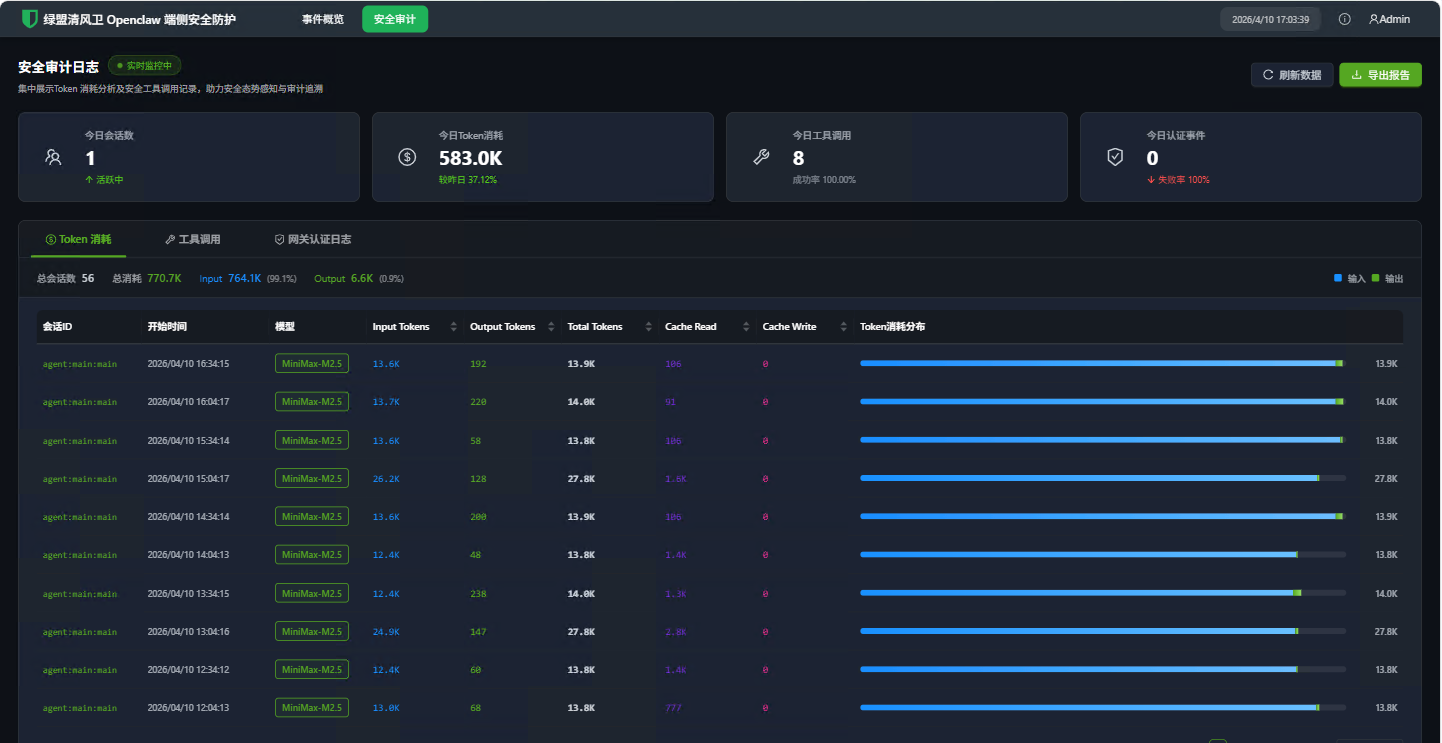
**Token 消耗** — 按会话和模型的 Token 用量统计,含输入/输出明细:
|
|
206
|
+
|
|
207
|
+
|
|
208
|
+
|
|
209
|
+
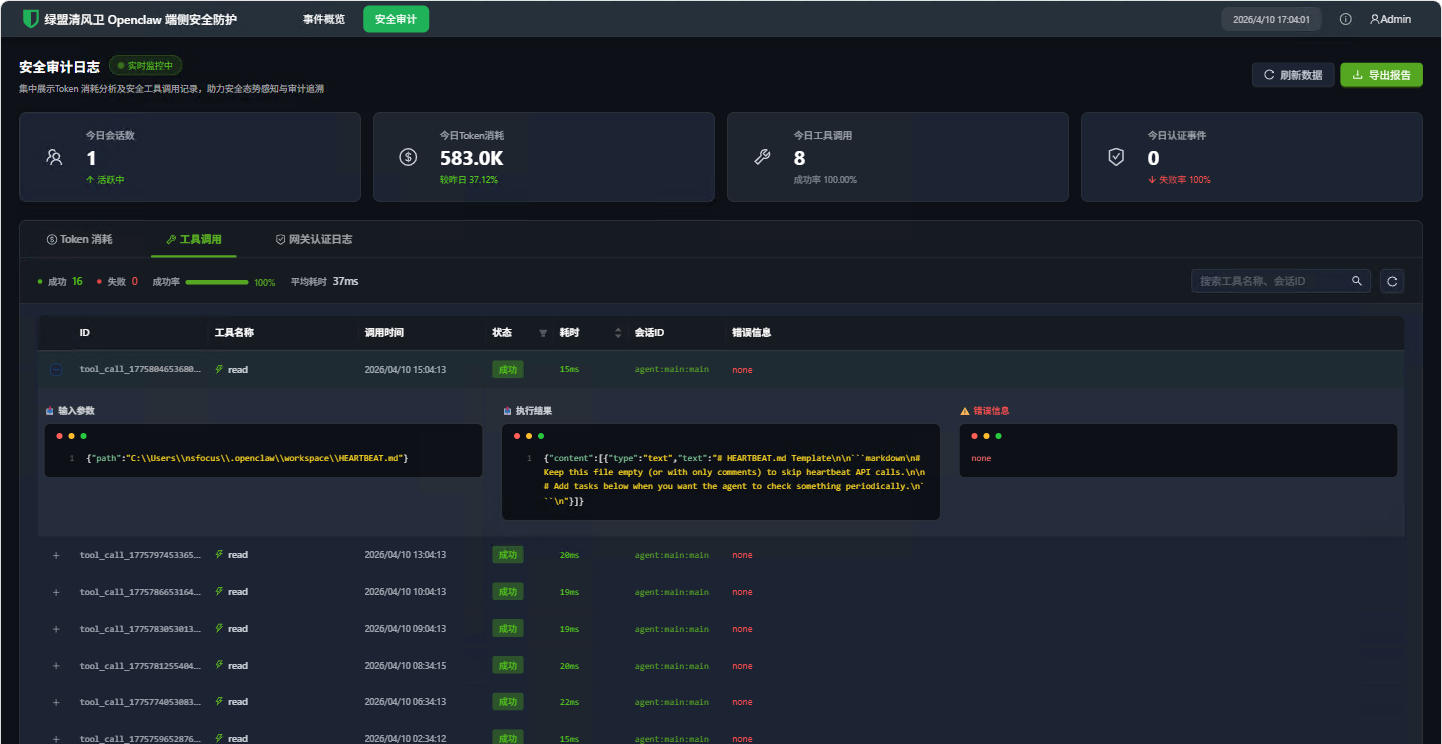
**工具调用** — 工具调用历史记录,含参数、结果和耗时详情:
|
|
210
|
+
|
|
211
|
+
|
|
212
|
+
|
|
213
|
+
### 仪表盘页面
|
|
214
|
+
|
|
215
|
+
| 页面 | 描述 |
|
|
216
|
+
|------|------|
|
|
217
|
+
| **总览** | 安全事件汇总、威胁分布和近期活动 |
|
|
218
|
+
| **安全事件** | 可筛选的安全发现列表,含威胁等级 |
|
|
219
|
+
| **Token 用量** | 按会话和模型的 Token 消耗趋势 |
|
|
220
|
+
| **工具调用** | 详细的工具调用历史及耗时 |
|
|
221
|
+
| **Gateway 认证** | 认证事件日志及连接详情 |
|
|
222
|
+
|
|
223
|
+
### API 接口
|
|
224
|
+
|
|
225
|
+
| 接口 | 描述 |
|
|
226
|
+
|------|------|
|
|
227
|
+
| `GET /lm-securty/overview` | 仪表盘总览统计 |
|
|
228
|
+
| `GET /lm-securty/events` | 安全事件列表 |
|
|
229
|
+
| `GET /lm-securty/securityEventStats` | 7 天事件趋势图数据 |
|
|
230
|
+
| `GET /lm-securty/tokenUsage` | Token 用量记录 |
|
|
231
|
+
| `GET /lm-securty/toolCall` | 工具调用记录 |
|
|
232
|
+
| `GET /lm-securty/gatewayAuthLogs` | Gateway 认证日志 |
|
|
233
|
+
|
|
234
|
+
---
|
|
235
|
+
|
|
236
|
+
## ⚙️ 配置说明
|
|
237
|
+
|
|
238
|
+
### 插件清单
|
|
239
|
+
|
|
240
|
+
插件通过 `openclaw.plugin.json` 进行配置:
|
|
241
|
+
|
|
242
|
+
```json
|
|
243
|
+
{
|
|
244
|
+
"id": "nsf-clawguard",
|
|
245
|
+
"name": "nsf-clawguard",
|
|
246
|
+
"description": "Real-time monitoring of the security status on the client side, intelligently identifying risks and providing handling solutions",
|
|
247
|
+
"version": "1.0.0",
|
|
248
|
+
"configSchema": {
|
|
249
|
+
"type": "object",
|
|
250
|
+
"properties": {
|
|
251
|
+
"mcpPaths": {
|
|
252
|
+
"type": "array",
|
|
253
|
+
"items": { "type": "string" },
|
|
254
|
+
"description": "Paths to MCP config files to monitor"
|
|
255
|
+
}
|
|
256
|
+
}
|
|
257
|
+
}
|
|
258
|
+
}
|
|
259
|
+
```
|
|
260
|
+
|
|
261
|
+
### 远程 API 配置
|
|
262
|
+
|
|
263
|
+
在插件根目录下创建 `config.json`:
|
|
264
|
+
|
|
265
|
+
```json
|
|
266
|
+
{
|
|
267
|
+
"baseUrl": "https://your-security-server.example.com",
|
|
268
|
+
"secretKey": "your-hmac-secret-key",
|
|
269
|
+
"accessKey": "your-access-key",
|
|
270
|
+
"appId": "your-app-id",
|
|
271
|
+
"verifySsl": true,
|
|
272
|
+
"mode": "online"
|
|
273
|
+
}
|
|
274
|
+
```
|
|
275
|
+
|
|
276
|
+
- 设置 `mode` 为 `"online"` 可启用远程 API 功能(违规上报、内容检测、心跳)
|
|
277
|
+
- 设置 `mode` 为其他值则运行在**离线模式** — 仅使用本地安全检测
|
|
278
|
+
|
|
279
|
+
---
|
|
280
|
+
|
|
281
|
+
## 🖱️ CLI 命令
|
|
282
|
+
|
|
283
|
+
```bash
|
|
284
|
+
# 上传并扫描 Skills/插件
|
|
285
|
+
nsf-clawguard check
|
|
286
|
+
|
|
287
|
+
# 扫描配置安全问题(仅显示失败项)
|
|
288
|
+
nsf-clawguard config-scan
|
|
289
|
+
|
|
290
|
+
# 完整配置扫描(显示所有规则状态)
|
|
291
|
+
nsf-clawguard config-scan-full
|
|
292
|
+
|
|
293
|
+
# JSON 格式输出
|
|
294
|
+
nsf-clawguard config-scan --json
|
|
295
|
+
nsf-clawguard config-scan-full --json
|
|
296
|
+
```
|
|
297
|
+
|
|
298
|
+
---
|
|
299
|
+
|
|
300
|
+
## 🧪 测试
|
|
301
|
+
|
|
302
|
+
```bash
|
|
303
|
+
# 运行所有测试
|
|
304
|
+
npm test
|
|
305
|
+
|
|
306
|
+
# 监听模式
|
|
307
|
+
npm run test:watch
|
|
308
|
+
|
|
309
|
+
# 生成覆盖率报告
|
|
310
|
+
npm run test:coverage
|
|
311
|
+
```
|
|
312
|
+
|
|
313
|
+
测试使用 [Vitest](https://vitest.dev/) 和 V8 覆盖率提供器。测试文件位于 `tests/` 目录。
|
|
314
|
+
|
|
315
|
+
---
|
|
316
|
+
|
|
317
|
+
## 🤝 参与贡献
|
|
318
|
+
|
|
319
|
+
1. Fork 本仓库
|
|
320
|
+
2. 创建功能分支(`git checkout -b feature/amazing-feature`)
|
|
321
|
+
3. 提交更改(`git commit -m 'Add amazing feature'`)
|
|
322
|
+
4. 推送到分支(`git push origin feature/amazing-feature`)
|
|
323
|
+
5. 发起 Pull Request
|
|
324
|
+
|
|
325
|
+
---
|
|
326
|
+
|
|
327
|
+
## 📄 许可证
|
|
328
|
+
|
|
329
|
+
MIT 许可证 — 版权所有 (c) 2026 NSFOCUS Technologies Group Co., Ltd. 详情请参阅 [LICENSE](./LICENSE) 文件。
|
package/README.md
ADDED
|
@@ -0,0 +1,329 @@
|
|
|
1
|
+
# NSF-ClawGuard
|
|
2
|
+
|
|
3
|
+
<p align="center">
|
|
4
|
+
<strong>Real-time Security Monitoring Plugin for OpenClaw / ClawdBot</strong>
|
|
5
|
+
</p>
|
|
6
|
+
|
|
7
|
+
<p align="center">
|
|
8
|
+
<a href="https://github.com/NSF-AIGuard/NSF-ClawGuard/blob/main/LICENSE"><img src="https://img.shields.io/badge/license-MIT-blue.svg" alt="License: MIT" /></a>
|
|
9
|
+
<img src="https://img.shields.io/badge/Node.js-%3E%3D18-green.svg" alt="Node.js >= 18" />
|
|
10
|
+
<img src="https://img.shields.io/badge/TypeScript-5.9-blue.svg" alt="TypeScript" />
|
|
11
|
+
</p>
|
|
12
|
+
|
|
13
|
+
NSF-ClawGuard is a comprehensive real-time security monitoring plugin for [OpenClaw](https://github.com/openclaw) and [ClawdBot](https://github.com/openclaw). It provides multi-layered security protection including configuration scanning, runtime command monitoring, skill code analysis, content safety checks, and a web-based security dashboard.
|
|
14
|
+
|
|
15
|
+
> **中文文档**请参阅 [README-CN.md](./README-CN.md)
|
|
16
|
+
|
|
17
|
+
---
|
|
18
|
+
|
|
19
|
+
## ✨ Key Features
|
|
20
|
+
|
|
21
|
+
### 🔍 Multi-Layered Security Scanning
|
|
22
|
+
- **Configuration Security Scanner** — Static analysis of `~/.openclaw/openclaw.json` with 30+ built-in security rules covering token security, network security, session security, data protection, plugin security, execution security, and rate limiting
|
|
23
|
+
- **SOUL.md Prompt Injection Detection** — Identifies prompt injection attacks in SOUL.md configuration files
|
|
24
|
+
- **Skill Code Static Scanner** — Deep analysis of installed skills covering SSRF, prompt injection, RCE, credential theft, sensitive path access, and dangerous function combinations
|
|
25
|
+
- **npm Dependency Audit** — Detects known vulnerabilities in project dependencies
|
|
26
|
+
- **Node.js EOL Detection** — Warns when running on unsupported Node.js versions
|
|
27
|
+
|
|
28
|
+
### 🛡️ Runtime Protection
|
|
29
|
+
- **Command Security Monitoring** — Intercepts and inspects dangerous shell commands before execution (reverse shells, file destruction, privilege escalation, credential theft, process injection, etc.)
|
|
30
|
+
- **Content Safety Check** — Monitors both user input and AI output for malicious content via local rules or remote API
|
|
31
|
+
- **Tool Call Auditing** — Logs all tool invocations (`exec`, `write`, `edit`) with duration, parameters, and success status
|
|
32
|
+
- **Gateway Authentication Monitoring** — Real-time monitoring of Gateway WebSocket authentication events with brute-force detection
|
|
33
|
+
|
|
34
|
+
### 📊 Observability
|
|
35
|
+
- **Web Dashboard** — React-based security dashboard with event overview, threat distribution charts, token usage statistics, and gateway auth logs
|
|
36
|
+
- **Token Usage Tracking** — Records AI model token consumption per session/model including cache hit metrics
|
|
37
|
+
- **SQLite Event Storage** — All security events persisted in a local SQLite database (`data/lm-security.db`) with indexed queries
|
|
38
|
+
- **Violation Reporting** — Automatic reporting of security violations to remote servers (configurable)
|
|
39
|
+
|
|
40
|
+
### 🔧 Additional Capabilities
|
|
41
|
+
- **CLI Commands** — `nsf-clawguard check`, `nsf-clawguard config-scan`, `nsf-clawguard config-scan-full`
|
|
42
|
+
- **Port Scanning** — Discovers and probes listening ports on `0.0.0.0` for exposed services
|
|
43
|
+
- **Heartbeat Mechanism** — Periodic health checks with plugin revocation detection
|
|
44
|
+
|
|
45
|
+
---
|
|
46
|
+
|
|
47
|
+
## 🏗️ Architecture
|
|
48
|
+
|
|
49
|
+
```
|
|
50
|
+
NSF-ClawGuard/
|
|
51
|
+
├── index.ts # Plugin entry point & event hooks
|
|
52
|
+
├── src/
|
|
53
|
+
│ ├── api.ts # Remote API: violation reporting, heartbeat, content check
|
|
54
|
+
│ ├── command-security.ts # 80+ dangerous command pattern detection rules
|
|
55
|
+
│ ├── config-scanner.ts # 30+ configuration security scan rules
|
|
56
|
+
│ ├── skill-scanner.ts # 8-category skill code static analysis
|
|
57
|
+
│ ├── database.ts # SQLite database (sql.js) with 4 tables
|
|
58
|
+
│ ├── event-store.ts # Unified event storage & category mapping
|
|
59
|
+
│ ├── logger.ts # Prefixed logging wrapper
|
|
60
|
+
│ ├── request.ts # HTTP client with HMAC authentication
|
|
61
|
+
│ ├── constants.ts # Shared constants
|
|
62
|
+
│ ├── types.ts # TypeScript type definitions
|
|
63
|
+
│ ├── utils.ts # Utility functions
|
|
64
|
+
│ ├── cli/
|
|
65
|
+
│ │ └── index.ts # CLI command registration
|
|
66
|
+
│ ├── scan-port/
|
|
67
|
+
│ │ └── index.ts # Network port scanner (cross-platform)
|
|
68
|
+
│ └── server/
|
|
69
|
+
│ ├── index.ts # HTTP route registration
|
|
70
|
+
│ ├── inspect.ts # Security event & stats API handlers
|
|
71
|
+
│ ├── audit.ts # Token usage & tool call API handlers
|
|
72
|
+
│ ├── router.ts # Lightweight HTTP router
|
|
73
|
+
│ ├── static.ts # Static file serving for web UI
|
|
74
|
+
│ ├── utils.ts # Server utility functions
|
|
75
|
+
│ └── ui/ # React dashboard (Vite + Ant Design)
|
|
76
|
+
├── tests/ # Unit tests (Vitest)
|
|
77
|
+
├── scripts/
|
|
78
|
+
│ └── build.js # Full build script (UI + main package)
|
|
79
|
+
├── openclaw.plugin.json # OpenClaw plugin manifest
|
|
80
|
+
├── clawdbot.plugin.json # ClawdBot plugin manifest
|
|
81
|
+
├── tsup.config.ts # Build configuration
|
|
82
|
+
├── tsconfig.json # TypeScript configuration
|
|
83
|
+
└── vitest.config.ts # Test configuration
|
|
84
|
+
```
|
|
85
|
+
|
|
86
|
+
---
|
|
87
|
+
|
|
88
|
+
## 📦 Installation
|
|
89
|
+
|
|
90
|
+
```bash
|
|
91
|
+
# Install dependencies
|
|
92
|
+
npm install
|
|
93
|
+
|
|
94
|
+
# Build the plugin
|
|
95
|
+
npm run build
|
|
96
|
+
|
|
97
|
+
# Full build (includes web dashboard)
|
|
98
|
+
npm run build:full
|
|
99
|
+
```
|
|
100
|
+
|
|
101
|
+
---
|
|
102
|
+
|
|
103
|
+
## 🚀 Development
|
|
104
|
+
|
|
105
|
+
```bash
|
|
106
|
+
# Build
|
|
107
|
+
npm run build
|
|
108
|
+
|
|
109
|
+
# Run tests
|
|
110
|
+
npm test
|
|
111
|
+
|
|
112
|
+
# Watch mode for tests
|
|
113
|
+
npm run test:watch
|
|
114
|
+
|
|
115
|
+
# Generate coverage report
|
|
116
|
+
npm run test:coverage
|
|
117
|
+
|
|
118
|
+
# Full build (UI + main package)
|
|
119
|
+
npm run build:full
|
|
120
|
+
```
|
|
121
|
+
|
|
122
|
+
---
|
|
123
|
+
|
|
124
|
+
## 🔐 Security Scanning Details
|
|
125
|
+
|
|
126
|
+
### Configuration Scanner (30+ Rules)
|
|
127
|
+
|
|
128
|
+
Scans `~/.openclaw/openclaw.json` across 7 security domains:
|
|
129
|
+
|
|
130
|
+
| Domain | Rules | Examples |
|
|
131
|
+
|--------|-------|---------|
|
|
132
|
+
| **Token Security** | 3 rules | Entropy check (< 48 chars), weak pattern detection (200+ patterns), hardcoded API keys |
|
|
133
|
+
| **Network Security** | 7 rules | Gateway bind exposure, TLS requirement, CORS wildcard, API endpoint safety, proxy trust |
|
|
134
|
+
| **Session Security** | 3 rules | Session TTL check, auth mode validation, session isolation |
|
|
135
|
+
| **Data Protection** | 3 rules | Workspace restriction, verbose logging, sensitive info in logs |
|
|
136
|
+
| **Plugin Security** | 3 rules | Plugin whitelist, source verification, internal hooks |
|
|
137
|
+
| **Execution Security** | 6 rules | Exec security profile, write path restrictions, denied commands, MCP trust |
|
|
138
|
+
| **Rate Limiting** | 1 rule | Rate limit configuration and threshold validation |
|
|
139
|
+
|
|
140
|
+
### Skill Scanner (8 Categories)
|
|
141
|
+
|
|
142
|
+
Performs static analysis on all installed skills:
|
|
143
|
+
|
|
144
|
+
1. **SSRF Detection** — Detects user-controlled URLs in `fetch()`, `axios`, `http.get()`, URL concatenation, and template literals
|
|
145
|
+
2. **Prompt Injection** — Detects user input concatenated into LLM prompts via string concatenation, template literals, or message array manipulation
|
|
146
|
+
3. **RCE / Dangerous Calls** — Detects `child_process`, `eval()`, `vm.runInNewContext`, `__import__`, PHP/Ruby/Java dangerous functions
|
|
147
|
+
4. **Credential Theft** — Detects access to `process.env` secrets, AWS/SSH/GitHub paths, key field names, and credential file writes
|
|
148
|
+
5. **Sensitive Path Access** — Detects access to `.ssh/`, `.gnupg/`, `/etc/passwd`, `.aws/`, `.kube/`, `.git/`, Docker config, etc.
|
|
149
|
+
6. **Dangerous Function Combinations** — Detects high-risk pairs: `child_process + fetch`, `eval + fetch`, `writeFile + exec`, etc.
|
|
150
|
+
7. **Metadata Quality** — Checks for missing/incomplete `package.json` fields (description, author, etc.)
|
|
151
|
+
8. **Install Hook Risks** — Detects dangerous npm scripts like `curl | bash`
|
|
152
|
+
|
|
153
|
+
### Command Security Monitor (80+ Patterns)
|
|
154
|
+
|
|
155
|
+
Intercepts tool calls in real-time, covering:
|
|
156
|
+
|
|
157
|
+
- **Reverse Shells** — `bash -i`, `nc -e`, `socat`, `awk`, `python -c`, `perl -e`, `php -r`, `ruby -e`
|
|
158
|
+
- **System Destruction** — `rm -rf /`, `mkfs`, `dd`, block device redirects
|
|
159
|
+
- **Credential Theft** — `procdump`, `comsvcs.dll`, `reg save`, `Sqldumper`
|
|
160
|
+
- **Privilege Escalation** — `BadPotato`, `JuicyPotato`, `SweetPotato`, `EfsPotato`
|
|
161
|
+
- **Download & Execute** — `curl | bash`, `wget | sh`, `base64 | bash`
|
|
162
|
+
- **Process Injection** — `gdb -p`, `ptrace`, `strace -p`
|
|
163
|
+
- **Kernel Modules** — `insmod`, `modprobe`, `rmmod`
|
|
164
|
+
- **Encoding Obfuscation** — Base64 decode pipes, command reversal via `rev`
|
|
165
|
+
- **Registry Manipulation** — `REG ADD/DELETE/SAVE`, `wevtutil` log manipulation
|
|
166
|
+
- **Cron Injection** — `echo | crontab`, pipe to `crontab -`
|
|
167
|
+
|
|
168
|
+
---
|
|
169
|
+
|
|
170
|
+
## 🪝 Plugin Hooks
|
|
171
|
+
|
|
172
|
+
| Hook | Trigger | Action |
|
|
173
|
+
|------|---------|--------|
|
|
174
|
+
| `message_received` | User sends a message | Content safety check on input |
|
|
175
|
+
| `agent_end` | AI agent finishes | Content safety check on output |
|
|
176
|
+
| `before_tool_call` | Before tool execution | Command safety check for `exec`, `write`, `edit` |
|
|
177
|
+
| `after_tool_call` | After tool execution | Log tool call with duration & result |
|
|
178
|
+
| `llm_output` | LLM response received | Record token usage metrics |
|
|
179
|
+
|
|
180
|
+
---
|
|
181
|
+
|
|
182
|
+
## 💾 Data Storage
|
|
183
|
+
|
|
184
|
+
All events are stored in a local SQLite database (`<pluginRoot>/data/lm-security.db`):
|
|
185
|
+
|
|
186
|
+
| Table | Purpose | Key Fields |
|
|
187
|
+
|-------|---------|------------|
|
|
188
|
+
| `security_events` | All security findings | category, sub_category, threat_level, event_time |
|
|
189
|
+
| `token_usage` | AI token consumption | session_key, model, input/output/total tokens |
|
|
190
|
+
| `tool_call` | Tool invocation records | tool_name, params, result, duration_ms |
|
|
191
|
+
| `gateway_auth_logs` | Gateway auth events | event_type, conn_id, remote_ip, client |
|
|
192
|
+
|
|
193
|
+
---
|
|
194
|
+
|
|
195
|
+
## 🖥️ Web Dashboard
|
|
196
|
+
|
|
197
|
+
Access the security dashboard at: **http://localhost:18789/web** (where `18789` is the Control UI port)
|
|
198
|
+
|
|
199
|
+
### Screenshots
|
|
200
|
+
|
|
201
|
+
**Event Overview** — Security event summary, threat distribution charts, 7-day trend, and endpoint security pass rate:
|
|
202
|
+
|
|
203
|
+

|
|
204
|
+
|
|
205
|
+
**Token Consumption** — Token usage statistics per session and model with input/output breakdown:
|
|
206
|
+
|
|
207
|
+

|
|
208
|
+
|
|
209
|
+
**Tool Calls** — Tool invocation history with parameters, results, and timing details:
|
|
210
|
+
|
|
211
|
+

|
|
212
|
+
|
|
213
|
+
### Dashboard Pages
|
|
214
|
+
|
|
215
|
+
| Page | Description |
|
|
216
|
+
|------|-------------|
|
|
217
|
+
| **Overview** | Summary of security events, threat distribution, and recent activity |
|
|
218
|
+
| **Security Events** | Filterable list of all security findings with severity levels |
|
|
219
|
+
| **Token Usage** | Token consumption trends per session and model |
|
|
220
|
+
| **Tool Calls** | Detailed tool invocation history with timing |
|
|
221
|
+
| **Gateway Auth** | Authentication event log with connection details |
|
|
222
|
+
|
|
223
|
+
### API Endpoints
|
|
224
|
+
|
|
225
|
+
| Endpoint | Description |
|
|
226
|
+
|----------|-------------|
|
|
227
|
+
| `GET /lm-securty/overview` | Dashboard overview statistics |
|
|
228
|
+
| `GET /lm-securty/events` | Security event list |
|
|
229
|
+
| `GET /lm-securty/securityEventStats` | 7-day event trend chart data |
|
|
230
|
+
| `GET /lm-securty/tokenUsage` | Token usage records |
|
|
231
|
+
| `GET /lm-securty/toolCall` | Tool call records |
|
|
232
|
+
| `GET /lm-securty/gatewayAuthLogs` | Gateway auth logs |
|
|
233
|
+
|
|
234
|
+
---
|
|
235
|
+
|
|
236
|
+
## ⚙️ Configuration
|
|
237
|
+
|
|
238
|
+
### Plugin Manifest
|
|
239
|
+
|
|
240
|
+
The plugin is configured via `openclaw.plugin.json`:
|
|
241
|
+
|
|
242
|
+
```json
|
|
243
|
+
{
|
|
244
|
+
"id": "nsf-clawguard",
|
|
245
|
+
"name": "nsf-clawguard",
|
|
246
|
+
"description": "Real-time monitoring of the security status on the client side, intelligently identifying risks and providing handling solutions",
|
|
247
|
+
"version": "1.0.0",
|
|
248
|
+
"configSchema": {
|
|
249
|
+
"type": "object",
|
|
250
|
+
"properties": {
|
|
251
|
+
"mcpPaths": {
|
|
252
|
+
"type": "array",
|
|
253
|
+
"items": { "type": "string" },
|
|
254
|
+
"description": "Paths to MCP config files to monitor"
|
|
255
|
+
}
|
|
256
|
+
}
|
|
257
|
+
}
|
|
258
|
+
}
|
|
259
|
+
```
|
|
260
|
+
|
|
261
|
+
### Remote API Configuration
|
|
262
|
+
|
|
263
|
+
Create a `config.json` in the plugin root directory:
|
|
264
|
+
|
|
265
|
+
```json
|
|
266
|
+
{
|
|
267
|
+
"baseUrl": "https://your-security-server.example.com",
|
|
268
|
+
"secretKey": "your-hmac-secret-key",
|
|
269
|
+
"accessKey": "your-access-key",
|
|
270
|
+
"appId": "your-app-id",
|
|
271
|
+
"verifySsl": true,
|
|
272
|
+
"mode": "online"
|
|
273
|
+
}
|
|
274
|
+
```
|
|
275
|
+
|
|
276
|
+
- Set `mode` to `"online"` to enable remote API features (violation reporting, content check, heartbeat)
|
|
277
|
+
- Set `mode` to any other value to run in **offline mode** — only local security detection is active
|
|
278
|
+
|
|
279
|
+
---
|
|
280
|
+
|
|
281
|
+
## 🖱️ CLI Commands
|
|
282
|
+
|
|
283
|
+
```bash
|
|
284
|
+
# Upload and scan skills/plugins
|
|
285
|
+
nsf-clawguard check
|
|
286
|
+
|
|
287
|
+
# Scan configuration for security issues (failures only)
|
|
288
|
+
nsf-clawguard config-scan
|
|
289
|
+
|
|
290
|
+
# Full configuration scan with all rule statuses
|
|
291
|
+
nsf-clawguard config-scan-full
|
|
292
|
+
|
|
293
|
+
# JSON output
|
|
294
|
+
nsf-clawguard config-scan --json
|
|
295
|
+
nsf-clawguard config-scan-full --json
|
|
296
|
+
```
|
|
297
|
+
|
|
298
|
+
---
|
|
299
|
+
|
|
300
|
+
## 🧪 Testing
|
|
301
|
+
|
|
302
|
+
```bash
|
|
303
|
+
# Run all tests
|
|
304
|
+
npm test
|
|
305
|
+
|
|
306
|
+
# Watch mode
|
|
307
|
+
npm run test:watch
|
|
308
|
+
|
|
309
|
+
# Generate coverage report
|
|
310
|
+
npm run test:coverage
|
|
311
|
+
```
|
|
312
|
+
|
|
313
|
+
Tests use [Vitest](https://vitest.dev/) with V8 coverage provider. Test files are located in the `tests/` directory.
|
|
314
|
+
|
|
315
|
+
---
|
|
316
|
+
|
|
317
|
+
## 🤝 Contributing
|
|
318
|
+
|
|
319
|
+
1. Fork the repository
|
|
320
|
+
2. Create a feature branch (`git checkout -b feature/amazing-feature`)
|
|
321
|
+
3. Commit your changes (`git commit -m 'Add amazing feature'`)
|
|
322
|
+
4. Push to the branch (`git push origin feature/amazing-feature`)
|
|
323
|
+
5. Open a Pull Request
|
|
324
|
+
|
|
325
|
+
---
|
|
326
|
+
|
|
327
|
+
## 📄 License
|
|
328
|
+
|
|
329
|
+
MIT License — Copyright (c) 2026 NSFOCUS Technologies Group Co., Ltd. See [LICENSE](./LICENSE) for details.
|