npm-update-package 0.17.2 → 0.18.0
This diff represents the content of publicly available package versions that have been released to one of the supported registries. The information contained in this diff is provided for informational purposes only and reflects changes between package versions as they appear in their respective public registries.
- package/README.md +71 -29
- package/dist/app.js +1 -1
- package/package.json +3 -3
package/README.md
CHANGED
|
@@ -11,35 +11,6 @@ CLI tool for creating pull request to update npm packages
|
|
|
11
11
|
npx npm-update-package --github-token $GITHUB_TOKEN
|
|
12
12
|
```
|
|
13
13
|
|
|
14
|
-
## Examples
|
|
15
|
-
|
|
16
|
-
Example of running npm-update-package on GitHub Actions at 0:00 (UTC) every day:
|
|
17
|
-
|
|
18
|
-
```yaml
|
|
19
|
-
name: npm-update-package
|
|
20
|
-
on:
|
|
21
|
-
schedule:
|
|
22
|
-
- cron: '0 0 * * *'
|
|
23
|
-
jobs:
|
|
24
|
-
npm-update-package:
|
|
25
|
-
runs-on: ubuntu-latest
|
|
26
|
-
steps:
|
|
27
|
-
- uses: actions/checkout@v2
|
|
28
|
-
- uses: actions/setup-node@v2
|
|
29
|
-
- run: |
|
|
30
|
-
git config user.name $GIT_USER_NAME
|
|
31
|
-
git config user.email $GIT_USER_EMAIL
|
|
32
|
-
npx npm-update-package --github-token $GITHUB_TOKEN
|
|
33
|
-
env:
|
|
34
|
-
GIT_USER_EMAIL: 41898282+github-actions[bot]@users.noreply.github.com
|
|
35
|
-
GIT_USER_NAME: github-actions[bot]
|
|
36
|
-
GITHUB_TOKEN: ${{ secrets.GITHUB_TOKEN }}
|
|
37
|
-
```
|
|
38
|
-
|
|
39
|
-
Actual working examples can be seen in these repositories.
|
|
40
|
-
|
|
41
|
-
- [npm-update-package/example-npm](https://github.com/npm-update-package/example-npm)
|
|
42
|
-
|
|
43
14
|
## Options
|
|
44
15
|
|
|
45
16
|
You can customize behavior via command-line options.
|
|
@@ -149,8 +120,79 @@ Pull request title template
|
|
|
149
120
|
- required: false
|
|
150
121
|
- default: `chore(deps): {{updateType}} update {{{packageName}}} to v{{newVersion}}`
|
|
151
122
|
|
|
123
|
+
## Examples
|
|
124
|
+
|
|
125
|
+
Example of running npm-update-package on GitHub Actions at 0:00 (UTC) every day:
|
|
126
|
+
|
|
127
|
+
```yaml
|
|
128
|
+
name: npm-update-package
|
|
129
|
+
on:
|
|
130
|
+
schedule:
|
|
131
|
+
- cron: '0 0 * * *'
|
|
132
|
+
jobs:
|
|
133
|
+
npm-update-package:
|
|
134
|
+
runs-on: ubuntu-latest
|
|
135
|
+
steps:
|
|
136
|
+
- uses: actions/checkout@v2
|
|
137
|
+
- uses: actions/setup-node@v2
|
|
138
|
+
- run: |
|
|
139
|
+
git config user.name $GIT_USER_NAME
|
|
140
|
+
git config user.email $GIT_USER_EMAIL
|
|
141
|
+
npx npm-update-package --github-token $GITHUB_TOKEN
|
|
142
|
+
env:
|
|
143
|
+
GIT_USER_EMAIL: 41898282+github-actions[bot]@users.noreply.github.com
|
|
144
|
+
GIT_USER_NAME: github-actions[bot]
|
|
145
|
+
GITHUB_TOKEN: ${{ secrets.GITHUB_TOKEN }}
|
|
146
|
+
```
|
|
147
|
+
|
|
148
|
+
Actual working examples can be seen in these repositories.
|
|
149
|
+
|
|
150
|
+
- [npm-update-package/example-npm](https://github.com/npm-update-package/example-npm)
|
|
151
|
+
|
|
152
|
+
## Flow
|
|
153
|
+
|
|
154
|
+
The following shows the process flow of npm-update-package:
|
|
155
|
+
|
|
156
|
+
[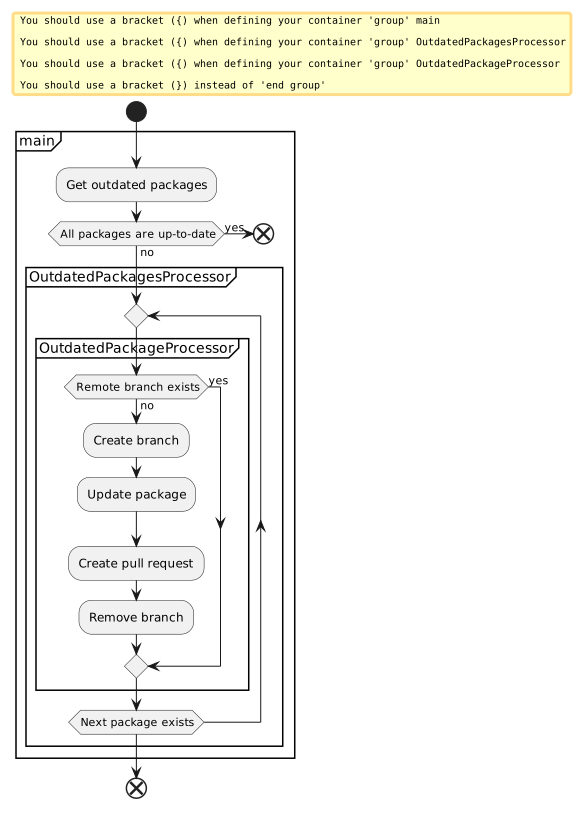](http://www.plantuml.com/plantuml/uml/RKyxKiCm5EpVARPqYbmWRi9Gq4666GuWx4tiGPQ4z0JXzaIn70D38wsUzkrddzH4pPELAv1Jz3bWCgEJtGCLFcjlb3s2wTxCYQaL6OzexgozZM0YaSDM_RPmDz213iqNqqO0kbve4z4ulv7BQpnAjNcgueSgT8Y-Oqe-IcIWKG7-9Quye8HvvkILU8t6TGDu7fEcFodM102mkuyqjursdhs4uh6qQdyHGxOMaU-PIUjFCVtuAN6jDjzpxDe2dyDeYUQHPrtKbv2oabTOaEmlHvxiDm00)
|
|
157
|
+
|
|
158
|
+
<!--
|
|
159
|
+
```plantuml
|
|
160
|
+
@startuml
|
|
161
|
+
start
|
|
162
|
+
group main
|
|
163
|
+
:Get outdated packages;
|
|
164
|
+
|
|
165
|
+
if (All packages are up-to-date) then (yes)
|
|
166
|
+
end
|
|
167
|
+
else (no)
|
|
168
|
+
endif
|
|
169
|
+
|
|
170
|
+
group OutdatedPackagesProcessor
|
|
171
|
+
repeat
|
|
172
|
+
group OutdatedPackageProcessor
|
|
173
|
+
if (Remote branch exists) then (yes)
|
|
174
|
+
else (no)
|
|
175
|
+
:Create branch;
|
|
176
|
+
:Update package;
|
|
177
|
+
:Create pull request;
|
|
178
|
+
:Remove branch;
|
|
179
|
+
endif
|
|
180
|
+
end group
|
|
181
|
+
repeat while (Next package exists)
|
|
182
|
+
end group
|
|
183
|
+
|
|
184
|
+
end group
|
|
185
|
+
end
|
|
186
|
+
@enduml
|
|
187
|
+
```
|
|
188
|
+
-->
|
|
189
|
+
|
|
152
190
|
## FAQ
|
|
153
191
|
|
|
192
|
+
### What is the purpose of npm-update-package?
|
|
193
|
+
|
|
194
|
+
npm-update-package can be used in environments where Renovate cannot be used for some reason.
|
|
195
|
+
|
|
154
196
|
### Conflicts have occurred in PR. What should I do?
|
|
155
197
|
|
|
156
198
|
If conflicts have occurred in PR, close it and run npm-update-package again.
|
package/dist/app.js
CHANGED
package/package.json
CHANGED
|
@@ -1,6 +1,6 @@
|
|
|
1
1
|
{
|
|
2
2
|
"name": "npm-update-package",
|
|
3
|
-
"version": "0.
|
|
3
|
+
"version": "0.18.0",
|
|
4
4
|
"description": "CLI tool for creating pull request to update npm packages",
|
|
5
5
|
"scripts": {
|
|
6
6
|
"build": "tsc --project tsconfig.build.json",
|
|
@@ -31,10 +31,10 @@
|
|
|
31
31
|
},
|
|
32
32
|
"devDependencies": {
|
|
33
33
|
"@jest/types": "27.0.6",
|
|
34
|
-
"@tsconfig/
|
|
34
|
+
"@tsconfig/node14": "1.0.1",
|
|
35
35
|
"@types/jest": "27.0.3",
|
|
36
36
|
"@types/mustache": "4.1.2",
|
|
37
|
-
"@types/node": "
|
|
37
|
+
"@types/node": "14.18.3",
|
|
38
38
|
"@types/parse-github-url": "1.0.0",
|
|
39
39
|
"@types/semver": "7.3.9",
|
|
40
40
|
"@typescript-eslint/eslint-plugin": "5.8.1",
|