node-red-contrib-web-worldmap 5.5.1 → 5.5.3
This diff represents the content of publicly available package versions that have been released to one of the supported registries. The information contained in this diff is provided for informational purposes only and reflects changes between package versions as they appear in their respective public registries.
- package/CHANGELOG.md +2 -0
- package/README.md +7 -17
- package/package.json +1 -1
- package/worldmap/worldmap.js +15 -7
- package/worldmap.js +1 -3
package/CHANGELOG.md
CHANGED
|
@@ -1,5 +1,7 @@
|
|
|
1
1
|
### Change Log for Node-RED Worldmap
|
|
2
2
|
|
|
3
|
+
- v5.5.3 - ensure SOG gets picked up earlier in chain
|
|
4
|
+
- v5.5.2 - Slight improvement for on/offline choice of map
|
|
3
5
|
- v5.5.1 - Fix maxNativeZoom for pmtiles to pull from tiles files. Issue #312
|
|
4
6
|
- v5.5.0 - Add ability to load raster pmtiles files. Issue #312
|
|
5
7
|
- v5.4.0 - Let msg.payload.command.zoomLevels set an array of acceptable zoom levels. Issue #312
|
package/README.md
CHANGED
|
@@ -1,18 +1,17 @@
|
|
|
1
1
|
# node-red-contrib-web-worldmap
|
|
2
2
|
|
|
3
|
+
A <a href="https://nodered.org" target="mapinfo">Node-RED</a> node to provide a world map web page for plotting "things" on. Please feel free to [](https://github.com/sponsors/dceejay) this project.
|
|
4
|
+
|
|
3
5
|
[](https://nodered.org)
|
|
4
6
|

|
|
5
7
|
[](https://github.com/dceejay/redmap/blob/master/LICENSE)
|
|
6
8
|
|
|
7
|
-
A <a href="https://nodered.org" target="mapinfo">Node-RED</a> node to provide a world
|
|
8
|
-
map web page for plotting "things" on.
|
|
9
|
-
|
|
10
|
-
Feel free to [](https://github.com/sponsors/dceejay) this project.
|
|
11
|
-
|
|
12
9
|
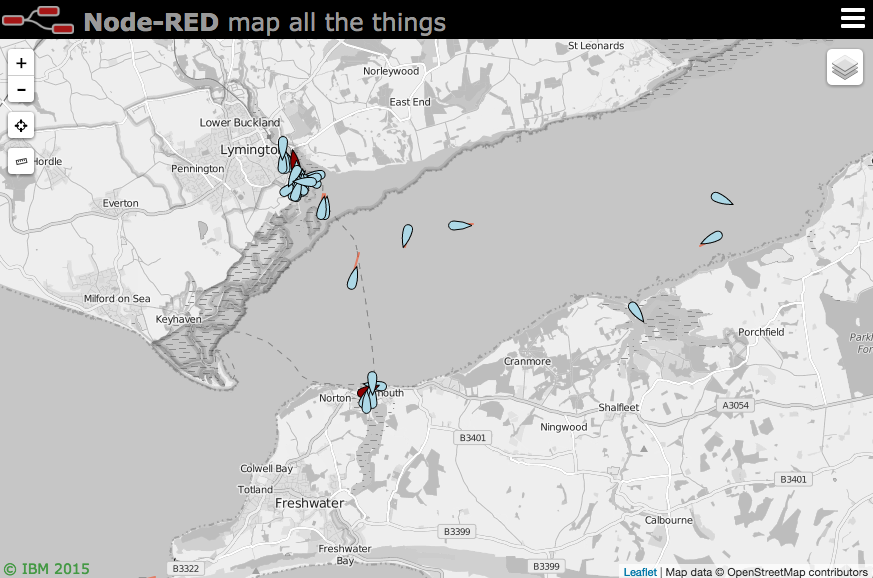
|
|
13
10
|
|
|
14
11
|
### Updates
|
|
15
12
|
|
|
13
|
+
- v5.5.3 - ensure SOG gets picked up earlier in chain
|
|
14
|
+
- v5.5.2 - Slight improvement for on/offline choice of map
|
|
16
15
|
- v5.5.1 - Fix maxNativeZoom for pmtiles to pull from tiles files. Issue #312
|
|
17
16
|
- v5.5.0 - Add ability to load raster pmtiles files. Issue #312
|
|
18
17
|
- v5.4.0 - Let msg.payload.command.zoomLevels set an array of acceptable zoom levels. Issue #312
|
|
@@ -24,15 +23,6 @@ Feel free to [. PR #295.
|
|
30
|
-
- v5.0.6 - Tweak SIDC flag handling slightly to show direction if available and moving.
|
|
31
|
-
- v5.0.4 - Tweak CoT handling slightly.
|
|
32
|
-
- v5.0.3 - Add great context menu example flow. PR #290. Bump express lib. PR #291.
|
|
33
|
-
- v5.0.2 - Fix sidcEdgeIcon docs PR #289.
|
|
34
|
-
- v5.0.1 - Fix isArray error PR #288.
|
|
35
|
-
- v5.0.0 - Feedback cleanup PR #281, edgeicons option PR #287, bump libs for vuln fixes.
|
|
36
26
|
|
|
37
27
|
- see [CHANGELOG](https://github.com/dceejay/RedMap/blob/master/CHANGELOG.md) for full list of changes.
|
|
38
28
|
|
|
@@ -97,6 +87,8 @@ If you use the name without the fa- prefix (eg `male`) you will get the icon ins
|
|
|
97
87
|
|
|
98
88
|
You can also specify an emoji as the icon by using the :emoji name: syntax - for example `:smile:`. Here is a **[list of emojis](https://github.com/dceejay/RedMap/blob/master/emojilist.md)**.
|
|
99
89
|
|
|
90
|
+
Note: Not all browsers/OS support unicode emoji - if you can see the Swiss flag here (🇨🇭) then you may be OK.
|
|
91
|
+
|
|
100
92
|
Or you can specify an image to load as an icon by setting the icon to `http(s)://...` By default it will be scaled to 32x32 pixels. You can change the size by setting **iconSize** to a number of pixels - eg 64. Example icon - `"https://img.icons8.com/windows/32/000000/bird.png"` or you can use an inline image of the form `data:image/...` which uses a base64 encoded image.
|
|
101
93
|
|
|
102
94
|
There are also several special icons...
|
|
@@ -143,8 +135,6 @@ There are lots of extra options you can specify as `msg.payload.options` - see t
|
|
|
143
135
|
|
|
144
136
|
Note: If the SIDC code is a 2525C 15 characters long, where chars 13 and 14 are a country code - then the country flag emoji is added to the staffComments field of the icon. If it's a 20 char 2525D code then the options:country property will be used to create the flag.
|
|
145
137
|
|
|
146
|
-
Note: Not all browsers/OS support unicode emoji - if you can see the Swiss flag here (🇨🇭) then you may be OK.
|
|
147
|
-
|
|
148
138
|
#### TAK Visualisation
|
|
149
139
|
|
|
150
140
|
Users of [TAK](https://tak.gov) can use the [TAK ingest node](https://flows.nodered.org/node/node-red-contrib-tak-registration) to create a JSON formatted TAK event object, received from a TAK server. This can be fed directly into the worldmap node.
|
|
@@ -766,7 +756,7 @@ You can set some default options for the pmtiles by creating a file called **pmt
|
|
|
766
756
|
|
|
767
757
|
theme can be light, dark, white, black, or grayscale.
|
|
768
758
|
|
|
769
|
-
The `
|
|
759
|
+
The `maxNativeZoom` should match the maximum zoom level in you pmtiles file(s) - whereas the `maxZoom` is the leaflet maximum zoom level you want to support. `theme` can be 'light', 'dark', 'white', 'black', or 'grayscale'.
|
|
770
760
|
|
|
771
761
|
You can also load them dynamically with a command like
|
|
772
762
|
|
package/package.json
CHANGED
package/worldmap/worldmap.js
CHANGED
|
@@ -181,10 +181,15 @@ var customTopoLayer = L.geoJson(null, {clickable:false, style: {color:"blue", we
|
|
|
181
181
|
layers["_countries"] = omnivore.topojson('images/world-50m-flat.json',null,customTopoLayer);
|
|
182
182
|
overlays["countries"] = layers["_countries"];
|
|
183
183
|
|
|
184
|
-
var onoffline = function() {
|
|
185
|
-
if (
|
|
186
|
-
|
|
187
|
-
|
|
184
|
+
var onoffline = function() {
|
|
185
|
+
if (!navigator.onLine) {
|
|
186
|
+
if (pmtloaded !== "") { basemaps[pmtloaded].addTo(map); layercontrol._update(); }
|
|
187
|
+
else { map.addLayer(overlays["countries"]); }
|
|
188
|
+
}
|
|
189
|
+
else if (Object.keys(basemaps).length === 0 ) {
|
|
190
|
+
map.addLayer(overlays["countries"]);
|
|
191
|
+
}
|
|
192
|
+
}
|
|
188
193
|
|
|
189
194
|
document.addEventListener ("keydown", function (ev) {
|
|
190
195
|
// Set Ctl-Alt-3 to switch to 3d view
|
|
@@ -1823,6 +1828,9 @@ function setMarker(data) {
|
|
|
1823
1828
|
|
|
1824
1829
|
if (data.draggable === true) { drag = true; }
|
|
1825
1830
|
|
|
1831
|
+
if (data.sog) { data.speed = data.sog * 0.514444; data.sog = data.sog + " kt"; } // SOG is in knots
|
|
1832
|
+
if (data.SOG) { data.speed = data.SOG * 0.514444; data.SOG = data.SOG + " kt"; } // SOG is in knots
|
|
1833
|
+
|
|
1826
1834
|
if (data.hasOwnProperty("icon")) {
|
|
1827
1835
|
var dir = parseFloat(data.track ?? data.hdg ?? data.heading ?? data.bearing ?? "0") + map.getBearing();
|
|
1828
1836
|
var siz = 32;
|
|
@@ -1840,6 +1848,7 @@ function setMarker(data) {
|
|
|
1840
1848
|
});
|
|
1841
1849
|
marker.setHeading(dir);
|
|
1842
1850
|
q = 'https://www.bing.com/images/search?q='+data.icon+'%20%2B"'+encodeURIComponent(data["name"])+'"';
|
|
1851
|
+
if (data?.IMO) { q = 'https://www.bing.com/images/search?q='+data.IMO; }
|
|
1843
1852
|
words += '<a href=\''+q+'\' target="_thingpic">Pictures</a><br>';
|
|
1844
1853
|
}
|
|
1845
1854
|
else if (data.icon === "plane") {
|
|
@@ -2244,8 +2253,6 @@ function setMarker(data) {
|
|
|
2244
2253
|
data.alt = +(parseFloat(data.altm)).toFixed(2) + " m";
|
|
2245
2254
|
delete data.altm;
|
|
2246
2255
|
}
|
|
2247
|
-
if (data.sog) { data.speed = data.sog * 0.514444; data.sog = data.sog + " kt"; } // SOG is in knots
|
|
2248
|
-
if (data.SOG) { data.speed = data.SOG * 0.514444; data.SOG = data.SOG + " kt"; } // SOG is in knots
|
|
2249
2256
|
|
|
2250
2257
|
// remove items from list of properties, then add all others to popup
|
|
2251
2258
|
if (data.hasOwnProperty("options")) { delete data.options; }
|
|
@@ -2739,6 +2746,7 @@ function doCommand(cmd) {
|
|
|
2739
2746
|
}
|
|
2740
2747
|
if (h.tileType === 1) {
|
|
2741
2748
|
opt.url = cmd.map.pmtiles;
|
|
2749
|
+
if (!opt.maxDataZoom) { opt.maxDataZoom = h.maxZoom || 15; }
|
|
2742
2750
|
basemaps[cmd.map.name] = protomapsL.leafletLayer(opt);
|
|
2743
2751
|
}
|
|
2744
2752
|
else {
|
|
@@ -3134,7 +3142,7 @@ function doCommand(cmd) {
|
|
|
3134
3142
|
// if (cmd.hasOwnProperty("panlock") && lockit === true) { doLock(true); }
|
|
3135
3143
|
|
|
3136
3144
|
if (cmd.hasOwnProperty("zoomLevels")) {
|
|
3137
|
-
if (Array.isArray(cmd.zoomLevels) && cmd
|
|
3145
|
+
if (Array.isArray(cmd.zoomLevels) && cmd.zoomLevels.length > 0) {
|
|
3138
3146
|
map.options.zooms = cmd.zoomLevels;
|
|
3139
3147
|
}
|
|
3140
3148
|
else { delete map.options.zooms; }
|
package/worldmap.js
CHANGED
|
@@ -131,9 +131,7 @@ module.exports = function(RED) {
|
|
|
131
131
|
client.write(JSON.stringify({command:c}));
|
|
132
132
|
for (var p=0; p < pmtiles.length; p++) {
|
|
133
133
|
fs.symlink(RED.settings.userDir+'/'+pmtiles[p], __dirname+'/worldmap/'+pmtiles[p], 'file', (err) => {
|
|
134
|
-
if (err) {
|
|
135
|
-
if (err.code !== "EEXIST") { console.log(err); }
|
|
136
|
-
}
|
|
134
|
+
if (err && err.code !== "EEXIST") { console.log(err); }
|
|
137
135
|
})
|
|
138
136
|
client.write(JSON.stringify({command: {map: {name:pmtiles[p].split('.')[0], pmtiles:pmtiles[p], opt:pmtilesopts }}}));
|
|
139
137
|
node.log("Added pmtiles file: "+pmtiles[p]);
|