node-red-contrib-web-worldmap 2.38.3 → 2.40.0
This diff represents the content of publicly available package versions that have been released to one of the supported registries. The information contained in this diff is provided for informational purposes only and reflects changes between package versions as they appear in their respective public registries.
- package/CHANGELOG.md +2 -0
- package/README.md +16 -3
- package/package.json +3 -2
- package/worldmap/worldmap.js +79 -15
- package/worldmap.html +2 -2
package/CHANGELOG.md
CHANGED
|
@@ -1,5 +1,7 @@
|
|
|
1
1
|
### Change Log for Node-RED Worldmap
|
|
2
2
|
|
|
3
|
+
- v2.40.0 - Add handling for TAK event points from TAK ingest node.
|
|
4
|
+
- v2.39.0 - Add client timezone to connect message. PR #245
|
|
3
5
|
- v2.38.3 - Better fix for geojson multipoint icons.
|
|
4
6
|
- v2.38.1 - Fix for geojson multipoint icons.
|
|
5
7
|
- v2.38.0 - Return client headers as part of connect message.
|
package/README.md
CHANGED
|
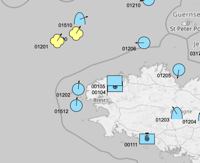
@@ -13,6 +13,8 @@ Feel free to [ can use the [TAK ingest node](https://flows.nodered.org/node/node-red-contrib-tak-registration) to create a JSON formatted TAK event object, received from a TAK server. This can be fed directly into the worldmap node.
|
|
129
|
+
|
|
130
|
+

|
|
131
|
+
|
|
132
|
+
|
|
133
|
+
|
|
124
134
|
### Areas, Rectangles, Lines, and GreatCircles
|
|
125
135
|
|
|
126
136
|
If the msg.payload contains an **area** property - that is an array of co-ordinates, e.g.
|
|
@@ -363,7 +373,10 @@ All actions also include a:
|
|
|
363
373
|
`msg._sessionid` property that indicates which client session they came from. Any msg sent out that includes this property will ONLY be sent to that session - so you can target map updates to specific sessions if required.
|
|
364
374
|
`msg._sessionip` property that shows the ip of the client that is connected to the session.
|
|
365
375
|
|
|
366
|
-
The "connected" action
|
|
376
|
+
The "connected" action additionally includes a:
|
|
377
|
+
`msg.payload.parameters` property object that lists the parameters sent in the url.
|
|
378
|
+
`msg.payload.clientTimezone` property string showing the clients local Timezone. Returns bool of `false` if unable to retrive clients local Timezone.
|
|
379
|
+
`msg._clientheaders` property that shows the headers sent by the client to make a connection to the session.
|
|
367
380
|
|
|
368
381
|
|
|
369
382
|
### Utility functions
|
|
@@ -694,7 +707,7 @@ and use a url like `"url": "http://localhost:1882/?map=/maps/my-app.map",`
|
|
|
694
707
|
|
|
695
708
|
To use a vector mbtiles server like **MapTiler** then you can download your mbtiles file into a directory and then from that directory run
|
|
696
709
|
```
|
|
697
|
-
docker run --name maptiler -d -v $(pwd):/data -p 1884:8080 maptiler/tileserver-gl -p 8080
|
|
710
|
+
docker run --name maptiler -d -v $(pwd):/data -p 1884:8080 maptiler/tileserver-gl -p 8080 --mbtiles yourMapFile.mbtiles
|
|
698
711
|
```
|
|
699
712
|
and use a url like `"url": "http://localhost:1884/styles/basic-preview/{z}/{x}/{y}.png"`
|
|
700
713
|
|
package/package.json
CHANGED
|
@@ -1,6 +1,6 @@
|
|
|
1
1
|
{
|
|
2
2
|
"name": "node-red-contrib-web-worldmap",
|
|
3
|
-
"version": "2.
|
|
3
|
+
"version": "2.40.0",
|
|
4
4
|
"description": "A Node-RED node to provide a web page of a world map for plotting things on.",
|
|
5
5
|
"dependencies": {
|
|
6
6
|
"@turf/bezier-spline": "~6.5.0",
|
|
@@ -24,7 +24,8 @@
|
|
|
24
24
|
"keywords": [
|
|
25
25
|
"node-red",
|
|
26
26
|
"map",
|
|
27
|
-
"world"
|
|
27
|
+
"world",
|
|
28
|
+
"tak"
|
|
28
29
|
],
|
|
29
30
|
"node-red": {
|
|
30
31
|
"version": ">=1.0.0",
|
package/worldmap/worldmap.js
CHANGED
|
@@ -18,7 +18,7 @@ var menuOpen = false;
|
|
|
18
18
|
var clusterAt = 0;
|
|
19
19
|
var maxage = 900; // default max age of icons on map in seconds - cleared after 10 mins
|
|
20
20
|
var baselayername = "OSM grey"; // Default base layer OSM but uniform grey
|
|
21
|
-
var pagefoot = " © DCJ
|
|
21
|
+
var pagefoot = " © DCJ 2023"
|
|
22
22
|
var inIframe = false;
|
|
23
23
|
var showUserMenu = true;
|
|
24
24
|
var showLayerMenu = true;
|
|
@@ -63,7 +63,7 @@ var connect = function() {
|
|
|
63
63
|
if (!inIframe) {
|
|
64
64
|
document.getElementById("footer").innerHTML = "<font color='#494'>"+pagefoot+"</font>";
|
|
65
65
|
}
|
|
66
|
-
ws.send(JSON.stringify({action:"connected",parameters:Object.fromEntries((new URL(location)).searchParams)}));
|
|
66
|
+
ws.send(JSON.stringify({action:"connected",parameters:Object.fromEntries((new URL(location)).searchParams),clientTimezone:Intl.DateTimeFormat().resolvedOptions().timeZone || false}));
|
|
67
67
|
onoffline();
|
|
68
68
|
};
|
|
69
69
|
ws.onclose = function() {
|
|
@@ -117,12 +117,23 @@ var handleData = function(data) {
|
|
|
117
117
|
}
|
|
118
118
|
}
|
|
119
119
|
if (data.command) { doCommand(data.command); delete data.command; }
|
|
120
|
+
|
|
121
|
+
// handle raw geojson type msg
|
|
120
122
|
if (data.hasOwnProperty("type") && data.type.indexOf("Feature") === 0) {
|
|
121
123
|
if (data.hasOwnProperty('properties') && data.properties.hasOwnProperty('title')) {
|
|
122
124
|
doGeojson(data.properties.title,data)
|
|
123
125
|
}
|
|
124
126
|
else { doGeojson("geojson",data); }
|
|
125
127
|
}
|
|
128
|
+
// handle TAK json (from tak-ingest node or fastxml node)
|
|
129
|
+
else if (data.hasOwnProperty("event") && data.event.hasOwnProperty("point")) {
|
|
130
|
+
doTAKjson(data.event);
|
|
131
|
+
}
|
|
132
|
+
// handle TAK json (from multicast Protobuf)
|
|
133
|
+
else if (data.hasOwnProperty("cotEvent") && data.cotEvent.hasOwnProperty("lat") && data.cotEvent.hasOwnProperty("lon")) {
|
|
134
|
+
doTAKMCjson(data.cotEvent);
|
|
135
|
+
}
|
|
136
|
+
// handle default worldmap json msg
|
|
126
137
|
else if (data.hasOwnProperty("name")) { setMarker(data); }
|
|
127
138
|
else {
|
|
128
139
|
if (JSON.stringify(data) !== '{}') {
|
|
@@ -2854,19 +2865,16 @@ function doGeojson(n,g,l,o) {
|
|
|
2854
2865
|
});
|
|
2855
2866
|
}
|
|
2856
2867
|
else if (feature.properties.hasOwnProperty("marker-symbol") && feature.properties["marker-symbol"].substr(0,3) === "fa-") {
|
|
2857
|
-
|
|
2858
|
-
|
|
2859
|
-
|
|
2860
|
-
|
|
2861
|
-
|
|
2862
|
-
|
|
2863
|
-
|
|
2864
|
-
|
|
2865
|
-
|
|
2866
|
-
|
|
2867
|
-
});
|
|
2868
|
-
}
|
|
2869
|
-
catch(e) { console.log(e); }
|
|
2868
|
+
var col = feature.properties["marker-color"] ?? "#910000";
|
|
2869
|
+
var imod = "";
|
|
2870
|
+
if (feature.properties["marker-symbol"].indexOf(" ") === -1) { imod = "fa-2x "; }
|
|
2871
|
+
myMarker = L.divIcon({
|
|
2872
|
+
className:"faicon",
|
|
2873
|
+
html: '<center><i class="fa fa-fw '+imod+feature.properties["marker-symbol"]+'" style="color:'+col+'"></i></center>',
|
|
2874
|
+
iconSize: [32, 32],
|
|
2875
|
+
iconAnchor: [16, 12],
|
|
2876
|
+
popupAnchor: [0, -16]
|
|
2877
|
+
});
|
|
2870
2878
|
}
|
|
2871
2879
|
else {
|
|
2872
2880
|
myMarker = L.VectorMarkers.icon({
|
|
@@ -2913,3 +2921,59 @@ function doGeojson(n,g,l,o) {
|
|
|
2913
2921
|
layers[lay].addLayer(markers[n]);
|
|
2914
2922
|
map.addLayer(layers[lay]);
|
|
2915
2923
|
}
|
|
2924
|
+
|
|
2925
|
+
// handle TAK messages from TAK server tcp - XML->JSON
|
|
2926
|
+
function doTAKjson(p) {
|
|
2927
|
+
// console.log("TAK event",p);
|
|
2928
|
+
if (p.type.indexOf('a') === 0) {
|
|
2929
|
+
var d = {};
|
|
2930
|
+
d.lat = Number(p.point.lat);
|
|
2931
|
+
d.lon = Number(p.point.lon);
|
|
2932
|
+
d.group = p.detail?.__group?.name;
|
|
2933
|
+
d.role = p.detail?.__group?.role;
|
|
2934
|
+
d.type = p.type;
|
|
2935
|
+
d.uid = p.uid;
|
|
2936
|
+
d.name = p.detail?.contact?.callsign || p.uid;
|
|
2937
|
+
d.hdg = p.detail?.track?.course;
|
|
2938
|
+
d.speed = p.detail?.track?.speed;
|
|
2939
|
+
var i = d.type.split('-').join('').toUpperCase();
|
|
2940
|
+
if (i[0] === 'A') { i = 'S' + i.substr(1,2) + 'P' + i.substr(3); }
|
|
2941
|
+
d.SIDC = (i + '------------').substr(0,12);
|
|
2942
|
+
d.timestamp = Date.parse(p.time);
|
|
2943
|
+
d.ttl = Date.parse(p.stale);
|
|
2944
|
+
// d.now = Date.now();
|
|
2945
|
+
d.alt = Number(p.point.hae) || 9999999;
|
|
2946
|
+
setMarker(d);
|
|
2947
|
+
}
|
|
2948
|
+
else {
|
|
2949
|
+
console.log("Skip TAK type",p.type);
|
|
2950
|
+
}
|
|
2951
|
+
}
|
|
2952
|
+
|
|
2953
|
+
// handle TAK messages from TAK Multicast - Protobuf->JSON
|
|
2954
|
+
function doTAKMCjson(p) {
|
|
2955
|
+
// console.log("TAK Multicast event",p);
|
|
2956
|
+
if (p.type.indexOf('a') === 0) {
|
|
2957
|
+
var d = {};
|
|
2958
|
+
d.lat = p.lat;
|
|
2959
|
+
d.lon = p.lon;
|
|
2960
|
+
d.group = p.detail?.group?.name;
|
|
2961
|
+
d.role = p.detail?.group?.role;
|
|
2962
|
+
d.type = p.type;
|
|
2963
|
+
d.uid = p.uid;
|
|
2964
|
+
d.name = p.detail?.contact?.callsign || p.uid;
|
|
2965
|
+
d.hdg = p.detail?.track?.course;
|
|
2966
|
+
d.speed = p.detail?.track?.speed;
|
|
2967
|
+
var i = d.type.split('-').join('').toUpperCase();
|
|
2968
|
+
if (i[0] === 'A') { i = 'S' + i.substr(1,2) + 'P' + i.substr(3); }
|
|
2969
|
+
d.SIDC = (i + '------------').substr(0,12);
|
|
2970
|
+
d.timestamp = Number(p.sendTime);
|
|
2971
|
+
d.ttl = Number(p.staleTime);
|
|
2972
|
+
// d.now = Date.now();
|
|
2973
|
+
d.alt = p.hae || 9999999;
|
|
2974
|
+
setMarker(d);
|
|
2975
|
+
}
|
|
2976
|
+
else {
|
|
2977
|
+
console.log("Skip TAK type",p.type);
|
|
2978
|
+
}
|
|
2979
|
+
}
|
package/worldmap.html
CHANGED
|
@@ -146,7 +146,7 @@ If <i>Web Path</i> is left empty, then by default <code>⌘⇧m</code> - <code>c
|
|
|
146
146
|
<p>Icons of type <i>plane</i>, <i>ship</i>, <i>car</i>, <i>uav</i> or <i>arrow</i> will use built in SVG icons that align to the
|
|
147
147
|
<code>bearing</code> value.</p>
|
|
148
148
|
<p>Font Awesome (<a href="https://fontawesome.com/v4.7.0/icons/" target="_new">fa-icons 4.7</a>) can also be used, as can
|
|
149
|
-
NATO symbology codes (<a href="https://spatialillusions.com/unitgenerator/">SIDC</a>), or <a href="https://github.com/dceejay/RedMap/blob/master/emojilist.md" target="_new">:emoji name:</a>,
|
|
149
|
+
NATO symbology codes (<a href="https://www.spatialillusions.com/unitgenerator-legacy/">SIDC</a>), or <a href="https://github.com/dceejay/RedMap/blob/master/emojilist.md" target="_new">:emoji name:</a>,
|
|
150
150
|
or the url of a small icon image (32x32)</p>
|
|
151
151
|
<p>See the <a href="https://www.npmjs.com/package/node-red-contrib-web-worldmap" target="_new">README</a> for further
|
|
152
152
|
details and examples of icons and commands for drawing <b>lines</b> and <b>areas</b>, and to <b>add layers</b> and
|
|
@@ -312,7 +312,7 @@ If <i>Web Path</i> is left empty, then by default <code>⌘⇧m</code> - <code>c
|
|
|
312
312
|
<p>Icons of type <i>plane</i>, <i>ship</i>, <i>car</i>, <i>uav</i> or <i>arrow</i> will use built in SVG icons that align to the
|
|
313
313
|
<code>bearing</code> value.</p>
|
|
314
314
|
<p>Font Awesome (<a href="https://fontawesome.com/v4.7.0/icons/" target="_new">fa-icons 4.7</a>) can also be used, as can
|
|
315
|
-
NATO symbology codes (<a href="https://spatialillusions.com/unitgenerator/">SIDC</a>), or <a href="https://github.com/dceejay/RedMap/blob/master/emojilist.md" target="_new">:emoji name:</a>,
|
|
315
|
+
NATO symbology codes (<a href="https://www.spatialillusions.com/unitgenerator-legacy/">SIDC</a>), or <a href="https://github.com/dceejay/RedMap/blob/master/emojilist.md" target="_new">:emoji name:</a>,
|
|
316
316
|
or the url of a small icon image (32x32)</p>
|
|
317
317
|
<p>See the <a href="https://www.npmjs.com/package/node-red-contrib-web-worldmap" target="_new">README</a> for further
|
|
318
318
|
details and examples of icons and commands for drawing <b>lines</b> and <b>areas</b>, and to <b>add layers</b> and
|