node-red-contrib-web-worldmap 2.37.4 → 2.38.1
This diff represents the content of publicly available package versions that have been released to one of the supported registries. The information contained in this diff is provided for informational purposes only and reflects changes between package versions as they appear in their respective public registries.
- package/CHANGELOG.md +3 -1
- package/README.md +22 -29
- package/package.json +1 -1
- package/worldmap/worldmap.js +10 -8
- package/worldmap.js +1 -1
package/CHANGELOG.md
CHANGED
|
@@ -1,5 +1,7 @@
|
|
|
1
1
|
### Change Log for Node-RED Worldmap
|
|
2
2
|
|
|
3
|
+
- v2.38.1 - Fix for geojson multipoint icons.
|
|
4
|
+
- v2.38.0 - Return client headers as part of connect message.
|
|
3
5
|
- v2.37.4 - Fix sessionid specific data not to be sent on reload/refresh
|
|
4
6
|
- v2.37.3 - Fix hang on layer change
|
|
5
7
|
- v2.37.2 - If custom layer is only layer then show it automatically. Issue #230
|
|
@@ -16,7 +18,7 @@
|
|
|
16
18
|
Delete marker now also removes from heatmap layer. Issue #218
|
|
17
19
|
|
|
18
20
|
- v2.31.3 - Undo previous fix as while more technically correct - doesn't look so good. Issue #217
|
|
19
|
-
- v2.31.2
|
|
21
|
+
- v2.31.2 - Fix more antimeridian crossing wrinkles. Issue #216
|
|
20
22
|
- v2.31.1 - Fix missing type property for drawings, and pass back feedback value. Add route distance. Issue #213, Issue #212, PR #215
|
|
21
23
|
- v2.31.0 - Better handling of KML files. Issue #211
|
|
22
24
|
|
package/README.md
CHANGED
|
@@ -7,32 +7,20 @@
|
|
|
7
7
|
A <a href="https://nodered.org" target="mapinfo">Node-RED</a> node to provide a world
|
|
8
8
|
map web page for plotting "things" on.
|
|
9
9
|
|
|
10
|
+
Feel free to [](https://github.com/sponsors/dceejay) this project.
|
|
11
|
+
|
|
10
12
|
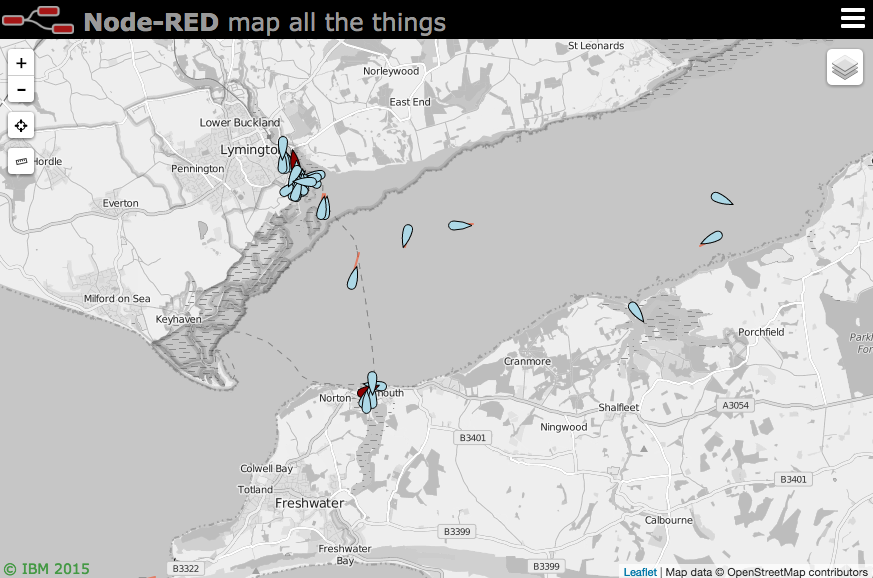
|
|
11
13
|
|
|
12
14
|
### Updates
|
|
13
15
|
|
|
16
|
+
- v2.38.1 - Fix for geojson multipoint icons.
|
|
17
|
+
- v2.38.0 - Return client headers as part of connect message.
|
|
14
18
|
- v2.37.4 - Fix sessionid specific data not to be sent on reload/refresh
|
|
15
19
|
- v2.37.3 - Fix hang on layer change
|
|
16
20
|
- v2.37.2 - If custom layer is only layer then show it automatically. Issue #230
|
|
17
21
|
- v2.37.1 - Warn (and drop) messages that are missing a payload. Issue #229
|
|
18
22
|
- v2.37.0 - Allow fly instead of fit option when using command to move view window. (PR #225)
|
|
19
23
|
- v2.36.0 - Add edge icons for SIDC markers just off the map.
|
|
20
|
-
- v2.35.0 - Let clickable:false work for markers as well.
|
|
21
|
-
- v2.34.0 - Let icon "url" be a local fixed path. PR #223
|
|
22
|
-
- v2.33.0 - Let shapes create click event. from PR #221
|
|
23
|
-
Fix heatmap delete point bug. Issue #222
|
|
24
|
-
- v2.32.2 - Fix map split in iframe position
|
|
25
|
-
- v2.32.1 - Let command.map.heatmap replace complete heatmap array.
|
|
26
|
-
- v2.32.0 - Change || to nullish operator ?? to fix numerous dodgy assignments. Issue #219
|
|
27
|
-
Delete marker now also removes from heatmap layer. Issue #218
|
|
28
|
-
- v2.31.3 - Undo previous fix as while more technically correct - doesn't look so good. Issue #217
|
|
29
|
-
- v2.31.2 = Fix more antimeridian crossing wrinkles. Issue #216
|
|
30
|
-
- v2.31.1 - Fix missing type property for drawings, and pass back feedback value. Add route distance. Issue #213, Issue #212, PR #215
|
|
31
|
-
- v2.31.0 - Better handling of KML files. Issue #211
|
|
32
|
-
- v2.30.3 - Fix for iframe height. Issue #210
|
|
33
|
-
- v2.30.2 - Fix for bad handling of mapbox id. Issue #208
|
|
34
|
-
- v2.30.1 - Don't resend bounds if not changed. Issue #209
|
|
35
|
-
- v2.30.0 - Add show/hide ruler option. PR #206
|
|
36
24
|
|
|
37
25
|
- see [CHANGELOG](https://github.com/dceejay/RedMap/blob/master/CHANGELOG.md) for full list of changes.
|
|
38
26
|
|
|
@@ -45,7 +33,7 @@ Either use the Manage Palette option in the Node-RED Editor menu, or run the fol
|
|
|
45
33
|
## Usage
|
|
46
34
|
|
|
47
35
|
Plots "things" on a map. By default the map will be served from `{httpRoot}/worldmap`, but this
|
|
48
|
-
can be
|
|
36
|
+
can be changed in the configuration panel.
|
|
49
37
|
|
|
50
38
|
Use keyboard shortcut `⌘⇧m`, `ctrl-shift-m` to jump to the map.
|
|
51
39
|
|
|
@@ -58,13 +46,13 @@ The minimum **msg.payload** must contain `name`, `lat` and `lon` properties, for
|
|
|
58
46
|
Optional properties include
|
|
59
47
|
|
|
60
48
|
- **deleted** : set to <i>true</i> to remove the named marker. (default <i>false</i>)
|
|
61
|
-
- **draggable** : set to <i>true</i> to allow marker to be moved. (default <i>false</i>)
|
|
49
|
+
- **draggable** : set to <i>true</i> to allow marker to be moved by the mouse. (default <i>false</i>)
|
|
62
50
|
- **layer** : specify a layer on the map to add marker to. (default <i>"unknown"</i>)
|
|
63
51
|
- **track | hdg | heading | bearing** : when combined with speed, draws a vector. (only first will be used)
|
|
64
|
-
- **speed** : when combined with heading, draws a vector.
|
|
65
|
-
- **accuracy** : when combined with heading vector, draws
|
|
66
|
-
- **color** : CSS color name or #rrggbb value for heading vector line or accuracy polygon
|
|
67
|
-
- **icon** : <a href="https://fontawesome.com/v4.7.0/icons/" target="mapinfo">font awesome</a> icon name, <a href="https://github.com/Paul-Reed/weather-icons-lite" target="mapinfo">weather-lite</a> icon, :emoji name:, or https://
|
|
52
|
+
- **speed** : when combined with track, hdg, heading, or bearing, draws a leader line vector.
|
|
53
|
+
- **accuracy** : when combined with heading vector, draws an arc of possible direction.
|
|
54
|
+
- **color** : CSS color name or #rrggbb value for heading vector line or accuracy polygon.
|
|
55
|
+
- **icon** : <a href="https://fontawesome.com/v4.7.0/icons/" target="mapinfo">font awesome</a> icon name, <a href="https://github.com/Paul-Reed/weather-icons-lite" target="mapinfo">weather-lite</a> icon, :emoji name:, or https:// uri.
|
|
68
56
|
- **iconColor** : Standard CSS colour name or #rrggbb hex value.
|
|
69
57
|
- **SIDC** : NATO symbology code (can be used instead of icon). See below.
|
|
70
58
|
- **building** : OSMbulding GeoJSON feature set to add 2.5D buildings to buildings layer. See below.
|
|
@@ -93,7 +81,7 @@ If you use the name without the fa- prefix (eg `male`) you will get the icon ins
|
|
|
93
81
|
|
|
94
82
|
You can also specify an emoji as the icon by using the :emoji name: syntax - for example `:smile:`. Here is a **[list of emojis](https://github.com/dceejay/RedMap/blob/master/emojilist.md)**.
|
|
95
83
|
|
|
96
|
-
Or you can specify an image to load as an icon by setting the icon to http(s)://... By default will be scaled to 32x32 pixels. You can change the size by setting **iconSize** to a number - eg 64. Example icon - `"https://img.icons8.com/windows/32/000000/bird.png"`
|
|
84
|
+
Or you can specify an image to load as an icon by setting the icon to http(s)://... By default it will be scaled to 32x32 pixels. You can change the size by setting **iconSize** to a number - eg 64. Example icon - `"https://img.icons8.com/windows/32/000000/bird.png"`
|
|
97
85
|
|
|
98
86
|
There are also several special icons...
|
|
99
87
|
|
|
@@ -109,7 +97,7 @@ There are also several special icons...
|
|
|
109
97
|
- **satellite** : a small satellite icon.
|
|
110
98
|
- **iss** : a slightly larger icon for the ISS.
|
|
111
99
|
- **locate** : a 4 corner outline to locate a point without obscuring it.
|
|
112
|
-
- **friend** : pseudo NATO style blue rectangle. (see NATO SIDC option below)
|
|
100
|
+
- **friend** : pseudo NATO style blue rectangle. (but see NATO SIDC option below)
|
|
113
101
|
- **hostile** : pseudo NATO style red circle.
|
|
114
102
|
- **neutral** : pseudo NATO style green square.
|
|
115
103
|
- **unknown** : pseudo NATO style yellow square.
|
|
@@ -142,7 +130,8 @@ then rather than draw a point and icon it draws the polygon. If the "area" array
|
|
|
142
130
|
elements, then it assumes this is a bounding box for a rectangle and draws a rectangle.
|
|
143
131
|
|
|
144
132
|
Likewise if it contains a **line** property it will draw the polyline.
|
|
145
|
-
|
|
133
|
+
|
|
134
|
+
If the payload also includes a property `fit:true` the map will zoom to fit the line or area. Alternatively you can use `fly:true` instead of fit for a more animated look.
|
|
146
135
|
|
|
147
136
|
Finally if a **greatcircle** property is set containing an array of two coordinates then an arc
|
|
148
137
|
following the great circle between the two co-ordinates is plotted.
|
|
@@ -336,7 +325,7 @@ in addition existing male, female, fa-male and fa-female icons are all represent
|
|
|
336
325
|
|
|
337
326
|
**NOTES**
|
|
338
327
|
|
|
339
|
-
- There is currently no way to add labels, popups, or make the icons clickable.
|
|
328
|
+
- There is currently no way to add labels, popups, or to make the icons clickable.
|
|
340
329
|
- The 3D only really works at zoomed in scales 16+ due to the small size of the icons. They are not scale independent like icons on the normal map.
|
|
341
330
|
- As this uses the mapbox api you may wish to edit the index3d.html code to include your api key to remove any usage restrictions.
|
|
342
331
|
- This view is a side project to the Node-RED Worldmap project so I'm happy to take PRs but it probably won't be actively developed.
|
|
@@ -369,7 +358,11 @@ The **worldmap in** node can be used to receive various events from the map. Exa
|
|
|
369
358
|
|
|
370
359
|
If File Drop is enabled - then the map can accept files of type gpx, kml, nvg, jpeg, png and geojson. The file content property will always be a binary buffer. The lat, lon of the cursor drop point will be included. Tracks will be locally rendered on the map. The node-red-node-exif node can be used to extract location information from a jpeg image and then geolocate it back on the map. Png images will be located where they are dropped but can then be dragged if required.
|
|
371
360
|
|
|
372
|
-
All actions also include a
|
|
361
|
+
All actions also include a:
|
|
362
|
+
`msg._sessionid` property that indicates which client session they came from. Any msg sent out that includes this property will ONLY be sent to that session - so you can target map updates to specific sessions if required.
|
|
363
|
+
`msg._sessionip` property that shows the ip of the client that is connected to the session.
|
|
364
|
+
|
|
365
|
+
The "connected" action also include a `msg._clientheaders` property that shows the headers sent by the client to make a connection to the session.
|
|
373
366
|
|
|
374
367
|
|
|
375
368
|
### Utility functions
|
|
@@ -430,8 +423,8 @@ Optional properties include
|
|
|
430
423
|
- **toptitle** - Words to replace title in title bar (if not in iframe)
|
|
431
424
|
- **toplogo** - URL to logo image for top tile bar (if not in iframe) - ideally 60px by 24px.
|
|
432
425
|
- **trackme** - Turns on/off the browser self locating. Boolean false = off, true = cyan circle showing accuracy error, or an object like `{"command":{"trackme":{"name":"Dave","icon":"car","iconColor":"blue","layer":"mytrack","accuracy":false}}}`. Usual marker options can be applied.
|
|
433
|
-
- **showmenu** - Show or hide the display of the hamberger menu control in the top right . Values can be "show" or "hide". - `{"command":{"showmenu: "hide"}}`
|
|
434
|
-
- **showlayers** - Show or hide the display of selectable layers. Does not control the display of an individual layer, rather a users ability to interact with them. Values can be "show" or "hide". - `{"command":{"showlayers: "hide"}}`
|
|
426
|
+
- **showmenu** - Show or hide the display of the hamberger menu control in the top right . Values can be "show" or "hide". - `{"command":{"showmenu": "hide"}}`
|
|
427
|
+
- **showlayers** - Show or hide the display of selectable layers. Does not control the display of an individual layer, rather a users ability to interact with them. Values can be "show" or "hide". - `{"command":{"showlayers": "hide"}}`
|
|
435
428
|
|
|
436
429
|
#### To switch layer, move map and zoom
|
|
437
430
|
|
package/package.json
CHANGED
package/worldmap/worldmap.js
CHANGED
|
@@ -751,10 +751,6 @@ map.on('moveend', function() {
|
|
|
751
751
|
map.on('locationfound', onLocationFound);
|
|
752
752
|
map.on('locationerror', onLocationError);
|
|
753
753
|
|
|
754
|
-
//map.on('contextmenu', function(e) {
|
|
755
|
-
// ws.send(JSON.stringify({action:"rightclick", lat:e.latlng.lat.toFixed(5), lon:e.latlng.lng.toFixed(5)}));
|
|
756
|
-
//});
|
|
757
|
-
|
|
758
754
|
// single right click to add a marker
|
|
759
755
|
var addmenu = "<b>Add marker</b><br><input type='text' id='rinput' autofocus onkeydown='if (event.keyCode == 13) addThing();' placeholder='name (,icon/SIDC, layer, colour, heading)'/>";
|
|
760
756
|
if (navigator.onLine) { addmenu += '<br/><a href="https://spatialillusions.com/unitgenerator/" target="_new">MilSymbol SIDC generator</a>'; }
|
|
@@ -809,6 +805,10 @@ var addToForm = function(n,v) {
|
|
|
809
805
|
form[n] = v;
|
|
810
806
|
}
|
|
811
807
|
|
|
808
|
+
// map.on('click', function(e) {
|
|
809
|
+
// ws.send(JSON.stringify({action:"click", lat:e.latlng.lat.toFixed(5), lon:e.latlng.lng.toFixed(5)}));
|
|
810
|
+
// });
|
|
811
|
+
|
|
812
812
|
// allow double right click to zoom out (if enabled)
|
|
813
813
|
// single right click opens a message window that adds a marker
|
|
814
814
|
var rclicked = false;
|
|
@@ -2795,7 +2795,7 @@ function doCommand(cmd) {
|
|
|
2795
2795
|
|
|
2796
2796
|
// handle any incoming GEOJSON directly - may style badly
|
|
2797
2797
|
function doGeojson(n,g,l,o) {
|
|
2798
|
-
//console.log("GEOJSON",n,g,l,o)
|
|
2798
|
+
// console.log("GEOJSON",n,g,l,o)
|
|
2799
2799
|
var lay = l ?? g.name ?? "unknown";
|
|
2800
2800
|
// if (!basemaps[lay]) {
|
|
2801
2801
|
var opt = { style: function(feature) {
|
|
@@ -2867,9 +2867,11 @@ function doGeojson(n,g,l,o) {
|
|
|
2867
2867
|
if (feature.properties.hasOwnProperty("url")) {
|
|
2868
2868
|
feature.properties.url = "<a target='_new' href='"+feature.properties.url+"'>"+feature.properties.url+"</a>";
|
|
2869
2869
|
}
|
|
2870
|
-
|
|
2871
|
-
|
|
2872
|
-
|
|
2870
|
+
if (feature.geometry.hasOwnProperty("type") && feature.geometry.type !== "MultiPoint") {
|
|
2871
|
+
delete feature.properties["marker-symbol"];
|
|
2872
|
+
delete feature.properties["marker-color"];
|
|
2873
|
+
delete feature.properties["marker-size"];
|
|
2874
|
+
}
|
|
2873
2875
|
var nf = {title:feature.properties.title, name:feature.properties.name};
|
|
2874
2876
|
feature.properties = Object.assign(nf, feature.properties);
|
|
2875
2877
|
return L.marker(latlng, {title:feature.properties.title ?? "", icon:myMarker});
|
package/worldmap.js
CHANGED
|
@@ -268,7 +268,7 @@ module.exports = function(RED) {
|
|
|
268
268
|
message = JSON.parse(message);
|
|
269
269
|
if (message.hasOwnProperty("action")) {
|
|
270
270
|
if ((node.events.indexOf("connect")!==-1) && (message.action === "connected")) {
|
|
271
|
-
setImmediate(function() {node.send({payload:message, topic:node.path.substr(1), _sessionid:client.id, _sessionip:sessionip})});
|
|
271
|
+
setImmediate(function() {node.send({payload:message, topic:node.path.substr(1), _sessionid:client.id, _sessionip:sessionip, _clientheaders:client.headers})});
|
|
272
272
|
}
|
|
273
273
|
if ((node.events.indexOf("bounds")!==-1) && (message.action === "bounds")) {
|
|
274
274
|
setImmediate(function() {node.send({payload:message, topic:node.path.substr(1), _sessionid:client.id, _sessionip:sessionip})});
|