node-red-contrib-relink 0.1.1 → 0.1.2
This diff represents the content of publicly available package versions that have been released to one of the supported registries. The information contained in this diff is provided for informational purposes only and reflects changes between package versions as they appear in their respective public registries.
- package/README.md +87 -93
- package/examples/alert.json +113 -0
- package/examples/camera-snapshots.json +90 -0
- package/examples/data-log.json +65 -0
- package/examples/mqtt-serial.json +139 -0
- package/examples/schedule.json +76 -0
- package/lib/client.js +250 -5
- package/lib/media.js +97 -0
- package/lib/protocol.js +28 -13
- package/nodes/relink.html +75 -3
- package/nodes/relink.js +99 -0
- package/package.json +1 -1
package/README.md
CHANGED
|
@@ -1,149 +1,143 @@
|
|
|
1
1
|
# Relink for Node-RED
|
|
2
2
|
|
|
3
|
-
|
|
3
|
+
Put Node-RED on [Relink](https://relink-iot.com). Your flows read and write the same virtual pins as your ESP32, Python or C++ program, watch its camera and hear its microphone. Connect Relink to MQTT, serial ports, databases, webhooks and anything else Node-RED talks to.
|
|
4
4
|
|
|
5
|
-
|
|
5
|
+
|
|
6
6
|
|
|
7
|
-
|
|
8
|
-
|
|
9
|
-
| Node | Purpose |
|
|
10
|
-
|---|---|
|
|
11
|
-
| **Relink connection** | Shared server settings and device credentials; one encrypted UDP endpoint |
|
|
12
|
-
| **relink in** | Receive one pin or all pins from the dashboard and other endpoints |
|
|
13
|
-
| **relink out** | Write a fixed pin or choose a pin from each incoming message |
|
|
14
|
-
|
|
15
|
-
```text
|
|
16
|
-
ESP32 / Python / C++ ← binary UDP mesh → Relink connection
|
|
17
|
-
│
|
|
18
|
-
relink in → Debug
|
|
19
|
-
relink out ← Inject / Function
|
|
20
|
-
```
|
|
21
|
-
|
|
22
|
-
The relay supplies peer addresses and handles fallback. Once peers establish a direct path, their pin data can travel directly between endpoints.
|
|
7
|
+
Full guide with every example: [relink-iot.com/docs/node-red](https://relink-iot.com/docs/node-red)
|
|
23
8
|
|
|
24
9
|
## Install
|
|
25
10
|
|
|
26
|
-
In Node-RED: **Menu → Manage palette → Install**, search
|
|
11
|
+
In Node-RED: **Menu → Manage palette → Install**, search `node-red-contrib-relink`, then **Install**.
|
|
27
12
|
|
|
28
|
-
Or from your Node-RED
|
|
13
|
+
Or from your Node-RED folder (normally `~/.node-red`), then restart Node-RED:
|
|
29
14
|
|
|
30
15
|
```bash
|
|
31
16
|
cd ~/.node-red
|
|
32
17
|
npm install node-red-contrib-relink
|
|
33
18
|
```
|
|
34
19
|
|
|
35
|
-
|
|
20
|
+
Needs Node.js 18+ and Node-RED 3+. No other npm packages. The nodes appear in the **network** group.
|
|
21
|
+
|
|
22
|
+
## The nodes
|
|
36
23
|
|
|
37
|
-
|
|
24
|
+
| Node | What it does |
|
|
25
|
+
|---|---|
|
|
26
|
+
| **relink in** | Sends a message when a pin changes. One pin (`V5`) or all pins (blank). |
|
|
27
|
+
| **relink out** | Writes `msg.payload` to a pin. A fixed pin, or `msg.pin` / `msg.topic` (`V2`). |
|
|
28
|
+
| **relink camera in** | One message per camera frame: `msg.payload` is a JPEG Buffer. |
|
|
29
|
+
| **relink camera out** | Streams JPEG Buffers on a Camera pin, like an ESP32-CAM. |
|
|
30
|
+
| **relink audio in** | Sound from a device: 16-bit samples in a Buffer, `msg.rate` 8000 / 16000 / 48000. |
|
|
31
|
+
| **relink audio out** | Sends 16-bit samples to the devices on this token. |
|
|
32
|
+
| **Relink connection** | Server, device token and encryption key. Nodes using it share one connection. |
|
|
38
33
|
|
|
39
|
-
|
|
34
|
+
## Quick start
|
|
40
35
|
|
|
41
|
-
|
|
36
|
+
1. On [relink-iot.com](https://relink-iot.com), open your device and add a datastream, for example **V0 Float**.
|
|
37
|
+
2. In Node-RED, drag in **Inject → relink out**. Set the Inject payload to the number `23.5`, and relink out's Pin to `V0`.
|
|
38
|
+
3. Open relink out, add a **Relink connection**:
|
|
42
39
|
|
|
43
40
|
| Field | Value |
|
|
44
41
|
|---|---|
|
|
45
|
-
| Server |
|
|
46
|
-
| UDP port | `7445
|
|
47
|
-
| API URL |
|
|
42
|
+
| Server | `relink-iot.com` |
|
|
43
|
+
| UDP port | `7445` |
|
|
44
|
+
| API URL | `https://relink-iot.com` (no `/api` at the end) |
|
|
48
45
|
| Device token | From the device page |
|
|
49
|
-
| Encryption key | The device's 64-character
|
|
50
|
-
| Direct mesh |
|
|
51
|
-
|
|
52
|
-
The token and key use Node-RED's credential system, rather than ordinary flow properties. They are omitted from exported example flows. Configure Node-RED's own credential encryption for your installation. A missing or malformed key is rejected; plaintext fallback is not supported.
|
|
53
|
-
|
|
54
|
-
## 2. Connect
|
|
55
|
-
|
|
56
|
-
Deploy. The status changes from **connecting** to **connected** after the relay's authenticated session handshake. All in/out nodes using one connection share one UDP endpoint. Different connection configurations create separate endpoints.
|
|
57
|
-
|
|
58
|
-
Signed HTTP requests fetch declared pins every 30 seconds. If the API is unavailable at startup, the relay continues to enforce the pin list and direct mesh waits for authorization. After a successful fetch, an API outage retains the previous list. The UDP connection re-registers after relay outages without blocking other flows.
|
|
59
|
-
|
|
60
|
-
Mesh uses Relink's existing binary UDP protocol: a sealed `N` peer list supplies public and LAN candidates, encrypted `H` hellos open the direct path, and `D` batches carry pin values. A short-TTL priming phase precedes public-address punching, matching the host SDK approach. The relay receives `L` link reports to avoid duplicate forwarding. Direct peers use the unsalted device envelope; relay uplink uses its session salt. Existing direct links continue carrying data when the relay session expires. Actual NAT reachability depends on both networks; relay fallback remains available.
|
|
46
|
+
| Encryption key | The device's 64-character key, from the device page |
|
|
47
|
+
| Direct mesh | On |
|
|
61
48
|
|
|
62
|
-
|
|
49
|
+
4. **Deploy**, wait for the status to say **connected**, and click the Inject. The dashboard shows 23.5.
|
|
63
50
|
|
|
64
|
-
|
|
65
|
-
|
|
66
|
-
Connect **relink in → Debug**. Leave Pin empty to receive all pins, or enter `V1` to filter.
|
|
51
|
+
To receive, drag in **relink in → Debug**:
|
|
67
52
|
|
|
68
53
|
```javascript
|
|
69
54
|
{
|
|
70
55
|
topic: "V1",
|
|
71
56
|
pin: 1,
|
|
72
|
-
payload: 42,
|
|
73
|
-
dtype: "
|
|
74
|
-
transport: "relay"
|
|
75
|
-
checksum: 123456789
|
|
57
|
+
payload: 42, // number, string or Buffer
|
|
58
|
+
dtype: "int16",
|
|
59
|
+
transport: "p2p", // "p2p" = direct, "relay" = through the server
|
|
60
|
+
checksum: 123456789 // the device id
|
|
76
61
|
}
|
|
77
62
|
```
|
|
78
63
|
|
|
79
|
-
|
|
64
|
+
Use the same token as your ESP32 or program and Node-RED joins that device. The token and key are stored as Node-RED credentials and are never in exported flows.
|
|
80
65
|
|
|
81
|
-
|
|
66
|
+
## Data types
|
|
82
67
|
|
|
83
|
-
|
|
68
|
+
relink out picks the type from the payload, unless you choose one. The datastream's type on the device page always wins: a whole number sent to a Float pin arrives as Float.
|
|
84
69
|
|
|
85
|
-
|
|
70
|
+
| Type | Payload | Range |
|
|
71
|
+
|---|---|---|
|
|
72
|
+
| Int16 | whole number | −32,768 to 32,767 |
|
|
73
|
+
| Int32 | whole number | −2,147,483,648 to 2,147,483,647 |
|
|
74
|
+
| UInt8 | whole number | 0 to 255 |
|
|
75
|
+
| Float | number | 32-bit float |
|
|
76
|
+
| Double | number | 64-bit float |
|
|
77
|
+
| String | text | up to 255 bytes UTF-8 |
|
|
78
|
+
| ByteArray | Buffer | up to 255 bytes |
|
|
86
79
|
|
|
87
|
-
|
|
80
|
+
A value that doesn't fit is refused and goes to a **Catch** node. Nothing is cut off silently.
|
|
88
81
|
|
|
89
|
-
|
|
90
|
-
|---|---|
|
|
91
|
-
| Whole number, Automatic | Int16 when it fits; otherwise Int32 |
|
|
92
|
-
| Fractional number, Automatic | Float32 |
|
|
93
|
-
| Boolean, Automatic | Int16 0 or 1 |
|
|
94
|
-
| String | UTF-8 text, up to 255 bytes |
|
|
95
|
-
| Buffer | ByteArray, up to 255 bytes |
|
|
82
|
+
## Camera and audio
|
|
96
83
|
|
|
97
|
-
|
|
84
|
+
Camera frames and sound go directly between Node-RED and the device, never through the server, the same as the ESP32, Python and C++ libraries. On the same network this always works; across the internet it works when both networks allow a direct link.
|
|
98
85
|
|
|
99
|
-
|
|
86
|
+
- **relink camera in** asks for frames while deployed. A device streams to one viewer at a time: whoever started last. Send the node any message to take the stream back.
|
|
87
|
+
- **relink camera out** sends only while someone watches (the Android app, or another program). The web dashboard's Live Camera widget needs a browser link, which Node-RED doesn't have.
|
|
88
|
+
- **relink audio in**: Voice (8 kHz), Standard (16 kHz) or High (48 kHz). An ESP32 always sends Voice, so read `msg.rate`.
|
|
89
|
+
- **relink audio out**: any sample rate in `msg.rate`; each listener gets the quality it asked for.
|
|
100
90
|
|
|
101
|
-
|
|
91
|
+
Measured against the C++ library on one PC (direct link): camera 60 fps × 60 KB both ways with no lost or damaged frame; audio 50 packets/s at 8 kHz, 100/s at 48 kHz.
|
|
102
92
|
|
|
103
|
-
|
|
104
|
-
|---|---|---|---|
|
|
105
|
-
| Int16 | `int16_t`, wire dtype 0 | 2 | −32,768 to 32,767, little-endian |
|
|
106
|
-
| Int32 | `int32_t`, wire dtype 1 | 4 | −2,147,483,648 to 2,147,483,647, little-endian |
|
|
107
|
-
| Float | Float32, wire dtype 2 | 4 | Finite IEEE 754 single-precision, little-endian |
|
|
108
|
-
| String | Wire dtype 3 | Up to 255 | UTF-8 bytes |
|
|
109
|
-
| ByteArray | Wire dtype 4 | Up to 255 | Raw Buffer bytes |
|
|
93
|
+
## Firewalls and networks
|
|
110
94
|
|
|
111
|
-
|
|
95
|
+
- **UDP 7445 blocked:** after 10 s without an answer the connection moves to UDP 443 and keeps trying both.
|
|
96
|
+
- **Direct links through NAT:** Node-RED asks STUN servers for its public addresses and tells the server, so boards and phones can reach it even on networks that use a different public address per destination.
|
|
97
|
+
- **No direct link:** pin values go through the server instead. Only camera and audio need the direct link.
|
|
98
|
+
- **Outage:** the last value per pin is kept and sent when the connection is back. Direct links keep working without the server.
|
|
112
99
|
|
|
113
|
-
|
|
100
|
+
## Examples
|
|
114
101
|
|
|
115
|
-
|
|
116
|
-
|
|
117
|
-
|
|
118
|
-
|
|
102
|
+
Import them from **Menu → Import → Examples → node-red-contrib-relink**.
|
|
103
|
+
|
|
104
|
+
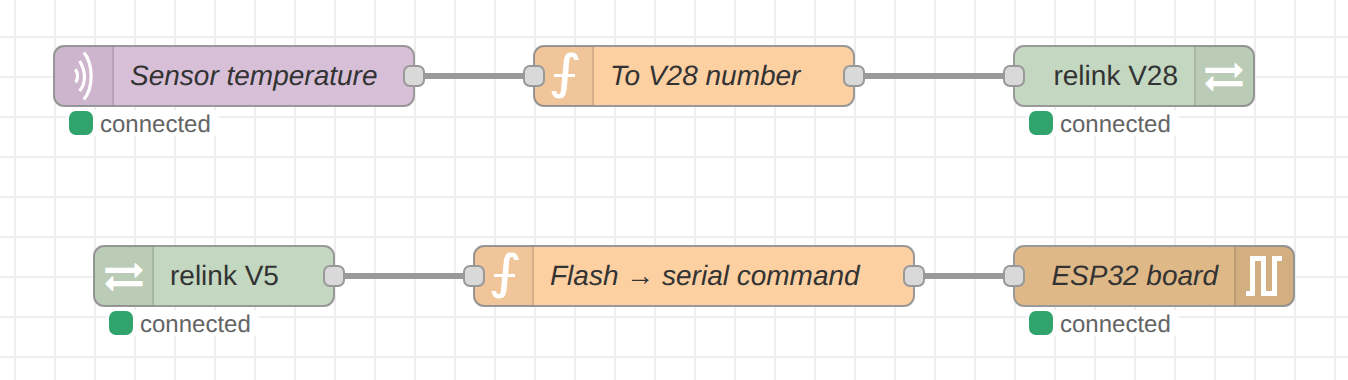
**mqtt-serial**: MQTT reading → V28, and V5 from the dashboard → serial command to a board (picture at the top).
|
|
105
|
+
|
|
106
|
+
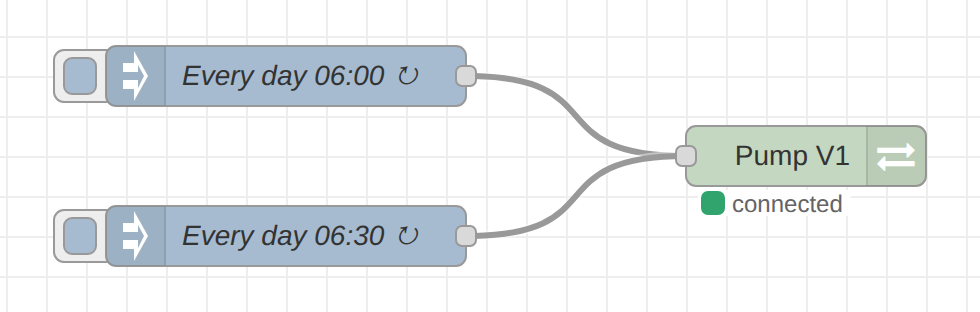
**schedule**: switch V1 on at 06:00 and off at 06:30 every day.
|
|
107
|
+
|
|
108
|
+
|
|
109
|
+
|
|
110
|
+
**alert**: when V20 goes above 30, post to a webhook (Discord, Slack, LINE), at most once per 10 minutes.
|
|
111
|
+
|
|
112
|
+

|
|
113
|
+
|
|
114
|
+
**camera-snapshots**: save one JPEG every 2 s from the camera on V10.
|
|
119
115
|
|
|
120
|
-
|
|
116
|
+

|
|
121
117
|
|
|
122
|
-
|
|
118
|
+
**data-log**: append every pin change to a CSV file.
|
|
123
119
|
|
|
124
|
-
|
|
120
|
+

|
|
125
121
|
|
|
126
|
-
|
|
122
|
+
**basic** and **bytes**: send and receive a number, and send raw bytes to a ByteArray pin.
|
|
127
123
|
|
|
128
|
-
##
|
|
124
|
+
## Good to know
|
|
129
125
|
|
|
130
|
-
-
|
|
131
|
-
-
|
|
132
|
-
-
|
|
133
|
-
-
|
|
134
|
-
- **Separate-network NAT and ESP32 hardware remain unverified for this package.** Direct UDP and relay interoperability were tested on one machine; network conditions can prevent hole punching.
|
|
126
|
+
- Add each pin as a datastream on the device page first. Writes to other pins are refused.
|
|
127
|
+
- The server passes up to 100 writes per second per device. Faster writes to the same pin are merged: the latest value wins. Direct links are not limited.
|
|
128
|
+
- A write to a control pin moves real hardware. Test with a spare device.
|
|
129
|
+
- Numbers are summarised once a minute for the device's history charts.
|
|
135
130
|
|
|
136
131
|
## Troubleshooting
|
|
137
132
|
|
|
138
|
-
|
|
|
133
|
+
| Problem | Check |
|
|
139
134
|
|---|---|
|
|
140
|
-
| Relink nodes
|
|
141
|
-
|
|
|
142
|
-
|
|
|
143
|
-
|
|
|
144
|
-
|
|
|
145
|
-
| A write fails | Connect a Catch node
|
|
146
|
-
| Values skip during high-rate traffic | Compare offered and transmitted values; latest values replace intermediate writes, and relay limits apply per device/pin |
|
|
135
|
+
| No Relink nodes in the palette | Install in the folder the running Node-RED uses (`~/.node-red`), restart it, search `relink` |
|
|
136
|
+
| Status stays at *connecting* | Token, key, server name, and that the network allows outgoing UDP |
|
|
137
|
+
| No values arrive | The pin is a datastream on the device page; the Pin filter in relink in; Node-RED's own writes don't come back |
|
|
138
|
+
| Camera in shows nothing | The camera is on and on the same token; a direct link is possible; the Android app may have taken the stream |
|
|
139
|
+
| Camera out says *nobody watching* | Open the camera in the Android app or another program on the same token |
|
|
140
|
+
| A write fails | Connect a Catch node: check pin, type and range, and the 255-byte limit for text and Buffers |
|
|
147
141
|
|
|
148
142
|
## License
|
|
149
143
|
|
|
@@ -0,0 +1,113 @@
|
|
|
1
|
+
[
|
|
2
|
+
{
|
|
3
|
+
"id": "relink-alert",
|
|
4
|
+
"type": "tab",
|
|
5
|
+
"label": "Relink — alert",
|
|
6
|
+
"disabled": false,
|
|
7
|
+
"info": "When V20 goes above 30, post one message per 10 minutes to a webhook (LINE, Discord, Slack...). Put your webhook URL in the HTTP request node."
|
|
8
|
+
},
|
|
9
|
+
{
|
|
10
|
+
"id": "al_in",
|
|
11
|
+
"type": "relink in",
|
|
12
|
+
"name": "Tank temp V20",
|
|
13
|
+
"connection": "rl_conn",
|
|
14
|
+
"pin": "V20",
|
|
15
|
+
"x": 150,
|
|
16
|
+
"y": 100,
|
|
17
|
+
"wires": [
|
|
18
|
+
[
|
|
19
|
+
"al_sw"
|
|
20
|
+
]
|
|
21
|
+
],
|
|
22
|
+
"z": "relink-alert"
|
|
23
|
+
},
|
|
24
|
+
{
|
|
25
|
+
"id": "al_sw",
|
|
26
|
+
"type": "switch",
|
|
27
|
+
"name": "Above 30 °C",
|
|
28
|
+
"property": "payload",
|
|
29
|
+
"propertyType": "msg",
|
|
30
|
+
"rules": [
|
|
31
|
+
{
|
|
32
|
+
"t": "gt",
|
|
33
|
+
"v": "30",
|
|
34
|
+
"vt": "num"
|
|
35
|
+
}
|
|
36
|
+
],
|
|
37
|
+
"checkall": "true",
|
|
38
|
+
"repair": false,
|
|
39
|
+
"outputs": 1,
|
|
40
|
+
"x": 340,
|
|
41
|
+
"y": 100,
|
|
42
|
+
"wires": [
|
|
43
|
+
[
|
|
44
|
+
"al_rbe"
|
|
45
|
+
]
|
|
46
|
+
],
|
|
47
|
+
"z": "relink-alert"
|
|
48
|
+
},
|
|
49
|
+
{
|
|
50
|
+
"id": "al_rbe",
|
|
51
|
+
"type": "delay",
|
|
52
|
+
"name": "Once per 10 min",
|
|
53
|
+
"pauseType": "rate",
|
|
54
|
+
"timeout": "5",
|
|
55
|
+
"timeoutUnits": "seconds",
|
|
56
|
+
"rate": "1",
|
|
57
|
+
"nbRateUnits": "10",
|
|
58
|
+
"rateUnits": "minute",
|
|
59
|
+
"randomFirst": "1",
|
|
60
|
+
"randomLast": "5",
|
|
61
|
+
"randomUnits": "seconds",
|
|
62
|
+
"drop": true,
|
|
63
|
+
"allowrate": false,
|
|
64
|
+
"outputs": 1,
|
|
65
|
+
"x": 530,
|
|
66
|
+
"y": 100,
|
|
67
|
+
"wires": [
|
|
68
|
+
[
|
|
69
|
+
"al_fn"
|
|
70
|
+
]
|
|
71
|
+
],
|
|
72
|
+
"z": "relink-alert"
|
|
73
|
+
},
|
|
74
|
+
{
|
|
75
|
+
"id": "al_fn",
|
|
76
|
+
"type": "function",
|
|
77
|
+
"name": "Alert message",
|
|
78
|
+
"func": "msg.payload = { text: 'Tank is ' + msg.payload + ' °C' };\nreturn msg;",
|
|
79
|
+
"outputs": 1,
|
|
80
|
+
"x": 720,
|
|
81
|
+
"y": 100,
|
|
82
|
+
"wires": [
|
|
83
|
+
[
|
|
84
|
+
"al_http"
|
|
85
|
+
]
|
|
86
|
+
],
|
|
87
|
+
"z": "relink-alert"
|
|
88
|
+
},
|
|
89
|
+
{
|
|
90
|
+
"id": "al_http",
|
|
91
|
+
"type": "http request",
|
|
92
|
+
"name": "Webhook (LINE / Discord)",
|
|
93
|
+
"method": "POST",
|
|
94
|
+
"ret": "txt",
|
|
95
|
+
"paytoqs": "ignore",
|
|
96
|
+
"url": "https://example.com/webhook",
|
|
97
|
+
"x": 930,
|
|
98
|
+
"y": 100,
|
|
99
|
+
"wires": [
|
|
100
|
+
[]
|
|
101
|
+
],
|
|
102
|
+
"z": "relink-alert"
|
|
103
|
+
},
|
|
104
|
+
{
|
|
105
|
+
"id": "rl_conn",
|
|
106
|
+
"type": "relink-connection",
|
|
107
|
+
"name": "My Relink device",
|
|
108
|
+
"server": "relink-iot.com",
|
|
109
|
+
"port": 7445,
|
|
110
|
+
"apiBase": "https://relink-iot.com",
|
|
111
|
+
"mesh": true
|
|
112
|
+
}
|
|
113
|
+
]
|
|
@@ -0,0 +1,90 @@
|
|
|
1
|
+
[
|
|
2
|
+
{
|
|
3
|
+
"id": "relink-camera-snapshots",
|
|
4
|
+
"type": "tab",
|
|
5
|
+
"label": "Relink — camera snapshots",
|
|
6
|
+
"disabled": false,
|
|
7
|
+
"info": "Save one JPEG every 2 s from the camera on V10 (ESP32-CAM or another program on this token). Change the folder in the function node."
|
|
8
|
+
},
|
|
9
|
+
{
|
|
10
|
+
"id": "cm_in",
|
|
11
|
+
"type": "relink camera in",
|
|
12
|
+
"name": "Camera V10",
|
|
13
|
+
"connection": "rl_conn",
|
|
14
|
+
"pin": "V10",
|
|
15
|
+
"x": 150,
|
|
16
|
+
"y": 100,
|
|
17
|
+
"wires": [
|
|
18
|
+
[
|
|
19
|
+
"cm_rate"
|
|
20
|
+
]
|
|
21
|
+
],
|
|
22
|
+
"z": "relink-camera-snapshots"
|
|
23
|
+
},
|
|
24
|
+
{
|
|
25
|
+
"id": "cm_rate",
|
|
26
|
+
"type": "delay",
|
|
27
|
+
"name": "1 photo per 2 s",
|
|
28
|
+
"pauseType": "rate",
|
|
29
|
+
"timeout": "5",
|
|
30
|
+
"timeoutUnits": "seconds",
|
|
31
|
+
"rate": "1",
|
|
32
|
+
"nbRateUnits": "2",
|
|
33
|
+
"rateUnits": "second",
|
|
34
|
+
"randomFirst": "1",
|
|
35
|
+
"randomLast": "5",
|
|
36
|
+
"randomUnits": "seconds",
|
|
37
|
+
"drop": true,
|
|
38
|
+
"allowrate": false,
|
|
39
|
+
"outputs": 1,
|
|
40
|
+
"x": 350,
|
|
41
|
+
"y": 100,
|
|
42
|
+
"wires": [
|
|
43
|
+
[
|
|
44
|
+
"cm_name"
|
|
45
|
+
]
|
|
46
|
+
],
|
|
47
|
+
"z": "relink-camera-snapshots"
|
|
48
|
+
},
|
|
49
|
+
{
|
|
50
|
+
"id": "cm_name",
|
|
51
|
+
"type": "function",
|
|
52
|
+
"name": "File name with time",
|
|
53
|
+
"func": "msg.filename = '/tmp/relink-snaps/cam-' + Date.now() + '.jpg';\nreturn msg;",
|
|
54
|
+
"outputs": 1,
|
|
55
|
+
"x": 560,
|
|
56
|
+
"y": 100,
|
|
57
|
+
"wires": [
|
|
58
|
+
[
|
|
59
|
+
"cm_file"
|
|
60
|
+
]
|
|
61
|
+
],
|
|
62
|
+
"z": "relink-camera-snapshots"
|
|
63
|
+
},
|
|
64
|
+
{
|
|
65
|
+
"id": "cm_file",
|
|
66
|
+
"type": "file",
|
|
67
|
+
"name": "Save JPEG",
|
|
68
|
+
"filename": "filename",
|
|
69
|
+
"filenameType": "msg",
|
|
70
|
+
"appendNewline": false,
|
|
71
|
+
"createDir": true,
|
|
72
|
+
"overwriteFile": "true",
|
|
73
|
+
"encoding": "none",
|
|
74
|
+
"x": 760,
|
|
75
|
+
"y": 100,
|
|
76
|
+
"wires": [
|
|
77
|
+
[]
|
|
78
|
+
],
|
|
79
|
+
"z": "relink-camera-snapshots"
|
|
80
|
+
},
|
|
81
|
+
{
|
|
82
|
+
"id": "rl_conn",
|
|
83
|
+
"type": "relink-connection",
|
|
84
|
+
"name": "My Relink device",
|
|
85
|
+
"server": "relink-iot.com",
|
|
86
|
+
"port": 7445,
|
|
87
|
+
"apiBase": "https://relink-iot.com",
|
|
88
|
+
"mesh": true
|
|
89
|
+
}
|
|
90
|
+
]
|
|
@@ -0,0 +1,65 @@
|
|
|
1
|
+
[
|
|
2
|
+
{
|
|
3
|
+
"id": "relink-data-log",
|
|
4
|
+
"type": "tab",
|
|
5
|
+
"label": "Relink — data log",
|
|
6
|
+
"disabled": false,
|
|
7
|
+
"info": "Append every pin change to relink-log.csv: time, pin, value, transport."
|
|
8
|
+
},
|
|
9
|
+
{
|
|
10
|
+
"id": "lg_in",
|
|
11
|
+
"type": "relink in",
|
|
12
|
+
"name": "All pins",
|
|
13
|
+
"connection": "rl_conn",
|
|
14
|
+
"pin": "",
|
|
15
|
+
"x": 140,
|
|
16
|
+
"y": 100,
|
|
17
|
+
"wires": [
|
|
18
|
+
[
|
|
19
|
+
"lg_fn"
|
|
20
|
+
]
|
|
21
|
+
],
|
|
22
|
+
"z": "relink-data-log"
|
|
23
|
+
},
|
|
24
|
+
{
|
|
25
|
+
"id": "lg_fn",
|
|
26
|
+
"type": "function",
|
|
27
|
+
"name": "CSV line",
|
|
28
|
+
"func": "const v = Buffer.isBuffer(msg.payload) ? msg.payload.toString('hex') : msg.payload;\nmsg.payload = [new Date().toISOString(), msg.topic, v, msg.transport].join(',');\nreturn msg;",
|
|
29
|
+
"outputs": 1,
|
|
30
|
+
"x": 320,
|
|
31
|
+
"y": 100,
|
|
32
|
+
"wires": [
|
|
33
|
+
[
|
|
34
|
+
"lg_file"
|
|
35
|
+
]
|
|
36
|
+
],
|
|
37
|
+
"z": "relink-data-log"
|
|
38
|
+
},
|
|
39
|
+
{
|
|
40
|
+
"id": "lg_file",
|
|
41
|
+
"type": "file",
|
|
42
|
+
"name": "relink-log.csv",
|
|
43
|
+
"filename": "relink-log.csv",
|
|
44
|
+
"filenameType": "str",
|
|
45
|
+
"appendNewline": true,
|
|
46
|
+
"createDir": true,
|
|
47
|
+
"overwriteFile": "false",
|
|
48
|
+
"encoding": "none",
|
|
49
|
+
"x": 510,
|
|
50
|
+
"y": 100,
|
|
51
|
+
"wires": [
|
|
52
|
+
[]
|
|
53
|
+
],
|
|
54
|
+
"z": "relink-data-log"
|
|
55
|
+
},
|
|
56
|
+
{
|
|
57
|
+
"id": "rl_conn",
|
|
58
|
+
"type": "relink-connection",
|
|
59
|
+
"name": "My Relink device",
|
|
60
|
+
"server": "relink-iot.com",
|
|
61
|
+
"port": 7445,
|
|
62
|
+
"apiBase": "https://relink-iot.com",
|
|
63
|
+
"mesh": true
|
|
64
|
+
}
|
|
65
|
+
]
|
|
@@ -0,0 +1,139 @@
|
|
|
1
|
+
[
|
|
2
|
+
{
|
|
3
|
+
"id": "relink-mqtt-serial",
|
|
4
|
+
"type": "tab",
|
|
5
|
+
"label": "Relink — MQTT and serial bridge",
|
|
6
|
+
"disabled": false,
|
|
7
|
+
"info": "1. settings: open the Relink connection, enter your device token and key; add V28 Integer and V5 Integer datastreams. Set the MQTT broker and the serial port. 2. connect: Deploy. 3. handlers: a V5 change on the dashboard goes to the board as \"f <n>\". 4. loop: every MQTT reading on factory/line1/temp lands on V28."
|
|
8
|
+
},
|
|
9
|
+
{
|
|
10
|
+
"id": "pr_mqtt",
|
|
11
|
+
"type": "mqtt in",
|
|
12
|
+
"z": "relink-mqtt-serial",
|
|
13
|
+
"name": "Sensor temperature",
|
|
14
|
+
"topic": "factory/line1/temp",
|
|
15
|
+
"qos": "0",
|
|
16
|
+
"datatype": "auto-detect",
|
|
17
|
+
"broker": "pr_broker",
|
|
18
|
+
"nl": false,
|
|
19
|
+
"rap": true,
|
|
20
|
+
"rh": 0,
|
|
21
|
+
"inputs": 0,
|
|
22
|
+
"x": 170,
|
|
23
|
+
"y": 100,
|
|
24
|
+
"wires": [
|
|
25
|
+
[
|
|
26
|
+
"pr_fn1"
|
|
27
|
+
]
|
|
28
|
+
]
|
|
29
|
+
},
|
|
30
|
+
{
|
|
31
|
+
"id": "pr_fn1",
|
|
32
|
+
"type": "function",
|
|
33
|
+
"z": "relink-mqtt-serial",
|
|
34
|
+
"name": "To V28 number",
|
|
35
|
+
"func": "// MQTT gives text or JSON; Relink wants a number on V28\nconst v = typeof msg.payload === 'object' ? msg.payload.temp : Number(msg.payload);\nif (!Number.isFinite(v)) return null;\nmsg.pin = 28;\nmsg.payload = Math.round(v);\nreturn msg;",
|
|
36
|
+
"outputs": 1,
|
|
37
|
+
"x": 400,
|
|
38
|
+
"y": 100,
|
|
39
|
+
"wires": [
|
|
40
|
+
[
|
|
41
|
+
"pr_out"
|
|
42
|
+
]
|
|
43
|
+
]
|
|
44
|
+
},
|
|
45
|
+
{
|
|
46
|
+
"id": "pr_out",
|
|
47
|
+
"type": "relink out",
|
|
48
|
+
"z": "relink-mqtt-serial",
|
|
49
|
+
"name": "",
|
|
50
|
+
"connection": "pr_conn",
|
|
51
|
+
"pin": "V28",
|
|
52
|
+
"dtype": "int32",
|
|
53
|
+
"x": 620,
|
|
54
|
+
"y": 100,
|
|
55
|
+
"wires": []
|
|
56
|
+
},
|
|
57
|
+
{
|
|
58
|
+
"id": "pr_in",
|
|
59
|
+
"type": "relink in",
|
|
60
|
+
"z": "relink-mqtt-serial",
|
|
61
|
+
"name": "",
|
|
62
|
+
"connection": "pr_conn",
|
|
63
|
+
"pin": "V5",
|
|
64
|
+
"x": 160,
|
|
65
|
+
"y": 200,
|
|
66
|
+
"wires": [
|
|
67
|
+
[
|
|
68
|
+
"pr_fn2"
|
|
69
|
+
]
|
|
70
|
+
]
|
|
71
|
+
},
|
|
72
|
+
{
|
|
73
|
+
"id": "pr_fn2",
|
|
74
|
+
"type": "function",
|
|
75
|
+
"z": "relink-mqtt-serial",
|
|
76
|
+
"name": "Flash → serial command",
|
|
77
|
+
"func": "// V5 slider 0..255 → the board's serial command \"f <n>\"\nconst n = Math.max(0, Math.min(255, Math.round(Number(msg.payload))));\nmsg.payload = 'f ' + n + '\\n';\nreturn msg;",
|
|
78
|
+
"outputs": 1,
|
|
79
|
+
"x": 400,
|
|
80
|
+
"y": 200,
|
|
81
|
+
"wires": [
|
|
82
|
+
[
|
|
83
|
+
"pr_serial"
|
|
84
|
+
]
|
|
85
|
+
]
|
|
86
|
+
},
|
|
87
|
+
{
|
|
88
|
+
"id": "pr_serial",
|
|
89
|
+
"type": "serial out",
|
|
90
|
+
"z": "relink-mqtt-serial",
|
|
91
|
+
"name": "ESP32 board",
|
|
92
|
+
"serial": "pr_port",
|
|
93
|
+
"x": 630,
|
|
94
|
+
"y": 200,
|
|
95
|
+
"wires": []
|
|
96
|
+
},
|
|
97
|
+
{
|
|
98
|
+
"id": "pr_conn",
|
|
99
|
+
"type": "relink-connection",
|
|
100
|
+
"name": "My Relink device",
|
|
101
|
+
"server": "relink-iot.com",
|
|
102
|
+
"port": 7445,
|
|
103
|
+
"apiBase": "https://relink-iot.com",
|
|
104
|
+
"mesh": true
|
|
105
|
+
},
|
|
106
|
+
{
|
|
107
|
+
"id": "pr_broker",
|
|
108
|
+
"type": "mqtt-broker",
|
|
109
|
+
"name": "Local broker",
|
|
110
|
+
"broker": "127.0.0.1",
|
|
111
|
+
"port": "1883",
|
|
112
|
+
"clientid": "",
|
|
113
|
+
"autoConnect": true,
|
|
114
|
+
"usetls": false,
|
|
115
|
+
"protocolVersion": "4",
|
|
116
|
+
"keepalive": "60",
|
|
117
|
+
"cleansession": true
|
|
118
|
+
},
|
|
119
|
+
{
|
|
120
|
+
"id": "pr_port",
|
|
121
|
+
"type": "serial-port",
|
|
122
|
+
"name": "",
|
|
123
|
+
"serialport": "/dev/ttyUSB0",
|
|
124
|
+
"serialbaud": "115200",
|
|
125
|
+
"databits": "8",
|
|
126
|
+
"parity": "none",
|
|
127
|
+
"stopbits": "1",
|
|
128
|
+
"waitfor": "",
|
|
129
|
+
"dtr": "none",
|
|
130
|
+
"rts": "none",
|
|
131
|
+
"cts": "none",
|
|
132
|
+
"dsr": "none",
|
|
133
|
+
"newline": "\\n",
|
|
134
|
+
"bin": "false",
|
|
135
|
+
"out": "char",
|
|
136
|
+
"addchar": "",
|
|
137
|
+
"responsetimeout": "10000"
|
|
138
|
+
}
|
|
139
|
+
]
|