node-red-contrib-power-saver 2.1.0 → 3.0.0
This diff represents the content of publicly available package versions that have been released to one of the supported registries. The information contained in this diff is provided for informational purposes only and reflects changes between package versions as they appear in their respective public registries.
- package/CHANGELOG.md +1 -43
- package/README.md +3 -231
- package/docs/.vuepress/config.js +67 -0
- package/docs/.vuepress/dist/404.html +15 -0
- package/docs/.vuepress/dist/assets/css/styles.e835bef6.css +8 -0
- package/docs/.vuepress/dist/assets/img/back-to-top.8b37f773.svg +1 -0
- package/docs/.vuepress/dist/assets/img/elvia-config-no-config.b4bb972c.png +0 -0
- package/docs/.vuepress/dist/assets/img/elvia-config-no-tariff.3f89aba8.png +0 -0
- package/docs/.vuepress/dist/assets/img/elvia-config-select-tariff.0f73fd56.png +0 -0
- package/docs/.vuepress/dist/assets/img/elvia-config-subscription-key.8be8ab8a.png +0 -0
- package/docs/.vuepress/dist/assets/img/elvia-flow.bae2a4d5.png +0 -0
- package/docs/.vuepress/dist/assets/img/example-flow-1.3ff3e23f.png +0 -0
- package/docs/.vuepress/dist/assets/img/example-flow-2.b653b58d.png +0 -0
- package/docs/.vuepress/dist/assets/img/migrate-best-save.f73420f6.png +0 -0
- package/docs/.vuepress/dist/assets/img/migrate-power-saver.aae13f9d.png +0 -0
- package/docs/.vuepress/dist/assets/img/node-power-saver.51ff2e5d.png +0 -0
- package/docs/.vuepress/dist/assets/img/node-ps-elvia-add-tariff.94ea2b09.png +0 -0
- package/docs/.vuepress/dist/assets/img/node-ps-receive-price.76eaa418.png +0 -0
- package/docs/.vuepress/dist/assets/img/node-ps-strategy-best-save.392292d5.png +0 -0
- package/docs/.vuepress/dist/assets/img/node-ps-strategy-lowest-price.3a4ad347.png +0 -0
- package/docs/.vuepress/dist/assets/img/power-saver-nordpool-current-state.bf14afde.png +0 -0
- package/docs/.vuepress/dist/assets/img/power-saver-nordpool-events-state.8c392507.png +0 -0
- package/docs/.vuepress/dist/assets/img/power-saver-tibber-mqtt.16891dd2.png +0 -0
- package/docs/.vuepress/dist/assets/js/293.5e967839.js +1 -0
- package/docs/.vuepress/dist/assets/js/491.c183eba3.js +1 -0
- package/docs/.vuepress/dist/assets/js/812.79dad458.js +2 -0
- package/docs/.vuepress/dist/assets/js/812.79dad458.js.LICENSE.txt +8 -0
- package/docs/.vuepress/dist/assets/js/app.80d4373d.js +1 -0
- package/docs/.vuepress/dist/assets/js/runtime~app.665b411c.js +1 -0
- package/docs/.vuepress/dist/assets/js/v-08683c60.9edcaa60.js +1 -0
- package/docs/.vuepress/dist/assets/js/v-0aca7ba6.5eca5160.js +1 -0
- package/docs/.vuepress/dist/assets/js/v-0b5e3c8c.c02472fb.js +1 -0
- package/docs/.vuepress/dist/assets/js/v-1ad821fa.a628e907.js +1 -0
- package/docs/.vuepress/dist/assets/js/v-30acb564.80b4190d.js +1 -0
- package/docs/.vuepress/dist/assets/js/v-3706649a.d7f73384.js +1 -0
- package/docs/.vuepress/dist/assets/js/v-4637f9e4.df94c6ea.js +1 -0
- package/docs/.vuepress/dist/assets/js/v-510ed0d4.a78d8542.js +1 -0
- package/docs/.vuepress/dist/assets/js/v-5954bcb2.4f4712f3.js +1 -0
- package/docs/.vuepress/dist/assets/js/v-5db8da3a.2e49b81a.js +1 -0
- package/docs/.vuepress/dist/assets/js/v-61f728ca.7b545524.js +1 -0
- package/docs/.vuepress/dist/assets/js/v-677dfaed.756e0fb5.js +1 -0
- package/docs/.vuepress/dist/assets/js/v-7c87f26e.57507077.js +1 -0
- package/docs/.vuepress/dist/assets/js/v-8daa1a0e.1ea39527.js +1 -0
- package/docs/.vuepress/dist/assets/js/v-b4a42144.a812c440.js +1 -0
- package/docs/.vuepress/dist/assets/js/v-e8c55052.30f30acd.js +1 -0
- package/docs/.vuepress/dist/assets/js/v-fffb8e28.850019c1.js +1 -0
- package/docs/.vuepress/dist/changelog/index.html +15 -0
- package/docs/.vuepress/dist/contribute/index.html +15 -0
- package/docs/.vuepress/dist/euro.png +0 -0
- package/docs/.vuepress/dist/examples/example-nordpool-current-state.html +169 -0
- package/docs/.vuepress/dist/examples/example-nordpool-events-state.html +173 -0
- package/docs/.vuepress/dist/examples/example-tibber-mqtt.html +182 -0
- package/docs/.vuepress/dist/examples/index.html +15 -0
- package/docs/.vuepress/dist/guide/index.html +52 -0
- package/docs/.vuepress/dist/index.html +15 -0
- package/docs/.vuepress/dist/logo.png +0 -0
- package/docs/.vuepress/dist/nodes/index.html +15 -0
- package/docs/.vuepress/dist/nodes/old-power-saver-doc.html +97 -0
- package/docs/.vuepress/dist/nodes/power-saver.html +15 -0
- package/docs/.vuepress/dist/nodes/ps-elvia-add-tariff.html +15 -0
- package/docs/.vuepress/dist/nodes/ps-receive-price.html +80 -0
- package/docs/.vuepress/dist/nodes/ps-strategy-best-save.html +65 -0
- package/docs/.vuepress/dist/nodes/ps-strategy-lowest-price.html +89 -0
- package/docs/.vuepress/dist/nodes/strategy-input.html +40 -0
- package/docs/.vuepress/public/euro.png +0 -0
- package/docs/.vuepress/public/logo.png +0 -0
- package/docs/README.md +32 -0
- package/docs/changelog/README.md +55 -0
- package/docs/contribute/README.md +39 -0
- package/docs/examples/README.md +5 -0
- package/docs/examples/example-nordpool-current-state.md +166 -0
- package/docs/examples/example-nordpool-events-state.md +170 -0
- package/docs/examples/example-tibber-mqtt.md +179 -0
- package/docs/guide/README.md +193 -0
- package/docs/images/all-nodes.png +0 -0
- package/docs/images/best-save-config.png +0 -0
- package/docs/images/elvia-add-tariff-node-used.png +0 -0
- package/docs/images/elvia-config-no-config.png +0 -0
- package/docs/images/elvia-config-no-tariff.png +0 -0
- package/docs/images/elvia-config-select-tariff.png +0 -0
- package/docs/images/elvia-config-subscription-key.png +0 -0
- package/docs/images/elvia-flow.png +0 -0
- package/docs/images/elvia-tariff-config.png +0 -0
- package/docs/images/euro.png +0 -0
- package/docs/images/example-flow-1.png +0 -0
- package/docs/images/example-flow-2.png +0 -0
- package/docs/images/logo.png +0 -0
- package/docs/images/lowest-price-config.png +0 -0
- package/docs/images/migrate-best-save.png +0 -0
- package/docs/images/migrate-power-saver.png +0 -0
- package/docs/images/node-power-saver.png +0 -0
- package/docs/images/node-ps-elvia-add-tariff.png +0 -0
- package/docs/images/node-ps-elvia-tariff-types.png +0 -0
- package/docs/images/node-ps-elvia-tariff.png +0 -0
- package/docs/images/node-ps-receive-price.png +0 -0
- package/docs/images/node-ps-strategy-best-save.png +0 -0
- package/docs/images/node-ps-strategy-lowest-price.png +0 -0
- package/{doc → docs/images}/node-red-contrib-power-saver-flow.png +0 -0
- package/docs/images/power-saver-nordpool-current-state.png +0 -0
- package/docs/images/power-saver-nordpool-events-state.png +0 -0
- package/docs/images/power-saver-tibber-mqtt.png +0 -0
- package/docs/nodes/README.md +53 -0
- package/docs/nodes/old-power-saver-doc.md +231 -0
- package/docs/nodes/power-saver.md +23 -0
- package/docs/nodes/ps-elvia-add-tariff.md +52 -0
- package/docs/nodes/ps-receive-price.md +153 -0
- package/docs/nodes/ps-strategy-best-save.md +142 -0
- package/docs/nodes/ps-strategy-lowest-price.md +165 -0
- package/docs/nodes/strategy-input.md +39 -0
- package/package.json +16 -4
- package/src/elvia/elvia-add-tariff.html +70 -0
- package/src/elvia/elvia-add-tariff.js +47 -0
- package/src/elvia/elvia-api.js +61 -0
- package/src/elvia/elvia-config.html +44 -0
- package/src/elvia/elvia-config.js +25 -0
- package/src/elvia/elvia-tariff-types.html +34 -0
- package/src/elvia/elvia-tariff-types.js +23 -0
- package/src/elvia/elvia-tariff.html +89 -0
- package/src/elvia/elvia-tariff.js +26 -0
- package/src/elvia/icons/elvia_hvite.svg +4 -0
- package/src/elvia/icons/elvia_positive_4 copy.svg +4 -0
- package/src/handle-input.js +159 -0
- package/src/power-saver.html +116 -0
- package/{power-saver.js → src/power-saver.js} +9 -32
- package/src/receive-price-functions.js +99 -0
- package/src/receive-price.html +30 -0
- package/src/receive-price.js +21 -0
- package/src/strategy-best-save-functions.js +110 -0
- package/src/strategy-best-save.html +116 -0
- package/src/strategy-best-save.js +95 -0
- package/src/strategy-lowest-price-functions.js +35 -0
- package/src/strategy-lowest-price.html +168 -0
- package/src/strategy-lowest-price.js +125 -0
- package/{utils.js → src/utils.js} +44 -100
- package/test/data/adjustedResult.js +219 -71
- package/test/data/adjustedResult_old.js +154 -0
- package/test/data/best-save-result.json +357 -0
- package/test/data/converted-prices.json +196 -0
- package/test/data/elvia-input-grid-tariff.json +760 -0
- package/test/data/elvia-input-power-prices.json +194 -0
- package/test/data/elvia-output-add-tariff.json +290 -0
- package/test/data/lowest-price-result-cont.json +18 -0
- package/test/data/lowest-price-result-split-allday.json +21 -0
- package/test/data/lowest-price-result-split-allday10.json +20 -0
- package/test/data/lowest-price-result-split.json +20 -0
- package/test/data/nordpool-current-state-prices.json +283 -0
- package/test/data/nordpool-event-prices.json +574 -0
- package/test/data/reconfigResult.js +220 -67
- package/test/data/reconfigResult_old.js +141 -0
- package/test/data/tibber-prices-single-home.json +64 -0
- package/test/data/tibber-prices.json +124 -0
- package/test/data/{tibber_result.json → tibber-result.json} +0 -0
- package/test/elvia.test.js +26 -0
- package/test/mostSavedStrategy.test.js +22 -55
- package/test/power-saver.test.js +21 -5
- package/test/receive-price-functions.test.js +153 -0
- package/test/receive-price.test.js +122 -0
- package/test/send-config-input.test.js +8 -10
- package/test/strategy-best-save-test-utils.js +32 -0
- package/test/strategy-best-save.test.js +103 -0
- package/test/strategy-lowest-price-functions.test.js +40 -0
- package/test/strategy-lowest-price.test.js +338 -0
- package/test/test-utils.js +0 -18
- package/test/utils.test.js +22 -180
- package/doc/example-nordpool-current-state.md +0 -166
- package/doc/example-nordpool-events-state.md +0 -153
- package/doc/example-tibber-mqtt.md +0 -189
- package/doc/power-saver-nordpool-current-state.png +0 -0
- package/doc/power-saver-nordpool-events-state.png +0 -0
- package/doc/power-saver-tibber-mqtt.png +0 -0
- package/mostSavedStrategy.js +0 -84
- package/power-saver.html +0 -308
- package/test/data/tibber_data.json +0 -412
- package/test/data/tibber_prices.json +0 -412
|
@@ -0,0 +1,153 @@
|
|
|
1
|
+
---
|
|
2
|
+
prev: ./ps-strategy-lowest-price.md
|
|
3
|
+
---
|
|
4
|
+
|
|
5
|
+
# ps-receive-price
|
|
6
|
+
|
|
7
|
+

|
|
8
|
+
|
|
9
|
+
## Description
|
|
10
|
+
|
|
11
|
+
The `ps-receive-price` node is used to convert prices from Tibber or Nord Pool to the format used by the strategy nodes. It takes its input directly from the output of the following nodes (see details below):
|
|
12
|
+
|
|
13
|
+
- `tibber-query` node from Tibber (`node-red-contrib-tibber-api`)
|
|
14
|
+
- `current state` node in Home Assistant
|
|
15
|
+
- `events: state` node in Home Assistant
|
|
16
|
+
|
|
17
|
+
Output can be sent directly to the strategy nodes (for example `strategy-best-save` or `strategy-lowest-price`), or it can be sent via another node to add grid tariff or other additional costs before the calculation is done.
|
|
18
|
+
|
|
19
|
+
::: warning Note
|
|
20
|
+
In version 2 of `node-red-contrib-power-saver`, prices were received directly by the Power Saver node.
|
|
21
|
+
This made it hard to add grid tariff before the calculation was done.
|
|
22
|
+
That is why this is now a separate node.
|
|
23
|
+
:::
|
|
24
|
+
|
|
25
|
+
## Configuration
|
|
26
|
+
|
|
27
|
+
There is no configuration except from node name.
|
|
28
|
+
|
|
29
|
+
## Input
|
|
30
|
+
|
|
31
|
+
### Tibber input
|
|
32
|
+
|
|
33
|
+
If you are a Tibber customer, you can use the `tibber-query` node from the [`node-red-contrib-tibber-api`](https://flows.nodered.org/node/node-red-contrib-tibber-api). Set it up with the following query:
|
|
34
|
+
|
|
35
|
+
```gql
|
|
36
|
+
{
|
|
37
|
+
viewer {
|
|
38
|
+
homes {
|
|
39
|
+
currentSubscription {
|
|
40
|
+
priceInfo {
|
|
41
|
+
today {
|
|
42
|
+
total
|
|
43
|
+
startsAt
|
|
44
|
+
}
|
|
45
|
+
tomorrow {
|
|
46
|
+
total
|
|
47
|
+
startsAt
|
|
48
|
+
}
|
|
49
|
+
}
|
|
50
|
+
}
|
|
51
|
+
}
|
|
52
|
+
}
|
|
53
|
+
}
|
|
54
|
+
```
|
|
55
|
+
|
|
56
|
+
Send the result from the `tibber-query` node with the query above directly to the `ps-receive-price` node. Make sure it is refreshed when new prices are ready. Prices for the next day are normally ready at 13:00, but refreshing every hour can be a good idea.
|
|
57
|
+
|
|
58
|
+
[See example with Tibber, a switch and MQTT](doc/example-tibber-mqtt.md)
|
|
59
|
+
|
|
60
|
+
::: danger Warning
|
|
61
|
+
The query above returns an array with all houses you have in your Tibber account.
|
|
62
|
+
It willl work only if the house you want is the first house in the array, for example if you have only one house.
|
|
63
|
+
If that is not the case, you must use the query below.
|
|
64
|
+
:::
|
|
65
|
+
|
|
66
|
+
**Tibber query for a specific house**
|
|
67
|
+
|
|
68
|
+
If the above query does not give you the house you want as the first in the result array, you can use the following method. In this method you need run one query in order to find the id of the house you want the prices for first, and then use the id in the real query.
|
|
69
|
+
|
|
70
|
+
Go to the [Tibber Deeloper pages](https://developer.tibber.com/), sign in, and go to the [API Explorer](https://developer.tibber.com/explorer). Load your personal token, then run the following query:
|
|
71
|
+
|
|
72
|
+
```gql
|
|
73
|
+
{
|
|
74
|
+
viewer {
|
|
75
|
+
homes {
|
|
76
|
+
id
|
|
77
|
+
address {
|
|
78
|
+
address1
|
|
79
|
+
address2
|
|
80
|
+
address3
|
|
81
|
+
postalCode
|
|
82
|
+
city
|
|
83
|
+
country
|
|
84
|
+
}
|
|
85
|
+
}
|
|
86
|
+
}
|
|
87
|
+
}
|
|
88
|
+
```
|
|
89
|
+
|
|
90
|
+
Then copy the `id` of the house you want to use prices for. It may look like this:
|
|
91
|
+
|
|
92
|
+
```
|
|
93
|
+
NB! This is just an example:
|
|
94
|
+
142c1670-ab43-2ab3-ba6d-723703a551e2
|
|
95
|
+
```
|
|
96
|
+
|
|
97
|
+
Then use the id in the following query, replacing the id with the one you found in the previous query:
|
|
98
|
+
|
|
99
|
+
```gql{3}
|
|
100
|
+
{
|
|
101
|
+
viewer {
|
|
102
|
+
home(id: "142c1670-ab43-2ab3-ba6d-723703a551e2") {
|
|
103
|
+
currentSubscription{
|
|
104
|
+
priceInfo{
|
|
105
|
+
today {
|
|
106
|
+
total
|
|
107
|
+
startsAt
|
|
108
|
+
}
|
|
109
|
+
tomorrow {
|
|
110
|
+
total
|
|
111
|
+
startsAt
|
|
112
|
+
}
|
|
113
|
+
}
|
|
114
|
+
}
|
|
115
|
+
}
|
|
116
|
+
}
|
|
117
|
+
}
|
|
118
|
+
```
|
|
119
|
+
|
|
120
|
+
This is the query you shall put in the `tibber-query` node.
|
|
121
|
+
|
|
122
|
+
### Nord Pool input
|
|
123
|
+
|
|
124
|
+
This is especially designed to work for Home Assistant (HA), and the [Nord Pool custom component](https://github.com/custom-components/nordpool). The Nord Pool component provides a _sensor_ that gives price per hour for today and tomorrow (after 13:00). Send the output from this sensor directly to the `ps-receive-price` node. Make sure this is done whenever the node is updated, as well as when the system starts up.
|
|
125
|
+
|
|
126
|
+
Data can be sent from both the `current state` node or the `events: state` node.
|
|
127
|
+
|
|
128
|
+
[See example with Nord Pool and `current state` node](doc/example-nordpool-current-state.md)
|
|
129
|
+
|
|
130
|
+
[See example with Nord Pool and `events: state` node](doc/example-nordpool-events-state.md)
|
|
131
|
+
|
|
132
|
+
### Other input
|
|
133
|
+
|
|
134
|
+
If you cannot use any of the two above (Tibber or Nord Pool), create the input to the node with the payload containing JSON like this:
|
|
135
|
+
|
|
136
|
+
```json
|
|
137
|
+
{
|
|
138
|
+
"today": [
|
|
139
|
+
{ "value": 1, "start": "2021-06-21T00:00:00+02:00" },
|
|
140
|
+
{ "value": 2, "start": "2021-06-21T01:00:00+02:00" }
|
|
141
|
+
//...
|
|
142
|
+
],
|
|
143
|
+
"tomorrow": [
|
|
144
|
+
{ "value": 3, "start": "2021-06-22T00:00:00+02:00" },
|
|
145
|
+
{ "value": 4, "start": "2021-06-22T01:00:00+02:00" }
|
|
146
|
+
//...
|
|
147
|
+
]
|
|
148
|
+
}
|
|
149
|
+
```
|
|
150
|
+
|
|
151
|
+
## Output
|
|
152
|
+
|
|
153
|
+
The output is the [common strategy input format](./strategy-input.md), so it can be sent directly to the strategy nodes, or via any `ps-xxx-add-tariff` node.
|
|
@@ -0,0 +1,142 @@
|
|
|
1
|
+
# ps-strategy-best-save
|
|
2
|
+
|
|
3
|
+

|
|
4
|
+
|
|
5
|
+
Strategy node to postpone power consumption until the price is lower.
|
|
6
|
+
|
|
7
|
+
## Description
|
|
8
|
+
|
|
9
|
+
This strategy turns off the hours where the price difference is largest compared to the next hour that is on. The idea is that the power you are not using when the switch is turned off, will be used immediately when the switch is turned on. This would fit well for turning off a water heater or another thermostat controlled heater.
|
|
10
|
+
|
|
11
|
+
The picture at the bottom of the page, under [Integration with MagicMirror](#integration-with-magicmirror), illustrates this by the purple strokes, taking the price from the top of the price curve to the level of the first hour after the save-period.
|
|
12
|
+
|
|
13
|
+
## Configuration
|
|
14
|
+
|
|
15
|
+

|
|
16
|
+
|
|
17
|
+
| Value | Description |
|
|
18
|
+
| ---------------------- | -------------------------------------------------------------------------------------------------------------------------------------------------------------------- |
|
|
19
|
+
| Max per sequence | Maximum number of hours to turn off in a sequence. |
|
|
20
|
+
| Min recover | Minimum hours to turn on immediately after a period when turned off the maximum number of hours that is allowed to be turned off |
|
|
21
|
+
| Min saving | Minimum amount to save per kWh in order to bother turning it off. It is recommended to have some amount here, e.g. 2 cents / 2 øre. No point in saving 0.001, is it? |
|
|
22
|
+
| Schedule for | Select to schedule for the whole data set or only from the current hour. |
|
|
23
|
+
| Send when rescheduling | Check this to make sure on or off output is sent immediately after rescheduling |
|
|
24
|
+
| If no schedule, send | What to do if there is no valid schedule any more (turn on or off). |
|
|
25
|
+
|
|
26
|
+
::: warning Min recover
|
|
27
|
+
NB! The `Min recover` only has effect if the previous save-period is of length `Max per sequence`. If the save-period is shorter, the following on-period may be as short as one hour.
|
|
28
|
+
:::
|
|
29
|
+
|
|
30
|
+
### Dynamic config
|
|
31
|
+
|
|
32
|
+
It is possible to change config dynamically by sending a config message to the node. The config messages has a payload with a config object like this example:
|
|
33
|
+
|
|
34
|
+
```json
|
|
35
|
+
"payload": {
|
|
36
|
+
"config": {
|
|
37
|
+
"maxHoursToSaveInSequence": 4,
|
|
38
|
+
"minHoursOnAfterMaxSequenceSaved": 2,
|
|
39
|
+
"minSaving": 0.02,
|
|
40
|
+
"sendCurrentValueWhenRescheduling": true,
|
|
41
|
+
"outputIfNoSchedule": true,
|
|
42
|
+
"scheduleOnlyFromCurrentTime": false
|
|
43
|
+
}
|
|
44
|
+
}
|
|
45
|
+
```
|
|
46
|
+
|
|
47
|
+
All the variables in the config object are optional. You can send only those you want to change.
|
|
48
|
+
|
|
49
|
+
The config sent like this will be valid until a new config is sent the same way, or until the flow is restarted. On a restart, the original config set up in the node will be used.
|
|
50
|
+
|
|
51
|
+
When a config is sent like this, the schedule will be replanned based on the last previously received price data. If no price data has been received, no scheduling is done.
|
|
52
|
+
|
|
53
|
+
## Input
|
|
54
|
+
|
|
55
|
+
The input is the [common strategy input format](./strategy-input.md)
|
|
56
|
+
|
|
57
|
+
## Output
|
|
58
|
+
|
|
59
|
+
There are three outputs. You use only those you need for your purpose.
|
|
60
|
+
|
|
61
|
+
### Output 1
|
|
62
|
+
|
|
63
|
+
A payload with the word `true` is sent to output 1 whenever the power / switch shall be turned on.
|
|
64
|
+
|
|
65
|
+
### Output 2
|
|
66
|
+
|
|
67
|
+
A payload with the word `false` is sent to output 2 whenever the power / switch shall be turned off.
|
|
68
|
+
|
|
69
|
+
### Output 3
|
|
70
|
+
|
|
71
|
+
When a valid input is received, and the schedule is recalculated, the resulting schedule, as well as some other information, is sent to output 3. You can use this to see the plan and verify that it meets your expectations. You can also use it to display the schedule in any way you like.
|
|
72
|
+
|
|
73
|
+
Example of output:
|
|
74
|
+
|
|
75
|
+
```json
|
|
76
|
+
{
|
|
77
|
+
"schedule": [
|
|
78
|
+
{
|
|
79
|
+
"time": "2021-09-30T00:00:00.000+02:00",
|
|
80
|
+
"value": false
|
|
81
|
+
},
|
|
82
|
+
{
|
|
83
|
+
"time": "2021-09-30T01:00:00.000+02:00",
|
|
84
|
+
"value": true
|
|
85
|
+
}
|
|
86
|
+
],
|
|
87
|
+
"hours": [
|
|
88
|
+
{
|
|
89
|
+
"price": 1.2584,
|
|
90
|
+
"onOff": false,
|
|
91
|
+
"start": "2021-09-30T00:00:00.000+02:00",
|
|
92
|
+
"saving": 0.2034
|
|
93
|
+
},
|
|
94
|
+
{
|
|
95
|
+
"price": 1.055,
|
|
96
|
+
"onOff": true,
|
|
97
|
+
"start": "2021-09-30T01:00:00.000+02:00",
|
|
98
|
+
"saving": null
|
|
99
|
+
},
|
|
100
|
+
{
|
|
101
|
+
"price": 1.2054,
|
|
102
|
+
"onOff": true,
|
|
103
|
+
"start": "2021-09-30T02:00:00.000+02:00",
|
|
104
|
+
"saving": null
|
|
105
|
+
}
|
|
106
|
+
],
|
|
107
|
+
"source": "Nord Pool",
|
|
108
|
+
"config": {
|
|
109
|
+
"maxHoursToSaveInSequence": 3,
|
|
110
|
+
"minHoursOnAfterMaxSequenceSaved": "1",
|
|
111
|
+
"minSaving": 0.001,
|
|
112
|
+
"sendCurrentValueWhenRescheduling": true,
|
|
113
|
+
"outputIfNoSchedule": false
|
|
114
|
+
}
|
|
115
|
+
}
|
|
116
|
+
```
|
|
117
|
+
|
|
118
|
+
The `schedule` array shows every time the switch is turned on or off. The `hours` array shows values per hour containing the price (received as input), whether that hour is on or off, the start time of the hour and the amount per kWh that is saved on hours that are turned off, compared to the next hour that is on.
|
|
119
|
+
|
|
120
|
+
## Algorithm
|
|
121
|
+
|
|
122
|
+
The calculation that decides what hours to turn off works as follows:
|
|
123
|
+
|
|
124
|
+
1. A matrix (x \* y) is created where x is the number of hours we have price information for, and y is the configured maximum number of hours to turn off in a sequence.
|
|
125
|
+
2. The matrix is filled with how much you save by turning off hour x for y hours.
|
|
126
|
+
3. The matrix is processed calculating all possibilities for turning off a number of hours in a sequence and by that saving money. In this process all non-saving sequences are discarded. Also, if the average saving per hour is less than what you have configured as minimum amount to save per kWh, the sequence is discarded.
|
|
127
|
+
4. The remaining sequences are sorted by how much that is saved, in descending order.
|
|
128
|
+
5. Next, a table with one value per hour is created, with all hours in state "on".
|
|
129
|
+
6. Then the saving sequences is applied one by one, turning off the hours in each sequence, discarding sequences that lead to any violation of the rules set by the config.
|
|
130
|
+
7. When all sequences are processed, the resulting table shows a pretty good savings plan, that in most cases would be the optimal plan.
|
|
131
|
+
|
|
132
|
+
I say "in most cases", because there is a chance that a group of two or more sequences combined can give a better plan than a single sequence preceeding those two, but where the selection of the one sequence causes the group to be discarded. If anyone encounters this situation, I would be happy to receive the price data set, and try to improve the algorithm even further.
|
|
133
|
+
|
|
134
|
+
## Integration with MagicMirror
|
|
135
|
+
|
|
136
|
+
Are you using [MagicMirror](https://magicmirror.builders/)? Are you also using [Tibber](https://tibber.com/)? If so, there is a module for MM called [MMM-Tibber](https://github.com/ottopaulsen/MMM-Tibber), that easily can be used to show savings from this node.
|
|
137
|
+
|
|
138
|
+
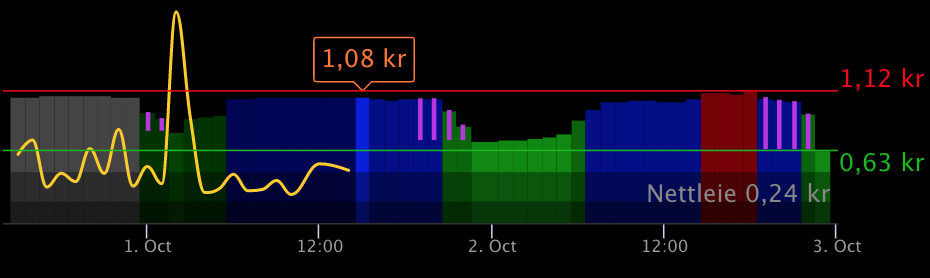
|
|
139
|
+
|
|
140
|
+
The purple lines show savings per kWh.
|
|
141
|
+
|
|
142
|
+
Read more about this in the [MMM-Tibber documentation](https://github.com/ottopaulsen/MMM-Tibber#show-savings).
|
|
@@ -0,0 +1,165 @@
|
|
|
1
|
+
---
|
|
2
|
+
next: ./ps-receive-price.md
|
|
3
|
+
---
|
|
4
|
+
|
|
5
|
+
# ps-strategy-lowest-price
|
|
6
|
+
|
|
7
|
+

|
|
8
|
+
|
|
9
|
+
Strategy node to turn on power the hours when the price is lowest during a given period, and turn off the other hours.
|
|
10
|
+
|
|
11
|
+
## Description
|
|
12
|
+
|
|
13
|
+
The node can work on a specific period from 1 to 24 hours during a 24 hour period. Inside this period, you can decide how many hours that shall be on. The rest of the period will be off. Outside the peiod, you can select that the output shall be either on or off. You can also decide that the hours on shall be consequtive (one continuous period) or spread around in multiple on-periods.
|
|
14
|
+
|
|
15
|
+
## Configuration
|
|
16
|
+
|
|
17
|
+

|
|
18
|
+
|
|
19
|
+
| Value | Description |
|
|
20
|
+
| ---------------------- | -------------------------------------------------------------------------------- |
|
|
21
|
+
| From Time | The start time of the selected period. |
|
|
22
|
+
| To Time | The end time of the selected period. |
|
|
23
|
+
| Hours On | The number of hours that shall be turned on. |
|
|
24
|
+
| Consecutive On-Period | Check this if you need the on-period to be consecutive. |
|
|
25
|
+
| Send When Rescheduling | Check this to make sure on or off output is sent immediately after rescheduling. |
|
|
26
|
+
| If No Schedule, Send | What to do if there is no valid schedule any more (turn on or off). |
|
|
27
|
+
| Outside Period, Send | Select the value to send outside the selected period. |
|
|
28
|
+
|
|
29
|
+
If you want to use a period of 24 hours, set the From Time and To Time to the same value. The time you select is signficant in the way that it decides which 24 hours that are considered when finding the hours with lowest price.
|
|
30
|
+
|
|
31
|
+
::: tip Example with Consecutive On-Period
|
|
32
|
+
One example to need a consecutive on-period can be if you want to control the washing machine. Let's say it needs 3 hours, and you want it to run between 22:00 and 06:00. Set `From Time = 22:00`, `To Time = 06:00` and check the `Consecutive On-Period` flag. This will turn on the cheapest 3-hour period from 22:00 to 06:00.
|
|
33
|
+
|
|
34
|
+
NB! It is not recommended to run the washing machine when you are sleeping or away.
|
|
35
|
+
:::
|
|
36
|
+
|
|
37
|
+
::: tip Example with non-consecutive on-period
|
|
38
|
+
If you have heating cables in the driveway, you may need them to be on only for a few hours every day, for example 4 hours, but it may not be important when this is. Then set `From Time = 00:00`, `To Time = 00:00` and **un-check** the `Consecutive On-Period` flag. This will turn on the 4 cheapest hours during the whole day, and off the rest.
|
|
39
|
+
|
|
40
|
+
You can use any time for start and end, but it is a good idea to use `00:00`, since the prices normally comes for this period.
|
|
41
|
+
:::
|
|
42
|
+
|
|
43
|
+
::: warning Outside Period, Send
|
|
44
|
+
Unless the period you select is 24 hours (`From Time` and `To Time` are the same), it is important what value you choose for `Outside Period, Send`. This decides whether the output is on or off during the period that is outside the selected period.
|
|
45
|
+
:::
|
|
46
|
+
|
|
47
|
+
::: danger Schedule not calculated
|
|
48
|
+
If you select a period for example from 10:00 to 02:00, it may not be possible to calculate before the period starts. This is because electricity prices for the next day (in the Nord Pool area) normally are received around 13:00. The node cannot calculate the period until it has price data for the whole period.
|
|
49
|
+
:::
|
|
50
|
+
|
|
51
|
+
### Dynamic config
|
|
52
|
+
|
|
53
|
+
It is possible to change config dynamically by sending a config message to the node. The config messages has a payload with a config object like this example:
|
|
54
|
+
|
|
55
|
+
```json
|
|
56
|
+
"payload": {
|
|
57
|
+
"config": {
|
|
58
|
+
"fromTime" : 10,
|
|
59
|
+
"toTime" : 16,
|
|
60
|
+
"hoursOn" : 3,
|
|
61
|
+
"doNotSplit" : false,
|
|
62
|
+
"sendCurrentValueWhenRescheduling" : true,
|
|
63
|
+
"outputIfNoSchedule" : false,
|
|
64
|
+
"outputOutsidePeriod": false
|
|
65
|
+
}
|
|
66
|
+
}
|
|
67
|
+
```
|
|
68
|
+
|
|
69
|
+
All the variables in the config object are optional. You can send only those you want to change.
|
|
70
|
+
|
|
71
|
+
The config sent like this will be valid until a new config is sent the same way, or until the flow is restarted. On a restart, the original config set up in the node will be used.
|
|
72
|
+
|
|
73
|
+
When a config is sent like this, the schedule will be replanned based on the last previously received price data. If no price data has been received, no scheduling is done.
|
|
74
|
+
|
|
75
|
+
## Input
|
|
76
|
+
|
|
77
|
+
The input is the [common strategy input format](./strategy-input.md)
|
|
78
|
+
|
|
79
|
+
## Output
|
|
80
|
+
|
|
81
|
+
When a valid input is received, and the schedule is recalculated, the resulting schedule, as well as some other information, is sent to output 3. You can use this to see the plan and verify that it meets your expectations. You can also use it to display the schedule in any way you like.
|
|
82
|
+
|
|
83
|
+
Example of output:
|
|
84
|
+
|
|
85
|
+
```json
|
|
86
|
+
{
|
|
87
|
+
"schedule": [
|
|
88
|
+
{
|
|
89
|
+
"time": "2021-12-10T00:00:00.000+01:00",
|
|
90
|
+
"value": "true"
|
|
91
|
+
},
|
|
92
|
+
{
|
|
93
|
+
"time": "2021-12-10T04:00:00.000+01:00",
|
|
94
|
+
"value": true
|
|
95
|
+
},
|
|
96
|
+
{
|
|
97
|
+
"time": "2021-12-10T10:00:00.000+01:00",
|
|
98
|
+
"value": false
|
|
99
|
+
},
|
|
100
|
+
{
|
|
101
|
+
"time": "2021-12-10T18:00:00.000+01:00",
|
|
102
|
+
"value": "true"
|
|
103
|
+
},
|
|
104
|
+
{
|
|
105
|
+
"time": "2021-12-11T04:00:00.000+01:00",
|
|
106
|
+
"value": true
|
|
107
|
+
},
|
|
108
|
+
{
|
|
109
|
+
"time": "2021-12-11T10:00:00.000+01:00",
|
|
110
|
+
"value": false
|
|
111
|
+
},
|
|
112
|
+
{
|
|
113
|
+
"time": "2021-12-11T18:00:00.000+01:00",
|
|
114
|
+
"value": "true"
|
|
115
|
+
}
|
|
116
|
+
],
|
|
117
|
+
"hours": [
|
|
118
|
+
{
|
|
119
|
+
"price": 0.4778,
|
|
120
|
+
"onOff": "true",
|
|
121
|
+
"start": "2021-12-10T00:00:00.000+01:00",
|
|
122
|
+
"saving": null
|
|
123
|
+
},
|
|
124
|
+
{
|
|
125
|
+
"price": 0.4828,
|
|
126
|
+
"onOff": "true",
|
|
127
|
+
"start": "2021-12-10T01:00:00.000+01:00",
|
|
128
|
+
"saving": null
|
|
129
|
+
},
|
|
130
|
+
//...
|
|
131
|
+
{
|
|
132
|
+
"price": 0.6514,
|
|
133
|
+
"onOff": "true",
|
|
134
|
+
"start": "2021-12-11T23:00:00.000+01:00",
|
|
135
|
+
"saving": null
|
|
136
|
+
}
|
|
137
|
+
],
|
|
138
|
+
"source": "Tibber",
|
|
139
|
+
"config": {
|
|
140
|
+
"fromTime": "04",
|
|
141
|
+
"toTime": "18",
|
|
142
|
+
"hoursOn": "06",
|
|
143
|
+
"doNotSplit": false,
|
|
144
|
+
"sendCurrentValueWhenRescheduling": true,
|
|
145
|
+
"outputIfNoSchedule": "true",
|
|
146
|
+
"outputOutsidePeriod": "true"
|
|
147
|
+
}
|
|
148
|
+
}
|
|
149
|
+
```
|
|
150
|
+
|
|
151
|
+
The `schedule` array shows every time the switch is turned on or off. The `hours` array shows values per hour containing the price (received as input), whether that hour is on or off, the start time of the hour and the amount per kWh that is saved on hours that are turned off, compared to the next hour that is on.
|
|
152
|
+
|
|
153
|
+
## Tips & tricks
|
|
154
|
+
|
|
155
|
+
### Multiple nodes works together
|
|
156
|
+
|
|
157
|
+
You can use multiple nodes simultanously, for different periods, if you want more hours on one part of the day than another part, or to make sure there are at least some hours on during each period.
|
|
158
|
+
|
|
159
|
+
### Highest price
|
|
160
|
+
|
|
161
|
+
If you want to find the `x` hours with the highest prices, do as follows:
|
|
162
|
+
|
|
163
|
+
1. Calculate `y` as the total number of hours in the period. For example, if the period is from `08:00` to `20:00`, then `y = 12`.
|
|
164
|
+
2. Configure `Hours On = y - x`, so if `x = 4`, then `Hours On = 12 - 4 = 8`.
|
|
165
|
+
3. Use **Output 2** to get a signal when you have the hours with the highest prices. Just remember that the value sent to output 2 is `false`, not `true` as it is on output 1.
|
|
@@ -0,0 +1,39 @@
|
|
|
1
|
+
# Strategy input format
|
|
2
|
+
|
|
3
|
+
The common input for strategy nodes is a payload with a `priceData` array containing an object for each hour. Each object has a `value` wich is the price, and a `start` wich is the start time for the hour.
|
|
4
|
+
|
|
5
|
+
Example:
|
|
6
|
+
|
|
7
|
+
```json
|
|
8
|
+
{
|
|
9
|
+
"priceData": [
|
|
10
|
+
{
|
|
11
|
+
"value": 0.9544,
|
|
12
|
+
"start": "2021-12-07T00:00:00.000+01:00"
|
|
13
|
+
},
|
|
14
|
+
{
|
|
15
|
+
"value": 0.8973,
|
|
16
|
+
"start": "2021-12-07T01:00:00.000+01:00"
|
|
17
|
+
},
|
|
18
|
+
{
|
|
19
|
+
"value": 0.8668,
|
|
20
|
+
"start": "2021-12-07T02:00:00.000+01:00"
|
|
21
|
+
},
|
|
22
|
+
{
|
|
23
|
+
"value": 0.8683,
|
|
24
|
+
"start": "2021-12-07T03:00:00.000+01:00"
|
|
25
|
+
},
|
|
26
|
+
{
|
|
27
|
+
"value": 0.8942,
|
|
28
|
+
"start": "2021-12-07T04:00:00.000+01:00"
|
|
29
|
+
}
|
|
30
|
+
// ... normally 24 or 48 hours
|
|
31
|
+
]
|
|
32
|
+
}
|
|
33
|
+
```
|
|
34
|
+
|
|
35
|
+
This format is used for:
|
|
36
|
+
|
|
37
|
+
- Output of the `ps-receive-price` node
|
|
38
|
+
- Input and output of the `ps-xxx-add-tariff` nodes
|
|
39
|
+
- Input for the strategy nodes (`ps-strategy-xxx-xxx`)
|
package/package.json
CHANGED
|
@@ -1,10 +1,12 @@
|
|
|
1
1
|
{
|
|
2
2
|
"name": "node-red-contrib-power-saver",
|
|
3
|
-
"version": "
|
|
3
|
+
"version": "3.0.0",
|
|
4
4
|
"description": "A module for Node-RED that you can use to turn on and off a switch based on power prices",
|
|
5
5
|
"main": "index.js",
|
|
6
6
|
"scripts": {
|
|
7
|
-
"test": "mocha"
|
|
7
|
+
"test": "mocha",
|
|
8
|
+
"docs:dev": "vuepress dev docs",
|
|
9
|
+
"docs:build": "vuepress build docs"
|
|
8
10
|
},
|
|
9
11
|
"author": "Otto Paulsen <ottpau@gmail.com>",
|
|
10
12
|
"license": "MIT",
|
|
@@ -14,11 +16,19 @@
|
|
|
14
16
|
"energy",
|
|
15
17
|
"smarthome",
|
|
16
18
|
"home-automation",
|
|
19
|
+
"home-assistant",
|
|
17
20
|
"power"
|
|
18
21
|
],
|
|
19
22
|
"node-red": {
|
|
20
23
|
"nodes": {
|
|
21
|
-
"power-saver": "power-saver.js"
|
|
24
|
+
"power-saver": "src/power-saver.js",
|
|
25
|
+
"ps-receive-price": "src/receive-price.js",
|
|
26
|
+
"ps-strategy-best-save": "src/strategy-best-save.js",
|
|
27
|
+
"ps-strategy-lowest-price": "src/strategy-lowest-price.js",
|
|
28
|
+
"ps-elvia-config": "src/elvia/elvia-config.js",
|
|
29
|
+
"ps-elvia-tariff-types": "src/elvia/elvia-tariff-types.js",
|
|
30
|
+
"ps-elvia-tariff": "src/elvia/elvia-tariff.js",
|
|
31
|
+
"ps-elvia-add-tariff": "src/elvia/elvia-add-tariff.js"
|
|
22
32
|
}
|
|
23
33
|
},
|
|
24
34
|
"prettier": {
|
|
@@ -32,8 +42,10 @@
|
|
|
32
42
|
"expect": "^27.0.2",
|
|
33
43
|
"lodash.clonedeep": "^4.5.0",
|
|
34
44
|
"mocha": "^6.2.1",
|
|
45
|
+
"node-fetch": "^2.6.6",
|
|
35
46
|
"node-red": "^1.3.5",
|
|
36
|
-
"node-red-node-test-helper": "^0.2.7"
|
|
47
|
+
"node-red-node-test-helper": "^0.2.7",
|
|
48
|
+
"vuepress": "^2.0.0-beta.27"
|
|
37
49
|
},
|
|
38
50
|
"dependencies": {
|
|
39
51
|
"luxon": "^1.27.0"
|
|
@@ -0,0 +1,70 @@
|
|
|
1
|
+
<script type="text/javascript">
|
|
2
|
+
RED.nodes.registerType("ps-elvia-add-tariff", {
|
|
3
|
+
category: "Power Saver",
|
|
4
|
+
color: "#a6bbcf",
|
|
5
|
+
defaults: {
|
|
6
|
+
name: { value: "Add Elvia Grid Tariff" },
|
|
7
|
+
elviaConfig: { value: "", type: "ps-elvia-config" },
|
|
8
|
+
tariffKey: { value: "", required: true },
|
|
9
|
+
range: { value: "today", required: true },
|
|
10
|
+
},
|
|
11
|
+
inputs: 1,
|
|
12
|
+
outputs: 1,
|
|
13
|
+
icon: "elvia_hvite.svg",
|
|
14
|
+
color: "#FFCC66",
|
|
15
|
+
label: function () {
|
|
16
|
+
return this.name || "Add Elvia Grid Tariff";
|
|
17
|
+
},
|
|
18
|
+
oneditprepare: function () {
|
|
19
|
+
const readTariffTypes = function () {
|
|
20
|
+
const configId = $("#node-input-elviaConfig").val();
|
|
21
|
+
if (!configId) {
|
|
22
|
+
return;
|
|
23
|
+
}
|
|
24
|
+
$.getJSON("elvia-tariff-types?configId=" + configId, function (data) {
|
|
25
|
+
if (!data.tariffTypes) {
|
|
26
|
+
return;
|
|
27
|
+
}
|
|
28
|
+
$("#node-input-tariffKey").typedInput({
|
|
29
|
+
types: [
|
|
30
|
+
{
|
|
31
|
+
value: "tariffkeys",
|
|
32
|
+
options: data.tariffTypes.map((k) => {
|
|
33
|
+
return { value: k.tariffKey, label: k.title };
|
|
34
|
+
}),
|
|
35
|
+
},
|
|
36
|
+
],
|
|
37
|
+
});
|
|
38
|
+
});
|
|
39
|
+
};
|
|
40
|
+
$("#node-input-elviaConfig").on("change", function () {
|
|
41
|
+
readTariffTypes();
|
|
42
|
+
});
|
|
43
|
+
readTariffTypes();
|
|
44
|
+
},
|
|
45
|
+
});
|
|
46
|
+
</script>
|
|
47
|
+
|
|
48
|
+
<script type="text/html" data-template-name="ps-elvia-add-tariff">
|
|
49
|
+
<div class="form-row">
|
|
50
|
+
<label for="node-input-name"><i class="fa fa-tag"></i> Name</label>
|
|
51
|
+
<input type="text" id="node-input-name" placeholder="Name" style="width: 300px" />
|
|
52
|
+
</div>
|
|
53
|
+
<div class="form-row">
|
|
54
|
+
<label for="node-input-elviaConfig"><i class="fa fa-tag"></i> Elvia config</label>
|
|
55
|
+
<input type="text" id="node-input-elviaConfig" placeholder="Elvia config" style="width: 300px" />
|
|
56
|
+
</div>
|
|
57
|
+
<div class="form-row">
|
|
58
|
+
<label for="node-input-tariffKey"><i class="fa fa-tag"></i> Tariff key</label>
|
|
59
|
+
<input type="text" id="node-input-tariffKey" placeholder="Tariff" style="width: 300px" />
|
|
60
|
+
</div>
|
|
61
|
+
</script>
|
|
62
|
+
|
|
63
|
+
<script type="text/markdown" data-help-name="ps-elvia-add-tariff">
|
|
64
|
+
# Elvia Add Tariff
|
|
65
|
+
|
|
66
|
+
A node to get the tariff from Elvia and add it to the price before it is sent to the power saver strategy nodes.
|
|
67
|
+
Use this node between the receive-price node and any of the strategy nodes.
|
|
68
|
+
|
|
69
|
+
Please read more in the [node documentation](https://ottopaulsen.github.io/node-red-contrib-power-saver/nodes/ps-elvia-add-tariff)
|
|
70
|
+
</script>
|
|
@@ -0,0 +1,47 @@
|
|
|
1
|
+
const { DateTime } = require("luxon");
|
|
2
|
+
const { getTariffForPeriod, ping } = require("./elvia-api");
|
|
3
|
+
const { roundPrice } = require("../utils");
|
|
4
|
+
|
|
5
|
+
module.exports = function (RED) {
|
|
6
|
+
function PsElviaAddTariffNode(config) {
|
|
7
|
+
RED.nodes.createNode(this, config);
|
|
8
|
+
this.elviaConfig = RED.nodes.getNode(config.elviaConfig);
|
|
9
|
+
this.tariffKey = config.tariffKey;
|
|
10
|
+
this.range = config.range;
|
|
11
|
+
const node = this;
|
|
12
|
+
|
|
13
|
+
const configList = node.context().global.get("elviaConfigList") || [];
|
|
14
|
+
const key = configList.find((c) => c.id == node.elviaConfig.id)?.elviaSubscriptionKey;
|
|
15
|
+
ping(node, key);
|
|
16
|
+
|
|
17
|
+
node.on("input", function (msg) {
|
|
18
|
+
const prices = msg.payload.priceData;
|
|
19
|
+
const fromTime = prices[0].start.substr(0, 19);
|
|
20
|
+
const toTime = DateTime.fromISO(prices[prices.length - 1].start)
|
|
21
|
+
.plus({ hours: 1 })
|
|
22
|
+
.toISO()
|
|
23
|
+
.substr(0, 19);
|
|
24
|
+
|
|
25
|
+
const configList = node.context().global.get("elviaConfigList") || [];
|
|
26
|
+
const key = configList.find((c) => c.id == node.elviaConfig.id)?.elviaSubscriptionKey;
|
|
27
|
+
|
|
28
|
+
getTariffForPeriod(node, key, node.tariffKey, fromTime, toTime).then((json) => {
|
|
29
|
+
const tariff = json;
|
|
30
|
+
const priceInfo = tariff.gridTariff.tariffPrice.priceInfo;
|
|
31
|
+
if (priceInfo.length !== prices.length) {
|
|
32
|
+
node.warn(`Elvia tariff count mismatch. Expected ${prices.length} items, but got ${priceInfo.length}`);
|
|
33
|
+
node.status({ fill: "red", shape: "dot", text: "Tariff error" });
|
|
34
|
+
} else {
|
|
35
|
+
prices.forEach((p, i) => {
|
|
36
|
+
p.powerPrice = p.value;
|
|
37
|
+
p.gridTariffVariable = priceInfo[i].variablePrice.total;
|
|
38
|
+
p.value = roundPrice(p.powerPrice + p.gridTariffVariable);
|
|
39
|
+
});
|
|
40
|
+
}
|
|
41
|
+
node.send([{ payload: { priceData: prices } }]);
|
|
42
|
+
});
|
|
43
|
+
});
|
|
44
|
+
}
|
|
45
|
+
|
|
46
|
+
RED.nodes.registerType("ps-elvia-add-tariff", PsElviaAddTariffNode);
|
|
47
|
+
};
|